lane assist AUDI Q3 2020 Owner's Manual
[x] Cancel search | Manufacturer: AUDI, Model Year: 2020, Model line: Q3, Model: AUDI Q3 2020Pages: 278, PDF Size: 72.66 MB
Page 167 of 278
83A012721BB
Navigation
calculated arrival time, and a direction arrow for
the upcoming maneuver will be displayed in the
right speedometer. If there is no upcoming ma-
neuver, the distance to the next maneuver will be
displayed.
@® Lane recommendation
Personal route
assistance
Applies to: vehicles with navigation system and personal
route assistance
Your MMI can learn the routes that you drive fre-
quently (such as your daily commute to work and
back) and suggest route guidance based on the
current vehicle position.
When the function is switched on, the MMI re-
cords the routes driven regardless of whether or
not you are using navigation.
Without starting route guidance, your MMI can
check the traffic conditions and shows possible
traffic incidents for the possible routes to be driv-
en.
Opening personal routes
Requirement: personal route assistance must be
switched on > page 171. Route guidance must
not be active. A notification is displayed.
> The MMI displays up to three suggestions.
Press on a suggestion. Route guidance will
start.
Better routes
If there are major traffic incidents, the MMI will
display a notification regardless of the selected
menu. If the MMI has calculated a better route,
you can select it as the route.
> Press on the notification.
As soon as you switch off personal route assis-
tance, your personal routes will no Longer be re-
corded. Routes that were already stored remain
stored.
Deleting personal routes
> Applies to: MMI: Select on the home screen:
NAVIGATION > <2} > Personal route assistance
> Delete recordings from the last 24 hours or
Delete all personal routes and destinations.
@ Tips
If personal route assistance is switched off
and you press F&, the personal route assis-
tance settings will be displayed > page 171.
Alternative routes
Applies to: vehicles with navigation system
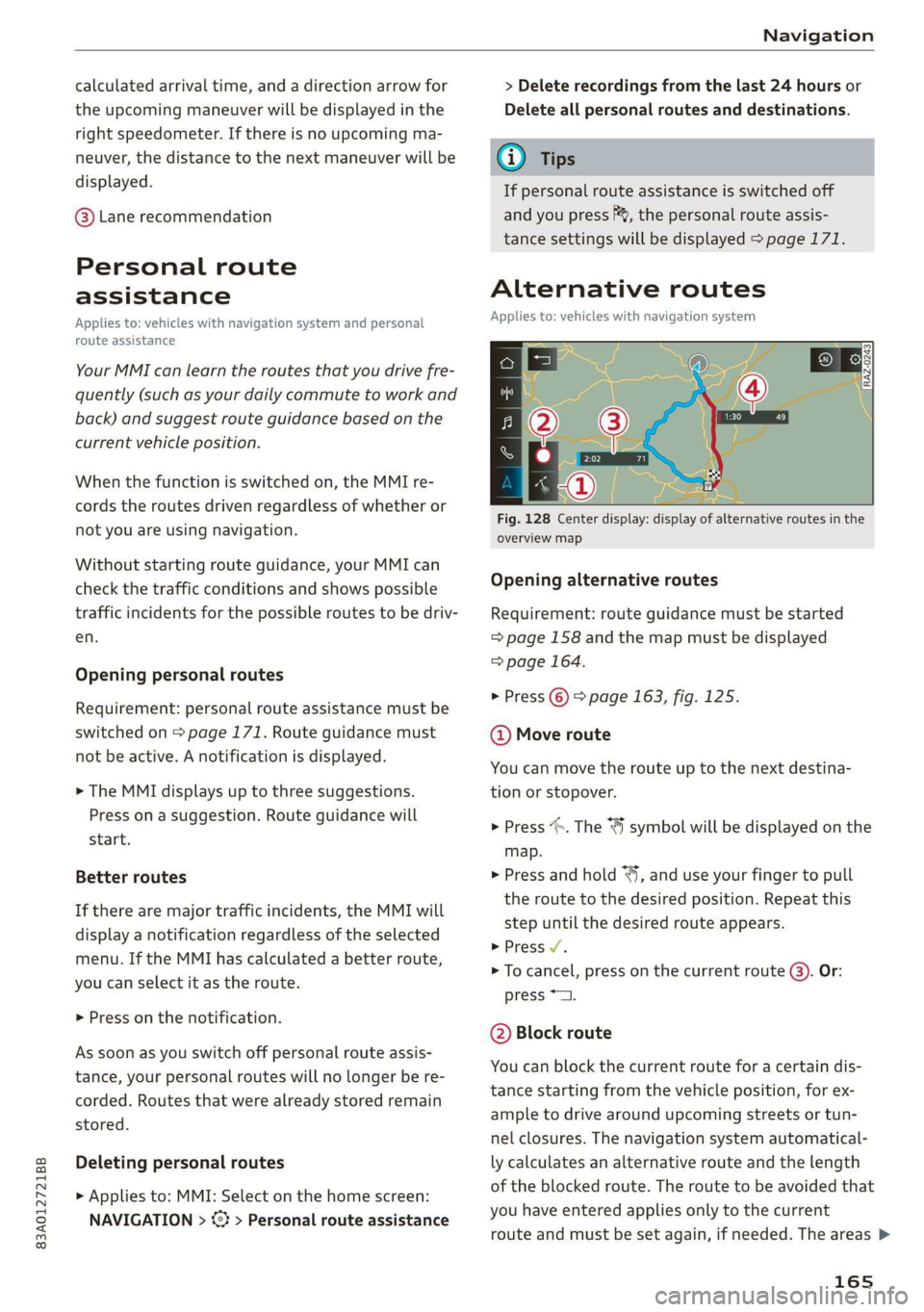
Fig. 128 Center display: display of alternative routes in the
overview map
Opening alternative routes
Requirement: route guidance must be started
=> page 158 and the map must be displayed
=> page 164.
> Press ©) > page 163, fig. 125.
@ Move route
You can move the route up to the next destina-
tion or stopover.
> Press “». The ¥ symbol will be displayed on the
map.
> Press and hold “, and use your finger to pull
the route to the desired position. Repeat this
step until the desired route appears.
> Press V.
> To cancel, press on the current route ©. Or:
press *2.
@ Block route
You can block the current route for a certain dis-
tance starting from the vehicle position, for ex-
ample to drive around upcoming streets or tun-
nel closures. The navigation system automatical-
ly calculates an alternative route and the length
of the blocked route. The route to be avoided that
you have entered applies only to the current
route and must be set again, if needed. The areas >
165
Page 173 of 278
83A012721BB
Navigation
Accessing settings
> Applies to: MMI: Select on the home screen:
NAVIGATION > ©.
Accessing settings using the multifunction
steering wheel
> Applies to: multifunction steering wheel: Select
in the instrument cluster: Navigation tab >
button.
Please note that a setting applied to the multi-
function steering wheel is only valid for the in-
strument cluster map.
Map settings
Satellite map: see > page 167.
Traffic: you can display current traffic informa-
tion on the map. See > page 164, Traffic infor-
mation display on the map or map preview
— Free flow of traffic
— Traffic obstructions
— Traffic information
Map colors
— Automatic: the map display adapts to the light-
ing conditions (for example, by changing from
day to night when driving through a tunnel).
— Day or Night
Map orientation
— 2D map or 2D north: the current vehicle posi-
tion is displayed. The map is oriented in the di-
rection of travel or to the north.
— 3D map: the current vehicle position is shown
ona three-dimensional map and is oriented in
the direction of travel.
— Overview: the entire route from the vehicle po-
sition to the destination or the next stopover is
displayed on the map. The map is oriented to
the north.
Automatic zoom
— On: the map scale is adapted automatically de-
pending on the type of road being traveled (ex-
pressway, highway, other roads) so that you al-
ways have an optimal overview of the road
ahead. When route guidance is active, the scale
is adjusted automatically for a better detailed
view when there are upcoming maneuvers.
— Intersection: when route guidance is active, the
scale is adjusted automatically for a better de-
tailed view when there are upcoming maneu-
vers.
— Off
MMI map contents/Map content: you can switch
the display of additional information (such as
POIs) on the map in the center display on or off.
Note the following for the 3D city model > ©.
Voice guidance
Voice guidance: you can adjust the navigation
prompts. With the Traffic setting, the MMI will
only give prompts if there are traffic incidents on
your route.
Voice guidance during phone call
Entertainment fader during navigation: the au-
dio playback volume is temporarily lowered when
navigation prompts are active.
Route criteria
You can adjust which route criteria should be al-
lowed or avoided for the route calculation.
HOV/carpool lanes
Highways
Toll roads
Ferries
Route information
When this function is switched on and route
guidance is active, route information ®
=> page 163, fig. 125 is displayed. The next ma-
neuver will be displayed at the bottom. POIs and
traffic information will also be displayed. Press
route information to display a preview of the next
maneuver on the map. You can switch the follow-
ing information on or off in route information.
— POIs along the route
— Traffic information
Personal route assistance
Personal route assistance is switched off at the
factory.
171
Page 265 of 278
83A012721BB
Index
A
A/C cooling mode............. ee eee eee ee 79
Accelerator pedal.............--00000005 87
also refer to Accelerator pedal........... 87
AccessorieS .. 0.00... cece eee eee ee 258
Active lane assist
refer to Lane departure warning......... 120
Adaptive cruise assist................00. 112
Cleaning the sensors...............--- 235
Adaptive dampers...........--000e-0 eee 97
Adaptive speed assist.................. 112
also refer to Adaptive cruise assist....... 112
Adjusting the air distribution. ............ 79
Adjusting the brightness................. 48
Adjusting the sound..............-...-- 193
Adjusting the temperature............... 79
Adjusting the vents............. eee eee 80
Adjusting the volume..............000005 26
Adjusting the volume (announcements) .... 193
Adjusting the welcome sound............ 193
Airbagisystem « s sesuew « wainwn @ + ween eo scams sw 0 62
Alarm system
refer to Anti-theft alarm system.......... 31
Alignment pin (changing the wheel)....... 240
Alleweather lights:esi: « s mss « © seve ov ewes 6 y 44
AL S@aSON IFES a5 6s caenu vs saws oe Hews oo He 230
All wheel drive
He fer Co quattro cies cv cess wv cero « 0 nsw oo 99
Amazon Alexa integration
Media playback.................00000. 182
OPCTATION ¢ cows « y wasps 5 ¥ eves s 7 ew ea ee 25
AMI
refer to Audi music interface........... 182
Android Auto
refer to Audi smartphone interface...... 191
Anti-freeze
Windshield washer system............. 212
Anti-lock braking system.............0005 99
AntisSlip: Regulation sso ss sissies 0 seme 6 8 os 100
Anti-theft alarm system..............005. 31
Anti-theft wheel bolts.................. 241
Apple CarPlay
refer to Audi smartphone interface...... 191
Aspect ratio (video)................ 186, 187
refer to Anti-Slip Regulation
Audi adaptive light
Audi connect
refer to connect
Audi drive select
Audi music interface
Audio files
Audi phone box
Audi pre sense
Messages
Audi pre sense front
Audi side assist
refer to Side assist
Audi smartphone interface
Legal information
Audi virtual cockpit
refer to Instrument cluster
AUTO
Automatic headlights
Climate control system
Auto Lock (central locking)
Automatic luggage compartment lid....
Automatic transmission
Automatic wipe/wash system
Average consumption
Average speed
Bag hooks
Battery
Charging
Winter operation
Block route
Bluetooth
Audio player
Connecting a cell phone
Deleting a device
Device overview
Disconnecting a device
Displaying profiles
Searching for a device
Selecting a device
Specifying a favorite
263
Page 270 of 278

Index
Internet radio
refer to Online radio..............005- 176
iPhone
refer to Audi music interface........... 182
J
Jump starting ......... 2... eee eee ee eee 244
K
Key... eee eee eee eee 28, 32
Convenience opening and closing......... 39
Key replacement............. cece ee eee 32
PANIC button.....................000. 32
Replacing the battery.................. 34
Unlocking and locking................0. 33
Vehicle code... 66... cece eee eee eee ee 32
Kick-down ... 2... eee ee eee 87
L
Lane assist
refer to Lane departure warning......... 120
Lane departure warning...............-. 120
Cleaning the camera area.............. 235
LATCH (securing child safety seats)......... 69
Leather care and cleaning............... 237
Legal information
License subscriptions................. 195
Software information...............05 195
Software licenses..................0-. 195
Version information..............000 195
License plate bracket...............0005 258
Lifting points (vehicle jack).............. 241
Light/rain sensor
Headlights << ¢ secss veea ss besa es Fees = 44
Intermittent mode (windshield wipers).... 50
Light functions
Triterion LIQhtingsses «+ coun « x sunsens 5 sxsinas 6 ws 47
Lighting
Exterior... 0... . cece eee eee 44
TNt@riGk seam = = see ¢ ¢ came 5 s eee ss eee ex 47
Lights... 2... ee eee eee eee 44
Listening to music
referto Mediate: « «sexs se enes 3s eee 180, 184
LOdd 's ceux : sees = wees ce pees se mE ee 262
268
Locking and unlocking
By remote control. ..... 2... eee eee 33
Using the lock cylinder. .........00..008 30
With the convenience key............... 33
Low beam headlights.................... 44
Lowering the cargo floor................. 77
Luggage compartment...........0....0% 74
GOVE lisse © 2 messes ae semeen ooo mae on ve oo we 75
Double cargo floor............. eee eae 76
Increasing the siz@s.« : sus « : yauu & s wom » 76
also refer to Luggage compartment...... 74
Luggage compartment lid
Closing button.................000000. 36
General information..............00005 34
Mechanically unlocking..........-....-- 37
Opening and closing...............005- 35
Opening and closing with foot motion..... 37
Power opening and closing.............. 36
Lumbar support’: : sess ss een ee ees ses 55, 56
M
Maiiitenance:: « « sans + s sana ss eee s caer ae 256
Maintenance intervals.................. 213
Malfunction Indicator Lamp (MIL)........ 200
Manual shifting..............0.00ee eee 86
Map
Changing thescale................... 162
Display’: = seen = ¢ seus 5 o ooops 5 Fes oe ee 164
Operating ’s « « wie ao caosis 6 7 soexine wv Hee vo 163
Setting the destination................ 162
MAP
refer to Message Access Profile......... 147
Map preview........ 0.0. cee cece eee 161
Map update.......... 0... eee eee 168
ONLNG: « meee 2 y wom 2 Rew g 2 BOR eo Ha 168
SD card/USB connection............... 168
Melia « sumcm 2 0 sane oo ms oo em 2 8 ae 180, 184
Supported formats................04- 188
Media Centel ns + cena + 4 amu « semen = 2 ence 184
Memory card
SD card reader (MMI)...........-00005 180
Supported types and formats........... 188
Menu language
refer to Setting the language........... 193
Message Access Profile................. 147
MESSaGeSine « ¢ seins 2 3 ems so Bae germ 147