release AUDI Q3 2020 Owner's Manual
[x] Cancel search | Manufacturer: AUDI, Model Year: 2020, Model line: Q3, Model: AUDI Q3 2020Pages: 278, PDF Size: 72.66 MB
Page 119 of 278
83A012721BB
Driver assistance
Meaning
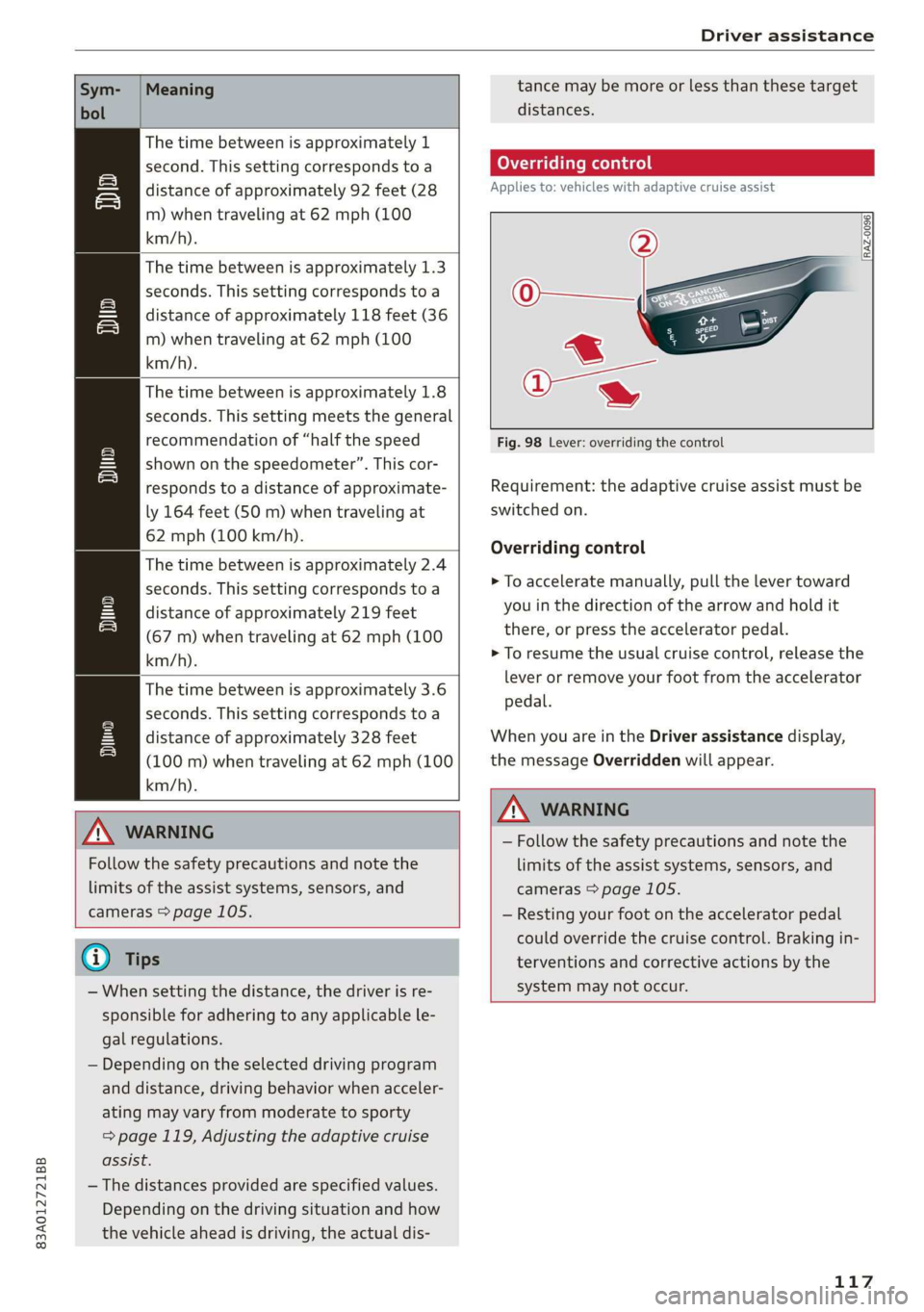
The time between is approximately 1
second. This setting corresponds toa
distance of approximately 92 feet (28
m) when traveling at 62 mph (100
km/h).
The time between is approximately 1.3
seconds. This setting corresponds toa
distance of approximately 118 feet (36
m) when traveling at 62 mph (100
km/h).
My
The time between is approximately 1.8
seconds. This setting meets the general
recommendation of “half the speed
shown on the speedometer”. This cor-
responds to a distance of approximate-
ly 164 feet (SO m) when traveling at
62 mph (100 km/h).
The time between is approximately 2.4
seconds. This setting corresponds toa
distance of approximately 219 feet
(67 m) when traveling at 62 mph (100
km/h).
i)
1)
The time between is approximately 3.6
seconds. This setting corresponds toa
distance of approximately 328 feet
(100 m) when traveling at 62 mph (100
km/h).
D
ZA WARNING
Follow the safety precautions and note the
limits of the assist systems, sensors, and
cameras > page 105.
G@) Tips
— When setting the distance, the driver is re-
sponsible for adhering to any applicable le-
gal regulations.
— Depending on the selected driving program
and distance, driving behavior when acceler-
ating may vary from moderate to sporty
= page 119, Adjusting the adaptive cruise
assist.
— The distances provided are specified values.
Depending on the driving situation and how
the vehicle ahead is driving, the actual dis-
tance may be more or less than these target
distances.
Overriding control
Applies to: vehicles with adaptive cruise assist
[RAZ-0096|
Fig. 98 Lever: overriding the control
Requirement: the adaptive cruise assist must be
switched on.
Overriding control
> To accelerate manually, pull the lever toward
you in the direction of the arrow and hold it
there, or press the accelerator pedal.
> To resume the usual cruise control, release the
lever
or remove your foot from the accelerator
pedal.
When you are in the Driver assistance display,
the message Overridden will appear.
ZA WARNING
— Follow the safety precautions and note the
limits of the assist systems, sensors, and
cameras > page 105.
— Resting your foot on the accelerator pedal
could override the cruise control. Braking in-
terventions and corrective actions by the
system may not occur.
117
Page 130 of 278

Parking and maneuvering
at speeds below approximately 6 mph (10
km/h), the parking aid will activate automati-
cally. Audible signals will sound once the obsta-
cle is within the sensor detection area.
> Applies to: MMI: To switch Automatic activa-
tion on or off, select on the home screen: VEHI-
CLE > Parking aid > Automatic activation.
Automatic deactivation
The distance indicator for the parking system
plus will deactivate automatically when driving
forward faster than approximately 6 mph (10
km/h).
ZA WARNING
Follow the safety precautions and note the
limits of the assist systems, sensors, and
cameras > page 105.
@) Note
Keep enough distance from the curb to avoid
damage to the rims.
@ Tips
If the parking aid is deactivated, it can only be
reactivated automatically when one of the fol-
lowing conditions is met:
— The vehicle speed exceeds 6 mph (10 km/h)
— The ignition is switched off and back on
again
— The parking brake is set and then released
— The “P” gear is engaged and released again
Applies to: vehicles with parking system plus
Fig. 107 Center display: distance display
If the sensors detect an obstacle, audible and vis-
ual signals will warn you.
128
Visual warnings
The visual warnings in the center display help you
to detect the critical vehicle area and to estimate
the distance to an obstacle.
Red segments (4) show detected obstacles that
are in your vehicle's path. The red lines (2) mark
the expected direction of travel based on the
steering angle. A white segment (8) indicates a
detected obstacle that is outside of the vehicle's
path. The closer your vehicle comes to the obsta-
cle, the closer the segments will move to the ve-
hicle. The collision area has been reached when
the next to last segment is displayed. Obstacles
in the collision area, including those outside of
the vehicle's path, are shown in red. Do not con-
tinue driving farther.
Audio signals
The closer your vehicle gets to a detected obsta-
cle, the shorter the time between the audible sig-
nals. A continuous tone sounds when an obstacle
is less than approximately 1 foot (0.30 m) away
from the front or rear of the vehicle. A continu-
ous tone sounds when an obstacle is less than
approximately 0.7 feet (0.20 m) away from the
sides* of the vehicle. Do not continue driving for-
ward or in reverse >(@).
> To deactivate audio signals while parking, press
(Jin the center display. The audio signals will
be automatically activated again the next time
the parking system is activated.
Adjusting the volume
You can adjust the volume to your preferences.
The settings depend on the vehicle equipment.
> Applies to: MMI: Select on the home screen:
VEHICLE > Parking aid. Or:
> Press|] in the center display when the parking
system is active.
Possible settings:
Front volume - Volume for the front and side*
area.
Rear volume - Volume for the rear area.
Page 201 of 278
83A012721BB
Checking and Filling
The correct fuel type for your vehicle can be
found ona label located on the inside of the fuel
filler door. For additional information on fuel, see
=> page 197.
For the tank capacity in your vehicle, refer to the
Technical Data > page 262.
To reduce the risk of fuel leaking out or vapors
escaping, make sure that the fuel tank is closed
correctly. Otherwise the Ey indicator light will
turn on.
If the central locking system malfunctions, there
is a fuel filler door emergency release
=> page 200.
Messages
[il Tank system: malfunction! Please contact
Service
There is a malfunction in the fuel tank system.
Drive to an authorized Audi dealer or authorized
Audi Service Facility immediately to have the
malfunction corrected.
flying sparks. Sparks can start a fire when
refueling.
Z\ WARNING
Improper fueling procedures and improper
handling of fuel can lead to explosions, fires,
severe burns, and other injuries.
— Do not smoke. Keep away from open flames.
— The ignition must be switched off when re-
fueling.
— Mobile devices, radio devices, and other ra-
dio equipment should always be switched
off when refueling. Electromagnetic rays
could cause sparks and start a fire.
— If you do not insert the fuel pump nozzle all
the way into the filler tube, then fuel can
leak out. Spilled fuel can ignite and start a
fire.
— Never get into the vehicle when refueling. If
there is an exceptional situation where you
must enter the vehicle, close the door and
touch a metal surface before touching the
fuel pump nozzle again. This will reduce the
risk of electrostatic discharge that can cause
A WARNING
Transporting fuel containers inside the vehicle
is not recommended. Fuel could leak out of
the container and ignite, especially during an
accident. This can cause explosions, fires, and
injuries.
— Ifyou must transport fuel in a fuel contain-
er, note the following:
— Always place the fuel container on the
ground before filling. Never fill the fuel
container with fuel while it is inside or on
the vehicle. Electrostatic discharge can oc-
cur while refueling and the fuel vapors
could ignite.
— When using fuel containers made of met-
al, the fuel pump nozzle must always re-
main in contact with the container to re-
duce the risk of static charge.
— Insert the fuel pump nozzle as far as pos-
sible into the filler opening while refuel-
ing.
— Follow the applicable legal regulations in
the country where you are driving when
using, storing and transporting fuel con-
tainers.
— Make sure that the fuel container meets
the industry standards, for example ANSI
or ASTM F852-86.
) Depending on the engine and country
@) Note
— Remove fuel that has overflowed onto any
vehicle
components immediately to reduce
the risk of damage to the vehicle.
— Never drive until the fuel tank is completely
empty. The irregular supply of fuel that re-
sults from that can cause engine misfires.
Uncombusted fuel may enter the exhaust
system and increase the risk of damage to
the catalytic converter.
199
Page 202 of 278
Checking and Filling
@) For the sake of the environment
— Do not overfill the fuel tank, or fuel could
leak out when the vehicle is warming up.
— Fuel should never enter the sewer system or
come into contact with the ground.
@ Tips
The fuel filler door on your vehicle does not
lock if you lock the vehicle from the inside us-
ing
the central locking switch.
Fuel filler door emergency release
If the central locking system malfunctions, the
fuel filler door can be unlocked manually.
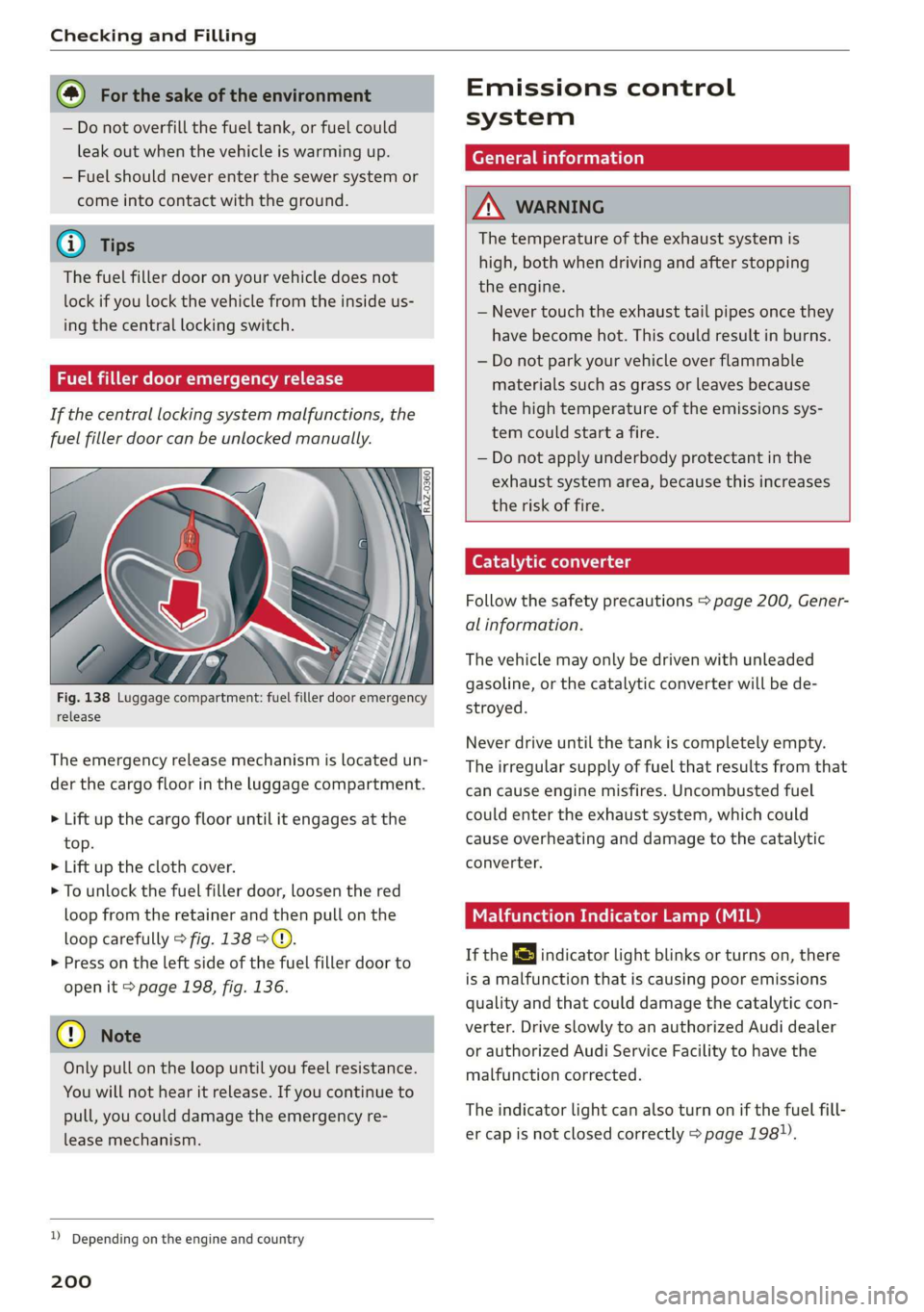
Fig. 138 Luggage compartment: fuel filler door emergency
release
The emergency release mechanism is located un-
der the cargo floor in the luggage compartment.
> Lift up the cargo floor until it engages at the
top.
> Lift up the cloth cover.
> To unlock the fuel filler door, loosen the red
loop from the retainer and then pull on the
loop carefully > fig. 138 ©.
>» Press on the left side of the fuel filler door to
open it > page 198, fig. 136.
@) Note
Only pull on the loop until you feel resistance.
You
will not hear it release. If you continue to
pull, you could damage the emergency re-
lease mechanism.
D Depending on the engine and country
200
Emissions control
system
General information
A WARNING
The temperature of the exhaust system is
high, both when driving and after stopping
the engine.
— Never touch the exhaust tail pipes once they
have
become hot. This could result in burns.
— Do not park your vehicle over flammable
materials such as grass or leaves because
the high temperature of the emissions sys-
tem could start a fire.
— Do not apply underbody protectant in the
exhaust system area, because this increases
the risk of fire.
Catalytic converter
Follow the safety precautions > page 200, Gener-
al information.
The vehicle may only be driven with unleaded
gasoline, or the catalytic converter will be de-
stroyed.
Never drive until the tank is completely empty.
The irregular supply of fuel that results from that
can
cause engine misfires. Uncombusted fuel
could enter the exhaust system, which could
cause overheating and damage to the catalytic
converter.
Malfunction Indicator Lamp (MIL)
If the S indicator light blinks or turns on, there
is a malfunction that is causing poor emissions
quality and that could damage the catalytic con-
verter. Drive slowly to an authorized Audi dealer
or authorized Audi Service Facility to have the
malfunction corrected.
The indicator light can also turn on if the fuel fill-
er cap is not closed correctly > page 198).
Page 204 of 278
Checking and Filling
chemicals known to the State of California
to cause cancer and birth defects or other
reproductive harm.
— Battery posts, terminals and related acces-
sories contain lead and lead compounds,
chemicals known to the State of California
to cause cancer and reproductive harms.
Wash hands after handling.
® Note
When filling fluids, be sure not to add any flu-
ids to the wrong reservoirs. Otherwise severe
malfunctions and engine damage will occur.
@ For the sake of the environment
You should regularly check the ground under
your vehicle in order to detect leaks quickly. If
there are visible spots from oil or other fluids,
bring your vehicle to an authorized Audi deal-
er or authorized Audi Service Facility to be
checked.
CO} Tema ma Coeiiare mater
compartment lid
The hood is released from inside the vehicle.
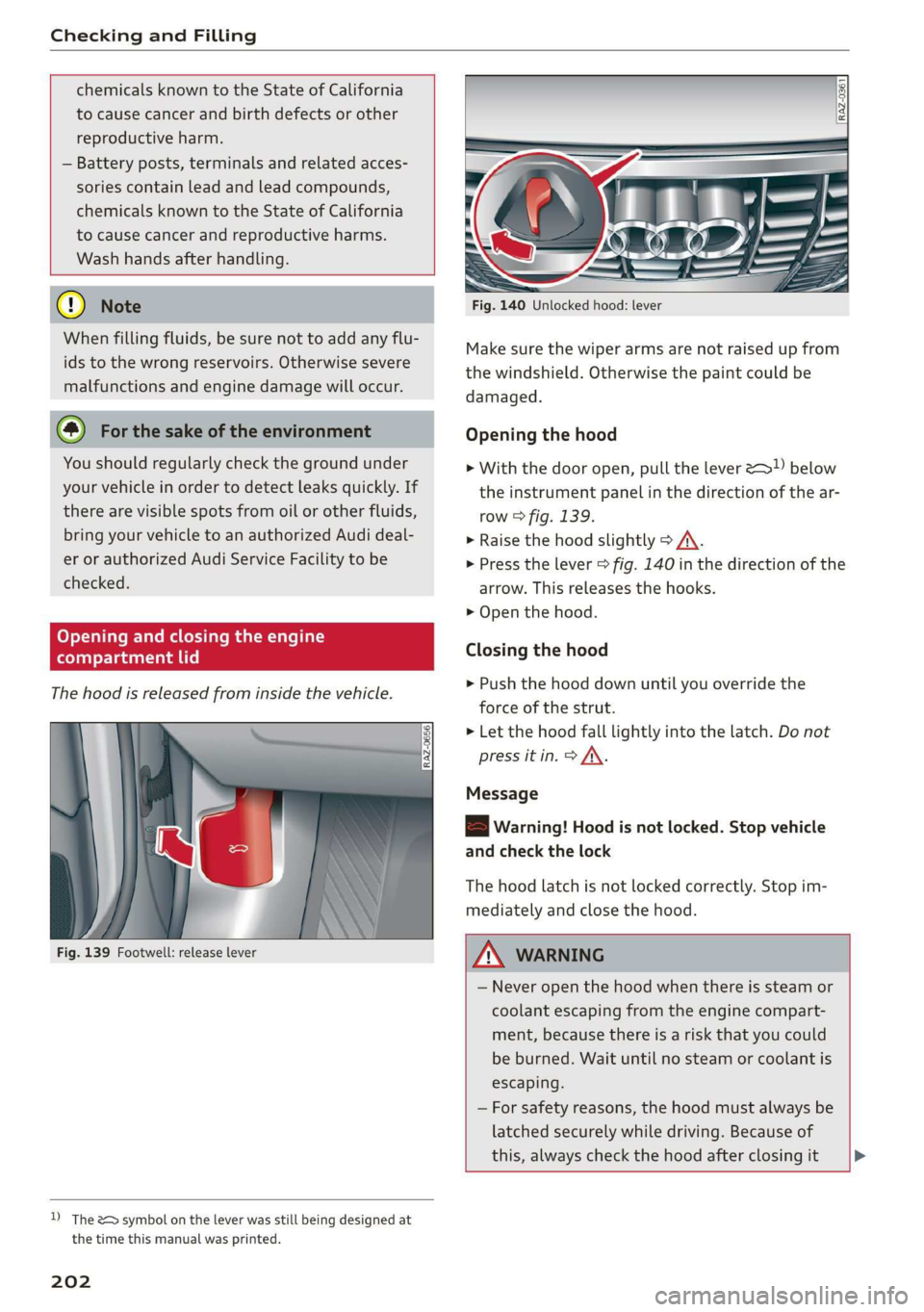
Fig. 139 Footwell: release lever
D) The &> symbol on the lever was still being designed at
the time this manual was printed.
202
Fig. 140 Unlocked hood: lever
Make sure the wiper arms are not raised up from
the windshield. Otherwise the paint could be
damaged.
Opening the hood
> With the door open, pull the lever >) below
the instrument panel in the direction of the ar-
row > fig. 139.
» Raise the hood slightly > /A\.
> Press the lever > fig. 140 in the direction of the
arrow. This releases the hooks.
> Open the hood.
Closing the hood
> Push the hood down until you override the
force of the strut.
> Let the hood fall lightly into the latch. Do not
press it in. > AX.
Message
8B Warning! Hood is not locked. Stop vehicle
and check the lock
The hood latch is not locked correctly. Stop im-
mediately and close the hood.
Z\ WARNING
— Never open the hood when there is steam or
coolant escaping from the engine compart-
ment, because there is a risk that you could
be burned. Wait until no steam or coolant is
escaping.
— For safety reasons, the hood must always be
latched securely while driving. Because of
this, always check the hood after closing it >
Page 248 of 278

Emergency assistance
@) Tips
Make sure that the connected jump start ca-
bles have sufficient contact with metal.
Towing
General information
You should only perform the steps that follow if
you have the necessary tools and technical ex-
pertise.
Towing requires a certain amount of practice.
Audi recommends contacting a towing company
to have the vehicle transported.
You should only have your vehicle towed by an-
other vehicle when disabled in exceptional cir-
cumstances. Inexperienced drivers should not
tow.
Notes on towing
When the engine is stopped, the transmission
will not be sufficiently lubricated if traveling at
high speeds and long distances:
— The maximum permitted towing speed is 30
mph (50 km/h).
— The maximum permitted towing distance is 30
miles (50 km).
Additional information on towing with a tow
truck
The vehicle may only be towed with the front axle
raised. Do not wrap any chains or cables around
the brake lines.
If the vehicle should be towed with the axle
raised, then the ignition must be switched off to
reduce the risk of damage to the drivetrain.
Tow bar and towing cable
The vehicle can be towed with a tow bar or tow-
ing cable. Both drivers should be familiar with
the special considerations when towing, especial-
ly when using a towing cable.
Always make sure the traction force does not ex-
ceed the permitted level and there are no shock
loading conditions. There is always the risk of the
246
coupling becoming overloaded when driving off-
road.
For the most safety and security, drive with a tow
bar. You should use a towing cable only if a tow
bar is not available. Use a towing cable made of
synthetic elastic cable similar elastic material.
ZA WARNING
— Towing highly increases the risk of an acci-
dent, for example from colliding with the
towing vehicle.
— To reduce the risk of an accident, do not al-
low anyone to remain inside the vehicle
when it is being transported by a tow truck
or a special transporter.
@) Note
— If normal towing is not possible, for exam-
ple if the transmission is faulty or if the
towing distance is greater than 30 miles
(50 km), then transport the vehicle on a
special carrier.
— If the vehicle is towed by a tow truck at the
axle that is not permitted, this can cause se-
vere damage to the transmission.
— The vehicle must not be tow started for
technical reasons.
@ Tips
— If the power supply is interrupted, then it
will not be possible to move the selector
lever out of the "P" position. The parking
lock must be released using the emergency
release before towing the vehicle
=> page 87.
— Switch Audi pre sense* off > page 124 when
loading the vehicle onto a vehicle carrier,
train, ship, or other type of transportation,
or when towing the vehicle. This can prevent
an undesired intervention from the pre
sense* system.
— Follow the local legal regulations for tow-
ing.
Page 249 of 278

83A012721BB
Emergency assistance
Read and follow the important information under
=> page 246.
Preparations
> Only secure the towing cable or tow bar at the
designated towing loops > page 247,
=> page 247.
> Make sure the towing cable is not twisted. Oth-
erwise it could disconnect from the towing loop
while towing.
> Switch the emergency flashers on in both
vehicles > page 46. However, do not do this if it
prohibited by law.
Towing vehicle (front)
> Only start to drive when the towing cable is
taut.
> Press the brake pedal very carefully.
> Avoid sudden braking or driving maneuvers.
Vehicle being towed (rear)
> Make sure the ignition is switched on so that
the steering wheel is not locked and so that you
can use the turn signals, the horn, and the
windshield wipers if needed > A\.
> Switching it off before the vehicle has stopped
may impair the function of the brake booster
and power steering. You would then need to
use more force to steer and brake the vehicle.
> Release the parking brake > page 93.
» Select the “N” selector lever position.
> Make sure the towing cable is always taut.
ZX WARNING
Never tow a vehicle using a tow bar or towing
cable if the vehicle does not have electrical
power.
Front towing loop
Fig. 163 Front bumper: installing the towing loop
The threaded opening for the towing loop is lo-
cated on the right side of the front bumper.
> Remove the towing loop from the vehicle tool
kit > page 240.
> Press the cap inward with brief, strong pressure
> fig. 163. The cap will loosen from the bump-
er.
> Tighten the towing loop in the threaded open-
ing until it stops and then tighten it with a
wheel wrench.
> After using, place the towing loop back in the
vehicle tool kit.
ZX WARNING
If the towing loop is not tightened until it
stops when installing, the threads may be
pulled out when towing the vehicle and result
in an accident.
@) Tips
Depending on the model, the shape of the
cover can vary.
Rear towing loop
Fig. 164 Rear bumper: installing the towing loop
247
Page 269 of 278
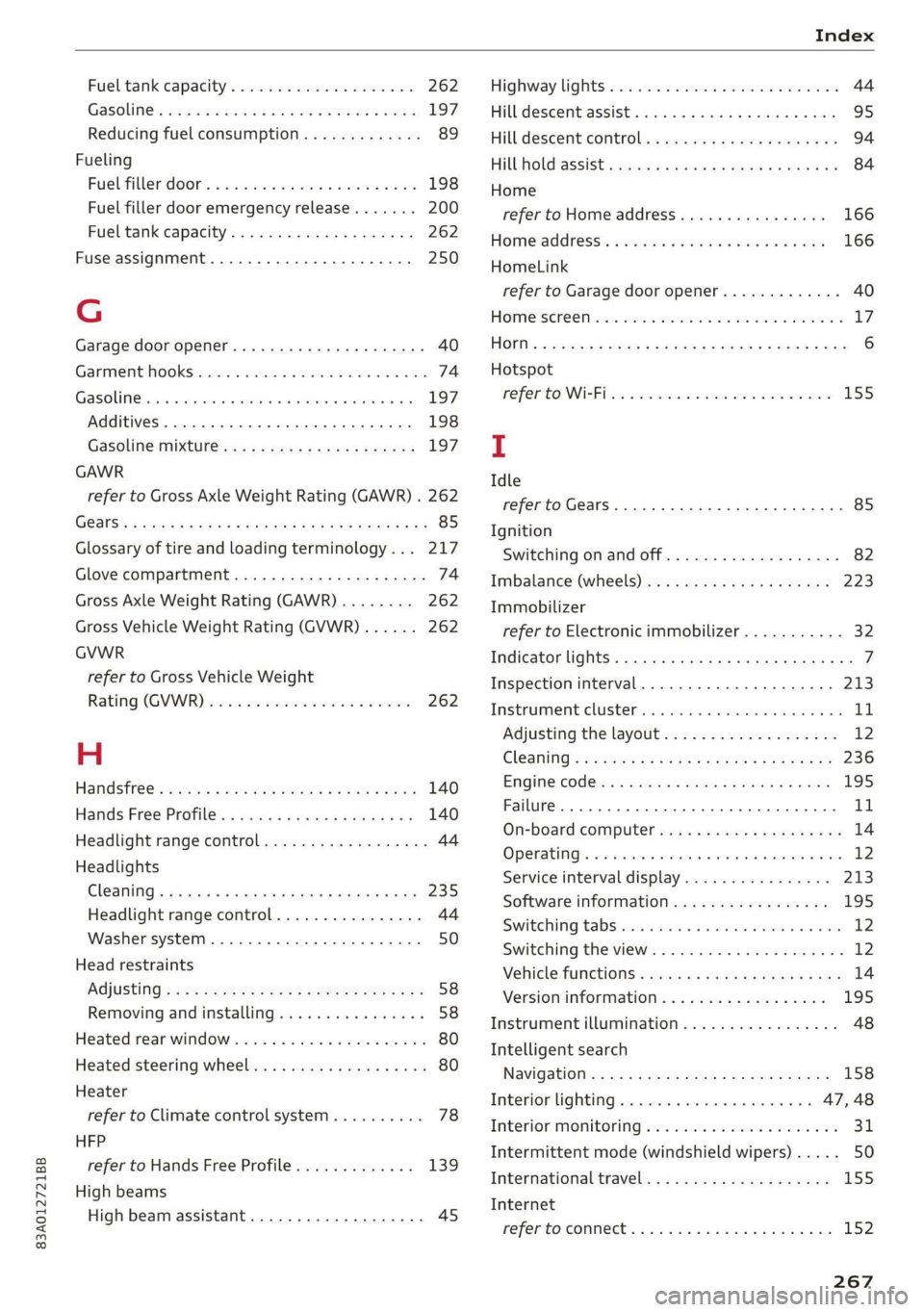
83A012721BB
Fuel tank capacity
Gasoline... 2... ee eee eee eee
Reducing fuel consumption............. 89
Fueling
Fuebtillerdoor's + = sce so sens o soamsne + aress 198
Fuel filler door emergency release....... 200
Fuel tank capacity.................00-. 262
Fuse assignment..............-.2-.0-- 250
G
Garage door opener... .. 6... ce eee eee eee 40
Garment hooks.......... 000.0000 eee eee 74
Gasoline... 2. eee eee 197
Additives ..... 0... ccc cece 198
GASOLINE MIXtURElea: « » coe ss yee 2 4 eee 197
GAWR
refer to Gross Axle Weight Rating (GAWR) . 262
GSlSiy « saves a neue 3 e Rew oe EER e eTEEY & BE 85
Glossary of tire and loading terminology... 217
Glove Compartment ocx « : cccu es yew 2 g can 74
Gross Axle Weight Rating (GAWR)........ 262
Gross Vehicle Weight Rating (GVWR)...... 262
GVWR
refer to Gross Vehicle Weight
Rating (GVWR) iiss «2 sssuos 6 2 wasn 2 w cose 262
H
Handstrees: esis « y ween ¢ pase 2 aaien gs ears 140
Hafids Free.Profile’. «sows + < sas sv emu ges 140
Headlight range control.................. 44
Headlights
Cleaning « « ssw ¢ owas x o owes x o sew so oe 235
Headlight range control................ 44
Washer system... 1... 0... cece eee ee eee 50
Head restraints
AGjUStING ss = = wows : 2 ewes to wees oo eee 2 2 58
Removing and installing................ 58
Heated rear window.............00000008 80
Heated steering wheel................--. 80
Heater
refer to Climate control system.......... 78
HFP
refer to Hands Free Profile............. 139
High beams
High beam assistant................... 45
Highway tights. © asi 2 oscar 2 waver vee 2 44
Hill descent assist ..... 0.0... ce eee eens 95
Hill descent control... 2.0... ..ce eee e eens 94
Hill Hold assist « vies se ees xe ews enews oe 84
Home
refer to Home address................ 166
Homeaddress:: « s sess saya nee ee pee 166
HomeLink
refer to Garage door opener............. 40
HOMEISCrERNs: 5. covi oo sosueee oH seston = 0 ane ov LZ
HIOKN « « sues 2 2 aus oo eee ee ey Fo eee s Bee 6
Hotspot
MO fEritONN eR be: 2 x seawes w = snecawe =o maesne ew anes 155
I
Idle
refer to Gears... . ee eee eee 85
Ignition
Switching on and off..............0000- 82
Imbalance (wheels) ............0 eee eee 223
Immobilizer
refer to Electronic immobilizer........... 32
Indicator lights... 2... 6. . eee eee eee eee 7
Inspection interval..............0000 00 213
Instrument cluster.............0 000 eee 11
Adjusting the layout................... 12
GlEANING’s « & seuss @ & wawe 2 = wow « y ROS ea 236
Engine code........... 2... eee ee eee 195
Failure... ee eee 11
On-board computer...............000-5 14
OPerabing’. « ssersc « vere eo evauens + + anova © & en 12
Service interval display................ 213
Software information................. 195
Switching tabs: « «wasn s & were w & areomwe 6 6 aoe 12
Switching the view.............2--0000- 12
Vehicle TUNCtIONS « isis x estas se ews oe eee 14
Version information.................- 195
Instrument illumination................. 48
Intelligent search
Navigationion + « scare ao casesene
Interior lighting © «ces << were ee ese ve 47,48
Interior MONItOriING’s « s scsi so csuew sees ws 31
Intermittent mode (windshield wipers) ..... 50
Internationaltravel..................0. 155
Internet
referto CONNeCts « 2 esws es eews ees wm 152