instrument cluster AUDI Q3 2020 Service Manual
[x] Cancel search | Manufacturer: AUDI, Model Year: 2020, Model line: Q3, Model: AUDI Q3 2020Pages: 278, PDF Size: 72.66 MB
Page 238 of 278
Care and cleaning
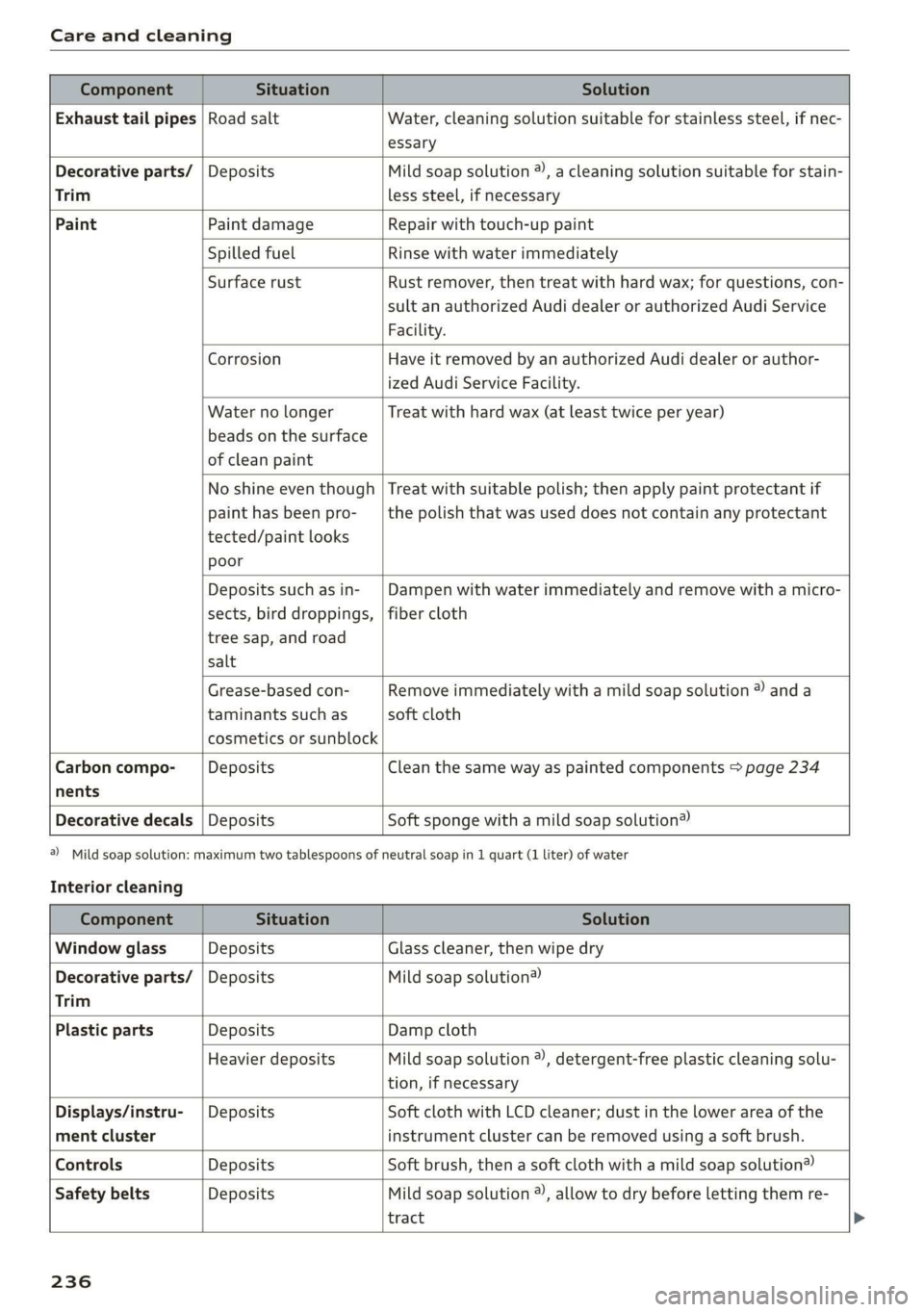
Component Situation Solution
Exhaust tail pipes | Road salt Water, cleaning solution suitable for stainless steel, if nec-
essary
Decorative parts/ | Deposits Mild soap solution ®), a cleaning solution suitable for stain-
Trim less steel, if necessary
Paint Paint damage Repair with touch-up paint
Spilled fuel Rinse with water immediately
Surface rust Rust remover, then treat with hard wax; for questions, con-
sult an authorized Audi dealer or authorized Audi Service
Facility.
Corrosion Have it removed by an authorized Audi dealer or author-
ized Audi Service Facility.
Water no longer
beads on the surface
of clean paint
Treat with hard wax (at least twice per year)
No shine even though
paint has been pro-
tected/paint looks
poor
Treat with suitable polish; then apply paint protectant if
the polish that was used does not contain any protectant
Deposits such as in-
sects, bird droppings,
tree sap, and road
salt
Dampen with water immediately and remove with a micro-
fiber cloth
Grease-based con-
taminants such as
cosmetics or sunblock
Remove immediately with a mild soap solution ® anda
soft cloth
Carbon compo- Deposits Clean the same way as painted components > page 234
nents
Decorative decals | Deposits Soft sponge with a mild soap solution®
a) Mild soap solution: maximum two tablespoons of
Interior cleaning
neutral soap in 1 quart (1 liter) of water
Component Situation Solution
Window glass Deposits Glass cleaner, then wipe dry
Decorative parts/ | Deposits Mild soap solution®)
Trim
Plastic parts Deposits Damp cloth
Heavier deposits Mild soap solution ®), detergent-free plastic cleaning solu-
tion, if necessary
Displays/instru- | Deposits Soft cloth with LCD cleaner; dust in the lower area of the
ment cluster instrument cluster can be removed using a soft brush.
Controls Deposits Soft brush, then a soft cloth with a mild soap solution®
Safety belts Deposits Mild soap solution ), allow to dry before letting them re-
tract
236
Page 240 of 278
Care and cleaning
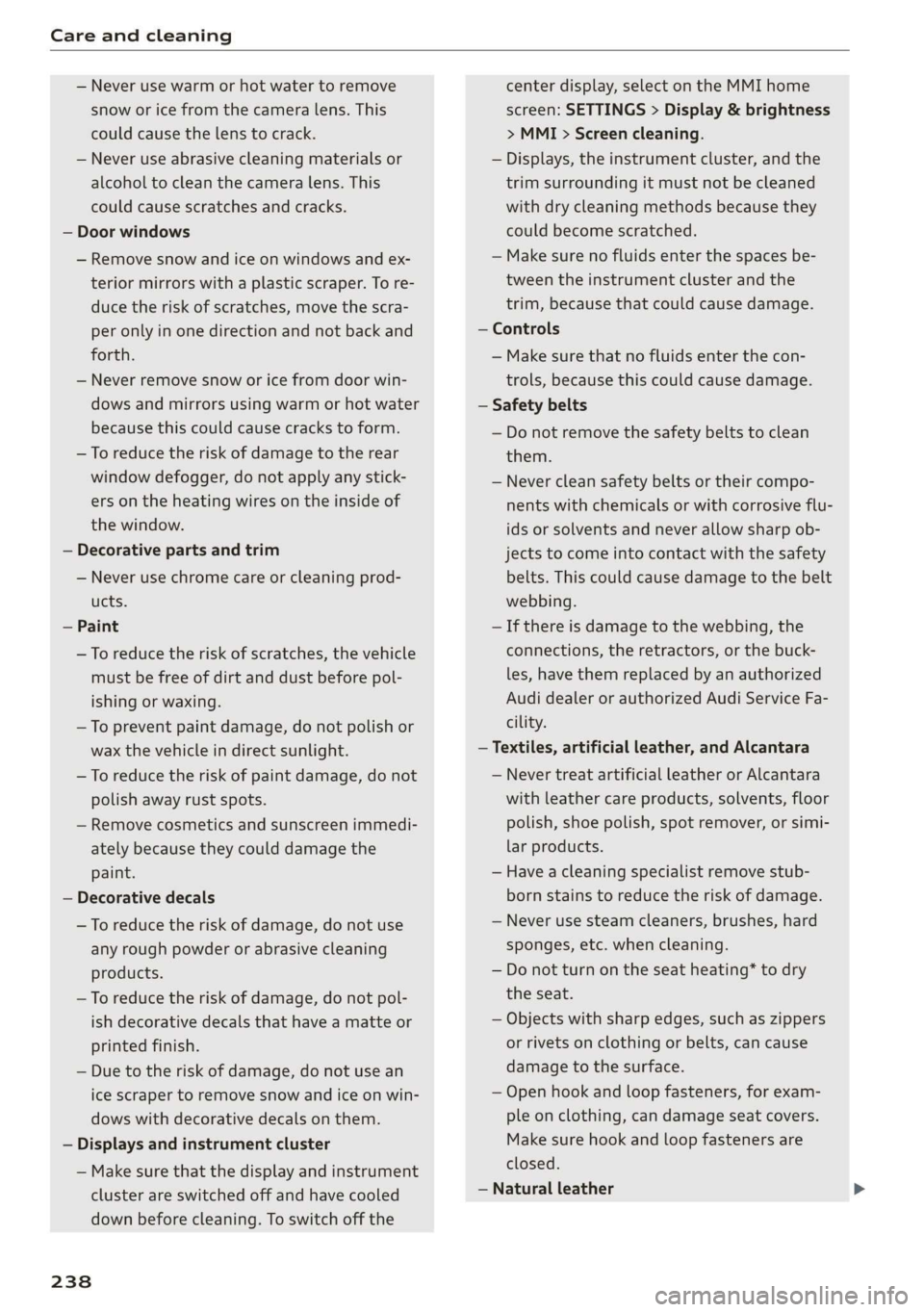
— Never use warm or hot water to remove
snow or ice from the camera lens. This
could cause the lens to crack.
— Never use abrasive cleaning materials or
alcohol to clean the camera lens. This
could cause scratches and cracks.
— Door windows
— Remove snow and ice on windows and ex-
terior mirrors with a plastic scraper. To re-
duce the risk of scratches, move the scra-
per only in one direction and not back and
forth.
— Never remove snow or ice from door win-
dows and mirrors using warm or hot water
because this could cause cracks to form.
—To reduce the risk of damage to the rear
window defogger, do not apply any stick-
ers on the heating wires on the inside of
the window.
— Decorative parts and trim
— Never use chrome care or cleaning prod-
ucts.
— Paint
— To reduce the risk of scratches, the vehicle
must be free of dirt and dust before pol-
ishing or waxing.
—To prevent paint damage, do not polish or
wax the vehicle in direct sunlight.
—To reduce the risk of paint damage, do not
polish away rust spots.
— Remove cosmetics and sunscreen immedi-
ately because they could damage the
paint.
— Decorative decals
—To reduce the risk of damage, do not use
any rough powder or abrasive cleaning
products.
—To reduce the risk of damage, do not pol-
ish decorative decals that have a matte or
printed finish.
— Due to the risk of damage, do not use an
ice scraper to remove snow and ice on win-
dows with decorative decals on them.
— Displays and instrument cluster
— Make sure that the display and instrument
cluster are switched off and have cooled
down before cleaning. To switch off the
238
center display, select on the MMI home
screen: SETTINGS > Display & brightness
> MMI > Screen cleaning.
— Displays, the instrument cluster, and the
trim surrounding it must not be cleaned
with dry cleaning methods because they
could become scratched.
— Make sure no fluids enter the spaces be-
tween the instrument cluster and the
trim, because that could cause damage.
— Controls
— Make sure that no fluids enter the con-
trols, because this could cause damage.
— Safety belts
— Do not remove the safety belts to clean
them.
— Never clean safety belts or their compo-
nents with chemicals or with corrosive flu-
ids or solvents and never allow sharp ob-
jects to come into contact with the safety
belts. This could cause damage to the belt
webbing.
—If there is damage to the webbing, the
connections, the retractors, or the buck-
les, have them replaced by an authorized
Audi dealer or authorized Audi Service Fa-
cility.
— Textiles, artificial leather, and Alcantara
— Never treat artificial leather or Alcantara
with leather care products, solvents, floor
polish, shoe polish, spot remover, or simi-
lar products.
— Have a cleaning specialist remove stub-
born stains to reduce the risk of damage.
— Never use steam cleaners, brushes, hard
sponges, etc. when cleaning.
— Do not turn on the seat heating* to dry
the seat.
— Objects with sharp edges, such as zippers
or rivets on clothing or belts, can cause
damage to the surface.
— Open hook and loop fasteners, for exam-
ple on clothing, can damage seat covers.
Make sure hook and loop fasteners are
closed.
— Natural leather
Page 253 of 278
83A012721BB
Fuses and bulbs
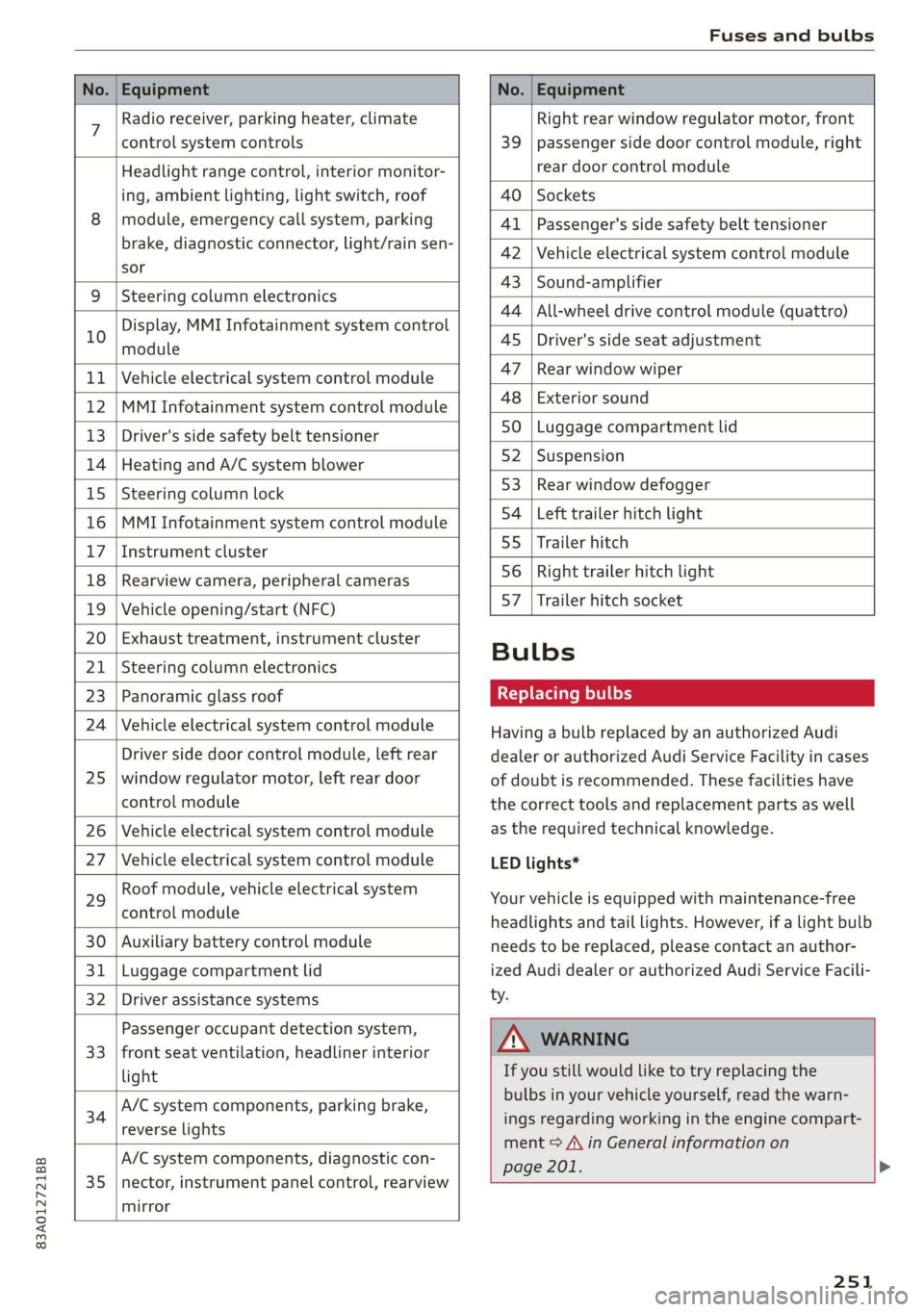
No. | Equipment No. | Equipment
7 Radio receiver, parking heater, climate Right rear window regulator motor, front
control system controls 39 | passenger side door control module, right
Headlight range control, interior monitor- rear door control module
ing, ambient lighting, light switch, roof 40 | Sockets
8 | module, emergency call system, parking 41 |Passenger's side safety belt tensioner
brake, diagnostic connector, light/raih'sen- 42 |Vehicle electrical system control module
sor
= - 43 |Sound-amplifier
9 |Steering column electronics
- - 44 | All-wheel drive control module (quattro)
Display, MMI Infotainment system control
10 anadtile 4S Driver's side seat adjustment
11 | Vehicle electrical system control module 47 | Rearwindow wiper
12 |MMI Infotainment system control module a6 || Exteriorsound
13 | Driver's side safety belt tensioner 50 | tuggage: compartment lid
14 | Heating and A/C system blower 52. || Suspension
15 | Steering column lock 53 | Rear;window defogger
16 |MMI Infotainment system control module 54 | Left trailer hitch light
17 |Instrument cluster 29 | Ualler hitch
18 | Rearview camera, peripheral cameras 56. | Right trailer hitch light
19 | Vehicle opening/start (NFC) 87 [Trailer'hitch'socket
20 | Exhaust treatment, instrument cluster
; Bulbs
21 | Steering column electronics
23 | Panoramic glass roof Replacing bulbs
24 | Vehicle electrical system control module
25
Driver side door control module, left rear
window regulator motor, left rear door
control module
26 Vehicle electrical system control module
27 Vehicle electrical system control module
29
Roof module, vehicle electrical system
control module
30 Auxiliary battery control module
31 Luggage compartment lid
32 Driver assistance systems
33
Passenger occupant detection system,
front seat ventilation, headliner interior
light
34
A/C system components, parking brake,
reverse lights
35
A/C system components, diagnostic con-
nector, instrument panel control, rearview
mirror
Having a bulb replaced by an authorized Audi
dealer or authorized Audi Service Facility in cases
of doubt is recommended. These facilities have
the correct tools and replacement parts as well
as the required technical knowledge.
LED lights*
Your vehicle is equipped with maintenance-free
headlights and tail lights. However, if a light bulb
needs to be replaced, please contact an author-
ized Audi dealer or authorized Audi Service Facili-
ty.
ZA\ WARNING
If you still would like to try replacing the
bulbs in your vehicle yourself, read the warn-
ings regarding working in the engine compart-
ment > A\ in General information on
page 201. >
251
Page 265 of 278
83A012721BB
Index
A
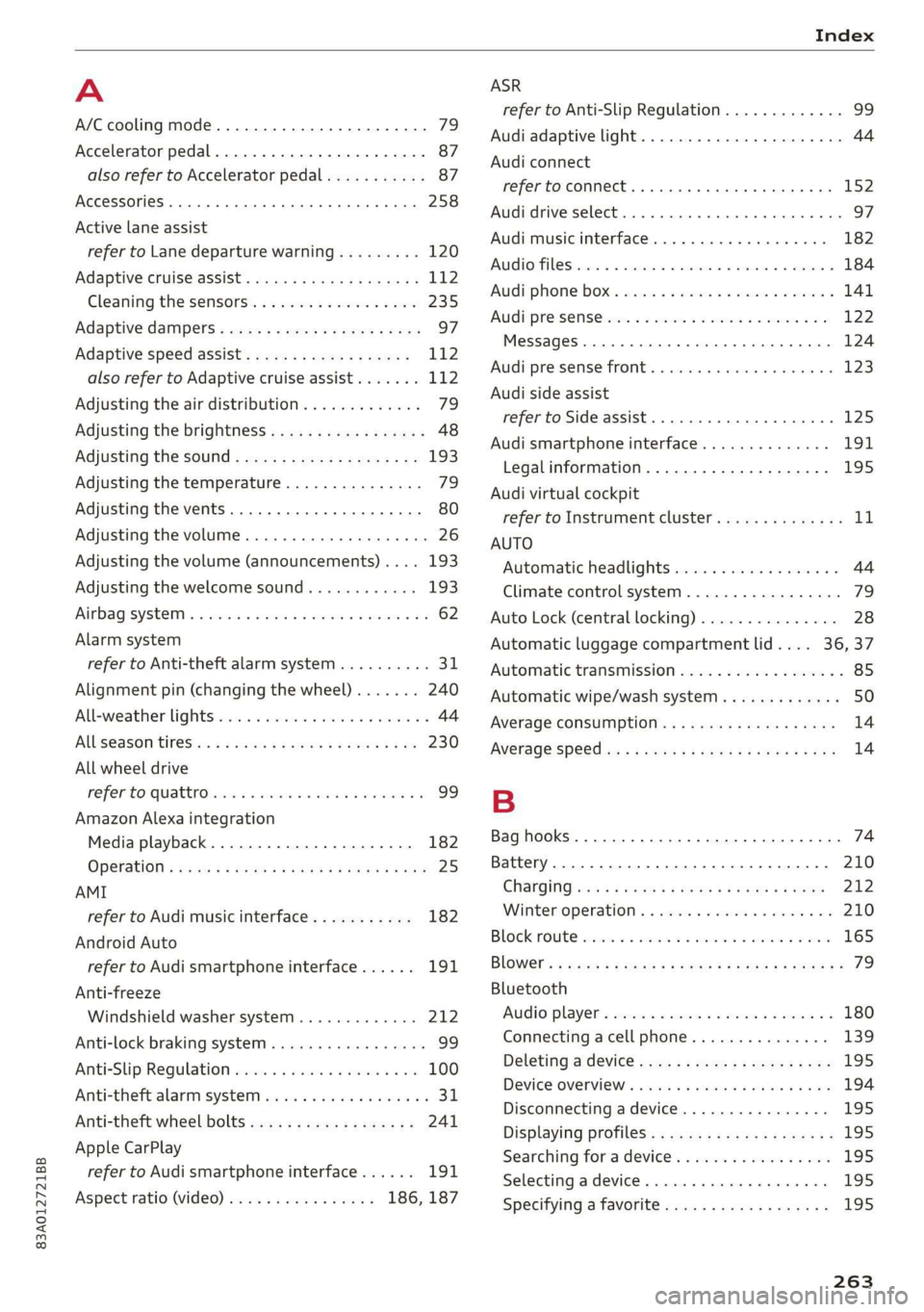
A/C cooling mode............. ee eee eee ee 79
Accelerator pedal.............--00000005 87
also refer to Accelerator pedal........... 87
AccessorieS .. 0.00... cece eee eee ee 258
Active lane assist
refer to Lane departure warning......... 120
Adaptive cruise assist................00. 112
Cleaning the sensors...............--- 235
Adaptive dampers...........--000e-0 eee 97
Adaptive speed assist.................. 112
also refer to Adaptive cruise assist....... 112
Adjusting the air distribution. ............ 79
Adjusting the brightness................. 48
Adjusting the sound..............-...-- 193
Adjusting the temperature............... 79
Adjusting the vents............. eee eee 80
Adjusting the volume..............000005 26
Adjusting the volume (announcements) .... 193
Adjusting the welcome sound............ 193
Airbagisystem « s sesuew « wainwn @ + ween eo scams sw 0 62
Alarm system
refer to Anti-theft alarm system.......... 31
Alignment pin (changing the wheel)....... 240
Alleweather lights:esi: « s mss « © seve ov ewes 6 y 44
AL S@aSON IFES a5 6s caenu vs saws oe Hews oo He 230
All wheel drive
He fer Co quattro cies cv cess wv cero « 0 nsw oo 99
Amazon Alexa integration
Media playback.................00000. 182
OPCTATION ¢ cows « y wasps 5 ¥ eves s 7 ew ea ee 25
AMI
refer to Audi music interface........... 182
Android Auto
refer to Audi smartphone interface...... 191
Anti-freeze
Windshield washer system............. 212
Anti-lock braking system.............0005 99
AntisSlip: Regulation sso ss sissies 0 seme 6 8 os 100
Anti-theft alarm system..............005. 31
Anti-theft wheel bolts.................. 241
Apple CarPlay
refer to Audi smartphone interface...... 191
Aspect ratio (video)................ 186, 187
refer to Anti-Slip Regulation
Audi adaptive light
Audi connect
refer to connect
Audi drive select
Audi music interface
Audio files
Audi phone box
Audi pre sense
Messages
Audi pre sense front
Audi side assist
refer to Side assist
Audi smartphone interface
Legal information
Audi virtual cockpit
refer to Instrument cluster
AUTO
Automatic headlights
Climate control system
Auto Lock (central locking)
Automatic luggage compartment lid....
Automatic transmission
Automatic wipe/wash system
Average consumption
Average speed
Bag hooks
Battery
Charging
Winter operation
Block route
Bluetooth
Audio player
Connecting a cell phone
Deleting a device
Device overview
Disconnecting a device
Displaying profiles
Searching for a device
Selecting a device
Specifying a favorite
263
Page 267 of 278
83A012721BB
Infotainment... «ccc eo esc waver ov ome 152
Infotainment services............0000- 153
Connected devices
Device overview ....... cee e eens 194
Connections
referto Media.............-.+++- 180, 184
Consumer information.................- 256
Consumption
REGUGING & oes oo xem o soem ao oa oe oe 89
GONSUMPtiON (TUE) = sec 2 x ewe 2 game 2 2 rem 14
Contacts
Add destinations ssw: « + cima © 2 aesen @ 2 sone 166
Importing and exporting.............. 150
MGIIGrY{Capacitycs « i seas ss mene sy eae 5 150
Opening (business card)............... 144
Updatinginthe MMI.................. 150
Convenience key............00 020 eee eee 28
Convenience closing................00 39
also refer to Vehicle key..............-- 32
Convenience opening and closing
Windows O60 « wiisss & wees so eames 6 & ere 39
Coolant temperature display.............. 13
Cooling MOE: s sexx s wean o + qome ee eg 79
Cooling system
Adding
coolant wos < « siesa ss ewe se ween 208
Checking the coolant level............. 208
COOlSTit sev: 5 = eaene =e meme & E eeG se ee 207
Cornering light.............. 00sec eee eee 44
Cruise control system.................. 111
Cup
holders. ....... 0.0... eee eee ee eee 73
Current CONSUMPLIOMN ese. . « cceses 6 0 cass © econ 14
D
DatarplanSierie a x cnvew + 2 ceva wo eevee a 9 cownae 155
Data: Privacy’. ssa + 2 owen ov omnes ve tee soe 255
Dat@sios s x saws xs ees 4 e Ree & 2 RSW se EEG 14
SOCEING « cnense: ao cuezoae wo aoneres sv oremine © @ ovens 193
Daytime running lights...............0.. 44
Declaration of compliance............... 259
Defrosting the windows.................. 79
DEF (instrument cluster)................- 11
Deluxe automatic climate control with 2
ZONCS/3:- ZONES. = 2 ess vx we es eee ee EMT 79
Demo mode
refer to Presentation mode............. 170
Destination onthe map................. 162
Dettailst. 2 1 swoveise « scams oo wciawe a axtsiwe os coawae 161
Determining correct load limit........... 228
Digital'cOmpass saccs se sews ve ees yo pees vs 52
DIMENSIONS's « avy & 2 wos « 4 aotEe 4s eEUE ae 261
Dimming the exterior mirrors............. 49
Dimming the rearview mirror............. 49
Directory
S@ttingS ces s x eee + wien gv Re a x OE 150
also refer to Contacts...............4. 144
Display
CLE ATTIG se « «. eserves 1 « souneite 4 o eveuene ol sneer aw 6 236
Displaying tooltips cose « x secnss +o onmnane a o voces 18
Disposable co nei a 2 svar a a amass wn anaes a wo 256
DistanG@rend 2 2 cows ot awere oo omen vo oem 2 os 14
Distance Warning sms: » « sews ¢ » saws 2 x eee 119
Doors
Childisafety lock sessies « ¢ sors oo ewe ao races @ 38
Door contact switch................00-. 47
Mechanically unlocking and locking....... 30
Driver information system................ 12
Drives
fefer te Medidies 5 & wees «x eww sv exw 180, 184
Drive select
refer to Audi drive select................ 97
DriveSystem « caus « x yor o © ome o x Rom Fe Be 89
Audi driverselect.. sors. «2 somos © x snus x 2 syn ‘G7
Drive system (message)...............0048. 91
Driving down Rill sia s & sass 2 x cose 2 wees o 94
Driving:program: « ¢ sos + ¢ somes 2 s eews eo ee 119
Driving through water..............0000- 95
DFIVINGUENTIG 5 « neue 4 < mews a Bee oF ee se 14
Driving tips
Driving through water...............0-. 95
EER cher FV cocies 2 x conan x x camasine we wsaenen 89
Offroad driving................ eee eee 95
Uphill and downhill...
E
E-mail
MessageroptionSie: « & sexs « » sewer x = caw 148
SOUS: ccawen a: ps asoxvin «. priexene ws: samen w 4 stiewens 148
eco mode (climate control system)......... 79
EDL
refer to Electronic Differential Lock....... 99
265
Page 269 of 278
83A012721BB
Fuel tank capacity
Gasoline... 2... ee eee eee eee
Reducing fuel consumption............. 89
Fueling
Fuebtillerdoor's + = sce so sens o soamsne + aress 198
Fuel filler door emergency release....... 200
Fuel tank capacity.................00-. 262
Fuse assignment..............-.2-.0-- 250
G
Garage door opener... .. 6... ce eee eee eee 40
Garment hooks.......... 000.0000 eee eee 74
Gasoline... 2. eee eee 197
Additives ..... 0... ccc cece 198
GASOLINE MIXtURElea: « » coe ss yee 2 4 eee 197
GAWR
refer to Gross Axle Weight Rating (GAWR) . 262
GSlSiy « saves a neue 3 e Rew oe EER e eTEEY & BE 85
Glossary of tire and loading terminology... 217
Glove Compartment ocx « : cccu es yew 2 g can 74
Gross Axle Weight Rating (GAWR)........ 262
Gross Vehicle Weight Rating (GVWR)...... 262
GVWR
refer to Gross Vehicle Weight
Rating (GVWR) iiss «2 sssuos 6 2 wasn 2 w cose 262
H
Handstrees: esis « y ween ¢ pase 2 aaien gs ears 140
Hafids Free.Profile’. «sows + < sas sv emu ges 140
Headlight range control.................. 44
Headlights
Cleaning « « ssw ¢ owas x o owes x o sew so oe 235
Headlight range control................ 44
Washer system... 1... 0... cece eee ee eee 50
Head restraints
AGjUStING ss = = wows : 2 ewes to wees oo eee 2 2 58
Removing and installing................ 58
Heated rear window.............00000008 80
Heated steering wheel................--. 80
Heater
refer to Climate control system.......... 78
HFP
refer to Hands Free Profile............. 139
High beams
High beam assistant................... 45
Highway tights. © asi 2 oscar 2 waver vee 2 44
Hill descent assist ..... 0.0... ce eee eens 95
Hill descent control... 2.0... ..ce eee e eens 94
Hill Hold assist « vies se ees xe ews enews oe 84
Home
refer to Home address................ 166
Homeaddress:: « s sess saya nee ee pee 166
HomeLink
refer to Garage door opener............. 40
HOMEISCrERNs: 5. covi oo sosueee oH seston = 0 ane ov LZ
HIOKN « « sues 2 2 aus oo eee ee ey Fo eee s Bee 6
Hotspot
MO fEritONN eR be: 2 x seawes w = snecawe =o maesne ew anes 155
I
Idle
refer to Gears... . ee eee eee 85
Ignition
Switching on and off..............0000- 82
Imbalance (wheels) ............0 eee eee 223
Immobilizer
refer to Electronic immobilizer........... 32
Indicator lights... 2... 6. . eee eee eee eee 7
Inspection interval..............0000 00 213
Instrument cluster.............0 000 eee 11
Adjusting the layout................... 12
GlEANING’s « & seuss @ & wawe 2 = wow « y ROS ea 236
Engine code........... 2... eee ee eee 195
Failure... ee eee 11
On-board computer...............000-5 14
OPerabing’. « ssersc « vere eo evauens + + anova © & en 12
Service interval display................ 213
Software information................. 195
Switching tabs: « «wasn s & were w & areomwe 6 6 aoe 12
Switching the view.............2--0000- 12
Vehicle TUNCtIONS « isis x estas se ews oe eee 14
Version information.................- 195
Instrument illumination................. 48
Intelligent search
Navigationion + « scare ao casesene
Interior lighting © «ces << were ee ese ve 47,48
Interior MONItOriING’s « s scsi so csuew sees ws 31
Intermittent mode (windshield wipers) ..... 50
Internationaltravel..................0. 155
Internet
referto CONNeCts « 2 esws es eews ees wm 152
Page 271 of 278
83A012721BB
Index
MInrOr COMPASS « ses 2s asians 4 0 wsesens oe somes 52
Mirrors
Adjusting exterior mirrors.............-. 48
DINING » scam 9 < noms ss ROR FF Ree 4b aR 49
Nanity(Mit ror cco 2s omen 2s onemn 3 o wean © 6s 50
MMI Navigation plus
refer to Multi Media Interface........... 18
MMI Radio plus
refer to Multi Media Interface........... 18
Mobile device
refer to Telephone...........-..2.-00. 139
Mobile phone network
GONNECtION SELEINGSs 2 caw « & gewa s ¢ aaws 150
Mouihitain Passes « sees sz sews ss wea ke oes 94
Mountain roads......... eee eee eee eee 94
Multifunction steering wheel
Buttons « weer: « x eee 4 s Queen yo ew 2 a 12,26
Operating « « sew +o waues v a nese + eawem 3 + eos 12
Programming buttons...............00 26
Voice recognition system............... 24
Multi Media Interface................... 18
Menus and symbols.............00e-0 08 19
OPeKabiING 4 « cassac o « sesame w 6 peonein 6 ceartene a 16,19
Switching on or off.................... 18
Muting (mute) ............. 000s 26
myAudi...
2.2... eee eee eee 27,153
myAudi navigation................. 157,161
N
Natural leather care andcleaning......... 237
NaVIQation sescans c+ asin ov coieas « ¥ suena © ¥ un 157
Better route............. 00 ee eee eee 169
GAlinGixe: « 5 wom 5 x epee e MemE E YEE ES 161
Changing the scale................005 161
also referto Map..................00. 163
Navigation database
Version information...............565 195
Navigation (instrument cluster) .......... 164
NHTSA... 22.0... c eee eee eee 258
Notificationscemter rcs x svexue 2 0 cumneue © 0) exe 20
Oo
Octane rating (gasoline)................ 197
OdOMELER seems so seein 6H areowe 6% svat Fa ERO a 14
Resetting .......... 0.0 e eee eee eee eee 14
Office address
refer to Business address.............. 166
Offroad
refer to Offroad driving...............-- 95
Offroad driving. ......... 0. eee e eee 95
Oil
referto Engine oil................-.-- 203
On-board computer..............0.-000. 14
On Board Diagnostic System (OBD)... 200, 253
Online destination
refer to Online Points of Interest........ 160
Online map
refer to Satellite map................. 167
Online Media xcs « s sees = v gems ep ewe se 181
Online Points of Interest................ 160
Online radio...................0.00005 176
also refer to Online radio.............. 176
Online services
WEFErTOXCONNEEE:: © = scevcix « 5 wees ¥ reevenere © HH 152
Online system update.................. 194
OPGNING a5 & eemes x were « + oem 6 x ReeR 9 tre 28
Automatic luggage compartment lid...... 36
Convenience opening............eee eee 39
Engine compartment lid............... 202
Fuel filler door. ... 0.0.0... cece e eee ee 198
Luggage compartment lid............... 35
Luggage compartment lid with foot motion . 37
Panoramic glass roof.............000005 40
Sunshade (roof) ................00000 ee 40
WiNdOWS!: 2 acum: « ¢ waey 3 o cee § 5 ARO gb ae 38
Opening and closing
refer to Unlocking and locking........ 28, 33
Operating
Tastrumenticluster sisson «0 evans + ¥ cvenee © a oe 12
Multifunction steering wheel............ 12
Multi Media Interface............... 16,19
TOEXTIMPUEEs 3 cunsens so coven as: scams a @ seawo @ it 21.
Touch display............-..0 eee eee ee 16
Optional equipment number............. 261
Options
Media... .... cece eee ee eee eee 187
NavigatiOties « « saws + s ween 5 s meek s Rees 170
Radio... cece 178
Overview! (Cockpit): ox ici a a cosmo a aos vw ae 6
269