lock AUDI Q3 2020 Repair Manual
[x] Cancel search | Manufacturer: AUDI, Model Year: 2020, Model line: Q3, Model: AUDI Q3 2020Pages: 278, PDF Size: 72.66 MB
Page 245 of 278

83A012721BB
Emergency assistance
The wheel bolts must be clean and loosen and
tighten easily. Check the contact surfaces for the
wheel and hub. Contaminants on these surfaces
must be removed before installing the wheel.
Z\ WARNING
— Read and follow the important information
and notes under > page 221.
— Never use the hex socket in the screwdriver
handle to tighten the wheel bolts. Using the
hex socket will not achieve the required
tightening torque, which increases the risk
of an accident.
C) Note
When removing or installing the wheel, the
rim
could hit the brake rotor and damage the
rotor. Work carefully and have a second per-
son help you.
Unidirectional tires
A unidirectional tire profile is identified by arrows
on the tire sidewall that point in the running di-
rection. You must always maintain the specified
running direction. This is necessary to ensure the
tire's optimal performance in regard to adhesion,
running noise, and friction, and to reduce the risk
of
hydroplaning.
To benefit fully from the advantages of the uni-
directional tire design, you should replace faulty
tires as soon as possible and restore the correct
running direction on all of the tires.
> Reinstall the caps on the wheel bolts if necessa-
ry.
> Store the vehicle tool kit in its designated
place.
> If the removed wheel does not fit in the spare
wheel well, store it securely in the luggage
compartment > page 74.
> Check the tire pressure on the installed wheel
as soon as possible.
> Correct the tire pressure and store it
> page 233.
> The wheel bolt tightening specification must be
100 ft lbs (140 Nm). Have it checked as soon as
possible with a torque wrench. Drive carefully
until then.
> Have the faulty wheel replaced as quickly as
possible.
Spare tire
tute Mae eis
Applies to: vehicles with subwoofer
The subwoofer must be removed before the
spare tire*/temporary spare tire* can be re-
moved.
Fig. 160 Spare tire well: subwoofer
Removing the subwoofer
> Pull out the red connector lock @).
>» Remove the connector (2) and set the discon-
nected cable aside.
> Turn the handwheel counter-clockwise and re-
move it.
> Carefully remove the subwoofer.
Installing the subwoofer
> Carefully place the subwoofer in the rim well.
The word “FRONT” on the subwoofer must face
forward.
> Insert the connector that was removed.
> Secure the subwoofer with the handle.
Byer leet Ue iy re
Applies to: vehicles with space-saving spare tire (compact
spare tire)
The spare tire is intended for short-term use only.
Have the damaged tire checked and replaced if
necessary by an authorized Audi dealer or author-
ized Audi Service Facility as soon as possible.
243
>
Page 248 of 278

Emergency assistance
@) Tips
Make sure that the connected jump start ca-
bles have sufficient contact with metal.
Towing
General information
You should only perform the steps that follow if
you have the necessary tools and technical ex-
pertise.
Towing requires a certain amount of practice.
Audi recommends contacting a towing company
to have the vehicle transported.
You should only have your vehicle towed by an-
other vehicle when disabled in exceptional cir-
cumstances. Inexperienced drivers should not
tow.
Notes on towing
When the engine is stopped, the transmission
will not be sufficiently lubricated if traveling at
high speeds and long distances:
— The maximum permitted towing speed is 30
mph (50 km/h).
— The maximum permitted towing distance is 30
miles (50 km).
Additional information on towing with a tow
truck
The vehicle may only be towed with the front axle
raised. Do not wrap any chains or cables around
the brake lines.
If the vehicle should be towed with the axle
raised, then the ignition must be switched off to
reduce the risk of damage to the drivetrain.
Tow bar and towing cable
The vehicle can be towed with a tow bar or tow-
ing cable. Both drivers should be familiar with
the special considerations when towing, especial-
ly when using a towing cable.
Always make sure the traction force does not ex-
ceed the permitted level and there are no shock
loading conditions. There is always the risk of the
246
coupling becoming overloaded when driving off-
road.
For the most safety and security, drive with a tow
bar. You should use a towing cable only if a tow
bar is not available. Use a towing cable made of
synthetic elastic cable similar elastic material.
ZA WARNING
— Towing highly increases the risk of an acci-
dent, for example from colliding with the
towing vehicle.
— To reduce the risk of an accident, do not al-
low anyone to remain inside the vehicle
when it is being transported by a tow truck
or a special transporter.
@) Note
— If normal towing is not possible, for exam-
ple if the transmission is faulty or if the
towing distance is greater than 30 miles
(50 km), then transport the vehicle on a
special carrier.
— If the vehicle is towed by a tow truck at the
axle that is not permitted, this can cause se-
vere damage to the transmission.
— The vehicle must not be tow started for
technical reasons.
@ Tips
— If the power supply is interrupted, then it
will not be possible to move the selector
lever out of the "P" position. The parking
lock must be released using the emergency
release before towing the vehicle
=> page 87.
— Switch Audi pre sense* off > page 124 when
loading the vehicle onto a vehicle carrier,
train, ship, or other type of transportation,
or when towing the vehicle. This can prevent
an undesired intervention from the pre
sense* system.
— Follow the local legal regulations for tow-
ing.
Page 249 of 278

83A012721BB
Emergency assistance
Read and follow the important information under
=> page 246.
Preparations
> Only secure the towing cable or tow bar at the
designated towing loops > page 247,
=> page 247.
> Make sure the towing cable is not twisted. Oth-
erwise it could disconnect from the towing loop
while towing.
> Switch the emergency flashers on in both
vehicles > page 46. However, do not do this if it
prohibited by law.
Towing vehicle (front)
> Only start to drive when the towing cable is
taut.
> Press the brake pedal very carefully.
> Avoid sudden braking or driving maneuvers.
Vehicle being towed (rear)
> Make sure the ignition is switched on so that
the steering wheel is not locked and so that you
can use the turn signals, the horn, and the
windshield wipers if needed > A\.
> Switching it off before the vehicle has stopped
may impair the function of the brake booster
and power steering. You would then need to
use more force to steer and brake the vehicle.
> Release the parking brake > page 93.
» Select the “N” selector lever position.
> Make sure the towing cable is always taut.
ZX WARNING
Never tow a vehicle using a tow bar or towing
cable if the vehicle does not have electrical
power.
Front towing loop
Fig. 163 Front bumper: installing the towing loop
The threaded opening for the towing loop is lo-
cated on the right side of the front bumper.
> Remove the towing loop from the vehicle tool
kit > page 240.
> Press the cap inward with brief, strong pressure
> fig. 163. The cap will loosen from the bump-
er.
> Tighten the towing loop in the threaded open-
ing until it stops and then tighten it with a
wheel wrench.
> After using, place the towing loop back in the
vehicle tool kit.
ZX WARNING
If the towing loop is not tightened until it
stops when installing, the threads may be
pulled out when towing the vehicle and result
in an accident.
@) Tips
Depending on the model, the shape of the
cover can vary.
Rear towing loop
Fig. 164 Rear bumper: installing the towing loop
247
Page 252 of 278
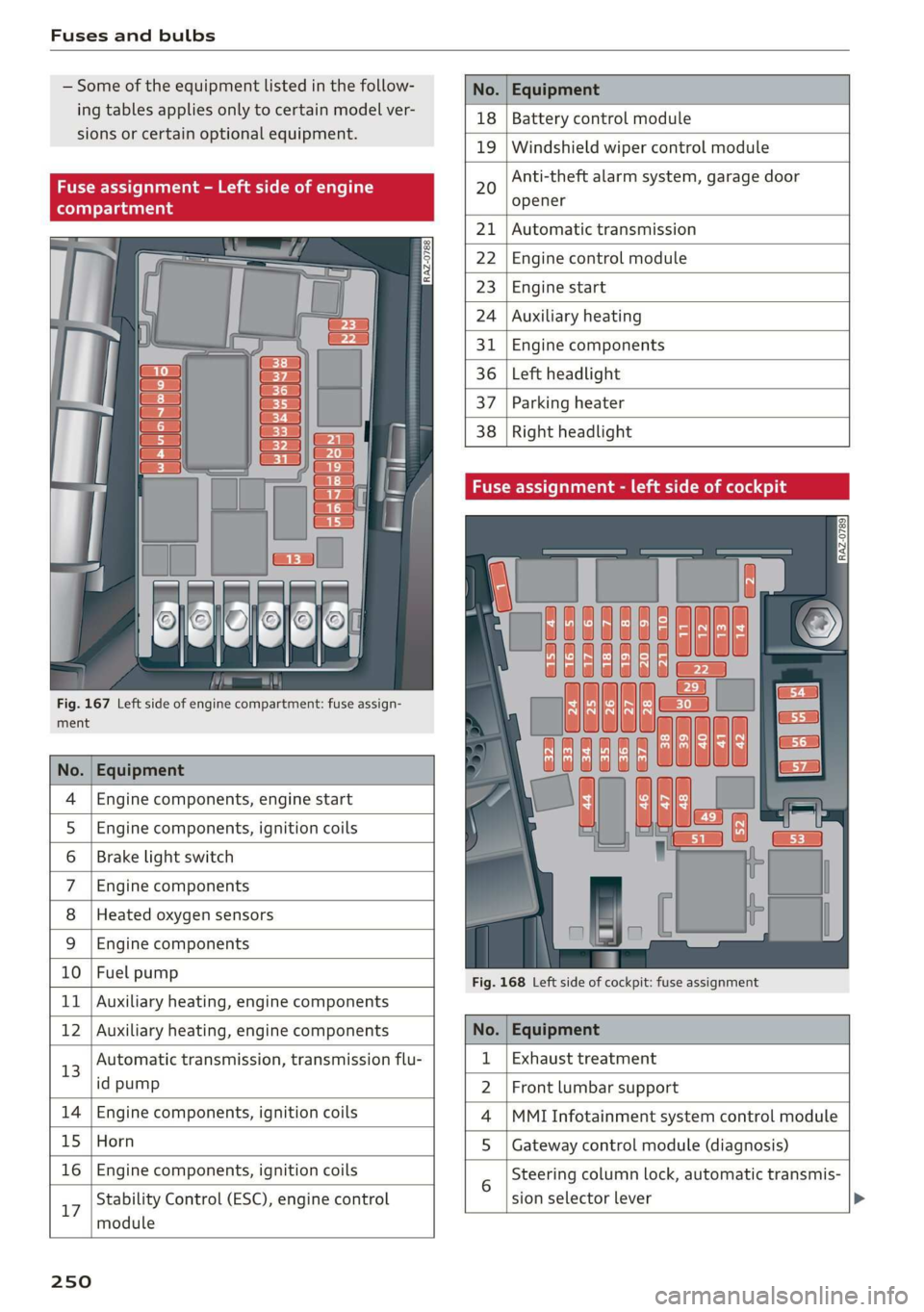
Fuses and bulbs
— Some of the equipment listed in the follow-
ing tables applies only to certain model ver-
sions or certain optional equipment.
Fig. 167 Left side of engine compartment: fuse assign-
ment
No. | Equipment
Engine components, engine start
Engine components, ignition coils
Brake light switch
Engine components
Heated oxygen sensors
OlOAIN
I
DA/Mm|A
Engine components
10 | Fuel pump
11 | Auxiliary heating, engine components
No. Equipment
18 Battery control module
19 Windshield wiper control module
20
Anti-theft alarm system, garage door
opener
21 Automatic transmission
22 Engine control module
23 Engine start
24 Auxiliary heating
31 Engine components
36 Left headlight
37 Parking heater
38
Right headlight
Fig. 168 Left side of cockpit: fuse assignment
Stability Control (ESC), engine control
17
module
250
12 | Auxiliary heating, engine components No. | Equipment
13 Automatic transmission, transmission flu- 1 | Exhaust treatment
id pump 2 | Front lumbar support
14 | Engine components, ignition coils 4 |MMI Infotainment system control module
15 | Horn 5 | Gateway control module (diagnosis)
16 | Engine components, ignition coils 5 Steering column lock, automatic transmis-
sion selector lever
Page 253 of 278
83A012721BB
Fuses and bulbs
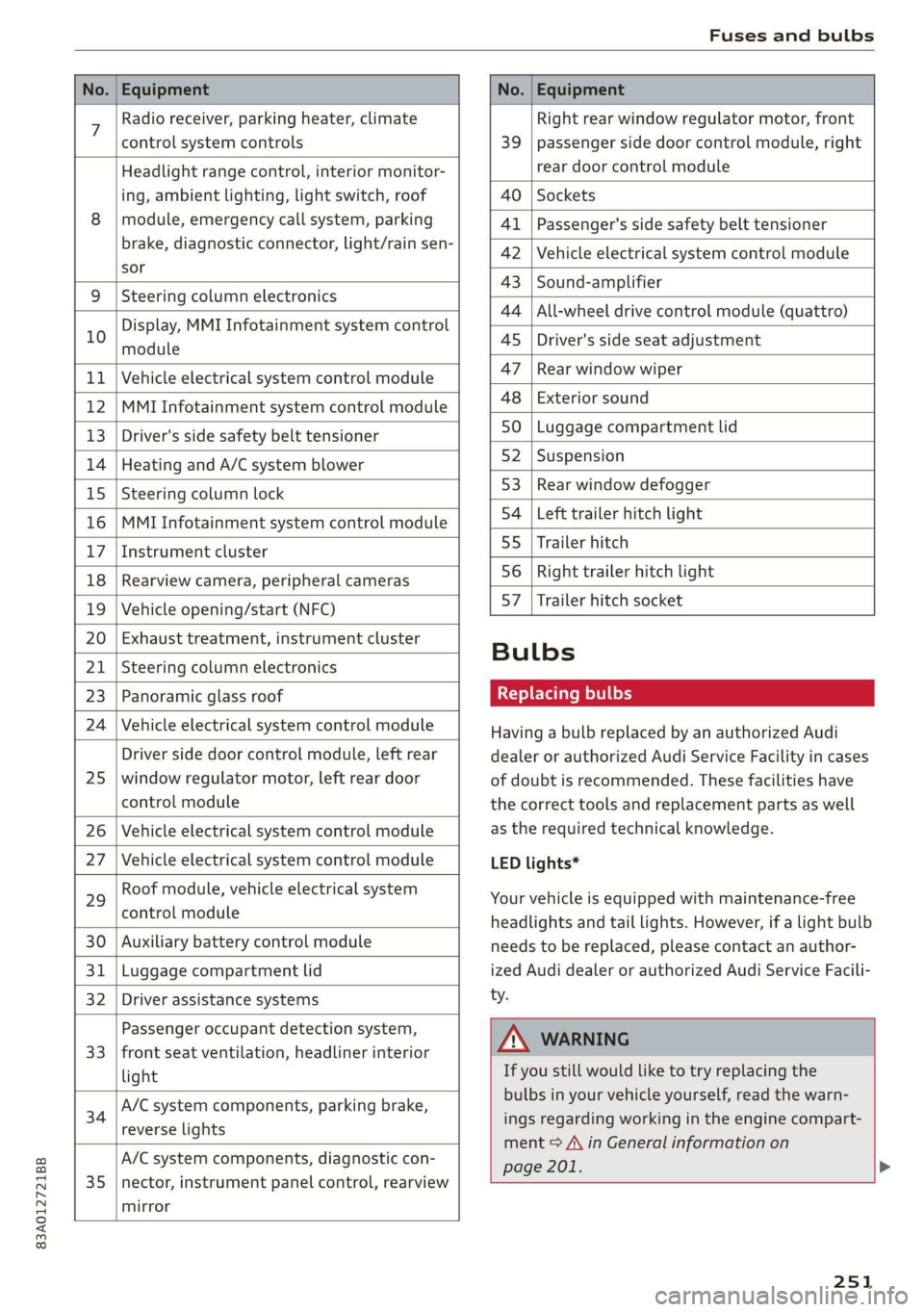
No. | Equipment No. | Equipment
7 Radio receiver, parking heater, climate Right rear window regulator motor, front
control system controls 39 | passenger side door control module, right
Headlight range control, interior monitor- rear door control module
ing, ambient lighting, light switch, roof 40 | Sockets
8 | module, emergency call system, parking 41 |Passenger's side safety belt tensioner
brake, diagnostic connector, light/raih'sen- 42 |Vehicle electrical system control module
sor
= - 43 |Sound-amplifier
9 |Steering column electronics
- - 44 | All-wheel drive control module (quattro)
Display, MMI Infotainment system control
10 anadtile 4S Driver's side seat adjustment
11 | Vehicle electrical system control module 47 | Rearwindow wiper
12 |MMI Infotainment system control module a6 || Exteriorsound
13 | Driver's side safety belt tensioner 50 | tuggage: compartment lid
14 | Heating and A/C system blower 52. || Suspension
15 | Steering column lock 53 | Rear;window defogger
16 |MMI Infotainment system control module 54 | Left trailer hitch light
17 |Instrument cluster 29 | Ualler hitch
18 | Rearview camera, peripheral cameras 56. | Right trailer hitch light
19 | Vehicle opening/start (NFC) 87 [Trailer'hitch'socket
20 | Exhaust treatment, instrument cluster
; Bulbs
21 | Steering column electronics
23 | Panoramic glass roof Replacing bulbs
24 | Vehicle electrical system control module
25
Driver side door control module, left rear
window regulator motor, left rear door
control module
26 Vehicle electrical system control module
27 Vehicle electrical system control module
29
Roof module, vehicle electrical system
control module
30 Auxiliary battery control module
31 Luggage compartment lid
32 Driver assistance systems
33
Passenger occupant detection system,
front seat ventilation, headliner interior
light
34
A/C system components, parking brake,
reverse lights
35
A/C system components, diagnostic con-
nector, instrument panel control, rearview
mirror
Having a bulb replaced by an authorized Audi
dealer or authorized Audi Service Facility in cases
of doubt is recommended. These facilities have
the correct tools and replacement parts as well
as the required technical knowledge.
LED lights*
Your vehicle is equipped with maintenance-free
headlights and tail lights. However, if a light bulb
needs to be replaced, please contact an author-
ized Audi dealer or authorized Audi Service Facili-
ty.
ZA\ WARNING
If you still would like to try replacing the
bulbs in your vehicle yourself, read the warn-
ings regarding working in the engine compart-
ment > A\ in General information on
page 201. >
251
Page 265 of 278
83A012721BB
Index
A
A/C cooling mode............. ee eee eee ee 79
Accelerator pedal.............--00000005 87
also refer to Accelerator pedal........... 87
AccessorieS .. 0.00... cece eee eee ee 258
Active lane assist
refer to Lane departure warning......... 120
Adaptive cruise assist................00. 112
Cleaning the sensors...............--- 235
Adaptive dampers...........--000e-0 eee 97
Adaptive speed assist.................. 112
also refer to Adaptive cruise assist....... 112
Adjusting the air distribution. ............ 79
Adjusting the brightness................. 48
Adjusting the sound..............-...-- 193
Adjusting the temperature............... 79
Adjusting the vents............. eee eee 80
Adjusting the volume..............000005 26
Adjusting the volume (announcements) .... 193
Adjusting the welcome sound............ 193
Airbagisystem « s sesuew « wainwn @ + ween eo scams sw 0 62
Alarm system
refer to Anti-theft alarm system.......... 31
Alignment pin (changing the wheel)....... 240
Alleweather lights:esi: « s mss « © seve ov ewes 6 y 44
AL S@aSON IFES a5 6s caenu vs saws oe Hews oo He 230
All wheel drive
He fer Co quattro cies cv cess wv cero « 0 nsw oo 99
Amazon Alexa integration
Media playback.................00000. 182
OPCTATION ¢ cows « y wasps 5 ¥ eves s 7 ew ea ee 25
AMI
refer to Audi music interface........... 182
Android Auto
refer to Audi smartphone interface...... 191
Anti-freeze
Windshield washer system............. 212
Anti-lock braking system.............0005 99
AntisSlip: Regulation sso ss sissies 0 seme 6 8 os 100
Anti-theft alarm system..............005. 31
Anti-theft wheel bolts.................. 241
Apple CarPlay
refer to Audi smartphone interface...... 191
Aspect ratio (video)................ 186, 187
refer to Anti-Slip Regulation
Audi adaptive light
Audi connect
refer to connect
Audi drive select
Audi music interface
Audio files
Audi phone box
Audi pre sense
Messages
Audi pre sense front
Audi side assist
refer to Side assist
Audi smartphone interface
Legal information
Audi virtual cockpit
refer to Instrument cluster
AUTO
Automatic headlights
Climate control system
Auto Lock (central locking)
Automatic luggage compartment lid....
Automatic transmission
Automatic wipe/wash system
Average consumption
Average speed
Bag hooks
Battery
Charging
Winter operation
Block route
Bluetooth
Audio player
Connecting a cell phone
Deleting a device
Device overview
Disconnecting a device
Displaying profiles
Searching for a device
Selecting a device
Specifying a favorite
263
Page 266 of 278
Index
Brake fluid
Checking the brake fluid level........... 209
Brakes... 2... eee eee 91
BrakevassiSt': scase < « seme 2s ae a eee eB: 99
Brakerflidl: «2 cso 2 assim 2 a conse oo emai 9 209
Emergency braking function............. 93
Le (0) 94
New brake pads « sisi: ss esos se cees s ween e 91
Break-in security feature.............0004 31
Breaking in
New brake pads « snessis se were sv awa wenn « 91
Newtires. 2... 0.0... cee cece ee eee 221
Browser
refer to Media center...............005 184
Business address...........00--0000eee 166
Cc
California Proposition 65 Warning........ 201
Battery SpecifiCes ¢ 2 cee s vowed pasa as 210
Calllist.. 0... eee eee ee 143,145
Cameras
Coverage areaS...... eee cee eee eee 107
LOCATIONS ics. 6 6 sciewe os wwnee oo eee wo wee 107
Capacities
Fueltank... 00.0.0... cee eee eee ee eee 262
Washer fluid reservoir...............-- 262
Cargo floor......... eee eee eee eee 76
Cargonet.... 2... cece eee ee 76
Car key... eee eee eee eee 32
Car phone
Serial number (IMEI) .................. 150
SWITCHING Olljews « « asus = ayew 2 = gees se ae 149
Car WaShis < cca = = sees 5 ¢ hes oe ees yo cee 234
Catalytic converter..................00. 200
Cell phone
refer to Telephone...........eee eee eae 139
Cell phone compartment
refer to Audi phone box............... 141
Central locking): ss sep 5 sees so eaes ve ees 28
Auto Lock... .. 0... cee eee eee 28
Convenience key............ 0 eee eee ees 33
Convenience opening and closing......... 39
Luggage compartment lid............... 35
Mechanically unlocking and locking....... 30
MESSAGES saris + ¢ Haven o & eee © e ewe oe ews 30
Remote control key... vss ve ewe ee eee o 33
264
SCC: 2 x cusewes o 2 somuses wow sarees 4 o seamen oo awe
Vehicle key
Central locking switch...............0--. 29
Ceramic brakes.........0 00.000 e eee eee 92
Certificationvins «6 cscs x + emcee ve eoenene ve esecene 259
Charging
refer to Power sourceS.........-- 00s eee 73
Charging the battery (mobile devices). 141, 182
Child safety lock
Power WINdOWS........ 0. eee cece e ee eens 38
ReardOOrSicn s = wey sv aes s Hom oo Kee ee 38
Child
safety seats................-00000- 67
Securing to the top tether anchor........ 71
Securing with a safety belt.............. 70
Securing with LATCH................00. 69
Cleaning... 2.2... . cee eee eee eee 234
Cleaning Alcantara.............-.00000. 237
Cleaning artificial leather............... 237
Cleaning carbon components........ 236, 237
Cleaning controls:. « sw se ewes «sens oo ov 236
Cleaning decorative parts andtrim........ 236
Cleaning exhaust tail pipes.............. 236
Cleaning plastic parts.................. 236
Cleaning textiles...................00, 237
Climate control system...........2.0000. 78
Closing
Automatic luggage compartment lid...... 36
Convenience closing.............+-.04. 39
Engine compartment lid............... 202
Luggage compartment lid............... 35
Luggage compartment lid with foot motion . 37
Panoramic glass roof.............000005 40
Sunshade (roof) ......... 0.000 e eee eee 40
WINdOWSS x 2 ones 5 2 awe & 2 yasew ¢ e came * 38
Cockpit GIMMMING e: « 2 ses ¢ ¢ owes ¢ o ews a ys 48
COCKPIT OVEFVIEW)'s « x eas 5 2 neue ot ees ge 6
Color number............ 2.02. cece eee 261
Compact spare tire...............000004 243
Compartments..............0 0.0.00 0005 74
Compass inthe mirror...............00-. 52
Compliance tse: « « ssccav: so aes
Configuration wizard.................00. 18
CONMECE cams + nary & + ewe a x mew at eR eee 152
Data:plans). « » svat « 0 wenn » 4 sae 6 2 sommes 155
Data Privacy.... 0.2... cece eee eee eee 255
Page 267 of 278
83A012721BB
Infotainment... «ccc eo esc waver ov ome 152
Infotainment services............0000- 153
Connected devices
Device overview ....... cee e eens 194
Connections
referto Media.............-.+++- 180, 184
Consumer information.................- 256
Consumption
REGUGING & oes oo xem o soem ao oa oe oe 89
GONSUMPtiON (TUE) = sec 2 x ewe 2 game 2 2 rem 14
Contacts
Add destinations ssw: « + cima © 2 aesen @ 2 sone 166
Importing and exporting.............. 150
MGIIGrY{Capacitycs « i seas ss mene sy eae 5 150
Opening (business card)............... 144
Updatinginthe MMI.................. 150
Convenience key............00 020 eee eee 28
Convenience closing................00 39
also refer to Vehicle key..............-- 32
Convenience opening and closing
Windows O60 « wiisss & wees so eames 6 & ere 39
Coolant temperature display.............. 13
Cooling MOE: s sexx s wean o + qome ee eg 79
Cooling system
Adding
coolant wos < « siesa ss ewe se ween 208
Checking the coolant level............. 208
COOlSTit sev: 5 = eaene =e meme & E eeG se ee 207
Cornering light.............. 00sec eee eee 44
Cruise control system.................. 111
Cup
holders. ....... 0.0... eee eee ee eee 73
Current CONSUMPLIOMN ese. . « cceses 6 0 cass © econ 14
D
DatarplanSierie a x cnvew + 2 ceva wo eevee a 9 cownae 155
Data: Privacy’. ssa + 2 owen ov omnes ve tee soe 255
Dat@sios s x saws xs ees 4 e Ree & 2 RSW se EEG 14
SOCEING « cnense: ao cuezoae wo aoneres sv oremine © @ ovens 193
Daytime running lights...............0.. 44
Declaration of compliance............... 259
Defrosting the windows.................. 79
DEF (instrument cluster)................- 11
Deluxe automatic climate control with 2
ZONCS/3:- ZONES. = 2 ess vx we es eee ee EMT 79
Demo mode
refer to Presentation mode............. 170
Destination onthe map................. 162
Dettailst. 2 1 swoveise « scams oo wciawe a axtsiwe os coawae 161
Determining correct load limit........... 228
Digital'cOmpass saccs se sews ve ees yo pees vs 52
DIMENSIONS's « avy & 2 wos « 4 aotEe 4s eEUE ae 261
Dimming the exterior mirrors............. 49
Dimming the rearview mirror............. 49
Directory
S@ttingS ces s x eee + wien gv Re a x OE 150
also refer to Contacts...............4. 144
Display
CLE ATTIG se « «. eserves 1 « souneite 4 o eveuene ol sneer aw 6 236
Displaying tooltips cose « x secnss +o onmnane a o voces 18
Disposable co nei a 2 svar a a amass wn anaes a wo 256
DistanG@rend 2 2 cows ot awere oo omen vo oem 2 os 14
Distance Warning sms: » « sews ¢ » saws 2 x eee 119
Doors
Childisafety lock sessies « ¢ sors oo ewe ao races @ 38
Door contact switch................00-. 47
Mechanically unlocking and locking....... 30
Driver information system................ 12
Drives
fefer te Medidies 5 & wees «x eww sv exw 180, 184
Drive select
refer to Audi drive select................ 97
DriveSystem « caus « x yor o © ome o x Rom Fe Be 89
Audi driverselect.. sors. «2 somos © x snus x 2 syn ‘G7
Drive system (message)...............0048. 91
Driving down Rill sia s & sass 2 x cose 2 wees o 94
Driving:program: « ¢ sos + ¢ somes 2 s eews eo ee 119
Driving through water..............0000- 95
DFIVINGUENTIG 5 « neue 4 < mews a Bee oF ee se 14
Driving tips
Driving through water...............0-. 95
EER cher FV cocies 2 x conan x x camasine we wsaenen 89
Offroad driving................ eee eee 95
Uphill and downhill...
E
E-mail
MessageroptionSie: « & sexs « » sewer x = caw 148
SOUS: ccawen a: ps asoxvin «. priexene ws: samen w 4 stiewens 148
eco mode (climate control system)......... 79
EDL
refer to Electronic Differential Lock....... 99
265
Page 268 of 278

Index
EDR
Event Data Recorder.............-.00. 253
Electrical system. .........-.0 00 eee eee 209
Electromechanical parking brake.......... 93
Electronic Differential Lock.............. 100
Electronic immobilizer................--. 32
Electronic Stabilization Control............ 99
Embedded SIM card
Emergency assistance...
Emergency braking function.............. 93
Emergency call............ 002: 0e ee eee 145
Emergency flashers...............000005 46
Emergency mode.............-.000ee0 0 88
Emergency operation
DOOrs ... 2... eee 30
Fuel Tillerdoors = sce ¢ 2 sews « 5 wees x 2 oe 200
Luggage compartment lid............... 37
Panoramic glass roof................--. 40
Emissions control system............... 200
EMe@ngy’GONSUMENSE. « & ssn 6 « ses 6 seemaas & 6 ire 15
Energy management...........0 eee eee ee 89
Engine
Breakingin........... 2.0.0 eee eee eee 89
Coolant... 6... ee eee eee eee eee eee 207
EM@rgency Stops « « saws x s seas g 2 gees & eae 82
JUMP Starting « sais
Start/Stop systeM........... 02. eee eee 90
Starting/stopping = « « sess s+ wees se eee: s 82
Engine compartment
Opening and closing the engine compart-
mentlid.......... 2. eee eee 202
OVERUIEW snes 5 2 wees 5 2 eee 7 a ees ba ee 203
Safety precautions.............0. ee eee 201
Engine oil
Adding.....
0.0... . cece cece ee eee ee 203
Changing.......... eee cece ee eee eee 206
Checking oil level.............----0000- 203
COMSUMPEIOM. 5 & sisi oa carvers + «orate oo onan 203
Indicator light..............00.000 eee 204
Replacement interval................. 213
Engine sound
Audi drive:selects asics x « masa «6 semen a 2 vase 97
Engine Start/Stop mode
refer to Start/Stop system........... 90,91
Engine startsystent sous +o asin + oxen 2 x meee 83
266
Engine stop
refer to Start/Stop system........... 90,91
Entry/exit lighting...............--.000- 46
Environment
Unleaded gasoline. ........... cee eee 197
eSIM
refer to Embedded SIM card............ 153
Event Data Recorder (EDR).............. 253
Exterior lighting. ...............e eee eee 44
Exterior Mirrors... 1... eee ee eee 48
Folding’settingS oss <= 2ecn es xeen es reese 29
External voice operation................. 25
F
Factory default settings
Multi Media Interface................. 194
Fast forwarding and rewinding (media file). 184
Fast forwarding (media files)............ 184
Fast route... 2.2... eee 158
Favorites
Bluetooth); « 2 aes sy eems 2 e eee se eee 195
NavigatiOMssios & wines wo wee 6 & eames 6 © eres 160
Radio... 2... ee eee ee ee 175
TelEPhONne escas s & cers 2 ows ¢ dae 8 xe 144
Federal Communications Commission (FCC) . 259
File formats (media drives) .............. 188
Folding the rear seats.............-..00. 76
For the sake of the environment
Disposing of engine oil................ 206
Fueling ss: = = sees ¢ = saws Fo Gees fo ewe 2 oe 198
Leaks 0... eee eee eee 202
Forward gear
refer to Gears... ... eee eee eee 85
Free text search
Media.... 2... eee eee 187
RaGiG savos x 2 awe ¢ ¢ gem ¢ 2 mews ge ney ® 175
also refer to Intelligent search.......... 158
Freeze protection
Coolant...... 2... eee eee eee 207
Front center armrest...............0.00. 56
Front collision warning
refer to Audi pre sense front............ 122
Fuel... cece eee eee 197
Additives: = secs c= pees ee seen ep eee ee 198
Current: consuMptiON:: & sve 6 e eens ss cee 14
Fuel display....... 0.00... cece eee eee rT
Page 270 of 278

Index
Internet radio
refer to Online radio..............005- 176
iPhone
refer to Audi music interface........... 182
J
Jump starting ......... 2... eee eee ee eee 244
K
Key... eee eee eee eee 28, 32
Convenience opening and closing......... 39
Key replacement............. cece ee eee 32
PANIC button.....................000. 32
Replacing the battery.................. 34
Unlocking and locking................0. 33
Vehicle code... 66... cece eee eee eee ee 32
Kick-down ... 2... eee ee eee 87
L
Lane assist
refer to Lane departure warning......... 120
Lane departure warning...............-. 120
Cleaning the camera area.............. 235
LATCH (securing child safety seats)......... 69
Leather care and cleaning............... 237
Legal information
License subscriptions................. 195
Software information...............05 195
Software licenses..................0-. 195
Version information..............000 195
License plate bracket...............0005 258
Lifting points (vehicle jack).............. 241
Light/rain sensor
Headlights << ¢ secss veea ss besa es Fees = 44
Intermittent mode (windshield wipers).... 50
Light functions
Triterion LIQhtingsses «+ coun « x sunsens 5 sxsinas 6 ws 47
Lighting
Exterior... 0... . cece eee eee 44
TNt@riGk seam = = see ¢ ¢ came 5 s eee ss eee ex 47
Lights... 2... ee eee eee eee 44
Listening to music
referto Mediate: « «sexs se enes 3s eee 180, 184
LOdd 's ceux : sees = wees ce pees se mE ee 262
268
Locking and unlocking
By remote control. ..... 2... eee eee 33
Using the lock cylinder. .........00..008 30
With the convenience key............... 33
Low beam headlights.................... 44
Lowering the cargo floor................. 77
Luggage compartment...........0....0% 74
GOVE lisse © 2 messes ae semeen ooo mae on ve oo we 75
Double cargo floor............. eee eae 76
Increasing the siz@s.« : sus « : yauu & s wom » 76
also refer to Luggage compartment...... 74
Luggage compartment lid
Closing button.................000000. 36
General information..............00005 34
Mechanically unlocking..........-....-- 37
Opening and closing...............005- 35
Opening and closing with foot motion..... 37
Power opening and closing.............. 36
Lumbar support’: : sess ss een ee ees ses 55, 56
M
Maiiitenance:: « « sans + s sana ss eee s caer ae 256
Maintenance intervals.................. 213
Malfunction Indicator Lamp (MIL)........ 200
Manual shifting..............0.00ee eee 86
Map
Changing thescale................... 162
Display’: = seen = ¢ seus 5 o ooops 5 Fes oe ee 164
Operating ’s « « wie ao caosis 6 7 soexine wv Hee vo 163
Setting the destination................ 162
MAP
refer to Message Access Profile......... 147
Map preview........ 0.0. cee cece eee 161
Map update.......... 0... eee eee 168
ONLNG: « meee 2 y wom 2 Rew g 2 BOR eo Ha 168
SD card/USB connection............... 168
Melia « sumcm 2 0 sane oo ms oo em 2 8 ae 180, 184
Supported formats................04- 188
Media Centel ns + cena + 4 amu « semen = 2 ence 184
Memory card
SD card reader (MMI)...........-00005 180
Supported types and formats........... 188
Menu language
refer to Setting the language........... 193
Message Access Profile................. 147
MESSaGeSine « ¢ seins 2 3 ems so Bae germ 147