ignition AUDI Q5 2013 User Guide
[x] Cancel search | Manufacturer: AUDI, Model Year: 2013, Model line: Q5, Model: AUDI Q5 2013Pages: 316, PDF Size: 78.89 MB
Page 28 of 316
26 Driver information d isplay
program. The fuel economy messages turn off
automatically after a certain per iod of t ime .
.,. To turn a fuel economy message off imme-
dia tely after it appears, press the
I RESE T I
button Q page 24 , fig . 17 @, or
.,. Press the funct ion selection switch
~ page 24 , fig. 17@.
(D Tips
-Once you have turned a fuel economy
message off, it will only appear again af
ter you turn the ignition on again.
- The fuel economy messages are not dis
played in every instance, but rather in in
tervals over a period of time.
On-Board Diagnostic
system (OBD)
Malfunction Indicator Lamp (MIL)
T he Malfunction Indicator Lamp (MIL) ¢4 in
the instrument cluster
Q page 14, fig. 8 is
part o f the On-Board Diagnostic (OBD II) sys
tem.
T he warning/indicator light illuminates when
the ignition is switched on and goes out after
the engine starts and the idle has stabilized .
T his indicates that the MIL is working proper
ly .
If the light does not go out after the engine
is started, or illuminates while you are driv
ing, a malfunction may exist in the engine sys
tem. If the light illuminates, the catalytic con
verter could be damaged.
Continue driving
with reduced power (avoid
ing sustained high speeds and/or rapid accel
erat ions) and have the condition corrected .
Contact your author ized A udi dealer.
If the light illuminates, the electronic speed limiter may also be malfunctioning. For more
information
Q page 2 7, Electronic speed
limiter .
An improperly closed fuel filler cap may also
cause the MIL light to illuminate
Qpage231 .
On-Board Diagnostics
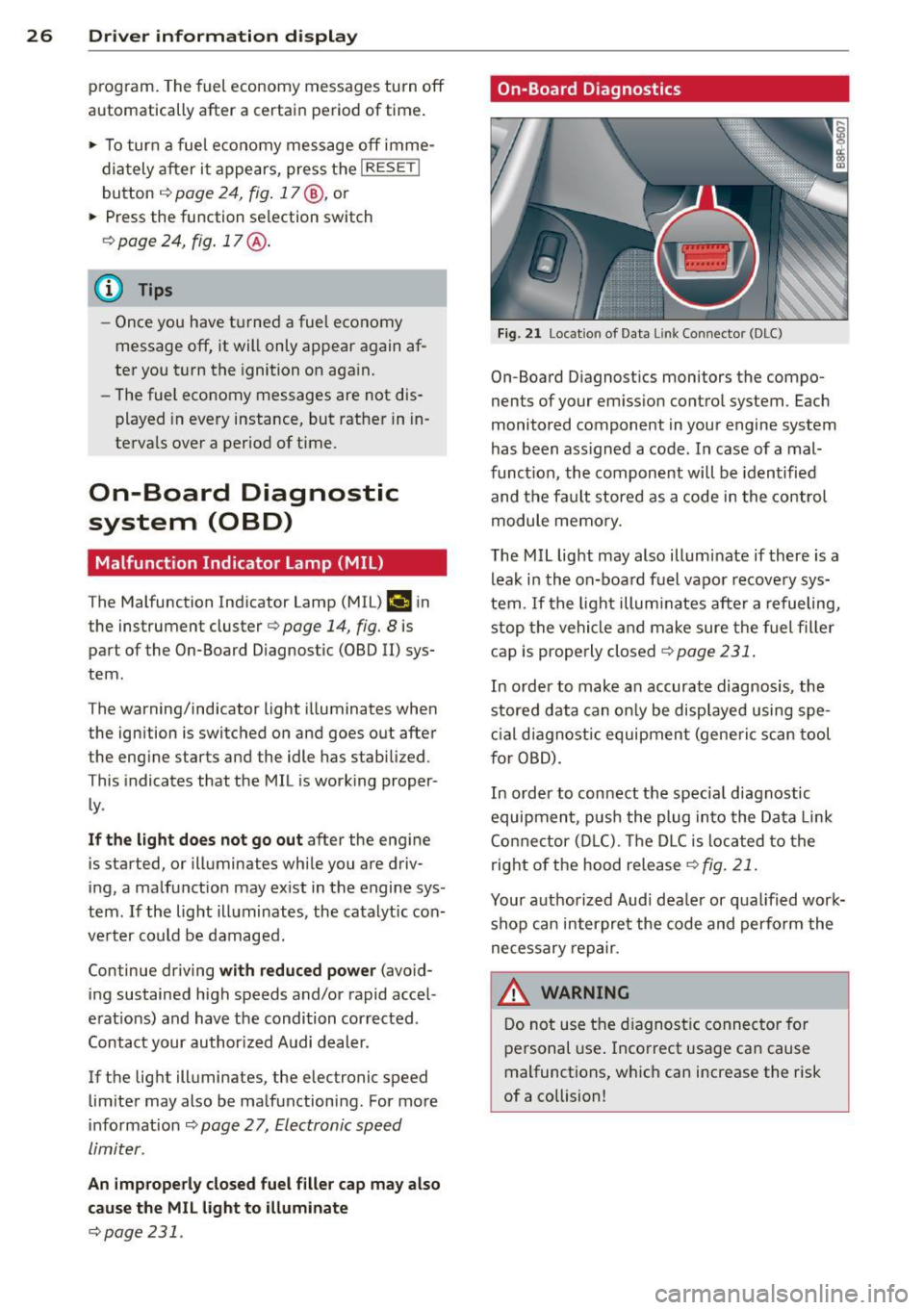
Fig. 21 Location of Data Li nk Conn ecto r (DLC)
On-Board Diagnostics monitors the compo
nents of your emission control system . Each
monitored component in your engine system
has been ass igned a code . In case of a mal
function, the component will be identified
and the fault stored as a code in the control
module memo ry.
The MIL light may also illuminate if there is a
leak in the on-board fuel vapor recovery sys
tem .
If the light illuminates after a refueling,
stop the vehicle and make sure the fuel filler
cap is properly closed
Q page 231.
In order to make an accurate diagnosis , the
stored data can only be displayed using spe
cial diagnostic equipment (generic scan tool
f or OBD).
In order to connect the spec ia l diagnostic
equipment , push the plug into the Data Link
Connector (DLC). Th e DLC is located to the
right of the hood release
Qfig. 21.
Your authorized Audi dea ler or qualified work
shop can interpret the code and perform the
necessary repair.
~ ARNING
Do not use the diagnostic connector for
personal use. Incorrect usage can cause
malfunctions, which can increase the risk
of a collision!
-
Page 29 of 316
Electronic speed
limiter
Your vehicle may be factory equipped with
tires that are rated for a maximum speed of
130 mph (210 km/h) . This is less than the
maximum speed of your vehicle . To reduce the
risk of sudden tire failure and loss of control if
the vehicle is ope rated at excessive speeds,
your veh icle also has an elect ronic speed limit
er. The electronic speed limiter prevents your
ve hicle from going faster than the tire speed
rating. For more information
c::> page 259 .
If the engine control unit rece ives fau lty vehi
cle road speed signals, the Malfunction Ind i
cator Lamp (MIU¢• will illuminate . If this
occurs, contact the nearest authorized Audi
dea ler for assistance.
A WARNING
Always observe the posted speed limits
and adjust your speed to suit prevailing
road, traff ic and weather conditions. Never
drive your vehicle faster than the maxi
mum speed ra ting of the tires insta lled.
Auto Check Control
Introduction
The Auto-Check control monitors the function
of certain veh icle features and components. It
simply makes sure these features and compo
nents are work ing properly . The Auto-Check
control wo rks as long as the ignition is on, as
well as whenever the vehicle is driven .
If a component is malfunctioning or if the need for an urgent repair has been detected,
this wi ll appear in the instrument cluster dis
p lay. You will a lso hear a n aud ible warn ing
tone. The d isplays are color coded in either
red or yellow depending on their level of prior
ity.
A red symbo l means
Dang er, a ye llow symbo l
indi cates
W arning . In certain s ituations, in
formation message for the dr iver appear in
additio n to the red and yellow symbols .
Driver inform ation di spl ay 2 7
Note about autom atic transmi ssion
T he Au to-Che ck Con trol wi ll automa tically
perform a test each t ime you sw itch on the ig
nition. With the selecto r lever in P or N, the
following message appears in the display:
When stationar y appl y brake pedal while se
lect ing gear
When you se lect a d iffe ren t gear (for exam
ple: R, D, etc.), t he mes sage will disappea r
and the Auto-Check f unct ion is displayed .
If there is a malfunct ion, then the malfu nc·
tion message will appear about 15 seconds af
te r you start the vehicle. At the same time you
will hear a wa rning tone.
Driver information messages
Driver information messages are shown in the
instrument cluster display in addition to sym
bols .
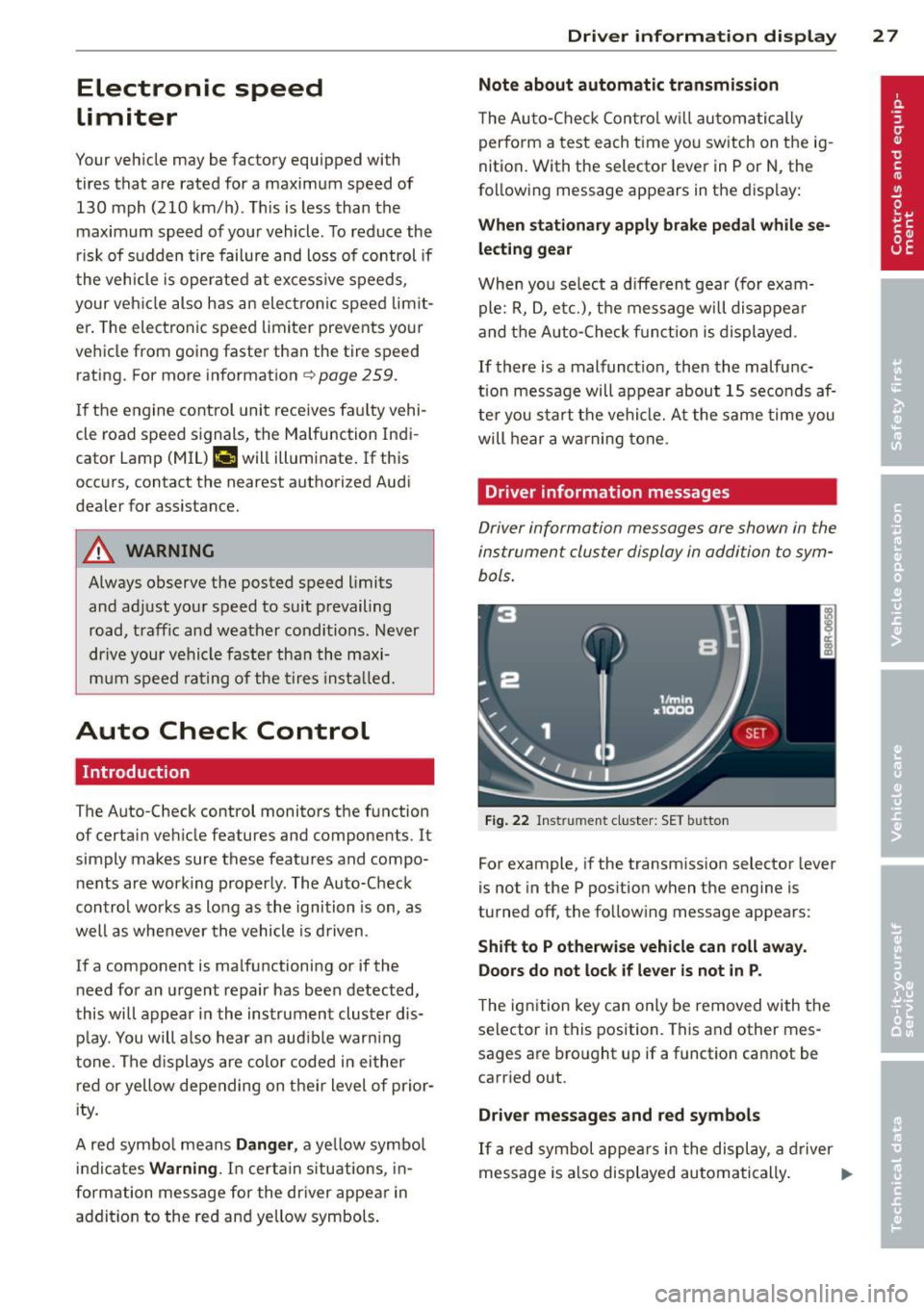
Fig . 2 2 Instrument cluster: SET b utto n
For example, if the transmission selector lever
is not in the P position when the engine is
turned off, the follow ing message appears :
Shift to P otherwise vehicle can roll away.
Door s do not lock if le ver is not in P .
The ign ition key can only be removed with the
selector in this position. This and other mes
sages are bro ught up if a function cannot be
carr ied out .
Driver messages and red s ymbols
If a red symbol appears in the display, a driver
message is also displayed au toma tically . ..,..
Page 30 of 316
28 Driver information d isplay
F or example, the symbol for a p roblem with
engine oi l pressure . appears i n the display .
The fo llow ing message appears:
Turn off engine! Oil pre ssure too low
The driver message in the display goes out af
ter about
5 seconds. The dr iver message ca n
b e d isp layed again by briefly pressi ng the
ISE Tlbut ton
r:::;, fig. 22.
Driver messages and yellow symbols
If a ye llow symbo l appears in the display, a
d river message is a lso displayed automat ica l
l y.
For example, the symbo,
(-$ appea rs in the
d isplay, ind icati ng low w indshield was her flu
id leve l. The follow ing message also appears:
Please refill washer fluid
The driver message disappears after a few
seconds . The driver message can be d isp layed
again by b rief ly pressing the !SET I button.
Red symbols
A red symbol means DANGER .
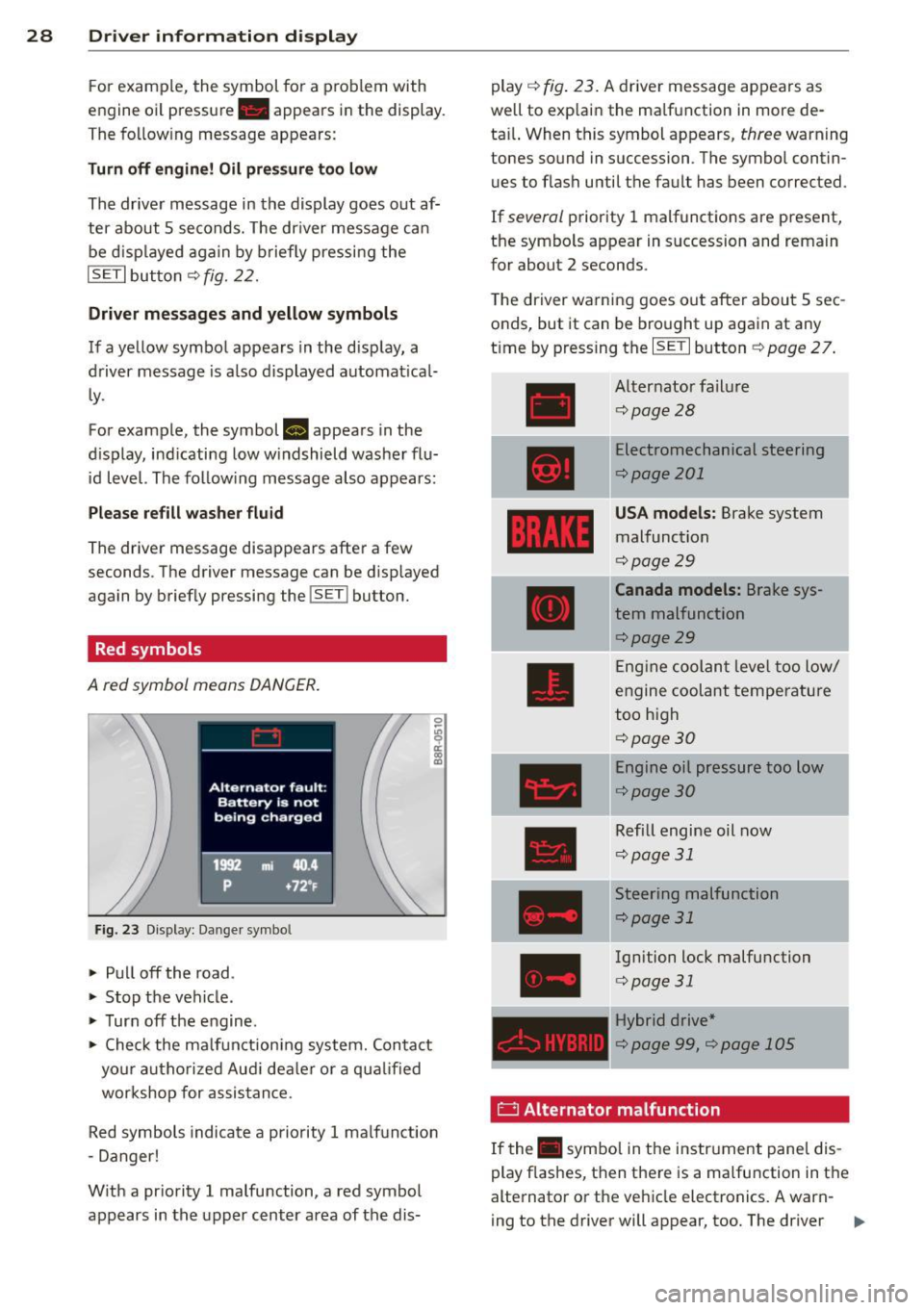
Fig . 2 3 Disp lay: Da nge r sy mbo l
" Pull off the road .
" Stop t he vehicle .
" Turn off the e ngine.
" Check the ma lf u nction ing system. Con ta ct
yo ur autho rize d Au di dea ler o r a q ua lified
wor kshop for assis tance .
Red symbols indicate a priority 1 ma lf u nction
- Danger!
W it h a pr iority 1 malfu nction, a red symbol
appears in the upp er center area of the dis- play
r:::;,
fig . 23. A drive r message ap pears as
well to exp lai n the ma lfunction in more de
ta il. When this symbol appears ,
three warning
tones so und in succession . T he symbo l contin
u es to flash unti l th e fault has been corrected.
If several priority 1 malfunctions are present,
the symbo ls appear in s uccession and rema in
for about
2 seconds.
The driver wa rning goes o ut after about
5 sec
onds, but it can be bro ught up aga in at any
t ime by press ing the ISET I button
r:!;> page 2 7 .
Alt ernator fa il ur e
r:!;> pag e 28
Electrom echanical steering
r:::;,page20 1
USA models: Brake system
malfunction
r:!;> page 29
Canada models: Brake sys
tem malfunction
r:::;,page29
En gine coolan t leve l too low/
e ngine coolant tempe rature
too h igh
c:::>page30
Eng ine oil pressure too low
c:::> page 30
Refill engine oil now
c:::> pag e 31
Stee ring malfunction
c:::> page 31
Ignition lock malfu nction
r:::;, page31
Hybrid drive *
r:::;,page 99, c;,page 105
E3 Alternator malfunction
If the . symbo l in t he instr ument pane l dis
play flashes, t hen t he re is a ma lfunction in t he
alternato r or the ve hicle elect ronics . A warn-
ing to the driver will appear, too. The driver
II>
Page 33 of 316
-The yellow oil level warning indication
II requires oil refill or workshop serv
ice without delay. Do not wait until the
red oil pressure warning. starts to
flash before you respond to the low oil
level warning
11-By then, your engine
may already have suffered serious dam
age .
~ . Fill engine oil now
WARNING: Please add oil immediately
If the . symbol lights up, then the o il has to
be re plenished r ight now ~
page 238 .
~- Steering malfunction
If there is a malfunction in the electronic
steering column lock, the steering cannot b e
unloc ked .
If the . symbol i n the display blinks , th ere
i s a malfunction in the electronic steer ing col
u m n lock . A driver message a ppears as well to
e xplain t he malfu nction in m ore deta il. The
d river war ning goes ou t a fter abou t
5 se c
on ds, but it can be brough t up at an y time by
p ress ing t he
ISE TI but ton again.
Steering defective! Do not drive vehicle!
.,. Co ntact your nearest authorized Audi deal
er .
.,. Do
not tow yo ur vehicle .
A WARNING
Your vehicle must not b e towe d in th e
eve nt of a m alfu nction in the ele ctronic
s t eerin g colum n lo ck bec ause i t ca n not be
steered due to the l ocked steering . If it is
towed with the stee ring loc ked, t here is
the risk of an accident.
© -Ignition lock malfunction
A mal function in the ignition lock mus t be re
paired immediately .
If th e. symbol in the d isp lay blink s, there
i s a ma lfunc tion in the elec troni c ignition lo ck.
Driver information display 31
A dr iver message appea rs as we ll to ex plain
t h e malfunction i n mo re deta il. The dr iver
warning goes out after a bout 5 seconds, b ut it
can be b roug ht up at any time by pressing the
ISE TI b utt on again.
Ignition lock defective. Contact dealer!
.,. Do not tu rn th e e ngine o ff.
.,. Drive imme diate ly to an a uthor ized A udi
dea le r to have t he mal funct io n corrected .
If there is a mal fun ctio n in t he ele ct ro nic igni
tio n loc k, the igni tion can not b e turne d off.
Drive immediate ly to an au tho riz e d se rvice fa
c ili ty to have t he cause of t he malfunct ion cor
r ected .
On vehicle s wi th Conven ien ce key* , the eng ine
s h ould not b e swi tc h ed off usin g th e S tart/
Stop button because t he engine cannot be
started again afte r th e ignit io n has been
switc hed off.
· Yellow symbols
A yellow symbol me ans WA RNING .
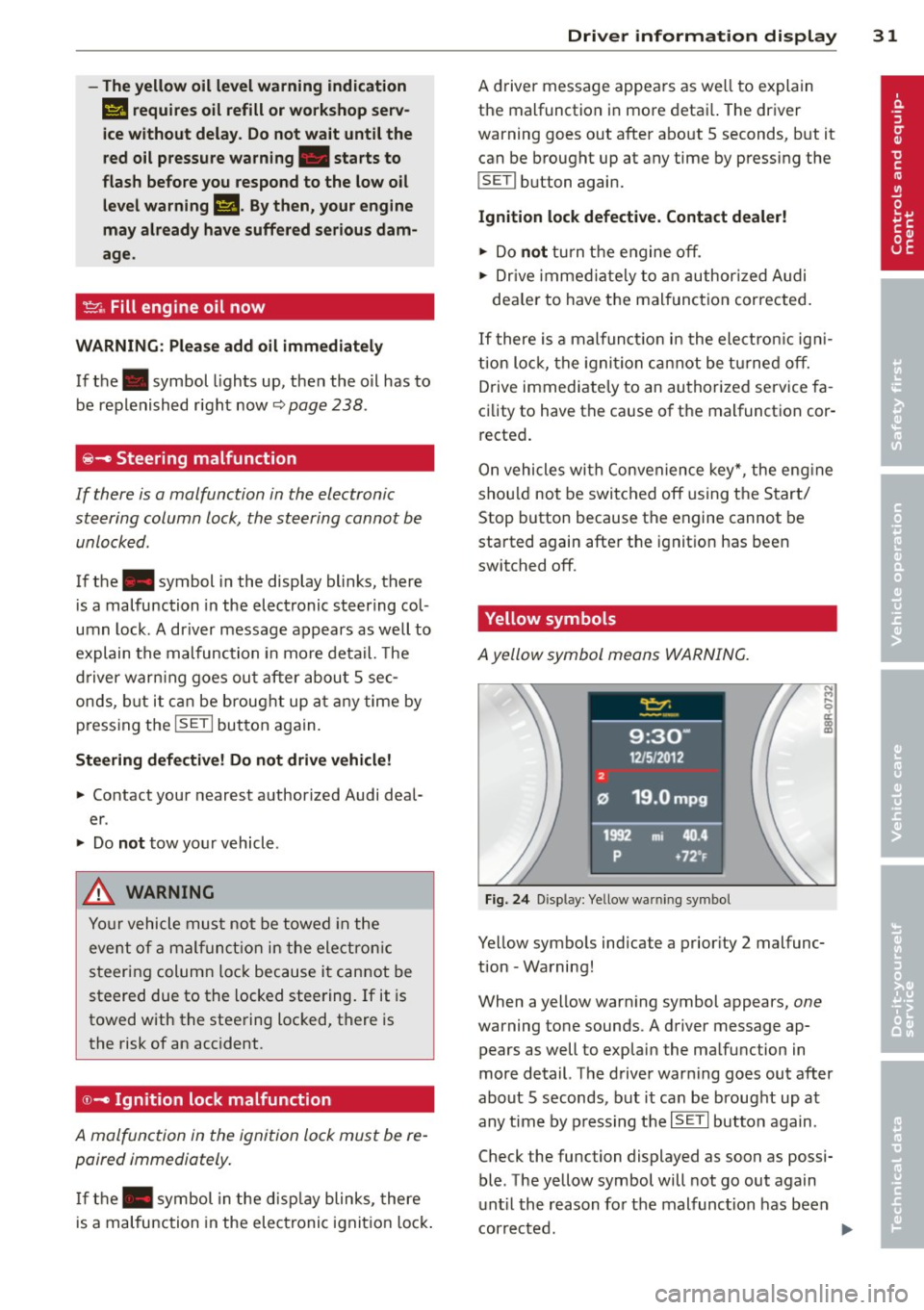
Fig. 24 Display: Yellow wa rning symbo l
N ..,
I
Yellow symbo ls ind icate a prior ity 2 malfunc
tion -Wa rning!
When a yellow warn ing symbol appears,
one
warning to ne sounds . A d river message ap
p ears as well to exp lai n the ma lfu nction in
m ore d etail. T he d rive r war ning goes out aft er
abo ut 5 seconds, but it ca n be broug ht up a t
any ti me by press ing t he
ISE TI button again .
Check the function displayed as s oon as possi
ble. The yellow symbol will not go out again
u nti l th e re ason fo r the mal func tion has bee n
cor rected.
Page 34 of 316
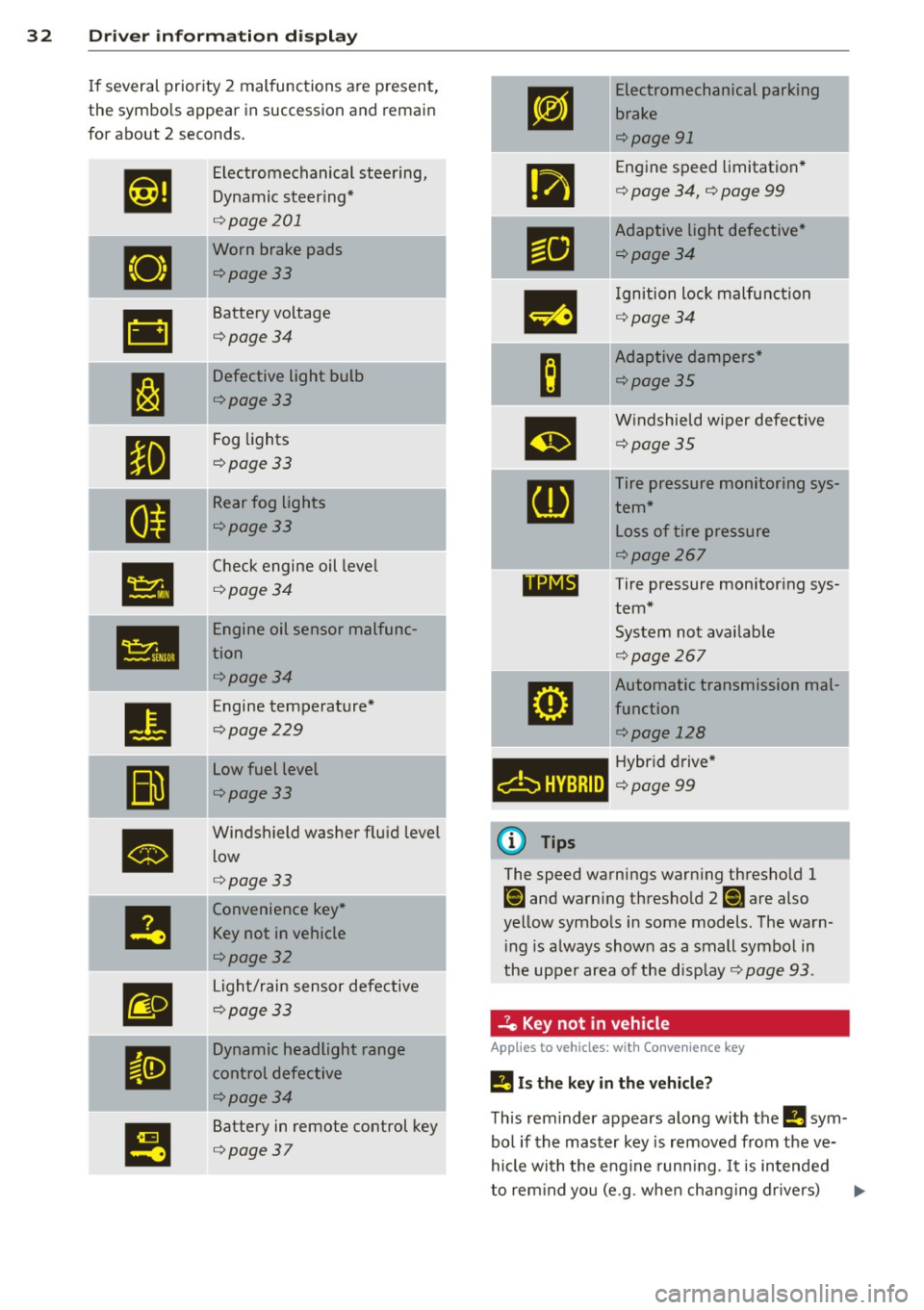
32 Driver in formation d isplay
If several priority 2 malfunctions a re present,
the symbols appear in succession and remain
for about 2 seconds .
,1,ij
Electromechanical steering,
Dynamic steering*
¢ page 201
•
Worn brake pads
¢page 33
&1
Battery voltage
¢page34
;....
J:J
Defective light bulb
¢page33
II
Fog lights
¢page 33
.... -
II
Rear fog ligh ts
¢page33
•
Check engine oil leve l
¢page34
Ill
Engine oil sensor malfunc-
tion
¢page34
•
Engine temperature*
¢page229
II
Low fuel level
¢page33
•
Windshield washer flu id level
low
¢ page33
!I
Convenience key *
Key not
in vehicle
¢page32
m
Light/rain sensor defective
¢page33
II
Dynamic headlight range
control defective
¢page34
I!
Battery in remote control key
¢ page 37
-
rm
.,
-
Ill
m
B
m
[DJ
11NIB
6HVBRID
(D Tips
E
lectromechanical parking
bra ke
¢page 91
Engine speed limitation *
¢ page 34, ¢ page 99
Adaptive light defective *
¢page34
Ignition lock malfunction
¢ page34
Adaptive dampers *
¢page35
Windshield wiper defective
¢page35
Tire pressure monitoring sys
tem*
L oss of tire pressure
¢page267
Tire pressure monitor ing sys
tem*
System not avai lab le
¢ page 267
Automatic transmission mal-I
function
¢page 128 j
Hybr id dr ive *
¢page99
The speed warnings warn ing thresho ld 1
Ct] and warning thresho ld 2 [i] are also
yellow symbo ls in some models . The warn
i ng is always shown as a small symbo l in
the upper a rea of the display ¢
page 93.
.Je Key not in vehicle
Applies to veh icles: w ith Convenience key
!I Is the key in the vehicl e?
Th is rem inder appears along with the !I sym
bo l if the master key is removed from the ve
hicle with the eng ine runn ing. It is intended
to rem ind you (e.g . whe n ch ang ing dr ivers) .,.
Page 35 of 316
not to continue the journey without the mas
ter key.
If the master key is no longer in the vehicle,
you cannot sw itch off the ignition after stop
ping the engine and you a lso cannot start the
engine again . You also cannot lock the vehicle
from the outs ide.
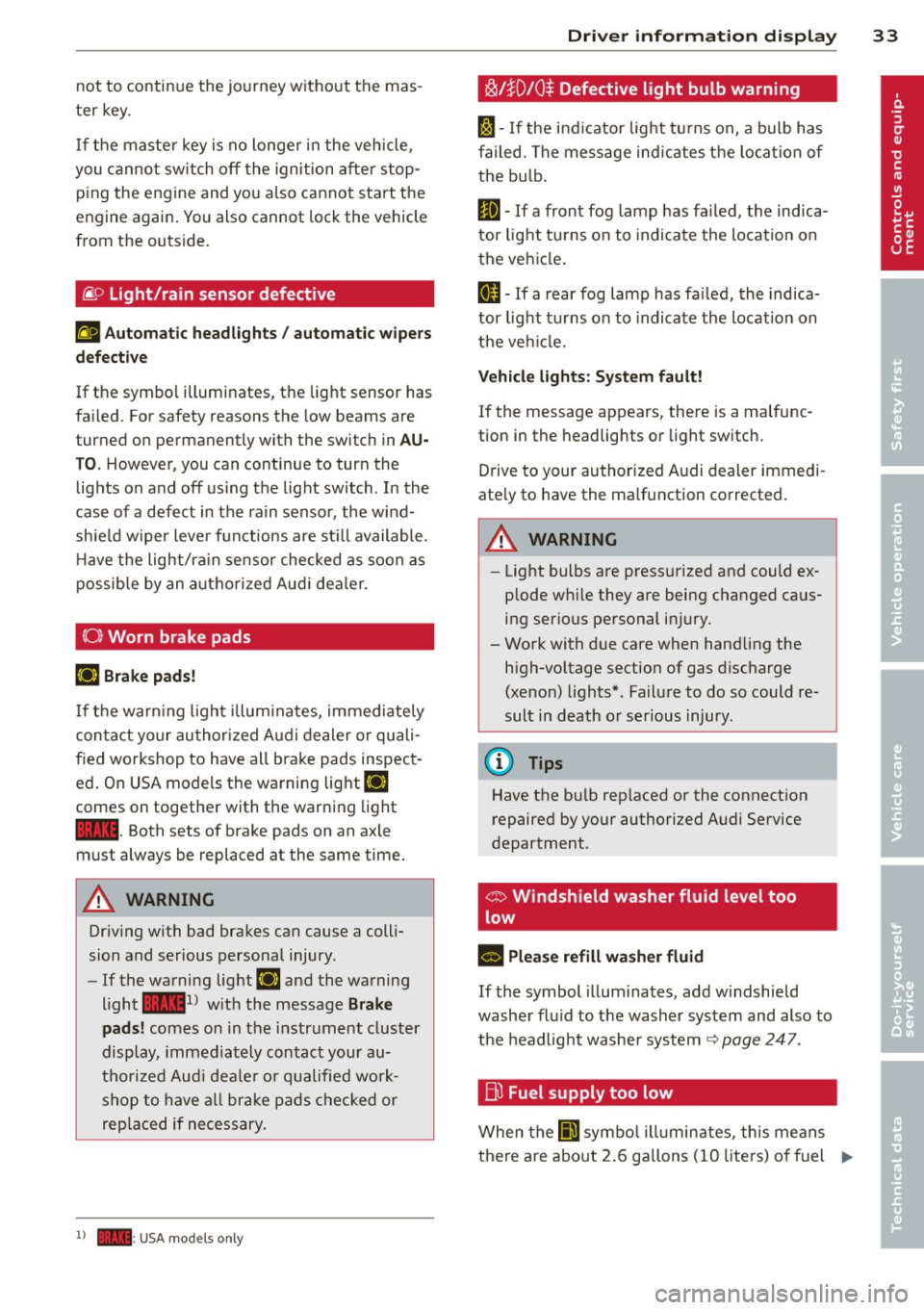
~ o Light/rain sensor defective
ral A utom atic he adlight s/ autom atic wi pers
d efect ive
If the symbol illuminates, the light sensor has
fa iled. For safety reasons the low beams are
turned on permanently with the switch in
A U
TO . However, you can continue to turn the
lights on and off us ing the light switch . In the
case of a defect in the rain sensor, the w ind
sh ie ld wiper lever functions are st ill available .
H ave the light/rain sensor checked as soon as
possible by an autho rized Aud i dea ler.
(0) Worn brake pad s
[IJ Brake pad s!
If the warn ing l ight illum inates, immediately
contact your authorized A udi dealer or quali
fied workshop to have all brake pads inspect
ed . On USA models the warning light
[IJ
comes on together with the warning light
1111 . Both sets of brake pads on an axle
must always be replaced at the same time.
A WARNING
Dr iv ing with bad brakes can cause a coll i
sion and serious personal injury.
- If the warning light
[IJ and the warning
light
11111> w ith the message B rak e
pads!
comes on in the instr ument cluster
display, immediately contact your au
tho rized Aud i deale r or qualified work
shop to have a ll brake pads checked or
replaced if necessary.
1) - : USA mod els only
-
Dri ver information di spla y 33
~!}010 $ Defective light bulb warning
I -If the ind icator light tu rns on, a bulb has
failed . The message ind icates the location of
the bu lb.
II -If a front fog lamp has fa iled, the ind ica
tor light tu rns on to indica te the location on
the vehi cle.
ml -If a rear fog lamp has fa iled, the indica
tor light turns on to indicate the location on
the ve hicl e.
Veh icl e light s: Sys te m fault!
If the message appears, there is a malfunc
tion in the headlights or light sw itch.
Drive to your authorized A udi dealer immedi
ate ly to have the malfunction corrected.
A WARNING
- Light bulbs are pressurized and could ex
plode wh ile they are being changed caus
ing serious personal injury.
- Work with due care when handling the high-voltage section of gas discharge
(xenon) lights* . Failure to do so could re
sult in death or serious injury .
(D Tips
Have the bulb replaced or the connection
repaired by your authorized Audi Service
department .
o:> Windshield washer fluid level too
low
- Please re fill w asher fluid
If the symbol il lum inates, add w indshield
washer flu id to the washer system and also to
the headlight washe r system
c::> page 247.
Eli) Fuel supply too low
When the Ii'] symbo l ill uminates, this means
there a re abo ut 2.6 gallons (10 liters) o f fuel ..,.
Page 36 of 316
34 Driver information display
left in the fuel tank. Time to refuel!
¢page 230.
If the symbol lights up, even when there is
ample fuel in the tank, and the text
Fuel tank
system malfunction! Contact dealer
appears
in the display, there is a fault in the system.
Contact an author ized A udi dealer to have the
fault rect ified.
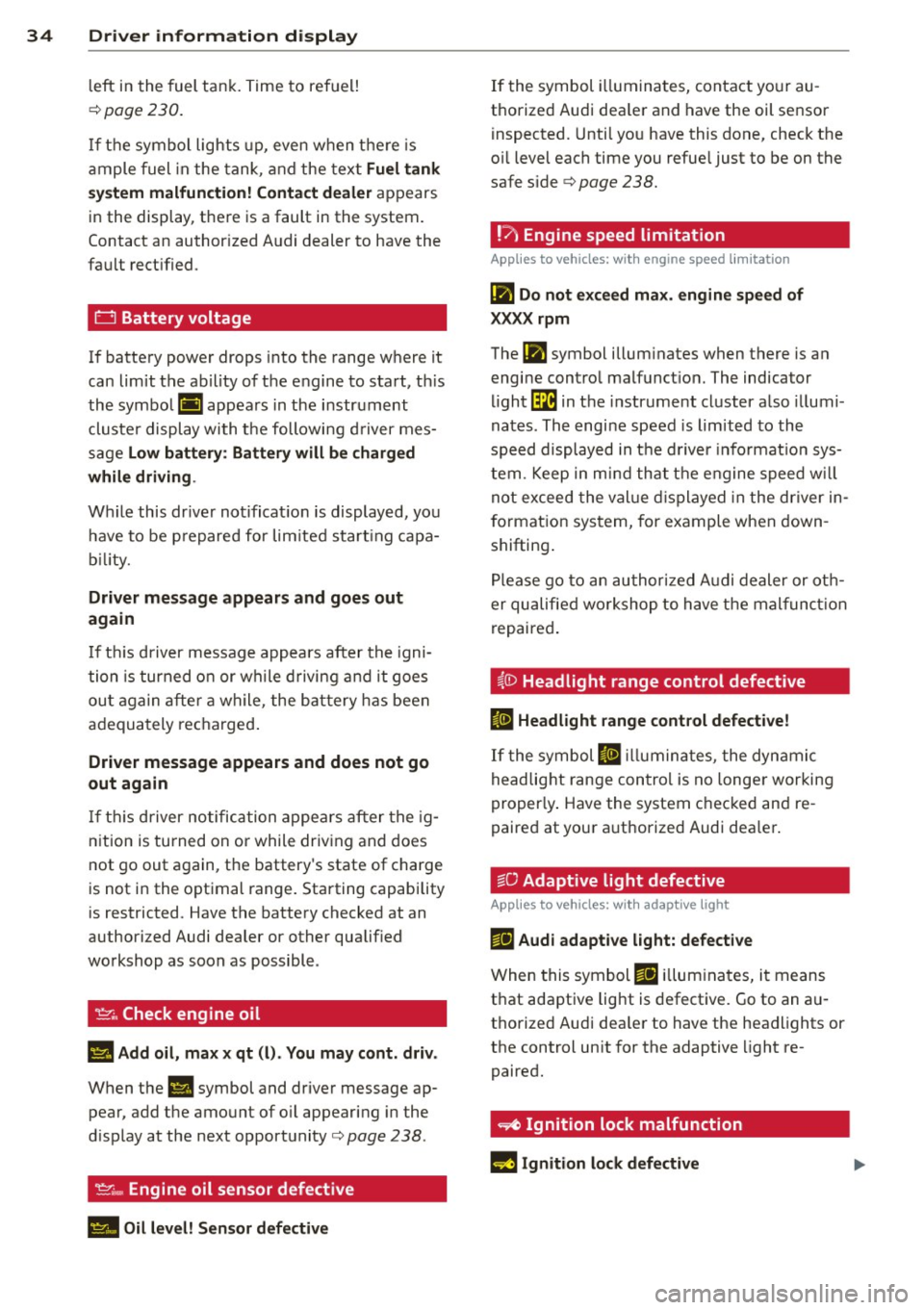
0 Battery voltage
If battery power drops into the range where it
can limit the ability of the engine to start, th is
the symbol (•) appears in the instrument
cluster display with the following driver mes
sage
Low battery : Battery will be charged
while driving .
While this dr iver not ificat ion is displayed, you
have to be p repared for lim ited start ing capa
bility.
Driver message appears and goes out
again
If thi s driver message appears after the igni
tion is turned on or while driving and it goes
out again after a while, the battery has been
adequately recharged .
Driver message appears and does not go
out again
If this driver notification appea rs after the ig
nition is turned on or while driving and does
not go out again, the battery's state of charge
is not in the optimal range. Starting capab ility
is restricted . Have the battery checked at an
authorized Audi dealer or other qualif ied
workshop as soon as possible .
~. Check engine oil
II Add oil, max x qt (l). You may cont. driv.
When the II symbol and driver message ap
pear, add the amount of oil appearing in the
d isplay at the next opportunity¢
page 238.
't'.::r.., Engine oil sensor defective
II Oil level! Sensor defective
If the symbol illuminates, contact your au
thorized Audi dea ler and have the oil sensor
inspected. Until you have this done, check the
o il level each time you refue l just to be on the
safe side ¢
page 238.
!'7 Engine speed limitation
Applies to vehicles: with engine speed limitation
(m Do not exceed max. engine speed of
XXXX rpm
The (m symbol illum inates when there is an
engine control malfunct ion. The indicator
light~ in the instrument cluster also illumi
nates . The engine speed is limited to the
speed displayed in the driver informat ion sys
tem. Keep in mind that the engine speed will
not exceed the value displayed in the driver in
f o rmation system, for example when down
shifting .
Please go to an authorized Audi dealer or oth
er qualified workshop to have the malfunction
repaired.
~0 Headlight range control defective
Iii Headlight range control defective!
If the symbol II illuminates, the dynamic
headlight range control is no longer working
properly . Have the system checked and re
paired at your a uthorized Audi dea ler .
§0 Adaptive light defective
Applies to vehicles: wit h adaptive light
ma Audi adaptive light: defective
When this symbol ma illuminates, it means
that adaptive light is defective. Go to an au
thorized Audi dea ler to have the headlights or
the control un it for the adaptive light re
paired.
~ Ignition lock malfunction
m Ignition lock defective
Page 38 of 316
36 Opening and closing
Opening and closing
Keys
Key set
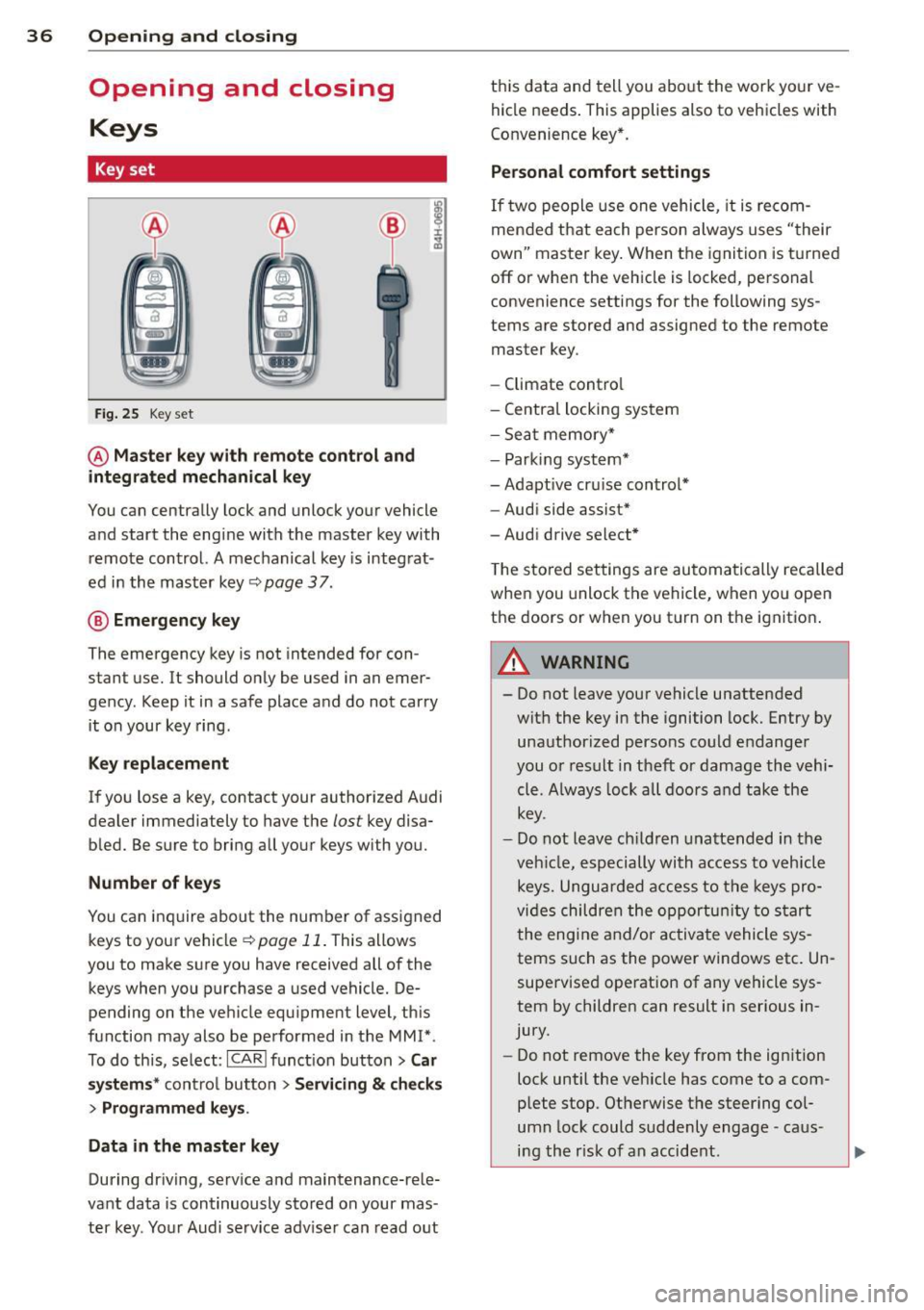
Fig. 25 Key set
@ Master key with remote control and
integrated mechanical key
You can centrally lock and unlock your vehicle
and start the engine with the master key with remote control. A mechanical key is integrat
ed in the master key
c::;, page 3 7.
@ Emergency key
The emergency key is not intended for con
stant use.
It should only be used in an emer
gency. Keep it in a safe place and do not carry
it on your key ring.
Key replacement
If you lose a key, contact your authorized Audi
dealer immediately to have the
lost key disa
bled. Be sure to bring all your keys with you.
Number of keys
You can inquire about the number of assigned
keys to your vehicle
c::;, page 11. This allows
you to make sure you have received all of the
keys when you purchase a used vehicle. De
pending on the vehicle equ ipment level, this
function may also be performed in the MM!* .
To do this, select:
ICARI funct ion button> Car
systems * control button > Servicing & checks
> Programmed keys .
Data in the master key
During driving, serv ice and maintenance-rele
vant data is continuously stored on your mas
ter key. Your Audi serv ice adv iser can read out this data and
tell you about the work your ve
hicle needs . This applies also to vehicles with
Convenience key *.
Personal comfort settings
If two people use one vehicle, it is recom
mended that each person always uses "their
own" master key. When the ignition is turned
off or when the vehicle is locked, personal
convenience settings for the following sys
tems are stored and assigned to the remote
master key.
- Climate control
- Central locking system
- Sea t memory*
- Parking system*
- Adaptive cruise control*
- Audi side assist*
-Audi drive select*
T he stored settings are automatically recalled
when you unlock the vehicle, when yo u open
the doors or when you turn on the ignit ion .
A WARNING ......... -
- Do not leave your vehicle unattended
wit h the key in the ignition lock. Entry by
unauthorized persons could endanger
you or result in theft or damage the vehi
cle. A lways lock all doors and take the
key.
- Do not leave children unattended in the
veh icle, especially with access to vehicle
keys. Unguarded access to the keys pro
vides children the opportunity to start
the engine and/or activate vehicle sys
tems such as the power windows etc. Un
supervised operation of any vehicle sys
tem by children can result in serious in
jury.
- Do not remove the key from the ignition
lock until the veh icle has come to a com
plete stop. Otherwise the steering col
umn lock could suddenly engage -caus
ing the r isk of an accident.
Page 40 of 316
38 Openin g and clo sing
Emergency unlocking of the ignition key
In the event of malfunc tions in the electrical
system, it may happen that you cannot re
move the ignition key.
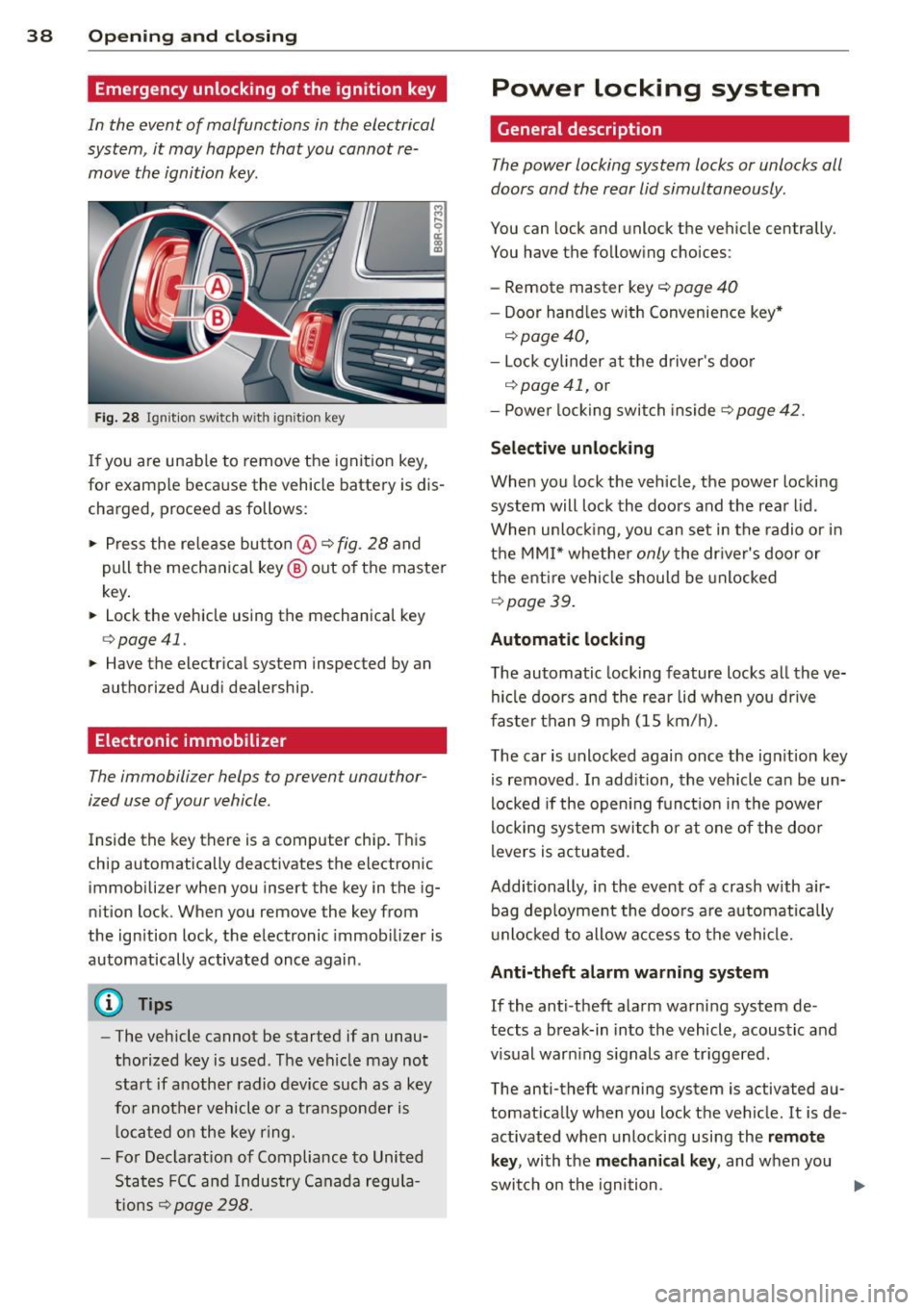
Fi g. 28 Ig nit io n swi tc h with igni tio n key
If you are unable to remove the ignit ion key,
for example because the vehicle battery is dis
charg ed, proceed as follows :
• Press the release button @
c::> fig. 28 and
pull the mechanical key ® out of the master
key .
• Lock the vehicle using th e m echanical key
c::> page 41.
• Have the elect ric al system inspected by an
au thor ized Audi dealership .
Electronic immobilizer
The immobilizer helps to prevent unauthor
ized use of your vehicle.
Inside th e key th ere is a compute r chip . This
chip automatically deactiv ates the elect roni c
immobili zer when you insert the key in the ig
n ition lock. When you remove the key from
the ign ition lock, the e lectronic immob ilizer is
automatically activated once again .
@ Tips
-The vehicle cannot be started if an unau
thorized key is used . The vehicle may not
start if another radio device such as a key
fo r another vehicle o r a tra nsponder is
l oca ted on the key ring .
- For Decla rat ion of Compliance to United
States FCC and Indus try Canada regula
tions
c::> page 298.
Power locking system
General description
The power locking system locks or unlocks all
doors and the rear lid simultaneously .
You can lock and unlock the vehicle cen trally .
You have the following choices :
- Remote master key
c::> page 40
-Door hand les with Convenience key *
c::>page40,
- Lock cylinder at the driver 's doo r
c::>page 41, or
- Powe r locking switch inside
c::> page 42.
Selective unlocking
When you lock the vehicle, the power locki ng
system will lock the doo rs and the rear l id .
When unloc king, you can set in the radio or in
t h e MMI* whethe r
only the dr iver's door or
t h e enti re veh icle should be unlocked
c::> page 3 9.
Automat ic lock ing
The automatic locking feature locks a ll the ve
hicle doors and the rear li d w hen you dr ive
f as ter than 9 mph (15 km/ h).
The car is unlocked again once the ign ition key
is removed . In add ition, the vehicle ca n be un
locked if the open ing fun ct ion in the power
locki ng sy stem switch or at one of the door
levers is actua ted .
Additionally , in the event of a crash with air
bag deployment the doo rs a re automatically
u nlocked to allow access to the vehicle.
Anti-theft alarm warning system
If the anti -theft ala rm warn ing system de
tects a b reak-in in to the vehicle, acoustic and
visual war ning s ignals are tr iggered .
The anti-theft warning system is activated au
tomat ically when you lock t he vehicle . It is de
activated when unlocki ng using the
remote
key , with the mechanical key , and when you
swit ch on the ignition .
IJII,
Page 41 of 316
The alarm also turns off when the alarm cycle
has expired.
Turn signals
When you unlock the vehicle, the turn signals
flash twice. When you lock the vehicle , the
turn signals flash once. If they do not flash,
one of the doors, the rear lid or the hood is
not locked.
Unintentionally locking yourself out
In the following cases there safeguards to
prevent you locking your remote master key in
the vehicle:
- The vehicle does not lock with the power
locking switch
¢ page 42 if the driver's
door is open.
- On vehicles with Convenience key* , if the
most recently used master key is in the lug
gage compartment, the rear lid is automati
cally unlocked again after it is closed.
Do not lock your vehicle with the
remote mas
ter key
or Convenience key* until all doors
and the rear lid are closed. In this way you
avoid locking yourself out accidentally.
A WARNING
- When you leave the vehicle, always re
move the ignition key and take it with
you. This will prevent passengers (chil
dren, for example) from accidentally be
ing locked in the vehicle should they acci
dentally press the power locking switch
in the front doors .
- Do not leave children inside the vehicle
unsupervised . In an emergency it would
be impossible to open the doors from
the outside without the key.
@ Tips
- In the event of a crash with airbag de
ployment all locked doors will be auto
matically unlocked to give access to the
vehicle occupants from the outside .
-If the power locking system should mal
function, you can lock the driver's door
using the mechanical key
¢ page 42.
-
Opening and closing 39
- If the power locking system should fail,
you can still open the fuel tank flap in an
emergency
¢ page 232.
- You are well advised not to keep valua
bles inside an unattended vehicle, visible
or not. Even a properly locked vehicle
cannot provide the security of a safe.
- If the LED in the upper edge of the driv
er's door panel comes on for about 30
seconds after the vehicle is locked, there
is a malfunction in the power locking or
the anti-theft warning system . Have the
malfunction corrected by an authorized
Audi dealership or qualified repair facili
ty.
Setting power locking
The driver can determine the functions for
power locking in the radio or in the
MM!*.
.,. Select: I CAR ! function button > Central lock
ing .
Or
.,. Select:
,.., I c=- A,...., Rc-, 1 function button > Car sys-
tems* control button > Vehicle settings >
(Central locking)* .
Unlocking single door/Unlock doors -
you can
specify which doors unlock when you open the
vehicle.
- Selecting
Off/All and pressing the [®] button
on the remote control key unlocks the entire
vehicle.
- Selecting
On/Driver and pressing the~ but
ton on the remote control key once unlocks
only the driver's door. In vehicles with a con
venience key*, only the door whose handle
you pull will unlock. If you press the
Iii but
ton twice, the entire vehicle will unlock. If
you press the~ button, the entire vehicle
will always lock .
Trunk lid/tailgate/Lock exterior trunk handle
-if you select On , the rear lid handle locks
¢ page 43, fig. 35 . In this case, the rear lid
can be opened with the
1£1 button on the mas
ter key
¢ page 40, fig. 29 or with the 1£1
button in the driver's door ¢ page 43,
fig. 34.