ignition AUDI Q5 2013 Owner's Manual
[x] Cancel search | Manufacturer: AUDI, Model Year: 2013, Model line: Q5, Model: AUDI Q5 2013Pages: 316, PDF Size: 78.89 MB
Page 43 of 316
Locking v ehicle
• Move the selector leve r to the P position
(automatic transmiss ion), otherwise the ve
hicle cannot be locked.
• Touch th e sensor at the door hand le
c:> fig . 30 to lock the vehicle c:> A in General
description on page 39.
Do not reach inside
the door handle .
T he vehicle can be locked and unlocked at any
door. It depends on the settings in the radio
or in the
MM!* whether the entire vehicle is
unlocked or one of the doors
c:> page 39 . The
master key must be within a range of about
5 feet (1.5 meters) from the appropr iate door
or the rear lid .
It makes no difference whether
the master key is in your jacket pocket or in
your brief case.
If you grip the door handle while locking, this
can adversely affect the lock ing funct ion.
It is not possible to re -open the door for a
brief period directly after closing it . Th is al
l ows you to ensure that the doors are properly
l ocked.
& WARNING
Read and follow a ll WARN INGS c:> &. in
General description on page 39.
@ Tips
-
If your vehicle has been standing for an ex
tended period, please note the follow ing:
- The proximity sensors are deactivated af-
ter a few days to save power. You then
have to pull on the door handle once to
u nlock the veh icle and a second time to
open the veh icle.
- To prevent the battery from being dis
charged and to preserve your vehicle's
ability to start for as long as possible,
the energy management system gradu
ally switches off unnecessary conven
ience funct ions. It is possible t hat you
will not be able to unlock your vehicle us i ng these conven ience functions .
Openin g an d clos ing 41
-For Declaration of Compliance to United
States FCC and Industry Canada reg ula·
t ions
c:> page 298.
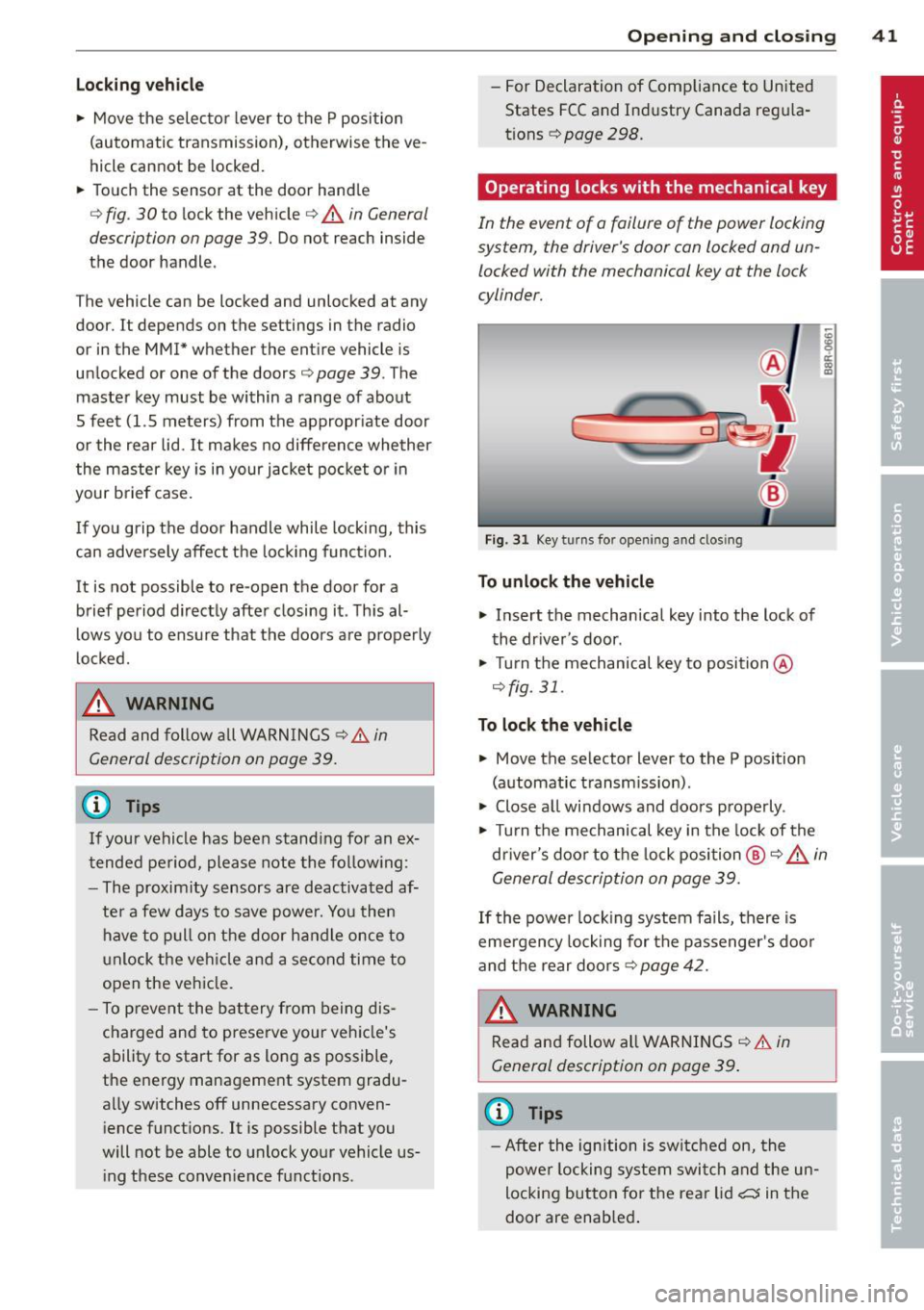
Operating locks with the mechanical key
In the event of o failure of the power locking
system, the driver's door can locked and un
locked with the mechanical key at the lock
cylinder.
Fig. 31 Key turns fo r open ing and clos ing
To unlo ck the vehicle
• Insert the mechanical key into the lock of
the dr iver's door .
• Turn the mechanical key to position @
c:>fig. 31 .
To lock th e vehicl e
• Move the selector lever to the P pos ition
(automat ic t ransm ission) .
• Close a ll windows and doors properly.
• Turn the mechanical key in the lock of the
d river's door to the lock position @
c:> A in
General description on page 39.
If the power lock ing system fails, there is
emergency lock ing for the passenger's doo r
and the rear doors
c:> page 42.
WARNING
Read and follow all WARNINGS c:> &. in
General description on page 39 .
(D Tips
-After the ignition is switched on, the
powe r locking system swit ch and the un
locking button fo r th e rear lid~ in the
door are enab led .
Page 44 of 316
42 Opening and clo sing
locking and unlocking the vehicle from
inside
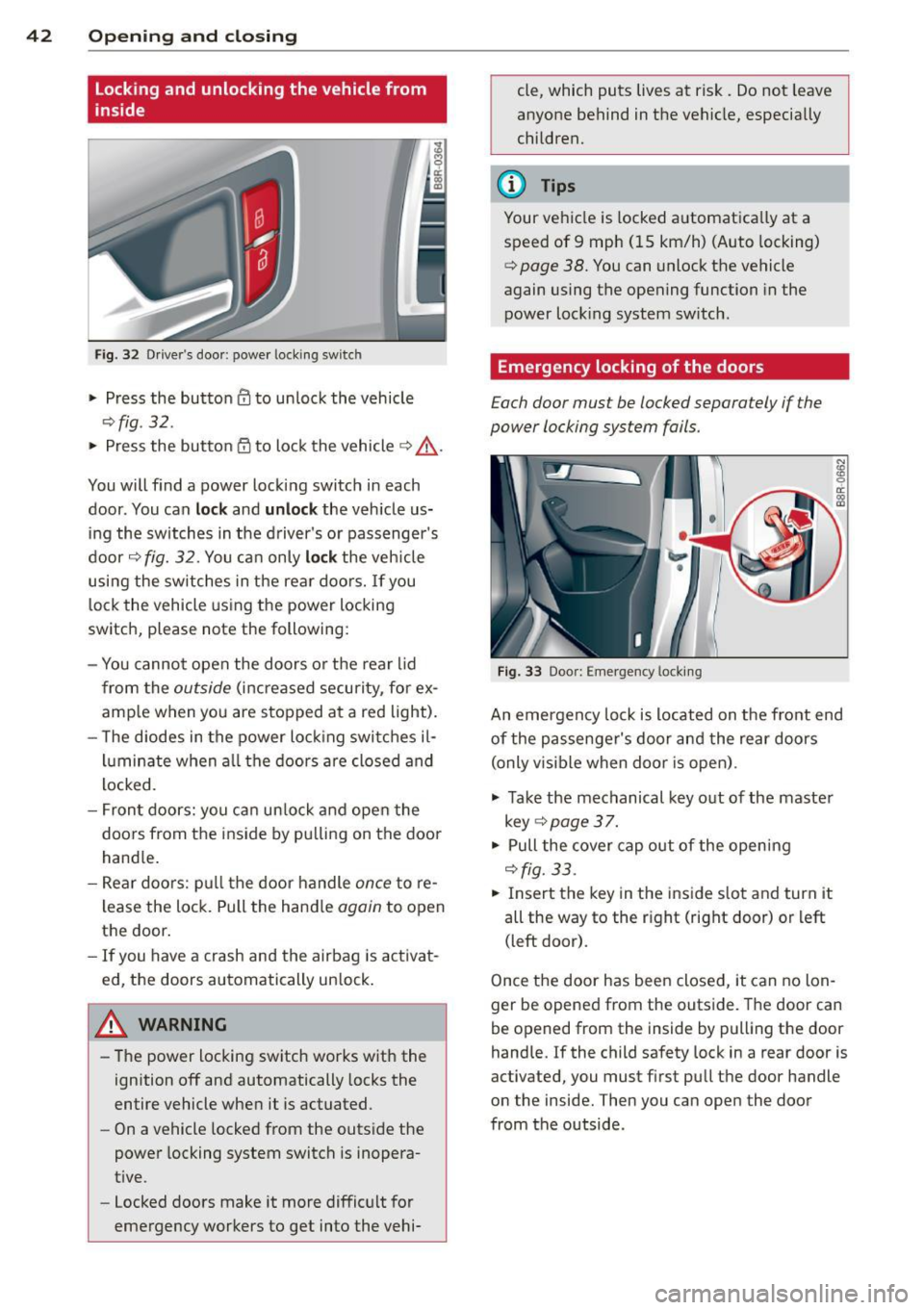
Fig . 32 Driver 's door : powe r locking switc h
.. Press the butto n El to unlock the vehicle
~fig . 32.
.. Press the button 5:'.t to loc k the vehicle ¢ ,&..
You will find a power Locking switch in each
door . You can
lo ck and unlock the veh icle us
ing the switches in the driver's or passenger's
door ¢
fig. 32. You ca n only loc k the veh icle
usi ng the switches in the rear doors. If you
l ock the vehicle using the power locking
switch, please note the following:
- You canno t open the doors o r the rear l id
from the
outside (increased security, for ex
amp le when you are s topped at a red light).
- The diodes in the power loc king switches il-
lu minate when a ll the doors are closed and
l ocked.
- Front doors: you ca n un lock and ope n the
doors from the ins ide by pu lling on the door
hand le .
- Re ar doo rs: p ull the door handle
once to re
l ease the lock. Pull the hand le
again to open
the door .
- If you have a crash and the airbag is activa t
ed, the doors automatically un lock .
A WARNING
-The power locking sw itch works wit h the
ignition off and automatically locks the
entire vehicle when it is actuated .
- On a vehicle locked from the outside the
power locking system switch is inopera
t ive.
- Locked doors make it more diffic ult for
emergency workers to get into the vehi- cle, which puts lives at risk. Do not
leave
anyone behind in the vehicle, especially
children.
(D Tips
Your ve hicle is locked a utomat ica lly at a
speed of 9 mph (15 km/h) (Auto locking)
¢
page 38. You can unlock the vehicle
again using the opening function in the
power Lock ing system sw itch.
Emergency locking of the doors
Each door must be locked separa tely if the
power locking system fails .
Fi g. 33 Doo r: E m ergency locking
An emergency lock is located on the front end
of the passenge r's door and the rear doors
(only v isible when door is open) .
.. Take the mechanical key out of the maste r
key ¢
page 3 7.
.. Pull the cover cap out of the open ing
¢ fig. 33 .
.. Insert the key in the inside slo t and turn it
all the way to the r ight (right door) or left
(left door).
Once the door has been closed, it can no lon
ger be opened from the outs ide. The door can
be opened from the inside by pulling the door
hand le.
If the child safety lock in a rear door is
activated, you must f irst pu ll the door handle
on the inside. Then you can open the door
from the outside .
Page 48 of 316
46 Opening and clo sing
Child safety locks
Child safety locks in the rear doors
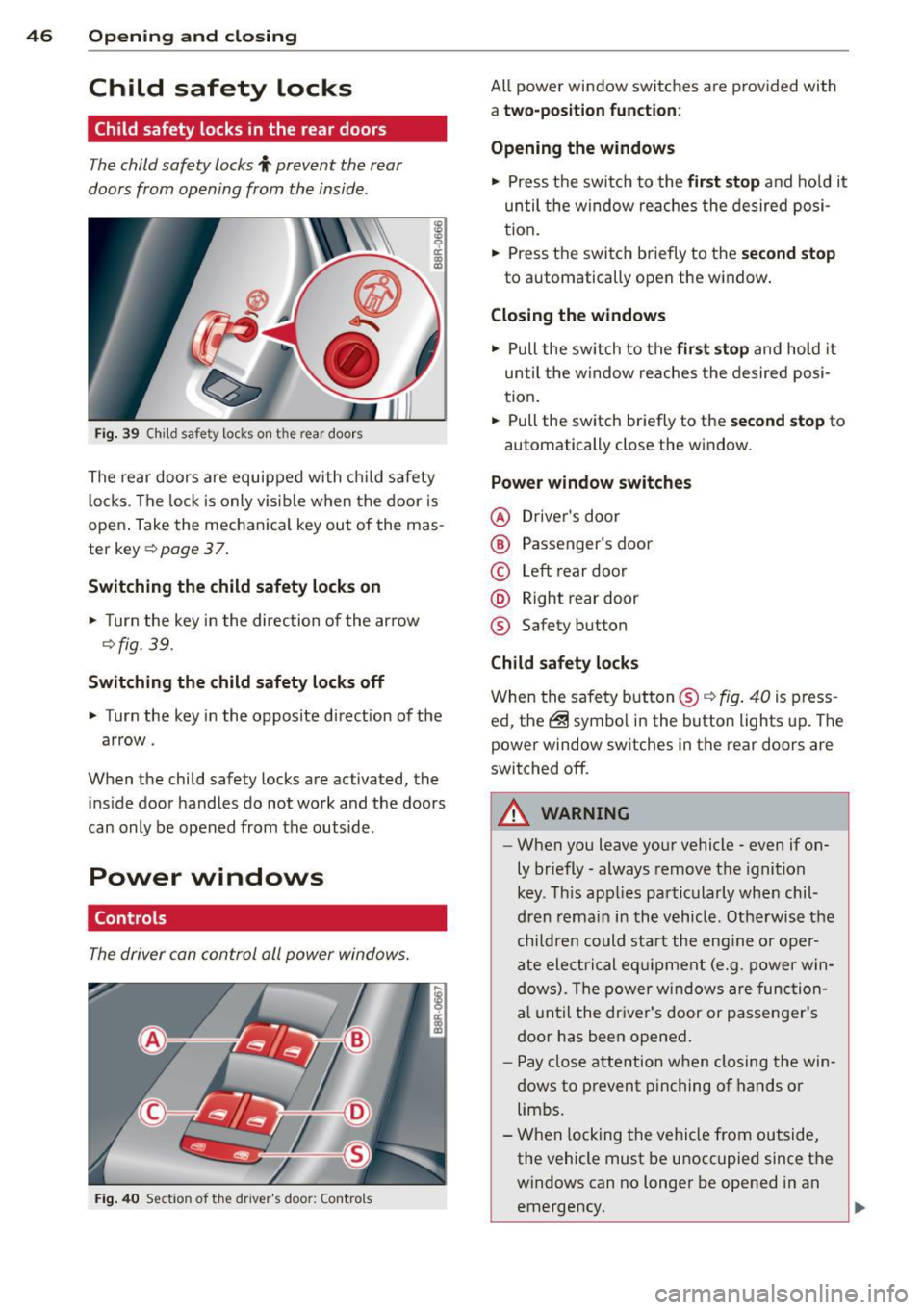
The child safety locks t prevent the rear
doors from opening from the inside .
Fig. 39 Child safety locks on th e rear doors
I ti:: 00 (0
The rear doors are equipped with c hild safety
l ocks . The lock is only v is ible when the door is
open . Take the mechan ica l key out of the mas
ter key ¢
page 3 7.
Switching the child safety locks on
.,. Turn the key in the direction of the ar row
Qfig. 39.
Switching the child safet y locks off
.. Turn the key in the opposite d irection of the
arrow .
When the child safety locks are activated, the
inside door handles do not work and the doors
can only be opened from the outside .
Power windows
Controls
The driver can control all power windows.
Fig . 40 Sect io n of the driver's door: Controls
All power window switches are provided with
a two-position fun ction :
Opening the windows
.. Press t he switch to the first stop and ho ld it
until the window re aches the desired posi
tion.
.. Press the switch briefly to the
second stop
to automatically open the window .
Closing the windows
.. Pull the switch to the first stop and hold it
until the window reaches the desired posi
tion .
.. Pull the switch briefly to the
se cond stop to
automatically close the window .
Power window switches
@ Driver's door
® Passenger's door
© Left rear door
@ Right rear door
® Safety button
Child safety locks
When the safety button® Q fig. 40 is p ress
ed, the@symbol in the button lights up. The
power window switches in the rear doors are
switched off.
A WARNING
-
-When you leave your vehicle -even if on-
ly br iefly -always remove the ignition
key . T his app lies pa rticularly when chil
dren remain i n the vehicle . Othe rwis e the
children could start the eng ine or ope r
a te electrical eq uipment (e.g. power win
dows) . The power w indows are func tion
al un til the dr iver's door or passenge r's
door has been opened .
- Pay close attention when closing the win
dows to p revent pinching of hands or
lim bs.
- When locking the vehicle from outside,
the vehicle must be unoccupied since the
windows can no longer be opened in an
emergency.
Page 49 of 316
@ Tips
After the ignition has been switched off,
the windows can still be opened or closed
for about 10 minutes. The power windows are not switched
off until the dr iver's door
or passenger's door has been opened.
Convenience opening/closing
The windows and the Panoramic sliding sun
roof* can be opened and closed with the me
chanical key or the emergency key.
C
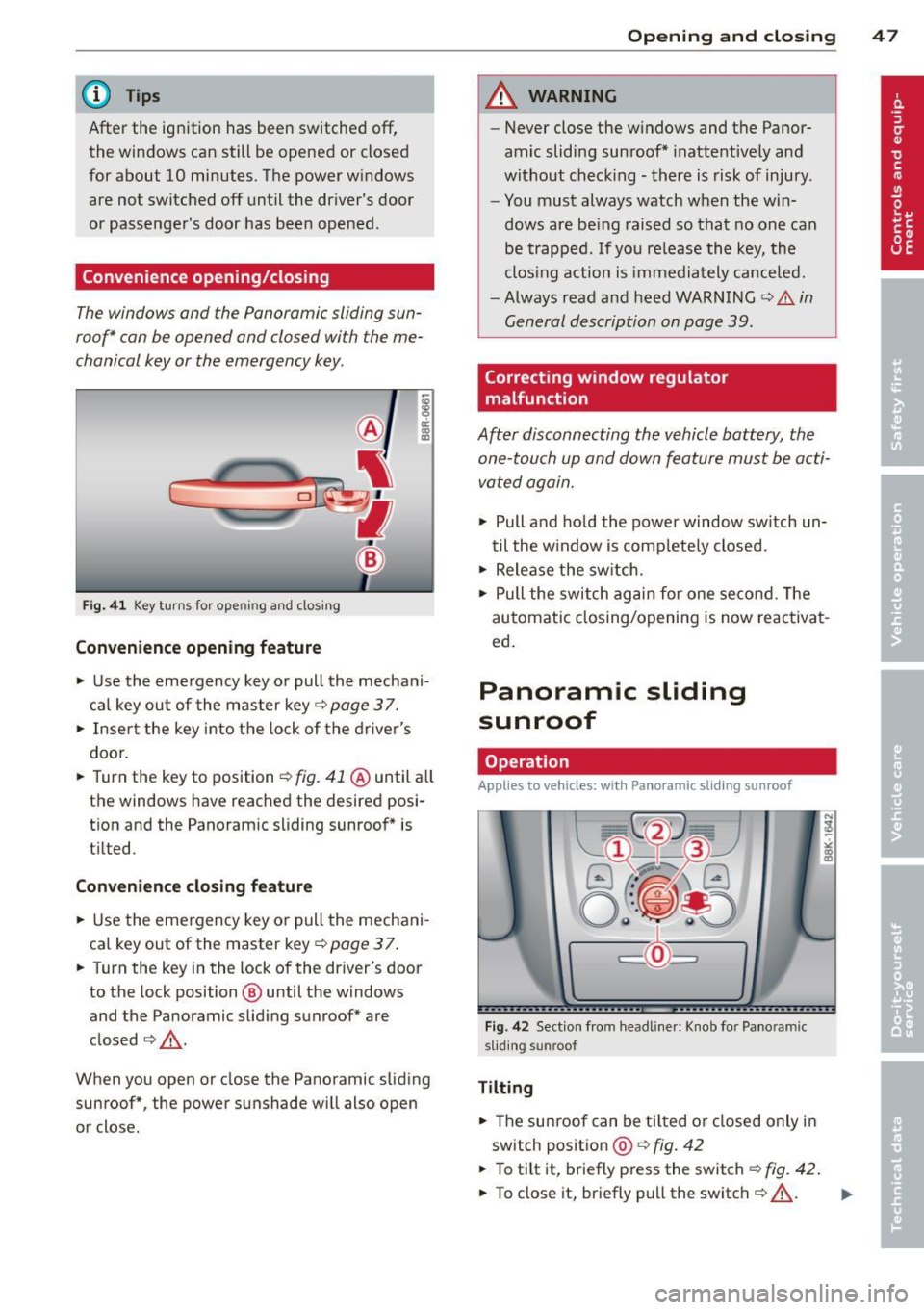
F ig. 41 Key turns for opening and closing
Convenience opening feature
§
ci: 0)
• Use the emergency key or pull the mechani
cal key out of the master key¢
page 3 7.
• Insert the key into the lock of the driver 's
door.
• Turn the key to position¢
fig. 41 @until all
the windows have reached the desired posi
tion and the Panoramic sliding sunroof* is
tilted.
Convenience closing feature
• Use the emergency key or pull the mechani
cal key out of the master key¢
page 3 7.
• Turn the key in the lock of the driver's door
to the lock position @ until the windows
and the Panoramic sliding sunroof* are
closed ¢.,&. .
When you open or close the Panoramic sliding
sunroof*, the power sunshade will also open
or close.
Opening and closing 47
A WARNING
- Never close the windows and the Panor
amic sliding sunroof* inattentively and
without checking -there is risk of injury.
- You must always watch when the win
dows are be ing raised so that no one can
be trapped. If you re lease the key, the
clos ing action is immediately cance led.
- Always read and heed WARNING
¢.&. in
General description on page 39.
Correcting window regulator
malfunction
After disconnecting the vehicle battery, the
one-touch up and down feature must be acti
vated again.
• Pull and ho ld the power window sw itch un
til the w indow is comp lete ly closed.
• Release the sw itch.
• Pull the switch again for one second. The
automatic closing/opening is now reactivat
ed.
Panoramic sliding
sunroof
Operation
App lies to veh icles: w ith Panoramic sl iding sunroof
Fig . 42 Sect ion from headliner: Knob for Panoramic
s liding sunroof
Tilting
• Th e sun roof can be tilted or closed only in
sw itch position @¢
fig. 42
• To tilt it, briefly press the switch¢ fig. 42.
• To close it, briefly pull the switch ¢.,&. . ..,.
Page 50 of 316
48 Opening and clo sing
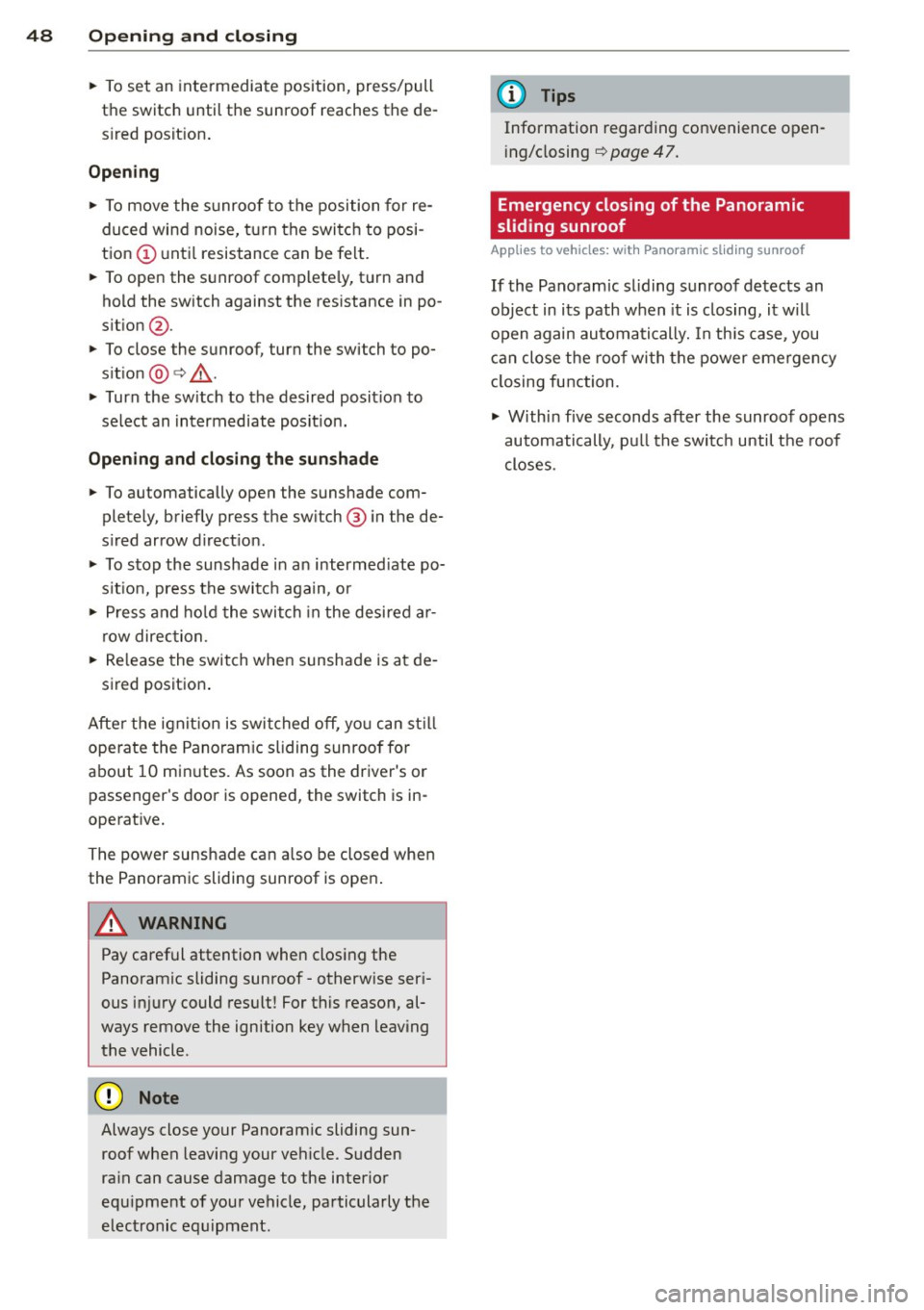
• To set an inte rmediate position, press/pull
the switch until the sunroof reaches the de
s ired posit ion .
Opening
• To move the s unroo f to the position for re
duced wind noise, tu rn the switch to posi
tion @ until resistance can be felt.
• To open the sunroof complete ly, t urn and
ho ld the switch against the resistance in po
s it ion @.
• To close the sunroof, turn the switch to po
s it ion
@) c> ,&. .
• Turn the sw itch to the desired posit ion to
select an intermediate posit ion.
Opening and clos ing the sun shade
• To automatically open the sunshade com
pletely, briefly press the sw itch @ in the de
s ired arrow d irect ion.
• To stop the sunshade in a n intermed iate po
s it io n, press the switc h again, o r
• Press and ho ld the switch in the desired a r
r ow direction.
• Re lease the switch when sunshade is at de -
s ired posit ion .
Afte r the ignit ion is switched off, you can st ill
ope rate the Panoram ic sliding sunroof fo r
about 10 min utes . As soon as the driver's or
passenger's door is opened, the switch is in
operat ive.
The power sunshade can a lso be closed when
the Panoramic sliding sunroof is ope n.
A WARNING -
Pay careful attention when closing the
Panoramic sliding sunroof -otherwise seri
ous injury could res ult! For this reason, al
ways remove the ignition key when leaving
the vehicle .
Cy Note
Always close your Panoram ic sliding sun
roof when leaving your ve hicle. Sudden
ra in can cause damage to the interio r
equ ipment of your vehicle, pa rticularly the
electronic eq uipment.
(D Tips
Information regar ding convenience open
i ng/closing
c> page 47.
Emergency closing of the Panoramic
sliding sunroof
Applies to vehicles: with Panoramic sliding sunroof
If the Pano ramic sliding sunroof detects an
object in its path w hen it is closing, it w ill
open again automa tically. In th is case , you
can close the roo f with t he power emergency
closing function.
• Within five seconds after the sunroof opens
automatically , pull the switc h until the roof
closes .
Page 53 of 316
Canada models : The function cannot be
turned off.
It is activated a utomatica lly each
time the ignition is switched on.
Travel mod e (Canada models)*
The headlight beam is asymmetrical. This pro
vides stronge r illum ination on the s ide of the
road on which you are driving . If you are driv
ing in a co untry that drives on the opposite
side of the road from your own country, this
will cause glare for oncoming drivers. To pre
vent glare:
- Trave l mode must be selected in vehicles
with Xenon headlights*.
- In vehicles with halogen headlights, certain
areas of the head light lenses must be cov
ered with waterproof adhesive covers that
prevent light from passing through. For
more information, please see your author
ized Audi dealer or author ized repair facility .
@ Tips
When travel mode* is activated, a d isp lay
in the drive r information system ind icates
this each time you switch the ignit io n on .
Instrument lighting
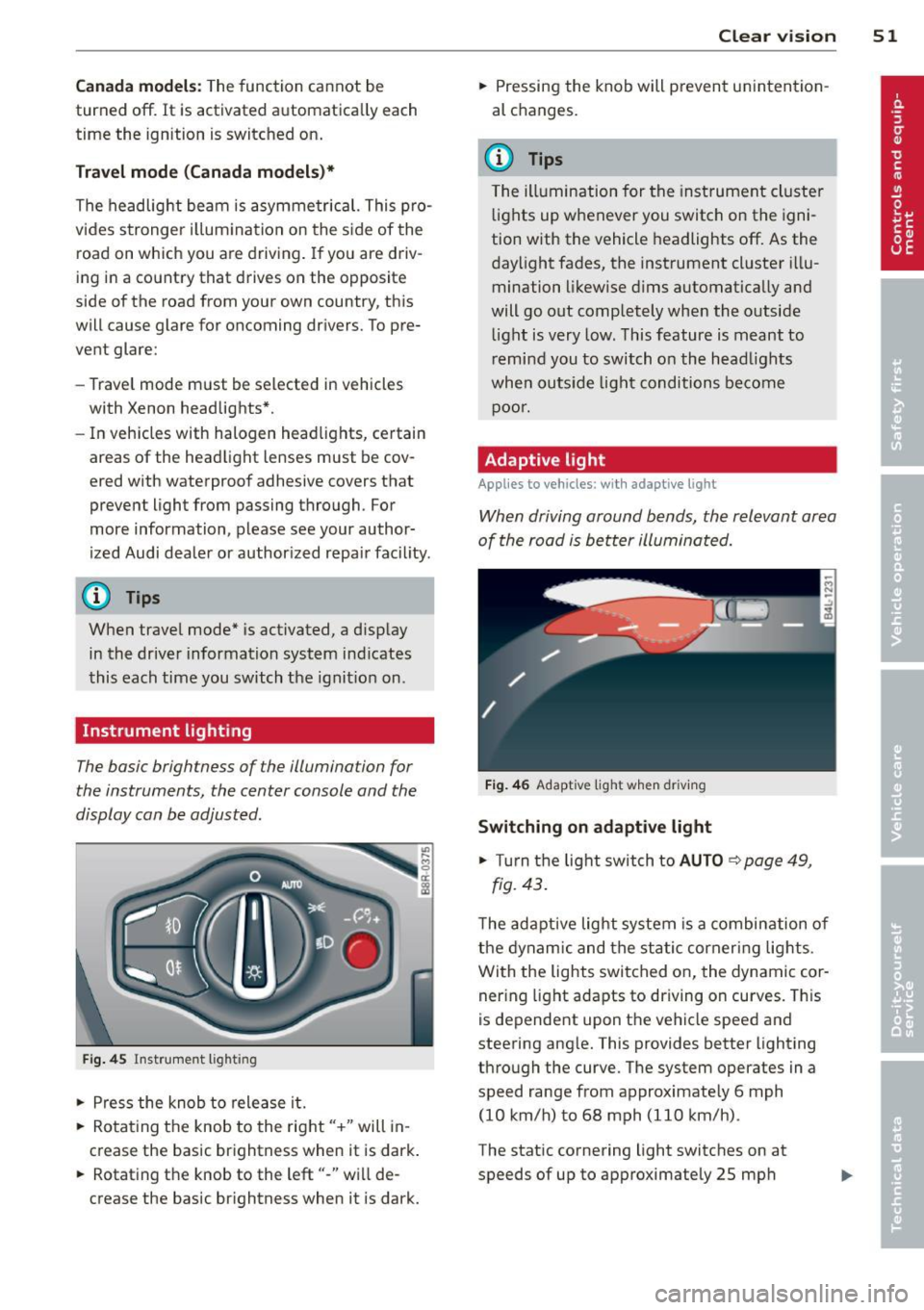
The basic brightness of the illumination for
the instruments, the center console and the
display can be adjusted .
Fig. 45 Inst rume nt lighting
.. Pres s the knob to release it.
.. Rota ting the knob to the rig ht" +" will in
c rease the basic brightness when it is dark .
.. Rotating the knob to the left"-" will de
crease the bas ic br ightness when it is dark. Clear vi
sion 51
.. Pressing the knob will p revent un intention
al changes.
(D Tips
T he ill umination for the instrument cluster
lights up w henever you switch on the igni
tion with the vehicle headlights off. As the
day light fades, the instrument cluster i llu
mination likewise dims automatica lly and
will go out completely when the outside li ght is very low. This feature is meant to
r emind you to switch on the head lights
whe n outside lig ht conditions become
p oor .
Adaptive light
Applies to vehicles: wi th adaptive light
Wh en driving around bends, the relevant area
of the road is be tter illuminated.
Fi g. 4 6 Adapt ive light w hen driv ing
Switching on adapt ive light
.. Turn t he light switch to AUTO ¢ page 49,
fig. 43 .
The adaptive lig ht system is a combin ation o f
the dynam ic and the static corneri ng lights.
Wi th the lights switched on, the dynamic cor
ner ing light adapts to driving on curves. This
is dependent upon t he vehicle speed and
steering ang le. This provides better lighting
through the curve. The system operates in a
speed range from approximate ly 6 mph
(10 km/h) to 68 mph (110 km/h) .
The static cornering light switches on at
speeds of up to approximately 25 mph
Page 54 of 316
52 Clear vision
(40 km/h) when a certain steering wheel an
gle is reached or when a turn signal is activat
ed. The area to the side of the vehicle is illu
minated better when turning .
Emergency flashers
The emergency flashers makes other moto
rists aware that you or your vehicle are in an
emergency situation.
Fig . 4 7 Emer gency flasher switc h
"" Press the switch &-, ¢ fig. 47 to turn the
emergency flashers on or off.
~
9 a: (X) a:,
When the emergency flashers are on, all four
turn signals blink at the same time. The turn signal indicator lights
BB in the instrument
cluster, as well as the light in the emergency
flasher switch &-, blink likewise . The emergen
cy flashers also work when the ignition is
turned off.
The emergency flashers will turn on automati
cally if you are in an accident where the airbag
has deployed.
@ Tips
You should turn on the emergency flashers
when :
-you are the last vehicle standing in a traf
fic jam so that any other vehicles coming
can see you, or when
-your vehicle has broken down or you are
in an emergency situation, or when
-your vehicle is being towed by a tow
truck or if you are towing another vehicle
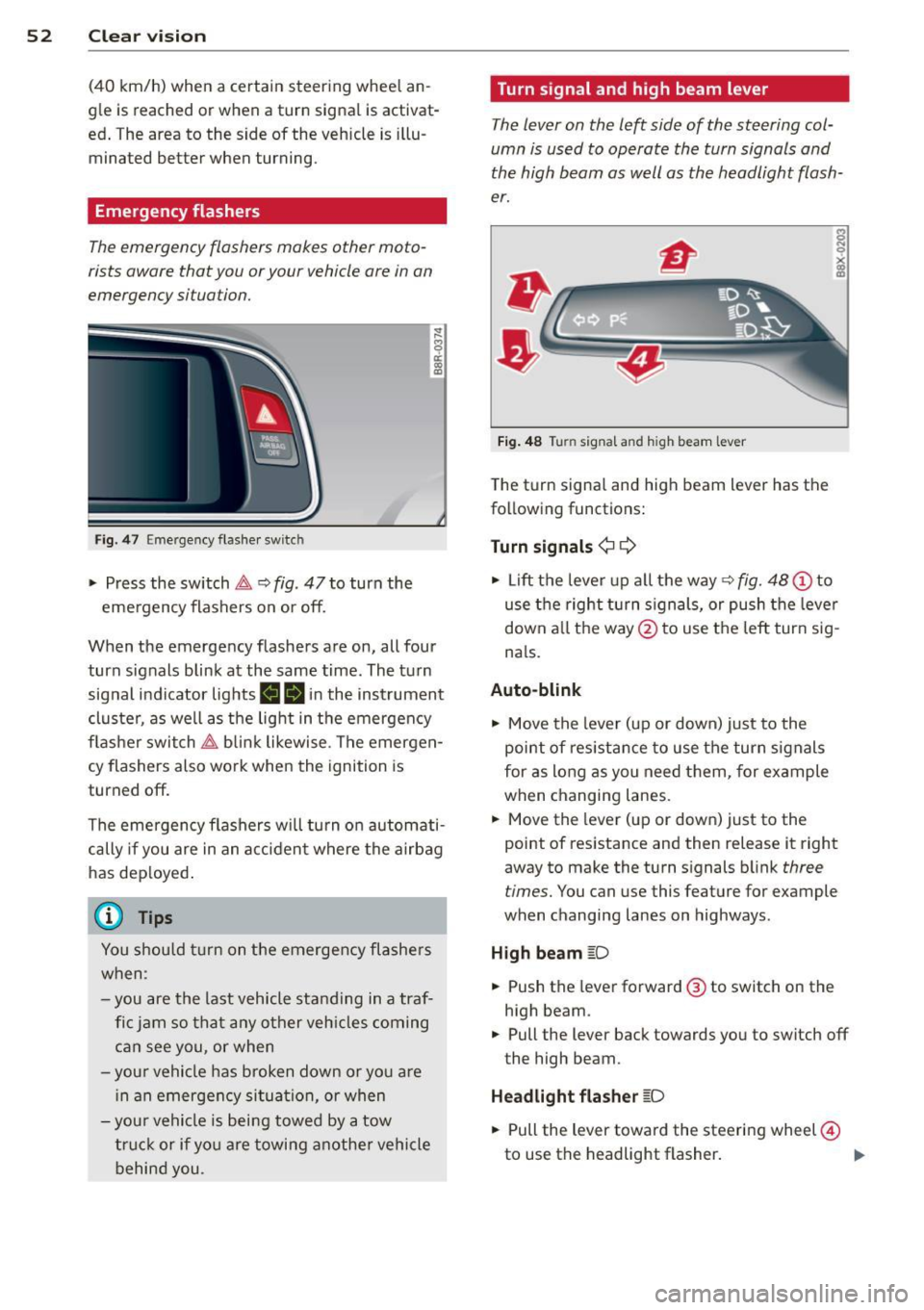
behind you. Turn signal and high beam lever
The
lever on the left side of the steering col
umn is used to operate the turn signals and
the high beam as well as the headlight flash
er.
Fig. 48 Turn signal and high beam lever
The turn signal and high beam lever has the
following functions:
Turn signals¢ ¢
s
"" '? X co a,
"" Lift the lever up all the way c:> fig. 48 (!) to
use the right turn signals, or push the lever
down all the way@ to use the left turn sig
n a ls.
Auto-blink .,. Move the lever (up or down) just to the
point of resistance to use the turn signals
for as long as you need them, for example
when changing lanes .
.,. Move the lever (up or down) just to the
point of resistance and then release it right
away to make the turn signals blink
three
times.
You can use this feature for example
when changing lanes on highways .
High beam
[D
"" Push the lever forward ® to switch on the
high beam .
.,. Pull the lever back towards you to switch off
the high beam.
Headlight flasher
[D
.. Pull the lever toward the steering wheel@
to use the headlight flasher.
IJJ>
Page 55 of 316
Notes o n these featur es
-The turn signals only work with the ignition
turned on. The indicator lights
II or Ill in
the instrument cluster
¢page 14 also b link.
- After you have turned a corner, the turn sig-
nal switches off automatica lly.
- The
high beam works only when the head
lights are on. The indicator light
II in th e
instrument cluster illuminates when the
high beams are on.
- The
headlight flasher wo rks only as long as
you hold the lever -even if there are no
lights turned on. The indicator light
II in
the instrument cluster illuminates when you
use the headlight flasher.
A WARNING
Do not use the high beam or headlight
flasher if you know that thes e cou ld blind
oncoming traffic.
Interior lights
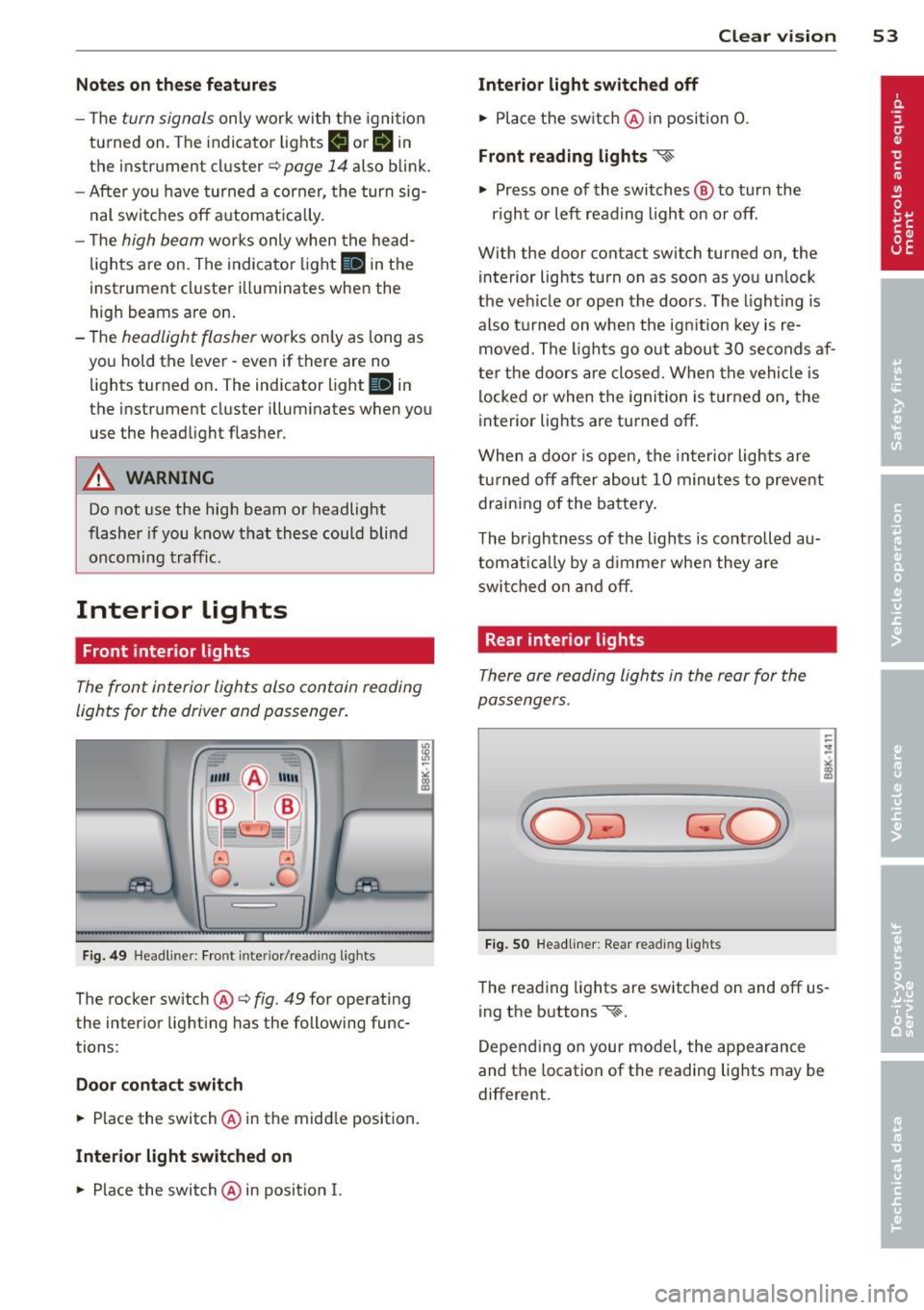
Front interior lights
-
The front interior lights also contain reading
lights for the driver and passenger .
r ,,,,, , 11111
~8 ,~
G) Gl
,o . . o
I
Fig. 49 Headliner: Fro nt inte rior/rea ding lights
The rocker switch @¢ fig. 49 for operating
the interior lighting has the following func
tions :
Door cont act swi tch
.,. Place the switch @ in the middle position.
Inte rior light switched on
.,. Place the switch@ in posit ion I.
Clear vision 5 3
Interior light switch ed off
.,. Place the sw itch @ in position 0.
Front re ad in g lights ~
.,. Press one of the switches@ to turn the
r ight or left reading light on or off .
With the door contact switch turned on, the
interior lights turn on as soon as you unlock
the vehicle or open the doors. The lighting is
also turned on when the ignition key is re
moved. The lights go out about 30 seconds af
ter the doors are closed. When the vehicle is locked or when the ignition is turned on, the
interior lights are turned off.
When a doo r is open, the interior lights are
tu rned off after about 10 minutes to prevent
draining of the battery .
The brightness of the lights is controlled au
tomat ica lly by a d immer when they are
swi tched on and off.
Rear interior lights
There are reading lights in the rear for the
passengers .
Fig . 50 Headliner: Rear read ing lig hts
The read ing l ights are switched on and off us
ing the buttons ~-
Depending on your model, the appearance
and the location of the reading lights may be
different .
Page 57 of 316
while driving. You can switch this function off by moving the lever to position ® within 10
seconds of the afterwipe operation. The after
wipe function is reactivated the next time the ignit ion is switched on.
The rear wiper automatically switches on
when the reverse gear is engaged and the
front w indshield wipers are on and in opera
tion .
C lea ning the headlights *. The headlight wash
er system * operates on ly when the headlights
are on. If you move the lever to pos ition ®,
the headlights are washed in interva ls .
® -Wipe the rear window. The rear wiper
moves about every 4 seconds .
0-Clean the rear window. The number of
wiping operations depends on how long the l ever is held in positio n 7.
A WARNING
-The ra in sensor is only intended to assist
the driver. The driver is still responsible
for man ually sw itching the w ipers on ac
cording to the v is ibility conditions.
- The windshie ld may not be treated w ith
water-repe lling windshie ld coat ing
agents. Unfavorable conditions, such as
wetness, darkness, low sun, can res ult in
increased glare. W iper b lade chatter is
also possible .
- Proper ly functioning w indshie ld w iper
blade s are required fo r a clear view and
sa fe dr iv ing .
(D Note
-In the case of frost, check whether the
windsh ield wiper b lades a re fro zen to
t h e windshie ld. Swit ching on the wind
s h ield wipers can d amage t he wipe r
blades!
- Prior to using a car w ash, the windshield
wipe r system m ust be swit ched off (lever
i n position 0) . This helps to prevent unin
tentiona l switching on and damage to
the windshie ld w iper system.
Clear v is ion 5 5
(D Tips
- The windshie ld w ipers are switched off
when the ign it ion is tu rned off . Act ivate
the windsh ield wipers after the ignition
is switc hed back on by moving t he wind
shield wipe r lever to any position .
- Worn or d irty windshield wiper blades
result in streaking. This ca n affect the
rai n sensor function. Check your wind
shield w iper blades regularly.
- The washer fluid nozz les of the wind
shield washe r system a re heated at low
tempe rat ures whe n the ignition is on .
- When stopping temporarily, e .g. at a
t raffic light, the set spe ed of the wind
shield wiper s is automatically reduced by
one speed.
Service position
The windshield wiper blades ore replaced in
the service position.
"' If the w iper blades are no t frozen to t he
w indshield, br ing the w indshie ld w iper lever
to the basic position @¢
page 54, fig . 53 .
"' Sele ct: !CAR !func tion butt on> Windshield
wipers
> Service position . Or
"' Sele ct: I CAR I func tion b utton > Car sy s
tem s*
contro l butto n > Servicing & checks >
Wiper service position . Or
"' Switch the ignit ion off and move the wind
shield w iper lever to position ©¢
page 54,
fig . 53.
- On -changing the windshield wiper b lades
can only be done if you b ring the wiper arms
to the service position . You will also avoid
pai nt damage to the hood when working on
the wipe rs in th is posit ion .
-Off -the w indshield w ipers are moved to
their in itia l position again .
(D Note
Neve r mane uver yo ur vehicle with t he
front windshie ld w iper arms raised s ince
they wi ll automatically be moved back to
Page 59 of 316
Attaching the wiper bl ade
• Press the w iper blade holder in the arrow d i
rect ion
c::> fig. 56 into the mount.
• Fold the windshield wiper arm back onto
the windshie ld .
A WARNING
- To prevent streaking, clean the wiper
blades regularly w ith a glass cleaner. In
the case of significant contamination,
e.g. from insect rema ins, the wiper
blades can be cleaned with a sponge or
cl oth.
- For safety reasons, the windsh ield wiper
blades sho uld be replaced once or twice
each year.
Mirrors
Adjusting the exterior mirrors
-
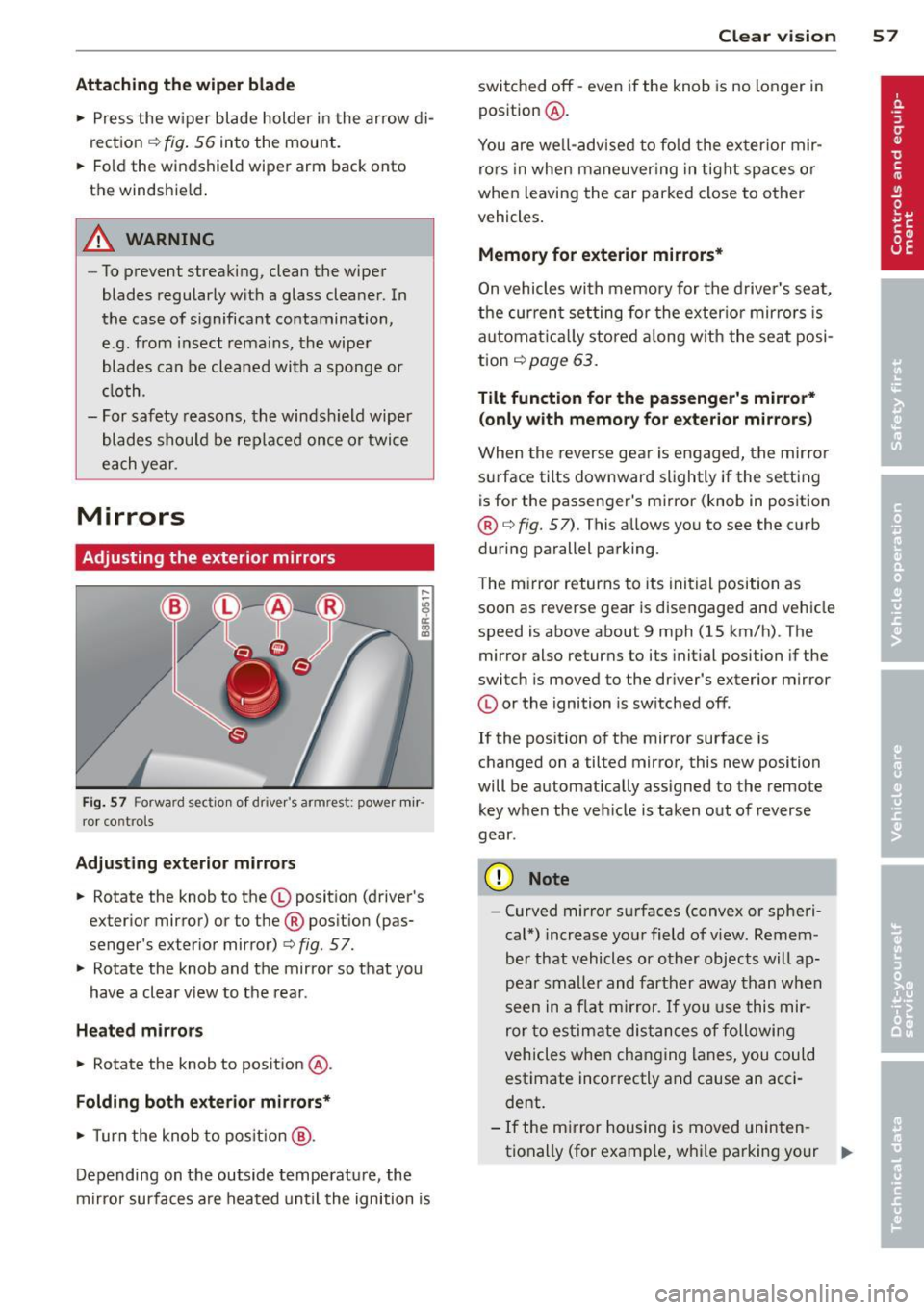
Fi g. 57 Forward section of dr iver 's armrest: power mir ·
ror co ntro ls
Adju sting e xterior m irrors
• Rotate the knob to the© position (driver's
exterior mirror) or to the® pos ition (pas·
senger's exterior mirror)
c::> fig. 57.
• Rotate the knob and the mirror so that you
have a clear view to the rear.
Heated mi rrors
• Rotate the knob to posit ion ® ·
Folding both e xterior mirrors*
• Turn the knob to pos it io n @ .
Depending on the outside temperature, the
m irror surfaces are heated unt il the ignition is
Clear vi sion 5 7
switched off -even if the knob is no longer in
position @.
You are we ll-advised to fold the exter ior mir·
rors in when maneuver ing in tight spaces o r
when leaving the car parked close to other
vehicles.
Memory for exterior mirrors*
On vehicles with memory for the drive r's seat,
the cur rent setting for the exter ior mirro rs is
automat ica lly stored a long w ith the sea t posi·
tion
c::> page 63.
Tilt function f or the passenger 's mirror*
(only with memory for e xterior mirrors )
When the reverse gear is engaged, the mirror
surface tilts downward slightly if the setting
is for the passenger's mirror (knob in position
®
c::> fig. 57) . This all ows you to see the curb
during parallel parking.
The mirror returns to its initial position as
soon as reverse gear is disengaged and vehicle
speed is above about 9 mph
(15 km/h). The
mirror also returns to its initial position if the
switch is moved to the dr iver's exterior mirror
© or the ignition is switched off .
If the position of the mirror surface is
changed on a tilted mirror, this new position
will be automatically assigned to the remote
key when the vehicle is taken out of reverse
gear .
(D Note
-Curved mirror surfaces (convex or spheri·
cal*) increase you r field of v iew . Remem
ber that vehicles or other objects will ap
pear smalle r and farther away than when
seen in a flat m irror.
If you use this mir
ror to estimate distances of following
vehicles when changing lanes, you could
estimate incorrectly and cause an acci·
dent.
- If the m irror housing is moved uninten
tionally (for examp le, while pa rking your .,..