instrument cluster AUDI Q5 2013 User Guide
[x] Cancel search | Manufacturer: AUDI, Model Year: 2013, Model line: Q5, Model: AUDI Q5 2013Pages: 316, PDF Size: 78.89 MB
Page 36 of 316
34 Driver information display
left in the fuel tank. Time to refuel!
¢page 230.
If the symbol lights up, even when there is
ample fuel in the tank, and the text
Fuel tank
system malfunction! Contact dealer
appears
in the display, there is a fault in the system.
Contact an author ized A udi dealer to have the
fault rect ified.
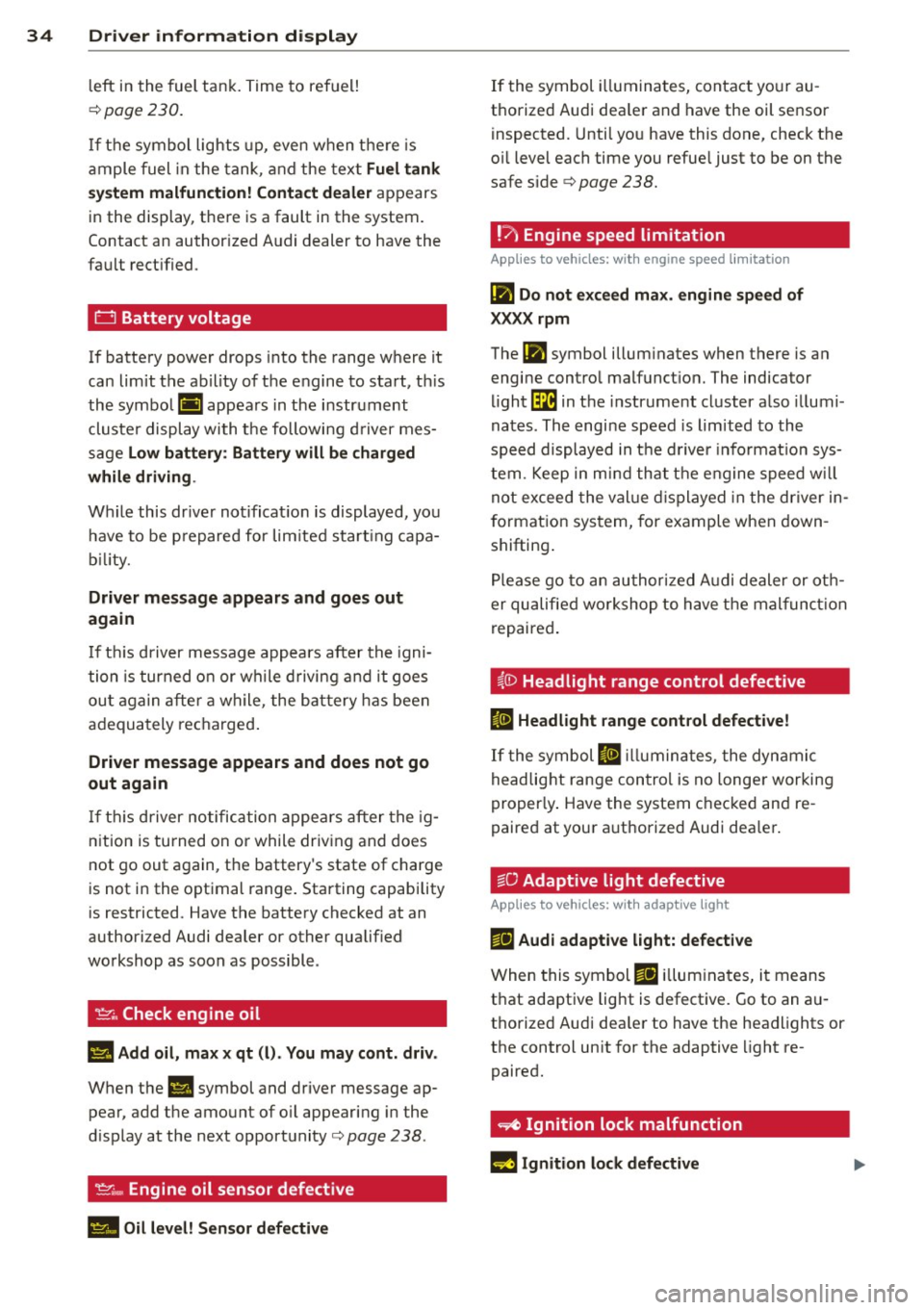
0 Battery voltage
If battery power drops into the range where it
can limit the ability of the engine to start, th is
the symbol (•) appears in the instrument
cluster display with the following driver mes
sage
Low battery : Battery will be charged
while driving .
While this dr iver not ificat ion is displayed, you
have to be p repared for lim ited start ing capa
bility.
Driver message appears and goes out
again
If thi s driver message appears after the igni
tion is turned on or while driving and it goes
out again after a while, the battery has been
adequately recharged .
Driver message appears and does not go
out again
If this driver notification appea rs after the ig
nition is turned on or while driving and does
not go out again, the battery's state of charge
is not in the optimal range. Starting capab ility
is restricted . Have the battery checked at an
authorized Audi dealer or other qualif ied
workshop as soon as possible .
~. Check engine oil
II Add oil, max x qt (l). You may cont. driv.
When the II symbol and driver message ap
pear, add the amount of oil appearing in the
d isplay at the next opportunity¢
page 238.
't'.::r.., Engine oil sensor defective
II Oil level! Sensor defective
If the symbol illuminates, contact your au
thorized Audi dea ler and have the oil sensor
inspected. Until you have this done, check the
o il level each time you refue l just to be on the
safe side ¢
page 238.
!'7 Engine speed limitation
Applies to vehicles: with engine speed limitation
(m Do not exceed max. engine speed of
XXXX rpm
The (m symbol illum inates when there is an
engine control malfunct ion. The indicator
light~ in the instrument cluster also illumi
nates . The engine speed is limited to the
speed displayed in the driver informat ion sys
tem. Keep in mind that the engine speed will
not exceed the value displayed in the driver in
f o rmation system, for example when down
shifting .
Please go to an authorized Audi dealer or oth
er qualified workshop to have the malfunction
repaired.
~0 Headlight range control defective
Iii Headlight range control defective!
If the symbol II illuminates, the dynamic
headlight range control is no longer working
properly . Have the system checked and re
paired at your a uthorized Audi dea ler .
§0 Adaptive light defective
Applies to vehicles: wit h adaptive light
ma Audi adaptive light: defective
When this symbol ma illuminates, it means
that adaptive light is defective. Go to an au
thorized Audi dea ler to have the headlights or
the control un it for the adaptive light re
paired.
~ Ignition lock malfunction
m Ignition lock defective
Page 39 of 316
@ Tips
-The operation of the remote contro l key
can be temporarily disrupted by interfer
ence from transmitters in the vicinity of
the veh icle work ing in the same frequen
cy range (e .g . a cell phone, radio equip
ment) .
- If you open the dr iver's door with the key
left in the ign ition lock, a chime will
sound . This is your reminder to remove
the key and lock the door .
- For security reasons , replacement keys
are only available from Aud i dea lers .
- For Decla rat ion of Compliance to United
States FCC and Industry Canada regula
tions
c::;, page 298 .
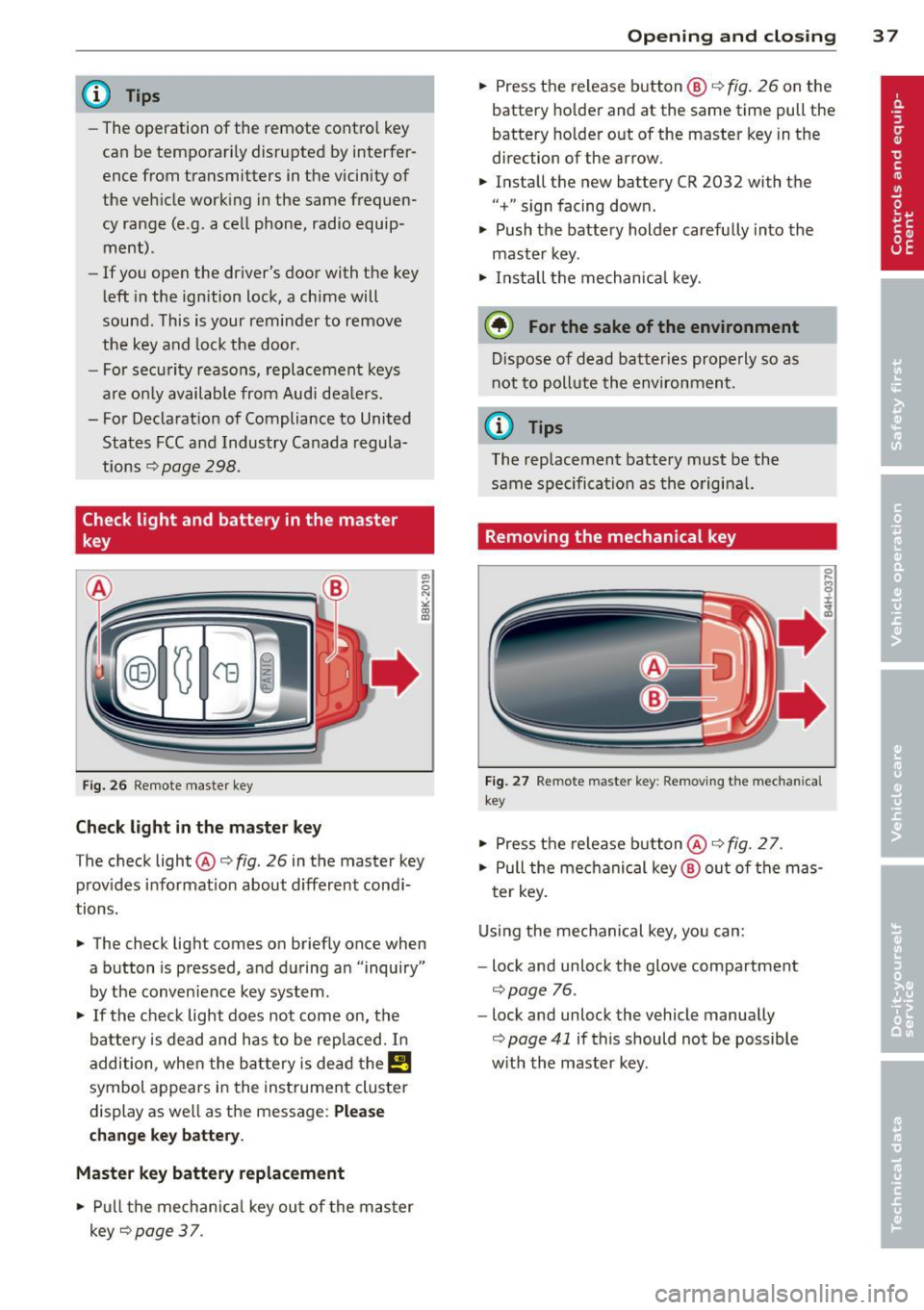
Check light and battery in the master
key
Fig. 26 Remote master key
Check light in the master key
"' 0 N ,;, (0 a:,
The check light@¢ fig. 26 in the master key
prov ides information about different cond i
tions.
.. The check light comes on briefly once when
a button is pressed, and during an "inquiry"
by the conven ience key system .
.. If the check light does not come on, the
battery is dead and has to be replaced. I n
addition, when the battery is dead the
!I
symbol appears in the instrument cluster
display as well as the message:
Please
change key battery.
Master key battery replacement
.. Pull the mechanical key out of the master
key
¢ page 37.
Opening and closing 3 7
.. Press the release button @ c::;, fig. 26 on the
battery holder and at the same time pull the
battery holder out of the master key in the
direction of the arrow.
.. Install the new battery CR 2032 with the
"+" sign facing down.
.. Push the battery holder carefully into the
master key.
.. Install the mechanica l key.
@) For the sake of the environment
Dispose of dead batteries prope rly so as
not to pollute the environment.
(j) Tips
The replacement battery must be the
same specification as the origina l.
Removing the mechanical key
Fig. 27 Remote maste r key : Removing the mec han ical
key
.. Press the release button@¢ fig. 27.
.. Pull the mechanical key@ out of the mas
ter key.
Using the mechanical key, you can:
- lock and unlock the glove compartment
c::;, page 76 .
-lock and unlock the vehicle manually
c::;, page 41 if this should not be possible
w it h the master key .
Page 51 of 316
Clear vision Lights
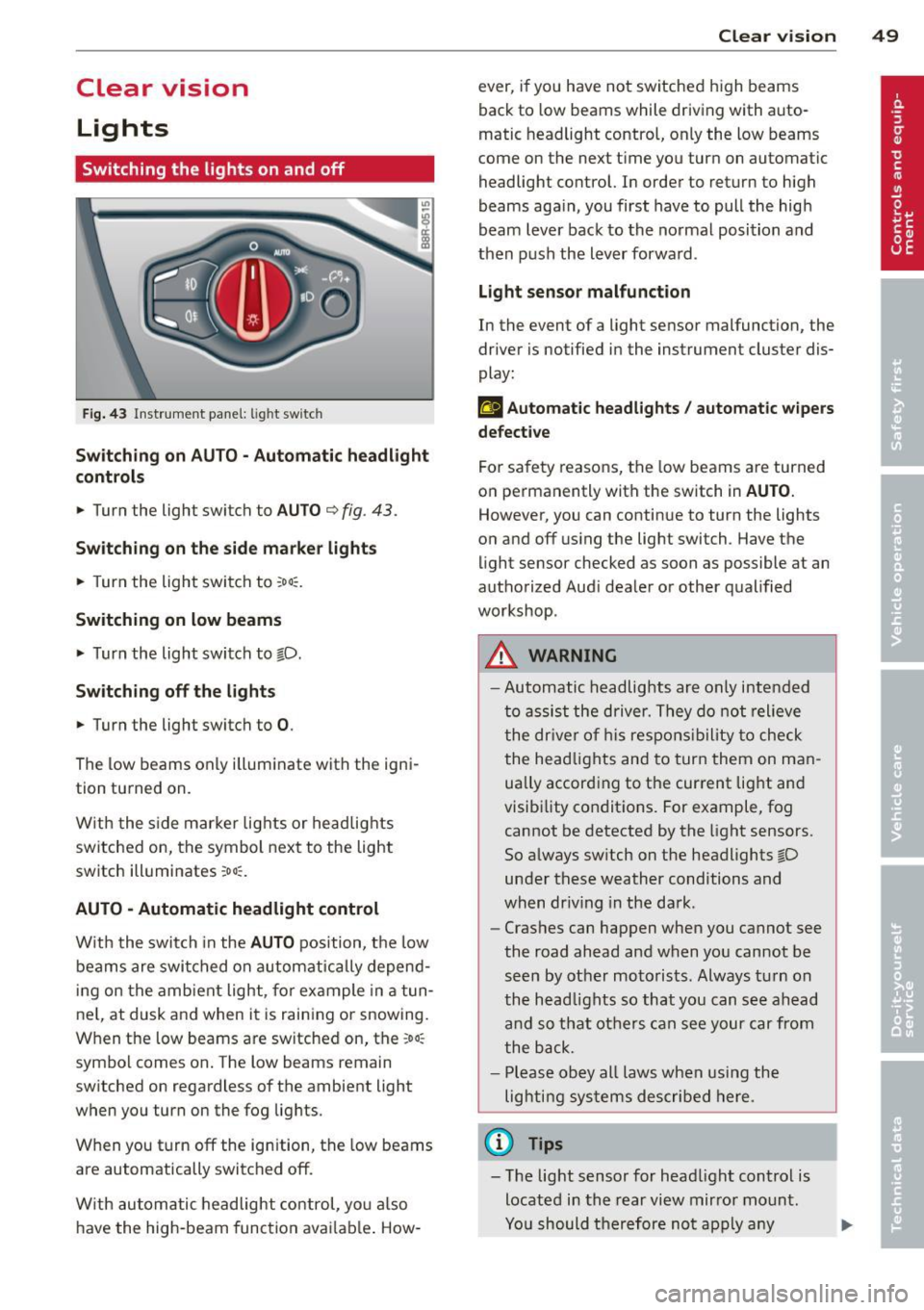
Switching the lights on and off
F ig . 43 Instrument pane l: light sw itch
Sw itching on AUTO - Automatic headlight
contr ols
• Turn the light switch to AUTO ¢ fig. 43.
S w itchin g on the side m arker light s
• Turn the light switch to :oo~.
Switching on low beams
• Turn the light switch to @-0.
Swi tchin g off the light s
• Turn the light switch to 0.
The low beams only i lluminate with the igni
tion turned on.
With the s ide marker lights or headlights
switched on, the symbol next to the light
switch illuminates
:oo:.
AUTO -Automatic headlight control
With the switch in the AUTO position, the low
beams are swi tched on a utomatica lly depend
ing on the ambient light, for example in a tun
ne l, at dusk and when it is raining or snowing.
When the low beams are switched on, the
:oo:
symbol comes on. The low beams remain
switched on regardless of the ambient light
when you turn on the fog lights.
When you turn
off the ign ition, the low beams
are automatically switched
off.
W ith automatic headlight control, you also
have the high-beam function avai lab le . How -
Clear vi sion 49
ever, if you have not switched h igh beams
back to low beams while driving with auto
matic headlight control, only the low beams
come on the next time you turn on automatic
headlight control. In order to return to high
beams aga in, you first have to pull the high
beam lever back to the normal position and
then push the lever forward .
Light sen so r malfunct ion
In the event of a light sensor malfunction, the
driver is notified in the instrument cluster dis
play :
fal Automat ic headlight s/ automati c wipers
defec tive
For safety reasons, the low beams are turned
on permanently with the switch in
AUTO .
However, you can continue to turn the lights
on and
off using the light switch . Have the
light sensor checked as soon as possible at an
authorized Audi dealer or other qualified
workshop.
A WARNING
- Automatic headlights are only intended
to assist the driver. They do not relieve
the dr iver of his respons ibility to check
the head lights and to turn them on man
ually accord ing to the current lig ht and
visibility conditions. For example, fog cannot be detected by the light sensors.
So always sw itch on the headlights @-0
under these weather conditions and
when dr iving in the da rk .
- Crashes can happen when you cannot see
the road ahead and when you cannot be
seen by other moto rists. Always turn on
the head lights so that you can see ahead
and so that others can see your car from
the back.
- Please obey all laws when using the
lighting systems described here.
(l'} Tips
-The light sensor for head light control is
located in the rear
view mirror mount.
Yo u should therefore no t apply any
Page 53 of 316
Canada models : The function cannot be
turned off.
It is activated a utomatica lly each
time the ignition is switched on.
Travel mod e (Canada models)*
The headlight beam is asymmetrical. This pro
vides stronge r illum ination on the s ide of the
road on which you are driving . If you are driv
ing in a co untry that drives on the opposite
side of the road from your own country, this
will cause glare for oncoming drivers. To pre
vent glare:
- Trave l mode must be selected in vehicles
with Xenon headlights*.
- In vehicles with halogen headlights, certain
areas of the head light lenses must be cov
ered with waterproof adhesive covers that
prevent light from passing through. For
more information, please see your author
ized Audi dealer or author ized repair facility .
@ Tips
When travel mode* is activated, a d isp lay
in the drive r information system ind icates
this each time you switch the ignit io n on .
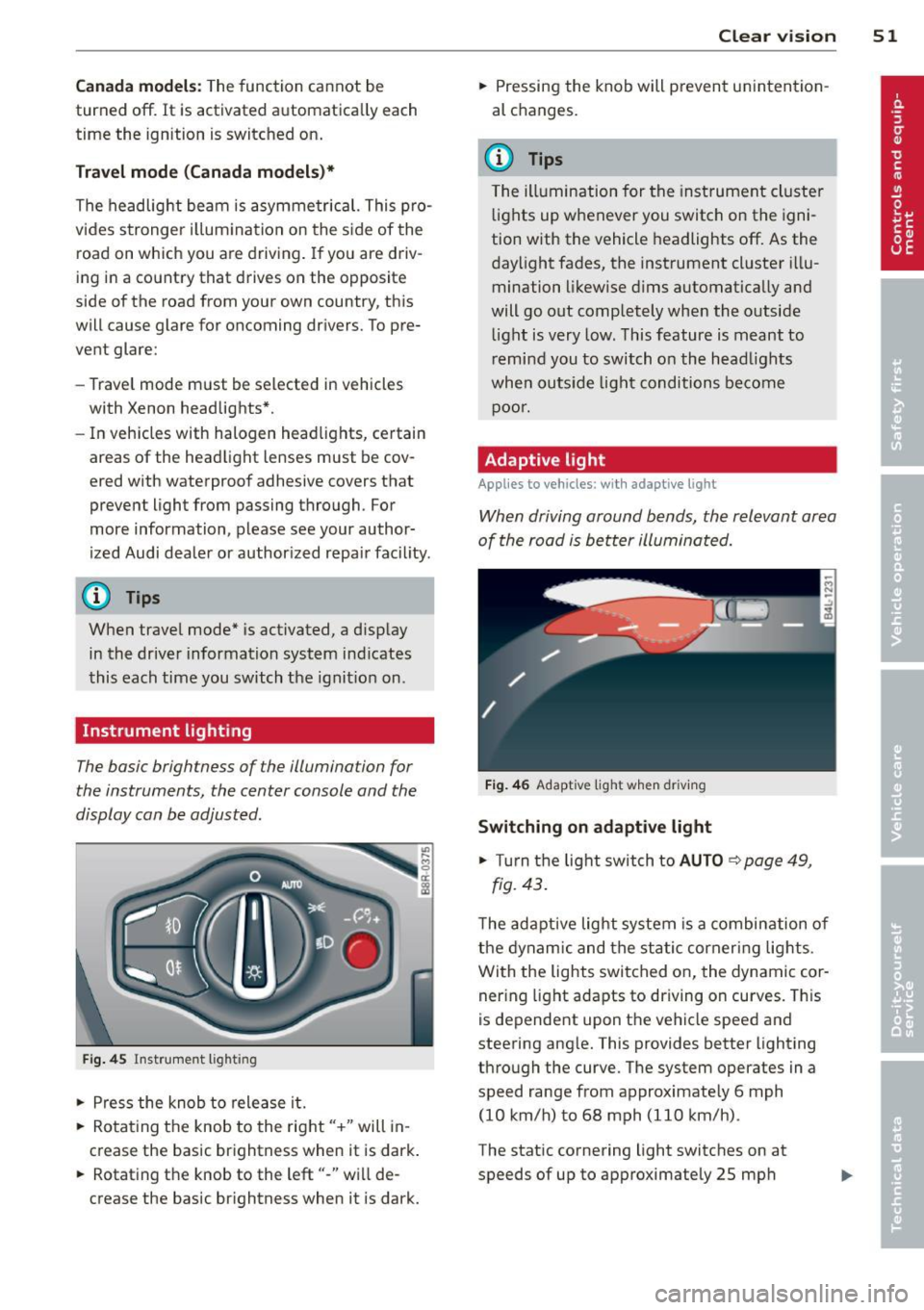
Instrument lighting
The basic brightness of the illumination for
the instruments, the center console and the
display can be adjusted .
Fig. 45 Inst rume nt lighting
.. Pres s the knob to release it.
.. Rota ting the knob to the rig ht" +" will in
c rease the basic brightness when it is dark .
.. Rotating the knob to the left"-" will de
crease the bas ic br ightness when it is dark. Clear vi
sion 51
.. Pressing the knob will p revent un intention
al changes.
(D Tips
T he ill umination for the instrument cluster
lights up w henever you switch on the igni
tion with the vehicle headlights off. As the
day light fades, the instrument cluster i llu
mination likewise dims automatica lly and
will go out completely when the outside li ght is very low. This feature is meant to
r emind you to switch on the head lights
whe n outside lig ht conditions become
p oor .
Adaptive light
Applies to vehicles: wi th adaptive light
Wh en driving around bends, the relevant area
of the road is be tter illuminated.
Fi g. 4 6 Adapt ive light w hen driv ing
Switching on adapt ive light
.. Turn t he light switch to AUTO ¢ page 49,
fig. 43 .
The adaptive lig ht system is a combin ation o f
the dynam ic and the static corneri ng lights.
Wi th the lights switched on, the dynamic cor
ner ing light adapts to driving on curves. This
is dependent upon t he vehicle speed and
steering ang le. This provides better lighting
through the curve. The system operates in a
speed range from approximate ly 6 mph
(10 km/h) to 68 mph (110 km/h) .
The static cornering light switches on at
speeds of up to approximately 25 mph
Page 54 of 316
52 Clear vision
(40 km/h) when a certain steering wheel an
gle is reached or when a turn signal is activat
ed. The area to the side of the vehicle is illu
minated better when turning .
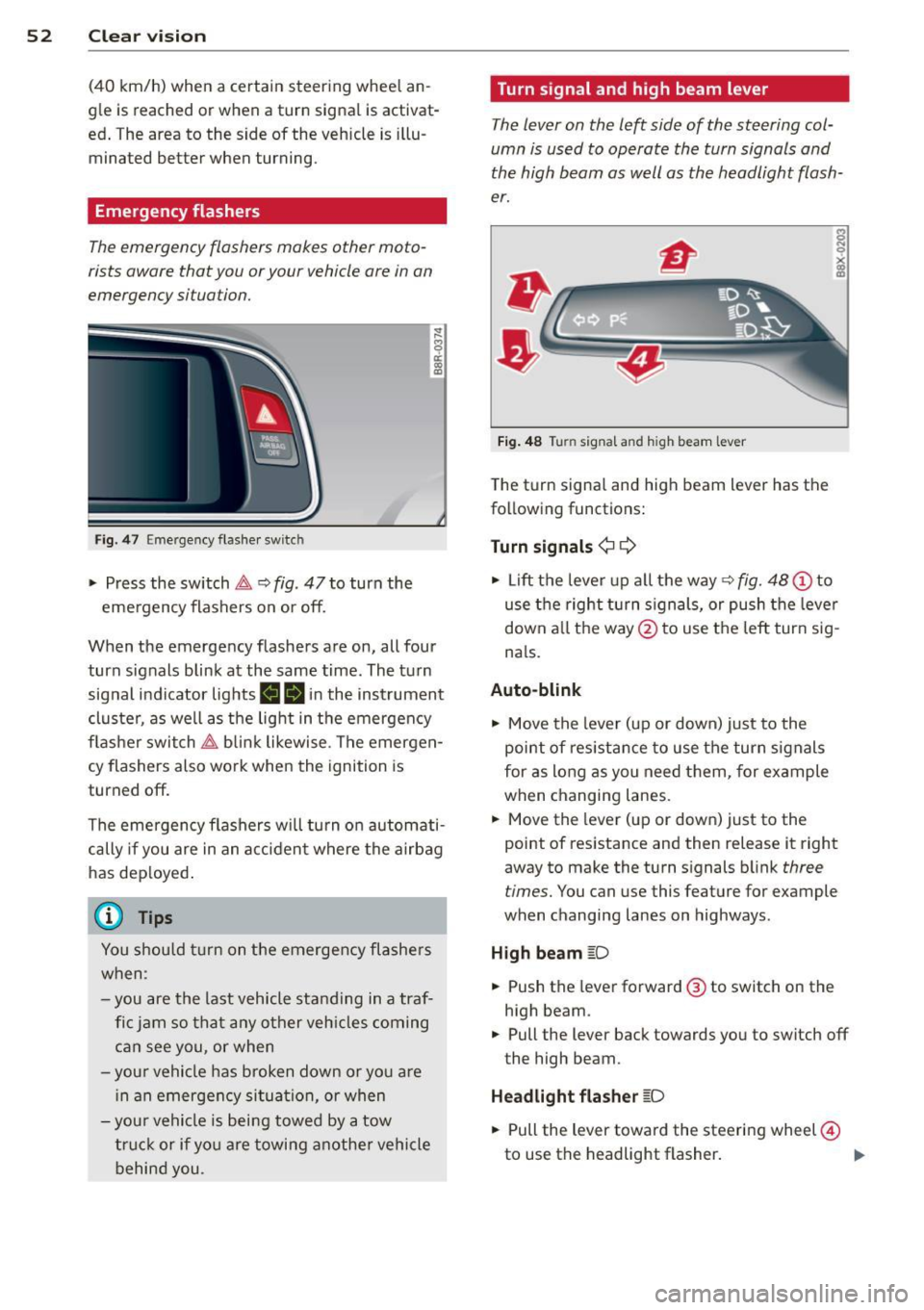
Emergency flashers
The emergency flashers makes other moto
rists aware that you or your vehicle are in an
emergency situation.
Fig . 4 7 Emer gency flasher switc h
"" Press the switch &-, ¢ fig. 47 to turn the
emergency flashers on or off.
~
9 a: (X) a:,
When the emergency flashers are on, all four
turn signals blink at the same time. The turn signal indicator lights
BB in the instrument
cluster, as well as the light in the emergency
flasher switch &-, blink likewise . The emergen
cy flashers also work when the ignition is
turned off.
The emergency flashers will turn on automati
cally if you are in an accident where the airbag
has deployed.
@ Tips
You should turn on the emergency flashers
when :
-you are the last vehicle standing in a traf
fic jam so that any other vehicles coming
can see you, or when
-your vehicle has broken down or you are
in an emergency situation, or when
-your vehicle is being towed by a tow
truck or if you are towing another vehicle
behind you. Turn signal and high beam lever
The
lever on the left side of the steering col
umn is used to operate the turn signals and
the high beam as well as the headlight flash
er.
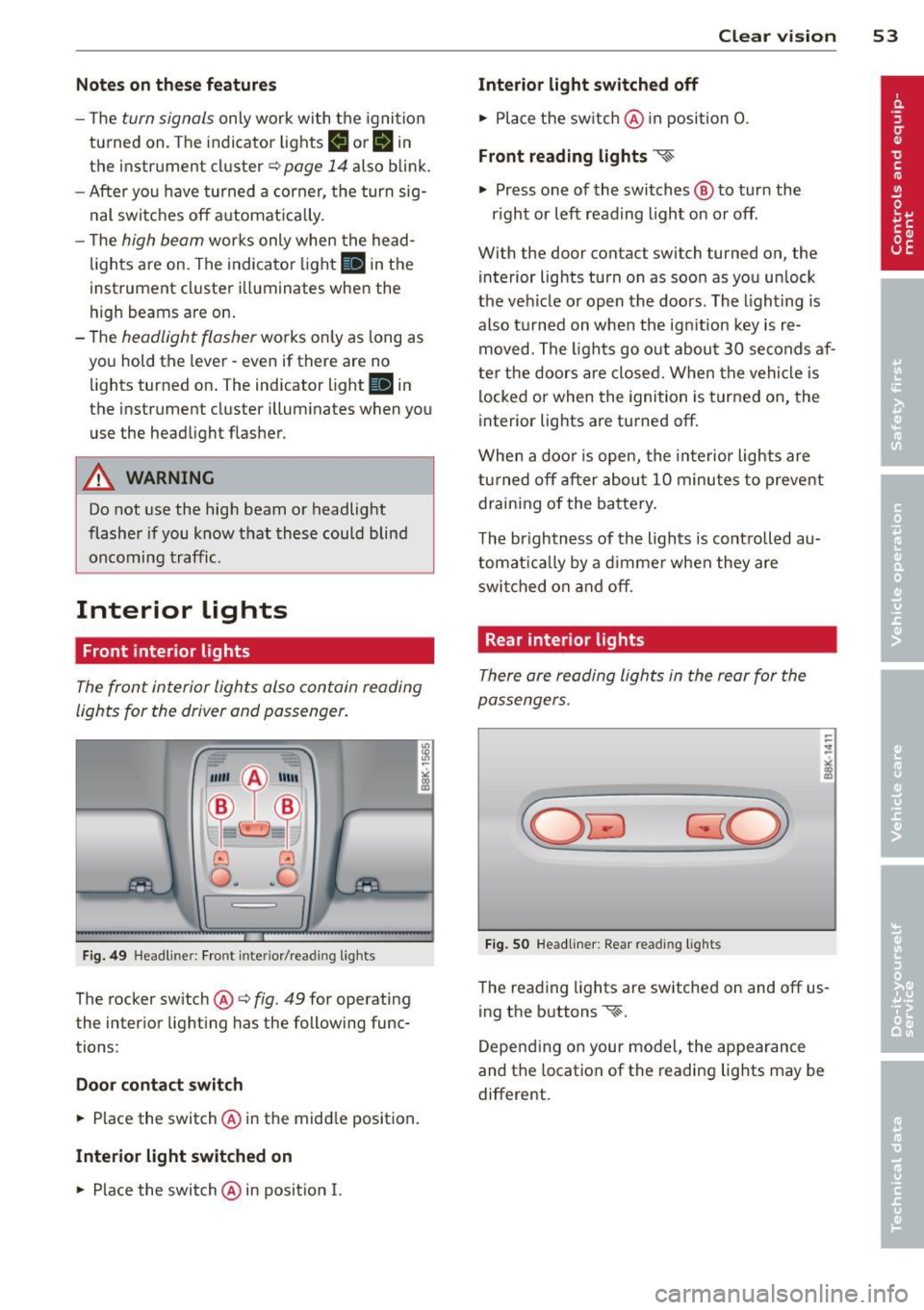
Fig. 48 Turn signal and high beam lever
The turn signal and high beam lever has the
following functions:
Turn signals¢ ¢
s
"" '? X co a,
"" Lift the lever up all the way c:> fig. 48 (!) to
use the right turn signals, or push the lever
down all the way@ to use the left turn sig
n a ls.
Auto-blink .,. Move the lever (up or down) just to the
point of resistance to use the turn signals
for as long as you need them, for example
when changing lanes .
.,. Move the lever (up or down) just to the
point of resistance and then release it right
away to make the turn signals blink
three
times.
You can use this feature for example
when changing lanes on highways .
High beam
[D
"" Push the lever forward ® to switch on the
high beam .
.,. Pull the lever back towards you to switch off
the high beam.
Headlight flasher
[D
.. Pull the lever toward the steering wheel@
to use the headlight flasher.
IJJ>
Page 55 of 316
Notes o n these featur es
-The turn signals only work with the ignition
turned on. The indicator lights
II or Ill in
the instrument cluster
¢page 14 also b link.
- After you have turned a corner, the turn sig-
nal switches off automatica lly.
- The
high beam works only when the head
lights are on. The indicator light
II in th e
instrument cluster illuminates when the
high beams are on.
- The
headlight flasher wo rks only as long as
you hold the lever -even if there are no
lights turned on. The indicator light
II in
the instrument cluster illuminates when you
use the headlight flasher.
A WARNING
Do not use the high beam or headlight
flasher if you know that thes e cou ld blind
oncoming traffic.
Interior lights
Front interior lights
-
The front interior lights also contain reading
lights for the driver and passenger .
r ,,,,, , 11111
~8 ,~
G) Gl
,o . . o
I
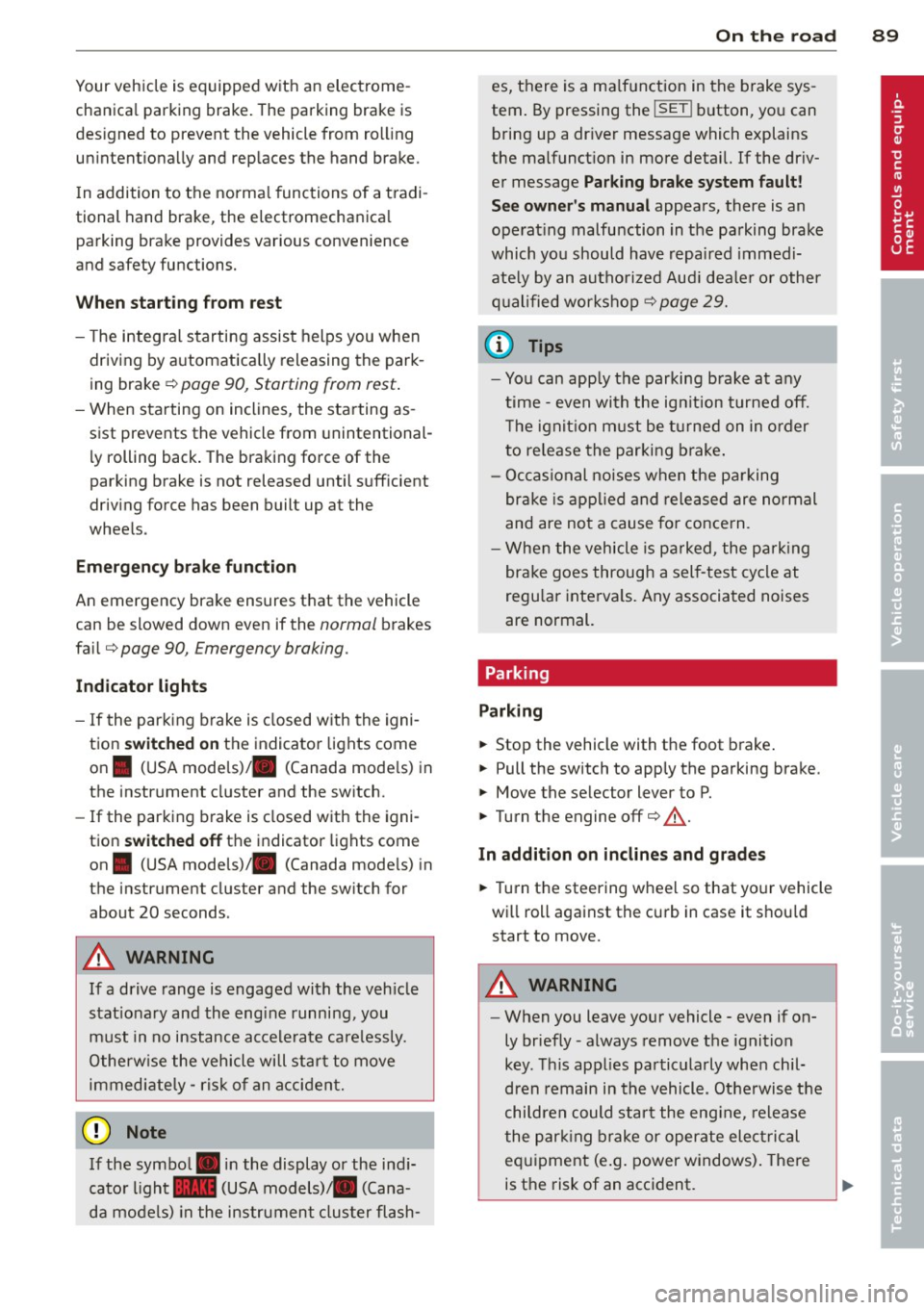
Fig. 49 Headliner: Fro nt inte rior/rea ding lights
The rocker switch @¢ fig. 49 for operating
the interior lighting has the following func
tions :
Door cont act swi tch
.,. Place the switch @ in the middle position.
Inte rior light switched on
.,. Place the switch@ in posit ion I.
Clear vision 5 3
Interior light switch ed off
.,. Place the sw itch @ in position 0.
Front re ad in g lights ~
.,. Press one of the switches@ to turn the
r ight or left reading light on or off .
With the door contact switch turned on, the
interior lights turn on as soon as you unlock
the vehicle or open the doors. The lighting is
also turned on when the ignition key is re
moved. The lights go out about 30 seconds af
ter the doors are closed. When the vehicle is locked or when the ignition is turned on, the
interior lights are turned off.
When a doo r is open, the interior lights are
tu rned off after about 10 minutes to prevent
draining of the battery .
The brightness of the lights is controlled au
tomat ica lly by a d immer when they are
swi tched on and off.
Rear interior lights
There are reading lights in the rear for the
passengers .
Fig . 50 Headliner: Rear read ing lig hts
The read ing l ights are switched on and off us
ing the buttons ~-
Depending on your model, the appearance
and the location of the reading lights may be
different .
Page 91 of 316
Your vehicle is equipped with an electrome
chanica l parking brake . The parking brake is
des igned to prevent the vehicle from ro lling
un intent ionally and replaces the hand brake.
I n addition to the norma l functions of a tradi
tional hand brake, the electromechanica l
parking brake provides various convenience
and safety functions.
When start ing f rom re st
- T he integral starting assist helps you when
driving by automatically releasing the park
ing brake ¢
page 90, Starting from rest.
-When starting on inclines, the starting as
sist prevents the vehicle from unintentional
l y rolling back. The braking force of the
parking brake is not released until sufficient
driv ing force has been built up at the
wheels .
Emergenc y bra ke function
An emergency brake ensures that the vehicle
can be slowed down even if the
normal brakes
fa il¢
page 90, £mergency braking.
Ind icator light s
-If the parking brake is closed w ith the igni
tion
s witched on the indicator lights come
on . (USA models)/ . (Canada models) in
the instrument cluster and the sw itch.
- If the parking brake is closed with the igni
tion
switched off the indicator lights come
on . (USA models)/ . (Canada mode ls) in
the instrument cluster and the switch for
about 20 seconds.
A WARNING
If a drive range is engaged with the veh icle
stat ionary and the engine runni ng, you
must in no instance accelerate care lessly.
Otherw ise the vehicle will start to move
immediate ly- risk of an accident.
W Note
If the symbo l. in the display or the ind i
cato r light .. (USA models) . (Cana
da mode ls) in the instrument cluster flash-
On th e ro ad 89
es, there is a ma lf u nction in the brake sys
tem . By pressing the
ISETI button, you can
bring up a dr iver message which explains
the malfunct ion in more detai l. If the driv
er message
Pa rking brake s ystem fault!
See owner 's manual
appears, there is an
ope rat ing malfunction in the parking brake
which yo u should have repaired immedi
ate ly by an autho rized Aud i dea le r o r other
q ualified wor ks hop ¢
page 29.
(D Tips
-Yo u can app ly the parking brake at any
t ime -even with the ig nition turned off.
T he ign it io n m ust be tu rned on in o rder
to release the parking brake .
- Occasional noises when the pa rking
brake is app lied and released are no rmal
and are no t a cause for conce rn.
- Whe n the vehicle is pa rked, the park ing
brake goes through a sel f-test cycle at
regu lar interva ls. Any associated noises
are normal.
Parking
Parking
.,. Stop the vehicle with the foot brake .
.,. Pull the switch to apply the parking brake.
.,. Move the selector lever to P .
.,. Turn the engine off¢.&_.
In addit ion on incline s and grades
.,. Turn the steering wheel so that yo ur vehicle
wi ll roll against the curb in case it should
start to move.
A WARNING
--When you leave your vehicle -even if on-
ly briefly -always remove the ignition
key. Th is applies pa rticularly when chil
dren remain in the vehicle. Otherwise the
children could sta rt the eng ine, release
the par king brake or operate electrical
equ ipment (e.g. power windows). There
is the risk of an acc ident.
Page 93 of 316
Using the parking brake to perform emer
gency braking will slow your vehicle down
as if you had made a full brake applicat ion.
The laws of physics cannot be suspended
even w ith ESC and its associated compo
nents (ABS, ASR, EDS) . In corners and
when road or weather conditions are bad, a full b rake application can cause the vehi
cle to skid or the rear end to break away -
risking an accident.
Driver messages in the instrument
cluster
Caution: V ehicl e parked too steep
T his message appears when the park ing brake
is applied on an incl ine that exceeds about
30%.
In this case the braking power of the parking
brake may
not be adequate to prevent the ve
h icle from rolling unintentionally .
Press brak e pedal to rel ease par king brak e
This driver message appears when the switch
to release the parking brake was pressed. The
parking brake can on ly be released if yo u step
on the brake pedal and at the same time press
the switch or you automatically release the parking brake with the start ing ass ist
c:> page90.
fplj Parking br ake m alfuncti on!
This driver message appears together with
the yellow
JiJ symbol when there is a parking
brake ma lfunction.
Start-Stop-System
Description
Appl ies to vehicles : wit h Start -Stop-System
The Star t-S top -System can he lp inc rease f ue l
economy and red uce CO2 emissions .
I n the Start-Stop-mode, the eng ine shuts off
a utomatically when the vehicle is stopped,
such as at a traffic ligh t. T he ig nition remains
switched on during t his stop phase. The en -
On th e ro ad 91
gine wi ll be automatica lly restarted when
needed .
T he last Start-Stop-System se tting (on/off us
ing the b utton 10 ..
I) will be restored when the
ignition is turned on . The L ED in the 10 ..
I but
ton t urns on when the Start-Stop-System is
switched off manually .
Basic requirements for the Start -Stop
mod e
-The driver's doo r is closed.
- The driver 's seat be lt is la tched.
- The hood is closed.
- The vehicle must have been dr iven faster
than
2.5 mph (4 km/h) since the last stop.
- A trailer is not hitched to the vehicle.
A WARNING
- Never turn off the engine before the ve
hicle has come to a comp lete stop. The
full funct ion of the brake boos ter and the
power steering is not gua ranteed. You
m ust use more force to tu rn or brake if
necessary. Beca use you cannot steer and
brake as you usually wou ld, this could
lead to crashes and ser ious injuries.
- To reduce the risk of injuries, make sure
that the Start-Stop-System is turned off
when working in the eng ine compart
ment
c:> page 93 .
(D Note
Always switch off the Start-Stop -System
when driving through water
c:> page 93.
Page 94 of 316
92 On the road
Starting/stopping the engine
Applies to vehicles: with Start-Stop-Syste m
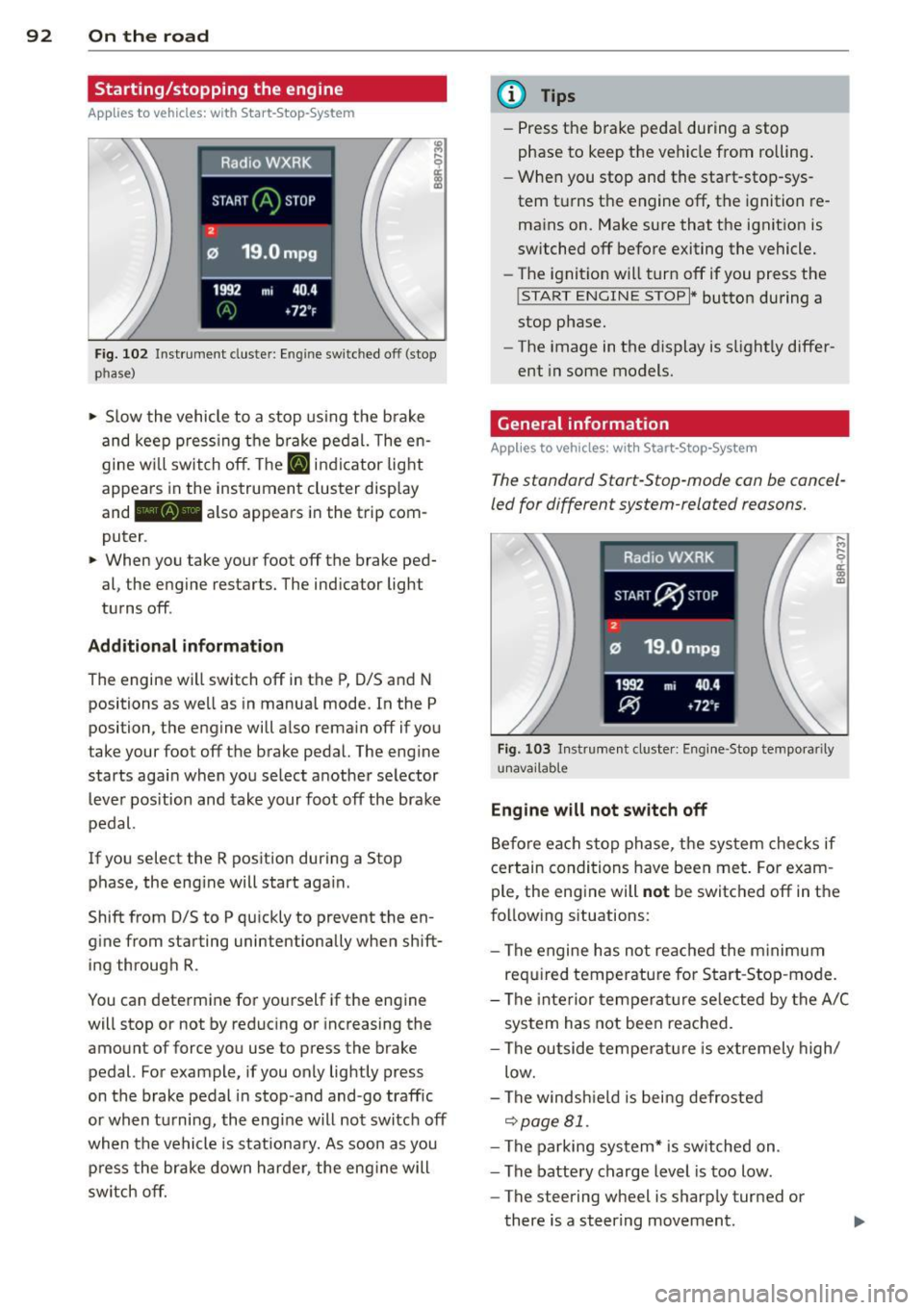
Fig. 102 Instrument cluste r: Eng ine switched off (stop
phase)
.. Slow the vehicle to a stop using the brake
and keep pressing the brake pedal. The en
gine w ill switch off. The
[IJ indic ator light
appears in the instrument cluster display
and - also appears in the trip com
puter .
.. When you take your foot off the brake ped
al, the engine restarts. The indicator light
turns off .
Additional information
The engine will switch off in the P, 0/5 and N
positions as well as in manual mode. In the P
position, the engine will also remain off if you
take your foot off the brake pedal. The engine
starts again when you select another selector
lever position and take your foot off the brake
pedal.
If you select the R position during a Stop phase, the eng ine will start aga in .
Shift from 0/5 to P qu ickly to prevent the en
g ine from starting unintentionally when shift
ing through R.
You can determine for yourself if the engine
will stop or not by reduc ing or increasing the
amount of force you use to press the brake
pedal. For example, if you only lightly press
on the brake pedal in stop-and and-go traffic
or when tu rning, the eng ine will not switch off
when the vehicle is stationary. As soon as you
press the brake down harder, the engine will
switch off.
(D Tips
-Press the brake pedal during a stop
phase to keep the vehicle from rolling.
- When you stop and the start-stop-sys
tem turns the engine off, the ignition re
mains on. Make sure that the ignition is
switched off before exiting the vehicle.
- The ignition will turn off if you press the
!START ENGINE STOPI * button during a
stop phase.
- The image in the display is slightly differ
ent in some models.
General information
Applies to vehicles: with Start-Stop-System
The standard Start-Stop-mode can be cancel
led for different system-related reasons.
Fig. 103 Instrument cluster: Engi ne-Stop tempora rily
unavailable
Engine will not switch off
Before each stop phase, the system checks if
certain conditions have been met. For exam
ple , the eng ine will
not be switched off in the
following sit uations:
- The engine has not reached the minimum
required temperature for Start-Stop -mode.
- The interior temperature selected by the A/C
system has not been reached.
- The outside temperature is extremely high/
low.
- The windsh ield is being defrosted
~page 81.
-The parking system* is switched on .
- The battery charge level is too low .
- The steering wheel is sharply turned or
there is a steering movement.
Page 95 of 316
- After engaging the reverse gear.
er.
Engine automatically restarts
The stop phase is interrupted in the following
situations, for example . The engine restarts
without any act ion by the driver .
- The interior temperature varies from the
temperature selected in the A/C system.
- The windshield is beeing defrosted
Q page 81.
-The brake pedal is pressed several times in a
row.
- The battery charge level becomes too low.
- High power consumption .
@ Tips
If you shift into the 0/5 or N positions af
ter shifting into reverse, the vehicle must
be driven faster than 6 mph (10 km/h) in
order for the engine to switch off again.
Switching the Start-Stop-System on/off
manually
Applies to vehicles: with Sta rt-Stop-System
If you do not wish to use the system, you can
switch it off manually .
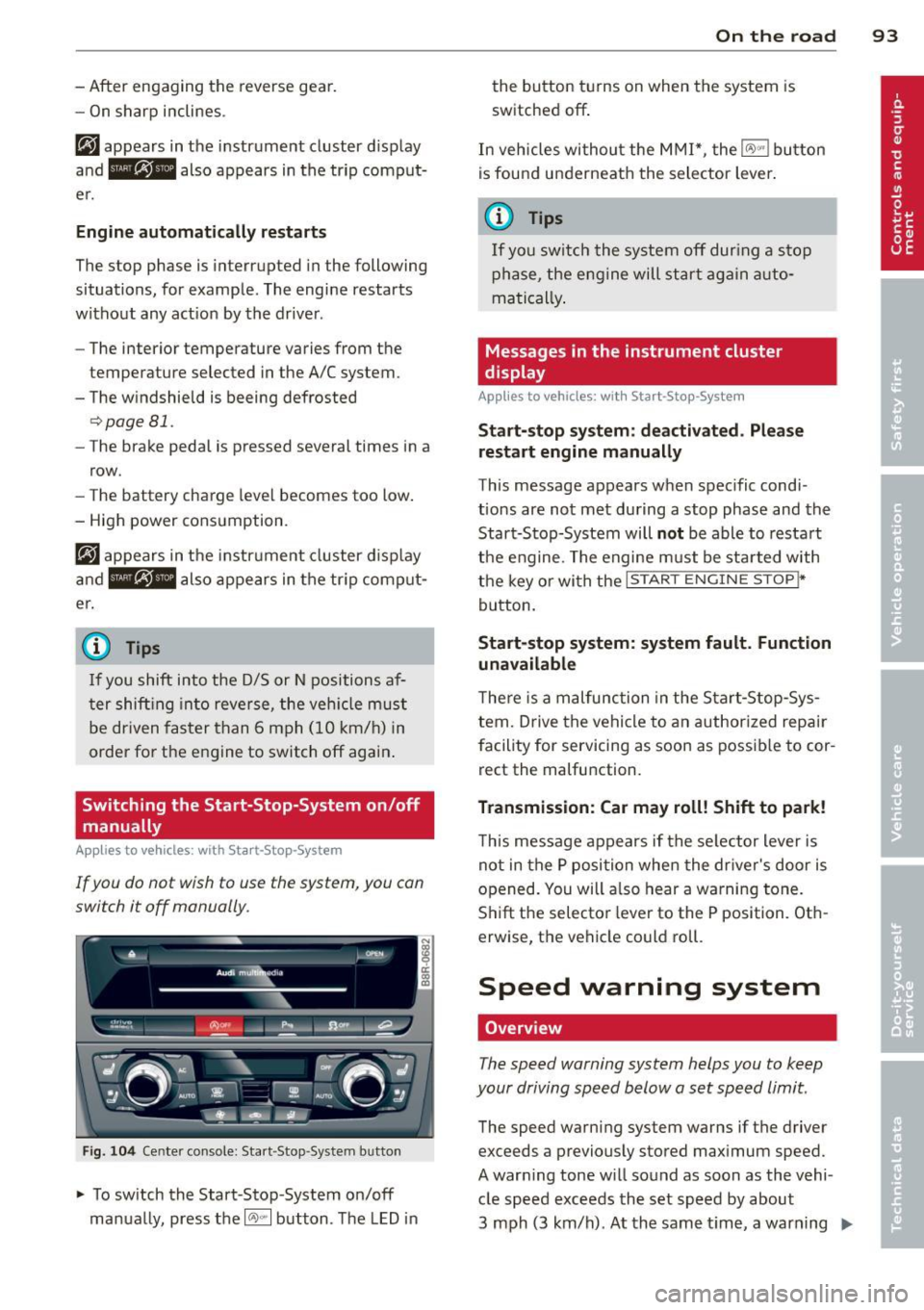
Fig. 104 Center console: Start -Stop -System button
.,. To switch the Start-Stop -System on/off
manually, press the
1 (1;)~ 1 button . The LED in
On the road 93
the button turns on when the system is
switched off .
In vehicles without the MMI*, the
IO\> .. j button
is found underneath the selector lever .
(j} Tips
If you switch the system off during a stop
phase, the engine will start again auto
matically.
Messages in the instrument cluster
display
App lies to vehicles: wit h Start-Stop-Syste m
Start-stop system: deactivated . Please
restart engine manually
This message appears when specific condi
tions are not met during a stop phase and the
Start-Stop-System will
not be able to restart
the engine. The engine must be started with
the key or with the
I STAR T ENGINE STOP t*
button.
Start-stop system: system fault. Function
unavailable
There is a malfunction in the Start-Stop-Sys
tem. Drive the vehicle to an authorized repair
facility for servicing as soon as possible to cor
rect the malfunction.
Transmission: Car may roll! Shift to park!
This message appears if the selector lever is
not in the P position when the driver's door is
opened. You will a lso hear a warning tone.
Shift the selector lever to the P position . Oth
erw ise, the vehicle could roll.
Speed warning system
Overview
The speed warning system helps you to keep
your driving speed below a set speed limit.
The speed warning system warns if the driver
exceeds a previously stored maximum speed.
A warning tone will sound as soon as the vehi cle speed exceeds the set speed by about
3 mph (3 km/h) . At the same time, a warning
IJJ,,