ECO mode AUDI Q5 2013 Owner's Manual
[x] Cancel search | Manufacturer: AUDI, Model Year: 2013, Model line: Q5, Model: AUDI Q5 2013Pages: 316, PDF Size: 78.89 MB
Page 104 of 316
102 Hybrid
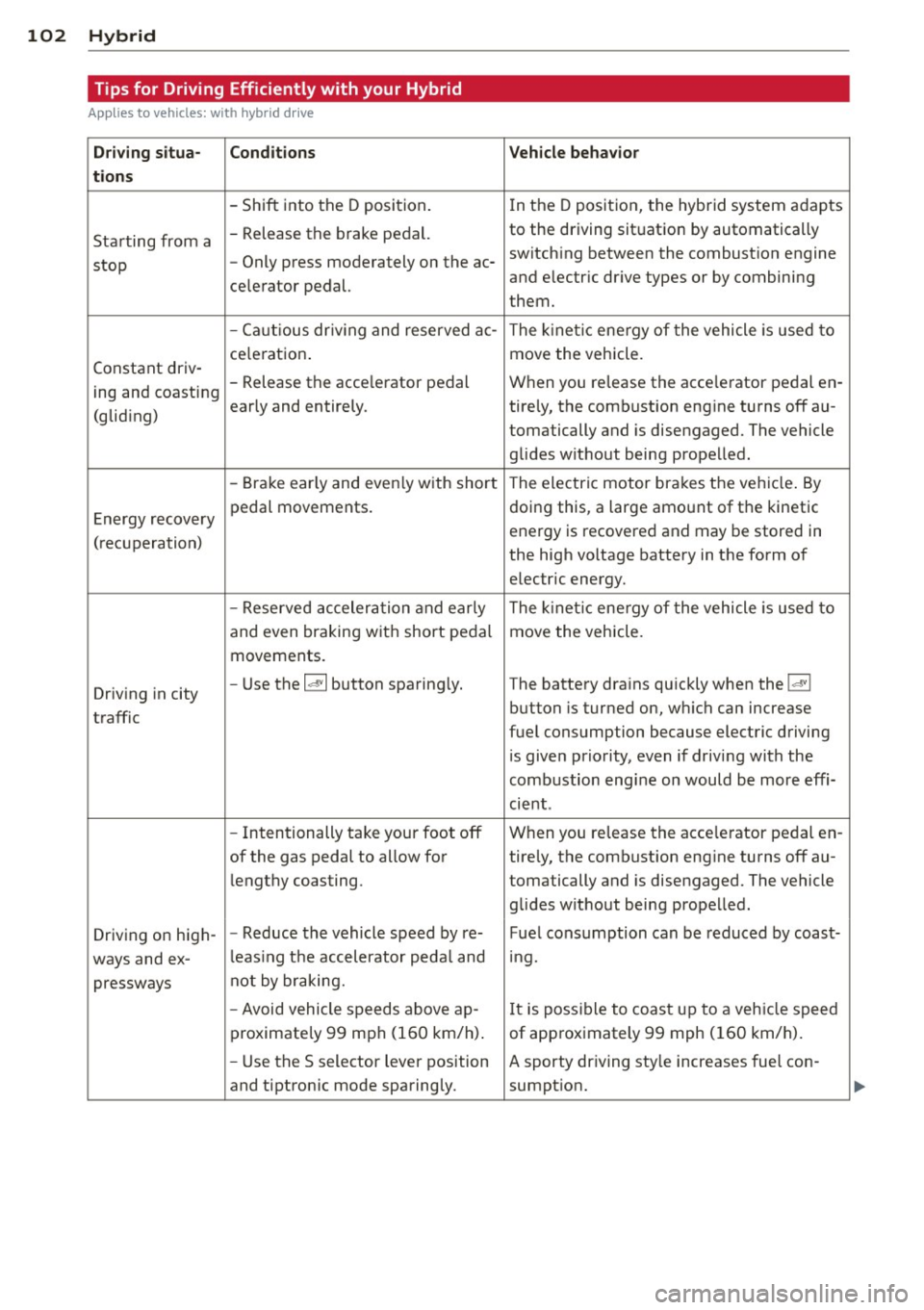
Tips for Driving Efficiently with your Hybrid
Applies to vehicles: with hybrid drive
Driving situa- Conditions Vehicle behavior
tions
- Shift into the D position.
In the D position, the hybrid system adapts
Starting from a -
Release the brake pedal. to the driving situation by automatically
stop -
Only press moderately on the ac- switching between the combustion engine
and electric drive types or by combining
celerator pedal.
them.
- Ca utious dr iv ing and reserved ac-
The kinetic energy of the vehicle is used to
ce leration . move the vehicle.
Constant driv-
ing and coasting -
Release the acce lerator pedal When you release the acce lerator pedal en -
early and entirely. ti rely, the combustion engine turns off au-
(gliding)
tomatically and is disengaged. The vehicle
glides without being propelled.
- Brake early and even ly with short The electric motor brakes the vehicle . By
Energy recovery pedal
movements. doing this, a large amount of the
kinetic
energy is recovered and may be stored in
( recuperation)
the high voltage battery in the form of
electric energy.
- Reserved acceleration and early The kinet ic energy of the vehicle is used to
and even braking w ith short pedal move the vehicle.
movements .
Driving in city -
Use the
la• I button sparing ly. The battery drains quickly when the laVI
button is turned on, which can increase
traffic
fuel consumption because electric driving
is given priority, even if driving with the
combustion engine on would be more effi-
cient .
- Intentionally take your foot off When you release the acce lerator pedal en-
of the gas pedal to allow for ti rely, the combustion engine turns off au-
lengthy coasting . tomatically and is disengaged. The vehicle
glides without being propelled.
Driv ing on high- -
Reduce the vehicle speed by re-Fuel consumption can be reduced by coast-
ways and ex-l
eas ing the accelerator peda l and mg.
pressways not by
braking.
- Avoid vehicle speeds above ajp-
It is possible to coast up to a veh icle speed
proximately 99 mph (160 km/h) . of approximately 99 mph (160 km/h).
- Use the S selector lever position A sporty driving sty le increases fuel con -
and tiptron ic mode sparingly. sumption.
Page 114 of 316
112 Audi adaptive cruise control and braking guard
<:::::> ___ <:::::>_ Distance 3: This setting cor re-
sponds to a d istance of 164 feet/SO meters
when traveling at 62 mph (100 km/h), or a
time interval of 1.8 second s.
<:::::> ____ <:::::> Distance 4: This setting cor re-
sponds to a d istance of 210 feet/64 meters
when traveling at 62 mph (100 km/h), or a
time interva l of 2 .3 seconds .
A WARNING
Following other vehicles too closely in
creases the risk of collisions and serious
personal injury.
- Setting short distances to the traffic
ahead reduces the t ime and distance
available to br ing your vehicle to a safe
stop and makes it even more necessary
to pay close attention to traffic.
- Always obey applicable traffic laws, use
good judgment, and select a safe follow
ing distance for the traffic, road and
weather conditions.
(0 Tips
- Distance 3
is set automatically each time
you sw itch the ignition on.
- Your standa rd settings are automatically
stored and assigned to the remote con
trol key being used
c:::> page 36.
Setting the driving program
Applies to vehicles: with Audi adaptive cruise control
Depending on the selected dr iving program
and distance, driving behavior when accelerat
ing will vary from dynamic to comfortable.
Setting the driving program for vehicles
without Audi drive select*
• In the radio/MMI*, select: !CAR !function
button
> adaptive cruise control > Driving
program
> Comfort, Standard or Dynamic .
Or
• Select : ICARI function button>
Car sys
tems *
control button > Driver assist> Adap
tive cruise control> Driving program
>
Comfort, Standard or Dynamic. Setting the driving mode for vehicles with
Audi drive
select*
Refer to c:::> page 121.
(D Tips
Your settings are automatical ly stored and
assigned to the remote control key being
used
c:::> page 36 .
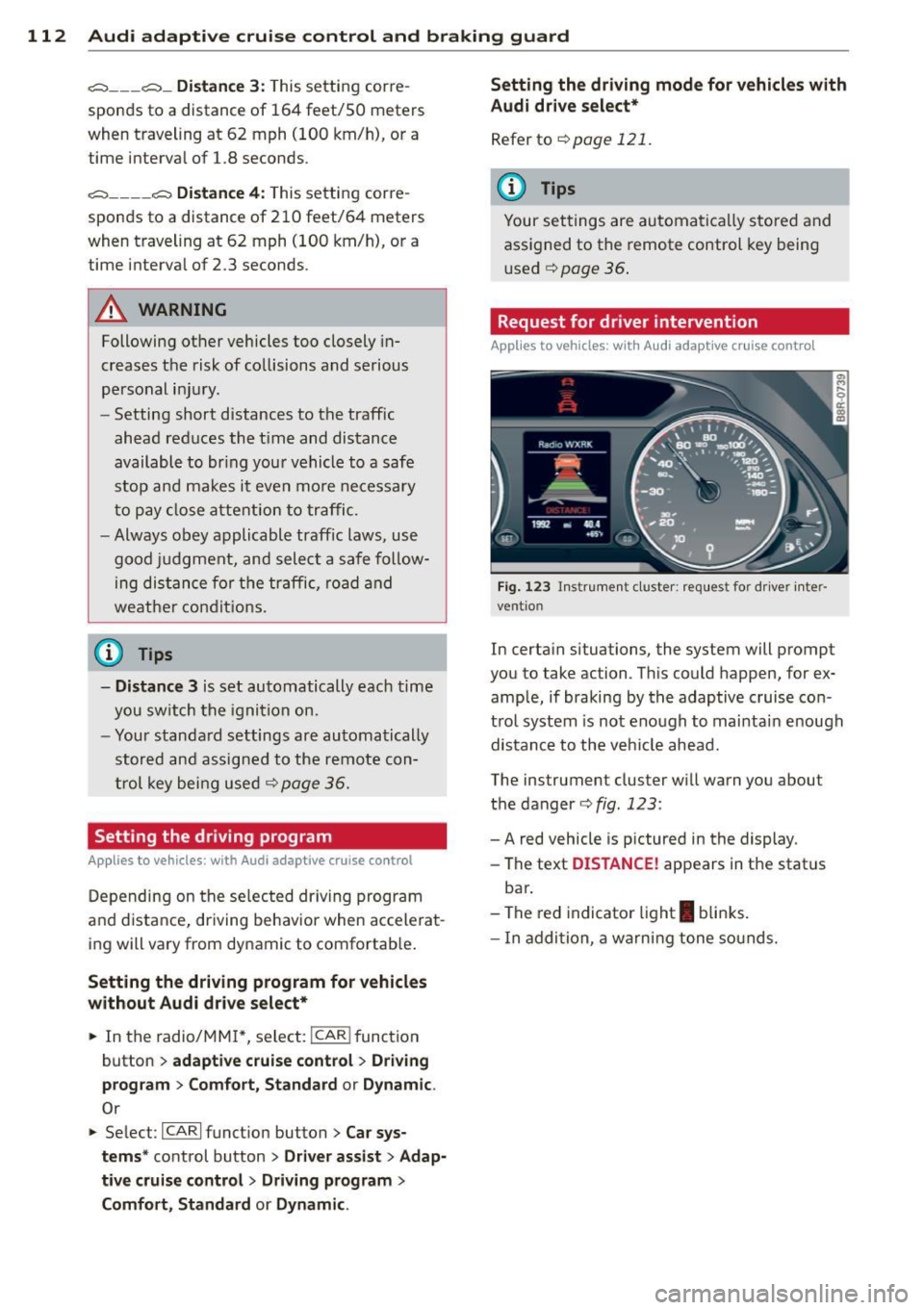
· Request for driver intervention
Applies to vehicles: with Audi adaptive cruise contro l
Fig. 123 Inst rumen t cl uster: r eque st for dr ive r in te r
ve ntion
In certain situations, the system will prompt
you to take ac tion . This could happen, for ex
ample, if braking by the adaptive cruise con
trol system is not enough to mai ntai n enough
distance to the vehicle ahead.
The ins trumen t cluster will warn you abou t
the danger
c:::> fig. 123 :
-A red vehicle is p ictured in the display.
- The text
DISTANCE! appears in the stat us
bar .
- The red indicator light
I blinks.
- In addition, a warning tone sounds.
Page 122 of 316
120 Audi drive select
Audi drive select
Driving settings
Introduction
App lies to vehicles: with Audi drive select
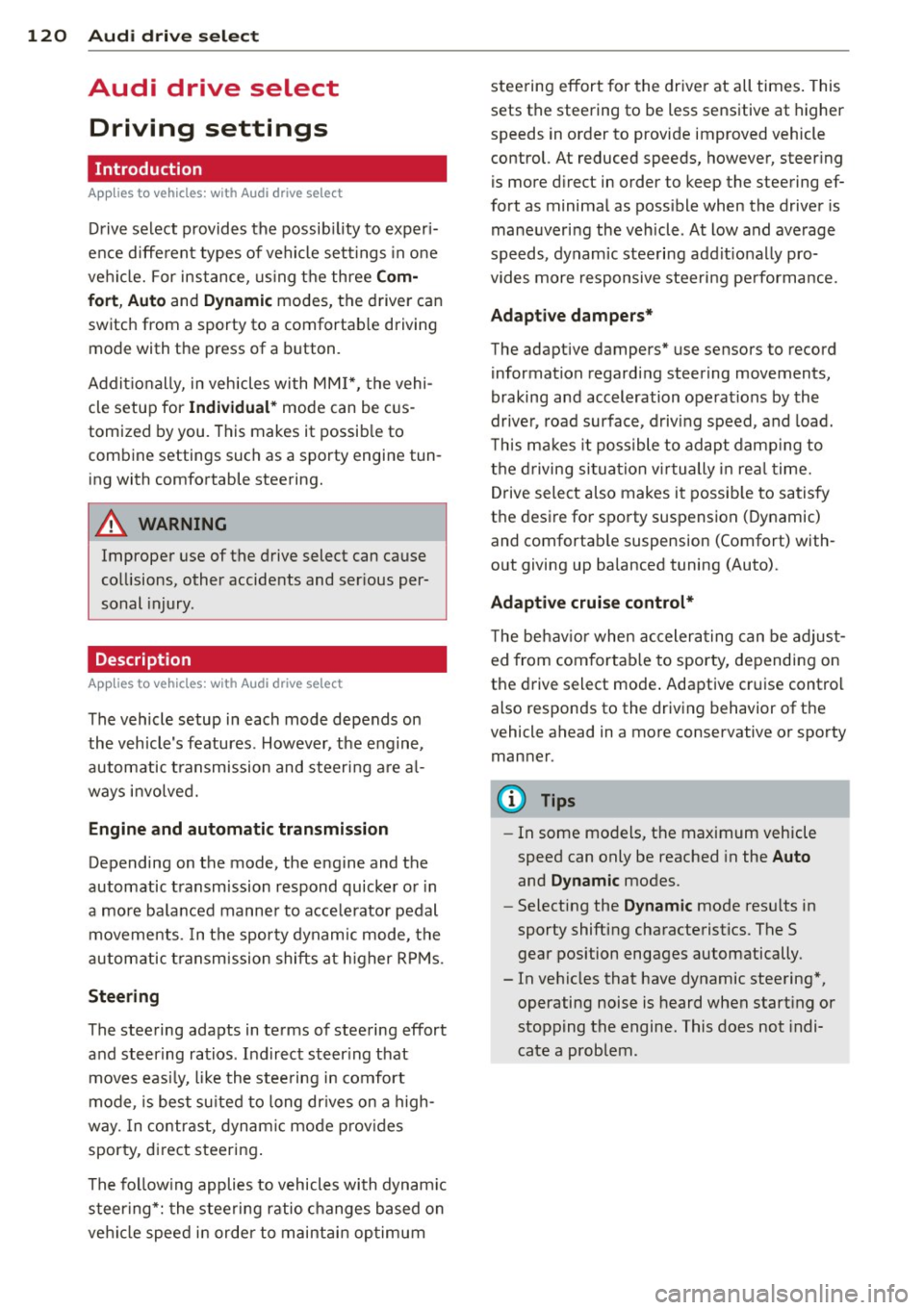
Drive select provides the possib ility to exper i
e nce diffe ren t types of vehi cle sett ings in o ne
ve hicl e. For ins tance, us ing t he three
Com
fort , Auto and Dynamic modes, the driver can
switch from a sporty to a comfortab le drivi ng
mode with the press of a b utton.
A ddit ionally, in veh icles wi th MM I*, the vehi
cle setup for
Individual* mode can be c us
tom ized by you. This makes it possib le to
comb ine settings such as a sporty engine tun
ing with comfortable steering.
A WARNING
Improper use of the drive select can cause
co llisions, other accide nts and ser ious per
sonal injury.
Description
App lies to vehicles: with Audi drive select
The vehicle setup in each mode depends on
the veh icle's features . However, the engin e,
automa tic t ransmissio n and steeri ng a re a l
ways involved.
Engine and automatic transmission
Depending on the mode , the e ng ine and the
automatic t ransm ission respond quicke r or i n
a more ba la nced manne r to a cce le rator pedal
move ments. In t he sporty dynam ic mode, the
a ut om at ic t ra nsmissio n shifts at h igher R PMs.
Steering
The steering adapts in terms of stee ring effort
and steering ra tios . Ind irect steer ing that
moves easi ly, l ike the stee rin g in comfort
mode, is best su ite d t o long dr ive s on a high
way. In co ntr ast, dynam ic mo de p rov ides
sporty, direct steering .
T he fo llow ing applies to vehicles with dynam ic
steer ing*: the stee ring ratio changes based on
ve hicl e spee d in order to maint ain op timum steering effort
for the drive r at all times . This
sets the stee ring to be less sens itive at higher
speeds in order to provide improved vehicle
control. At reduced speeds, however, steer ing
is more d irect in order to keep the steering ef
fort as minima l as poss ible when the driver is
mane uveri ng the veh icle. At low and ave rage
speeds, dynamic steering addit iona lly pro
vides more respon sive stee rin g pe rforma nce.
Adaptive dampers*
The adaptive dampers* use se nsors to record
informa tion regard ing steer ing movemen ts,
braking and acceleration o perations by the
drive r, road surfac e, d riv in g speed, and load.
T his makes it poss ible to adapt damp ing to
the driving si tua tion v irtu ally in real t ime.
Dr ive sele ct also makes i t possib le to sa tisfy
t h e desire fo r spo rty suspension ( Dynamic)
and comfortab le suspension (Comfort) with
o ut giving up ba lanced tuning (Auto) .
Adaptive cruise control*
The be havior when accelera ting can be adju st
ed from comforta ble to sporty, depending on
the d rive select mode . Adaptive cr uise contro l
also responds to the driv ing behavior of the
vehicle ahead in a more conservative or spo rty
manner.
(D Tips
- In some mo dels, t he maximum vehicle
speed can only be reached in the
Auto
and Dynamic mo des.
- Selecting the
Dynamic mode resu lts in
sporty shifting cha racte ristics. The S
gear position engages aut omatically.
- In vehicles that have dynamic stee ring *,
operating noise is heard when start ing or
stopping the e ngine. This does not indi
cate a problem .
Page 125 of 316
Automatic
transmission
tiptronic
Introduction
The automatic transmission is controlled elec
tronically. The transmission upshifts or down
shifts automatically depending on which drive
program is selected. The power is transferred
by a torque converter .
When a
mode rate d riv in g s ty le is used, the
transmission selects the most econom ica l
driving mode. It w ill then change up early and
delay the downshifts to g ive better fuel econ
omy.
T he transmission switches to a sporty mode
after a k ick-down or when the driver uses a
spo rty driving sty le characterized by quick ac
celerator pedal movements, heavy accelera
tion, frequent changes in speed and traveling
at the maximum speed.
If desired, the driver can a lso select the gears
manually ( tiptronic mode ) c:> page 12 7.
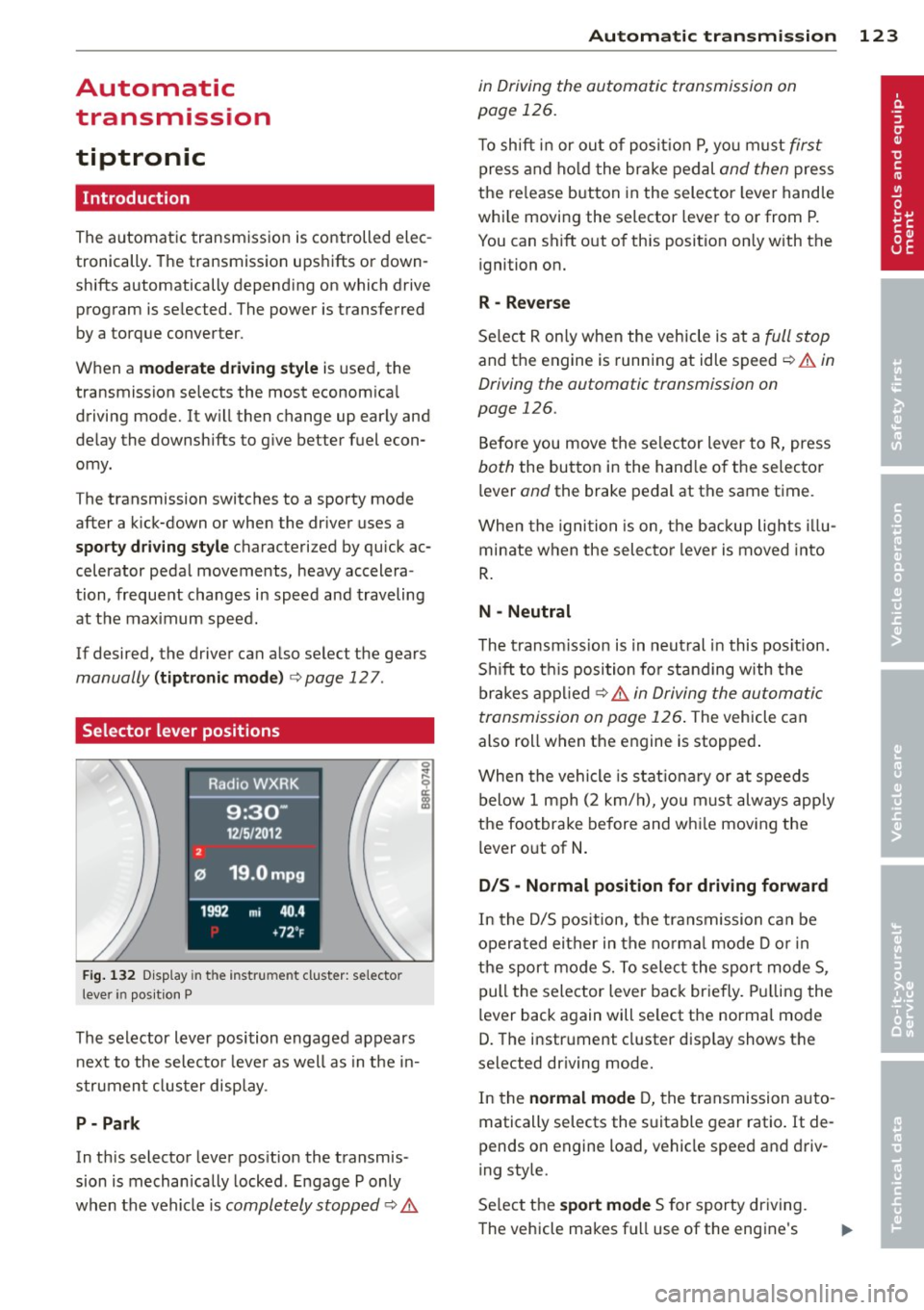
Selector lever positions
Fig . 132 D isp lay in t he i nst ru m en t cluster: selecto r
l ever in pos it ion P
The selector lever position engaged appears
next to the selecto r lever as well as in the in
strument clus ter disp lay.
P- P ark
In th is selector lever pos ition the transmis
sion is mechan ically locked . Engage P only
when the vehicle is
completely stopped c:> 11::..
Automa tic tran sm iss ion 123
in Driving the automatic transmission on
page 126.
T o shift in or out of posit io n P , yo u m ust first
press and ho ld the brake pedal and then press
the re lease button in the selector leve r handle
whi le moving the selector lever to or from P.
You can shift out of th is position only with the
ignition on.
R -Reverse
Se lect R on ly when the vehicle is at a full stop
and the engine is running at idle speed c:> 11::.. in
Driving the automatic transmission on
page 126.
Before you move the se lector lever to R, press
both the button in the hand le o f the selector
lever
and the brake pedal at the same t ime.
When the ignition is on, the backup lights illu
minate when the selecto r lever is moved into
R .
N -Neutral
The t ransm iss ion is in neut ral in this pos ition.
S hi ft to t his position fo r standing with the
brakes appl ied
c:> 11::.. in Driving the automatic
transmission on page 126 .
The vehicle can
also roll when the engine is stopped .
When the vehicle is stat iona ry or at speeds
below 1 mph (2 km/h), yo u m ust always apply
the footbrake before and whi le mov ing the
lever o ut of
N .
D/S - Normal position for driving forward
In the D/S pos ition, the transmission can be
operated either in the no rma l mode D or in
the sport mode S. To select the sport mode S,
pull the selector lever back briefly. Pulling the
lever back again will se lect the normal mode
D. The instrument cluster disp lay shows the
selected driving mode.
In the
normal mode D, the transmission auto
matically selects the s uitable gear ratio. It de
pends on engine load, vehicle speed and driv
ing style.
Se lect the
sport mode S for sporty dr iving .
The vehicle makes fu ll use of the engine's
Page 126 of 316
124 Autom atic tr an smi ssion
power. Shifting may become noticeable when
accelerating . Hybrid drive*: electric driving is
not possible .
When the veh icle is stationary o r at speeds
below 1 mph (2 km/h), you must always apply
the foot brake before and while moving the
lever to D/S out of N.
A WARNING
Read and follow a ll WARNINGS c:> & in
Driving the automatic transmission on
page 126 .
@ Note
-
Coasting downhi ll with the transmission in
N and the engine not r unning w ill result in
damage to the automatic transmission
and possibly the catalytic converter .
(D Tips
-On vehicles with Aud i drive select*, you
can adjust the sporty sh ift characteristics
i n the
Dynamic driving mode.Swill ap
pear in the instrument cluster display in
stead of D .
- If you accidenta lly select N while driv ing,
take your foot off the acce lerator pedal
i mmediately and wait fo r the engine to
s low down to idle before se le cting D/S.
- Hybrid drive*: if the
lasvl button
c:> page 100 is pressed w hile in sport
mode S, the transm issio n sw itches auto
matically to the normal mode D.
- If there is a power failure, the se lector
l ever will not move out of the P posi tio n.
The eme rgency release can be used if
this happens
q page 1 28.
Automatic Shift Lock {ASL)
The Automatic Shift Lock safeguards you
against accidentally shifting into a forward or
the reverse gear and causing the vehicle to
move unintentionally.
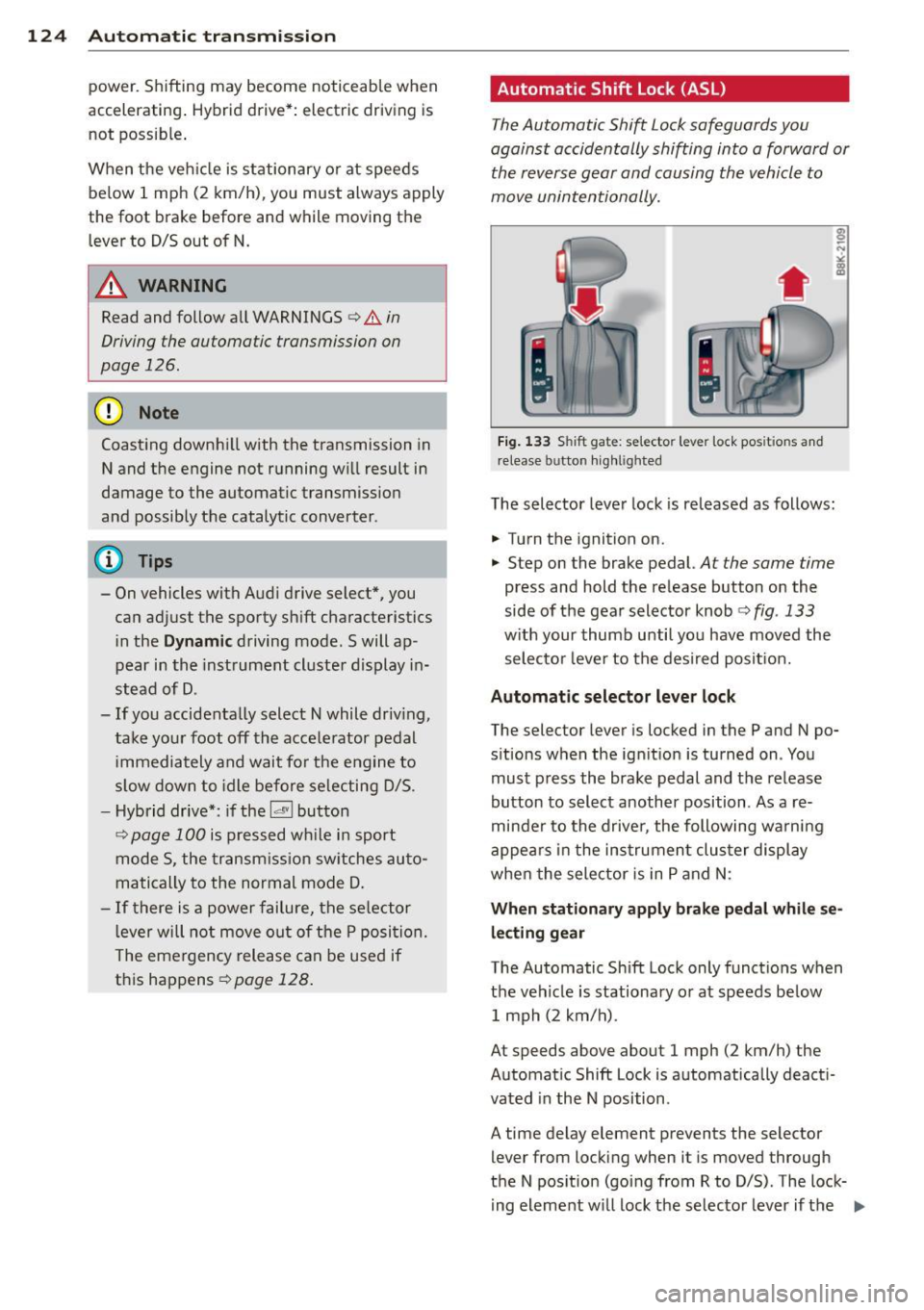
Fi g. 1 33 Shift gate: selecto r lever lock pos itions and
r elease button highl igh ted
The selector lever lock is released as follows :
.... Turn the ignition on.
.,.. Step on the brake pedal.
At the same time
press and hold the release button on the
side of the gear selector knob
c:> fig. 133
w ith your thumb until yo u have moved the
selecto r leve r to the desi red posit ion.
Automatic selector leve r lock
The selector lever is locked in the P and N po
s itions when the ign ition is turned on . You
must p ress the brake pedal and t he release
button to select another position . As a re
minde r to the drive r, the following wa rni ng
appea rs in the instrumen t clus ter display
when the sele ctor is in P and N:
When stationar y apply brak e pedal while se
lec ting gear
The Automatic Shift Lock only funct ions when
t h e veh icle is stationary or at speeds be low
1 mph (2 km/h) .
At speeds above about 1 mph (2 km/h) the
Automat ic Shift Lock is automatically deact i
vated in the N position .
A time delay element prevents the selector lever from locking when it is moved through
the N pos it ion (go ing from R to D/S) . The lock
i ng element w ill lock the selecto r lever if t he
Ill>
Page 128 of 316
126 Automatic transmission
8_ WARNING
-Unintended vehicle movement can cause
serious injury .
- Never leave your vehicle with the engine
running while in gear. If you must leave
your vehicle when the engine is running,
activate the parking brake and move the
selector lever to P.
- Power is still transmitted to the wheels
when the engine is running at idle. To
prevent the vehicle from "creeping", you
must keep your foot on the brake when
the engine is running and the selector lever is in D/S or R or "tiptronic" mode is
selected.
- Do not press the accelerator pedal when
changing the selector lever position
while the vehicle is stationary and the
engine is running.
- Never shift into
R or P while driving.
- Before driving down a steep slope, re-
duce your speed and shift into a lower
gear with "tiptronic".
- Do not ride the brakes or press the brake
pedal too often or too long when driving
down a hill. Constant braking causes the
brakes to overheat and substantially re
duces braking performance, increases
braking distance or causes complete fail
ure of the brake system .
- To preven t the vehicle from rolling back
when stopping on inclines, always hold it
in place with the brake pedal or parking
brake.
- Never hold the vehicle on an incline with
a slipping clutch . The clutch opens auto
matically when it becomes too hot from
the overload. An indicator lamp
[O] illu
minates and a driver message appears
Q page 128when the clutch is overload
ed.
- If the engine must remain running, never
have any driving position engaged when
checking under the hood. Make sure the
selector lever has securely engaged and
is locked in P with the parking brake set
Q page 226, Engine compartment . 0th-erwise, any increase in engine speed may
set the vehicle in motion, even with the
parking brake applied.
(D Note
- When stopping on an incline , do not try
to hold the vehicle in place by pressing
the accelerator pedal while a driving gear is selected. This can cause the transmis
sion to overheat and can damage it. Acti
vate the parking brake or press the brake
pedal to prevent the vehicle from rolling .
- Allowing the vehicle to roll when the en
gine is stopped and the selector lever is
in N will damage the transmission be
cause it is not lubricated under those cir
cumstances.
@ Tips
For safety reasons, the parking brake is re
leased automatically only when the driv
er's safety belt is engaged in the buckle.
Hill descent control
The hill descent control system assists the
driver when driving down declines.
Hill descent control is activated when these
lector lever is in D /S and you press the brake
pedal. The transmission automatically selects
a gear that is suitable for the incline. Hill de
scent control tries to maintain the speed ach
ieved at the time of braking, within physical
and technical limitations. If may still be nec
essary to adjust the speed with the brakes .
Hill descent control switches off once the de
cline levels out or you press the accelerator
pedal.
When the speed is set in the cruise control
system
q page 95, hill descent control is also
activated.
A WARNING
-
Hill descent control cannot overcome
physical limitations, so it may not be able
to maintain a constant speed under all
Page 137 of 316
Homelink®
Universal remote
control
Description
Applies to vehicles: with Home link
The HomeLink universal remote control con
be programmed with the remo te control for
devices that ore already present.
With Home Link, you can control devices such
as the garage door, secu rity systems, ho use
lights , etc. comfortably from the inside of you
veh icle .
H omelink makes it poss ible for you to rep lace
t hree different remote controls from dev ices
in your home with one un ive rsal remo te. Th is
featu re works for most garage door and exte
rior door motor signals. Programming the in
d ividual remote control for your remote con
trol takes p lace near the center of the radiator
grille. There is a control module attached at
this location .
A one-t ime programm ing of the sensor must
be performed before you are able to use sys
tems with Homelink. If the system does not activate after performing the one-t ime pro
gramming, check whether the system uses a rolling code ¢
page 138 for vehicles without
the MMI*.
& WARNING
-
- Never use the Homelink ® transmi tter
with any garage door opener that does have not the sa fety stop and reverse fea
ture as requ ired by federa l safety stand
ards. Th is includes any garage door open
er mode l manufactured before April 1,
1982.
- A garage door opener which cannot de
tect an object, signaling the door to stop
and reverse does not meet current feder
al safety standards . Us ing
a garage door
opener without these features increases
r isk of serious inj ury or death.
Homelink ® 135
-For safety reasons never re lease the
parking brake or start the eng ine while
anyone is standing in front of the vehicle .
- A garage door or an estate gate may
sometimes be set in motion when the
Homelink ® remote control is being pro
grammed. If the device is repeatedly ac
tivated, th is can overstrain motor and
damage its e lectrical compon ents -an
overheated mo to r i s
a fire hazard!
- To avo id possib le injuries or property
damage, please always make abso lutely
certa in that no person s or objects are lo
cated in the range of motion of any
equ ipment being operated .
(0 Tips
-If you would like more information on
Homelink ®, where to purchase the
Home link ® compatib le products, or
would like to purchase the Homelink ®
Home Lighting Package, please ca ll toll
free: l-800-355-3515.
- For Declaration of Compliance to United
States FCC and Industry Canada reg ula
tions
¢ page 298.
- For security reasons, we recommend that
you clear the programmed b uttons be
fore selling the veh icle.
Operation
App lies to vehicles : with Homeli nk
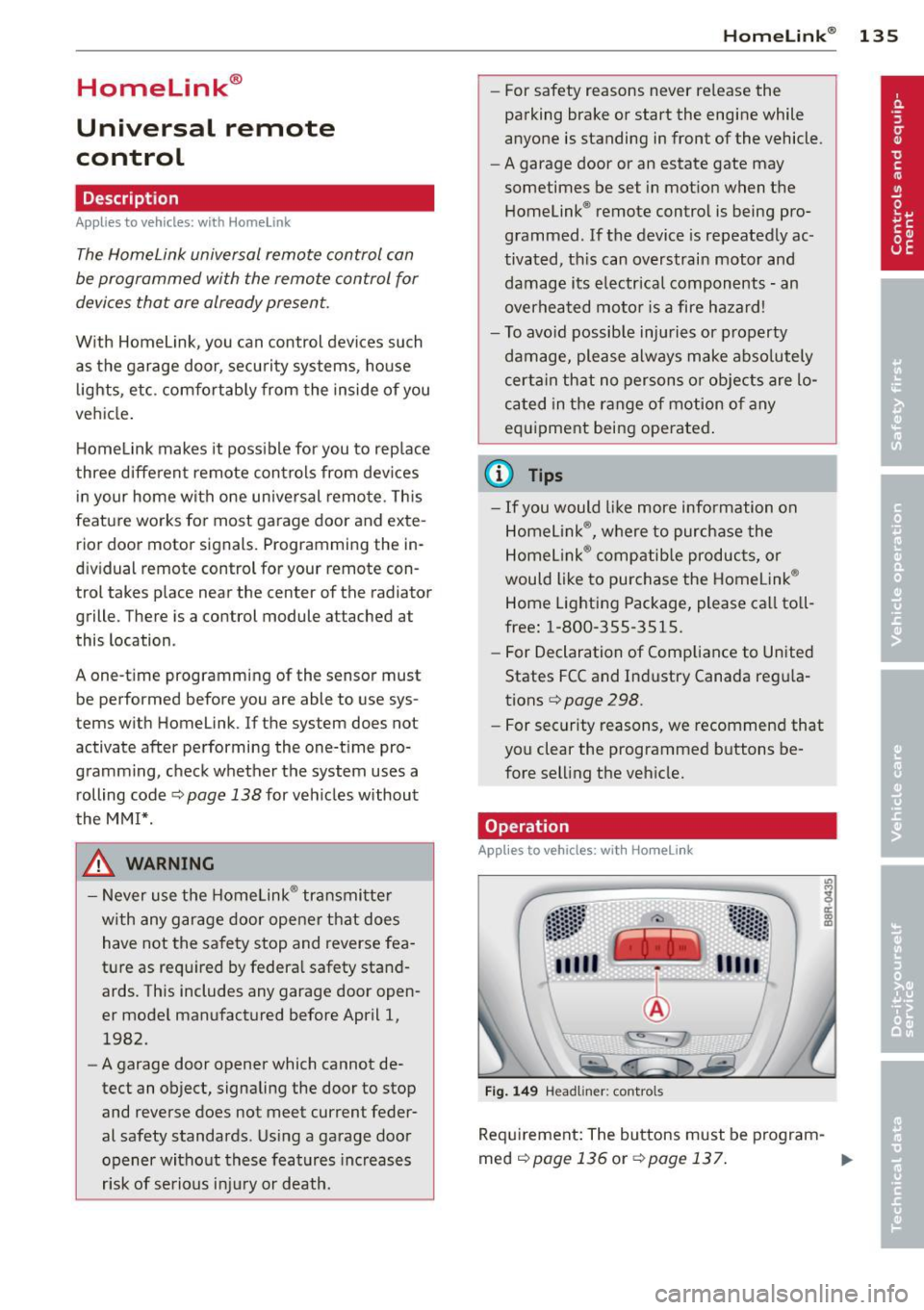
Fig . 14 9 Head li ner: controls
Req uirement : The buttons must be program-
med
<:!)page 136 or ¢page 137. ..,_
Page 138 of 316
136 Homelink®
• To open the garage door, press the p ro
grammed button . The LED @will light up or
flash.
• To close the garage door, press the button
again.
@ Tips
To open the garage door, press the button, but do not press it for longer ten seconds
or the Homelink module w ill switch to
programming mode.
Programming the transmitter (version A)
Appl ies to vehicles: with Home link
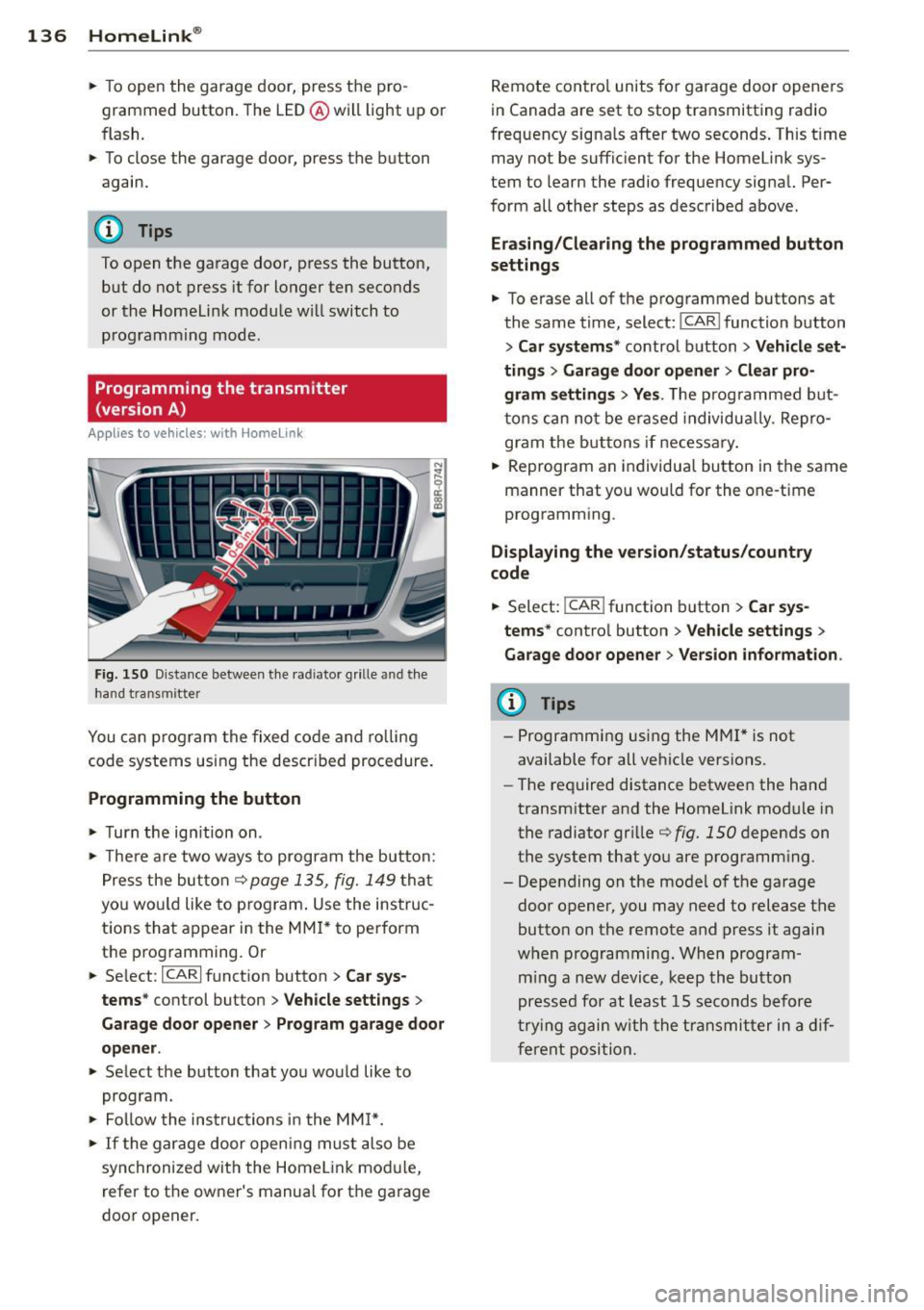
Fig. 15 0 Distance between t he rad iator grille and th e
hand transmitter
You can p rogram the fixed code and ro lling
code systems using the descr ibed procedure.
Programming the button
• Turn the ig nition on .
• The re a re two ways to program the but ton:
P res s the but ton¢
page 135, fig. 149 tha t
yo u wou ld like to p rogram . Use the instruc
t ions tha t appear in the MM I* to perform
the p rogramming. Or
• Se lect:
ICARI function button > Car sys·
terns *
control button > Vehicle settings >
Garage door opener > Program gar age door
opener .
• Select the button that yo u would like to
program.
• Fol low the ins truc tions in the MMI*.
• If the gar age door openi ng mus t also be
syn chronized wit h the Homel ink mod ule,
refer to t he owner's manual for t he garage
door opener. R
emote cont ro l units fo r garage door opene rs
in Canada are set to stop transmitting radio
frequency signa ls after two seconds . This t ime
may not be suffic ient for the Home link sys
tem to learn the radio frequency signal. Per·
form all other steps as described above .
Erasing/Clearing the programmed button
settings
• To e rase all of t he programmed buttons at
the same t ime, select:
I CAR I function button
> Car systems * control button > Vehicle set·
ting s
> Garage doo r open er > Clear pro·
gram setting s> Yes.
The prog rammed b ut
t ons can no t be erased individua lly. Re pro
gram the butt ons if necessa ry .
• Reprogram an individua l bu tton in the same
manner that you wou ld for the one-time
programm ing .
Displaying the version /status/country
code
• Select: I CAR ! function b utton > Car sys·
terns *
contro l button > Vehicle settings >
Garage door opener > Version information .
(D Tips
-Programming using the M MI* is not
available for all ve hicle vers ions.
- The required distance betwee n the hand
transm itter and the Homelink module in
the radiator gr ille ¢
fig. 1 SO depends on
the system that you are prog ramm ing .
- Depending on the mode l of the ga rage
door opener, you may need to release the
butto n on the remote and press it again
w hen programming. When program·
m ing a new device, keep the butto n
presse d for at least 15 s econds before
t ry ing ag ain w ith the tra nsmit ter in a dif
fere nt posi tion.
Page 139 of 316
Programming the transmitter (version B)
Applies to vehicles: with Horne link
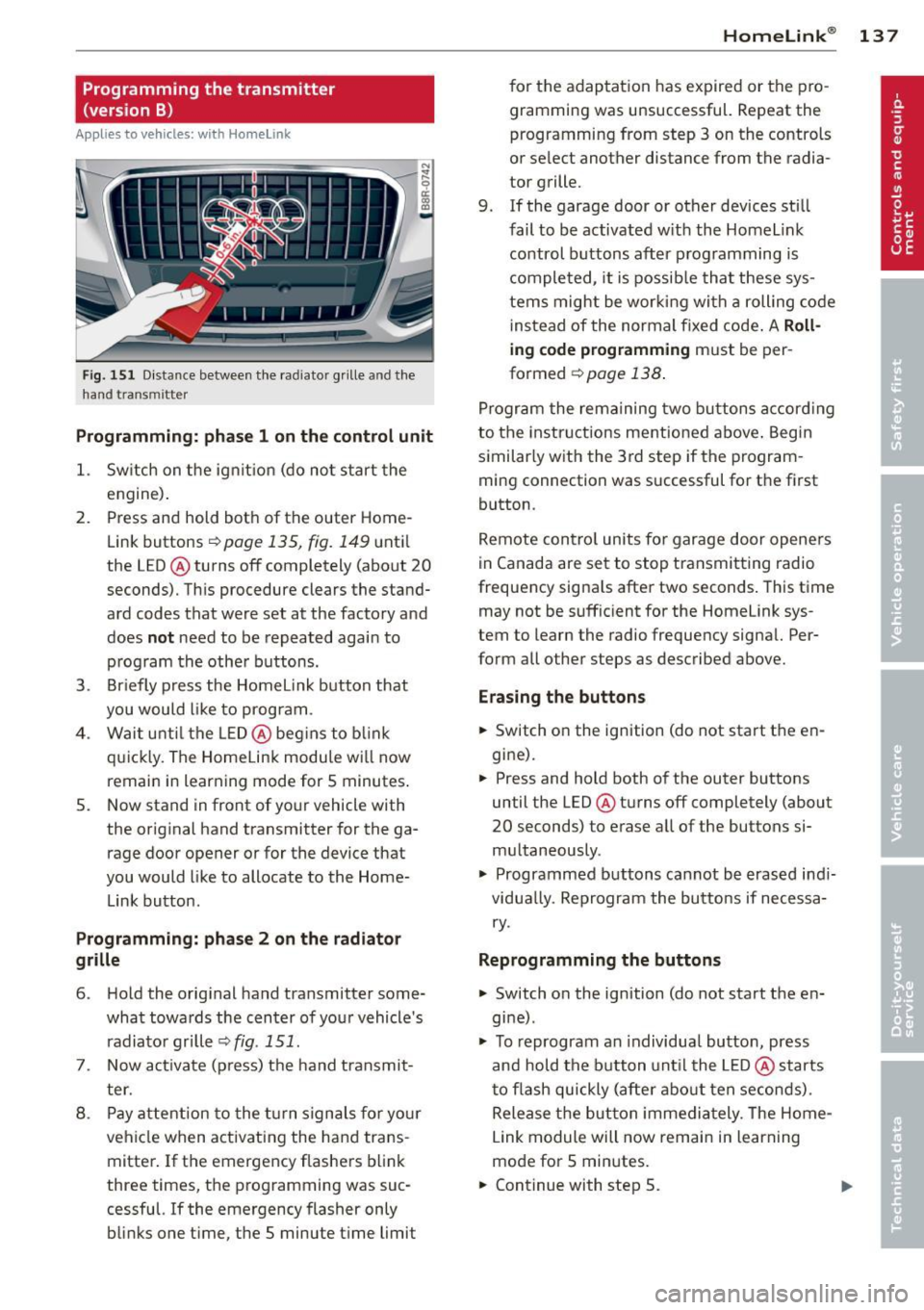
Fig. 15 1 Distance between the radiator gr ille and the
hand transmitter
P rogrammin g: ph ase 1 on the control unit
1. Sw itch on the ig nit ion (do no t start the
engine) .
2. Press and hold both of the outer Home
Link buttons
r=>page 135, fig. 149 until
the LED @ turns off completely (about
20
seconds). Th is procedure clears the stand
ard codes that were set at the factory and
does
n ot need to be repeated agai n to
p rog ram the other buttons.
3. Briefly press the Homelink button that
you would li ke to prog ram .
4 . Wai t unti l the LED @ beg ins to b link
q ui ckly. The Home Link modu le wi ll now
remai n in learning mode for
5 minutes .
5. Now stand in front of your vehicle with
the original hand transmitter for the ga rage door opener or for the device that
you would like to allocate to the Home
Link button.
Programming: pha se 2 on th e radiator
grille
6 . Hold the orig inal hand transmitter some
what towa rds the center of your vehicle 's
radiato r grille r=>
fig. 151.
7. Now act ivate (p ress) t he hand transmit
ter.
8 . Pay a ttention to the tu rn signals for you r
vehicle when activating the ha nd trans
mitter . If t he emergency flashers blink
three times, the programming was suc
cessful. If the emergency flasher only
bli nks one t ime, the 5 minute t ime limit
Homelink ® 13 7
for the adaptation has expired or the pro
gram ming was unsuccessful. Repeat the
programming from step 3 on the controls
or select another distance from the radia
tor grille.
9. If the garage door or other devices sti ll
fail to be activated w it h the Homelink
control buttons after p rogramming is
comple ted, it is possib le tha t these sys
tems might be working with a rolling code
ins tead of the normal fixed code .
A Roll
ing code programming must be per
formed
r=> page 138 .
Program the rema ining two buttons a ccord ing
to the instructions mentioned above . Beg in
similar ly w ith the 3rd step if the program
ming connection was successful for t he first
button.
Remote con tro l units fo r garage door opene rs
in Canada are set to stop transmitting radio
frequency signa ls after two seconds . This time
may not be suffic ient for the Homelink sys
tem to learn the radio frequency signa l. Per
form all other steps as described above.
Erasing the buttons
.,. Switch o n the ignition (do not start the en
gi ne).
.,. Press and hold both of the outer buttons
until the LED @ turns off completely (about
20 seconds) to erase all of the buttons si
m ultaneously .
.,. Programmed buttons cannot be erased ind i
vidua lly. Reprogram the buttons if necessa
ry .
Reprogramming the buttons
.,. Switch on the ignition (do not start the en
gine) .
.,. To reprogram an individua l butto n, press
and hold the button unt il the LE D @ starts
to f lash quickly (after abo ut ten seconds) .
Release t he but ton imme dia tely. The Home
L ink module will now remain in learning
mo de for 5 minutes.
.,. Continue with step 5.
Page 140 of 316
138 Homelink®
-The required dista nce between the hand
transmitter and the HomeLink module in
the radiator grille
c:> fig. 151 depends on
the system that you are programming.
- Depend ing on the model of the garage
door opener, you may need to release the
button on the remote and press it again
when programming . When p rogram
ming a new dev ice, keep the button
pressed for a t least 15 seconds befo re
trying again wi th the transmitte r in a dif
ferent pos it ion. W atch out fo r the emer
gency flasher during that time .
Programming the rolling code
Applies to vehicles: with Home link
Additionally, a rolling code programming for
the HomeLink universal remote control is re
quired for some systems .
Identifying the rolling code
.. Press the prev ious ly programmed Homelink
button aga in and hold i t down .
.. Look at the LED@ c:>
page 135, fig. 149 . If
the LED blinks quickly , the features, s uch as
the garage door o pener, are equipped with
the rolling code .
.. Program the roll ing code as fo llows:
Act ivating the garage door opener motor
unit
.. Locate the sett ing button on the garage
door opener motor unit . The exact location
and co lor of the b utton may vary depending
on the garage door opener ma nufacturer .
.. Press the sett ing button on the garage door
opener motor unit (usually th is w ill act ivate
a "se tt ing light d isp lay" on the moto r unit).
Now you w ill have abo ut
30 se conds ti me to
p erfo rm the Home Link bu tton programming
on the cont ro ls.
Programming on the controls
.. Press the Home L ink button that was already
programmed and hold for two seconds . ..
To end ro lling code programm ing, p ress and
hold t he Home link button for two seconds
aga in .
.. The Homelink button may need to be press
ed a t hird t ime to end the adjus tment proce
dure for some garage door openers .
After the controls have been programmed, the
garage door opener s hou ld recogni ze the
Homelink signa l and operate when the Home
Li nk button is pressed . N ow you may program
the o ther buttons as needed .
(D Tips
-Programmi ng the rolling code can be
performed quicke r and more easily with
the help of a second person .
- If d iff iculties should ar ise when pro
gramming the rolling code, consult the
op erating instructions fo r th e garage
door opener or o ther dev ices for po ssible
s o lu tions.