ECO mode AUDI Q5 2013 User Guide
[x] Cancel search | Manufacturer: AUDI, Model Year: 2013, Model line: Q5, Model: AUDI Q5 2013Pages: 316, PDF Size: 78.89 MB
Page 56 of 316
54 Clear vision
Vision
Sun visors
Using the sun visors makes driving safer.
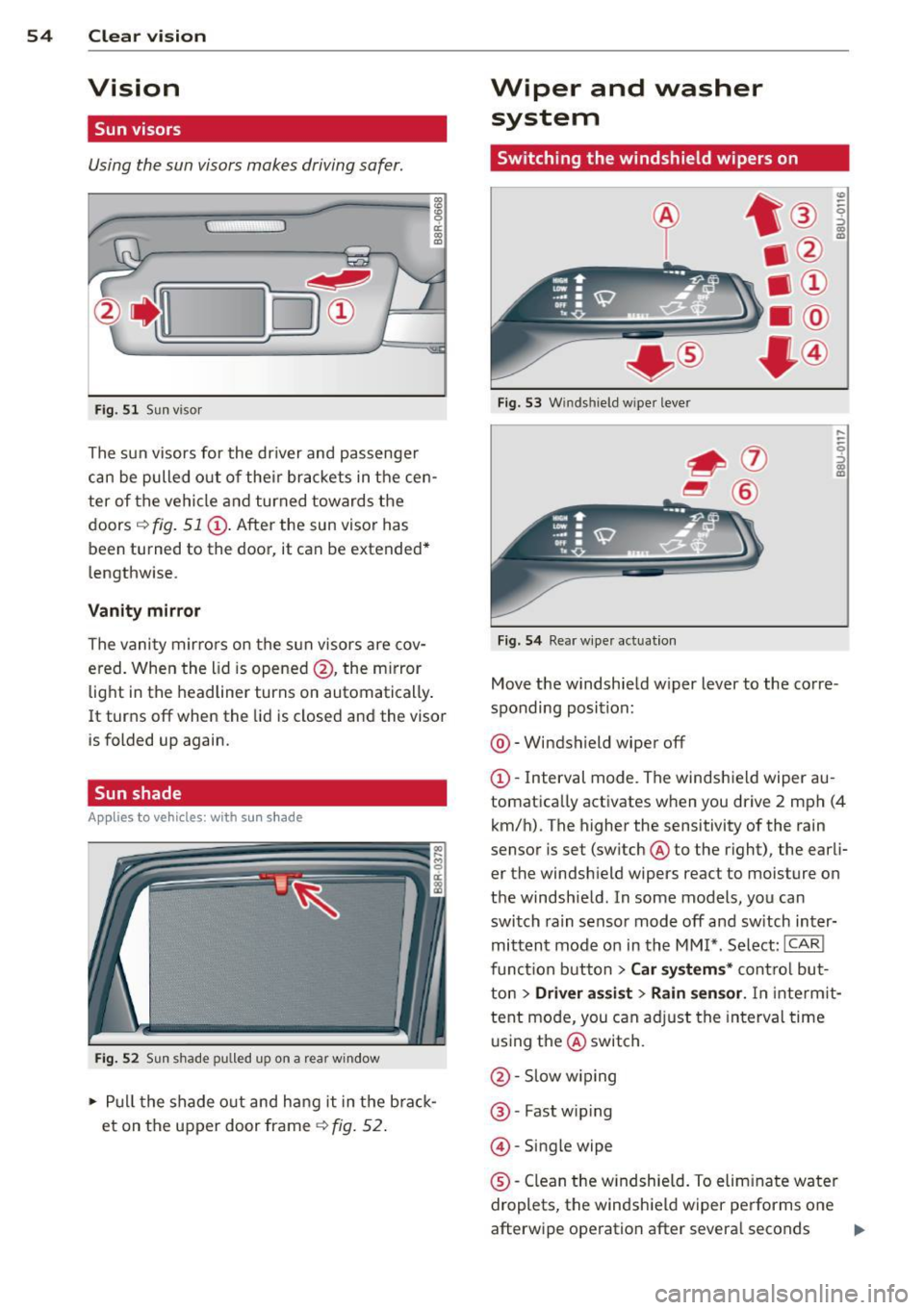
Fig. 51 Sun visor
The sun visors for the driver and passenger
can be pulled out of their brackets in the cen
ter of the vehicle and turned towards the
doors
i::> fig. 51 (D. After the sun visor has
been turned to the door, it can be extended*
lengthwise.
Vanity mirror
The vanity mirrors on the sun visors are cov
ered. When the lid is opened @, the m irror
light in the headliner turns on automatically .
It turns off when the lid is closed and the visor
is folded up again.
Sun shade
App lies to vehicles: with s un shade
Fig. 52 Sun shade pulled up on
a rear window
.. Pull the shade out and hang it in the brack
et on the upper door frame
~fig. 52.
Wiper and washer
system
Switching the windshield wipers on
+ ®
Fig . 53 Windshield w iper lever
Fig.
54 Rear w iper actuat io n
Move the windshield w iper lever to the corre
sponding position:
@ -Windshield wiper off
(D-Interval mode. The windshield wiper au
tomatically activates when you drive 2 mph (4
km/h). The higher the sensitivity of the rain
sensor is set (sw itch @to the right), the ear li
er the windsh ield wipers react to moisture on
the windshield . In some models, you can
switch rain sensor mode
off and sw itch inter
mittent mode on in the MMI*. Select:
ICAR!
function button > Car systems* control but
ton
> Driver assist > Rain sensor. In interm it
tent mode, you can adjust the interval time
using the@switch.
@ -Slow wipin g
@-Fast wip ing
@ -Single wipe
®-Clean the win dshie ld. To eliminate water
droplets, the windsh ield wiper performs one
afterwipe operation after severa l seconds
ll>-
Page 61 of 316
Digital compass
Activating or deactivating the compass
Applies to vehicles: with digital compass
The direction is displayed on the interior rear
view mirror.
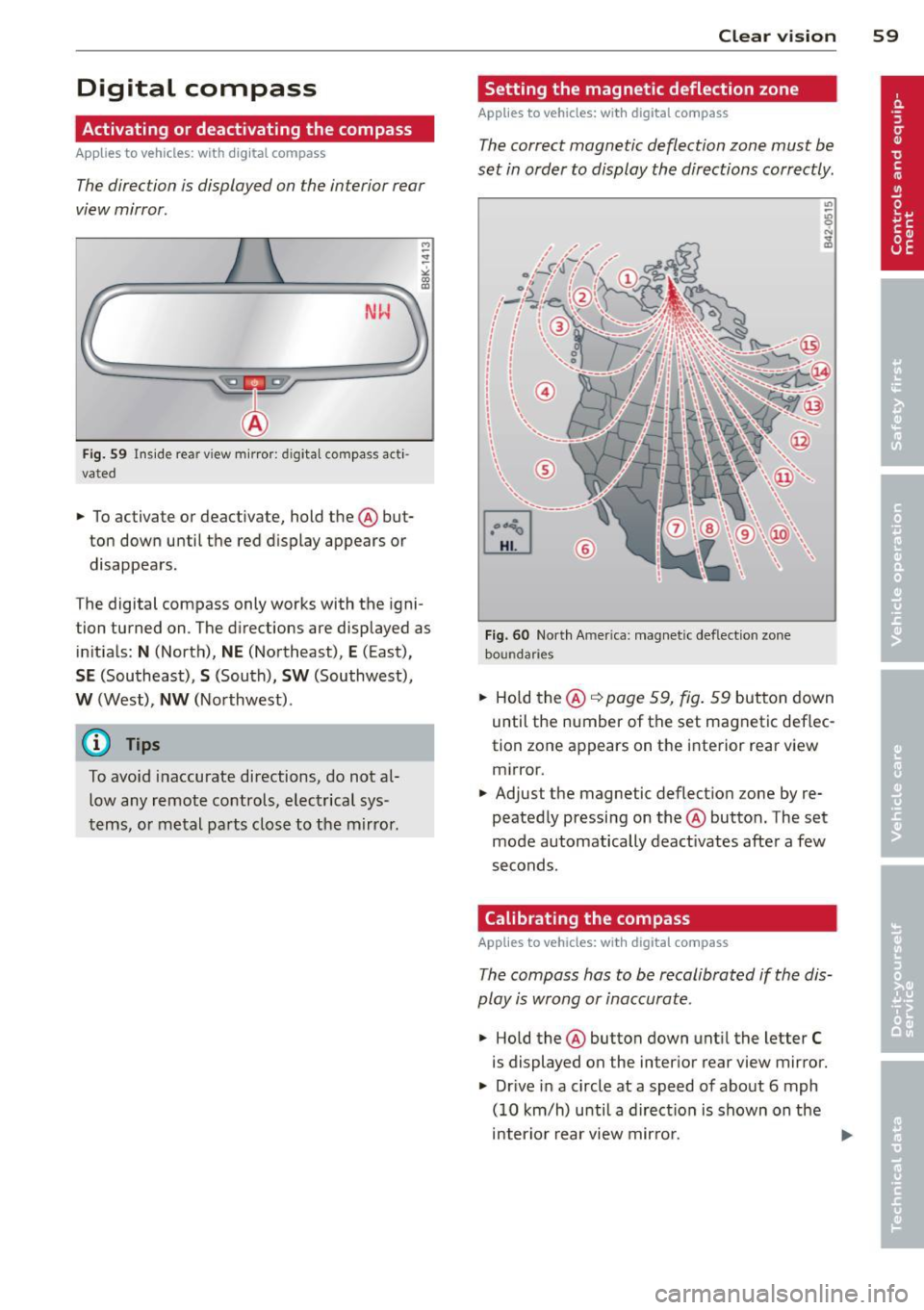
Fig. 59 Ins ide rear view mirror: digital compass acti
vated
.,.. To activate or deactivate, hold the@ but
ton down until the red display appears or
disappears.
The digital compass only works with the igni
tion turned on. The directions are displayed as
initials:
N (North), NE (Northeast), E (East),
SE (Southeast), S (South), SW (Southwest),
W (West), NW (Northwest).
(D Tips
To avo id inaccurate directions, do not al
low any remote controls, electrical sys
tems, or metal parts close to the mirror. Clear vision 59
Setting the magnetic deflection zone
Applies to vehicles: with digital compass
The
correct magnetic deflection zone must be
set in order to display the directions correctly.
Fig . 60 North America: magnetic defle ction zone
bo undaries
.,.. Hold the@ q page 59, fig. 59 button down
until the number of the set magnetic deflec
tion zone appears on the interior rear view mirror.
.,.. Adjust the magnetic deflection zone by re
peatedly pressing on the@ button. The set
mode automatically deactivates after a few
seconds.
Calibrating the compass
Applies to vehicles: with digital compass
The compass has to be recalibrated if the dis
play is wrong or inaccurate .
.,.. Hold the@ button down until the letter C
is displayed on the interior rear view mirror .
.,.. Dr ive in a circle at a speed of about 6 mph
(10 km/h) unti l a direction is shown on the
interior rear view mirror.
Page 79 of 316
To close glove compartment
• Push the glove compartment lid upward un-
ti l the lock engages.
There are holders for a pen and a pad of paper in the glove compartment lid.
On the right side in the glove compartment is
a holder with the key body into which the
emergency key must be cl ipped to be able to
start the vehicle .
A WARNING
To reduce the risk of personal injury in an
accident or sudden stop, a lways keep the
glove compartment closed whi le driving.
Cooling box in glove compartment
The cooling box works only when the air-con
ditioning is in cooling mode.
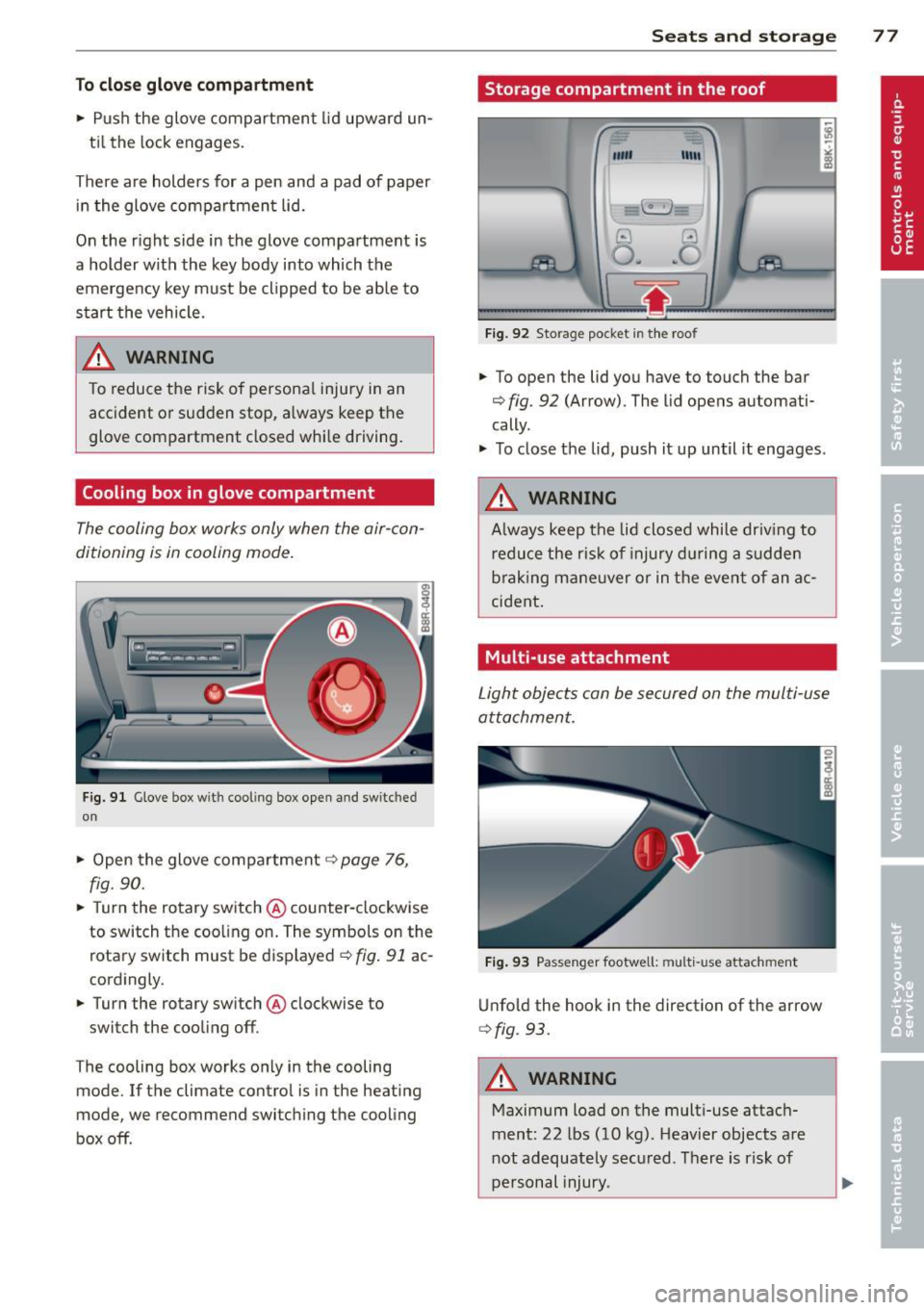
Fig. 91 Glove box w ith cool ing box open and switc hed
on
" Open the glove compartment c::> page 76,
fig. 90.
" Turn the rotary switch @counter-clockwise
to switch the coo ling on. The symbols on the
rotary switch must be displayed
c::> fig. 91 ac
cordingly .
• Turn the rotary sw itch @clockwise to
switch the cooling off .
T he cooling box works only in the cooling
mode. If the climate contro l is in the heating
mode, we recommend switching the cooling
box off .
Seats and storage 77
Storage compartment in the roof
""'
11111
Fig. 92 Storage pocket in the roof
" To open the lid you have to touch the bar
c> fig . 92 (Arrow). The lid opens automati
cally .
" To close the lid, push it up until it engages .
A WARNING
Always keep the lid closed while driv ing to
reduce the ris k of injury dur ing a sudden
braking maneuver or in the event of an ac
cident .
Multi-use attachment
Light objects can be secured on the multi-use
attachment.
Fig. 93 Passenger footwell: mult i-use attachment
Unfold the hook in the direction of the arrow
¢ fig . 93.
A WARNING
Maximum load on the multi-use attach
ment: 22 lbs (10 kg) . Heavier objects are
not adequately secured . There is risk of
personal injury .
Page 82 of 316
80 Warm and cold
Operation
We recommend pressing the IAUTOI button and setting the temperature to 72 °F (22 °C) .
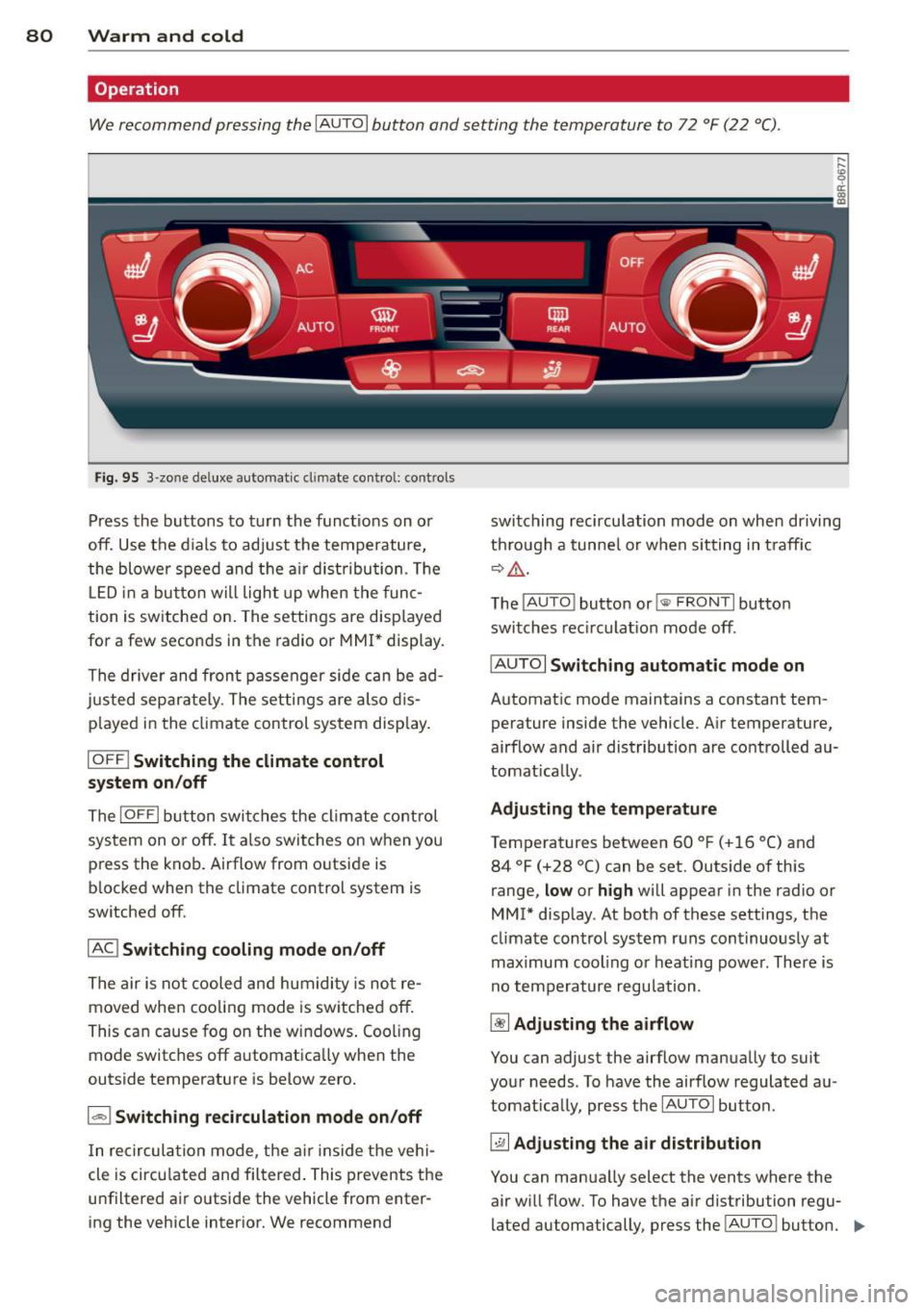
Fig. 95 3 -zo ne de luxe automat ic cl imate contro l: controls
Press the buttons to turn the functions on or
off. Use the d ials to adjust the temperature,
the blower speed and the air dist ribution . Th e
L ED in a button wi ll light up when the func
tion is switched on. The settings are disp layed
for a few seconds in the radio or MMI* display.
The driver and front passenger side can be ad
justed separately. The settings are also dis p la yed in the climate control system display.
IOFFI Switching the climate control
system on/off
The IOFFI button switches the climate control
sys tem on or off. It also switches on when you
press the knob. Airflow from o utside is
b locked when the climate control system is
switched off.
IAC ! Switching cooling mode on/off
The air is not cooled and humidity is not re
moved when cooling mode is switched off .
This can cause fog on the windows . Cooling
mode switches off a utomatica lly when the
outside temperature is below zero.
1 - 1 Switching recirculation mode on/off
In recircul ation mode, the air inside the vehi
cle is circu lated and filtered . This prevents the
u nfiltered air outside the vehicle from enter
ing the vehicle interior. We recommend switching
recirculation mode on when driving
th rou gh a tunnel or when sitting in traff ic
~&. -
The IAUTO I button or!@ FR ONT I button
switches recirculation mode off.
IAU TOI
Switching automatic mode on
Automatic mode maintains a constant tem
perature inside the vehicle. Air temperature,
airflow and air distribution are controlled au
tomat ically.
Adjusting the temperature
Temperatures between 60 °F (+16 °C) and
84 °F (+28 °C) can be set. Outside of this
range,
low or high will appear in the radio or
MMI* display . At both of these settings, the
climate control system runs continuously at
maximum cooling o r heating power. There is
no temperature regulation .
~ Adjusting the airflow
You can adjust the airflow manually to suit
your needs . To have the airflow regulated au
tomatica lly, press the IAUTOI button .
~ Adjusting the air distribution
You can manually select the vents where the
air will flow. To have the a ir distribution regu
lated automatically, press the !AUTO ! button.
IIJ,,
Page 83 of 316
![AUDI Q5 2013 User Guide [i] Adjusting seat heating*
Pressing the button switches the seat heating
on at the highest setting ( leve l 3) . The LEDs
indicate the temperature level. To reduce the
temperature,](/img/6/57637/w960_57637-82.png "AUDI Q5 2013 User Guide [i] Adjusting seat heating*
Pressing the button switches the seat heating
on at the highest setting ( leve l 3) . The LEDs
indicate the temperature level. To reduce the
temperature,")
[i] Adjusting seat heating*
Pressing the button switches the seat heating
on at the highest setting ( leve l 3) . The LEDs
indicate the temperature level. To reduce the
temperature, press the button again. To
switch the seat heating off, press the button
repeatedly until the LED turns off .
After 10 minutes, the seat heating automati
cally switches from leve l 3 to leve l 2.
lil Adjusting seat ventilation*
Pr ess ing the button switches the seat venti la
tion on at the highest setting (level 3). The
LE Ds indicate the ventilation leve l. To reduce
the ventilation leve l, press the button again.
To switch the seat ventilat ion off, press the
button repeatedly until the LED turns off.
I.., FRONT I Switch the defroster on/off
The windshield and side windows are defrost
ed or cleared of condensation as quickly as possib le. The maximum amo unt of air flows
mainly from the vents below the windshield.
Recirculation mode switches off . The tempera
ture is controlled automat ically.
The
IAU TOI button switches the defroster off.
IClil REAR I Switching rear window heater
on/off
The rear window heater only operates when
the engine is running.
It switches off auto
matica lly after a few minutes, depend ing on
the outside temperature.
To prevent the rear window heater from
switching off automatically, press and hold
the
lllii) REAR I button for more than 2 seconds.
This remains stored unt il the ignition is
switched off.
Air vents
You can open and close the center and rear air
vents using the thumbwheels . The levers ad
just the direction of the airflow from the vents.
You can adjust the air temperature in the rear by turning the thumbwheel toward the red
Warm and cold 81
side to make it warmer or toward the blue
side to make it cooler .
A WARNING
-Do not use the recircu lation for extended
periods of time. The windows could fog
up since no fresh a ir can enter the vehi
cle . If the windows fog up, press the air
recirculation button aga in immed iately
to switch off the air recirculation func
tion or select defrost.
- Individuals with reduced sensitivity to
pa in or temperature could develop burns
when using the seat heating* funct ion.
To reduce the risk of injury, these individ
uals shou ld not use seat heating.
(D Note
To avoid damage to the heating elements*
in the seats, do not kneel on the seats or
place heavy loads on a small area of the
seat.
(D Tips
The seat heating* only works when the
seat detects body weight on it. Placing ob
jects on the seat could create enough
weight to switch seat heating on .
Setup
The basic climate control settings can be ad
justed in the radio or MMI*.
.,. Select: I CAR I function button> A/C control
but ton. Or
.,. Select:
I CAR I function button > Car sys-
tems*
control button > AC.
Automatic recirculation
When switched on, automatic recirculation
controls the recirculation mode automatically.
If the windows fog up, press the lqj> FRON T I
button.
Synchronization
When synchronization is switched on, the
same settings are applied to both the driver
liJ>,
Page 91 of 316
Your vehicle is equipped with an electrome
chanica l parking brake . The parking brake is
des igned to prevent the vehicle from ro lling
un intent ionally and replaces the hand brake.
I n addition to the norma l functions of a tradi
tional hand brake, the electromechanica l
parking brake provides various convenience
and safety functions.
When start ing f rom re st
- T he integral starting assist helps you when
driving by automatically releasing the park
ing brake ¢
page 90, Starting from rest.
-When starting on inclines, the starting as
sist prevents the vehicle from unintentional
l y rolling back. The braking force of the
parking brake is not released until sufficient
driv ing force has been built up at the
wheels .
Emergenc y bra ke function
An emergency brake ensures that the vehicle
can be slowed down even if the
normal brakes
fa il¢
page 90, £mergency braking.
Ind icator light s
-If the parking brake is closed w ith the igni
tion
s witched on the indicator lights come
on . (USA models)/ . (Canada models) in
the instrument cluster and the sw itch.
- If the parking brake is closed with the igni
tion
switched off the indicator lights come
on . (USA models)/ . (Canada mode ls) in
the instrument cluster and the switch for
about 20 seconds.
A WARNING
If a drive range is engaged with the veh icle
stat ionary and the engine runni ng, you
must in no instance accelerate care lessly.
Otherw ise the vehicle will start to move
immediate ly- risk of an accident.
W Note
If the symbo l. in the display or the ind i
cato r light .. (USA models) . (Cana
da mode ls) in the instrument cluster flash-
On th e ro ad 89
es, there is a ma lf u nction in the brake sys
tem . By pressing the
ISETI button, you can
bring up a dr iver message which explains
the malfunct ion in more detai l. If the driv
er message
Pa rking brake s ystem fault!
See owner 's manual
appears, there is an
ope rat ing malfunction in the parking brake
which yo u should have repaired immedi
ate ly by an autho rized Aud i dea le r o r other
q ualified wor ks hop ¢
page 29.
(D Tips
-Yo u can app ly the parking brake at any
t ime -even with the ig nition turned off.
T he ign it io n m ust be tu rned on in o rder
to release the parking brake .
- Occasional noises when the pa rking
brake is app lied and released are no rmal
and are no t a cause for conce rn.
- Whe n the vehicle is pa rked, the park ing
brake goes through a sel f-test cycle at
regu lar interva ls. Any associated noises
are normal.
Parking
Parking
.,. Stop the vehicle with the foot brake .
.,. Pull the switch to apply the parking brake.
.,. Move the selector lever to P .
.,. Turn the engine off¢.&_.
In addit ion on incline s and grades
.,. Turn the steering wheel so that yo ur vehicle
wi ll roll against the curb in case it should
start to move.
A WARNING
--When you leave your vehicle -even if on-
ly briefly -always remove the ignition
key. Th is applies pa rticularly when chil
dren remain in the vehicle. Otherwise the
children could sta rt the eng ine, release
the par king brake or operate electrical
equ ipment (e.g. power windows). There
is the risk of an acc ident.
Page 93 of 316
Using the parking brake to perform emer
gency braking will slow your vehicle down
as if you had made a full brake applicat ion.
The laws of physics cannot be suspended
even w ith ESC and its associated compo
nents (ABS, ASR, EDS) . In corners and
when road or weather conditions are bad, a full b rake application can cause the vehi
cle to skid or the rear end to break away -
risking an accident.
Driver messages in the instrument
cluster
Caution: V ehicl e parked too steep
T his message appears when the park ing brake
is applied on an incl ine that exceeds about
30%.
In this case the braking power of the parking
brake may
not be adequate to prevent the ve
h icle from rolling unintentionally .
Press brak e pedal to rel ease par king brak e
This driver message appears when the switch
to release the parking brake was pressed. The
parking brake can on ly be released if yo u step
on the brake pedal and at the same time press
the switch or you automatically release the parking brake with the start ing ass ist
c:> page90.
fplj Parking br ake m alfuncti on!
This driver message appears together with
the yellow
JiJ symbol when there is a parking
brake ma lfunction.
Start-Stop-System
Description
Appl ies to vehicles : wit h Start -Stop-System
The Star t-S top -System can he lp inc rease f ue l
economy and red uce CO2 emissions .
I n the Start-Stop-mode, the eng ine shuts off
a utomatically when the vehicle is stopped,
such as at a traffic ligh t. T he ig nition remains
switched on during t his stop phase. The en -
On th e ro ad 91
gine wi ll be automatica lly restarted when
needed .
T he last Start-Stop-System se tting (on/off us
ing the b utton 10 ..
I) will be restored when the
ignition is turned on . The L ED in the 10 ..
I but
ton t urns on when the Start-Stop-System is
switched off manually .
Basic requirements for the Start -Stop
mod e
-The driver's doo r is closed.
- The driver 's seat be lt is la tched.
- The hood is closed.
- The vehicle must have been dr iven faster
than
2.5 mph (4 km/h) since the last stop.
- A trailer is not hitched to the vehicle.
A WARNING
- Never turn off the engine before the ve
hicle has come to a comp lete stop. The
full funct ion of the brake boos ter and the
power steering is not gua ranteed. You
m ust use more force to tu rn or brake if
necessary. Beca use you cannot steer and
brake as you usually wou ld, this could
lead to crashes and ser ious injuries.
- To reduce the risk of injuries, make sure
that the Start-Stop-System is turned off
when working in the eng ine compart
ment
c:> page 93 .
(D Note
Always switch off the Start-Stop -System
when driving through water
c:> page 93.
Page 96 of 316
94 On the road
symbol appears in the display. The symbol's
appearance might be different in some mod
els.
The speed warning system has
two warning
thresholds
that function independently of
each other and that have somewhat d ifferent
purposes:
Speed warning 1
You can use speed warn ing 1 to set the maxi
mum speed wh ile you are dr iv ing. This sett ing
will remain in effect unt il you turn off the igni
tion, assuming that you have not changed or
reset the setting.
The speed warning symbol. (USA models)/
• (Canada mode ls) in the warning 1 display
appears when you exceed the maximum
speed . It goes out when the speed fa lls below
the stored maximum speed.
The speed warn ing symbo l wi ll also go out if
the speed
exceeds the stored maximum speed
by more than about 25 mph (40 km/h) for at
least 10 seconds. The s tored maximum speed
is deleted .
Setting speed warning 1
c:!;> page 94 .
Speed warning
2
Storing warning 2 is recommended if you al
ways
want to be reminded of a certa in speed,
for example when you are trave ling in a coun
try that has a general maximum speed limit,
or if you do not want to exceed a specified
speed for winte r ti res.
The speed warning 2 symbol ,. (USA mod
e ls)/ . (Canada models) appears in the dis
p lay when you exceed the stored speed limit.
Unlike wa rning 1, it will not go out until the
vehicle speed drops below the stored speed
limit.
Setting speed warn ing 2
c:!;> page 94.
@ Tips
Even though your vehicle is equipped with
a speed warning system, you shou ld sti ll
watch the speedometer to make sure you are not driving faster than the speed limit.
Speed warning 1: setting a speed limit
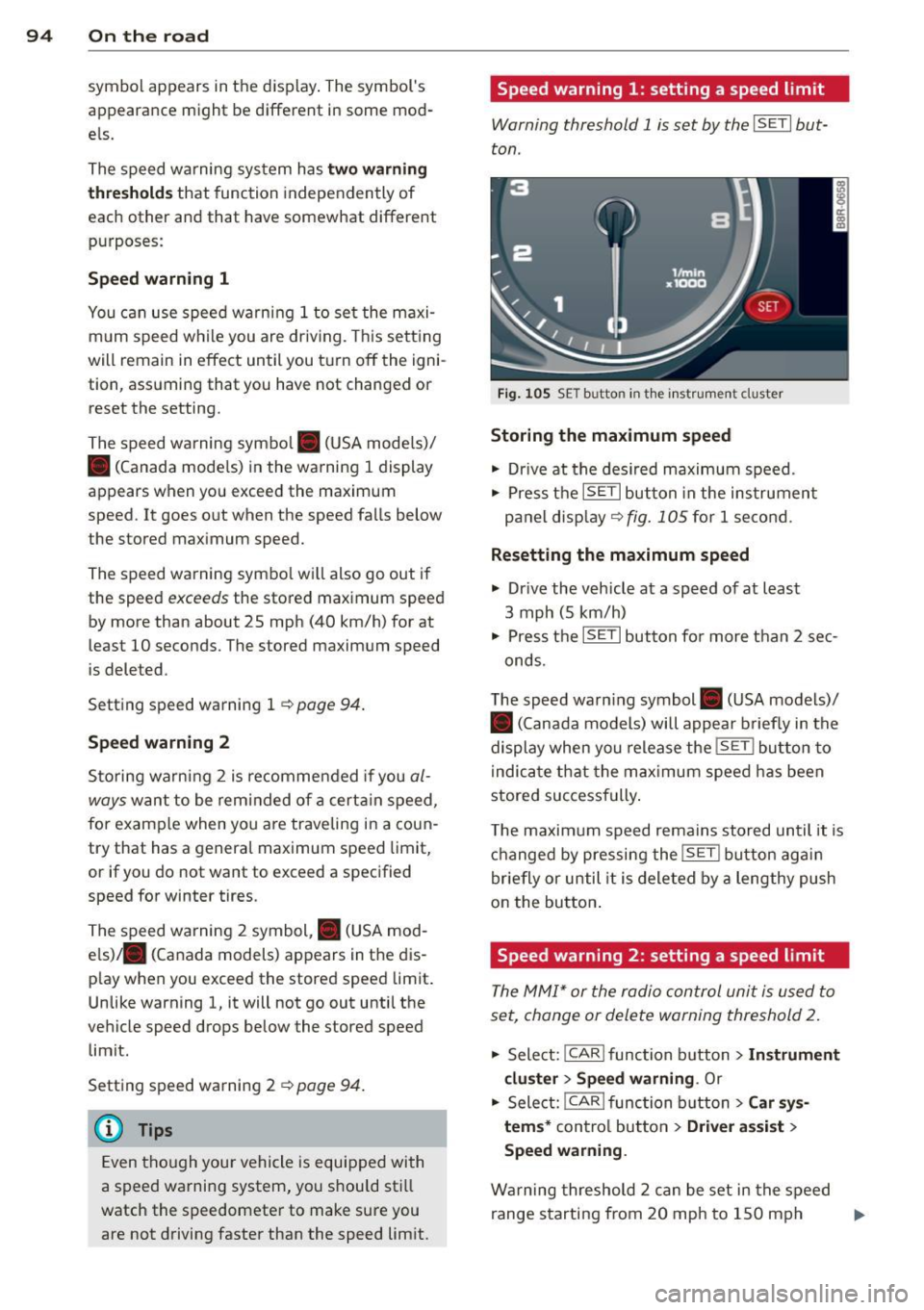
Warning threshold 1 is set by the I SET I but
ton .
Fig. 1 05 SE T butto n in th e instrumen t cl uster
Storing the maximum speed
• Dr ive at the desired maximum speed .
• Press the
ISETI button in the instrumen t
panel display ~
fig. 105 for 1 second .
Resetting the maximum speed
• Drive the vehicle at a speed of at least
3 mph (5 km/h)
• Press the
ISET I button for more than 2 sec-
onds.
T he speed warn ing symbol . (USA models)/
• (Canada models) will appear briefly in the
display when you release the
!SE T! button to
i ndica te that the max imum speed has been
stored successfully .
T he maximum speed remains stored until it is
changed by pressing the
!S ET ! bu tton again
briefly or until it is deleted by a lengthy push
on the button .
Speed warning 2: setting a speed limit
The MM!* or the radio control unit is used to
set, change or delete warning threshold
2.
• Select: !CAR lfunction b utton> In strument
cluster> Speed warning .
Or
.. Select: !CAR ! f unction button> Car sys·
tems*
control button > Driver assist >
Speed warning .
Warning threshold 2 can be set in the speed
range starting from 20 mph to 150 mph ..,.
Page 100 of 316
98 Hybrid -Do not transport fluids in open contain
ers in the luggage compartment. Spilled
fluids can seep underneath the cargo
floor. This can damage the high voltage
system.
Starting the vehicle
App lies to vehicles: with hybrid drive
The vehicle is started and turned off either
with the ignition key~
page 83 or with the
I START ENGIN E STOP ! button* ~ page 86 in
the same way as a conventional vehicle .
When starting the vehicle, the needles in the instrument cluster move upward briefly .
When the vehicle enters drive ready mode,
the status message
hybrid ready appears
briefly in the instrument cluster display and
the needle in the power meter points to
READY ~ page 98.
Depending on the operation mode of the hy
brid system, there are two possible drive
ready modes after the vehicle has been start
ed:
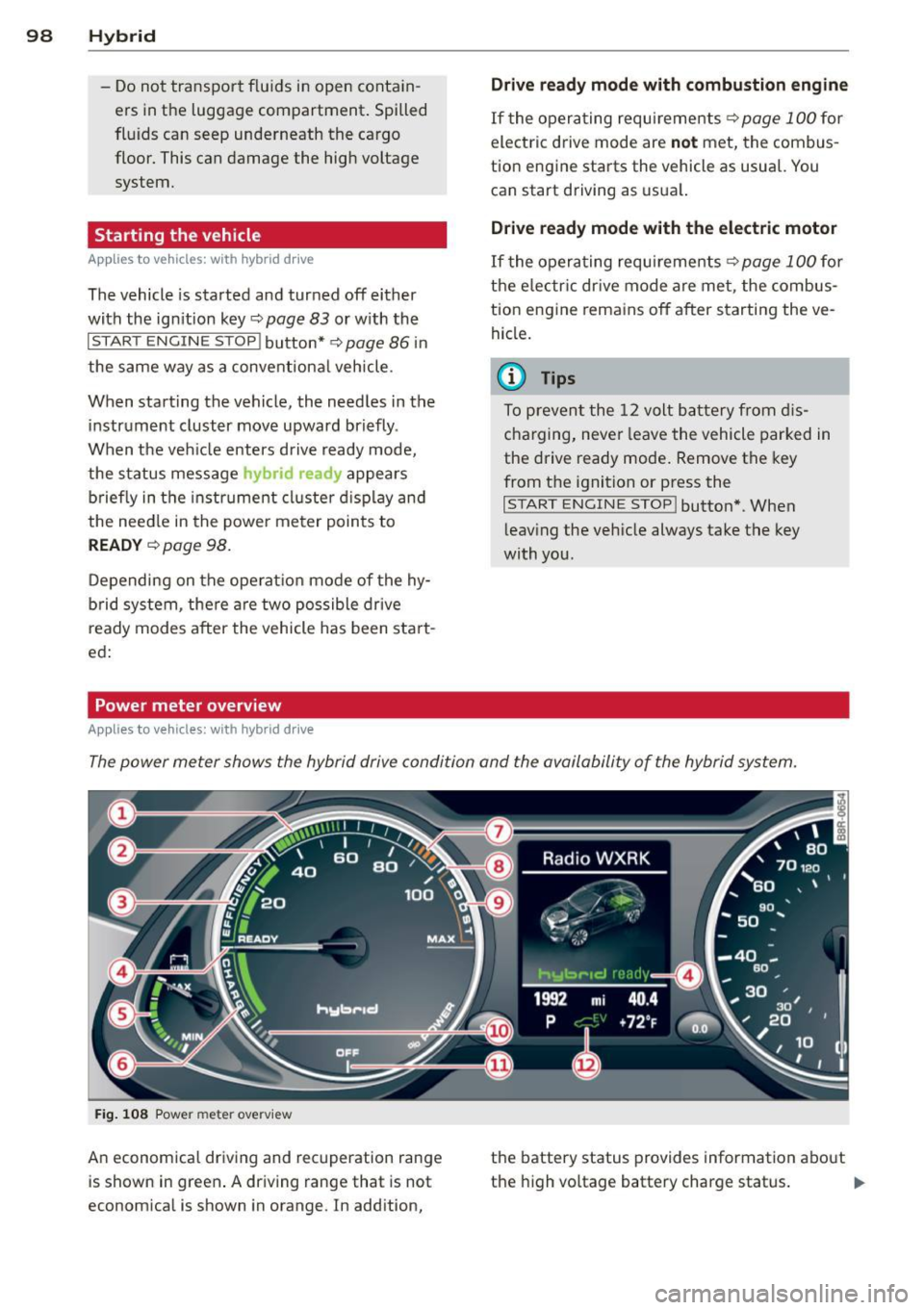
Power meter overview
Applies to vehicles: with hybrid dr ive
Drive ready mode with combustion engine
If the operating requirements~ page 100 for
electric drive mode are
not met, the combus
tion engine starts the vehicle as usual. You can start driving as usual.
Drive ready mode with the electric motor
If the operating requirements~ page 100 for
the electric drive mode are met, the combus
tion engine remains off after starting the ve
hicle.
(0 Tips
To prevent the 12 volt battery from dis
charging, never leave the vehicle parked in
the drive ready mode. Remove the key
from the ignition or press the
I START ENGINE STOP! button* . When
leaving the vehicle always take the key
with you.
The power meter shows the hybrid drive condition and the availability of the hybrid system.
Fig. 108 Power meter overv iew
An economical driving and recuperation range
is shown in green. A driving range that is not
economical is shown in orange. In addition, the battery status
provides information about
the high voltage battery charge status.
lill-
Page 103 of 316
-ESC offroad mode and hill descent assist
must not be turned on¢
page 198 .
The combust ion eng ine tu rns on and inter
rupts
the enhanced electric d rive mode when
the vehicle is accelerated. The gray indicator
light
l!I also turns on in the disp lay. The en
hanced electric drive mode resumes automati
cally once acceleration stops.
The enhanced e lectric drive mode is
deactivat
ed if at least one of the following conditions is
met :
- The ign ition is turned
off.
- Th e 1.:1"1 button is pressed again.
- The high voltage battery charge level is low .
- The vehicle speed is higher than approxi -
mately 62 mph (100 km/h).
- The S selector lever position or tiptronic
mode is selected .
- ESC offroad mode or hill descent assist is
switched on .
T he
ld" I button must be pressed to reactivate
it .
Start-Stop function
The combustion engine is operated on ly as
needed. Generally, the combustion engine
turns
off when the vehicle is stationary and
the high voltage battery powers the electrical
vehicle systems.
The purpose of automatica lly shutting the
combustion engine
off in hybrid drive mode is
to save fuel. All of the important veh icle sys
tems, such as steering, brakes and the A/C
system, cont inue to remain active. In some
cases , systems may require the combustion
engine to cont inue running when the vehicle
is stationary. When dr iv ing in congested traf
fic for long per iods of time, the comb ustion
engine w ill cycle on when the vehicle is sta
tionary to keep the high voltage battery
charged.
Gliding
I f the gas pedal is not pressed and the D posi
tion is selec ted, the combustion engine re-
Hybrid 101
mains turned off up to speeds of approxi
mately 99 mph (160 km/h). Driving conserva
tive ly like this can reduce fuel consumption.
Energy recovery (recuperation)
When braking, the electric motor will act as a
generator creating e lectric energy that is then
stored in the high voltage battery. This also
occurs when the ve hicle is coasting or driving
downhi ll. The combustion engine is automati
cally turned
off i n this case.
The vehicle is braked with the electric motor
by applying ear ly and even pressure to the
brakes and using short pedal movements
¢
page 98, fig. 108 @. By doing this, a large
amount of the kinetic energy is recovered and
may be stored as electric energy in the high
voltage battery . During heavy braking, the
convent ional brakes are also act ivated
¢ page 98, fig. 108 @.
The energy recovery is shown in the MMI dis
play ¢
page 104.
Automatic start of the combustion engine
Various operating conditions cause the com
bust ion engine to start automat ically :
- The high voltage battery charge leve l is low.
- The temperature of the combustion engine
is low.
- The temperature of the catalytic converter is
low .
- The power output needed for the A/C sys-
t em is high.
- The vehicle speed is high.
- The vehicle acceleration is high.
- The inclin e is steep.
- High charge level for the high voltage bat-
tery when coasting. In th is case, the h igh
voltage battery cannot absorb any more en
ergy and so the electric motor cannot slow
down the veh icle. The combustion engine
tu rns on (engine brake). In this situation the
h igh voltage battery will show a Max charge.