ESP AUDI Q5 2013 Owner's Manual
[x] Cancel search | Manufacturer: AUDI, Model Year: 2013, Model line: Q5, Model: AUDI Q5 2013Pages: 316, PDF Size: 78.89 MB
Page 118 of 316
116 Audi side assist
Audi side assist
Lane change assistant
Description
App lies to vehicles: with Audi side assist
D
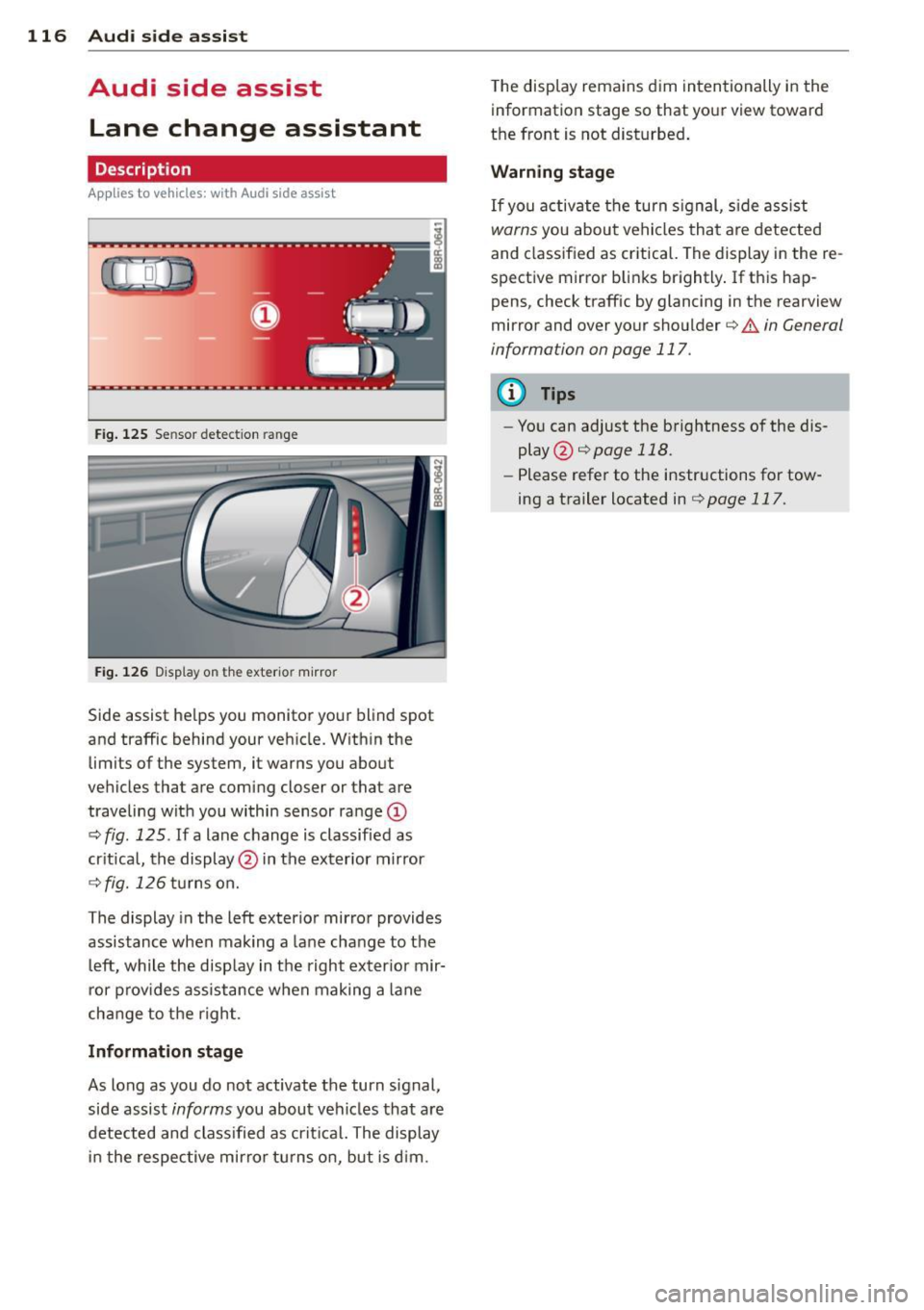
Fig. 125 Sensor detectio n ran ge
Fig. 126 Display on the exterio r mirro r
Side assist he lps you monitor your blind spot
and traffic behind your veh icle. W ith in the
limits of the system, it warns you about
vehicles that are coming closer or that are
traveling with you within sensor range
(D
c:> fig . 125 . If a lane change is classified as
critical, the display @in the exterior mirror
¢ fig. 126 turns on.
The display in the left exterior mirror provides
assistance when mak ing a lane change to the
le ft, while the display in the right exter ior mir·
ror provides assistance when making a lane
change to the right.
Information stage
As long as you do not activate the turn signal,
side assist
informs you about vehicles that are
detected and class ified as critical. The display
in the respective mirror turns on, but is d im. T
he display remains dim intentionally in the
information stage so that your view toward
the front is not disturbed .
Warning stage
If you activate the turn s ignal, s ide ass ist
warns you about vehicles that are detected
and class ified as critical. The display in the re
spective mirror blinks brightly . If this hap
pens, check traffic by glancing in the rearview
mirror and over your shoulder c:>
.&. in General
information on page 117.
(D Tips
- You can adjust the brightness of the dis
play @c:>
page 118.
-Please refer to the instructions for tow·
ing a trailer located in
¢ page 117.
Page 119 of 316
General information
Applies to vehicles: with Audi side assist
®
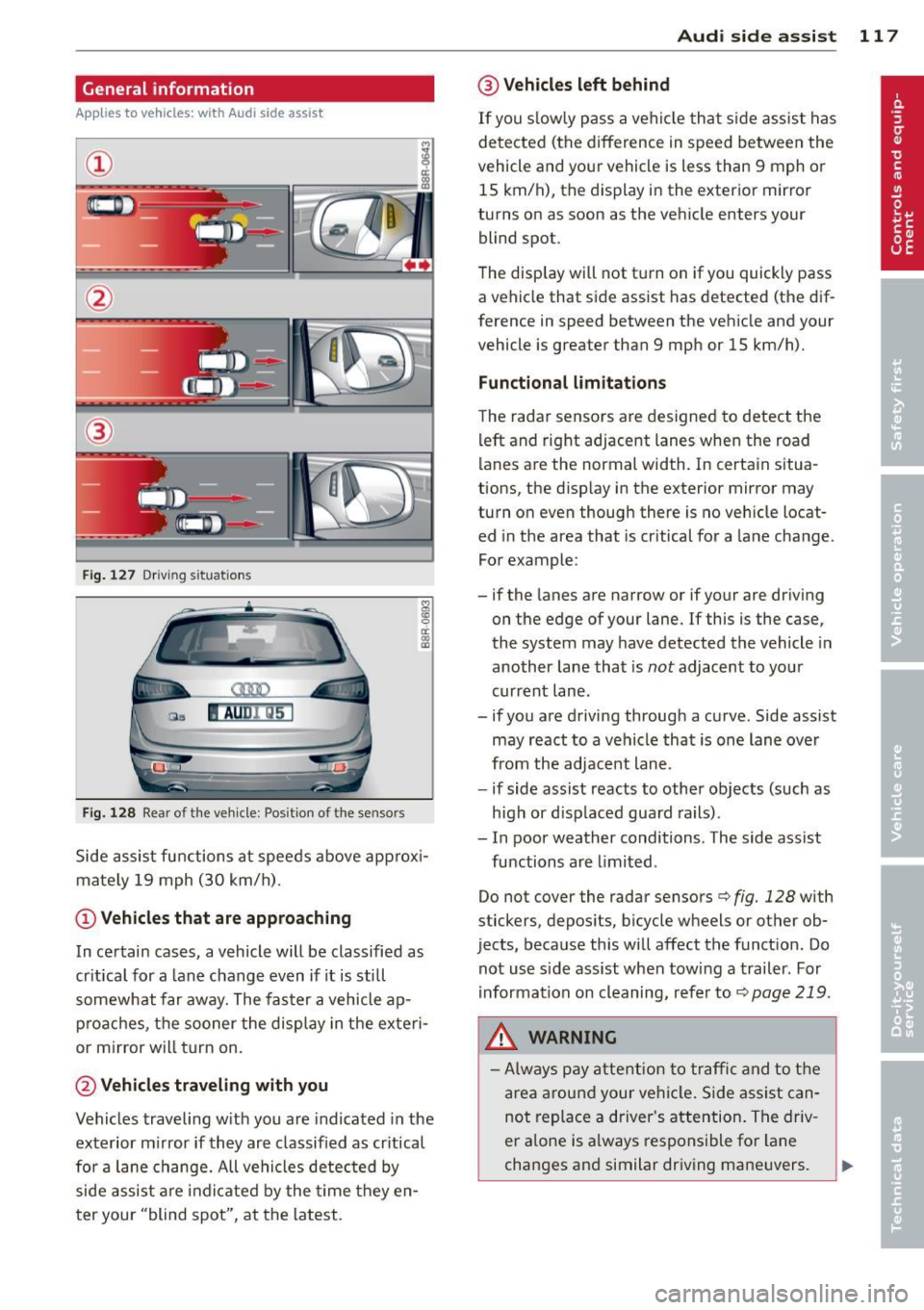
Fig . 127 Driving situations
Fi g. 1 28 Rear of t he ve hicle: Pos it ion of the sensors
M
m 0 ci: .. a,
Side assist functions at speeds above approx i
mately 19 mph (30 km/h).
@ Vehicl es th at ar e approaching
In certain cases, a vehicle will be classified as
cr itical for a lane change even if it is still
somewhat far away. The fas ter a vehicle ap
p roaches, the sooner the display in the exteri
or m irror will t urn on.
@ Vehicles traveling with you
Vehicles traveling w ith you are indicated in the
exterior m irror if they are classified as cr itical
for a lane change. All vehicles detec ted by
side assist are indicated by the time they en
ter your "blind spot", at the latest.
Audi side assist 11 7
@ Vehicle s left behind
If you s low ly pass a vehi cle that s ide assist has
detected (the difference in speed between the
vehicle and you r vehicle is less than 9 mph or
15 km/h), the display in the exterio r mir ror
turns on as soon as the vehicle enters your blind spot.
T he disp lay will not t urn on if you quickly pass
a vehicle that side assist has detected (the dif
ference in speed between the veh icle and your
vehicle is greater than 9 mph or 15 km/h).
Functi onal limitations
The radar sensors are designed to detect the
left and right adjacent lanes when the road
lanes are the normal width. In certain situa
tions, the d isp lay in the exterior mirror may
turn on even though there is no veh icle locat
ed in the area that is cr itical for a lane change.
For example:
- if the lanes are narrow or if your are dr iving
on the edge of your lane.
If this is the case,
the system may have detected the vehicle in
another lane that is
not adjacent to you r
current lane .
- if you a re driving through a curve. Side assist
may react to a vehicle that is one lan e ove r
from the adjacent lane.
- if side assist reacts to other objects (such as
high or d isp laced guard rails) .
- In poor weather conditions. The side assist
functions are l imited .
Do not
cover the radar sensors c> fig. 128 with
stickers, depos its, bicycle wheels or other ob
jects, because this will affect the funct ion. Do
not use s ide ass ist when towing a trailer. For
i nformation on cleaning, refer to
c> page 219 .
_&. WARNING
-Always pay attention to traffic and to t he
area a round your ve hicl e. S ide assist can
not replace a driver's attention. T he driv
er a lone is always responsible fo r lane
changes and similar driving mane uvers.
Page 122 of 316
120 Audi drive select
Audi drive select
Driving settings
Introduction
App lies to vehicles: with Audi drive select
Drive select provides the possib ility to exper i
e nce diffe ren t types of vehi cle sett ings in o ne
ve hicl e. For ins tance, us ing t he three
Com
fort , Auto and Dynamic modes, the driver can
switch from a sporty to a comfortab le drivi ng
mode with the press of a b utton.
A ddit ionally, in veh icles wi th MM I*, the vehi
cle setup for
Individual* mode can be c us
tom ized by you. This makes it possib le to
comb ine settings such as a sporty engine tun
ing with comfortable steering.
A WARNING
Improper use of the drive select can cause
co llisions, other accide nts and ser ious per
sonal injury.
Description
App lies to vehicles: with Audi drive select
The vehicle setup in each mode depends on
the veh icle's features . However, the engin e,
automa tic t ransmissio n and steeri ng a re a l
ways involved.
Engine and automatic transmission
Depending on the mode , the e ng ine and the
automatic t ransm ission respond quicke r or i n
a more ba la nced manne r to a cce le rator pedal
move ments. In t he sporty dynam ic mode, the
a ut om at ic t ra nsmissio n shifts at h igher R PMs.
Steering
The steering adapts in terms of stee ring effort
and steering ra tios . Ind irect steer ing that
moves easi ly, l ike the stee rin g in comfort
mode, is best su ite d t o long dr ive s on a high
way. In co ntr ast, dynam ic mo de p rov ides
sporty, direct steering .
T he fo llow ing applies to vehicles with dynam ic
steer ing*: the stee ring ratio changes based on
ve hicl e spee d in order to maint ain op timum steering effort
for the drive r at all times . This
sets the stee ring to be less sens itive at higher
speeds in order to provide improved vehicle
control. At reduced speeds, however, steer ing
is more d irect in order to keep the steering ef
fort as minima l as poss ible when the driver is
mane uveri ng the veh icle. At low and ave rage
speeds, dynamic steering addit iona lly pro
vides more respon sive stee rin g pe rforma nce.
Adaptive dampers*
The adaptive dampers* use se nsors to record
informa tion regard ing steer ing movemen ts,
braking and acceleration o perations by the
drive r, road surfac e, d riv in g speed, and load.
T his makes it poss ible to adapt damp ing to
the driving si tua tion v irtu ally in real t ime.
Dr ive sele ct also makes i t possib le to sa tisfy
t h e desire fo r spo rty suspension ( Dynamic)
and comfortab le suspension (Comfort) with
o ut giving up ba lanced tuning (Auto) .
Adaptive cruise control*
The be havior when accelera ting can be adju st
ed from comforta ble to sporty, depending on
the d rive select mode . Adaptive cr uise contro l
also responds to the driv ing behavior of the
vehicle ahead in a more conservative or spo rty
manner.
(D Tips
- In some mo dels, t he maximum vehicle
speed can only be reached in the
Auto
and Dynamic mo des.
- Selecting the
Dynamic mode resu lts in
sporty shifting cha racte ristics. The S
gear position engages aut omatically.
- In vehicles that have dynamic stee ring *,
operating noise is heard when start ing or
stopping the e ngine. This does not indi
cate a problem .
Page 134 of 316
132 Parking system
Reverse Parking
App lies to vehicles: with Audi parking system p lus w ith
rea rview camera
Parking mode 1 con be used when parking in
a garage or into a parking space.
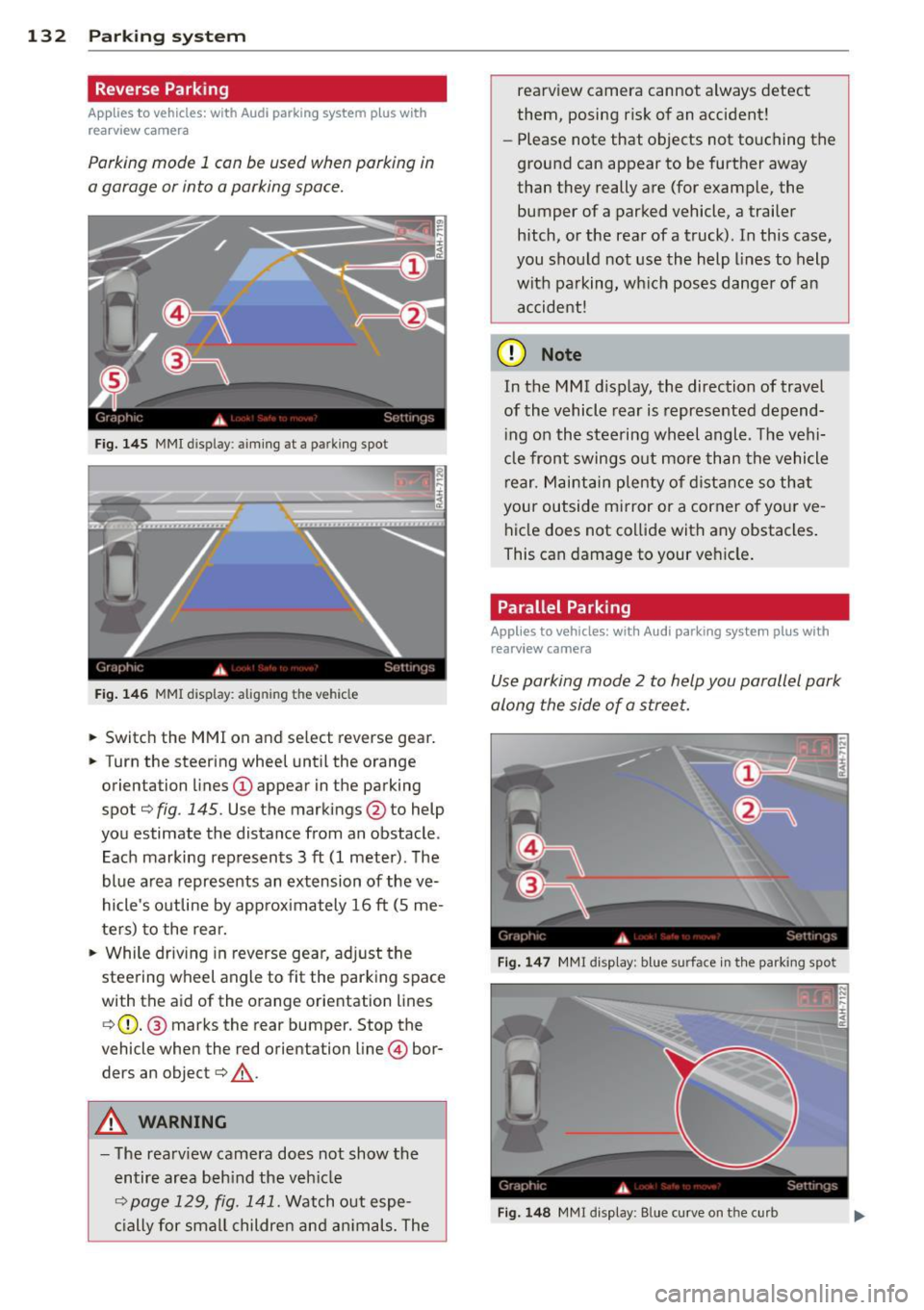
Fig. 145 MMI disp lay : aiming at a pa rking spot
Fig. 146 MMI display: alig nin g th e veh icle
... Switch the MMI on and select reverse gear .
... Turn the steering wheel until the orange
orientation lines
(D appear in the parking
spot¢
fig . 145. Use the markings @to help
you estimate the distance from an obstacle .
Each marking represents 3
ft (1 meter). The
blue area represents an extension of the
ve
hicle's outline by approximately 16 ft (5 me
ters) to the rear.
"' While driving in reverse gear, adjust the
steering wheel angle to fit the parking space
with the aid of the orange orientation lines ¢ (D. @ marks the rear bumper. Stop the
vehicle when the red orientation line © bor
ders an object¢ _&..
A WARNING
-The rearview camera does not show the
entire area behind the vehicle
¢ page 129, fig. 141. Watch out espe
cially for small children and animals. The rearview camera cannot always detect
them, posing risk of an accident!
- Please note that objects not touching the
ground can appear to be further away
than they really are (for example, the
bumper of a parked vehicle, a trailer
hitch, or the rear of a truck). In this case,
you should not use the help lines to help
with parking, which poses danger of an accident!
(D Note
In the M MI dis play , the direction of travel
of the vehicle rear is represented depend
ing on the steering wheel angle . The vehi
cle front swings out more than the vehicle
rear. Maintain plenty of distance so that
your outside mirror or a corner of your
ve
hicle does not collide with any obstacles.
This can damage to your vehicle.
Parallel Parking
Applies to vehicles: with Aud i parking system plus with
rearv i ew camera
Use parking mode 2 to help you parallel park
along the side of a street .
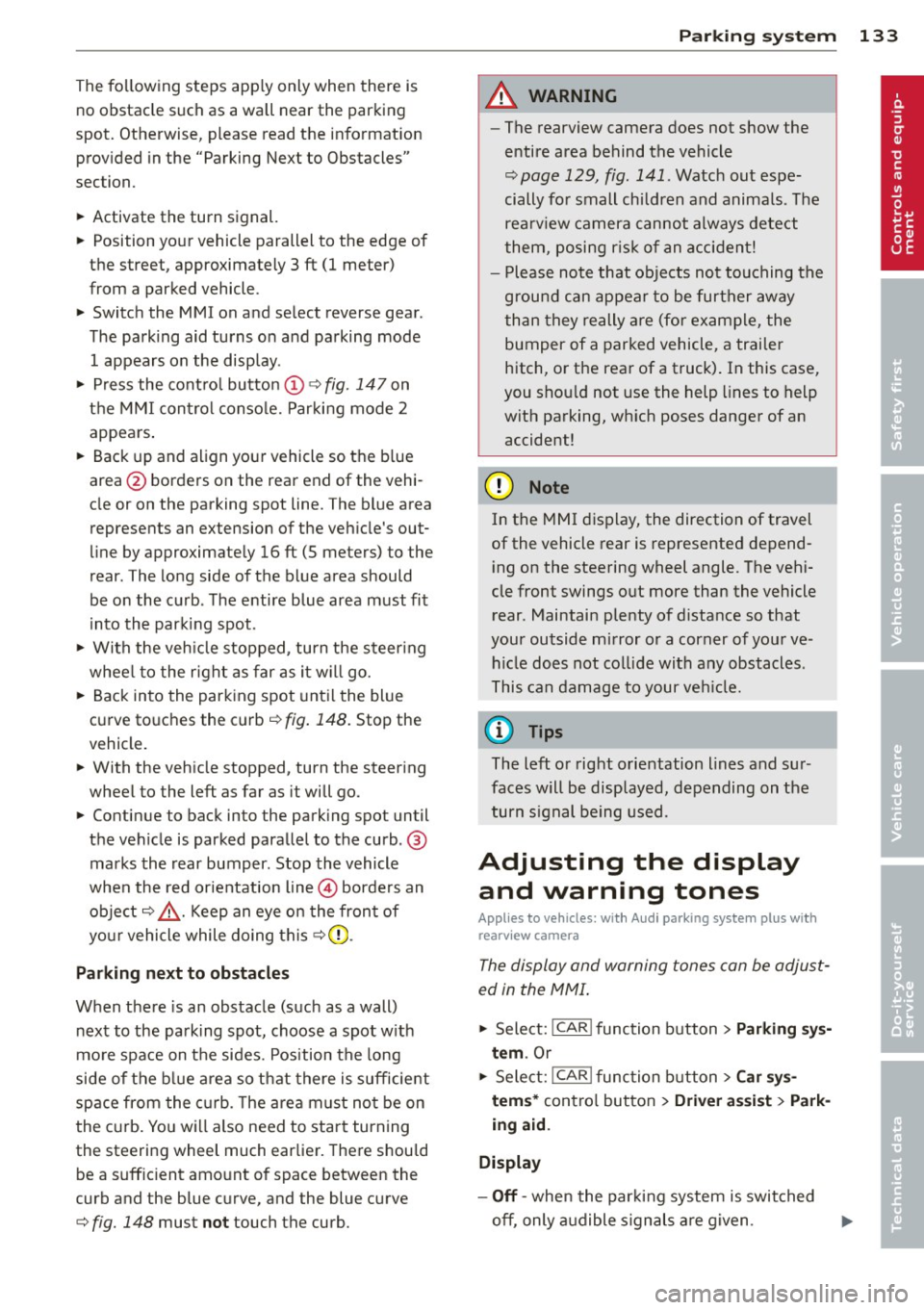
Fig. 147 MMI disp lay: blue surface in th e parking spot
Fig. 148 MM! display : B lue curve on th e curb
Page 135 of 316
The following steps apply only when there is
no obstacle such as a wall near the parking
spot. Otherwise, please read the information
prov ided in the "Parking Next to Obstacles"
section.
~ Activate the turn signal.
~ Position your vehicle parallel to the edge of
the street, approxim ately 3 ft (1 meter)
from a parked vehicle .
~ Switch the MMI on and se lect reverse gear .
The parking aid tu rns o n and parking mode
1 appears on the display .
~ Press the contro l button (D ¢ fig. 147 on
the MMI contro l conso le. Parking mode
2
appea rs .
~ Back up and align yo ur vehicle so t he b lue
area @ borders on the rear end of the vehi
cle or on the parking spot line. The bl ue area
represents an extension of the veh icle's out
line by approximate ly
16 ft (S meters) to the
rear . The long side of the blue area should
be o n the curb . The entire blue area must fit
i nto the parking spot .
~ With the vehicle stopped, turn the steer ing
whee l to the right as far as it w ill go.
~ Back into the park ing spot until the blue
cu rve to uches the curb¢
fig. 148. Stop the
vehicle.
~ With the veh icle stopped, turn the steer ing
wheel to the left as far as it will go .
~ Continue to back into the park ing spot until
the vehicle is parked parallel to the curb .@
marks the rear bumper. Stop the vehicle
when the red orientation line@ borde rs an
object ¢.&, . Keep an eye o n the fron t of
yo ur vehicle while do ing this ¢Ci) .
Parking n ext to obstacles
When t here is an obstacle (such as a wall)
next to the pa rking spot, choose a spot w ith
mo re space on t he sides. Position the long
side of the b lue a rea so that there is sufficient
space from the curb. The a rea m ust no t be on
the c urb. You w ill also need to start turn ing
the steering wheel much earlie r. T he re should
be a suffic ient amo unt of space between the
curb and the blue curve, and the blue c urve
¢ fig. 148 must not touch the curb.
Par king system 133
A WARNING
- The rearview camera does not show the
entire area behind the vehicle
¢ page 129, fig. 141 . Watch out espe
cially fo r small children and anima ls . The
rea rv iew camera cannot always detect
them, posing r is k of an a ccident!
- P lease note that objects not touching the
g rou nd can appear to be further away
than they really are (for example, the
bumper of a parked vehicle, a trai ler
hitch, or the rea r of a truck) . In this case,
you shou ld not use the help lines to help
with parking, wh ich poses danger of an
accident!
(D Note
In the MMI display, the direction of travel
of the vehicle rear is represented depend
i ng on the steering wheel angle . The vehi
cle front swings out more than the vehicle rear. Maintain ple nty of d istance so that
your outside mirror or a corner of your ve
hicle does not col lide with any obstacles.
T his can damage to your ve hicle.
(0 Tips
The left o r right orientation lines and su r
faces will be disp layed, depending on the
turn s ignal being used .
Adjusting the display
and warning tones
App lies to v ehicl es: wi th Audi parking sys te m plus wi th
rearv iew camera
The display and warning tones can be adjust
ed in the MMI .
~ Select: !CAR ! function button> Parking sys
tem .
Or
~ Select: ~I C- A- R~I func tion button > Car sy s
tems *
contro l bu tton > Driver a ssist > Park
ing aid.
Display
- Off -when the par king system is switched
off, only a udible s ignal s are given .
Page 141 of 316
Driving Safely
General notes
Safe driving habits
Please remember -safety first!
This chapter contains important information,
tips, instructions and warnings that you need
to read and observe for your own safety, the
safety of your passengers and others . We have
summarized here what you need to know
about safety belts, airbags, child restraints as
well as child safety. Your safety is for us
priori
ty number 1.
Always observe the information
and warnings in this section - for your own
safety as well as that of your passengers.
The information in this section applies to all
model versions of your vehicle . Some of the
features described in this sections may be
standard equipment on some models, or may
be optional equipment on others. If you are
not sure, ask your authorized Audi dealer.
A WARNING
- Always make sure that you follow the in
structions and heed the WARNINGS in
this Manual. It is in your interest and in
the interest of your passengers.
- Always keep the complete Owner's Liter
ature in your Audi when you lend or sell
your vehicle so that this important infor
mation will always be available to the
driver and passengers.
- Always keep the Owner's literature handy
so that you can find it easily if you have
questions.
Safety equipment
The safety features are part of the occupant
restraint system and work together to help
reduce the risk of injury in a wide variety of
accident situations .
Your safety and the safety of your passengers
should not be left to chance. Advances in
technology have made a variety of features
available to help reduce the risk of injury in an
Driving Safely 139
accident. The following is a list of just a few of
the safety features in your Audi :
- sophisticated safety belts for driver and all
passenger seating positions,
- belt force limiters for the front seats,
- belt pretensioners for the seats,
- belt height adjustment for the front seats,
- head restraints for each seating position,
- front airbags,
- side airbags in the front seats and outer rear
seats*,
- side curtain airbags,
- special LATCH anchorages for child re-
straints,
- adjustable steering column.
These individual safety features, can work to gether as a system to help protect you and
your passengers in a wide range of accidents.
These features cannot work as a system if
they are not always correctly adjusted and cor
rectly used.
Safety is everybody's responsibility!
Important things to do before driving
Safety is everybody 's job! Vehicle and occu
pant safety always depends on the informed
and careful driver.
For your safety and the safety of your passen
gers,
before driving always:
.,. Make sure that all lights and signals are op
erating correctly .
.,. Make sure that the tire pressure is correct .
.,. Make sure that all windows are clean and
afford good visibility to the outside .
.,. Secure all luggage and other items carefully
qpage 76.
.,. Make sure that nothing can interfere with
the pedals.
.,. Adjust front seat, head restraint and mir
rors correctly for your height.
.,. Instruct passengers to adjust the head re
straints according to their height .
.,. Make sure to use the right child restraint
correctly to protect children ¢
page 178,
and~~~-~
•
•
Page 142 of 316
140 Driving Safely
• Sit properly in your seat and make sure that
your passengers do the same¢
page 61,
Gen eral recomm endations.
• Fasten your safety belt and wear it properly.
Also instruct your passenge rs to fasten their
safety belts properly¢
page 149 .
What impairs driving safety?
Safe driving is directly related to the condi
t ion of the vehicle, the driver as well as the
driver's ability to concentrate on the road
without being distracted.
The driver is responsible for the safety of the
vehicle and all of its occupants . If your ability
to drive is impaired, safety risks for everybody
in the vehicle increase and you also become a
hazard to everyone else on the road
9 .&,.
Therefore:
• Do not let yourself be distracted by passen
gers or by using a cellular telephone.
• NEVER drive when your driving ability is im
paired (by medications, alcohol, drugs, etc.).
• Observe all traffic laws, rules of the road
and speed limits and plain common sense.
• ALWAYS adjust your speed to road, traffic
and weather conditions .
• Take frequent breaks on Long trips. Do not
drive for more than two hours at a stretch.
> Do NOT drive when you are tired, under
pressure or when you are stressed .
A WARNING
Impaired driving safety increases the risk
of serious personal injury and death when
ever a veh icle is being used.
Proper occupant
seating positions
Proper seating position for the driver
The proper driver seating position is impor
tant for safe, relaxed driving.
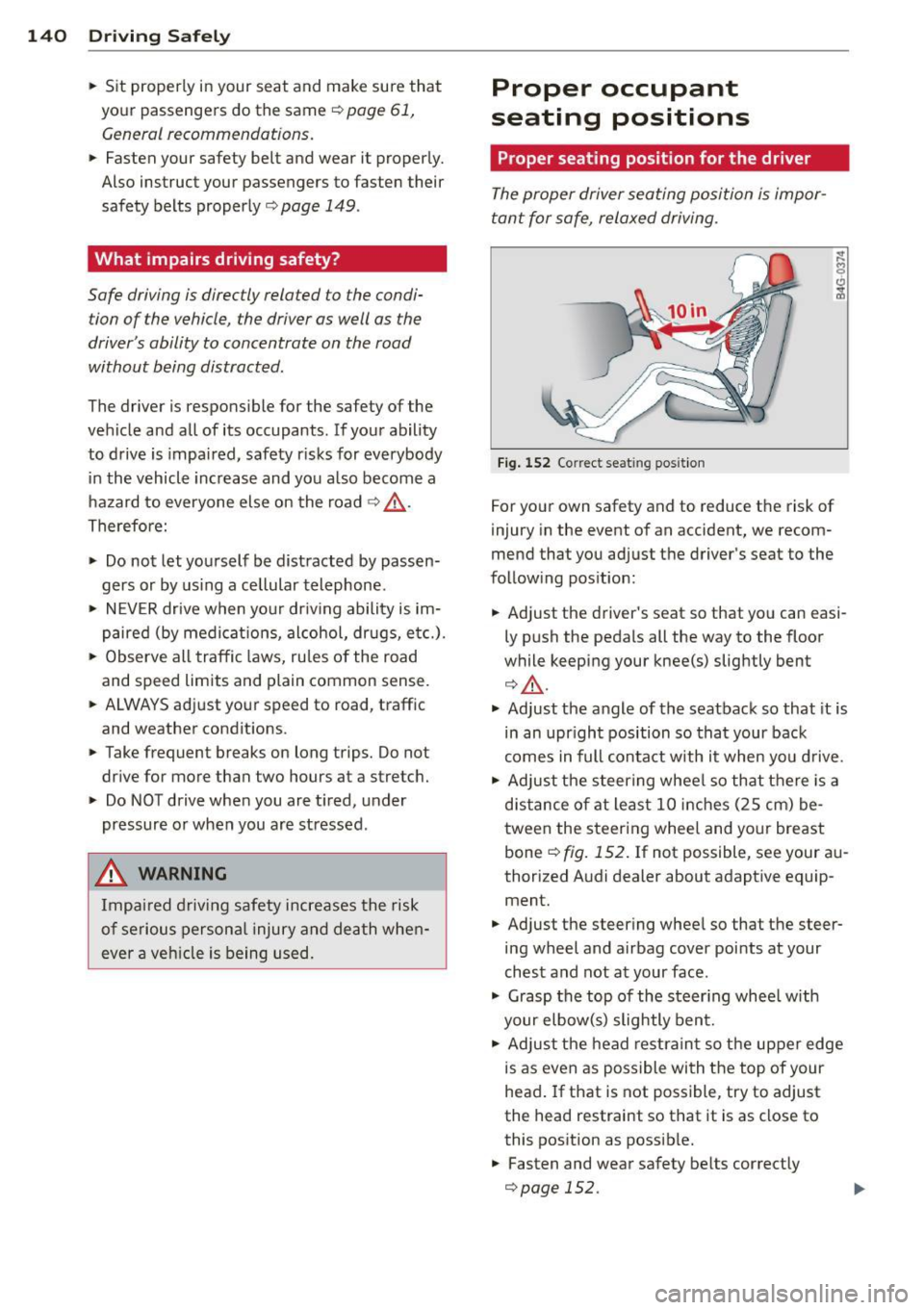
Fig. 152 Correc t seat ing position
For your own safety and to reduce the risk of
injury in the event of an accident, we recom
mend that you adjust the driver's seat to the
following position:
• Adjust the driver's seat so that you can easi
ly push the pedals all the way to the floor
while keeping your knee(s) slightly bent
¢,&. .
• Adjust the angle of the seatback so that it is
in an upright position so that your back
comes in full contact with it when you drive .
• Adjust the steering wheel so that there is a
distance of at least 10 inches (25 cm) be
tween the steering wheel and your breast
bone ¢
fig. 152. If not possible, see your au
thorized Audi dealer about adaptive equip ment.
• Adjust the steering wheel so that the steer
ing wheel and airbag cover points at your
chest and not at your face .
• Grasp the top of the steering wheel with
your elbow(s) slightly bent.
• Adjust the head restraint so the upper edge
is as even as possible with the top of your
head. If that is not possible, try to adjust
the head restraint so that it is as close to
this position as possible.
• Fasten and wear safety belts correctly
¢page 152.
Page 145 of 316
~ Adjust the head restraints so the upper
edge is as even as possible with the top of
your head. If that is not possib le, try to ad
j ust the head restraint so that it is as close
to this position as possible
¢fig . 153.
~ If there is a passenger on the rear center
seat ing pos ition, slide the center head re
stra int upward at least to the next notch .
Adjust ing head restra ints ¢
page 65.
A WARNING
All seats are equipped with head re
straints. Dr iv ing without head restra ints or
w ith head restra ints that a re not properly
adjusted increases the risk of ser ious or fa
t al neck injury dramat ic a lly. To help reduce
t he risk of in jury:
- Alw ays drive with the he ad restraints in
pla ce and properly adjusted.
- E very pe rson in the veh icle must have a
properly adj usted head restr aint.
- Always make sure each pe rson in the ve
hicle properly adjus ts the ir head re
st rain t. Ad just the head restrain ts so the
upper edge is as even as possib le with
the top of your head. If that is not possi
ble, try to adjust the head restra int so
that it is as close to this position as pos
sible.
- Never attempt to adjust head restraint wh ile driving. If you have driven off and
must adjust the dr iver head rest for any
reason, first stop the vehicle safe ly be
fore attempting to adjust the head re
st raint.
- Children must always be properly re
st rained in a ch ild restraint that is appro
pr iate for their age and s ize ¢
page 1 78.
Examples of improper seating positions
The occupant restraint system can only re
duce the risk of injury if vehicle occupants are
properly seated.
Imp rope r seat ing pos it ions can cause serious
in ju ry or death . Safety belts can on ly wor k
when they a re properly posit ioned o n the
Dr iving S afel y 143
body. Improper seating positions re duce the
effectiveness of safety belts and wi ll even in
crease the ris k of i njury and death by moving
the safety belt to crit ica l areas of the body.
Improper seating positions a lso increase the
risk of serious injury and death when an a ir
bag deploys and str ikes an occupant w ho is
not in the p roper seating posit ion. A dr iver is
responsible fo r the safety of all veh icle occu
pan ts and espec ially for children. The re fore :
~ Never allow anyone to assume an incorrect
seating position when the vehicle is being
used
Q ,& .
The following bulletins list on ly some sample
pos itions tha t will increase the risk of serious
i njury and death . Ou r hope is that these exam
ple s will ma ke yo u mo re aware o f seati ng po
s itions tha t are d angerous.
Therefore , whenever the vehicle is
moving:
- neve r stand up in the vehicle
- neve r stand on the seats
- never kneel on the seats
- never ride w it h the seatback reclined
- never lie down on the rear seat
- never lean up against the instrument panel
- never s it on the edge of the seat
- neve r sit sideways
- neve r lean out the window
- neve r put your feet out the window
- never put your feet on the instr ument panel
- neve r rest your feet on the seat cush ion or
back of the seat
- neve r ride in the footwell
- neve r ride in the cargo area
A WARNING ~
Imp ro p er seating posit ions increase the
risk of serious persona l injury and death
whenever a vehicle is being used.
- Always make sure that all vehicle occu-
pants stay in a proper seating position
and are properly restrained whenever the
veh icle is being used .
-
•
•
Page 148 of 316
146 Driving Safel y
to reduce the risk of inj ury when the vehi
cle is not be ing used.
- After closing the rear lid, always make
sure that it is properly closed and locked.
- Never leave your vehicle unattended es
pecially with the rear lid left open . A
child could crawl into the vehicle through
the luggage compartment and close the
rear lid becoming trapped and unable to
get out . Be ing trapped in a vehicle can
lead to serious persona l injury.
- Never let children p lay in or around the
vehicle .
- Never let passengers r ide in the luggage
compartment . Veh icle occupan ts must
always be proper ly restrained in one of
the vehicle's seating positions.
(D Tips
- Air circulation helps to reduce window
fogging . Sta le air escapes to the o utside
th rough vents in the trim pane l. Be su re
to keep these slots free and open.
- The tire pressure must correspond to the
load . The t ire pr essure is shown on the
tire p ressu re label. The tire pressure la
bel is loc ate d on the driver's s ide B-pi lla r.
The tire pressure label lists the recom
men ded cold t ire inflat ion pressu res for
the veh icle at its maximum capacity
weight and the tires that were on your
vehicle at the time it was manufact ured.
For recommended t ire pressures for nor
mal load conditions, please see chapter
Q page252.
Tie-downs
The luggage compartment is equipped with
four tie-downs to secure luggage and other
items .
Use the tie-downs to secure your cargo prop
erly ¢ page 145, Loading the luggage com
partment .
In a coll is ion, the laws of phys ics mean that
even smaller items that are loose in the vehi
cle will become heavy missiles that can cause se
rious injury. Items in t he vehi cle possess en
ergy which vary with vehicle speed and the
weight of t he item . Vehicle speed is the most
s ignificant factor.
F or example, in a frontal collision at a speed
of 30 mph (48 km/h), the forces acting on a 10 -lb (5 kg) object a re abo ut 20 times the
normal weight of the item. This means that
the weight of the item would sudden ly be
about 200 lbs . (90 kg) . You can imag ine the
injur ies that a 200 lbs . (90 kg) item fly ing
fr ee ly t hro ugh the passenger compa rtment
cou ld cause in a col lision like this.
_& WARNING
We ak, damaged or imprope r straps used
to secure items to tie-downs can fail dur
i ng hard braking or in a collision and cause
se rious pe rsonal injury.
-Always use s uita ble mo unt ing straps an d
p roperly secu re items to the tie-downs in
the l uggage compa rtment to he lp pre
vent items from shift ing or fly ing fo r
ward as dangerous missiles.
- When the rea r seat backrest is folded
down, a lways use suitable mounting
straps and properly secure items to the
tie-downs in the luggage compartment
to hel p prevent items from fly ing for
ward as dangerous missiles into the pas
senger compartment.
- Never attach a chi ld safety seat t ether
s trap to a t ie-down .
Reporting Safety
Defects
Applicable to U.S.A.
If yo u b eli eve that your vehi cle
has a def ect whi ch could cau se
a crash or could cau se injury or
death, you should immediately
inform the National Highway
Traffic Safet y Administration ""
Page 155 of 316
To provide maximum protection, sa fety belts
must always be positioned correctly on the
wearer's body .
... Adjust the front seat and head restra int
properly
c::> page 61, General recommenda
tions .
... Make sure the seatback of the rear seat
bench is in an upright position and securely
latched in place before using the belt
c::> ,&. .
... Hold the be lt by the tongue and pull it
evenly ac ross the chest and pelvis
c::> ,&..
... Insert the tongue into the correct buckle of
your seat until you hea r it latch securely
c::>fig. 161.
... Pu ll on t he be lt to make sure that it is se-
curely latched in the buckle.
Automatic safety belt retractors
Every safety belt is equipped w ith an automat
i c belt retractor on the shoulder be lt. T his fea
ture locks the belt when the belt is pulled out
fast, dur ing hard braking and in an accident.
The belt may also lock when you drive up or
down a steep hill or through a sharp curve. During normal driving the belt lets you move
freely.
Safety belt pretensioners
The safety belts are equipped with a belt pre
tensioner that helps to tighten the safety belt
and remove slack when the pretensioner is ac
tivated. The funct ion of the pretensioner is
monitored by a warning light
c::> page 15.
Sw itchable locking feature
E very sa fety belt except the one on the driver
seat is equipped with a switchable locking fea
ture that
must be used when the safety belt is
used to attach a child safety seat. Be sure to read the important information about this
feature
c::> page 188.
A WARNING
Imprope rly positioned safety belts can
cause serious injury in an accident
o::> page 153, Safety belt position.
-Safety belts offer optimum protect ion
only when the seatback is upright and
Safety belts 153
belts are properly positioned on the
body.
- Always make sure that the rear seat
backrest to which the center rear safety
be lt is attached is securely latched when
ever the rear center safety belt is being
used. If the backrest is not securely
latched, the passenger w ill move for
ward with the backrest during sudden
braking, in a sudden maneuver and espe
cially in a crash .
- Never attach th e safety belt to the buck
le for another seat . Atta ching the belt to
the wrong buckle will reduce s afety be lt
effectiveness and can cause ser ious per
sonal injury.
- A passenger who is not proper ly restrain
ed can be seriously injured by the safety
be lt itself when it moves from the stron
ger parts of the body into cr itical areas
like the abdomen.
- Always lock the convertible locking re
tractor when you are securing a child safety seat in the vehicle
c::> page 190.
Safety belt position
Correct belt position is the key to getting
maximum protection from safety belts.
Fig . 162 Safety belt position
Standa rd features on your veh icle help you ad
just the position of the safety belt to match you r body size.
- belt height adjustment for the front seats,
- height-adjustable front seats.