warning lights AUDI Q5 2013 Owner's Manual
[x] Cancel search | Manufacturer: AUDI, Model Year: 2013, Model line: Q5, Model: AUDI Q5 2013Pages: 316, PDF Size: 78.89 MB
Page 60 of 316
58 Clear vision
vehicle), then you must first fold the mir
ror electrically. Do not readjust the mir
ror housing manually. You could damage
the motor which controls the mirror.
- If you wash the vehicle in an automatic
car wash, you must fold the exterior mir
rors in to reduce the risk of damage to
the mirrors. Never fold power folding ex
terior mirrors* by hand . Only fold them
in and out using the power controls.
@ Tips
If there should be a malfunction in the
electrical system, you can still adjust the
exterior mirrors by pressing the edge of
the mirror.
Dimming the mirrors
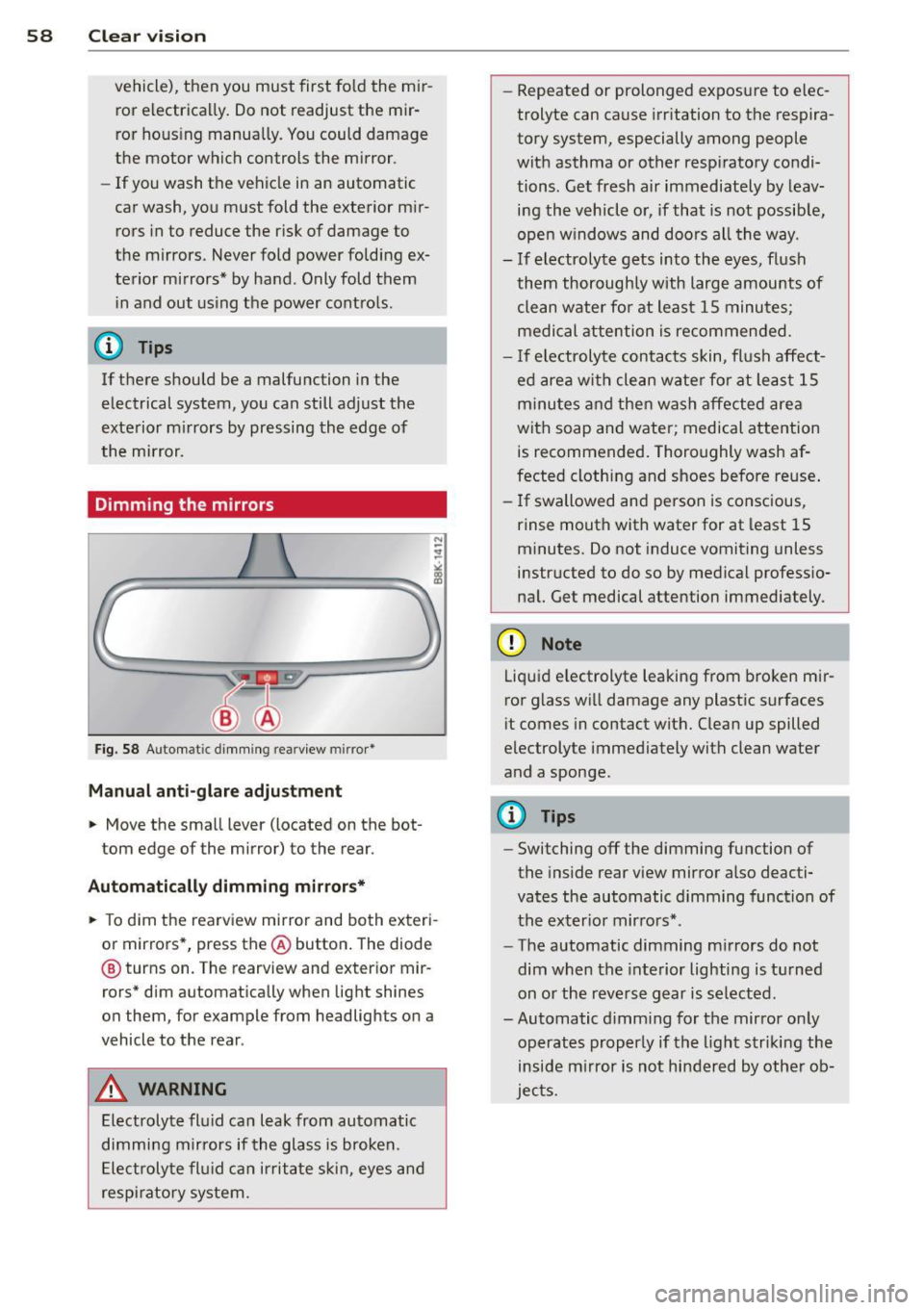
Fig. 58 Automat ic dimming rearview mirror*
Manual anti-glare adjustment
.. Move the small lever (located on the bot
tom edge of the mirror) to the rear.
Automatically dimming mirrors* .. To dim the rearview mirror and both exteri
or mirrors*, press the@button. The diode
@ turns on. The rearview and exterior mir
rors* dim automatically when light shines
on them, for example from headlights on a
vehicle to the rear .
A WARNING
Electrolyte fluid can leak from automatic
dimming mirrors if the glass is broken.
Electrolyte fluid can irritate skin, eyes and
respiratory system. -
Repeated or prolonged exposure to elec
trolyte can cause irritation to the respira
tory system, especially among people
with asthma or other respiratory condi
tions. Get fresh air immediately by leav
ing the vehicle or, if that is not possible,
open windows and doors all the way.
- If electrolyte gets into the eyes, flush
them thoroughly with large amounts of clean water for at least 15 minutes;
medical attention is recommended.
- If electrolyte contacts skin, flush affect
ed area with clean water for at least 15
minutes and then wash affected area
with soap and water; medical attention
is recommended. Thoroughly wash af
fected clothing and shoes before reuse.
- If swallowed and person is conscious,
rinse mouth with water for at least 15
minutes. Do not induce vomiting unless
instructed to do so by medical professio
nal. Get medical attention immediately .
(D Note
Liquid electrolyte leaking from broken mir
ror glass will damage any plastic surfaces
i t comes in contact with. Clean up spilled
electrolyte immediately with clean water
and a sponge.
@ Tips
- Switching off the dimming function of
the inside rear view mirror also deacti
vates the automatic dimming function of
the exterior mirrors* .
- The automatic dimming mirrors do not
dim when the interior lighting is turned
on or the reverse gear is selected.
-Automatic dimming for the mirror only
operates properly if the light striking the
inside mirror is not hindered by other ob
jects.
Page 65 of 316
Seat memory
Memory for driver's seat
Applies to vehicles: with seat memory
The seat adjustment settings for two drivers
can be stored using the memory buttons in
the driver's door.
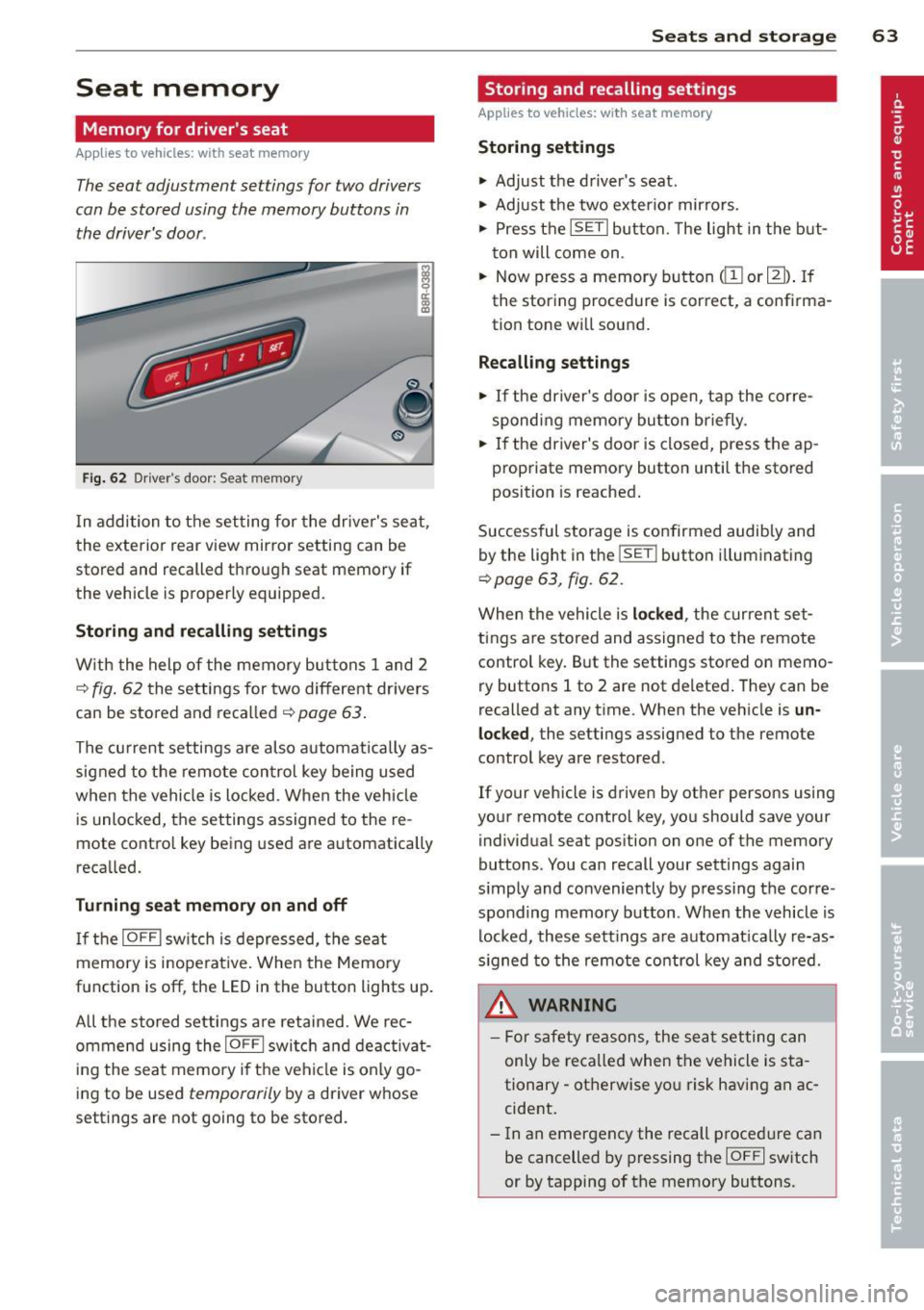
Fig. 62 Driver 's door : Seat me mory
In addition to the setting for the driver's seat ,
the exterior rear view mirror setting can be
stored and recalled through seat memory if
the vehicle is properly equipped.
Storing and recalling settings
With the help of the memory buttons 1 and 2
c::> fig. 62 the settings for two different dr ivers
can be stored and recalled
c::> page 63.
The current settings are also automatically as
signed to the remote control key being used
when the vehicle is locked . When the vehicle
is unlocked, the settings assigned to the re
mote contro l key being used are automatically
recalled.
Turning seat memory on and off
If the IOFF I switch is depressed, the seat
memory is inope rative. When the Memory
function is off , the LED in the button lights up.
A ll the stored settings are retained. We rec
ommend using the
I OFF I switch and deactivat
ing the seat memory if the vehicle is only go
ing to be used
temporarily by a driver whose
settings are not going to be stored.
Seats and storage 63
Storing and recalling settings
Applies to vehicles: with seat memory
Storing settings
.,. Adjust the driver's seat.
.,. Adjust the two exterior mirrors.
.,. Press the
ISETI button. The light in the but
ton will come on .
.,. Now press a memory button
tion tone will sound.
Recalling settings
.,. If the driver's door is open, tap the corre
sponding memory button briefly .
.,. If the driver's door is closed, press the ap
propriate memory button until the stored
position is reached.
Successful storage is confirmed audib ly and
by the light in the
ISE TI button i lluminating
c::> page 63, fig. 62 .
When the vehicle is locked , the current set
tings are stored and assigned to the remote
control key. But the settings stored on
memo
ry buttons 1 to 2 are not deleted. They can be
recalled at any time . When the vehicle is
un
locked ,
the settings assigned to the remote
control key are restored .
If your vehicle is driven by other persons using
your remote control key, you should save you r
individual seat position on one of the memory
buttons . You can recall your settings again
s imply and conveniently by pressing the corre
sponding memory button . When the vehicle is
locked, these sett ings are automatically re-as
signed to the remote control key and stored.
A WARNING
- For safety reasons , the seat setting can
only be recalled when the vehicle is sta
tionary -otherwise yo u risk having an ac
cident.
- In an emergency the recall p rocedure can
be cancelled by pressing the
IO FF I switch
or by tapping of the memory buttons .
Page 86 of 316
84 On th e road
• Press the key ¢fig . 97- the engine will
start.
Switching the ignition on /off
If you wou ld like to switch the ignition o n
without starting the eng ine, follow these
steps:
• Insert the key into the ignition lock.
• Press the key b riefly
w itho ut press the
brake pedal.
• To switch the ignition off, press the key
again .
When starting the engine, major e lectr ica l
loads are switched off temporarily.
You can only remove the key w ith the ignition
switched off. To do this, you have to press on
the key aga in.
If the engine should not start immediately,
the starting process is automatically stopped
after a sho rt time. Repeat starting procedu re.
Sw it c hing the ignition /engine off
automatically *
The following applies to vehicles with Start
Stop-System* /Hybrid drive*: to prevent the
battery from drain ing, the ignit ion and the en
g ine will switch off automatically under the
following conditions :
- T he veh icle has al ready bee n driven .
- The driver's door is opened .
- The driver's seat belt is removed.
- The brake peda l is not pressed down.
- The veh icle is stationary.
I n th is case, the activated low beam w ill be re
p laced by the side marker lights. The side
marker lights will switch off after a certain pe
riod of time or w hen you lock the vehicle .
A WARNING
-Never allow the engine to run in confined
spaces - danger of asphyxiation .
- Never remove the ign ition key from the
ignition lock while the vehicle is moving.
Otherw ise, the steering lock could sud- denly engage and yo
u wo uld not be able
to steer the vehicle .
- Always take the key with you whenever
you leave your vehicle. Otherw ise, the
engine could be started or electrical
equ ipment such as the power windows
could be operated. This can lead to seri
ous injury.
- Never leave children or persons requiring
assistance unattended in the vehicle . The
doors can be locked using the remote
transmitte r, prevent ing people from es
caping from the ve hicle on t heir own in
t he event of an emergency. Depending
on the time of year, peop le inside the ve
hicle can be exposed to very high or very
low tempe ratu res .
(D Note
Avoid high eng ine rpm, f ull throttle and
heavy engine loads unti l the engine has
r eached operating temperat ure - ot her
wise yo u risk eng ine damage.
@ For the sake of the environment
Do not let the engine run wh ile pa rked to
warm up. Begin driving immediately. This
r educes unnecessary emissions .
(D Tips
-If the key cannot be removed from the
ignition lock, you have to pull the me
chanical key out of the master key in or
der to be able to lock the vehicle
¢page 38.
-After starting a cold engine, there may
be a brief period of increased noise be
cause the oil pressure must f irst bu ild up
in the hydraulic valve adjusters . This is
normal and not a cause for concern.
- If you leave the ve hicle with the ignition
switched on, the ignit io n w ill switch off
afte r a certain per iod of t im e. Please
note that ele ctri cal eq uipment su ch as
exterior l igh ts will sw itch off as well
when that happens .
Page 88 of 316
86 On the road
(D Note
If the engine has been under heavy load
for an extended period, heat builds up in
the engine compartment after the engine
is switched off -there is a risk of damaging
the engine. Allow the engine to run at idle
for about two minutes before switching it
off.
Convenience key
Starting the engine
Appl ies to vehicles: with Convenience key
The I STAR T ENGINE S TOP! button switches
the ignition on and starts the engine .
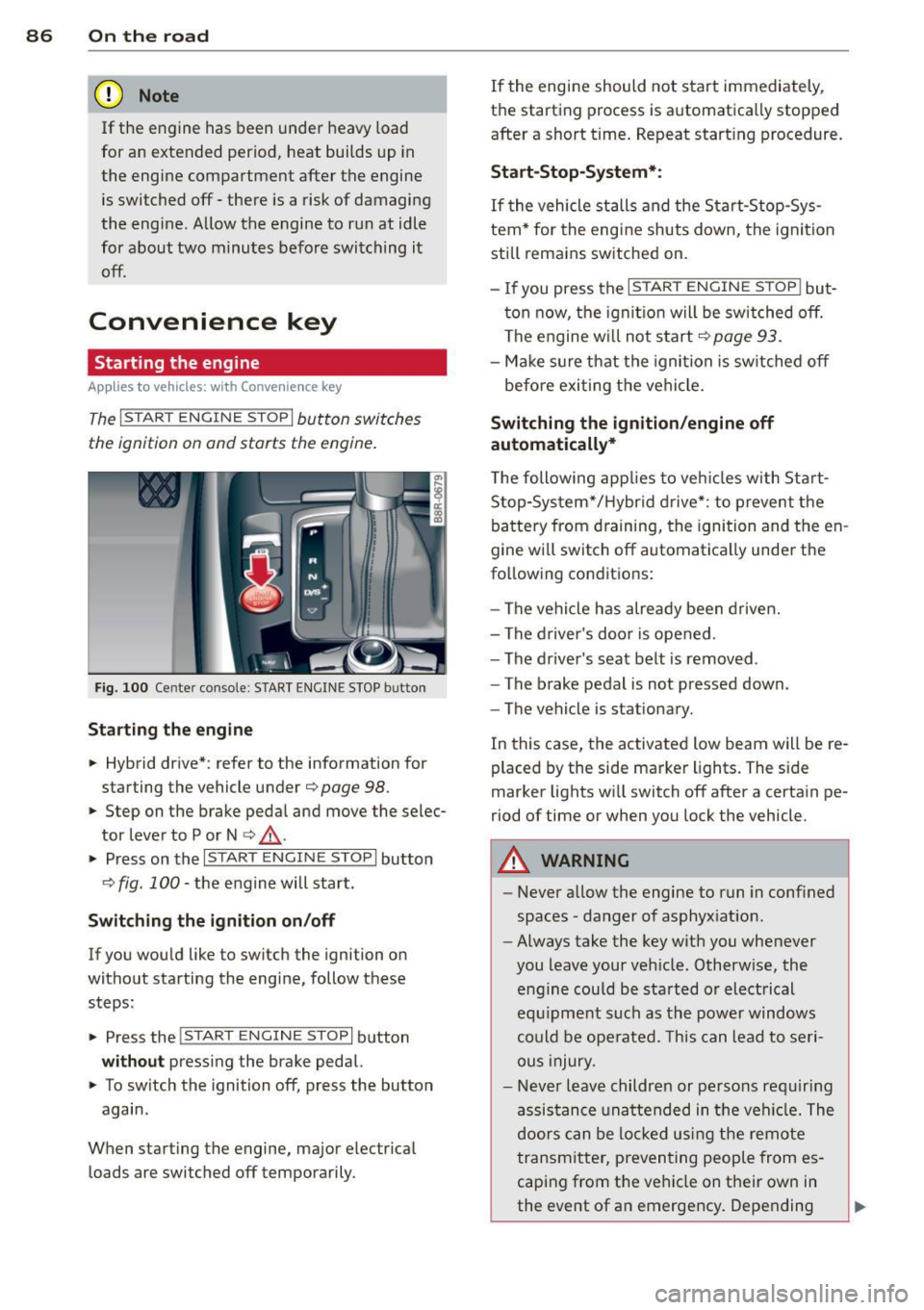
Fig. 100 Center console: START ENGINE STOP butto n
Starting the engine
.. Hybrid drive* : refer to the information for
starting the vehicle under
¢ page 98 .
.. Step on the brake peda l and move the selec
tor lever to P or N
¢ ,& .
.. Press on the r:I s==T::-:: A--=R== T=-c E=-c N:-;--:::: G-.,,.I ::-:N-;::: E-,S== T;:-; O:;--;P:cil button
c;, fig . 100 -the engine will start .
Switching the ignition on/off
If you would like to switch the ignition on
without starting the eng ine, follow these
steps :
.. Press the
!START ENGINE STOP! button
without pressing the brake pedal.
.. To sw itch the ignition off, press the button
again .
When starting the engine, major electr ical
loads are switched off temporarily . If
the engine should not start immediately,
the starting process is automatically stopped
after a short t ime. Repeat start ing procedure.
Start -Stop-System*:
If the vehicle stalls and the Start-Stop-Sys
tem* for the eng ine shuts down, the ignition
still remains switched on.
- If you press the
I START ENGINE STOP I but
ton now, the ignitio n will be switched off.
The engine w ill not start
¢page 93.
-Make sure that the igni tion is sw itched off
befo re exiting the vehicle.
Switching the ignition /engine off
automatically*
T he following app lies to veh icles with Start
Stop-System*/Hybrid drive*: to prevent the
battery from draining, the ignition and the en
gine wi ll switch off automatically unde r the
following conditions:
- The vehicle has already been driven.
- The driver's door is opened .
- The driver 's seat belt is removed .
- The brake pedal is not pressed down .
- The vehicle is stat ionary.
In this case, the activated low beam will be re
placed by the side marker lights. The side
marker lights wi ll switch off after a certain pe
riod of time or when you lock the vehicle.
A WARNING
--Never allow the engine to run in conf ined
spaces -danger of asphyx iat ion.
- Always take the key with you whenever
you leave your veh icle. Otherw ise, the
engine could be sta rted or electrical
equ ipment such as the power windows
could be operated. This can lead to seri
ous injury.
- Never leave children or persons requiring
assistance unattended in the vehi cle. The
doors can be locked us ing the remote
transmitter, preventing people from es
caping from the veh icle on their own in
the event of an emergency . Depending
Page 89 of 316
on the time of year, people inside the ve
hicle can be exposed to very high or very
low temperatures .
0 Note
Avoid high engine rpm, full throttle and
heavy engine loads until the engine has
reached operating temperature -other-
wise you risk engine damage.
@ For the sake of the environment
Do not let the engine run while parked to
warm up . Begin driving immediately. This
reduces unnecessary emissions.
@ Tips
- After starting a cold engine, there may
be a brief period of increased noise be
cause the oil pressure must first build up in the hydraulic valve adjusters . This is
normal and not a cause for concern .
- If you leave the vehicle with the ignition
switched on, the ignition will switch off
after a certain period of time . Please
note that electrical equipment such as
exterior lights will switch off as well
when that happens .
Switching engine off
App lies to vehicles: with Conve nie nce key
"" Bring your vehicle to a complete stop.
... Move the selector lever to the P or N posi
tion.
"" Press the
!START ENGINE STOPI button
r:::;, page 86, fig. 100 .
Steering lock
The steering locks when you turn the engine
off using the
I S TAR T ENGINE STOP I button
and open the d river 's doo r. T he locked steer
ing helps prevent vehicle theft.
Emergency off
If necessary, the engine can be switched off
with the selector lever in the R or D/S posi
tions. To do so , step on the brake pedal and
press and hold the
I START ENGINE STOP I but-
On the road 87
ton. The vehicle speed must be less than 6
mph/ 10 km/h.
A WARNING
- Never turn off the engine before the ve
hicle has come to a complete stop . The
full function of the brake booster and the power steering is not guaranteed . You
must use more force to turn or brake if
necessary . Because you cannot steer and
brake as you usually would, this could
lead to crashes and serious injuries.
- For safety reasons, you should always
park your vehicle with the selector lever
in P . Otherwise, the vehicle could inad
vertently roll away.
- The radiator fan can continue to run for
up to 10 minutes even after you have
turned off the engine and removed the ignition key. The radiator fan can also
turn on again if the engine coolant heats
up because of intense sunlight or heat
build-up in the engine compartment.
- Always take the key with you whenever you leave your vehicle. Otherwise, the
engine could be started or electrical
equipment such as the power windows
could be operated. This can lead to seri
ous inJury.
- Never leave children or persons requiring
assistance unattended in the vehicle. The
doors can be locked using the remote
transmitter, preventing people from es
caping from the vehicle on their own in
the event of an emergency. Depending
on the time of year, people inside the ve hicle can be exposed to very high or very
low temperatures.
(D Note
If the engine has been under heavy load
for an extended period, heat builds up in
the engine compartment after the engine is switched off -there is a risk of damaging
the engine. Allow the engine to run at idle
for about two minutes before switching it
off .
Page 91 of 316
Your vehicle is equipped with an electrome
chanica l parking brake . The parking brake is
des igned to prevent the vehicle from ro lling
un intent ionally and replaces the hand brake.
I n addition to the norma l functions of a tradi
tional hand brake, the electromechanica l
parking brake provides various convenience
and safety functions.
When start ing f rom re st
- T he integral starting assist helps you when
driving by automatically releasing the park
ing brake ¢
page 90, Starting from rest.
-When starting on inclines, the starting as
sist prevents the vehicle from unintentional
l y rolling back. The braking force of the
parking brake is not released until sufficient
driv ing force has been built up at the
wheels .
Emergenc y bra ke function
An emergency brake ensures that the vehicle
can be slowed down even if the
normal brakes
fa il¢
page 90, £mergency braking.
Ind icator light s
-If the parking brake is closed w ith the igni
tion
s witched on the indicator lights come
on . (USA models)/ . (Canada models) in
the instrument cluster and the sw itch.
- If the parking brake is closed with the igni
tion
switched off the indicator lights come
on . (USA models)/ . (Canada mode ls) in
the instrument cluster and the switch for
about 20 seconds.
A WARNING
If a drive range is engaged with the veh icle
stat ionary and the engine runni ng, you
must in no instance accelerate care lessly.
Otherw ise the vehicle will start to move
immediate ly- risk of an accident.
W Note
If the symbo l. in the display or the ind i
cato r light .. (USA models) . (Cana
da mode ls) in the instrument cluster flash-
On th e ro ad 89
es, there is a ma lf u nction in the brake sys
tem . By pressing the
ISETI button, you can
bring up a dr iver message which explains
the malfunct ion in more detai l. If the driv
er message
Pa rking brake s ystem fault!
See owner 's manual
appears, there is an
ope rat ing malfunction in the parking brake
which yo u should have repaired immedi
ate ly by an autho rized Aud i dea le r o r other
q ualified wor ks hop ¢
page 29.
(D Tips
-Yo u can app ly the parking brake at any
t ime -even with the ig nition turned off.
T he ign it io n m ust be tu rned on in o rder
to release the parking brake .
- Occasional noises when the pa rking
brake is app lied and released are no rmal
and are no t a cause for conce rn.
- Whe n the vehicle is pa rked, the park ing
brake goes through a sel f-test cycle at
regu lar interva ls. Any associated noises
are normal.
Parking
Parking
.,. Stop the vehicle with the foot brake .
.,. Pull the switch to apply the parking brake.
.,. Move the selector lever to P .
.,. Turn the engine off¢.&_.
In addit ion on incline s and grades
.,. Turn the steering wheel so that yo ur vehicle
wi ll roll against the curb in case it should
start to move.
A WARNING
--When you leave your vehicle -even if on-
ly briefly -always remove the ignition
key. Th is applies pa rticularly when chil
dren remain in the vehicle. Otherwise the
children could sta rt the eng ine, release
the par king brake or operate electrical
equ ipment (e.g. power windows). There
is the risk of an acc ident.
Page 97 of 316
(30 km/h to 240 km/h). Settings can each be
adjusted in intervals of
5 mph (10 km/h).
Cruise control
Switching on
The cruise control system makes it possible to
drive at a constant speed starting at 20 mph
(30 km/h) .
0
f
®t
0
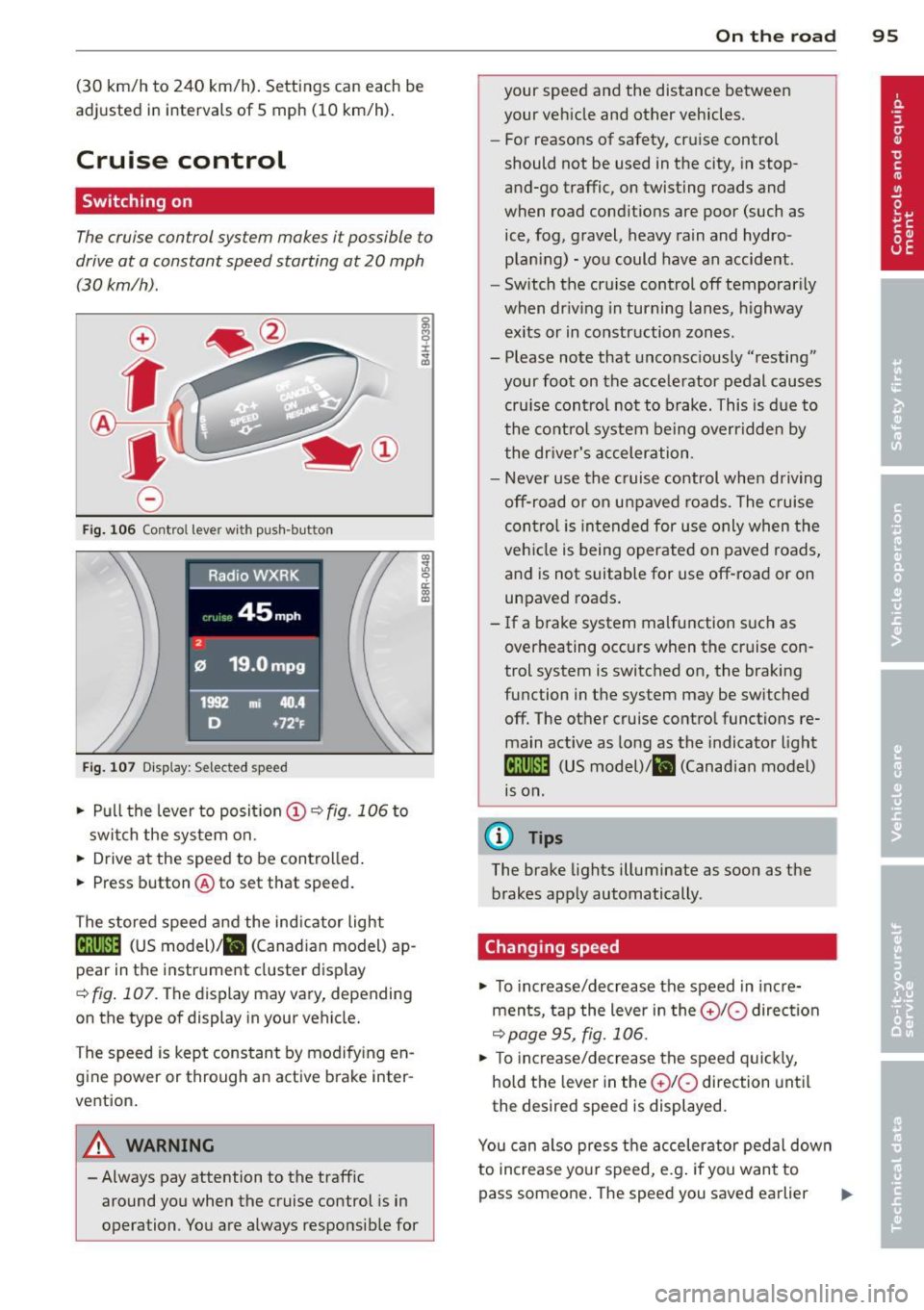
Fig. 106 Contro l lever with push -button
Fig. 107 Di sp lay: Selected speed
.. Pull the lever to posit ion (!) ~ fig. 106 to
switch the system on .
.. Drive at the speed to be controlled .
.. Press button @to set that speed.
The stored speed and the ind icator light
Bll!lm (US model)/ il (Canad ian model) ap
pear in the instrument cluster display
<=>fig. 107. The display may vary, depending
on the type of display in your vehicle.
The speed is kept constant by modifying en
gine power or through an active brake inter
vention.
A WARNING
- Always pay attention to the traffic around you when the cruise control is in
operation . You are always responsible for
c:o ;:g 0 ci: c:o al
On th e road 95
your speed and the distance between
your vehicle and other vehicles.
- For reasons of safety, cruise control
should not be used in the city, in stop
and-go traffic, on twisting roads and
when road conditions are poor (such as
ice, fog, gravel, heavy rain and hydro
plan ing) -you could have an accident.
- Switch the cruise control off temporarily
when dr iv ing in turning lanes, highway
exits or in construction zones.
- Please note that unconsciously "resting"
your foot on the accelerator pedal causes
cru ise contro l not to brake. This is due to
the control system being overridden by
the driver's acceleration.
- Never use the cruise control when driving
off-road or on unpaved roads. The cruise
con tro l is intended for use only when the
vehicle is being operated on paved roads,
and is not suitable for use off-road or on
unpaved roads.
- If a brake system malfunction such as
overheating occurs when the cruise con
trol system is switched on, the braking
function in the system may be switched off. The other cruise control functions re
main active as long as the indicator light
IR;\1)~14 (US model)/ fil (Canadian model)
1s on .
(D Tips
The brake lights illuminate as soon as the
brakes apply automatically .
Changing speed
.. To increase/decrease the speed in incre
ments, tap the lever in the
010 direction
~pa ge 95, fig. 106.
.. To increase/decrease the speed quickly,
hold the lever in the
010 direction until
the desired speed is displayed.
You can also press the accelerator pedal down
to increase your speed, e.g . if you want to
pass someone. The speed you saved earlier
Page 101 of 316
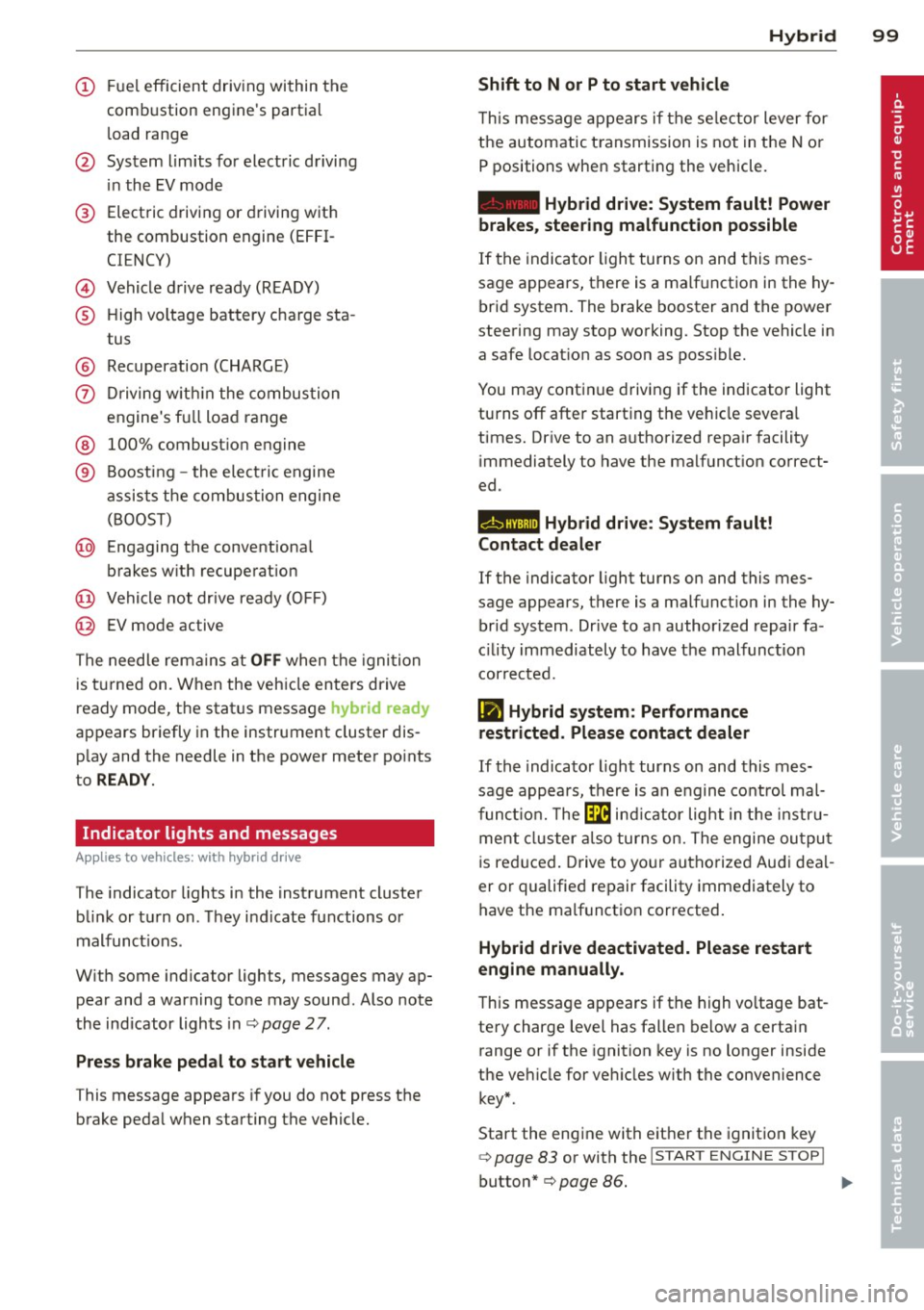
(!) Fuel efficient driv ing within the
comb ustion engine's partia l
l oad range
@ System limits fo r electric d riving
i n the EV mode
® Elect ric driving or d riving w it h
the combustion engine (EFFI -
CI ENCY)
© Vehicle d rive ready (READY)
® H igh vo ltage bat tery c ha rge sta -
tus
® Recuperation (CHARGE)
0 Dr iving w it hi n the combus tion
engine's fu ll loa d range
® 100% combust io n engine
® Boost ing -the elect ric e ngine
assists the combus tion engine
( B OOST)
@ Engaging the conventiona l
brakes w ith recuperat ion
@ Vehicle not drive ready ( OFF)
@ EV mode active
The needle rema ins at
OFF when the igni tion
is tur ned on. W hen the veh icle en ters drive
ready mode, t he stat us message
hybrid ready
ap pears briefly in the instrument cluster dis
p lay and the needle in the power meter po ints
to
READY .
Indicator lights and messages
Applies to vehicles: with hybrid drive
The indicator lights in the instrument cluste r
b link or t urn on . Th ey i ndicate fu nctions o r
malfunct ions .
W ith some ind icator lights, messages may ap
pear and a warning tone may sound. Also note
the indicator lights in c::,;,
pag e 27.
Press brake pedal to start vehicle
This message appea rs if you do not press the
brake peda l when starting the vehicle.
Hybrid 99
Shift to N or P to start vehicle
T his mess age appears if the se lector lever for
the automatic t ransmission is not in t he N or
P positions when starting the vehicle.
- Hybrid drive: System fault! Power
brakes, steering malfunction possible
I f the indica tor ligh t turns on and this mes
sage a ppears, t here is a ma lf u nction in the hy
bri d system. The brake booster and the power
steering may stop working. Stop the vehicle i n
a safe l ocat io n as soo n as poss ible.
You may cont in ue dr iving if the indicator light
turns
off afte r start ing the ve hicle severa l
times. Dr ive to an a uthorized repa ir facility
immediately to have the malfunct ion correct
ed .
EHithjj,j Hybrid drive : Sy stem fault!
Contact dealer
If the indicator light turns on and this mes
sage appears , there is a malfunct ion in the hy
br id system . Drive to a n author ized repair fa
c ili ty immediat ely to hav e th e m alfunc tion
corrected.
Ill Hybrid system: Performance
restricted. Please contact dealer
If th e i ndica to r light turns on and this mes
sag e appea rs, there is an engine contro l ma l
f unct io n .
The @B indi cator light in t he instr u
m ent cluster also tur ns on. The engine ou tput
i s re duced. Drive to yo ur autho rize d Au di dea l
er or qualifie d repair facility immediately to
have the malfunct io n corrected .
Hybrid drive deactivated. Please restart
engine manually.
Th is message ap pears if the high vo ltage bat
te ry charge leve l has fallen below a certa in
range or if the ignition key is no longer inside
the ve hicle for ve hicles with the convenience
key *.
Start the eng ine with e it h er the ignitio n key
¢page 83 or with the !STAR T EN GINE STOPI
button* c::> page 86.
Page 112 of 316
110 Audi adaptive cruise control and braking guard
@ Indicator lights
r• 1 -A dap tive crui se control is switched on . No
ve hicl es are detected up ahead. The stored
speed is ma intained.
I -A mov ing vehicle is detec ted up ahe ad.
T he ad aptive cruise co ntro l sys tem regulates
the spee d and d istance to the moving vehicle
a head and acce le rates/brakes automat ica lly.
I -W hen a utoma tic br aking is no t ab le to
keep enough distance to a previously detec ted
moving vehicle up ahead, you m ust ta ke co n
trol and brake <=:>
page 112, Request for driver
intervention .
© Display
If ad aptive cruise co ntr ol is n ot shown in the
d ispl ay, you c an call it up with the
I RESET !
button ¢ page 20.
Based on the symbo ls in the display, you can
dete rm ine if the system is main taini ng a dis
tance to the vehicle ahead and w hat tha t di s
tance is .
No vehicle -No vehicle a head wa s de te cted.
White vehicle -A vehicle ahead was detected.
Red vehicle -Prompt for the driver to take ac
tion
<=:> page 112.
Both arrow s on the sc ale © indicate the dis
tance to the vehicle ahead. No ar row appears
when t he vehicle is on an open road and there
is no object ahead. If an object is detected
a head, the arrow moves on the scale.
The green zone on the scale s hows the sto red
distance . For information on changing the
stored distance, refer to <=:>
page 111. If the
d istance selected is too close or may soon be
come too close, the arrows move into the red
zo ne on the scale .
A WARNING
Improper use of the adaptiv e cruis e con
trol can ca use c oll is io ns, ot he r acc iden ts
a n d s eriou s pers onal i njuries.
- P re ss ing th e
ISETI button when driving at
sp eeds below 20 mp h (30 km/h), will a u- tomatically accelerate the vehicle to
20 mph (30 km/h), w hich is the mini
m um speed that can be set.
(D Tips
- If you switch t he ig nitio n or the adaptive
cruise contro l off, t he set speed is e rased
from the system memory.
- Th e Electronic Stabilization Control (ESC)
is a utomat ica lly turned on when the
adaptive cru ise contro l is turned on. You
cannot switc h the ESC into ESC Offroad
mode w hile the adapt ive cr uise c ontrol is
t ur ne d on
<=:> pag e 198 .
Changing the speed
Applies to veh icles: w ith Audi adaptive cruise co ntro l
0
f
• 0
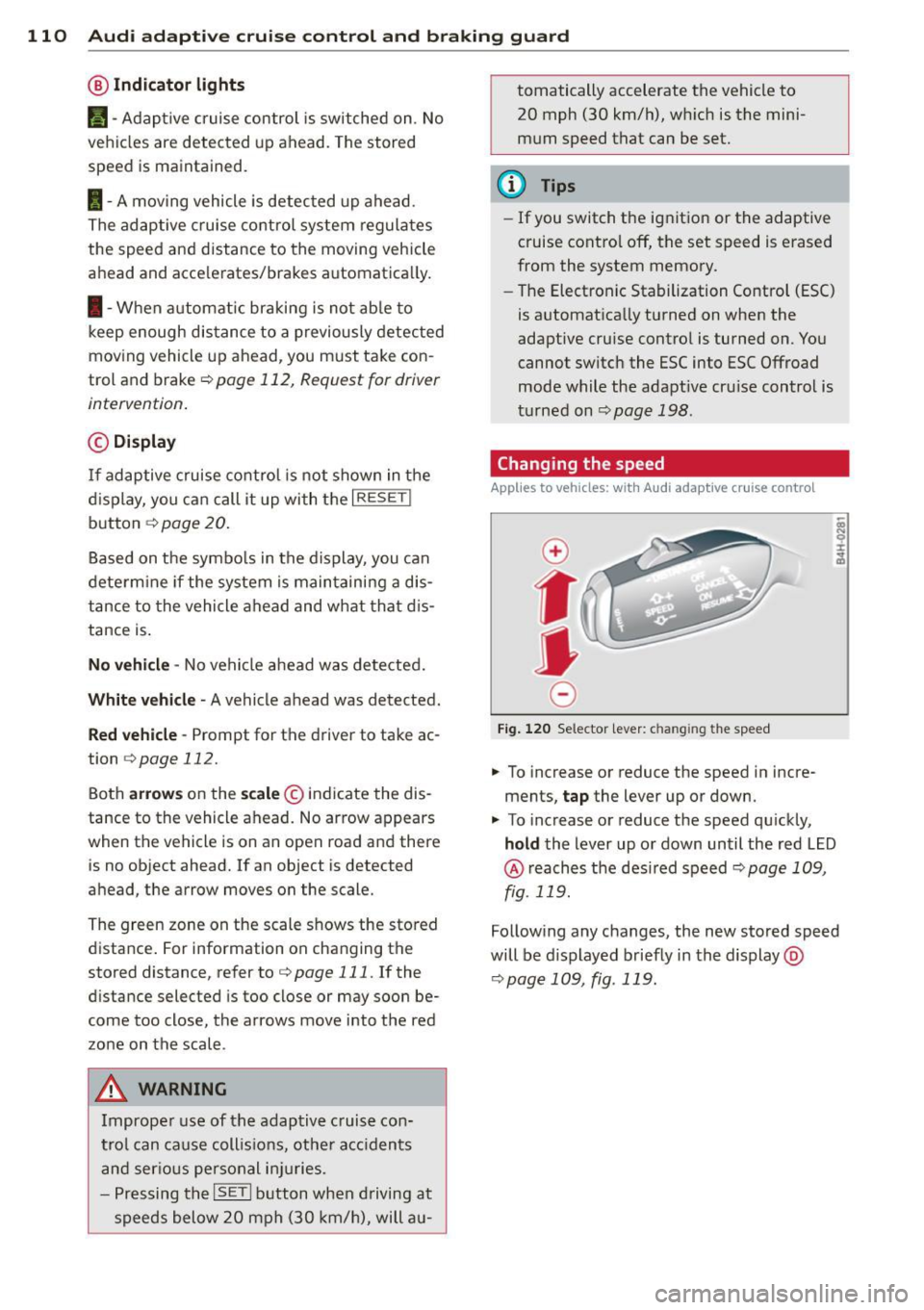
Fig. 120 Selec tor lever: c han gin g the speed
.,. To increase or reduce the speed in incre
ments,
tap the lever up or down .
.,. To increase or reduce the speed qu ickly,
hold the Lever up o r down un til the red L ED
@ reaches t he des ired speed <=:> page 1 09,
fig . 119.
Follow ing any changes, the new sto red speed
will be d isplayed briefly in the display @
<=:>page 109, fig . 119.
Page 133 of 316
Switching on and off
Applies to vehicles: with Audi parking system p lus with
rea rview camera
The reorview camera switches on automati
cally together with the acoustic and visual
pork assist when you put the vehicle in re verse .
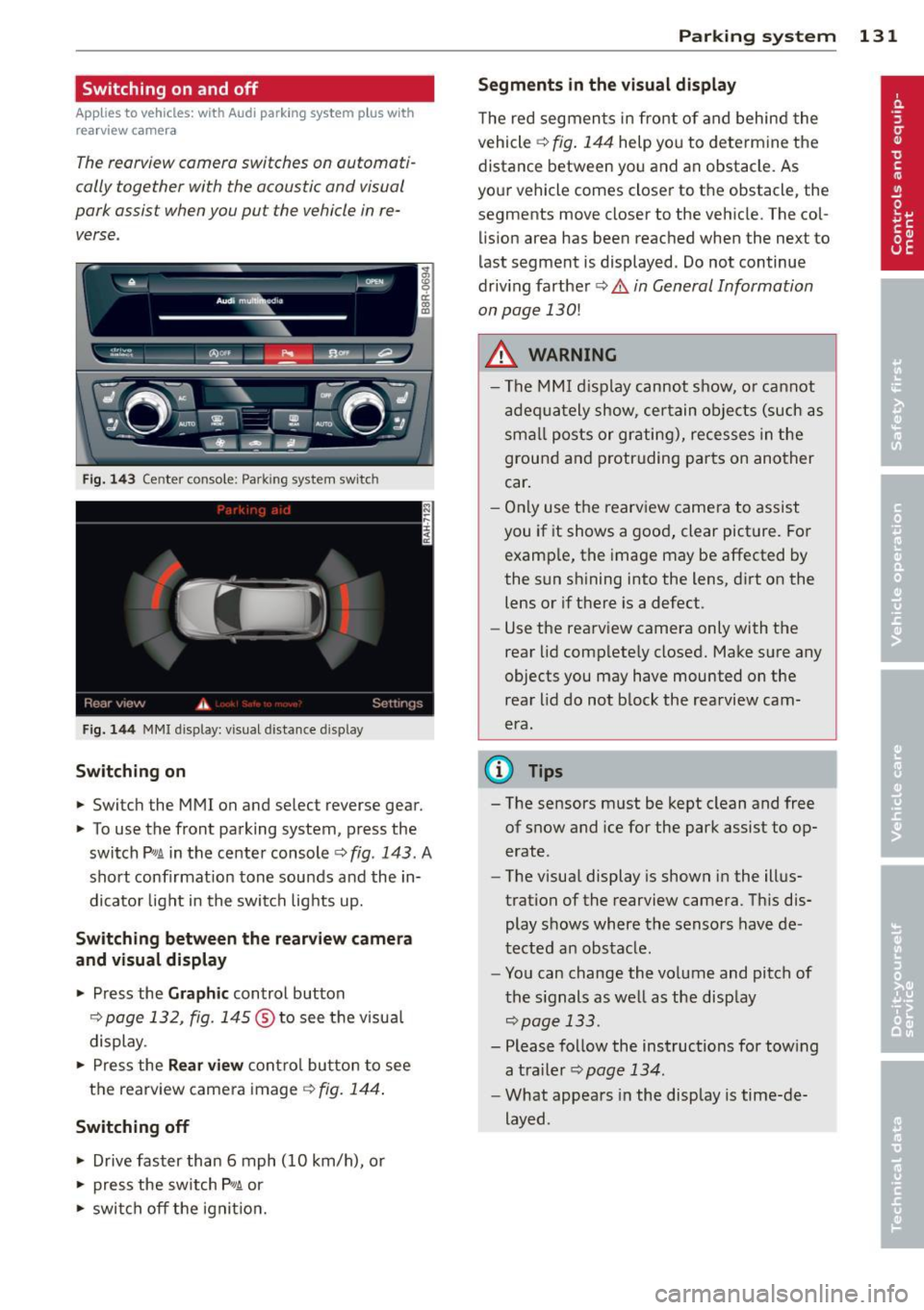
Fig. 14 3 Center co nsole ; Pa rk ing syste m switc h
Fig. 144 MMI disp lay: visu al dista nce display
Switching on
.,. Switch the MMI on and select reverse gear.
.,. To use the front parking system, press the
switch
P w.A in the center console c> fig . 143. A
sho rt confirmat ion tone sounds and the in
dicato r light in the switch lights up.
Switching between the rear view came ra
and visual display
.,. Press the Graphic control button
¢ page 132, fig . 145 ® to see the visua l
display.
.,. Press the
Rear view con trol bu tton to see
the rearview came ra image
¢ fig. 144 .
Switching off
.,. Drive faster than 6 mph (10 km/h), or
.,. press the sw itch
p ,q .A or
.,. swi tch off the ignit io n.
Par king system 131
Segm ents in the vi sual display
T he red segmen ts i n fro nt of and behind the
vehicle
c> fig . 144 help you to determ ine the
distance between yo u and an obstacle. As
you r vehicle comes close r to the obstacle, the
segments move closer to the vehicle. The col lision area has been reached when the next to
l ast segment is displayed . Do not continue
driv ing farther
c> .&. in General Information
on page
130!
A WARNING
- T he MMI display cannot s how, o r ca nnot
a dequa tely show, certain o bje cts (such as
smal l posts or gr ating), recesses in the
ground and p rotruding parts on another
car .
- On ly use the rearv iew came ra to assist
you if it shows a good, clear pict ure. For
examp le, the image may be affected by
the sun sh ining into the lens, d irt on the
lens or if there is a defect.
- Use the rearv iew camera only with the
rear lid comp lete ly closed. Make sure any
o bjects you may have mounted on the
rea r lid do not b lock the rearview cam
era.
(D Tips
- The sensors m ust be kept clean and free
of snow and ice for the park assist to op
erate .
- The visua l display is shown in the illus
tration of the rearview camera. Th is dis
play shows where the sensors have de
tected an obstacle .
- You can change the vo lume and pitch of
t he s ignals as we ll as the disp lay
<=>page 133.
- Please fo llow the instructions for tow ing
a tra iler
c> page 134.
-What appears in the display is time-de
layed .