warning AUDI Q5 2014 Owners Manual
[x] Cancel search | Manufacturer: AUDI, Model Year: 2014, Model line: Q5, Model: AUDI Q5 2014Pages: 316, PDF Size: 78.41 MB
Page 133 of 316
Switching on and off
Applies to vehicles: with Audi parking system p lus with
rea rview camera
The reorview camer a switches on automati
cally together with the acoustic and visual
pork assist wh en you put the vehicl e in re
verse .
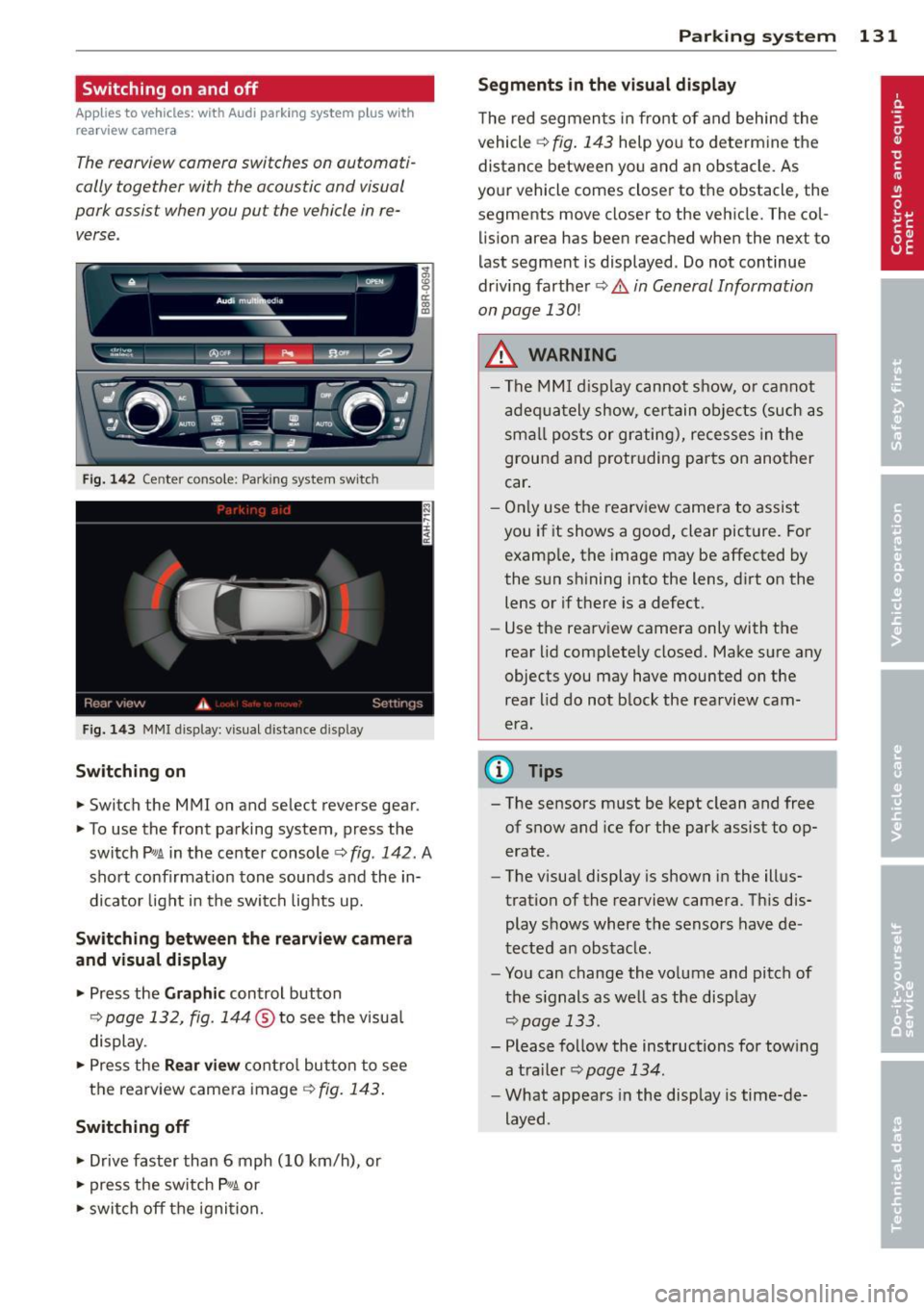
Fig. 14 2 Center co nsole ; Pa rk ing syste m switc h
Fig. 14 3 MMI disp lay: visu al dista nce display
Switching on
.,. Switch the MMI on and se lect reverse gear.
.,. To use the front parking system, press the
switch
Pw.A in the center console~ fig. 142. A
sho rt confirmat io n tone sou nds a nd the in
dicato r light in the switch lights up.
Switching between the rearview came ra
and visual display
.,. Pr ess the Graphic control button
¢ page 132, fig. 14 4 ® to see t he visua l
display.
.,. Press the
Rear view cont ro l but to n t o see
the rearview came ra image
¢ fig. 143 .
Switching off
.,. Drive faster than 6 mph (10 km/h), or
.,. press the sw itch
p ,,,A or
.,. switch off t he igni tion.
Par king system 131
Segments in the visual display
The re d segmen ts i n fro nt of and behind the
vehicle ~
fig. 143 help yo u to determ ine the
distance between yo u and an obstacle. As
you r vehicle comes close r to t he obstacle, the
segments move closer to the vehicle. The col lis ion area has bee n reached when the next to
l ast segment is displayed . Do not continue
dr iv ing farther ~.&.
in General Information
on page 130!
A WARNING
- Th e M MI di splay can not s how, o r ca nnot
ad equa tely show, cer tain o bje cts ( such as
smal l posts or gr ati ng), recesses in the
grou nd and protr uding par ts on ano ther
car .
- On ly use t he rearv iew came ra to assist
you if it shows a goo d, clear pict ure. Fo r
examp le, the image may be affected by
the sun s hining into the lens, d irt on the
lens or if there is a defect.
- Use the rearv iew camera only with the
rear lid c om plete ly closed. Make s ure any
o bjects you may have mounted on the
rea r lid do n ot b lock the rearview cam
era.
(D Tips
- T he sensors m ust be kept clean and free
of snow and ice for the park assist to op
erate .
- The visua l display is shown in the ill us
tration of the rearview came ra. Th is dis
play s hows where the senso rs have de
tected an obstacle .
- Yo u can change the vo lume and pitch of
t he s ignals as we ll as the disp lay
~page 133.
- Please fo llow the ins tructions for tow ing
a tra iler
¢ page 134.
-What appears in the display is time-de
layed .
Page 134 of 316
132 Parking system
Reverse Park ing
App lies to vehicles: with Audi parking system p lus w ith
rea rview camera
Parking mode 1 con be used when parking in
a garage or into a parking space.
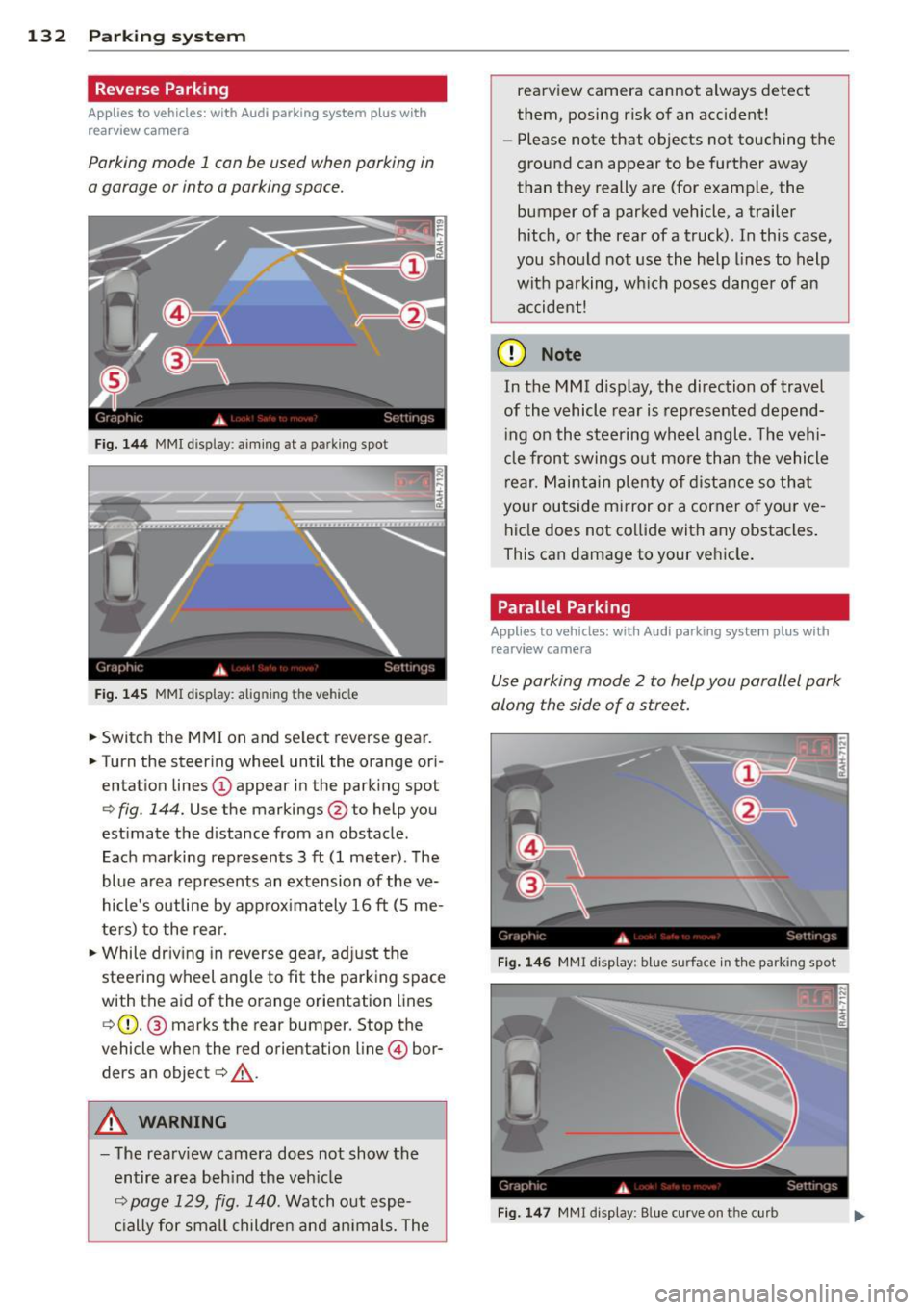
Fig. 1 44 MMI display: aiming at a parking spot
Fig. 14 5 MMI display: aligning the vehicle
... Switch the MMI on and se lect reverse gear .
... Turn the steer ing whee l until the orange ori
entation lines @appear in the park ing spot
¢ fig . 144. Use the markings @to help you
estimate the d istance from an obstacle.
Each marking represents 3
ft (1 meter). The
blue area represents an extension of the ve
hicle's outline by approx imately 16
ft (S me
ters) to the rear.
"' While driv ing in reverse gear, ad just the
steering wheel angle to fit the parking space
with the aid of the orange orientation lines
¢ (D. @ marks the rear bumper. Stop the
vehicle when the red orientation line © bor
ders an object¢ _&..
A WARNING
-The rearv iew camera does not show the
entire area beh ind the veh icle
¢ page 129, fig. 140. Watch out espe
c ially for small childre n an d an imals. The rearview camera cannot always detect
them, posing risk of an accident!
- Please note that objects not touching the
ground can appear to be further away
than they really are (for example, the
bumper of a parked vehicle, a trailer
hitch, or the rea r of a truck). In this case,
you shou ld not use the help lines to help
with pa rking, wh ich pos es dange r of an
accident!
(D Note
In the M MI d is play , the direction of travel
of the vehicle rear is represented depend
i ng on the stee ring wh eel angle . T he vehi
cle front swings o ut more than the vehicle
rear. M aint ain ple nty of dista nce so th at
your outside mirror or a corner o f you r ve
hicle does not co llide with any obstacles .
This can damage to your ve hicle .
Parallel Parking
Applies to vehicles: wit h Aud i parking syste m plus with
rearv i ew camera
Use parking mode 2 to help you parallel park
along the side of a stree t .
F ig . 14 6 MMI disp lay : b lue surface in th e parking spot
Fig . 14 7 MM! display: Blue curve on the curb
Page 135 of 316
The following steps apply only when there is
no obstacle such as a wall near the parking
spot. Otherwise, please read the information
prov ided in the "Parking Next to Obstacles"
section.
~ Activate the turn signal.
~ Position yo ur vehicle parallel to the edge of
the street, approxim ately 3 ft (1 meter)
from a parked vehicle .
~ Switch the MMI on and se lect reverse gear .
The parking aid tu rns o n and parking mode
1 appears on the display .
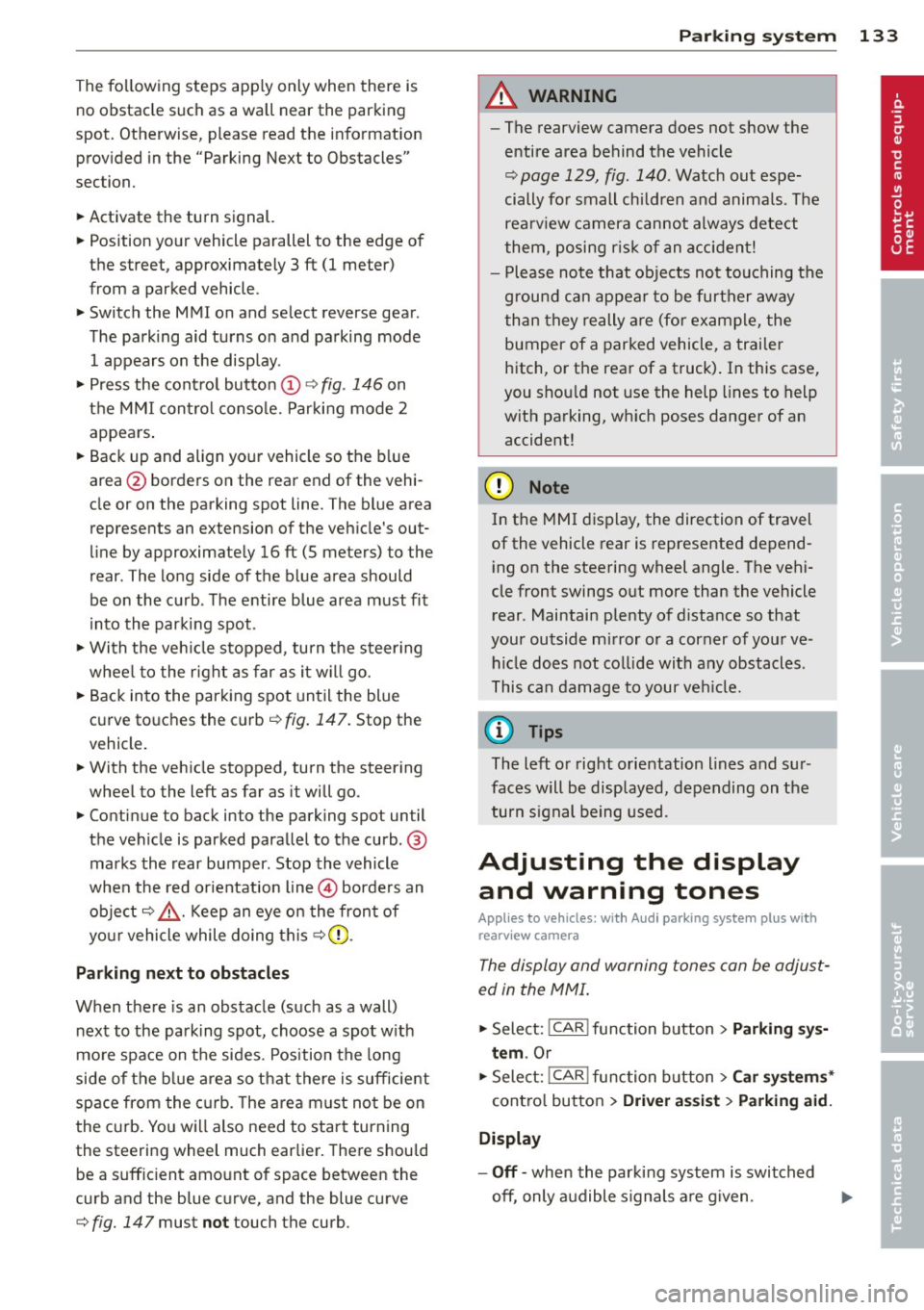
~ Press the control button @¢ fig. 146 on
the MMI contro l conso le. Parking mode
2
appea rs .
~ Backup and align yo ur vehicle so the b lue
area @ borders on the rear end of the vehi
cle or on the parking spot line. The bl ue area
represents an extension of the veh icle's out
line by approximate ly
16 ft (5 meters) to the
rear . The long side of the blue area should
be o n the curb . The entire blue area must fit
i nto the parking spot .
~ With the veh icle s topped, turn the s teer ing
whee l to the right as far as it w ill go.
~ Back into the parking spot until the blue
curve to uches the curb¢
fig. 147. Stop the
vehicle.
~ With the veh icle stopped, turn the steer ing
wheel to the left as far as it will go .
~ Continue to back into the parking spot un til
the vehicle is parked parallel to the curb .@
marks the rear bumper. Stop the vehicle
when the red orientation line@ borde rs an
object ¢.&, . Keep an eye on the fron t of
yo ur vehicle while do ing this
~ CD .
Pa rking n ext to obstacles
When there is an obstacle (such as a wall)
next to the pa rking spot, choose a spot w ith
mo re space on t he sides. Position the long
side of the b lue a rea so that there is sufficient
space from the curb. The a rea m ust no t be on
the c urb. You wi ll also need to start turn ing
the steering wheel much earlie r. T he re should
be a suffic ient amo unt of space between the
curb and the blue curve, and the blue c urve
¢
fig. 147 must not touch the curb.
Par king system 133
A WARNING
- The rearview camera does not show the
entire area behind the vehicle
~ page 129, fig. 140 . Watch out espe
cially fo r small children and anima ls . The
rea rv iew camera cannot always detect
them, posing r is k of an accident!
- P lease note that objects not touching the
g rou nd can appear to be further away
than they really a re (for example, the
bumper of a parked vehicle, a trai ler
hitch, or the rea r of a truck) . In this case,
you shou ld not use the help lines to help
with parking, wh ich poses danger of an
accident!
(D Note
In the MMI display, the direction of travel
of the vehicle rear is represented depend
i ng on the steering wheel angle . The vehi
cle front swings out more than the vehicle rear. Maintain ple nty of d istance so that
your outside mirror or a corner of your ve
hicle does not col lide with any obstacles.
T his can damage to your ve hicle.
(0 Tips
The left o r right orientation lines and su r
faces will be disp layed, depending on the
turn s ignal being used .
Adjusting the display
and warning tones
App lies to v ehicl es: wi th Audi parking sys te m plus wi th
rearv iew camera
The display and warning tones can be adjust
ed in the MMI .
~ Select: !CAR ! function button> Parking s ys
tem .
Or
~ Select: ~IC_ A_ R~I func tio n button> Car sy ste m s*
cont ro l button > Driver as sist > Parking aid.
Display
-Off -when the parki ng system is switched
off, only a udible s ignals a re g iven .
Page 136 of 316
134 Parking system
- On -when the parking system is switched
on, either the visua l d isplay or the picture
from the rearview camera is disp layed .
Warning tones
-Front volum e -front sensor vol ume
- Front frequ enc y-front sensor frequency
-Re ar volum e -rear sensor volume
- Rear frequenc y -rear sensor frequency
- In -ca r entertainme nt fader /Mu sic volume
w hile pa rking -
when the parking system is
switched on , the volume of the active audio
source is lowered .
The new ly adjusted value is briefly heard from
the signal generator.
@ Tips
- The warning tones can a lso be adjusted
directly by the v is ual disp lay or the p ic
ture from the rearview camera. Simp ly
press the
Sett ings contro l button.
- Changed settings are activated when
parking system is switched on again.
- The settings are automatically stored
and ass igned to the remote control key.
Trailer hitch
Applies to vehicles: with Audi parking system plus w ith
rea rview camera a nd trailer hitch
For vehi cles with a facto ry installed trai ler
hitch, or a trai ler hitch installed according to
factory specifications, the parking system rear
sensors do not come on whenever you shift in
to reverse gear or when you press the
P, #J\.
switch. Remember, there is no warning for
d istances to the rear . The front sensors re
main activated. The visual display switches to
the trailer towing mode. The picture from the
rearv iew camera will not show the orientation
l ines nor the blue su rfaces.
If you install a hitch yourself, th is function
may not work .
Error messages
Applies to vehicles: wi th Audi parking sys te m plus with
rearv iew camera
T he re is an error in the system if t he LED on
the
p, q~ switch is blinking and you hea r a con
t in uous alarm for a few se conds after switch
ing on the parking system or when the park
ing system is already activated . Have yo ur au
thorized Audi dea ler correct the error.
(D Tips
If the error is not corrected before you
switch off the ignition, when you switch on
the parking system again, the LED in the
Pw J\. switch will blink.
Page 137 of 316
Homelink
Universal remote
control
Description
Applies to vehicles: with Home link
The HomeLink universal remote control can
be programmed with the remote control for
devices that are already present.
With Home Link, you can control devices such
as the garage door, security systems, house
lights , etc. comfortably from the inside of you
vehicle.
Homelink makes it possible for you to rep lace
three different remote controls from dev ices
in your home with one universal remote. This
feature works for most garage door and exte
rior door motor signals. Programming the in
dividual remote control for your remote con
trol takes place near the center of the radiator
grille. There is a control module attached at
this location .
A one-time programming of the sensor must be performed before you are able to use sys
tems with Homelink. If the system does not activate after performing the one-time pro
gramming, check whether the system uses a rolling code¢
page 138 for vehicles without
the MMI*.
& WARNING
-
- Never use the Homelink transmitter
with any garage door opener that does
have not the safety stop and reverse fea
ture as requ ired by federa l safety stand
ards. This includes any garage door open
er model manufactured before April 1,
1982.
-A garage door opener which cannot de
tect an object, signaling the door to stop
and reverse does not meet current feder
al safety standards . Using a garage door
opener without these features increases
risk of serious injury or death.
Homelink 135
- For safety reasons never release the
parking brake or start the engine while
anyone is standing in front of the vehicle .
- A garage door or an estate gate may
sometimes be set in motion when the
Homelink remote control is being pro
grammed. If the device is repeatedly ac
tivated, th is can overstrain motor and
damage its electrical components - an
overheated mo to r i s a fire hazard!
- To avoid possib le injuries or property
damage, please always make abso lutely
certa in that no persons or objects are lo
cated in the range of motion of any
equipment being operated.
(0 Tips
- If you would like more information on
Homelink, where to purchase the Home
Link compat ible products, or would like
to purchase the Home Link Home Light
ing Package, please call toll-free :
1-800-355-3515.
-For Declaration of Compliance to United
States FCC and Industry Canada regula
tions
¢ page 296.
-For security reasons, we recommend that
you clear the programmed buttons be
fore selling the vehicle.
Operation
App lies to vehicles : with Homeli nk
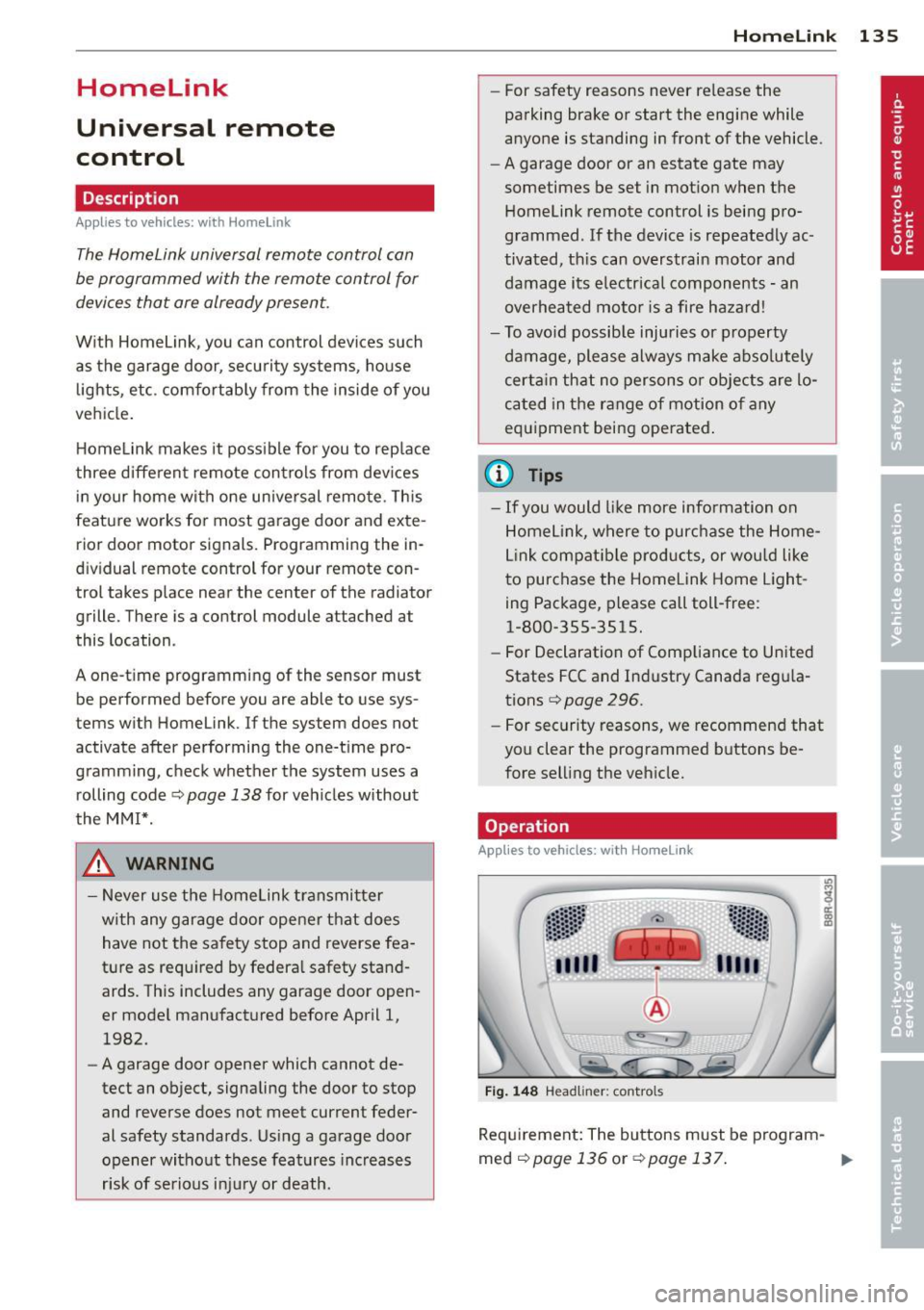
Fig. 148 Headl iner: controls
Req uirement: The buttons must be program-
med
<:!)page 136 or ¢page 137. ..,_
Page 141 of 316
Driving Safely
General notes
Safe driving habits
Please remember -safety first!
This chapter contains important information,
tips, instructions and warnings that you need
to read and observe for your own safety, the
safety of your passengers and others . We have
summarized here what you need to know
about safety belts, airbags, child restraints as
well as child safety. Your safety is for us
priori
ty number 1.
Always observe the information
and warnings in this section - for your own
safety as well as that of your passengers.
The information in this section applies to all
model versions of your vehicle . Some of the
features described in this sections may be
standard equipment on some models, or may
be optional equipment on others. If you are
not sure, ask your authorized Audi dealer.
A WARNING
- Always make sure that you follow the in
structions and heed the WARNINGS in
this Manual. It is in your interest and in
the interest of your passengers.
- Always keep the complete Owner's Liter
ature in your Audi when you lend or sell
your vehicle so that this important infor
mation will always be available to the
driver and passengers.
- Always keep the Owner's literature handy
so that you can find it easily if you have
questions.
Safety equipment
The safety features are part of the occupant
restraint system and work together to help
reduce the risk of injury in a wide variety of
accident situations .
Your safety and the safety of your passengers
should not be left to chance. Advances in
technology have made a variety of features
available to help reduce the risk of injury in an
Driving Safely 139
accident. The following is a list of just a few of
the safety features in your Audi :
- sophisticated safety belts for driver and all
passenger seating positions,
- belt force limiters for the front seats,
- belt pretensioners for the seats,
- belt height adjustment for the front seats,
- head restraints for each seating position,
- front airbags,
- side airbags in the front seats and outer rear
seats*,
- side curtain airbags,
- special LATCH anchorages for child re-
straints,
- adjustable steering column.
These individual safety features, can work to gether as a system to help protect you and
your passengers in a wide range of accidents.
These features cannot work as a system if
they are not always correctly adjusted and cor
rectly used.
Safety is everybody's responsibility!
Important things to do before driving
Safety is everybody 's job! Vehicle and occu
pant safety always depends on the informed
and careful driver.
For your safety and the safety of your passen
gers,
before driving always:
.,. Make sure that all lights and signals are op
erating correctly .
.,. Make sure that the tire pressure is correct .
.,. Make sure that all windows are clean and af
ford good visibility to the outside .
.,. Secure all luggage and other items carefully
qpage 76.
.,. Make sure that nothing can interfere with
the pedals.
.,. Adjust front seat, head restraint and mirrors
correctly for your height .
.,. Instruct passengers to adjust the head re
straints according to their height .
.,. Make sure to use the right child restraint
correctly to protect children ¢
page 178,
and~~~-~
•
•
Page 142 of 316
140 Driving Safely
• Sit properly in your seat and make sure that
your passengers do the same¢
page 61,
General recommendations.
• Fasten your safety belt and wear it properly.
Also instruct your passengers to fasten their
safety belts properly¢
page 149 .
What impairs driving safety?
Safe driving is directly related to the condi
tion of the vehicle, the driver as well as the
driver's ability to concentrate on the road
without being distracted.
The driver is responsible for the safety of the
vehicle and all of its occupants . If your ability
to drive is impaired, safety risks for everybody
in the vehicle increase and you also become a
hazard to everyone else on the road
9 .&,.
Therefore:
• Do not let yourself be distracted by passen
gers or by using a cellular telephone.
• NEVER drive when your driving ability is im
paired (by medications, alcohol, drugs, etc.).
• Observe all traffic laws, rules of the road
and speed limits and plain common sense.
• ALWAYS adjust your speed to road, traffic
and weather conditions .
• Take frequent breaks on long trips. Do not
drive for more than two hours at a stretch.
> Do NOT drive when you are tired, under
pressure or when you are stressed .
A WARNING
Impaired driving safety increases the risk
of serious personal injury and death when
ever a vehicle is being used.
Proper occupant
seating positions
Proper seating position for the driver
The proper driver seating position is impor
tant for safe, relaxed driving.
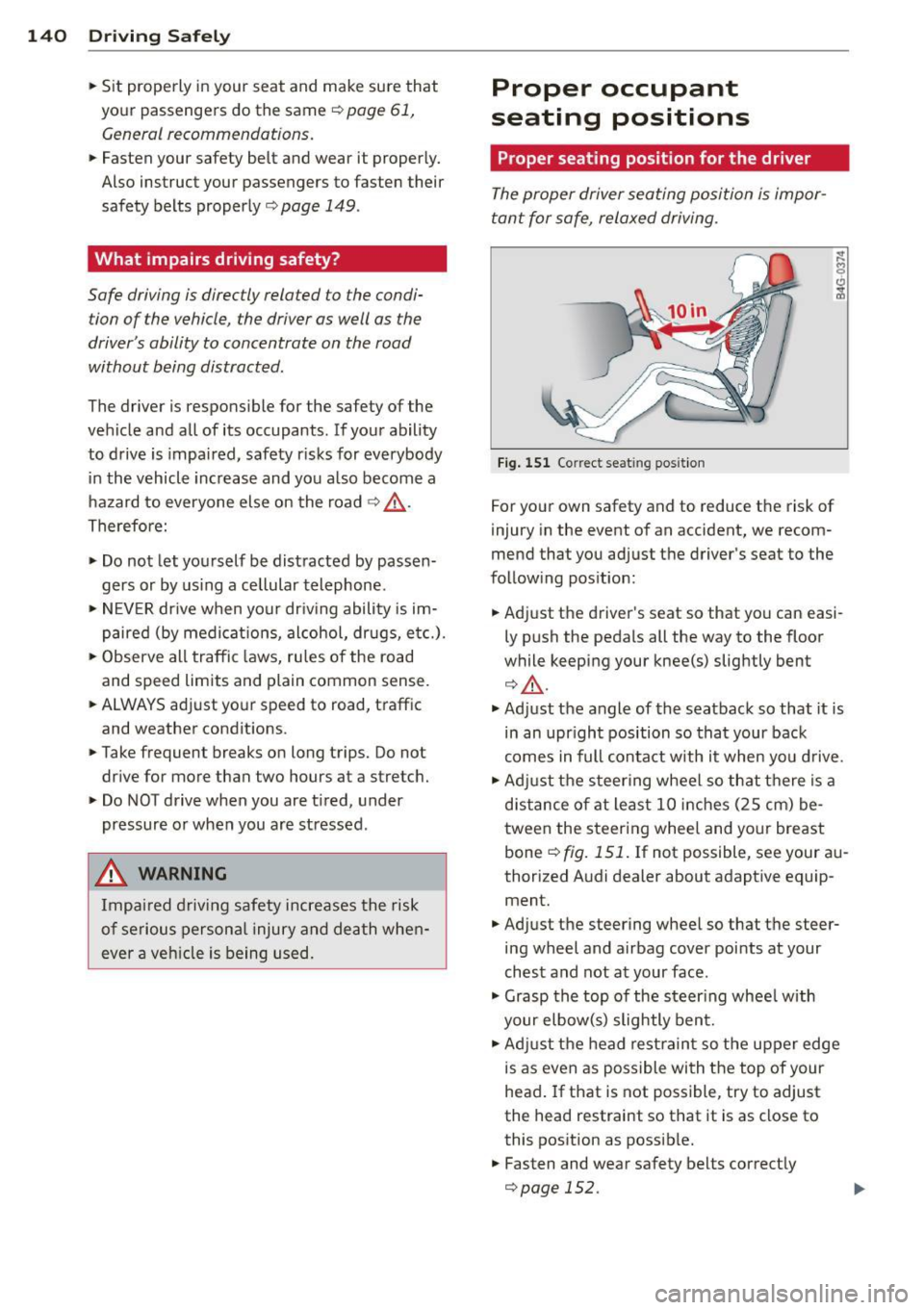
Fig. 151 Correct seat ing position
For your own safety and to reduce the risk of
injury in the event of an accident, we recom
mend that you adjust the driver's seat to the
following position:
• Adjust the driver's seat so that you can easi
ly push the pedals all the way to the floor
while keeping your knee(s) slightly bent
¢,&. .
• Adjust the angle of the seatback so that it is
in an upright position so that your back
comes in full contact with it when you drive.
• Adjust the steering wheel so that there is a
distance of at least 10 inches (25 cm) be
tween the steering wheel and your breast
bone ¢
fig. 151. If not possible, see your au
thorized Audi dealer about adaptive equip ment.
• Adjust the steering wheel so that the steer
ing wheel and airbag cover points at your
chest and not at your face .
• Grasp the top of the steering wheel with
your elbow(s) slightly bent.
• Adjust the head restraint so the upper edge
is as even as possible with the top of your
head. If that is not possible, try to adjust
the head restraint so that it is as close to
this position as possible.
• Fasten and wear safety belts correctly
¢page 152.
Page 143 of 316
~ Always keep both feet in the footwell so
that you are in control of the vehicle at all
times.
For detailed information on how to adjust the
driver's seat, see
c:;, page 62.
A WARNING
Drivers who are unbelted, out of position
or too close to the airbag can be seriously
injured by an airbag as it unfolds. To help
reduce the risk of serious personal injury:
- Always adjust the driver's seat and the
steering wheel so that there are at least
10 inches (25 cm) between your breast
bone and the steering wheel.
- Always hold the steering wheel on the
outside of the steering wheel rim with
your hands at the 9 o'clock and 3 o'clock positions to help reduce the risk of per
sonal injury if the driver's airbag inflates.
- Never hold the steering wheel at the
12 o'clock position or with your hands at
other positions inside the steering wheel
rim or on the steering wheel hub. Hold
ing the steering wheel the wrong way
can cause serious injuries to the hands,
arms and head if the driver's airbag de
ploys.
- Pointing the steering wheel toward your
face decreases the ability of the supple
mental driver's airbag to protect you in a
collision.
- Always sit in an upright position and nev
er lean against or place any part of your
body too close to the area where the air
bags are located.
- Before driving, always adjust the front
seats and head restraints properly and
make sure that all passengers are prop
erly restrained.
- Never adjust the seats while the vehicle
is moving . Your seat may move unexpect
edly and you could lose control of the ve
hicle.
- Never drive with the backrest reclined or
tilted far back! The farther the backrests
are tilted back, the greater the risk of in-
Driving Safely 141
jury due to incorrect positioning of the
safety belt and improper seating posi
tion.
- Children must always ride in child safety
seats
c:;, page 178. Special precautions
apply when installing a child safety seat
on the front passenger seat
c:;, page 157.
Proper seating position for the front
passenger
The proper front passenger seating position
is important for safe, relaxed driving.
For your own safety and to reduce the risk of
injury in the event of an accident, we recom
mend that you adjust the seat for the front
passenger to the following position:
~ Adjust the angle of the seatback so that it is in an upright position and your back comes
in full contact with it whenever the vehicle is
moving .
~ Adjust the head restraint so the upper edge
is as even as possible with the top of your
head. If that is not possible, try to adjust
the head restraint so that it is as close to
this position as possible
c:;, page 142.
~ Keep both feet flat on the floor in front of
the front passenger seat .
~ Fasten and wear safety belts correctly
c:;,page 152.
For detailed information on how to adjust the
front passenger's seat, see
c:;, page 61.
A WARNING ,_
Front seat passengers who are unbelted,
out of position or too close to the airbag
can be seriously injured or killed by the air
bag as it unfolds. To help reduce the risk of
serious personal injury:
- Passengers must always sit in an upright
position and never lean against or place
any part of their body too close to the
area where the airbags are located.
- Passengers who are unbelted, out of po
sition or too close to the airbag can be
seriously injured by an airbag as it
•
•
Page 144 of 316

142 Driving Safely
unfolds with great force in the blink of
an eye .
- Always make sure that there are at least
10 inches (25 cm) between the front
passenger's breastbone and the instru
ment panel.
- Each passenger must always sit on a seat of their own and properly fasten and
wear the safety belt belonging to that
seat.
- Before driving, always adjust the front
passenger seat and head restraint prop
erly .
- Always keep your feet on the floor in
front of the seat. Never rest them on the
seat, instrument panel, out of the win
dow, etc. The airbag system and safety
belt will not be able to protect you prop
erly and can even increase the risk of in
jury in a crash.
- Never drive with the backrest reclined or
tilted far back! The farther the backrests
are tilted back, the greater the risk of in
jury due to incorrect positioning of the
safety belt and improper seating posi
tion.
- Children must always ride in child safety
seats
c::> page 178. Special precautions
apply when installing a child safety seat
on the front passenger seat
c::> page 15 7 .
Proper seating positions for passengers
in rear seats
Rear seat passengers must sit upright with
both feet on the floor consistent with their
physical size and be properly restrained whenever the vehicle is in use .
To reduce the risk of injury caused by an incor
rect seating position in the event of a sudden
braking maneuver or an accident, your pas
sengers on the rear bench seat must always
observe the following :
.. If there is a passenger on the rear center
seating pos ition, slide the center head re
straint upward at least to the next notch
c::> page 65.
.. Make sure that the seatback is securely
latched in the upright position
c::> page 67.
.. Keep both feet flat in the footwell in front of
the rear seat .
.. Fasten and wear safety belts properly
c::>page 152.
.. Make sure that children are always properly
restrained in a child restraint that is appro
priate for their size and age
c::> page 178.
_& WARNING
Passengers who are improperly seated on
the rear seat can be seriously injured in a
crash .
- Each passenger must always sit on a seat
of their own and properly fasten and
wear the safety belt belonging to that seat .
- Safety belts only
offer maximum protec
tion when the seatback is securely latch
ed in the upright position and the safety
belts are properly positioned on the
body. By not sitting upright, a rear seat
passenger increases the risk of personal
injury from improperly positioned safety
belts!
- Always adjust the head restraint properly
so that it can give maximum protection.
Proper adjustment of head restraints
-
Correctly adjusted head restraints are an im
portant part of your vehicle's occupant re
straint system and can help to reduce the risk
of injuries in accident situations.
Fig. 152 H ead restra int: vi ew ed from the front
The head restraints must be correctly adjust-
ed to achieve the best protection. .,.
Page 145 of 316

~ Adjust the head restraints so the upper edge is as even as possib le with the top of yo ur
head. If that is not possib le, try to ad just
the head restraint so that it is as close to
th is position as possible¢
fig. 152.
~ If there is a passenger on the rear center
seat ing pos ition, slide the center head re
stra int upward at least to the next notch .
Adjust ing head restra ints ¢
page 65.
A WARNING
All seats are equipped with head re
straints. Dr iv ing without head restra ints or
w ith head restra ints that are not properly
adjusted increases the risk of ser ious or fa
t al neck injury dr amat ic a lly. To help reduce
t he risk of in jury:
- Alw ays drive with the he ad restraints in
pla ce and properly adjusted.
- E very pe rson in the veh icle must have a
properly adj usted head restr aint.
- Always make sure each pe rson in the ve
hicle properly adjus ts the ir head re
st rain t. Ad just the head rest rain ts so the
upper edge is as even as possib le with
the top of your head. If that is not possi
ble, try to adjust the head restra int so
that it is as close to this position as pos
sible.
- Never attempt to adjust head restraint wh ile driving. If you have driven off and
must adjust the dr iver head rest for any
reason, first stop the vehicle safe ly be
fore attempting to adjust t he head re
st raint.
- Children must always be properly re
st rained in a ch ild restraint that is appro
pr iate for their age and siz e ¢
page 1 78.
Examples of improper seating positions
The occupant restraint system can only re
duce the risk of injury if vehicle occupants are
properly seated.
Imp rope r seat ing pos it ions can cause serious
in ju ry or death . Safety belts can on ly wor k
when they a re properly posit ioned o n the
Dr iving S afel y 143
body. Improper seating positions re duce the
effectiveness of safety belts and wi ll even in
crease the r is k of i njury and death by moving
the safety belt to crit ica l areas of the body.
Improper seating positions a lso increase the
risk of serious injury and death when an a ir
bag deploys and str ikes an occupant w ho is
not in the p roper seating posit ion. A dr iver is
responsible fo r the safety of all veh icle occu
pan ts and espec ially for children. The re fore :
~ Never allow anyone to assume a n incor rect
seating position when the vehicle is being
used
Q ,& .
The following bulletins list on ly some samp le
pos itions tha t will increase the risk of serious
i njury and death . Ou r hope is that these e xam
ple s will ma ke yo u mo re aware o f seati ng po
s itions tha t are d angerous.
Therefore , whenever the vehicle is
moving:
- neve r stand up in the vehicle
- neve r stand on the seats
- neve r kneel on the seats
- never ride w it h the seatback reclined
- never lie down on the rear seat
- never lean up against the instrument panel
- never s it on the edge of the seat
- neve r sit sideways
- neve r lean out the window
- neve r put your feet out the window
- never put your feet on the instr ument panel
- neve r rest your feet on the seat cush ion or
back of the seat
- neve r ride in the footwell
- neve r ride in the cargo area
A WARNING ~
Imp ro p er seating posit ions increase the
risk of serious persona l injury and death
whenever a vehicle is being used.
- Always make sure that all vehicle occu-
pants stay in a proper seating position
and are properly restrained whenever the
veh icle is being used .
-
•
•