brakes AUDI Q5 2014 User Guide
[x] Cancel search | Manufacturer: AUDI, Model Year: 2014, Model line: Q5, Model: AUDI Q5 2014Pages: 316, PDF Size: 78.41 MB
Page 110 of 316
108 Audi adaptive cruise control and braking guard
confirmed by the video camera, an acute
collision warning.
- For safety reasons, do not use adaptive
cruise control when driving on roads with
many curves, when the road surface is in
poor condition and/or in bad weather
(such as ice, fog, gravel, heavy rain and
hydroplan ing). Using the system under
these conditions could result in a colli
sion.
- Switch adaptive cruise control off tempo
rar ily when driv ing in turning lanes, on
expressway exits or in construc tion
zones. This prevents the vehicle from ac
celerating to the set speed when in these
situations.
- Th e adaptive cruise control system w ill
not brake by itse lf if you put your foot on
the accelerator pedal. Doing so can over
ride the speed and distance regulation.
- When approaching stationary objects
such as stopped traffic, adaptive cruise
control will not respond and braking
guard w ill have limited function.
- The adaptive cr uise control system and
braking guard do not react to people, an
ima ls, objects crossing the road or on
coming objects .
- The function of the radar sensor can be
affected by reflective objects such as
guard rails, the entrance to a tunnel,
heavy rain or ice.
- Never follow a vehicle so closely that you cannot stop your vehicle safely. The
adaptive cruise control cannot slow or
brake the vehicle safely when you follow
ano ther vehicle too closely . Always re
member that the automatic braking
function cannot bring the vehicle to a sudden or emergency stop under these
conditions.
- To prevent unintended operation, always
switch adaptive cruise control off when it
is not being used.
QJ Note
The sensor can be disp laced by impacts o r
damage to the bumper, whee l housing and underbody.
That could affect the adaptive
cruise control system and braking guard. Have yo ur authorized Aud i dea ler or a u
thorized Audi Service Facility check their
function.
In curves
Applies to vehicles: with Audi adaptive cruise contro l
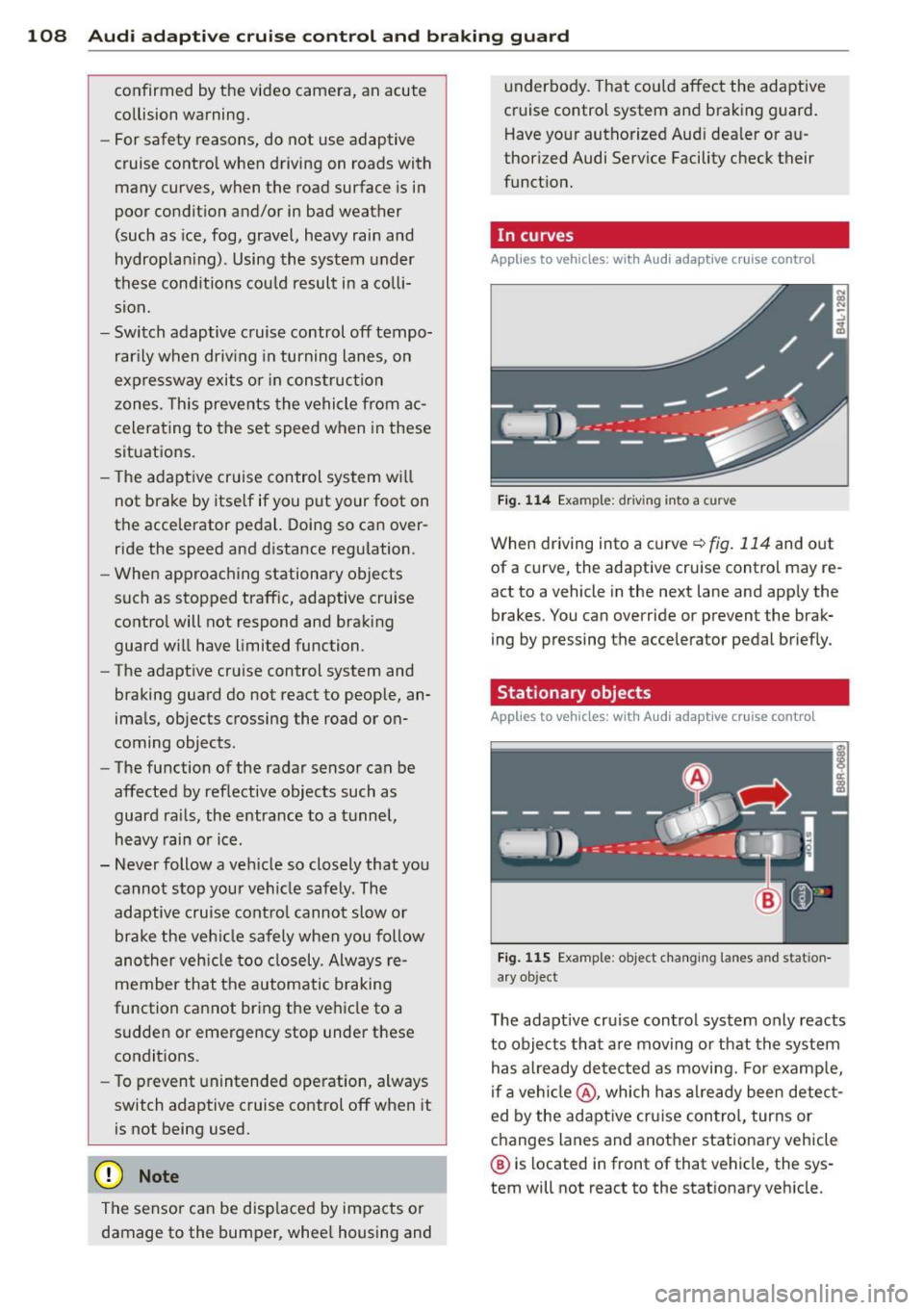
Fig. 114 Examp le: driv ing into a curve
When driving into a curve¢ fig. 114 and out
of a curve, the adaptive cruise control may re
act to a vehicle in the next lane and app ly the
brakes. You can override or prevent the brak
ing by pressing the accelerator pedal briefly.
' Stationary objects
Applies to vehicles: with Aud i adapt ive cru ise contro l
Fig. 115 Example: object changing lanes and station
a ry object
T he adaptive cru ise control system only reacts
to objects that are moving or that the system
has a lready detected as moving. For examp le,
if a vehi cle@ , which has al ready been detect
ed by the adaptive cruise control, turns or
changes lanes and another stationary vehicle
® is located in front of that vehicle, the sys
tem will not react to the stat ionary veh icle.
Page 112 of 316

110 Audi adaptive cruise control and braking guard
@ Indicator lights
r• 1-Adaptive cruise control is switched on . No
vehicles are detected up ahead. The stored
speed is maintained.
I-A moving vehicle is detected up ahead.
The adaptive cruise control system regulates
the speed and distance to the moving vehicle
ahead and accelerates/brakes automatically.
I -When automatic braking is not able to
keep enough distance to a previously detected
moving vehicle up ahead, you must take con
trol and brake<=:>
page 112, Request for driver
intervention.
© Display
If adaptive cruise control is not shown in the
display, you can call it up with the
I RESET !
button ¢ page 20.
Based on the symbols in the display, you can
determine if the system is maintaining a dis
tance to the vehicle ahead and what that dis
tance is.
No vehicle -No vehicle ahead was detected.
White vehicle -A vehicle ahead was detected.
Red vehicle -Prompt for the driver to take ac
tion
<=:> page 112.
Both arrows on the scale © indicate the dis
tance to the vehicle ahead. No arrow appears
when the vehicle is on an open road and there
is no object ahead. If an object is detected
ahead, the arrow moves on the scale.
The green zone on the scale shows the stored
distance. For information on changing the
stored distance, refer to <=:>
page 111. If the
distance selected is too close or may soon be
come too close, the arrows move into the red
zone on the scale .
A WARNING
Improper use of the adaptive cruise con
trol can cause collisions, other accidents
and serious personal injuries.
- Pressing the
ISETI button when driving at
speeds below 20 mph (30 km/h), will au- tomatically accelerate the vehicle to
20 mph (30 km/h), which is the mini
mum speed that can be set.
(D Tips
- If you switch the ignition or the adaptive
cruise control off, the set speed is erased
from the system memory.
- The Electronic Stabilization Control (ESC)
is automatically turned on when the
adaptive cruise control is turned on. You
cannot switch the ESC into offroad mode
while the adaptive cruise control is
turned on
<=:> page 198 .
Changing the speed
Applies to veh icles: w ith Audi adaptive cruise co ntro l
0
f
• 0
Fig. 119 Selector lever: ch an gin g the speed
.,. To increase or reduce the speed in incre
ments,
tap the lever up or down .
.,. To increase or reduce the speed quickly,
hold
the lever up or down until the red LED@
reaches the desired speed <=:>
page 109,
fig . 118.
Following any changes, the new stored speed
will be displayed briefly in the display @
<=:>page 109, fig . 118.
Page 113 of 316

Audi adaptive cruise control and braking guard 111
Interrupting cruise control
Applies to vehicles: with Audi adaptive cruise control
Fig. 120 Selector lever
Requirement: adaptive cruise control must be
switched on
¢ fig. 120 (D .
Overriding cruise control
• To accelerate manually, press the accelera
tor pedal. The message
ACC: override ap
pears.
• To resume adaptive cruise control, remove
your foot from the gas pedal. The system re
turns again to the speed that was saved be
fore.
• You can save a new speed at any time by
pressing thelSETI button ¢fig. 120.
Canceling cruise control while driving
• Move the lever into position @. The mes
sage
ACC: Standby appears. Or
• press the brake pedal.
• To resume the stored speed, move the lever
into position @.
_& WARNING
Never resume the stored speed if the
speed is too high for prevailing road, traf
fic or weather conditions.
Setting the distance
App lies to vehicles: wit h Aud i adapt ive cr uise contro l
Fig. 121 Selector lever: setting the distance
• Tap the switch to display the current set dis
tance ¢fig. 121.
• To increase or reduce the distance by incre
ments, tap the switch again to the left or
r ight. The distance between the two vehicles
w ill c hange in the instrument cluster dis
p lay .
When approach ing a moving vehicle up ahead,
the adapt ive cruise control system brakes to
match that object's speed and then mainta ins
the stored distance. If the vehicle ahead ac
ce lerates, adaptive cruise control will also ac
celerate up to the stored speed.
T he higher the speed, the greater the distance
in yards (meters) ¢& .The
Distance 3 setting
is recommended.
T he distances provided are specified va lues .
Depend ing on the driv ing s ituation and the
how the vehicle ahead is driving, the actual
distance may be more or less than these tar
get distances.
T he var ious symbols for the time increments
appear briefly in the informat ion line @
¢ page 109, fig . 118 when you change the
settings.
c:::::,_c:::::, ___ Distance 1: This setting corre-
sponds to a distance of 92 feet/28 meters
when traveling at 62 mph (100 km/h), or a
time interval of 1 second.
c:::::, __ c:::::, __ Distance 2 : This setting corre
sponds to a distance of 118 feet/36 meters
when traveling at 62 mph (100 km/h), or a
time interval of 1.3 seconds.
Page 115 of 316

Audi adaptive cruise control and braking guard 113
Audi braking guard
Description
Applies to vehicles: with Audi adaptive cruise control
Fig. 123 Instrument cluste r: approac h warn ing
Braking guard uses a radar sensor. It also
functions within the limits of the system
when adaptive cruise control is switched off.
What can braking guard do?
When detected in time, the system can assess
situations when a vehicle ahead brakes sud
denly or if your own vehicle is traveling at a
high speed and approaching a vehicle up
ahead that is moving more slowly . Braking
gua rd does not react if it cannot detect the
situation .
The system advises you of various situations:
- The
distance warning is given if you are too
close to the vehicle ahead for a long time. If
the vehicle ahead brakes sharply, you wi ll
not be able to avoid a collision. The indicator
light
I in the display comes on .
- The
approach warning is given when a de
tected vehicle up ahead in your lane is mov
ing much more slowly than you are or if it
brakes sharply . When this warning is given,
it may only be possible to avoid a collision
by swerving or braking sharply. The indicator
light
I and indicator in the display will warn
you about the danger
c:> fig. 123. You will al
so hear an acoustic signal.
If you do not react fast enough or do not react
at all to the situation, braking guard will inter-
ll Th is is not ava ilable in som e coun tri es.
vene by braking and the message Braking
guard: Activated
will appear.
- If a coll ision is imminent , the system will
first provide an
acute warning by briefly and
sharply applying the brakes.
- If you do not react to the acute warning,
braking guard can brake within the limits of
the system. This reduces the vehicle speed
in the event of a collision.
- At speeds under 20 mph (30 km/h), the sys
tem can initiate a complete deceleration shortly before a collision
ll.
- If the braking guard senses that you are not
braking hard enough when a collision is im
minent, it can increase the braking force .
Which functions can be controlled?
You can switch braking guard and the dis
tance/approach warning on or off in the radio/
MMI* i::!> page 114, Settings in the radio/
MMI *.
A WARNING
--==
Lack of attention can cause collisions, oth-
er accidents and serious personal injuries.
The braking guard is an assist system and
cannot prevent a collision by itself. The
driver must always intervene. The driver is
always respons ible for braking at the cor
r ect time .
- Always pay close attention to traffic,
even when the braking guard is switched
on . Be ready to intervene and be ready to
take comp lete control whenever necessa
ry. Always keep the safe and legal dis
tance between your vehicle and vehicles
up ahead.
- Braking guard works within limits and
will not respond outside the system lim
its, for examp le when approaching a
stopped vehicle or stationary obstacle (end of a traffic jam or vehicle that has
broken down in traff ic).
Page 125 of 316
Automatic
transmission
tiptronic
Introduction
The automatic transmission is controlled elec
tronically. The transmission upshifts or down
shifts automatically depending on which drive
program is selected. The power is transferred
by a torque converter .
When a
mode rate d riv in g s ty le is used, the
transmission selects the most econom ica l
driving mode. It w ill then change up early and
delay the downshifts to g ive better fuel econ
omy.
T he transmission switches to a sporty mode
after a k ick-down or when the driver uses a
spo rty driving sty le characterized by quick ac
celerator pedal movements, heavy accelera
tion, frequent changes in speed and traveling
at the maximum speed.
If desired, the driver can a lso select the gears
manually ( tiptronic mode ) c:> page 12 7.
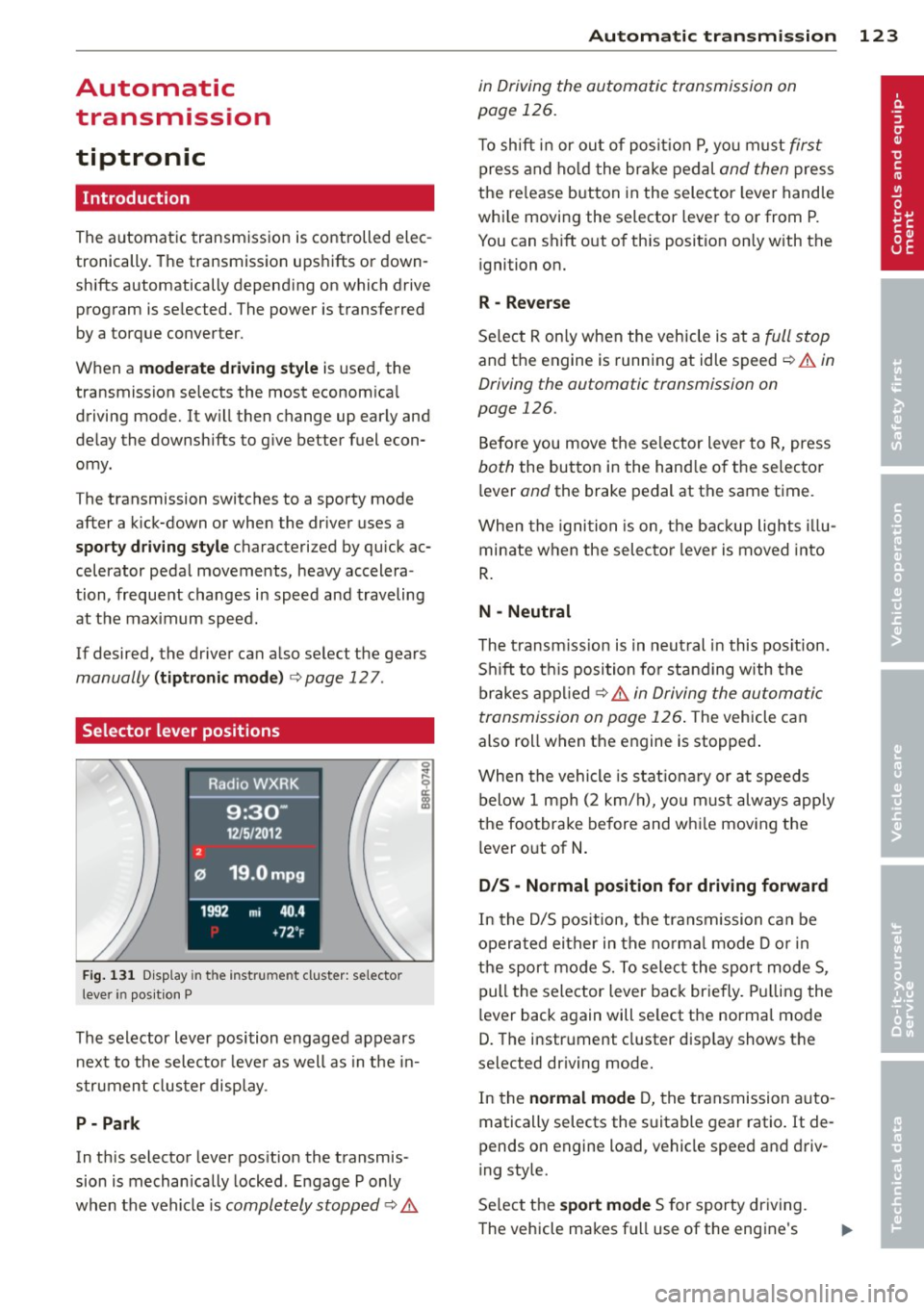
Selector lever positions
Fig . 131 D isp lay in t he i nst ru m en t cluster: selecto r
l ever in pos it ion P
The selector lever position engaged appears
next to the selecto r lever as well as in the in
strument clus ter disp lay.
P- P ark
In th is selector lever pos ition the transmis
sion is mechan ically locked . Engage P only
when the vehicle is
completely stopped c:> 11::..
Automa tic tran sm iss ion 123
in Driving the automatic transmission on
page 126.
T o shift in or out of posit io n P , yo u m ust first
press and ho ld the brake pedal and then press
the re lease button in the selector leve r handle
whi le moving the selector lever to or from P.
You can shift out of th is position only with the
ignition on.
R -Reverse
Se lect R on ly when the vehicle is at a full stop
and the engine is running at idle speed c:> 11::.. in
Driving the automatic transmission on
page 126.
Before you move the se lector lever to R, press
both the button in the hand le o f the selector
lever
and the brake pedal at the same t ime.
When the ignition is on, the backup lights illu
minate when the selecto r lever is moved into
R .
N -Neutral
The t ransm iss ion is in neut ral in this pos ition.
S hi ft to t his position fo r standing with the
brakes appl ied
c:> 11::.. in Driving the automatic
transmission on page 126 .
The vehicle can
also roll when the engine is stopped .
When the vehicle is stat iona ry or at speeds
below 1 mph (2 km/h), yo u m ust always apply
the footbrake before and whi le mov ing the
lever o ut of
N .
D/S -Normal position for driving forward
In the D/S pos ition, the transmission can be
operated either in the no rma l mode D or in
the sport mode S. To select the sport mode S,
pull the selector lever back briefly. Pulling the
lever back again will se lect the normal mode
D. The instrument cluster disp lay shows the
selected driving mode.
In the
normal mode D, the transmission auto
matically selects the s uitable gear ratio. It de
pends on engine load, vehicle speed and driv
ing style.
Se lect the
sport mode S for sporty dr iving .
The vehicle makes fu ll use of the engine's
Page 128 of 316
126 Automatic transmission
8_ WARNING
-Unintended vehicle movement can cause
serious injury .
- Never leave your vehicle with the engine
running while in gear. If you must leave
your vehicle when the engine is running,
activate the parking brake and move the
selector lever to P.
- Power is still transmitted to the wheels
when the engine is running at idle. To
prevent the vehicle from "creeping", you
must keep your foot on the brake when
the engine is running and the selector lever is in D/S or R or "tiptronic" mode is
selected.
- Do not press the accelerator pedal when
changing the selector lever position
while the vehicle is stationary and the
engine is running.
- Never shift into
R or P while driving.
- Before driving down a steep slope, re-
duce your speed and shift into a lower
gear with "tiptronic".
- Do not ride the brakes or press the brake
pedal too often or too long when driving
down a hill. Constant braking causes the
brakes to overheat and substantially re
duces braking performance, increases
braking distance or causes complete fail
ure of the brake system .
- To preven t the vehicle from rolling back
when stopping on inclines, always hold it
in place with the brake pedal or parking
brake.
- Never hold the vehicle on an incline with
a slipping clutch . The clutch opens auto
matically when it becomes too hot from
the overload. An indicator lamp
[O] illu
minates and a driver message appears
<=:> page 128when the clutch is overload
ed.
- If the engine must remain running, never
have any driving position engaged when
checking under the hood. Make sure the
selector lever has securely engaged and
is locked in P with the parking brake set
r:::> page 231 . Otherwise, any increase in engine speed may set the vehicle in mo
tion, even with the parking brake ap
plied.
(D Note
- When stopping on an incline , do not try
to hold the vehicle in place by pressing
the accelerator pedal while a driving gear is selected. This can cause the transmis
sion to overheat and can damage it. Acti
vate the parking brake or press the brake pedal to prevent the vehicle from rolling .
- Allowing the vehicle to roll when the en
gine is stopped and the selector lever is
in N will damage the transmission be
cause it is not lubricated under those cir
cumstances.
@ Tips
For safety reasons, the parking brake is re
leased automatically only when the driv
er's safety belt is engaged in the buckle.
Hill descent control
The hill descent control system assists the
driver when driving down declines.
Hill descent control is activated when these
lector lever is in D /S and you press the brake
pedal. The transmission automatically selects
a gear that is suitable for the incline. Hill de
scent control tries to maintain the speed ach
ieved at the time of braking, within physical
and technical limitations. It may still be nec
essary to adjust the speed with the brakes .
Hill descent control switches off once the de
cline levels out or you press the accelerator
pedal.
When the speed is set in the cruise control
system
r:::> page 95, hill descent control is also
activated.
A WARNING
-
Hill descent control cannot overcome
physical limitations, so it may not be able
to maintain a constant speed under all
Page 129 of 316
conditions. Always be ready to apply the
brakes.
Manual shift program
Using the manual shift program you can
manually select gears.
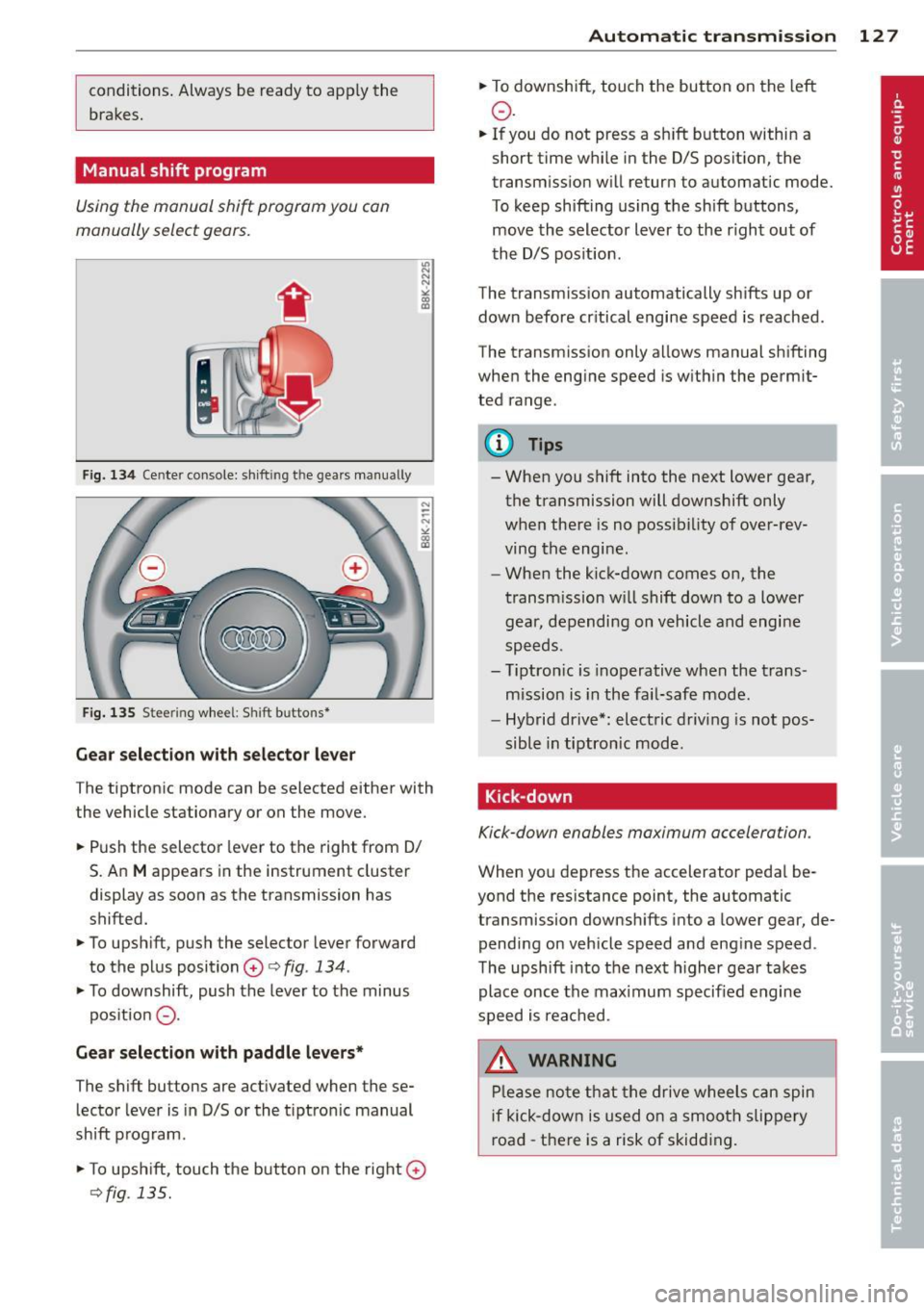
F ig. 134 Cente r console: sh ift in g t he gears manual ly
Fig. 135 S tee rin g wheel: S hift b utto ns*
Gear selection with selector lever
The tiptronic mode can be selected either with
the vehicle stationary or on the move.
.. Push the selector lever to the right from 0/
S. An
M appears in the instrument cluster
display as soon as the transmission has
shifted.
.. To upshift, push the selector lever forward
to the plus position
0 c:> fig. 134 .
.. To downshift, push the lever to the minus
pos ition
0 -
Gear selection with paddle levers*
The shift buttons are activated when these
lector lever is in D/S or the t iptron ic manual
shift program.
.. To upshift, touch the button on the right
0
c> fig . 135.
Autom atic transm ission 12 7
.. To downshift, touch the button on the left
0 .
.. If you do not press a sh ift button within a
short time while in the D/S position, the
transmission will return to automatic mode.
To keep shifting using the shift buttons,
move the selector lever to the r ight out of
the D/S position .
The transm iss ion automatically shifts up or
down before cr itical engine speed is reached.
The transmission only allows manual shifting
when the engine speed is within the permit
ted range .
@ Tips
-When you shift into the next lower gear,
the transmission will downshift only
when there is no possibility of over-rev
ving the engine.
- When the kick-down comes on, the
transmission will shift down to a lower
gear, depending on vehicle and engine
speeds.
- Tiptron ic is inoperative when the trans
mission is in the fail-safe mode.
- Hybrid drive*: electric driving is not pos
sible in tiptronic mode.
Kick-down
Kick-down enables maximum acceleration .
When you depress the accelerator pedal be
yond the resistance point, the automatic
transmission downsh ifts into a lower gear, de
pending on vehicle speed and engine speed .
The upshift into the next higher gear takes
place once the max imum specified engine
speed is reached .
_& WARNING
Please note that the drive wheels can spin
if kick-down is used on a smooth slippery
road -there is a risk of skidding .
Page 199 of 316
Intelligent technology Notice about data
recorded by vehicle
control modules
Your vehicle is not equipped with an Event Da
ta Recorder (EDR), installed by some manu
facturers for the express purpose of capturing
data for retrieval after an accident or crash
event. EDR's are sometimes called "crash re
corders".
Some state laws restrict the retr ieval or down
loading of data stored by EDR's that were in
stalled in a vehicle for the express purpose of
retrieving data after an accident or crash
event without the owner's consent.
Although your vehicle is not equipped with an
EDR, it is equipped with a number of electron
ic control modules for various vehicle systems
such as, for examp le, engine function, emis
sion control, as well as for the airbags and
safety belts.
These electronic control modules also record
vehicle-related data during norma l vehicle op
eration for diagnostic and repair purposes.
The recording capacity of the electronic con
trol modules is limited to data (no sound is re
corded) and only a small amount of data is ac
tually recorded over a very limited period of
time and stored when a system fault or other
condition is sensed by a control unit. Some of
the data then stored may relate to vehicle
speed, direction, braking as we ll as restraint
system use and performance in the event of a
crash or other condition. Stored data can only be read and downloaded with special equip
ment.
Electronic Stabilization
Control (ESC)
Description
The Electronic Stabilization Control (ESC) rein
forces driver safety. It reduces the risk of slip
ping and improves driving stability. ESC de
tects critical s ituations such as the vehicle
Intelligent technology 197
oversteering and understeering or the whee ls
spinning . The vehicle is stabilized by applying
the brakes or reducing eng ine torque . Once
the ESC is active, the indicator light
G1 blinks
in the instrument cluster.
ESC includes the anti-lock brake system (ABS),
brake assist system, anti-slip regulation
(ASR), electronic differential lock (EDL), dy
namic steering*, hill descent assist and selec
tive wheel torque control.
Anti-lock brake system (ABS)
ABS prevents the whee ls from locking up
when braking . The vehicle can still be steered
even during hard braking. App ly steady pres
sure to the brake pedal. Do not pump the ped
al. A pulsing in the brake pedal indicates that
the system is helping you to brake the vehicle .
Brake assist system
The brake assist system can decrease braking
distance. It increases braking power when the
driver presses the brake pedal quickly in emer
gency situations . You must press and hold the
brake pedal until the situation is over . In
vehicles with adaptive cruise control*, the
brake assist system is more sensitive if the
distance detected to the vehicle ahead is too
small.
Anti-slip regulation (ASR)
ASR reduces engine power when the drive
wheels beg in to sp in and adapts the force to
the road conditions. This makes it easier to
start, accelerate and drive up hill s.
Electronic differential lock (EDL)
The EDL brakes wheels that are spinning and
transfers the drive power to the othe r whee ls .
T his function is available up to about 78 mph
(125 km/h) .
In extreme cases, EDL automatically switches
off to help keep the brake on the braked wheel
from overheat ing. EDL will switch on again au
tomatically when conditions have returned to
normal.
•
•
Page 201 of 316
The following situations are exceptions where it may be useful to switch on offroad mode to
allow the whee ls to spin :
- Rocking the vehicle to free it when it is stuck
- Driv ing in deep snow or on loose ground
- Driving with snow cha ins
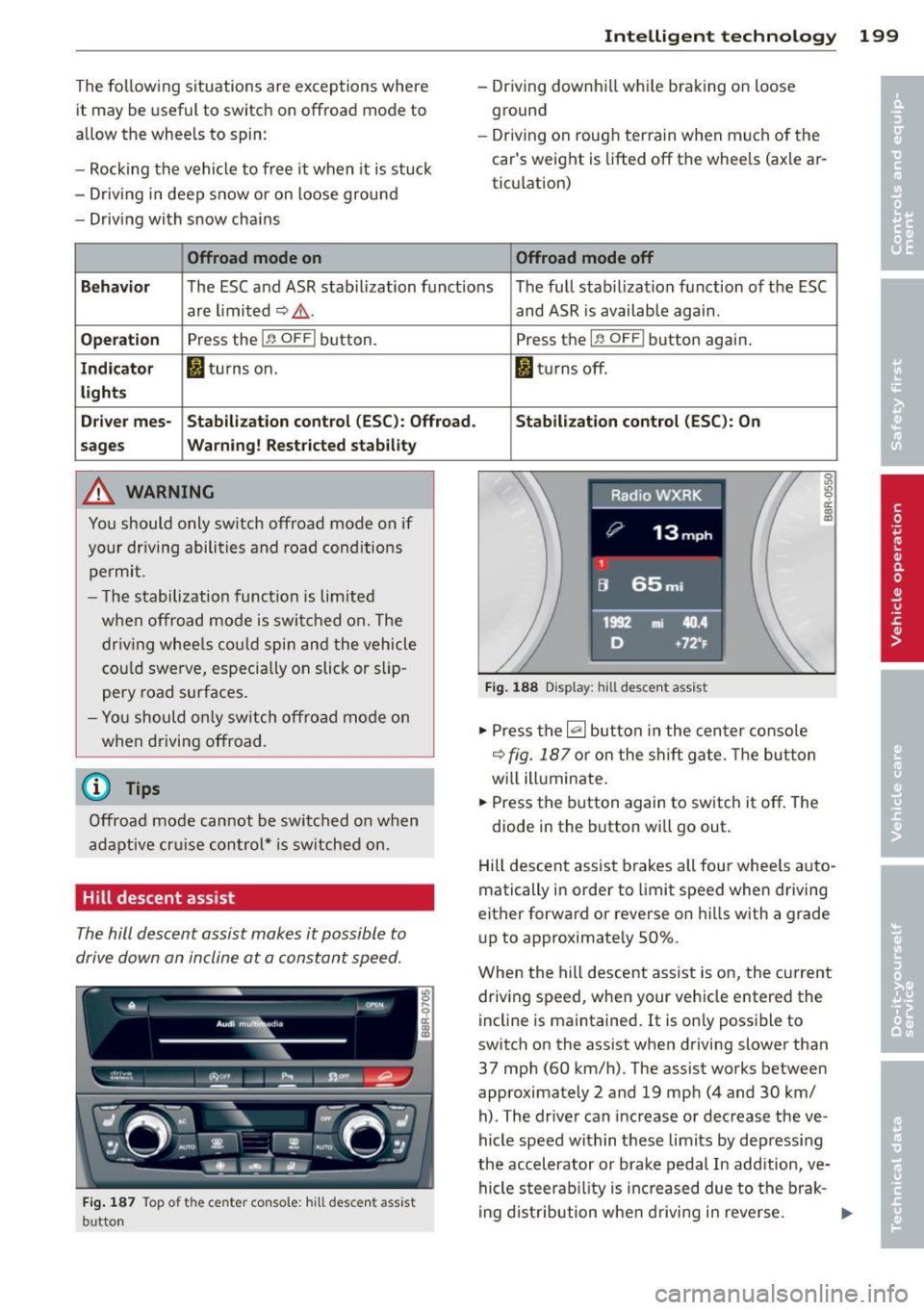
Offroad mode on
Intelligen t technolog y 199
- Driving downh ill wh ile braking on loose
ground
- Dr iving on roug h ter rain when much of the
car's weight is lifted
off the whee ls (axle ar
tic ulation)
Offroad mode off
Beha vior
The ESC and ASR stabilization funct ions The full stab ilizat ion function of the ESC
are limited ~,&. .
Operation Press the I~ OF FI button.
Ind icat or II tu rns on.
li g ht s
Dri ver me s- Stabilizat ion cont rol (ESC ): Offroad.
s age s War
nin g ! Rest ricted stab ility
A WARNING
You should only sw itch offroad mode on if
your dr iving abili ties and road cond itions
pe rmit .
- T he stabilization function is limited
when offroad mode is swi tched on. The
dr iv ing whee ls co uld spin and the vehicle
cou ld swe rve, especially on slick or slip
pery road surfaces.
- Yo u should o nly switch offroad mode o n
when driving offroad.
@ Tips
Offroad mode cannot be swit ched o n when
a dapt ive cr uise control* is sw itched o n.
Hill descent assist
The hill descent assist makes it possible to
drive down an incline at a constant speed.
F ig . 187 Top o f the ce nter conso le : hi ll d es cent ass ist
b utto n
and ASR is available again .
Press the
I ~ OFF I button again .
MJ tu rns off .
Stabil ization control (ESC ): On
Fi g. 18 8 Disp lay: hil l de sce nt ass is t
"' Press the~ button in the cen ter conso le
~ fig. 187 or on the sh ift ga te. Th e but ton
wi ll ill uminate.
"' Press the b utton again to sw itch it
off . The
diode in the button wi ll go out .
Hill descent assist brakes all four whee ls auto
matically in order to limit speed when driving
either forwa rd or reverse on hill s with a grade
up to approximate ly 50% .
When the hill descent assist is on, the current
driv ing speed, when your vehicle entered the
incline is maintained. It is on ly possible to
switch on the assist when driving slower than
37 mph (60 km/h). The assist works between
approximately 2 and 19 mp h (4 and 30 km/
h) . The driver can inc rease or decrease the ve
hicle speed within these limits by depress ing
the accelerator or brake pedal In addition, ve hicle steerab ility is increased due to the brak-
i ng distribution when driving i n reve rse . ..,.
Page 202 of 316
200 Intelligent technology
There must be however sufficient ground ad
hesion . The hill descent assist can
not do its
job if the incl ine is icy or if the incline ground
is loose ¢,&..
The system does not work at speeds between
19 and 37 mph (30 and 60 km/h). The system
is then in the ready-mode. The diode in the
button will come on . The system automatical
ly switched
off when you drive faster than 37
mph (60 km/h) . The diode will go out in this
case.
Active control at a specific speed up to approx
imately 19 mph (30 km/h) w ill appear in the
instrument cluster display ¢
fig. 188. Two
dashes' '-- " w ill appear in the ready mode.
Hill descent assist is automatica lly act ivated
under the following cond itions:
- the diode in the button illuminates,
- vehicle speed is be low approximate ly
19 mph (30 km/h)
- the incline is 10%.
A WARNING
-Always adapt your speed to the weather,
road and traffic conditions . Do not let
the increased safety provided tempt you
into taking r isks.
- The hill descent assist system cannot
overcome the laws of physics. Your driv
ing style must always be adapted to the
current road and traffic conditions.
- The hill descent assist may not be able to
hold your vehicle at a constant speed un
der all condit ions wh ile driving on an in
cl ine (for example if ground under the
vehicle is loose).
Brake system
Operating conditions and driving habits
The brakes on today's automobiles are st ill
subject to wear, depending largely on operat
ing conditions and dr iv ing habits ¢& . On
veh icles that are e ither driven mostly in stop
and-go city traffic o r are driven hard, the
brake pads should be checked by your author- ized Audi dealer more often
than specified in
the
Warranty & Maintenance booklet. Failure
to have your brake pads inspected can result
in reduced brake performance.
On steep slopes, you should use the braking
effect of the engine. This way, you prevent un
necessary wear on the brake system. If you
must use your brakes, do not hold the brakes
down cont inuously. Pump the brakes at inter
vals .
Noises may occur when braking depending on
the speed, braking force and outside condi
tions such as temperature and humidity.
Moisture or road salt
Under certain conditions, for example, when
driving through water or very heavy rain, or
even after washing your vehicle, the braking
effect can be reduced due to moisture (or in
freezing cond itions ice) on the brake pads. A
few careful brake applications should dry
off
the brake pads or remove any ice coatings .
When you are driving at higher speeds with
the windshield wipers on, the brake pads will
briefly touch the brake discs in regular inter
vals so as to improve reaction time when brak
ing on wet surfaces. You, the driver, will not
notice anything.
The effectiveness of the brakes can be reduced
when the vehicle is driven on a salt-covered
road and the b rakes are not used. Here too,
you should clean
off accumulated sa lt coating
from brake discs and pads with a few careful
applications of the brake ¢& .
Corrosion
The re may be a tendency for dirt to build up
o n the brake pads and corrosion to form on
the discs if the car is not driven regularly or
only for short trips with littl e use of the
brakes.
If the brakes a re not used frequently, o r if cor
rosion has formed on the discs, it is adv isable
to clean
off the pads and discs by braking
firmly a few times from a modera tely high
speed ¢£ .
IJll-