rear light AUDI Q5 2014 User Guide
[x] Cancel search | Manufacturer: AUDI, Model Year: 2014, Model line: Q5, Model: AUDI Q5 2014Pages: 316, PDF Size: 78.41 MB
Page 57 of 316
while driving. You can switch this function off by moving the lever to position ® within 10
seconds of the afterwipe operation. The after
wipe function is reactivated the next time the ignit ion is switched on.
The rear wiper automatically switches on
when the reverse gear is engaged and the
front w indshield wipers are on and in opera
tion .
C lea ning the headlights *. The headlight wash
er system * operates on ly when the headlights
are on. If you move the lever to pos ition ®,
the headlights are washed in interva ls .
® -Wipe the rear window. The rear wiper
moves about every 4 seconds .
0-Clean the rear window. The number of
wiping operations depends on how long the l ever is held in positio n 7.
A WARNING
-The ra in sensor is only intended to assist
the driver. The driver is still responsible
for man ually sw itching the w ipers on ac
cording to the v is ibility conditions.
- The windshie ld may not be treated w ith
water-repe lling windshie ld coat ing
agents. Unfavorable conditions, such as
wetness, darkness, low sun, can res ult in
increased glare. W iper b lade chatter is
also possible .
- Proper ly functioning w indshie ld w iper
blade s are required fo r a clear view and
sa fe dr iv ing .
(D Note
-In the case of frost, check whether the
windsh ield wiper b lades a re fro zen to
t h e windshie ld. Swit ching on the wind
s h ield wipers can d amage t he wipe r
blades!
- Prior to using a car w ash, the windshield
wipe r system m ust be swit ched off (lever
i n position 0) . This helps to prevent unin
tentiona l switching on and damage to
the windshie ld w iper system.
Clear v is ion 5 5
(D Tips
- The windshie ld w ipers are switched off
when the ign it ion is tu rned off . Act ivate
the windsh ield wipers after the ignition
is switc hed back on by moving t he wind
shield wipe r lever to any position .
- Worn or d irty windshield wiper blades
result in streaking. This ca n affect the
rai n sensor function. Check your wind
shield w iper blades regularly.
- The washer fluid nozz les of the wind
shield washe r system a re heated at low
tempe rat ures whe n the ignition is on .
- When stopping temporarily, e .g. at a
t raffic light, the set spe ed of the wind
shield wiper s is automatically reduced by
one speed.
Cleaning windshield wiper blades
C lean the w indsh ie ld w iper blades when t hey
begin to leave st reaks.
.,. Place t he w indshie ld w iper arms in the serv
ice pos ition. Re fer to ~
page 56.
.,. Lift the wiper a rm away from the rea r win
dow .
.. Use a soft cloth and glass cleane r to clean
the windshield wiper b lades.
A WARNING
Dirty windsh ield wiper b lades can impair
your view . This can lead to accidents .
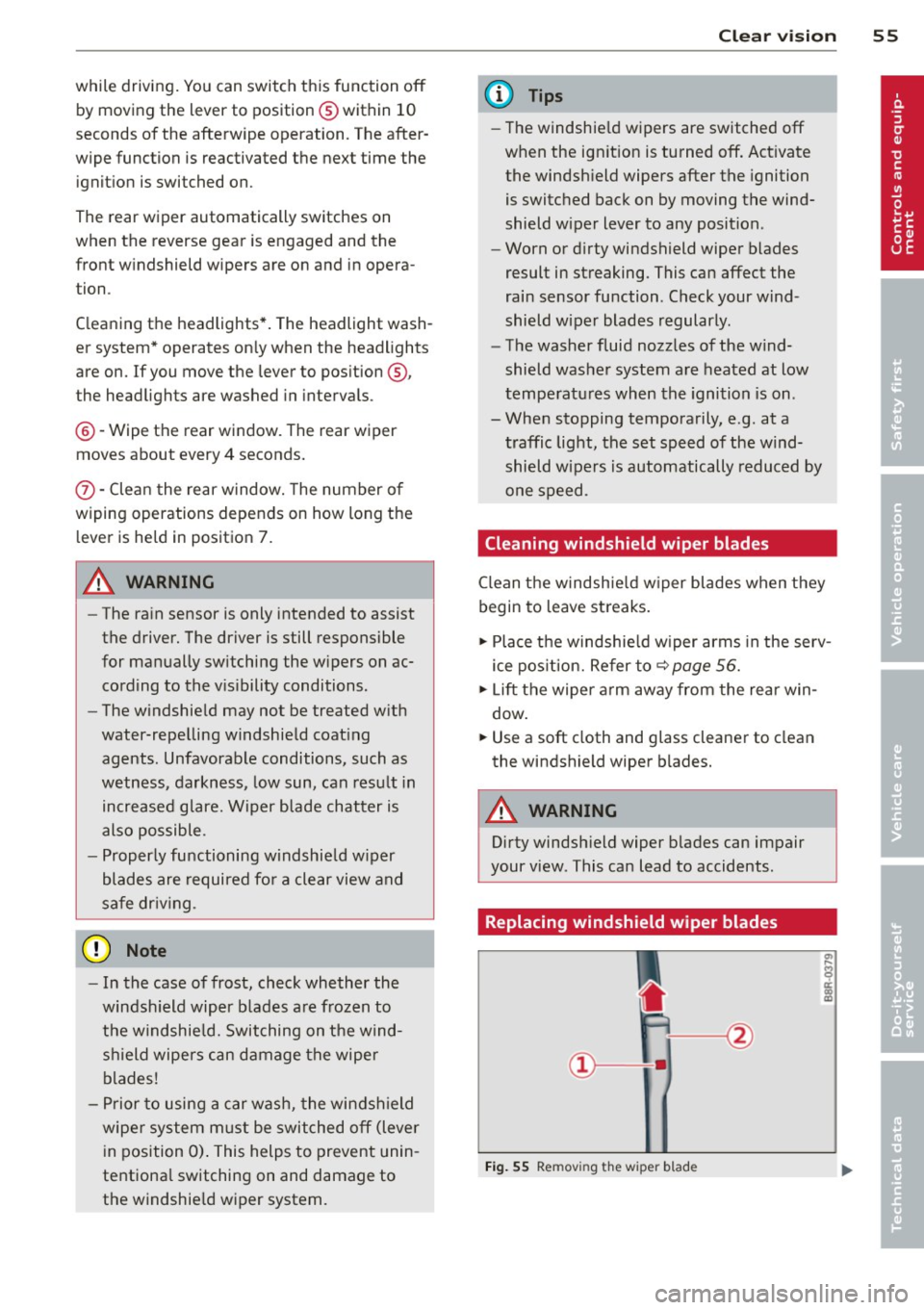
Replacing windshield wiper blades
Fig. 55 Remov ing the w iper blad e
Page 60 of 316
58 Clear vis ion
@ Tips
If there shou ld be a malfunction in the
electrical system, you can still adjust the
exterior mirrors by pressing the edge of
the mirror .
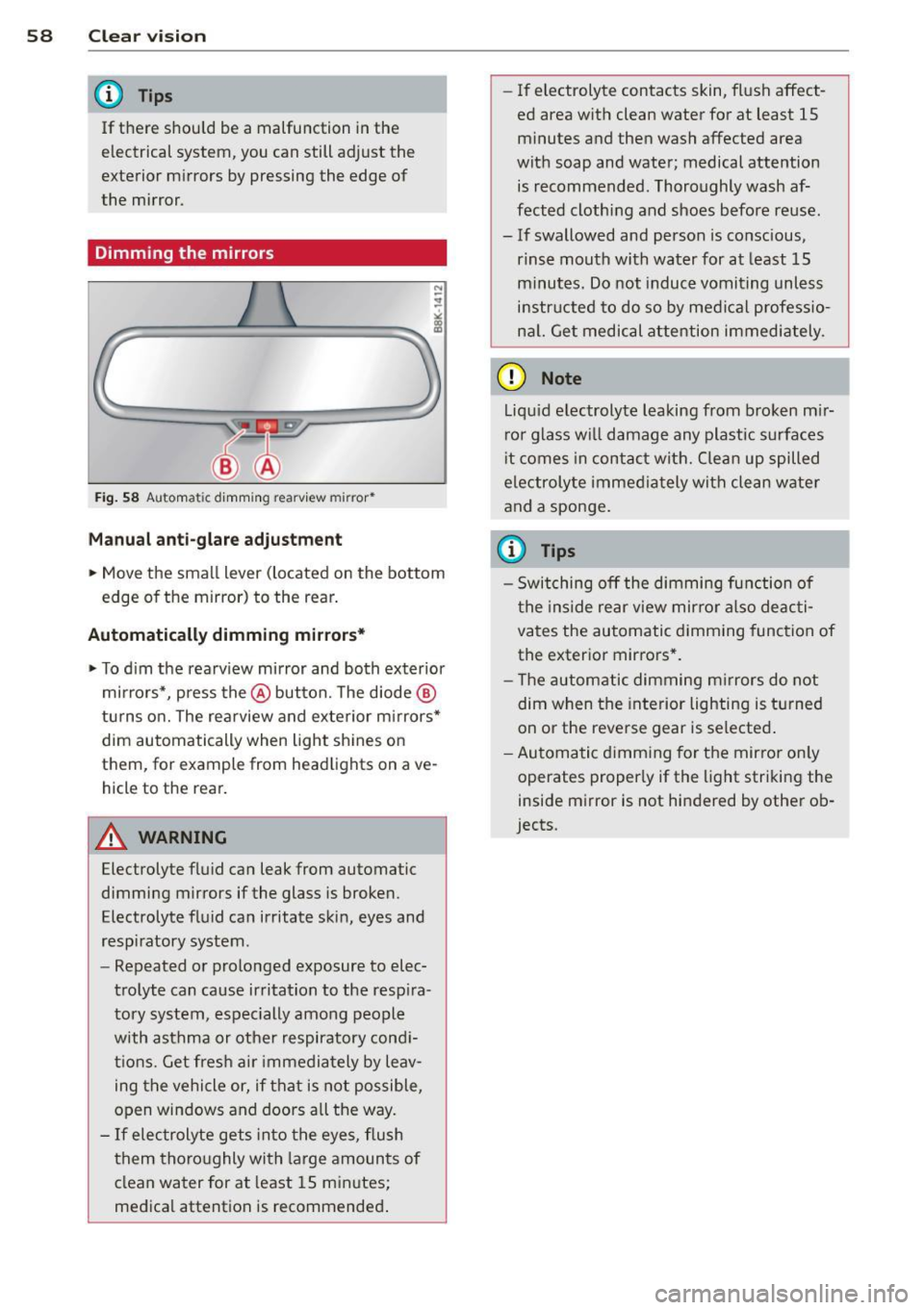
Dimming the mirrors
N
..
-
" ~==============~ l8
Fig. 58 A ut oma tic d imm ing re arview mirror*
Manual anti -glar e adju stm ent
.. Move the small lever (located on the bottom
edge of the mirror) to the rear .
Automatically dimming mirrors*
.. To d im the rearv iew mirror and both exterior
mirrors*, press the @button. The diode ®
turns o n. The rearview and exterior m irrors*
dim automatically when light shines on
them, for example from headlights on ave
hicle to the rear.
A WARNING
Electrolyte flu id can leak from automatic
dimming mirrors if the glass is broken.
Electrolyte fluid can irritate skin, eyes and
respiratory system .
- Repeated or prolonged exposure to elec
trolyte can cause irritation to the resp ira
tory system, espec ially among people
with asthma or other respiratory cond i
t ions. Get fres h air immedia tely by leav
ing t he vehicle or, if that is not possible,
open windows and doors all the way.
- If electrolyte gets in to the eyes, flush
them thoro ughly with large amounts of
clean water for at least 15 minutes;
medica l attention is recommended .
-If electrolyte contacts skin, flush affect
ed area with clean water for at least 15 minutes and then wash affected area
with soap and water; medical attention is recommended . Thoroughly wash af
fected clothing and shoes before reuse.
- If swallowed and person is conscious,
rinse mouth with water for at least 15
minutes. Do not induc e vomiting unless
instructed to do so by medi cal professio
na l. Get medical attention immediately .
(D Note
Liquid electrolyte leaking from b roken m ir
ror glass w ill damage any plastic surfaces
i t comes in contac t with. Clean up spilled
electrolyte imme diately with clean water
and a sponge .
(D Tips
-Switching off the dimming function of
the inside rear view mirror also deacti
vates the automatic dimming func tion of
the exterior mirrors * .
- The automatic dimming m irrors do not
dim when the interior lighting is turned
on or the reverse gear is selected .
- Au toma tic d imm ing for the mirror on ly
operates properly if the light striking the
inside mirror is not hindered by othe r ob
jects .
Page 65 of 316
Seat memory
Memory for driver's seat
Applies to vehicles: with seat memory
The seat adjustment settings for two drivers
can be stored using the memory buttons in
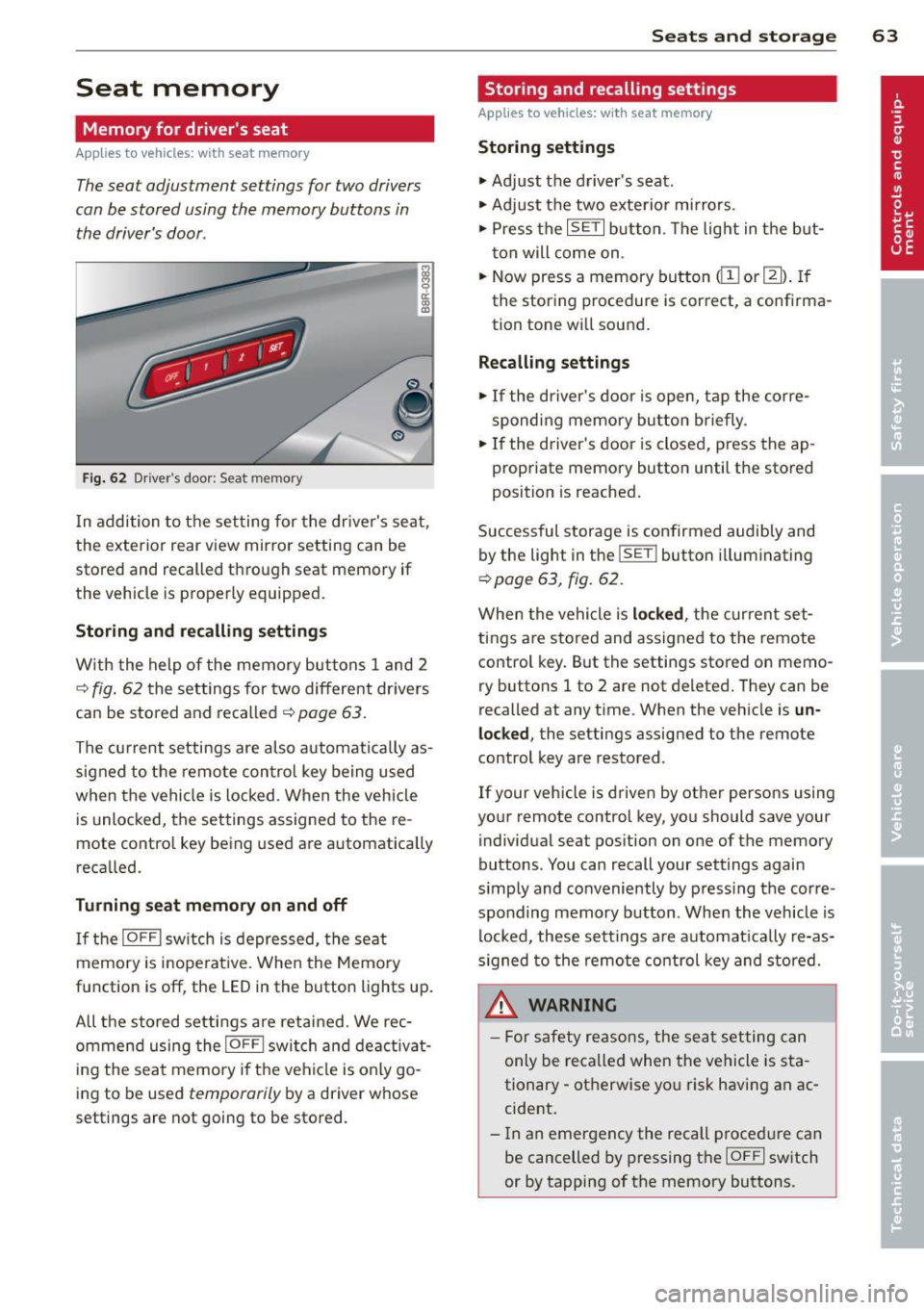
the driver's door.
Fig. 62 Driver's door: Seat memory
In addition to the setting for the driver's seat,
the exterior rear view mirror setting can be
stored and recalled through seat memory if
the vehicle is properly equipped.
Storing and recalling settings
With the help of the memory buttons 1 and 2
c::> fig. 62 the settings for two different dr ivers
can be stored and recalled
c::> page 63.
The current settings are also automatically as
signed to the remote control key being used
when the vehicle is locked . When the vehicle
is unlocked, the settings assigned to the re
mote contro l key being used are automatically
recalled.
Turning seat memory on and off
If the IOFFI switch is depressed, the seat
memory is inope rative. When the Memory
function is off , the LED in the button lights up.
A ll the stored settings are retained. We rec
ommend using the
I OFFI switch and deactivat
ing the seat memory if the vehicle is only go
ing to be used
temporarily by a driver whose
settings are not going to be stored.
Seats and storage 63
Storing and recalling settings
Applies to vehicles: wit h seat memory
Storing settings
.,. Adjust the driver's seat.
.,. Adjust the two exterior mirrors.
.,. Press the
ISET I button. The light in the but
ton will come on .
.,. Now press a memory button
<[II or m). If
the storing procedure is correct, a confirma
tion tone will sound.
Recalling settings
.,. If the driver's door is open, tap the corre
sponding memory button briefly .
.,. If the driver's door is closed, press the ap
propriate memory button until the stored
position is reached.
Successful storage is confirmed audibly and
by the light in the
ISETI button i lluminating
c::> page 63, fig. 62 .
When the vehicle is locked , the current set
tings are stored and assigned to the remote
control key. But the settings stored on
memo
ry buttons 1 to 2 are not deleted. They can be
recalled at any time. When the vehicle is
un
locked ,
the settings assigned to the remote
control key are restored.
If your vehicle is driven by other persons using
your remote control key, you should save your
individual seat position on one of the memory
buttons. You can recall your settings again
s imply and conveniently by press ing the corre
sponding memory button . When the vehicle is
locked, these settings are automatically re-as
signed to the remote control key and stored.
A WARNING
- For safety reasons, the seat setting can
only be recalled when the vehicle is sta
tionary -otherwise yo u risk having an ac
cident.
- In an emergency the recall p rocedure can
be cancelled by pressing the
IOFFI switch
or by tapping of the memory buttons.
Page 71 of 316
weight flying freely through the passenger
compartment can cause in a co llision at a
speed considered relatively low .
.&_ WARNING
Weak, damaged or improper straps used
to secure items to tie-downs can fail dur
ing hard brak ing or in a collision and cause
ser ious personal injury.
- Always use suitable retaining straps and
properly secure items to the tie-downs in
the luggage compartment to help pre
vent items from sh ifting or flying for
wa rd.
- When the rear seat backrest is folded down, always use su itab le retain ing
straps and properly sec ure items to the
t ie-downs in the luggage compartment
to help prevent items from flying for
ward into the passenger compartment .
- Never attach a child safety seat tether
strap to a tie -down .
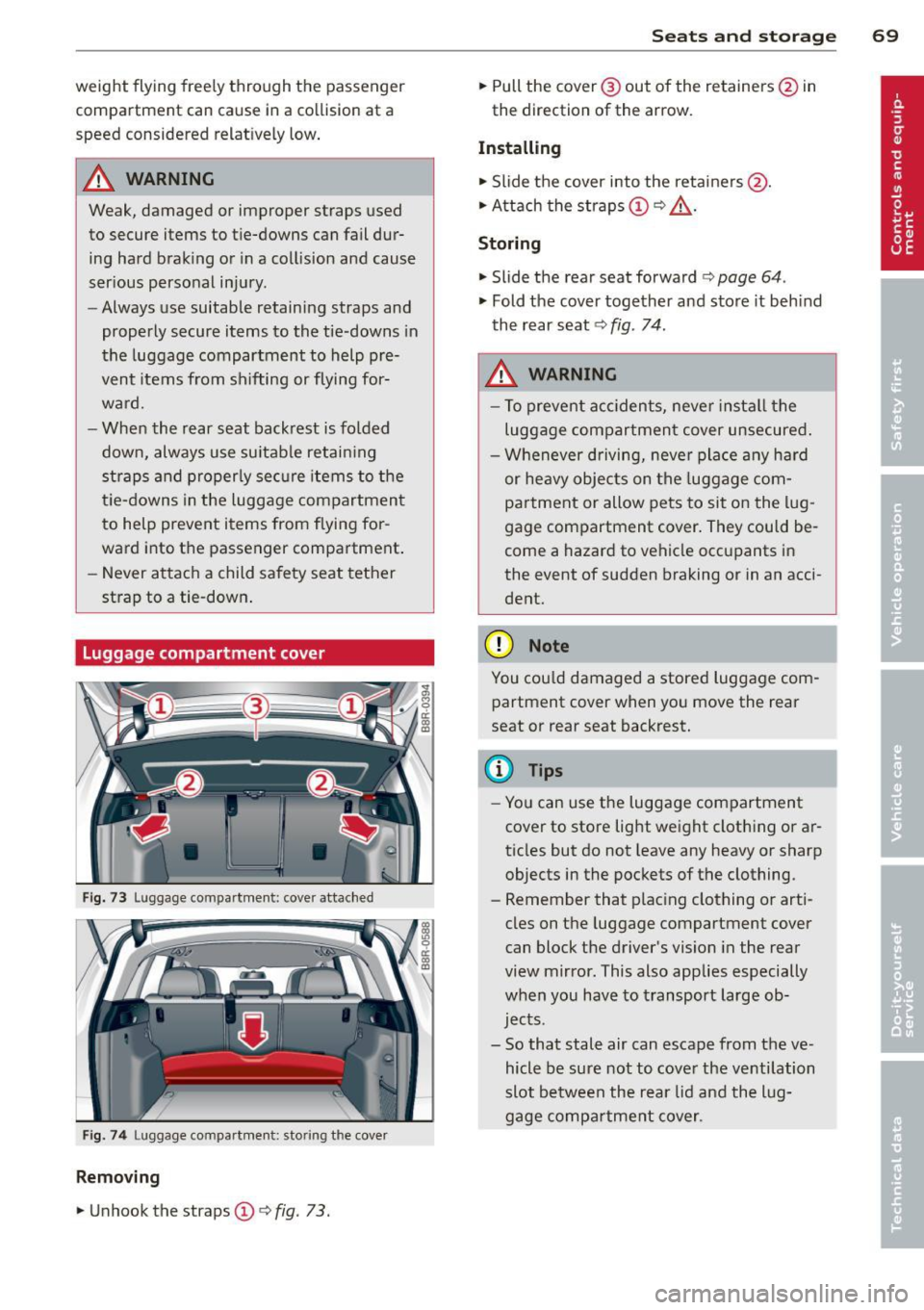
Luggage compartment cover
Fig. 73 Luggage compartme nt: cover attac hed
Fig . 7 4 Luggage compartment: stor ing the cover
Removing
.. Unhook the straps(!)¢ fig. 73.
Sea ts a nd s to rage 69
.. Pull the cover@ out of the retainers @in
the direction of the arrow.
Installing
.. Slide the cover into the retainers @ .
.. Attach the straps(!)¢,& .
Storing
.. Slide the rear seat forward ¢ page 64.
.. Fold the cover together and store it beh ind
the rear seat¢
fig. 74.
.&_ WARNING
- To prevent acc idents, never instal l the
luggage compartmen t cover unsecured .
- Whenever driving, neve r pla ce any hard
or heavy objects on the luggage com
partment or allow pets to sit on the lug
gage compartment cover. They could be
come a hazard to vehicle occ upants in
the event of sudden braking or in an acci
dent.
(D Note
You cou ld damaged a stored luggage com
partment cover when you move the rear
seat or rear seat backrest.
(D Tips
- You can use the luggage compartment
cover to store light weight clothing or ar
ticles but do not leave any heavy or sharp
objects in the pockets of the clothing.
- Remember that plac ing clothing or arti
cles on the luggage compartment
cover
can block the driver's vision in the rear
view mirror. This also applies especially
when you have to transport large ob
jects.
- So that stale air can escape from the ve
hicle be su re not to cove r the ventilation
slot between the rear lid and the lug
gage compa rtment cover.
-
Page 79 of 316
To close glove compartment
• Push the g love compartment lid upward un-
ti l the lock engages.
There are holders for a pen and a pad of paper in the glove compartment lid.
On the right side in the glove compartment is
a holder with the key body into which the
emergency key must be cl ipped to be able to
start the vehicle .
A WARNING
To reduce the risk of personal injury in an
accident or sudden stop, a lways keep the
glove compartment closed whi le driving.
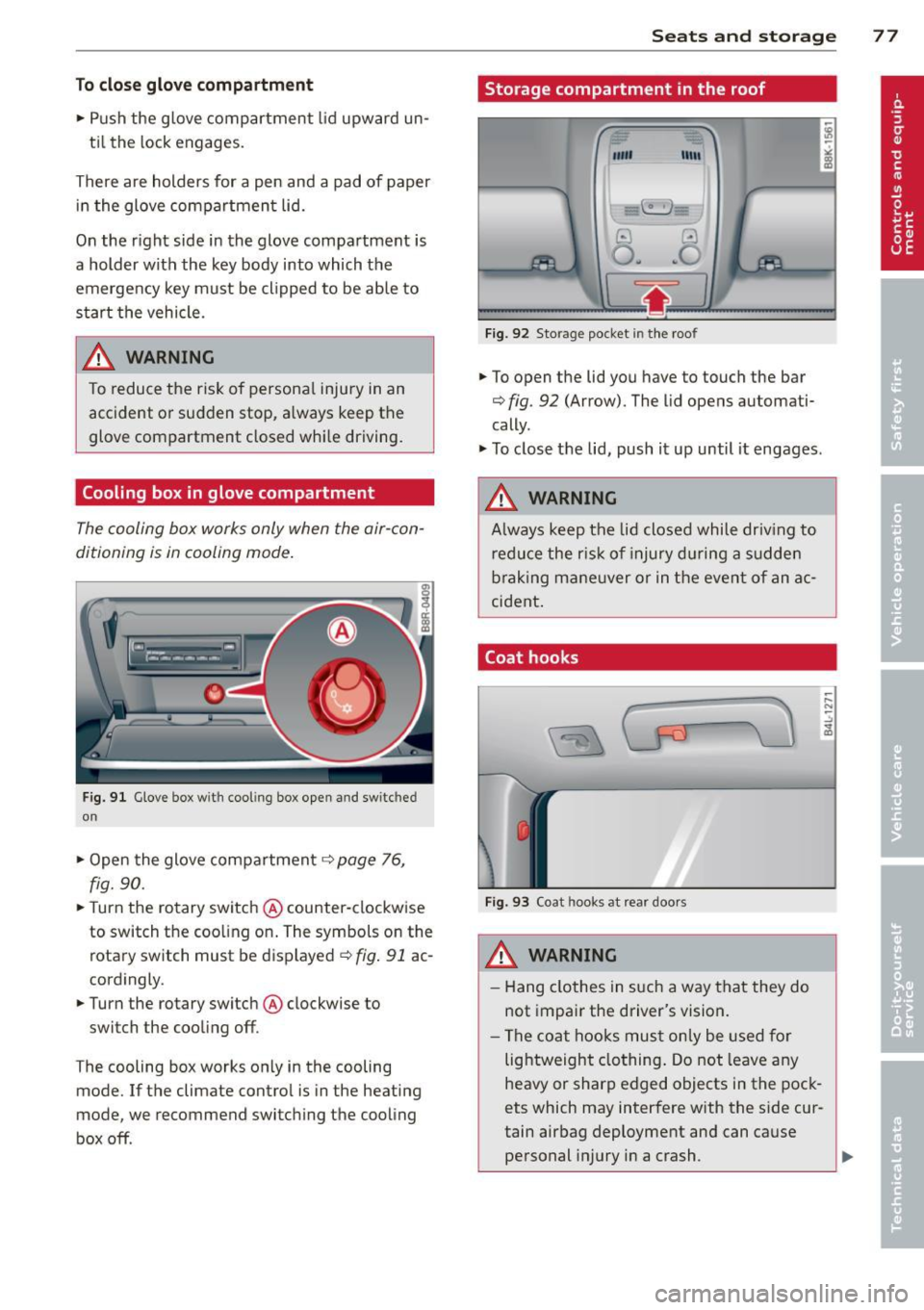
Cooling box in glove compartment
The cooling box works only when the air-con
ditioning is in cooling mode.
Fig. 91 Glove box w ith cool ing box open and switc hed
on
" Open the glove compartment c::> page 76,
fig. 90.
"T urn the rotary switch @ counter-clockwise
to switch the coo ling on. The symbols on the
rotary switch must be displayed
c::> fig. 91 ac
cordingly .
• Turn the rotary switch @ clockwise to
switch the cooling off .
T he cooling box works only in the cooling
mode. If the climate contro l is in the heating
mode, we recommend switching the cooling
box off .
Seats and storage 77
Storage compartment in the roof
""'
11111
Fig. 92 Storage pocket in the roof
.. To open the lid you have to touch the bar
c::> fig . 92 (Arrow). The lid opens automati
cally .
" To close the lid, push it up until it engages .
A WARNING
Always keep the lid closed while driv ing to
reduce the risk of injury during a sudden
braking maneuver or in the event of an ac
cident .
Coat hooks
Fig. 93 Coat hooks at rear doors
_& WARNING
- Hang clothes in such a way that they do
not impair the driver's vision.
- The coat hooks must only be used for
lightweight clothing. Do not leave any
heavy or sharp edged objects in the pock
ets which may interfere with the side cur
tain airbag deployment and can cause personal injury in a crash .
Page 132 of 316
130 Parking system
Rearv iew camer a coverage area
The MM I display shows the area cove red by
the rearview camera
r=> fig. 140 (J) . Objects
that are not in the a rea covered @are not
shown on the MMI display .
We recommend that you p ractice park ing wi th
the rearview camera in a traffic-free location
or parking lot to become familiar with the sys
tem, the orientation lines, and their f unction.
When doing th is, there sho uld be good light
and weather conditions.
I n the MMI disp lay, objects or vehicles appear
closer or further away if:
- yo u are d riving in reverse gear from a level
s u rface on to an incline, or a downward
s lope,
- you are d riving in reverse gear toward pro
truding objects,
- the vehicle is carrying too much load in the
rear .
The accu racy of the orientat ion lines and b lue
surfaces dim inishes if:
- the rearview camera does not prov ide a reli
able image, for example, in poor visibility
condit io ns or if the lens is dirty,
- the image on t he screen is not visible due to
s u n glare and reflect ion .
Caring for the rear view came ra len s
The rearview camera is located above the rear
license plate bracket . For the parking system
to operate, the lens
r=> fig. 141 must be kept
clean:
- Dampen the lens with a househo ld alcoho l
based glass cleaner, and then wipe the lens
clean with a dry cloth
r=> 0 .
- Remove snow with a hand brush and ice
prefe rably with a de-icing spray
r=> 0 .
A WARNING
-The parking system cannot rep lace the
dr iver's at tention. The d river alone is re
sponsible fo r par kin g and similar dr iving
ma ne uvers .
-
-Sensors have blind spots in wh ich objects
cannot be detected. Pay spec ia l attention
to small childre n and an imals because
the sensors cannot always detect them .
- Always keep your eyes on the vehicle 's
sur roundings, us ing the rearv iew mir ror
as we ll.
- Do not allow yourself to be distracted
from traffic by the rea rv iew camera pic
tures .
- If the position and the installation angle
of the camera has changed, for example,
after a rear end coll ision, do not conti nue
to use the system for safety reasons .
H ave it chec ked by a qualified dea le rship.
Q) Note
- Low obstacles a lready s ignaled by a
wa rning can disappear from the system's
detection rang e as they are app roached
and w ill no t cont inue to be signaled. Ob
jec ts such as ba rr ier chains, tra iler draw
bars, thin painted vert ica l poles or fen
ces may not be detecte d by the system,
posing ris k of damage .
- N ever use warm or hot water to remove
snow or ice from the rearv iew camera
lens -this could ca use the lens to crac k!
- W hen cleaning the lens, never use prod
ucts that a re a brasive.
Page 133 of 316
Switching on and off
Applies to vehicles: with Audi parking system p lus with
rea rview camera
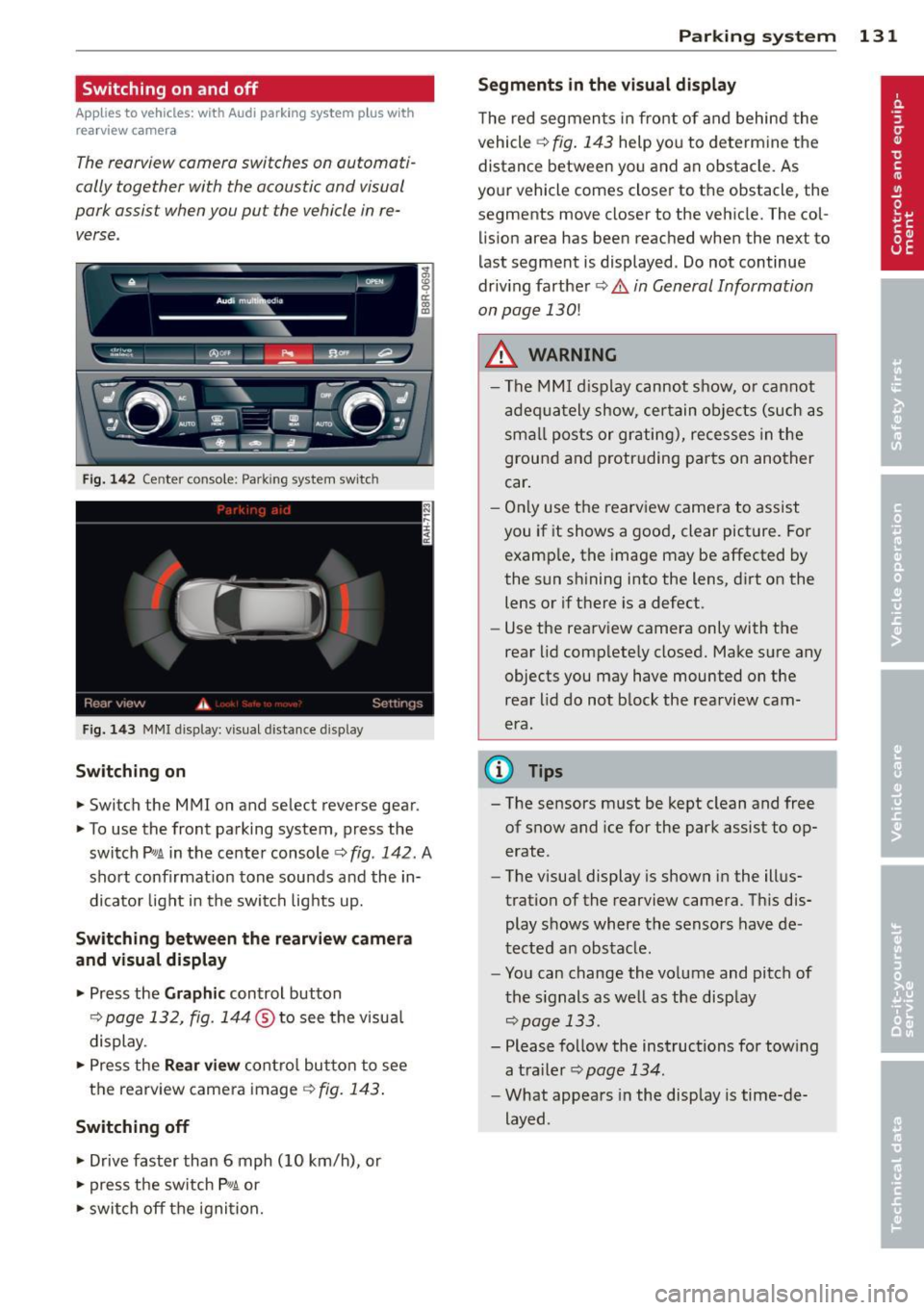
The reorview camer a switches on automati
cally together with the acoustic and visual
pork assist wh en you put the vehicl e in re
verse .
Fig. 14 2 Center co nsole ; Pa rk ing syste m switc h
Fig. 14 3 MMI disp lay: visu al dista nce display
Switching on
.,. Switch the MMI on and se lect reverse gear.
.,. To use the front parking system, press the
switch
Pw.A in the center console~ fig. 142. A
sho rt confirmat io n tone sou nds a nd the in
dicato r light in the switch lights up.
Switching between the rearview came ra
and visual display
.,. Pr ess the Graphic control button
¢ page 132, fig. 14 4 ® to see t he visua l
display.
.,. Press the
Rear view cont ro l but to n t o see
the rearview came ra image
¢ fig. 143 .
Switching off
.,. Drive faster than 6 mph (10 km/h), or
.,. press the sw itch
p ,,,A or
.,. switch off t he igni tion.
Par king system 131
Segments in the visual display
The re d segmen ts i n fro nt of and behind the
vehicle ~
fig. 143 help yo u to determ ine the
distance between yo u and an obstacle. As
you r vehicle comes close r to t he obstacle, the
segments move closer to the vehicle. The col lis ion area has bee n reached when the next to
l ast segment is displayed . Do not continue
dr iv ing farther ~.&.
in General Information
on page 130!
A WARNING
- Th e M MI di splay can not s how, o r ca nnot
ad equa tely show, cer tain o bje cts ( such as
smal l posts or gr ati ng), recesses in the
grou nd and protr uding par ts on ano ther
car .
- On ly use t he rearv iew came ra to assist
you if it shows a goo d, clear pict ure. Fo r
examp le, the image may be affected by
the sun s hining into the lens, d irt on the
lens or if there is a defect.
- Use the rearv iew camera only with the
rear lid c om plete ly closed. Make s ure any
o bjects you may have mounted on the
rea r lid do n ot b lock the rearview cam
era.
(D Tips
- T he sensors m ust be kept clean and free
of snow and ice for the park assist to op
erate .
- The visua l display is shown in the ill us
tration of the rearview came ra. Th is dis
play s hows where the senso rs have de
tected an obstacle .
- Yo u can change the vo lume and pitch of
t he s ignals as we ll as the disp lay
~page 133.
- Please fo llow the ins tructions for tow ing
a tra iler
¢ page 134.
-What appears in the display is time-de
layed .
Page 141 of 316
Driving Safely
General notes
Safe driving habits
Please remember -safety first!
This chapter contains important information,
tips, instructions and warnings that you need
to read and observe for your own safety, the
safety of your passengers and others . We have
summarized here what you need to know
about safety belts, airbags, child restraints as
well as child safety. Your safety is for us
priori
ty number 1.
Always observe the information
and warnings in this section - for your own
safety as well as that of your passengers.
The information in this section applies to all
model versions of your vehicle . Some of the
features described in this sections may be
standard equipment on some models, or may
be optional equipment on others. If you are
not sure, ask your authorized Audi dealer.
A WARNING
- Always make sure that you follow the in
structions and heed the WARNINGS in
this Manual. It is in your interest and in
the interest of your passengers.
- Always keep the complete Owner's Liter
ature in your Audi when you lend or sell
your vehicle so that this important infor
mation will always be available to the
driver and passengers.
- Always keep the Owner's literature handy
so that you can find it easily if you have
questions.
Safety equipment
The safety features are part of the occupant
restraint system and work together to help
reduce the risk of injury in a wide variety of
accident situations .
Your safety and the safety of your passengers
should not be left to chance. Advances in
technology have made a variety of features
available to help reduce the risk of injury in an
Driving Safely 139
accident. The following is a list of just a few of
the safety features in your Audi :
- sophisticated safety belts for driver and all
passenger seating positions,
- belt force limiters for the front seats,
- belt pretensioners for the seats,
- belt height adjustment for the front seats,
- head restraints for each seating position,
- front airbags,
- side airbags in the front seats and outer rear
seats*,
- side curtain airbags,
- special LATCH anchorages for child re-
straints,
- adjustable steering column.
These individual safety features, can work to gether as a system to help protect you and
your passengers in a wide range of accidents.
These features cannot work as a system if
they are not always correctly adjusted and cor
rectly used.
Safety is everybody's responsibility!
Important things to do before driving
Safety is everybody 's job! Vehicle and occu
pant safety always depends on the informed
and careful driver.
For your safety and the safety of your passen
gers,
before driving always:
.,. Make sure that all lights and signals are op
erating correctly .
.,. Make sure that the tire pressure is correct .
.,. Make sure that all windows are clean and af
ford good visibility to the outside .
.,. Secure all luggage and other items carefully
qpage 76.
.,. Make sure that nothing can interfere with
the pedals.
.,. Adjust front seat, head restraint and mirrors
correctly for your height .
.,. Instruct passengers to adjust the head re
straints according to their height .
.,. Make sure to use the right child restraint
correctly to protect children ¢
page 178,
and~~~-~
•
•
Page 151 of 316

Safety belts
General notes
Always wear safety belts!
Wearing safety belts correctly saves lives!
This chapter explains why safety belts are nec
essary, how they work and how to adjust and
wear them correctly.
~ Read all the information that follows and
heed all of the instruc tions and WARNINGS.
A WARNING
Not wearing safety belts or wearing them
improperly increases the risk of serious
personal injury and death.
- Safety belts are the single most effective
means available to reduce the risk of se
rious injury and death in automobile acci
dents. For your protection and that of
your passengers, always correctly wear
safety belts when the vehicle is moving.
- Pregnant women, injured, or physically
impaired persons must also use safety
belts. Like all vehicle occupants, they are
more likely to be seriously injured if they
do not wear safety belts. The best way to
protect a fetus is to protect the mother -
throughout the entire pregnancy.
Number of seats
Your Audi has a total of five seating positions:
two in the front and three in the rear. Each
seating position has a safety belt.
A WARNING
Not wearing safety belts or wearing them
improperly increases the risk of serious
personal injury and death.
- Never strap more than one person, in
cluding small children, into any belt. It is
especially dangerous to place a safety
belt over a child sitting on your lap.
- Never let more people ride in the vehicle
than there are safety belts available.
Safety belts 149
-Be sure everyone riding in the vehicle is
properly restrained with a separate safe
ty belt or child restraint.
Safety belt warning light
Your vehicle has a warning system for the
driver and (on USA models only) front seat
passenger to remind you about the impor
tance of buckling-up.
Fig. 154 Safety belt warning light in the instrument
cl uster -enla rged
Before driving off, always:
~ Fasten your safety belt and make sure you
are wearing it properly.
~ Make sure that your passengers also buckle
up and properly wear their safety belts.
~ Protect your children with a child restraint
system appropriate for the size and age of
the children.
The warning light . in the instrument cluster
light s up when the ignition is switched on as a
reminder to fasten the safety belts. In addi
tion, you will hear a warning tone for a certain period of time.
Fasten your safety belt now and make sure
that your passengers also properly put on
their safety belts.
A WARNING
- Safety belts are the single most effective
means available to reduce the risk of se
rious injury and death in automobile acci
dents. For your protection and that of
your passengers, always correctly wear safety belts when the vehicle is moving.
•
•
Page 152 of 316

150 Safety belts
-Failure to pay attention to the warning
light that come on, could lead to person
al injury.
Why safety belts?
Frontal collisions and the law of physics
Frontal crashes create very strong forces for
people riding in vehicles.
Fig. 155 Unbelted occupants in a ve hicle heading for a
wall
Fig. 156 Th e vehicle c rash es into the wall
The physical principles are simple. Both the
vehicle and the passengers possess energy
which varies w ith veh icle speed and body
weight . Engineers call this energy "kinetic en
e rgy ."
T he higher the speed of the vehicle and the
greater the vehicle's weight, the more energy
that has to be "absorbed" in the crash .
Vehicle speed is the most significant factor.
If
the speed doubles from 15 to 30 mph (25 to
50 km/h), the energy increases 4 times!
Because the passengers of this veh icle are not
using safety belts¢
fig. 155, they will keep
moving at the same speed the vehicle was
mov ing just before the crash, until something
stops them - here, the wall ¢
fig. 156 .
The same principles apply to people sitting in
a vehicle that is involved in a frontal collision .
Even at c ity speeds of 20 to 30 mph (30 to 50
km/h), the forces acting on the body can
reach one ton (2,000 lbs. or 1,000 kg) or
more . At greater speeds, these forces are even
higher .
Peop le who do not use safety belts are also
not attached to their vehicle. In a frontal colli
s ion they will also keep moving forward at the
speed their vehicle was t ravell ing just before
the crash . Of course, the laws of physics don't
just apply to frontal collisions, they determine
what happens in all kinds of accidents and col
lisions .
What happens to occupants not wearing
safety belts?
In crashes unbelted occupants cannot stop
themselves from flying forward and being in
jured or killed. Always wear your safety belts!
Fig. 157 A d river not wea ring a safety b elt is viol en tly
thrown fo rwa rd
Fig . 158 A rear passe nge r not wearing a safety belt
w ill fl y forward and strike the driver
Unbelted occupants are not able to resist the
tremendous forces of i mpac t by holding tight
or bracing themselves. Without the benefit of
safety restraint systems , the unrestrained
ll-