turn signal AUDI Q5 2014 User Guide
[x] Cancel search | Manufacturer: AUDI, Model Year: 2014, Model line: Q5, Model: AUDI Q5 2014Pages: 316, PDF Size: 78.41 MB
Page 135 of 316
The following steps apply only when there is
no obstacle such as a wall near the parking
spot. Otherwise, please read the information
prov ided in the "Parking Next to Obstacles"
section.
~ Activate the turn signal.
~ Position yo ur vehicle parallel to the edge of
the street, approxim ately 3 ft (1 meter)
from a parked vehicle .
~ Switch the MMI on and se lect reverse gear .
The parking aid tu rns o n and parking mode
1 appears on the display .
~ Press the control button @¢ fig. 146 on
the MMI contro l conso le. Parking mode
2
appea rs .
~ Backup and align yo ur vehicle so the b lue
area @ borders on the rear end of the vehi
cle or on the parking spot line. The bl ue area
represents an extension of the veh icle's out
line by approximate ly
16 ft (5 meters) to the
rear . The long side of the blue area should
be o n the curb . The entire blue area must fit
i nto the parking spot .
~ With the veh icle s topped, turn the s teer ing
whee l to the right as far as it w ill go.
~ Back into the parking spot until the blue
curve to uches the curb¢
fig. 147. Stop the
vehicle.
~ With the veh icle stopped, turn the steer ing
wheel to the left as far as it will go .
~ Continue to back into the parking spot un til
the vehicle is parked parallel to the curb .@
marks the rear bumper. Stop the vehicle
when the red orientation line@ borde rs an
object ¢.&, . Keep an eye on the fron t of
yo ur vehicle while do ing this
~ CD .
Pa rking n ext to obstacles
When there is an obstacle (such as a wall)
next to the pa rking spot, choose a spot w ith
mo re space on t he sides. Position the long
side of the b lue a rea so that there is sufficient
space from the curb. The a rea m ust no t be on
the c urb. You wi ll also need to start turn ing
the steering wheel much earlie r. T he re should
be a suffic ient amo unt of space between the
curb and the blue curve, and the blue c urve
¢
fig. 147 must not touch the curb.
Par king system 133
A WARNING
- The rearview camera does not show the
entire area behind the vehicle
~ page 129, fig. 140 . Watch out espe
cially fo r small children and anima ls . The
rea rv iew camera cannot always detect
them, posing r is k of an accident!
- P lease note that objects not touching the
g rou nd can appear to be further away
than they really a re (for example, the
bumper of a parked vehicle, a trai ler
hitch, or the rea r of a truck) . In this case,
you shou ld not use the help lines to help
with parking, wh ich poses danger of an
accident!
(D Note
In the MMI display, the direction of travel
of the vehicle rear is represented depend
i ng on the steering wheel angle . The vehi
cle front swings out more than the vehicle rear. Maintain ple nty of d istance so that
your outside mirror or a corner of your ve
hicle does not col lide with any obstacles.
T his can damage to your ve hicle.
(0 Tips
The left o r right orientation lines and su r
faces will be disp layed, depending on the
turn s ignal being used .
Adjusting the display
and warning tones
App lies to v ehicl es: wi th Audi parking sys te m plus wi th
rearv iew camera
The display and warning tones can be adjust
ed in the MMI .
~ Select: !CAR ! function button> Parking s ys
tem .
Or
~ Select: ~IC_ A_ R~I func tio n button> Car sy ste m s*
cont ro l button > Driver as sist > Parking aid.
Display
-Off -when the parki ng system is switched
off, only a udible s ignals a re g iven .
Page 139 of 316
Programming the transmitter (version B)
A pplies to vehicles: with Horne link and radio
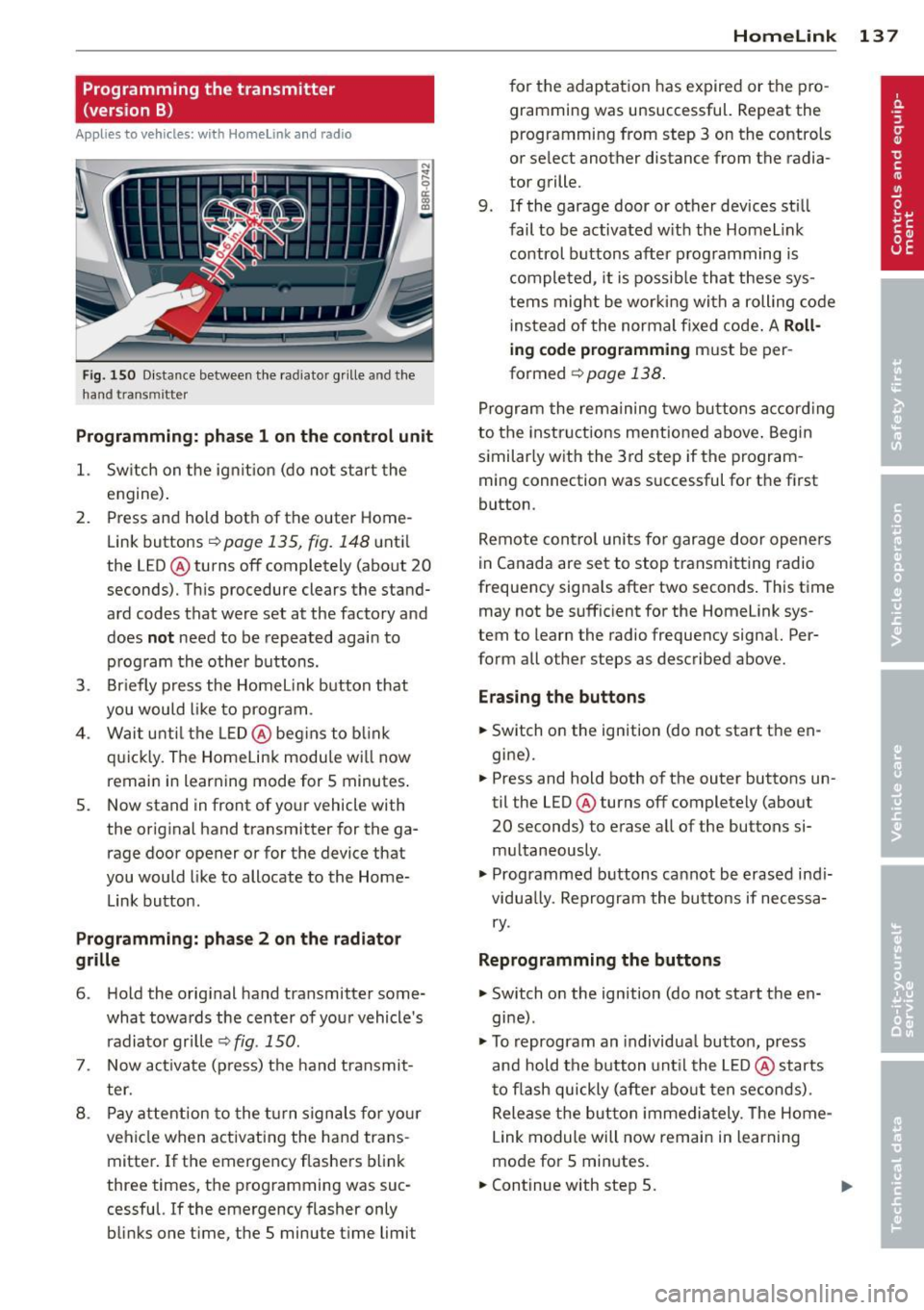
Fig. 150 D istance between t he rad ia to r gr ille a nd the
h and trans mitter
Programming: phase 1 on the control unit
1. Sw itch on the ig nit io n (do no t start the
engine) .
2. Press and hold both of the outer Home
Link buttons
r=>page 135, fig. 148 until
the LED @ turns off completely (about
20
seconds). Th is procedure clears the stand
ard codes that were set at the factory and
does
not need to be repeated agai n to
p rog ram the othe r buttons.
3 . Briefly press the Homelink button that
you would like to prog ram .
4. Wai t u nti l the LED @ beg ins to blink
q ui ckly . The Home Lin k modu le wi ll now
remai n in learning mode for
5 minutes .
5. Now stand in front of your vehicle with
the original hand transmitter for the ga
rage door opener or for the device that
you would like to allocate to the Home
Link button.
Programming: pha se 2 on the radiator
grille
6 . Hold the orig inal hand t ransmitter some
what towa rds the center o f you r vehicle 's
radiato r gr ille
r=> fig . 150.
7. Now activate (p ress) t he hand transmit
ter.
8 . Pay a ttention to the t urn signals for yo ur
vehicle when activating the ha nd trans
mitter . If t he emergency flashers blink
three times, the programming was suc
cessful. If the emergency flasher only bli nks one t ime, the 5 minute t ime limit
Homelink 13 7
for the adaptat ion has expired or the pro
gram ming was unsuccessful. Repeat the
programming from step 3 on the controls
o r se lect another distance from the radia
tor grille.
9. If the garage door or other devices sti ll
fail to be activated w it h the Homelin k
control buttons after p rogramming is
comple ted, it is possib le tha t these sys
tems might be w ork ing wi th a roll ing code
ins tead of the normal fixed co de.
A Roll
ing code programming must be per
formed
r=> page 138 .
Program the rema ining tw o bu ttons a ccord ing
to the instructions mentioned above . Beg in
similar ly w ith the 3rd step if the program
m ing connection was successful for t he fi rst
button .
Remote con trol units fo r garage door opene rs
in Canada are set to stop tra nsmitting radio
frequency signa ls after two seconds . This t ime
may not be suffic ient for the Homelink sys
tem to learn the radio frequency signa l. Per
form all other steps as described above.
Erasing the buttons
.,. Switch on the ignition (do not sta rt the en
gi ne).
.,. Press and hold both o f the outer buttons un
til the LED@ turns off completely (abo ut
20 seconds) to erase a ll of the buttons si
m ultaneously .
.,. Programmed b uttons ca nnot be erased ind i
vidua lly. Reprogram the buttons if necessa
ry .
Reprogramming the buttons
.,. Switch o n the ignition (do not start t he en
gine) .
.,. To reprogram an individua l bu tto n, press
and hold the button unt il the LED @ starts
to f lash quickly (a fter abo ut ten seconds) .
Release t he bu tton imme dia tely. The Home
L ink module will now remain in learning
mo de for 5 minutes.
.,. Continue with step 5.
Page 268 of 316
266 Tire s and wheels
When the malfunction indicator is illuminat
ed, the system may not be able to detect or
signal low t ire pressure as intended. TPMS
malfunctions may occur for a variety of rea
sons, including the installation of replace
ment or alternate tires or wheels on the vehi
cle that prevent the TPMS from funct ioning
properly . Always check the TPMS malfunct ion
tellta le after replacing one or more t ires or
wheels on your veh icle to ensure that the re
p lacement or a lternate tires and wheels allow
the TPMS to continue to function properly.
Tire pressure indicator appears
Applies to vehicles: with tire pressure monitoring system
The tire pressure indicator in the instrument
cluster informs you if the tire pressure is too
low or if there is a system malfunction.
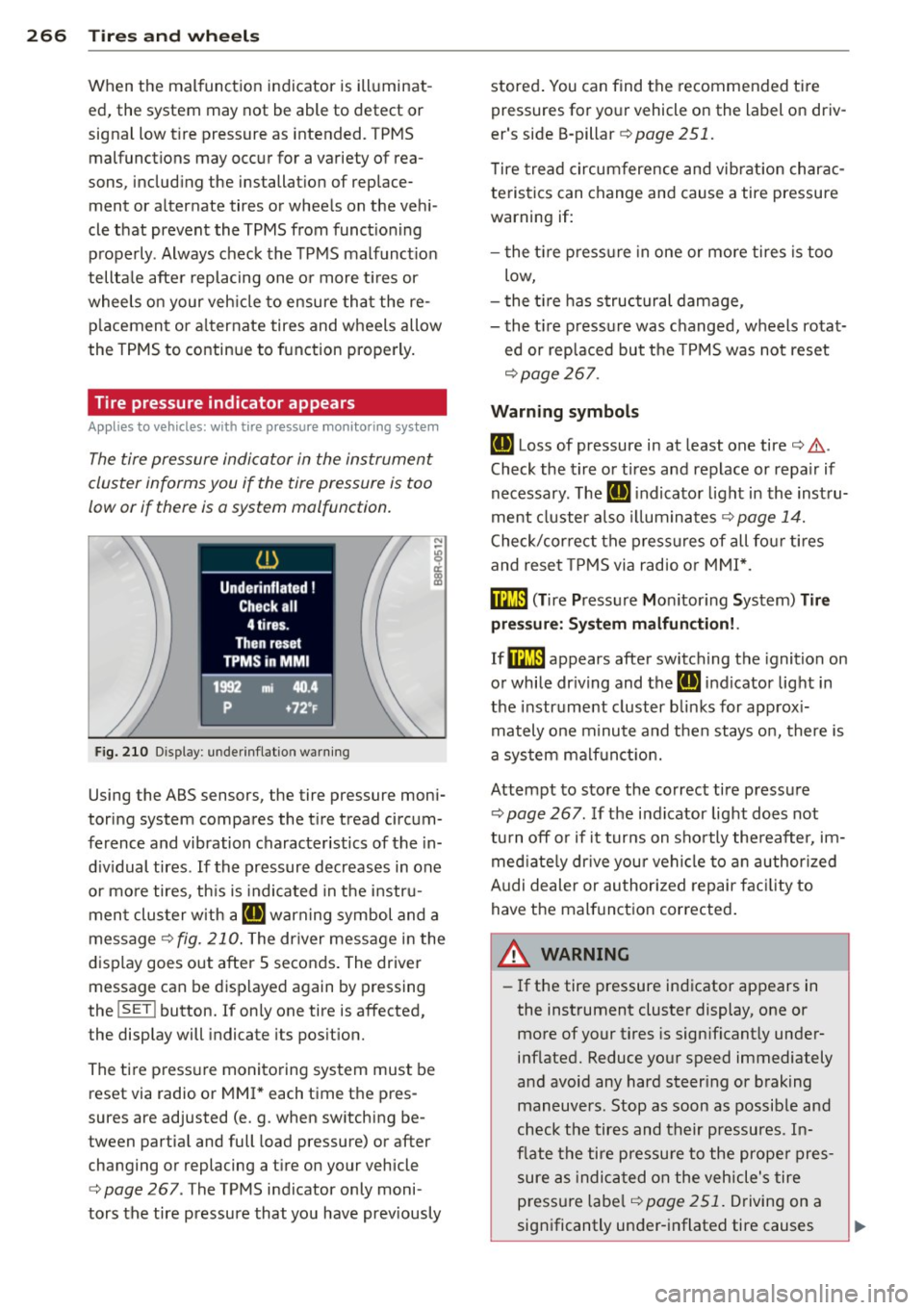
N
I
Fig. 210 Display: underinflation warning
Using the ABS sensors, the tire pressure moni
toring system compares the tire tread circum
ference and vibration characteristics of the in
dividual tires. If the pressure decreases in one
or more tires, th is is indicated in the instru
ment cluster w ith a
IE warning symbol and a
message
¢fig . 210. The dr iver message in the
display goes out after 5 seconds. The driver
message can be displayed again by pressing
the
! SET ! button. If on ly one tire is affected,
the display will indicate its position.
The tire pressure monitoring system must be
reset via radio or MMI * each time the pres
sures are adjusted (e. g . when switching be
tween partia l and full load pressure) or after
changing or replacing a tire on your vehicle
¢
page 267. The TPMS indicator only moni
tors the tire pressure that you have prev iously stored
. You can find the recommended tire
pressures for your vehicle on the label on driv
er's side B-pillar ¢
page 251.
Tire tread circumference and vibration charac
teristics can change and cause a tire pressure
warning if:
- the tir e pressure in one or more tires is too
low,
- the tir e has structural damage,
- the tir e pressure was changed, wheels rotat-
ed or replaced but the TPMS was not reset
¢page 267.
Warning symbols
IE Loss of pressure in at least one tire¢ .&..
Check the tire or tires and replace or repa ir if
necessary. The
IE indicato r light in the inst ru
ment cluster als o illuminates
¢ page 14.
Check/correct the pressures of all four tires
and reset TPMS via radio or MMI*.
ffim (T ire Pressure Mon itor ing System) Tire
pressure: System malfunction!.
If@m appears after switching the ignition on
or while dr iving and the
IE indicator light in
the instrume nt cluster blink s for app rox i
mately one minute and then stays on, there is
a system malfunction.
Attempt to store the correct tire pressure
¢
page 267 . If the indicator light does not
tu rn
off or if it turns on shortly thereafter, im
mediately drive you r vehicle to an authorized
A udi dealer or authorized repair facility to
have the malfunction corrected.
A WARNING
=
- If the tire pressure indicator appears in
the instrument cluster display, one or
more of your tires is sign ificant ly under
inflated. Reduce your speed immediately
and avoid any hard steer ing or braking
maneuvers. Stop as soon as possible and
check the tires and their pressures. In
flate the tire pressure to the proper pres
sure as ind icated on the vehicle's tire
p ressu re lab el¢
page 251. Driving on a
significantly under-inflated tire causes
Page 311 of 316
Technical modifications ..... .. .. .. .. . 296
Tether anchors ............... ... ... 194
T ether strap . ............. .... .. .. . 194
Textiles Cleaning ... .... .. .... ... .. .. .. ... 220
The first 1,000 m iles (1,500 km) and after-
wards ..... ... ............. ...... .. 205
Tie-down r ings . . . . . . . . . . . . . . . . . 68, 146
tiptronic Automatic S hift Lock (ASL) . . . . . . . . . . 124
Dnvrng .... .. .... .... ... .. .. .. ... 125
Emergency mode . ..... ... .. .. .. .. . 128
Hill descent control ....... .. .. .. .. . 126
Kick-dow n .. ............. .... .. ... 127
Manual sh ift program ........ .... .. 127
Selecto r leve r . . . . . . . . . . . . . . . . . . . . . 123
tiptronic (automatic transmission) . ... . 123
Tire Mobility Sy stem . . . . . . . . . . . . 104, 27 1
Tire pressure . ............. .... .. .. . 253
Tire pressure monitoring system . ... .. . 265
Loss of air pressure . . . . . . . . . . . . 16, 266
Malfunct ion .. ........... .. .. .. ... 266
Resett ing tire pressures .... .. .. .. .. . 267
Tires . ... .. .. .. .. ... . .... ... .. .. .. . 2 47
Repai r kit .. .... .. .... ... .. .. .. ... 271
Repair set . ... .... .... ... .. .. .. ... 104
Service life . ............. .... .. .. . 257
Speed rating letter code ... .. .. .. .. . 259
Tire manufacturing date ... .. .. .. .. . 259
T ire specifications ........... .... .. 259
Tread depth ..... .. ...... .. .. .. .. . 257
Uniform tire quality grading .. .. . ... . 26 1
W inte r tir es ............. .. .. .. .. . 26 2
Tires and vehicle load limits .. .. .. .. .. . 255
Tires and whee ls
Checking tire pressure .. ... .. .. .. .. . 253
Cold ti re inflat ion pressure ... ...... . 251
Dimensions . ............. .... .. ... 258
General notes ............ .... .. .. . 247
Glossary of t ire and load ing term ino lo -
gy ...... ... ...... ............. .. 24 8
L ow aspect rat io t ires ... ...... .... .. 264
New tires and w heels ...... .. .. .. .. . 258
Replacing .. ............. .... .. .. . 259
Snow chains .. .. .. .... ... .. .. .... . 263
Tire pressure monitoring system . 16, 265
Tires and vehicle load limits . ... .. .. . 255
Inde x 309
Whee l bolts
Winter tires 264
262
T oo l kit ...... .. .. ................. 268
Too ls ...... .. .. .. ................. 104
T orn or frayed safety belts
152
Towing Front eye let . . . . . . . . . . . . . . . . . . . . . . 286
Rea r eyelet .. .. .. ................. 286
T ow t ruc k procedu res ........... .. .. 285
Towing a trailer Pa rking system . . . . . . . . . . . . . . . . . . . . 134
TPMS Tire pressure monitoring system . .. .. 266
T ra iler tow ing . .. .. .. . .............. 213
Operating instr uctions .. ..... ... .. .. 21 4
Technical requirements . . . . . . . . 213, 214
Tongue load ..... ... .. .. ..... ... .. 214
Trai ler towing tips ............. .. .. 215
T rai le r turn s ignal assembly
Warning/ind icator lights ..... ... .. .. . 17
Transmission .. .. .. .. ... ....... ..... 123
Malfunction ( indicato r light) ..... .. .. 128
Transport Canada .. ................. 147
T rave l mode . ... .. .. . .. ... .... ... .. . 51
T read Wear Ind icator (TWI) .......... . 257
T rip comp uter
Fuel consumpt ion ................. . 23
Mileage . .. .. .. .. .. ............... . 23
S ingle-trip memory ..... ......... .. . 23
T ota l-trip memory ................ .. 23
Tr ip odometer ..... .. . .. .. ..... ... .. . 13
T runk
refer to Rear lid . . . . . . . . . . . . . . . . . . . . 44
Turn signals ....... .. ..... ........... 52
Warning/ind icator lights .. .. ... ... .. . 16
u
Un fastening safety belts
Un idirectional tires ... . .. .. ..... ... . .
Uni form tire quality g radi ng ......... .
U nlocking 154
247
261
Power locking switch ............... . 42
Rea r lid/tru nk lid ... . .. .. .. ... ... .. . 43
Remote contro l key . . . . . . . . . . . . . . . . . 40
U si ng the mechanical key .......... .. 41
U se of jumper cab les ............ .... 284
•
•