engine AUDI Q5 2014 Workshop Manual
[x] Cancel search | Manufacturer: AUDI, Model Year: 2014, Model line: Q5, Model: AUDI Q5 2014Pages: 316, PDF Size: 78.41 MB
Page 129 of 316
conditions. Always be ready to apply the
brakes.
Manual shift program
Using the manual shift program you can
manually select gears.
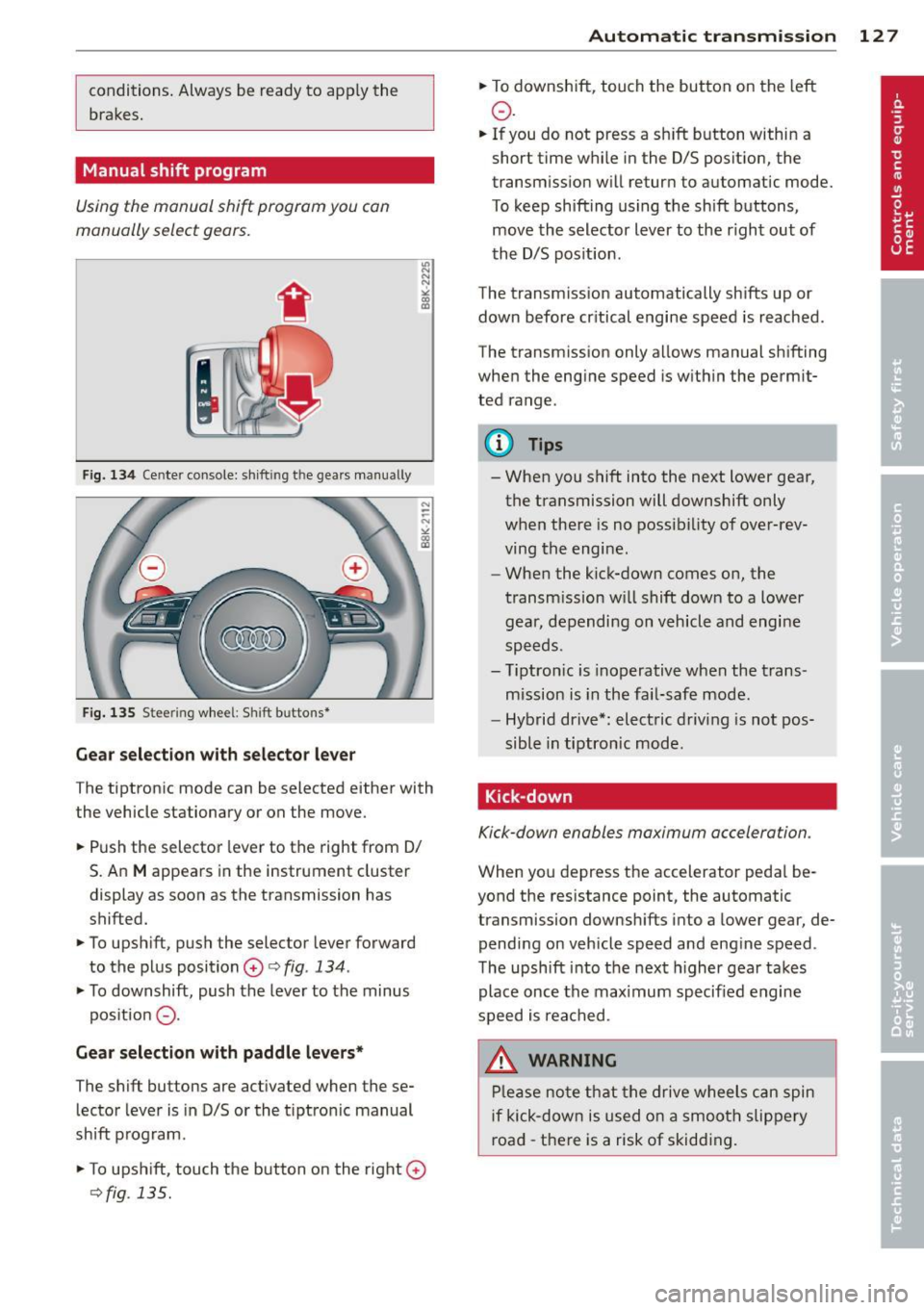
F ig. 134 Cente r console: sh ift in g t he gears manual ly
Fig. 135 S tee rin g wheel: S hift b utto ns*
Gear selection with selector lever
The tiptronic mode can be selected either with
the vehicle stationary or on the move.
.. Push the selector lever to the right from 0/
S. An
M appears in the instrument cluster
display as soon as the transmission has
shifted.
.. To upshift, push the selector lever forward
to the plus position
0 c:> fig. 134 .
.. To downshift, push the lever to the minus
pos ition
0 -
Gear selection with paddle levers*
The shift buttons are activated when these
lector lever is in D/S or the t iptron ic manual
shift program.
.. To upshift, touch the button on the right
0
c> fig . 135.
Autom atic transm ission 12 7
.. To downshift, touch the button on the left
0 .
.. If you do not press a sh ift button within a
short time while in the D/S position, the
transmission will return to automatic mode.
To keep shifting using the shift buttons,
move the selector lever to the r ight out of
the D/S position .
The transm iss ion automatically shifts up or
down before cr itical engine speed is reached.
The transmission only allows manual shifting
when the engine speed is within the permit
ted range .
@ Tips
-When you shift into the next lower gear,
the transmission will downshift only
when there is no possibility of over-rev
ving the engine.
- When the kick-down comes on, the
transmission will shift down to a lower
gear, depending on vehicle and engine
speeds.
- Tiptron ic is inoperative when the trans
mission is in the fail-safe mode.
- Hybrid drive*: electric driving is not pos
sible in tiptronic mode.
Kick-down
Kick-down enables maximum acceleration .
When you depress the accelerator pedal be
yond the resistance point, the automatic
transmission downsh ifts into a lower gear, de
pending on vehicle speed and engine speed .
The upshift into the next higher gear takes
place once the max imum specified engine
speed is reached .
_& WARNING
Please note that the drive wheels can spin
if kick-down is used on a smooth slippery
road -there is a risk of skidding .
Page 137 of 316
Homelink
Universal remote
control
Description
Applies to vehicles: with Home link
The HomeLink universal remote control can
be programmed with the remote control for
devices that are already present.
With Home Link, you can control devices such
as the garage door, security systems, house
lights , etc. comfortably from the inside of you
vehicle.
Homelink makes it possible for you to rep lace
three different remote controls from dev ices
in your home with one universal remote. This
feature works for most garage door and exte
rior door motor signals. Programming the in
dividual remote control for your remote con
trol takes place near the center of the radiator
grille. There is a control module attached at
this location .
A one-time programming of the sensor must be performed before you are able to use sys
tems with Homelink. If the system does not activate after performing the one-time pro
gramming, check whether the system uses a rolling code¢
page 138 for vehicles without
the MMI*.
& WARNING
-
- Never use the Homelink transmitter
with any garage door opener that does
have not the safety stop and reverse fea
ture as requ ired by federa l safety stand
ards. This includes any garage door open
er model manufactured before April 1,
1982.
-A garage door opener which cannot de
tect an object, signaling the door to stop
and reverse does not meet current feder
al safety standards . Using a garage door
opener without these features increases
risk of serious injury or death.
Homelink 135
- For safety reasons never release the
parking brake or start the engine while
anyone is standing in front of the vehicle .
- A garage door or an estate gate may
sometimes be set in motion when the
Homelink remote control is being pro
grammed. If the device is repeatedly ac
tivated, th is can overstrain motor and
damage its electrical components - an
overheated mo to r i s a fire hazard!
- To avoid possib le injuries or property
damage, please always make abso lutely
certa in that no persons or objects are lo
cated in the range of motion of any
equipment being operated.
(0 Tips
- If you would like more information on
Homelink, where to purchase the Home
Link compat ible products, or would like
to purchase the Home Link Home Light
ing Package, please call toll-free :
1-800-355-3515.
-For Declaration of Compliance to United
States FCC and Industry Canada regula
tions
¢ page 296.
-For security reasons, we recommend that
you clear the programmed buttons be
fore selling the vehicle.
Operation
App lies to vehicles : with Homeli nk
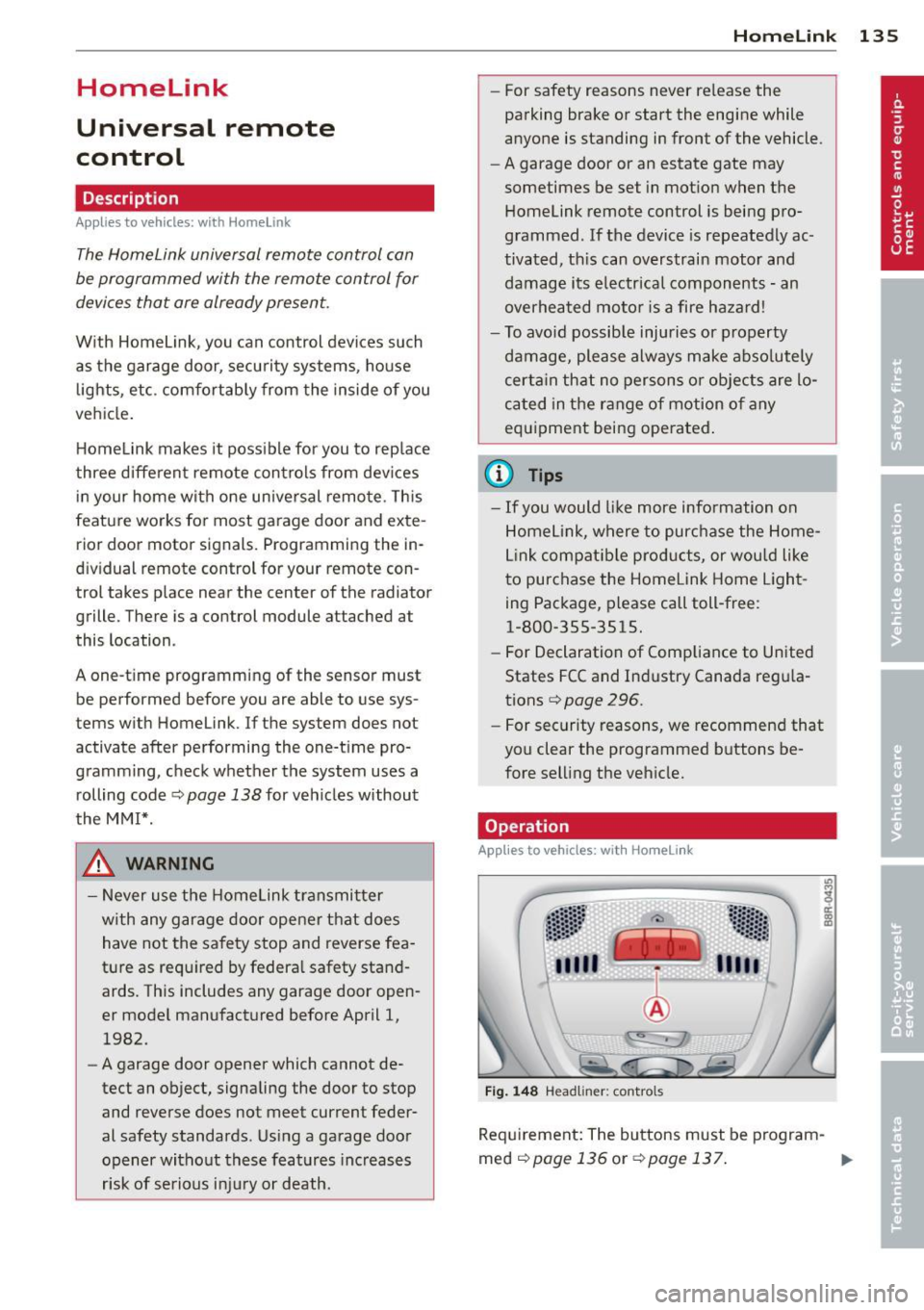
Fig. 148 Headl iner: controls
Req uirement: The buttons must be program-
med
<:!)page 136 or ¢page 137. ..,_
Page 139 of 316
Programming the transmitter (version B)
A pplies to vehicles: with Horne link and radio
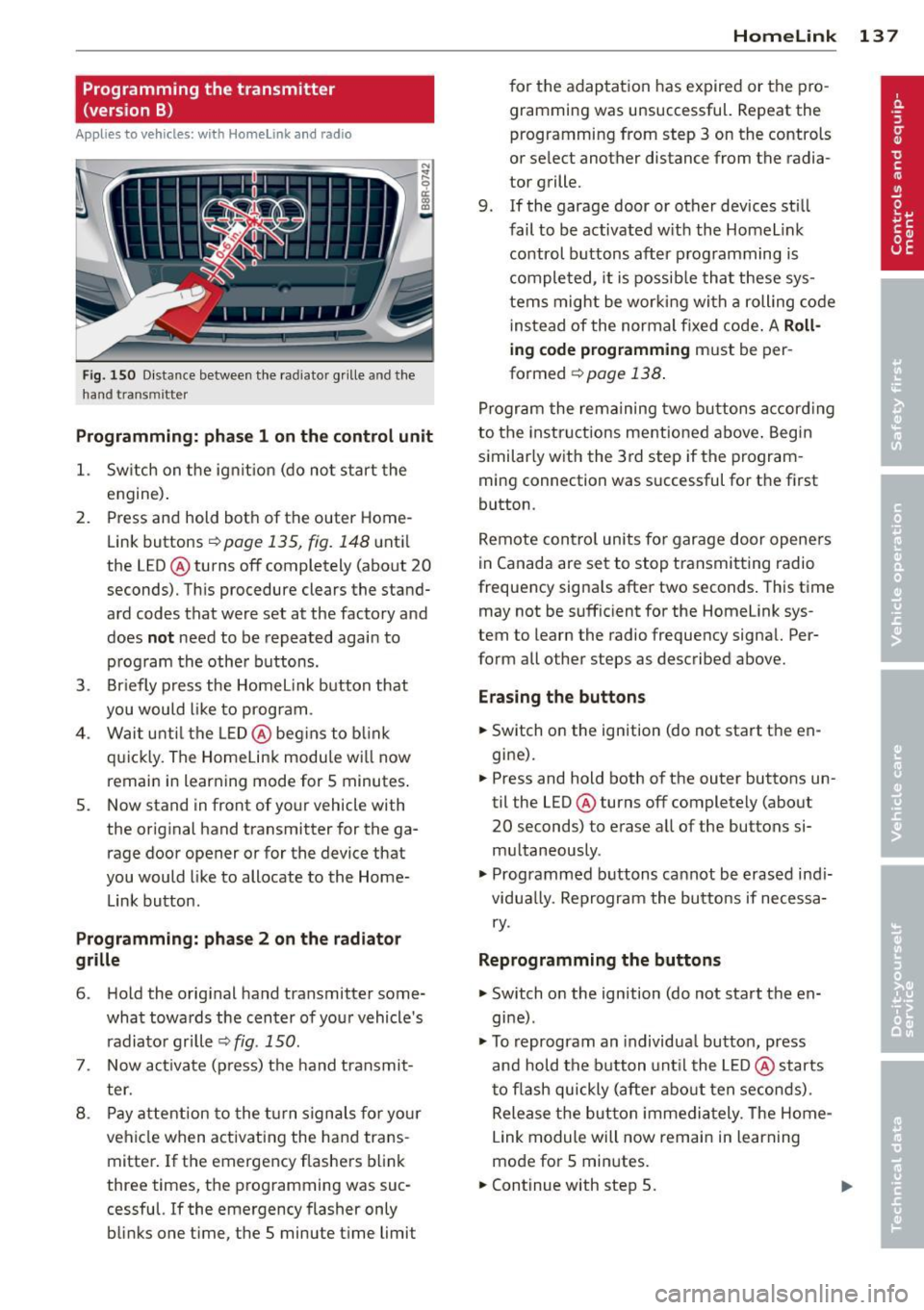
Fig. 150 D istance between t he rad ia to r gr ille a nd the
h and trans mitter
Programming: phase 1 on the control unit
1. Sw itch on the ig nit io n (do no t start the
engine) .
2. Press and hold both of the outer Home
Link buttons
r=>page 135, fig. 148 until
the LED @ turns off completely (about
20
seconds). Th is procedure clears the stand
ard codes that were set at the factory and
does
not need to be repeated agai n to
p rog ram the othe r buttons.
3 . Briefly press the Homelink button that
you would like to prog ram .
4. Wai t u nti l the LED @ beg ins to blink
q ui ckly . The Home Lin k modu le wi ll now
remai n in learning mode for
5 minutes .
5. Now stand in front of your vehicle with
the original hand transmitter for the ga
rage door opener or for the device that
you would like to allocate to the Home
Link button.
Programming: pha se 2 on the radiator
grille
6 . Hold the orig inal hand t ransmitter some
what towa rds the center o f you r vehicle 's
radiato r gr ille
r=> fig . 150.
7. Now activate (p ress) t he hand transmit
ter.
8 . Pay a ttention to the t urn signals for yo ur
vehicle when activating the ha nd trans
mitter . If t he emergency flashers blink
three times, the programming was suc
cessful. If the emergency flasher only bli nks one t ime, the 5 minute t ime limit
Homelink 13 7
for the adaptat ion has expired or the pro
gram ming was unsuccessful. Repeat the
programming from step 3 on the controls
o r se lect another distance from the radia
tor grille.
9. If the garage door or other devices sti ll
fail to be activated w it h the Homelin k
control buttons after p rogramming is
comple ted, it is possib le tha t these sys
tems might be w ork ing wi th a roll ing code
ins tead of the normal fixed co de.
A Roll
ing code programming must be per
formed
r=> page 138 .
Program the rema ining tw o bu ttons a ccord ing
to the instructions mentioned above . Beg in
similar ly w ith the 3rd step if the program
m ing connection was successful for t he fi rst
button .
Remote con trol units fo r garage door opene rs
in Canada are set to stop tra nsmitting radio
frequency signa ls after two seconds . This t ime
may not be suffic ient for the Homelink sys
tem to learn the radio frequency signa l. Per
form all other steps as described above.
Erasing the buttons
.,. Switch on the ignition (do not sta rt the en
gi ne).
.,. Press and hold both o f the outer buttons un
til the LED@ turns off completely (abo ut
20 seconds) to erase a ll of the buttons si
m ultaneously .
.,. Programmed b uttons ca nnot be erased ind i
vidua lly. Reprogram the buttons if necessa
ry .
Reprogramming the buttons
.,. Switch o n the ignition (do not start t he en
gine) .
.,. To reprogram an individua l bu tto n, press
and hold the button unt il the LED @ starts
to f lash quickly (a fter abo ut ten seconds) .
Release t he bu tton imme dia tely. The Home
L ink module will now remain in learning
mo de for 5 minutes.
.,. Continue with step 5.
Page 152 of 316

150 Safety belts
-Failure to pay attention to the warning
light that come on, could lead to person
al injury.
Why safety belts?
Frontal collisions and the law of physics
Frontal crashes create very strong forces for
people riding in vehicles.
Fig. 155 Unbelted occupants in a ve hicle heading for a
wall
Fig. 156 Th e vehicle c rash es into the wall
The physical principles are simple. Both the
vehicle and the passengers possess energy
which varies w ith veh icle speed and body
weight . Engineers call this energy "kinetic en
e rgy ."
T he higher the speed of the vehicle and the
greater the vehicle's weight, the more energy
that has to be "absorbed" in the crash .
Vehicle speed is the most significant factor.
If
the speed doubles from 15 to 30 mph (25 to
50 km/h), the energy increases 4 times!
Because the passengers of this veh icle are not
using safety belts¢
fig. 155, they will keep
moving at the same speed the vehicle was
mov ing just before the crash, until something
stops them - here, the wall ¢
fig. 156 .
The same principles apply to people sitting in
a vehicle that is involved in a frontal collision .
Even at c ity speeds of 20 to 30 mph (30 to 50
km/h), the forces acting on the body can
reach one ton (2,000 lbs. or 1,000 kg) or
more . At greater speeds, these forces are even
higher .
Peop le who do not use safety belts are also
not attached to their vehicle. In a frontal colli
s ion they will also keep moving forward at the
speed their vehicle was t ravell ing just before
the crash . Of course, the laws of physics don't
just apply to frontal collisions, they determine
what happens in all kinds of accidents and col
lisions .
What happens to occupants not wearing
safety belts?
In crashes unbelted occupants cannot stop
themselves from flying forward and being in
jured or killed. Always wear your safety belts!
Fig. 157 A d river not wea ring a safety b elt is viol en tly
thrown fo rwa rd
Fig . 158 A rear passe nge r not wearing a safety belt
w ill fl y forward and strike the driver
Unbelted occupants are not able to resist the
tremendous forces of i mpac t by holding tight
or bracing themselves. Without the benefit of
safety restraint systems , the unrestrained
ll-
Page 153 of 316
occupant will slam violently into the steering
wheel, instrument panel, windshield, or what
ever else is in the way
r::;; fig. 157. This impact
with the vehicle interior has all the energy
they had just before the crash.
Never rely on airbags alone for protection.
Even when they deploy, airbags provide only
additional protection. Airbags are not sup
posed to deploy in all kinds of accidents. Al
though your Audi is equipped with airbags, all
veh icle occupants, including the driver, must
wear safety belts correctly in order to mini
mize the risk of severe injury or death in a
crash.
Remember too, that airbags will deploy only
once and that your safety belts are always
there to offer protection in those accidents in
which airbags are not supposed to deploy or
when they have already deployed. Unbelted
occupants can also be thrown out of the vehi
cle where even more severe or fatal injuries
can occur.
It is also important for the rear passengers to
wear safety belts correctly. Unbelted passen
gers in the rear seats endanger not only them
selves but also the driver and other passen
gers
r::;; fig. 158. In a frontal collision they will
be thrown forward violently, where they can
hit and injure the driver and/or front seat pas
senger.
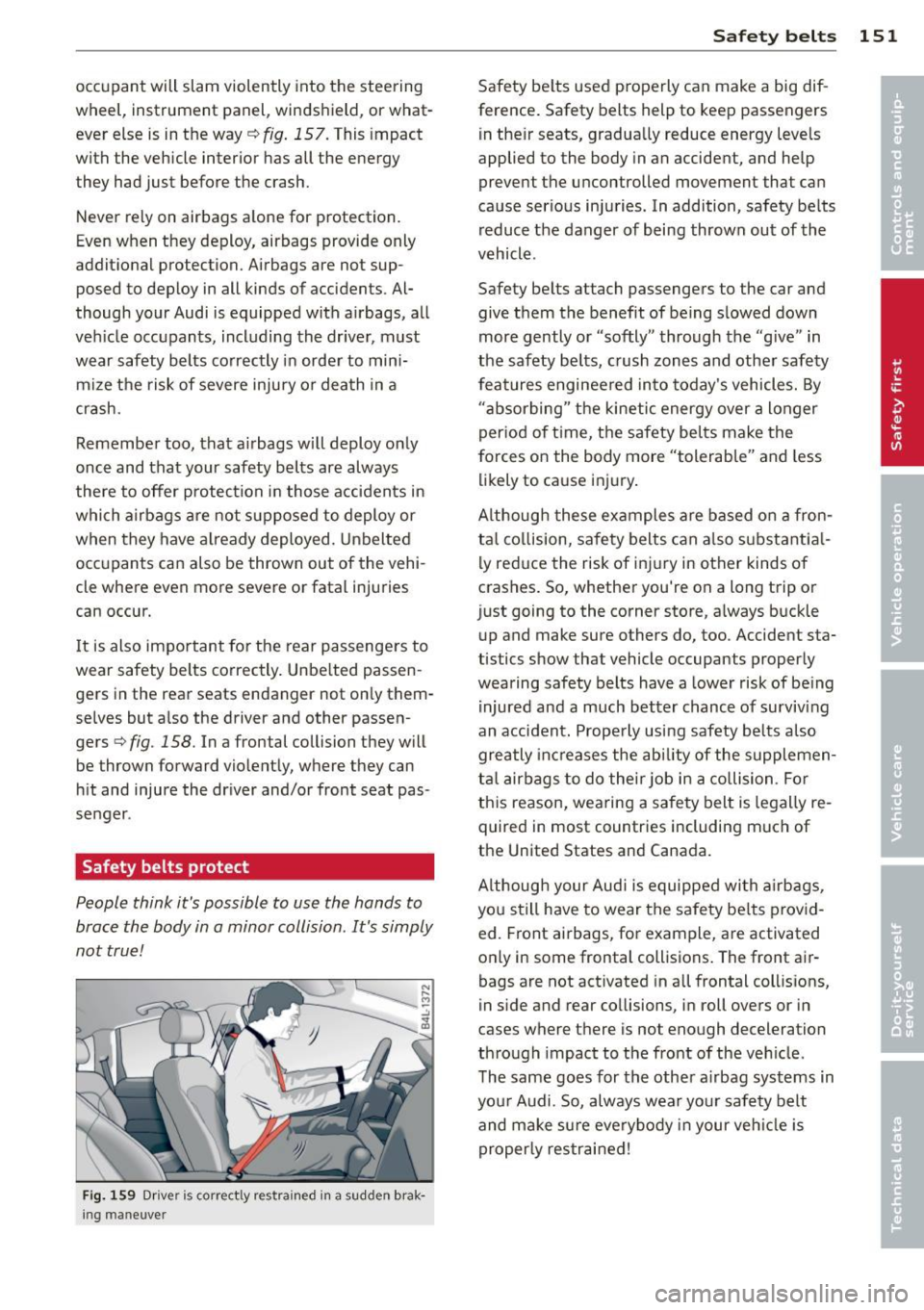
Safety belts protect
People think it's possible to use the hands to
brace the body in a minor collision. It's simply
not true!
Fig. 159 Driver is correctly restra ined in a sudden brak
ing maneuver
Safety belts 151
Safety belts used properly can make a big dif
ference. Safety belts help to keep passengers
in their seats, gradually reduce energy levels
applied to the body in an accident, and help
prevent the uncontrolled movement that can
cause serious injuries. In addition, safety belts
reduce the danger of being thrown out of the
vehicle.
Safety belts attach passengers to the car and
give them the benefit of being slowed down
more gently or "softly" through the "give" in
the safety belts, crush zones and other safety
features engineered into today's vehicles. By
"absorbing" the kinetic energy over a longer
period of time, the safety belts make the
forces on the body more "tolerable" and less
likely to cause injury.
Although these examples are based on a fron
tal collision, safety belts can also su bsta ntia l
ly reduce the risk of injury in other kinds of
crashes. So, whether you're on a long trip or
just going to the corner store, always buckle
up and make sure others do, too. Accident sta
tistics show that vehicle occupants properly
wearing safety belts have a lower risk of being
injured and a much better chance of surviving
an accident. Properly using safety belts also
greatly increases the ability of the supplemen
tal airbags to do their job in a collision . For
this reason, wearing a safety belt is legally re
quired in most countries including much of
the United States and Canada.
Although your Audi is equipped with airbags,
you still have to wear the safety belts provid
ed. Front airbags, for example, are activated
only in some frontal collisions. The front air
bags are not activated in all frontal collisions,
in side and rear collisions, in roll overs or in
cases where there is not enough deceleration
through impact to the front of the vehicle.
The same goes for the other airbag systems in
your Audi. So, always wear your safety belt
and make sure everybody in your vehicle is
properly restrained!
Page 199 of 316
Intelligent technology Notice about data
recorded by vehicle
control modules
Your vehicle is not equipped with an Event Da
ta Recorder (EDR), installed by some manu
facturers for the express purpose of capturing
data for retrieval after an accident or crash
event. EDR's are sometimes called "crash re
corders".
Some state laws restrict the retr ieval or down
loading of data stored by EDR's that were in
stalled in a vehicle for the express purpose of
retrieving data after an accident or crash
event without the owner's consent.
Although your vehicle is not equipped with an
EDR, it is equipped with a number of electron
ic control modules for various vehicle systems
such as, for examp le, engine function, emis
sion control, as well as for the airbags and
safety belts.
These electronic control modules also record
vehicle-related data during norma l vehicle op
eration for diagnostic and repair purposes.
The recording capacity of the electronic con
trol modules is limited to data (no sound is re
corded) and only a small amount of data is ac
tually recorded over a very limited period of
time and stored when a system fault or other
condition is sensed by a control unit. Some of
the data then stored may relate to vehicle
speed, direction, braking as we ll as restraint
system use and performance in the event of a
crash or other condition. Stored data can only be read and downloaded with special equip
ment.
Electronic Stabilization
Control (ESC)
Description
The Electronic Stabilization Control (ESC) rein
forces driver safety. It reduces the risk of slip
ping and improves driving stability. ESC de
tects critical s ituations such as the vehicle
Intelligent technology 197
oversteering and understeering or the whee ls
spinning . The vehicle is stabilized by applying
the brakes or reducing eng ine torque . Once
the ESC is active, the indicator light
G1 blinks
in the instrument cluster.
ESC includes the anti-lock brake system (ABS),
brake assist system, anti-slip regulation
(ASR), electronic differential lock (EDL), dy
namic steering*, hill descent assist and selec
tive wheel torque control.
Anti-lock brake system (ABS)
ABS prevents the whee ls from locking up
when braking . The vehicle can still be steered
even during hard braking. App ly steady pres
sure to the brake pedal. Do not pump the ped
al. A pulsing in the brake pedal indicates that
the system is helping you to brake the vehicle .
Brake assist system
The brake assist system can decrease braking
distance. It increases braking power when the
driver presses the brake pedal quickly in emer
gency situations . You must press and hold the
brake pedal until the situation is over . In
vehicles with adaptive cruise control*, the
brake assist system is more sensitive if the
distance detected to the vehicle ahead is too
small.
Anti-slip regulation (ASR)
ASR reduces engine power when the drive
wheels beg in to sp in and adapts the force to
the road conditions. This makes it easier to
start, accelerate and drive up hill s.
Electronic differential lock (EDL)
The EDL brakes wheels that are spinning and
transfers the drive power to the othe r whee ls .
T his function is available up to about 78 mph
(125 km/h) .
In extreme cases, EDL automatically switches
off to help keep the brake on the braked wheel
from overheat ing. EDL will switch on again au
tomatically when conditions have returned to
normal.
•
•
Page 200 of 316
198 Intelligent technology
Dynamic ste ering *
On vehicles with dynamic stee ring* , ES C helps
stabilize the st eering in critical s ituations .
Selective wh eel torque c ontrol
The selective whee l torque control operates
when dr iv ing through curves . T he front wheel
on the inside of the curve or both wheels on
the inside of the curv e are braked selective ly
as needed. This m inimizes sliding in the front
wheels and allows for more pr ecise driving
through curves . T he system may not act ivate
when driving in wet or snowy cond itions .
A WARNING
-ESC, ABS, ASR, EDL dynamic steering"
and the se lective wheel torque control
cannot overcome the laws of physics .
Th is is especially important on slippery
or wet roads.
If the systems begin act ing
to stabilize yo ur vehicle , you sho uld im
med iately change your speed to ma tch
the road and traffic condit ions. Do not
let the increased safety provided by
these systems tempt you to take risks. Do ing so wi ll increase the risk of a loss of
vehicle control, collision and serious per
sonal injuries .
- Always adapt your speed to road, traff ic
and weather condit ions. The risk of Los-
ing cont ro l of the veh icle increases when
Switching on/off
-
driving too fast, espec ially through
curves and on slippery or wet roads, and
when dr iv ing too close to vehicles up
ahead . ESC, ABS, the brake ass ist sys
tem, ASR, ED L, dynam ic steering* and
the selective whe el torque cont ro l can
not p revent collisions.
- Always accelerate with special care on
even, smooth surfaces such as those that
are wet or covered with ice and snow.
The drive wheel s can spin eve n w ith
these assistance sys tems t hat can not al
ways he lp to red uce the risk of loss of ve
hicle control.
(0 Tips
- ABS and ASR only work correctly when
all four whee ls are equipped wi th identi
cal tires . Different tire sizes can lead to a
reduction in engine powe r.
- Yo u may hear noises when the systems
described are working .
-If the ind icator light&] or llB (USA
mode ls)/ [iJ (Canada models) appears,
there may be a malfunction
c:::, page 15,
c:::, page 17.
-When installing a factory-supplied roof
rack system on the roof railing, the ESC
w ill adapt itse lf to a different center of
gravity.
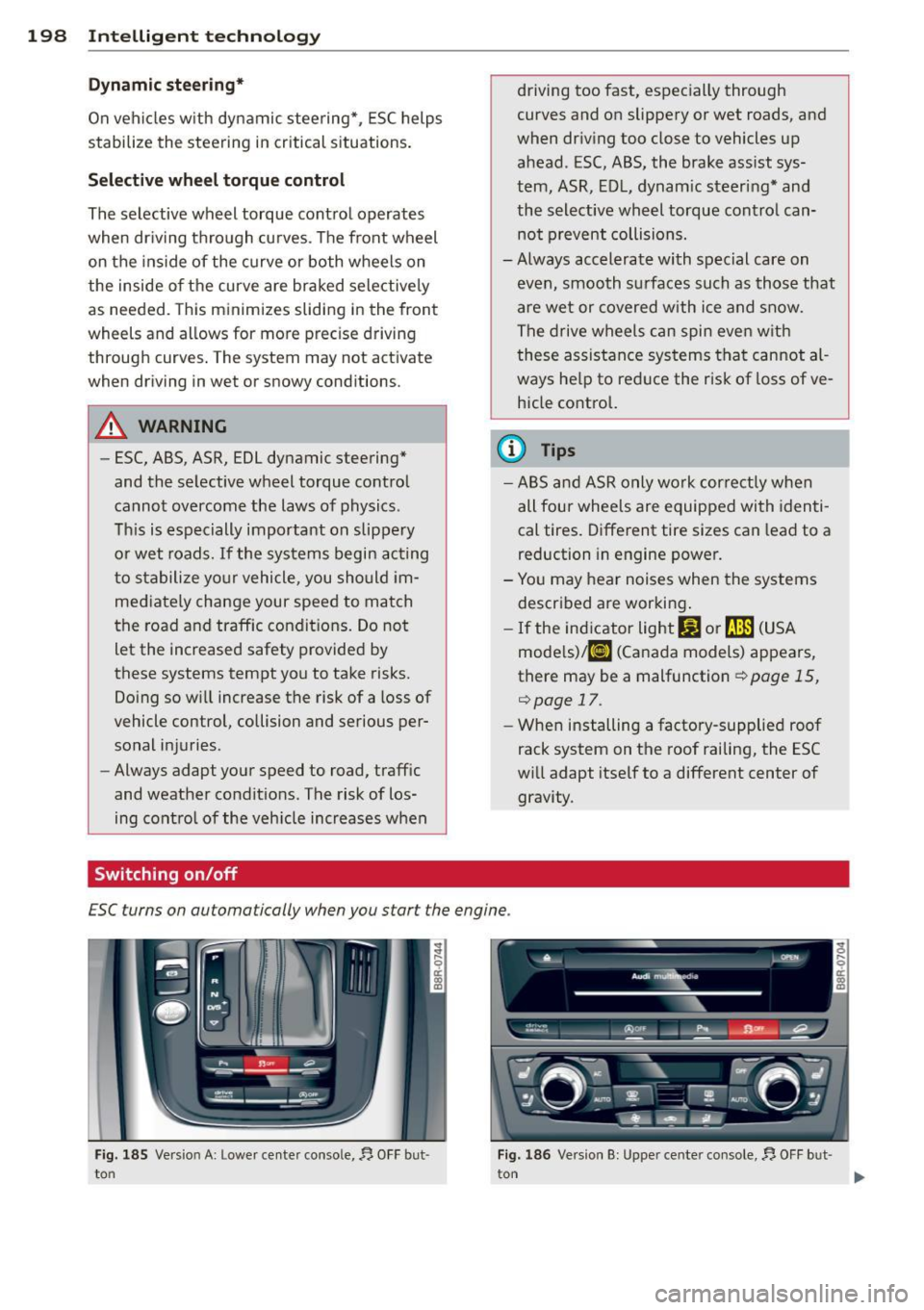
ESC turn s on automa tically when you star t the engine .
Fig . 18 5 Ve rs io n A: L ower ce nte r conso le , fJ. O FF b ut·
to n Fig. 186 Ve rs io n B: Uppe r ce nte r co nso le, fJ. OF F bu t
t on
Page 202 of 316
200 Intelligent technology
There must be however sufficient ground ad
hesion . The hill descent assist can
not do its
job if the incl ine is icy or if the incline ground
is loose ¢,&..
The system does not work at speeds between
19 and 37 mph (30 and 60 km/h). The system
is then in the ready-mode. The diode in the
button will come on . The system automatical
ly switched
off when you drive faster than 37
mph (60 km/h) . The diode will go out in this
case.
Active control at a specific speed up to approx
imately 19 mph (30 km/h) w ill appear in the
instrument cluster display ¢
fig. 188. Two
dashes' '-- " w ill appear in the ready mode.
Hill descent assist is automatica lly act ivated
under the following cond itions:
- the diode in the button illuminates,
- vehicle speed is be low approximate ly
19 mph (30 km/h)
- the incline is 10%.
A WARNING
-Always adapt your speed to the weather,
road and traffic conditions . Do not let
the increased safety provided tempt you
into taking r isks.
- The hill descent assist system cannot
overcome the laws of physics. Your driv
ing style must always be adapted to the
current road and traffic conditions.
- The hill descent assist may not be able to
hold your vehicle at a constant speed un
der all condit ions wh ile driving on an in
cl ine (for example if ground under the
vehicle is loose).
Brake system
Operating conditions and driving habits
The brakes on today's automobiles are st ill
subject to wear, depending largely on operat
ing conditions and dr iv ing habits ¢& . On
veh icles that are e ither driven mostly in stop
and-go city traffic o r are driven hard, the
brake pads should be checked by your author- ized Audi dealer more often
than specified in
the
Warranty & Maintenance booklet. Failure
to have your brake pads inspected can result
in reduced brake performance.
On steep slopes, you should use the braking
effect of the engine. This way, you prevent un
necessary wear on the brake system. If you
must use your brakes, do not hold the brakes
down cont inuously. Pump the brakes at inter
vals .
Noises may occur when braking depending on
the speed, braking force and outside condi
tions such as temperature and humidity.
Moisture or road salt
Under certain conditions, for example, when
driving through water or very heavy rain, or
even after washing your vehicle, the braking
effect can be reduced due to moisture (or in
freezing cond itions ice) on the brake pads. A
few careful brake applications should dry
off
the brake pads or remove any ice coatings .
When you are driving at higher speeds with
the windshield wipers on, the brake pads will
briefly touch the brake discs in regular inter
vals so as to improve reaction time when brak
ing on wet surfaces. You, the driver, will not
notice anything.
The effectiveness of the brakes can be reduced
when the vehicle is driven on a salt-covered
road and the b rakes are not used. Here too,
you should clean
off accumulated sa lt coating
from brake discs and pads with a few careful
applications of the brake ¢& .
Corrosion
The re may be a tendency for dirt to build up
o n the brake pads and corrosion to form on
the discs if the car is not driven regularly or
only for short trips with littl e use of the
brakes.
If the brakes a re not used frequently, o r if cor
rosion has formed on the discs, it is adv isable
to clean
off the pads and discs by braking
firmly a few times from a modera tely high
speed ¢£ .
IJll-
Page 204 of 316
202 Intelligent technology
iT-ij Dynamic steering: System fault! You can
cont inue driving
If the indicator light turns on and the mes
sage appears, the steer ing may be more diffi
cult to move or more sensitive than usual. The
steering may also be at an angle when driving
straight.
Drive slow ly to your authorized Audi dealer or
qualified workshop to have the malfunction
corrected .
iT-ij Dynamic steering: Initializing
Audi drive select*: if the indicator light blinks
and the driver message appears, the dynamic
steer ing* is reinitialized. Once you sta rt the
engine after this is finished, the steering
wheel will be easy to move. Re-ini tialization
might be necessary if the steering wheel was
moved hard to the left and right while the ve
h icle was not moving . The display turns off if
the initiali zation was successful.
- If the . or
tTij indicator light on ly stays
on for a short time, you may continue
driving.
- The dynamic steering* stability systems
¢
page 197 are not available in the event
of a system malfunction.
- For additional information on dynamic
steering* ¢
page 120.
Driving with your
quattro
With all-wheel drive, all four wheels are driv
en.
General information
W ith all-wheel dr ive, power is distributed to
all four wheels. This happens automatically
depending on your driving sty le and the road
conditions at the time . See also ¢
page 197.
A center different ial distr ibutes the dr iv ing
power var iably to the front and rear axle . It
works together with se lective wheel torque control, which activates when driving through
curves
r=:>
page 198.
The all-wheel drive concept is designed for
high eng ine power. Your veh icle is except ion
ally powerfu l and has excellent driving charac
teristics both under normal driving conditions
and on snow and ice . Always read and follow
safety precaut ions r=;,
,&.
Winter tires
When driving in the winter, your vehicle with
all-wheel drive has an advantage, even with
regular tires. In winter road conditions it may
be advisable to mount winter tires (or all-sea
son tires) for improved driveability and brak
ing : these tires must be mounted on
all four
wheels.
See also r=;, page 262, Winter tires.
Tire chains
Where tire chains are mandatory on certain
roads, this norma lly also app lies to veh icles
with all-wheel driver=;,
page 263, Snow
chains .
Replacing wheels/tires
Vehicles with a ll-wheel drive must always
have tires of the same size. A lso avoid tires
with different tread depths. For deta ils see
page
r=;, page 2 SB, New tires and replacing
tires and wheels.
A WARNING
-Always adjust your dr iv ing to road and traf-
f ic conditions. Do not let the extra safety
afforded by all-wheel drive tempt you into
taking extra risks .
- Although the all-wheel drive is very ef
fective, always remember that braking
capacity is lim ited by tire traction. You
should therefore not drive at excessive
speeds on icy or slippery road surfaces.
- On wet road surfaces, be careful not to
drive too fast because the front wheels
could begin to slide on top of the water
(aquaplaning). If this should occur, you
will have no warning from a sudden in crease in eng ine speed as w ith a front
wheel drive veh icle. Always drive at
Page 205 of 316
speeds which are suited to the road con
ditions -risk of crash.
Energy management
Starting ability is optimized
Energy management controls the distribution
of electrical energy and thus optimizes the
availability of electrical energy for starting
the engine .
If a vehicle with a conventional energy system
is not driven for a long period of time , the bat
tery is discharged by idling cu rrent consumers
(e.g. immobilizer). In ce rtain c ircumstances it
can result in there being insuff icient ene rgy
avai lab le to s tart the engine .
I ntelligent energy management in your vehi
cle hand les the d ist ribution of electrical ener
gy. Starting ab ility is marked ly imp roved and
the life of the battery is extended.
Basically , energy management consists of
b atter y dia gno sis, idling curr ent manag e
m ent
and dynami c en ergy m anag emen t.
Battery diagnosis
Battery d iagnosis continuously determ ines
the state of the battery . Sensors determ ine
battery vo ltage, battery curren t and battery
temperature. This dete rm ines the current
state of charge and the power of the battery .
Idling current management
Idling current management reduces energy
consumpt ion wh ile the veh icle is stand ing .
W ith the ignition switched off, it cont ro ls the
energy s upply to the va rio us electr ical compo
nents. Data from battery diagnosis is consid
ered.
D epending on the batte ry's state of charge,
i nd ividual consumers are grad ua lly turned off
to p revent excessive discharge of the battery
and thus maintain starting capability .
Dynamic energy management
W hil e the vehicle is being driven, dynamic en
e rgy management dist ributes t he energy gen-
Int ellig ent technolog y 203
erated according to the needs of the individ u
al components. It regulates consumption, so
that more electrical energy is not being used
than is being generated and ensures an opti
mal state of charge for the battery.
(D Tips
- But even energy management cannot
negate the limits of physics. Consider
that the power and life of a battery are
limited.
- If start ing ability is t hreatened, the indi
cator light(•] appears¢
page 34 .
What you should know
The highest priority is given to maintaining
star ting capability.
The battery is severe ly taxed in short-distance
driving, in city traff ic and during the cold time
of year. Abundant elect rical energy is re
quired, but only a lit tle is generated . It is also
crit ical if the engine is not running and electri
cal components are turned on. In this in
stance ene rgy is be ing consumed but none is
being genera ted .
It is in precisely these situations that you will
not ice energy management actively regulat
ing the d istribution of ene rgy.
Vehicle stand s for an e xtended period
If you do not drive your vehicle over a period
of several days or weeks, e lectr ical compo
nents are gradually cut back or switched off.
This reduces energy consumption and ma in
ta ins start ing capability over a longer pe riod .
Some of the convenience func tions may not
opera te , such as the interior ligh ts or the
power seat adjustment. The convenience
funct ions w ill be available again when you
switch on the ignition and start the engine.
With the en gine turn ed off
If you listen to the radio, for exam ple, w ith
the engine turned off or use other MMI* func-
tions, the battery is being discharged .
11>-
•
•