cooling AUDI Q5 2014 Owners Manual
[x] Cancel search | Manufacturer: AUDI, Model Year: 2014, Model line: Q5, Model: AUDI Q5 2014Pages: 316, PDF Size: 78.41 MB
Page 5 of 316
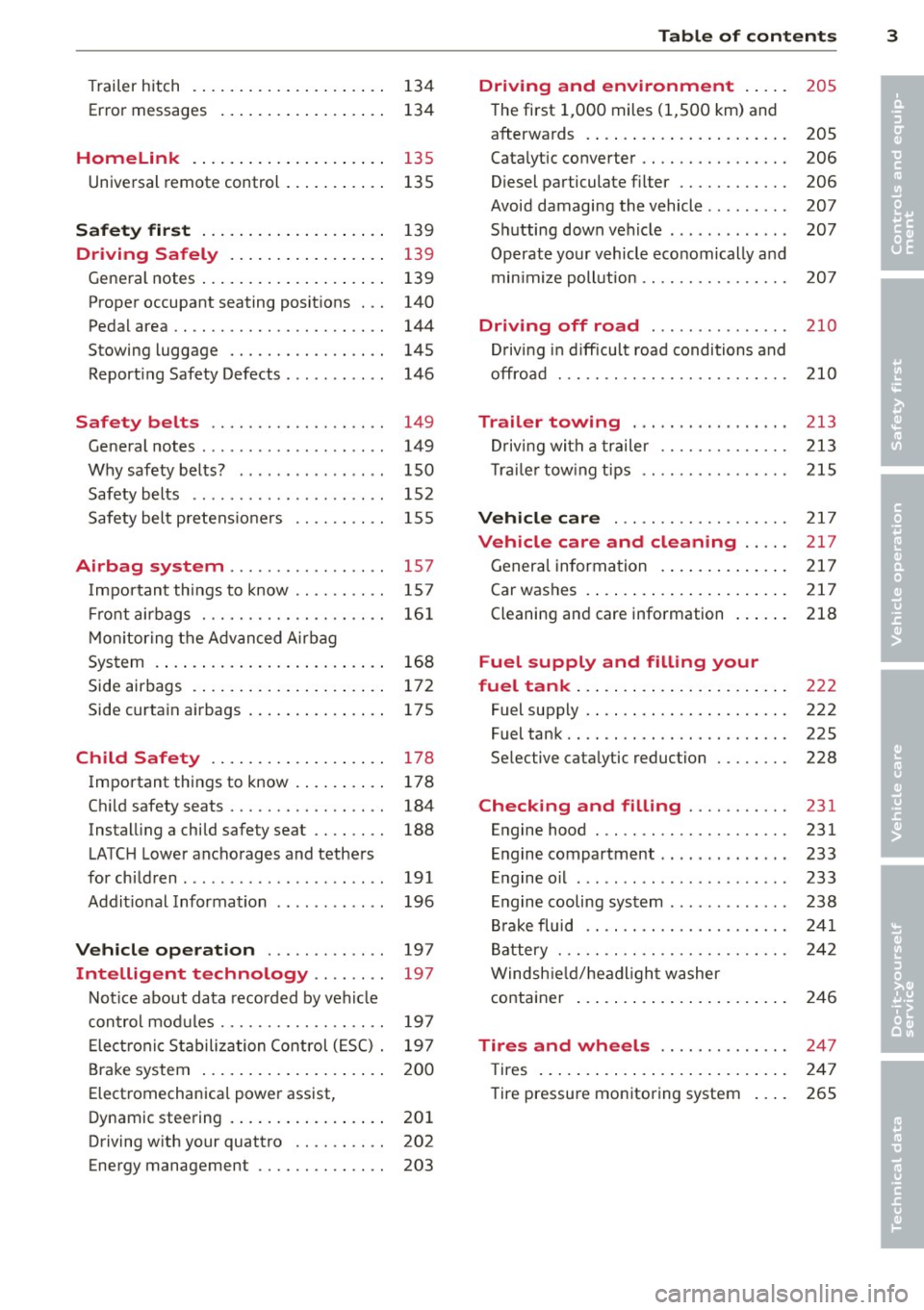
Trailer hitch ................... . .
Error messages
Homelink ................ ... . .
Universal remote control .......... .
Safety first ................... .
134
134
135
135
139
Dri ving Safely . . . . . . . . . . . . . . . . . 139
General notes . . . . . . . . . . . . . . . . . . . . 139
Proper occupant seating positions . . . 140
Pedal area . . . . . . . . . . . . . . . . . . . . . . . 144
Stowing luggage . . . . . . . . . . . . . . . . . 145
Reporting Safety Defects . . . . . . . . . . . 146
Safety belts . . . . . . . . . . . . . . . . . . . 149
General notes . . . . . . . . . . . . . . . . . . . . 149
Why safety belts? . . . . . . . . . . . . . . . . 150
Safety belts . . . . . . . . . . . . . . . . . . . . . 152
Safety belt pretensioners . . . . . . . . . . 155
Airbag sy stem .......... ... ... . 157
Important things to know . . . . . . . . . . 157
Front airbags . . . . . . . . . . . . . . . . . . . . 161
Monitoring the Advanced Airbag
System . . . . . . . . . . . . . . . . . . . . . . . . . 168
Side airbags . . . . . . . . . . . . . . . . . . . . . 172
Side curtain airbags . . . . . . . . . . . . . . . 175
Child Safety ................. . .
Important things to know ........ . .
Child safety seats ......... .... .. . .
Installing a child safety seat .. .. .. . .
LATCH Lower anchorages and tethers
for children .... .. .. ...... .. .. .. . .
Additional Information
Vehicle operation ....... .. .. . .
Intelligent technology .. .. . .. .
178
178
184
188
191
196
197
197
Notice about data recorded by vehicle
control modules . . . . . . . . . . . . . . . . . . 197
Electronic Stabilization Control (ESC) . 197
Brake system . . . . . . . . . . . . . . . . . . . . 200
Electromechanical power assist,
Dynamic steering . . . . . . . . . . . . . . . . . 201
Driving with your quattro . . . . . . . . . . 202
Energy management . . . . . . . . . . . . . . 203
Table of contents 3
Driving and environment . . . . .
205
The first 1,000 miles (1,500 km) and
afterwards . . . . . . . . . . . . . . . . . . . . . . 205
Catalytic converter . . . . . . . . . . . . . . . . 206
Diesel particulate filter . . . . . . . . . . . . 206
Avoid damaging the vehicle . . . . . . . . . 207
Shutting down vehicle . . . . . . . . . . . . . 207
Operate your vehicle economically and
min imize pollution . . . . . . . . . . . . . . . . 207
Driving off road . . . . . . . . . . . . . . . 210
Driving in difficult road conditions and
offroad . . . . . . . . . . . . . . . . . . . . . . . . . 210
Trailer towing . . . . . . . . . . . . . . . . . 213
Driving with a trailer . . . . . . . . . . . . . . 213
Trailer towing tips . . . . . . . . . . . . . . . . 215
Vehicle care . . . . . . . . . . . . . . . . . . . 217
Vehicle care and cleaning . . . . . 217
General information . . . . . . . . . . . . . . 217
Car washes . . . . . . . . . . . . . . . . . . . . . . 217
Cleaning and care information . . . . . . 218
Fuel supply and filling your
fuel tank . . . . . . . . . . . . . . . . . . . . . . .
222
Fuel supply . . . . . . . . . . . . . . . . . . . . . . 222
Fuel tank. . . . . . . . . . . . . . . . . . . . . . . . 225
Selective catalytic reduction . . . . . . . . 228
Checking and filling . . . . . . . . . . . 231
Engine hood . . . . . . . . . . . . . . . . . . . . . 231
Engine compartment . . . . . . . . . . . . . . 233
Engine oil . . . . . . . . . . . . . . . . . . . . . . . 233
Engine cooling system . . . . . . . . . . . . . 238
Brake fluid . . . . . . . . . . . . . . . . . . . . . . 241
Battery . . . . . . . . . . . . . . . . . . . . . . . . . 242
Windshield/headlight washer
container . . . . . . . . . . . . . . . . . . . . . . . 246
Tires and wheels . . . . . . . . . . . . . . 247
T ires . . . . . . . . . . . . . . . . . . . . . . . . . . . 247
Tire pressure monitoring system . . . . 265
•
•
Page 13 of 316
Instrument s and warning /indicator lights 11
Warning light in th e instrument cluster
display
If th e. warn ing light in th e instr ument clus
ter disp lay flashes, this can mean one of two
things: either the coo lant
t empera ture is too
high, or the coolant
level is too low
¢ page 30.
If the needle is we ll in the upper area of the
ga uge, the coo lant temperature is too high.
Stop the veh icle , switch the engine off, and
allow it to cool.
I f the warni ng light comes o n
again after driving a short distance, contact
an author ized Audi d ealer or other qualif ied
wo rkshop.
.&, WARNING
- Always o bserve the w arning i n
¢page 231, be fore opening t he hood
and checking t he engine coo lant level.
- N ever open t he engine hood i f you see o r
hear steam, or if you see en gine coolant
dr ipping from the eng ine com partment.
You could burn yo urself. Let the engine
cool off first so that you cannot hear or
see any steam or engine coolant .
CD Note
-Mo unt ing additional lights or accessories
i n front of t he a ir inlets red uces the cool
i ng effect of the rad iator . At h igh outside
temperatures or high eng ine load, the
engine could ove rheat .
- The front spo ile r has been designed to
proper ly distr ibute the cooling air when
the veh icle is moving .
If the spoiler is
damaged, th is cou ld re duce the cooling
effect and t he engine co uld th e n over
hea t. Ask yo ur auth o riz ed Aud i de aler fo r
ass ist ance.
Tachometer (engine rev counter)
The tachometer indicate s the engine RPM
(rev olu tion s per minu tes).
If engine R PM drops be low 1,500, you should
downshift to the nex t lower gea r. T he red a rea
at t he e nd of the s ca le ind icates maxim um p
ermissible engine RPM after the break- in pe
r iod. Before reaching this a rea , move these
l ector lever to position D/S o r ease your foot
off the acce lerator pedal.
CD Note
The tac hometer nee d le @ ¢ page 1 0,
fig . 3 should on ly briefly be in the red
zone: you cou ld damage yo ur engine! T he
b egin ning of the red z one var ies depend
i ng o n the engine .
® For the sake of the environment
Upshifting early saves fuel and reduces en
g ine noise .
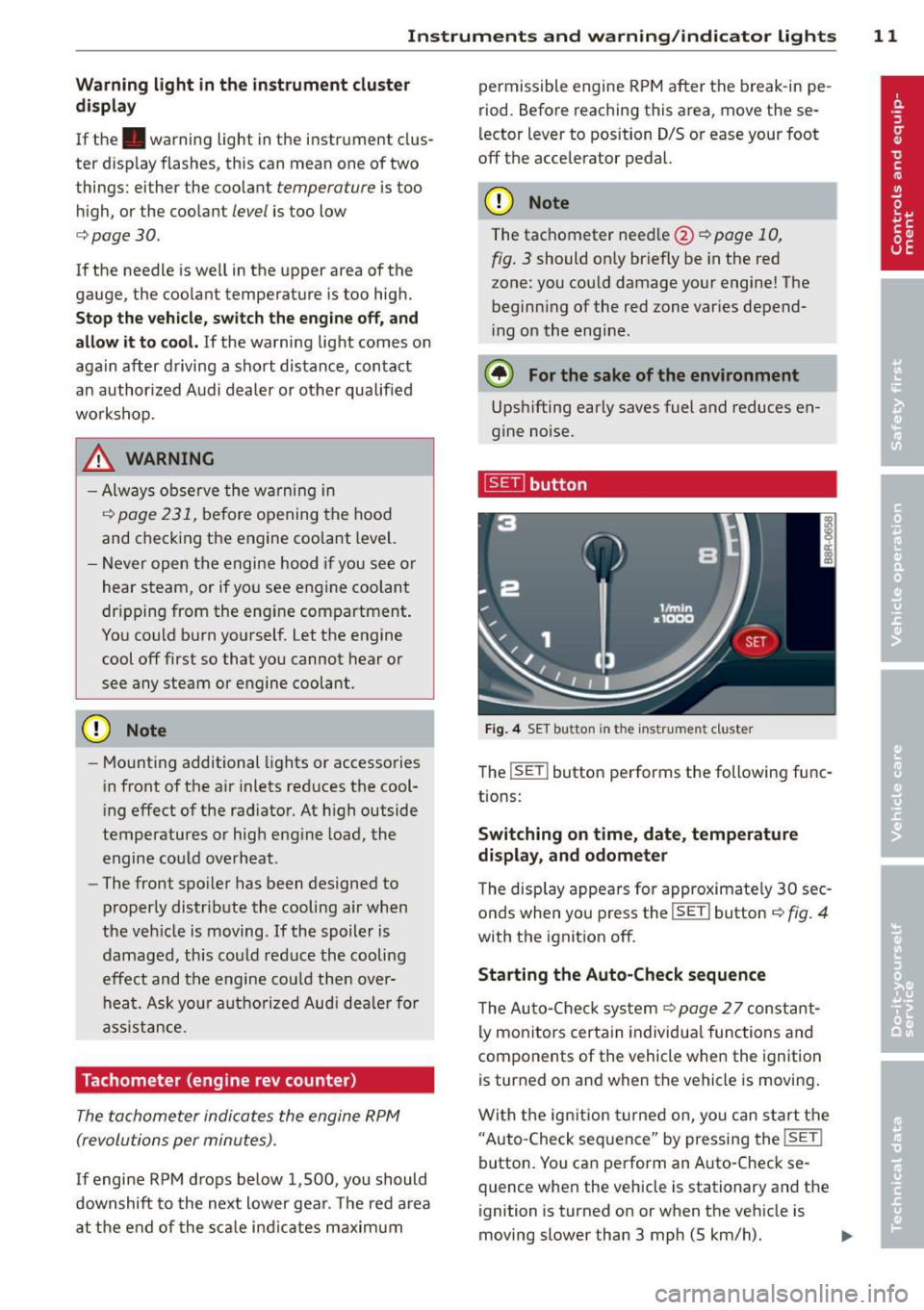
[gTi button
Fig. 4 SET b utt on in th e ins trume nt clust er
The !SE T! button performs the following fu nc
t ions:
Switching on time, date , temperature
display, and odomete r
The disp lay appears for a pproximate ly 30 sec
o nds when yo u press the
I SE T! button ¢ fig. 4
with the ignition off.
Starting the Auto -Check sequence
T he Au to-C he ck sys tem ¢ page 2 7 const ant
ly mon itors certa in individu al functions and
components of the vehicle whe n the ignition
is turned on and when th e vehicle is moving .
W it h the ig nition turne d on, yo u can s tart t he
"Auto -Chec k se qu ence" by pressing the
!SET !
button. You ca n pe rform an Auto-Check se
quence when the veh icle is stationary and the
ignition is turned on or when t he veh icle is
moving slower than 3 mph (5 km/h).
Page 32 of 316
30 Driver in formation d isplay
Audi dealer or other qualified workshop
and have the malfunction corrected.
_ t Engine cooling system malfunction
A malfunct ion in the engine cooling system
must be repaired as soon as possible .
If the . symbo l flashes in the d isplay, either
the eng ine coolant
temperature is too h igh or
the engine coolant
level is too low . A driver
m essage appea rs as we ll to exp lain the mal
function in more detail. The driver warning
goes out after about 5 seconds, but it can be brought up at any time by press ing the
ISETI
button again .
Turn off engine and check coolant level
• Pull off the road.
• Stop the vehicle .
• Turnoff the engine.
• Check coolant leve l
c> page 239.
• Add coolant if necessary c> page 239 .
• Continue driving only after the eng ine cool
ant war ning/ indicato r light goes o ut.
• Co ntact you r autho rized Audi dea le r fo r as-
s istance if necessary .
If the engine coolant level is correct, then the r adiato r fan may be the cause of the malfunc
tion .
.&, WARNING
-If your veh icle should break down for
mech anic al or other re asons, park at a
sa fe dis tance from moving traffic, turn
off the engine and turn on the hazard
wa rning lights ~
page 52, Emergency
flashers.
-
- Never open the hood if you see or hea r
steam or coolant escap ing from the en
gine compartme nt -you risk being scald
ed. Wait until you can no longer see or
hear steam or coo lant escaping .
- The e ngine compartment of any ve hicle
is a da ngerous a rea . Before you perform
any wor k in the engine compartment,
t ur n of the eng in e and allow it to cool.
Follow the wa rni ng sti cke rs ~
page 231.
(D Note
Do not continue dr iv ing if the . symbo l
ill um inates . There is a mal function in the
engine cooling system -you could damage
your engine.
"l:::r. Engine oil pressure malfunction
T he red engine oil pressure warning symbol
requires immediate service or repair. Driving with a low oil pressure indication is likely to
cause severe engine damage .
If the . symbo l on the disp lay flashes, the
engi ne oil pressure is too low. A driver mes
sage appears as we ll to exp la in the malfunc
t io n in more detail. The dr iver warning goes
o ut afte r abo ut 5 seconds , but it can be
brough t up at any t ime by p ressing the
- IS- ET- I
butto n ag ain .
Turn off engine! Oil pressure too low
• Stop the vehicle.
• Turn the engine
off.
• Check the engine oil level c> page 236 .
• Contact your authorized A ud i dealer for as-
sistance if necessa ry.
Eng ine oil level too low
If the engine oil level is too low, add engine
o il
c>page 236 .
Engine oil level correct
If the symbol . flashes even tho ugh the en
gine oil leve l is correct, please contact your
nearest authori zed Aud i Dea ler for assistance.
Do not continue dr iving . Do not leave the en
gine ru nning
idle, either .
(D Tips
- The engine oil pressure symbol. is
not an indicator for a low eng ine oil lev
el. Do not rely on it. Instead, check the
oil level in your engine at regular inter
vals, preferably each time you refuel, and always before going on a long trip .
- The yellow oil level warning indication
II requires oil refill or workshop .,..
Page 76 of 316
7 4 Seats and storage
Climatized cupholders
Appl ies to vehicles: wit h clim atized beverage holders
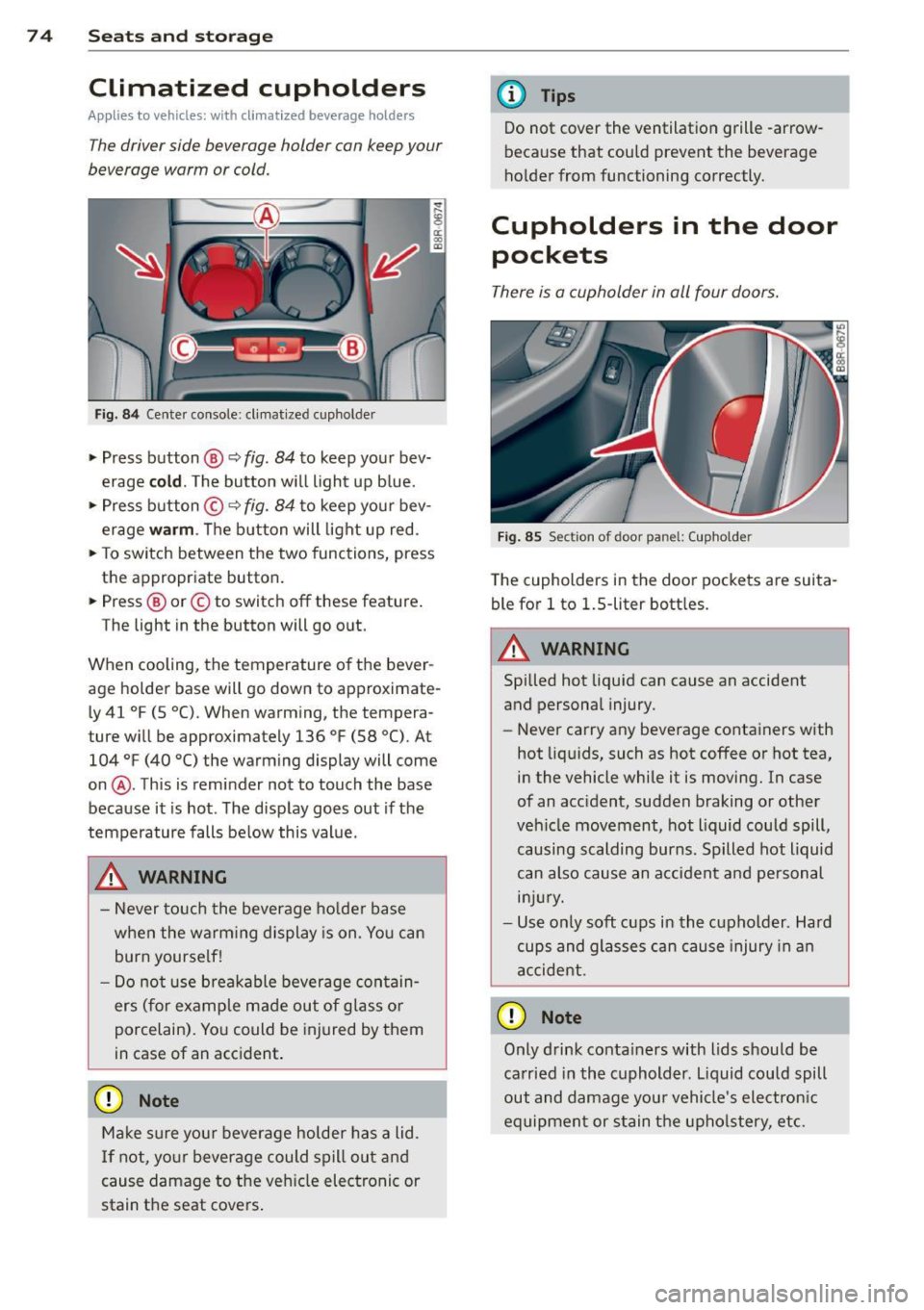
The driver side beverage holder can keep your
beverage warm or cold.
Fi g. 8 4 Center console: cl imat ized cup holder
.,. Press button @ q fig. 84 to keep your bev
erage
cold . The button w ill light up b lue .
.,. Press button ©
q fig. 84 to keep you r bev
erage
warm . The button will light up red .
.,. To sw itch between the two functions, press
the appropriate button.
.,. Press @ or© to switch
off these feature .
The light in the button will go o ut.
When cooling, the temperature of the bever
age holde r base will go down to approximate·
L y 41
°F (5 °C). When warming, the tempera
ture w ill be approximately 136
°F (58 °(). At
104
°F (40 °() the warm ing display will come
on @. This is reminder not to touch the base
because it is hot . The disp lay goes out if the
temperature falls be low this value.
_& WARNING
- Never to uch the beverage ho lde r base
when the warm ing display is on. Yo u can
burn yourse lf!
- Do not use breakable beverage con tain
ers (for example made out of glass o r
porcelain). Yo u could be injured by them
in case of an acc ident.
(D Note
Ma ke sure you r beverage holder has a lid.
I f not, yo ur beverage could spill out and
cause damage to t he ve hicle elec tronic or
stain t he seat cove rs .
-
(D Tips
Do not cover the ventilation grille -arrow
because that could prevent the beverage
ho lder from functioning correctly.
Cupholders in the door
pockets
There is a cupholder in all four doors.
F ig . 85 Section of door pa nel : (upholde r
The cupholders in the doo r pockets are suita
ble for
l to 1.5-liter bott les .
.&_ WARNING
-==
Spilled hot liquid can cause an accident
and personal injury.
-
-Never carry any beverage containers with
hot liq uids, such as hot
coffee or hot tea,
in the vehicle while it is moving. In case
of an acc ident, sudden braking or othe r
veh icle movement, hot liquid could spill,
causing scalding burns. Spilled hot liquid
can also cause an a ccident and pe rsonal
in jur y.
- Use on ly soft cups in the cupholder . Hard
cups and glasses can cause injury in a n
accident.
0 Note
Only drink conta iners with lids should be
ca rried in the cuphold er. L iquid could spill
out and damage you r vehicle's electron ic
equipment or stain the upho lstery, etc.
Page 78 of 316
76 Seats and storage
The 12-volt sockets can be used for electrical
accessories. The power input must not exceed
120 watts.
There is an additional 12-volt socket in the
center console. Before you purchase any accessories, always
read and follow the information in
Q page 295, Additional accessories and parts
replacement.
A WARNING
The power outlets and therefore the elec
trical accessories connected to them oper ate only with the ignition on. Improper use
of the outlets or of electrical accessories
can lead to serious injuries or cause a fire.
For this reason, children should never be
left unattended in the vehicle -they could
be injured!
(D Note
To avoid damaging the socket, only use
plugs that fit properly .
{D) Tips
When the engine is off and accessories are
still plugged in and are on, the vehicle bat
tery can still be drained .
Storage
General overview
There are numerous places to store items in
your vehicle.
Glove compar tment Q page 76
Cooling box in glove com part-Qpage 77
ment
Storage compartment in the
Qpage 77
roof
Coat hooks
Qpage 77
Storage in the door panels
Storage net in footwell
-
Storage net in the front seat- backs
Storage net in luggage com- partment
A WARNING
--
- Always remove objects from the instru
ment panel. Any items not put away
could slide around inside the vehicle
while driving or when accelerating or
when applying the brakes or when driv ing around a corner.
- When you are driving make sure that
anything you may have placed in the cen
ter console or other storage locations
cannot fall out into the footwells. In case
of sudden braking you would not be able
to brake or accelerate.
- Any pieces of clothing that you have
hung up must not interfere with the driv
er's view. The coat hooks are designed
only for lightweight clothing. Never hang
any clothing with hard, pointed or heavy
objects in the pockets on the coat hooks .
During sudden braking or in an accident -
especially if the airbag is deployed -
these objects could injure any passen
gers inside the vehicle.
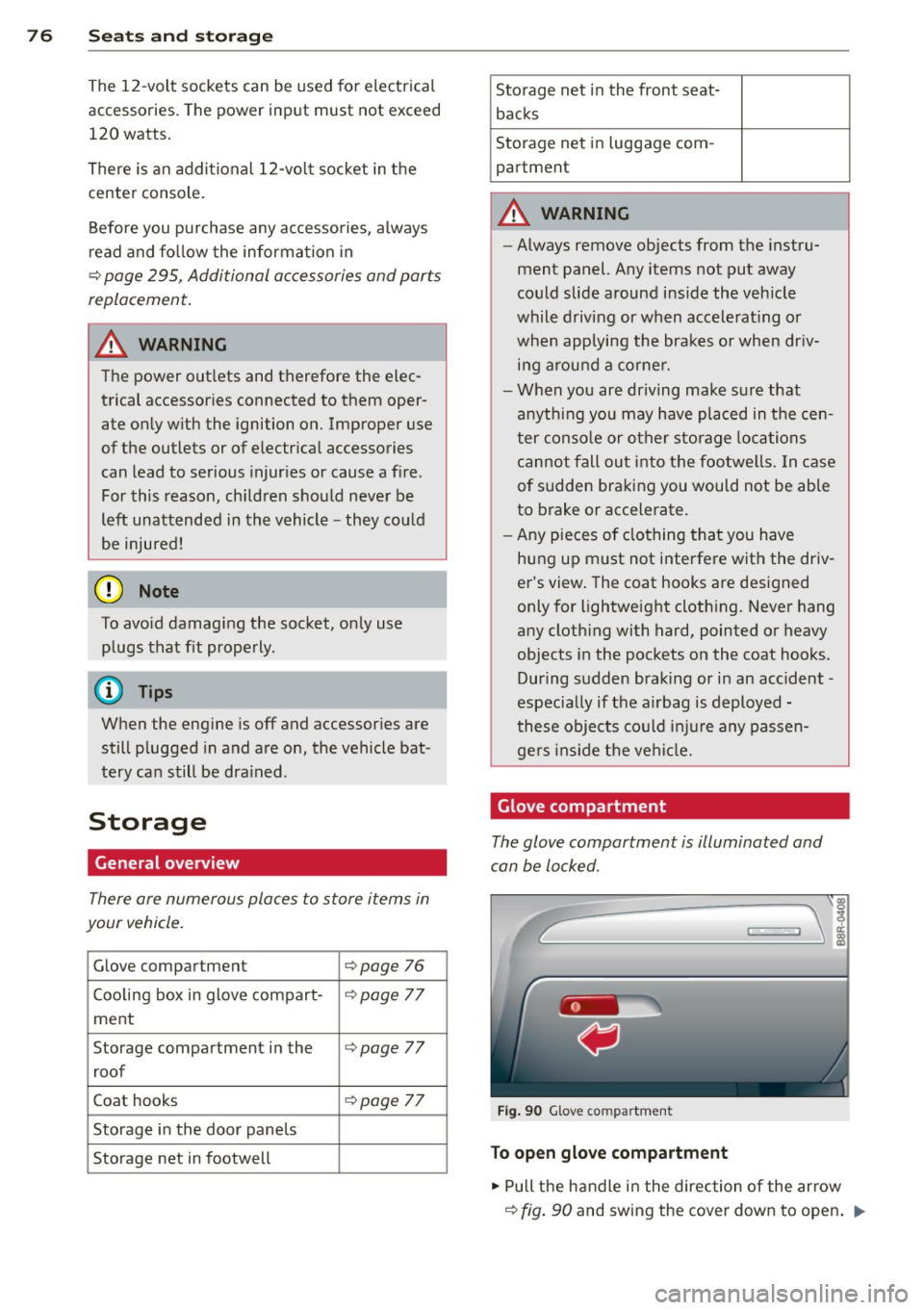
Glove compartment
The glove compartment is illuminated and
can be locked .
Fig. 90 Glove co mpartm ent
To open glove compartment
.,. Pull the handle in the direction of the arrow
Q fig. 90 and swing the cover down to open . ..,.
Page 79 of 316
To close glove compartment
• Push the g love compartment lid upward un-
ti l the lock engages.
There are holders for a pen and a pad of paper in the glove compartment lid.
On the right side in the glove compartment is
a holder with the key body into which the
emergency key must be cl ipped to be able to
start the vehicle .
A WARNING
To reduce the risk of personal injury in an
accident or sudden stop, a lways keep the
glove compartment closed whi le driving.
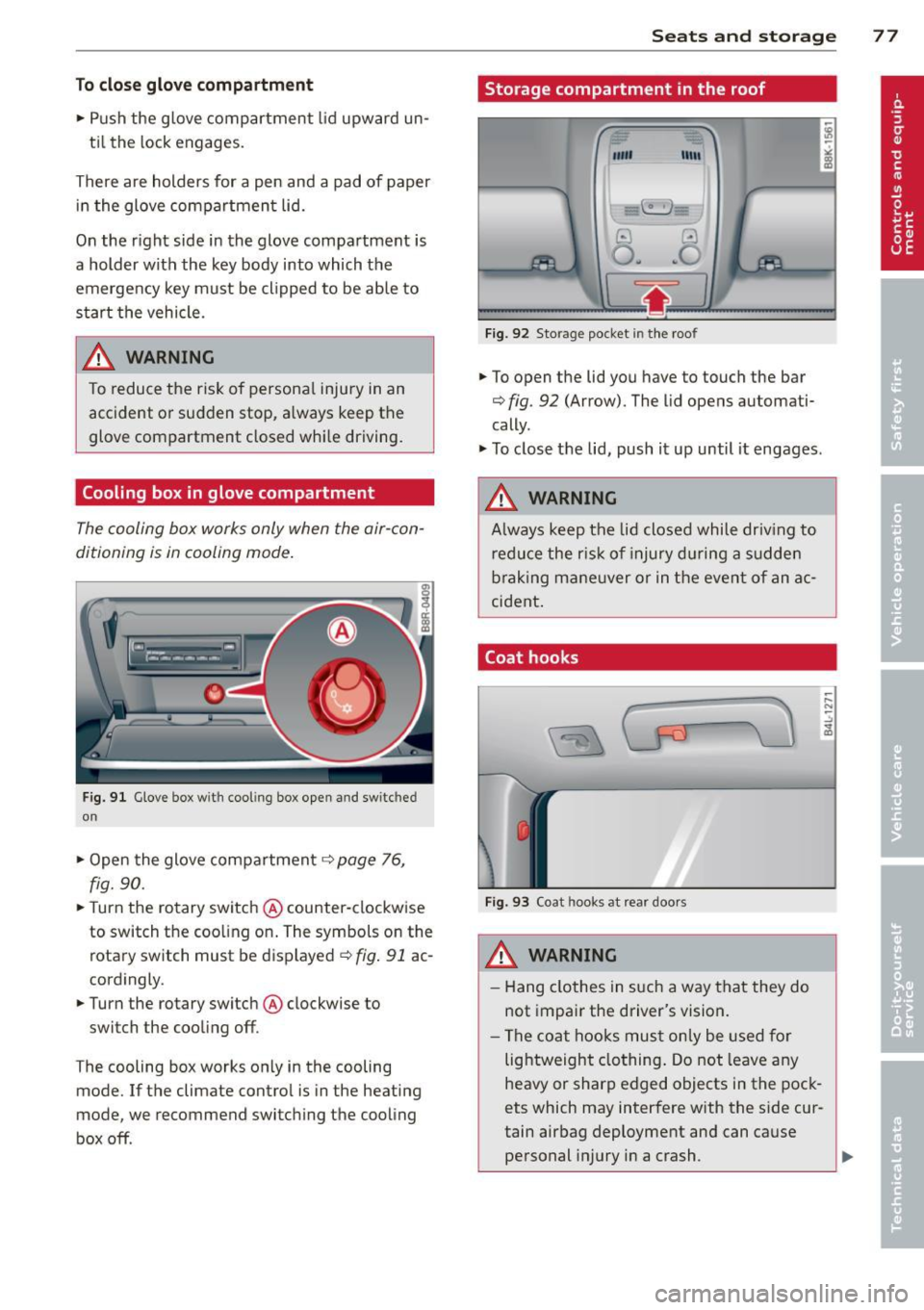
Cooling box in glove compartment
The cooling box works only when the air-con
ditioning is in cooling mode.
Fig. 91 Glove box w ith cool ing box open and switc hed
on
" Open the glove compartment c::> page 76,
fig. 90.
"T urn the rotary switch @ counter-clockwise
to switch the coo ling on. The symbols on the
rotary switch must be displayed
c::> fig. 91 ac
cordingly .
• Turn the rotary switch @ clockwise to
switch the cooling off .
T he cooling box works only in the cooling
mode. If the climate contro l is in the heating
mode, we recommend switching the cooling
box off .
Seats and storage 77
Storage compartment in the roof
""'
11111
Fig. 92 Storage pocket in the roof
.. To open the lid you have to touch the bar
c::> fig . 92 (Arrow). The lid opens automati
cally .
" To close the lid, push it up until it engages .
A WARNING
Always keep the lid closed while driv ing to
reduce the risk of injury during a sudden
braking maneuver or in the event of an ac
cident .
Coat hooks
Fig. 93 Coat hooks at rear doors
_& WARNING
- Hang clothes in such a way that they do
not impair the driver's vision.
- The coat hooks must only be used for
lightweight clothing. Do not leave any
heavy or sharp edged objects in the pock
ets which may interfere with the side cur
tain airbag deployment and can cause personal injury in a crash .
Page 81 of 316
Warm and cold Climate control
Description
The climate control system warms, cools and
adds humidity to the a ir in the veh icle inter io r.
It is the most effect ive when the windows and
panoramic sliding sunroo f* are closed . If
there is a build-up of heat inside the vehicle,
venti lation can help to speed up the cooling
process.
I n all heating mode f unctions except
defrost,
the blower on ly switches to a higher speed
once the engine coolant has reached a certain
temperature.
Condensation from the cooling system can
drip and form a puddle of water under the vehicle. This is normal and does not mean there
is a leak.
Pollutant filter
The po llutant filte r removes po llutants s uch
as dust and pollen from the air.
The air pollutants filte r must be changed at
the in tervals specified in you r Wa rranty
&
Main tenance book let, so tha t the air condi
tioner can properly work.
I f you drive you r vehicle in an area with h igh
a ir po llution, the fi lter may need to be
ch anged more freq uent ly than specified in
your Aud i Warranty
& Ma intenance booklet. If
i n doubt, ask your authorized A udi Service Ad
visor for advice .
K ey coded settings
The climate con trol settings are automat ically
stored and assigned to the remote cont ro l key
that is in use .
& WARNING
Reduced visibility is dangero us and can
cause accidents . -
Warm and cold 79
-For safe driving it is very important that
all windows be free of ice, snow and con
densat ion.
- Comp letely fam iliarize yourse lf with the
proper use and funct ion of the heat ing
and ve nti lation system and especially
how to defog and defrost the w indows.
- Never use the windshield wiper/washer
system in freez ing weather unt il you
have warmed the w indshield first, using
the heating and ventilation system. The
washer sol ution may free ze o n the wind
shie ld and red uce visib ility.
(D Note
- If you suspect that the air conditioner has been damaged, switch the system
off to avoid furt her damage and have it
i n spected by a q ua lified dea lership.
- Repairs to the Audi air conditioner re
quire specia l techni cal know ledge and
speci al tools. Contact an autho rized Aud i
dealer fo r ass istance.
@ For the sake of the environment
B y reduci ng the amou nt of f uel you use,
you also red uce the amount of pollutan ts
emitted in to the air.
(D Tips
- Keep the air intake s lots ( in fro nt of the
w indshield) free from ice, snow and de
br is in order to maintai n the proper f unc
tion of the climate control system.
- T he energy management system may
switch the seat heating* or rear window
defroster off temporar i Ly . These systems
are available again as soon as the energy
balance has been restored.
- The air flowing out of the vents and
throughout the vehicle's entire interior is
discharged at the rear of the ve hicle.
Make sure that the outlet slots are not
covered by clothing, etc.
Page 82 of 316
80 Warm and cold
Operation
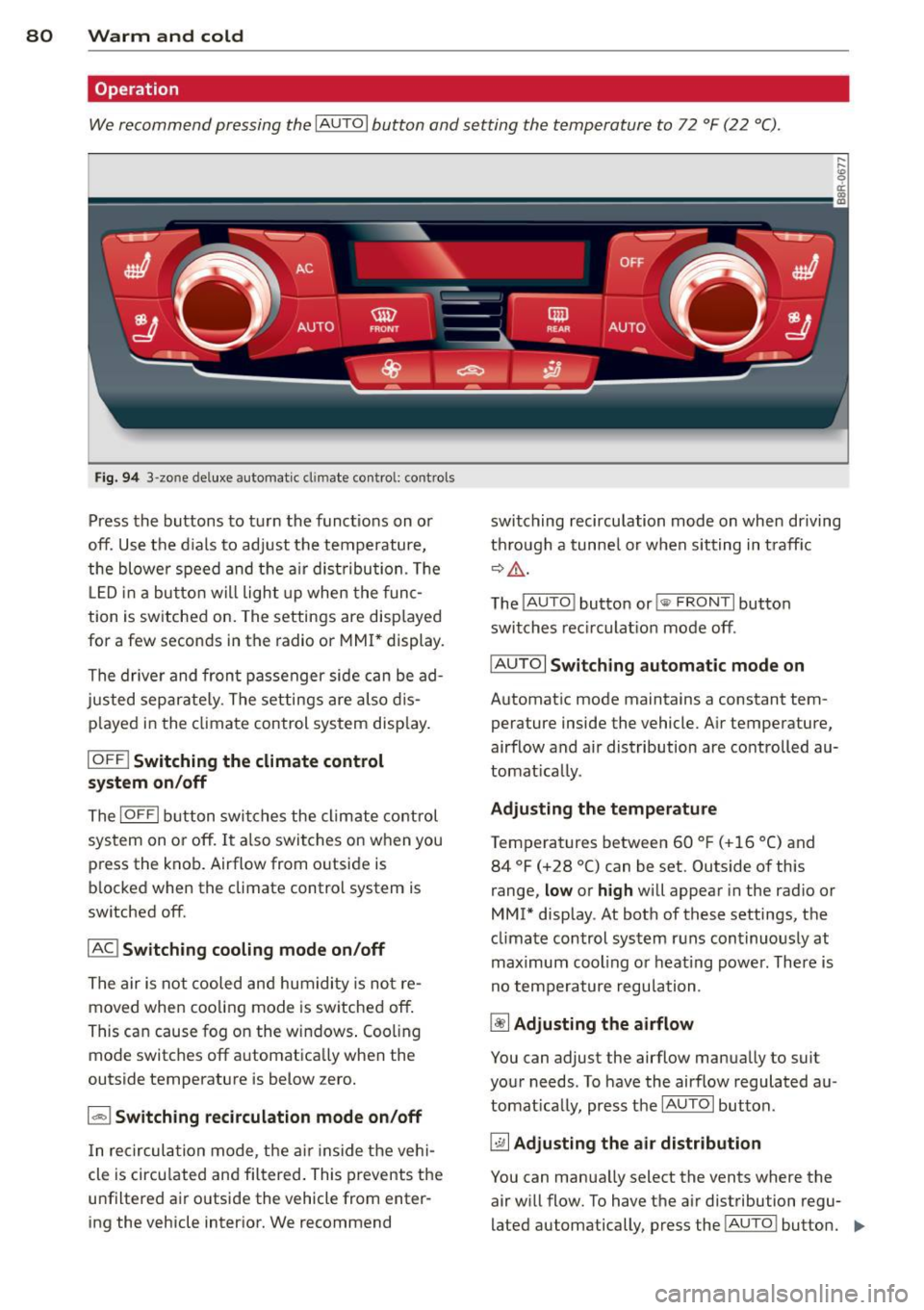
We recommend pressing the IAUTOI button and setting the temperature to 72 °F (22 °C) .
Fig. 94 3 -zo ne de luxe automat ic cl imate contro l: controls
Press the buttons to turn the functions on or
off. Use the d ials to adjust the temperature,
the blower speed and the air dist ribution . Th e
L ED in a button wi ll light up when the func
tion is switched on. The settings are disp layed
for a few seconds in the radio or MMI* display.
The driver and front passenger side can be ad
justed separately. The settings are also dis
p layed in the climate control system disp lay.
IOFF I Switching the climate control
system on/off
The IOFFI button switches the climate control
sys tem on or off. It also switches on when you
press the knob. Airflow from o utside is
b locked when the climate control system is
switched off.
IAC ! Switching cooling mode on/off
The air is not cooled and humidity is not re
moved when cooling mode is switched off.
This can cause fog on the windows . Cooling
mode switches off a utomatica lly when the
outside temperature is below zero.
1 - 1 Switching recirculation mode on/off
In recirculation mode, the air inside the vehi
cle is circu lated and filtered . This prevents the
u nfiltered air outside the vehicle from enter
ing the vehicle interior. We recommend switching
recirculation mode on when driving
th rough a tunnel or when sitting in traff ic
~&. -
The IAU TO I button or!@ FR ONT I button
switches recirculation mode off.
IAU TOI
Switching automatic mode on
Automatic mode maintains a constant tem
perature inside the vehicle. Air temperature,
airflow and air distribution are controlled au
tomatically.
Adjusting the temperature
Temperatures between 60 °F (+16 °C) and 84 °F (+28 °C) can be set. Outside of this
range,
low or high will appear in the radio or
MMI* display . At both of these settings, the
climate control system runs continuously at
maximum cooling o r heating power. There is
no temperature regulation .
~ Adjusting the airflow
You can adjust the airflow manually to suit
your needs . To have the airflow regulated au
tomatically, press the IAUTOI button .
~ Adjusting the air distribution
You can manua lly select the vents where the
air will flow. To have the a ir distribution regu
lated automatically, press the !AU TO ! button.
IIJ,,
Page 216 of 316
214 Trailer towing
Operating instructions
6"
i ~
I 1,2 ..
{ ~
~
,,
-
2
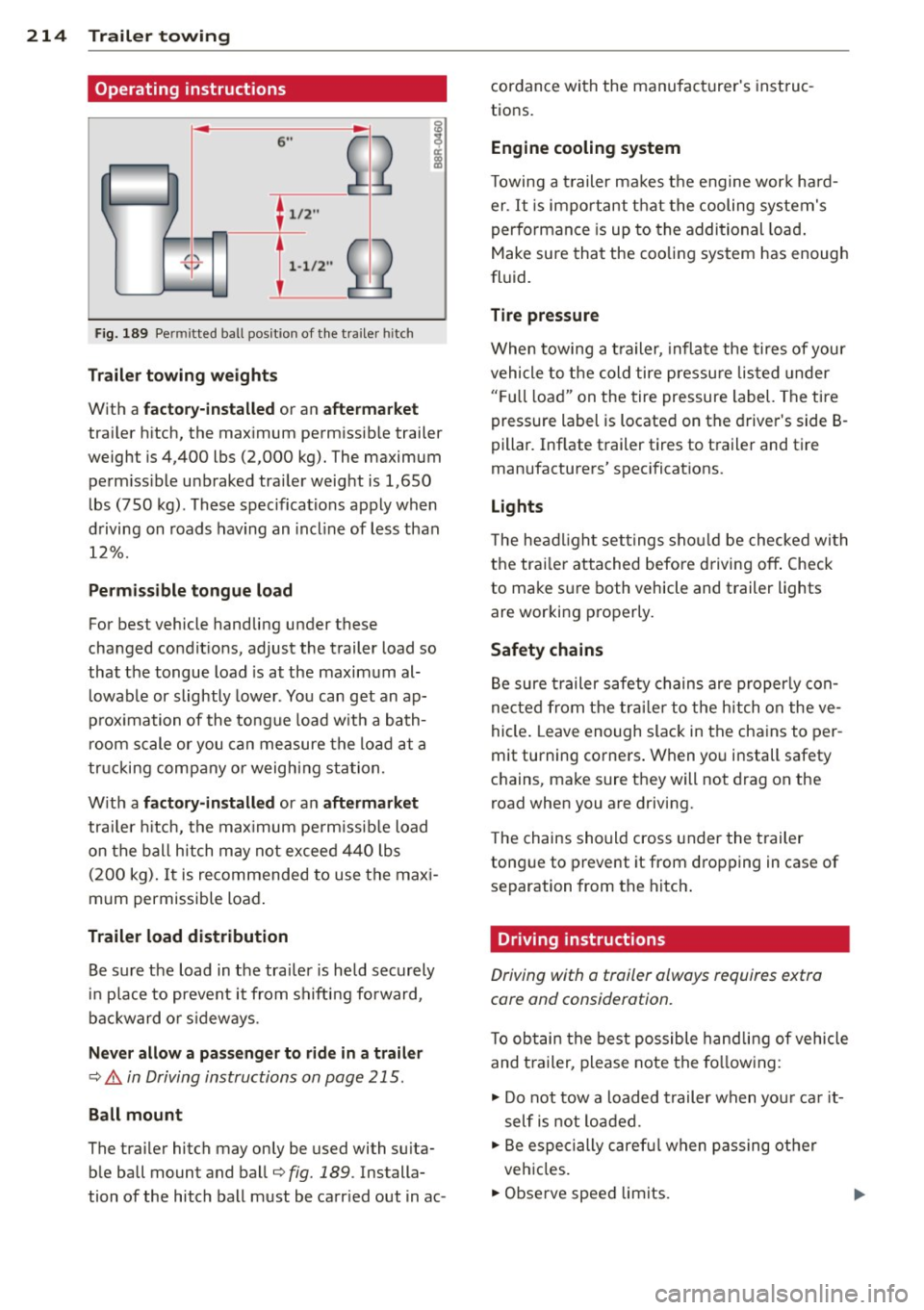
Fig. 189 Pe rmi tted ball posit ion of the tra iler h itch
T ra ile r tow ing weight s
With a factor y-insta lled or an afte rm arket
trailer h itch, the max imum permissib le trailer
weight is 4,400 lbs (2,000 kg). The maximum perm iss ible unbraked trailer weight is 1,650
lbs (750 kg). These spec ifications apply when
driving on roads hav ing an incl ine of less than
12%.
P erm is s ible tongue load
For best vehicle handling under these
changed condit ions, adjust the trailer load so
that the tongue load is at the maximum al
l owable or slightly lower . You can get an ap
p rox imation of the tongue load w ith a bath
room scale or you can measure the load at a
tr ucking company or weighing sta tion.
W ith a
fact ory -in stall ed or an aftermarket
trailer h itch, the max imum pe rm issible load
on the ball hitch may not exceed 440 lbs (200 kg).
It is recommended to use the maxi
mum permissible load .
Trailer lo ad distribut ion
Be sure the load in the trai ler is held securely
in place to prevent it from shifting fo rward,
backward or s ideways.
N eve r allow a p assenger to rid e in a trail er
¢ .&. in Driving instructions on page 215.
Ball mount
The trailer hitch may only be used with su ita
ble ball mount and ball¢
fig. 189. Installa
tion of the hitch ball must be carr ied out in ac- cordance with the manufacturer's instruc
tions.
Eng ine cooling system
T owing a t railer makes the engine work hard
er . It is important that the cooling system's
performance is up to the additional load .
Make sure that the cooling system has enough
fluid.
Tire pressur e
When towing a trailer, inflate the tires of your
vehicle to the cold tire pressu re listed under
" F u ll load" on the tire pressure label. The tire
pressure label is located on the driver's side B·
pillar. Inflate trailer tires to trailer and tire
manufacturers' spec ificat ions.
Lights
T he headlight settings shou ld be checked wi th
the trai ler attached before driving off . Check
to make sure both vehicle and trailer lights
are working properly.
Safety chains
Be sure trailer safety chains are properly con
nected from the tra iler to the hitch on the ve
hicle . Leave enough slack in the chains to per
mit turning corners . When you install safety
chains, make sure they will not drag on the
road when you are driving.
T he chains should cross under the trailer
tongue to prevent it from dropping in case of separation from the hitch .
Driving instructions
Driving with a trailer always requires extra
core and consideration.
T o obtain the best possible handling of vehicle
and t railer, please note the fo llowing :
.,. Do not tow a loaded t railer when you r ca r it
self is not loaded .
.. Be especially caref ul when passing ot her
vehicles.
.. Observe speed limits.
Page 237 of 316
names etc.) that conform to Audi oi l standard
VW 502 00 (vehicles with gasoline engine) or
VW 507 00 (vehicles with diesel engine).
C hang ing th e engin e oil
The engine oil and oi l filter must be changed
according to the m ileage (kilomete rs) and
time inte rva ls specified in yo ur vehicle's War
ranty
& Maintenance booklet. Do not exceed
these intervals -harmful deposits from old
engine oil can reduce engine performance and
can lead to expensive eng ine repairs.
Changing the o il at the recommended inter
va ls is so very important because the lubricat
ing properties of oi l decrease gradually during
norma l vehicle use . If you are not sure when
you have your oi l changed, ask your author
ized Audi Service Advisor.
Under some circ umstances the engine oi l
should even be changed more frequently .
Change o il more often if you drive mostly
short distances, operate the vehicle in dusty
areas or mostly under stop-and -go traffic con
d itions, or when you use your veh icle where
temperatures stay below freezing point for l ong periods.
Detergent addit ives in the o il w ill make fresh
oil look dark after the eng ine has been run
n ing for a short time. This is norma l and is not
a reason to change the o il mo re often than
r ecommended.
Damage or ma lf u nction s du e to lac k of
ma intenance
It is essential that you change your oil at the
recommended interva ls using only engine oil
that complies with Audi oil standard
VW 502 00 (vehicles with gasoline engine) or
VW S07 00 (veh icles with diese l engi ne). Yo ur
L im ited New Vehicle Warra nty does not cover
damage or ma lfunctions due to failure to fol
l ow recommended maintenance and use re
quirements as set forth in the A udi Owner's
Manual and Warranty
& Maintenance book let.
Your dealer will have to deny warranty cover age un less you present to the dea ler proof in
the form of Service or Repa ir Orders that a ll
Checking and fillin g 235
scheduled maintenance was performed in a
timely manner.
· Engine oil consumption
The engine in your vehicle depends on an ade
quate amount of oil to lubricate and cool all
of its moving parts.
In order to prov ide effective lubrication and
cooling o f inte rna l engine components, all in
ternal combustion engines consume a certain
amount of oil. Oil consumpt ion varies from
engine to engine and may change sign ificantly
over the life of the engine. Typically, engines
with a spec ified break-in period (see
Q page 205) consume more oil during the
break-in pe riod than they consume after o il
consump tion has stabilized.
Under normal cond itions, the rate of oi l con
sumption depends on the quality and viscos ity
of the oil, the RP M (revolut ions per minute) at
which the engine is operated, the ambient
tempe rature a nd road conditions. Furt her fac
tors are the amount of oil dilut ion from wa ter
condensation or fue l residue and the oxida
tion level of the oi l. As any engine is subject to
wear as mi leage builds up, the oil consump
tion may increase over time until replacement
of worn components may become necessary.
With a ll these variab les coming into p lay, no
standard rate of oil consumpt ion can be es
tablished or spec ified. There is no alternative
to regular and frequent check ing of the o il lev
el, see
Not e.
If the yellow engine oil level warning symbo l
in the instrument cluster
II lights up, you
shou ld check the oil leve l as soon as possib le
¢ page 236 . Top off the oil at your earliest
convenience
~ page 236.
&_ WARNING
Before you chec k anything in the engine
compa rtmen t, always read and heed al l
WARNI NGS
Q .&. in Working in the engine
compartment on page 231 .
•
•