child lock AUDI Q5 2015 Owners Manual
[x] Cancel search | Manufacturer: AUDI, Model Year: 2015, Model line: Q5, Model: AUDI Q5 2015Pages: 302, PDF Size: 75.01 MB
Page 38 of 302
Opening and closing
Opening and closing
Keys
Key set
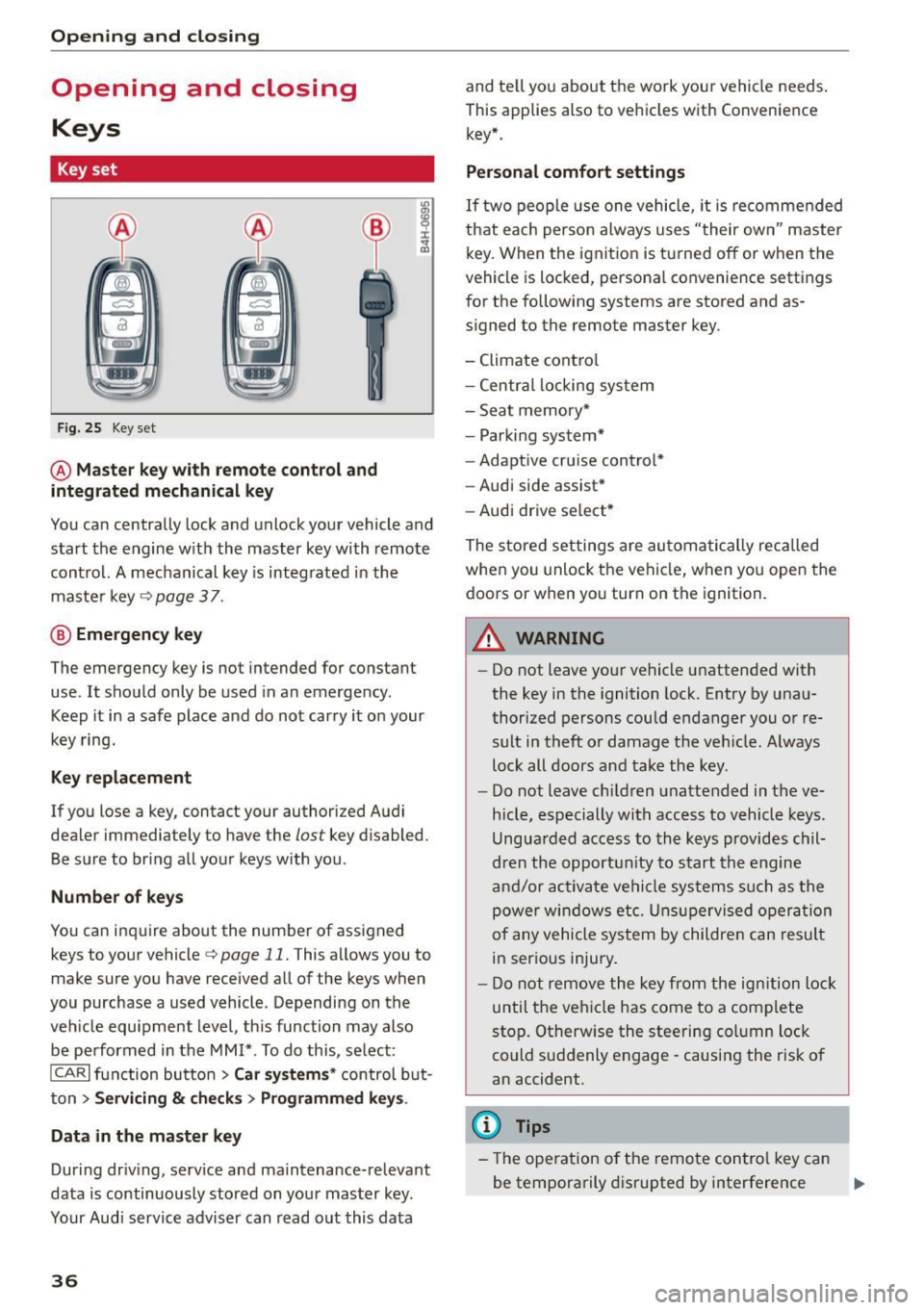
F ig . 25 Key set
@ Master key with remote control and
integrated mechanical key
You can centrally lock and unlock your vehicle and
start the engine w ith the master key with remote
contro l. A mechanical key is integ rated in the
maste r key
¢page 37 .
@ Eme rgency key
The emergency key is not intended for constant
use . It shou ld only be used in an emergency .
Keep it in a safe place and do not carry it on your
key ring.
Key replacement
If you lose a key, contact your authorized Audi
dealer immediately to have the
lost key disabled.
Be sure to bring all your keys with you .
Number of key s
You ca n inquire about the number of assigned
keys to your vehicle¢
page 11. This allows you to
make sure you have received all of the keys when
you purchase a used vehicle . Depending on the
veh icle equ ipment level , th is function may also
be performed in the
MM I* . To do this, se lect:
ICARI function button > Car systems * control b ut
ton
> Servicing & c h eck s> Programmed key s.
Data in the master key
During dr iv ing, serv ice and ma intenance-relevant
data is continuously stored on you r mas ter key.
Your Audi service adviser can read o ut this data
36
and te ll yo u about the work you r vehicle needs .
This applies also to vehicles with Convenience key* .
Personal comfort settings
If two people use one vehicle, it is recomme nded
that each perso n always uses "their own" master
key. When the ignition is tu rne d off or when the
vehicle is locked, persona l convenience settings
for the following systems are stored and as
signed to the remote master key.
- Climate cont ro l
- Centra l locking system
- Sea t memory*
- Parki ng system*
- Adaptive cru ise cont rol*
- Audi side assist*
- Aud i drive se lect *
The store d settings are au toma tic ally reca lled
when you unlock the vehi cle, when yo u open the
doors or when yo u turn on the ignition.
A WARNING
-
- Do not leave your ve hicle unattended with
the key in the ignition lock. Entry by una u
thorized persons could endanger you or re
sult in theft or damage the ve hicle. Always
loc k all doors and take the key .
- Do not leave ch ild ren unattended in the ve
hicle, especially with access to vehicle keys .
Ungua rded access to the keys provides chil
dren the opportu nity to s tart the engine
a nd/or ac tiva te ve hicle sys te m s su ch as the
power w ind ow s etc. Unsup ervised op eration
of any vehicle system by childre n can resul t
in ser ious injury.
- Do not remove the key fr om the ign ition lock
until the ve hicle has come to a com plete
sto p. Otherwise the steering co lumn lock
could suddenly engage -causing the risk of
an accident.
(D Tips
- The operation o f the remote con trol key ca n
be temporarily d isrupted by interference .,..
Page 41 of 302
M N
co
a:
co
...... \!) 1.1'1
N 1.1'1 ......
Turn signals
When you unlock the vehicle, the turn signa ls
flash twice. When you lock the vehicle, the turn
signals flash once. If they do not flash, one of the
doors, the rear lid or the hood is not locked.
Unintentionally locking yourself out
In the following cases there safeguards to pre
vent yo u locking yo ur remote master key in the
vehicle:
- Th e veh icle does not lock with the power lock
ing switch ~
page 42 if the dr iver's door is
open .
- On vehicles with Convenience key*, if the most
recently used master key is in the luggage com
partment, the rear lid is automatically un locked
again after it is closed.
Do not lock your vehicle with the
remote master
key or Convenience key*
until all doors and the
rear lid are closed . In this way you avoid locking
yourself out accidenta lly.
& WARNING
- When you leave the vehicle, always remove
the ignition key and take it with you. This
will prevent passengers (children, for exam
ple) from accidentally being locked in the
vehicle should they acc identally press the
power locking switch in the front doors .
- Do not leave children ins ide the veh icle un
supervised . In an emergency it wou ld be im
poss ible to open the doors from the outside
without the key.
(D Tips
-In the event of a crash with airbag deploy
ment all locked doors will be automatically
unlocked to give access to the vehicle occu
pants from the outside.
- If the power locking system should mal
function, you can lock the dr iver's door us
in g the mechanical key~
page 42.
-If the power locking system should fail, you
can still open the fuel tank flap in an emer
gency~
page 217.
- You are we ll advised not to keep valuables
insi de an unattended vehicle, vis ible or not.
Opening and closing
Even a properly locked vehicle cannot pro
vide the security of a safe.
- If the LED in the upper edge of the driver's
door pane l comes on for about 30 seconds
after the vehicle is locked, there is a mal
function in the power locking or the ant i
theft warning system. Have the malfunction corrected by an authorized Audi dealership
or qualified repair facility .
Setting power locking
The driver can determine the functions for power
locking in the radio or in the MMI*.
.. Select: !CARI function button> Cent ral locking .
Or
.,. Select:
!CARI function button > Car systems*
control button > Vehicle settings > (Central
locking )*.
Unlocking single door/Unlock doors -
you can
specify wh ich doors unlock when you open the ve
hicle .
- Select ing Off /All and press ing the ~ button on
the remote control key unlocks the entire vehi
cle .
- Select ing
On /Driver and press ing the ~ button
on the remote control key once unlocks only the
driver's door. In vehicles with a convenience
key*, only the door whose handle you pull will
unlock. If you press the
[ru butto n twice, the en
tire vehicle will unlock. If you p ress the~ but
ton, the entire vehicle will always lock.
Trunk lid/tailgate /Lock exterior trunk handle -if
you select
On , the rear lid handle locks
~ page 43, fig. 35. In this case, the rear lid can
be opened with the
l""'I button on the master key
Q page 40, fig. 29 or with the~ button in the
driver's door~
page 43, fig . 34.
Fold mirrors * -if you select On , the outside mir
rors will fold in automatically when you press the
~ button on the remote control key Q page 59.
Confirmation tone /Tone when locking -if you
select
On , a tone w ill sound when you lock the ve
hicle.
39
Page 44 of 302
Opening and closing
Locking and unlocking the vehicle from
inside
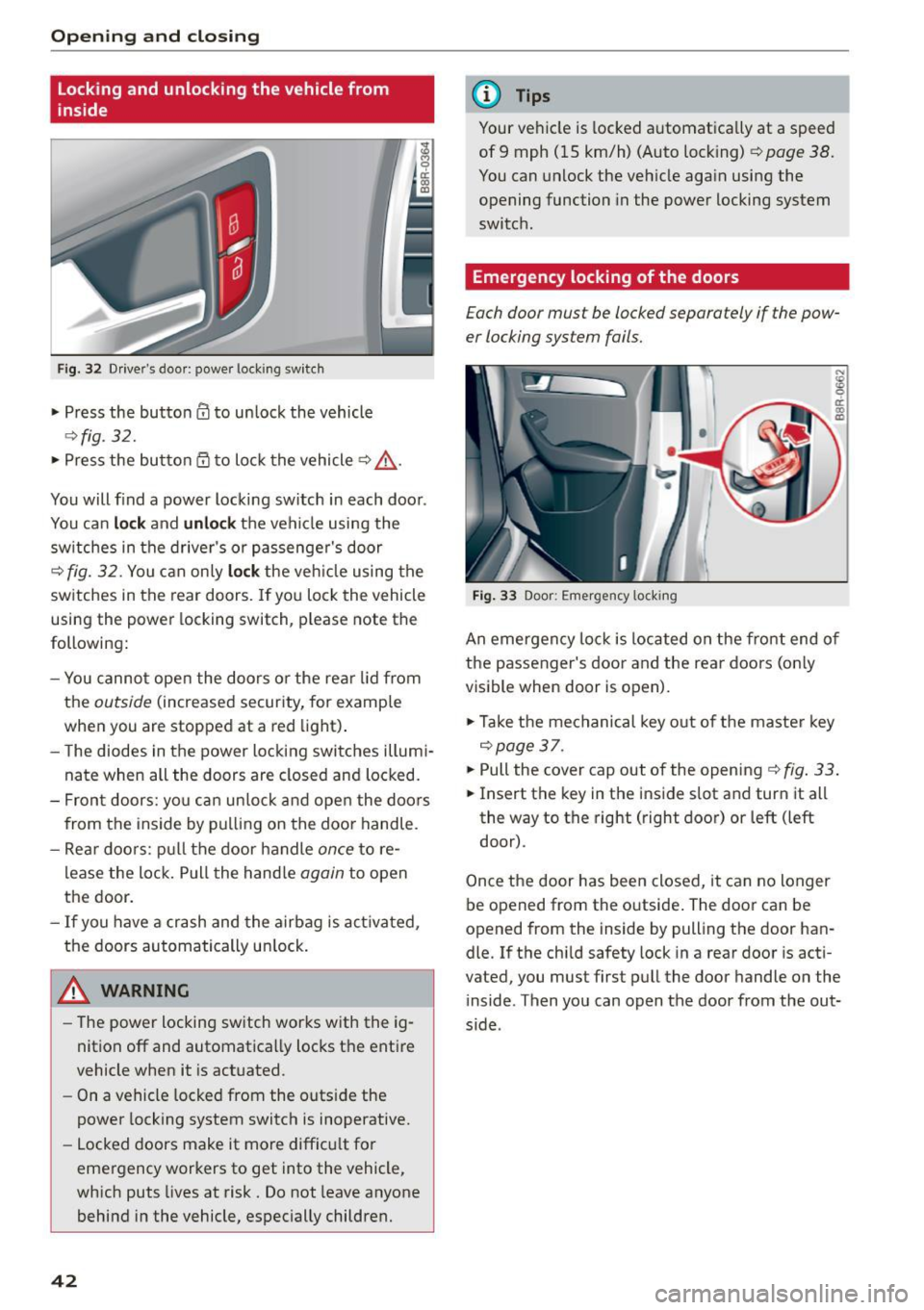
Fig. 32 Drive r's door : power lo ckin g sw it ch
• Press the button 0 to unlock the vehicle
~ fig. 32.
• Press the button Qj to lock the vehicle ~.&, .
You will find a power locking switch in each door .
You can
lo ck and unlock the veh icle using the
sw itches in the driver's or passenger's door
¢
fig. 32. You can only lo ck the veh icle using the
switches in the rear doors. If you lock the vehicle
using the power locking switch , please note the
following:
- You cannot open the doors o r the rear lid from
the
outside (increased security, for example
when you are stopped at a red light) .
- The diodes in the power locking switches illumi
nate when all the doors are closed and locked.
- Front doors: yo u can un lock and open the doors
from the inside by pulling on the door handle.
- Rear doo rs: pull the door handle
once to re
lease the lock. Pull the hand le
again to open
the door.
- If you have a crash and the airbag is act ivated,
the doors automatically un lock.
A WARNING
- The power locking sw itch works with the ig
nition off and automatically locks the entire
vehicle when it is actuated.
- On a vehicle locked from the outs ide the
power locking system switch is inoperative.
- Locked doors make it more difficu lt for
emergency workers to get into the vehicle,
which puts lives at risk. Do not leave anyone
behind in the vehicle, especially children.
42
@ Tips
Your vehicle is locked automatica lly at a speed
of 9 mph ( 15 km/h) (Auto locking)¢
page 38.
You can unlock the vehicle again using the
opening function in the power locking system
switch .
Emergency locking of the doors
Each door mus t be locked separately if the pow
er locking sys tem fails.
Fig. 33 Door : Emerge ncy lo ckin g
An emergency lock is located on the front end of
the passenger's door and the rear doors (only
visible when door is open).
• Take the mechanical key out of the master key
¢page 37 .
• Pull the cover cap out of the opening ¢ fig. 33.
• Insert the key in the inside slot and turn it all
the way to the right (right door) or left (left
door) .
Once the door has been closed, it can no longer
be opened from the outside. The door can be
opened from th e inside by pulling the door han
dle. If the child safety lock in a rear door is acti
vated , you must first pull the door handle on the
inside . T hen you can open the door from the out
s ide .
Page 45 of 302
M N
co ~ co
rl I.O
"' N
"' rl
Opening and closing rear
lid
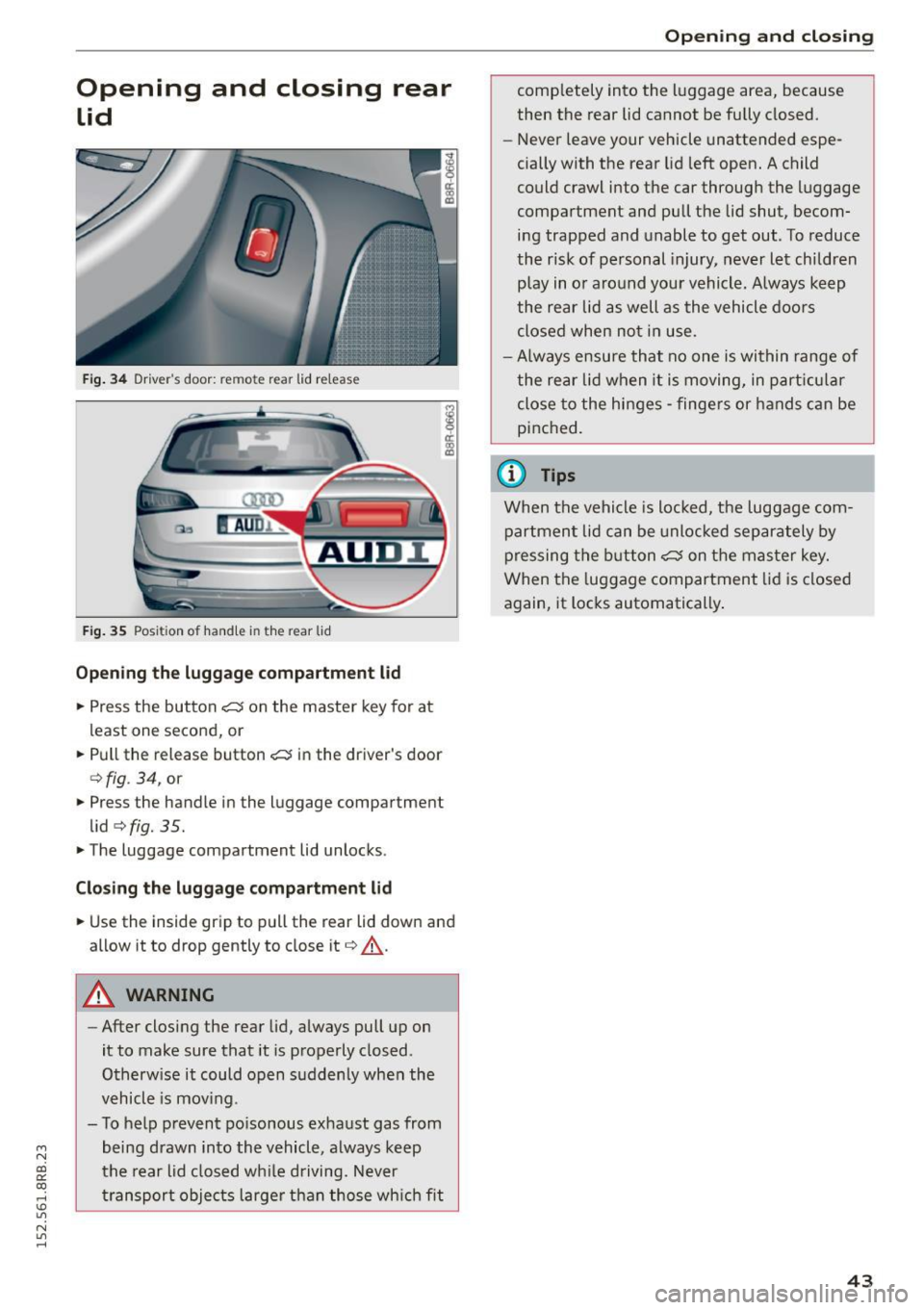
Fig. 34 Driver's door: remote rear lid release
Fig. 35 Position of handle in the rear l id
Opening the luggage compartment l id
.,. Press the button <:::::5 on the master key for at
least one second, or
.. Pull the release button
<:::::5 in the driver's door
c:>fig . 34, or
.,. Press the handle in the luggage compartment
lid
c:> fig. 35 .
.. The luggage compartment lid unlocks.
Closing the luggage compartment lid
.. Use the inside grip to pull the rear lid down and
allow it to drop gently to close it
c:> A .
A WARNING
-After closing the rear lid, always pull up on
it to make sure that it is properly closed .
Otherwise it could open suddenly when the
vehicle is mov ing.
- To help prevent po isonous exhaust gas from
being drawn into the vehicle, always keep
the rear lid closed while driving. Never
transport objects larger than those which fit
Opening and closing
completely into the luggage area, because
then the rear lid cannot be fully closed.
- Never leave your vehicle unattended espe
cially with the rear lid left open. A child
could crawl into the car through the luggage
compartment and pull the lid shut, becom ing trapped and unable to get out. To reduce
the risk of personal injury, never let children
play in or around your vehicle. Always keep
the rear lid as well as the vehicle doors
closed when not in use.
-Always ensure that no one is within range of
the rear lid when it is moving, in particular
close to the hinges -fingers or hands can be
pinched.
(0 Tips
When the vehicle is locked, the luggage com
partment lid can be unlocked separately by
pressing the button
<:::::5 on the master key.
When the luggage compartment lid is closed
again, it locks automatically .
43
Page 47 of 302
M N
co ~ co
rl I.O
"' N
"' rl
-Always ensure that no one is with in range of
the rear lid when it is mov ing, in particular
close to the hinges and the upper and lower
edges - f ingers or hands can be pinched.
- To help prevent po isonous exhaust gas from
being drawn into the vehicle, a lways keep
the rear lid closed wh ile driving . Never
transport objects large r than those wh ich fit
compl etely into the luggage area , because
then the rea r lid cannot be fully closed .
- Never leav e your vehicle unattended espe
c ially w ith the rear lid left open. A ch ild
c ou ld craw l in to the car through t he luggage
c ompartment and pull the lid s hut, becom
ing t rapped and unable to get ou t. To red uce
the risk of perso nal in jury, never let children
play i n or around your veh icle . Always keep
the rear lid as well as the vehicle doors
closed when not in use.
- If there is a luggage rack or bicycle rack
mounted on the rear lid, it may not be able
to open completely or an ope ned rear lid
may close by itse lf because of the added
we ight. So the open rear lid must be sup
ported or the weight m ust be removed from
the luggage ra ck fi rst .
(O} Tips
- As soon as the electrical connection to the
tra ile r socket is completed on veh icles with
a f actory insta lled towing hitch, o r a trailer
hitch that was insta lled later acco rding to
fac tory spe cifi ca tions , th e au tomat ic rear li d
fu nct ion can only be operate d via the hand le
in the rea r lid .
- If th e vehicle battery charge drops below a
certain level, yo u can sti ll open or close the
r ear lid manua lly, however, you w ill need to
apply more force to close it.
- If the rear lid on a locked vehicle is un locked
with the middle button
,c:$ on the remote
key, the rear lid is automatically locked
again immediately after closing. This is indi
cated by the turn s ignals bli nking.
- The f ollowing applies to veh icles equipped
with the Conve nience key" feature: if the re
mote control key is left in the luggage com
partment, luggage compartment will auto-
Open ing and clo sing
matically unlock itse lf after yo u loc k the ve
hicle. This prevents you from unintentional·
Ly locking yo ur key in the luggage compart
ment.
Emergency unlocking of
the luggage compartment Lid
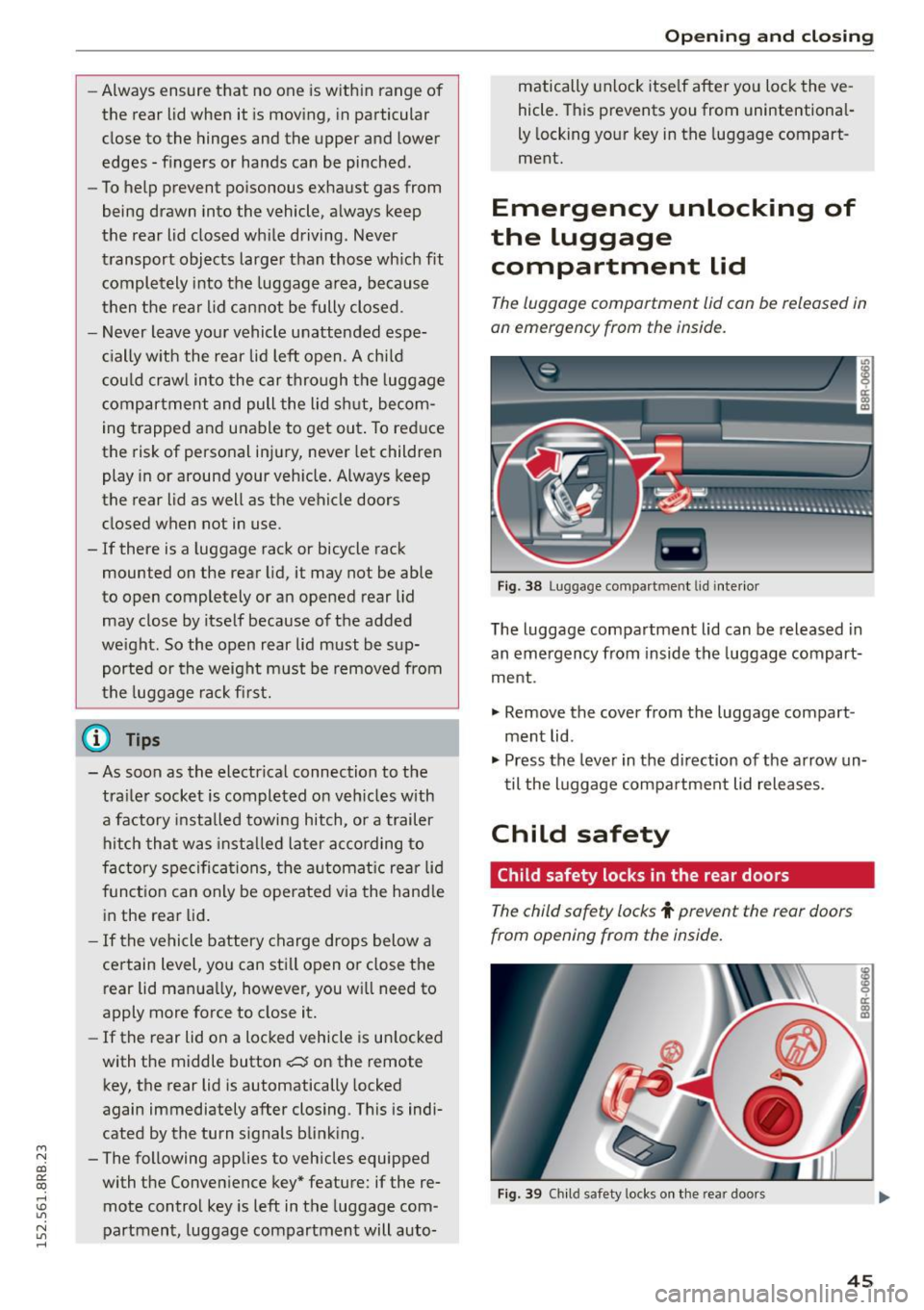
The luggage compartment lid can be released in
an emergency from the inside.
Fi g. 3 8 Luggage co mpa rtment lid i nte rior
T he luggage compartment lid can be released in
an emergency from inside the luggag e compart
me nt.
., Remove the cover from t he luggage compart
ment lid .
., Press the leve r in the di rection of the arrow un
t il the luggage compa rtment lid releases.
Child safety
Child safety locks in the rear doors
The child safety locks t prevent the rear doors
from opening from the inside.
Fig . 39 Chil d safety locks o n th e rea r doo rs
45
Page 48 of 302
Opening and closing
The rear doors are equipped with child safety
locks . The lock is only visib le when the door is
open . Take the mechan ica l key out of the master
key
c> page 3 7.
Switch ing the child safety loc ks on
"Turn the key in the direction of the arrow
<:>fig. 39.
Switching the child safety locks off
"Turn the key in the opposite d irection of the ar
row.
When the child safety locks are activated, the in
side door hand les do not work and the doors can
only be opened from the outside.
Power Windows
Controls
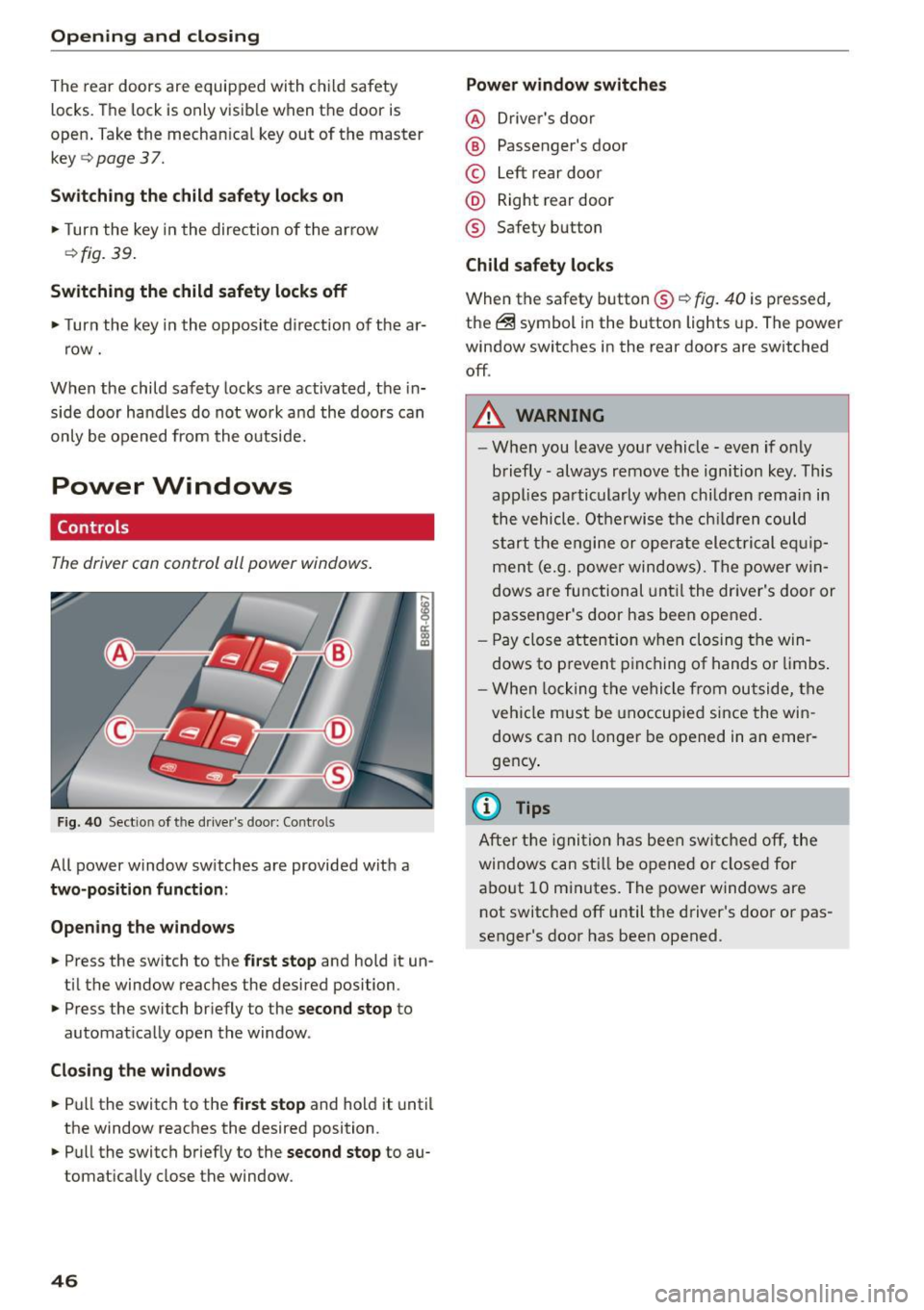
The driver con control all power windows .
Fig . 40 Sect ion of the driver 's doo r: Con trols
All power window sw itches are provided with a
two-position function :
Open ing th e windows
... Press the switch to the first stop and hold it un
ti l the window reaches the desired position .
... Press the switch br iefly to the
second stop to
automat ica lly open the window.
Clo sing the window s
... Pu ll the switch to the first stop and hold it until
the window reaches the desired position .
... Pull the switch briefly to the
second stop to au
tomatically close the window.
46 Power window switches
@ D
river 's doo r
® Passenger's door
© Left rear doo r
@ Right rear door
® Safety button
Child safety locks
When the safety button® c> fig. 40 is pressed,
the ~ symbol in the button lights up. The power
window switches in the rear doors are switched
off .
A WARNING
-W hen you leave you r vehicle - even if only
briefly -always remove the ignition key. This
applies pa rticula rly when children remain in
the vehicle. Otherwise t he ch ild ren could
s t art the e ngi ne or operate ele ct rical eq uip
men t (e.g. p ower windows). The power w in
dows are functional unt il the dr iver's door or
passenger's door has been ope ned.
- Pay close attention w he n closing t he win
dows to p revent p inching of hands o r limbs .
- W hen locking the ve hicle from outside, the
vehi cle must be unoccupied since the win
dows can no longer be opened in an emer
gency .
(D Tips
After t he ig nit ion has bee n swi tc h ed off , th e
windows can st ill be o pened or closed for
a bo ut 10 m inutes. The power windows are
not switched off until the driver's door or pas
senger's door has been opened .
Page 73 of 302
M N
co ~ co
rl I.O
"' N
"' rl
the lugg age compartment to help prevent
items from flying forward into the passen
ger compartment.
- Never attach a child safety seat tether strap
to a tie-down.
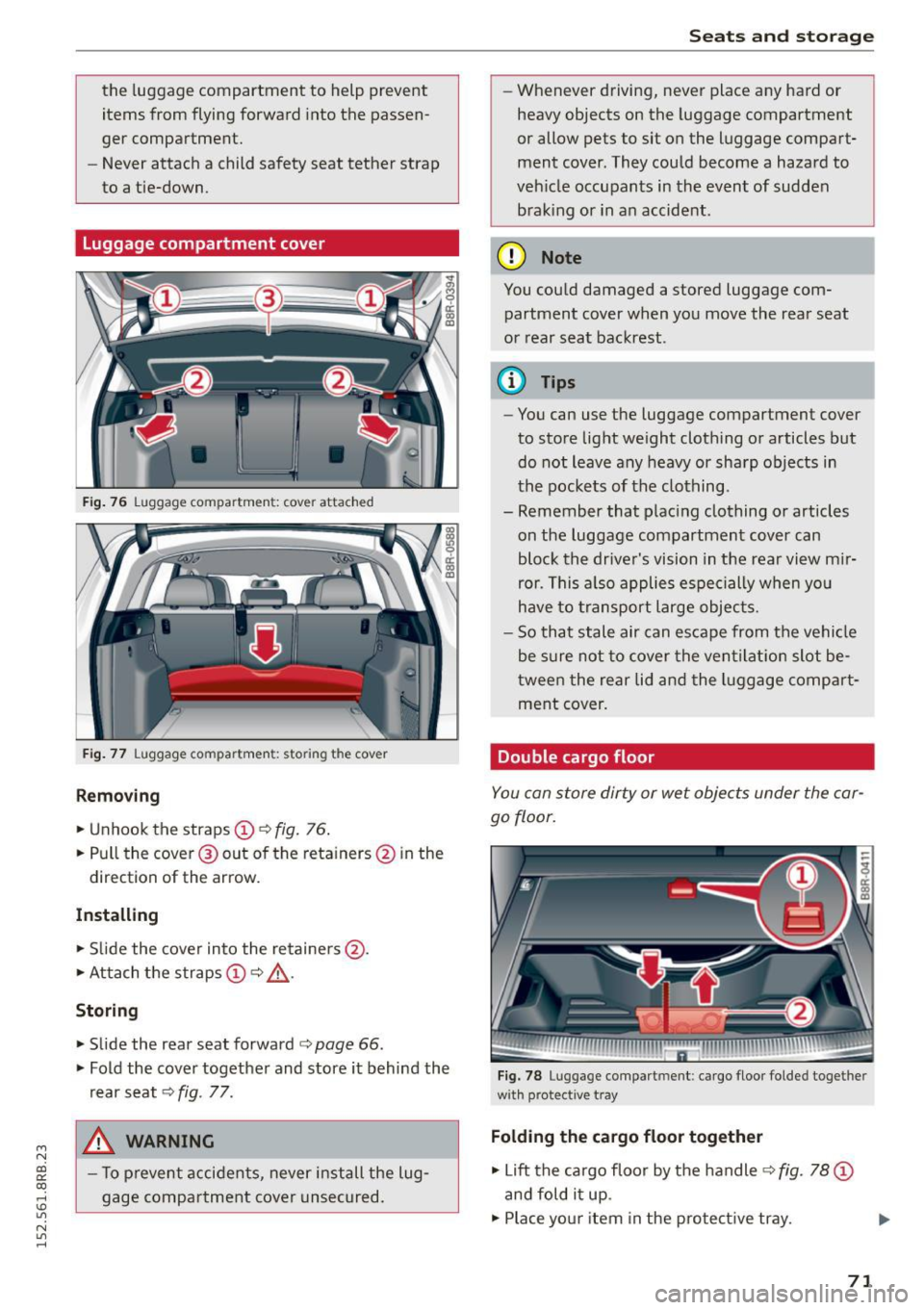
Luggage compartment cover
Fig. 76 Luggage compartment: cover attached
Fig. 77 Luggage compartment: storing the cover
Removing
"'Unhook the straps (!) c:> fig. 76.
"'Pull the cover @out of the reta iners @ in the
direction of the arrow.
Installing
"'Slide the cover into the retainers @.
"'Attach the straps
(D c:> ,&.
Storing
"' Slide the rear seat forward c:> page 66.
"' Fold the cover together and store it behind the
rear seat
c:> fig . 77.
A WARNING
- To prevent accidents, never install the lug
gage compartment cover unsecured.
-
Seats and storage
- Whenever driving, never place any hard or
heavy objects on the luggage compartment
or allow pets to sit on the luggage compart
ment cover . They could become a hazard to
vehicle occupants in the event of sudden
braking or in an accident .
(D Note
You could damaged a stored luggage com
partment cover when you move the rear seat
or rear seat backrest.
@ Tips
-You can use the luggage compartment cover
to store light weight clothing or articles but do not leave any heavy or sharp objects in
the pockets of the clothing .
- Remember that placing clothing or articles
on the luggage compartment cover can
block the driver's vision in the rear view mir
ror. This also applies especially when you
have to transport large objects.
- So that stale air can escape from the vehicle
be sure not to cover the ventilation slot be
tw een the rear lid and the luggage compart
ment cover.
Double cargo floor
You can store dirty or wet objects under the car
go floor.
Fig. 78 Luggage compartment: cargo floor folded togethe r
with protective tray
Folding the cargo floor together
"' Lift the cargo floor by the handle c:> fig. 78 (D
and fold it up .
"'Plac e your item in the protective tray. .,,.
71
Page 88 of 302
Driving
Starting the vehicle with the emergency
key
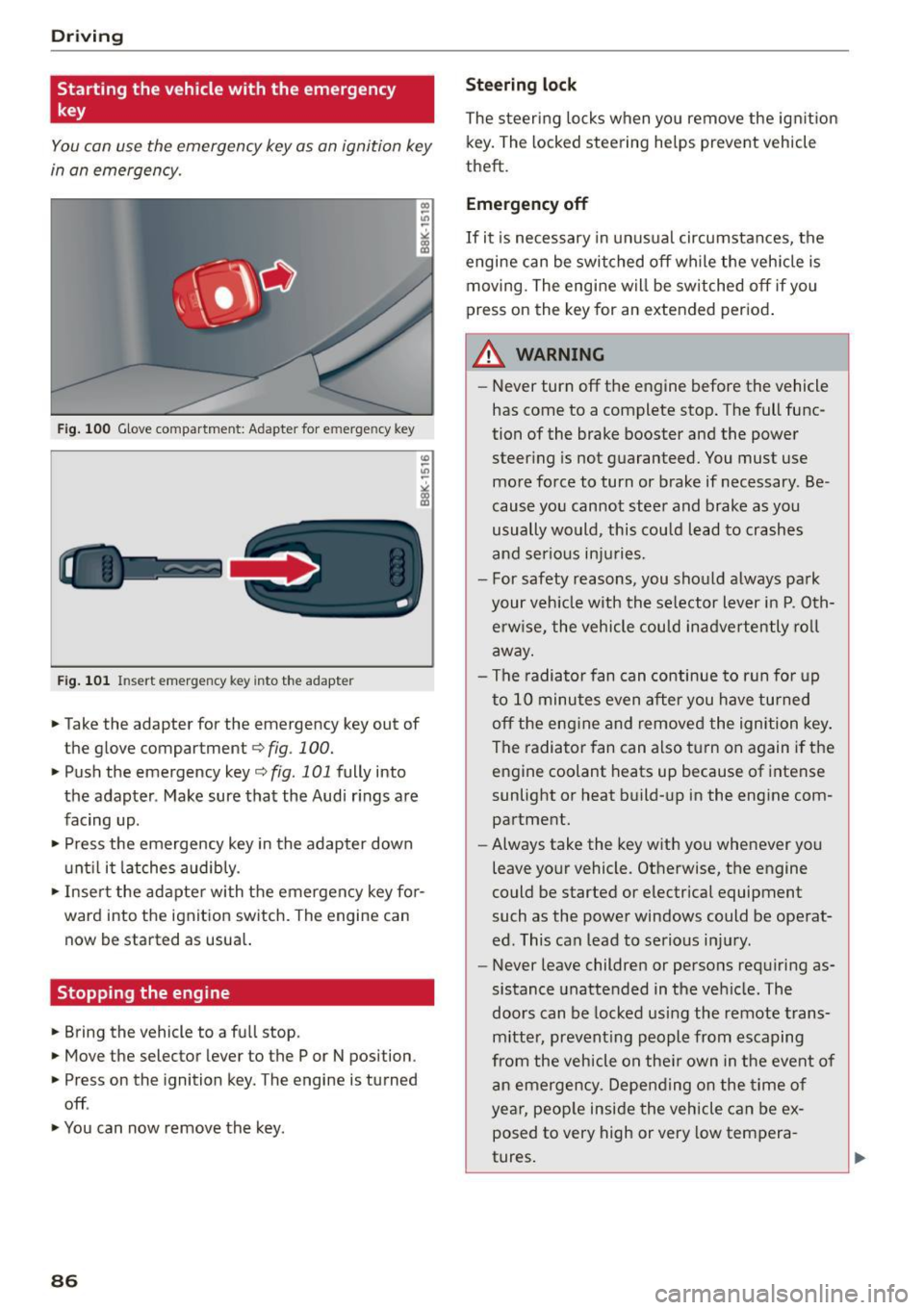
You can use the emergency key as an ignition key
in an emergency.
Fig. 100 Glove compartment: Adapter for e merg en cy key
Fig. 101 In sert emergency key into the adapter
... Take the adapter for the emergency key out of
the glove compartment
r:::;, fig . 100 .
.,. Push the emergency key r:::;, fig. 101 fully into
the adapter . Make sure that the Audi rings are
facing up .
.,. Press the emergency key in the adapter down
until it latches audibly.
.,. Insert the adapter with the emergency key for
ward into the ignition switch. The engine can now be started as usual.
Stopping the engine
... Bring the vehicle to a full stop.
... Move the selector lever to the P or N position .
.,. Press on the ignition key. The engine is turned
off .
.,. You can now remove the key.
86
Steering lock
The steering locks when you remove the ignition
key. The locked steering helps prevent vehicle
theft.
Emergency off
If it is necessary in unusual circumstances, the
engine can be switched off while the vehicle is
moving. The engine will be switched off if you
press on the key for an extended period.
A WARNING
- Never turn off the engine before the vehicle
has come to a complete stop. The full func
tion of the brake booster and the power
steering is not guaranteed. You must use
more force to turn or brake if necessary . Be
cause you cannot steer and brake as you
usually would, this could lead to crashes
and serious injuries.
- For safety reasons, you should always park
your vehicle with the selector lever in P. Oth erwise, the vehicle could inadvertently roll
away.
- The radiator fan can continue to run for up
to 10 minutes even after you have turned off the engine and removed the ignition key .
The radiator fan can also turn on again if the
engine coolant heats up because of intense
sunlight or heat build-up in the engine com
partment .
- Always take the key with you whenever you
leave your vehicle. Otherwise, the engine
could be started or electrical equipment
such as the power windows could be operat
ed. This can lead to serious injury.
- Never leave children or persons requiring as
sistance unattended in the vehicle. The
doors can be locked using the remote trans
mitter, preventing people from escaping
from the vehicle on their own in the event of
an emergency. Depending on the time of
year, people inside the vehicle can be ex
posed to very high or very low tempera
tures.
Page 89 of 302
M N
co ~ co
rl I.O
"' N
"' rl
CD Note
If the engine has been under heavy load for
an extended per iod, heat builds up in the en
gine c ompartment after the engine is switch
ed off -there is a risk of damag ing the eng ine .
Allow t he engine to run at idle fo r about two
m inutes befo re switch ing it off.
Convenience key
Starting the engine
Applies to vehicles: with Conven ience key
The I STAR T ENGINE S TOP I button switches the
ignition on and starts the engine.
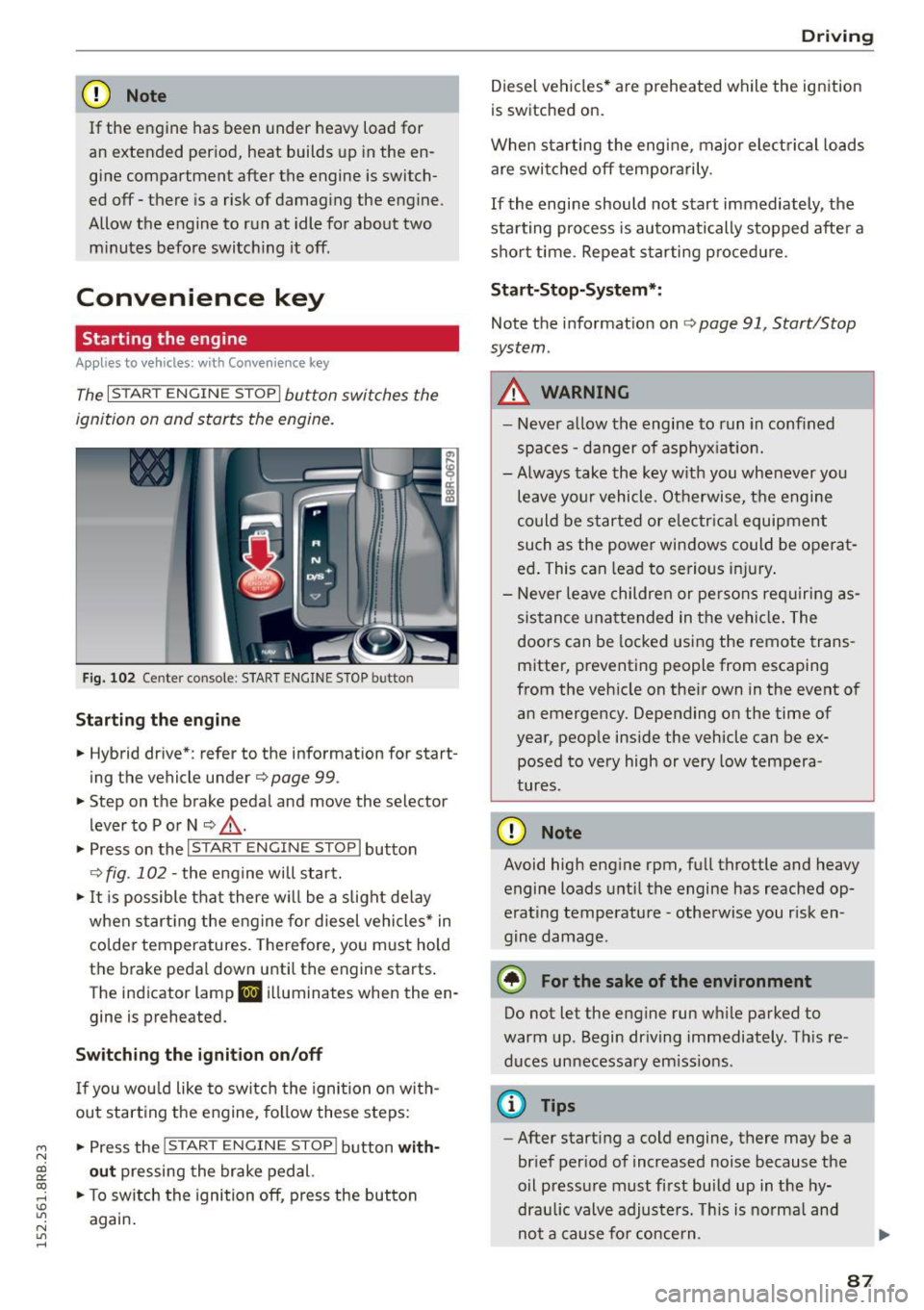
Fi g. 1 02 Cente r co nsole : STAR T ENGIN E STOP b utto n
Starting the engine
• Hybrid dr ive *: refer to the information for start
ing the vehicle under
Q page 99 .
• Step on t he brake pedal and move the selector
lever to P o r N
Q ,& .
• Press on the 1~s= T~A_R_T_E_N--GI N_E_S_T_O_P_I button
Q fig. 102 -the engine will start.
• It is possible that there w ill be a slight de lay
when start ing the eng ine for diesel vehicles * in
colder temperatures. Therefore, yo u must hold
t h e brake pedal down until the engine starts .
The indicator lamp
II i ll uminates when the en
gine is preheated.
Switching the ignition on /off
If yo u wou ld like to switch the ignition on with
out start ing the engine, fo llow these steps:
• Press the
!S TAR T EN GINE STOPI button with
out pressing the brake ped al.
• To sw itch the ignition off, press the button
again .
Driv ing
Diesel vehicles * are preheated while the ignition
is switched on.
When sta rting the engine, major electrical loads
are swi tched off temporarily .
If the engine should not start immediately, the
sta rting process is au tomatically s topped afte r a
sho rt time. Repeat s tarting p roced ure.
Sta rt-Stop-System* :
Note the information on Q page 91, Start/Stop
system .
A WARNING
=
-Never a llow th e engine to run in confined
spaces -da nger of asphyx iat io n.
- Always take the key w ith you whenever you
leave your vehicle. Ot herwise, t he engine
could be started or e lectr ica l equipment
such as the power win dows could be ope rat
ed . This can lead to se rious i njury.
- Never le ave children or pe rsons re quiring as
sistance unattende d in the vehi cle. The
doors can be locked us ing the remote trans
mitter, preventing people from escaping
from the veh icle on the ir own in the event o f
an emergency. Depending on the time of
year, people inside the vehicle can be ex posed to very high or very low tempera
tures.
CD Note
Avoid high eng ine rpm, full throttle and heavy
engine loads u ntil the engine has reached op
erating temperature -otherwise you r isk en
gine damage.
@ For the sake of the environment
Do not let the engine run wh ile parked to
warm up. Begin dr iving immediately . Th is re
duces unnecessa ry em iss io ns.
@ Tips
- After starting a cold engine, there may be a
brief per iod of increased noise because the
oil p ressu re must f irst build up in the hy
draulic valve adjusters. Th is is norma l and
-
no t a cause fo r concern . ..,
87
Page 90 of 302
Driving
-If you leave the vehicle with the ignit ion
switched on, the ignition will switc h off af
ter a certa in period of time. P lease note that
e lectr ica l equipment s uch as exterior lights
will switch off as well when that happens.
Switching engine off
A pp lies to veh icles: w ith Convenie nce key
.,. Bring your veh icle to a complete stop.
.. Move the selector lever to the P or N position .
.,. Press the
!START ENGINE STOPI button
"*page 87, fig. 102.
Stee ring lock
The steering locks when you turn the engine off
using the
!START ENGINE STOP I button and open
the dr iver's door. The locked steering helps pre
vent vehicle theft.
Emergen cy off
If necessary, the eng ine can be sw itched off with
the selector lever in the R or D/S position . The en
g ine stops if you press and hold the
I STAR T ENGINE ST OP ! button at speeds below
6 mph ( 10 km/h) a nd p ress the brake pedal.
..&, WARNING
- Never turn off the engine be fore the ve hicle
has come to a comp lete stop. The fu ll func
tion of the b rake booster and the power
stee ring is not guaranteed. Yo u must use
more force to turn or bra ke i f necessary. Be
cause you cannot steer and brake as you
usually wou ld, this could lead to crashes
and serious injur ies.
- For safety reasons, you should always park
your vehicle with the selector lever in P. Oth
erwise , the vehicle could inadver tently roll
away.
- The rad iator fan ca n continue to run for up
to 10 m inutes eve n after you have turned
off the engine a nd removed the ignition key.
T he ra diato r fan ca n also turn on aga in if the
engi ne coola nt he ats up becau se of intense
s u nligh t or heat bui ld-up in the engine com
partment.
88
- Always take the key with you whenever you
leave your vehicle. Otherwise, the engine
could be started or electrical equipment
such as the power windows could be operat
ed. This can lead to serious in jury.
- Never leave children or persons requiring as
sistance unattended in the vehicle. The
doors can be locked using the remote t rans
m itter, prevent ing people from escaping
from the vehicle on the ir own in the event of
a n emergency. Depe nding on the time o f
yea r, peop le inside the vehicle can be ex
posed to very high or very low tempera
tures .
(D Note
If the engine h as been unde r heavy lo ad for
an ex tended pe riod, hea t bu ilds up in t he en
gine compartment after the engine is switch
ed off -there is a risk of damaging the engine .
A llow the engine to run at id le for about two
minutes before switching it off.
Driver messages
Ignition is on
This message appears and a warning tone sounds i f you open the drive r's door when the ign ition is
switched on .
No key identified
This message appears when the
I START ENGI NE STO PI* button is p ressed if the re
i s no master key ins ide the ve hicle or if the sys
tem does no t re cogn ize it. For examp le, the mas
te r k ey cannot be recogn ized if it is covered by an
ob ject (e.g. a luminum brief case) wh ic h
screens
the radio sig na l. Electro nic devices such as cell
phones can a lso interfere with the radio signa l.
Press brake pedal to start engine
This message appears if yo u do not p ress the
brake pedal to start the eng ine.
Shift to N or P to start engin e
This message appears when attempt ing to start
the engine if the selector lever for the automat ic .,.