light AUDI Q5 2016 Owners Manual
[x] Cancel search | Manufacturer: AUDI, Model Year: 2016, Model line: Q5, Model: AUDI Q5 2016Pages: 300, PDF Size: 75.02 MB
Page 190 of 300
Child safet y
-If you must install a rearward facing ch ild
safety seat on the front passenger seat be
cause of exceptiona l circumstances and the
PASSENGER AIR BAG OFF light does not
come on and stay on, immed iate ly install
the rear-fac ing ch ild safety seat in a rear
seat ing pos ition and have the airbag system
inspec ted by your A udi dealer.
Additional information
Sources of information about child
restraints and their use
There are a number of so urces of addit io nal in
formation about child restra int selection, insta l
lation and use:
NHTSA advises that the best child safety seat is
the one that fits your ch ild and fits in you r vehi
cle, and that yo u will use co rrectly and consis
t ently.
Try before you buy!
U.S National Highw ay Traffic Safety Administra
tion
Tel.: 1-888-327-4236 (TTY : 1-800-424-9153)
http :/ /www.nhtsa .gov
National SAFE KIDS Campaign
Tel.: (202) 662-0600
http ://www.safek ids.org
Safety BeltSafe U.S.A
Tel.: (800) 745 -SAFE (English)
Tel.: (800) 747-SANO (Span ish)
http ://www.carseat.org
Transport Canada Information Centre
Tel.: 1-800-333-0371 or call 1 -613 -998 -8616 i f
you are in the Ottawa a rea
http ://www.tc.gc.ca/ eng/roadsafety/menu .htm
Audi Customer Relation s
Tel.: (800) 822-2834
188
Page 192 of 300
Intelligent Technology
shared, please see your contract with the
wireless te lecommunications provider and the
"About Aud i connect" tab in your vehicle's
MMI*:
I MENU ! button > Audi connect > About
Audi connect .
Electronic Stabilization
Control (ESC)
Description
The Electroni c Stab ili z at ion Control (ESC) re infor
ces driver safety. It reduces the r isk of slipping
and improves driving stability. ESC detects crit i
cal s ituations suc h as the vehicle overstee ring
and understeering o r the wheels sp inning. The
ve hicl e is stab ilized by applying the b rakes o r re
ducing e ngine torque . Once t he ESC is acti ve , the
i n dicator light
m bli nks in the instrument cl us
ter.
The fo llow ing sys tems a re integrated in the ESC:
Anti-lock b rake system (ABS)
ABS preve nts the wheels from lock ing up when
b raking . The veh icle can sti ll be steered even dur
i n g ha rd brak ing . Apply steady press ure to the
b rake pedal. Do no t pump t he pedal. A pulsing in
the brake pedal indicates tha t the system i s help
i n g you to br ake the vehicle .
Brake assist system
The brake assist system can decrease brak ing dis
tance . It increases brak ing power when the d river
p resses the brake pedal q uic kl y in eme rgency si t
uations . You m ust press and hold t he b rake pedal
until the situa tion is over. In vehi cles w it h ad ap
tive cruise contro l* , the brake assist system is
mo re sensit ive if the distance detected to the ve
h icle ahead is too small.
Anti -slip regulation (ASR)
A SR re duces eng ine power when the drive w heels
begin to spin and adapts the force to the roa d
conditions. This makes it easie r to sta rt, acceler
ate and drive up hi lls.
190
Electronic differential lock (EDL)
The EDL brakes wheels that are spi nning and
transfers the drive power to the other w heels .
This function is not ava ilable at higher speeds.
I n ext reme cases , ED L automat ica lly swi tches off
to help keep the b rake on the bra ke d whee l from
overheating . EDL will sw itch on again automa ti
ca lly w hen conditions have returned to normal.
Steering recommendation
The ESC he lps to stabilize the vehicle by cha ng ing
t h e s teer ing torque .
On vehicles with dynam ic steering*, ESC helps
stab il ize the steer ing in crit ica l sit uat ions .
Selective wheel torque control
Selective wheel torque cont rol is used when d riv
i ng o n curves. The front whee l on the inside of
the curve or both wheels on the i nside of the
curve are braked selectively as needed . Th is al
l ows mo re prec ise driving in c urves . The applica
ble sys tem may not a ctivate w hen d riv in g in we t
o r snowy cond it ions.
_8. WARNING
- The ESC and i ts integ ra ted systems cannot
overcome the laws of physics . This is espe
cially important on slippery or wet roads. If
the systems begin act ing to stab ilize your
veh icle, you should immediately change
your speed to matc h the road and traffic
conditions. Do no t let the increased safe ty
provided by t hese systems tempt yo u to
t ake risks. Doing so will i ncreas e th e risk of
a loss of vehicle con trol, collisi on and se ri
ou s person al injur ies .
- Always a dap t your spee d to road , traffic and
weather condi tions. The risk of los ing con
t rol of the vehicle in cr eases w hen driving
t oo f ast, es pecially throu gh curves and on
slippe ry or wet roads, and when driving too
close to ve hicles up ahea d. The ESC and its
integ rated systems cannot always prevent
col lisions - there is still a risk of accidents!
- Always accelerate w ith special ca re on even,
smooth surfaces s uch as those that are wet
o r covered with ice and snow. The drive .,..
Page 193 of 300
..... N
co ~ CX)
..... I.Cl U"I
.... I.Cl .....
wheels can spin even with these ass istance
systems that cannot always he lp to reduce
the risk of loss of vehicle control.
@ Tips
-ABS and AS R on ly work correctly when a ll
fo ur whee ls are e quipped w ith ide ntical
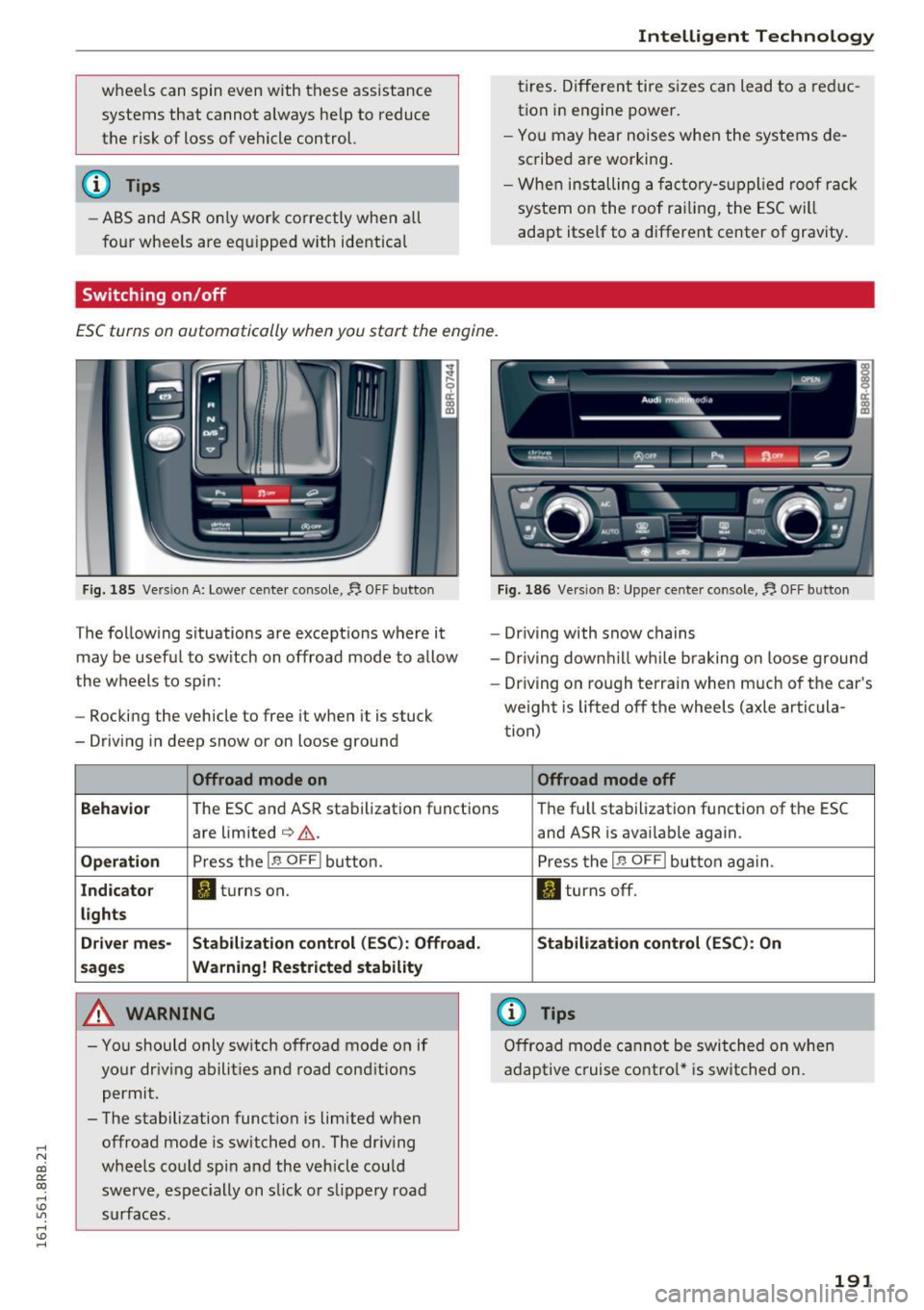
Switching on /off
Intelligent Technology
tires. Diff eren t tire s izes can lead to a red uc
tion i n engine po wer .
- You may hear noises when t he sy stems de
scribe d are workin g.
- Whe n in sta lling a facto ry-s up plied roo f ra ck
system o n the roof r ailing , the ESC wi ll
adapt itself to a different center of gravity .
ESC turns on automatically when you start the engine.
Fig . 18 5 Versio n A: Lowe r cente r conso le,~ OFF b utto n
The follow ing s ituations are except ions where it
may be usef ul to sw itch on offroad mode to allow
the wheels to spi n:
- Rocking the vehicle to free it when it is stuck
- Driv ing in deep snow or on loose ground
Offroad mode on
~ Q:)01_1 _ --.!'3.- -ft.
- Driving with snow chains
- Dr iving down hill wh ile braking on loose ground
- Dr iving on ro ugh te rra in when m uch of the car's
weight is lifted off the wheels (axle articula
tion)
Offroad mode off
Behavio r
The ESC and AS R stabilization f unctions Th
e fu ll sta bilization f unction of the ESC
a re limited
c:> &. .
Operation Press the 1.$ OFF I button.
Indicator II turns on.
lights
Driver mes- Stabilization
control (ESC): Offroad.
sages Wa rning! Restricted stability
A WARNING
- You should only sw itch o ffroad mode o n if
yo ur dr iv ing abilit ies a nd road cond it io ns
permit.
- The stabilization function is limited when offroa d mode is switched on. The dr iv ing
wheels co uld spi n and th e vehicle cou ld
swerve, es pec ially on s lick o r sli ppery roa d
s ur fac es. and ASR
is avai lab le again.
P ress t he
1.$ OFFI button aga in.
II turns off.
Stabilization control (ESC ): On
(D Tips
Offro ad mode ca nno t be switche d on whe n
adaptive c ruise co ntro l* is switched on.
191
Page 196 of 300
Intelligent Technology
brake. This may cause the brakes to over
heat, premature wear and increased stop
ping distance.
- Under certain climatic and operating condi
tions such as passing through water, driving
in heavy rain or after washing the vehicle,
the effectiveness of the brakes can be re duced . In winter, ice can accumulate on the
brake pads, linings, discs and drums. Care
fully apply brakes for a test. Brakes will dry
and ice coatings will be cleaned off after a
few careful brake applications.
- Driving for an extended period of time on
salt-covered roads without using your
brakes can also affect braking efficiency.
Clean off accumulated salt coating from
brake discs and pads with a few carefu l
brake app lications .
-If you damage the front spoiler, or if you in
stall a different spoiler, be sure the air flow
to the front brakes is not obstructed. Other
wise the brake system could overheat reduc ing the effectiveness of the entire brake sys
tem .
- Failure of one brake circuit will impair the
braking capability resulting in an increased
stopping distance. Avoid driving the vehicle and have it towed to the nearest author ized
Audi dealer or qualified workshop.
- Never let the vehicle roll to a stop with the
engine shut off.
- If the brake booster is not working, the
brake pedal must be pressed considerably
harder to make up for the lack of booster
assista nee.
Electromechanical power
assist, Dynamic steering
The electromechanical power assist helps the
driver when steering.
Power steering adapts electronically based on
the vehicle speed.
Indicator lights and messages
• Steering defective! Do not drive vehicle!
194 If
this indicator light turns on and stays on and
this message appears, the power steering may
have failed.
Stop the vehicle in a safe location as soon as pos
sible. Do
not continue driving . See your author
ized Audi dealer or other qualified repair facility
for ass istance .
'-r, ij Dynamic steering: System fault! You can
continue driving
If the indicator l ight turns on and the message
appears, the steering may be more difficult to
move or more sensitive than usual. The steering
may also be at an angle when driving straight.
Drive slowly to your authorized Audi dealer or
qualified workshop to have the malfunct ion cor
rected.
1 :r- ij Dynamic steering: Initializing
Audi drive select* : if the indicator light blinks and
the driver message appears, the dynamic steer i ng* is reinitial ized. After start ing the engine, the
steering wheel will move slightly . Re-initial iza
tion might be necessary if the steering wheel was
moved hard to the left and right while the vehicle
was not moving. The display turns off if the initi
alization was successful.
(D Tips
- If the . or 1:r- ij in dicato r light only stays on
for a short time, you may continue driving.
- T he dynamic steering* stab ility systems
¢ page 190 are not available in the event of
a system malfunction.
- For additional information on dynamic
steering*
¢page 119.
Driving with your
quattro
With all-wheel drive, all four wheels are driven .
General information
With all-wheel drive, power is distributed to all
four wheels. This happens automatically depend
ing on your driving style and the road conditions
at the time. See also
c> page 190. ..,.
Page 198 of 300
Intelligent Technology
electrical energy is not being used than is being
generated and ensures an optimal state of
charge for the battery.
(D Tips
- But even energy management cannot neg ate the limits of physics . Consider that the
power and life of a battery are limited.
- If starting ability is threatened, the indica
tor light (•) appears
r=:; page 33.
What you should know
The highest priority is given to maintaining start
ing capability.
The battery is severely taxed in short-distance
driving, in city traffic and during the cold time of
year. Abundant electrical energy is required, but only a little is generated. It is also critical if the
engine is not running and electrical components
are turned on. In this instance energy is being
consumed but none is being generated.
It is in precisely these situations that you will no
tice energy management actively regulating the
distribution of energy .
Vehicle stands for an extended period
If you do not drive your vehicle over a period of
several days or weeks, electrical components are
gradually cut back or switched off. This reduces
energy consumption and maintains starting ca pability over a longer period. Some of the con
venience functions may not operate, such as the interior lights or the power seat adjustment . The
convenience functions will be available again
when you switch on the ignition and start the en
gine.
With the engine turned off
If you listen to the radio, for example, with the
engine turned off or use other MMI" functions,
the battery is being discharged .
If starting capability is jeopardized due to energy
consumption, a message appears in the radio or MMI* display . The message indicates that the
system will be switched off automat ical ly in a
196
moment. If you wish to continue using the func
tions, you have to start the engine .
With the engine running
Although electrical energy is generated when the
vehicle is being driven, the battery can become
discharged. This happens mostly when little en
ergy is being generated and a great deal con
sumed and the battery's state of charge is not
optimal.
To bring the energy balance back into equilibri
um, consumers which require especially large
amounts of energy are temporarily cut back or
switched off. Heating systems in particular re
quire a great deal of energy. If you notice, for ex
ample, that the heated seats* or the heated rear
window are not heating, they have been tempo
rarily cut back or switched off . These systems will
be available again as soon as the energy balance
has been restored.
You will also notice that engine idle speed has
been increased slightly . This is normal and not a
cause for concern. By increasing engine idle
speed the additional energy required is generat
ed and the battery is charged.
Page 201 of 300
..... N
co
er::
co
.....
give you some tips on how you can he lp the envi
ronment and your pocketbook.
(D Tips
T he consumpt ion estimates as published by
ENVIRONMENTAL PROTECTION AGENCY
(EPA) and Transport Canada may not corre
spond to your act ual consumption on the
road, which will vary depending upon vehicle
load and speed, road and weather conditions,
trip length, etc.
Drive smoothly and keep a lookout ahead
Vehicles use the most fuel when they are acceler
ating .
.. Avoid unnecessary accelerating and braking.
Vehicles use the most fuel when they are acceler
ating . If you anticipate what is going to happen
next, you will need to brake less and, thus, accel
erate less . Let the vehicle coast whenever possi
b le -for example when you see that the next traf
fic light is red .
Avoid full throttle
Driving a t moderate speeds saves fuel and im
proves your mileage .
.. Try and keep well be low your car's max imum
speed.
Accelerating gent ly reduces f uel consumption,
engine wear, and does not disturb the environ
ment.
F ue l cons umption, exha ust emissions and engine
noise increase d isproportionately at high speeds.
If yo u drive at approximately three quarters of
top speed, fuel consumpt ion w ill be reduced by
one ha lf. Never drive faster than the posted
speed limit and weather conditions perm it .
Driving and the envir onment
Reducing unnecessary idling
Even when your car is just idling it burns up fuel .
.. Shut the eng ine off when you are not driving
the vehicle.
.. Do not warm up t he vehicle by lett ing the en-
gine run at idle .
The idling phase is automatically reduced for
vehicles with the Start-Stop-System*. It is effi c ient to sw itch off the engine in veh icles without
the Start-Stop-System* when stopped at ra ilroad
c ross ings and long red lights . T urning the engine
off fo r just 30-40 seconds saves mo re fue l th an is
bur ned by s tarti ng the eng ine again .
It takes a long time for the eng ine to warm up
fully when it is ru nning at id le. However, wea r
and noxious emissions are especially high w hen
t h e engine is war ming up. So yo u should dr ive
aw ay as soon as you star t the eng ine and avoid
runn ing at high rpms w hile the engine is sti ll
warming up .
(D Note
Do not leave eng ine idling unatt ended after
start ing. If wa rning lights sho uld come on to
i ndicate impro per operation, they would go
u nheeded. Extended idling also prod uces
heat, which could result in overheating or
other damage to the vehicle o r othe r proper
ty .
Regular maintenance
A badly tuned engine unnecessarily wastes a lot
of fuel .
.. Have your vehicle serviced at regular interva ls.
By hav ing your vehicle regular ly serv ice d by an
authorized Aud i dea ler helps to ensure that it
runs properly and economically . T he cond ition o f
yo ur vehicle not on ly affects its safety and ability
to hold its value , it also affects
fuel consump
tion .
Check your oil each time you fill your tank.
T he amou nt o f oil used is related to engine load
and speed. .,,.
199
Page 203 of 300
,....,
N
co
er::
co
,....,
conditions and off-road
General information
The operation of the Electronic Stabilization Con
trol (ESC) is expanded for operation away from paved roads. In situations where slip or a differ
ential locking fun ction is required , the offroad
mode can be activated ¢
page 190. Your Audi al
so has permanent all-wheel drive in addition .
However, your Audi is not a pure offroad vehicle.
It was not built for driving under extreme condi
tions, e.g. for tr ips that are in the nature of an
expedition .
Drive only on roads and offroad sections which
match the design of your vehicle and your abili
ties as a driver. Never take risks!
Before driving offroad
-Check the engine oi l level, tire pressure, coo l
ant level, and the fluid level in the windshield
washer reservo ir.
- Stow luggage items and other objects in the
luggage compartment, and secure them
against sliding around.
After driving offroad
-After trips offroad, remove any twigs and other
foreign objects from the gri ll, the underbody
and the wheels. Pay special attention to foreign
objects (stones) which have become lodged in
the tire tread.
- Clean the body and the vehicle underside, and
inspect the vehicle for possible damage.
- Clean dirty windows, headlamp lenses, rear
lights, and license plates.
- Perform a brake check (particularly after travel
ling through water).
A WARNING
-Drive especially attentively and plan ahead
in difficult road condit ions and when off
road. Excessive speed or incorrect maneu
vers can cause injuries and damage to the
vehicle .
Offroad driving
-Always adapt your speed and driving style to
road, offroad, traffic, and weather condi
tions. Drive especially slowly offroad when
your view is restricted.
- Please be aware that in offroad mode, par
ticularly on a smooth and slippery road, the
wheels may have an increased tendency to spin and the vehicle may break away - dan
ger of skidd ing!
- Stability is lim ited in the offroad mode .
@) For the sake of the environment
Avoid damage to the environment and re
spect nature.
(D Tips
Only drive where it is permitted and stay on
marked roads and paths.
Explanation of some technical terms
The following data refer to ideal conditions. De
pending on vehicle load and ground conditions
and the environment, the numbers may vary. It is
the driver's responsibility to decide whether ave
hicle can overcome a specific s ituation
¢ ,&. .
Gradient angle
The number of meters in altitude gained over a
distance of 109.4 yards or 100 meters (grade)
are given as a percentage or degrees. Informa
t ion about the gradient the vehicle can cl imb un
der its own power (depends in part on the road
s ur face and eng ine power). Maximum permitted
grade: 31
°
Ground clearance
The distance between the road surface and the
lowest point of the vehicle underbody. Ground
clearance 7.9 in (200 mm)
_& WARNING
-
Exceeding the stated maximum figures can
result in severe injuries or vehicle damage.
- All the information was gathered on level,
firm and non-slippery road surfaces, and un-
der dry weather conditions.
~
201
Page 205 of 300
,....,
N
co
er::
co
,....,
General information
Your Audi was designed primarily for passenger
transportation .
If you plan to tow a trailer, please remember that
the additional load will affect durability, econo my and performance.
T railer towing not only places more stress on the
vehicle, it also calls for more concentration from
the driver.
For this reason, always follow the operating and
driving instructions provided and use common
sense.
Technical requirements
Trailer hitch
Use a weight-carrying hitch conforming to the
gross trailer weight. The hitch must be suitable
for your vehicle and trailer and must be mounted
securely on the vehicle's chassis at a technically
sound
location . Use only a trailer hitch with a re
movable ball mount . Always check with the trail
er hitch manufacturer to make sure that you are
using the correct hitch.
Do not use a bumper hitch.
The hitch must be installed in such a way that it
does not interfere with the impact -absorbing
bumper system . No modifications should be
made to the vehicle exhaust and brake systems .
From time to time, check that all hitch mounting
bo lts remain securely fastened.
When you are not towing a trailer,
remove the
tra iler hitch ball mount . This prevents the hitch
from causing damage should your vehicle be
struck from beh ind ¢
,&. .
Trailer brakes
If your trailer is equipped with a braking system,
check to be sure that it conforms to all regula
tions .
Trailer mode
The trailer hydraulic brake system must not be
directly connected to the vehicle's hydraulic
brake system ¢.&. .
Safety chains
Always use safety chains between your vehicle
and the trailer.
Trailer lights
T ra iler lights must meet all regulations . Be sure
to check with your author ized Audi dealer for cor
rect wiring, switches, and relays.
Mirrors
If you are unable to see the traffic behind you us
ing the regular outside mirrors, then you
must in
stall extended mirrors. It is important that you
always have clear vision to the rear.
,8. WARNING
-If a trailer has electrical brakes please note
that these brakes are not activated by the
factory-fitted control unit -risk of accident!
- After removing the trailer hitch, do not store it in your vehicle. In case of sudden
braking, the hitch could fly forward and in
jure you or your passengers.
- Never install a "weight distributing" or
"load equalizing" trailer hitch on your vehi
cle. The vehicle was not designed for these
kinds of trailer hitches . The hitch attach
ment can fail, causing the trailer to tear
loose from the vehicle.
- The Gross Vehicle Weight Rating for your
vehicle, found on the safety compliance la bel on the driver's side B-pillar, must never
be exceeded under any circumstances. Ex
ceeding the Gross Vehicle Weight Rating of
your vehicle is likely to damage your vehicle,
and such damage will not be covered by
your Limited New Vehicle Warranty. Exceed
ing the Gross Vehicle Weight Rating will al
so change the performance and handling
characteristics of your vehicle, which could
cause a crash resulting in serious injury or
death.
203
Page 206 of 300
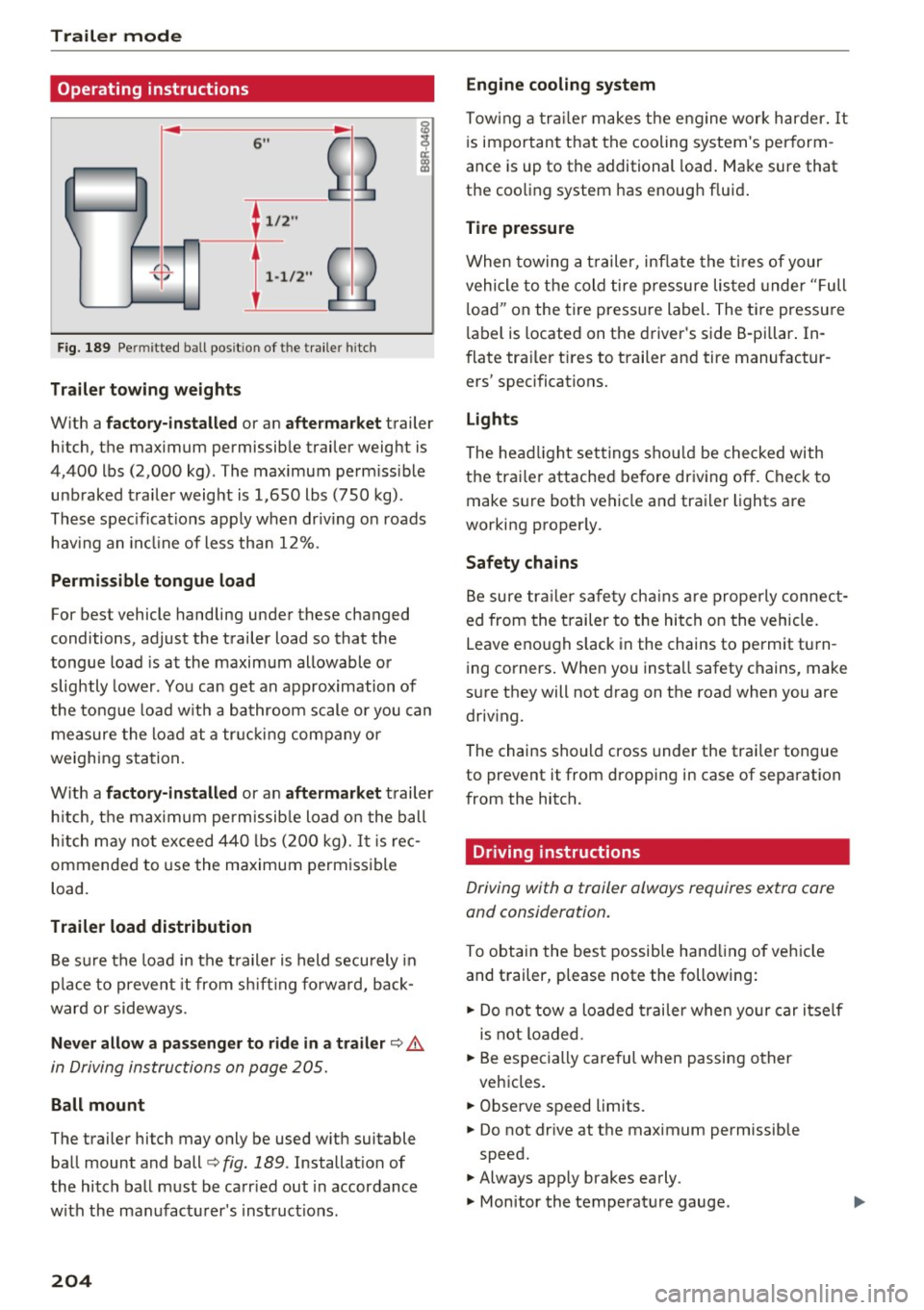
Trailer mod e
Operating instructions
6"
~ 2
. 1/2 "
.(. '-I} 1-1/2"
-
F ig. 189 Pe rmi tted ball posit io n of the traile r hi tch
Tr aile r to wing weights
With a f ac tor y-inst all ed or an a ft er ma rket trailer
h itch, the maximum permissib le trailer weight is
4,400 lbs (2,000 kg) . The maximum perm iss ible
unb raked trailer weight is 1,650 lbs (750 kg) .
These spec ificat ions apply when dr iv ing on roads
hav ing an incl ine of less tha n 12%.
Perm is sible tongue load
For best vehicle handling under these changed
conditions, adjust the trailer load so that the
tongue load is at the maxim um allowable or
slightly lower. You can get an approx imation of
the tongue load w ith a bathroom scale or you can
measure the load at a tr ucking company or
weighing station.
W ith a
fa ctor y-installed or an aftermarket trailer
h itch, t he maximum permissib le load on the ball
h itch may not exceed 440 lbs (200 kg).
It is rec
ommended to use the maximum permissible
load.
Trailer load di stribution
B e su re the load in the trailer is held securely in
p lace to prevent it from s hift ing fo rwa rd, back
ward or sideways.
Nev er allo w a p assenge r to ride in a trail er c::> A
in Driving instructions on page 205.
Ball mount
The trailer hitch may only be used w ith suitable
ball mount and ball
c::> fig. 189 . Installat ion of
the hitch ball must be carr ied out in accordance
w ith the manufacturer 's inst ruct ions.
204
Engine cooling system
Towing a tra ile r makes t he engine work harder. It
is important that the cooling system's perform
ance is up to the additional load . Make sure that
the cooling system has enough fluid .
Tire pressure
When towing a t railer, inflate the ti res of your
vehicle to the cold tire pressure listed under "Full
l oad" on the tire press ure label. The tire pressure
l abel is located on the driver 's side B-pillar . In
flate tra iler tires to trailer and tire manufactur
ers' specifications.
Lights
The head light settings shou ld be checked with
the trailer attached before driving off. Check to
make s ure both vehicle and trailer lights are
working properly.
Safety chains
Be sure tra ile r safety cha ins a re properly connect
ed from the trailer to the hitch on the vehicle.
Leave enough slack in the chains to permit tu rn
i ng corners . When you install safety chains, make
s u re they will not drag on the road when you are
driv ing.
The chains should cross under the trai ler tongue
to prevent it from dropping in case of separation
from the hitch.
Driving instructions
Driving with a trailer always requires extra care
and consideration.
To obtain the best possible handling of veh icle
and t railer, p lease note the following:
.., Do not tow a loaded trai ler when your car itself
is not loaded.
.., Be especially care ful when passing other
vehicles .
.., Observe speed limits.
.., Do not drive at the maximum permissible
speed.
.., Always app ly brakes early.
.., Monitor the temperature gauge.
Page 207 of 300
,....,
N
co
er::
co
,....,
Towing a loaded trailer with an empty car res ults
in a high ly unstable distribution of weight. If this
cannot be avoided, drive at very low speeds only
to avoid the risk of losing steering control.
A "balanced" rig is eas ier to operate and control.
This means that the tow vehicle should be loaded
to the extent possible and permissible, while
keeping the trailer as light as possible under the
circumstances. Whenever possible, transfer
some cargo to the luggage compartment of the
tow vehicle while observ ing tongue load require
ments and vehicle loading considerat ions.
Speed
The higher the speed, the more difficult it be
comes for the driver to contro l the rig. Do not
drive at the maximum permiss ible speed . Reduce
your speed even more if load, weather or wind
conditions are unfavorable - part icularly when
going downhill.
Reduce veh icle speed
immediately if the tra iler
shows the slightest sign of swaying .
Do not try
to stop the swaying by accelerating.
Observe speed lim its . In some areas, speeds for
veh icles towing trai lers are lower than for regular
veh icles.
Always apply brakes early. When driving down
h ill , shift into a lower gear to use the engine
braking effect to slow the veh icle. Use of the
brakes alone can cause them to overheat and fa il.
Coolant temperature
The coolant temperature gauge r=;, page 10 must
be observed carefully . If the needle moves close
to the upper end of the scale, reduce speed im mediately and/or turn off the air conditioner.
If the coolant temperature warning light in the
instrument cluster starts flashing., pull off
the road, stop and let the engine
idle for about
two minutes to prevent heat build-up.
A WARNING
Anyone not properly restrained in a moving
vehicle is at a much greater risk in an acci-
-
Trailer mode
dent. Never let anyone ride in your car who is
not properly wear ing the restraints provided
by Aud i.
Trailer mode notes
Important to know
Your vehicle handles differently when towing a
t railer because o f the additional weight and dif
ferent weight distribution. Safety, performance
and economy will greatly depend on how carefu l
ly you load your trai ler and operate your rig.
Before you actually tow your trailer, practice
tu rning, stopping and backing up in an area away
from traffic. Keep practicing until you have be
come comp lete ly familiar w ith the way your vehi
cle-tra iler combination behaves and responds.
Backing up is difficu lt and requires practice.
Backing up with a t railer generally requires steer
ing action opposite to that when backing up your
vehicle without a trailer.
Maintain a greater distance between your vehicle
and the one in front of you . You will need more
room to stop. To compensate for the trailer, you
will need a larger than normal turning radius.
When passing, remember that you cannot accel
erate as fast as you normally would because of
the added load. Make sure you have enough room
to pass. After passing, allow p lenty of room for
your trailer before c hanging lanes again.
Avoid jerky starts, sharp turns or rapid lane
changes.
(D Tips
- Do not tow a trailer during the break-in peri
od of your veh icle.
- If you tow a trailer, your Audi may requ ire
more frequent maintenance due to the ex
tra load
r=;, page 280.
205