light AUDI Q5 2016 Repair Manual
[x] Cancel search | Manufacturer: AUDI, Model Year: 2016, Model line: Q5, Model: AUDI Q5 2016Pages: 300, PDF Size: 75.02 MB
Page 107 of 300
.... N
co
er::
co
....
used for both charging and jump starting
¢ page 231 or¢ page 2 70.
Vehicle not ready to start. See owner's
manual
This message appears if the high voltage battery
charge level is too low. The vehicle can no longer
be started with its own power. The high voltage
battery must be charged with a charger or the ve
hicle must be jump started with the a id of anoth
er vehicle.
After the connecting the charger or jumper ca bles, the ignition must be turned off for approxi
mately two minutes and then turned on again.
After no more than one m inute, one of the fol
l owing indicator lights turns on in the instrument
cluster display .
B Charging battery. Please wait ...
If the indicator light turns on and this message
appears, the high voltage battery is charging or
the vehicle is be ing jump started with assistance
from another veh icle .
If the 12 volt batteries are dead, the -indi
cator light turns on . The charging procedure
takes longer in this case because the 12 volt bat
ter ies a re charged first. The procedure goes fast
er with the ignit ion switched off.
Vehicle ready to start.
This message appears if the charging procedure
was successful. The vehicle may be started again .
Battery could not be charged enough to start
vehicle.
This message appears if the charging procedure
was not successful or it was interrupted. This
may happen if the charger or the battery in the
veh icle that is assist ing is too weak. If the ve hicle
cannot be started, see an authorized repair facili
ty for ass istance.
(D Tips
- The charger should deliver a current of at
l east 30 A. Otherwise charging the high
voltage battery will take considerably Ion-
Hybrid
ger . A current between 50 A and 70 A is ide
al.
- The vehicle that is assisting should be some
what within the same vehicle class when
jump starting a vehicle. A smaller vehicle's
battery may be drained.
- After approximately 30 minutes, the charg
ing procedure ends because the ignition is
automatically turned off. If you wou ld like
to cont inue to charge the battery, turn the
ign ition on again .
Vehicle transport
App lies to vehicles: wit h hybrid drive
The following contains information you should
know about transporting your vehicle.
The lithium ion battery (SANYO 72 UF 121 285)
installed in your vehicle has passed test 38.3 in
accordance with UN handbook tests and criter ia.
The vehicle may be transported with the battery
installed as conventional class 9 hazardous mate
rials without addit ional officia l consent for a ir
and sea transportation (current law ICAO- TI and
IMDG-Code 01.01.2012).
105
Page 111 of 300
..... N
co ~ CX)
..... I.Cl U"I
..... I.Cl .....
Audi adaptive cruise control and braking guard
@ Indicator lights
Ill-Adaptive cru ise control is switched on. No
vehicles are detected up ahead. The stored speed
is maintained.
• -A moving vehicle is detected up ahead. The
adaptive cruise control system regulates the
speed and distance to the moving vehicle ahead
and accelerates/brakes automatically.
• -When automatic braking is not ab le to keep
enough distance to a previously detected moving
vehicle up ahead, you must take control and
brake
~ page 111, Request for driver interven
tion.
© Display
If adaptive cruise control is not shown in the dis
play, you can call it up with the
I RESETI button
¢page 20.
Based on the symbols in the display, you can de
termine if the system is maintaining a distance to
the vehicle ahead and what that distance is.
No vehicle -No vehicle ahead was detected.
White vehicle -A vehicle ahead was detected.
Red vehicle -Prompt for the dr iver to take action
¢page 111.
Both arrows on the scale © indicate the distance
to the vehicle ahead . No arrow appears when the
vehicle is on an open road and there is no object
ahead . If an object is detected ahead, the arrow
moves on the scale .
The green zone on the scale shows the stored dis
tance. For information on changing the stored
distance, refer to
¢page 110. If the distance se
lected is too close or may soon become too close,
the arrows move into the red zone on the scale.
A WARNING
Improper use of the adaptive cruise control
can cause collis ions, other acc idents and seri
ous personal injur ies.
- Pressing the
!SET ! button when driving at
speeds below 20 mph (30 km/h), will auto
matically accelerate the vehicle to 20 mph (30
km/h), which is the minimum speed
that can be set.
(D Tips
- If you switch the ignition or the adaptive
cruise control off, the set speed is erased
from the system memory.
- Th e Electronic Stabilization Control (ESC) is
automatically turned on when the adaptive
cruise control is turned on . You cannot
switch the ESC into offroad mode while the
adaptive cru ise control is turned on
¢page 191.
Changing the speed
Applies to vehicles: with Audi adapt ive cru ise control
0
f
•
0
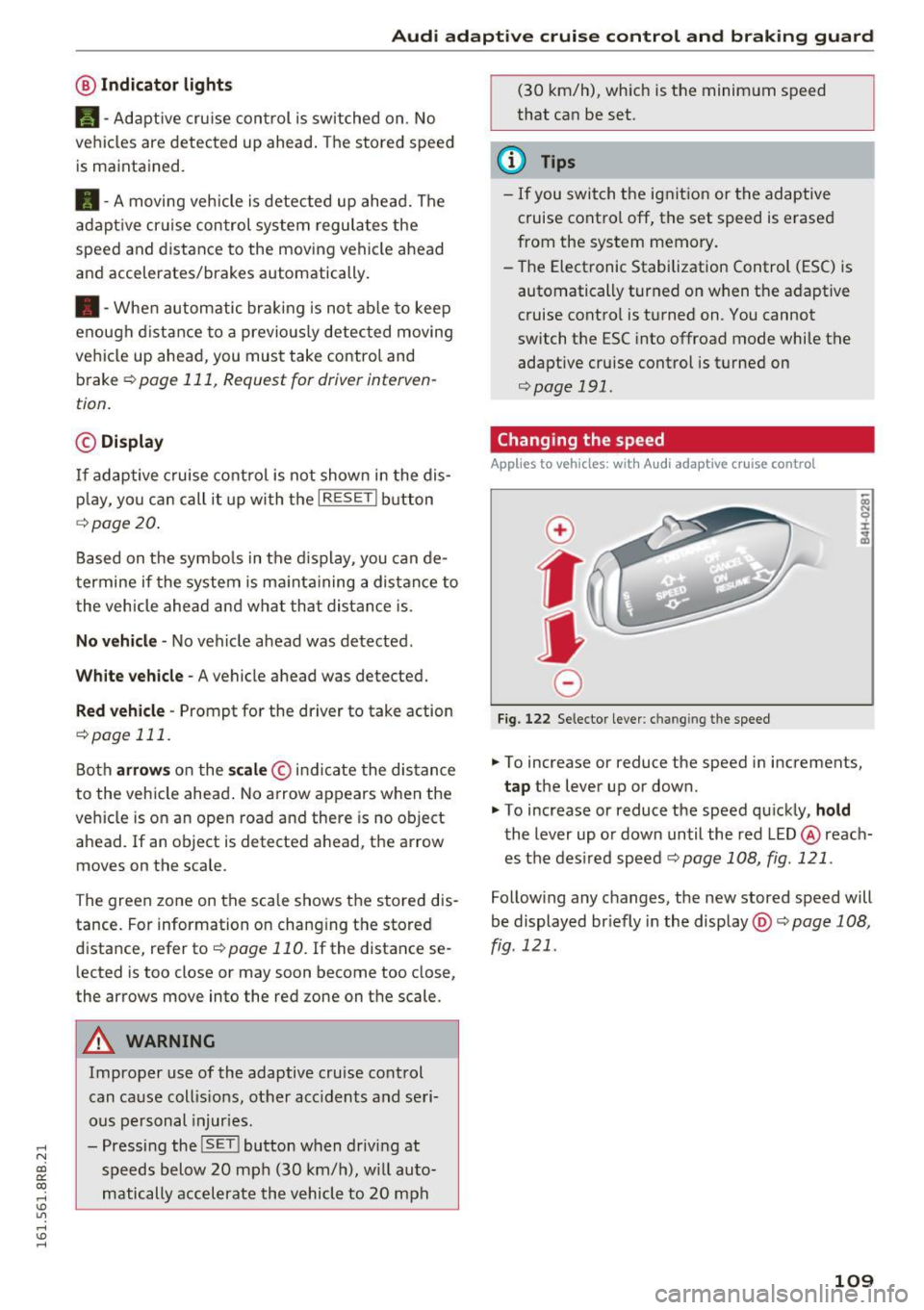
Fig. 122 Selector lever: ch an gin g the speed
.,. To increase or reduce the speed in increments,
tap the lever up or down.
" To increase or reduce the speed quickly,
hold
the lever up or down until the red LED @ reach
es the des ired speed c::>
page 108, fig. 121 .
Following any changes, the new stored speed will
be displayed br iefly in the display @c::>
page 108,
fig. 121 .
109
Page 113 of 300
..... N
co ~ CX)
..... I.Cl U"I
..... I.Cl .....
Audi adaptive cruise control and braking guard
~--- ~-Di stance 3: This setting corresponds
to a distance of 164 feet/SO meters when travel
ing at 62 mph (100 km/h), or a time interval of
1.8 seconds.
~ ---- ~ Distance 4: This setting corresponds
to a distance of 210 feet/64 meters when travel
ing at 62 mph (100 km/h), or a time interval of
2 .3 seconds.
A WARNING
Following other vehicles too closely increases
the risk of collisions and ser ious personal in
jury.
- Setting short distances to the traffic ahead
reduces the time and distance available to
br ing your vehicle to a safe stop and makes
it even more necessary to pay close atten
tion to traffic.
- Always obey applicable traffic laws, use
good judgment, and select a safe following
distance for the traffic, road and weather
conditions.
¢j) Tips
- Distance 3
is set automatically each time
you switch the ignition on.
- Your standard sett ings are automat ically
stored and assigned to the remot e control
k ey be ing used
<=> page 36.
Setting the driving program
Applies to vehicles: with Audi adaptive cruise control
Depending on the selected dr iv in g program and
d istance, driving behavior when accelerating w ill
vary from dynamic to comfortable.
Setting the driving program for vehicles
without Audi drive select*
~ In the radio/MM!*, select: !CARI funct ion but
ton >
adaptive cruise control > Driving pro
gram > Comfort, Standard or Dynamic .
Or
~ Select: ICARI function button> Car systems*
contro l button > Driver ass ist > Adaptive cruise
control > Driving program > Comfort, Stand
ard or Dynamic . Setting the driving mode for vehicles with
Audi drive select*
Refer to c!:>poge 120 .
(D Tips
Your settings are automatically stored and as
s ig ned to the remote control key being used
c!:> page 36.
Request for driver intervention
Applies to vehicles: with Audi adaptive cruise control
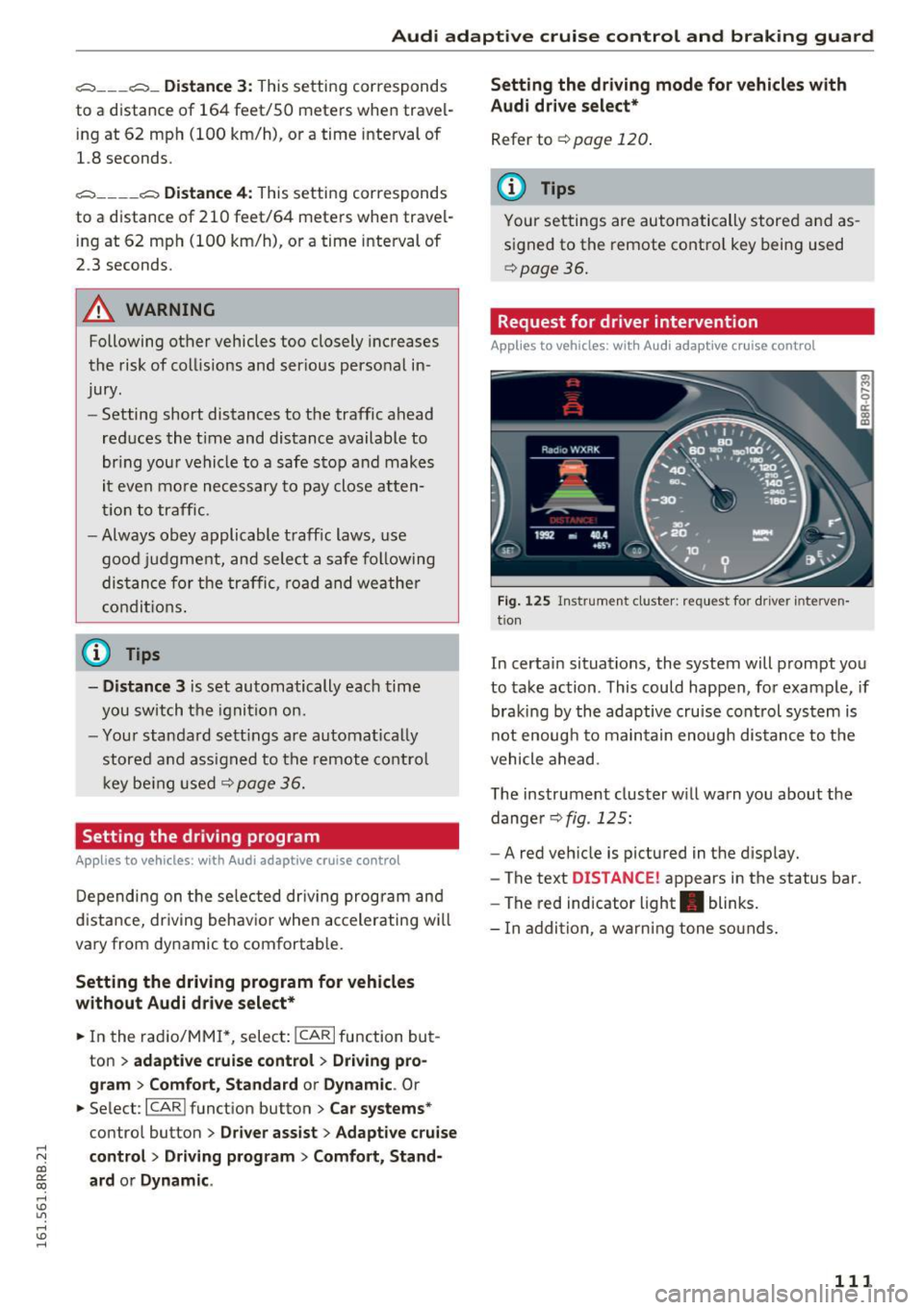
Fig. 125 Instrument cluster: req uest for driver interven
tion
In certain situations, the system will prompt you
to take action . This could happen, for example, if
braking by the adaptive cruise control system is
not enoug h to maintain enough distance to the
vehicle ahead.
The instrument cluster w ill warn you about the
dange r
c!:>fig . 125:
-A red vehicle is pictured in the display.
- The text
DISTANCE! appears in the status bar.
- The red indicator light . blinks.
- I n addition, a warning tone sounds.
111
Page 114 of 300
Audi adaptive cruise control and braking guard
Audi braking guard
Description
Applies to vehicles: with Audi adaptive cruise contro l
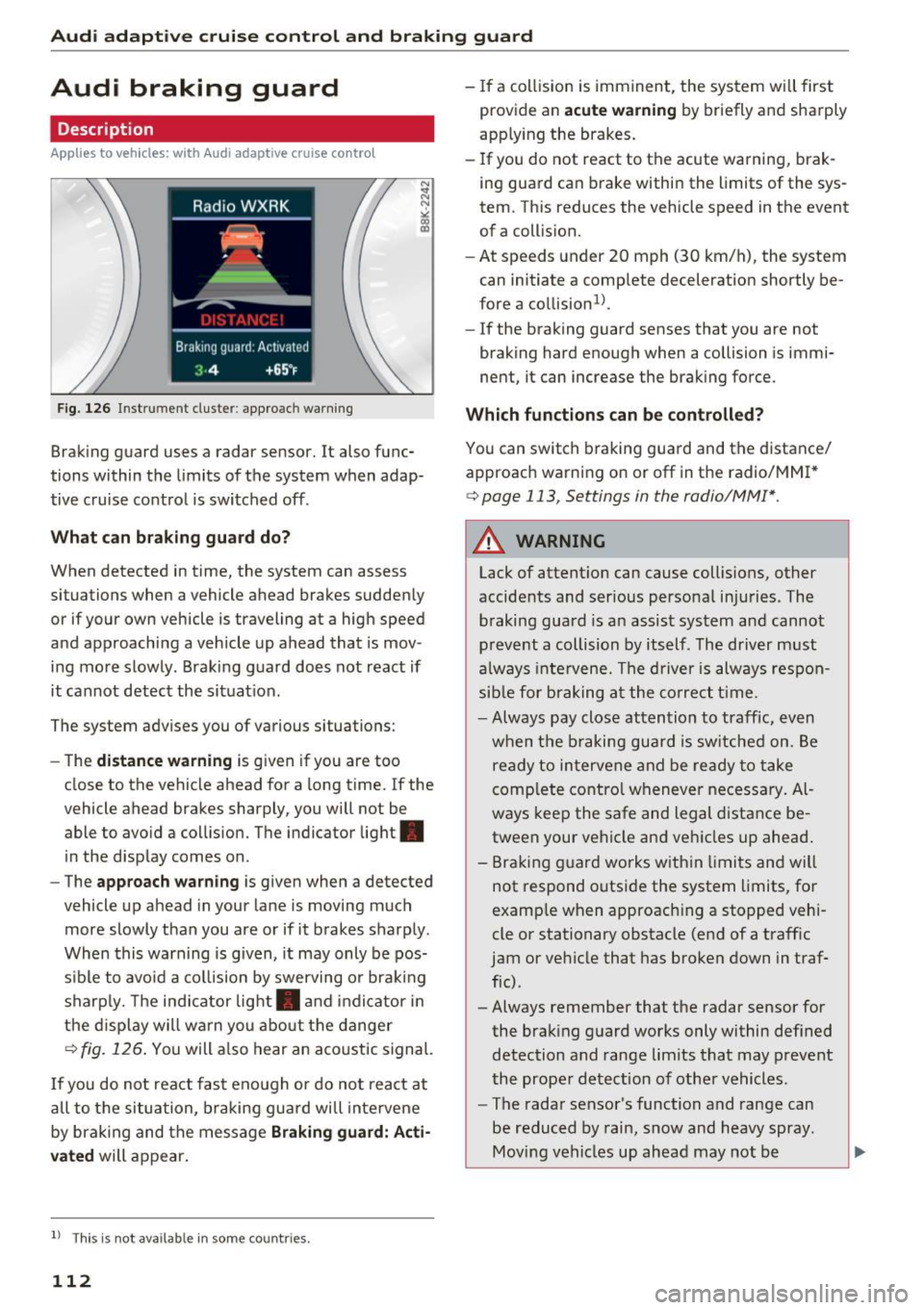
Fig. 126 In strument cluste r: appro ach warning
Braking guard uses a radar sensor. It also func
tions within the limits of the system when adap
tive cruise control is switched off .
What can braking guard do?
When detected in time, the system can assess
situations when a veh icle ahead brakes suddenly
or if your own vehicle i s traveling at a high speed
and approaching a vehicle up ahead that is mov
ing more slowly . Braking guard does not react if
it cannot detect the situat ion.
The system advises you of variou s situations:
- The
distance warning is given if you are too
close to the vehicle ahead for a long time. If the
vehicle ahead brakes sharply, you will not be
able to avoid a collision. The indic ator light .
in the display comes on.
- The
approach warning is given when a detected
vehicle up ahead in your lane is moving much
more slowly than you are or if it brakes sharply .
When this warning is given, it may only be pos
s ib le to avo id a collision by swerving or braking
sharply. The indicator light . and indicator in
the display will warn you about the danger
¢fig. 126. You will also hear an acoustic signal.
If you do not react fast enough or do not react at
a ll to the situation, braking guard will intervene
by braking and the message
Braking guard: Acti
vated
will appear.
l) Thi s is no t a vail able in som e coun trie s.
112
- If a collision is imminent, the system will first
provid e an
acute warning by briefly and sharply
app ly ing the b rakes.
- If you do not react to the acute warning, brak
ing guard can brake within the limits of the sys
tem . This reduces the vehicle speed in the event
of a collision.
- At speeds under 20 mph (30 km/h), the system
can initiate a comp lete deceleration shortly be
fore a collision ll.
- If the braking gua rd senses that you are not
braking hard enough when a collision is immi
nent, it can increase the braking force.
Which functions can be controlled?
You can switch braking guard and the distance/
approach warning on or off in the radio/MM
I*
¢ page 113 , Settings in the radio/MM!* .
A WARNING
Lack of attent ion can cause collisions, other
accidents and ser ious personal injuries . The
braking guard is an assist system and cannot
prevent a collision by itself . The driver must
always intervene. The driver is always respon
sible for braking at the correct time .
- Always pay close attention to traffic, even
when the braking guard is switched on. Be
ready to intervene and be ready to take
complete control whenever necessary. Al
ways keep the safe and legal distance be
tween your vehicle and vehicles up ahead .
- Braking guard works within limits and will
not respond outside the system limits, for
examp le when approach ing a stopped vehi
cle or stationary obstacle (end of a traffic
jam or vehicle that has broken down in traf
fic) .
- Always remember that the radar sensor for
the braking guard works only within defined
detection and range limits that may prevent
the proper detection of other vehicles.
- The radar sensor's function and range can
be reduced by rain, snow and heavy spray.
Moving vehicles up ahead may not be
-
Page 124 of 300
Automatic transmissio n
Automatic transmission
tiptronic
Introduction
The automat ic transmission is controlled e lec
tron ically . The transmission upshifts or down
shifts automatically depending on wh ich dr ive
p rogram is selected. The powe r is transferred by
a torque converter .
When a
moderate driving style is used, the
transmission se lects the most economical d riving
mode .
It will then change up early and de lay the
downshifts to give better fuel economy .
The transm ission switches to a spo rty mode afte r
a kick-down or when the drive r uses a
sport y
d riv ing sty le
charac ter ized by quick accelerator
pedal movements, heavy acce leration, frequent
changes in speed and traveling at the maximum
speed.
If desired, the dr iver can a lso select the gears
manually ( tiptronic mod e) ¢ page 126.
Selector lever positions
0 ;:t 0 ct CX) a,
Fig. 1 34 Disp lay in the instrument cl uster: selector lever in
position P
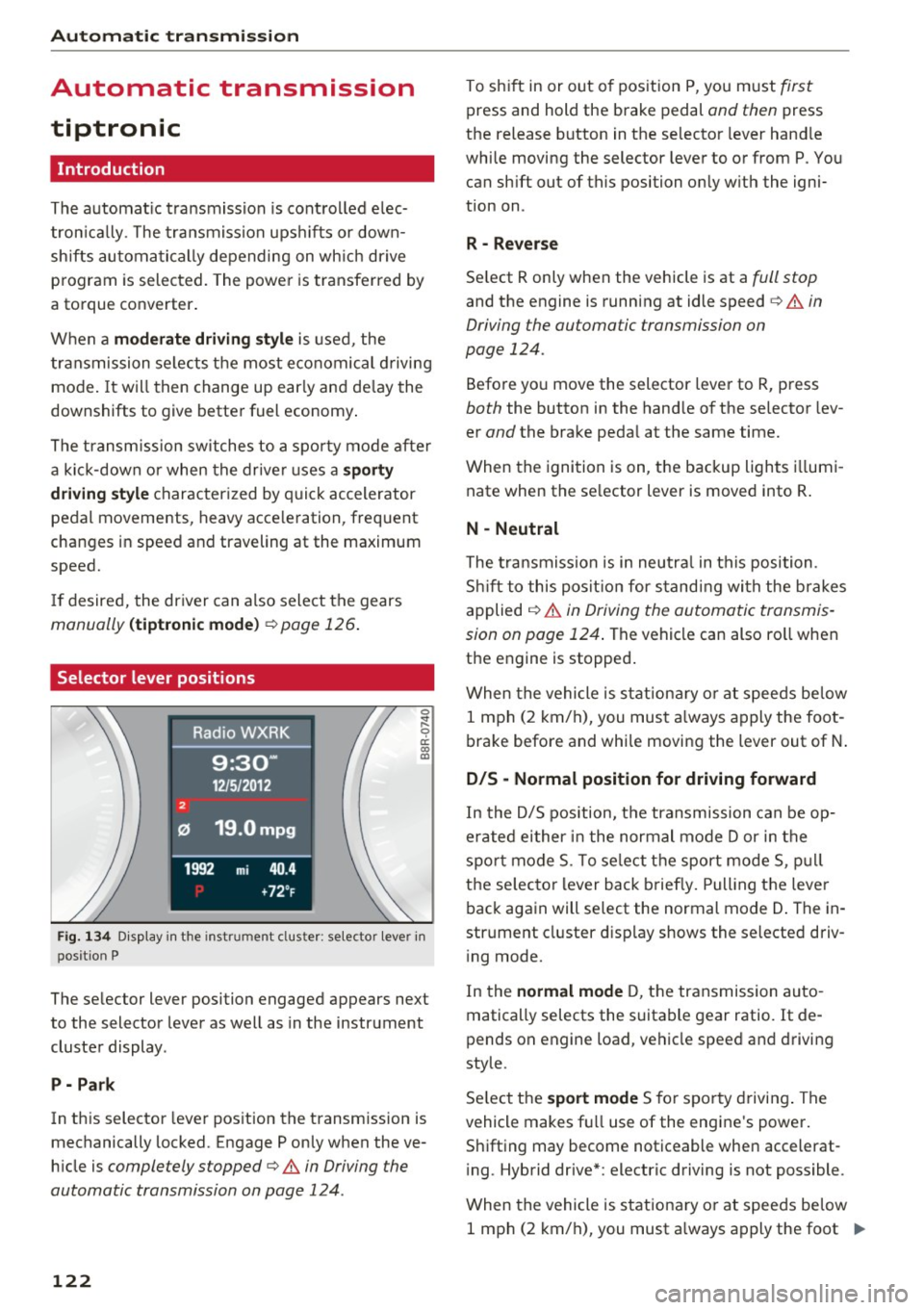
The selector lever position engaged appears next
to the selector lever as well as in the instrument
cluster display .
P -Pa rk
In this selector lever position the transmission is
mechanically locked. Engage P only when the ve
h icle is
completely stopped¢.& in Driving the
automatic transmission on page 124 .
122
To shift in or out of pos ition P, you m ust first
press and hold the brake pedal and then press
the release button in the selector lever hand le
while moving the selector lever to or from P. You can sh ift out of this position on ly w ith the igni
tion on .
R -Reve rse
Se lect R only when the vehicle is at a full stop
and the engine is running at idle speed c> .& in
Driving the automatic transmission on
page 124.
Befo re yo u move the selector lever to R, press
both the button in the hand le of the se lector lev
er
and the brake peda l at the same time.
When the ignition is on, the backup lights i llumi
nate when the se lector lever is moved into R .
N -Neutral
The t ra nsmission is in neutra l in this position .
S hi ft to this pos it ion for s tand ing wi th the brakes
applied
¢ .&. in Driving the automatic transmis
sion on page 124 .
The vehicle can also ro ll when
the engine is stopped .
When the vehicle is stationa ry o r at speeds be low
1 mph (2 km/h), you must a lways apply the foot
brake before and whi le moving the lever out of N .
D/S -Normal position for driving forward
In the D/5 position, the transmission can be op
erated either in the normal mode Dor in the
spo rt mode 5. To se lect the sport mode 5, p ull
t h e se lecto r lever back briefly. Pulling the leve r
back again will select the normal mode D . The in
strument cluster d isplay shows the se lected driv
i ng mode.
In the
normal mode D, t he transmission auto
matically selects the suitable gear ratio . It de
pends on engine load, vehicle speed and d riving
style.
Se lect t he
sport mode 5 for sporty drivi ng . The
vehicle makes fu ll use of the engine 's power.
Shifting may become noticeable when accelerat
i ng . Hybrid drive* : electric driving is not possible .
When the vehicle is stationary o r at speeds be low
1 mph (2 km/h), you must a lways apply the foot ..,.
Page 125 of 300
..... N
co ~ CX)
..... I.Cl U"I
..... I.Cl ..... brake before and wh
ile moving th e le ver to D/S
out of N.
A WARNING
Read and follow all WARNINGS¢ & in Driv
ing the automatic transmission on
page 124.
(D Note
Coasting downhill with the transmission in N
and the engine not running will result in dam
age to the automatic transmission and possi
bly the catalytic converter .
(D Tips
-On vehicles with Audi drive select*, you can
adjust the sporty shift characteristics in the
Dynamic driving mode .Swill appear in the
i nstrument cluster display instead of 0.
- If you accidentally select N while driving ,
take your foot off the accelerator pedal im
mediately and wa it for the engine to slow
down to idle before selecting D/S .
- Hybrid drive*: if the
l-,,sv ! button r::::;, page 100
is pressed while in sport mode S, the trans
mission switches automatically to the nor
mal mode D.
- If there is a power failure, the selector lever
will not move out of the P posit ion. The
eme rgency release can be used if this hap
pens
¢ page 127.
'
Automatic transmission
Automatic Shift Lock (ASL)
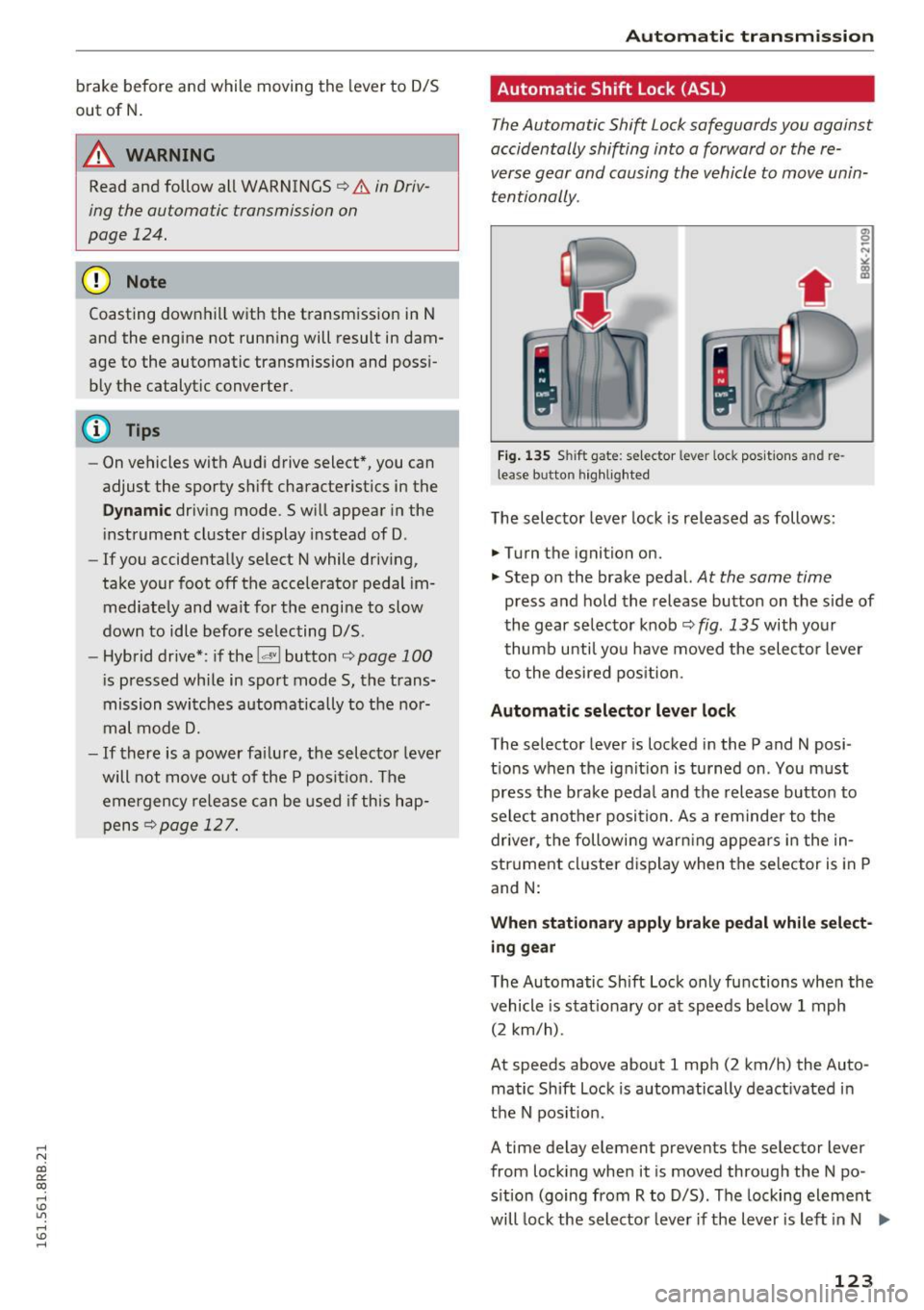
The Automatic Shift Lock safeguards you again st
accidentally shifting into a forward or the re
verse gear and causing the vehicle to move unin
tentionally .
Fig. 13S Shi ft gat e: se lec tor le ver loc i< po sition s and re
lea se butto n highlighted
The selector lever lock is released as follows :
.,. Turn the ignition on.
"" Step on the brake pedal.
At the same time
press and hold the release button on the side of
the gear selector knob
r::::;, fig. 135 with your
thumb until you have moved the selector lever
to the desired position .
Automatic selector lever lock
The selector lever is locked in the P and N po si
tions when the ignit ion is turned on . You must
press the brake peda l and the release button to
select another position. As a reminder to the
driver , the following warn ing appears in the in
strument cluster d isplay when the se lector is in P
and N:
When stationary apply brake pedal while select
ing gear
The Automatic Shift Lock only functions when the
vehicle is stat ionary or at speeds be low 1 mph
(2 km/h) .
At speeds above about 1 mph (2 km/h) the Auto ·
matic Shift Lock is automatically deact ivated in
the N pos it ion .
A time delay element preven ts the selec tor lever
from locking when it is moved through the N po
sition (going from R to D/S). The locking element
will lock the selector lever if the lever is left in N .,..
123
Page 126 of 300
Automatic transmissio n
(N eu tra l) for more than approx imately 1 second,
w ithout th e brake peda l being pressed.
Release button
The release button on the se lec to r lever preven ts
the lever from being accidentally sh ifted into cer
tain posit ions . Press ing t his but ton deactivates
the selector lever lock . Depending on the direc
tion of the shift, the selector lever locks at differ
ent positions. The positions are high lighted in
the illustrat ion ¢
fig. 135 .
Ignition key safety int erlock
The key cannot be removed from the igni tion un
less the selector lever is in the P park pos ition .
When the ignition key is removed, the selector lever will be locked in the P pos ition.
Driving the automatic transmission
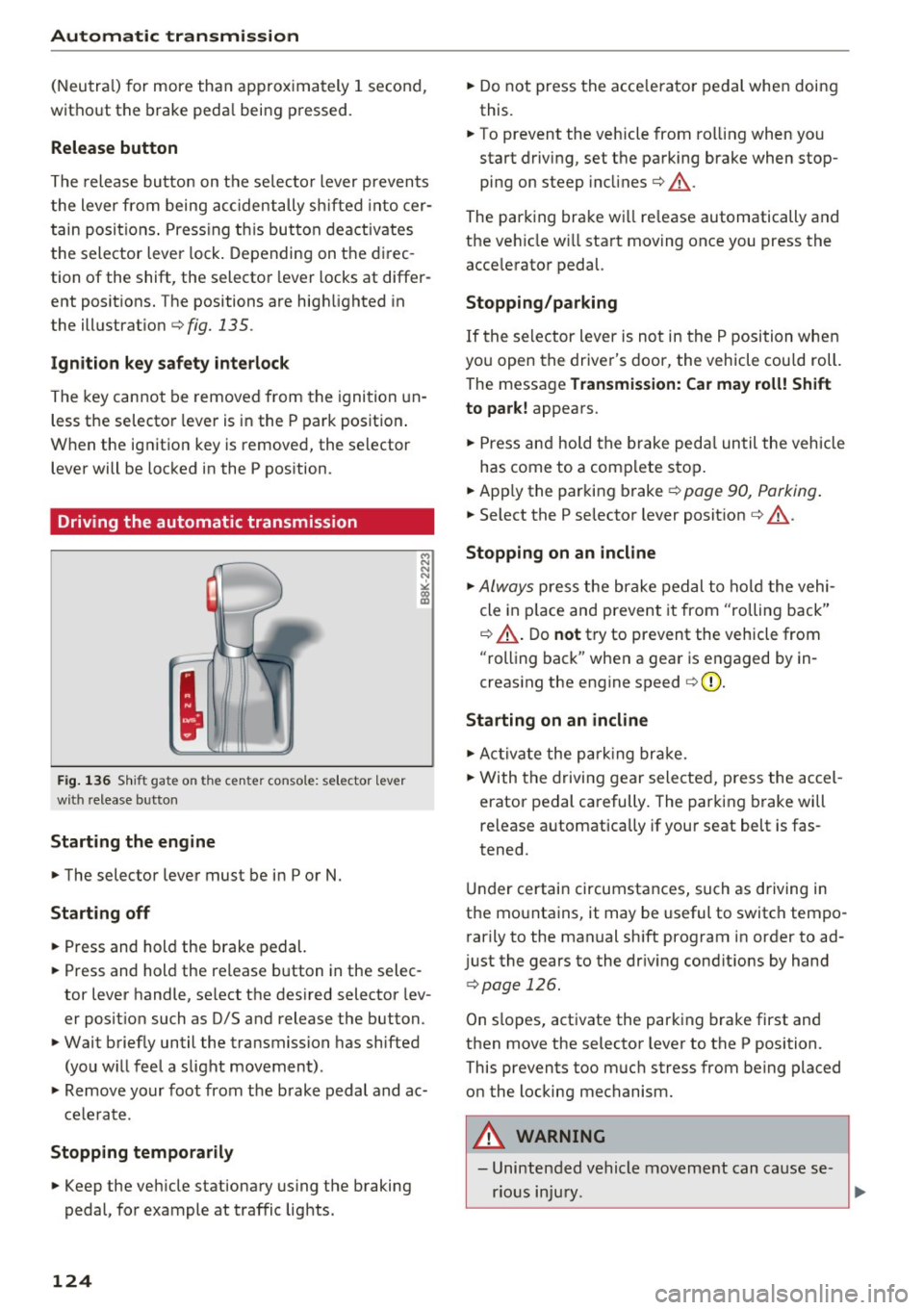
F ig. 1 36 Shi ft gat e on t he c en te r co nsole : se lecto r lev er
w ith release b utto n
Starting the engine
~ The selector lever must be in P or N.
Starting off
~ Press and hold the brake pedal.
~ Press and hold the release button in the selec
tor lever handle, se lect the des ired selector lev
er posit ion such as D/S and release the button.
~ Wait briefly until the transmission has shifted
(you w ill feel a slight movement) .
~ Remove your foot from the brake pedal and ac
cele rate .
Stopp ing temporarily
~ Keep the veh icle stationary us ing the braking
pedal, for example at traffic lights .
124
~ Do not press the acce lerato r pedal when doing
this.
~ To prevent the veh icle from ro lling when you
start driving, set the parking brake when stop
ping on steep incl ines¢ &_.
The parking brake wi ll re lease automatically and
the ve hicle w ill start moving once you press the
acce lerator pedal.
Stopping /par king
If the se lector lever is not in the P position whe n
you open the driver's door, the vehicle cou ld roll.
The message
Tr ansmis sion: Car may roll! Shift
to park!
appears.
~ Press and hold the brake peda l un til the vehicle
has come to a comp lete stop .
~ Apply the parking brake¢ page 90, Parking .
~ Select the P selector lever posit ion ¢ &_ .
Stopping on an incline
~ Always press the brake pedal to ho ld the vehi
cle in p lace and prevent it from "rolling back"
¢ &_ . D o
not try to prevent the vehicle from
"rolling back" when a gear is engaged by in
creas ing the engine speed ¢(D .
Starting on an incline
~ Ac tivate the pa rk ing br ake.
~ With the d riving gear selected, press the accel
erator pedal carefully. The parking brake will
release a utomatica lly if your seat belt is fas
tened.
Under certain circumstances, such as driving in
the mounta ins, it may be useful to switch tempo
rarily to the manual sh ift program in order to ad
j ust the gears to the dr iv ing cond it ions by hand
¢ page 126.
On slopes, activate the parking b rake first and
then move the selector lever to the P position.
This prevents too m uch stress from being placed
on the locking mechanism.
A WARNING
- Unintended vehicle movement can cause se
rious injury .
Page 129 of 300
..... N
co ~ CX)
..... I.Cl U"I
..... I.Cl ..... The transmission temperature has increased sig
nificantly due to the sporty driving manner. Drive
in a less sporty manner until the temperature re
turns to the normal range and the indicator light
switches of .
rm Transmission malfunction: You can continue
driving
There is a system malfunct ion in the transmis
sion. You may continue driving. Drive to your au
thorized Audi dealer or qualified repair facility
soon to have the malfunction corrected.
rm Transmission malfunction: Limited driving
functionality
There is a system malfunction in the transmis
sion . T he transmission is sw itching to emergency
mode. This mode only shifts into certain gears or
will no longer shift at all. The engine may stall.
Drive to your authorized Audi dea ler or qualified
repair facility immediately to have the malfunc
tion corrected .
rm Transmission malfunction: Stop vehicle and
shift to park.
Do not continue driving. Select the P selector lev
e r position and see your a uthorized Aud i dea ler
or qualified repair facility for assistance .
(D Note
If the transmission switches to emergency
mode, you sho uld take the vehicl e to an au
thorized Audi dealership as soon as possible
to have the condition corrected.
Automatic transmission
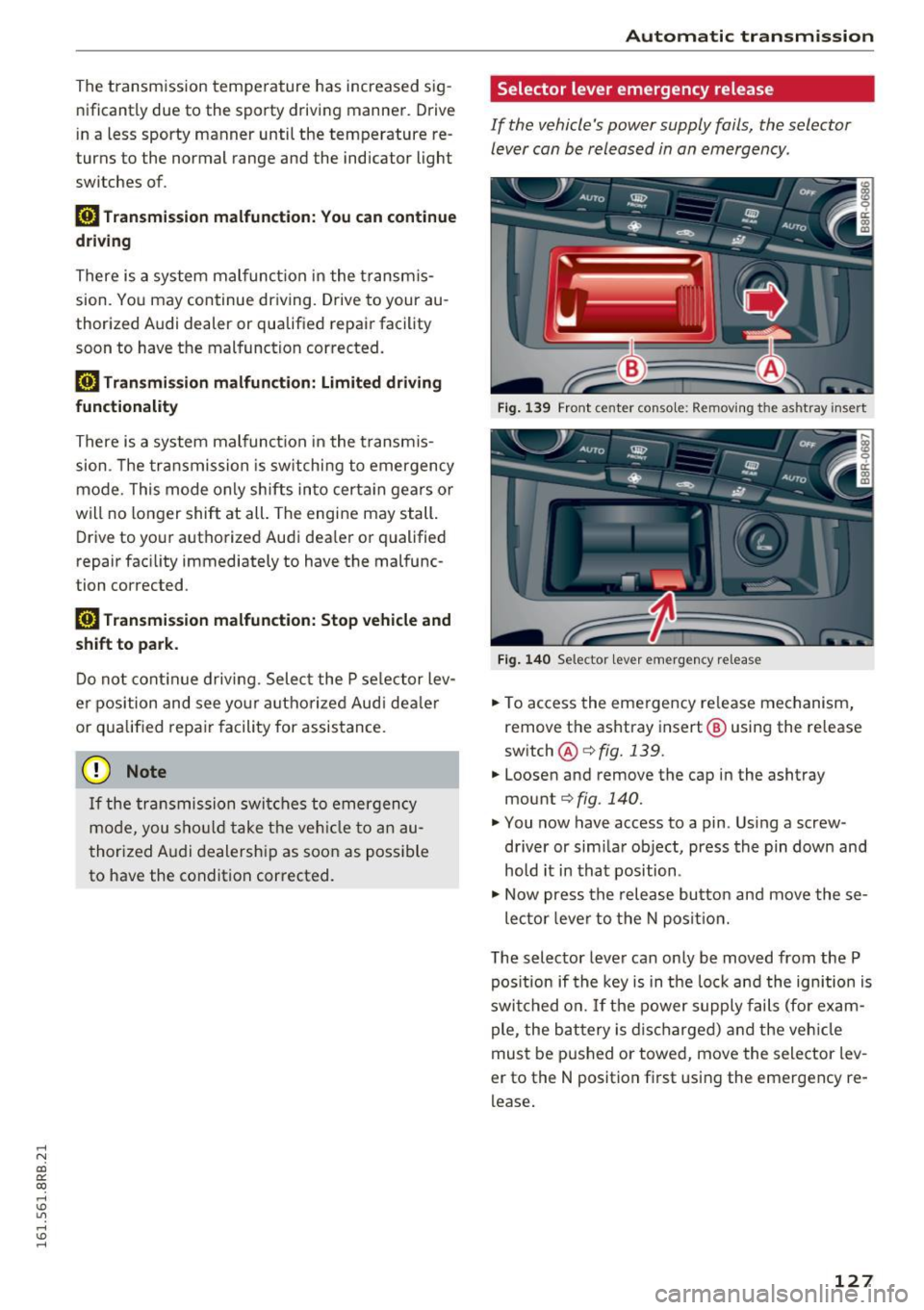
Selector lever emergency release
If the vehicle 's power supply fails, the selector
lever can be released in an emergency .
Fig. 139 Front center conso le: Removing the ashtray insert
Fig. 140 Selector lever emergency release
.,. To access the emergency re lease mechanism,
remove the ashtray insert@ using the release
switch @Qfig.139.
.,. Loosen and remove the cap in the ashtray
mount
Q fig. 140.
.,. You now have access to a pin . Using a screw
driver or sim ilar object, press the pin down and
hold it in that position .
.,. Now press the release button and move these-
lector lever to the N position.
The selector lever can only be moved from the P
pos ition if the key is in the lock and the ignition is
switched on. If the power supply fails (for exam
ple, the battery is discharged) and the vehicle
must be pushed or towed, move the selector lev
er to the N position f irst using the emergency re
lease .
127
Page 131 of 300
,....,
N
co
er::
co
,....,
The MM I display s hows the area covered by the
rearv iew camera ¢
fig. 143 (!). Objects that a re
not in the area covered @are not shown on the
MMI disp lay .
We recommend that yo u pract ice pa rking with
the rearview camera in a t raff ic-free location o r
parking lot to become familiar w ith the system ,
the orientation lines, and their function . When
doing this, there should be good light and weath
er cond itions.
I n the MMI disp lay, objects or vehicles appea r
closer o r furthe r away if :
- yo u are driving in reverse gea r from a level sur
f ace onto an in cli ne, or a downward s lope,
- yo u are d riving in reverse ge ar toward protr ud
ing objects,
- th e vehi cle is ca rrying too much lo ad in the
re ar .
The accuracy of the o rientation lines and blue
surfaces d imin ishes if:
- the rearv iew camera does not provide a reliab le
i mage, for example, in poor visibility cond itions
or if the lens is d irty,
- the image on the screen is not visib le due to
s u n glare and reflection .
Caring for the rear view c amera lens
The rearview camera is located above the rear li
cense plate bracket. For the parking system to
operate, the lens¢
fig. 144 must be kept clean:
- Dampen the lens with a house hold alcoho l-
based glass cleaner, and then wipe the lens
clean with a dry cloth¢(!).
- Remove snow with a hand brush and ice pref
erab ly w ith a de -icing spray ¢(D .
A WARNING
-The parking system cannot replace the dr iv
er's attention. The driver alone is responsi
ble for parki ng and similar dr iving ma neu
vers.
- Senso rs have blind spots in which objects
cannot be detected . Pay spec ial attention to
Par king sy stem
sma ll children and anima ls because the sen
sors cannot always detect them.
- Always keep your eyes on the vehicle's sur
roundings, using the rearv iew mirror as
wel l.
- Do not allow you rself to be dist racted from
traffic by the rearview camera pictures.
- If the position and the installation angle of
the camera has changed, for example, after
a rear end co llision, do not continue to use
the system for safety reasons. Have it
checked by a qualified dealership .
CI) Note
-Low obstacles a lready signa led by a warning
can disappea r from the system's detection
range as they are approached and w ill not
cont inue to be s ignaled. Objects such as
barrie r cha ins, tra iler draw bars, th in pain t
ed vertical poles or fences may not be de
te cted by the system, posi ng risk of dam
a ge.
- N ever use warm o r hot wate r to remove
snow o r ic e from the rearview camera lens -
t his could ca u se the lens to c ra ck!
- Whe n cleani ng the lens, never use prod ucts
t ha t are abras ive.
129
Page 132 of 300
Parking system
Switching on and off
Applies to veh icles: w ith Aud i park ing system p lus w ith rear
view ca mera
The rearview camera switches on automatically
together with the acoustic and visual park assist
when you put the vehicle in reverse.
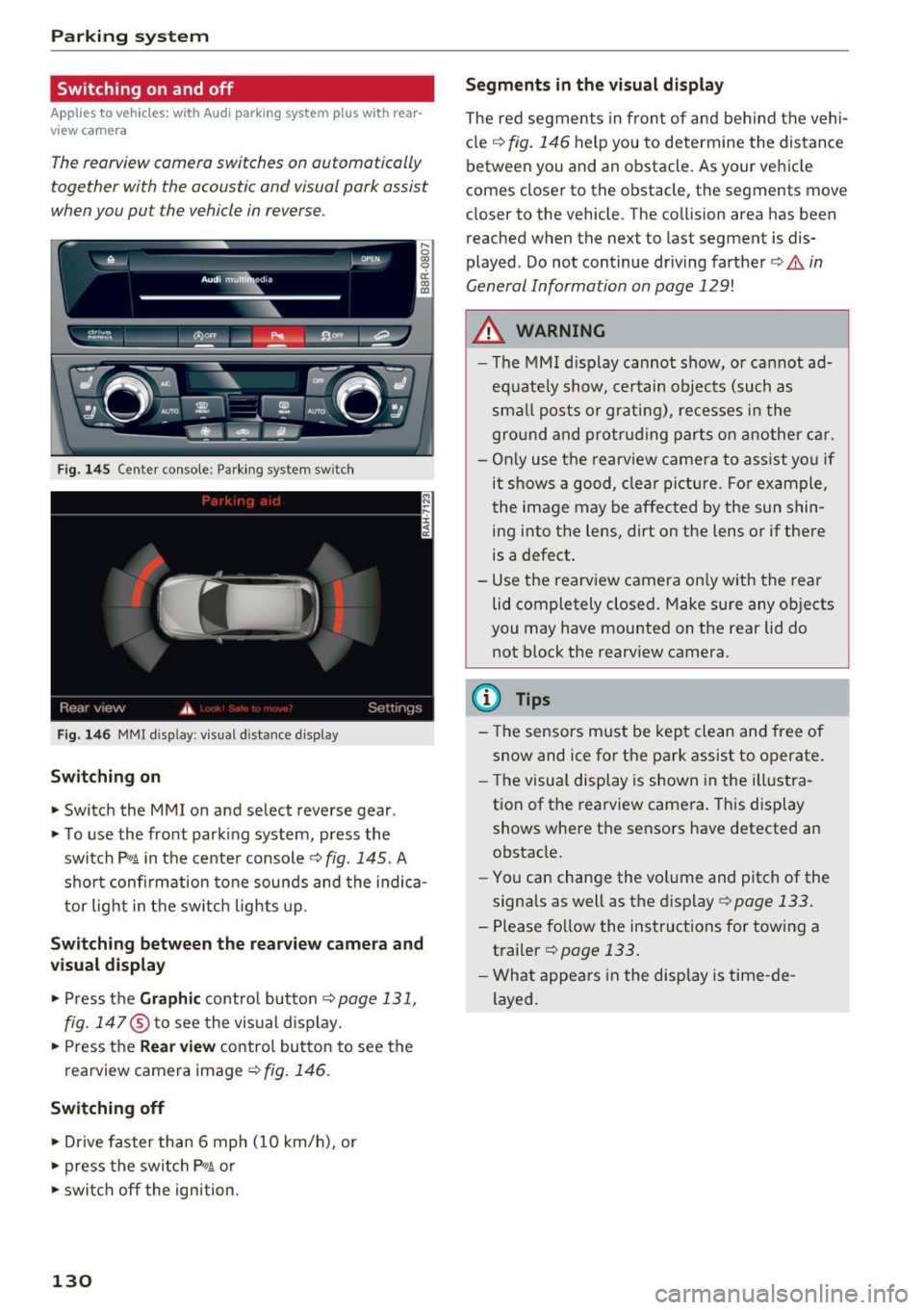
F ig. 145 Center console: Pa rking system sw itch
F ig. 146 MM I d isp lay : v isual d istance display
Sw itch ing on
• Switch the MM I on and select reverse gear .
• To use the front parking system, press the
switch
P11A in the center console¢ fig. 145. A
sho rt confi rmation to ne sounds and the indica
tor light in the switch lights up.
Sw itching betwe en th e re arview came ra and
visual display
• Press t he Graphi c control but ton ¢ page 131,
fig. 147
® to see the vis ual d isplay.
• Press the
Re ar view contro l button to see the
rearview camera image¢
fig. 146.
Switching off
• Drive faster than 6 mph (10 km/h), or
• press the switch
P"1A or
• swit ch off the ignition.
130
S egments in the vis ual d isplay
The red segments in front of and behind the vehi
cle
¢ fig. 146 help you to determine the distance
between you and an obstacle . As your vehicle
comes closer to the obstacle, the segments move
closer to the vehicle . The collision area has been
reached when the next to last segment is dis
played . Do not continue dr iving farther ¢.&.
in
General Information on page 129!
,& WARNING
- The MMI display cannot show, or cannot ad
equate ly show, certain objects (such as
sma ll posts or grati ng), re cesses in the
gro und and protrud ing parts on another car.
- On ly use the rearv iew camera to ass ist you if
it shows a good, clear picture . For example,
the image may be affected by the sun shin
ing into the lens, dirt on the lens o r if there
is a defect .
- Use the rearview camera on ly with the rear
lid completely closed. Make sure any ob jects
you may have mounted on the rear lid do
not block the rearview camera.
(D Tips
- The sensors m ust be kept clean and free of
snow and ice for the park assist to operate .
- The visu al display is shown in the illustra
tion of the rearview camera. This display
shows where the sensors have detected an obstacle.
- Yo u can change the vol ume and pitch of the
signals as well as the disp lay ¢
page 133.
-Please follow the instruc tions for tow ing a
trailer
¢ page 133.
- What appears in the display is time -de
layed .