instrument cluster AUDI Q5 2016 User Guide
[x] Cancel search | Manufacturer: AUDI, Model Year: 2016, Model line: Q5, Model: AUDI Q5 2016Pages: 300, PDF Size: 75.02 MB
Page 28 of 300
Driver information system
On Board Diagnostic
System (OBD)
Malfunction Indicator Lamp (MIL)
The Malfunction Indicator Lamp (MIL) ¢• in the
instrument cluster
c:::> page 14, fig. 8 is part of the
On-Board Diagnostic (OBD II) system.
The warning/indicator light illuminates when the
ignition is switched on and goes out after the en
gine starts and the idle has stabilized . This indi
cates that the MIL is working properly.
If the light doe s not go out after the engine is
started, or illuminates while you are driving, a malfunction may exist in the engine system. If
the light illuminates, the catalytic converter
could be damaged.
Continue driving
with reduced power (avoiding
sustained high speeds and/or rapid accelera
tions) and have the condition corrected. Contact
your authorized Audi dealer.
If the light illuminates, the electronic speed lim
iter may a lso be malfunctioning. For more infor
mation
c:::> page 26, Electronic speed limiter.
An improperly closed fuel filler cap may also
cause the MIL light to illuminate (only vehicles
with gasoline engine)
c:::>page 215.
On-Board Diagnostics
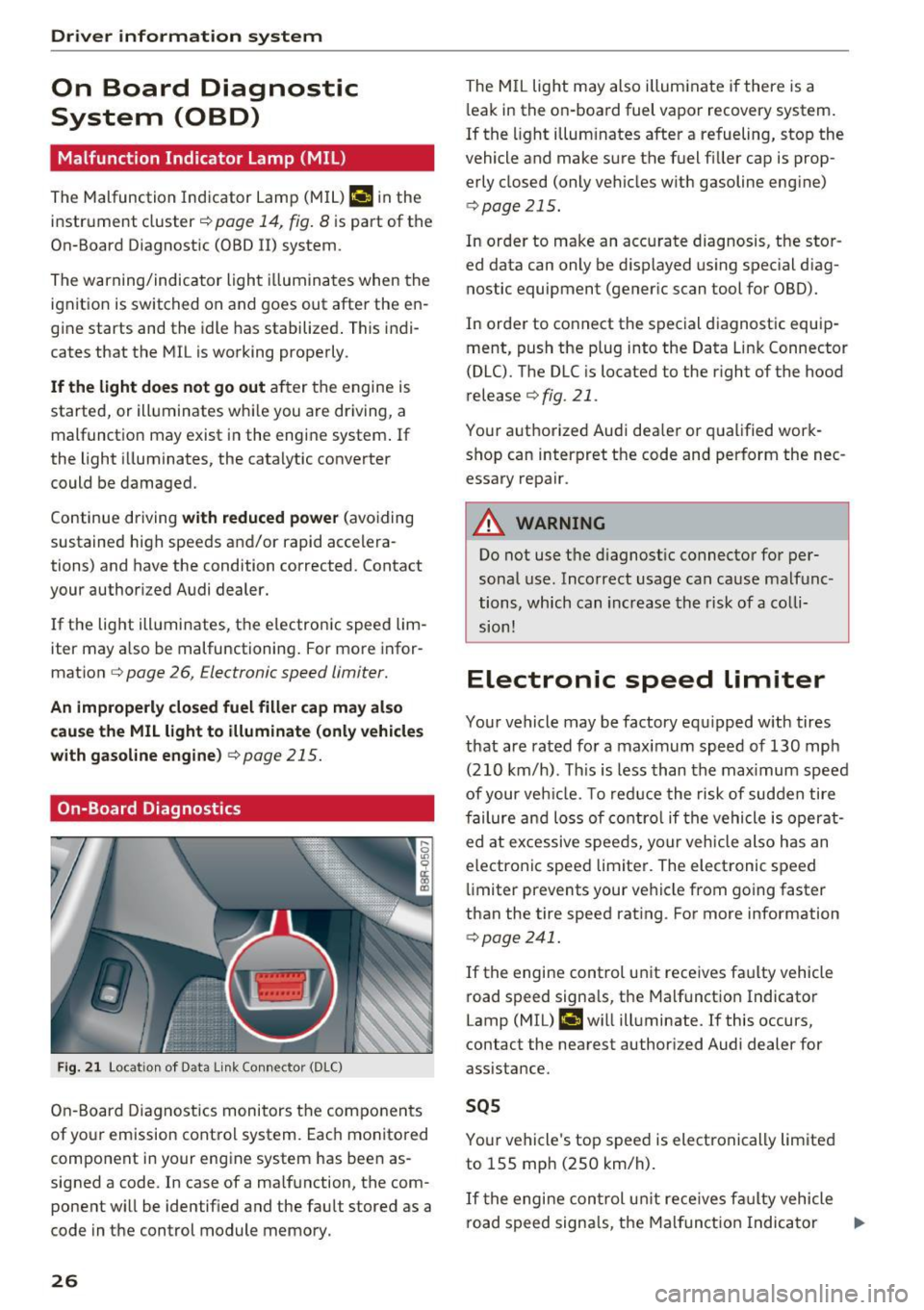
Fig. 21 Loca tion of Data Link Connector (DLC)
On-Board Diagnostics monitors the components
of your emission control system. Each monitored
component in your engine system has been as
signed a code . In case of a malfunction, the com
ponent will be identified and the fault stored as a
code in the control module memory.
26
The M IL light may also illuminate if there is a
l eak in the on-board fuel vapor recovery system.
If the light illum inates after a refueling, stop the
vehicle and make sure the fuel f iller cap is prop
erly closed (only vehicles with gasoline engine)
c:::> page 215.
In order to make an accurate diagnosis, the stor
ed data can only be displayed using special diag
nostic equipment (generic scan tool for OBD).
In order to connect the special diagnostic equip ment, push the plug into the Data Link Connector
(DLC). The DLC is located to the right of the hood
release
c:::> fig. 21.
Your authorized Audi dealer or qualified work
shop can interpret the code and perform the nec
essary repair .
A WARNING
Do not use the diagnostic connector for per
sonal use. Incorrect usage can cause malfunc
tions, which can increase the risk of a colli
sion!
Electronic speed limiter
Your vehicle may be factory equipped with tires
that are rated for a maximum speed of 130 mph (210 km/h) . This is less than the max imum speed
of your veh icle. To reduce the risk of sudden tire
failure and loss of control if the vehicle is operat
ed at excessive speeds, your veh icle also has an
electronic speed limiter. The electronic speed
limiter prevents your vehicle from going faster
than the tire speed rating . For more information
c:::> page 241.
If the engine control unit receives faulty vehicle
road speed signals, the Malfunction Indicator
Lamp (MIL) ¢•will illuminate. If this occurs,
contact the nearest authorized Audi dealer for
assistance.
SQS
Your vehicle's top speed is electronically limited
to 155 mph (250 km/h).
If the engine control un it rece ives faulty vehicle
road speed signals, the Malfunction Indicator .,..
Page 34 of 300
Driver information system
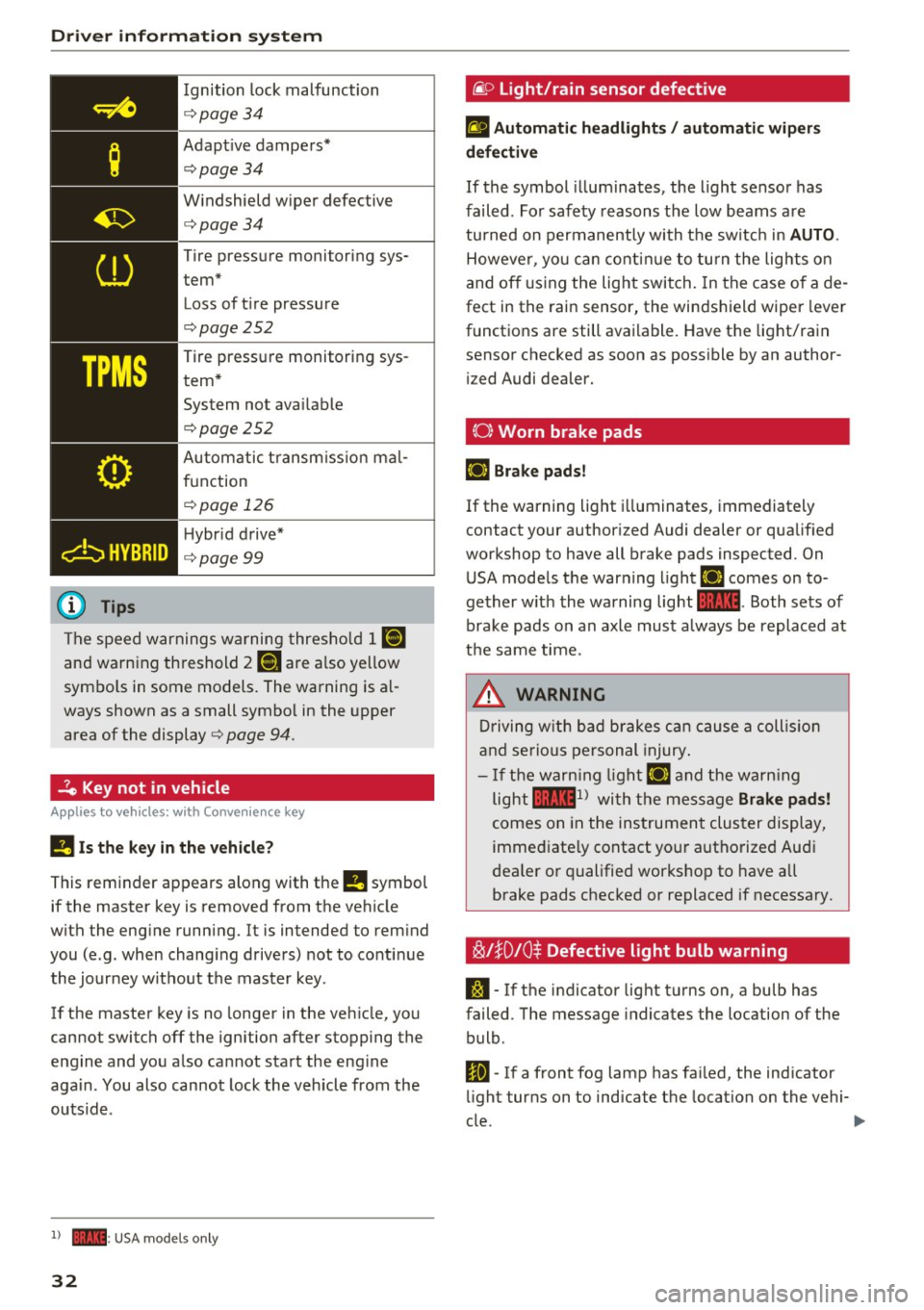
Ignition lock malfunction
<=>page 34
Adaptive dampers*
c:> page 34
Windshield wiper defective
c:>page34
Tire pressure monitoring sys
tem* Loss of tire pressure
c:>page252
Tire pressure monitoring sys
tem* System not available
c:>page252
Automatic transmission mal
function
<=> page 126
Hybrid drive*
c:> page99
The speed warnings warning threshold
J raj
and warning threshold 2 ISi are also yellow
symbols in some models. The warning is al
ways shown as a small symbol in the upper
area of the display
c:> page 94.
-?e Key not in vehicle
Applies to veh icles: w ith Conven ie nce key
II Is the key in the vehicle?
This reminder appears along with the
II symbol
if the master key is removed from the vehicle
with the engine running. It is intended to remind
you (e.g. when changing drivers) not to continue the journey without the master key .
If the master key is no longer in the vehicle, you
cannot switch off the ignition after stopping the
engine and you also cannot start the engine
again . You also cannot lock the vehicle from the
outside .
l) - : USA models only
32
·@ Light/rain sensor defective
fl Automatic headlights/ automatic wipers
defective
If the symbol illum inates, the light sensor has
failed. For safety reasons the low beams are
turned on permanently with the switch in
AUTO.
However, you can continue to turn the lights on
and off using the light switch. In the case of a de
fect in the rain sensor, the windshield wiper lever
functions are still available. Have the light/rain
sensor checked as soon as possible by an author ized Audi dealer.
(0) Worn brake pads
£i1 Brake pads!
If the warning light illuminates, immediately
contact your authorized Audi dealer or qualified
workshop to have all brake pads inspected. On USA models the warning light
£i1 comes on to
gether with the warning light
1111. Both sets of
brake pads on an axle must a lways be replaced at
the same time.
_8. WARNING
Driving with bad brakes can cause a collision
and serious personal injury.
-If the warning light £i1 and the warning
light
llll1 l with the message Brake pads!
comes on in the instrument cluster display,
immediately contact your authorized Audi
dealer or qualified workshop to have all
brake pads checked or replaced if necessary.
~l}D 10$ Defective light bulb warning
S:1 -If the indicator light turns on, a bulb has
failed. The message indicates the location of the
bulb .
Im-If a front fog lamp has failed, the indicator
light turns on to indicate the location on the vehi-
cle.
~
Page 35 of 300
,....,
N
co
er::
co
,....,
light tu rns on to indicate the location on the vehi
cle.
Vehicle light s: System fault!
If the message appears, there is a ma lfunction in
the head lights or light switch.
Drive to your authorized Aud i dealer immediately
to have the malfunct ion corrected .
A WARNING
-Light bu lbs are pressur ized and could ex
plode while they are being changed caus ing
ser ious persona l injury.
-
- Work with due care when handling the high
voltage section of gas dis charge (xenon)
ligh ts*. Failure to do so co uld result in death
or serious injury .
@ Tips
Have the bulb replaced or the connect ion re
pa ired by yo ur autho rized Aud i Serv ice depart
men t.
<:;::> Windshield washer flu id level too low
llt Plea se refill washer fluid
If the symbol illumi nates, add w indshield was her
fluid to the washer system and also to the head
light washer system
c::> page 233 .
Bil Fuel supply too low
When the liD symbol i llum inates, this means
there are about 2.6 ga llons ( 10 liters) of fue l left
in the fuel tank. Time to refuel!
c::> page 214.
If the symbol lights up, even when there is amp le
fuel in the tank, and the text
Fuel tank sy stem
malfun ction! Contact deale r
appears in the dis
p lay, there is a fault in the system. Contact an au
thor ized Audi dealer to have the fault rect ified.
D Battery voltage
If battery power drops into the range where it
can limit the ab il ity of the engine to start, th is
the symbol (•) ;ippears in the instrument cluster
Dri ver informa tion system
display with the following driver message Lo w
batter y: Batte ry will be char ged while dri ving.
While t his driver notification is disp layed , you
have to be prepared for limited start ing capabili
ty .
Driver message appears and goes out again
If this d rive r message appea rs after the ignition
is turned on or while d riving a nd it goes ou t again
after a whi le, the battery has been adequately re
charged .
Driver message appears and does not go out
again
If this drive r notificat ion appea rs after the igni
tion is tu rned on or while driv ing and does not go
out again, the battery's state of charge is not in
the optimal range. Start ing capability is restrict
ed . Have the battery checked at an authorized
Audi dealer or other qualified workshop as soon as possible.
~ Check engine oil
II Add oil, ma x x qt (l). You may cont. driv.
When the Ill symbol and dr iver message appear,
add the amount of oil appear ing in the disp lay at
the next opportunity
c::> page 224 .
'l:7;,.. Engine oil sensor defective
• Oil le vel! Sen sor defecti ve
If the symbol illuminates, contact your author
ized Audi dea ler and have the oil sensor inspect
ed . Until you have this done, check the oil level
each time you refuel just to be on the safe side
c::> page 224.
! ? Engine speed limitation
Applies to vehicles: with engine speed limitation
II! Do not exceed max. engine spe ed of XXXX
rpm
T he II! symbol illuminates when there is an en
gine co ntrol malf unct ion. The indi cator light ~
in t he i nstr ument cluster also illum ina tes. The
engine speed is limited to the speed displayed in ..,.
33
Page 39 of 300
from transmitters in the vicinity of the vehi
cle work ing in the same frequency range
(e .g . a cell p hone, radio equipment) .
- If yo u open the dr iver's doo r with t he key
l eft in the ignition Lock, a chime w ill sound.
This is your remi nder to remove the key and
l ock the door.
- Fo r security reasons, replacement keys are
on ly availab le from Audi dealers.
- Fo r De claration of Comp liance to U nite d
States FCC and Ind ustry Canada reg ulations
r:=> page283 .
Check light and battery in the master key
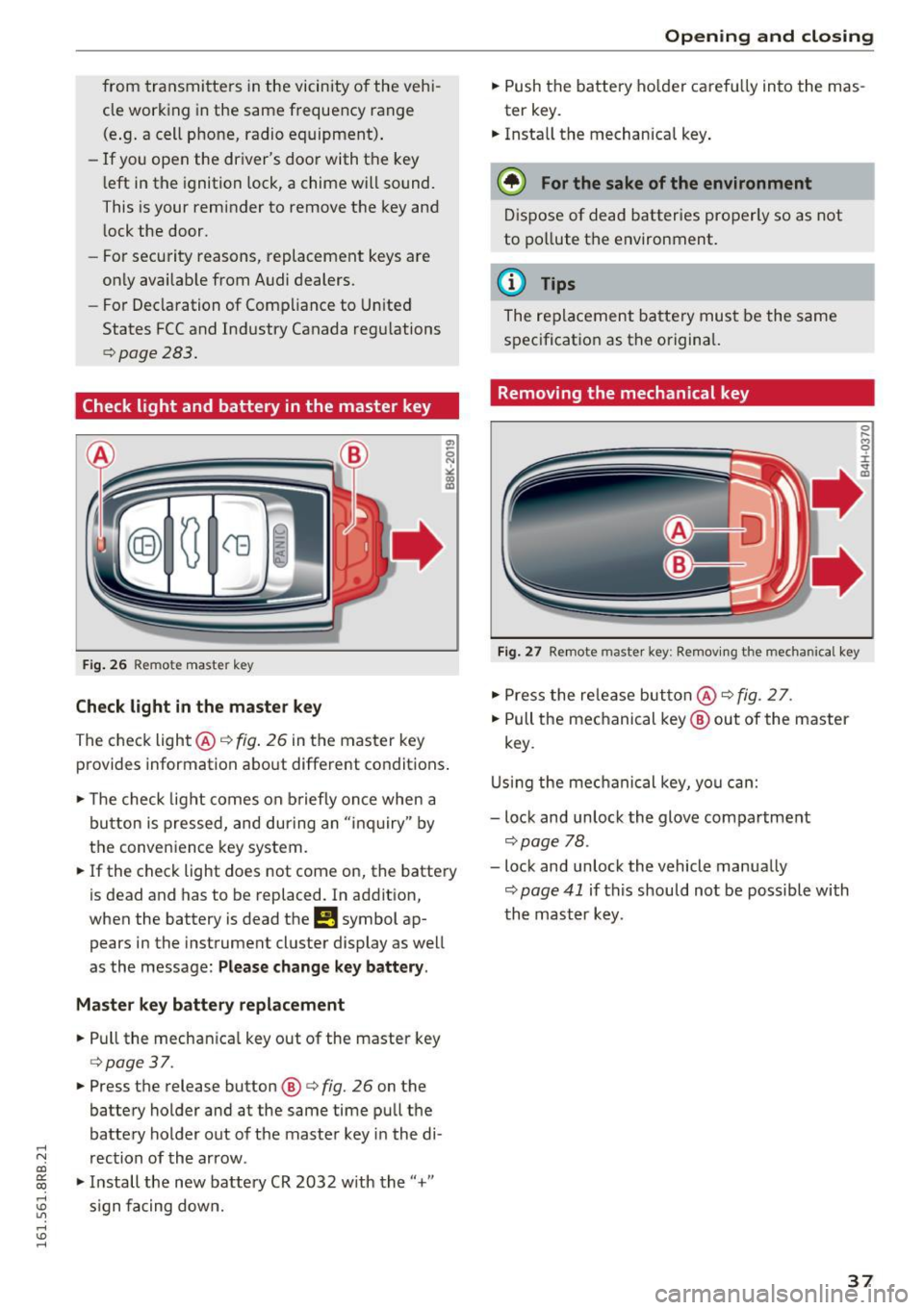
Fig. 26 Re mote mast er key
Check light in the master key
The check light@q fig. 26 in t he master key
p rovides information abo ut different condit ions .
.,. The check light co m es on briefly on ce when a
button is pressed, and dur ing an " in qu iry" by
the conven ience key system .
.,. If the check light does not come on, the batte ry
is dead and has to be replaced. In ad dition,
when the battery is dead
the m symbol ap
pears in the instrument cluster display as well
as the message :
Please change key battery .
Master key battery replacement
.,. Pull the mechan ica l key out of the master key
c=> page 37 .
.,. Press the release button @ r=> fig. 26 on the
batte ry holder and at the same time pu ll th e
batte ry holder out of t he maste r key in the di-
.....
'"" rection of the arrow . co
~ .,. In stall the new battery CR 2032 w ith the "+"
; s ign f acing dow n.
Open ing and closing
.,. Push the batt ery ho lder caref ully into the mas
ter key.
.,. Insta ll the mechanical key .
@ For the sake of the environment
Dis pose of dead batter ies properly so as not
to po llute t he environment.
@ Tips
The re placeme nt ba tte ry mus t be the same
s p ec ificat ion as t he o rigina l.
Removing the mechanical key
Fig. 27 Remote maste r key: Re mov ing the mecha nical key
.,. Press the re le a se but ton @ r=> fig. 2 7.
.,. Pull the me chanical key @ out of the master
key .
U sing th e mec hanical key, yo u ca n:
- lock and unlock the glove compartment
c=> page 78 .
-lock and unlock the vehicle manua lly
c=> page 41 if this should no t be possible with
t h e m aster k ey .
37
Page 54 of 300
Lights and Vision
Lights and Vision
Exterior lighting
Switching the lights on and off
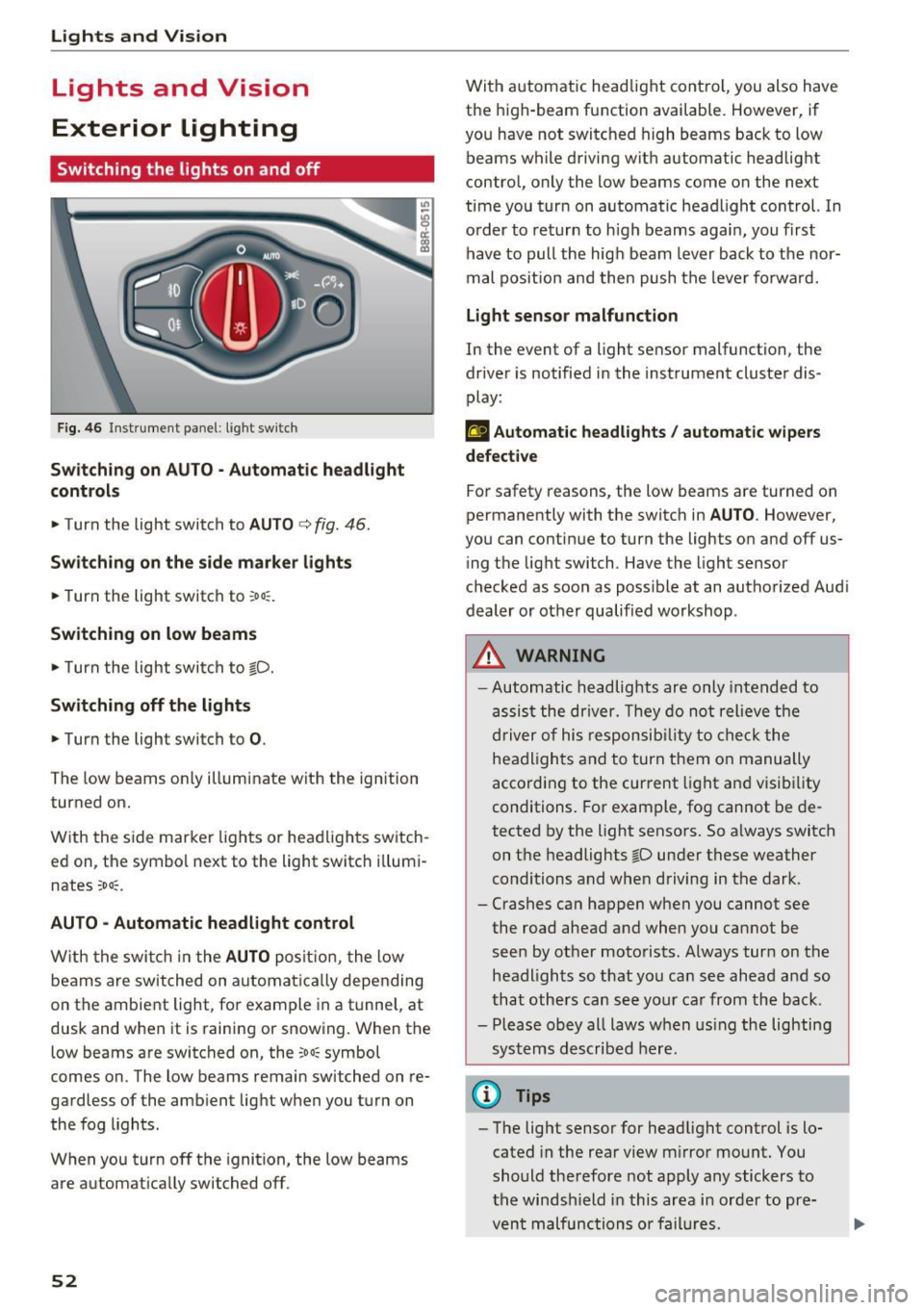
Fig. 46 Instrument panel: l ight sw itch
S wi tch in g on AUTO· Automatic headlight
controls
• Turn the light switch to AUTO c> fig. 46 .
Sw itch ing on the side marke r lights
• Turn the light switch to ~o o:.
Switching on low beams
• Turn the light swi tch to io.
Sw itch ing off the lights
• Turn the light switch to 0.
The low beams only illuminate with the ignition
turned on.
With the side marker lights or headlights switch
ed on, the symbol next to the light switch i llumi
nates
~oo~.
AU TO -Automatic headlight control
W ith the swi tch in the AUTO posit io n, the low
beams are switched on automat ic all y depending
on the ambient light, fo r example in a tunnel, at
dusk and when it is raining or snowing. When the
low beams are switched on, the
~oo~ symbol
comes on. The low beams remain switched on re
gardless of the amb ient light when you turn on
the fog lights .
When you turn off the ignition , the low beams
are automat ically switched off .
52
With automatic head light cont rol, you also have
the high-beam function available. However, if
you have not switched high beams back to low beams while driving with automatic headlight
contro l, only the low beams come on the next
time you turn on automatic headlight control. In
o rder to return to h igh beams agai n, you first
have to pull the hig h beam lever back to the nor
mal pos it ion and then push the leve r fo rwa rd.
Light sen sor malfunction
In the event of a light sensor malfunction, the
dr ive r is notified in the instrument cluster dis
play:
El Automat ic headlights / auto matic wipers
defective
For safety reasons, the low beams are turned on
permanently with the switch in
AU TO . However,
you can contin ue to turn the lights on and off us
i ng t he light switch. Have the light sensor
checked as soon as poss ible at an autho rized Aud i
dealer or other qualified workshop .
_&, WARNING
-Automatic headlights are only inte nded to
assis t the driver. They do not relieve the
driver of his respon sib ility to check the
headligh ts a nd to turn them o n manually
according to the cur rent light an d visibility
conditions. For example, fog cannot be de
tected by the light sensors. So a lways switch
on t he headlights
io under these weather
conditions and when driving in the dark .
- Crashes ca n happen when you cannot see
the road ahead and when you cannot be seen by other motorists. Always turn on the
headl igh ts so that you ca n see ahead a nd so
that others can see yo ur car from the back.
- Please obey all laws w hen us ing the lighting
sys tems described here.
@ Tips
- The light sensor for headlight control is lo
cated in the rear view m irror mount. You
should therefore not apply any stickers to
the windsh ield in this area i n order to pre
vent malfunctions or fail ures.
Page 57 of 300
..... N
co ~ CX)
..... I.Cl U"I
..... I.Cl .....
-your vehicle is being towed by a tow truck or
if you are towing another vehicle behind
you .
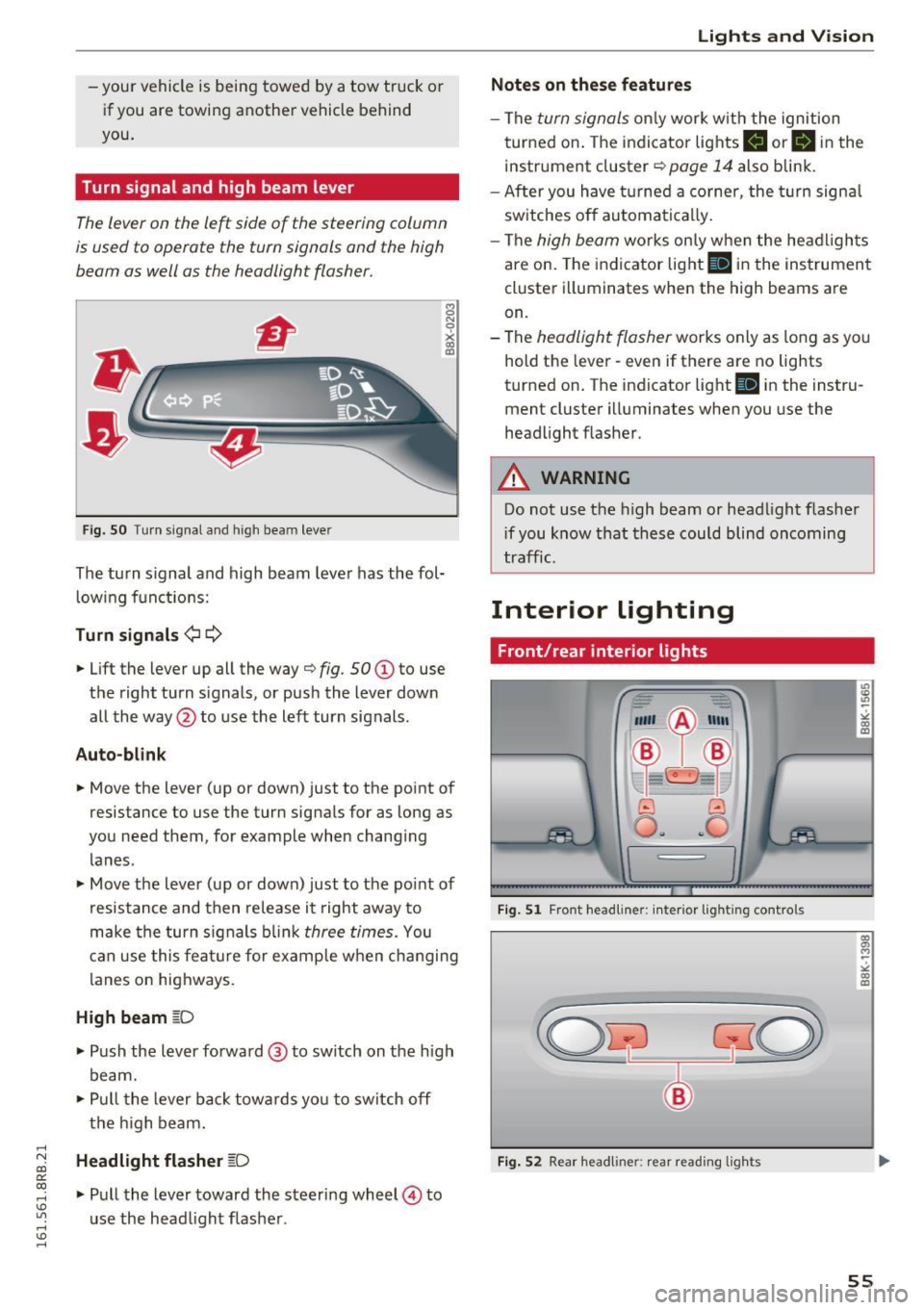
Turn signal and high beam lever
The lever on the le~ side of the steering column
is used to operate the turn signals and the high
beam as well as the headlight flasher.
Fig. SO Tu rn signal and high bea m lever
The turn s ignal and high beam lever has the fol·
lowing functions:
Turn signals ¢¢
8 N
0
~ IXI
• Lift the lever up all the way¢ fig. 50 (D to use
t h e right turn s ignals, or push the lever down
all the way @to use the left turn signals .
Auto-blink
• Move the lever (up or down) just to the point of
resistance to use the turn signa ls for as long as
you need them, for example when changing lanes .
• Move the lever (up or down) just to the point of
resistance and then release it right away to
make the turn s ignals blink
three times. You
can use this feature for example when changing
l anes on highways.
High beam ~D
• Push the lever forward@ to switch on the high
beam.
• Pull the lever back towa rds yo u to switch off
the high beam .
Headlight flasher ~D
• Pull the lever toward the steering wheel© to
u se the head light flasher .
Lights and V ision
Notes on these features
-The turn signals only work w ith the ignition
turned on. The indicato r lights
II or II in the
instr ument cluster ¢
page 14 also blink.
- After you have turned a corner, the turn signa l
switches off automatically.
- The
high beam wo rks on ly when the headlights
are on. The indicator light
II in the instrument
cluster illuminates when the high beams are
on.
- The
headlight flasher works only as long as yo u
hold the lever· even if there are no lights
turned on . The indicator light
II in the instru
ment cluster illuminates when you use the
headlight flasher .
A WARNING
-Do not use the high beam or head light flasher
i f you know that these could blind oncoming
traffic.
Interior lighting
Front /rear interior lights
_. --=:.
I-~~
._ -- v
8 G
o .. .. c
l
Fig. 51 Front head line r: in ter io r light ing cont rols
Fig. 52 Rear headliner: rear read ing lights
55
Page 91 of 300

..... N
co ~ CX)
..... I.Cl U"I
..... I.Cl .....
!I Is the ke y in the vehicle ?
This message appears in a veh icle w ith Conven
ience key* if the master key is removed from the
ve hicle w ith the engine r unning.
If the master
key is no longer in the vehicle, you cannot switch
on the ignition after stopping the engine and you
also cannot start the eng ine again. Moreover, you
cannot lock the veh icle from the outside with the
key.
Shift to P othe rwis e vehicle c an roll away . Doors
do not l ock if lever i s not in
P.
This message appears for safe ty reasons a long
with a warning s ignal.
It appears i f the selector
lever for the automatic transmission is not in the
P posit ion when switching
off the ignition. Move
the selector lever to the P posit ion, otherwise the
vehicle is not secured aga inst rolling away . You
also cannot lock the vehicle using the locking button* on the door handle or using the remote
key .
Turn off ignit io n befo re lea ving car
Th is message appears if the driver's door is
opened while the ignition is switched on . Always
switch
off the ignition if you are leaving the vehi
cle . See also
c:;, page 93.
Turn off ignit ion befo re lea ving car. Batte ry is
dis charging
This message appears if the d river's door is
ope ned while the ignition is switched on. Always
switch
off the ignition if you are leaving the vehi
cle . See a lso
c:;, page 93.
Shift to P and turn off ignition, otherwi se vehi
cle can roll awa y
This message appears if the driver 's door is
opened while the igni tion is sw itched on and t he
selec to r lever is not in t he P posit ion. Shift the
se lector lever into the P pos ition and switch of f
the ignition when you exit the vehicle . Otherwise
the vehicle cou ld roll . See also
c:;, page 93.
Con venien ce k ey defe cti ve ! Use igniti on lo ck
This message appears if the engine must be
started or stopped using the ignit ion key and not
the
! S TAR T ENGINE ST OPI* button .
Electromechanical
parking brake
Operation D
rivi ng
The electromechanical parking brake replaces
the hand brake.
F ig. 103 Center co nsole : P ark ing brake
.,. Pull on the switch Wl c:;, fig. 103 to apply the
parking brake. The indicator lights in the switch
and . (USA models)/ . (Canada models) in
the inst rument cluster illuminate .
.,. With the ignition switched on, step o n the
brake pedal or the accelerator pedal and press
t he swit ch(® at the same time to re lease the
parking brake . The indicator lights in the switch
and . (USA mode ls)/ . (Canada models) in
the instrument cluster go out.
You r vehicle is equ ipped wi th an electromechan i
ca l parking brake . The parking brake is designed
to prevent the vehicle from ro lling unintentional
ly and replaces the hand brake.
In add ition to the normal functions of a trad i
t iona l han d brake, the electromechanical parking
brake provides va rious convenience and safety
funct ions .
When starting from rest
-The integra l sta rting assist he lps yo u when
driving by automati cally releas ing the pa rking
brake
c:;, page 90, Starting from res t.
-When start ing on incline s, t he s tart ing assist
prevents the vehicle from uninten tionally ro ll
ing back . The braking force of the parking brake
is not re leased unti l sufficient driving force has
been built up at the wheels. .,.
89
Page 92 of 300
Driving
E m erg ency b ra ke function
An emergency b rake ensures that the veh icle can
be slowed down even if the normal brakes fai l
¢ page 91, Emergency broking.
A WARNING
If a drive range is engaged with the vehicle
stationary and the engine running, you must
in no instance accelerate care lessly. Other
w ise the vehicle will start to move immediate
ly -risk of an accident.
(D Tips
- If the parking brake is app lied with the igni
tion switched off, the indicator lights in the
switch and. (USA models)/ . (Cana-
da models) in the instrument cluster will go
out after a ce rtain per iod of t ime.
- Occasiona l noises whe n the parking b rake is
applied and released are normal and are not
a cause for conce rn.
- When the vehicle is par ked, the park ing
brake goes thro ugh a self-test cycle at regu
l a r i nte rvals. Any associa ted noises a re nor
mal.
Parking
" Press the brake ped al to stop the vehicle.
" Pull the switch
¢ page 89, fig. 103 to set the
parking brake.
" Move the selector lever to P.
" Turn the eng ine off¢ &_.
-
"When on incl ines or declines, turn the steering
wheel so that the vehicle w ill roll into the curb
if it beg ins to move .
A WARNING
-When you leave your vehi cle - even if on ly
br iefly- always remove the ign ition key. This
applies particular ly when c hildren remain in
the vehicle . Otherwise the children could
sta rt the engine, release the pa rking brake
or operate electrical eq uipment (e .g. power
windows). There is the risk of an acc ident.
- When the vehicle is loc ked, no one - particu
larly not children shou ld remain in the vehi-
90
-
cle. Locked doors make it more d ifficult for
emergency wo rkers to get into the vehicle -
putting lives at risk.
Starting from rest
The starting assist function ensures that the
parking broke is released automatically upon
starting.
Stopping and applying park ing brake
" Pull the switch to app ly the parking b rake.
Starting and automat ically releasing the
park ing brake
" When you start to d rive as usua l, the par king
brake is automatically released and yo ur vehicle
beg ins to move.
When stopp ing at a t raffic sig na l or s topping in
c ity traff ic on vehicles with an automat ic t rans
mission, the pa rking brake can be applied . The
vehicle does not have to be held with the foot brake. The parking brake eliminates the tendency
to c reep w ith a dr ive range engaged . As soon as
you drive off as usual, the parking brake is re
leased automat ica lly and the vehicle starts to
move.
Starting on slope s
When starting on incl ines, the starting assist pre
vents the vehicle from un intent iona lly rolling
back. The braking force of the parking brake is
not re leased u nti l sufficient dr iv ing fo rce has
been built up at the wheels.
@ Tips
For safety reasons, the park ing brake is re
l eased automatically on ly when the d river's
safety be lt is engaged in the b uckle.
Starting off with a trailer
To prevent rolling bock unintentionally on on in
cline, do the following:
" Keep the switch pu lled and depress the acceler
ator. The park ing brake stays applied and pre-
vents the ve hicle from roll ing backward.
IJ,,
Page 93 of 300
,....,
N
co
er::
co
,....,
that you are developing enough driving force at
the wheels by depressing the accelerator .
Depending on the weight of the r ig (vehi cle and
tra iler) and the severity of the incline, you may
ro ll backwards as you start . You can prevent roll
ing backwards by holding the parking brake
switch pulled out and accelerating -just as you
wou ld when starting on a hill with a conventiona l
h and brake .
Emergency braking
In the event that the conven tional brake system
fails or locks .
~ In an emergency, pull the sw itch and cont inue
to pull it to slow your veh icle down with the
parking b rake.
~ As soon as you release the switch or accelerate,
the b raking process stops .
If you pull the sw itch and hold it above a speed of
about 5 mph (8 km/h) , the eme rgency braking
function is in it iated . The vehicle is braked at all
four wheels by activating the hydraulic brake sys
te m. T he b rake perfo rman ce is sim ila r t o making
an em ergen cy sto p ~ ,& .
In o rder not to activate the emergency brak ing by
mista ke, an audib le wa rn ing tone (buzze r)
sounds w hen the sw itch is p ulled. As soon as t he
sw itch is rele ased, or the acce le ra to r p edal is de
p ressed, eme rgency bra king stops.
A WARNING
Emergency bra king should only be use d in an
emergency, w hen the normal foot brake has
fai led or the bra ke pedal is obstructed . Using
the par king b rake to perfo rm emergency
brak ing will slow your vehicle down as if you
had made a full bra ke ap plication . The laws of
physics cannot be suspended even wi th ESC
a n d its associated components (A BS, ASR,
E DS). In c orn ers and when road or weath er
c ondi tions are bad, a full brake ap plication
c an ca use the vehicle to sk id or the rear end to
break away· r isking an accident .
Driving
Driver messages in the instrument cluster
Caution: Vehicle parked too steep
T h is message appears when the pa rking bra ke is
applie d on an in cl in e that exceeds about 30%.
In this case the braki ng power o f the pa rking
brake may not be adequate to prevent the ve hi
cle from roll ing uninten tionally.
Press b rake pedal to release park ing brake
This dr iver message appears when the sw itch to
re lease the par king brake was pressed. The park
ing brake can only be released if you step o n the
brake pedal and at the same time press the
switch or you automatica lly re lease the park ing
bra ke w ith the sta rting ass ist ~
page 90 .
r.lJ Parking brake malfunction!
This dr iver message appears together w ith the
yellow
rlJ symbol whe n there is a parki ng brake
malfu nction .
Start/Stop system
Description
Applies to vehicles: wit h Start-Stop-Syste m
The Start -Stop -System can he lp increase f uel
economy and reduce CO2 emissions.
In the Start -S top -mode, the engine sh uts off au
tomat ica lly when the vehicle is stoppe d, such as
at a t raff ic light. The ignition remains switched
on d uring this stop phase. The eng ine will be a u
tomat ically restarted when needed.
T he last Start-Stop -System setting (on/off usin g
the b utton
10~ 1) will be restored when the ign i
t ion is turned on. The LED in the
10'" 1 button turns
on when the Start-Stop-System is switched off
manua lly .
Ba sic requirements for the Start-Stop mode
- The d river 's door is closed.
- The driver 's sea t belt is latc hed.
- The hood is closed.
- The vehicle must have bee n driven fast er than
2.5 mph (4 km/h) s in ce the last s top.
- A t railer is not hitched to the vehicle . .,.
91
Page 95 of 300
..... N
co ~ CX)
..... I.Cl U"I
..... I.Cl .....
engine will no t be switched off in the following
situations:
- The eng ine has not reached the m in imum re
quired temperature for Start-Stop-mode.
- T he interior temperature selected by the A/C
system has not been reached.
- The outs ide temperatu re is ext remely h igh/low.
- The w indshield is being defrosted
¢ page 82.
-The parking system* is switched on.
- The battery charge level is too low.
- The steering whee l is sharply turned or there is
a steering movement.
- After engaging the reverse gear.
- On sharp inclines .
IIJ appears in the instrument cluster display and
§ii;Ff&Ff ~lso appears in the tr ip comp ute r.
Engine automatically re starts
The stop phase is interrupted in the following sit
uations, for example . The eng ine restarts without
any action by the driver .
- The interior temperature varies from the tem
perature se lected in the A/C system .
- The windshield is beeing defrosted
¢ page 82.
- The brake pedal is pressed several times in a
row.
- The battery charge level becomes too low.
- High power cons umption .
IIJ appears in the instrument cluster display and
H§;Ff&Fii ~lso appears in the tr ip comp ute r.
Switching the ignition off autom atically
To prevent the battery from draining, the ignition
will switch off
automati cally when all of the fol
lowing cond itions have been met:
- The veh icle has already been driven.
- The eng ine has been turned off by the Start-
Stop-System .
- The driver's door is opened .
- T he dr iver's seat bel t is removed.
- The brake pedal is not pressed down.
- T he veh icle is stationary .
In this case, the activated low beam will be re
placed by the s ide marker lights . The side marker
D rivi ng
lights will switch of f after approximate ly 30 m i
nutes or when you lock the veh icle.
If t he Start-S top-System has not turned off the
engine or if you have swi tched the S tart -Stop
System off manually, the ignition will
not be au
tomatica lly switched off and the eng ine wi ll con
t in u e to run¢& .
A WARNING <= -
Never allow the engine to run in confined
spaces -danger of asphyx iation.
(D Tips
If you shift into the 0/S or N positions after
shifting into reverse, the vehicle must be dr iv
en faster than 6 mph (10 km/h) in order for
the engine to switch off again .
Switching the Start-Stop -System on /off
manually
App lies to vehicles: wi th Start -S top-Syste m
If you do not wish to use the system, you can
switch it off manually.
= , __ (A)Off _ --"'-- f'~-.::a-----
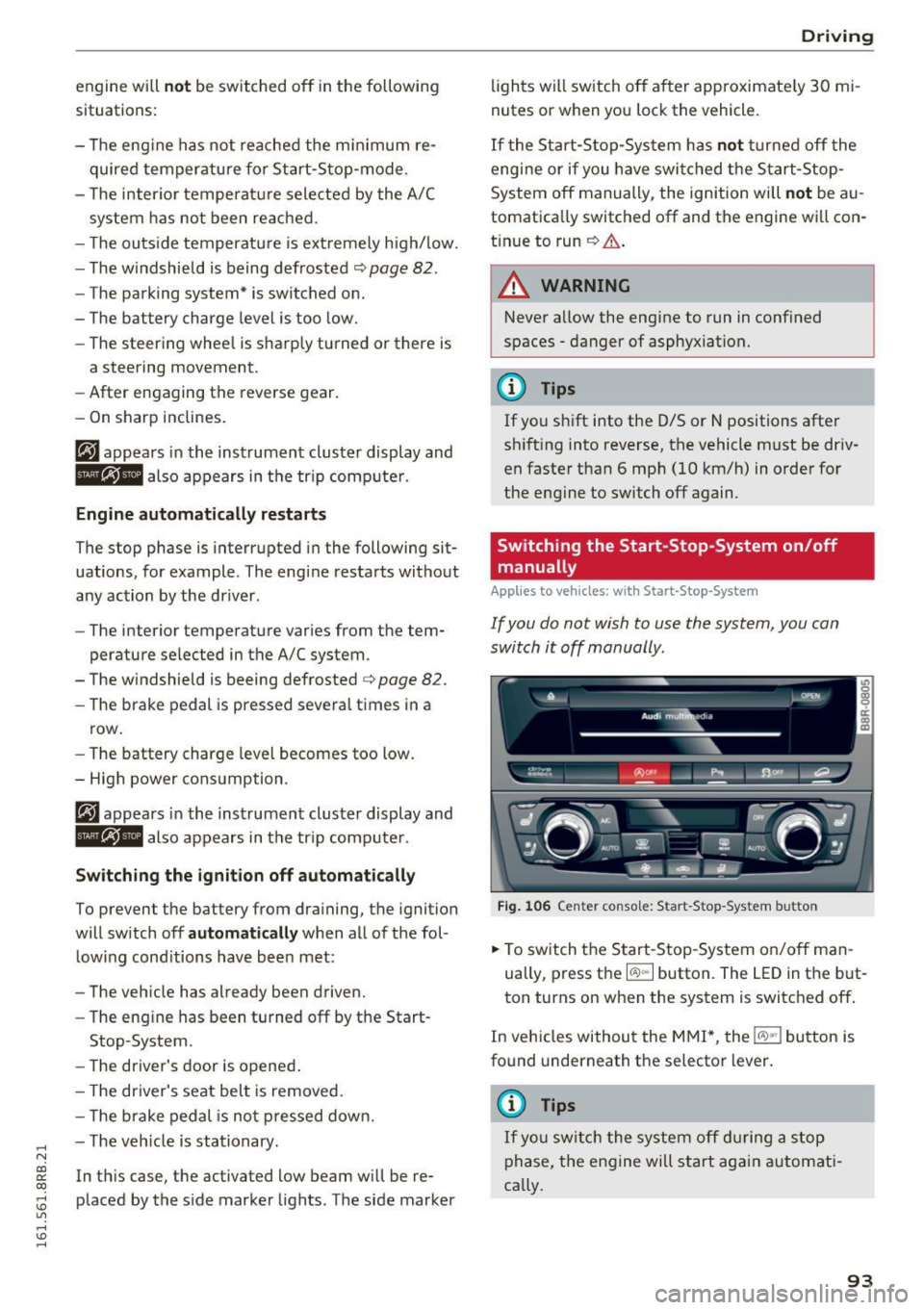
Fig . 10 6 Cen ter co nsole: S ta rt -Stop -System button
.. To switch the Start -Stop-System on/off man
ually, press the
I CAJ ,,.I button. The LED in the b ut
ton turns on when the system is switched off .
In vehicles without the M MI*, the
!CA.> "'! button is
found underneath the se lector lever.
(D Tips
If y ou swit ch the system off d uring a stop
phase, the engine will st art aga in automati
ca lly.
93