tow AUDI Q5 2016 Owner's Manual
[x] Cancel search | Manufacturer: AUDI, Model Year: 2016, Model line: Q5, Model: AUDI Q5 2016Pages: 300, PDF Size: 75.02 MB
Page 132 of 300
Parking system
Switching on and off
Applies to veh icles: w ith Aud i park ing system p lus w ith rear
view ca mera
The rearview camera switches on automatically
together with the acoustic and visual park assist
when you put the vehicle in reverse.
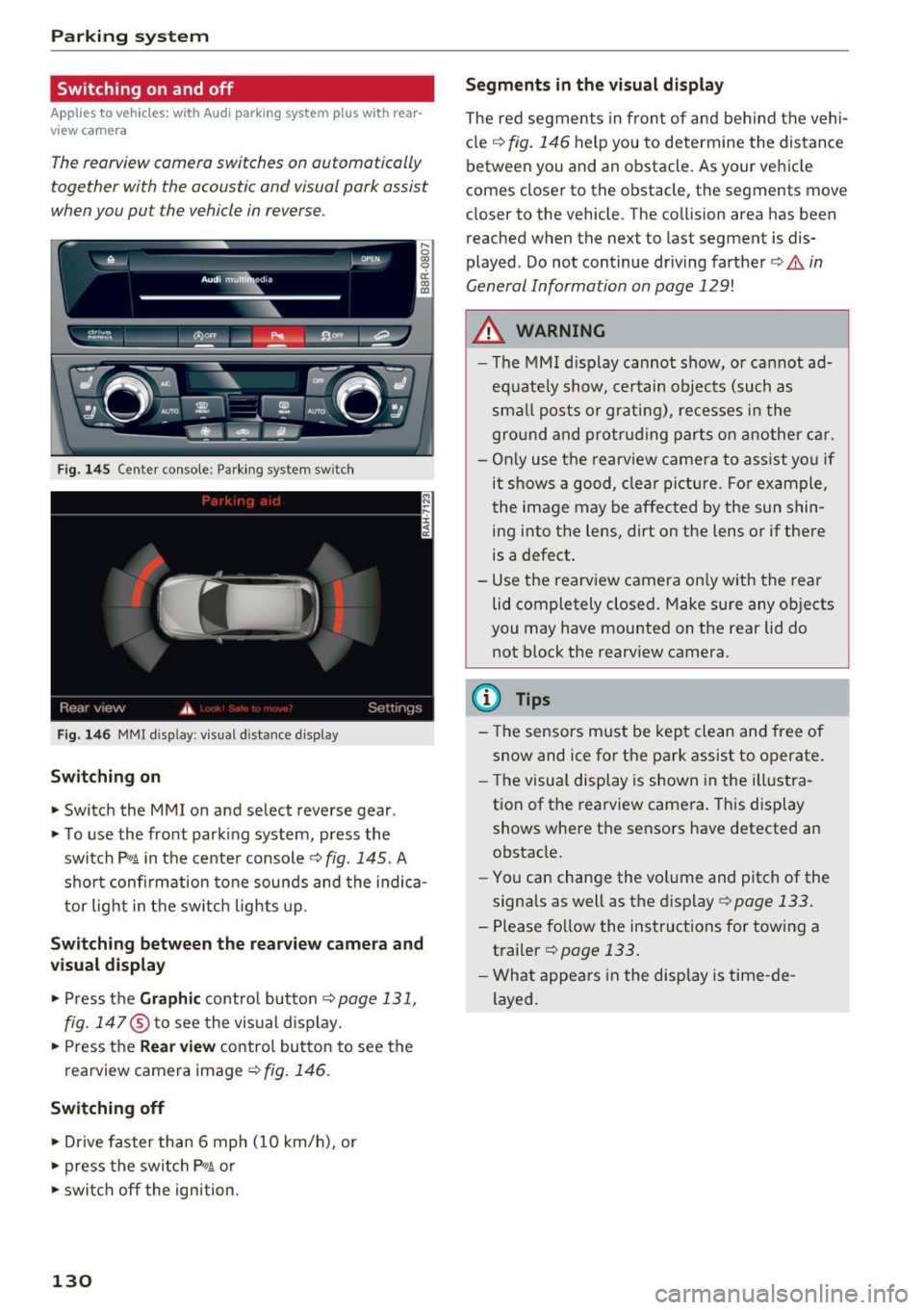
F ig. 145 Center console: Pa rking system sw itch
F ig. 146 MM I d isp lay : v isual d istance display
Sw itch ing on
• Switch the MM I on and select reverse gear .
• To use the front parking system, press the
switch
P11A in the center console¢ fig. 145. A
sho rt confi rmation to ne sounds and the indica
tor light in the switch lights up.
Sw itching betwe en th e re arview came ra and
visual display
• Press t he Graphi c control but ton ¢ page 131,
fig. 147
® to see the vis ual d isplay.
• Press the
Re ar view contro l button to see the
rearview camera image¢
fig. 146.
Switching off
• Drive faster than 6 mph (10 km/h), or
• press the switch
P"1A or
• swit ch off the ignition.
130
S egments in the vis ual d isplay
The red segments in front of and behind the vehi
cle
¢ fig. 146 help you to determine the distance
between you and an obstacle . As your vehicle
comes closer to the obstacle, the segments move
closer to the vehicle . The collision area has been
reached when the next to last segment is dis
played . Do not continue dr iving farther ¢.&.
in
General Information on page 129!
,& WARNING
- The MMI display cannot show, or cannot ad
equate ly show, certain objects (such as
sma ll posts or grati ng), re cesses in the
gro und and protrud ing parts on another car.
- On ly use the rearv iew camera to ass ist you if
it shows a good, clear picture . For example,
the image may be affected by the sun shin
ing into the lens, dirt on the lens o r if there
is a defect .
- Use the rearview camera on ly with the rear
lid completely closed. Make sure any ob jects
you may have mounted on the rear lid do
not block the rearview camera.
(D Tips
- The sensors m ust be kept clean and free of
snow and ice for the park assist to operate .
- The visu al display is shown in the illustra
tion of the rearview camera. This display
shows where the sensors have detected an obstacle.
- Yo u can change the vol ume and pitch of the
signals as well as the disp lay ¢
page 133.
-Please follow the instruc tions for tow ing a
trailer
¢ page 133.
- What appears in the display is time -de
layed .
Page 135 of 300
,....,
N
co
er::
co
,....,
lide with any obstacles. This can damage to
your veh icle.
(D Tips
The left or right orientation lines and surfaces
wi ll be displayed, depending on the turn sig
na l being used .
Adjusting the display
and warning tones
Applies to vehicles: with Audi parking system plus with rear
view camera
The display and warning tones can be adjusted in
the MMI.
~ Select: I CARI function button > Parking syste m.
Or
~ Se lect: I CARI funct ion button > C ar sy stem s*
control button > Driver a ssi st > Pa rking aid .
Di sp lay
- Off -
when the parking system is switched on,
only aud ible signals are g iven.
- On -when the parking system is switched on,
either the visual disp lay or the picture from the
rearview camera is displayed.
Warning tones
- Front volu me -
fron t se nso r volume
- Front fr equ ency -front se nsor frequency
- Rea r volum e -rear sensor vol ume
- Rea r frequency -rear sensor frequency
-In -car enterta inment fade r/Mus ic volum e
w hile pa rking -
when the parking system is
switched on, the volume of the active audio
source is lowered .
The new ly adjusted value is briefly heard from
the signal generator .
- The warning tones can also be ad justed d i
rectly by the vis ual disp lay or the picture
from the rearview camera. Simply press the
Sett ings control button.
- Changed settings are activated when park
ing system is switched on again.
Par king system
- The settings are automatically stored and
assigned to the remote control key .
Trailer hitch
Applies to vehicles: with Audi parking system plus with rear
view camera and trailer hitch
Fo r vehicles with a factory installed trailer hitch,
o r a tra ile r hi tch installed according to factory
specifications, the par king system rear sensors
do not come on whenever you shift into reverse
gear or when you press the
P •1~ switch . Remem
ber, there is no war ning for distances to the rear .
The front sensors remain activated. The visual
display switches to the tra iler tow ing mode. The
picture from the rearview camera w ill not show
the or ientat io n lines nor the blue surfaces .
If you insta ll a hitch yourse lf, this f unct ion may
not work.
Error messages
Applies to vehicles: with Audi parking system plus with rear
view camera
T he re is an error in the system if the LE D on the
Pw~ switch is blink ing and yo u hear a continuous
alarm for a few seconds after sw itch ing on the
park ing system or when the parking system is al
ready activated. Have your authorized Audi dealer
correct the error.
(D Tips
If the error is not corrected before you switch
off the ign ition, when you switch on the park
i ng system again, the LED in the
Pw.A sw itch
will blink.
133
Page 138 of 300
Driving safety
For detailed information on how to adjust the
driver's seat, see ¢
page 64.
A WARNING
Drivers who are unbelted, out of position or
too close to the airbag can be seriously in
jured by an airbag as it unfolds. To help re
duce the risk of serious personal injury:
- Always adjust the driver's seat and the
steering wheel so that there are at least
10 inches (25 cm) between your breastbone
and the steering wheel.
- Always hold the steering wheel on the out
side of the steering wheel rim with your
hands at the 9 o'clock and 3 o'clock posi
tions to help reduce the risk of personal in
jury if the driver's airbag inflates.
- Never hold the steering wheel at the
12 o'clock position or with your hands at
other positions inside the steering wheel
rim or on the steering wheel hub. Holding
the steering wheel the wrong way can cause serious injuries to the hands, arms and head
if the driver's airbag deploys.
- Pointing the steering wheel toward your
face decreases the ability of the su pplemen
tal driver's airbag to protect you in a colli
sion.
- Always sit in an upright position and never lean against or place any part of your body
too close to the area where the airbags are
located.
- Before driving, always adjust the front seats
and head restraints properly and make sure
that all passengers are properly restrained.
- Never adjust the seats while the vehicle is
moving . Your seat may move unexpectedly
and you could lose control of the vehicle.
- Never drive with the backrest reclined or
tilted far back! The farther the backrests are
tilted back, the greater the risk of injury due
to incorrect positioning of the safety belt
and improper seating position.
- Children must always ride in child safety
seats¢
page 171. Special precautions ap
ply when installing a child safety seat on the
front passenger seat
¢page 151.
136
-
Proper seating position for the front
passenger
The proper front passenger seating position is
important for safe, relaxed driving.
For your own safety and to reduce the risk of in
jury in the event of an accident, we recommend
that you adjust the seat for the front passenger
to the following position :
.,. Adjust the angle of the seatback so that it is in
an upright position and your back comes in full
contact with it whenever the vehicle is moving.
.,. Adjust the head restraint so the upper edge is
as even as possible with the top of your head. If
that is not possible, try to adjust the head re
straint so that it is as close to this position as
possible
¢ page 137.
.,. Keep both feet flat on the floor in front of the
front passenger seat.
.,. Fasten and wear safety belts correctly
¢page 146.
For detailed information on how to adjust the
front passenger's seat, see
¢ page 63.
A WARNING
Front seat passengers who are unbelted, out
of position or too close to the airbag can be
seriously injured or killed by the airbag as it
unfolds. To help reduce the risk of serious
personal injury:
- Passengers must always sit in an upright po
sition and never lean against or place any
part of their body too close to the area
where the airbags are located.
- Passengers who are unbelted, out of posi
tion or too close to the airbag can be seri
ously injured by an airbag as it unfolds with
great force in the blink of an eye.
- Always make sure that there are at least
10 inches (25 cm) between the front pas
senger's breastbone and the instrument
panel.
- Each passenger must always sit on a seat of
their own and properly fasten and wear the
safety belt belonging to that seat.
- Before driving, always adjust the front pas senger seat and head restraint properly.
Page 141 of 300
,...,
N
co ~ CX) ,...,
I.Cl U"I ,...,
I.Cl ,...,
-Never place any objects in the driver's foot
well. An object could get into the pedal area and interfere w ith pedal function. In case of
sudden braking or an accident, you would not be able to brake or accelerate!
- Always make sure that nothi ng can fall or
move into the dr iver's footwell.
Floor mats on the driver side
Always use floor mots that con be securely at
tached to the floor mot fasteners and do not in
terfere with the free movement of the pedals .
.. Make sure that the floor mats are properly se
cured and cannot move and interfere with the
pedals
¢ .&, .
Use only floor mats that leave the pedal area un
obstructed and that are firmly secured so that
they cannot slip out of position. You can obtain
suitable floor mats from your authorized Audi
dealer .
F loor mat fasteners are installed in your Audi.
Fl oor mats used in your vehicle must be attached
to these fasteners. Proper ly securing the floor
mats will prevent them from sliding into posi
tions that could interfere with the pedals or im pair safe operation of your vehicle in other ways.
A WARNING
Peda ls that cannot move free ly can result i n a
loss of vehicle control and increase the risk of
ser ious personal injury .
-Always make sure that floor mats are prop erly secured.
- Never place or install floor mats or other
floo r coverings in the veh icle that ca nnot be
prope rly secured in place to prevent them
from slipp ing and in terfering with the ped
als or the abili ty to contro l the vehicle.
- Never place or insta ll floor mats or o ther
floo r coverings on top of already insta lled
floo r ma ts. Addit ional floor mats and othe r
coverings w ill reduce the size of the peda l
area and interfere with the pedals .
- Always properly reinstall and secu re floor
mats that have been taken o ut for cleaning .
Driving safety
-Always make sure that objects cannot fall
into the driver footwell while the vehicle is
mov ing. Objects can become trapped under
the brake pedal and accelerator pedal caus ing a loss of vehicle control.
Storing cargo correctly
Loading the luggage compartment
All luggage and other objects must be properly stowed and secured in the luggage compart
ment.
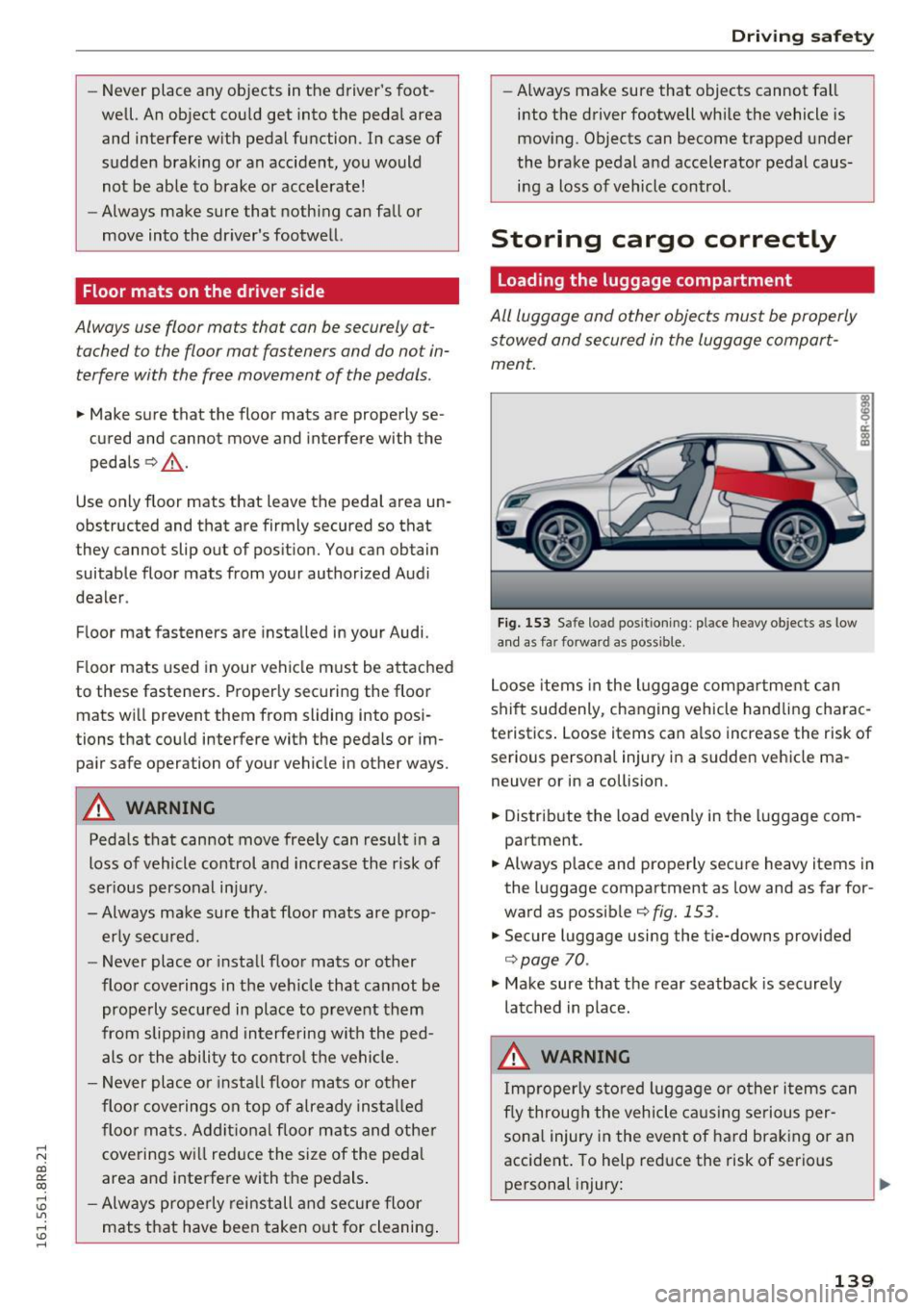
F ig. 153 Safe load positioning: place heavy objects as low
a n d as far forward as possible .
Loose items in the luggage compar tment can
shift suddenly, changing vehicle handling charac
teristics . Loose items can also increase the risk of
serious persona l injury in a s udden vehicle ma
neuver or in a collision.
.,. Distribute the load evenly in the luggage com
partment.
.. Always place and properly secure heavy items in
the luggage compartment as low and as far for
ward as possib le
¢fig. 153.
.,. Secure luggage using the tie-downs provided
¢page 70.
.,. Make sure that the rear seatback is securely
latched in place.
A WARNING
I mproperly s to red luggage or o ther i tems can
fly through the vehicle ca us ing serious per
sona l injury in the event of hard braking or an
accident . To help reduce the risk of serio us
personal injury: .,.
139
Page 150 of 300
Safety belts
from the strong bones to more vulnerable,
soft tissue and cause serious injury.
- Always read and heed all WARNINGS and
other important information¢
page 145.
Pregnant women must also be correctly
restrained
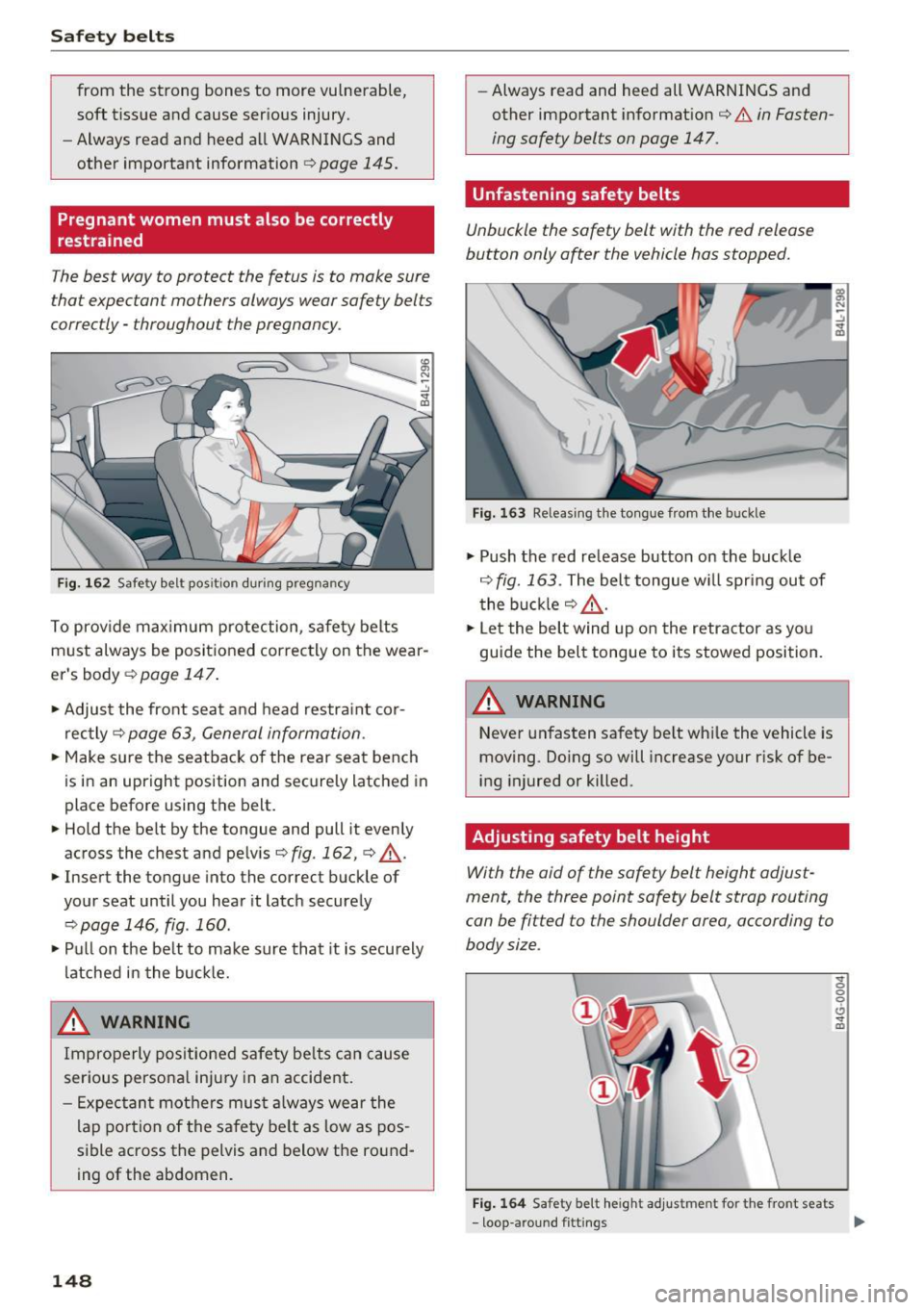
The best way to protect the fetus is to make sure
that expectant mothers always wear safety belts
correctly -throughout the pregnancy.
Fig. 162 Safety belt pos ition during pregnancy
To provide maximum protection , safety belts
must always be positioned correctly on the wear
er's body ¢
page 147.
.,. Adjust the front seat and head restraint cor
rectly ¢
page 63, General information .
,.. Make sure the seatback of the rear seat bench
is in an upright position and securely latched in
place before using the belt.
,.. Hold the be lt by the tongue and pull it evenly
across the chest and pelvis¢
fig. 162, ¢ &.
.,. Insert the tongue into the correct buckle of
your seat until you hear it latch securely
¢page 146, fig .160 .
.,. Pull on the belt to make sure that it is securely
latched in the buckle.
,8. WARNING
Improperly positioned safety belts can cause
serious personal injury in an accident.
- Expectant mothers must always wear the
lap portion of the safety belt as low as pos
sible across the pelvis and below the round
ing of the abdomen.
148
- Always read and heed all WARNINGS and
other important information ¢
& in Fasten
ing safety belts on page 147.
Unfastening safety belts
Unbuckle the safety belt with the red release
button only after the vehicle has stopped.
Fig. 163 Releasing the tongue from the buckle
.,. Push the red release button on the buckle
¢ fig. 163. The belt tongue will spring out of
the buckle ¢
&-
.,. Let the belt wind up on the retractor as you
guide the belt tongue to its stowed position.
,8. WARNING
Never unfast en safety belt while the vehicle is
moving. Doing so will increase your risk of be
ing injured or killed.
Adjusting safety belt height
With the aid of the safety belt height adjust
ment, the three point safety belt strap routing
can be fitted to the shoulder area, according to
body size .
Fig. 164 Safety belt heigh t adjustment for the front seats
- loop- around fittings
Sf 0 0
0
CJ Sf m
Page 161 of 300
..... N
co ~ CX)
..... I.Cl U"I
..... I.Cl .....
restraints or occupants on the front passen
ger seat and prevent the side airbag in the
seat backrest from deploying properly.
- Never use cushions, pillows, blankets or
similar items on the front passenger seat.
The additional padding will prevent the
weight-sensing mat in the seat from accu
rately registering the child restraint or per
son on the seat and prevent the Advanced
Airbag System from functioning properly .
- If you must use a child restraint on the front passenger seat and the child restraint man
ufacturer's instructions require the use of a
towel, foam cushion or something else to
properly position the child restraint, make
certain that the
PASSENGER AIR BAG OFF
light comes on and stays on whenever the
child restraint is installed on the front pas
senger seat.
- If the
PASSENGER AIR BAG OFF light does
not come on and stay on, immediately in
stall child restraint in a rear seating position
and have the airbag system inspected by
your authorized Audi dealer .
How the Advanced Airbag System
components work together
The front Advanced Airbag System and the side
airbags supplement the protection offered by the
front three-point safety belts with pretensioners
and load limiters and the adjustable head re
straints to help reduce the risk of inju ry in a wide
range of accident and crash situations. Be sure to
read the important information about safety and
heed the WARNINGS in this chapter.
Deployment of the Advanced Airbag System and
the act ivation of the safety be lt pretensioners de
pend on the deceleration measured by the crash
sensors and regis tered by the electronic control
unit . Crash severity depends on speed and decel
eration as well as the mass and stiffness of the
vehicle or object involved in the crash .
On the passenger side, regardless of safety belt
use, the airbag will be turned off if the weight on
the passenger seat is less than the amount pro grammed in the elect ronic control unit. The front
Airbag system
airbag on the passenger side will also be turned
off if one of the child safety seats that has been
certified under Federal Motor Vehicle Safety
Standard 208 has been recognized on the seat.
The
PASSENGER AIR BAG OFF light comes on
and stays on to tell you when the front Advanced
Airbag on the passenger side has been turned off
q page 152, Child restraints on the front seat -
some important things to know .
_&. WARNING
To reduce the risk of injury when an airbag in
flates, always wear safety belts properly.
- If you are unrestrained, leaning forward, sit
ting sideways or out of position in any way,
your risk of injury is much higher.
- You will also receive serious injuries and
could even be killed if you are up against the
airbag or too close to it when it inflates -
even with an Advanced Airbag
qpage 151.
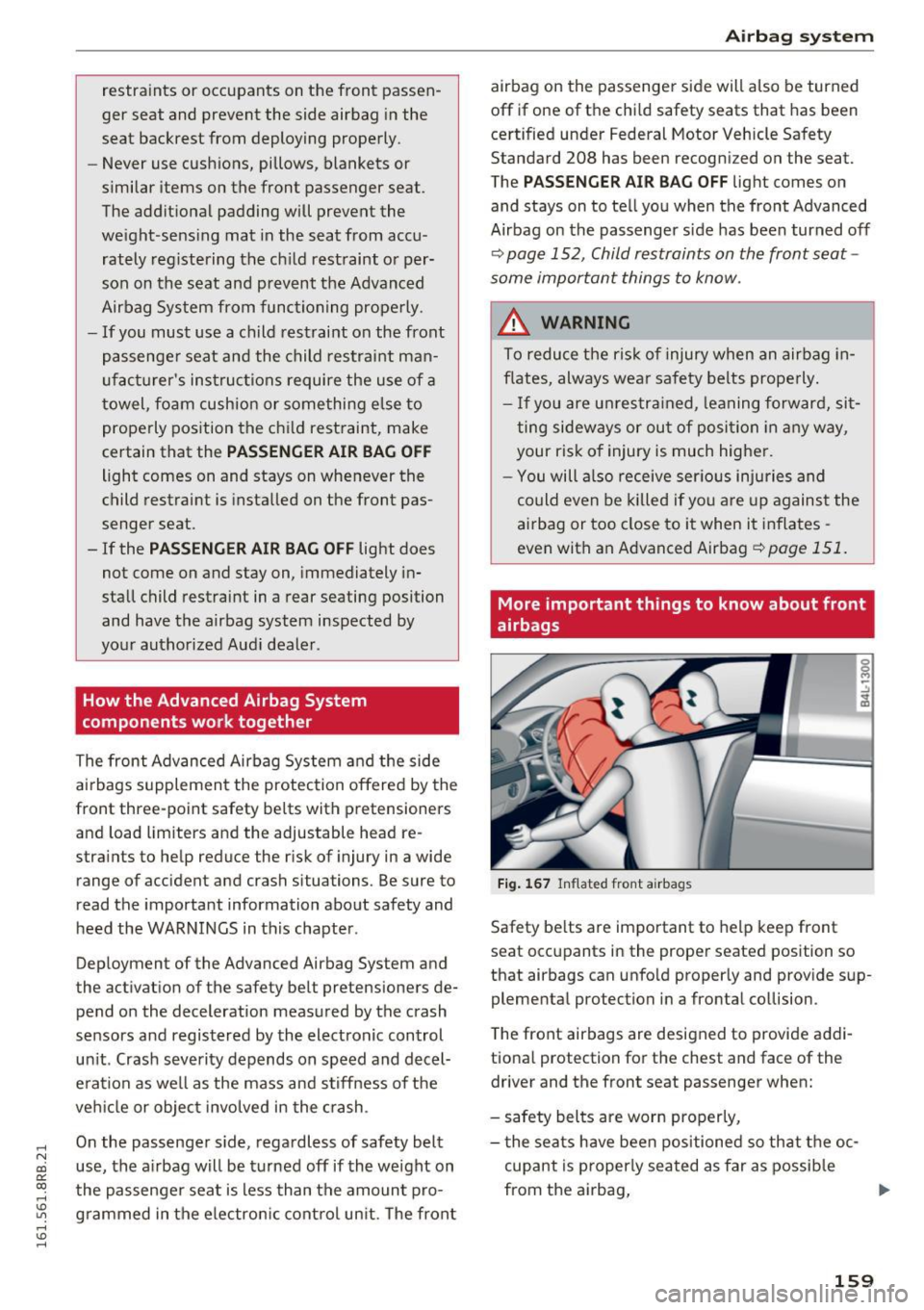
More important things to know about front
airbags
Fig. 167 Inflated front airbags
Safety belts are important to help keep front
seat occupants in the proper seated position so
that airbags can unfold properly and provide sup
plemental protection in a frontal collision .
The front airbags are designed to provide addi
tional protection for the chest and face of the
driver and the front seat passenger when:
- safety belts are worn properly,
- the seats have been positioned so that the oc-
cupant is properly seated as far as possible
from the airbag, ..,.
159
Page 185 of 300
,....,
N
co
er::
co
,....,
the child restraint is installed is in an up
right position and securely latched into
place and cannot fold forward. Otherwise,
the seatback with the child safety seat at
tached to it could f ly forward in the event of
an accident or other emergency situation.
- Always read and heed all WARNINGS when
ever using a child restrained in a veh icle is
being used
r=;, page 171. Specia l precaut ions
apply when installing a child safety seat on
the front passenger seat
¢ page 152, Child
restraints on the front seat -some impor
tant things to know.
Deactivating the convertible locking
retractor
The convertible locking retractor for child re
straints will be deactivated automatically when
the belt is wound all the way back into the re
tractor .
~ Press the red button on the safety belt buckle.
The belt tongue will pop out of the buckle.
~ Guide the safety belt all the way back into its
stowed position .
Always let the safety belt retract completely into
its stowed position. The safety belt can now be
used as an ordinary safety belt without the con
vertible locking retractor for child restraints.
If the convertible locking retractor should be ac
tivated inadvertently, the safety belt must be un
fastened and guided completely back into its
stowed position to deact ivate this feature. If the
convert ible locking retractor is not deactivated,
the safety belt w ill gradually become tighter and
uncomfortable to wear.
_& WARNING
-
Improperly installed chi ld safety seats in
crease the risk of serious personal injury and
death in a collision.
- Never unfasten the safety belt to deactivate
the convertible locking retractor for child re
straints while the vehicle is moving . You
Child safety
would not be restrained and could be seri
ously injured in an accident.
- Always read and heed all WARNINGS when
ever using a child restrained in a vehicle is
be ing used
¢page 171. Special precautions
apply when installing a child safety seat on
the front passenger seat
¢ page 152, Child
restraints on the front seat -some impor
tant things to know.
LATCH system (Lower
anchorages and tethers
for children)
Child Restraint System anchors and how
are they related to child safety
To provide a simpler and more practicab le way to
attach the child restraint on the vehicle seat,
Federal regulations require special lower ancho
rages in vehicles and devices on new child re
straints to attach to the vehicle anchorages .
In the United States, the combination of the
tether anchorages and the lower anchorages is
now generally called the LATCH system for
"Lower Anchorages and Tethers for Children". In
Canada, the terms "top tether" with "lower uni
versa l anchorages" (or "lower universal anchor
age bars") are used to descr ibe the system .
In other countries the term "ISOFIX" is used to
describe the lower anchorages .
Forward-facing child restraints manufactured af
ter September 1, 1999, are required by U.S. fed
eral regulations to comply with new child head
movement performance req uirements. These
new performance requirements make a tether
necessary on most new ch ild seats.
Installing a child restraint that requires a top
tethe r without one can seriously impair the per
formance of the child restraint and its ab ility to
protect the child in a collision. Installing a child
restra int that requi res a top tether without the
top tether may be a violation of state law.
Child restraint manufacturers offer LATCH lower
anchorages on their child seats w ith hook-on or ..,.
183
Page 196 of 300
Intelligent Technology
brake. This may cause the brakes to over
heat, premature wear and increased stop
ping distance.
- Under certain climatic and operating condi
tions such as passing through water, driving
in heavy rain or after washing the vehicle,
the effectiveness of the brakes can be re duced . In winter, ice can accumulate on the
brake pads, linings, discs and drums. Care
fully apply brakes for a test. Brakes will dry
and ice coatings will be cleaned off after a
few careful brake applications.
- Driving for an extended period of time on
salt-covered roads without using your
brakes can also affect braking efficiency.
Clean off accumulated salt coating from
brake discs and pads with a few carefu l
brake app lications .
-If you damage the front spoiler, or if you in
stall a different spoiler, be sure the air flow
to the front brakes is not obstructed. Other
wise the brake system could overheat reduc ing the effectiveness of the entire brake sys
tem .
- Failure of one brake circuit will impair the
braking capability resulting in an increased
stopping distance. Avoid driving the vehicle and have it towed to the nearest author ized
Audi dealer or qualified workshop.
- Never let the vehicle roll to a stop with the
engine shut off.
- If the brake booster is not working, the
brake pedal must be pressed considerably
harder to make up for the lack of booster
assista nee.
Electromechanical power
assist, Dynamic steering
The electromechanical power assist helps the
driver when steering.
Power steering adapts electronically based on
the vehicle speed.
Indicator lights and messages
• Steering defective! Do not drive vehicle!
194 If
this indicator light turns on and stays on and
this message appears, the power steering may
have failed.
Stop the vehicle in a safe location as soon as pos
sible. Do
not continue driving . See your author
ized Audi dealer or other qualified repair facility
for ass istance .
'-r, ij Dynamic steering: System fault! You can
continue driving
If the indicator l ight turns on and the message
appears, the steering may be more difficult to
move or more sensitive than usual. The steering
may also be at an angle when driving straight.
Drive slowly to your authorized Audi dealer or
qualified workshop to have the malfunct ion cor
rected.
1 :r- ij Dynamic steering: Initializing
Audi drive select* : if the indicator light blinks and
the driver message appears, the dynamic steer i ng* is reinitial ized. After start ing the engine, the
steering wheel will move slightly . Re-initial iza
tion might be necessary if the steering wheel was
moved hard to the left and right while the vehicle
was not moving. The display turns off if the initi
alization was successful.
(D Tips
- If the . or 1:r- ij in dicato r light only stays on
for a short time, you may continue driving.
- T he dynamic steering* stab ility systems
¢ page 190 are not available in the event of
a system malfunction.
- For additional information on dynamic
steering*
¢page 119.
Driving with your
quattro
With all-wheel drive, all four wheels are driven .
General information
With all-wheel drive, power is distributed to all
four wheels. This happens automatically depend
ing on your driving style and the road conditions
at the time. See also
c> page 190. ..,.
Page 199 of 300
,....,
N
co
er::
co
,....,
environment
Breaking in
New engine
The engine needs to be run-in during the first
1,000 miles (1,500 km).
For the first 600 miles (1 ,000 kilometer s):
"' Do not use full throttle .
"' Do not drive at engine speeds that are more
than 2/3 of the max imum permitted RPM .
From 600 to 1,000 miles (1 ,000 to 1 ,500
kilometers):
"' Speeds can gradually be increased to the maxi
mum pe rm issib le road or engine speed .
During and after break-in pe riod
"' Do not rev the engine up to high speeds when it
is cold. This applies whether the transmission is
in N (Neutral) or in gear .
After the break-in period
"'Do not exceed maximum engine speed under
any c ircumstances.
"'U pshift into the next higher gear
before reach
ing the red area at the end of the tachometer
sca le
c=>page 10.
During the first few hours of driving, the eng ine's
internal friction is higher than later when all the
mov ing parts have been broken in . How well this
b reak-in process is done depends to a considera
b le exte nt on the way the veh icle is d rive n during
t he first 1,000 miles (1,500 kilometers).
(D Note
Extremely high eng ine s peeds a re au toma ti
cally reduced. However, t hese rpm limits are
programme d for a n engine well run-i n, not a
n ew engine.
@) For the sake of the environment
D o not dr ive with u nnecessari ly high eng in e
spee ds -up sh ifting ea rly saves fuel, reduces
n oise and pr otects the envi ronme nt.
Driving and the envir onment
New tires
If your vehicle is runn ing on new tires, d rive very
car efu lly fo r the firs t 35 0 miles (500 kilometers)
a ft er fit ting.
WARNING
New tires tend to be slippe ry and must a lso
be "bro ken-in". Be sure to remembe r th is dur
i ng the fi rst 350 m iles (500 kilometers).
Brake gent ly. Avoid following closely behind
other vehicles or other s ituations that m ight
r equire sudden, hard b raking.
Catalytic converter
Applies to vehicles: wit h gasoli ne e ngi ne
It is very important that your emission control
system (catalytic converter) is functioning prop
erly to ensure that your vehicle is running in an
environmen tally sound manner.
"' Always use lead-free gasoli ne c> page 212,
Gasoline .
"' Never run t he tank down all the way to empty.
"'N ever put too much mo to r oil in yo ur eng ine
c=> page 2 24, Adding engine oil 'l:::r. .
"' Never try to push- or tow-start your veh icle.
T he cat alyt ic co nverter is an efficie nt "cle an-up"
device built into the exhau st sys tem o f the ve hi
cl e. T he catalyt ic converte r burns many of the
po llutants in the exhaust gas before they are re
l eased into the atmosphere.
T he ex clusive use of u nleaded fuel is critic ally im
por tant fo r the life o f the catalytic converte r and
prope r fu nct ion ing of the engine.
A WARNING
=
The temperat ure o f the exhaust system is
hi gh, both when driv ing and after stopping
the eng ine.
-
- Never touch the exhaus t tail pipes once they
have become hot. This cou ld res ult in burns.
- Do not park or operate the vehicle in a reas
where the hot exhaust system may come in
contact w ith dry g rass, brush, fuel sp ill o r
other mate rial wh ich can ca use a fire.
197
Page 203 of 300
,....,
N
co
er::
co
,....,
conditions and off-road
General information
The operation of the Electronic Stabilization Con
trol (ESC) is expanded for operation away from paved roads. In situations where slip or a differ
ential locking fun ction is required , the offroad
mode can be activated ¢
page 190. Your Audi al
so has permanent all-wheel drive in addition .
However, your Audi is not a pure offroad vehicle.
It was not built for driving under extreme condi
tions, e.g. for tr ips that are in the nature of an
expedition .
Drive only on roads and offroad sections which
match the design of your vehicle and your abili
ties as a driver. Never take risks!
Before driving offroad
-Check the engine oi l level, tire pressure, coo l
ant level, and the fluid level in the windshield
washer reservo ir.
- Stow luggage items and other objects in the
luggage compartment, and secure them
against sliding around.
After driving offroad
-After trips offroad, remove any twigs and other
foreign objects from the gri ll, the underbody
and the wheels. Pay special attention to foreign
objects (stones) which have become lodged in
the tire tread.
- Clean the body and the vehicle underside, and
inspect the vehicle for possible damage.
- Clean dirty windows, headlamp lenses, rear
lights, and license plates.
- Perform a brake check (particularly after travel
ling through water).
A WARNING
-Drive especially attentively and plan ahead
in difficult road condit ions and when off
road. Excessive speed or incorrect maneu
vers can cause injuries and damage to the
vehicle .
Offroad driving
-Always adapt your speed and driving style to
road, offroad, traffic, and weather condi
tions. Drive especially slowly offroad when
your view is restricted.
- Please be aware that in offroad mode, par
ticularly on a smooth and slippery road, the
wheels may have an increased tendency to spin and the vehicle may break away - dan
ger of skidd ing!
- Stability is lim ited in the offroad mode .
@) For the sake of the environment
Avoid damage to the environment and re
spect nature.
(D Tips
Only drive where it is permitted and stay on
marked roads and paths.
Explanation of some technical terms
The following data refer to ideal conditions. De
pending on vehicle load and ground conditions
and the environment, the numbers may vary. It is
the driver's responsibility to decide whether ave
hicle can overcome a specific s ituation
¢ ,&. .
Gradient angle
The number of meters in altitude gained over a
distance of 109.4 yards or 100 meters (grade)
are given as a percentage or degrees. Informa
t ion about the gradient the vehicle can cl imb un
der its own power (depends in part on the road
s ur face and eng ine power). Maximum permitted
grade: 31
°
Ground clearance
The distance between the road surface and the
lowest point of the vehicle underbody. Ground
clearance 7.9 in (200 mm)
_& WARNING
-
Exceeding the stated maximum figures can
result in severe injuries or vehicle damage.
- All the information was gathered on level,
firm and non-slippery road surfaces, and un-
der dry weather conditions.
~
201