tow AUDI Q5 2016 User Guide
[x] Cancel search | Manufacturer: AUDI, Model Year: 2016, Model line: Q5, Model: AUDI Q5 2016Pages: 300, PDF Size: 75.02 MB
Page 74 of 300
Sea ts and stor age
Removing th e cargo fl oor, in stalling
.. To remove, lift the cargo floor folded together
and pull it toward the rear lid .
.. To insta ll, place the folded cargo floo r into
both retainers and unfold it.
Grab the protective tray on the handles and pu ll
it out. You can also install a divider to divide @
the storage area . Depending on the vehicle
equipment level, the protective tray can have dif
ferent sizes and shapes.
Cargo net and storage hooks
F ig . 79 Luggage compartment :
•
Fig . 80 Luggage compartment: Storage hooks
Storage net
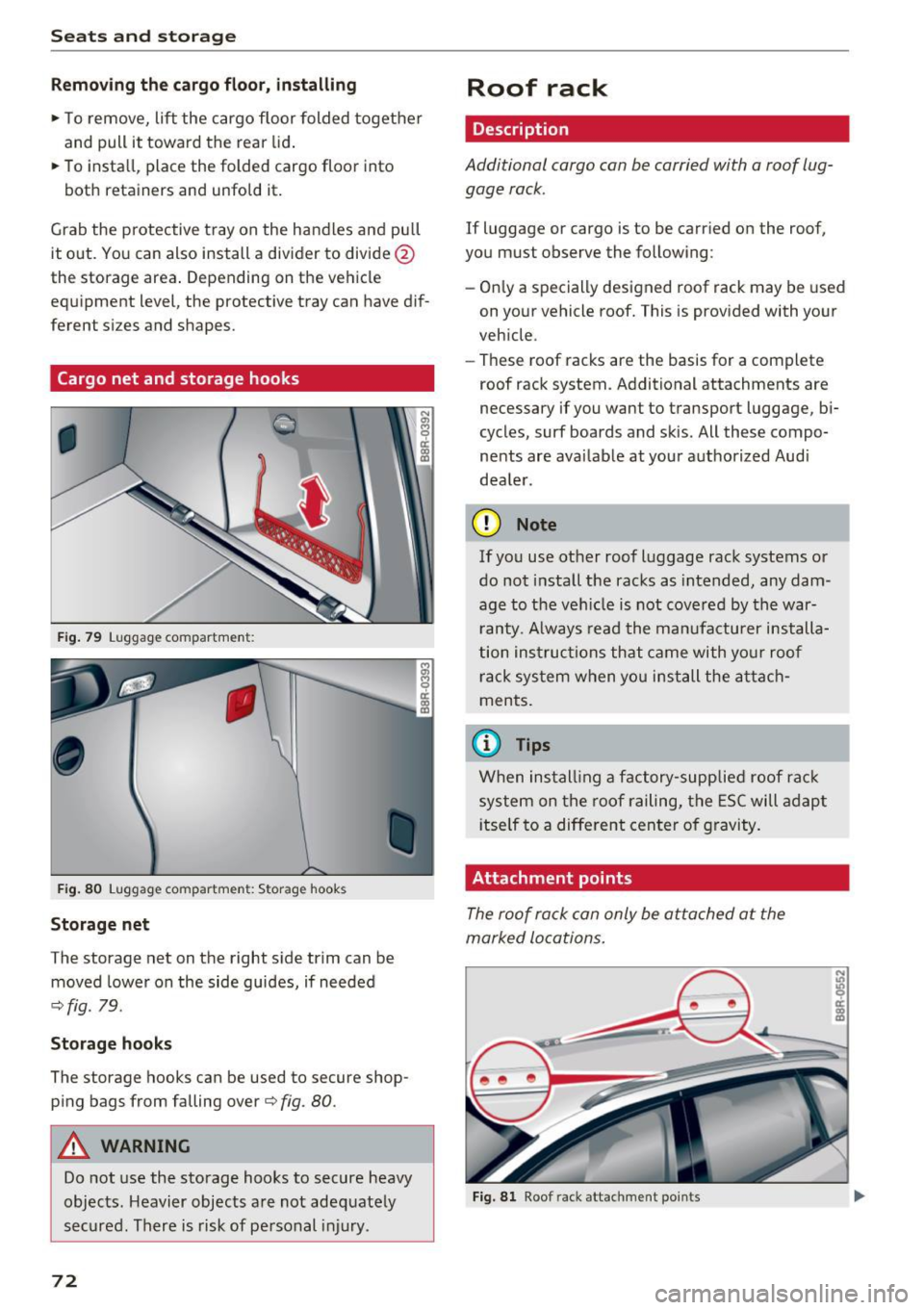
The storage net on the right s ide trim can be
moved lower on the side guides, if needed
.:;. fig . 79.
Storag e ho oks
The storage hooks can be used to secure shop
ping bags from falling over¢
fig. 80.
A WARNING
Do not use the storage hooks to secure heavy
objects. Heavier objects are not adeq uately
secured. There is risk of personal in jury .
72
Roof rack
Description
Additional cargo can be carried with a roof lug
gage rack .
If luggage or cargo is to be carr ied on the roof,
you must observe the following:
- On ly a specially designed roof rack may be used
on your vehicle roof. This is provided with your
veh icle .
- These roof racks are the basis for a complete
roof rack system. Additional attachments are
necessary if you want to transport luggage, b i
cycles, surf boards and skis. All these compo
nents are avai lable at your authorized Audi
dea le r.
(D Note
If you use other roof luggage rack systems or
do not install the racks as intended, any dam
age to the veh icle is not cove re d by the war
r anty . A lways read the manufacturer installa
tion instructions that came with yo ur roof
rack system when you install the attach
ments.
(D Tips
When install ing a factory-supplied roof rac k
system on the roof railing, the ESC will adap t
i tself to a diffe rent cente r of gravity.
Attachment points
The roof rack can only be attached at the
marked locations.
Fig. 8 1 Roof r ack attachment points
Page 84 of 300
Warm and cold
[ii Adjusting seat heating*
P ressing the button switches the seat heating on
at the highest setting (level 3). The LEDs indicate
the temperature level. To reduce the tempera
ture, press the button again. To switch the seat heating
off, press the button repeatedly until the
LED turns
off.
After 10 minutes, the seat heating automatically
switches from level 3 to level 2.
lil Adjusting seat ventilation*
Pressing the button switches the seat vent ilation
on at the highest sett ing (level 3). The LEDs indi
cate the venti lation level. To reduce the ventila
tion level, press the button again. To sw itch the
seat ventilation
off, press the button repeatedly
until the LED turns
off.
l qo, FRONT I Switch the defroster on/off
The windshield and side windows are defrosted
or cleared of condensation as quickly as possible.
The maximum amount of air flows main ly from
the vents below the windshield. Recirculation
mode switches off. The temperature should be
set to 72 °F (22 °() or higher. The temperature is
controlled automat ically .
The
IAUTOI button switches the defroster off.
IQiil REARI Switching rear window heater on/
off
The rear window heater on ly operates when the
engine is running. It switches off automatica lly
after a few minutes, depending on the outside
temperature.
To prevent the rear window heater from switch ing
off automatically, press and ho ld the l(jji) REARI
button for more than 2 seconds. This remains
stored until the ign it ion is switched off.
Air vents
You can open and close the center and rear air
vents using the thumbw heels . The levers adjust
the direction of the airflow from the vents.
You can adjust the air temperature in the rear by
turning the thumbwheel toward the red side to
82
make it warmer or toward the blue side to make
it coo ler.
A WARNING
- Do not use the recirculation for extended
periods of time. The windows could fog up
since no fresh air can enter the vehicle. If
the windows fog up, press the air rec ircula
tion button again immed iately to switch
off
the air rec irculat ion function or select de
frost.
- Individuals with reduced sensit iv it y to pain
or temperature could develop burns when
using the seat heating* function . To reduce
the risk of injury, these individuals should
not use seat heating.
(D Note
To avoid damage to the heating elements* in
the seats, do not kneel on the seats or place heavy loads on a small area of the seat.
Setup
-
The basic climate control settings can be adjust
ed in the radio or MM!".
"'Select : !CAR I function button> A/C control but
ton. Or
"' Select:
I CAR I function button > Car systems*
control button >
A/C.
Automatic recirculation
When switched on, automat ic rec irculation con
tro ls the recirculation mode automatically. If the
windows fog up, press the
I® FRO NT ! button.
Synchronization
When synchron izat ion is switched on, the same
settings are applied to both the dr iver and front
passenger , except for the seat heating/ventila
tion* . Synchronization switches
off when you ad
just the settings on the front passenger's side.
You can also switch synchronizat ion on by press -
i ng and holding the knob on the driver's side .
Ill>-
Page 98 of 300
Driving
-For reasons of safety, cruise control should
not be used in the city, in stop-and-go traf
fic, on twisting roads and when road condi
tions are poor (such as ice, fog, gravel, heavy rain and hydroplaning) -you could
have an accident.
- Switch the cruise control off temporarily when driving in turning lanes, highway exits
or in construction zones.
- Please note that unconsciously "resting"
your foot on the accelerator pedal causes cruise control not to brake . This is due to
the control system being overridden by the
driver's acceleration.
- Never use the cruise control when driving
off-road or on unpaved roads. The cruise
control is intended for use only when the ve
hicle is being operated on paved roads, and
is not suitable for use off-road or on un
paved roads.
- If a brake system malfunction such as over
heating occurs when the cruise control sys
tem is switched on, the braking function in
the system may be switched off. The other
cruise control functions remain active as
long as the indicator light
tii;(O~i4 (US mod
el)/lil (Canadian model) is on .
{D) Tips
The brake lights illuminate as soon as the
brakes apply automatically.
Changing speed
.,. To increase/decrease the speed in increments,
tap the lever in the
010 direction ¢ page 95,
fig. 108 .
.,. To increase/decrease the speed quickly, hold
the lever in the
010 direction until the de
sired speed is displayed.
You can also press the accelerator pedal down to
increase your speed, e.g. if you want to pass
someone. The speed you saved earlier will re
sume as soon as you let off of the accelerator
pedal.
If, however, you exceed your saved speed by
S mph
(10 km/h) for longer than 5 minutes, the
96
cruise control will be turned off temporarily. The
green symbol in the display turns white, the
saved speed is retained.
Pre-selecting speed
You can pre-select your desired speed while the
vehicle is not moving.
.,. Turn on the ignition.
.,. Pull lever into position
(D ¢page 95, fig. 108.
.,. Press the lever in the 0 or 0 direction to in-
crease or decrease your speed.
.,. Let go of the lever to save that speed .
This function makes it possible, for example, to
save the speed you want before driving on the
highway. Once on the highway, activate the
cruise control by pulling the lever toward
(D .
Switching off
Temporary deactivation
.,. Step on the brake pedal, or
.,. Press the lever into position @ (not clicked into
place) ¢
page 95, fig . 108, or
.,. Drive for longer than 5 minutes at more than
5 mph (10 km/h) above the stored speed.
Switching off completely
.,. Press lever into position @ (clicked into place),
or
.,. Switch the ignition off .
The speed you saved will be retained if the cruise control has been switched off temporarily . To re
sume the saved speed , let up on the brake and
pull the lever to position
(D.
The saved speed will be erased after turning the
ignition off.
A WARNING
You should only resume the saved speed if it
is not too high for existing traffic conditions.
Otherwise you risk an accident.
Page 108 of 300
Audi adaptive cruise control and braking guard
Audi adaptive cruise
control and braking
guard
Introduction
Applies to vehicles: with Audi adaptive cruise contro l
The adaptive cruise contro l system assists the
driver by regulating vehicle speed and helping to
maintain a set distance to the veh icle ahead ,
within the limits of the system. If the system de
tects a moving vehicle up ahead, adaptive cruise
control can brake and then accelerate your vehi
cle. This helps to make driving more comfortable
on long highway stretches.
The braking guard system can warn you about an
impending collision and initiate braking maneu
vers
c::> page 112.
Adaptive cruise control and braking guard have
technical limitations that you must know, so
please read th is section carefully, understand
how the system works and use them properly at
all times.
General information
General information
Applies to veh icles: with Audi adaptive cruise control
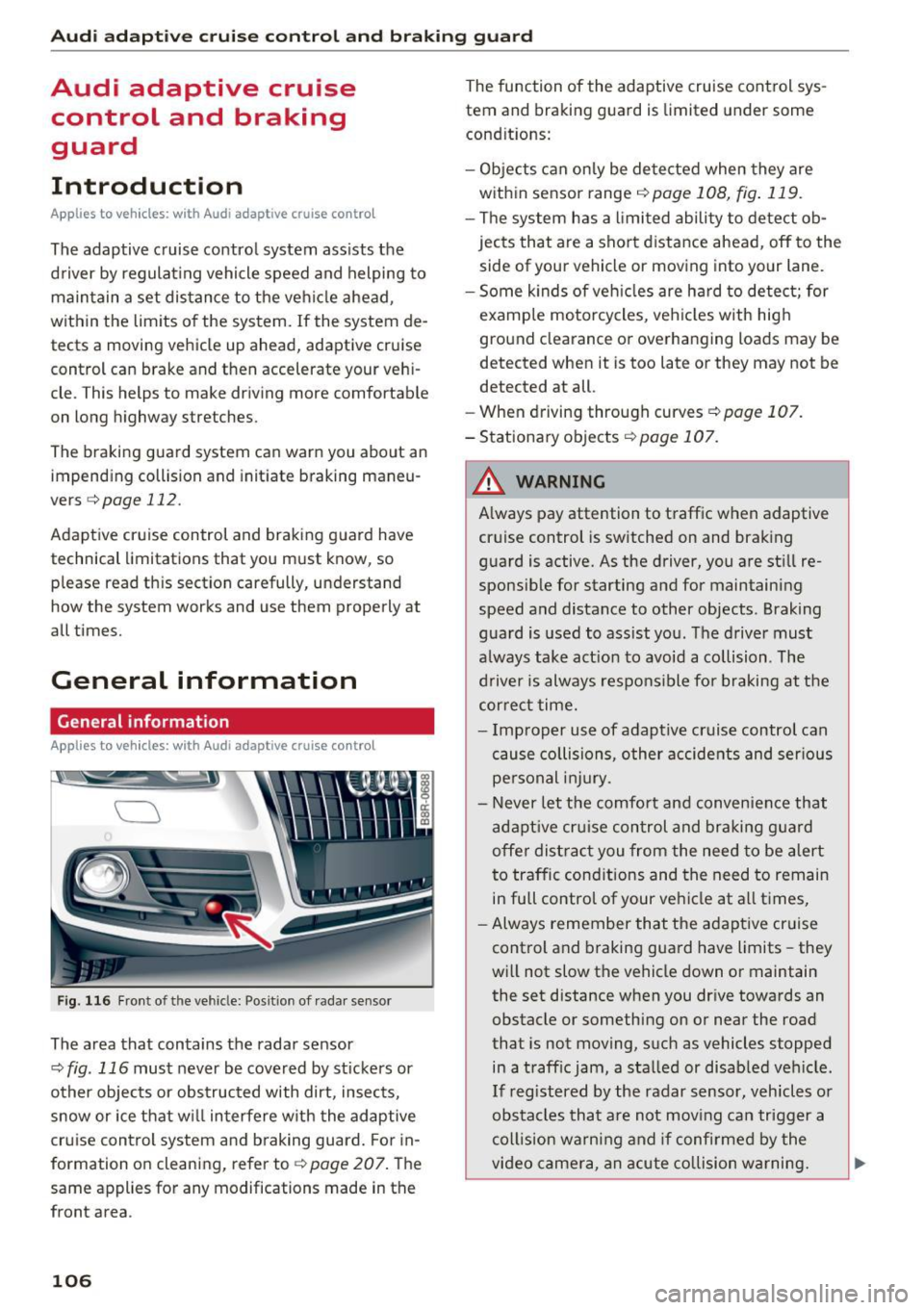
Fig. 116 Front of t he veh icle: Posit ion of radar sensor
The area that contains the radar sensor
c::> fig . 116 must never be covered by st ickers or
other objects or obstructed with dirt, insects,
snow or ice that w ill interfere w ith the adaptive
cruise control system and braking guard. For in
formation on cleaning, refer to
c::> page 207. The
same appl ies for any modifications made in the
front area .
106
The function of the adaptive cruise control sys
tem and braking guard is limited under some
condit ions:
- Objects can only be detected when they are
within sensor range
<:!) page 108, fig . 119.
-The system has a limited ability to detect ob
jects that are a short distance ahead, off to the
side of your vehicle or moving into your lane.
- Some k inds of veh icles are hard to detect; for
example motorcycles, veh icles with high
ground clearance or overhanging loads may be
detected when it is too late or they may not be
detected at all.
- When driving through curves ¢
page 107.
- Stationary objects i::!) page 107.
& WARNING
-Always pay attention to traffic when adaptive
cruise control is switched on and braking
guard is active. As the driver, you are still re
sponsible for starting and for maintaining
speed and distance to other objects . Braking
guard is used to assist you . The driver must
a lways take action to avoid a collision . The
driver is always responsible fo r braking at the
correct time.
- Improper use of adaptive cruise contro l can
cause collisions, other accidents and serious
personal injury.
- Never let the comfort and convenience that
adapt ive cr uise control and braking guard
offe r dist ract you from the need to be alert
to traffic cond itions and the need to remain
in full control of your ve hicle at all times,
- Always remember that the adaptive cruise
control and braking guard have limits -they
will not slow the vehicle down or maintain
the set distance when you dr ive towards an
obstacle or something on or near the road
that is not moving, such as vehicles stopped
in a traff ic jam, a stalled or disab led veh icle.
If registered by the radar sensor, veh icles o r
obstacles that are not moving can trigger a
coll ision warning and if confirmed by the
video camera, an acute collision warning. ..,
Page 110 of 300
Audi adaptive cruise control and braking guard
Audi adaptive cruise
control
Description
A pplies to veh icles: with Audi adaptive cruise co ntrol
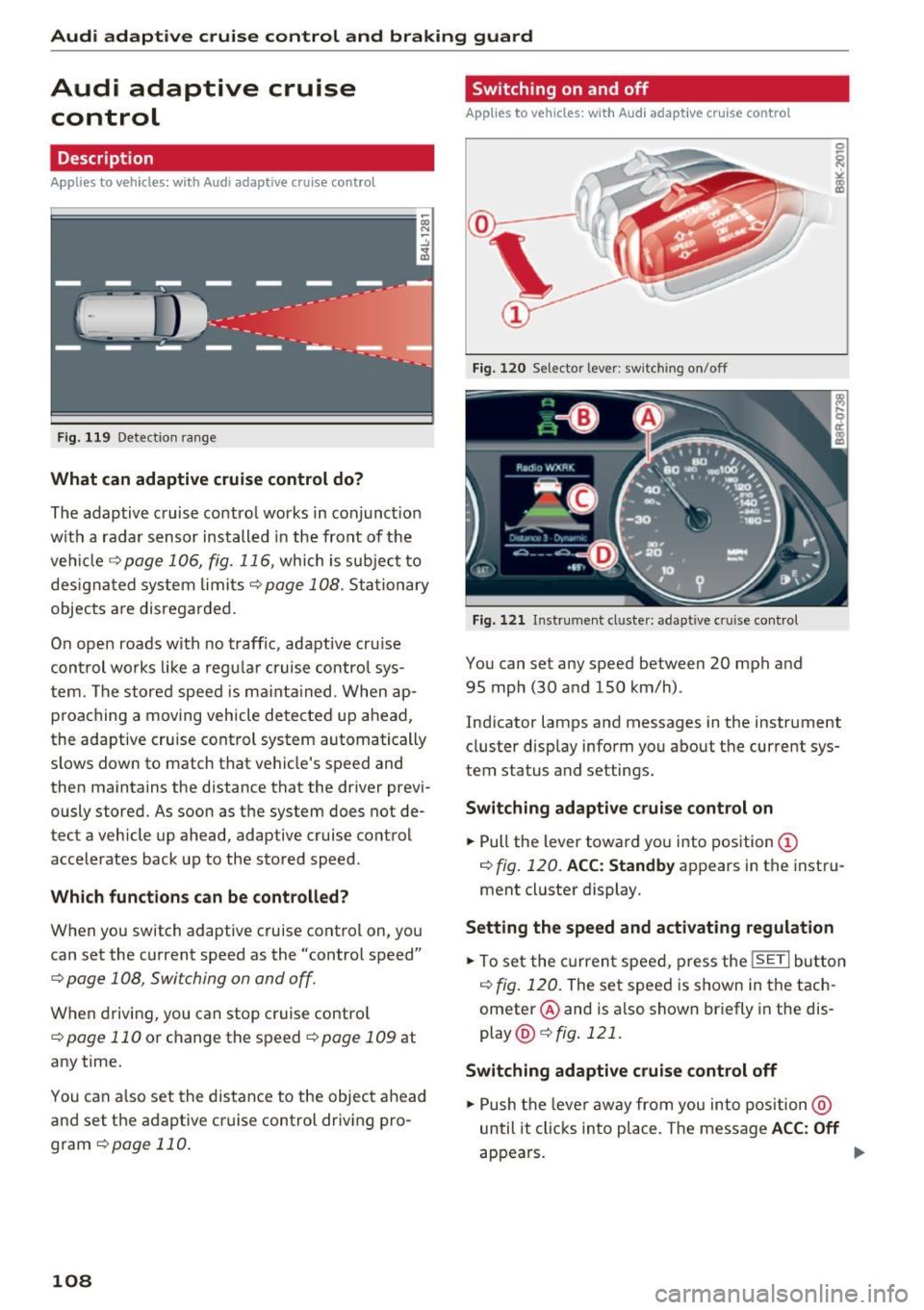
F ig. 119 Detection range
What can adaptive cruise control do?
The adaptive cruise control works in conjunct ion
with a radar sensor installed in the front of the
veh icle¢
page 106, fig. 116, which is subject to
designated system limits
¢page 108. Stationary
objects a re disregarded.
On open roads with no traffic, adaptive cru ise
control works like a regular cruise control sys
tem. The stored speed is ma inta ined. When ap
proaching a moving vehicle detected up ahead,
the adaptive cruise control system automatically
slows down to match that vehicle's speed and
then maintains the distance that the driver previ
ously stored. As soon as the system does not de
tect a vehicle up ahead, adaptive cruise control accelerates back up to the stored speed.
Which functions can be controlled?
When you switch adaptive cruise control on, you
can set the current speed as the "control speed"
¢ page 108, Switching on and off.
When driving, you can stop cruise control
¢
page 110 or change the speed ¢ page 109 at
any time.
You can also set the distance to the object ahead
and set the adaptive cruise control driving pro
gram
¢page 110.
108
Switch ing on and off
App lies to vehicles: wit h Audi ada ptive cruise control
Fig. 120 Selector lever: switch ing on/o ff
Fig. 121 Instrument cl uster: adapt ive c ruise control
You can set any speed between 20 mph and
95 mph (30 and 150 km/h) .
Indicator lamps and messages in the instrument cluster display inform you about the current sys
tem status and settings .
Switching adaptive cruise control on
.,. Pull the lever toward you into position (D
¢ fig. 120. ACC: Standby appears in the instru
ment cluster display.
Setting the speed and activating regulation
.,. To set the current speed, press the ISETI button
¢
fig. 120. The set speed is shown in the tach
ometer @and is also shown briefly in the dis
play @¢
fig. 121 .
Switching adaptive cruise control off
.,. Push the lever away from you into position @
until it clicks into place. The message ACC: Off
appears. Iii>
Page 117 of 300
..... N
co ~ CX)
..... I.Cl U"I
..... I.Cl .....
Audi side assist Side assist
Description
App lies to vehicles: with Audi side assist
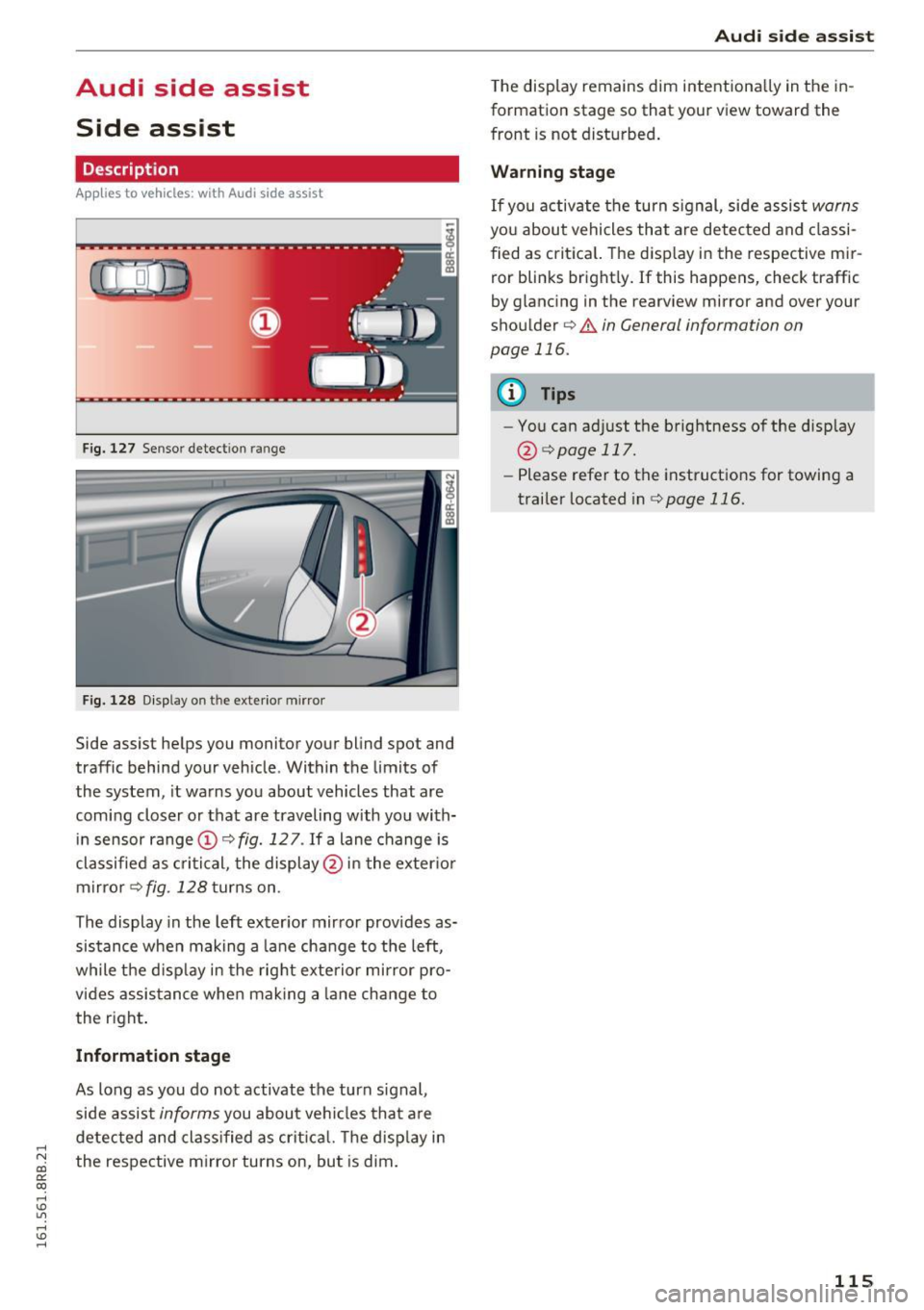
Fig. 127 Sensor dete ction rang e
Fig. 128 Display o n the exterio r mirror
Side assist helps you monitor your blind spot and
traffic behind your vehicle . Within the limits of
the system , it warns you about vehicles that are
coming closer or that are traveling with you with
in sensor range ©
c::, fig. 12 7. If a lane change is
classified as critical, the display @ in the exter ior
mirror
c::, fig . 128 turns on .
The display in the left exterior mirror provides as
sistance when making a lane change to the left,
while the d isp lay in the right exterior mirror pro
vides assistance when making a lane change to
the right .
Information stage
As long as you do not activate the turn signal,
side assist
informs you about vehicles that are
detected and class ified as critica l. The disp lay in
the respective mirro r turns on , but is dim .
Aud i side assist
The display remains dim intentionally in the in
formation stage so that your view toward the
front is not disturbed.
Warning stage
If you activate the turn signal , side assist warns
you about vehicles that are detected and classi
fied as critical. The display in the respect ive mir
ror blinks bright ly. If this happens, check traffic
by glancing in the rearview mirror and ove r you r
shoulder c::,
.&. in General informa tion on
page 116.
{!) Tips
- You can adjust the brightness of the display
@ c::,
page 117.
-Please refer to the instructions for towing a
trailer located inc::,
page 116.
115
Page 118 of 300
Audi side assist
General information
Applies to vehicles: with Audi side assist
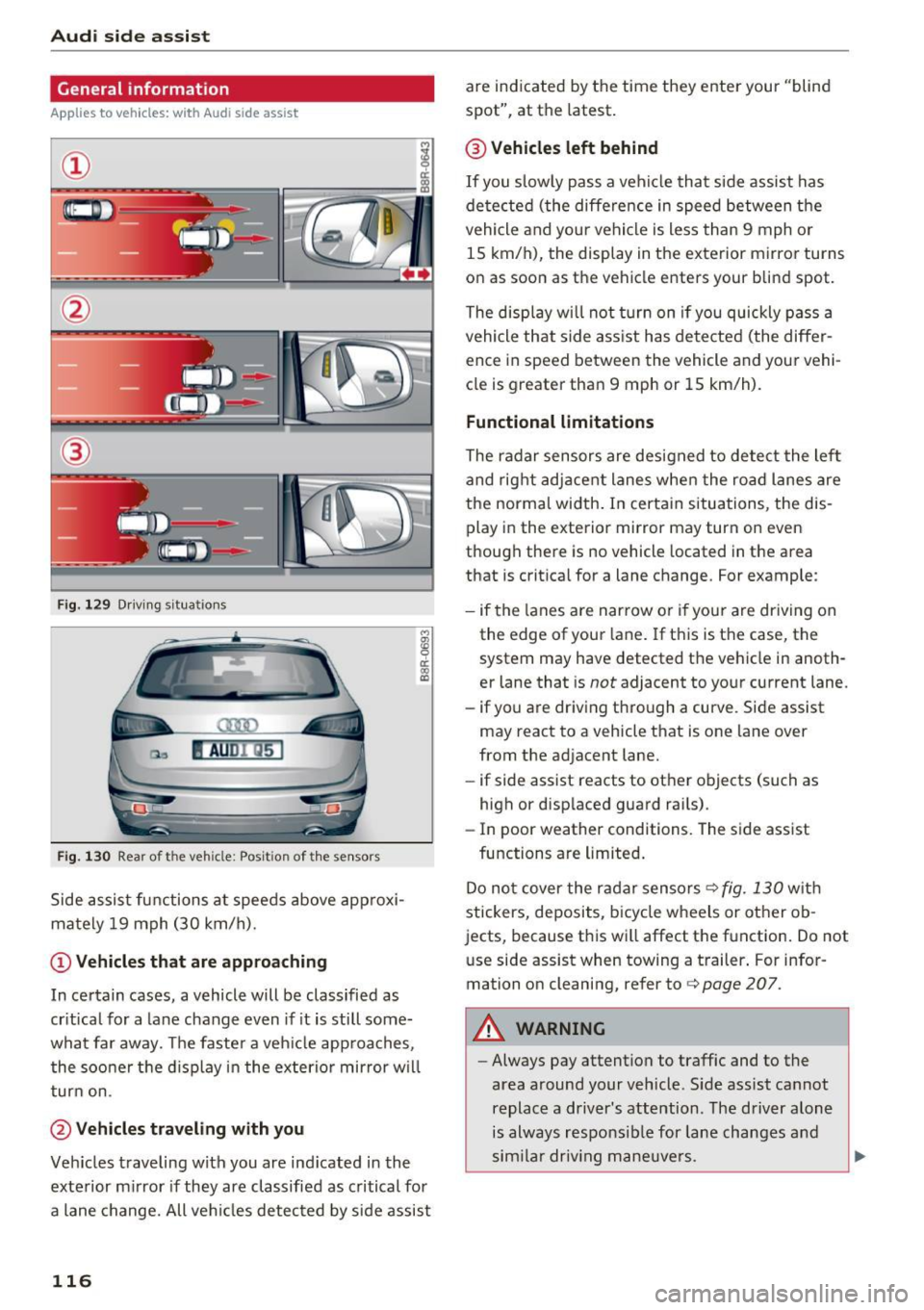
F ig . 129 Driving s it ua tion s
Fig. 130 Rear of the veh icle: Posit ion of the se nsor s
Side assist functions at speeds above approxi
mately 19 mph (30 km/h).
(D Vehicles that are appro aching
M
! OJ CD
In certain cases, a vehicle will be classified as
cr itical for a la ne change even if it is still some
what far away. The faster a veh icle approaches ,
the soo ner the d isplay in the exterior mirror w il l
turn on.
@ Vehicles tra veling with you
Veh icles traveling with you are ind icated in the
exterior m irror if they are classified as critical for
a lane change. All ve hicl es detected by side assist
116
are indicated by the time they enter your "blind
spot", at th e latest .
@ Vehicle s left behind
If you slow ly pass a vehicle that s ide assist has
de tected (the diffe rence in speed between the
vehicle and your vehicle is less than 9 mph or
15 km/h), the display in the exterior mirror turns
on as soon as the vehicle enters your blind spot.
The display w ill not turn on if you quickly pass a
vehicle that side ass ist has detected (the differ
ence in speed between the vehicle and your vehi
cle is greater than 9 mph or 15 km/h).
Functional limitation s
The radar sensors are designed to detect the lef t
and rig ht adjacent lanes whe n the road lanes are
the normal width . In certa in situations, the dis
play in the exterior mirror may turn on even
t hough there is no vehicle located in the area
that is crit ica l for a lane change. For example :
- if the lanes a re narrow o r if your are driving on
the edge of your lane . If this is the case, the
system may have detect ed the vehicle in anoth
e r lane that is
not adjacent to your current lane.
- if yo u are driving through a curve. Side assist
may r eact to a vehicle that is on e lane over
from the ad jacent lane.
- if side assist reacts to other objects (such as
high or disp laced guard rai ls) .
- In poor weather condit ions. The side assist
functions are limited .
Do no t cover the radar sensors ¢
fig. 130 wit h
stickers, deposits, bicycl e wheels or other ob
jects, because this wi ll affect the function. Do not
u se side assist when towing a trailer . For infor
mation on cleaning, refer to ¢
page 207.
A WARNING
-Always pay attention to traffic and to the
area around your veh icle . S ide assist cannot
replace a driver's attention . The driver alone
is always responsib le for lane changes and
sim ila r driv ing mane uve rs .
Page 120 of 300
Audi side assist
(D Tips
-Si de assist is not active w hile you are mak
i ng t he a dju stment .
- You r settings are automatic ally store d an d
assi gned to t he remote co ntrol key being
u sed.
Driver messages
A ppl ies to ve hicles: w ith Audi side assis t
If side ass ist switches off by itself, the LED in the
button turns off a nd a message will appear in the
i n str ument cluster d isp lay :
Audi side assist unavailable: Sensors blocked
The rada r senso rs ' vision is affected. Do not cove r
the area in front of the sensors with b ike wheels,
stickers , dirt or other objects. Clean the area in
front of the sensors, if necessary
c> page 116 ,
fig. 130.
Audi side assist: Currently unavailable
Side assist cannot be switched on tempo rar ily be
cause there is a malfunction (for example, the
battery charge level may be t oo low).
Audi side assist: System fault!
The system cannot guarantee that it wi ll detect
ve hicl es co rrectly and it is switc hed off. The sen
sors have been d isp laced or are fa ulty. Have the
system checked by an a uthorized Audi dealer or
author ized Audi Se rvice Facility soon.
Audi side assist: Unavailable when towing
Side assist sw itches off automati ca lly w hen a fac
to ry -installed trailer hitch is connected to t he
electrical connector on the trailer. The re is no
gua rantee the system w ill sw itch off whe n using
a retrofitted tra ile r hitc h. Do not use side assist
when towing a trailer.
118
Page 129 of 300
..... N
co ~ CX)
..... I.Cl U"I
..... I.Cl ..... The transmission temperature has increased sig
nificantly due to the sporty driving manner. Drive
in a less sporty manner until the temperature re
turns to the normal range and the indicator light
switches of .
rm Transmission malfunction: You can continue
driving
There is a system malfunct ion in the transmis
sion. You may continue driving. Drive to your au
thorized Audi dealer or qualified repair facility
soon to have the malfunction corrected.
rm Transmission malfunction: Limited driving
functionality
There is a system malfunction in the transmis
sion . T he transmission is sw itching to emergency
mode. This mode only shifts into certain gears or
will no longer shift at all. The engine may stall.
Drive to your authorized Audi dea ler or qualified
repair facility immediately to have the malfunc
tion corrected .
rm Transmission malfunction: Stop vehicle and
shift to park.
Do not continue driving. Select the P selector lev
e r position and see your a uthorized Aud i dea ler
or qualified repair facility for assistance .
(D Note
If the transmission switches to emergency
mode, you sho uld take the vehicl e to an au
thorized Audi dealership as soon as possible
to have the condition corrected.
Automatic transmission
Selector lever emergency release
If the vehicle 's power supply fails, the selector
lever can be released in an emergency .
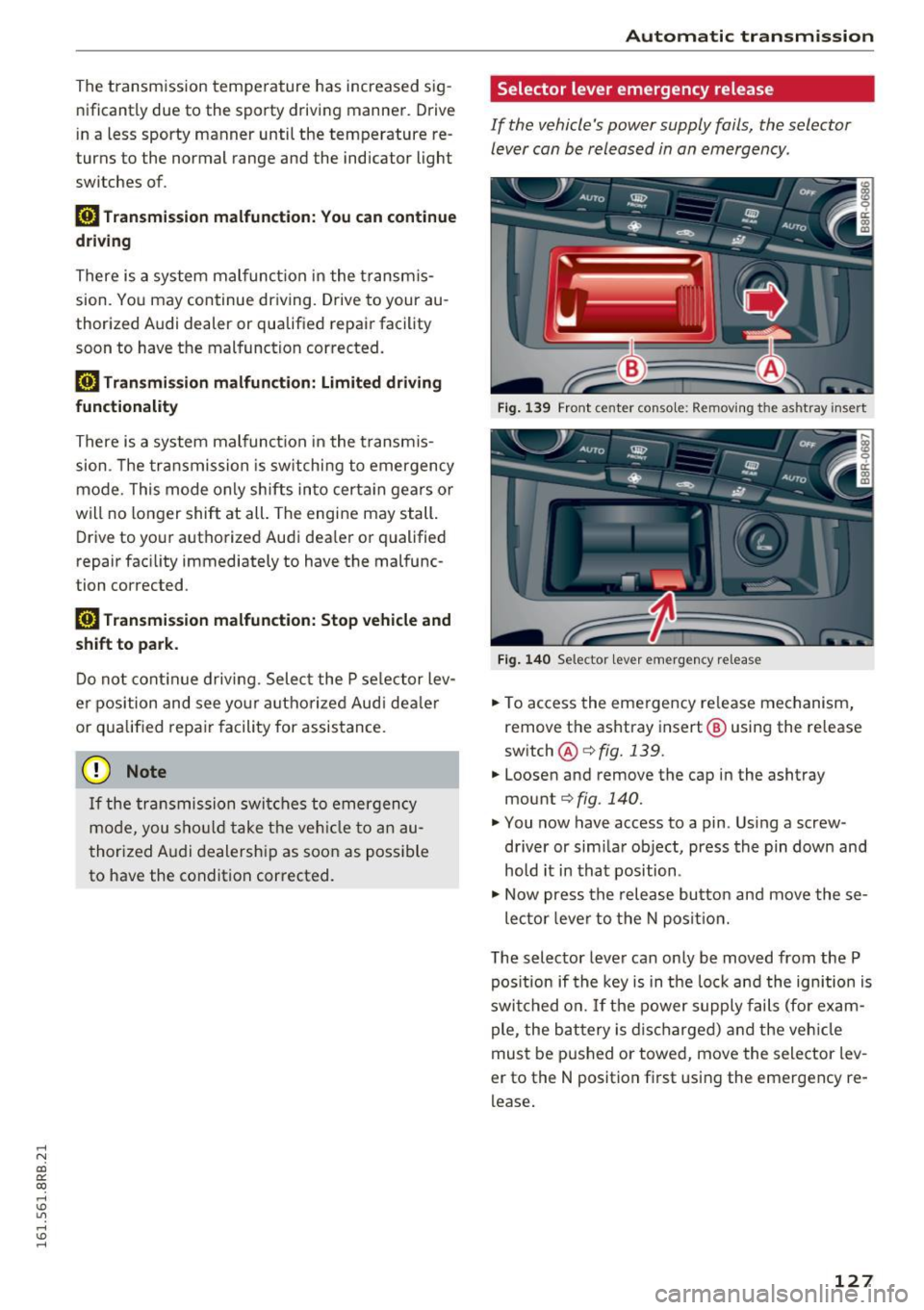
Fig. 139 Front center conso le: Removing the ashtray insert
Fig. 140 Selector lever emergency release
.,. To access the emergency re lease mechanism,
remove the ashtray insert@ using the release
switch @Qfig.139.
.,. Loosen and remove the cap in the ashtray
mount
Q fig. 140.
.,. You now have access to a pin . Using a screw
driver or sim ilar object, press the pin down and
hold it in that position .
.,. Now press the release button and move these-
lector lever to the N position.
The selector lever can only be moved from the P
pos ition if the key is in the lock and the ignition is
switched on. If the power supply fails (for exam
ple, the battery is discharged) and the vehicle
must be pushed or towed, move the selector lev
er to the N position f irst using the emergency re
lease .
127
Page 131 of 300
,....,
N
co
er::
co
,....,
The MM I display s hows the area covered by the
rearv iew camera ¢
fig. 143 (!). Objects that a re
not in the area covered @are not shown on the
MMI disp lay .
We recommend that yo u pract ice pa rking with
the rearview camera in a t raff ic-free location o r
parking lot to become familiar w ith the system ,
the orientation lines, and their function . When
doing this, there should be good light and weath
er cond itions.
I n the MMI disp lay, objects or vehicles appea r
closer o r furthe r away if :
- yo u are driving in reverse gea r from a level sur
f ace onto an in cli ne, or a downward s lope,
- yo u are d riving in reverse ge ar toward protr ud
ing objects,
- th e vehi cle is ca rrying too much lo ad in the
re ar .
The accuracy of the o rientation lines and blue
surfaces d imin ishes if:
- the rearv iew camera does not provide a reliab le
i mage, for example, in poor visibility cond itions
or if the lens is d irty,
- the image on the screen is not visib le due to
s u n glare and reflection .
Caring for the rear view c amera lens
The rearview camera is located above the rear li
cense plate bracket. For the parking system to
operate, the lens¢
fig. 144 must be kept clean:
- Dampen the lens with a house hold alcoho l-
based glass cleaner, and then wipe the lens
clean with a dry cloth¢(!).
- Remove snow with a hand brush and ice pref
erab ly w ith a de -icing spray ¢(D .
A WARNING
-The parking system cannot replace the dr iv
er's attention. The driver alone is responsi
ble for parki ng and similar dr iving ma neu
vers.
- Senso rs have blind spots in which objects
cannot be detected . Pay spec ial attention to
Par king sy stem
sma ll children and anima ls because the sen
sors cannot always detect them.
- Always keep your eyes on the vehicle's sur
roundings, using the rearv iew mirror as
wel l.
- Do not allow you rself to be dist racted from
traffic by the rearview camera pictures.
- If the position and the installation angle of
the camera has changed, for example, after
a rear end co llision, do not continue to use
the system for safety reasons. Have it
checked by a qualified dealership .
CI) Note
-Low obstacles a lready signa led by a warning
can disappea r from the system's detection
range as they are approached and w ill not
cont inue to be s ignaled. Objects such as
barrie r cha ins, tra iler draw bars, th in pain t
ed vertical poles or fences may not be de
te cted by the system, posi ng risk of dam
a ge.
- N ever use warm o r hot wate r to remove
snow o r ic e from the rearview camera lens -
t his could ca u se the lens to c ra ck!
- Whe n cleani ng the lens, never use prod ucts
t ha t are abras ive.
129