light AUDI Q5 2016 Service Manual
[x] Cancel search | Manufacturer: AUDI, Model Year: 2016, Model line: Q5, Model: AUDI Q5 2016Pages: 300, PDF Size: 75.02 MB
Page 67 of 300
..... N
co ~ CX)
..... I.Cl U"I
..... I.Cl .....
Memory function
Memory for driver's seat
Applies to vehicles: with seat memory
The seat adjustment settings for two drivers con
be stored using the memory buttons in the driv
er's door .
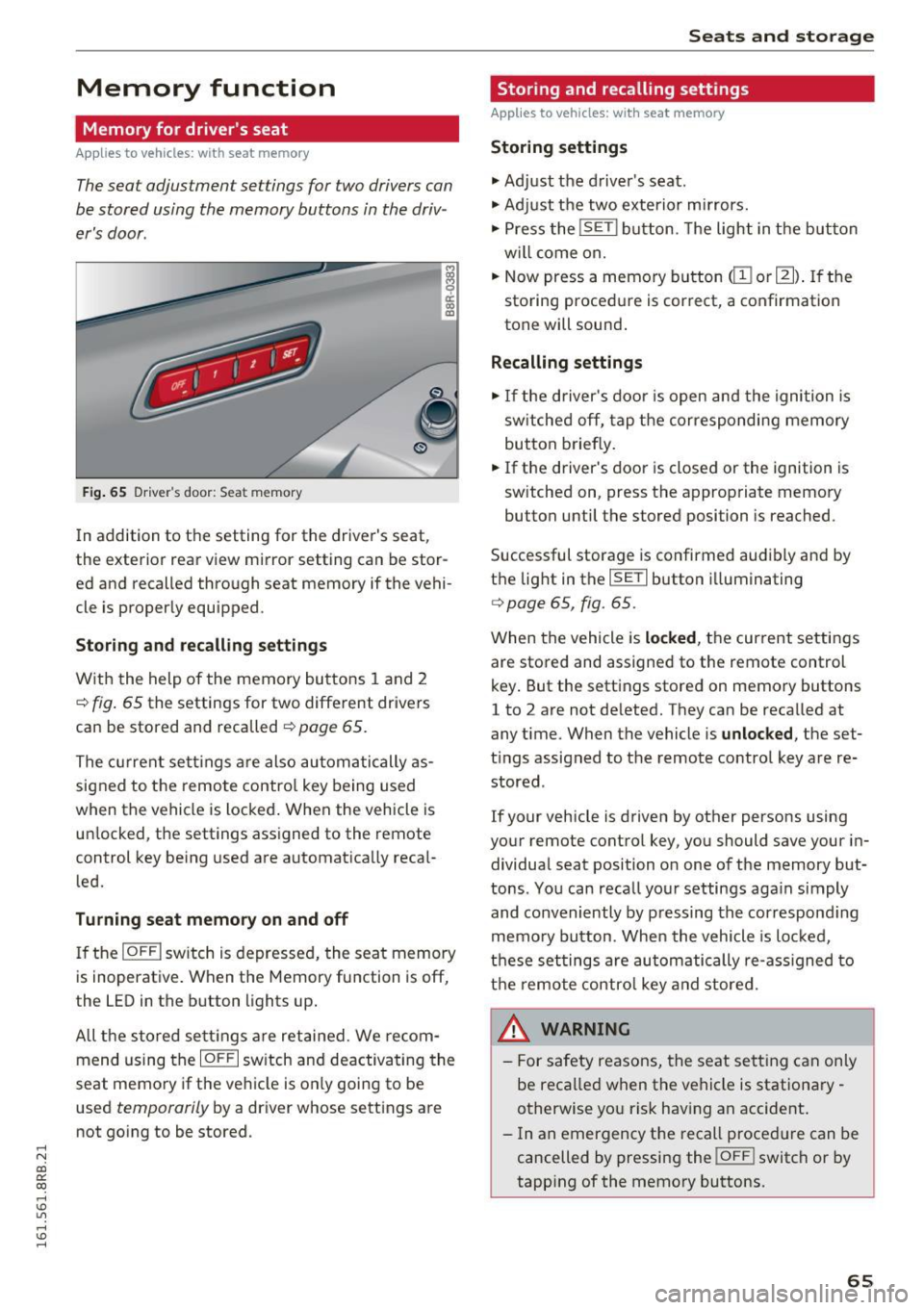
Fig . 65 D ri ver's door : Sea t memory
! co ID
In addition to the setting for the driver's seat ,
the exterior rear view mirror setting can be stor
ed and recalled through seat memory if the vehi
cle is proper ly equ ipped .
Storing and recall ing s ettings
With the help of the memory buttons 1 and 2
¢ fig . 65 the settings for two different drivers
can be stored and recalled
¢ page 65.
The cu rrent sett ings are also automatically as
signed to the remote contro l key being used
when the vehicle is locked . When the vehicle is
un locked, the settings ass igned to the remote
control key being used are automatica lly reca l
led.
Turning seat memory on and off
If the IO FFI sw itch is depressed, the seat memory
is inoperat ive . When the Memory fu nction is off,
the LED in the button lights up .
All the sto red se ttings a re retained. We recom
mend us ing the
IO FF I sw itch and deactivating the
seat memory if the ve hicle is on ly going to be
used
temporarily by a driver whose settings are
not go ing to be stored .
Seats and storag e
Storing and recalling settings
Applies to vehicles: with seat memory
Storing settings
.,. Adj ust the d river's seat.
.,. Adjust the two exterior mirrors.
.,. Press the
!S ET I button. The light in the button
w ill come on.
.,. Now press a memory button
(ill or 121) . If th e
sto ring procedure is correct, a confirmation
tone will sound .
Recalling settings
.,. If the driver's door is open and the ignition is
sw itched off, tap the corresponding memory
button briefly .
.,. If the driver's door is closed or the ignition is
sw itched on, press the approp riate memory
button until the stored position is reached.
Successful storage is confirmed audibly and by
t h e light in the
ISET I button i lluminating
r=> poge 65, fig. 65.
When the vehicle is locked , the current settings
are stored and assigned to the remote control
key . But the settings stored on memory buttons
1 to 2 are not de leted. They can be reca lled at
any time . When the vehicle is
unlocked , the set
t ings assigned to the remote control key are re
stored .
If your vehicle is driven by other persons using
your remote control key, you should save your in
dividua l seat position o n one of the memory but
tons . You can reca ll you r settings aga in simply
and conveniently by pressing the correspond ing
memo ry button. When the vehicle is loc ked,
t h ese settings are automatically re-ass igned to
t h e remo te contro l key and stored.
_& WARNING
-
- For safety reasons, the seat sett ing can on ly
be recalled when the vehicle is stationa ry -
otherwise yo u risk having an accident .
- In an emergency the recall proced ure can be
cancelled by pressing the
! OF FI switch or by
tapp ing of the memory bu ttons.
65
Page 73 of 300
..... N
co ~ CX)
..... I.Cl U"I ,....,
I.Cl ,....,
the luggage compartment to help prevent
items from f lying fo rward into the passen
ger compartment.
- Never attach a child safety seat tether strap
to a tie-down.
Luggage compartment cover
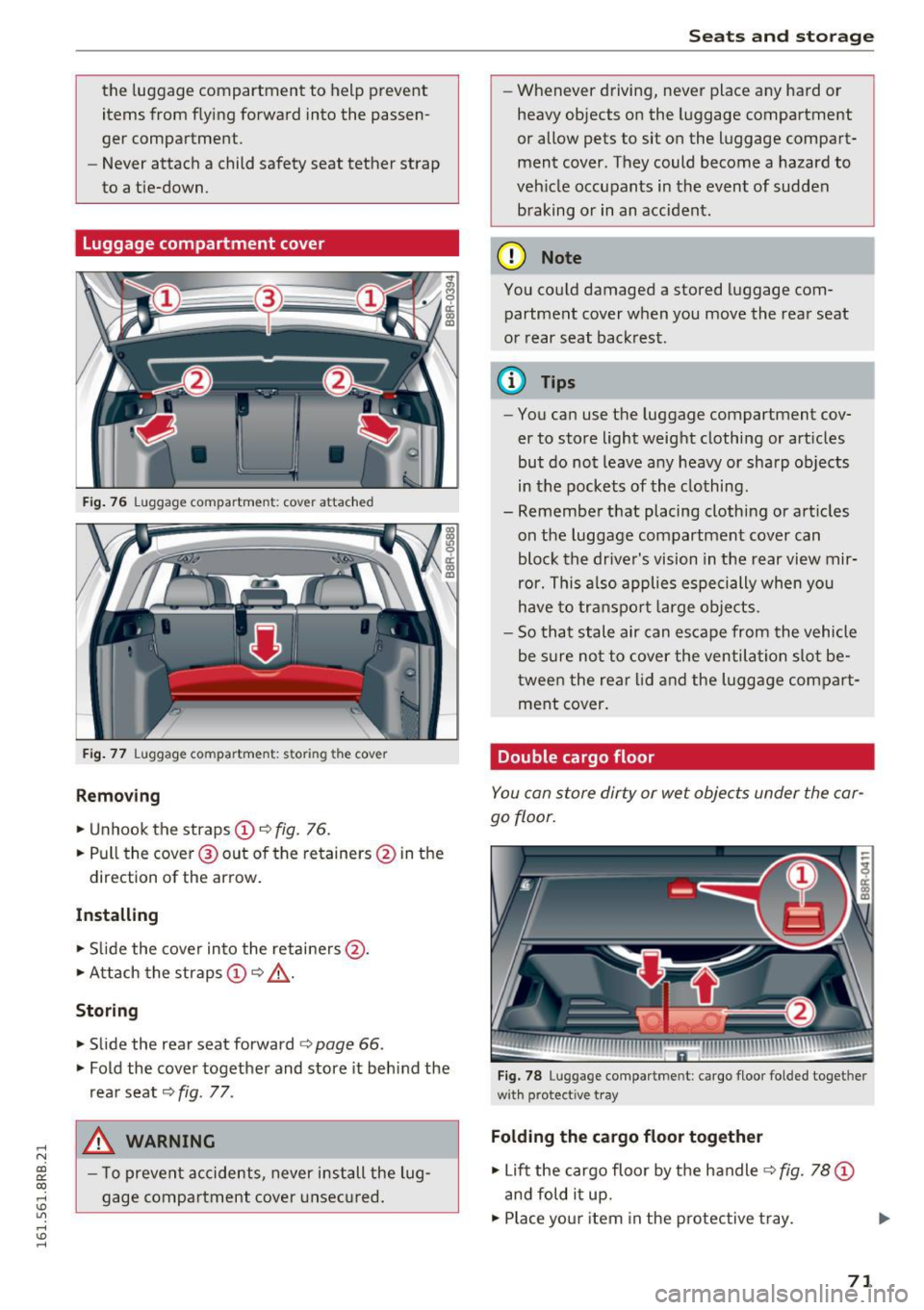
F ig. 76 Luggage compartment: cover attached
Fig. 77 Luggage compartme nt: storing the cover
Removing
"' Unhook the straps @ c:> fig. 76.
"' Pull the cove r@ out of the retainers @ in the
direction of the arrow .
Installing
"' Slide the cover in to the retainers @.
"' Attach the straps
(D c:> _&. .
Storing
"'Slide the rea r seat forward c:> page 66 .
"' Fold the cover together and store it behind the
rea r seat
c:> fig. 77 .
A WARNING
- T o prevent accidents, never install the Lug
gage compa rtment cove r unsec ured .
-
Seats and storag e
-Whenever driving, never place any ha rd or
heavy objects on the l uggage compartment
or allow pets to sit on the luggage compart
ment cover. They could become a hazard to
ve hicle occupants in the event of sudden
braking or in an accident .
(D Note
You could damaged a stored luggage com
partment cover when you move the rear seat
or rear seat back rest.
@ Tips
- You can use the luggage compartment cov
er to store light weight clothing or art icles
but do not leave any heavy or sharp objects
in the pockets of the clo thing.
- Remember that placing clothing or art icles
on the luggage compartment cover can
bloc k the drive r's vision in the rear view mir
ror. This a lso applies es pecially when you
have to transpo rt large obje cts.
- So that stale air can escape from the vehicle
be s ure no t to cover the ventilation slot be
t ween the rear lid and the luggage com pa rt
ment cover.
Double cargo floor
You can store dirty or wet objects under the car
go floor.
F ig . 7 8 Luggage compartme nt: ca rgo floor folded together
w it h protective tray
Folding the cargo floor together
"' Lift the cargo floor by the handle c:> fig. 78 (D
and fold i t up.
"' Place you r item in the protec tive t ray. ..,.
71
Page 77 of 300
..... N
co ~ CX)
..... I.Cl U"I
..... I.Cl ......
Opening rear beverage h olders
• To open the rear cupholder, press on the sym
bol~ @~
fig. 86.
Hold ing bev erages at the rear
• To adjust the arm @, swing it in the d irect ion
of the ar row .
• Place the beverage in the holde r and release
the a rm. The a rm swings back by itse lf and au
tomatica lly sec ures the beverage.
Clo sing the r ear cupholders
• To close the rear cupholder, press on the center
section between the two arms and p ush the cu
pholder in the s lot as far as it will go.
The hold ing arm must be adjusted such that it
l ies closely against the cupholde r.
A maximum of two beverages can be placed in
the center armrest.
A WARNING
Spilled hot liquid can cause an accident and
personal injury.
- Never carry any beverage containers with
hot liquids, such as hot coffee or hot tea, in
the vehicle while it is moving. I n case of a n
acc ident, sudden braki ng or o ther veh icle
movement, hot liq uid could spill, causing
sca ld ing burns . Spilled hot liquid can also
cause an accident and perso nal i nju ry.
- Use only soft cups in the cupholder . Hard
cups and g lasses can cause i njury in an acci
dent.
- Never use t he cupholder or adapter as an
ashtray -risk of fire .
(D Note
Onl y drink containe rs with lids should be ca r
r ied in the cupholder . Liquid could sp ill out
and damage your vehicle's electronic equip
ment or stain the upho lstery, etc .
Seats and storag e
Climatized cupholders
Applies to vehicles: w it h climat ized beve rage holders
The driver side beverage holder can keep your
beverage warm or cold.
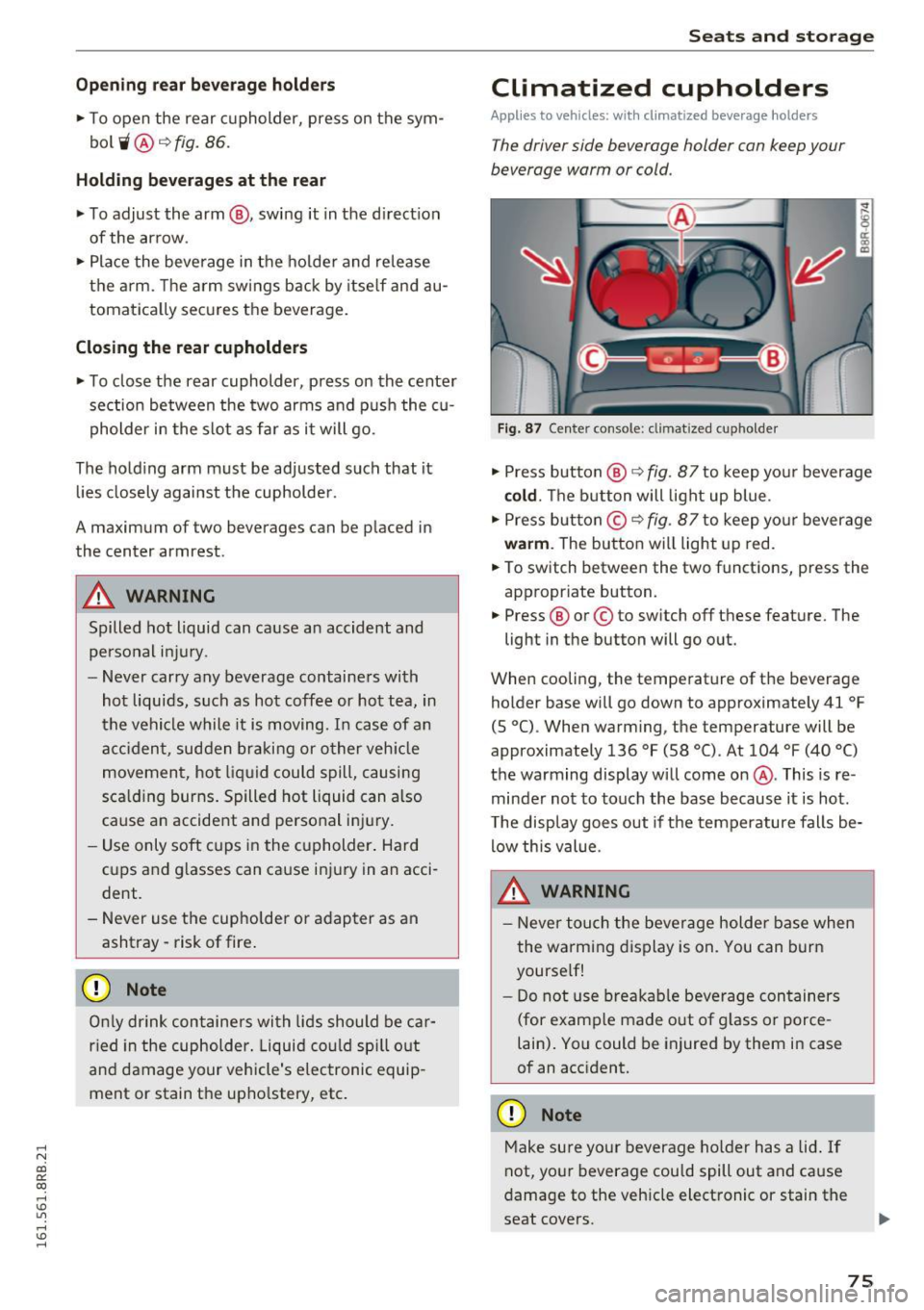
Fig. 87 Center console: climatized cupholder
• Press button @¢ fig. 87 to keep you r beverage
cold . The b utton will light up blue.
• Press but ton © ¢
fig. 87 to keep yo ur beverage
wa rm . The button will light up red.
• To switch between the two functions, press the
appropr iate button.
• Press ® or© to sw itch off these feature. The
light in the button will go out.
When cooling, the temperature of t he beverage
holder base will go down to approximately 41
°F
(S °C). When warm ing, the temperature will be
approximately 136
°F (58 °(). At 104 °F (40 °()
the warming display will come on@. This is re
minder not to touch the base because it is hot.
T he disp lay goes out if the temperature falls be
low this value.
A WARNING
- Neve r tou ch the bever age holder base when
the wa rming display is on. You can bur n
yourse lf!
- Do not use bre akab le beverage con tainers
(for e xamp le made out of g lass or porce
lain) . Yo u could be injured by them in case
of an acc ident.
(D Note
M ake sure your beverage ho lder has a lid . If
not, your beverage cou ld spill out and cause
damage to the vehicle electronic or stain the
seat covers .
75
Page 78 of 300
Sea ts and stor age
@ Tips
Do not cover the venti lation grille -arrow-be
cause that cou ld prevent the beverage holder
from functioning correctly.
Cupholders in the door
pockets
There is a cupholder in all four doors.
F ig . 88 Sect ion of door panel: (upholder
The cupholders in the door pockets are suitable
for 1 to 1.5-liter bottles .
& WARNING
Spilled hot liquid can cause an accident and
personal injury.
- Never carry any beverage containers with
hot liquids, such as hot coffee or hot tea, in
the vehicle while it is moving. In case of an
acc ident, sudden braking or other vehicle
movement, hot liquid could spill, causing
sca ld ing burns. Spilled hot liquid can also
ca use an accident and personal inj ury.
- Use only soft cups in the cupholder. Ha rd
cu ps and g lasses can cause inju ry in an acci
dent .
(D Note
Only dr ink containers with lids should be car
r ied in the cupholder. Liquid co uld sp ill out
and damage yo ur vehicle's electronic equip
ment or stain the upho lstery, etc.
76
-
Ashtray
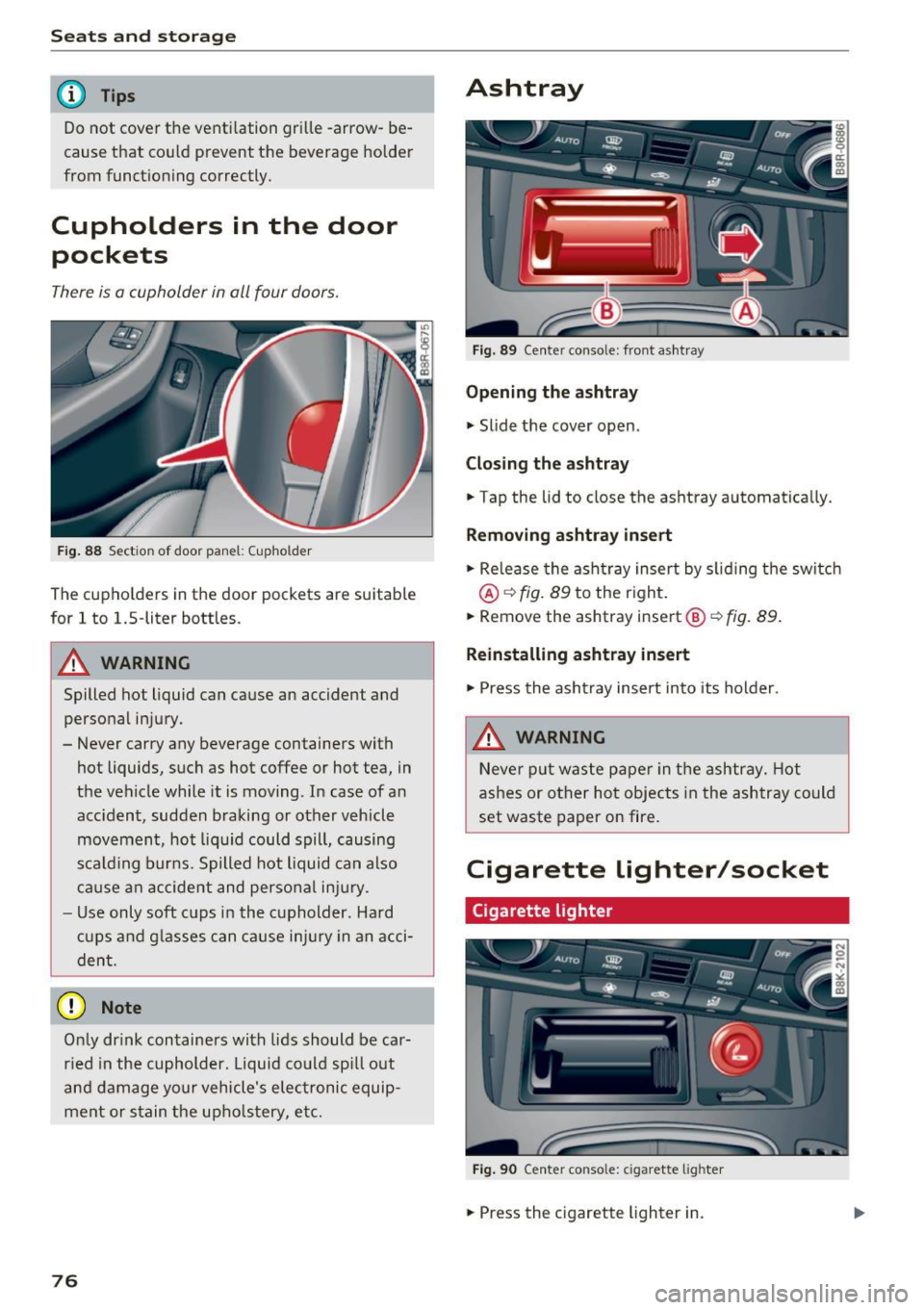
Fig. 89 Center conso le: front ashtray
Opening the ashtray
"' Slide the cover open.
Closing the ashtray
"'Tap the lid to close the ashtray automatica lly.
Removing a shtray insert
"' Re lease the asht ray insert by s liding the switch
@ ~fig. 89 to the right.
"' Remove the ashtray insert@¢
fig. 89.
Reinstalling ashtra y insert
"' Press the asht ray insert into its holder.
& WARNING
-
Neve r put was te paper in the ashtray. Hot
ashes or other hot objects in the ashtray co uld
set waste paper on fire.
Cigarette lighter/socket
Cigarette lighter
Fig . 90 Cente r console: cigarette lig h ter
"' Press the cigarette lighter in.
Page 79 of 300
..... N
co ~ CX)
..... I.Cl U"I
..... I.Cl .....
.. Remove the cigarette lighter when it pops out.
The c igarette lighter sho uld only be used as a
power so urce for the compressor from the inflat
ab le spare tire/tire repai r kit* when absolute ly
necessary.
A WARNING
T he ciga rette lighter on ly works when the ig
nition is sw itched on. Incorrect usage can lead
to ser ious injuries or burns. For this reason,
children shou ld never be left unattended i n
the vehicle beca use this increases the risk of
injury.
12 -volt sockets
Electrical accessories can be connected to every
12-volt socket.
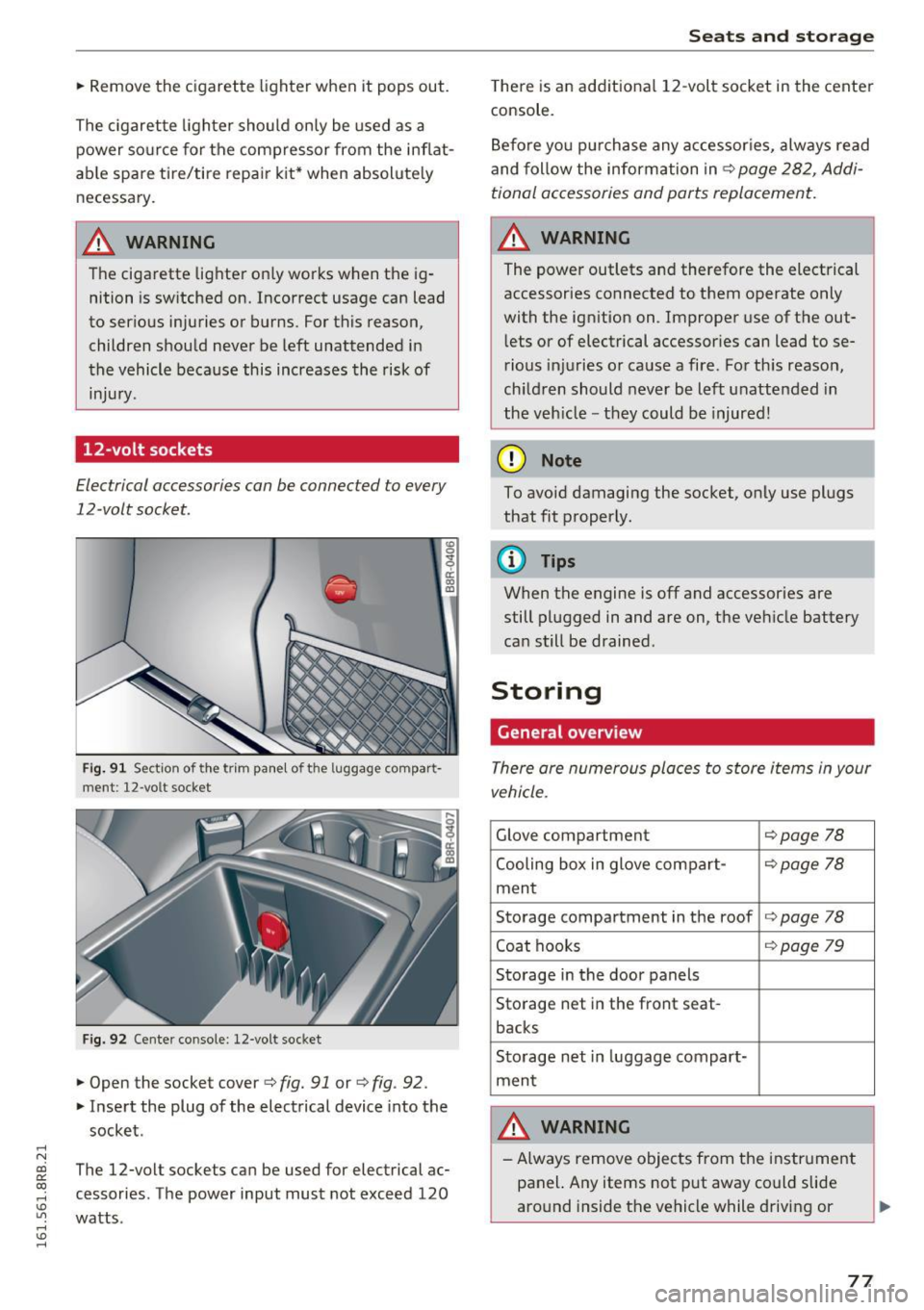
Fig. 91 Section of the trim pa nel of the luggage compart
ment: 12-volt socket
Fig . 9 2 Cen ter console: 12-volt socket
.. Open the socket cover c:> fig. 91 or ¢ fig. 92.
.. Inse rt the plug of the electrical device into the
socket .
The 12-volt sockets can be used for electrical ac
cessories. The power input must not exceed 120
watts .
Seats and storag e
There is an add itio na l 1 2-volt socket in the center
console.
B efore yo u pur chase any accessor ies, always read
and follow the information inc::>
page 282, Addi
tional accessories and parts replacement.
A WARNING
The power outlets and therefore the electrical
accessories connected to them operate only
with the ign ition on. Improper use of the out
l ets or of electrical accessor ies can lead to se
rio us inj uries or cause a fire. Fo r th is reason,
ch ildren should never be left unattended in
the veh icle -they could be injured!
(D Note
To avoid damaging the socket, o nly use plugs
that fit properly.
(D Tips
When the engine is off and accessories are
still plugged in and are on, the ve hicle battery
ca n still be drained .
Storing
General overview
There are numerous places to store items in your
vehicle .
Glove compartment c::>page 78
Cooling box in glove com pa rt-¢ page 78
men t
Storage compartment in the roof
¢page 78
Coat hooks ¢page 79
Storage in the door panels
Sto rage net in the front seat-
backs
Sto rage net in luggage compart-
ment
A WARNING
- A lways remove objects from the instr ument
panel. Any items not p ut away could slide
aro und inside the vehicle while driving or
~
77
Page 80 of 300
Sea ts and stor age
when accelerat ing or when app lying the
brakes or when driving around a corner.
- When you are driving make sure that any
thing you may have placed in the center con
so le or other storage locations cannot fall
out into the footwells. In case of sudden
braking you would not be able to brake or
acce le rate .
- Any pieces of cloth ing that you have hung
up must not interfere with the driver's view.
The coat hooks are designed only for light
weight cloth ing . Neve r hang any clothing
with hard , po inted or he avy objects in the
poc kets on the coat hooks . Dur ing s udden
braking or in an accident -especia lly i f the
airbag is dep loyed -these objects could in
jure any passengers inside the vehicle .
Glove compartment
The glov e comportm ent is illuminat ed and con
be locked.
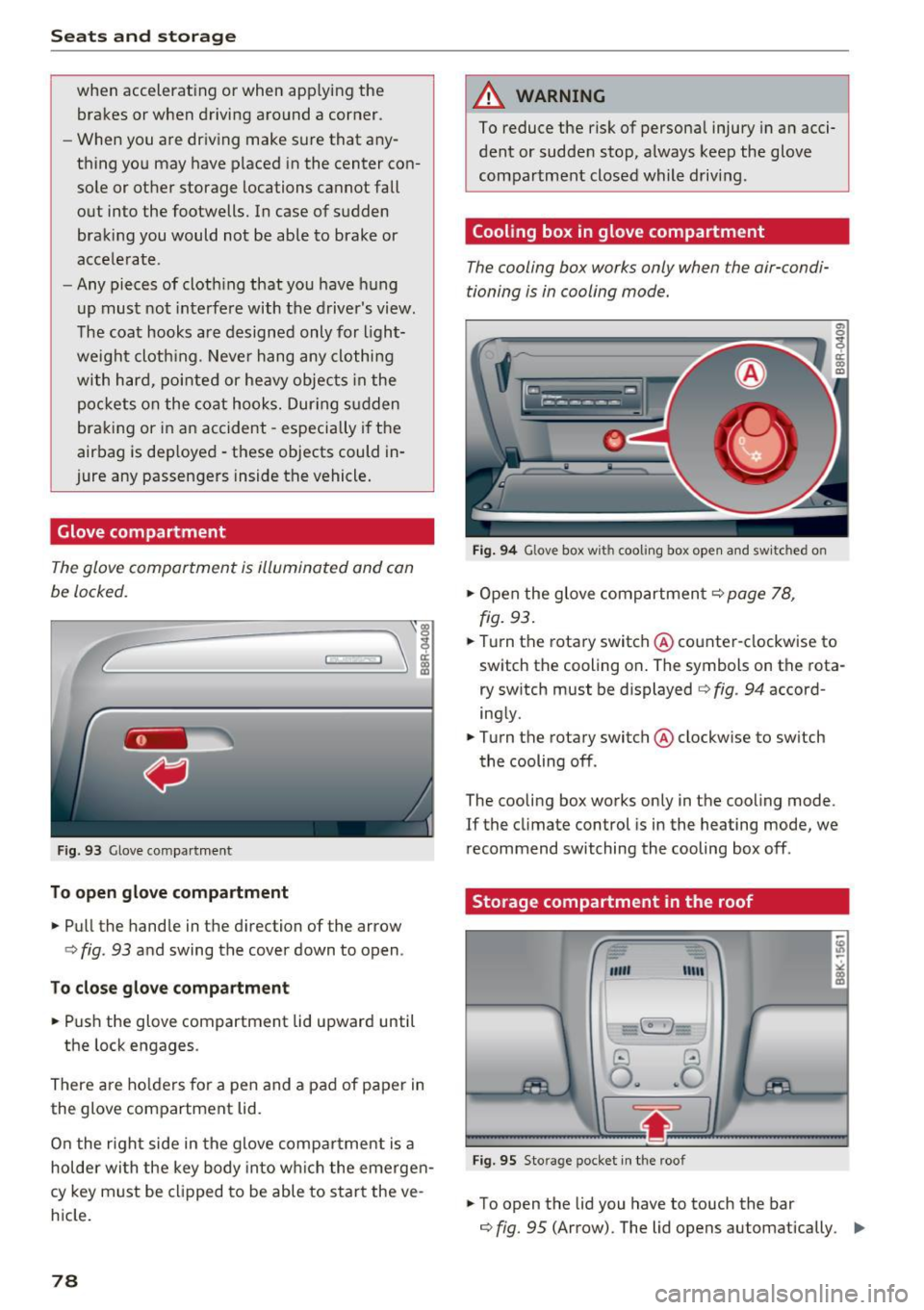
F ig . 93 Glove co mpa rt men t
To open glove compartment
.. Pull the handle in the d irection of the arrow
c> fig . 93 and swing the cover down to open .
To clo se glove c omp artm ent
.. Push the glove compartment lid upward until
the lock engages .
There are ho lders for a pen and a pad of paper in
the glove compartment lid.
On the r ight side in the glove compa rtment is a
hol der wi th the key body into w hich the emerge n
cy key must be clipped to be able to star t the ve
h icle.
78
A WARNING
To reduce the risk of persona l injury in a n acci
dent or sudde n stop, a lways keep the glove
compartment closed while driving .
Cooling box in glove compartment
The cooling box works only when the air-condi
tioning i s in cooling mode.
Fig . 94 Glove box w ith cooli ng box ope n and sw itc hed on
.. Open the glove compartmen t c> page 78,
fig. 93 .
.. Tu rn the rotary switch @ counte r-clockwise to
switch th e cooling on . The symbols on th e rota
ry sw it c h must be displayed c> fig . 94 accord
ing ly .
.. Turn the rotary switch @ clockwise to sw itch
the cooling off .
The cooling box works only in the cooling mode.
If the climate con trol is in the heating mode, we
recommend switching the cooling box off .
Storage compartment in the roof
""' "'"
-~
@ ..!J
O .. ~O
Fig. 95 Sto ra g e pocket in t he roof
.. To open the lid you have to touch the bar
c> fig. 95 (Arrow). The lid open s automatically . ..,.
Page 81 of 300
..... N
co ~ CX)
..... I.O U"I
..... I.O .....
.. To close the lid, push it up until it engages .
A WARNING
Always keep the lid closed while driving to re
duce the risk of injury during a sudden brak
ing maneuver or in the event of an accident .
Coat hooks
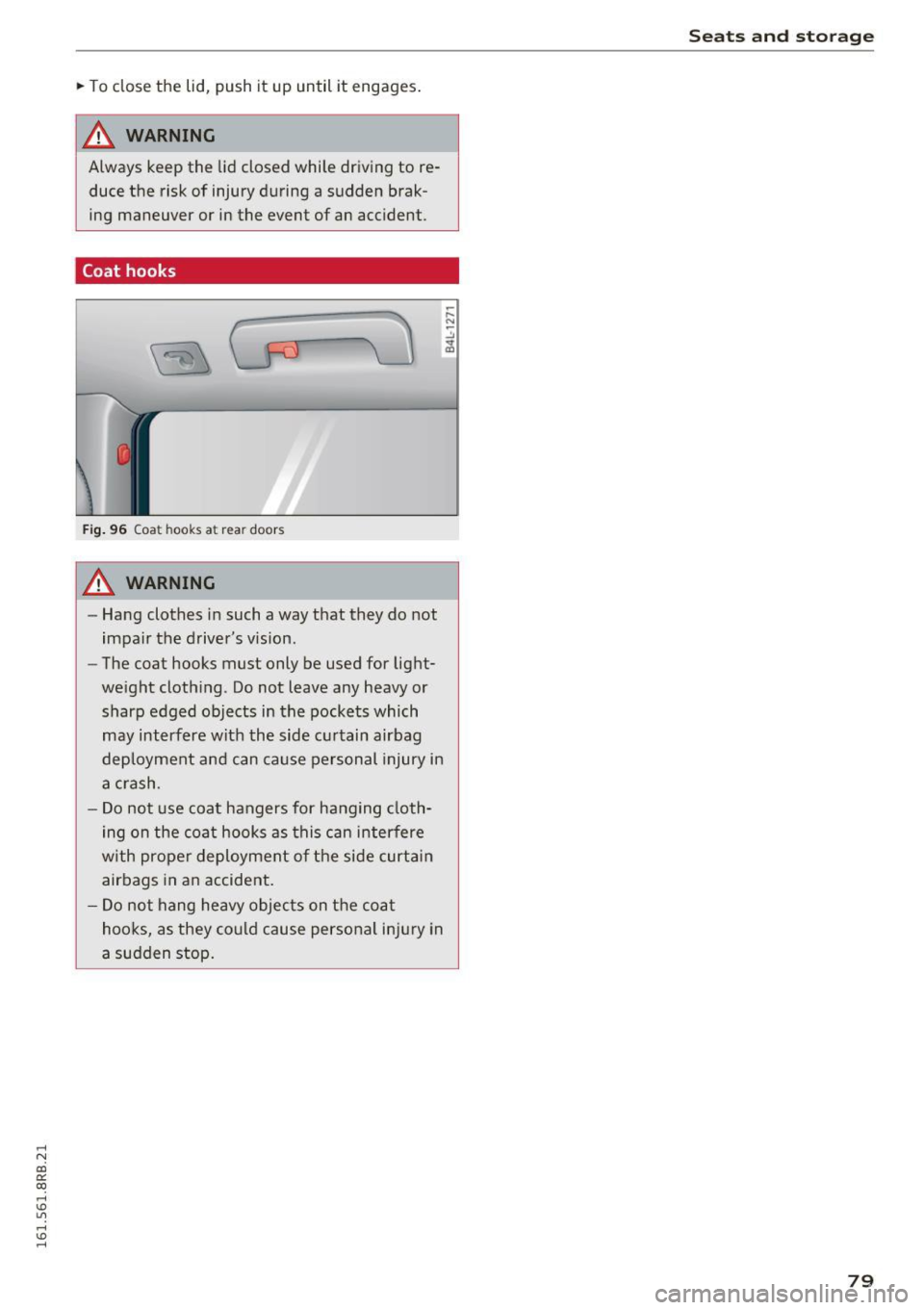
Fig. 96 Coat hoo ks a t re ar doors
A WARNING
- Hang clothes in such a way that they do not
impair the driver 's vision.
- The coat hooks must only be used for light
weight clothing . Do not leave any heavy or
sharp edged objects in the pockets which
may interfere with the side curtain airbag
deployment and can cause personal injury in
a crash .
- Do not use coat hangers for hanging cloth
ing on the coat hooks as this can interfere
with proper deployment of the side curtain
airbags in an accident.
- Do not hang heavy objects on the coat
hooks, as they could cause personal injury in
a sudden stop .
Seats and storage
79
Page 83 of 300
..... N
co ~ CX)
rl I.Cl U"I
rl I.Cl .....
Warm and cold
Operation
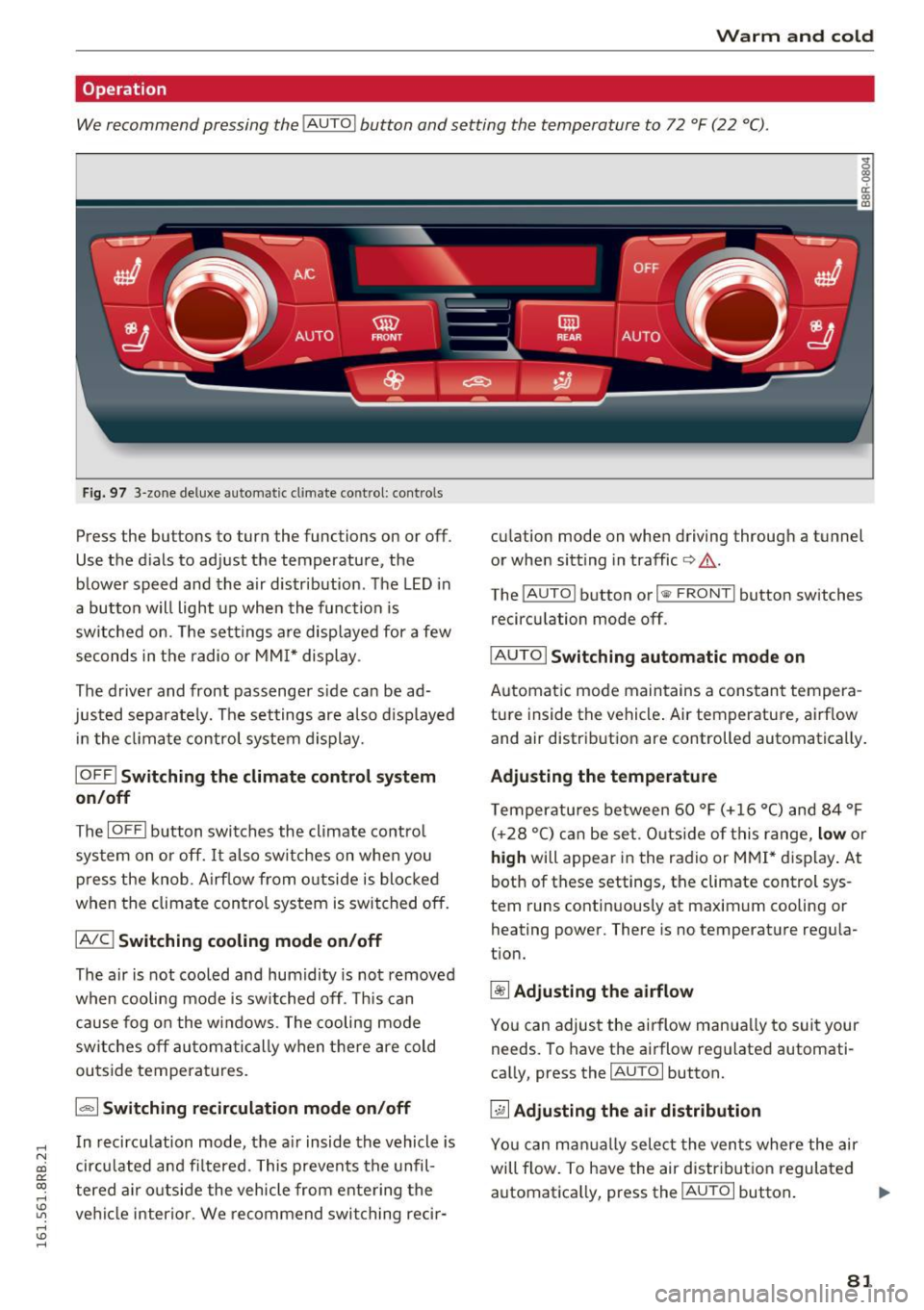
We recommend pressing the !AUTO ! button and setting the temperature to 72 °F (22 °C).
Fig. 97 3-zone deluxe automatic cl imate control: co ntrols
Press the buttons to turn the functions on or off .
Use the d ials to adjust the temperature, the
blower speed and the air distr ibut ion. The LED in
a button w ill light up when the function is
switched on. The settings are displayed for a few
seconds in the radio or MMI* display .
The driver and front passenger s ide ca n be ad
justed separately. The settings are also displayed
in t he climate control system display.
IOFFI Switching the climate control system
on/off
The I OF Fi button switches the climate contro l
system on or off.
It also sw itches on when you
press the knob. Airf low from o utside is blocked
when the climate control system is switched off.
IA/C l Switching cooling mode on/off
The air is not cooled and humidity is not removed
when cooling mode is switched off. This can
cause fog on the windows. The cooling mode
switches off automatically when there are cold
outside temperat ures.
1.,,., 1 Switching recirculation mode on/off
In recirculation mode, the air inside the vehicle is
circu lated and fi ltered. This prevents the unfil
tered air o utside the vehicle from ente ring the
ve hicl e interior. We recommend switching rec ir- cu
lation mode on when driving through a tunnel
or when sitt ing in traffic
c> .&. .
The !AUTO I button or I @ FRONT I button switches
recirculation mode off.
I AUTO I Switching automatic mode on
Automatic mode maintains a constant tempera
ture inside the vehicle . Air temperature, airf low
and air distribut ion are controlled automatically .
Adjusting the temperature
Temperatu res between 60 °F (+ 16 °C) and 84 °F
( +2 8 °C) ca n be set. O uts ide of this range,
low or
high will appear in the radio or M MI* display. At
both of these settings, the climate control sys
tem runs continuous ly at maximum cooling or
heating power. There is no temperat ure regula
t ion.
~ Adjusting the airflow
You can adjus t the airflow manua lly to suit your
needs. To have the airflow reg ulated automati
ca lly, press the
IAUTO I button.
~ Adjusting the air distribution
You can man ually select the ven ts where the air
will flow. To have the air distribut ion regulated
automatica lly, press the
IAUTOi button . ..,.
81
Page 87 of 300
,....,
N
co
er::
co
,....,
when starting the engine for diesel vehicles* in
colder temperatures. Therefore, you must hold
the brake pedal down until the engine starts.
The indicator lamp
1,1 illuminates when the en
gine is preheated .
Switching the ignit ion on /off
If you would like to switch the ignition on with
out starting the engine, follow these steps:
~ Inse rt the key into the ignition lock .
~ Press the key briefly without press the brake
pedal.
~ To switch the ignition off, press the key again.
Diese l vehicles* are preheated while the ignition
is switched on.
When start ing the e ngine, major electrical loads
are switched off tempora rily.
You can on ly remove the key with the ignition
switched off. To do th is, you have to press on the
key aga in.
I f the engine should not start immediately, the
starting process is automat ically stopped after a
short time. Repeat sta rting procedu re .
St art-Sto p-S ystem*:
Note the information on c:> page 91, Start/Stop
system .
A WARNING
-Never allow the engine to run in confined
spaces -dange r of asphyxiation .
- Never remove the ignit ion key from the ign i
t ion lock while the vehicle is moving . Other
wise, the stee ring lock cou ld suddenly en
gage and you would not be able to stee r the
vehicle .
- Always ta ke the key with you whenever you
leave you r vehicle. Othe rw ise, the engine
c ou ld be started or electrical eq uipment
such as the power windows cou ld be operat
ed. This can lead to serious injury.
- Never leave children or persons requiring as
sistance unattended in the vehicle. The
doors can be locked using the remote trans-
-
Driv ing
mitter, preventing peop le from escaping
from the vehicle on their own in the event of
an emergency. Depending on the time of
year, people ins ide the veh icle can be ex
posed to very h igh or very low tempera
tures.
(D Note
Avo id h igh engine rpm, full throttle and heavy
engine loads until the engine has reached op
erating temperature -otherw ise you risk en
gine damage .
@ For the sake of the environment
Do not let the engine run wh ile parked to
warm up. Beg in driving immed iately. T his re
duces unnecessa ry emissions.
(D Tips
- If the key cannot be removed from the ign i
tion lock, you have to pull the mechanical key out of the master key in o rder to be able
to lock the vehicle
c:> page 38.
- Some noise after start ing the engine is nor
ma l and is no cause for conce rn.
- If you leave the vehicle w ith the ignition
switched on, the ignit ion w ill switch off af
ter a ce rtain per iod of t ime. Please note that
elect rical eq uipment such as exterior lights
w ill switch off as we ll when that happens.
85
Page 88 of 300
Driving
Starting the vehicle with the emergency
key
You can use the emergency key as an ignition key
in an emergency.
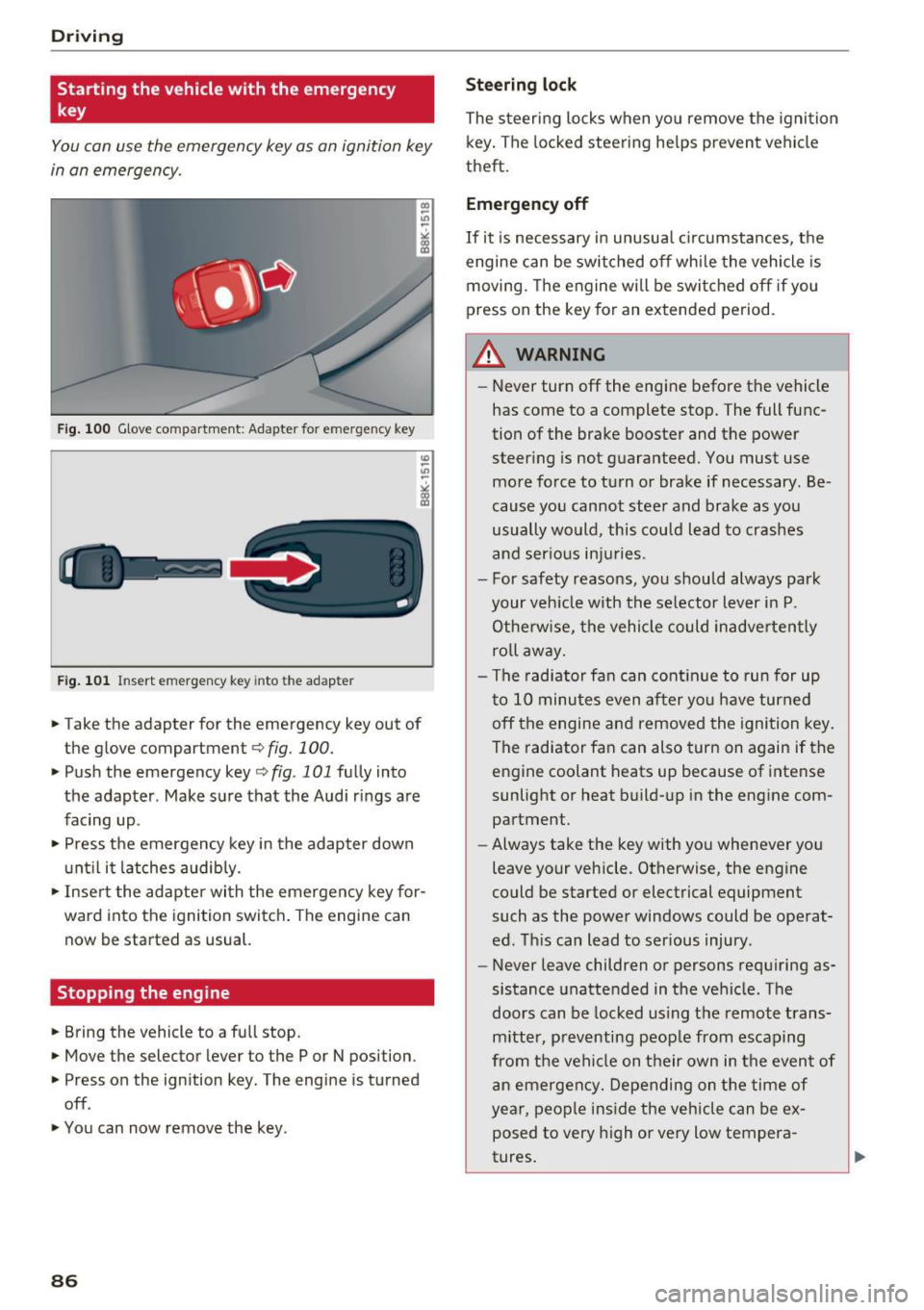
Fig. 100 Glove compartment : Ada pte r fo r em erg en cy key
Fig. 101 In sert emergency key into the adap te r
... Take the adapter for the emergency key out of
the glove compartment ¢
fig. 100.
.,. Push the emergency key ¢ fig . 101 fully into
the adapter . Make sure that the Audi rings are
facing up .
.,. Press the emergency key in the adapter down
until it latches audibly.
.,. Insert the adapter with the emergency key for
ward into the ignition switch. The engine can
now be started as usual.
Stopping the engine
... Bring the vehicle to a full stop.
... Move the selector lever to the P or N position .
.. Press on the ignition key . The engine is turned
off .
.,. You can now remove the key .
86
Steering lock
The steering locks when you remove the ignition
key. The locked steering helps prevent vehicle
theft.
Emergency off
If it is necessary in unusual circumstances, the
engine can be switched off while the vehicle is
moving. The engine will be switched off if you
press on the key for an extended period .
A WARNING
-Never turn off the engine before the vehicle
has come to a complete stop. The full func
tion of the brake booster and the power
steering is not guaranteed. You must use
more force to turn or brake if necessary . Be
cause you cannot steer and brake as you
usually would, this could lead to crashes
and serious injuries .
- For safety reasons, you should always park
your vehicle with the selector lever in P .
Otherwise, the vehicle could inadvertently
roll away.
- The radiator fan can continue to run for up
to 10 minutes even after you have turned
off the engine and removed the ignition key .
The radiator fan can also turn on again if the
engine coolant heats up because of intense
sunlight or heat build-up in the engine com
partment .
- Always take the key with you whenever you
leave your vehicle . Otherwise, the engine
could be started or electrical equipment
such as the power windows could be operat
ed. This can lead to serious injury .
- Never leave children or persons requiring as
sistance unattended in the vehicle. The
doors can be locked using the remote trans
mitter, preventing people from escaping
from the vehicle on their own in the event of
an emergency. Depending on the time of
year, people inside the vehicle can be ex
posed to very high or very low tempera
tures.