reset AUDI Q5 2016 Owners Manual
[x] Cancel search | Manufacturer: AUDI, Model Year: 2016, Model line: Q5, Model: AUDI Q5 2016Pages: 300, PDF Size: 75.02 MB
Page 11 of 300
.... N
co
er::
co
....
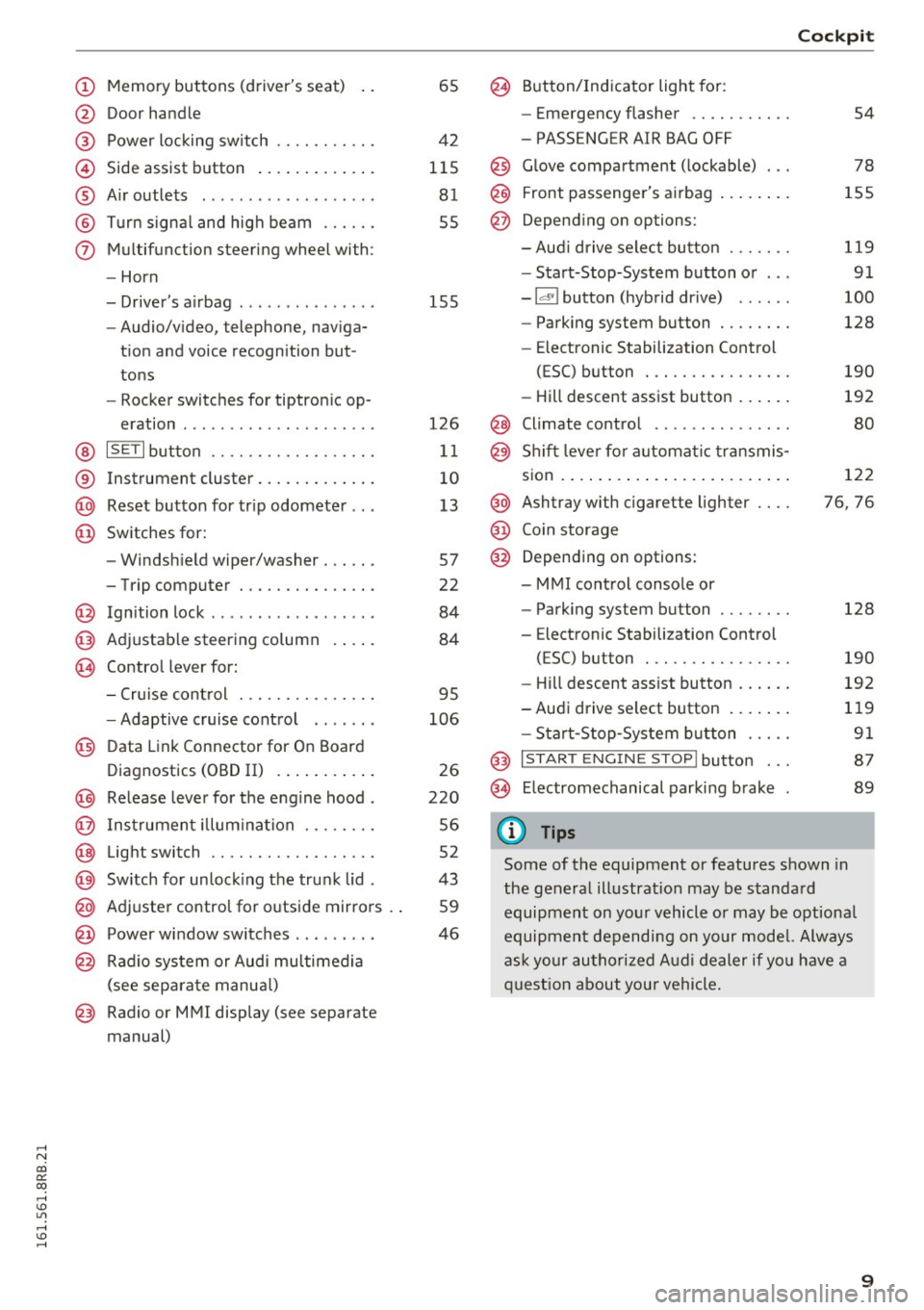
@ Door handle
@ Power locking sw itch .......... .
© Side assist button ............ .
® Air outlets ..... ........ .... . .
@ Turn signal and high beam ... .. .
(j) Multifunction steering wheel with:
- Horn
- Driver's airbag ..... ..... ... . .
- Audio/video, telephone, naviga-
tion and voice recognition but
tons
- Rocker switches for tiptronic op-
eration ............... ..... .
@ ISETI button ............... .. .
® Instrument cluster .......... .. .
@ Reset button for trip odometer .. .
@ Switches for:
- Windshield wiper/washer . .... .
- Trip computer ............ .. .
@ Ignition lock ................. .
@ Adjustable steering column
@ Control lever for:
65
42
115 81
55
155
126
11
10
13
57
22
84
84
- Cruise control . . . . . . . . . . . . . . . 95
- Adaptive cruise control . . . . . . .
106
@ Data Link Connector for On Board
Diagnostics (OBD II) . . . . . . . . . . .
26
@) Release lever for the engine hood . 220
@ Instrument illumination . . . . . . . . 56
@ Light switch . . . . . . . . . . . . . . . . . . 52
@) Switch for unlocking the trunk lid . 43
@ Adjuster control for outside mirrors . . 59
@ Power window switches . . . . . . . . . 46
@ Radio system or Audi multimedia
(see separate manual)
@ Radio or MMI display (see separate
manual)
@ Button/Indicator light for:
- Emergency flasher .......... .
- PASSENGER AIR BAG OFF
@ Glove compartment (lockable) .. .
@ Front passenger's airbag ....... .
@ Depending on options:
- Aud i drive select button ...... .
- Start-Stop-System button or .. .
- Id'! button (hybrid drive) ..... .
- Parking system button ....... .
- Elect ronic Stabilization Control
(ESC) button . .............. .
- Hill descent assist button ..... .
@ Climate control .. ............ .
@ Shift lever for automat ic transmis-
sion ..... ..... .. ............ .
@ Ashtray with cigarette lighter ... .
@ Coin storage
@ Depending on options:
- MMI control console or
- Parking system button ....... .
- E lectronic Stabilization Control
(ESC) button . .. ............ .
Cockpit
54
78
155
119
91
100
128
190
192
80
122
76, 76
128
190
- Hill descent assist button . . . . . . 192
-Audi drive select button . . . . . . . 119
- Start-Stop -System button . . . . . 91
@ I START ENGINE STOP! button . . . 87
@> Electromechanical parking brake 89
(D Tips
Some of the equipment or features shown in
the general illustration may be standard
equipment on your vehicle or may be optional
equipment depending on your model. Always
ask your authorized Audi dealer if you have a
question about you r vehicle.
9
Page 12 of 300
Instruments and indicator lights
Instruments and indicator Lights
Instruments
Instrument cluster and controls
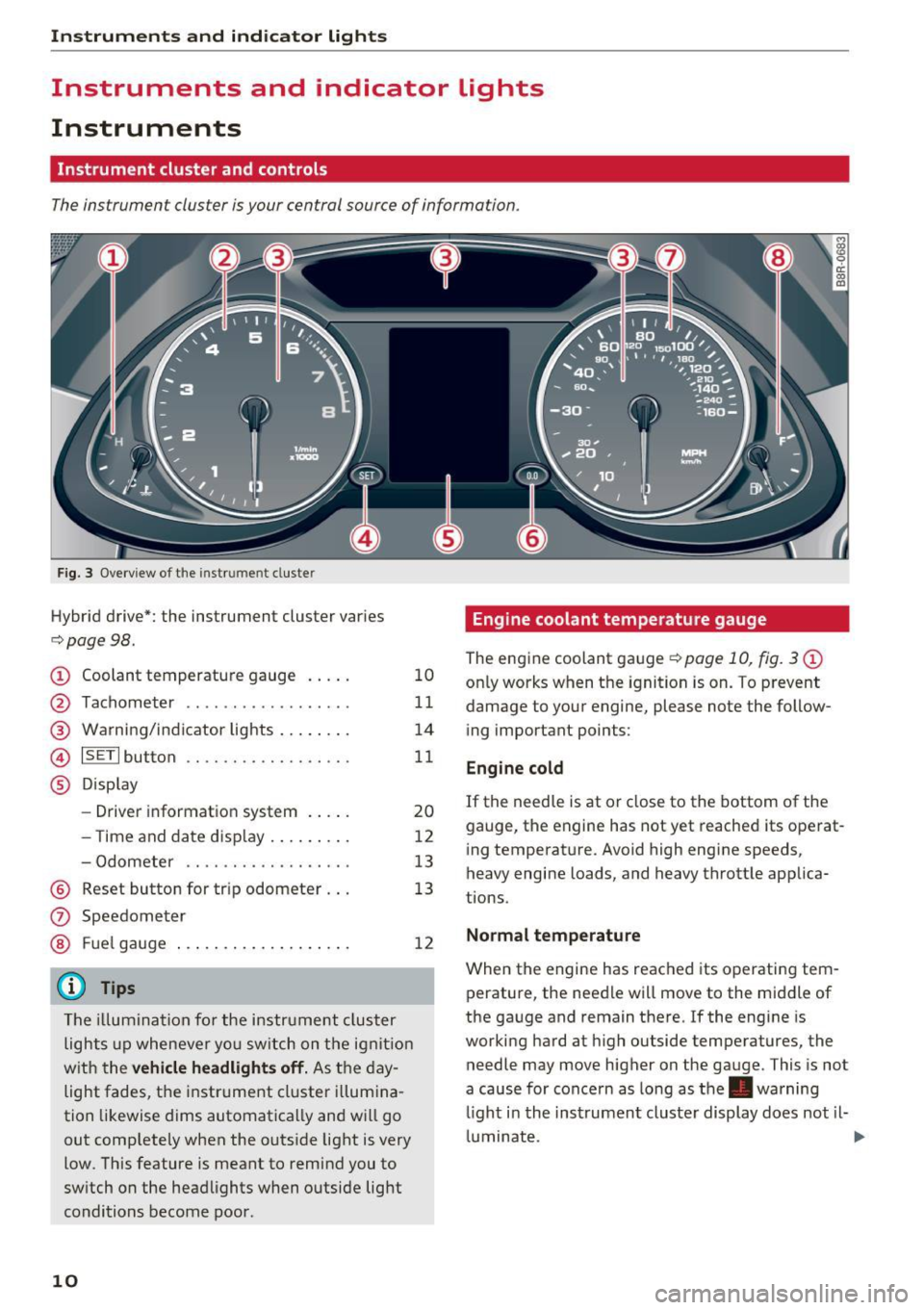
The instrument cluster is your central source of information.
Fig. 3 Overview of the instr ume nt cluste r
Hybrid drive*: the instrument cluster varies
c::> page98 .
CD Coolant temperature gauge
@
®
©
®
Tachometer .............. ... .
Warning/indicator lights ....... .
ISETI button .... .. .. ..... .... .
Display
- Driver information system .... .
- T ime and date display ........ .
- Odometer .... .... ....... .. .
® Reset button for trip odometer . ..
(J) Speedometer
® Fuel gauge
(D Tips
The illum inatio n for the instrument cluster
lights up whenever yo u switch on the ignit ion
w ith the
vehicle headlights off. As the day
light fades, the instrument cluster illumina
tion likewise dims automatica lly and will go
out comp letely when the outs ide light is very
low . This feature is meant to remind you to
switch on the headlights when outside light
conditions become poor .
10
10
11
14
11
20
12
13
13
12
Engine coolant temperature gauge
The engine coolant gauge¢ page 10, fig. 3 CD
only works when the ignition is on. To prevent
damage to your engine, please note the follow
ing important points:
Engine cold
If the needle is at or close to the bottom of the
gauge, the engine has not yet reached its operat
ing temperature. Avoid high engine speeds,
heavy engine loads, and heavy throttle applica
tions .
Normal temperature
When the engine has reached its operating tem
perature, the needle will move to the middle of
the gauge and remain there.
If the engine is
working hard at high outside temperatures, the
needle may move higher on the gauge . This is not
a cause for concern as long as the . warning
li ght i n the inst rument cluste r display does not il-
luminate . ..,.
Page 15 of 300
..... N
co ~ CX)
..... I.Cl U"I
..... I.Cl ..... Odometer
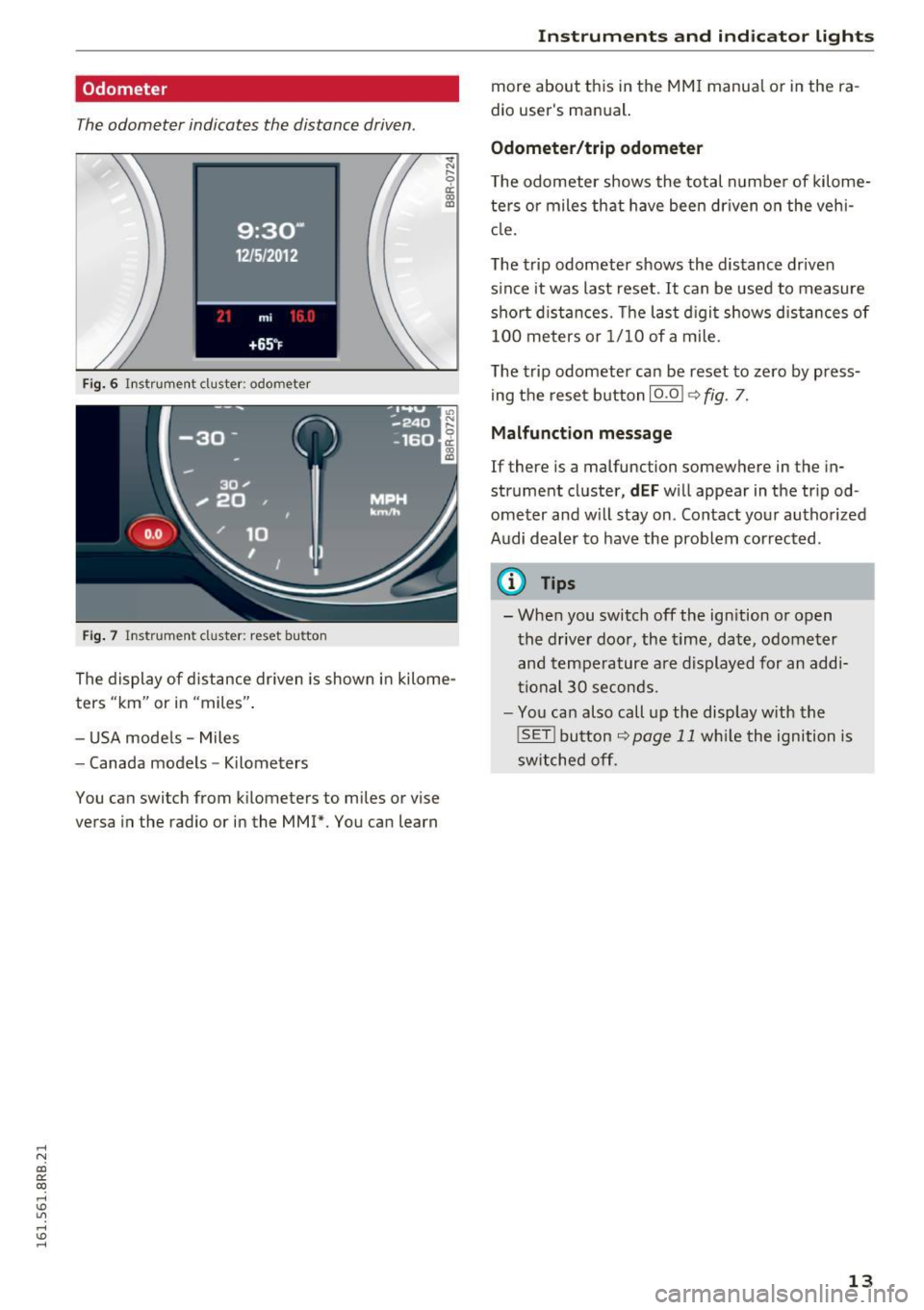
The odometer indicates the distance driven
.
Fig. 6 Instrument cluste r: odometer
Fig . 7 Instrument cluster: reset button
.,. N r;
ci: a, al
The display of distance driven is shown in kilome
ters "km" or in "miles" .
- USA models -Miles
- Canada models -Kilometers
You can switch from kilometers to miles or vise
versa in the radio or in the MMI*. You can learn
Inst rum ents a nd ind icat or ligh ts
more about this in the MM I manual or in the ra
dio user's manual.
Odometer /trip odom eter
T he odometer shows the total number of kilome
ters or miles that have been driven on the vehi cle.
The trip odometer shows the distance driven s ince it was last reset.
It can be used to measure
short d istances. The last d igit shows distances of
100 meters or 1/10 of a mile.
The trip odometer can be reset to zero by press ing the reset button
10.01 9 fig. 7.
Malfunct ion me ssage
If there is a malfunction somewhere in the in
strument cluster,
d EF w ill appear in the tripod
ometer and w ill stay on. Contact your authorized
Audi dealer to have the problem corrected.
(D Tips
- When you switch off the ign ition or open
the driver door, the time, date, odometer and temperature are displayed for an addi
tronal 30 seconds.
- You can also call up the display with the
! SET !bu tton
9page 11 while the ignition is
switched off.
13
Page 24 of 300
Driver information system
Service interval display
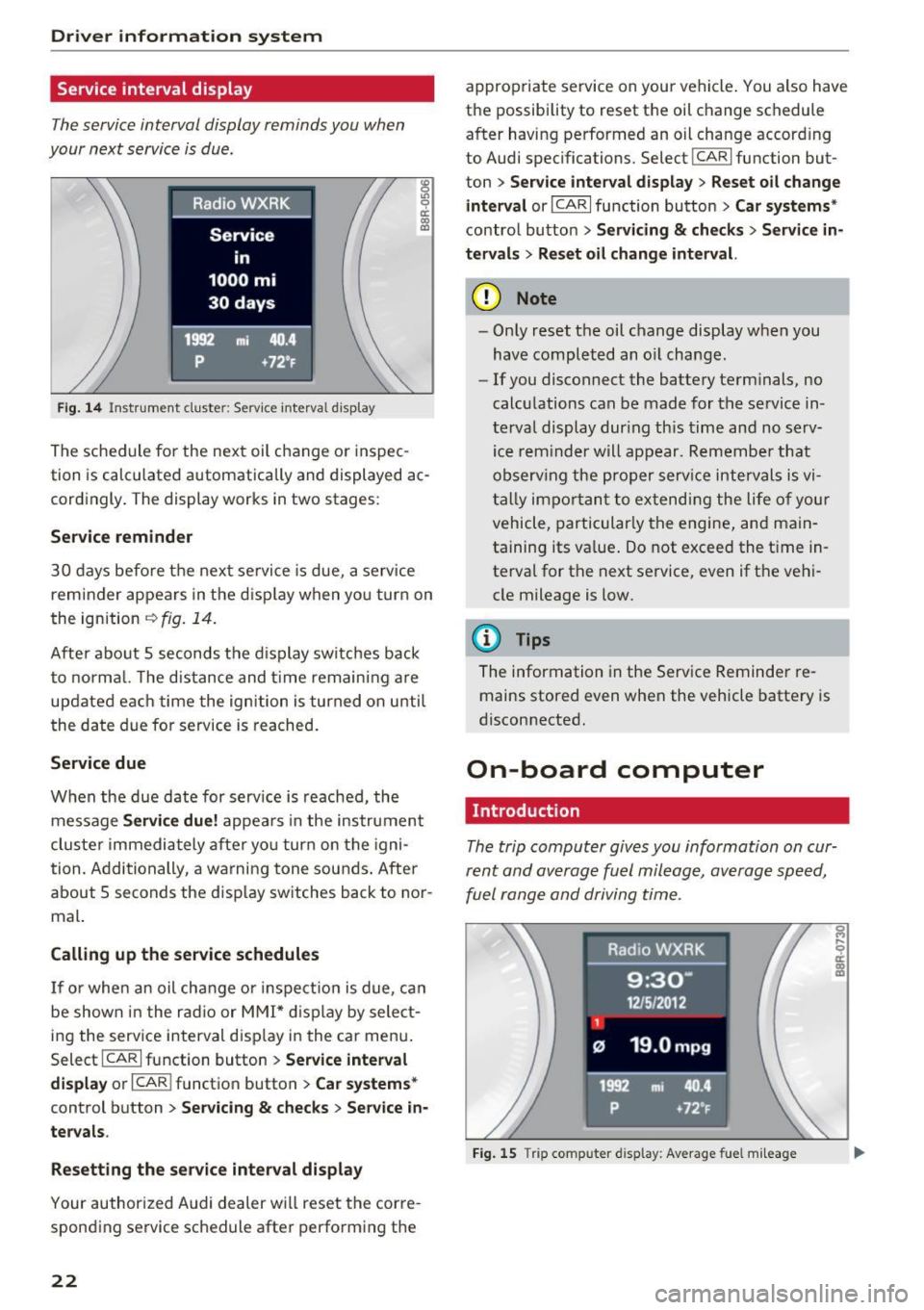
The service interval display reminds you when
your next service is due.
Fig. 14 Instrument cluste r: Service interva l d isp lay
The schedule for the next oil change or inspec
tion is calculated automatically and displayed ac
cordingly . The display works in two stag es:
Service reminder
30 days before the next se rvice is due, a service
reminder appears in the d isplay when yo u turn on
the ignition
~ fig. 14.
After about 5 seconds the display switches back
to normal. The distance and time remain ing are
updated each time the ignition is turned on until
the date due for service is reached.
Service due
When the due date for serv ice is reached, the
message
Service due! appears in the instrument
cluster immediately after yo u turn on the igni
tion. Additionally, a warning tone sounds . After
about
5 seconds the display switches back to nor
mal.
Calling up the service schedules
If or when an oil change or inspection is due, can
be shown in the radio or MMI* display by select
ing the serv ice interval d isplay in the car menu .
Select
ICARI function button > Service interval
display
or I CAR I function button > Car systems*
control button > Servicing & checks > Service in·
tervals .
Resetting the service interval display
Your authorized Audi dealer will reset the corre
sponding service schedule after perform ing the
22
appropriate service on your vehicle . You also have
the possibility to reset the oil change schedule
after having performed an oil change accord ing
to Audi specifications. Select
I CAR I function but
ton >
Service interval display > Reset oil change
interval
or ICARI function button> Car systems*
control button > Servicing & checks > Service in·
tervals
> Reset oil change interval.
(D Note
- Only reset the oil change display when you
have completed an o il change.
- If you disconnect the battery term inals, no
calculations can be made for the se rvice in ·
terval display dur ing this time and no serv
ice rem inder will appear. Remember that
observ ing the proper service intervals is vi
tally impo rtant to extending the life of your
vehicle, particularly the engine, and main
ta ining its va lue. Do not exceed the time in
terval for the next service, even if the vehi
cle mileage is low.
(D Tips
The information in the Service Reminder re
mains stored even when the vehicle batte ry is
disconnected.
On-board computer
Introduction
The trip computer gives you information on cur
rent and average fuel mileage , average speed,
fuel range and driving time .
Fig. 15 Tri p comp uter d isplay: Average fue l mileage
Page 25 of 300
..... N
co ~ CX)
..... I.Cl U"I
..... I.Cl .....
The following informa tion is cont inuo usly evalu
ated by the trip computer and can be displayed
sequent ia lly in the inst rument cl uste r display:
Fuel range
The estima ted cruising range in miles ( km) ap
pea rs in t he d isp lay. Th is tells you how far your
ve hicle wi ll be able to trave l on the curren t tank
of fuel and with the same driving style. The dis
p lay changes in increments of 5 miles (10 km) .
Average fuel mileage The aver age f uel economy in M PG (l/ 100 km)
since you las t clea red the memory appears in this
d is p lay . You can use this d isplay to adjust your
d riving technique to ach ieve a desired mileage .
Current fuel mileage
The in stantaneous f ue l cons umption in miles per
g all on (l/ 100 km) is shown in th is display. Yo u
c a n use th is d isp lay to ad just yo ur dr iv ing tech ni
que to achieve a desi red mileage .
F ue l cons umption is re calc ula ted at inte rvals of
3 3 ya rds (30 meters).
Average speed The average speed in mph (km/h) si nce the last
time the display was reset appea rs in the disp lay .
Elapsed t ime
The length of time that you have been driving
since you last reset the memory appears in t his
d isplay .
Distance
The distance that has been covered since the last
time the memory was cleared appears in the dis p lay.
(D} Tips
- Fuel consum ptions (average and c urrent),
r ange and speed are displayed in metric
units on Canadian models.
- All stored val ues will be lost if the ve hicle
batte ry is disconnected .
Driver informa tion system
Memories
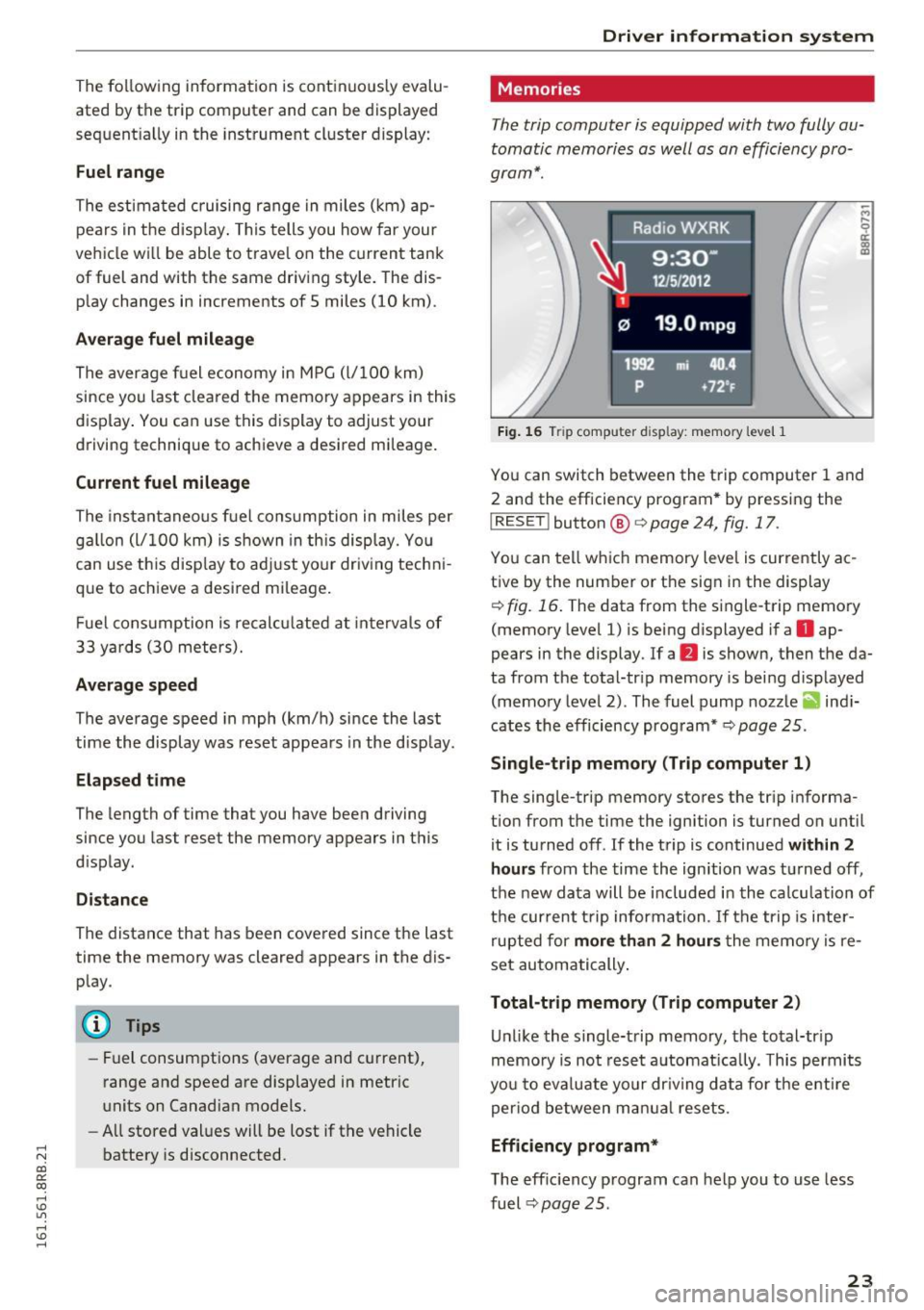
The trip computer is equipped with two fully au
tomatic memories as well as an efficiency pro
gram*.
Fig. 1 6 Trip com puter d isp lay: memory level 1
-M
9 a: (D Cl)
Yo u can switch between the t rip computer 1 and
2 an d the efficie ncy program * by pressing the
I RESET I button @ c> page 24, fig. 17.
Yo u can te ll w hich memory leve l is currently ac
tive by the num ber or t he sign i n the display
i=;, fig. 16 . The data from the s ingle-trip memo ry
(memo ry level 1) is be ing displayed i f a
D ap
pears in the display. If a
fJ is shown, then t he da
ta from t he total-tr ip memory is bei ng d isp layed
(memo ry level 2) . The fuel p ump nozz le
ii ind i
cates the efficiency program* ¢
page 25 .
Single-trip memory (Trip computer 1)
The sing le-trip memory sto res the tr ip info rma
t ion from the time the ignition is turned on unt il
it is tu rned off . If the t rip is continued within 2
hours from the time the ign ition was t urned off,
th e n ew data will be include d in th e calcu lation of
t h e cur rent t rip information . If the tr ip is in te r
r upte d for more th an 2 hours the memo ry is re
set au tom atically .
Total-trip memory (Trip computer 2) U nli ke the single-trip memory, the to tal-tr ip
m emo ry is no t rese t automat ically . T his p ermi ts
yo u t o ev aluate yo ur dr iv ing d ata fo r th e e ntir e
per io d between m anual rese ts.
Efficiency program*
T he eff ic iency p rogram can he lp you to use less
fuel
i=;, page 25 .
23
Page 26 of 300
Driver information system
Operation
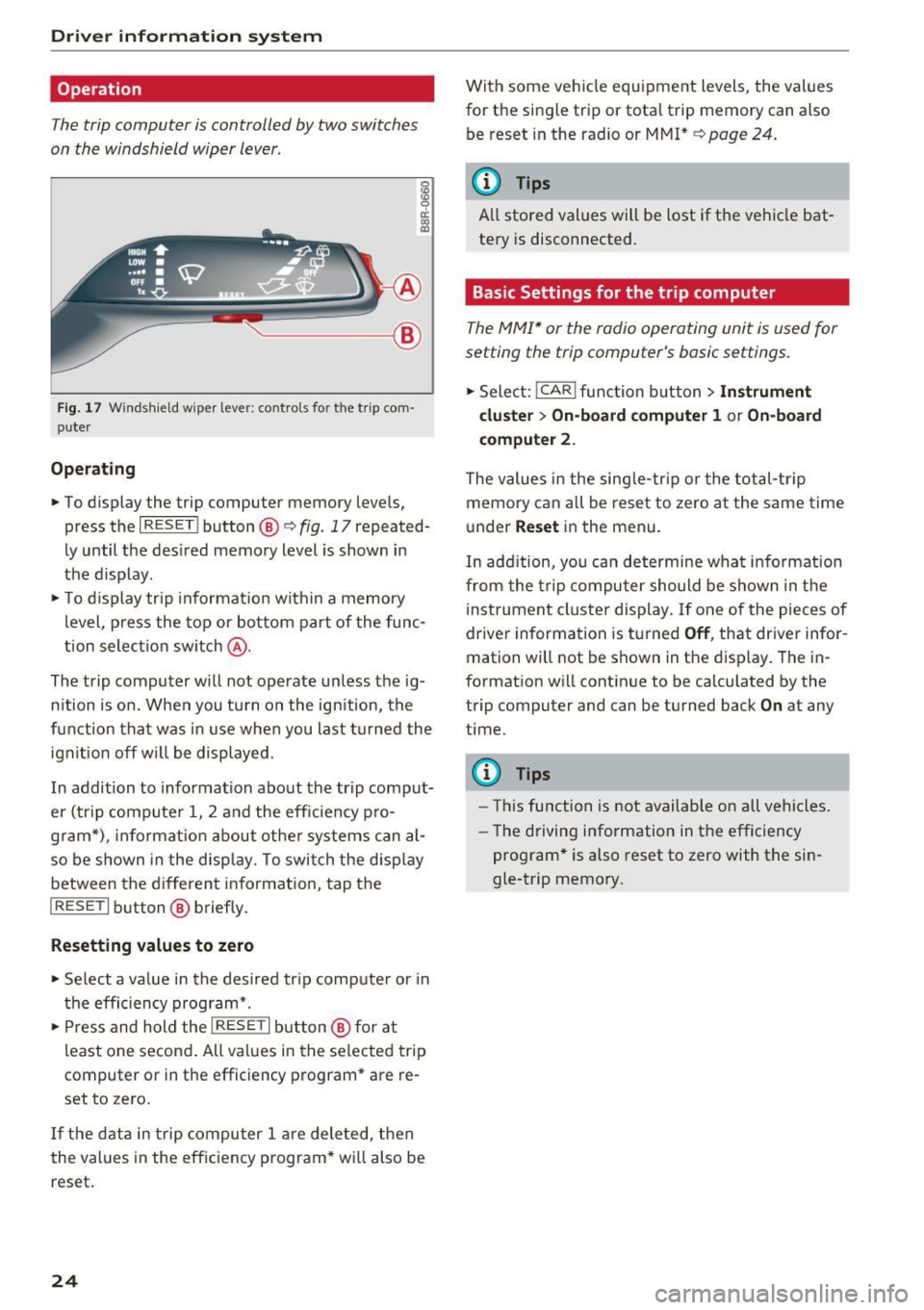
The trip computer is controlled by two switches
on the windshield wiper lever .
g
~ a: (0 a,
~--@
Fig. 17 Windshield wiper lever: contro ls for t he t rip com
puter
Operating
.. To display the trip computer memory levels,
press the
I RESET ! button®<=> fig. 17 repeated
ly until the des ired memory level is shown in
the d isplay .
.. To display tr ip information within a memory
level, press the top or bottom part of the func
tion select ion switch @.
The trip computer will not operate unless the ig n ition is on. When you turn on the ign ition, the
function that was in use when you last turned the
ignit ion off wil l be displayed.
In addition to information about the trip comput
er (tr ip computer 1, 2 and the effic iency pro
gram*) , informat ion about other systems can al
so be shown in the disp lay. To switch the disp lay
between the d ifferent information, tap the
I RESET I button® briefly.
Resetting values to zero
.. Select a va lue in the desired tr ip computer or in
the efficiency program* .
.,. Press and hold the
I RESET I button@ for at
least one second . All values in the selected trip
computer or in the efficiency program* are re
set to zero.
If the data in trip computer 1 are dele ted, then
the values in the efficiency program* will also be
reset .
24
With some vehicle equipment levels, the values
for the single trip or tota l trip memory can also
be reset in the radio or MM!*
¢ page 24.
(D Tips
All stored values will be lost if t he vehicle bat
tery is disconnected.
Basic Settings for the trip computer
The MMI* or the radio operating unit is used for
setting the trip computer's basic settings .
.,. Select: !CAR ! function button > Instrument
cluster
> On-board computer 1 or On-board
computer 2.
The values in the single-trip or the total-trip
memory can all be reset to zero at the same time
under
Reset in the menu.
In add ition, you can determine what information
from the trip computer should be shown in the
instrument cluster display. If one of the pieces of
driver information is turned
Off , that driver infor
mation will not be shown in the display. The in
formation will continue to be calculated by the
trip computer and can be turned back
On at any
time .
(D Tips
-Th is function is not available on all vehicles.
- The driving information in the efficiency
program* is also reset to zero with the sin
gle-trip memory.
Page 27 of 300
..... N
co ~ CX)
..... I.Cl U"I
..... I.Cl .....
Efficiency program
Description
Applies to vehicles: with efficiency program
Fig. 18 Display : eff icienc y prog ram
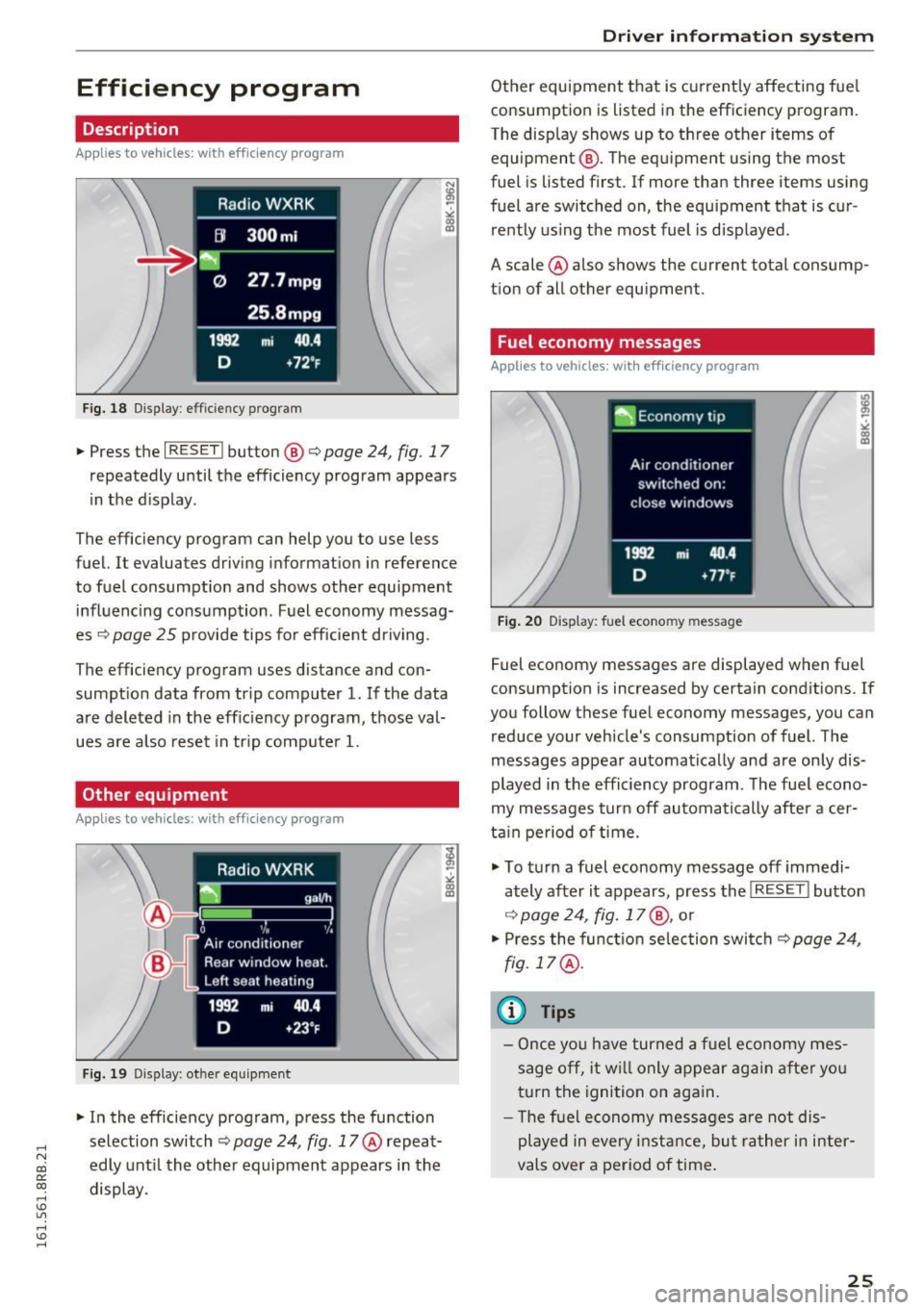
" Press the I RESET ! button@ c:> page 24, fig. 17
repeatedly until the efficiency program appears
in the d isplay .
The efficiency program can help you to use less
fuel.
It evaluates driving information in reference
to fuel consumption and shows other equipment inf luencing consumption . Fuel economy messag
es
c:> page 25 provide tips for efficient driving.
The efficiency program uses distance and con
sumption data from trip computer
l. If the data
are deleted in the eff iciency program, those val
ues are also reset in tr ip computer
1.
Other equipment
Applies to vehicles: with effic iency program
Fig. 19 Display: ot her equipment
" In the efficiency program, press the function
selection switch
c:> page 24, fig. 17 @ repeat
edly until the other equipment appears in the
display.
Driver in forma tion system
Other equipment that is current ly affecting fuel
consumption is listed in the efficiency program.
The display shows up to three other items of
equipment @. The equipment using the most
fuel is listed first. If more than three items using
fuel are switched on, the equipment that is cur
re ntly using the most fuel is displayed.
A scale @also shows the current total consump
tion of all other equipment.
Fuel economy messages
Applies to vehicles: with efficiency program
Fig. 20 Display: fue l econo my message
Fuel economy messages are displayed when fuel
consumption is increased by certain conditions. If
you follow the se fuel economy messages, you can
reduce your vehicle's consumption of fuel. The
messages appear automatically and are only dis
played in the efficiency program . The fuel econo
my messages turn off automatically after a cer
tain period of time.
" To turn a fuel economy message off immedi
ately after it appears, press the
I RESET! button
c:> page 24, fig. 17@, or
" Press the function selection switch
c:> page 24,
fig. 17 @.
(D Tips
-Once you have turned a fuel economy mes
sage off, it w ill only appear again after you
turn the ignition on aga in.
- T he fuel economy messages are not dis
played in every instance, but rather in inter
vals over a period of time .
25
Page 96 of 300
Driving
Messages in the instrument cluster display
Applies to vehicles: with Start-Stop-System
Start-stop system: deactivated. Please
restart engine manually
This message appears when specific conditions
are not met during a stop phase and the Start
Stop -System wi ll
not be able to restart the en
gine. The engine must be started with the key or
with the
! START ENGINE STOPI* button .
Start-stop system: system fault. Function
unavailable
There is a malfunction in the Start-Stop-System .
Drive the vehicle to an authorized repair facility
for servicing as soon as possible to correct the malfunction.
Transmission: Car may roll! Shift to pa rk!
This message appears if the selector lever is not
in the
P position when the driver's door is
opened. You will also hear a warning tone. Shift
the selector lever to the
P position. Otherwise,
the vehicle could roll.
Speed warning system
Overview
The speed warning system helps you to keep your
driving speed below a set speed limit.
The speed warning system warns if the driver ex
ceeds a prev ious ly stored maximum speed. A
warn ing tone w ill sound as soon as the vehicle
speed exceeds the set speed by about
3 mph
(3 km/h). At the same time, a wa rning symbo l
appears in the display. The symbol's appearance
might be different in some models.
The speed warning system has
two warning
thresholds that function independently of each
other and that have somewhat different purpos
es:
Speed warning 1
You can use speed warning 1 to set the maximum
speed while yo u are driving. This setting will re
main in effect unti l yo u turn off the ignition, as-
94
suming that you have not changed or reset the
setting .
The speed warning symbol. (USA models)/ .
(Canada models) in the warning 1 disp lay ap
pears when you exceed the maxim um speed. It
goes out when the speed falls below the stored
max imum speed .
The speed warning symbol will also go out if the
speed
exceeds the stored maximum speed by
more than about 2S mph (40 km/h) for at least
10 seconds . The stored maximum speed is delet
ed.
Setting speed warning 1
¢page 95.
Speed warning 2
Storing warning 2 is recommended if you always
want to be reminded of a ce rtain speed, for ex
amp le when you are traveling in a country that
has a genera l maximum speed limit, or if you do
not want to exceed a specified speed for winter
tires.
The speed warning 2 symbol ,. (USA mode ls)/
• (Canada models) appears in the display when
you exceed the stored speed limit. Unlike warn
ing 1, it will not go out until the vehicle speed
drops below the stored speed limit.
Setting speed wa rning 2
¢page 95.
(D Tips
Even though your vehicle is eq uipped with a
speed warning system, you should still watch
the speedometer to make sure you are not
driving faster than the speed limit.
Page 97 of 300
..... N
co ~ CX)
..... I.Cl U"I
..... I.Cl .....
Speed warning 1: setting a speed limit
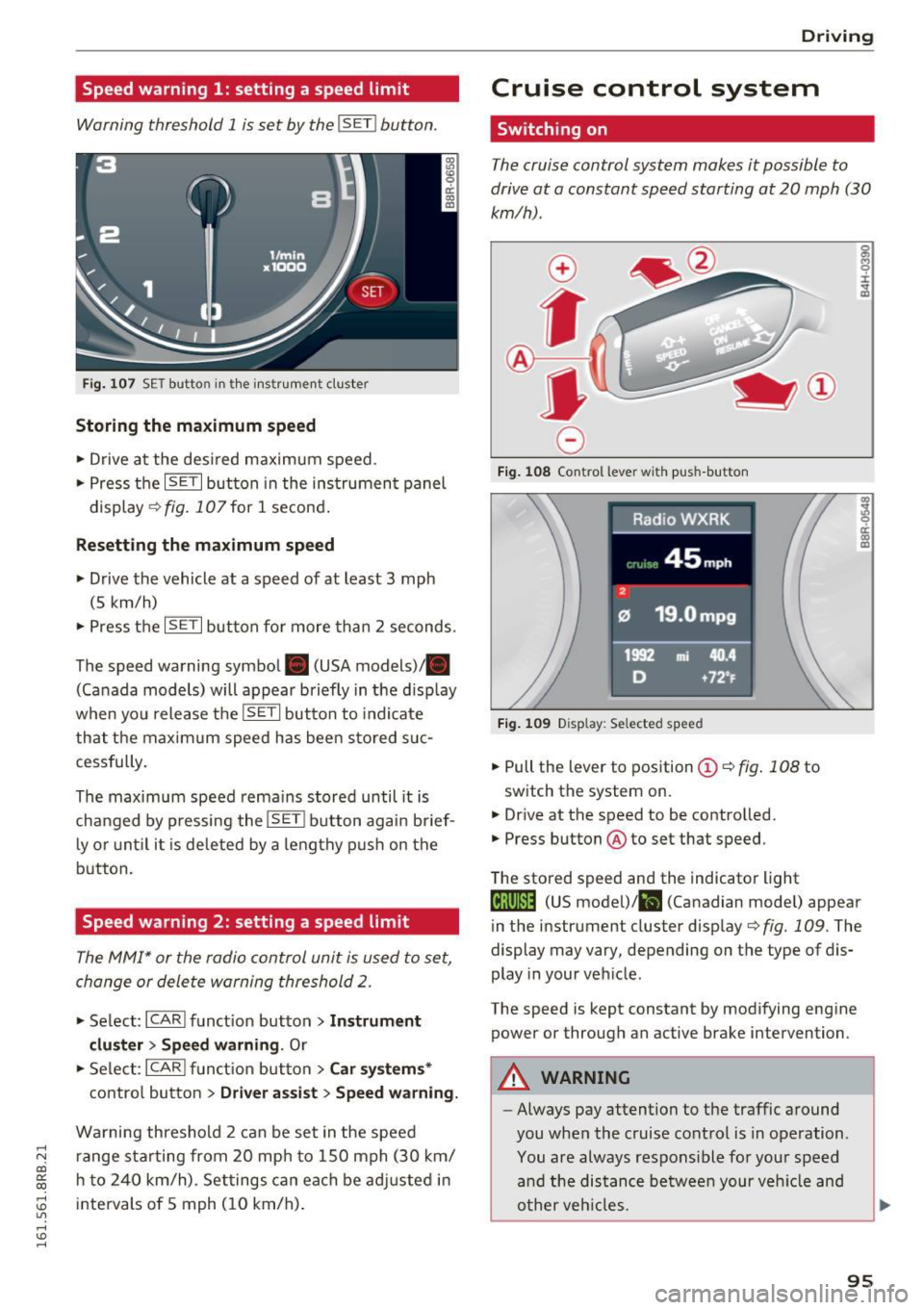
Warning threshold 1 is set by the IS ET I button .
Fig. 107 SET butto n in t he inst rume nt cluster
Storing the maximum speed
.. Drive at the desired maximum speed.
.. Press the
ISE TI button in the instrument panel
display ¢fig .107for 1 second .
Resetting the maximum speed
.. Drive the vehicle at a speed of at least 3 mph
(5 km/h)
.. Press the
~ IS- ET~I button for more than 2 seconds .
The speed warning symbol. (USA models)/ .
(Canada models) will appear briefly in the d isp lay
when you release the
ISE TI button to indicate
that the maxim um speed has been sto red suc
cessfully.
The maximum speed rema ins stored until it is
changed by pressing the
I S ET I button aga in brief
l y o r until it is deleted by a lengthy p ush on the
button.
Speed warning 2: setting a speed limit
The MMI* or the radio control unit is used to set,
change or delete warning threshold
2.
.. Se lect: I CARI f u nct ion button > Instrum ent
clu ster > Sp eed warning .
Or
.. Se lect: ICARI funct ion but ton> C ar sys tem s*
contro l button > Dri ver a ssist > Speed warning.
Wa rning threshold 2 can be set in the speed
r ange sta rting from 20 mp h to 150 mph (30 km/
h t o 240 km/h) . Settings can each be ad justed i n
intervals of 5 mph ( 10 km/h) .
Drivi ng
Cruise control system
Switching on
The cruise control system makes it possible to
drive at a constant speed starting at 20 mph (30
km/h) .
0
f
~
0
Fig . 108 Co ntrol lever w it h push -b utton
F ig . 1 09 Disp la y: Se lected speed
.. Pull the lever to position ©¢ fig. 108 to
switch the system on.
.,. Dr ive at the speed to be controlled.
.. Press button @to set that speed.
The stored speed and the indicator light
g M 0 :i:
;A
..
~ a: .. m
@;\l)M4 (US model) !&I (Canadian mode l) appear
in the instrument cluster display
¢fig. 109 . The
display may vary, depending on the type of dis
play in your veh icle .
The speed is kept constant by modifying engine power or through an active brake intervention .
A WARNING
--
-Always pay attention to the traffic around
you when the cruise control is in operation .
You are always respons ible for your speed
a nd the distance between your veh icle and
o ther veh icles.
95
Page 105 of 300
..... N
co ~ CX)
..... I.Cl U"I
..... I.Cl .....
Energy flow display
Applies to vehicles: with hybrid drive
Fig . 112 Instrument cluster : ene rgy flow display
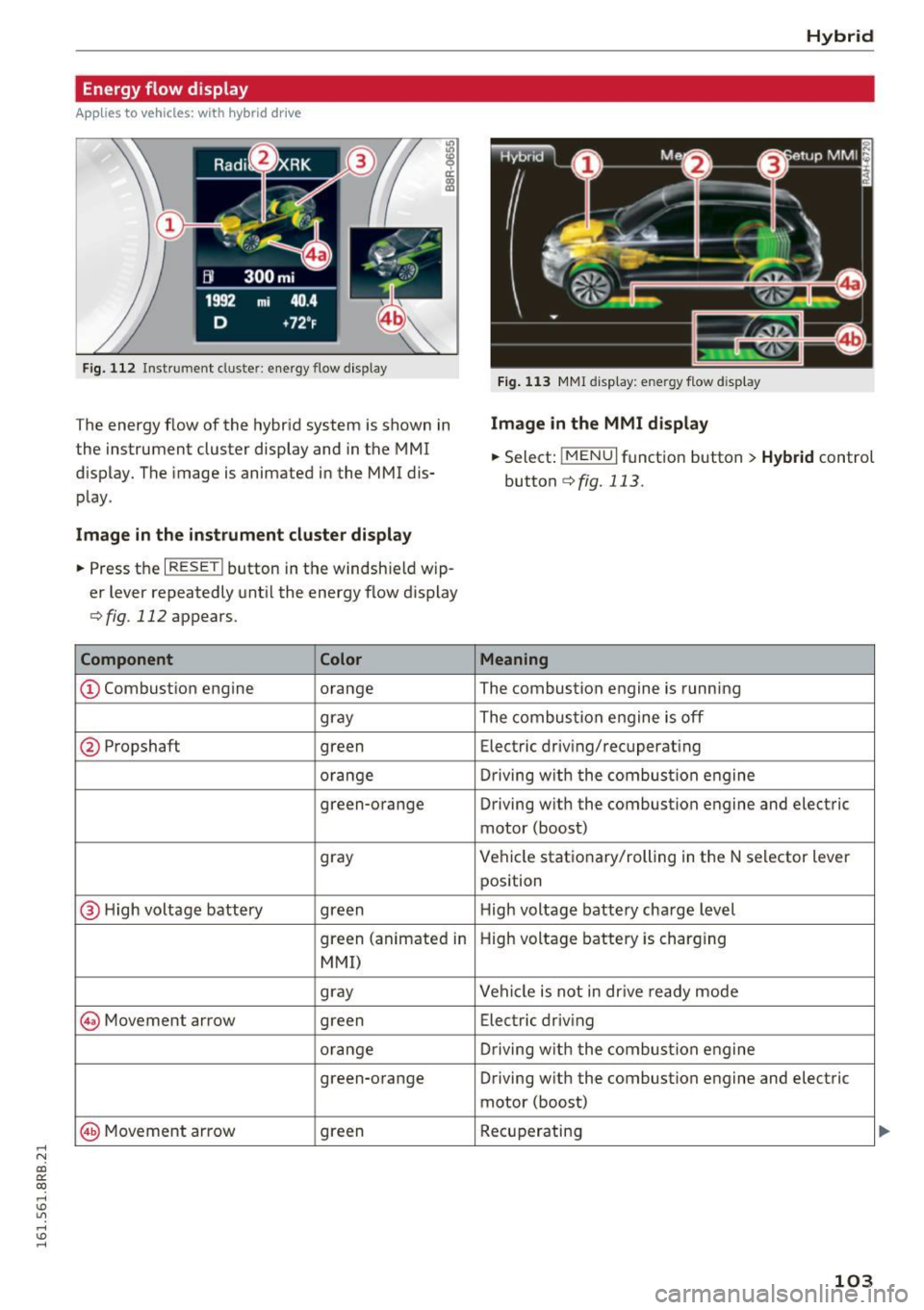
The energy flow of the hybrid system is shown in
the instrument cluster display and in the MMI
d isplay. The image is animated in the MMI dis
play.
Image in the instrument cluster display
.. Press the I RESET I button in the windsh ield wip
er lever repeatedly until the energy flow display
¢fig. 112 appears.
Component Color
@Combustion engine orange
gray
@ Propshaft green
orange
green-orange
gray
@ H
igh voltage battery green
green (animate d in
MMI)
gray
@ Movement arrow green
orange
green-orange
@ M
ovement arrow green
Hybrid
Fig. 113 MMI disp lay: energy flow d isplay
Image in the MMI display
.,. Select: I MEN u I fun ction button > Hybrid control
button
¢ fig. 113.
Meaning
The combustion engine is running
The comb ustion eng ine is off
Electric driv ing/recuperat ing
Driving with t he combustion engine
Driving with the combustion engine and electric
motor (boost)
Vehicle stationary/rolling in the N selector lever
position
High voltage battery charge level
High voltage battery is charging
Vehicle is not in drive ready mode
Electric driv ing
Dr iving w ith the combustion engine
Driving with the combustion engine and electric
motor (boost)
Recuperating
103