steering AUDI Q5 2016 Owners Manual
[x] Cancel search | Manufacturer: AUDI, Model Year: 2016, Model line: Q5, Model: AUDI Q5 2016Pages: 300, PDF Size: 75.02 MB
Page 4 of 300
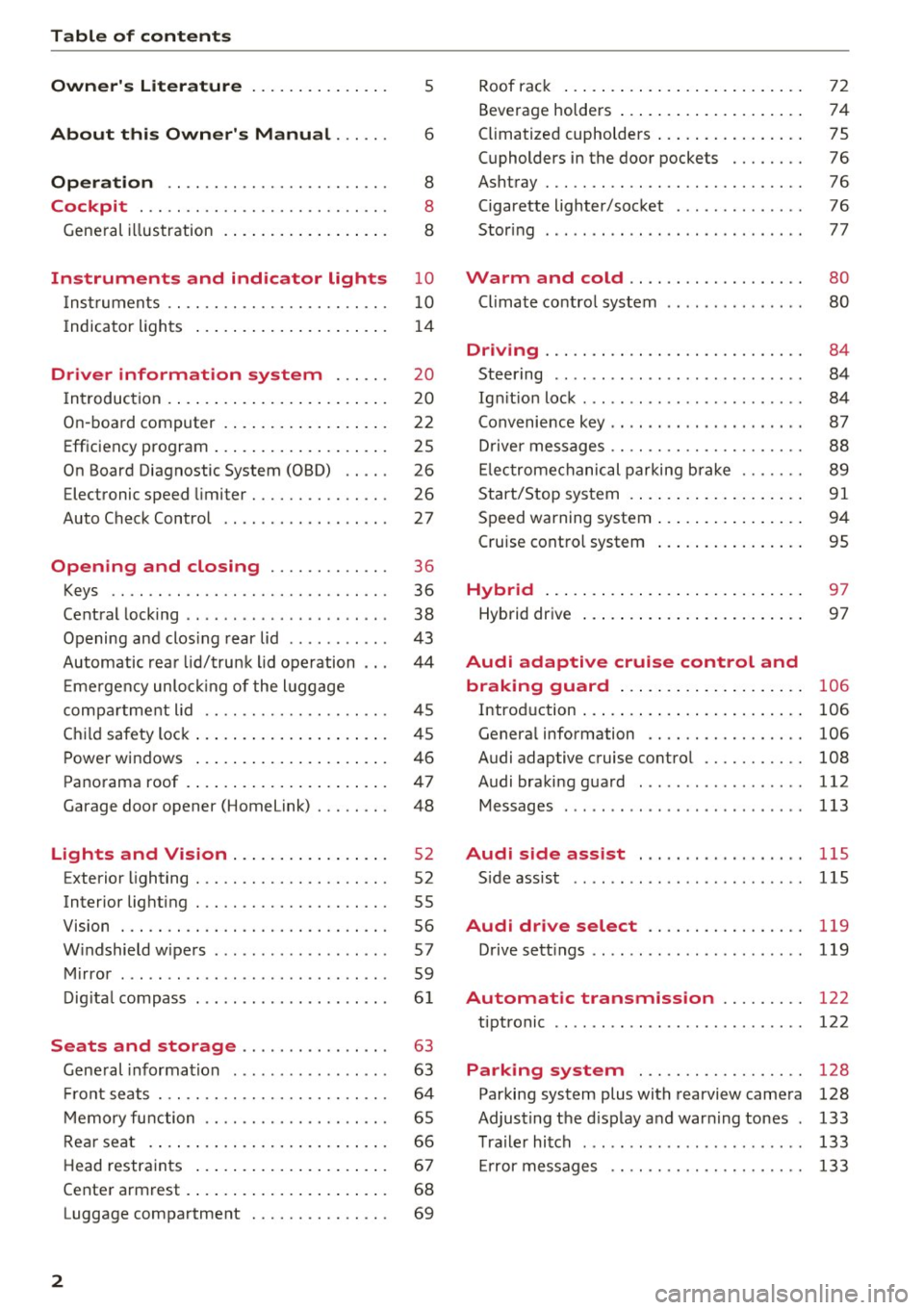
Table of contents
Owner's Literature
5
About this Owner's Manual . . . . . . 6
Operation . . . . . . . . . . . . . . . . . . . . . . . . 8
Cockpit . . . . . . . . . . . . . . . . . . . . . . . . . . . 8
General illustration . . . . . . . . . . . . . . . . . . 8
Instruments and indicator lights 10
Instruments . . . . . . . . . . . . . . . . . . . . . . . . 10
Indicator lights . . . . . . . . . . . . . . . . . . . . . 14
Driver information system . . . . . . 20
I n tr oduction . . . . . . . . . . . . . . . . . . . . . . . . 20
On -board computer . . . . . . . . . . . . . . . . . . 22
Efficiency program . . . . . . . . . . . . . . . . . . . 25
On Board Diagnostic System (OBD) . . . . . 26
Electronic speed limiter . . . . . . . . . . . . . . . 26
Auto Check Contro l . . . . . . . . . . . . . . . . . . 27
Open ing and closing . . . . . . . . . . . . . 36
Keys . . . . . . . . . . . . . . . . . . . . . . . . . . . . . . 36
Central locking . . . . . . . . . . . . . . . . . . . . . . 38
Opening and clos ing rear lid . . . . . . . . . . . 43
Automatic rear lid/trunk lid operation 44
Em ergency unlo cking of the luggage
compa rtment lid . . . . . . . . . . . . . . . . . . . . 45
Ch ild safety lock . . . . . . . . . . . . . . . . . . . . . 45
Power windows . . . . . . . . . . . . . . . . . . . . . 46
Panorama roof . . . . . . . . . . . . . . . . . . . . . . 47
Garage door opener (Home link) . . . . . . . . 48
Lights and Vision . . . . . . . . . . . . . . . . . 52
Exterior lighting . . . . . . . . . . . . . . . . . . . . . 52
Interior lighting . . . . . . . . . . . . . . . . . . . . . 55
V1s1on . . . . . . . . . . . . . . . . . . . . . . . . . . . . . 56
Windshield wipers . . . . . . . . . . . . . . . . . . . 57
Mirror . . . . . . . . . . . . . . . . . . . . . . . . . . . . . 59
Digital compass . . . . . . . . . . . . . . . . . . . . .
61
Seats and storage . . . . . . . . . . . . . . . . 63
Gene ral information . . . . . . . . . . . . . . . . . 63
Front seats . . . . . . . . . . . . . . . . . . . . . . . . . 64
Memory function . . . . . . . . . . . . . . . . . . . . 65
Rear seat . . . . . . . . . . . . . . . . . . . . . . . . . . 66
Head restraints . . . . . . . . . . . . . . . . . . . . . 67
Cente r armrest . . . . . . . . . . . . . . . . . . . . . .
68
Luggage compartment . . . . . . . . . . . . . . . 69
2
Roof rack ... .. .. .. .. ... .......... . .
Beverage holders ... .. .. ........... . .
Climatized cupholders ... . .......... . .
(upholders in the door pockets ...... . .
Ashtray ....... .. .. .. ............. . .
Cigarette lighter/socket ............. .
Stor ing ... .. .. .. .. .. ........ ..... . .
Warm and cold .. .. ... .. ..... ... . .
Climate control system ........ ..... . .
Dnv1ng ....... .. .. .. ............. . .
Steering ........ ... ............. .. .
Ig niti on lock ...... ... .............. .
Convenience key .. .. .. ... .. ... ... .. . .
Driver messages .. .. .. .. ........... . .
Electromechanical parking brak e ..... . .
Start/Stop system .... .. . .......... . .
Speed warning system .. .. .......... . .
Cruise control system
Hybrid ..... .. .. .. .. ... .......... . .
Hybrid dr ive ... .. .. .. .. ........... . . 72
74
75
76
76
76
77
80
80
84
84
84
87
88
89
91
94
95
97
97
Audi adaptive cruise control and
braking guard . . . . . . . . . . . . . . . . . . . .
106
Introd uction . . . . . . . . . . . . . . . . . . . . . . . . 106
Genera l information . . . . . . . . . . . . . . . . . 106
Audi adaptive cruise contro l . . . . . . . . . . . 108
Audi braking guard . . . . . . . . . . . . . . . . . . 112
Messages . . . . . . . . . . . . . . . . . . . . . . . . . . 113
Audi side assist . . . . . . . . . . . . . . . . . . llS
S ide assist .. .. .. .. .. ........ ..... .. 115
Audi drive select . . . . . . . . . . . . . . . . . 119
Drive sett ings . . . . . . . . . . . . . . . . . . . . . . . 119
Automatic transmiss ion . . . . . . . . . 122
tiptronic . . . . . . . . . . . . . . . . . . . . . . . . . . . 122
Parking system . . . . . . . . . . . . . . . . . . 128
Parking system plus with rearview camera 128
Adjusting the display and warn ing tones 133
Trailer hitch . . . . . . . . . . . . . . . . . . . . . . . . 133
Er ror messages . . . . . . . . . . . . . . . . . . . . . 133
Page 5 of 300
.... N
co
er::
co
....
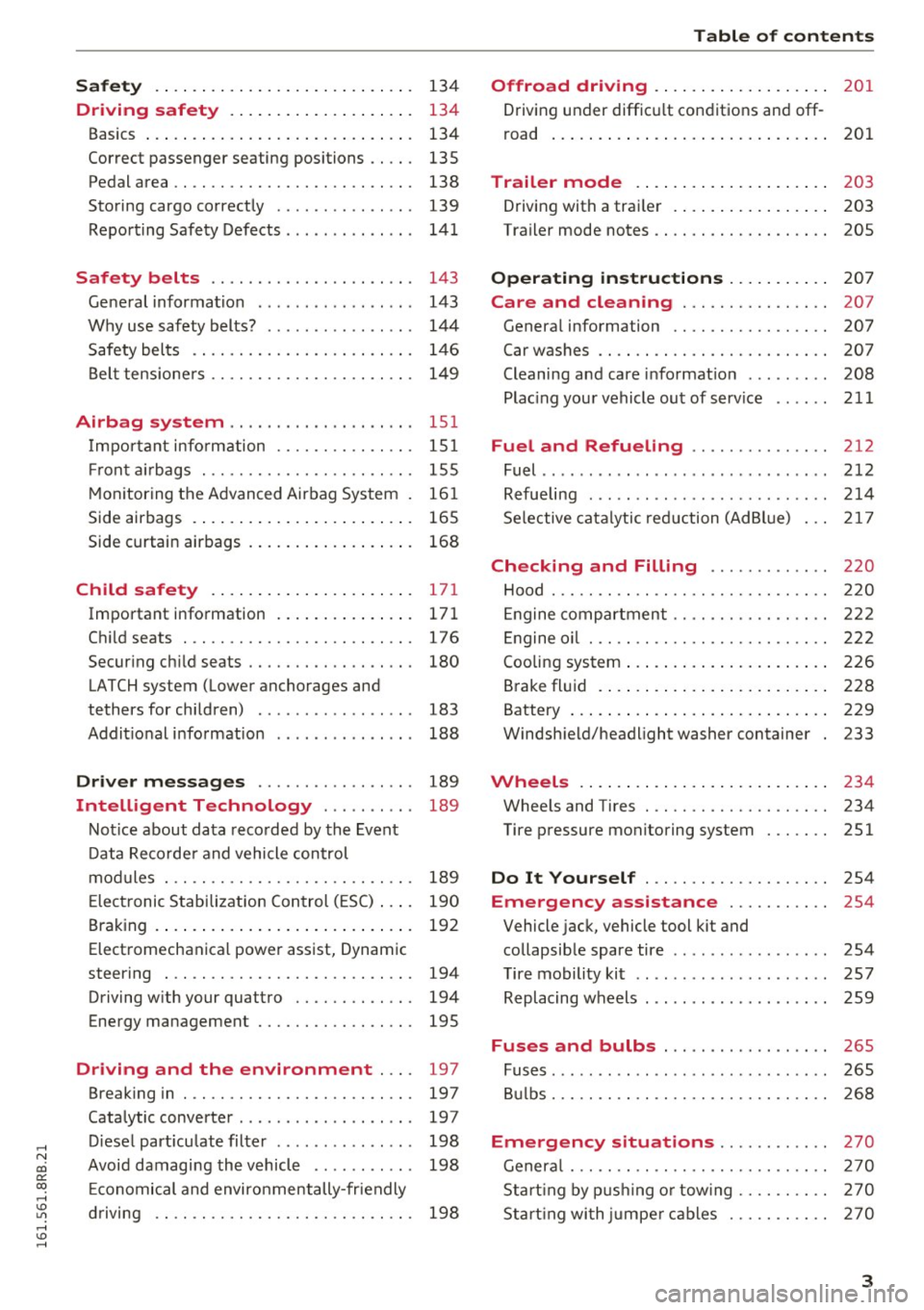
Driving safety . . . . . . . . . . . . . . . . . . . . 134
Basics . . . . . . . . . . . . . . . . . . . . . . . . . . . . . 134
Correct passenger seating positions . . . . . 135
Pedal area . . . . . . . . . . . . . . . . . . . . . . . . . . 138
Storing cargo correct ly . . . . . . . . . . . . . . . 139
Repo rt ing Safety Defects . . . . . . . . . . . . . . 14 1
Safety belts . . . . . . . . . . . . . . . . . . . . . . 143
Ge ne ral information . . . . . . . . . . . . . . . . . 143
Why use safety belts? . . . . . . . . . . . . . . . . 144
S afety belts . . . . . . . . . . . . . . . . . . . . . . . . 14 6
Bel t tensione rs . . . . . . . . . . . . . . . . . . . . . . 14 9
Airbag system .......... .... ... .. . 15 1
I mportant info rm ation . . . . . . . . . . . . . . . 151
Fr on t air bags . . . . . . . . . . . . . . . . . . . . . . . 155
M oni toring the A dvanced Airbag Sys tem . 16 1
Side airbags . . . . . . . . . . . . . . . . . . . . . . . . 165
Side curtain airbags . . . . . . . . . . . . . . . . . . 168
Child safety . . . . . . . . . . . . . . . . . . . . . . 171
Important information . . . . . . . . . . . . . . . 17 1
Ch ild seats . .. ............... .. .... . 17 6
Secur ing child seats . . . . . . . . . . . . . . . . . . 180
LATCH system (Lower anchorages and
tethers for children) . . . . . . . . . . . . . . . . . 183
Addit ional information 188
Driver messages . . . . . . . . . . . . . . . . . 189
Intelligent Technology . . . . . . . . . . 189
Not ice about data reco rded by the Event
D ata Recorde r and vehicle control
mod ules . . . . . . . . . . . . . . . . . . . . . . . . . . . 189
E lectronic Stabilization Con trol ( ESC) . . . . 190
Braking . . . . . . . . . . . . . . . . . . . . . . . . . . . . 192
Elect romechanica l power assist, Dynam ic
steering . . . . . . . . . . . . . . . . . . . . . . . . . . . 194
Driving w ith your quattro . . . . . . . . . . . . . 194
Energy management . . . . . . . . . . . . . . . . . 195
Driving and the environment . . . . 197
Breaking in . . . . . . . . . . . . . . . . . . . . . . . . . 197
Cata lytic converte r . . . . . . . . . . . . . . . . . . . 197
D iese l part icu late filter . . . . . . . . . . . . . . . 198
Avoid damagi ng the vehicle . . . . . . . . . . . 198
E conomical and environmentally-fr iendly
driving . . . . . . . . . . . . . . . . . . . . . . . . . . . . 198
Table of contents
Offroad driving . . . . . . . . . . . . . . . . . . .
201
Driving under diffic ult con ditions and off -
road . . . . . . . . . . . . . . . . . . . . . . . . . . . . . . 201
Trailer mode . . . . . . . . . . . . . . . . . . . . . 203
Driving with a trai ler . . . . . . . . . . . . . . . . . 203
Trailer mode notes . . . . . . . . . . . . . . . . . . . 205
Operating instructions . . . . . . . . . . . 207
Care and cleaning . . . . . . . . . . . . . . . . 207
Genera l information . . . . . . . . . . . . . . . . . 207
Car washes . . . . . . . . . . . . . . . . . . . . . . . . . 207
Cleaning and care informat ion . . . . . . . . . 208
Plac ing your vehicle out of serv ice . . . . . . 211
Fuel and Refueling ............... 212
Fuel ......... ...................... 212
Refue ling . . . . . . . . . . . . . . . . . . . . . . . . . . 214
Se lective cata lytic red uction (AdBlue) 217
Checking and Filling . . . . . . . . . . . . . 220
Hood . . . . . . . . . . . . . . . . . . . . . . . . . . . . . . 220
En gine compartment . . . . . . . . . . . . . . . . . 22 2
En gine oi l . . . . . . . . . . . . . . . . . . . . . . . . . . 2 22
Cooling sys tem . . . . . . . . . . . . . . . . . . . . . . 2 26
Brake fl uid . . . . . . . . . . . . . . . . . . . . . . . . . 228
Battery . . . . . . . . . . . . . . . . . . . . . . . . . . . . 229
Windsh ield/headlight washer container 233
Wheels .. .. .. .. .. ... .. ..... ... .. .. 234
Wheels and Tires . . . . . . . . . . . . . . . . . . . . 234
Tire p ressure mon itoring system
251
Do It Yourself . . . . . . . . . . . . . . . . . . . . 254
Emergency assistance . . . . . . . . . . . 254
Vehicle jack, vehicle tool kit and
collapsib le spare tire . . . . . . . . . . . . . . . . . 254
T ire mobility kit . . . . . . . . . . . . . . . . . . . . . 257
Replacing w heels . . . . . . . . . . . . . . . . . . . . 259
Fuses and bulbs . . . . . . . . . . . . . . . . . . 265
Fuses . . . . . . . . . . . . . . . . . . . . . . . . . . . . . . 265
B ulbs. . . . . . . . . . . . . . . . . . . . . . . . . . . . . . 268
Emergency situations . . . . . . . . . . . . 270
Genera l . . . . . . . . . . . . . . . . . . . . . . . . . . . . 270
Start ing by p ushi ng o r tow ing . . . . . . . . . . 270
Sta rt ing wi th ju mpe r cab les . . . . . . . . . . . 270
3
Page 11 of 300
.... N
co
er::
co
....
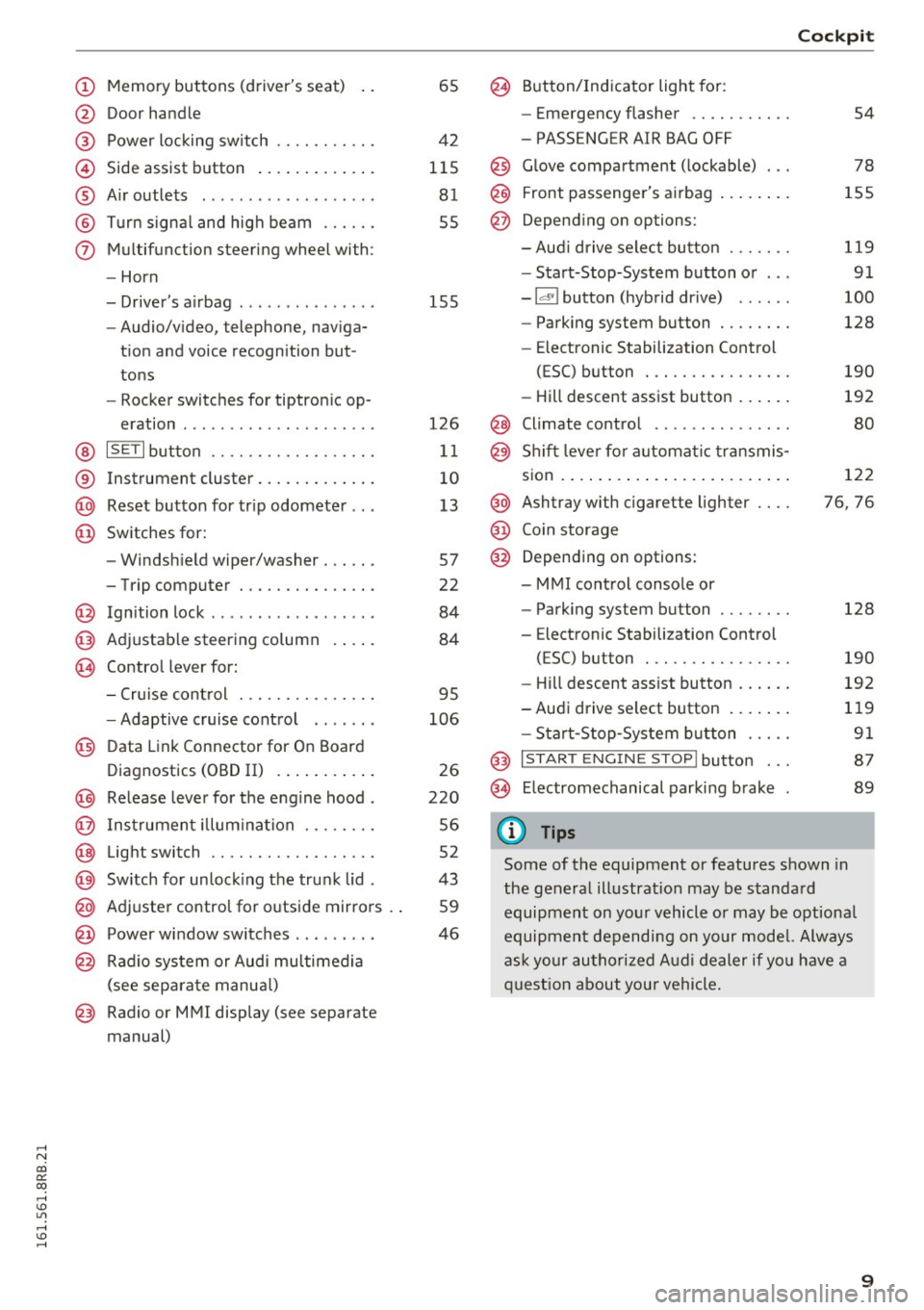
@ Door handle
@ Power locking sw itch .......... .
© Side assist button ............ .
® Air outlets ..... ........ .... . .
@ Turn signal and high beam ... .. .
(j) Multifunction steering wheel with:
- Horn
- Driver's airbag ..... ..... ... . .
- Audio/video, telephone, naviga-
tion and voice recognition but
tons
- Rocker switches for tiptronic op-
eration ............... ..... .
@ ISETI button ............... .. .
® Instrument cluster .......... .. .
@ Reset button for trip odometer .. .
@ Switches for:
- Windshield wiper/washer . .... .
- Trip computer ............ .. .
@ Ignition lock ................. .
@ Adjustable steering column
@ Control lever for:
65
42
115 81
55
155
126
11
10
13
57
22
84
84
- Cruise control . . . . . . . . . . . . . . . 95
- Adaptive cruise control . . . . . . .
106
@ Data Link Connector for On Board
Diagnostics (OBD II) . . . . . . . . . . .
26
@) Release lever for the engine hood . 220
@ Instrument illumination . . . . . . . . 56
@ Light switch . . . . . . . . . . . . . . . . . . 52
@) Switch for unlocking the trunk lid . 43
@ Adjuster control for outside mirrors . . 59
@ Power window switches . . . . . . . . . 46
@ Radio system or Audi multimedia
(see separate manual)
@ Radio or MMI display (see separate
manual)
@ Button/Indicator light for:
- Emergency flasher .......... .
- PASSENGER AIR BAG OFF
@ Glove compartment (lockable) .. .
@ Front passenger's airbag ....... .
@ Depending on options:
- Aud i drive select button ...... .
- Start-Stop-System button or .. .
- Id'! button (hybrid drive) ..... .
- Parking system button ....... .
- Elect ronic Stabilization Control
(ESC) button . .............. .
- Hill descent assist button ..... .
@ Climate control .. ............ .
@ Shift lever for automat ic transmis-
sion ..... ..... .. ............ .
@ Ashtray with cigarette lighter ... .
@ Coin storage
@ Depending on options:
- MMI control console or
- Parking system button ....... .
- E lectronic Stabilization Control
(ESC) button . .. ............ .
Cockpit
54
78
155
119
91
100
128
190
192
80
122
76, 76
128
190
- Hill descent assist button . . . . . . 192
-Audi drive select button . . . . . . . 119
- Start-Stop -System button . . . . . 91
@ I START ENGINE STOP! button . . . 87
@> Electromechanical parking brake 89
(D Tips
Some of the equipment or features shown in
the general illustration may be standard
equipment on your vehicle or may be optional
equipment depending on your model. Always
ask your authorized Audi dealer if you have a
question about you r vehicle.
9
Page 16 of 300
Instruments and indicator lights
Indicator lights
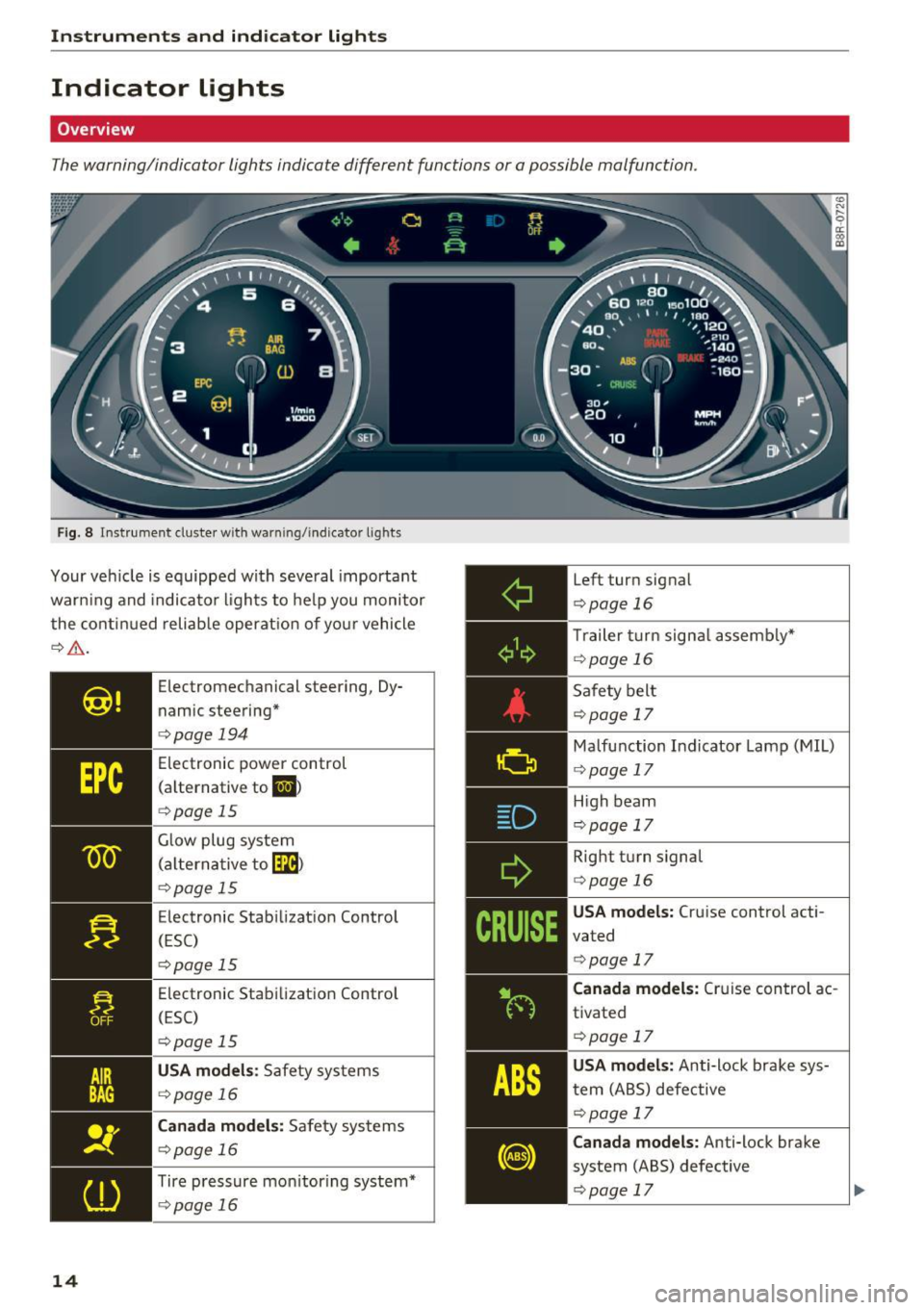
Overview
The warning/indicator lights indicate different functions or a possible malfunction.
Fig. 8 Instrument cluster w ith warn ing/indicator lights
Your vehicle is equipped with several important
warn ing and indicator lights to help you monitor
the continued reliable operation of yo ur vehicle
¢ ,6. .
14
Electromechanical steering, Dy
namic steering*
¢page 194
Electronic power control
(alternative to
El >
¢ page 15
Glow plug system
(alterna tive to~)
¢page 15
Electronic Stabilization Control
(ESC)
¢pag e 15
Electronic Stabilization Control
(ESC)
¢ page 15
USA models: Safety systems
¢page 16
Canada models: Safety systems
¢page 16
Tire pressure monitoring system*
¢page 16
Left turn signal
¢page 16
Trailer turn signal assembly*
¢page 16
Safety belt
¢page 17
Malfunction Indicator Lamp (MIL)
¢ page 17
High beam
¢pag e 17
Right turn signal
¢ page 16
USA models: Cruise control acti
vated
¢ page 17
Canada models: Cruise control ac
tivated
¢page 17
USA models: Anti-lock brake sys
tem (ABS) defective
¢page 17
Canada models: Anti-lock brake
system (ABS) defective
¢page 17
Page 30 of 300
Driver information s ystem
The drive r message disappears after a few sec
onds. The driver message can be disp layed again
by briefly pressing the
! SE T! button.
Red symbols
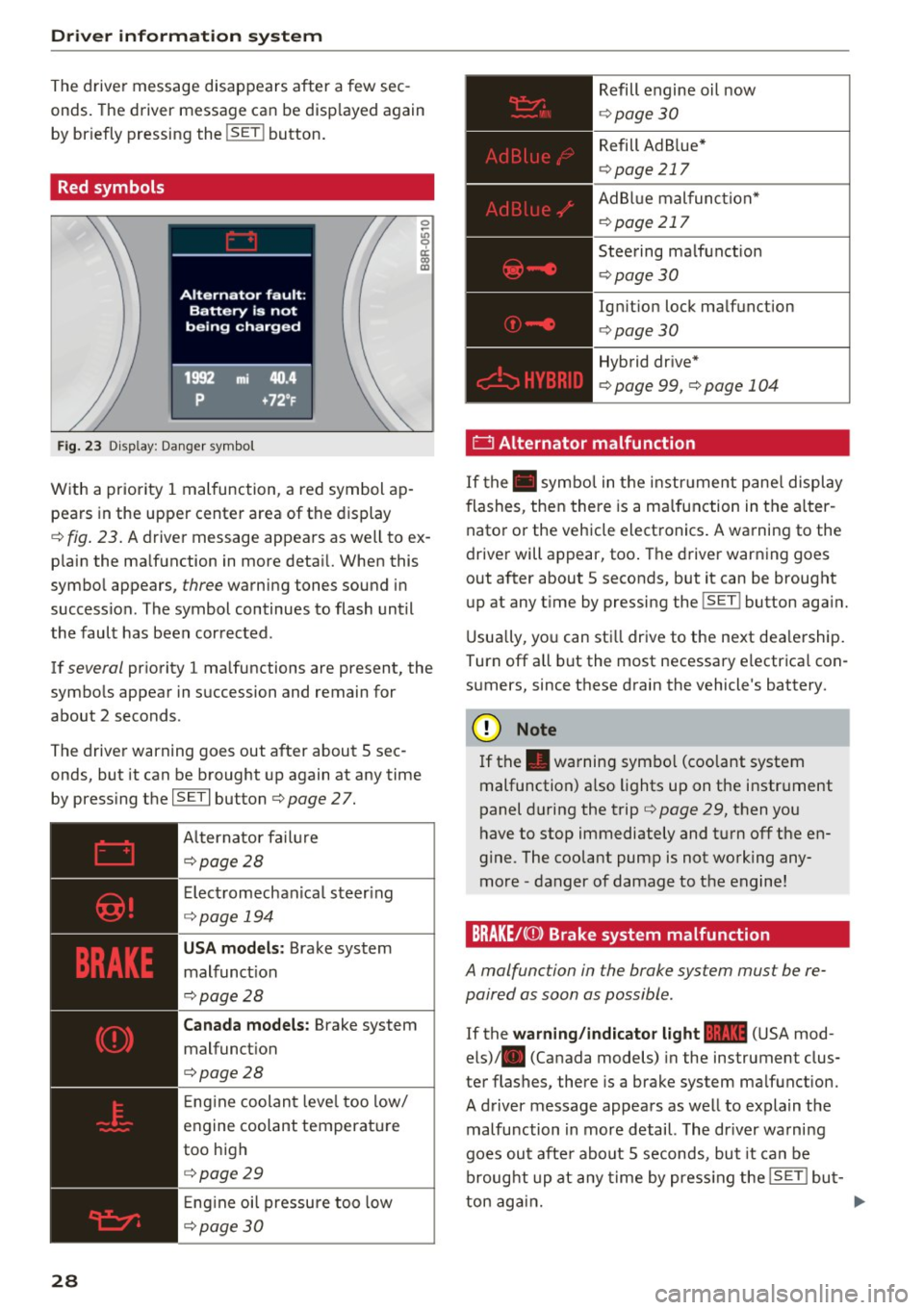
Fig . 23 Display : Dang er symbol
W ith a priority 1 malfunction, a red symbol ap
pears in the upper center area of the display
0 ~
"' 0 ci: a, al
c::> fig . 23. A driver message appears as w ell to ex
p lain the ma lfunction in more deta il. When this
symbo l appears,
three warning tones sound i n
succession . The symbol continues to flash until
the fault has been corrected .
If
several pr iority 1 malfunctions are present, the
symbo ls appear in succession and remain for
about 2 seconds .
The drive r warning goes out after about 5 sec
onds, but it can be b rought up again at any time
by press ing the
I SE T I button c> page 2 7.
28 Alternator fa
il ur e
c::> page 28
Elect romechanica l steer ing
c::> page 194
USA models : Brake system
malfunct ion
c::> page 28
Canada models: Brake system
malfunct ion
c>page28
E ng ine coolan t leve l too low/
engine coolant temperat ure
too high
c> page29
Eng ine oi l pressure too low
c::> page 3 0
Refill engine oil now
c::> page 30
Refill Ad B lue*
c> page 217
AdBlue malfunc tion*
c::> page 217
Steering ma lfunction
c> page30
Ign it ion lock ma lfunction
c> page 30
Hybrid dr ive*
c> page 99, c>page 104
0 Alternator malfunction
If the . symbo l in the instr ument pane l display
flashes, then there is a ma lfunction in the alter
nator or the vehicle elect ronics . A warning to the
driver will appear, too . The driver warn ing goes
out after about 5 seconds, but it can be brought up at any t ime by pressing the
!SET ! button aga in.
U sua lly, yo u can sti ll drive to the next dea lership.
Turn off all but the most necessary e lectr ica l con
s u mers, since these drain the vehicle's battery.
CJ) Note
If the . warning sym bol (coo lant system
malfunction) a lso lights up on the instr ument
panel during the trip
c> page 29, then you
h ave to stop immediately and turn off the en
gine . The coolant pump is not working any
more -danger of damage to the engine!
BRAKE/C(D) Brake system malfunction
A malfunction in the brake system must be re
paired as soon as possible.
If the warning /ind icator light 1111 (USA mod
els) . (Canada models) in the instrument clus
ter flashes, there is a brake system ma lfunction.
A driver message appea rs as well to expla in t he
malfunction in more detail. The dr iver wa rni ng
goes out afte r about 5 seconds, bu t it can be
broug ht up at any time by press ing the
ISE T! bu t-
ton aga in. ..,.
Page 32 of 300
Driver information s ystem
CJ) Note
Do not contin ue driving if the. symbo l ill u
m inates . There is a malfunction in the eng ine
cooling system -you could damage your en
gine.
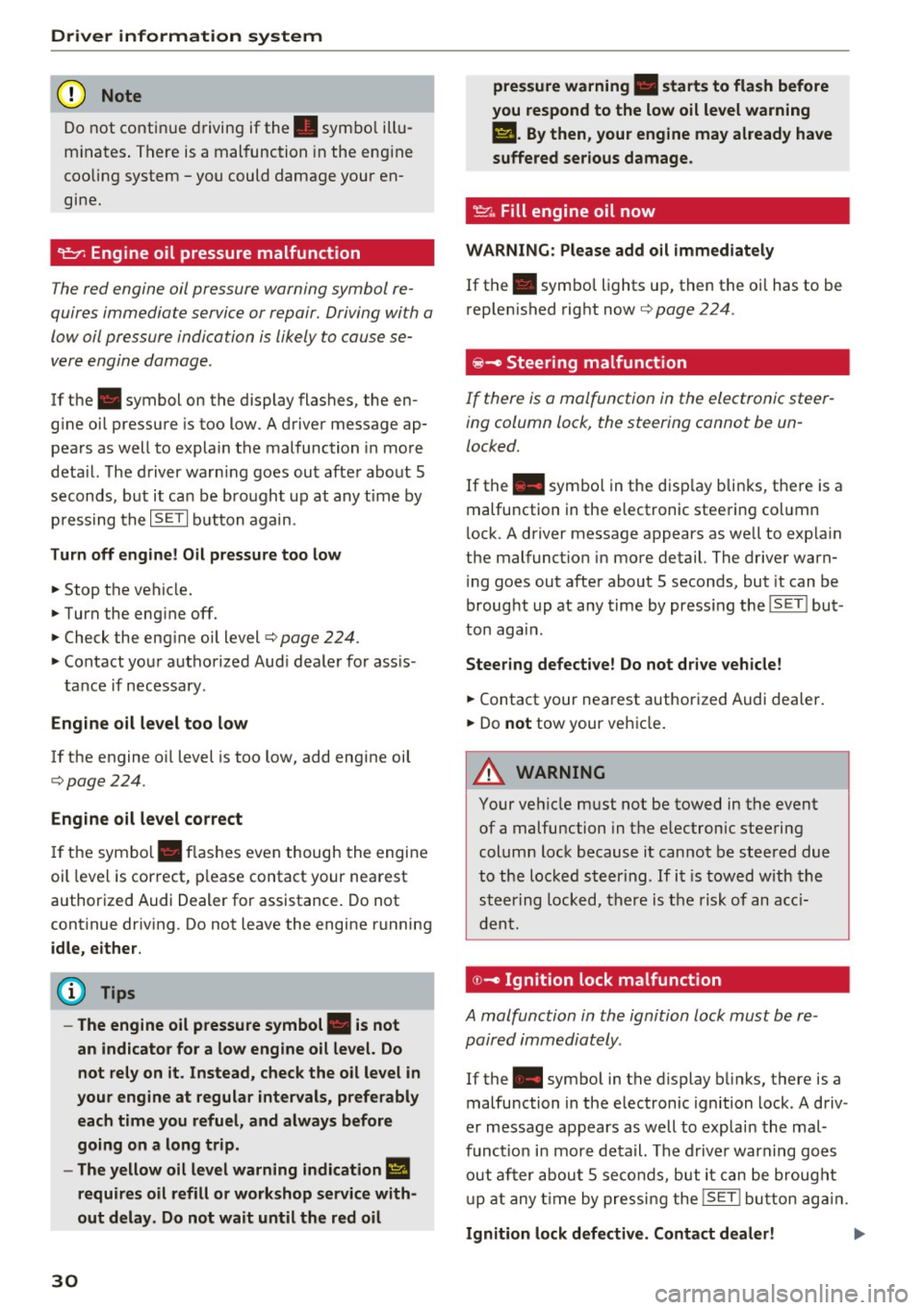
'l=:;r: Engin e oil pressure malfunction
The red engine oil pressure warning symbol re
quires immedia te service or repair. Driving wi th a
low oil pressure indi cation is likely to cause se
vere engine damage .
If the . symbol on the display flashes, the en
g ine oil pressure is too low . A driver message ap
pears as well to explain the malfunction in more
deta il. The driver warn ing goes ou t afte r about 5
seconds, but it ca n be bro ugh t up at any t ime by
p ressing the
IS ET I but ton again.
Turn off engine! Oil pressure too low
• Stop the veh icle .
• Turn the eng ine off.
• Check the eng ine oi l level
c> page 224.
• Contact your authorized Aud i dealer for ass is -
tance if necessary .
Engine oil level too low
If the engine oil level is too low, add eng ine oil
c>page224.
Engine oil level correct
If the symbo l. flashes even though the engine
oil leve l is correct, p lease contact your nearest
authorized Audi Dealer for assistance. Do not
continue dr iv ing . Do not leave the engine running
idle, either .
(D Tips
- The engine oil pressure symbol. is not
an indicato r for a low engine oil level. Do
not rely on it. Instead, check the oil level in
your engine at regular intervals, preferably each time you refuel, and always before
going on a long trip .
- The yellow oil level warning indication
Ill
requires oil refill or workshop service with
out delay. Do not wait until the red oil
30
pre ssure warning • starts to flash before
you respond to the low oil level warning
II. By then , your engine may already have
suffered serious damage.
~ ... Fill engine oil now
WARNING : Please add oil immediately
If the . symbol lights up, then the oil has to be
r ep lenished right now
c> page 224 .
@-Steer ing malfunction
If there is a malfunction in the electronic steer
ing column lock, the steering cannot be un
locked.
If the . symbo l in t he d isp lay bli nks, the re is a
malfunction in the e lectronic stee ring co lumn
l ock. A driver message appears as well to exp la in
the malfunct ion in more detail. The driver warn
i ng goes out afte r about 5 seconds, but it can be
broug ht up at any time by press ing the
ISET ! but
ton aga in.
Steering defective! Do not drive vehicle!
• Contact your nea rest authorized Audi dealer .
• Do
not tow your veh icle .
A WARNING
Your ve hicle must not be towed in the event
of a malfunction in the electronic steering
column lock because it cannot be steered due
to the loc ked st eering . If i t is towed with the
ste ering locked, t here is t he risk of an a cci
d ent.
© -Ignition lock malfunct ion
A malfunction in the ignition lock must be re
paired immediately.
If the . symbo l in the display b links , there is a
malfunction in the e lectronic ignition lock . A d riv
e r message appears as well to explai n the mal
funct ion in more de tail. The d rive r warning goes
out af ter abou t 5 se co nds, b ut it can be brought
u p at any t ime by pressi ng the
!SE T! b utton ag ain .
Ignition lock defective. Contact dealer! ..,..
Page 33 of 300
,....,
N
co
er::
co
,....,
~ Drive immediate ly to an authorized Audi dealer
to have the malfunction corrected .
If there is a malfunction in the electronic ignition
lock, the ignition cannot be turned off . Drive im
mediately to an authorized service facility to have
the cause of the malfunction corrected.
On vehicles with Convenience key*, the engine
should not be switched off using the Start/Stop button because the engine cannot be started
again after the ignition has been switched off.
Yellow symbols
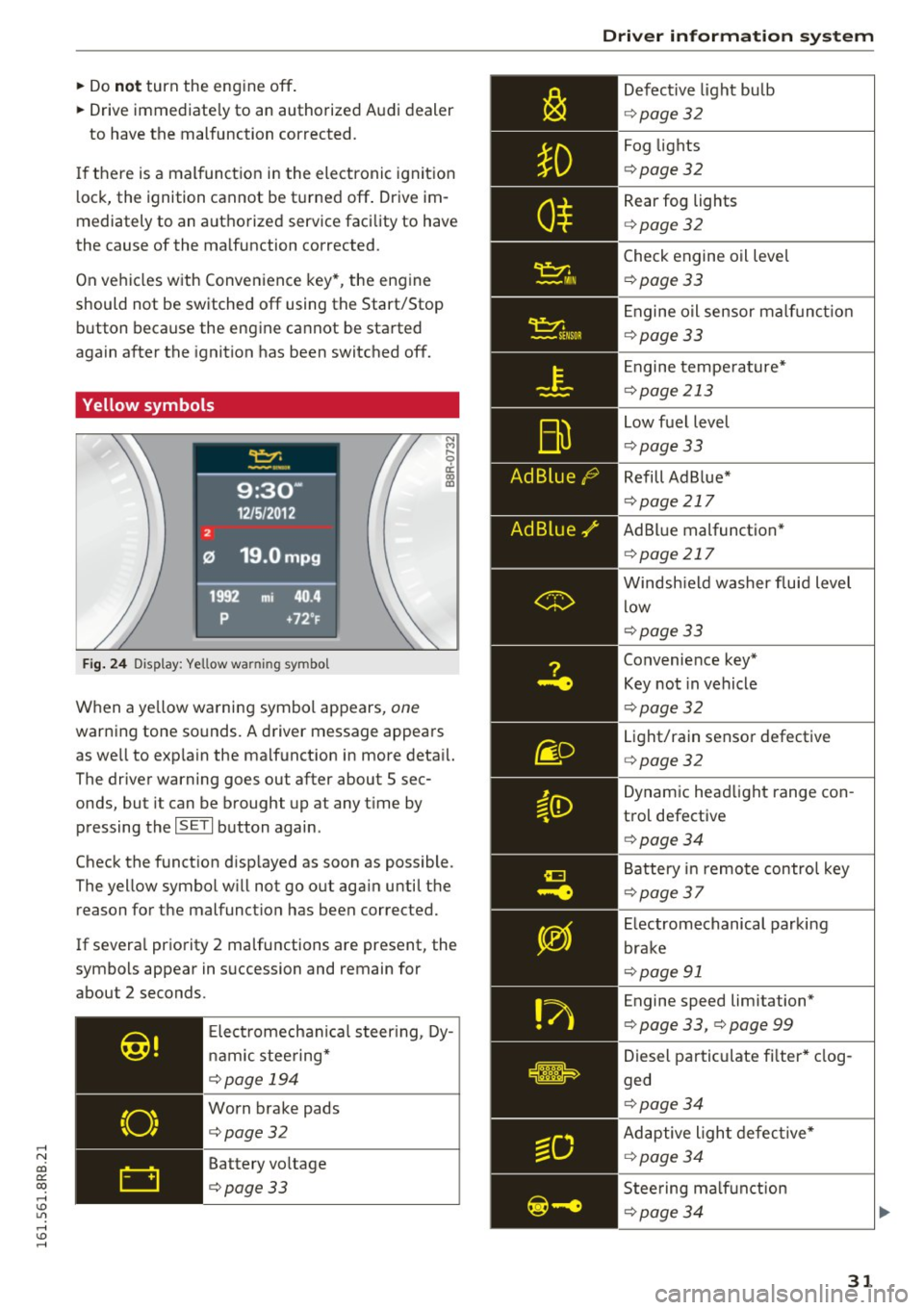
Fig. 24 Display: Yellow warning symbo l
N M
9 a: a, a,
When a yellow warning symbol appears, one
warning tone sounds. A driver message appears
as well to exp la in the malfunction in more detail.
The driver warning goes out after about 5 sec
onds, but it can be brought up at any t ime by
pressing the
ISETI button again.
Check the function disp layed as soon as possible.
The yellow symbol w ill not go out aga in until the
reason for the malfunct ion has been corrected.
If severa l priority 2 ma lfunctions are present, the
symbols appear in succession and remain for
about 2 seconds.
Elect romechan ical steering, Dy
nam ic stee ring*
¢page 194
Worn brake pads
¢page32
Battery voltage
¢page33
Driver information system
Defective light bulb
¢page 32
Fog lights
¢pag e 32
Rear fog lights
¢page 32
Check engine oil leve l
¢page 33
Engine oil sensor malf unc tion
¢page 33
Engine temperature*
¢page 213
Low fuel level
¢pag e 33
Refill Ad Blue*
¢page 217
AdBlue malfunction *
¢page 217
Windshield washer fluid level
low
¢page 33
Convenience key*
Key not in vehicle
¢pag e 32
Light/rain sensor defective
¢page 32
Dynamic headlight range con
trol defective
¢ page 34
Battery in remote control key
¢page 37
Electromechanical parking
brake
¢page 91
Engine speed limitation*
¢ page 33, ¢ page 99
Diesel particulate fi lter * clog
ged
¢pag e 34
Adaptive light defective*
¢page 34
Steering malfunction
¢page 34
31
Page 36 of 300
Driver information s ystem
the dr iver information system . Keep in m ind that
the engine speed will not exceed the value dis
p layed in the dr iver information system, for ex
ample when downshifting.
Please go to an autho rized Aud i dea le r or other
qualified workshop to have the ma lfunction re
pa ired .
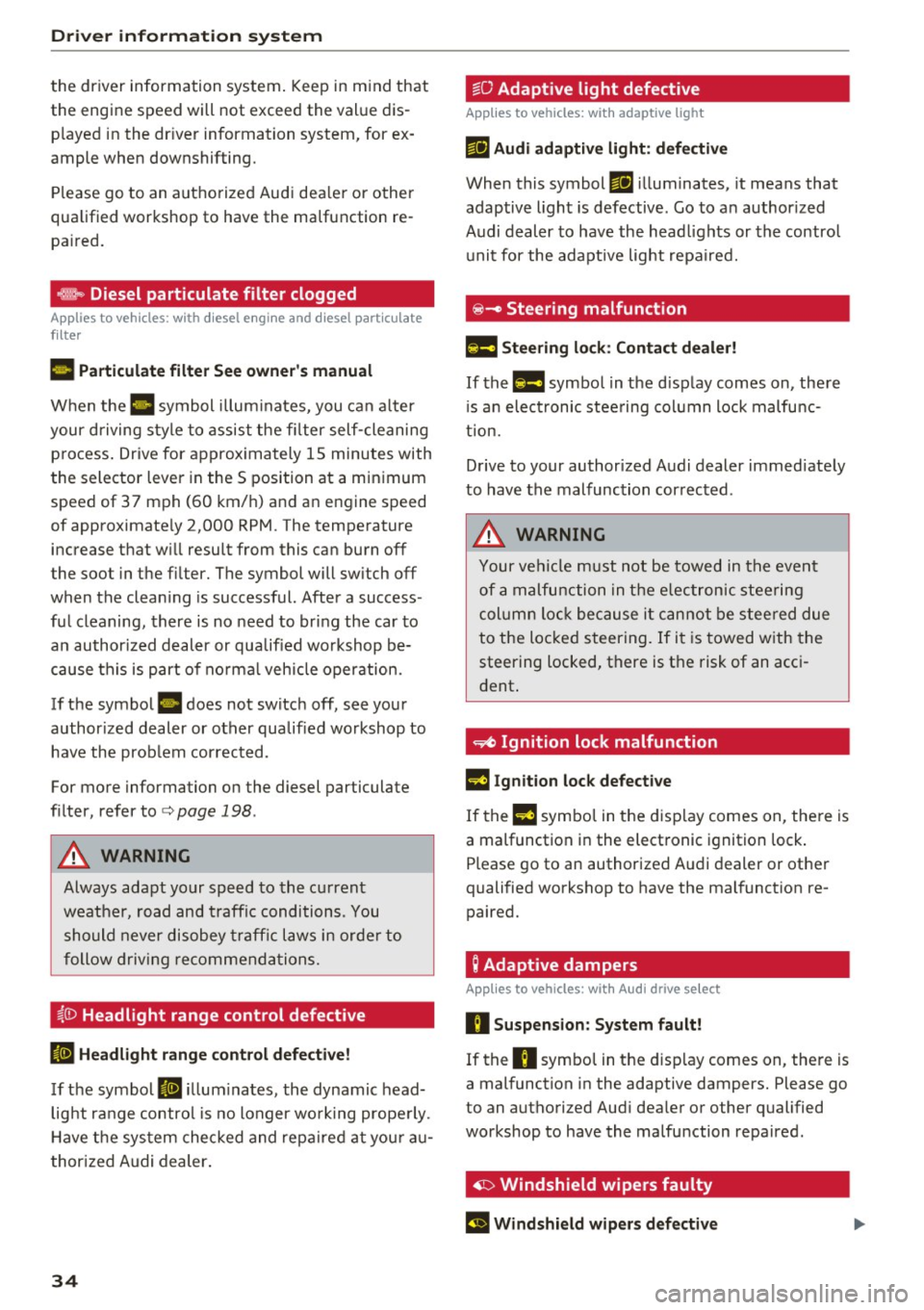
,m.. Diesel particulate filter clogged
Applies to veh icles: w ith diesel e ngi ne and d iesel pa rt icu late
f ilte r
II Particulate filter See owner's manual
When the II symbol illum inates, you can a lter
your driving sty le to assis t the fi lter self-cleaning
p rocess . Drive for approx ima tely 15 minutes with
the selector lever in the S position a t a min imum
speed of 37 mph (60 km/ h) a nd an engine speed
of approximate ly 2,000 RPM . The tempe rature
increase that w ill result from this can burn off
the soot in the fi lter. The symbol will sw itch off
when the clean ing is successful. After a success
fu l cleaning, there is no need to br ing the car to
an author ized deal er or qualified workshop b e
cause this is part of no rm al veh icle oper ation.
If t he symbo l
II does not switch off, see you r
author ized dealer or other qualif ied workshop to
have the prob lem cor rected.
For more information on the diesel particulate
fi lter, refer to
c> page 198.
A WARNING
Always ada pt your speed to the c urrent
w eather, road and traffic conditions . Y ou
should never dis obey traffi c la ws in orde r to
follow driving re co m mend ation s.
~()) Headlight range control defective
II Headlight range control defective!
If th e symbol II ill um ina tes, the dynamic head
lig ht ra nge co ntrol is no longer wo rking prope rly.
H ave t he sys tem checked and repa ired at you r au
t hor ized Audi dealer .
34
~O Adaptive light defective
Applies to vehicles: with adaptive light
mil Audi adaptive light : defe ctive
When this symbol mil ill uminates, it means that
adaptive ligh t is defective. Go to a n author ized
Audi dealer to have the head lights or the contro l
u nit for the adapt ive light repa ired.
@ -Steering malfunction
El! Steering lock: Contact dealer!
If the El! symbo l in t he d isp lay comes on, there
i s a n elect ronic stee ring column lock malfu nc
tion.
D rive to your author ized A udi dealer immed iate ly
to have the malfunc tion cor rected .
A WARNING
Your ve hicl e m ust not be towed in the event
of a m alfunction in the elec tronic s teering
column lo ck bec ause it c an no t b e stee red due
to the lo cked steering. If i t i s towed w ith the
steering locked, there is the risk of an acc i
dent .
~ Ignition lock malfunction
m Ignition lock defective
If the l3 symbo l in the d isplay comes on, the re is
a malfunction i n the elect ronic ignition lock .
Please go to an authorized A udi dealer or other
qualified workshop to have the malfunct ion re
paired.
; Adaptive dampers
App lies to vehicles: with Aud i drive se lect
R Suspension : System fault!
If the R symbol in the d isp lay comes on, the re is
a mal function in the adaptive dampers. Please go
to an authorized Aud i dea le r or other qualified
workshop to have the ma lfunction repaired.
· ~ Windshield wipers faulty
El Windshield wipers defective
Page 38 of 300
Opening and closing
Opening and closing
Keys
Key set
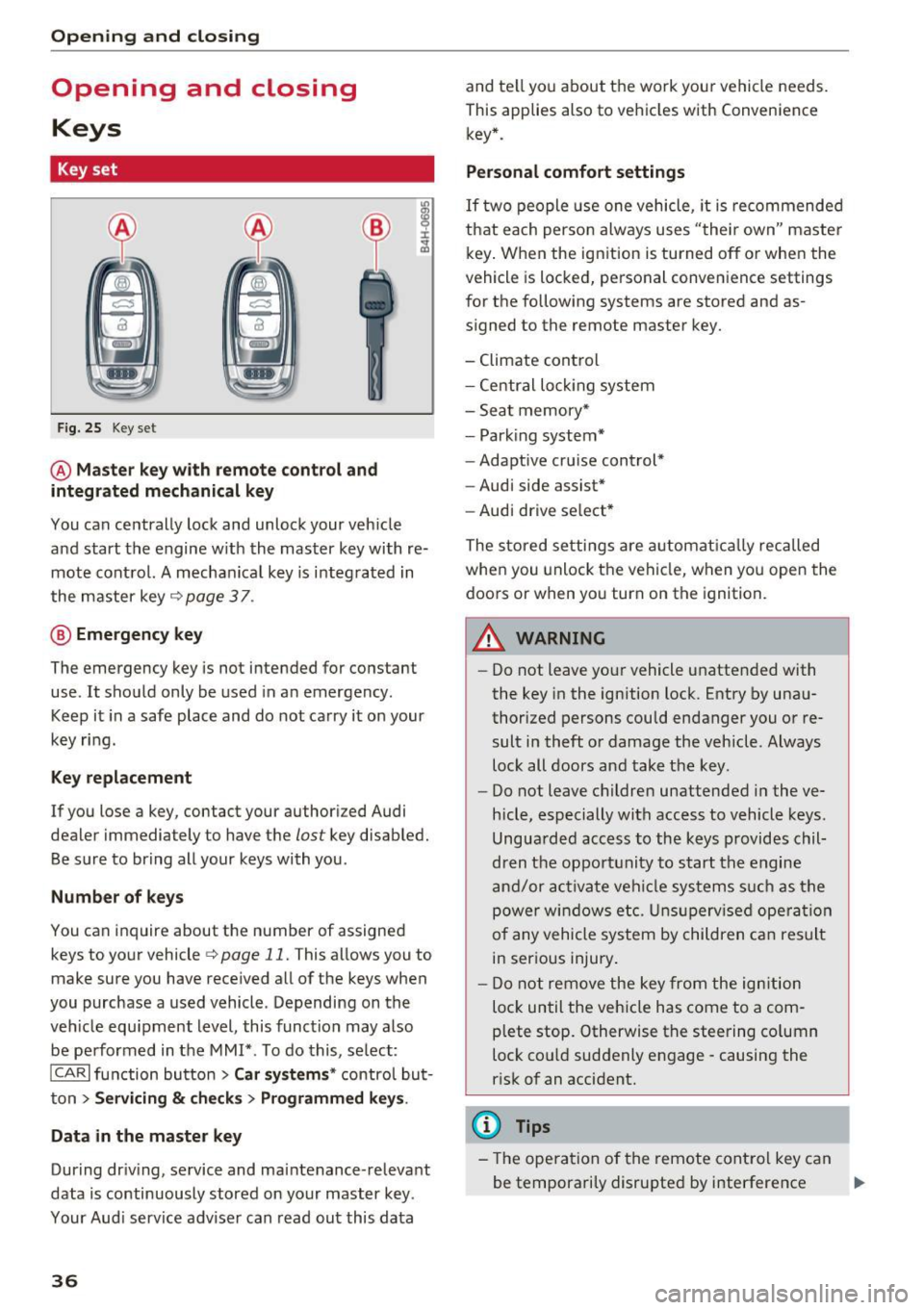
Fig. 25 Key set
@ Master key with remote control and
integrated mechanical key
You can centrally lock and unlock your veh icle
and start the engine w ith the master key with re
mote control. A mechanical key is i ntegrated in
the master key
c> page 3 7 .
@ Emergency key
The emergency key is not intended for constant
use . It should only be used in a n emergency.
Keep it in a safe place and do not carry it on your
key ring.
Key replacement
If you lose a key, contact your authori zed Audi
dealer immediately to have the
lost key disabled.
Be su re to bring all your keys with you .
Number of keys
You can inquire about the number of assigned
keys to your vehicle
c> page 11. This allows you to
make sure you have received all of the keys when
you purchase a used vehicle . Depending on the
veh icle equ ipment level, this function may also
be performed in the MMI*. To do this, select:
ICARI function button > Car systems* control but
ton
> Servicing & checks> Programmed keys .
Data in the master key
Dur ing dr iv ing, service and ma intenance -relevant
data is continuously stored on your master key .
Your Aud i service adviser can read out this data
36
and te ll you about the work your vehicle needs.
This applies also to vehicles with Convenience key* .
Personal comfort settings
If two people use one vehicle, it is recommended
that each person always uses "the ir own" master
key. When the ignition is turned off or whe n the
vehicle is locked, personal convenience settings
for the following systems are stored and as
signed to the remote master key.
- Climate control
- Central loc king system
- Seat memory*
- Park ing system*
- Adaptive cru ise cont rol*
- Audi side assist*
- Audi drive se lect *
The stored settings are automatically recalled
when you unlock the vehicle, when you open the
doors or when yo u turn on the ignition.
A WARNING
-
-Do not leave your vehicle unattended with
the key in the ignition lock. Entry by unau
thorized persons could endanger you or re
sult in theft or damage the vehicle . Always
lock all doors and take the key.
- Do not leave children unattended in the ve
hicle, especially with access to vehicle keys.
Unguarded access to the keys provides chil
dren the opportunity to start the engine
and/or activate vehicle systems s uch as the
power windows etc. Unsupervised operation
of any vehicle system by children can result
in serious injury.
- Do not remove the key from the ignition
loc k until the veh icle has come to a com
plete stop. Otherwise the steering co lumn
lock co uld suddenly e ngage -causing the
risk of an accident.
(D Tips
-Th e operation of the remote control key can
be temporarily disrupted by interference ..,.
Page 56 of 300
Lights and Vision
Tra ve l m ode ( Canada models )*
The headlight beam is asymme trical. This pro
vides stronger i llumination on the side of the
road on which you are driving. If you are driving
i n a country that drives on the opposit e sid e of
the road from your own country , this will cause
g lare for oncoming dr ivers . To prevent glare:
- Travel mode must be selected in vehicles with
Xenon headlights *.
- In vehicles with halogen headlights, certain
areas of the headlight lenses must be covered
with waterproof adhesive covers that prevent
li ght from pa ssing through. For more informa
tion, please see your authori zed Audi dea ler or
autho rized repair facility .
(!) Tips
When travel mode* is activated, a display in
the driver information system ind icates this
each t ime yo u switch the ignition on.
Adaptive light
Applies to vehicles: with adaptive ligh t
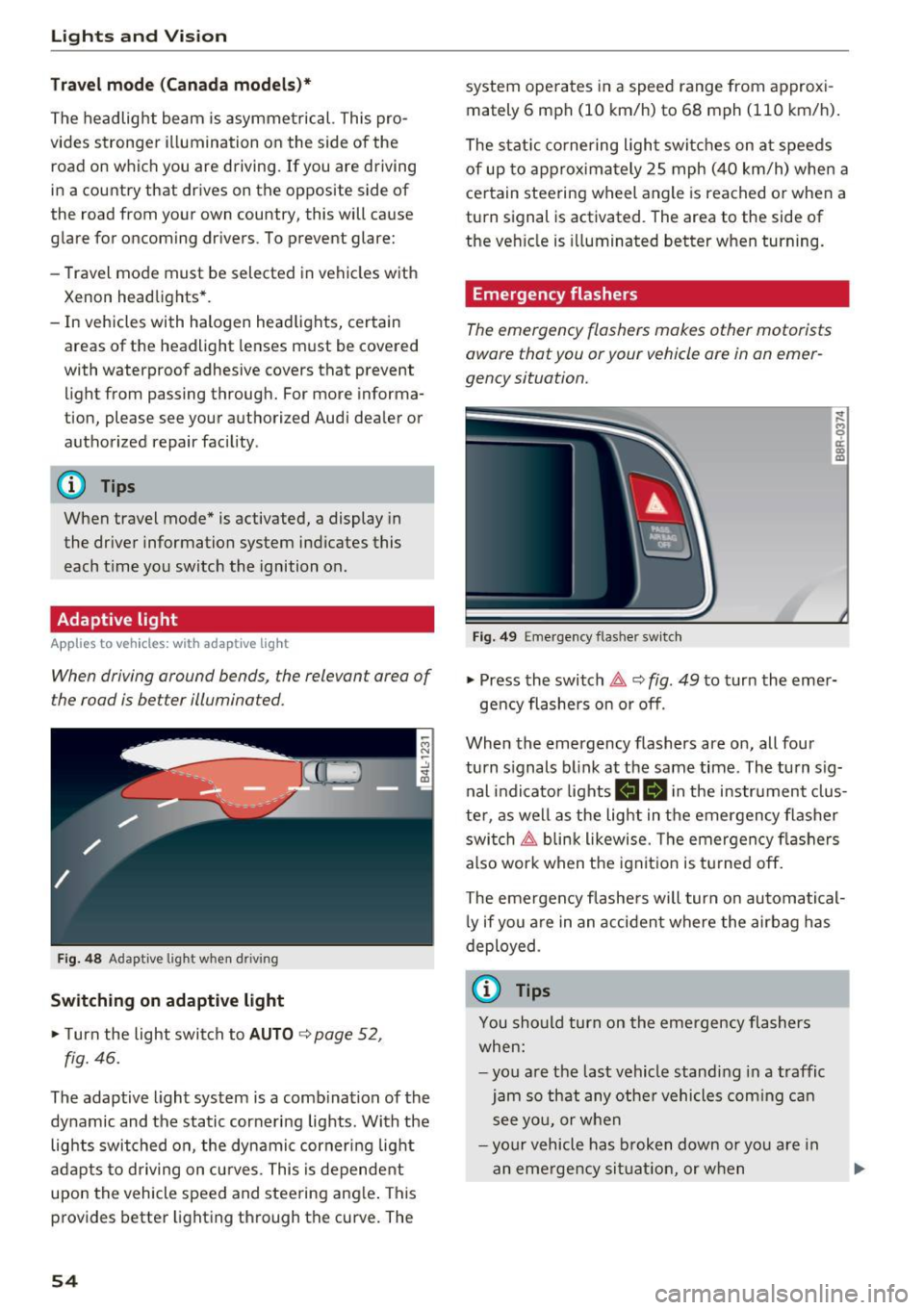
When driving around bends, the relevan t area of
the road is be tter illuminated.
Fig. 4 8 Adapt ive lig ht when d riving
Switching on adaptive light
~ T urn the light swit ch to AUTO ~ page 52,
fig. 46.
The adaptive light system is a comb ination of the
dynamic and the static cornering lights . With the
lights switched on , the dynamic cornering light
a dapts to driving on cu rves. This is dependent
upon the vehicle speed and steering ang le . This
provides better lighting through the curve. The
54
system ope rates in a speed range from approxi
mately 6 mph (10 km/h) to 68 mph (110 km/h) .
The stat ic co rnering ligh t switc hes on a t speeds
of up to approxima tely 25 mph (40 km/h) whe n a
ce rtain steering w heel angle is reached o r whe n a
turn signal is activated . The area to the side of
the ve hicle is illuminated better when turning.
Emergency flashers
The emergency flashers makes other motorists
aware that you or your vehicle ore in an emer
gency situation.
Fi g. 49 Eme rge ncy f las her switch
~
9 a: (X) m
~ Press the switch~ c::> fig. 49 to turn the eme r-
ge ncy flashers on or off .
When the emergency flashers are on, all four
turn s ignals b link at the same time. The turn s ig
nal indicator lights
II Bi n the instrument clus
te r, as we ll as the light in t he emergency flasher
swi tch ~ blin k likewise . T he emergency fl ashers
also work when t he ign it ion is tu rned o ff.
The eme rgency flashe rs will turn on automatical
l y if you a re in an acci dent where the air bag has
deployed .
(j) Tips
You should turn on the eme rgency flashers
when:
- yo u are t he last vehicle s tandi ng in a traffic
jam so th at any othe r vehicles com ing c an
s ee yo u, or whe n
- you r vehicle has broken down o r yo u are in
an eme rge ncy si tuati on, or w hen