steering AUDI Q5 2016 User Guide
[x] Cancel search | Manufacturer: AUDI, Model Year: 2016, Model line: Q5, Model: AUDI Q5 2016Pages: 300, PDF Size: 75.02 MB
Page 57 of 300
..... N
co ~ CX)
..... I.Cl U"I
..... I.Cl .....
-your vehicle is being towed by a tow truck or
if you are towing another vehicle behind
you .
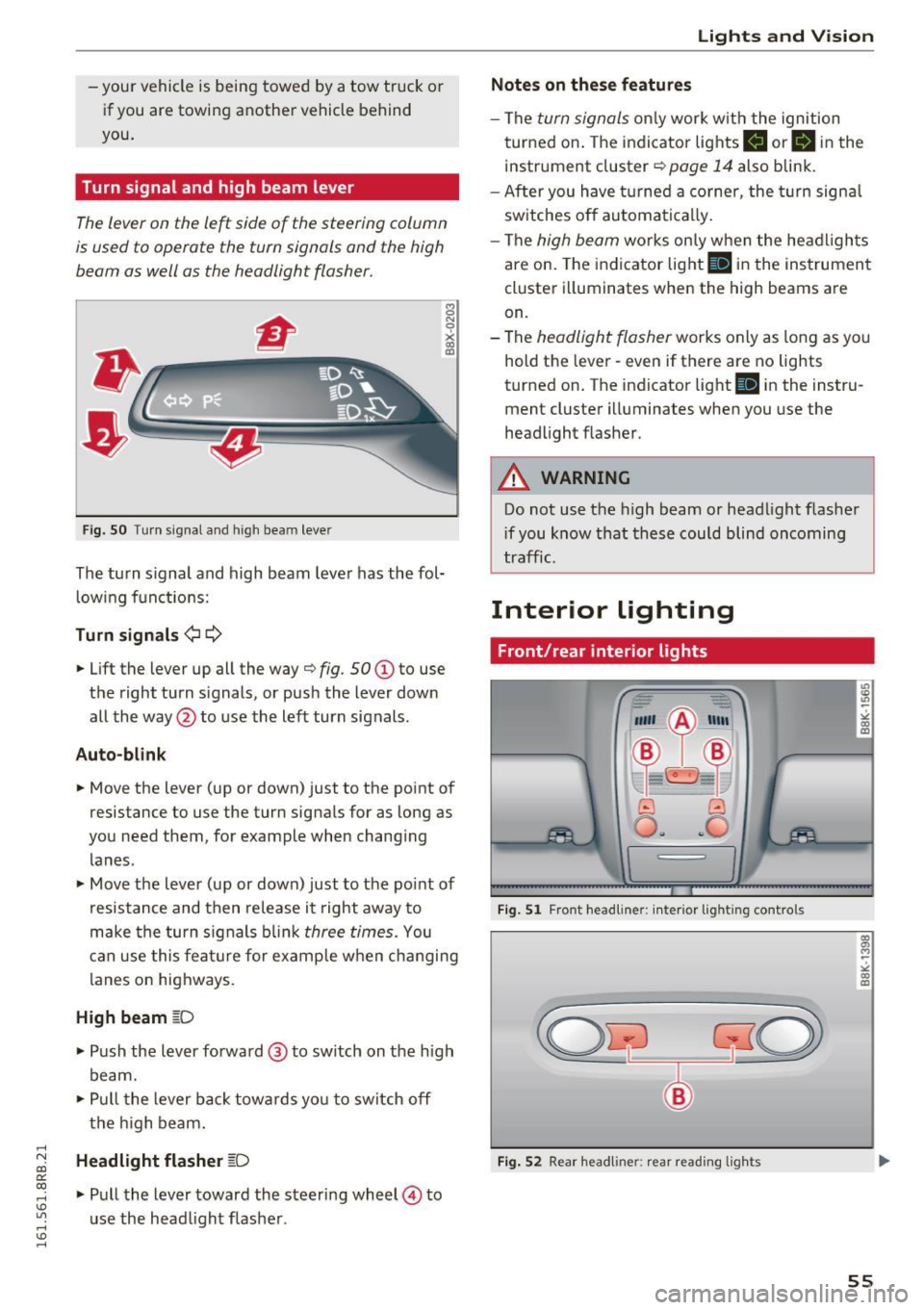
Turn signal and high beam lever
The lever on the le~ side of the steering column
is used to operate the turn signals and the high
beam as well as the headlight flasher.
Fig. SO Tu rn signal and high bea m lever
The turn s ignal and high beam lever has the fol·
lowing functions:
Turn signals ¢¢
8 N
0
~ IXI
• Lift the lever up all the way¢ fig. 50 (D to use
t h e right turn s ignals, or push the lever down
all the way @to use the left turn signals .
Auto-blink
• Move the lever (up or down) just to the point of
resistance to use the turn signa ls for as long as
you need them, for example when changing lanes .
• Move the lever (up or down) just to the point of
resistance and then release it right away to
make the turn s ignals blink
three times. You
can use this feature for example when changing
l anes on highways.
High beam ~D
• Push the lever forward@ to switch on the high
beam.
• Pull the lever back towa rds yo u to switch off
the high beam .
Headlight flasher ~D
• Pull the lever toward the steering wheel© to
u se the head light flasher .
Lights and V ision
Notes on these features
-The turn signals only work w ith the ignition
turned on. The indicato r lights
II or II in the
instr ument cluster ¢
page 14 also blink.
- After you have turned a corner, the turn signa l
switches off automatically.
- The
high beam wo rks on ly when the headlights
are on. The indicator light
II in the instrument
cluster illuminates when the high beams are
on.
- The
headlight flasher works only as long as yo u
hold the lever· even if there are no lights
turned on . The indicator light
II in the instru
ment cluster illuminates when you use the
headlight flasher .
A WARNING
-Do not use the high beam or head light flasher
i f you know that these could blind oncoming
traffic.
Interior lighting
Front /rear interior lights
_. --=:.
I-~~
._ -- v
8 G
o .. .. c
l
Fig. 51 Front head line r: in ter io r light ing cont rols
Fig. 52 Rear headliner: rear read ing lights
55
Page 65 of 300
..... N
co
er::
co
.....
General information
Why is your seat adjustment so important?
The safety belts and the airbag system can only
provide maximum protection if the front seats are corr ectly adjusted .
There are various ways of adjusting the front
seats to provide safe and comfortable support
for the driver and the front passenger . Adjust
your seat properly so that:
- you can easily and quickly reach all the switches
and controls in the instrument panel
- your body is properly supported thus reducing
physical stress and fatigue
- the safety belts and a irbag system can offer
maximum protection
<=:> page 151.
In the following sections, you will see exact ly
how you can best adjust your seats.
There are spec ial regulations and instr uctions for
installing a child safety seat on the front pas
senger's seat . Always fo llow the information re
garding child safety provided in
¢ page 171,
Child safety.
A WARNING
Incorrect seating position of the driver and all
other passengers can result in serious person
al injury .
- Always keep your feet on the floor when the
vehicle is in motion - never put your feet on
top of the instrument pane l, o ut of the win
dow or on top of the seat cushion. This ap
plies especially to the passengers.
If your
seating pos it ion is inco rrect, yo u increase
the risk of injury in the case of sudden brak
ing or an accident. If the ai rbag inf lates and
the seating position is incorrect, this cou ld
result in personal injury or even death.
- It is important for both the driver and front
passenger to keep a d istance o f at least
10 inches (25 cm) between themselves and
the steering wheel and/or instrument pan el. If you're s itting any closer than this, the
airbag system can not protect you properly .
Seat s and sto rage
In addition, the front seats and head re
stra ints must be adjusted to your body
he ight so that they can g ive you maximum
protection .
- Always try to keep as much distance as pos
sible between yourself and the steer ing
wheel or instrument panel.
- Do not adjust the driver's or front passeng
er's seat while the veh icle is moving . Your
seat may move unexpectedly, causing sud
den loss of vehicle contro l and personal in
jury.
If yo u ad just yo ur seat while the veh icle
is moving, you a re o ut of pos ition.
Driver's seat
The correct seat position is important for safe
and relaxed driving.
We recommend that you adjust the dr iver 's seat
i n the following manner:
.. Adjust the seat in fore and aft direction so that
you can eas ily push the pedals to the floor
while keeping yo ur knees slightly bent<=:>.&,
in
Why is your seat adjustment so important? on
page 63 .
.,. Adjust the seatback so that when yo u sit with
your back agains t the se atback , you can still
grasp the to p of the steering wheel.
.,. Adjust the head res traint so the uppe r edge is
as even as possib le with the top of you r head. If
that is not possible, try to adjust the head re
straint so that it is as close to this posit ion as
possible
<=:> page 67.
A WARNING
--
Neve r place any objects in the dr iver's foot
well. An object could ge t into the pedal a rea
and inte rfe re with pedal function. In case of
su dd en braking or an accident, you would no t
be ab le to br ake or accelera te.
63
Page 86 of 300
Driving
Driving
Steering
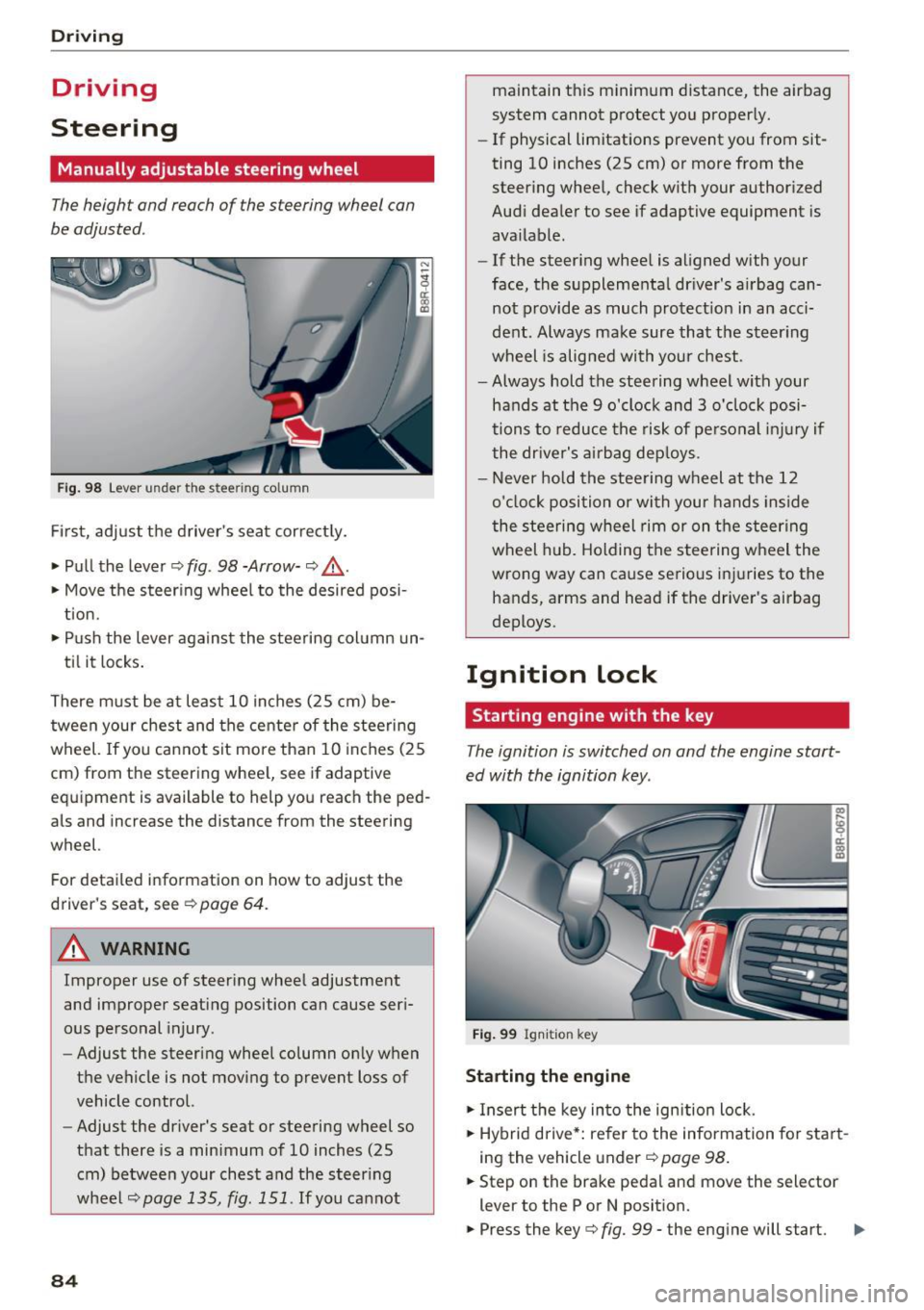
Manually adjustable steering wheel
The height and reach of the steering wheel can
be adjusted .
Fig . 98 Lever under the s tee ring column
Fi rs t, adjust t he driver 's sea t cor rect ly.
• Pull the lever¢
fig. 98 -Arrow-¢ &_.
• Move the steer ing whee l to the desired posi
t ion.
• Push the lever agains t the steering col umn un-
ti l it locks .
There m ust be at least 10 inches (25 cm) be
tween your chest and the cente r of the steering
wheel. If you cannot sit more than 10 inches (25
cm) from the steering whee l, see if adaptive
eq uipment is available to help you reach the ped
als and increase the distance from the steering
wheel.
For detailed information on how to adjust the
driver's seat, see ¢
page 64.
A WARNING
Improper use of steering whee l adjustment
and improper seati ng position can cause ser i
ous pe rsonal injury.
- Adjust the steering wheel column on ly when
the vehicle is not moving to prevent loss of
vehicle control.
- Adjust the dr iver's seat o r steering wheel so
that there is a min imum o f 10 inches (25
cm) be twee n your chest and the s teer ing
wheel
¢page 135, fig. 151 . If you ca nnot
84
maintain t his minim um distance, the airbag
system cannot p rotect yo u properly.
- If physical limitations prevent you from sit
ting 10 inches (25 cm) or more from the
steer ing whee l, check with your author ized
Aud i dea ler to see if adaptive equipment is
ava ilable.
- If the steer ing whee l is aligned with your
face, the s upplementa l dr iver's a irbag can
not provide as much protect ion in an acci
dent . Always make sure that the steer ing
wheel is alig ned wi th your chest.
- Always hold the steering w heel with your
hands at the 9 o'clock and 3 o'clock posi
tions to reduce the ris k of pe rsonal injur y if
the dr ive r's ai rb ag de ploys .
- Never ho ld the stee ring w heel at t he 12
o' cl oc k position or with your hands inside
the stee ring wheel rim or on t he steering
wheel hub. Holding the steering w heel the
wrong way can cause se rious i njuries to the
hands, arms and head if the driver's airbag
deploys .
Ignition lock
Starting engine with the key
The ignition is switched on and the engine start
ed with the ignition key.
F ig . 9 9 Ign iti on key
Starting the engine
• In sert the key in to the ignition lock.
• Hybrid d rive *: refer to the information fo r sta rt
i ng the veh icle under ¢
page 98 .
• Step on the brake pedal and move the selector
lever to the P or N posit ion.
• Press the key¢
fig. 99 -the eng ine will start. .,.
Page 88 of 300
Driving
Starting the vehicle with the emergency
key
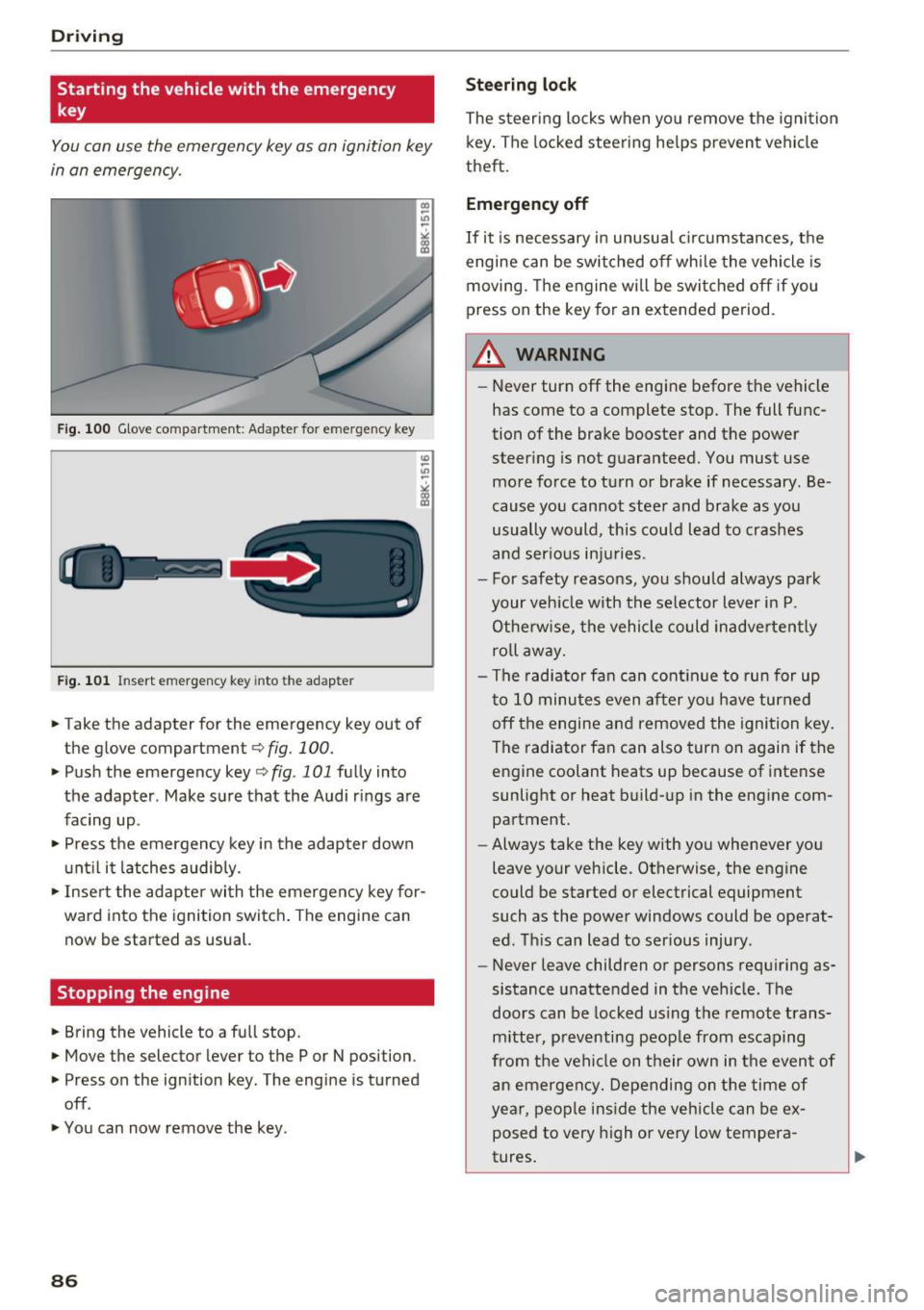
You can use the emergency key as an ignition key
in an emergency.
Fig. 100 Glove compartment : Ada pte r fo r em erg en cy key
Fig. 101 In sert emergency key into the adap te r
... Take the adapter for the emergency key out of
the glove compartment ¢
fig. 100.
.,. Push the emergency key ¢ fig . 101 fully into
the adapter . Make sure that the Audi rings are
facing up .
.,. Press the emergency key in the adapter down
until it latches audibly.
.,. Insert the adapter with the emergency key for
ward into the ignition switch. The engine can
now be started as usual.
Stopping the engine
... Bring the vehicle to a full stop.
... Move the selector lever to the P or N position .
.. Press on the ignition key . The engine is turned
off .
.,. You can now remove the key .
86
Steering lock
The steering locks when you remove the ignition
key. The locked steering helps prevent vehicle
theft.
Emergency off
If it is necessary in unusual circumstances, the
engine can be switched off while the vehicle is
moving. The engine will be switched off if you
press on the key for an extended period .
A WARNING
-Never turn off the engine before the vehicle
has come to a complete stop. The full func
tion of the brake booster and the power
steering is not guaranteed. You must use
more force to turn or brake if necessary . Be
cause you cannot steer and brake as you
usually would, this could lead to crashes
and serious injuries .
- For safety reasons, you should always park
your vehicle with the selector lever in P .
Otherwise, the vehicle could inadvertently
roll away.
- The radiator fan can continue to run for up
to 10 minutes even after you have turned
off the engine and removed the ignition key .
The radiator fan can also turn on again if the
engine coolant heats up because of intense
sunlight or heat build-up in the engine com
partment .
- Always take the key with you whenever you
leave your vehicle . Otherwise, the engine
could be started or electrical equipment
such as the power windows could be operat
ed. This can lead to serious injury .
- Never leave children or persons requiring as
sistance unattended in the vehicle. The
doors can be locked using the remote trans
mitter, preventing people from escaping
from the vehicle on their own in the event of
an emergency. Depending on the time of
year, people inside the vehicle can be ex
posed to very high or very low tempera
tures.
Page 90 of 300
Driving
electrical equipment such as exterior lights
will switch off as well when that happens.
Switching engine off
Applies to veh icles: w ith Conven ience key
~ Bring your vehicle to a complete stop.
~ Move the selector lever to the P or N position.
~ Press the I START ENGIN E STOPI button
¢page 87, fig. 10 2.
Steering lock
The steering locks when you turn the engine off
using the
!START ENGINE STOP ! button and
open the driver 's door. The locked steering helps
prevent vehicle theft.
Emergency off
If necessary, the engine can be switched off with
the s ele ctor lever in the R or D/S position. The
engine stops if you press and hold the
!START ENGINE STOP! button at speeds below
6 mph (10 km/h) and press the brake pedal.
A WARNING
- Never turn off the engine before the vehicle
has come to a complete stop. The full func
t ion of the brake booster and the power
steering is not guaranteed. You must use
more force to turn or brake if necessary. Be
cause you cannot steer and brake as you
usually would, this could lead to crashes
and serious injuries.
- For safety reasons, you should always park
your vehicle with the selector lever in P.
Otherwise, the vehicle could inadvertently
roll away .
- The radiator fan can continue to run for up
to 10 minutes even after you have turned
off the engine and removed the ignition key.
The radiator fan can also turn on again if the
engine coolant heats up because of intense
sunlight or heat build-up in the engine com
partment.
- Always take the key with you whenever you
leave your vehicle. Otherwise, the engine
could be started or electrical equipment
88
such as the power windows could be operat
ed. This can lead to serious injury.
- Never leave children or persons requiring as
sistance unattended in the vehicle. The
doors can be locked using the remote trans
mitter, preventing people from escaping
from the vehicle on their own in the event of
an emergency. Depending on the time of
year, people inside the vehicle can be ex
posed to very high or very low tempera
tures.
0 Note
If the engine has been under heavy load for
an extended period, heat builds up in the en
gine compartment after the engine is switch
ed off -there is a risk of damaging the engine.
Allow the engine to run at idle for about two
minutes before switching it off.
Driver messages
Ignition is on
This message appears and a warning tone sounds
if you open the driver 's door when the ignition is
switched on.
No key identified
This message appears when the
ISTART E NGIN E STOP !* button is pressed if there
is no master key inside the vehicle or if the sys
tem does not recognize it. For example, the mas
ter key cannot be recognized if it is covered by an
object (e .g . aluminum brief case) which
screens
the radio s ignal. Electronic devices such as cell
phones can also interfere with the radio signal.
Press brake pedal to start engine
This message appears if you do not press the
brake pedal to start the engine .
Shift to N or P to start engine
This message appears when attempting to start
the engine if the selector lever for the automatic
transmission is not in the P or N position. The en
gine can only be started with the selector in
these positions.
ll-
Page 92 of 300
Driving
E m erg ency b ra ke function
An emergency b rake ensures that the veh icle can
be slowed down even if the normal brakes fai l
¢ page 91, Emergency broking.
A WARNING
If a drive range is engaged with the vehicle
stationary and the engine running, you must
in no instance accelerate care lessly. Other
w ise the vehicle will start to move immediate
ly -risk of an accident.
(D Tips
- If the parking brake is app lied with the igni
tion switched off, the indicator lights in the
switch and. (USA models)/ . (Cana-
da models) in the instrument cluster will go
out after a ce rtain per iod of t ime.
- Occasiona l noises whe n the parking b rake is
applied and released are normal and are not
a cause for conce rn.
- When the vehicle is par ked, the park ing
brake goes thro ugh a self-test cycle at regu
l a r i nte rvals. Any associa ted noises a re nor
mal.
Parking
" Press the brake ped al to stop the vehicle.
" Pull the switch
¢ page 89, fig. 103 to set the
parking brake.
" Move the selector lever to P.
" Turn the eng ine off¢ &_.
-
"When on incl ines or declines, turn the steering
wheel so that the vehicle w ill roll into the curb
if it beg ins to move .
A WARNING
-When you leave your vehi cle - even if on ly
br iefly- always remove the ign ition key. This
applies particular ly when c hildren remain in
the vehicle . Otherwise the children could
sta rt the engine, release the pa rking brake
or operate electrical eq uipment (e .g. power
windows). There is the risk of an acc ident.
- When the vehicle is loc ked, no one - particu
larly not children shou ld remain in the vehi-
90
-
cle. Locked doors make it more d ifficult for
emergency wo rkers to get into the vehicle -
putting lives at risk.
Starting from rest
The starting assist function ensures that the
parking broke is released automatically upon
starting.
Stopping and applying park ing brake
" Pull the switch to app ly the parking b rake.
Starting and automat ically releasing the
park ing brake
" When you start to d rive as usua l, the par king
brake is automatically released and yo ur vehicle
beg ins to move.
When stopp ing at a t raffic sig na l or s topping in
c ity traff ic on vehicles with an automat ic t rans
mission, the pa rking brake can be applied . The
vehicle does not have to be held with the foot brake. The parking brake eliminates the tendency
to c reep w ith a dr ive range engaged . As soon as
you drive off as usual, the parking brake is re
leased automat ica lly and the vehicle starts to
move.
Starting on slope s
When starting on incl ines, the starting assist pre
vents the vehicle from un intent iona lly rolling
back. The braking force of the parking brake is
not re leased u nti l sufficient dr iv ing fo rce has
been built up at the wheels.
@ Tips
For safety reasons, the park ing brake is re
l eased automatically on ly when the d river's
safety be lt is engaged in the b uckle.
Starting off with a trailer
To prevent rolling bock unintentionally on on in
cline, do the following:
" Keep the switch pu lled and depress the acceler
ator. The park ing brake stays applied and pre-
vents the ve hicle from roll ing backward.
IJ,,
Page 94 of 300
Driving
_& WARNING
-Ne ver turn off the engine before the veh icle
has come to a comp lete stop . The f ull func
t ion of the brake booster and the power
steering is not guaranteed. Yo u must use
more force to turn or brake if necessary . Be
ca use you cannot steer and b rake as you
us ually wou ld, this could lead to crashes
and serious injur ies.
- To reduce the risk of inju ries, make s ure that
t h e S tart -Stop-System is turned off whe n
wor king in the eng ine compart ment
9page 93 .
(D Note
Always sw itch off the Start-Stop-System
when dr iv ing th rough water
9 page 93 .
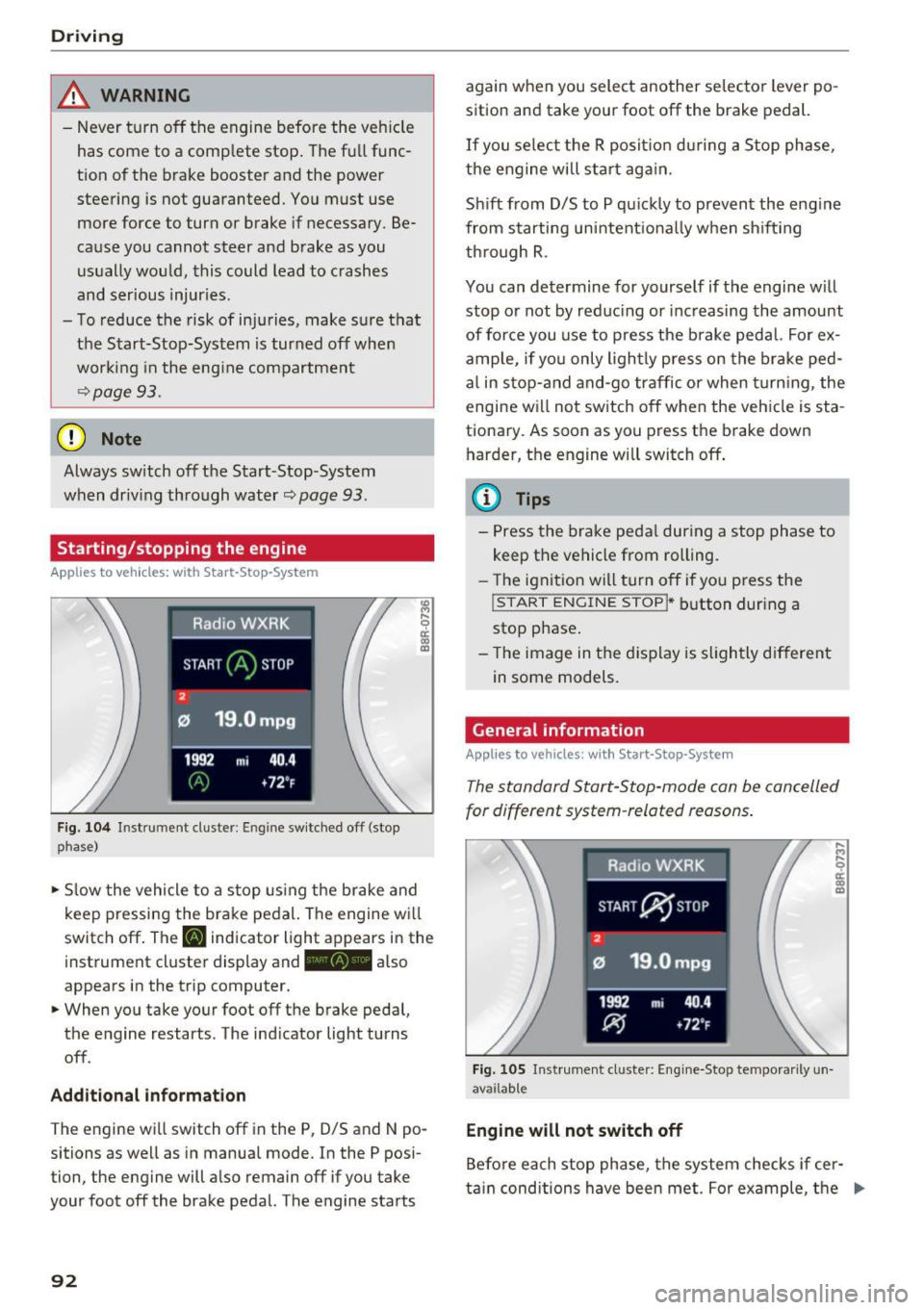
Starting/stopping the engine
Applies to veh icles: w ith Start -Stop -System
F ig . 104 In strum ent cluste r: En gin e sw itc hed off (stop
phase}
• Slow the vehicle to a s top using the brake and
k eep pressing the bra ke pe dal. The engine w ill
switc h off . The
[I] ind icator light appears in the
i nst rument cluste r display and -also
appears in the t rip computer.
• When you take yo ur foot off the b rake peda l,
the engine restarts . The ind icator light tu rns
off .
Add itional informat ion
The eng ine wi ll switch off in the P, D/S and N po
sitions as we ll as in manua l mode. In the P pos i
tion, the eng ine will a lso remain off if you take
your foot off the brake pedal. The engine starts
92
again w hen you select another se lecto r lever po
sition and take your foot off the brake pedal.
If you se lect t he R posit io n dur ing a Stop phase,
the e ngine will sta rt ag ain.
Sh ift from D/S to P qu ic kl y to prevent the eng ine
from starting uni ntent io na lly when sh if ti ng
th rough R.
You can determine for yourself if t he engine w ill
stop o r not by re duc ing or inc reasing the amount
of force you use to p ress the b rake pedal. Fo r ex
amp le, if yo u only ligh tly press o n the brake ped
a l in s top- and and-go traffic or when turning, the
engine will not switch off when the veh icle is sta
tiona ry. As soon as you press the brake down
h arder, the engine will switch off .
{i) Tips
-Press the brake peda l during a stop phase to
keep the vehicle from rolling.
- The igni tio n wi ll turn off if y ou press the
! START ENGINE STOPI * button dur ing a
stop p hase .
- Th e image in the displ ay is s ligh tly d ifferent
in some models.
General information
Applies to vehicles: with Start-Stop-System
The standard Start-S top-mode can be can celled
for different system -related reasons .
Fig. 1 05 In str um ent cl uste r: E ngi ne-Stop te mpo rari ly un
ava ilab le
Engine will not switch off
.... .., .... 0
~ m
Befo re each sto p phase, t he system checks if cer
ta in conditions have been met. For example, t he .,.
Page 95 of 300
..... N
co ~ CX)
..... I.Cl U"I
..... I.Cl .....
engine will no t be switched off in the following
situations:
- The eng ine has not reached the m in imum re
quired temperature for Start-Stop-mode.
- T he interior temperature selected by the A/C
system has not been reached.
- The outs ide temperatu re is ext remely h igh/low.
- The w indshield is being defrosted
¢ page 82.
-The parking system* is switched on.
- The battery charge level is too low.
- The steering whee l is sharply turned or there is
a steering movement.
- After engaging the reverse gear.
- On sharp inclines .
IIJ appears in the instrument cluster display and
§ii;Ff&Ff ~lso appears in the tr ip comp ute r.
Engine automatically re starts
The stop phase is interrupted in the following sit
uations, for example . The eng ine restarts without
any action by the driver .
- The interior temperature varies from the tem
perature se lected in the A/C system .
- The windshield is beeing defrosted
¢ page 82.
- The brake pedal is pressed several times in a
row.
- The battery charge level becomes too low.
- High power cons umption .
IIJ appears in the instrument cluster display and
H§;Ff&Fii ~lso appears in the tr ip comp ute r.
Switching the ignition off autom atically
To prevent the battery from draining, the ignition
will switch off
automati cally when all of the fol
lowing cond itions have been met:
- The veh icle has already been driven.
- The eng ine has been turned off by the Start-
Stop-System .
- The driver's door is opened .
- T he dr iver's seat bel t is removed.
- The brake pedal is not pressed down.
- T he veh icle is stationary .
In this case, the activated low beam will be re
placed by the s ide marker lights . The side marker
D rivi ng
lights will switch of f after approximate ly 30 m i
nutes or when you lock the veh icle.
If t he Start-S top-System has not turned off the
engine or if you have swi tched the S tart -Stop
System off manually, the ignition will
not be au
tomatica lly switched off and the eng ine wi ll con
t in u e to run¢& .
A WARNING <= -
Never allow the engine to run in confined
spaces -danger of asphyx iation.
(D Tips
If you shift into the 0/S or N positions after
shifting into reverse, the vehicle must be dr iv
en faster than 6 mph (10 km/h) in order for
the engine to switch off again .
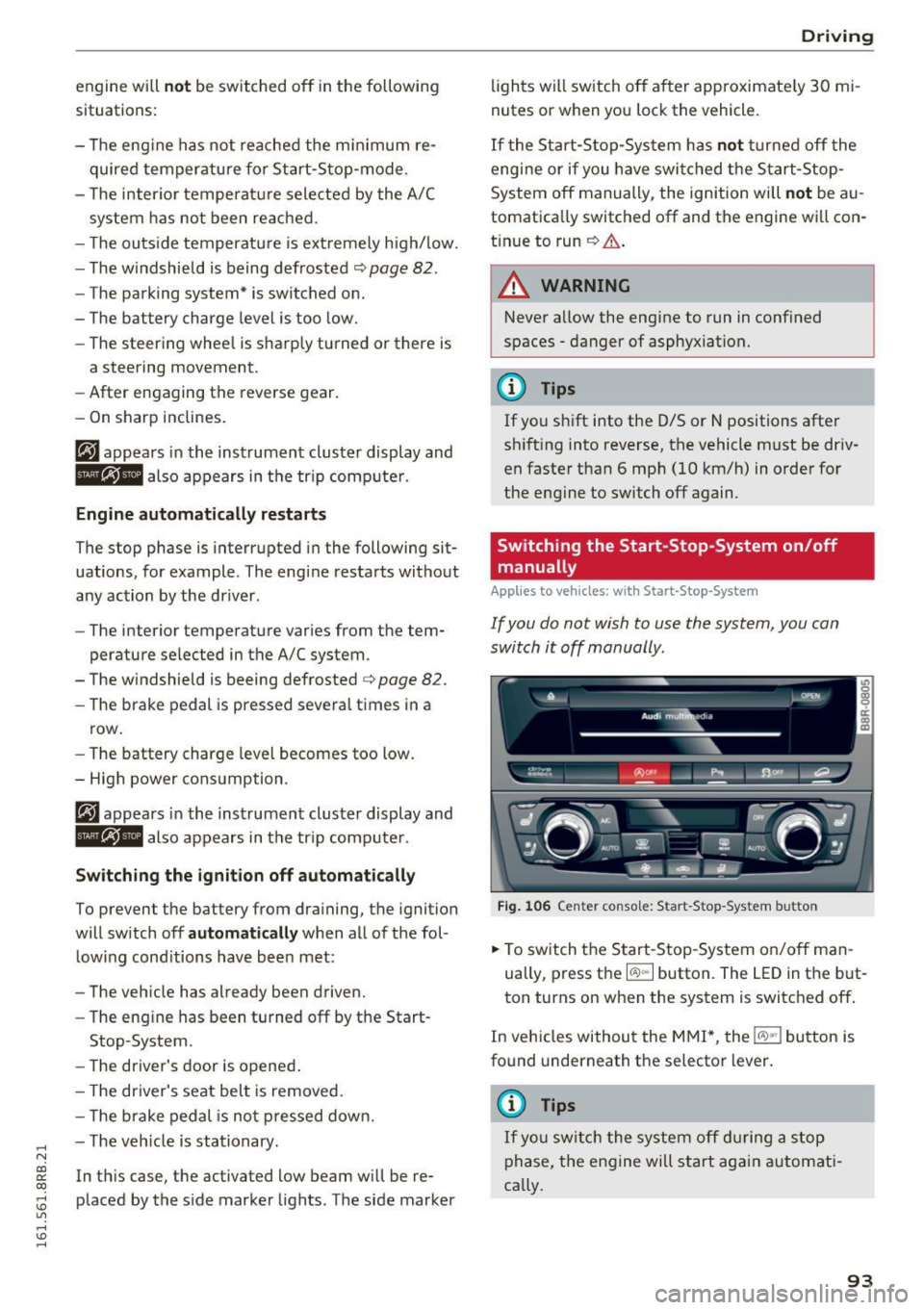
Switching the Start-Stop -System on /off
manually
App lies to vehicles: wi th Start -S top-Syste m
If you do not wish to use the system, you can
switch it off manually.
= , __ (A)Off _ --"'-- f'~-.::a-----
Fig . 10 6 Cen ter co nsole: S ta rt -Stop -System button
.. To switch the Start -Stop-System on/off man
ually, press the
I CAJ ,,.I button. The LED in the b ut
ton turns on when the system is switched off .
In vehicles without the M MI*, the
!CA.> "'! button is
found underneath the se lector lever.
(D Tips
If y ou swit ch the system off d uring a stop
phase, the engine will st art aga in automati
ca lly.
93
Page 101 of 300

© Vehicle drive ready (READY)
® H igh voltage battery charge status
@ Recupe ration (CHARG E)
(J) Driving within the combustion en
g ine's full load range
@ 100% combust ion engine
® Boosting - the elect ric engine as
sists the combustion engine (BOOST)
@ E ngaging the conve ntiona l brakes
with recuperat ion
@ Vehicle not drive ready (OFF)
@ EV mode act ive
The need le remains at
OFF whe n the ignition is
turned on. When the veh icle enters drive ready
mode, the status message
hybrid ready appears
briefly in the instrument cluster d isplay and the
needle in the powe r meter poi nts to
READY .
Indicator lights and messages
Applies to vehicles: with hybrid drive
The indica to r li gh ts in the inst rument cluste r
b link or tur n on. They indicate functions or mal
f u nctions .
W ith some ind icator lights, messages may ap
pear and a warning tone may sou nd . A lso note
the ind icator lights in
<=:> page 2 7.
Press brake pedal to start vehicle
This message appears if you do not press the
b rake pedal whe n starting the vehicle.
Shift to N or P to start vehicle
This message appea rs if the selecto r leve r fo r the
automatic transm iss ion is not in the Nor P posi
tions whe n starting the vehicle .
-Hybrid drive: System fault! Power
brakes , steering malfunction pos sible
If the indicator lig ht turns on and th is message
appears, there is a malfunction in the hybrid sys
tem. The brake booster and the power steeri ng
~ may stop working . Stop the vehicle in a safe loca -
co g:; tion as soon as possible.
Hybrid
You may con tinue dr iving i f the indicator light
tu rns off after sta rt ing the ve hicl e several times .
Drive to an authorized repa ir facility immed iate ly
to have the malfunction cor rected .
f#iifj:j;jj,j Hybrid drive: System fault! Contact
dealer
If the indicator light turns on and this message
appea rs, there is a ma lfunction in the hybrid sys
tem. Drive to an autho rized repair fac ility imme
diately to have the malfunct io n corrected.
(II Hybrid system : Performance rest ricted .
Please contact dealer
If the indicator light turns on and this message
appears, there is an eng ine control malfunction .
The
[Ia i ndica to r li ght in the ins trument clus te r
also t urns on. The engine ou tput is red uced .
Dr ive to your authori zed A udi dealer or qualified
r ep air fa cility i mme diate ly to h ave the m alfu n c
t io n corre cte d.
Hybrid drive deactivated. Please restart
engine manually.
T h is m ess age appe ars if t he high vo lt a ge b attery
c h arge leve l h as fallen below a cer tain range or i f
t h e ig nition key is no longer i nsid e the veh icle for
vehicles with the convenience key* .
Start the engi ne w it h eithe r th e ig nitio n key
<=:> page 84 o r wi th the !START ENGI NE STOPI
button* <=:> page 87.
Hybrid battery: Low battery charge. Battery
will be charged while driving.
T h is mess age app ea rs if the high vo lt a ge b att ery
c h arge leve l has fallen be low a certa in range . If
t hi s message turns off afte r a litt le while, the
high voltage battery cha rged enoug h while driv
ing .
If the message does not turn off, have an au thor
ized repair facility cor rect the ma lf u nction as
soon as possib le .
EV mode is currently unavailable.
Th is me ssa ge appears if the con ditions
<=:> page 10 0 for enhanced ele ctric drivi ng ar e not
met. Try aga in at a late r time .
99
Page 103 of 300
,....,
N
co
er::
co
,....,
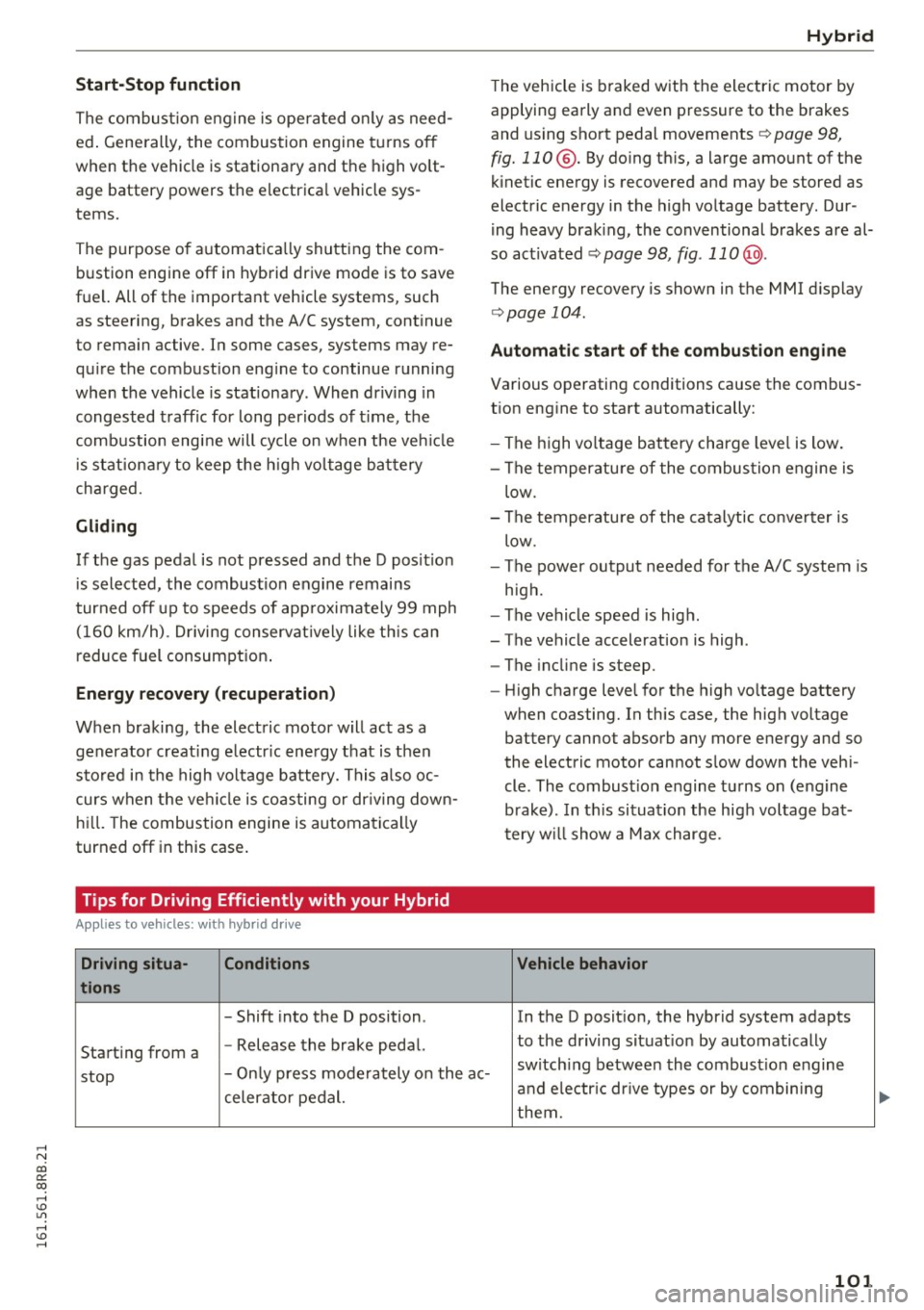
The combustion engine is operated on ly as need
ed . Gene rally, the combustion engine turns off
when the vehicle is stationary and the high vo lt
age battery powers the electrical vehicle sys
tems.
The purpose of automatica lly shutting the com
bustion engine off in hybrid drive mode is to save
fuel. All of the important vehicle systems, such
as steering, brakes and the A/C system, continue
to rema in active. In some cases, systems may re
qu ire the combustion eng ine to continue running
when the vehicle is stationary . When dr iving in
congested traffic for long periods of t ime, the
combustion engine will cycle on when the veh icle
is stat iona ry to keep the h igh voltage battery
charged.
Gliding
If the gas pedal is not pressed and the D posit ion
is selected, the combustion engine remains
turned off up to speeds of app roximately 99 mph
(160 km/h) . D riving conservat ively like th is can
reduce fuel c:on5umption .
Energy recovery (recuperation )
When braking, the electric motor will act as a
generator creating electr ic energy that is then
sto red in the high voltage battery. This also oc
curs when the ve hicle is coasting or dr iving down
hill. The combustion engine is automatica lly
turned off in this case.
Tips for Driving Efficiently with your Hybrid
A ppl ies to vehicles: with hybr id drive
Driving situa- Conditions
tions
- Shift into the D position .
Starting from a -
Release the brake pedal.
Hybrid
The vehicle is braked with the electric motor by
applying early and even pressure to the brakes
and using short pedal movements~
page 98,
fig. 110 @. By doing this, a large amount of the
kinetic energy is recovered and may be stored as
electric energy in the high voltage battery. Dur
i ng heavy brak ing, the conventional brakes are al
so act ivated
~ page 98, fig . 11 0@ .
The energy recovery is shown in the MMI d isplay
~ page 104 .
Automatic start of the combustion engine
Various operating conditions cause the combus
t ion eng ine to start automatically:
- The high vo ltage battery charge level is low.
- The temperatu re of the combustion engine is
low.
- The temperature of the catalytic converter is
low.
- The power output needed for the A/C system is
high.
- The vehicle speed is high .
- The vehicle acceleration is high .
- The incline is steep .
- High charge level for the high voltage battery
when coasting. In this case, the high voltage battery cannot absorb any more energy and so
the electric motor cannot slow down the veh i
cle . The combust ion engine turns on (engine
brake). In th is situation the high voltage bat
tery will show a Max charge.
Vehicle behavior
In the D posit ion, the hybrid system adapts
to the dr iving situat ion by automatically
stop -
Only press moderately on the ac- switch
ing between the combust ion engine
and e lectr ic dr ive types or by combining
celerator pedal.
them.
101