turn signal AUDI Q5 2016 Owners Manual
[x] Cancel search | Manufacturer: AUDI, Model Year: 2016, Model line: Q5, Model: AUDI Q5 2016Pages: 300, PDF Size: 75.02 MB
Page 11 of 300
.... N
co
er::
co
....
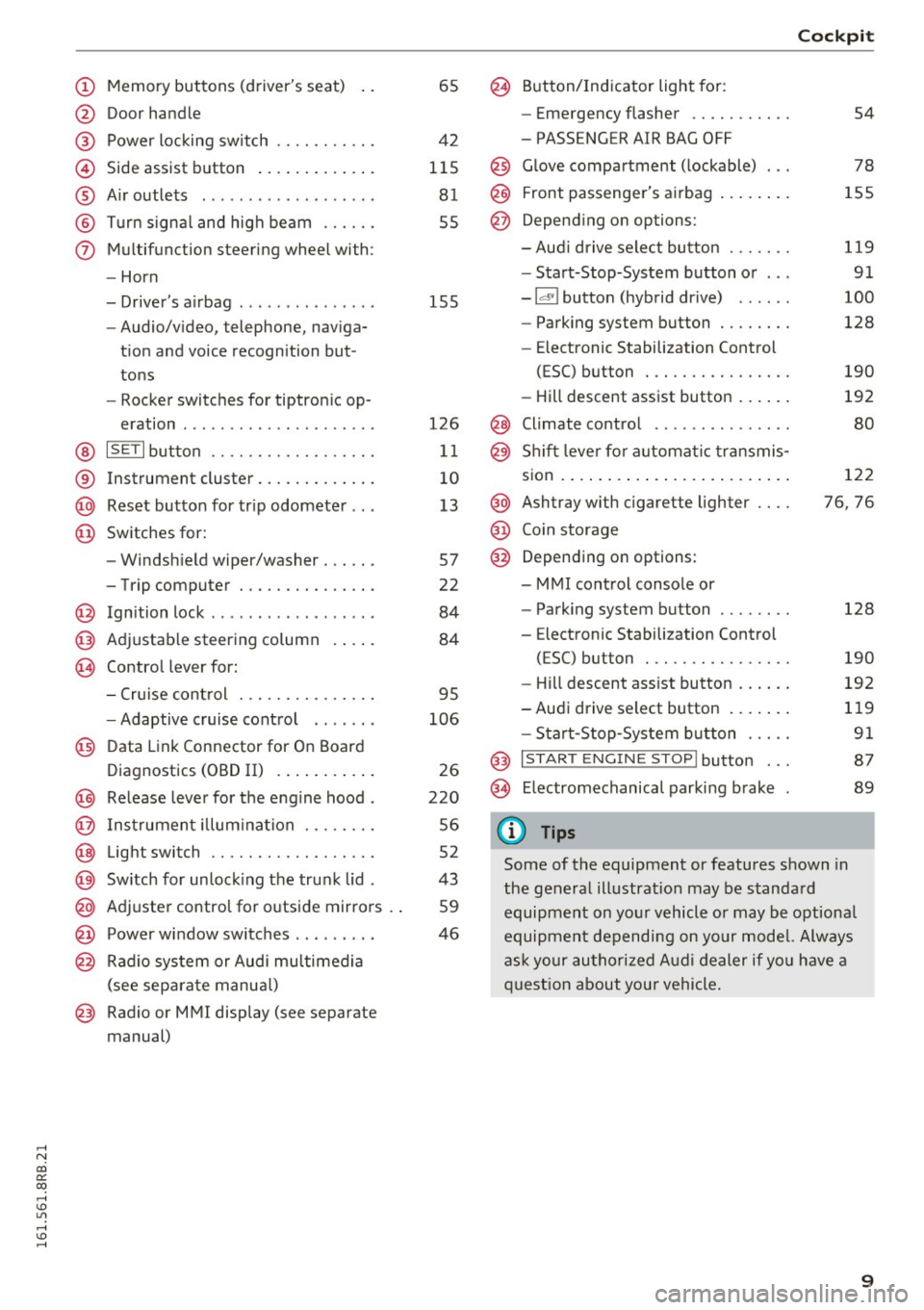
@ Door handle
@ Power locking sw itch .......... .
© Side assist button ............ .
® Air outlets ..... ........ .... . .
@ Turn signal and high beam ... .. .
(j) Multifunction steering wheel with:
- Horn
- Driver's airbag ..... ..... ... . .
- Audio/video, telephone, naviga-
tion and voice recognition but
tons
- Rocker switches for tiptronic op-
eration ............... ..... .
@ ISETI button ............... .. .
® Instrument cluster .......... .. .
@ Reset button for trip odometer .. .
@ Switches for:
- Windshield wiper/washer . .... .
- Trip computer ............ .. .
@ Ignition lock ................. .
@ Adjustable steering column
@ Control lever for:
65
42
115 81
55
155
126
11
10
13
57
22
84
84
- Cruise control . . . . . . . . . . . . . . . 95
- Adaptive cruise control . . . . . . .
106
@ Data Link Connector for On Board
Diagnostics (OBD II) . . . . . . . . . . .
26
@) Release lever for the engine hood . 220
@ Instrument illumination . . . . . . . . 56
@ Light switch . . . . . . . . . . . . . . . . . . 52
@) Switch for unlocking the trunk lid . 43
@ Adjuster control for outside mirrors . . 59
@ Power window switches . . . . . . . . . 46
@ Radio system or Audi multimedia
(see separate manual)
@ Radio or MMI display (see separate
manual)
@ Button/Indicator light for:
- Emergency flasher .......... .
- PASSENGER AIR BAG OFF
@ Glove compartment (lockable) .. .
@ Front passenger's airbag ....... .
@ Depending on options:
- Aud i drive select button ...... .
- Start-Stop-System button or .. .
- Id'! button (hybrid drive) ..... .
- Parking system button ....... .
- Elect ronic Stabilization Control
(ESC) button . .............. .
- Hill descent assist button ..... .
@ Climate control .. ............ .
@ Shift lever for automat ic transmis-
sion ..... ..... .. ............ .
@ Ashtray with cigarette lighter ... .
@ Coin storage
@ Depending on options:
- MMI control console or
- Parking system button ....... .
- E lectronic Stabilization Control
(ESC) button . .. ............ .
Cockpit
54
78
155
119
91
100
128
190
192
80
122
76, 76
128
190
- Hill descent assist button . . . . . . 192
-Audi drive select button . . . . . . . 119
- Start-Stop -System button . . . . . 91
@ I START ENGINE STOP! button . . . 87
@> Electromechanical parking brake 89
(D Tips
Some of the equipment or features shown in
the general illustration may be standard
equipment on your vehicle or may be optional
equipment depending on your model. Always
ask your authorized Audi dealer if you have a
question about you r vehicle.
9
Page 16 of 300
Instruments and indicator lights
Indicator lights
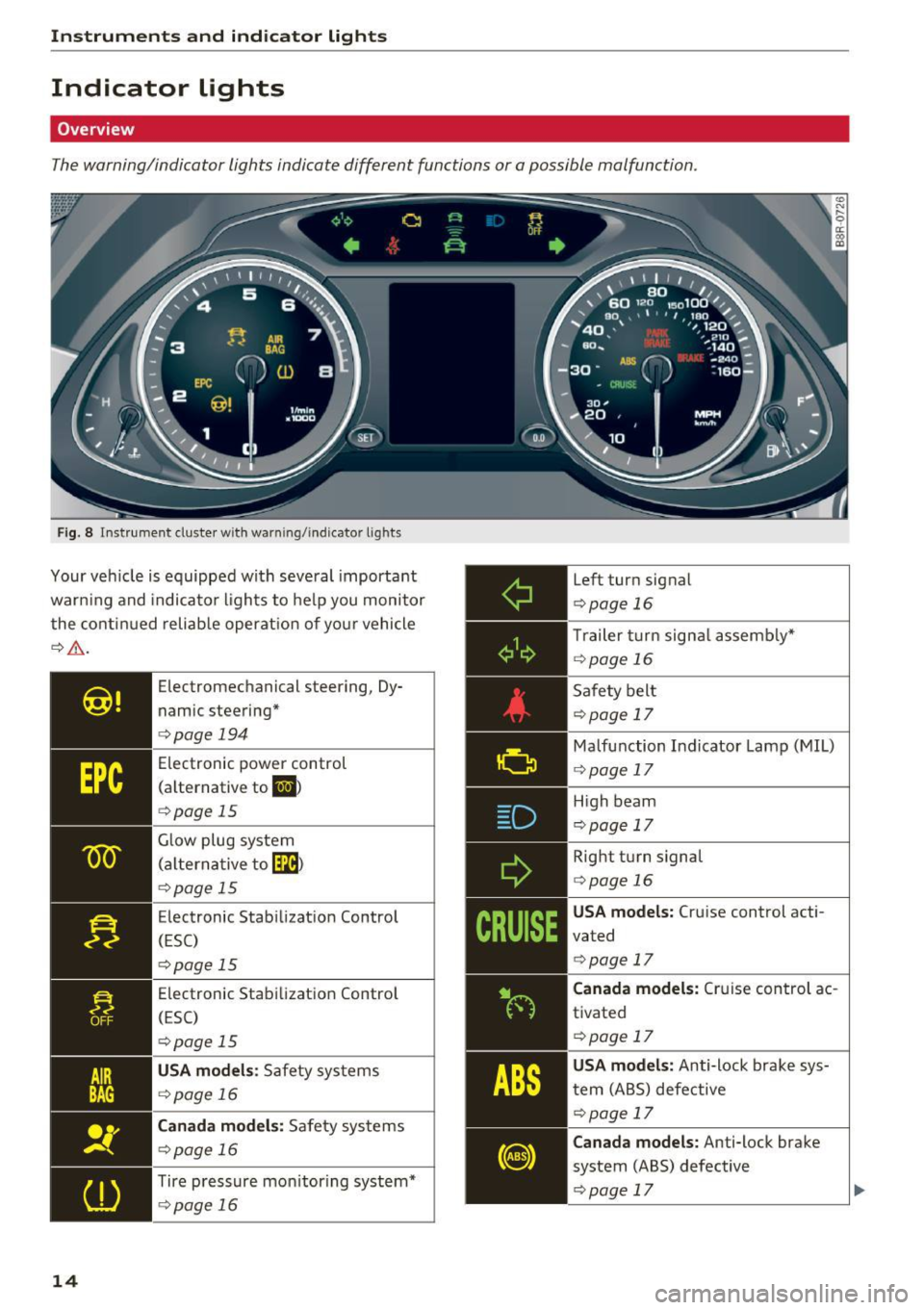
Overview
The warning/indicator lights indicate different functions or a possible malfunction.
Fig. 8 Instrument cluster w ith warn ing/indicator lights
Your vehicle is equipped with several important
warn ing and indicator lights to help you monitor
the continued reliable operation of yo ur vehicle
¢ ,6. .
14
Electromechanical steering, Dy
namic steering*
¢page 194
Electronic power control
(alternative to
El >
¢ page 15
Glow plug system
(alterna tive to~)
¢page 15
Electronic Stabilization Control
(ESC)
¢pag e 15
Electronic Stabilization Control
(ESC)
¢ page 15
USA models: Safety systems
¢page 16
Canada models: Safety systems
¢page 16
Tire pressure monitoring system*
¢page 16
Left turn signal
¢page 16
Trailer turn signal assembly*
¢page 16
Safety belt
¢page 17
Malfunction Indicator Lamp (MIL)
¢ page 17
High beam
¢pag e 17
Right turn signal
¢ page 16
USA models: Cruise control acti
vated
¢ page 17
Canada models: Cruise control ac
tivated
¢page 17
USA models: Anti-lock brake sys
tem (ABS) defective
¢page 17
Canada models: Anti-lock brake
system (ABS) defective
¢page 17
Page 18 of 300
Instruments and indicator lights
brakes still function with their normal power, but
ABS is not active.
Drive to your authorized Audi dealer or qualified
workshop immediately to have the malfunction
corrected.
A WARNING
If the 1111111 (USA models) ;II (Canada mod
els) brake system indicator light turns on to
gether with the ABS and ESC indicator lights,
the ABS/ESC regulating function may have
failed . Functions that stabilize the vehicle are
no longer available . This could cause the vehi
cle to swerve and increase the risk of sliding.
Drive carefully to the nearest authorized Audi
dealer or other qualified workshop and have
the malfunction corrected.
@ Tips
For add itional information on ESC and ABS,
refer to
¢ page 190.
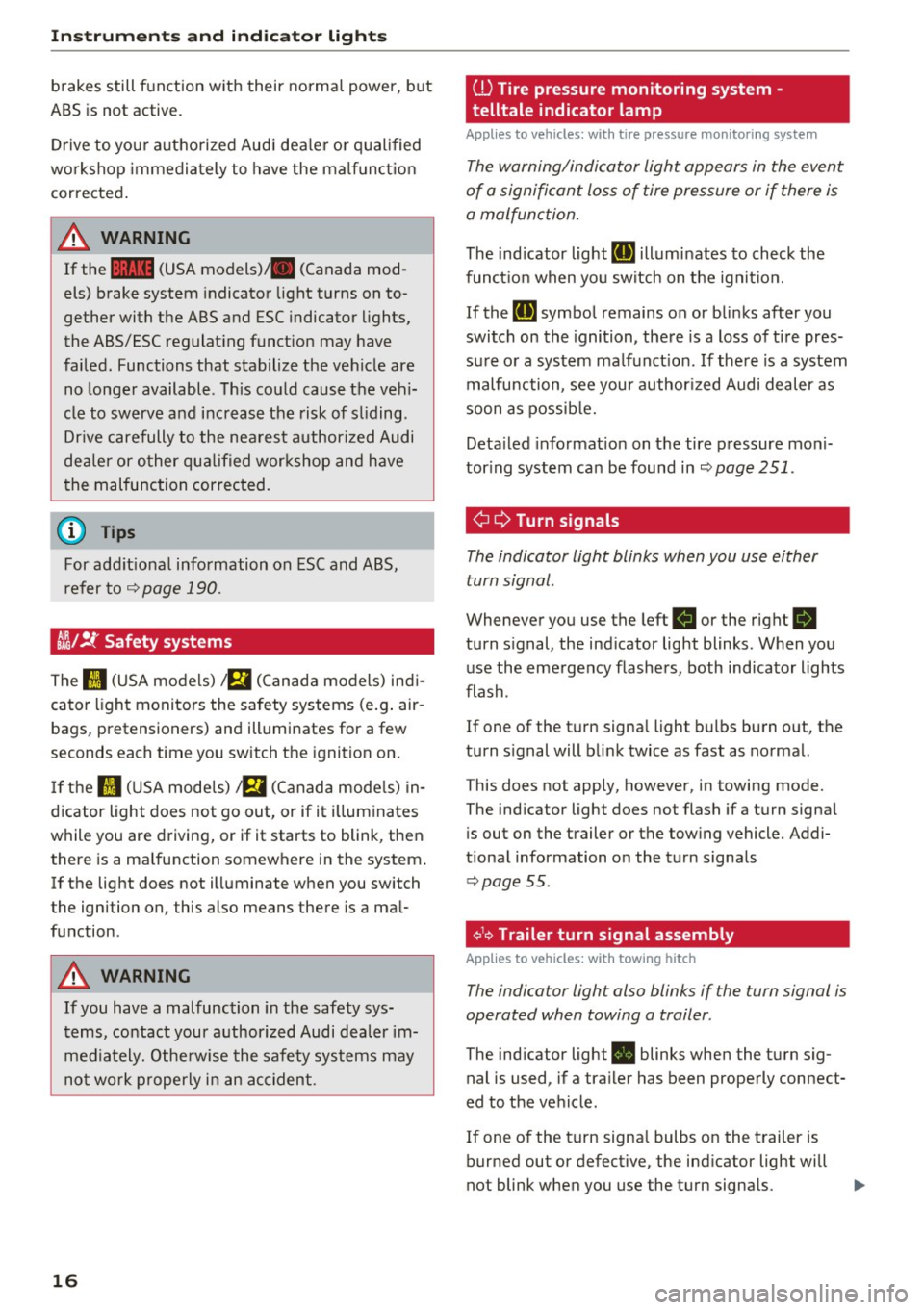
CJ};/ !f Safety systems
The II (USA models) !E,I (Canada models) indi
cator light monitors the safety systems (e.g . air
bags, pretensioners) and illuminates for a few
seconds each time you switch the ignition on.
If the II (USA models) !E,I (Canada models) in
dicator light does not go out, or if it illuminates
while you are driving, or if it starts to blink, then
there is a malfunction somewhere in the system.
If the light does not illuminate when you switch
the ignition on, this also means there is a mal
function .
A WARNING
If you have a malfunction in the safety sys
tems, contact your authorized Audi dealer im
mediately. Otherwise the safety systems may
not work properly in an accident.
16
ill Tire pressure monitoring system -
telltale indicator lamp
Applies to vehicles: with tire pressure mon itoring system
The warning/indicator light appears in the event
of a significant loss of tire pressure or if there is
a malfunction.
The indicator light RI] illuminates to check the
function when you switch on the ignition.
If the
RI] symbol remains on or blinks after you
switch on the ignition, there is a loss of tire pres
sure or a system malfunction. If there is a system
malfunction, see your author ized Audi dealer as
soon as possible.
Detailed information on the tire pressure moni
toring system can be found in
¢page 251.
¢¢ Turn signals
The indicator light blinks when you use either
turn signal .
Whenever you use the left Hor the right B
turn signal, the indicator light blinks. When you
use the emergency flashers, both indicator lights
flash .
If one of the turn signal light bulbs burn out, the
turn signal will blink twice as fast as normal.
This does not apply, however, in towing mode.
The indicator light does not flash if a turn signal
is out on the trailer or the towing vehicle. Addi
tional information on the turn signals
¢page 55.
¢1.~ Trailer turn signal assembly
Applies to vehicles: with towing hitch
The indicator light also blinks if the turn signal is
operated when towing a trailer .
The indicator light. blinks when the turn sig
nal is used, if a trailer has been properly connect
ed to the vehicle .
If one of the turn signal bulbs on the trailer is
burned out or defective, the indicator light will
not blink when you use the turn signals.
Page 22 of 300
Drive r inf orm ati on sy stem
Driver information
system
Introduction
General notes
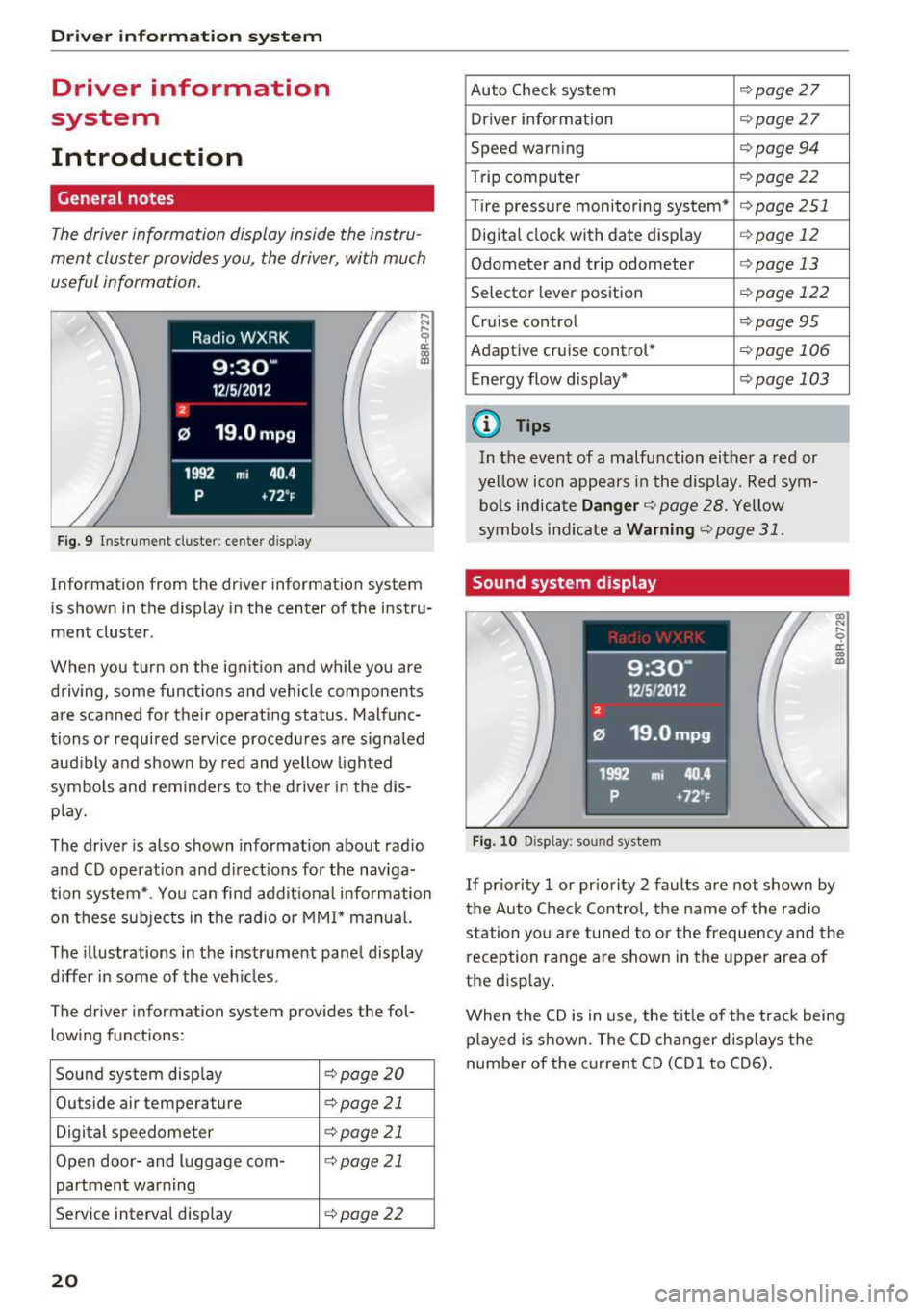
The driver information display inside the instru
ment cluster provides you, the driver, with much
useful information .
Fig. 9 Instrumen t cl uster: ce nter display
Information from the driver information sys tem
is shown in the display in the center of the instru
ment cluster .
When you turn on the ignition and while you a re
driving, some functions and vehicle components
are scanned for their operating status. Malfunc
tions or required service procedures are signaled
aud ibly and shown by red and yellow lighted
symbo ls and reminders to the d river in the dis
p lay.
The driver is also shown informat ion about rad io
and CD operat ion and direct ions for the naviga
tion system* . You can find addit ional information
on these sub jects in t he radio or MMI* manual.
The illustrations in the instrument panel display
differ in some of the veh icles .
The driver information system provide s the fol
lowing functions:
Sound system disp lay
¢ page20
Outside air tempera ture c:> page 21
Digital speedometer c:>page 21
Open door- and luggage com-¢page 21
partment warning
Service interval display
¢ page22
20
Auto Check system ¢page 27
Driver information c:>page 27
Speed warning c:>page 94
Trip computer ¢page22
Tire pressure monitoring system* c:> page 251
Digital clock with date display ¢ page 12
Odometer and trip odometer ¢page 13
Selector lever position ¢ pag e 122
Cruise control ¢ page 95
Adaptive cruise control * ¢page 106
Ene rgy flow d isplay* ¢ page 103
{D Tips
In the event of a malfu nction either a red or
ye llow icon appears in the display. Red sym
bo ls indicate
Danger ¢ page 28. Yellow
symbols ind icate a
Warning ¢ page 31.
Sound system display
Fig. 10 Disp lay : soun d system
If pr io rity 1 or pr iority 2 faults are not shown by
the Auto Check Control, the name of the radio
station yo u are tu ned to or the frequency and the
reception range are shown in the upper area of
the disp lay .
When the CD is in use , the tit le of the track being
played is shown. The CD changer d isp lays the
numbe r of the c urrent CD (CDl to CD6).
Page 40 of 300
Opening and clo sin g
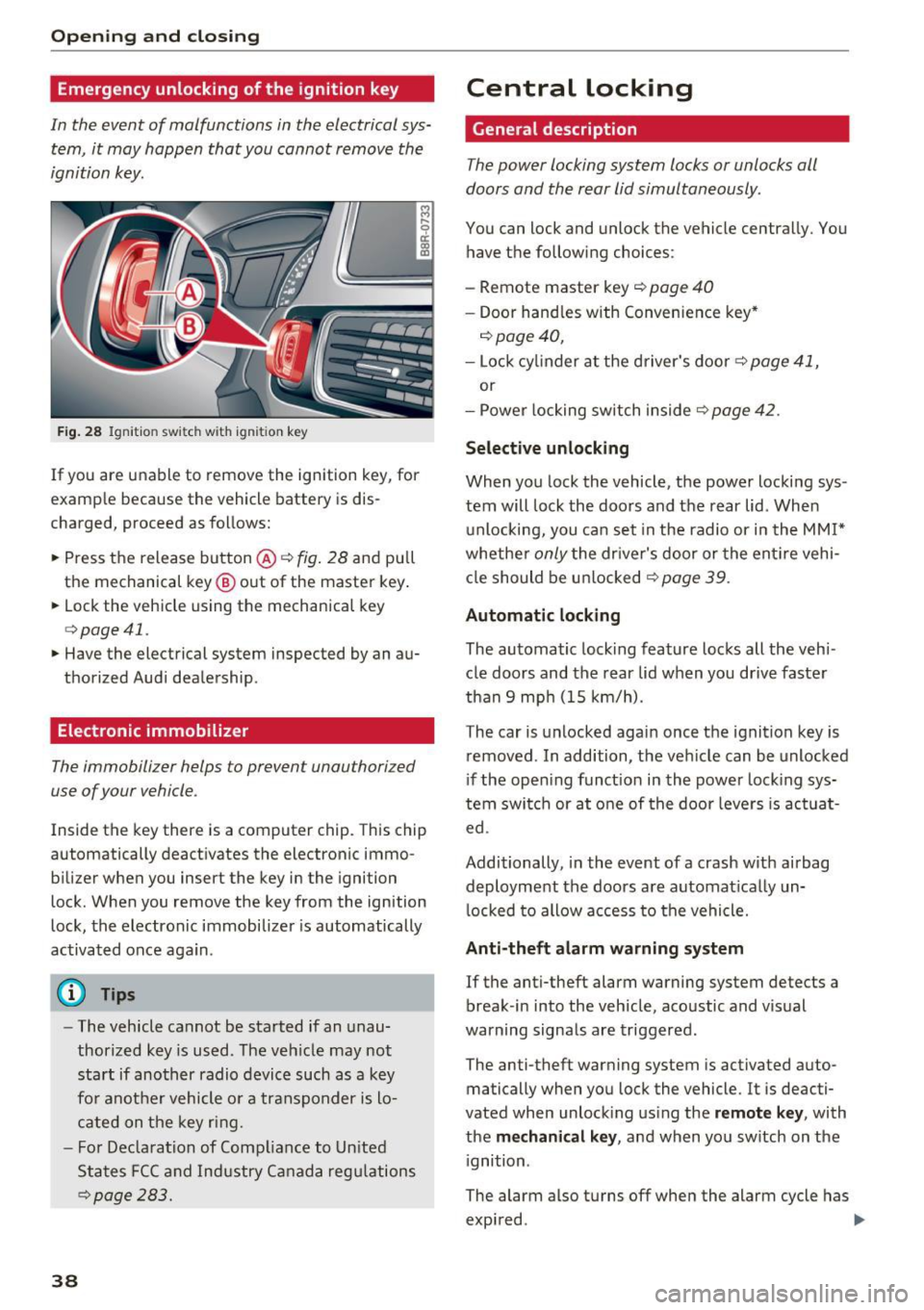
Emergency unlocking of the ignition key
In the event of malfunctions in the electrical sys
tem, it may happ en that you cannot remove the
ignition key.
Fig . 28 Ignit ion switch with ignition key
If you are unable to remove the ignition key, for
example because the vehicle battery is dis
charged, proceed as follows:
.. Press the release button @
c::> fig. 28 and pull
the mechanical key ® out of the master key .
.. Lock the vehicle using the mechanica l key
c::> page 41.
.. Have the electrical system inspected by an au
thorized Audi dealership.
Electronic immobilizer
The immobilizer helps to prevent unauthorized
use of your vehicle.
Inside the key there is a computer chip. This chip
automatically deact ivates the electronic immo
bilizer when you insert the key in the ignition
lock. When you remove the key from the ignition
lock, the electronic immobilizer is automatically
activated once again.
(D Tips
- The vehicle cannot be started if an unau
thorized key is used. The veh icle may not
start if another radio device such as a key
fo r anot her vehicle o r a transponder is lo
cated on the key ring.
- F or Declara tion of Comp liance to Un ited
States FCC and Industry Ca nada regu lations
c::> page 283.
38
Central Locking
General description
The power locking system locks or unlocks all
doors and the rear lid simultaneously.
You can lock and unlock the vehicle centrally. You
have the following choices:
- Remote master key
c::> page 40
- Doo r hand les w ith Convenience key*
c::> page 40,
- Lock cy linder a t the d river's door c::> page 41,
or
- Power locking switch inside
c::> page 42.
Select ive unlocking
When yo u lock the vehicle, the power locki ng sys
tem will lock the doo rs and the rear lid. When
u nlocking, you ca n set in the radio or i n the
MM I*
whethe r only the driver's door or the ent ire vehi
cl e should be u nlocked
c::> page 39.
Automatic locking
The automatic locking feature locks all the veh i
cle doors and the rear lid when you drive faster
than 9 mp h (15 km/h).
The car is unlocked agai n once the ignition key is
removed . In addition, the ve hicle can be unlocked
i f the open ing funct ion in the power lock ing sys
tem switch or at o ne of the door leve rs is act uat
ed.
Additionally, in the event of a crash w ith airbag
deployment the doors a re automat ica lly un
l ocked to allow access to the vehicle.
Anti-theft alarm warning system
If the anti-theft alarm warning system detects a
break-in into the veh icle, aco ustic and vis ual
warning signals are triggered.
The anti-theft warning system is activated auto
matically when you lock the vehicle. It is deacti
vated when unlock ing us ing the remote k ey , with
the
me chan ical key , and when yo u sw itch on the
i gnition.
The alarm also turns off when the alarm cycle has
expi red . .,..
Page 41 of 300
,....,
N
co
er::
co
,....,
When you unlock the vehicle, the turn signa ls
flash twice. When you lock the vehicle, the turn
signals flash once. If they do not flash, one of the
doors, the rear lid or the hood is not locked .
Unintentionall y loc king your self out
In the following cases there safeguards to pre
vent you locking yo ur remote master key in the
veh icle:
- T he veh icle does not lock with the power lock
ing switch ~
page 42 if the dr iver's door is
open .
- On vehicles with Co nvenience key*, if the most
recently used master key is in the luggage com
partment, the rear lid is automatically un locked
again after it is closed.
Do not lock you r vehicle with the
remot e ma st e r
ke y or C onvenience key *
unti l all doors and the
r ear lid are closed . In t his way you avoid locking
yourse lf out accidentally.
& WARNING
- When you leave the vehicle, always remove
the ignition key and take it with you. This
will prevent passengers (children, for exam
ple) from accidentally being locked in the
vehicle should they acc identally press the
power locking switch in the front doors.
- Do not leave children inside the vehicle un
su perv ised. In an emergency it wou ld be im
poss ible to open the doors from the outs ide
withou t the key.
(D} Tips
- In the event of a crash with airbag deploy
ment all locked doors w ill be automatically
unlocked to give access to the veh icle occu
pants from the outside.
- If the power lock ing system should mal
funct ion, you can lock the dr iver's door us
i ng the me chanical key~
page 42.
- If the power lock ing system should fail, you
ca n still open the fuel tan k flap in an eme r
gency
~page 216.
-You are well adv ised not to keep valuables
:;;: inside an unattended vehicle, v is ible or not.
,....,
Op ening and cl osing
Even a properly locked vehicle cannot p ro
vide the security of a safe.
- If the LED in the upper edge of the driver's
door pane l comes on for about 30 seconds
after the vehicle is locked, there is a mal
function in the power locking or the anti
theft warning system. Have the malfunction
corrected by an authorized Aud i dealership
or qualified repair fac ility.
Setting power locking
The driver can determine the functions for power
locking in the radio or in the MMI* .
.. Select: !CAR I function button> Cent ral locki ng .
Or
.,. Select:
!CAR I function button > Car syst ems *
control button > Vehicl e setting s> (Ce ntr al
loc king )* .
Unloc king single door /Unloc k doo rs -
you can
specify which doors unlock when you open the ve
hicle .
-Select ing Off /All and pressing the IQ] button on
the remote control key unlocks the entire vehi
cle .
- Select ing
On /Dri ver and pressing the IQ] button
on the remote control key once unlocks only
the dr iver's door. In vehicles w ith a convenience
key*, only the door whose handle you pull will
un lock. If you press the
Im button tw ice, the en
tire veh icle w ill unlock.
If you press the I:@ but
ton, the entire ve hicl e w ill always lock .
Trunk lid/tailgate /lock e xterior trunk handle -if
you select
On , the rea r lid handle locks
c=> page 43, fig. 35 . In this case, the rear lid can
be opened with the
l asl bu tto n on the master key
c=> page 40, fig. 29 or with the~ button in the
driver's door
c:> page 43, fig . 34 .
Fold mirrors * -if you se lect On , the outside m ir
rors w ill fold i n autom atic ally when you press the
Im but ton on the remote control key c:> page 59.
Confirmation ton e/Tone wh en lo cking -if you
select
On , a tone w ill sound when you lock the ve
hicle.
39
Page 42 of 300
Opening and clo sin g
Unlocking and locking the vehicle with the
remote control
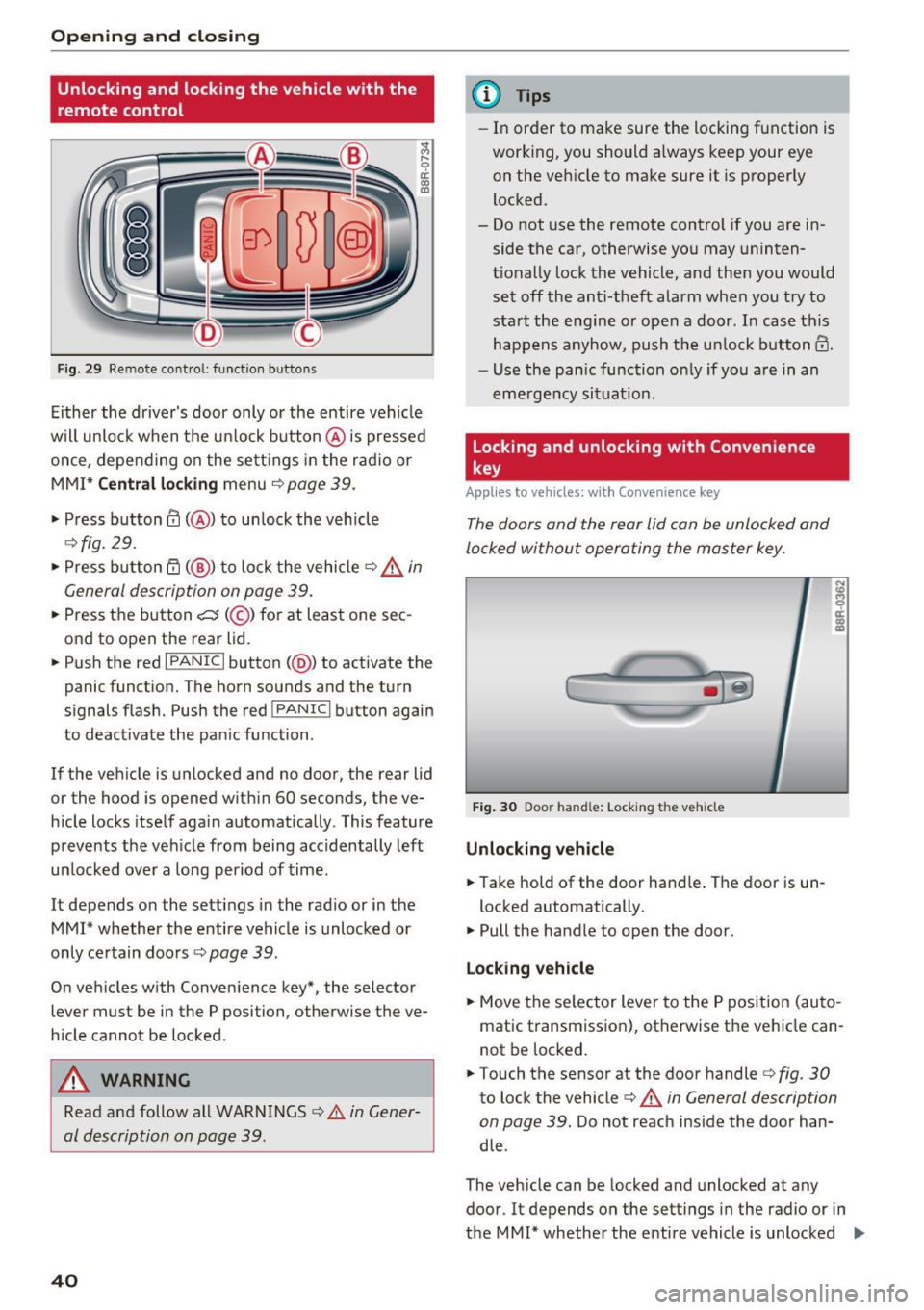
Fig. 29 Remo te cont ro l: function b uttons
Ei ther the driver's door only or the entire vehicle
wil l unlock when the u nlock button @is pressed
once, depe nd ing on the sett ings in the radio or
MMI*
C entral l ocking menu ¢page 39.
• Press button@( @) to un lock the vehicle
¢ fig. 29.
• Press button rfl (@ ) to lock the vehicle ~.&. in
General description on page 39.
• Press the button c::5 (@ ) for at least one sec
ond to open the rear lid.
• Push the red
I PANIC I button (@ ) to act ivate the
panic funct ion. The horn sounds and the turn
signals flash. Push the red
! PANIC I button again
to deactivate the pan ic function .
If the veh icle is unlocked and no door, the rear lid
or the hood is opened with in 60 seconds, the ve
h icle locks itself aga in automatically. This feature
prevents the veh icle from being accidentally left
un locked over a long period of time.
It depends on the settings in the rad io or in the
MMI* whether the entire vehicle is unlocked or
only ce rtain doo rs
r:!> page 39.
On veh icles w ith Conven ience key*, the selector
lever must be in the P position, otherw ise the ve
h icle cannot be locked .
A WARNING
Read and follow all WARNINGS ¢ A in Gener
al description on page 39.
40
@ Tips
- In order to make sure the locking function is
working, you should a lways keep your eye
on the vehicle to make sure it is properly
locked.
- Do not use the remote control if you are in side the car, otherwise you may uninten
tionally lock the vehicle, and then you would
set off the anti-theft alarm when you try to
sta rt the eng ine or open a door. In case this
happens anyhow, push the un lock button@.
- Use the pan ic function on ly if you are in an
eme rgency situat io n.
Locking and unlocking with Convenience
key
App lies to vehicles : wi th Convenience key
The doors and the rear lid can be unlocked and
locked without operating the master key.
Fig . 30 Door ha nd le: Lock ing the vehicle
Unlocking vehicle
• Take hold of the door hand le . The door is un -
locked automatically.
• Pull the handle to open the door .
Lo ck ing v ehicle
• Move the se lector lever to the P pos ition (au to
matic transmission), otherwise the vehicle can
not be locked.
• Touch the sensor at the door handler:!>
fig. 30
to lock the vehicle c:> A in General description
on page 39.
Do not reach inside the door han
dle .
The vehicle can be locked and unlocked at any
door. It depends on the sett ings in the radio or in
the MMI* whether the entire vehicle is unlocked
II>-
Page 47 of 300
..... N
co ~ CX)
..... I.Cl U"I
..... I.Cl .....
-Always ensure that no one is within range of
the rear lid when it is moving, in particular
close to the hinges and the upper and lower
edges - fingers or hands can be pinched.
- To help prevent poisonous exhaust gas from
being drawn into the veh icle, always keep
the rear lid closed while driving . Never
transport objects larger than those which fit
completely into the luggage area, because
then the rear lid cannot be fully closed.
- Never leave your vehicle unattended espe cially w ith the rea r lid left open . A chi ld
cou ld crawl into t he car thro ugh the luggage
compartmen t and pull the lid shut, becom
ing trapped and unable to get out. To re
duce the risk of persona l injury, never let
children p lay in or around your veh icle. Al
ways keep the rear lid as well as the vehicle
doors closed when not in use.
- If there is a l uggage rack or bicycle rack
mounted on the rear lid, it may not be able
to open completely or an opened rear lid may close by itself because of the added
we ight. So the open rear lid must be sup
ported or the weight must be removed from
the luggage rack first.
(O} Tips
- As soon as the electrical connection to the
trailer socket is completed on vehicles with
a factory installed tow ing hitch, or a t railer
hitch that was instal led later ac co rding to
factory specifications, the a utomat ic rear lid
funct ion can only be ope rated via the handle
in the rear lid.
- If the vehicle battery charge drops below a ce rtain level, you can still open or close the
rear lid manually, however, you will need to
apply more force to close it .
- If the rear lid on a locked vehicle is unlocked
with the middle button
,c:$ on the remote
key, the rear lid is automatically locked
again immediately after closing. This is ind i
cated by the turn signals bli nking .
- The following applies to veh icles equipped
with the Convenience key* feature: if the re mote control key is left in the luggage com
partment, luggage compartment w ill auto-
Op enin g an d clos ing
matically unlock itse lf after you lock the ve
hicle. This prevents you from unintentiona l
ly locking yo ur key in the luggage compart
ment.
Emergency unlocking of
the luggage compartment lid
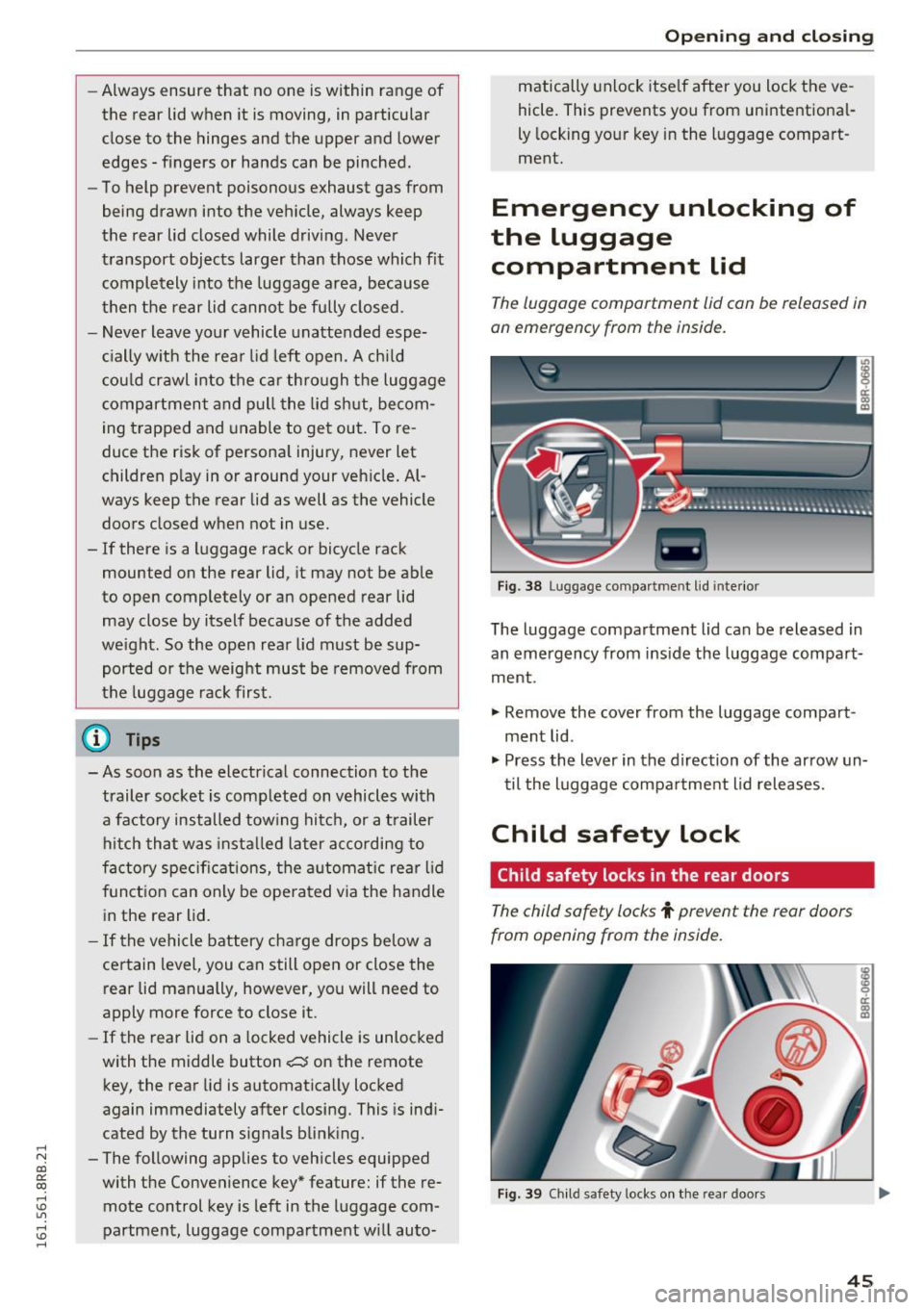
The luggage compartment lid can be released in
an emergency from the inside.
F ig . 3 8 Luggage compa rt me nt lid inte rior
The luggage compartment lid can be released in
an emergency from ins ide the luggage compart
ment .
.,. Remove the cover from the luggage compart
ment lid .
.,. Press the lever in the d irection of the ar row un
til the luggage compa rtme nt l id releases.
Child safety lock
Child safety locks in the rear doors
The child safety locks t prevent the rear doors
from opening from the inside.
F ig . 39 Ch ild safety locks on the rea r doors
45
Page 51 of 300
..... N
co ~ CX)
..... I.Cl U"I
..... I.Cl .....
Operation
Applies to vehicles: with garage door opener (Homelink)
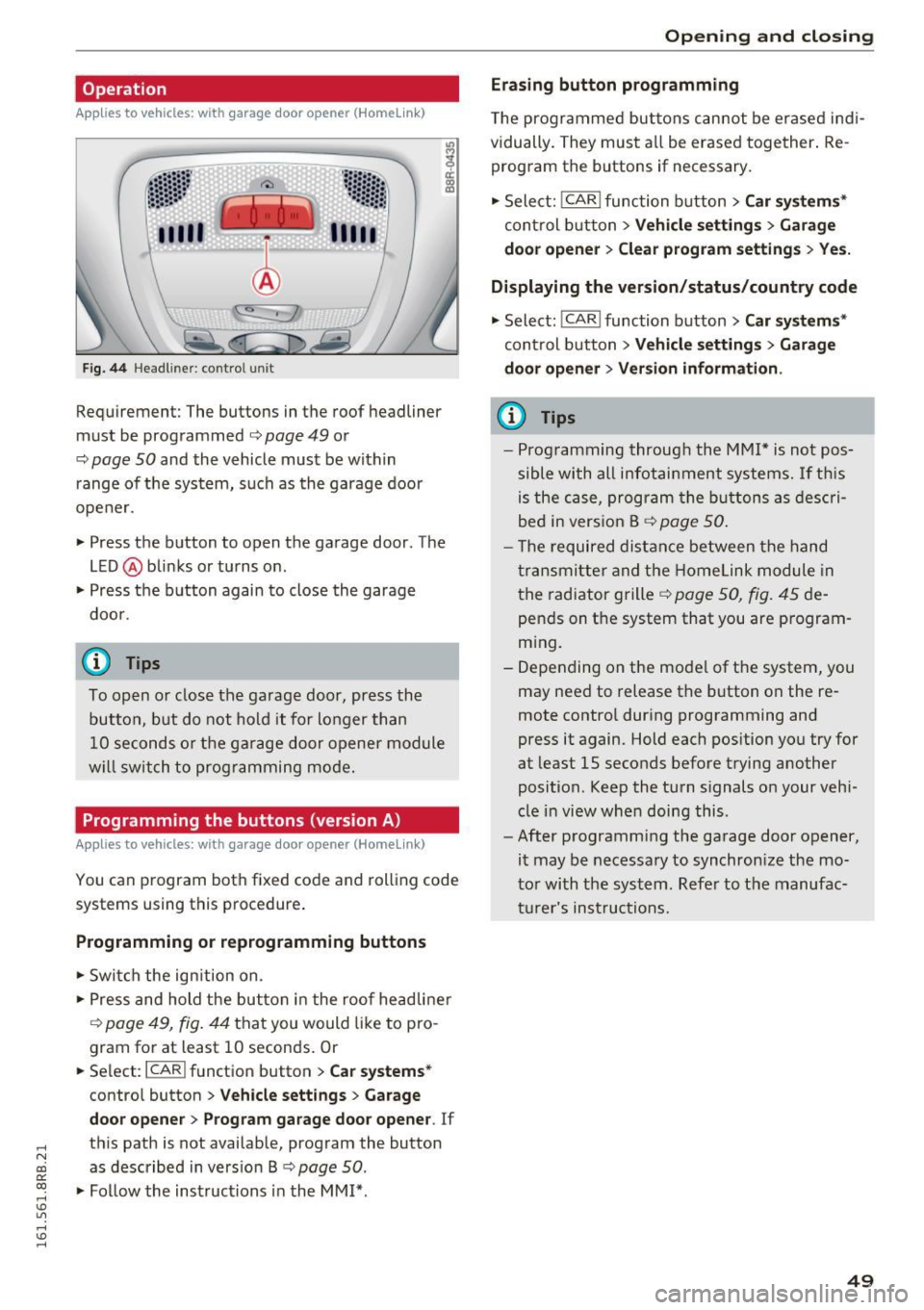
Fig. 44 Headl iner: c on tro l uni t
Requiremen t: The buttons in the roof headliner
must be programmed
c:> page 49 or
c::> page 50 and the vehicle must be within
range of the system, such as the garage door
opener.
" Press the button to open the garage door . The
LED @blinks or turns on .
" Press the button again to close the garage
door .
@ Tips
To open or close the garage door, press the
button, but do not hold it for longer than
10 seconds or the garage door opener module
will switch to programming mode.
Programming the buttons (version A )
Applies to vehicles: with garage door opener (Homelink)
You can program both fixed code and rolling code
systems using this procedure.
Programming or reprogramming buttons
"Switch the ignition on .
"Press and hold the button in the roof headliner
c::> page 49, fig. 44 that you would like to pro
gram for at least
10 seconds. Or
.. Select:
I CAR I function button > Car systems*
control button > Vehicle settings > Garage
door opener> Program garage door opener .
If
this path is not available, program the button
as described in version B
c::> page 50.
"Follow the instructions in the MMI* .
Opening and closing
Erasing button programming
The programmed buttons cannot be erased indi
vidually. They must all be erased together. Re
program the buttons if necessary.
"Select:
! CAR ! function button> Car systems*
control button > Vehicle settings > Garage
door opener> Clear program settings > Yes.
Displaying the version/status/country code
"Select: ! CAR ! function button> Car systems*
control button > Vehicle settings > Garage
door opener> Version information.
(D Tips
- Programming through the MMI* is not pos
sible with all infotainment systems. If this
is the case, program the buttons as descri
bed in version B
c::> page 50.
- The required distance between the hand
transmitter and the Homelink module in
the radiator grille
c::> page 50, fig. 45 de
pends on the system that you are program
ming.
- Depending on the model of the system, you
may need to release the button on the re
mote control during programming and
press it again. Hold each position you try for
at least
15 seconds before trying another
position . Keep the turn signals on your vehi
cle in view when doing this .
- After programming the garage door opener,
it may be necessary to synchronize the mo
tor with the system. Refer to the manufac
turer's instructions.
49
Page 52 of 300
Opening and clo sin g
Programming the buttons (version B)
Applies to vehicles: with garage door opener (Homelink)
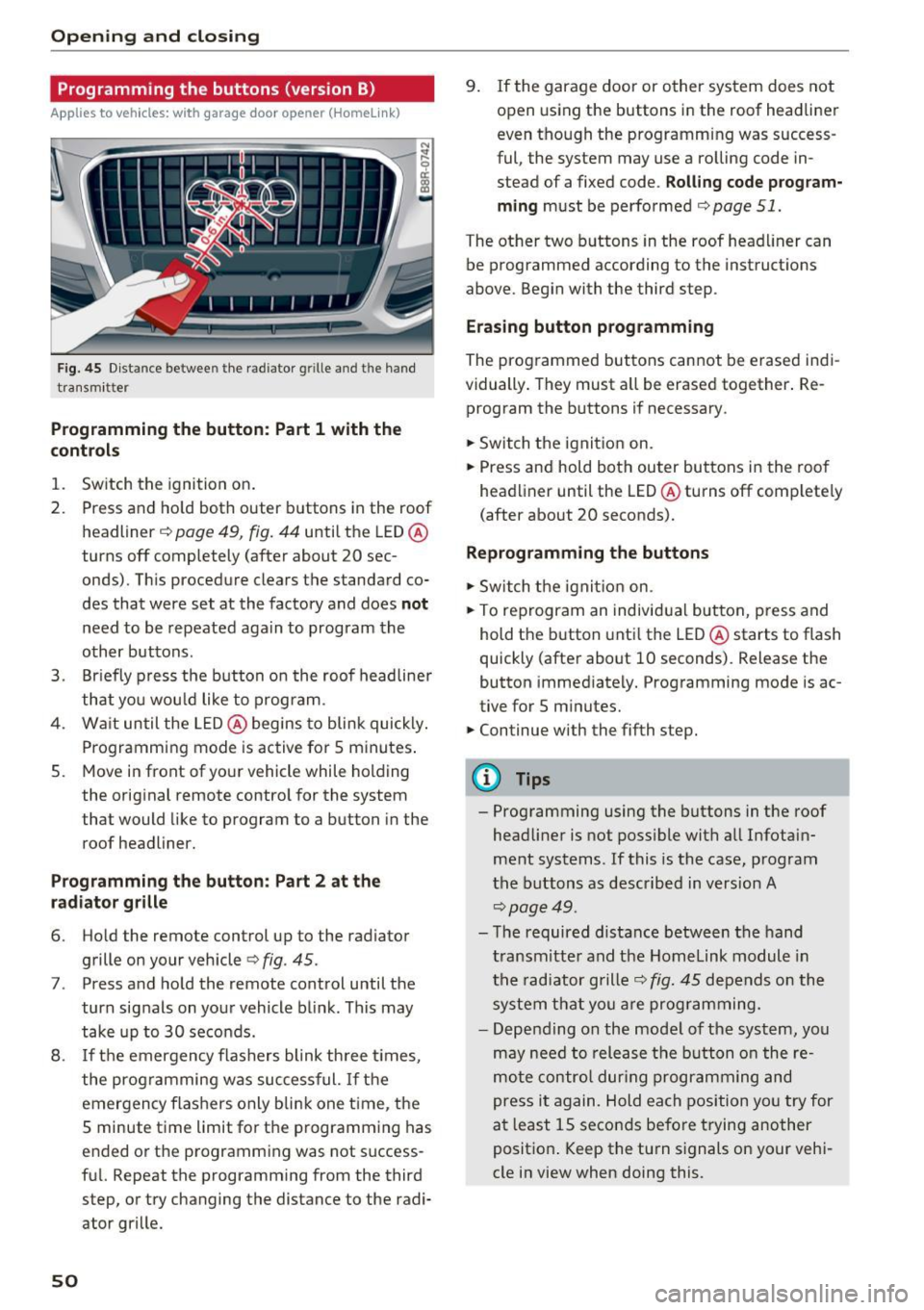
Fig. 45 Dist an ce betwee n th e rad iator g rille an d th e hand
tra nsm itt er
Programming the button : Part 1 with the
contr ols
1. Switch the ignition on.
2. Press and ho ld both outer buttons in the roof
headliner ~
page 49, fig. 44 until the LED @
turns off completely (after about 20 sec
onds). This procedure clears the s tandard co
des that were set at the factory and does
not
need to be repeated again to program the
other buttons .
3. Br iefly p ress the b utton o n the roof headliner
that you wou ld like to program .
4. Wa it until the LED @ begins to blink quickly .
Programming mode is active for 5 minutes .
5. Move in front of yo ur vehicle while holding
the original remote control for the system
t hat would like to program to a button in the
roof headliner.
Prog ramming th e butt on : Part 2 at the
r a d iat or gr ille
6. Ho ld the remote control up to the radiator
grille on your vehicle¢
fig. 45 .
7. Press and hold the remote control until the
turn signals on your vehicle blink . This may
take up to 30 seconds.
8 .
If the emergency flashers blink th ree t imes,
the programming was suc cessful.
If th e
emergency flashers only b lin k one t ime , the
5 minute time limit for the p rogramming has
ended or the programm ing was not success
fu l. Repeat the programming from the third
step, or try changing the distance to the radi
ator grille.
50
9. If the garage door or other system does not open using the buttons in the roof headliner
even though the programming was success
ful , the system may use a ro lling code in
s tead of a fixed code .
Rolling code prog ram
m ing
must be performed ¢ page 51.
The other two b uttons in the roof head liner can
be programmed according to the instruct ions
above . Begin with the third s tep .
Era sing button prog ramm ing
The prog rammed buttons cannot be erased indi
vidually . They must a ll be erased tog ether . Re
program the buttons if necessary .
.. Switch the ignit io n on.
.. Press and hold both outer bu ttons in the roof
headliner until the LED @turns off comp lete ly
( after about 20 seconds).
Reprogramm ing the buttons
.. Switch the ignit io n on .
.. To reprogram an individual button, press and
hold the button unti l the LED @starts to flash
quickly (after about 10 seconds) . Release the
button immed iately. Programming mode is ac
tive for 5 m inu tes.
.. Continue with the fifth step.
@ Tips
- Programming using the buttons in the roof
headliner is not possible with all Infotain
ment systems . If this is the case, program
the buttons as descr ibed in version A
¢ page 49 .
-The required distance between the hand
transm itte r and the Homelink module in
the radiator grille~
fig. 45 depends o n the
system that you a re prog ramming.
- Depending on the mode l of the system, you
may need to release the b utton o n the re
mote contro l dur ing programming and
press it again. Hold each position yo u try for
a t least 15 seconds before trying another
posit ion . Keep the turn s ignals on your vehi
cle in view when doing this .