turn signal AUDI Q5 2016 User Guide
[x] Cancel search | Manufacturer: AUDI, Model Year: 2016, Model line: Q5, Model: AUDI Q5 2016Pages: 300, PDF Size: 75.02 MB
Page 55 of 300
..... N
co ~ CX)
..... I.Cl U"I
..... I.Cl .....
-Some exterior lighting functions can be a d
j u sted
¢page 53 .
-When yo u remove your key from the igni
tion while the vehicle's lights are t urne d on,
a buzzer sounds as long as the driver's door
i s open.
- In coo l or damp weather, the inside of the
headlights, turn signals and tai l lights can
fog over d ue to the temperature d ifference
between the inside and outs ide. They will
clea r short ly after switch ing them on. This
does not affect the serv ice life of the lig ht
i ng .
- In the event of a light sensor malfunct ion,
the d river is not ifi ed in t he i nstr ument clus
te r dis play¢
pag e 32.
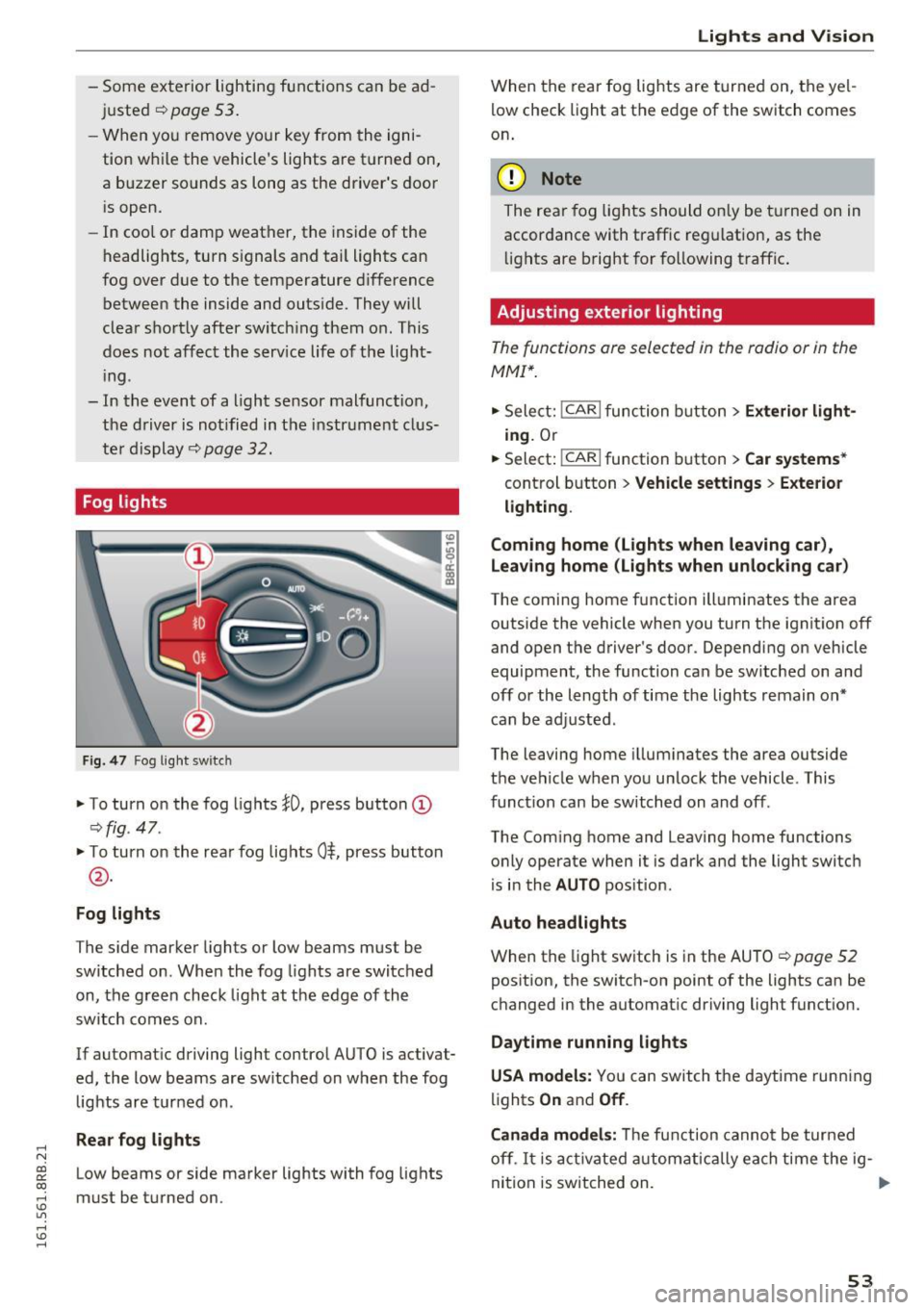
Fog lights
Fig . 4 7 Fog ligh t sw itc h
"To turn on the fog lights }O, press button (D
¢ fig. 47.
"T o turn on the rea r fog lights 0$, press but ton
@ .
Fog lights
The s ide marker lights or low beams must be
switche d on. When the fog lights are switc hed
on, the g reen check light at the edge of the
sw itch comes on.
If automat ic driving light control AUTO is activat
ed, the low beams are sw itched on w hen the fog
lights are tur ned on .
Rear fog lights
Low beams or side marker lights with fog lights
must be t urned on .
Lights and V ision
W hen the rear fog lights are t urned on, the yel
l ow check light at the edge of the switch comes
on .
(D Note
The rear fog lig hts should o nly be t urne d on in
accor dance with traffic reg ulation, as the
li g hts are b right for f ollowing traffic .
Adjusting exterior lighting
The functions are selected in the radio or in the
MMI*.
"Sele ct: !CAR ! func tion b utton> Exterior light
ing .
Or
.. Select:
-,c- A- R~I function button > Car systems *
control b utton > Vehicle settings > Exterior
lighting .
Coming home (Lights when leaving car ),
Leav ing home (Lights when unlock ing car )
The coming home f unction illuminates the area
outside the vehicle when you turn the ignit ion off
and open the d river's doo r. Dependi ng on vehicle
equipment, the function can be sw itched on and
off or the length of time the lights remain on*
c an be ad justed .
The leaving home i llum inates the area outside
t h e ve hicle when you un lock the vehicle . This
funct ion can be switched on and off .
The Com ing home and Leaving home functions
o nly operate when it is dark and the light switch
i s i n the
AUTO pos it ion.
Auto headlights
When the light sw itch is in the AU TO ¢ page 52
pos ition, the switch-on point of the lights can be
changed in the automat ic driving light funct ion.
Daytime running lights
USA models: You can switch the daytime runn ing
li ghts
On and Off .
Canada models:
Th e fu nction canno t be turned
off .
It is a ct ivate d automatica lly ea ch time the ig-
ni tio n i s switched on. ..,
53
Page 56 of 300
Lights and Vision
Tra ve l m ode ( Canada models )*
The headlight beam is asymme trical. This pro
vides stronger i llumination on the side of the
road on which you are driving. If you are driving
i n a country that drives on the opposit e sid e of
the road from your own country , this will cause
g lare for oncoming dr ivers . To prevent glare:
- Travel mode must be selected in vehicles with
Xenon headlights *.
- In vehicles with halogen headlights, certain
areas of the headlight lenses must be covered
with waterproof adhesive covers that prevent
li ght from pa ssing through. For more informa
tion, please see your authori zed Audi dea ler or
autho rized repair facility .
(!) Tips
When travel mode* is activated, a display in
the driver information system ind icates this
each t ime yo u switch the ignition on.
Adaptive light
Applies to vehicles: with adaptive ligh t
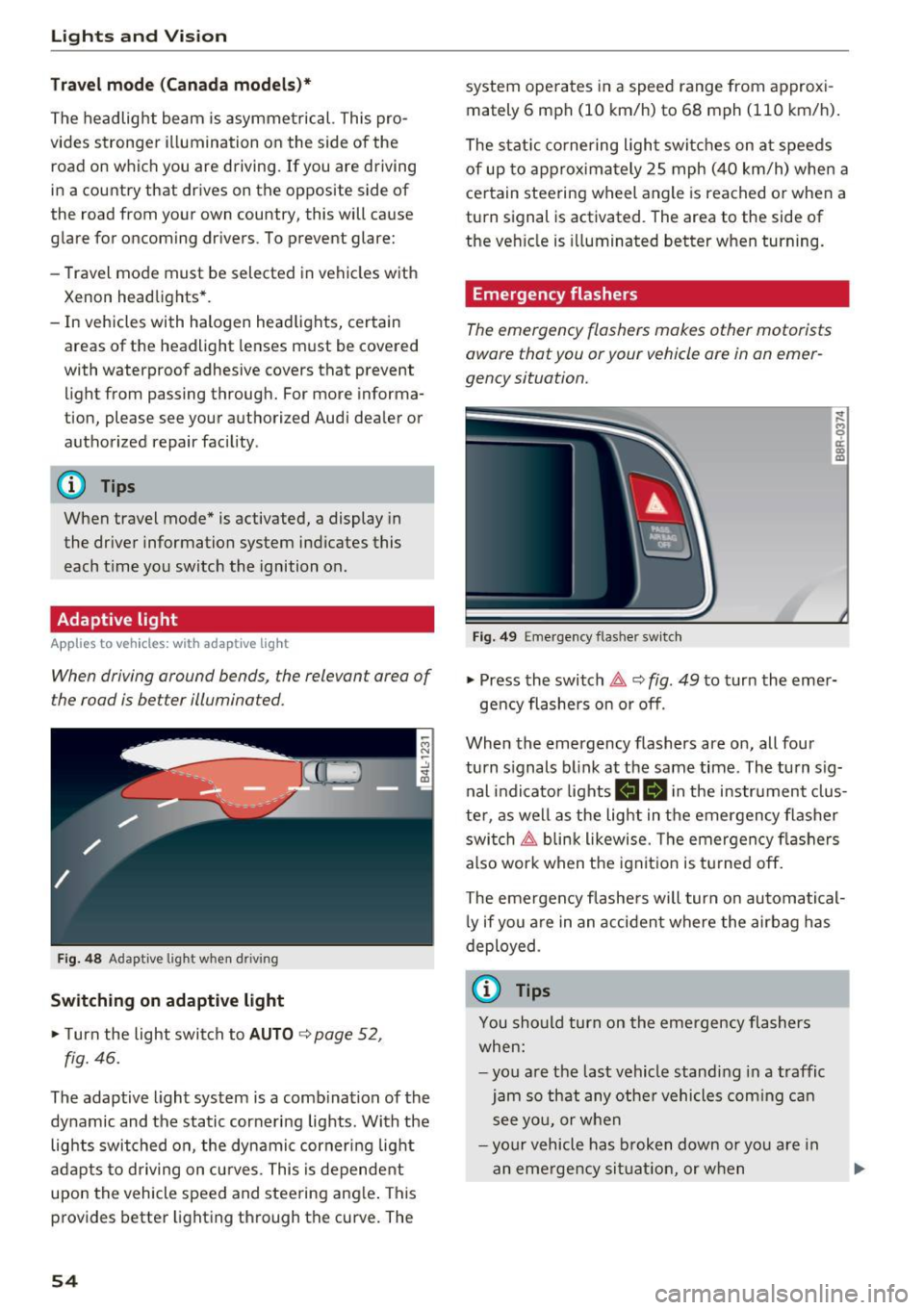
When driving around bends, the relevan t area of
the road is be tter illuminated.
Fig. 4 8 Adapt ive lig ht when d riving
Switching on adaptive light
~ T urn the light swit ch to AUTO ~ page 52,
fig. 46.
The adaptive light system is a comb ination of the
dynamic and the static cornering lights . With the
lights switched on , the dynamic cornering light
a dapts to driving on cu rves. This is dependent
upon the vehicle speed and steering ang le . This
provides better lighting through the curve. The
54
system ope rates in a speed range from approxi
mately 6 mph (10 km/h) to 68 mph (110 km/h) .
The stat ic co rnering ligh t switc hes on a t speeds
of up to approxima tely 25 mph (40 km/h) whe n a
ce rtain steering w heel angle is reached o r whe n a
turn signal is activated . The area to the side of
the ve hicle is illuminated better when turning.
Emergency flashers
The emergency flashers makes other motorists
aware that you or your vehicle ore in an emer
gency situation.
Fi g. 49 Eme rge ncy f las her switch
~
9 a: (X) m
~ Press the switch~ c::> fig. 49 to turn the eme r-
ge ncy flashers on or off .
When the emergency flashers are on, all four
turn s ignals b link at the same time. The turn s ig
nal indicator lights
II Bi n the instrument clus
te r, as we ll as the light in t he emergency flasher
swi tch ~ blin k likewise . T he emergency fl ashers
also work when t he ign it ion is tu rned o ff.
The eme rgency flashe rs will turn on automatical
l y if you a re in an acci dent where the air bag has
deployed .
(j) Tips
You should turn on the eme rgency flashers
when:
- yo u are t he last vehicle s tandi ng in a traffic
jam so th at any othe r vehicles com ing c an
s ee yo u, or whe n
- you r vehicle has broken down o r yo u are in
an eme rge ncy si tuati on, or w hen
Page 57 of 300
..... N
co ~ CX)
..... I.Cl U"I
..... I.Cl .....
-your vehicle is being towed by a tow truck or
if you are towing another vehicle behind
you .
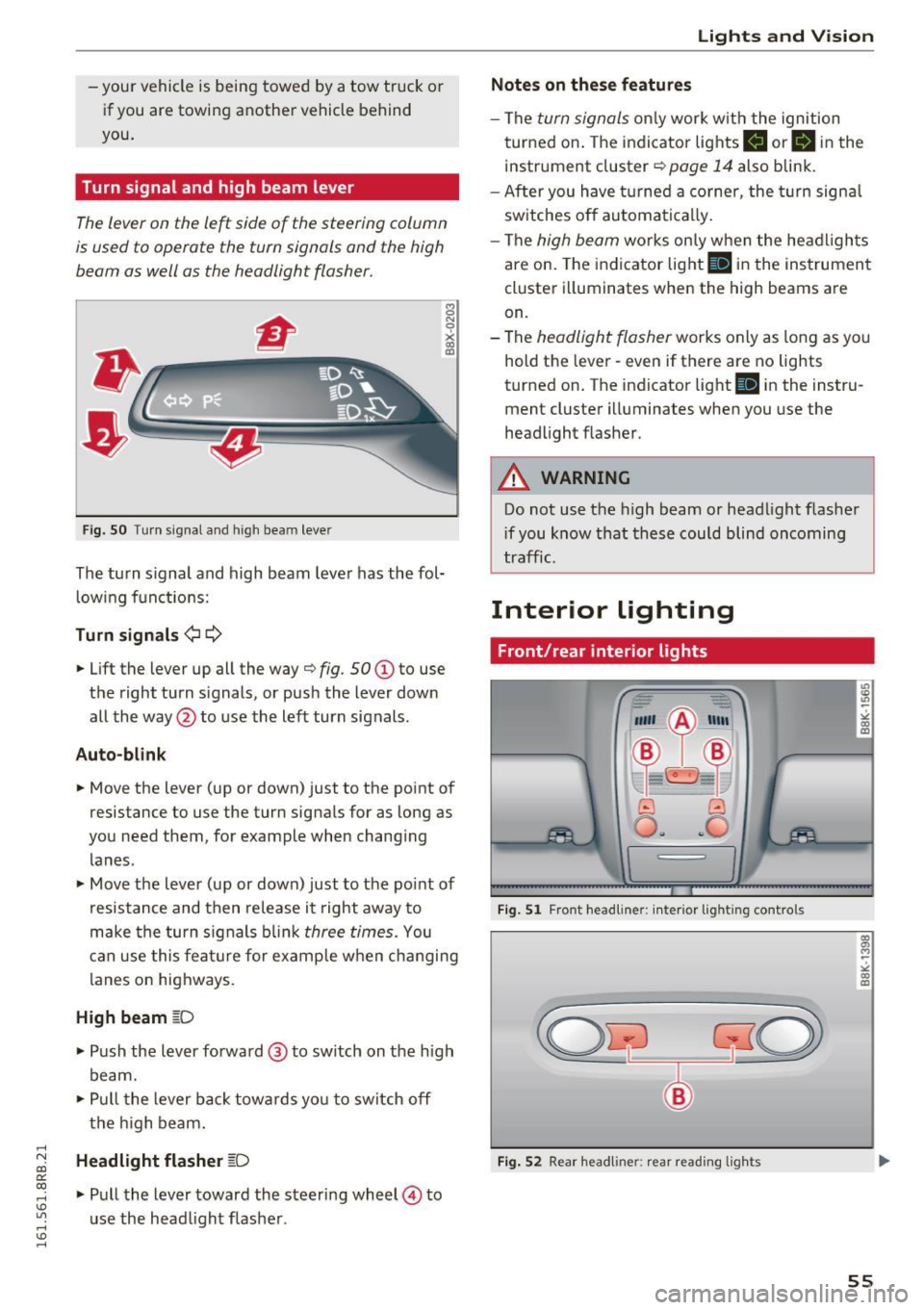
Turn signal and high beam lever
The lever on the le~ side of the steering column
is used to operate the turn signals and the high
beam as well as the headlight flasher.
Fig. SO Tu rn signal and high bea m lever
The turn s ignal and high beam lever has the fol·
lowing functions:
Turn signals ¢¢
8 N
0
~ IXI
• Lift the lever up all the way¢ fig. 50 (D to use
t h e right turn s ignals, or push the lever down
all the way @to use the left turn signals .
Auto-blink
• Move the lever (up or down) just to the point of
resistance to use the turn signa ls for as long as
you need them, for example when changing lanes .
• Move the lever (up or down) just to the point of
resistance and then release it right away to
make the turn s ignals blink
three times. You
can use this feature for example when changing
l anes on highways.
High beam ~D
• Push the lever forward@ to switch on the high
beam.
• Pull the lever back towa rds yo u to switch off
the high beam .
Headlight flasher ~D
• Pull the lever toward the steering wheel© to
u se the head light flasher .
Lights and V ision
Notes on these features
-The turn signals only work w ith the ignition
turned on. The indicato r lights
II or II in the
instr ument cluster ¢
page 14 also blink.
- After you have turned a corner, the turn signa l
switches off automatically.
- The
high beam wo rks on ly when the headlights
are on. The indicator light
II in the instrument
cluster illuminates when the high beams are
on.
- The
headlight flasher works only as long as yo u
hold the lever· even if there are no lights
turned on . The indicator light
II in the instru
ment cluster illuminates when you use the
headlight flasher .
A WARNING
-Do not use the high beam or head light flasher
i f you know that these could blind oncoming
traffic.
Interior lighting
Front /rear interior lights
_. --=:.
I-~~
._ -- v
8 G
o .. .. c
l
Fig. 51 Front head line r: in ter io r light ing cont rols
Fig. 52 Rear headliner: rear read ing lights
55
Page 90 of 300
Driving
electrical equipment such as exterior lights
will switch off as well when that happens.
Switching engine off
Applies to veh icles: w ith Conven ience key
~ Bring your vehicle to a complete stop.
~ Move the selector lever to the P or N position.
~ Press the I START ENGIN E STOPI button
¢page 87, fig. 10 2.
Steering lock
The steering locks when you turn the engine off
using the
!START ENGINE STOP ! button and
open the driver 's door. The locked steering helps
prevent vehicle theft.
Emergency off
If necessary, the engine can be switched off with
the s ele ctor lever in the R or D/S position. The
engine stops if you press and hold the
!START ENGINE STOP! button at speeds below
6 mph (10 km/h) and press the brake pedal.
A WARNING
- Never turn off the engine before the vehicle
has come to a complete stop. The full func
t ion of the brake booster and the power
steering is not guaranteed. You must use
more force to turn or brake if necessary. Be
cause you cannot steer and brake as you
usually would, this could lead to crashes
and serious injuries.
- For safety reasons, you should always park
your vehicle with the selector lever in P.
Otherwise, the vehicle could inadvertently
roll away .
- The radiator fan can continue to run for up
to 10 minutes even after you have turned
off the engine and removed the ignition key.
The radiator fan can also turn on again if the
engine coolant heats up because of intense
sunlight or heat build-up in the engine com
partment.
- Always take the key with you whenever you
leave your vehicle. Otherwise, the engine
could be started or electrical equipment
88
such as the power windows could be operat
ed. This can lead to serious injury.
- Never leave children or persons requiring as
sistance unattended in the vehicle. The
doors can be locked using the remote trans
mitter, preventing people from escaping
from the vehicle on their own in the event of
an emergency. Depending on the time of
year, people inside the vehicle can be ex
posed to very high or very low tempera
tures.
0 Note
If the engine has been under heavy load for
an extended period, heat builds up in the en
gine compartment after the engine is switch
ed off -there is a risk of damaging the engine.
Allow the engine to run at idle for about two
minutes before switching it off.
Driver messages
Ignition is on
This message appears and a warning tone sounds
if you open the driver 's door when the ignition is
switched on.
No key identified
This message appears when the
ISTART E NGIN E STOP !* button is pressed if there
is no master key inside the vehicle or if the sys
tem does not recognize it. For example, the mas
ter key cannot be recognized if it is covered by an
object (e .g . aluminum brief case) which
screens
the radio s ignal. Electronic devices such as cell
phones can also interfere with the radio signal.
Press brake pedal to start engine
This message appears if you do not press the
brake pedal to start the engine .
Shift to N or P to start engine
This message appears when attempting to start
the engine if the selector lever for the automatic
transmission is not in the P or N position. The en
gine can only be started with the selector in
these positions.
ll-
Page 117 of 300
..... N
co ~ CX)
..... I.Cl U"I
..... I.Cl .....
Audi side assist Side assist
Description
App lies to vehicles: with Audi side assist
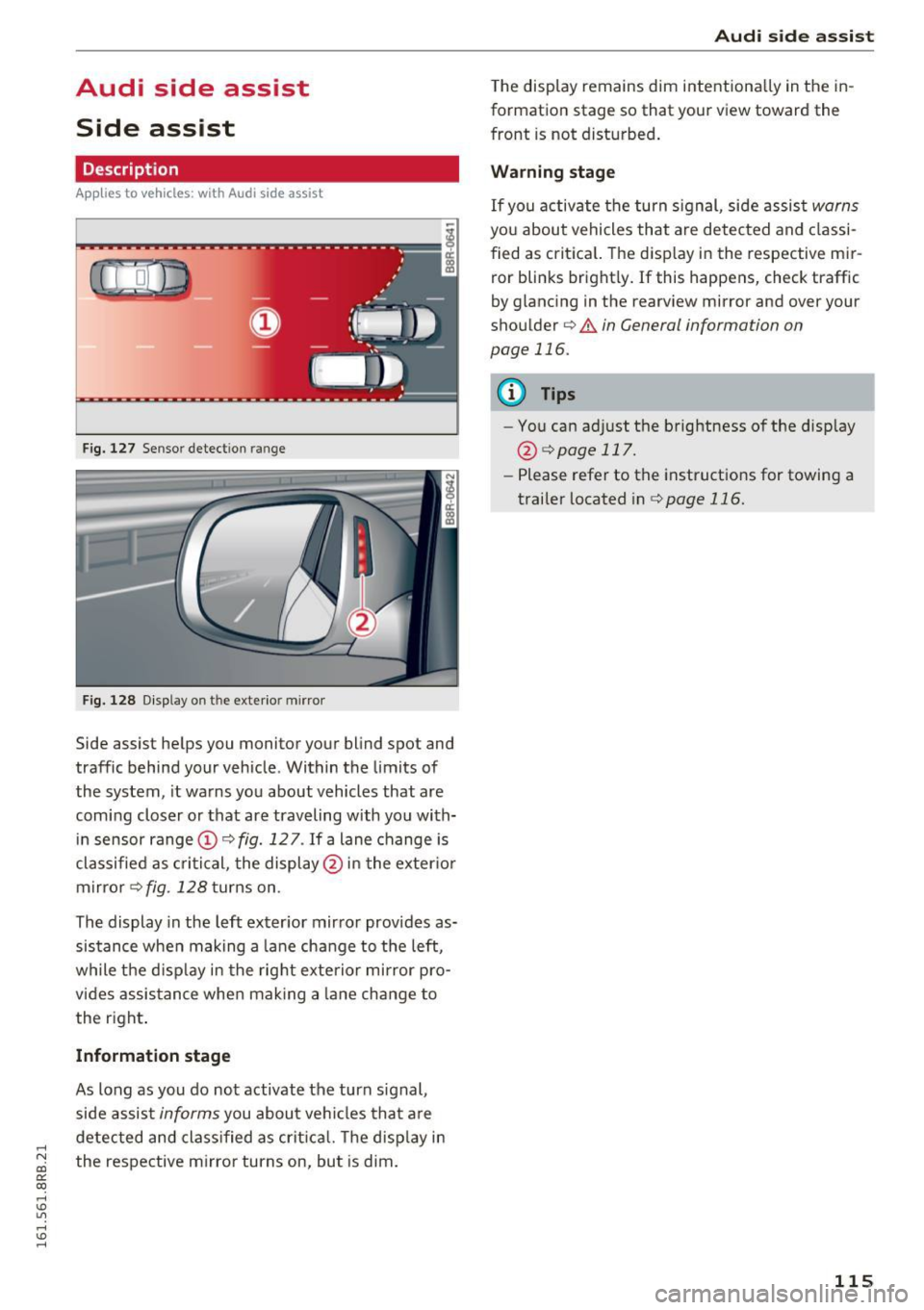
Fig. 127 Sensor dete ction rang e
Fig. 128 Display o n the exterio r mirror
Side assist helps you monitor your blind spot and
traffic behind your vehicle . Within the limits of
the system , it warns you about vehicles that are
coming closer or that are traveling with you with
in sensor range ©
c::, fig. 12 7. If a lane change is
classified as critical, the display @ in the exter ior
mirror
c::, fig . 128 turns on .
The display in the left exterior mirror provides as
sistance when making a lane change to the left,
while the d isp lay in the right exterior mirror pro
vides assistance when making a lane change to
the right .
Information stage
As long as you do not activate the turn signal,
side assist
informs you about vehicles that are
detected and class ified as critica l. The disp lay in
the respective mirro r turns on , but is dim .
Aud i side assist
The display remains dim intentionally in the in
formation stage so that your view toward the
front is not disturbed.
Warning stage
If you activate the turn signal , side assist warns
you about vehicles that are detected and classi
fied as critical. The display in the respect ive mir
ror blinks bright ly. If this happens, check traffic
by glancing in the rearview mirror and ove r you r
shoulder c::,
.&. in General informa tion on
page 116.
{!) Tips
- You can adjust the brightness of the display
@ c::,
page 117.
-Please refer to the instructions for towing a
trailer located inc::,
page 116.
115
Page 119 of 300
..... N
co ~ CX)
..... I.Cl U"I
..... I.Cl ..... -
Improper reliance on the side assist system
can cause collisions and serious personal in
jury:
- Never rely only on side assist when chang
ing lanes.
- Always check rear view mirrors to make
sure that it is safe to change lanes.
- Side assist cannot detect all vehicles under
all conditions -danger of accident!
- Please note that side assist indicates there
are approaching vehicles, or vehicles in your
blind spot, only after your vehicle has
reached a driving speed of at least 19 mph
(30 km/h).
- In certain situations, the system may not
function or its function may be limited. For
example:
- if vehicles are approaching or being left
behind very quickly. The display may not
turn on in time.
- in poor weather conditions such as heavy
rain, snow or heavy mist.
- on very wide lanes, in tight curves or if
there is a rise in the road surface. Vehicles
in the adjacent lane may not be detected
because they are outside of the sensor
range.
(D Note
The sensors can be displaced by impacts or
damage to the bumper, wheel housing and
underbody. This can affect the system. Have
your authorized Audi dealer or authorized
Audi Service Facility check their function.
(D Tips
-If the window glass in the driver's door or
front passenger's door has been tinted , the
display in the exterior mirror may be misin
terpreted.
- For Declaration of Compliance to United
States FCC and Industry Canada regulations
¢page 283.
Audi side assist
Activating and deactivating
Applies to vehicles: with A udi side ass ist
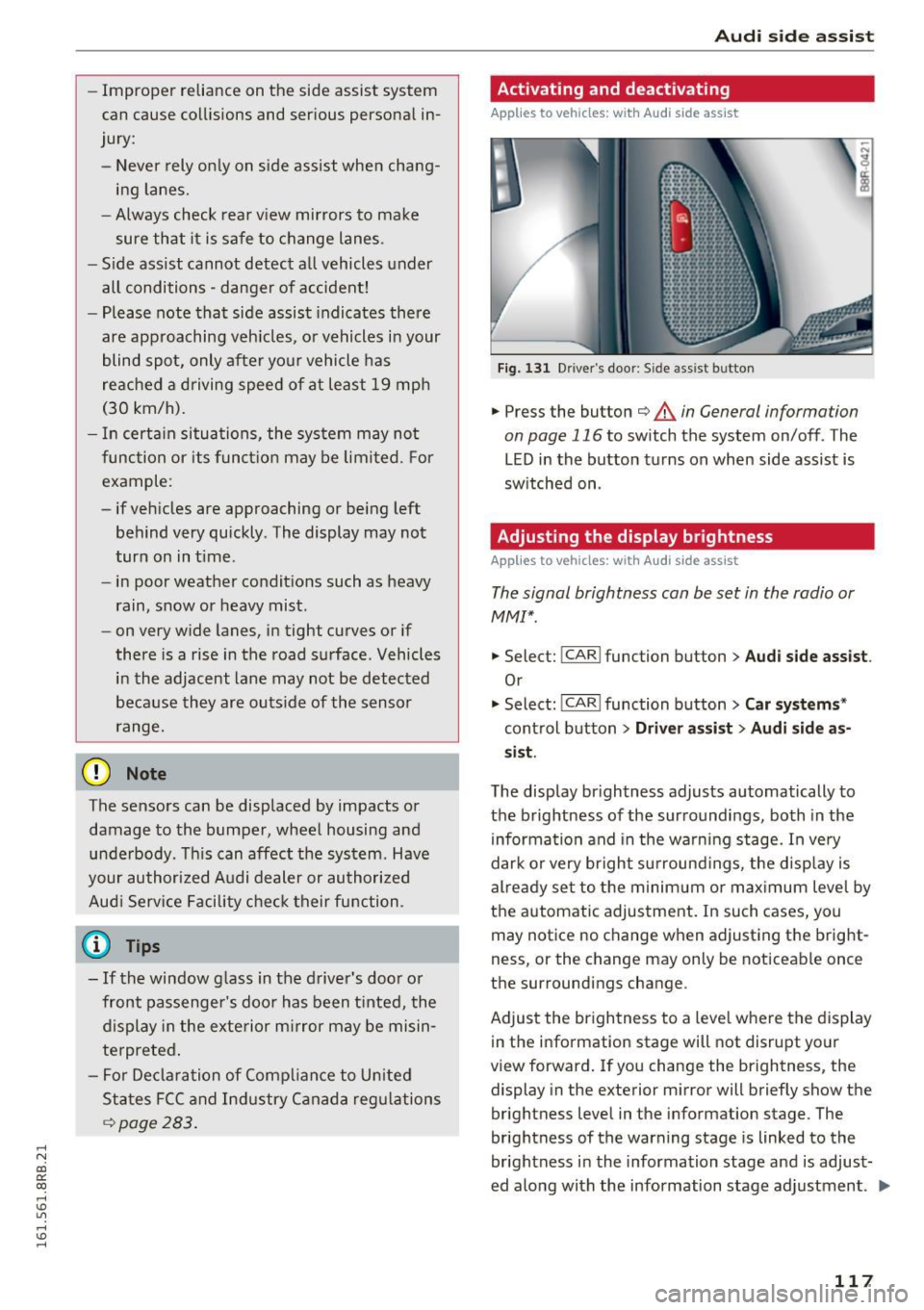
Fig. 131 Dr iver 's do or: Sid e assis t button
.,. Press the button ¢ & in General information
on page 116
to switch the system on/ off . The
LED in the button turns on when side assist is
switched on .
Adjusting the display brightness
Applies to vehicles: with Audi side assist
The signal brightness can be set in the radio or
MM!*.
.,. Select: !CAR I function button> Audi side assist .
Or
.,. Select: !CAR I function button> Car systems *
control button > Driver assist > Audi side as
sist.
The display brightness adjusts automatically to
the brightness of the surroundings, both in the
information and in the warning stage. In very
dark or very bright surroundings, the display is
already set to the minimum or maximum level by
the automatic adjustment. In such cases, you
may notice no change when adjusting the bright
ness, or the change may only be noticeable once
the surroundings change .
Adjust the brightness to a level where the display
in the information stage will not disrupt your
view forward. If you change the brightness, the
display in the exterior mirror will briefly show the
brightness level in the information stage . The
brightness of the warning stage is linked to the
brightness in the information stage and is adjust
ed along with the information stage adjustment . ..,.
117
Page 134 of 300

Parking system
Parallel Parking
Applies to veh icles: w ith Aud i park ing system p lus w ith rear
view ca mera
Use parking mode 2 to help you parallel park
along the side of a street.
Fig. 1 49 MMI d isp lay: blue su rface in the pa rking spot
F ig. 150 MMI d isp lay: Blue curve on the cu rb
The fo llowing steps apply only when there is no
obstacle such as a wall near the parking spot .
Otherw ise, please read the information provided
in the "Pa rking Next to Obstacles " section .
.,. Activate the turn signal.
.,. Pos ition your vehicle parallel to the edge of the
street, approx imately 3 ft (1 meter) from a
parked veh icle .
.,. Swi tch the MMI on and se lect reverse gear. The
parking aid turns on and park ing mode 1 ap
pears on the d isplay .
... Press the control button©¢
fig. 149 on the
MMI control console. Parking mode 2 appears.
... Back up and align your vehicle so the blue area
@ borders on the rear end of the vehicle or on
the parking spot line. The b lue area represents
an extension of the veh icle's outline by approx i
mately 16 ft (S meters) to the rear . The long
s ide of the blue area should be on the c urb . T he
entire blue area m ust fit into the parking spot.
132
.,. With the vehicle stopped, t urn the steering
wheel to the right as far as it will go.
... Back into the parking spot until the blue curve
to uches the curb¢
fig. 150. Stop the vehicle.
.,. With the vehicle stopped, turn the steering
wheel to the left as far as it will go .
.,. Continue to back into the parki ng spot unt il the
veh icle is parked paralle l to the curb .@ marks
the rea r bumpe r. Stop the veh icle when the red
orientat ion line @ borders an object¢ & .
Keep an eye on the front of you r vehicle while
doing this ¢(D .
Parking next to obstacles
When there is an obstacle (such as a wall) next to
the pa rking spot, choose a spot with mo re space
o n the s ides. Position the long side of t he b lue
area so that there is sufficient spa ce from the
curb . The area must not be on the curb. You wi ll
also need to start turning the steering wheel
much earlier . There should be a sufficient
amount of space between the curb and the blue
curve, and the blue curve¢ fig. 150 must not
touch the curb.
&_ WARNING
-The rearview camera does not show the en
tire area behind the vehicle ¢
page 128,
fig . 143.
Watch o ut especially fo r small chi l
dren and animals. The re a rv iew came ra can
no t always detect them, posing risk of an
accident!
- P lease note that objects not touching the
gro und can appear to be further away than
they really are (for examp le, the bumpe r of
a parked vehicle, a trailer hitch, or the rear
of a truck). In this case, you shou ld not use
the help lines to help with parking, which poses danger of an accident!
(D Note
In the M MI d isplay, the direction of travel of
the veh icle rear is represented depend ing on
the steer ing whee l ang le. The veh icle front
swings o ut more tha n the vehicle rear. Main
tai n plenty of distance so that yo ur outside
Page 135 of 300
,....,
N
co
er::
co
,....,
lide with any obstacles. This can damage to
your veh icle.
(D Tips
The left or right orientation lines and surfaces
wi ll be displayed, depending on the turn sig
na l being used .
Adjusting the display
and warning tones
Applies to vehicles: with Audi parking system plus with rear
view camera
The display and warning tones can be adjusted in
the MMI.
~ Select: I CARI function button > Parking syste m.
Or
~ Se lect: I CARI funct ion button > C ar sy stem s*
control button > Driver a ssi st > Pa rking aid .
Di sp lay
- Off -
when the parking system is switched on,
only aud ible signals are g iven.
- On -when the parking system is switched on,
either the visual disp lay or the picture from the
rearview camera is displayed.
Warning tones
- Front volu me -
fron t se nso r volume
- Front fr equ ency -front se nsor frequency
- Rea r volum e -rear sensor vol ume
- Rea r frequency -rear sensor frequency
-In -car enterta inment fade r/Mus ic volum e
w hile pa rking -
when the parking system is
switched on, the volume of the active audio
source is lowered .
The new ly adjusted value is briefly heard from
the signal generator .
- The warning tones can also be ad justed d i
rectly by the vis ual disp lay or the picture
from the rearview camera. Simply press the
Sett ings control button.
- Changed settings are activated when park
ing system is switched on again.
Par king system
- The settings are automatically stored and
assigned to the remote control key .
Trailer hitch
Applies to vehicles: with Audi parking system plus with rear
view camera and trailer hitch
Fo r vehicles with a factory installed trailer hitch,
o r a tra ile r hi tch installed according to factory
specifications, the par king system rear sensors
do not come on whenever you shift into reverse
gear or when you press the
P •1~ switch . Remem
ber, there is no war ning for distances to the rear .
The front sensors remain activated. The visual
display switches to the tra iler tow ing mode. The
picture from the rearview camera w ill not show
the or ientat io n lines nor the blue surfaces .
If you insta ll a hitch yourse lf, this f unct ion may
not work.
Error messages
Applies to vehicles: with Audi parking system plus with rear
view camera
T he re is an error in the system if the LE D on the
Pw~ switch is blink ing and yo u hear a continuous
alarm for a few seconds after sw itch ing on the
park ing system or when the parking system is al
ready activated. Have your authorized Audi dealer
correct the error.
(D Tips
If the error is not corrected before you switch
off the ign ition, when you switch on the park
i ng system again, the LED in the
Pw.A sw itch
will blink.
133
Page 293 of 300
,....,
N
co
er::
co
,....,
High beam . . . . . . . . . . . . . . . . . . . . . . . . . . 55
High beam warning/indicator light. . . . . . . 17
Interior/reading lights . . . . . . . . . . . . . . . .
55
Leaving home . . . . . . . . . . . . . . . . . . . . . . . . 53
Sensor. ...... ..... ........... .... ... 52
Sensor defective. . . . . . . . . . . . . . . . . . . . . . 32
Switching on and off . . . . . . . . . . . . . . . . . . 52
Travel mode . . . . . . . . . . . . . . . . . . . . . . . . . 54
Turn signals . . . . . . . . . . . . . . . . . . . . . . . . .
55
Lighting
Exterior . . . . . . . . . . . . . . . . . . . . . . . . . . . . . 52
Interior . . . . . . . . . . . . . . . . . . . . . . . . . . . . .
55
Loading the luggage compartment . . . . . . . 139
Lock ing
Power locking switch . . . . . . . . . . . . . . . . . . 42
Rear lid/trunk lid . . . . . . . . . . . . . . . . . . . . . 43
Remote control key . . . . . . . . . . . . . . . . . . . 40
Using the mechanical key . . . . . . . . . . . . . . 41
L ow beams . . . . . . . . . . . . . . . . . . . . . . . . . . . 52
Defective . . . . . . . . . . . . . . . . . . . . . . . . . . .
3 2
Luggage compartment
Cargo net . . . . . . . . . . . . . . . . . . . . . . . . . . . 72
Cover.. .. .... ....................... 71
Expanding . . . . . . . . . . . . . . . . . . . . . . . 69, 70
Storage hooks . . . . . . . . . . . . . . . . . . . . . . . 72
Storing cargo correctly . . . . . . . . . . . . . . . 139
Tie-down rings . . . . . . . . . . . . . . . . . . . . . . . 70
also refer to Loading the luggage compart-
ment .. .. .. .. ............... .. .... .
139
Luggage compartment lid
Emergency unlocking . . . . . . . . . . . . . . . . . . 45
L umbar support . . . . . . . . . . . . . . . . . . . . . . . 64
M
Maintenance . . . . . . . . . . . . . . . . . . . . . . . . . 280
Malfunction Indicator Lamp (MIL)
Master key 17,26
Battery replacement . . . . . . . . . . . . . . . . . . 3 7
Check light . . . . . . . . . . . . . . . . . . . . . . . . . . 3 7
Mechanical key . . . . . . . . . . . . . . . . . . . . . . . . 37
Memory for driver's seat . . . . . . . . . . . . . . . . 65
Recalling settings . . . . . . . . . . . . . . . . . . . . 65
Storing settings . . . . . . . . . . . . . . . . . . . . . . 65
Memory function . . . . . . . . . . . . . . . . . . . . . . 65
Index
Mileage
Average . . . . . . . . . . . . . . . . . . . . . . . . . . . . 22
Instantaneous . . . . . . . . . . . . . . . . . . . . . . . 22
Mirrors Activating the dig ita l compass . . . . . . . . . . 61
Adjusting the exterior mirrors . . . . . . . . . . .
59
dimming .. .. .. .. .................. .. 60
Monitoring the Advanced Airbag System . . 161
N
Natural leather care/cleaning
NHTSA 210
Contacting . . . . . . . . . . . . . . . . . . . . . . . . . 141
N itrogen oxide (NOx) catalytic converter
refer to Ad Blue . . . . . . . . . . . . . . . . . . . . . . 217
Number of seats . . . . . . . . . . . . . . . . . . . . . . 143
0
Occupant seating positions 135
Octane rating ... .. .. ................ . 212
Odometer . . . . . . . . . . . . . . . . . . . . . . . . . . . .
13
Offroad mode . . . . . . . . . . . . . . . . . . . . . . . . 191
OFF (cl imate control) . . . . . . . . . . . . . . . . . . . 81
Oil
refer to Engine oil . . . . . . . . . . . . . . . 222, 224
Oil consumption . . . . . . . . . . . . . . . . . . . . . . 224
On-Board Diagnostic System (OBD)
Data Link Connector (D LC) . . . . . . . . . . . . . . 26
Electronic speed limiter. . . . . . . . . . . . . . . . 26
Malfunction Indicator Lamp (MIL) . . . . . . . 26
Onboard tool kit . . . . . . . . . . . . . . . . . . . . . . 254
Open door or rear lid warning . . . . . . . . . . . . 21
Opening..... ... . ... ................ .. 36
Panoramic sliding sunroof............ .. 47
Other equipment (efficiency program) . . . . . 25
Outside mirrors
refer to Exterior mirrors . . . . . . . . . . . . . . . 59
Outside temperature display . . . . . . . . . . . . . 21
Owner's Literature
5
p
Paint damage
209
Paint No. . . . . . . . . . . . . . . . . . . . . . . . . . . . . 276
291
Page 297 of 300
,....,
N
co
er::
co
,....,
Tire pressure monitoring system
L f . oss o a,r pressure . . . . . . . . . . . . . . . . . . . 16
Tires.. .. .. .... ............. .. .. ..... 234
Low aspect ratio tires . . . . . . . . . . . . . . . . 250
Repair set . . . . . . . . . . . . . . . . . . . . . . 104, 257
Replacing . . . . . . . . . . . . . . . . . . . . . . . . . . 259
Service life . . . . . . . . . . . . . . . . . . . . . . . . . 242
r ,re pressure . . . . . . . . . . . . . . . . . . . . . . . 244
Tire pressure monitoring system .. . 251,252
Tire pressure table . . . . . . . . . . . . . . . . . . . 245
Tread wear indicators . . . . . . . . . . . . . . . . 242
Unidirectional . . . . . . . . . . . . . . . . . . . . . . . 236
Uniform tire quality grading .... .. .. .. . 251
Tires and wheels Glossary of tire and loading termino logy . 236
Tire pressure monitoring system . . . . . . . . 16
Tires and vehicle load limits . . . . . . . . . . . 246
Tool kit . . . . . . . . . . . . . . . . . . . . . . . . . . . . . 254
Tools . . . . . . . . . . . . . . . . . . . . . . . . . . . . . . . 104
Torn or frayed safety be lts . . . . . . . . . . . . . . 145
Towing Front eyelet . . . . . . . . . . . . . . . . . . . . . . . . 2 72
Rear eyelet . . . . . . . . . . . . . . . . . . . . . . . . . 273
Tow trucks . . . . . . . . . . . . . . . . . . . . . . . . . 272
Towing a trailer Parking system . . . . . . . . . . . . . . . . . . . . . . 133
T PMS (tire pressure monitoring system) . . . 252
Trailer mode . . . . . . . . . . . . . . . . . . . . . . . . . 203
Notes . . . . . . . . . . . . . . . . . . . . . . . . . . . . . 205
Trailer towing Operating instructions . . . . . . . . . . . . . . . . 204
Technical requirements . . . . . . . . . . . 203 , 204
Tongue load . . . . . . . . . . . . . . . . . . . . . . . . 204
T railer turn signal assembly
Warning/indicator lights . . . . . . . . . . . . . . . 16
T ransmission
Malfunction (indicator light) . . . . . . . . . . . 126
Transport Canada . . . . . . . . . . . . . . . . . . . . . 142
Travel mode . . . . . . . . . . . . . . . . . . . . . . . . . . S4
Trip computer Fue l consumption . . . . . . . . . . . . . . . . . . . . 22
Mileage . . . . . . . . . . . . . . . . . . . . . . . . . . . . . 22
Single-trip memory . . . . . . . . . . . . . . . . . . . 23
Total-trip memory . . . . . . . . . . . . . . . . . . . . 23
Trip odometer . . . . . . . . . . . . . . . . . . . . . . . . . 13
Index
Trunk
refer to Rear lid . . . . . . . . . . . . . . . . . . . . . . 44
T . l urn s1gna s . . . . . . . . . . . . . . . . . . . . . . . . . . 55
Warning/indicator lights . . . . . . . . . . . . . . . 16
u
ULSD No . 2 (Diesel fuel) . . . . . . . . . . . . . . . . 214
Unfastening safety belts . . . . . . . . . . . . . . . 148
Uniform tire quality grading . . . . . . . . . . . . 251
Unlocking Power locking switch . . . . . . . . . . . . . . . . . . 42
Rear lid/trunk lid . . . . . . . . . . . . . . . . . . . . . 43
Remote contro l key . . . . . . . . . . . . . . . . . . . 40
Using the mechanical key . . . . . . . . . . . . . . 41
Use of jumper cables . . . . . . . . . . . . . . . . . . 271
V
V ·t . ani y mirror . . . . . . . . . . . . . . . . . . . . . . . . . . 56
Vehicle Care/cleaning . . . . . . . . . . . . . . . . . . . . . . . 207
Out of service . . . . . . . . . . . . . . . . . . . . . . . 211
Transport . . . . . . . . . . . . . . . . . . . . . . . . . . 105
Vehicle control modules . . . . . . . . . . . . . . . . 189
Vehicle identification label . . . . . . . . . . . . . 276
Vehicle Identification Number (VIN) . . . . . . 276
Vehicle jack . . . . . . . . . . . . . . . . . . . . . . 254, 261
Vehicle tool kit . . . . . . . . . . . . . . . . . . . . . . . 104
Ventilation . . . . . . . . . . . . . . . . . . . . . . . . . . . 80
w
Warning/ indicator l ights
Airbag system . . . . . . . . . . . . . . . . . . . . . . . 16
Anti- lock brake system (ABS) . . . . . . . . . . . 17
Brake system . . . . . . . . . . . . . . . . . . . . . . . . 18
Cruise control . . . . . . . . . . . . . . . . . . . . . . . . 17
Electromechanical parking brake . . . . . . . . 18
Electronic power control . . . . . . . . . . . . . . . lS
Electronic Stabilization Control (ESC) . . . . . lS
Glow plug system . . . . . . . . . . . . . . . . . . . . 15
High beam . . . . . . . . . . . . . . . . . . . . . . . . . . 17
Malfunction Ind icator Lamp (MIL) . . . . . . . 17
Safety belt . . . . . . . . . . . . . . . . . . . . . . . . . . 17
Tire pressure monitoring system . . . . . . . . 16
Trailer turn signa l assemb ly . . . . . . . . . . . . 16
Turn signals . . . . . . . . . . . . . . . . . . . . . . . . . 16
295