turn signal AUDI Q5 2017 User Guide
[x] Cancel search | Manufacturer: AUDI, Model Year: 2017, Model line: Q5, Model: AUDI Q5 2017Pages: 296, PDF Size: 74.43 MB
Page 54 of 296
Lights and Vision
-yo ur vehicle is being towed by a tow truck or
if you are towing another vehicle behind
you.
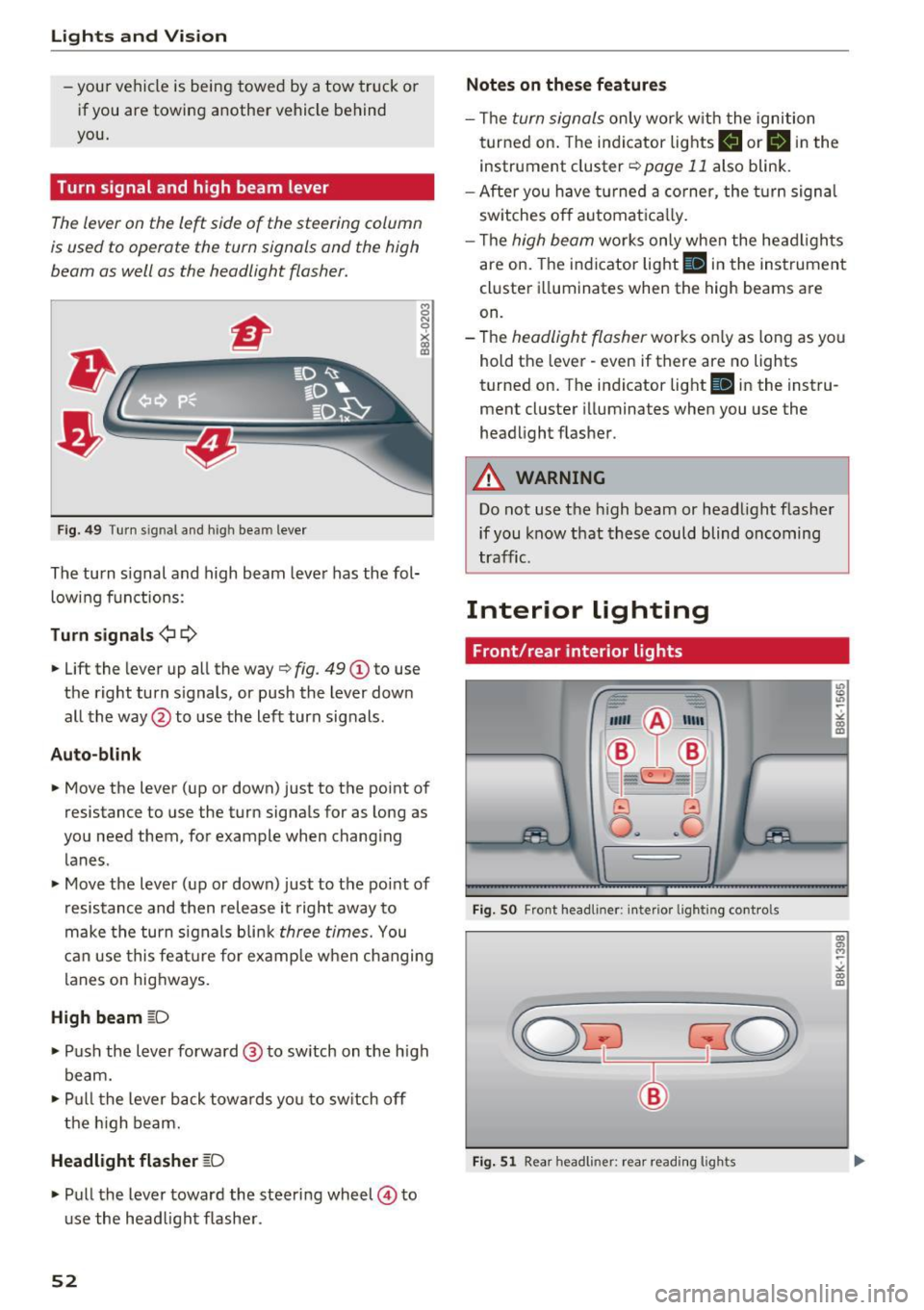
Turn signal and high beam lever
The lever on the le~ side of the steering column
is us ed to operat e the turn signals and th e high
beam as well as the headlight flasher.
F ig . 4 9 Tu rn s ig na l a n d h ig h beam leve r
The turn signal and high beam leve r has the fol
low ing f unctions :
Turn signals ¢¢
8 N 'i'
~ (0
• Lift the lever up al l the way c> fig . 49 (D to use
the right turn s ignals, or push the lever down
all the way@to use the left turn signals .
Auto-blink
• Move the lever (up or down) just to t he point of
resistance to use the turn signals for as long as
yo u need them, for example when chang ing
lanes .
• Move the lever (up or down) just to the point of
resistance and then release it right away to
make the turn signals b li nk
three times. You
can use this fea ture for example when ch anging
lanes on hig hways.
High beam ~D
• Push the l ever forward @ to sw itch on the h igh
beam.
• Pull t he lever back towa rds you to sw itch off
t he hig h beam.
Headlight flasher ~D
• Pu ll the lever toward the steering wheel © to
u se the head light f lashe r.
52
Notes on these features
- Th e turn signals on ly work w it h the ignition
t urned on. The indi cator lights
B or B in the
instrument cluster¢
page 11 also blink .
- After you have turned a co rner, the turn signa l
sw itches o ff automat ica lly.
- Th e
high beam works only when the head ligh ts
are on. The indicator light
Bl in the instrumen t
cl uster illuminates when the high beams are
on.
- The
headlight flasher works o nly as long as yo u
hold t he lever - even if there are no lights
turned on. T he indicator light
Bl in the inst ru
ment cluster illuminates when you use the
headlight flas her .
A WARNING
Do not use the h igh beam or head light flasher
if you know that these could blind oncoming
tra ffic.
Interior lighting
Front/rear interior lights
Fig. SO Fro nt headl iner: interio r li gh tin g cont ro ls
Fig. 51 Rear h eadli ner: rea r read ing ligh ts
" co (0
co a, M ~
"' co (0
Page 87 of 296
CD
CD
.... N ,-... N .... 0 0 C<'. 00
electrical equipment s uch as exterior lights
will switch off as well when that happens.
Switching engine off
A pp lies to: ve hicles with Conve nien ce key
~ Bring your vehicle to a complete stop.
~ Move the selector lever to the P or N position.
~ Press the I STAR T ENGINE ST OPI button
¢ page 84, fig. 101.
Ste ering lock
The steering locks when you turn the engine off
using the
! S TART ENGINE STOPI button and
open the dr iver's door. The locked steering helps
prevent vehicle theft.
Emer gency off
If necessary, the engine can be switched off with
the selector lever in the R or D/S position. The
engine stops if you press and ho ld the
I START ENGINE STOPI button at speeds below
6 mph (10 km/h) and press the brake pedal.
A WARNING
- Never turn off the engine before the veh icle
has come to a comp lete stop. The fu ll func
t ion of the brake booster and the power
steering is no t gua ranteed. You must use
more fo rce to turn or brake i f necessary. Be
cause you cannot steer and b rake as you
usually wou ld, this could lead to crashes
and ser ious injuries.
- For safety reasons, you should a lways park
your vehicle with the selector lever in P .
Otherwise, the vehicle could inadvertently
roll away.
- The radiator fan can continue to run for up
to 10 m inutes even after you have turned
off the engine and removed the ignition key.
The radiator fan can also turn on again if the engine coolant heats up because of intense
sunlight or heat bui ld-up in the engine com
partment.
- Always take the key with you whenever you
leave you r vehicle. Othe rw ise, the engine
c ou ld be started o r electrical equ ipme nt
D riv ing
such as the power windows could be operat
ed. This can lead to ser ious injury.
- Never leave chi ldren or persons requiring as
sistance unattended in the vehicle. The
doors can be locked using the remote trans mitter, preventing people from escaping
from the vehicle on their own in the event of
a n emergency. Depending on the time of
year, people ins ide the veh icle can be ex
posed to very high o r very low tempera
tures.
0 Note
If the engine has been under heavy load for
an extended pe riod, heat bu ilds up in the en
g ine compartment afte r the engine is switch
ed off -there is a ris k of damaging the engine.
A llow the engine to run at id le for about two
minutes before switching it off.
Driver messages
Ignition i s on
This message appears and a warning tone sounds
if you open the drive r's door when the ig nition is
swi tched on.
No k ey id ent ified
This message appears when the
I START ENGINE STOP !* button is pressed if there
is no master key inside the vehicle or if the sys
tem does not recognize it. For example, the mas
ter key cannot be recognized if it is covered by an
obje ct (e.g. al uminum brief case) which
screens
the radio s ignal. Elec tronic devices such as ce ll
phones can a lso interfere with the radio signal.
Pre ss brake p edal to start en g ine
This message appears if you do not press the
brake pedal to start the engine.
S hift to N or P to start en gine
This message appears when attempting to start
the engine if the se lector lever for the automatic
transm ission is not in the P or N position. The en
gine can on ly be started with the se lector in
these positions.
Ill-
85
Page 88 of 296
Driving
!I Is the key in the vehicle ?
This message appears in a veh icle with Conven
ience key* if the master key is removed from the
ve hicle w ith the engine r unning.
If the maste r
key is no longer in the vehicle, you cannot switch
on the ignition after stopping the engine and you
also cannot start the eng ine again. Moreover, you
cannot lock the veh icle from the outside with the
key.
Shift to P otherw ise vehicle can roll awa y. Door s
do not lo ck if le ver i s not in P.
This message appea rs fo r sa fe ty reasons a long
with a warning signal.
It appears i f the se lector
lever for the automatic transmission is not in the
P posit ion when switching off the ignition. Move
the selector lever to the P position, otherwise the
vehicle is not secured aga inst rolling away. You
also cannot lock the vehicle using the locking
button* on the door handle or using the remote
key .
Turn off ignition befo re lea ving car
This message appears if the driver's door is
opened while the ignit ion is switched on. A lways
switch off the ignition if you are leaving the vehi
cle . See also
c::> page 90.
Turn off ignition before lea ving car. Batte ry is
discha rging
This message appea rs if the d river's doo r is
opened while the ignition is sw itched on. A lways
switch off the ignition if you are leaving the vehi
cle . See also
c::> page 90.
Shift to P and turn off ignition, otherwi se vehi
cle can roll awa y
This message appea rs if the d river's door is
ope ned while t he igni tion is switched on and the
selec to r l ever is not in the P posi tion. Shift t he
selector lever in to the P position and switch off
the ignition when you exit the vehicle . Otherwise
the vehicle cou ld roll. See also¢
page 90.
Convenien ce key defective! Use ignition lock
This message appea rs if the eng ine must be
started or stopped using the ignit io n key and no t
t he !STAR T
ENGINE ST OPI* b utton .
86
Electromechanical
parking brake
Operation
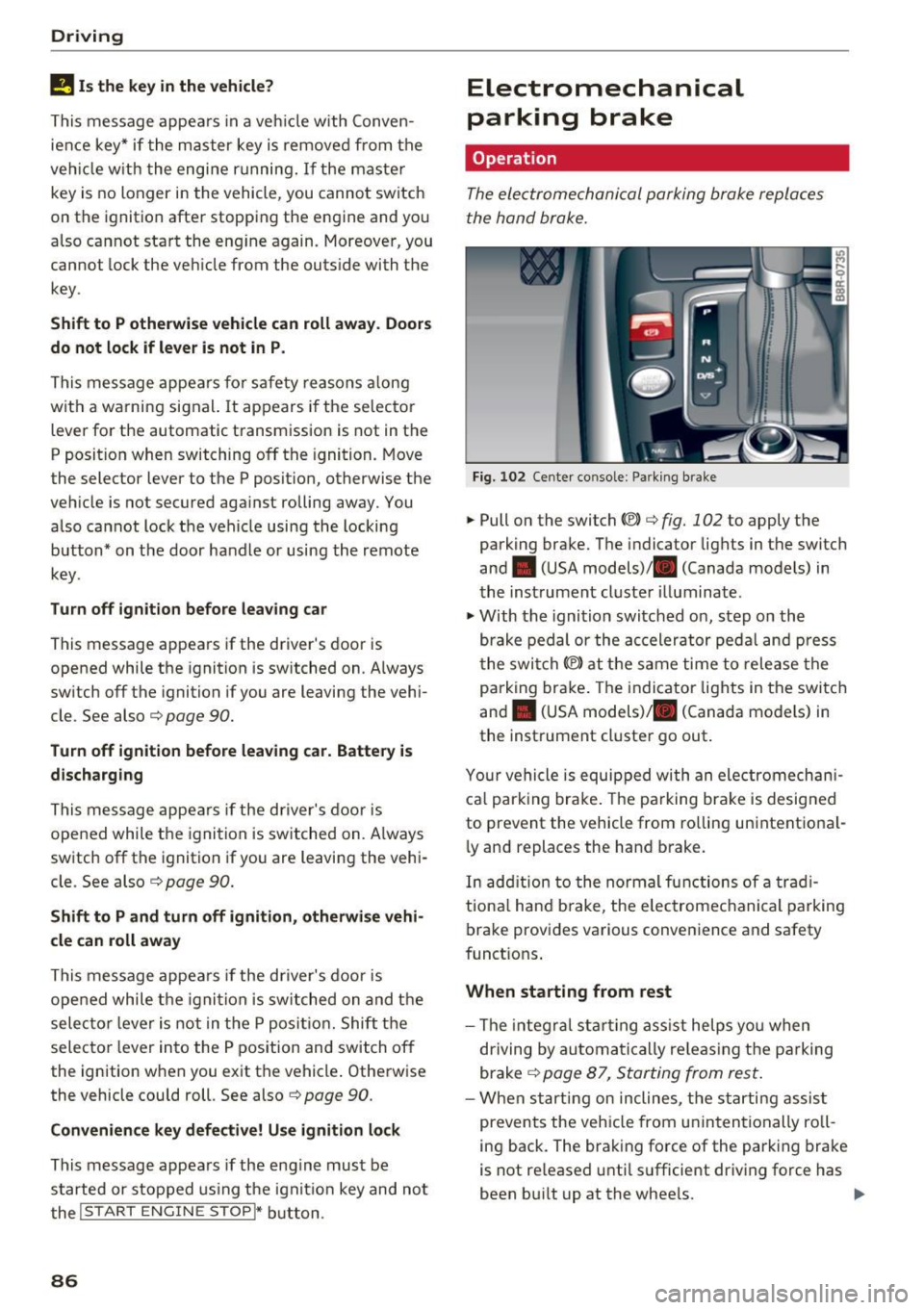
The electromechanical parking brake replaces
t he hand brake.
Fig. 102 Center co nsole : Pa rk ing brake
.. Pull on the switch (®) c::> fig. 102 to apply the
park ing brake. The indicator lights in the switch
and . (USA models)/ . (Canada models) in
the inst rument cluste r illuminat e.
.. With the ignition switched on, step on the
brake pedal or the ac celerator peda l and press
t he swi tch(®) at the same time to release the
p arking brake . The indicator lights in the switch
and . (USA models)/ . (Canada models) in
the instrument cluster go out .
Y our vehicle is equipped wi th an ele ctromechan i
ca l park ing brake . The parking brake is desig ned
to prevent the vehicle from ro lling unintentional
ly and replaces the hand b rake.
In add ition to the no rmal functions of a trad i
tiona l hand b rake, the e lectromechanical parking
brake provides various convenience and safety
funct ions .
When starting from rest
-The integra l st art ing ass ist helps yo u when
dr iving by automati ca lly re leas ing t he pa rking
brake
c::> page 87, Starting from rest .
-When starting on inclines, the starti ng assis t
prevents the vehicle from unintentionally ro ll
ing back. The brak ing force of the park ing brake
is not re leased unti l su fficient dr iving force has
been bu ilt up at the whee ls. ..,.
Page 120 of 296
Audi side assist
Audi side assist
Side assist
Description
Applies to: veh icles with Audi side assist
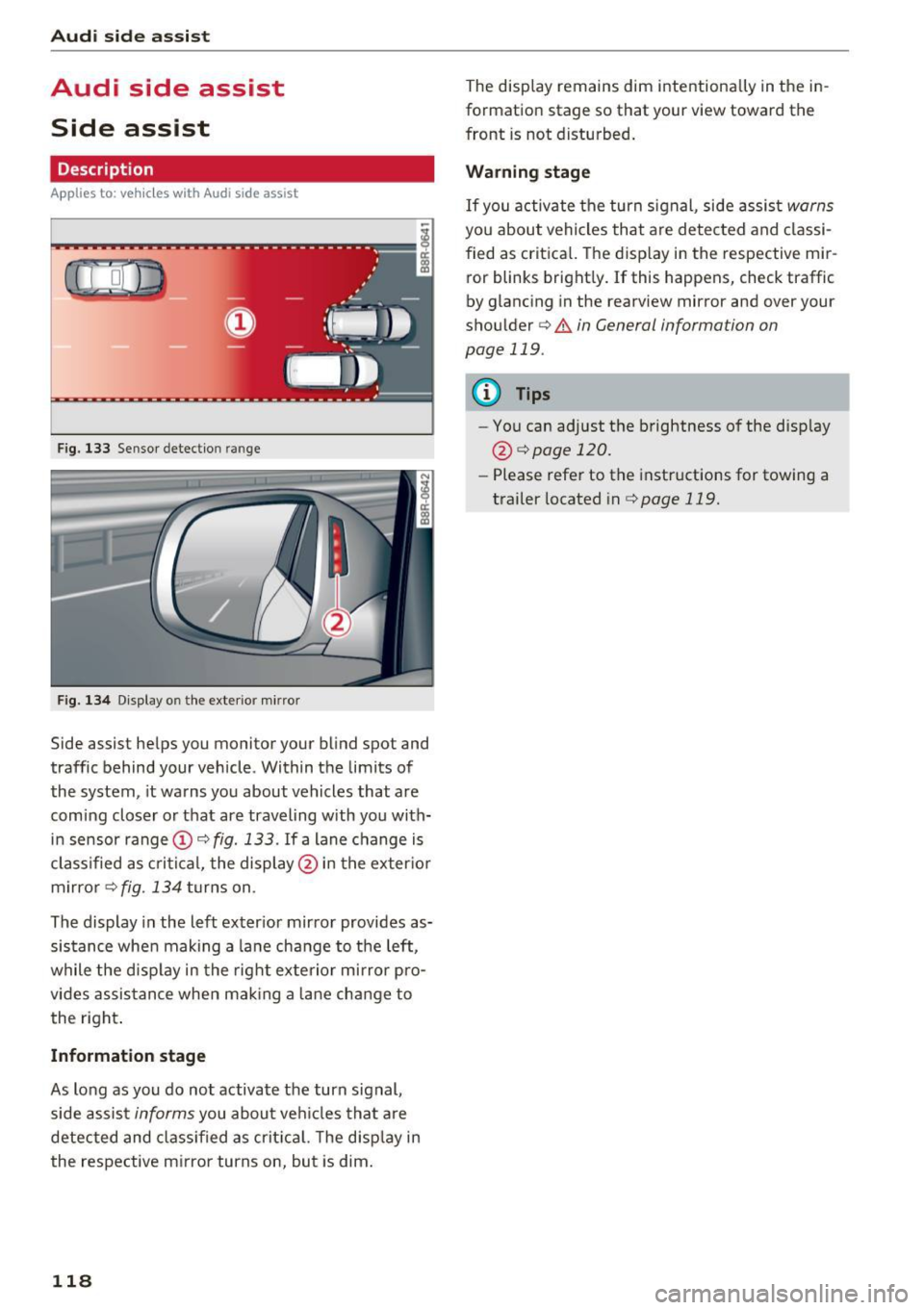
F ig. 133 Sensor detection range
Fig . 1 34 D isp lay on the exterio r m irror
Side assist helps you monitor your bl ind spot and
traffic behind your vehicle. Within the limits of
the system , it warns you about vehicles that are
comi ng closer o r that are traveling with you with
in sensor range
(D c:> fig. 133 . If a lane c hange is
cl assified as c ritic al, the displ ay @ in the exter io r
m irro r
c:> fig. 134 turns on .
The display in the left exter ior mir ro r provides as
sis tance whe n making a la ne change to the left,
while the disp lay in the rig ht exte rio r mi rror pro
vides assis tance when mak ing a lane chan ge to
the right .
Information stage
As long as you do no t activate the turn signal,
side assis t
informs you about ve hicles tha t are
detected and class if ied as crit ic al. T he disp lay in
the respe ctive m irror turns on, but is dim .
118
The display remains dim intentionally in the in
formation stage so that your view toward the
front is not disturbed .
Warning stage
If you activate the turn signal, side assis t warns
you about vehicles that are detected and classi
fied as crit ica l. T he disp lay in the respective mir
ror blinks bright ly.
If this happens, check traffic
by glancing in the rearview mirror and over your
shou lder
c:> .&. in General information on
page 119 .
{!) Tips
-You can adjust the brightness of the disp lay
@ i=>pagel20.
-Please refe r to the instructions for towing a
trailer located in
i=>page 119.
Page 122 of 296
Audi side assist
-Improper reliance on the side assist system
can cause collisions and serious personal in
jury:
- Never rely only on side assist when chang
ing lanes.
- Always check rear view mirrors to make
sure that it is safe to change lanes.
- Side assist cannot detect all vehicles under
all conditions -danger of accident!
- Please note that side assist indicates there
are approaching vehicles, or vehicles in your blind spot, only after your vehicle has
reached a driving speed of at least 19 mph
(30 km/h).
- In certain situations, the system may not
function or its function may be limited. For
example:
- if vehicles are approaching or being left
behind very quickly . The display may not
turn on in time .
- in poor weather conditions such as heavy
rain, snow or heavy mist .
- on very wide lanes, in tight curves or if
there is a rise in the road surface . Vehicles
in the adjacent lane may not be detected
because they are outside of the sensor
range.
(D Note
The sensors can be displaced by impacts or damage to the bumper, wheel housing and
underbody . This can affect the system . Have
your authorized Audi dealer or authorized
Audi Service Facility check their function.
(D Tips
-If the window glass in the driver's door or
front passenger's door has been tinted, the
display in the exterior mirror may be misin
terpreted.
- For Declaration of Compliance to United
States FCC and Industry Canada regulations
c::> page 2 79.
120
Activating and deactivating
Applies to : vehicles wit h Audi side ass ist
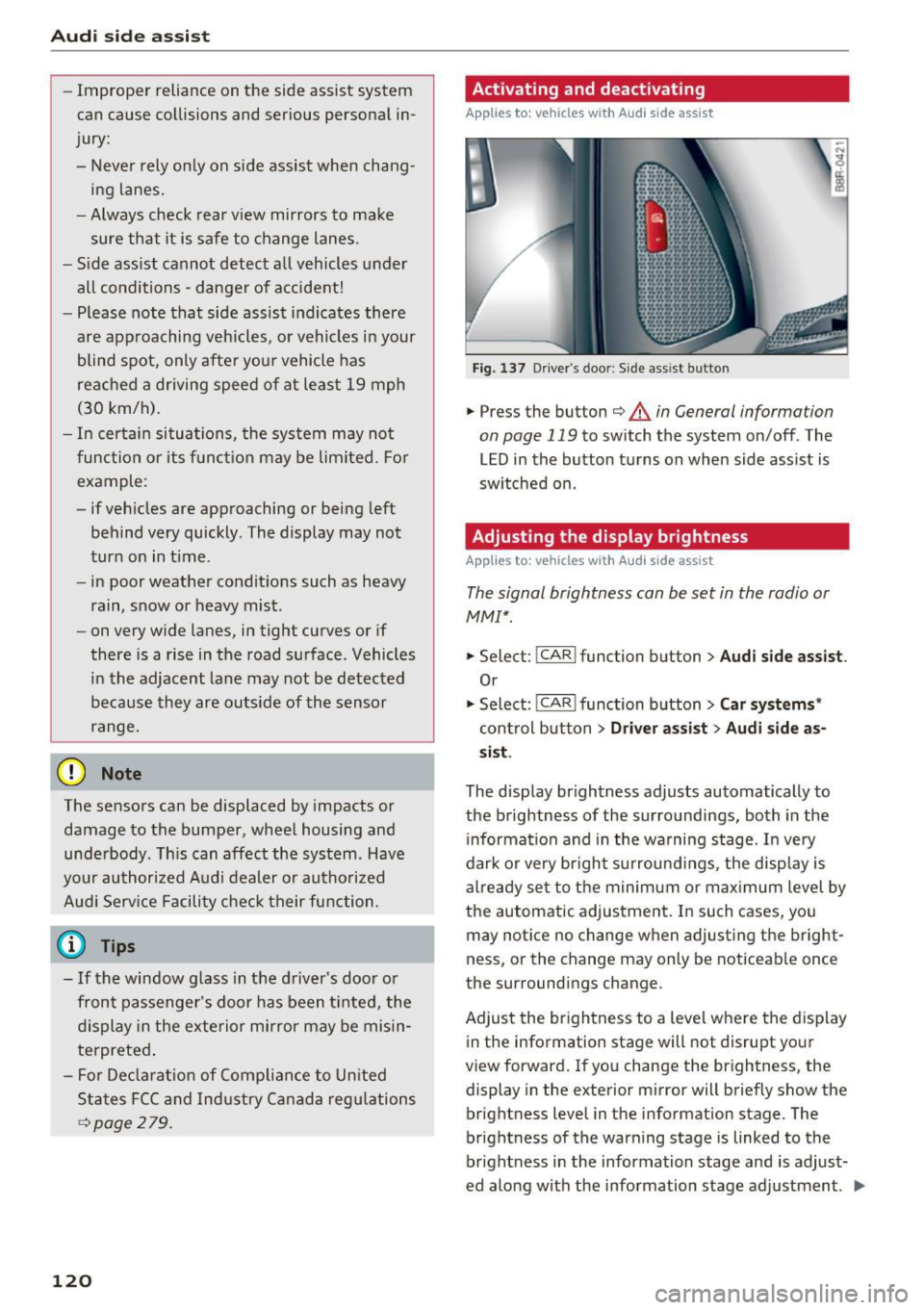
Fig. 137 D riv er's doo r: Side ass ist butto n
.,.. Press the button c::> &. in General information
on page 119
to switch the system on/off . The
LED in the button turns on when side assist is
switched on .
Adjusting the display brightness
Applies to: vehicles wit h Aud i side ass ist
The signal brightness can be set in the radio or
MMI* .
.,.. Select: I CAR I function button > Audi side assist.
Or
.,.. Select: I CAR I function button > Car systems*
control button > Driver assist> Audi side as
sist.
The display brightness adjusts automatically to
the brightness of the surroundings, both in the
information and in the warning stage. In very
dark or very bright surroundings, the display is
already set to the minimum or maximum level by
the automatic adjustment. In such cases, you may notice no change when adjusting the bright
ness, or the change may only be noticeable once
the surroundings change.
Adjust the brightness to a level where the display
in the information stage will not disrupt your
view forward. If you change the brightness, the
display in the exterior mirror will briefly show the
brightness level in the information stage . The
brightness of the warning stage is linked to the
brightness in the information stage and is adjust
ed along with the information stage adjustment . .,,.
Page 131 of 296
a,
a,
..... N ,....
N ..... 0 0
0:
co
Parallel Parking
Applies to: vehicles with Aud i parking system plus with rear
view camera
Use parking mode 2 to help you porollel pork
along the side of a street.
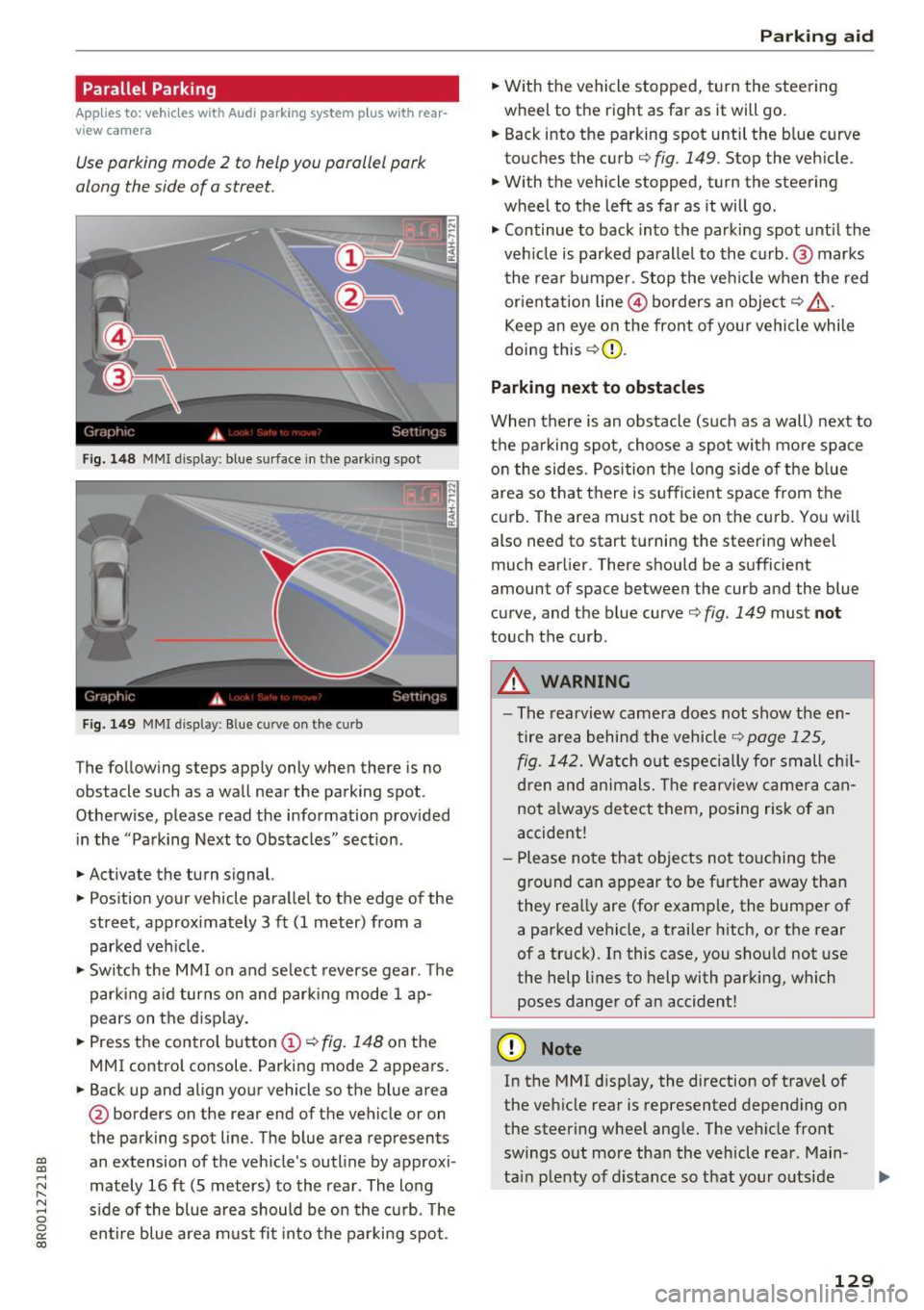
Fig. 148 MMI display: blue surface in the parking spot
Fig. 1 49 MMI display : Blue curve on the curb
The following steps apply only when there is no
obstacle such as a wall near the parking spot.
Otherwise, please read the information prov ided
in the "Parking Next to Obstacles" sect ion.
.,. Activate the turn signal.
.,. Pos ition your vehicle paralle l to the edge of the
street, approx imately 3 ft (1 meter) from a
parked veh icle.
.,. Swi tch the M MI on and se lect reverse gear. The
park ing a id turns on and park ing mode 1 ap
pears on the d isplay .
.,. Press the control button
(D ¢ fig. 148 on the
MMI control console. Parking mode 2 appears.
.,. Back up and align yo ur vehicle so the b lue area
@ borders on the rear end of the vehicle or on
the parking spot line. The blue area represents
an extension of the vehicle's outline by approxi
mately 16 ft (S meters) to the rear. The long
s ide of the blue area should be on the curb. The
en tire blue area must fit into the parki ng spot.
P ark ing aid
.,. With the vehicle stopped, turn the steering
wheel to the right as far as it will go.
.,. Back into the parking spot until the b lue curve
touches the curb¢
fig. 149. Stop the vehicle.
.,. With the vehicle stopped, turn the steering
wheel to the left as far as it will go .
.,. Continue to back into the parki ng spot unt il the
veh icle is parked parallel to the c urb. @ marks
the rear bumpe r. Stop the ve hicle when the red
orientat ion line @ borders an object¢
&
Keep an eye on the front of yo ur vehicle while
doing this ¢(D.
Parking next to obstacles
When there is an obstacle (such as a wall) next to
th e parking spot, choose a spot with mo re space
o n t he sides. Pos ition the long side of the b lue
area so that there is sufficient space from the
curb. The area must not be on the curb. You wi ll
also need to start turning the steering wheel
much earlier. There should be a sufficient
amount of space between the curb and the blue
curve, and the blue curve¢
fig. 149 must not
touch the curb.
A WARNING
-The rearview camera does not show the en
tire area behind the vehicle¢
page 125 ,
fig. 142.
Watch o ut especially fo r small ch il
d ren and animals. The rearview came ra can
not a lways detect them, posing risk of an
accide nt!
- P lease note that o bjects no t touching the
g ro und can appear to be further away tha n
they rea lly are (for e xamp le, the bumper of
a parked vehicle, a trailer h itch, or the rear
of a truck). In this case, you shou ld not use
the help lines to help with parking, which poses danger of an accident!
(D Note
In the M Ml d is play, the direction o f travel of
the veh icle rear is represented depend ing on
the steer ing whee l ang le. The ve hicle front
swings o ut more tha n the vehicle rea r. Main
ta in plenty of distance so that your o utside
129
Page 132 of 296
Parking aid
mirror or a corne r of your veh icle does not col
lide with any obstacles. This can damage to
your vehicle.
(D Tips
The left or right orientation lines and surfaces
will be displayed, depending on the turn sig
nal being used .
Adjusting the display
and warning tones
A pp lies to : ve hicles w ith Audi park ing system plus w ith rea r
view ca mera
The display and warning tones can be adjusted in
the MMI.
~ Select: ICARlfunction button> Parking system.
Or
~ Select: I CARI funct ion button > Car systems*
control button > Driver assist> Parking aid .
Display
-Off -when the parking system is switched on,
only audible signals are g iven.
- On -when the parking system is switched on,
either the visual disp lay or the picture from the
rearview camera is displayed .
Warning tones
-Front volume -front sensor volume
-Front frequency -front sensor frequency
- Rear volume -rear sensor volume
-Rear frequency -rear sensor frequency
-In -car entertainment fader/Music volume
while parking -
when the parking system is
switched on, the volume of the active audio
source is lowered .
The newly adjusted value is briefly heard from
the signal generator.
(D Tips
- The warning tones can also be adjusted di
rectly by the v isual disp lay or the picture
from the rearview camera. S imply press the
Settings control button.
- Changed settings are act ivated when park
in g system is switched on again .
130
-Th e settings are automatically stored and
assigned to the remote control key.
Trailer hitch
Applies to : vehicles wi th Audi parking sys te m plus wi th rear
v iew camera an d tra il er hitc h
For vehicles with a factory installed trailer hitch,
o r a trailer hitch installed according to factory
spec ifications, the parking system rear sensors
do not come on whenever you shift into reverse
gear or when you press the
p, qA switch. Remem
ber, there is no warning for distances to the rear.
The front sensors remain activated. The visual
display switches to the trailer tow ing mode. The
picture from the rearview camera w ill not show
the or ientat ion lines nor the blue surfaces .
If you install a hitch yourself, this function may
not work.
Error messages
App lies to: vehicles wi th Audi parking sys te m plus with rear
v iew camera
There is an error in the system if the LED on the
PJJJA switch is blinking and you hear a continuous
alarm for a few seconds after switching on the parking system or when the parking system is al
ready activated . Have your authorized Audi dealer
correct the error.
(D Tips
If the error is not corrected before you switch
off the ign ition, when you switch on the park
ing system again, the LED in the
Pw.o. switch
will blink.
Page 172 of 296
Child safety
Advanced Airbags and the weight-sensing mat in the front seat
The Advanced Airbag System in your vehicle de
tects the presence of an infant or child in a child
restraint on the front passenger seat using the
weight -sensing mat in the seat cushion and the
sensor below the safety belt latch on the front
passenger seat that measures the tension on the
safety belt .
The weight-sensing mat measures total weight
of the child and the child safety seat and a child blanket on the front passenger seat . The weight
on the front passenger seat is related to the de
sign of the child restraint and its "footprint ", the
size and shape of the bottom of the child re
straint as it sits on the seat. The weight of a child
restraint and its "footprint" vary for different
kinds of child restraints and for the different
models of the same kind of child restraint of
fered by child restraint manufacturers.
The weight ranges for the individual types,
makes and models of child restraints that the
NHTSA has specified in the Safety Standard to
gether with the weight ranges of typical infants
and typical 1 year-old child have been stored in
the control unit of the Advanced Airbag System .
When a child restraint is being used on the front
passenger seat with a typical 1 year-old child, the
Advanced Airbag System compares the weight
measured by the weight sensing mat with the in
formation stored in the electronic control unit.
The electronic control unit also registers the ten
sion on the front passenger safety belt. The ten
sion on the safety belt for the front passenger
seat will be different for an adult who is properly
using the safety belt as compared to the tension
on the belt when it is used to attach a child re
straint to the seat. The sensor below the latch for
the safety belt for the front seat passenger
measures the tension on the belt. The input from
this sensor is then used with the weight to "de
cide" , whether there is a child restraint with a
typical 1 year-old child on the front passenger
seat and whether or not the airbag must be
turned off.
170
· Child restraints and Advanced Airbags
Regardless of the child restraint that you use,
make sure that it has been certified to meet Safe
ty Standards and has been certified by its manu
facturer for use with an airbag. Always be sure
that the child restraint is properly installed at
one of the rear seating positions . If in exception
al circumstances you must use it on the front passenger seat, carefully read all of the informa
tion on child safety and Advanced Airbags and heed all of the applicable WARNINGS. Make cer
tain that the child restraint is correctly recog
nized by the weight-sensing mat inside the front
passenger seat, that the front passenger airbag
is turned off and that the airbag status is always
correctly signaled by the
PASSENGER AIR BAG
OFF
light.
Many types and models of child restraints have
been available over the years, new models are in
troduced regularly incorporating new and im
proved designs and older models are taken out of
production. Child restraints are not standardized.
Child restraints of the same type typically have
differen t weights and si zes and different 'foot
prints,' the size and shape of the bottom of the
child restraint that sits on the seat, when they
are installed on a vehicle seat. These differences
make it virtually impossible to certify compliance
with the requirements for advanced airbags with
each and every child restraint that has ever been
sold in the past or will be sold over the course of
the useful life of your vehicle.
For this reason, the United States National High
way Traffic Safety Administration has published a
list of specific type, makes and models of child
restraints that must be used to certify compli
ance of the Advanced Airbag System in your vehi
cle with the suppression requirements of Federal
Motor Vehicle Safety Standard 208. These child
restraints are:
Subpart A - Car bed child restraints
Model Manufactured on or
after
Angel Guard Angel September 25, 2007 Ride AA2403FOF
Page 288 of 296
Index
How safety belt pretensioners work ..... .
Hybrid drive .. .. .. ................ ... .
12 volt batteries .. ........... .... .. . 146
100
107
Consumption display . . . . . . . . . . . . . . . . . 107
Efficient drive mode . . . . . . . . . . . . . . . . . . 104
Energy flow display . . . . . . . . . . . . . . . . . . 106
EV mode . . . . . . . . . . . . . . . . . . . . . . . . . . . 103
High voltage battery . . . . . . . . . . . . . 100, 107
High voltage system . . . . . . . . . . . . . . . . . 100
Operating modes . . . . . . . . . . . . . . . . . . . . 103
Power meter . . . . . . . . . . . . . . . . . . . . . . . . 101
Starting the vehicle . . . . . . . . . . . . . . . . . . 101
Transport 108
I
Ignition
Switching on/off . . . . . . . . . . . . . . . . . . . . . 81
Ignition key Emergency unlocking . . . . . . . . . . . . . . . . . . 35
I gnition lock . . . . . . . . . . . . . . . . . . . . . . . . . . 81
Malfunction .... ................ .. 27, 31
Imbalance (wheels) . . . . . . . . . . . . . . . . . . . 238
Important things to do before driving . . . . 131
I mproperly worn safety belts . . . . . . . . . . . 146
Indicator lights . . . . . . . . . . . . . . . . . . . . 11, 102
Airbag system . . . . . . . . . . . . . . . . . . . . . . 159
PASSENGER AIR BAG OFF . . . . . . . . . . . . . 159
Infant seats . . . . . . . . . . . . . . . . . . . . . . . . . 17 4
I nflatable spare tire . . . . . . . . . . . . . . . . . . . 251
I nflating . . . . . . . . . . . . . . . . . . . . . . . . . . . 252
Inflation pressure (tires) . . . . . . . . . . . . . . . 240
Installing the upper tether strap on the an
chorage . . . . . . . . . . . . . . . . . . . . . . . . . . . . . 184
I nstrument cluster . . . . . . . . . . . . . . . . . . . . 101
Indicator lights . . . . . . . . . . . . . . . . . . . . . . 11
Messages . . . . . . . . . . . . . . . . . . . . . . . . . . . 11
I nstrument illum inat ion . . . . . . . . . . . . . . . . 53
Instruments . . . . . . . . . . . . . . . . . . . . . . . . . . . 8
I nstruments and controls
General illustration . . . . . . . . . . . . . . . . . . . . 6
I nterior lights
Front . . . . . . . . . . . . . . . . . . . . . . . . . . . . . . . 52
Rear . . . . . . . . . . . . . . . . . . . . . . . . . . . . . . . 52
Interval wiping . . . . . . . . . . . . . . . . . . . . . . . . 54
Rain sensor . . . . . . . . . . . . . . . . . . . . . . . . . . 54
286
J
Jump-starting 266
Jumper cables . . . . . . . . . . . . . . . . . . . . . . . . 267
Jump starting 107
K
Key...........
... .. .. ................ 33
Battery replacement . . . . . . . . . . . . . . . . . . 34
Check light . . . . . . . . . . . . . . . . . . . . . . . . . . 34
Emergency key . . . . . . . . . . . . . . . . . . . . . . . 83
lg n ition/ engine on/ off . . . . . . . . . . . . . . . . 81
Key replacement . . . . . . . . . . . . . . . . . . . . . 33
Master key with remote control . . . . . . . . . 33
Mechanica l key . . . . . . . . . . . . . . . . . . . . . . . 34
Removing . . . . . . . . . . . . . . . . . . . . . . . . . . . 83
Kick-down tiptronic . . . . . . . . . . . . . . . . . . . . . . . . . . . . 98
L
Lane Change Assistant
refer to Side assist . . . . . . . . . . . . . . . . . . . 118
LATCH . . . . . . . . . . . . . . . . . . . . . . . . . . . . . . 181
Description . . . . . . . . . . . . . . . . . . . . . . . . . 182
Installing a child restraint . . . . . . . . . . . . . 182
Location . . . . . . . . . . . . . . . . . . . . . . . . . . . 181
Mounting and releasing the anchorage
hook . . . . . . . . . . . . . . . . . . . . . . . . . . . . . . 182
Lateral angle . . . . . . . . . . . . . . . . . . . . . . . . . 198
Leather care/cleaning . . . . . . . . . . . . . . . . . 207
Lefthand drive .. .. .. .. ............. ... 51
Lifting jack . . . . . . . . . . . . . . . . . . . . . . . . . . 257
Light Coming home . . . . . . . . . . . . . . . . . . . . . . . . 50
Dayt ime runn ing lights . . . . . . . . . . . . . . . . 50
Driving light control. . . . . . . . . . . . . . . . . . . 49
Emergency flashers . . . . . . . . . . . . . . . . . . . 51
Exterior lighting . . . . . . . . . . . . . . . . . . . . . . 50
High beam . . . . . . . . . . . . . . . . . . . . . . . . . . 52
High beam warning/indicator light. . . . . . . 14
Leaving home . . . . . . . . . . . . . . . . . . . . . . . . 50
Sensor .. .. .. .. .. .. .. ...... .... ... .. . 49
Sensor defective . . . . . . . . . . . . . . . . . . . . . . 29
Switching on and off . . . . . . . . . . . . . . . . . . 49
Travel mode . . . . . . . . . . . . . . . . . . . . . . . . . 51
Turn signals . . . . . . . . . . . . . . . . . . . . . . . . . 52
Page 293 of 296
CD
CD
.... N ,-... N ..... 0 0 C<'. 00
Treadwear indicato rs . . . . . . . . . . . . . . . . . 238
Unidirectional . . . . . . . . . . . . . . . . . . . . . . . 232
Uniform tire quality grad ing . . . . . . . . . . . 247
Tires and wheels Glossary of tire and load ing terminology . 232
Tire pressure monitoring system . . . . . . . . 13
Tires and vehicle load limits . . . . . . . . . . . 242
Tool kit . . . . . . . . . . . . . . . . . . . . . . . . . . . . . 250
Tools . . . . . . . . . . . . . . . . . . . . . . . . . . . . . . . 107
To rn or frayed safety be lts . . . . . . . . . . . . . . 142
Towing Front eye let . . . . . . . . . . . . . . . . . . . . . . . . 269
Rear eyelet . . . . . . . . . . . . . . . . . . . . . . . . . 269
Tow trucks . . . . . . . . . . . . . . . . . . . . . . . . . 268
Towing a trailer
Parking system . . . . . . . . . . . . . . . . . . . . . . 130
TPM5 (tire pressure monitoring system) . . . 248
Trailer tow ing . . . . . . . . . . . . . . . . . . . . . . . . 200
I nformation . . . . . . . . . . . . . . . . . . . . . . . . 202
Operating instructions . . . . . . . . . . . . . . . . 201
Technical requirements . . . . . . . . . . . 200, 201
Tongue load . . . . . . . . . . . . . . . . . . . . . . . . 201
Trailer turn signal assembly
Warning/indicator lights . . . . . . . . . . . . . . . 14
T ransmission
Malfunction (indicator light) . . . . . . . . . . . . 98
T ransport Canada . . . . . . . . . . . . . . . . . . . . . 139
Travel mode . . . . . . . . . . . . . . . . . . . . . . . . . . 51
Trip computer
Fuel consumption . . . . . . . . . . . . . . . . . . . . 19
Mileage . . . . . . . . . . . . . . . . . . . . . . . . . . . . . 19
Single -trip memory . . . . . . . . . . . . . . . . . . . 20
Total-trip memory . . . . . . . . . . . . . . . . . . . . 20
T rip odometer . . . . . . . . . . . . . . . . . . . . . . . . . 10
Trunk
refer to Rear lid . . . . . . . . . . . . . . . . . . . . . . 41
Turn signals . . . . . . . . . . . . . . . . . . . . . . . . . . 52
Warning/indicator lights . . . . . . . . . . . . . . . 14
u
ULSD No. 2 (D iesel fuel) . . . . . . . . . . . . . . . . 211
Unfastening safety belts . . . . . . . . . . . . . . . 145
Uniform tire quality grading
Unlocking 247
Power locking switch . . . . . . . . . . . . . . . . . . 39
Rear lid/trunk lid . . . . . . . . . . . . . . . . . . . . . 40
Index
Remote control key . . . . . . . . . . . . . . . . . . . 3 7
Using the mechanical key . . . . . . . . . . . . . . 38
Use of jumper cables . . . . . . . . . . . . . . . . . . 267
V
Vanity mirror . . . . . . . . . . . . . . . . . . . . . . . . . . 53
Vehicle Care/cleaning . . . . . . . . . . . . . . . . . . . . . . . 204
Out of service . . . . . . . . . . . . . . . . . . . . . . . 208
Transport . . . . . . . . . . . . . . . . . . . . . . . . . . 108
Vehicle control modules . . . . . . . . . . . . . . . . 188
Vehicle identification label . . . . . . . . . . . . . 272
Vehicle Identification Number (VIN) . . . . . . 272
Vehicle jack . . . . . . . . . . . . . . . . . . . . . . 250, 257
Vehicle tool kit . . . . . . . . . . . . . . . . . . . . . . . 107
Ventilation . . . . . . . . . . . . . . . . . . . . . . . . . . . 77
w
Warning/indicator lights
Airbag system . . . . . . . . . . . . . . . . . . . . . . . 13
Anti-lock brake system (ABS) . . . . . . . . . . . 14
Brake system . . . . . . . . . . . . . . . . . . . . . . . . 15
Cruise control . . . . . . . . . . . . . . . . . . . . . . . . 14
E le ctromechanical parking brake . . . . . . . . 15
Electronic power control . . . . . . . . . . . . . . . 12
E lectron ic Stabilization Contro l (ESC) . . . . . 13
Glow p lug system . . . . . . . . . . . . . . . . . . . . 12
High beam . . . . . . . . . . . . . . . . . . . . . . . . . . 14
Malfunction Indicator Lamp (MIL) . . . . . . . 14
Safety be lt . . . . . . . . . . . . . . . . . . . . . . . . . . 14
Tire pressure monitoring system . . . . . . . . 13
Trailer turn signal assembly . . . . . . . . . . . . 14
Turn signals . . . . . . . . . . . . . . . . . . . . . . . . . 14
Warning/Ind icator lights
Airbag system . . . . . . . . . . . . . . . . . . . . . . 158
Warranty coverages . . . . . . . . . . . . . . . . . . . 276
Washer reservoir . . . . . . . . . . . . . . . . . . . . . 229
Washing matte finish pa int . . . . . . . . . . . . . 204
Weights . . . . . . . . . . . . . . . . . . . . . . . . . . . . . 272
What happens if you wear your safety belt too
l oose? . . . . . . . . . . . . . . . . . . . . . . . . . . . . . . 144
What happens to unbelted occupants? . . . . 141
What impairs driving safety? . . . . . . . . . . . . 132
Wheel bolts . . . . . . . . . . . . . . . . . . . . . . . . . 244
291