steering AUDI Q5 2017 Owner's Manual
[x] Cancel search | Manufacturer: AUDI, Model Year: 2017, Model line: Q5, Model: AUDI Q5 2017Pages: 296, PDF Size: 74.43 MB
Page 104 of 296
Hybrid
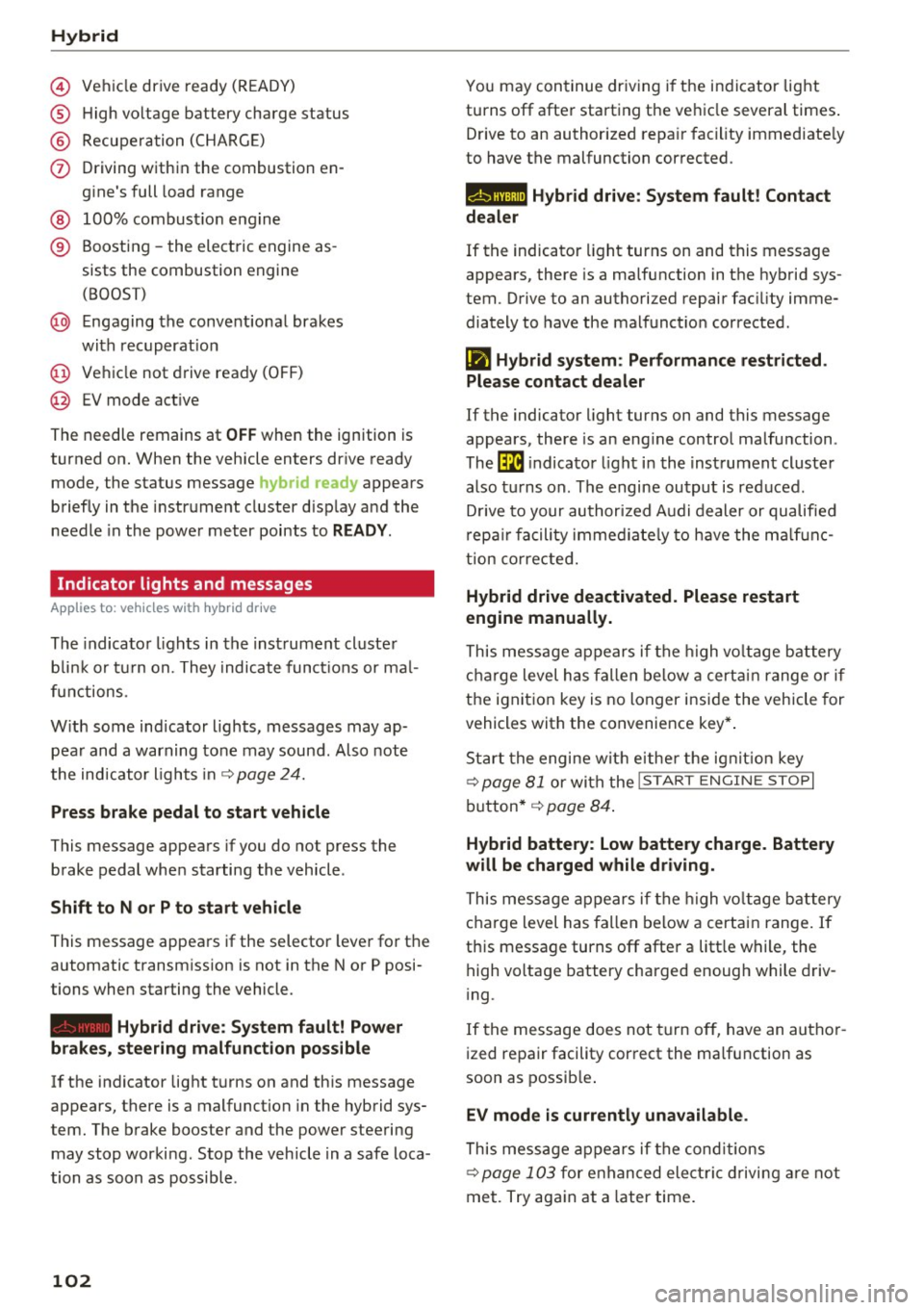
© Vehicl e drive ready (READY)
® High voltage battery charge status
® Recuperation (CHARGE)
(j) Driving within the combustion en-
gine's full load range
® 100% combust ion engine
® Boosting -the electric engine as-
sists the combustion engine
(BOOST)
@ Engaging the conventional brakes
with recuperat ion
@ Vehicle not drive ready (OFF)
@ EV mode act ive
The needle remains at
OFF when the ignition is
turned on. When the vehicle enters drive ready
mode, the status message
hybrid ready appears
briefly in the instrument cluster display and the
needle in the power meter points to
READY.
Indicator lights and messages
App lies to: ve hicles w ith hyb rid drive
The indicator lights in the instrument cluster
b lin k or tu rn on. They indicate functions or mal
f unct ions.
With some indicator lights, messages may ap
pear and a warning tone may sound . Also note
the indicator l ights in
¢page 24.
Press brake pedal to start vehicle
This message appears if you do not press the
brake pedal when starting the vehicle .
Shift to N or P to start vehicle
This message appears if the selector lever for the
automatic transmission is not in the Nor P posi
tions when starting the vehicle.
- Hybrid drive: System fault! Power
brakes, steering malfunction possible
lfthe indicator light turns on and this message
appears, there is a malfunction in the hybrid sys
tem . The brake booster and the power steering
may stop working. Stop the vehicle in a safe loca
tion as soon as possible.
102
You may continue driving i f the i ndicator light
turns off after starting the vehicle several times .
Drive to an authorized repair facility immediate ly
to have the malfunction corrected .
Q/ij:@,j rlybrid drive: System fault! Contact
dealer
If the indicator light turns on and this message
appears, there is a malfunction in the hybrid sys
tem. Drive to an authorized repair fac ility imme
diately to have the malfunct ion corrected.
(II Hybrid system: Performance restricted.
Please contact dealer
If the indicator light turns on and this message
appears, there is an eng ine control malfunction .
The
ffa i ndicator light in the instrument cluster
also turns on. The engine output is reduced.
D rive to your authorized Audi dealer or qualified
r epa ir facility immediate ly to have the malfunc
tion corrected.
Hybrid drive deactivated. Please restart
engine manually.
This message appears if the high vo ltage battery
charge level has fallen below a certain range or if
the ignition key is no longer inside the vehicle for
vehicles with the convenience key* .
Start the engine wit h eithe r the ignition key
¢
page 81 or with the !START ENGINE STOPI
button* ¢ page 84.
Hybrid battery: Low battery charge. Battery
will be charged while driving.
This message appears if the high vo ltage battery
charge level has fallen below a certain range. If
this message turns off after a litt le while, the
high voltage battery charged enough while driv
i ng.
If the message does not turn off, have an author
ized repair facility correct the ma lfunction as
soon as possib le .
EV mode is currently unavailable .
This message appears if the conditions
¢ page 103 for enha nced elect ric driving are not
met. Try again at a la ter time .
Page 106 of 296
Hybrid
Start-Stop function
The combustion engine is operated on ly as need
ed . Generally, the combustion engine turns off
when the vehicle is stationary and the high volt
age battery powers the electrical vehicle sys
tems.
The purpose o f automatica lly shutting the com
bustion engine off in hybrid drive mode is to save
fuel. All of the important vehicle systems, such
as steering, brakes and the A/C system, continue
to remain active. In some cases , systems may re
qu ire the combustion eng ine to continue running
when the vehicle is stationary . When dr iv ing in
congested traff ic for long per iods of t ime, the
combustion eng ine will cycle on when the veh icle
is stationary to keep the high voltage battery
charged.
Gliding
If the gas pedal is not pressed and the D posit ion
is selected, the combustion engine remains
turned off up to speeds of approximately 99 mph
(160 km/h) . Driving conservative ly like th is can
reduce fuel con5umption .
Energy recovery (recuperation)
When braking, the electric motor will act as a
generator creating e lectr ic energy that is then
sto red in the high voltage battery. This also oc
curs when the vehicle is coasting or driving down
hi ll. The combustion engine is automat ica lly
turned off in this case .
Tips for Driving Efficiently with your Hybrid
Appl ies to: ve hicles w ith hyb rid drive
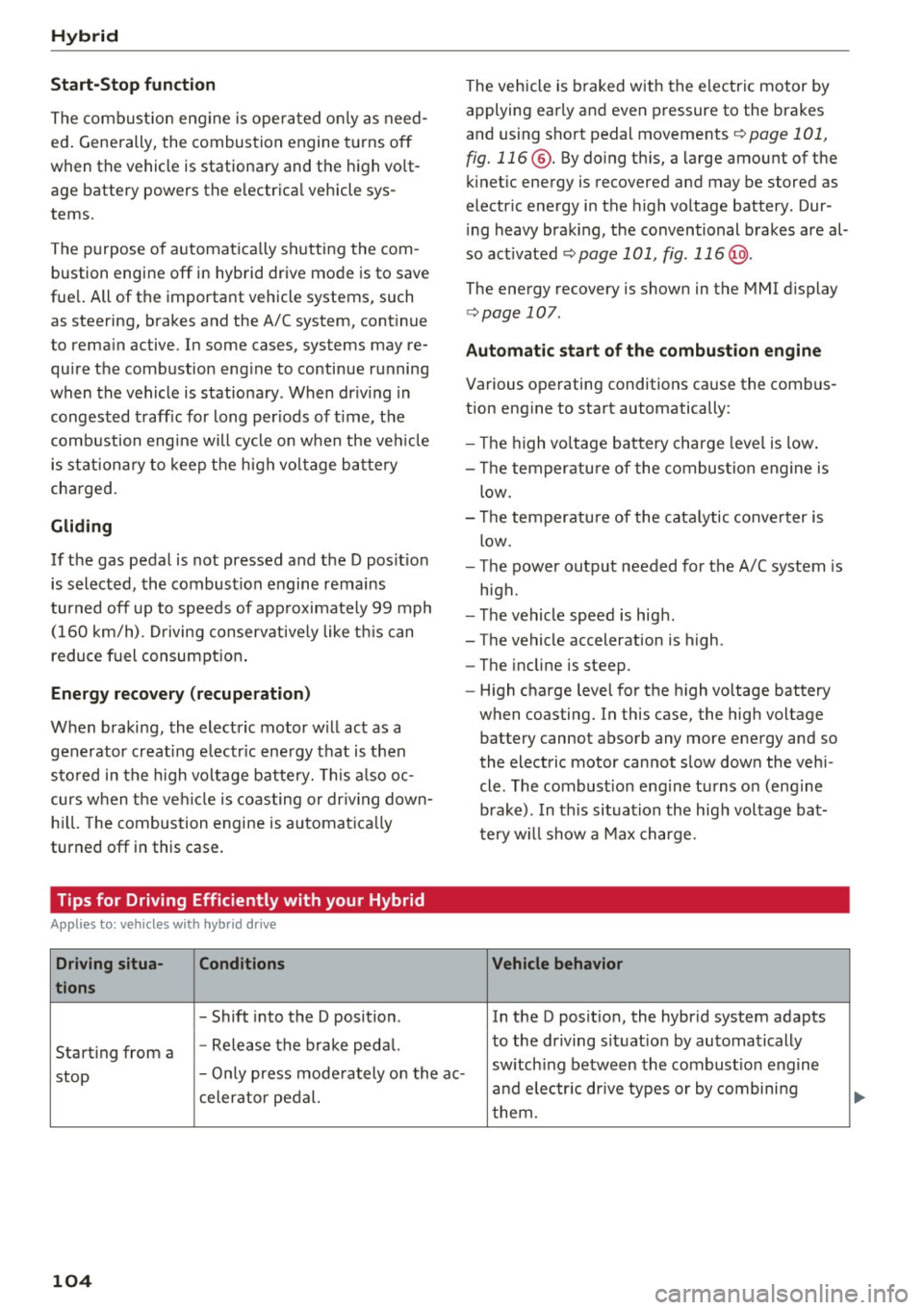
Driving situa- Conditions
tions
- Shift into the D position .
Starting from a -
Release the brake pedal. The vehicle is braked with
the electric motor by
applying early and even pressure to the brakes
and using short pedal movements
¢ page 101,
fig. 116 @. By doing this, a large amount of the
kinet ic energy is recovered and may be stored as
electric energy in the high voltage battery. Dur
i ng heavy brak ing , the conventional brakes are al
so act ivated
¢ page 101, fig . 116 @.
The energy recovery is shown in the MMI display
¢page 107 .
Automatic start of the combustion engine
Various operating conditions cause the combus
tion eng ine to start automatically:
- Th e high voltage battery charge level is low.
- Th e temperature of the combustion engine is
low .
- Th e temperature of the catalytic converter is
low .
- T he power output needed for the A/C system is
high.
- The vehicle speed is high .
- The vehicle acceleration is high .
- The incline is steep .
- High charge level for the high voltage battery
when coasting. In this case, the high voltage battery cannot absorb any more energy and so
the electric motor cannot slow down the veh i
cle. The combust ion engine turns o n (engine
brake) . In this situation the high voltage bat
t ery w ill show a Max charge.
Vehicle behavior
In the D posit ion, the hybrid system adapts
to the driving situat ion by automatically
stop -
Only press moderately on the ac- sw
itch ing between the combustion engine
and e lectr ic drive types or by combining
celerator pedal.
them.
104
...
Page 124 of 296
Audi drive select
Audi drive select
Drive settings
Introduction
Applies to: vehicles with Audi drive select
Drive select provides the possibility to experience
d ifferent types of vehicle settings in one veh icle.
F or instance, using the three
Comfort, Auto and
Dynamic modes, the driver can switch from a
sporty to a comfortable driving mode with the
press of a button.
Addit ionally, in vehicles with MM I*, the vehicle
setup for Individual* mode can be customized by
you. This makes it possible to combine settings such as a sporty engine tuning with comfortable
steering .
A WARNING
-
Improper use of the drive select can cause
collisions, other accidents and serious person
al injury .
Description
Applies to: vehicles with Audi drive select
The vehicle setup in each mode depends on the
veh icle's features . However, the engine, auto
mat ic transmission and steering are a lways in
volved.
Engine and automatic transmission
Depending on the mode, the engine and the au
tomatic transmission respond quicker or in a
more balanced manner to accelerator pedal
movements . In the sporty dynamic mode, the au
tomatic transmission shifts at higher RPMs.
Steering
The steering adapts in terms of steering effort
and steering ratios. Indirect steer ing that moves
easi ly, like the steering in comfort mode, is best
suited to long drives on a highway. In contrast,
dynamic mode provides sporty, direct steering.
The follow ing applies to vehicles with dynam ic
steer ing*: the stee ring rat io changes based on
veh icle speed in order to ma inta in optim um
steer ing effort for the driver at all times. This
122
sets the steering to be less sensitive at higher
speeds in order to provide improved vehicle con
tro l. At reduced speeds, however, steering is
more direct in order to keep the steering effort as
minimal as possible when the driver is maneuver
ing the vehicle . At low and average speeds, dy
nam ic steering addit ionally prov ides more re
spons ive steering performance .
Adaptive dampers*
The adaptive dampers* use sensors to record in
formation regarding steering movements, brak ing and acceleration operations by the driver,
road surface, driving speed, and load . This makes
i t possible to adapt damp ing to the driving situa
tion virtually in real time . Drive select also makes
i t possible to sat isfy the desire for sporty suspen
sion (Dynamic) and comfortable suspension
(Comfort) without giving up balanced tuning (Au
to).
Engine sound*
The sound of the eng ine is adapted to the select
ed mode and ranges from subtle to sporty.
Adaptive cruise control*
The behavior whe n accelerating can be adjusted
from comfortable to sporty, depending on the
drive select mode. Adaptive cruise control also
r esponds to the driv ing behavior of the vehicle
ahead in a more conservative or sporty manner .
(D Tips
- In some models, the maximum vehicle
speed can only be reached in the
Auto and
Dynamic modes.
- Selecting the
Dynamic mode results in spo r
ty shifting characteristics. The S gear posi
tion engages automatically.
- In veh icles that have dynamic steering*, op
erating noise is heard when starting or stop
ping the engine. This does not indicate a
prob lem.
Page 125 of 296
a,
a,
..... N r-N ..... 0 0
0:
co
Selecting the driving mode
App lies to: vehicles wit h Audi drive select
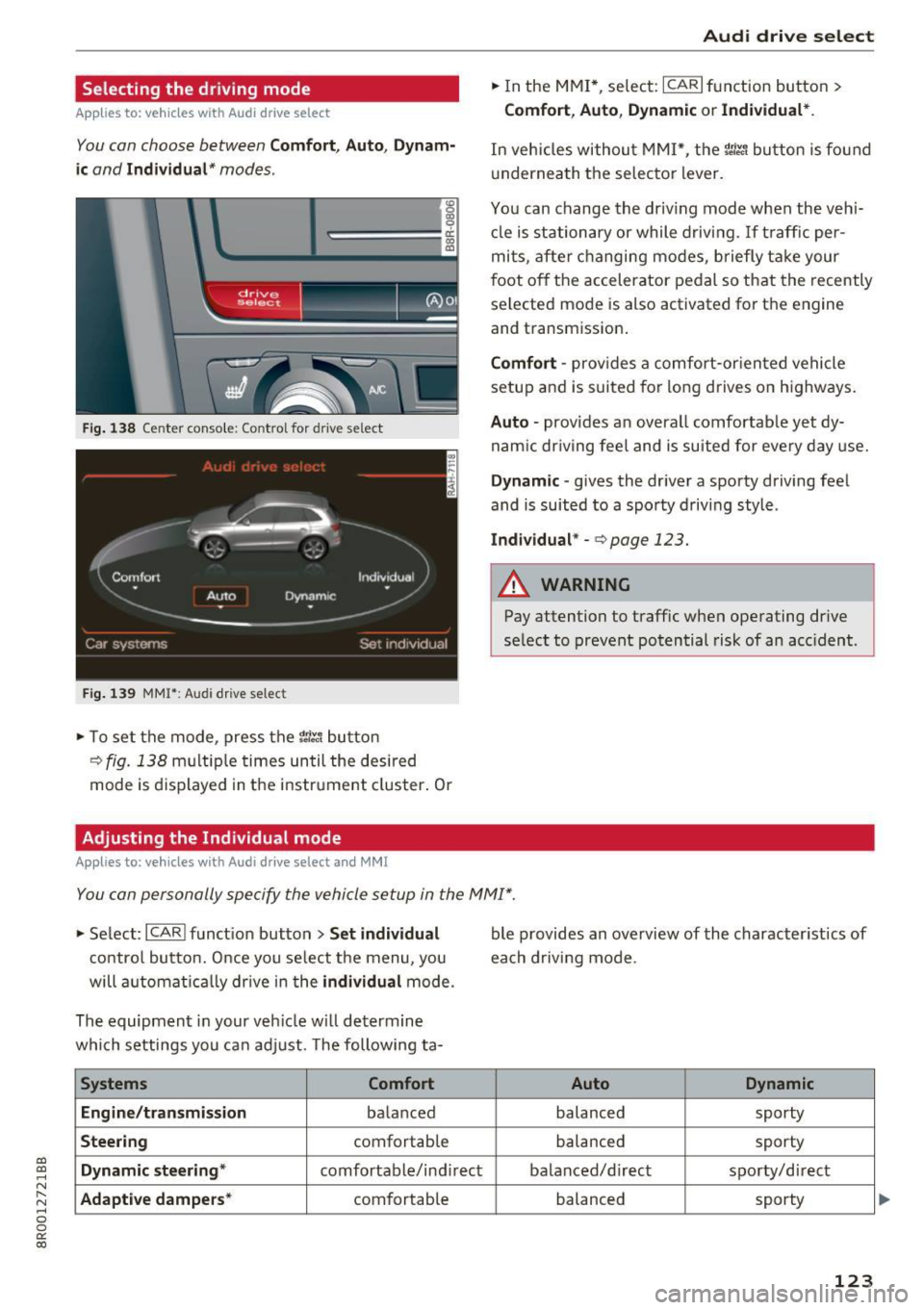
You con choose between Comfort, Auto, Dynam
ic and Individual* modes .
«>
~ 9
c:=====::::;: ~ a,
drive I I r.,. select _ - ~
Fig. 138 Center conso le: Co ntrol for drive se lect
Fig. 139 MMI*: Audi drive select
... To set the mode, press the r:i~ button
c>fig. 138 multip le times until the desired
mode is displayed in the instrument cluster. Or
Adjusting the Individual mode
Applies to: vehicles with Audi drive select and MMI
Audi drive select
... In the MMI*, select: ICARlfunction button>
Comfort , Auto , Dynamic or Individual*.
In vehicles without MMI*, the rn~, button is found
underneath the selector lever.
You can change the driving mode when the veh i
cle is stationary or while driving.
If traff ic per
mits, after changing modes, briefly take your
foot off the accelerator pedal so that the recently
selected mode is also activated for the engine
and transmission .
Comfort -provides a comfort-or iented vehicle
setup and is suited for long drives on highways.
Auto -provides a n overal l comfortab le yet dy
namic driving feel and is suited for every day use.
Dynamic -gives the driver a sporty driving feel
and is suited to a spo rty driving style .
Individual* -c> poge 123.
A WARNING
-Pay attention to traffic when operating drive
se lect to prevent potential risk of an acc ident.
You can personally specify the vehicle setup in the MMI" .
... Se lect: I CARI function button > Set individual
control button. Once you se lect the menu, you
will automatically drive in the
individual mode .
The equipment in your vehicle will determine
which settings you can adjust. The following ta-
Systems Comfort
Engine/transmission
ba lanced
Steering comfortab le
Dynamic steering* comfortable/ind irect
Adaptive dampers * comfortable ble
provides an overview of the character istics of
each driving mode.
Auto Dynamic
balanced sporty
balanced sporty
balanced/d irect sporty/direct
balanced sporty
123
Page 130 of 296
Parking aid
Reverse Parking
Applies to: vehicles w ith Aud i park ing system p lus w ith rear
view c amera
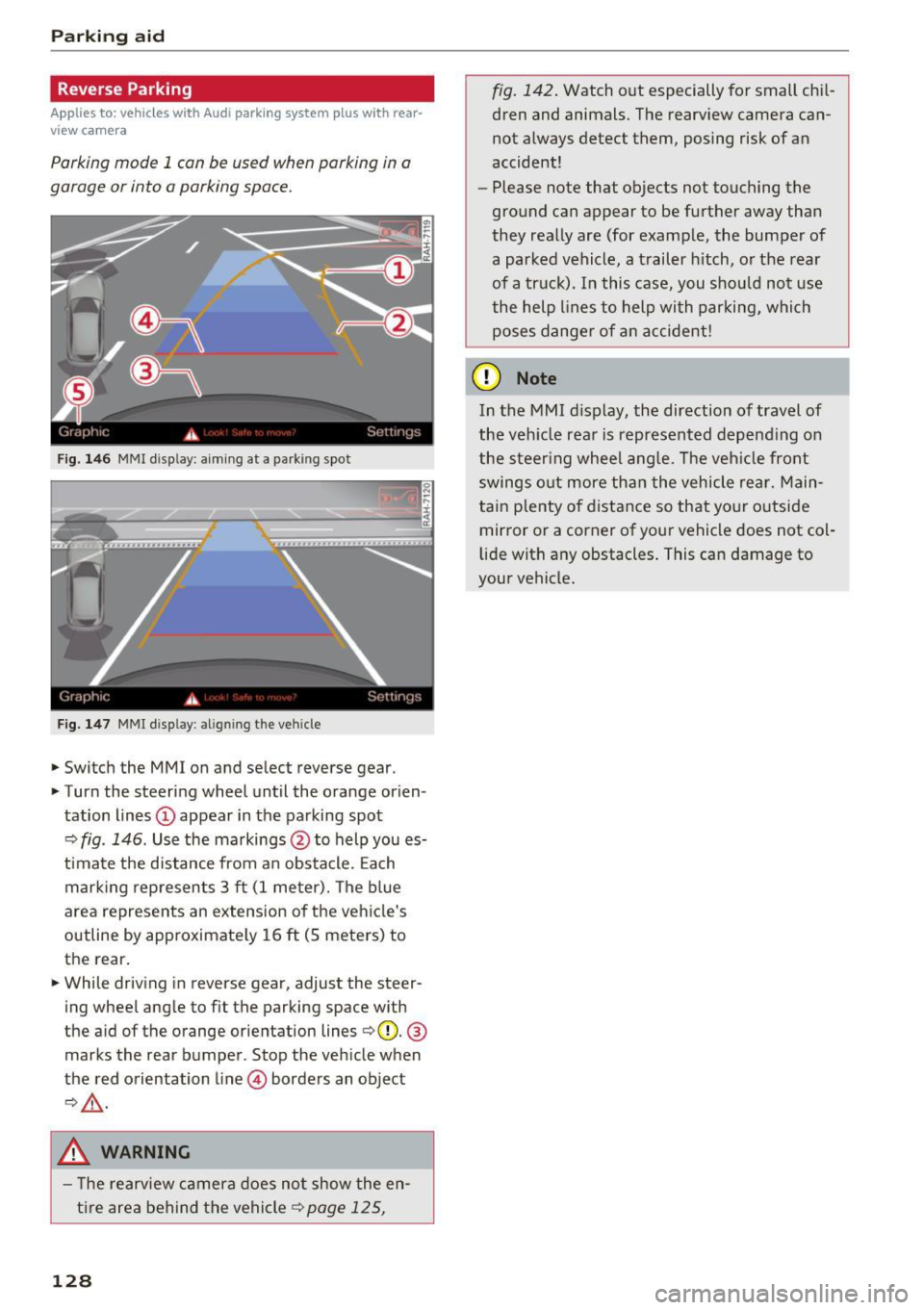
Parking mode 1 con be used when parking in a
garage or into a parking space.
Fig. 146 MMI disp lay: a iming at a parking spot
Fig. 147 MMI disp lay: align ing the vehicle
.,. Switch the MMI on and se lect reverse gear .
.,. Turn the steering wheel until the orange orien
tation lines
(D appear in the parking spot
¢ fig . 146. Use the markings @to help you es
timate the distance from an obstacle. Each
marking represents 3 ft (1 meter). The blue
area represents an extension of the vehicle's
outline by approximately 16
ft (S meters) to
the rear .
.,. While driving in reverse gear, adjust the steer
ing wheel angle to fit the parking space with
the a id of the orange orientation lines ¢(D.
®
marks the rear bumper . Stop the vehicle when
the red orientation line© borders an object
¢,&. .
.&_ WARNING
- The rearview camera does not show the en
tire area behind the vehicle¢
page 125,
128
fig. 142. Watch out especially for small chil
dren and animals. The rearview camera can
not always detect them, posing risk of an
accident!
- Please note that objects not touching the
ground can appear to be further away than
they really are (for example, the bumper of
a parked vehicle, a trailer hitch, or the rear
of a truck). In this case, you should not use
the help lines to help with parking, which
poses danger of an accident!
(D Note
In the MMI display, the direction of travel of
the vehicle rear is represented depending on
the steering wheel angle. The vehicle front
swings out more than the vehicle rear. Main
tain plenty of distance so that your outside
mirror or a corner of your vehicle does not col
lid e with any obstacles. This can damage to
your vehicle.
Page 131 of 296
a,
a,
..... N ,....
N ..... 0 0
0:
co
Parallel Parking
Applies to: vehicles with Aud i parking system plus with rear
view camera
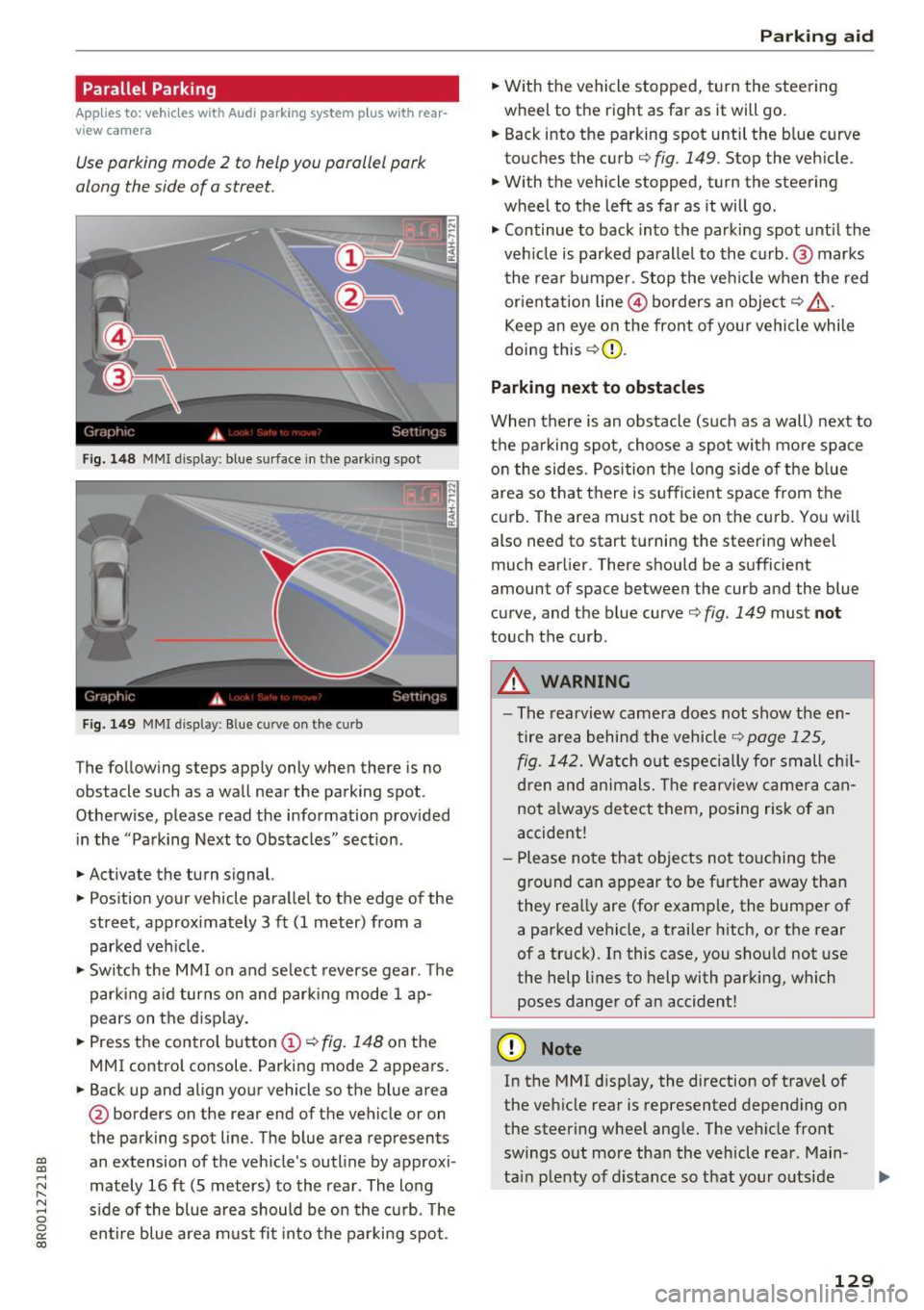
Use parking mode 2 to help you porollel pork
along the side of a street.
Fig. 148 MMI display: blue surface in the parking spot
Fig. 1 49 MMI display : Blue curve on the curb
The following steps apply only when there is no
obstacle such as a wall near the parking spot.
Otherwise, please read the information prov ided
in the "Parking Next to Obstacles" sect ion.
.,. Activate the turn signal.
.,. Pos ition your vehicle paralle l to the edge of the
street, approx imately 3 ft (1 meter) from a
parked veh icle.
.,. Swi tch the M MI on and se lect reverse gear. The
park ing a id turns on and park ing mode 1 ap
pears on the d isplay .
.,. Press the control button
(D ¢ fig. 148 on the
MMI control console. Parking mode 2 appears.
.,. Back up and align yo ur vehicle so the b lue area
@ borders on the rear end of the vehicle or on
the parking spot line. The blue area represents
an extension of the vehicle's outline by approxi
mately 16 ft (S meters) to the rear. The long
s ide of the blue area should be on the curb. The
en tire blue area must fit into the parki ng spot.
P ark ing aid
.,. With the vehicle stopped, turn the steering
wheel to the right as far as it will go.
.,. Back into the parking spot until the b lue curve
touches the curb¢
fig. 149. Stop the vehicle.
.,. With the vehicle stopped, turn the steering
wheel to the left as far as it will go .
.,. Continue to back into the parki ng spot unt il the
veh icle is parked parallel to the c urb. @ marks
the rear bumpe r. Stop the ve hicle when the red
orientat ion line @ borders an object¢
&
Keep an eye on the front of yo ur vehicle while
doing this ¢(D.
Parking next to obstacles
When there is an obstacle (such as a wall) next to
th e parking spot, choose a spot with mo re space
o n t he sides. Pos ition the long side of the b lue
area so that there is sufficient space from the
curb. The area must not be on the curb. You wi ll
also need to start turning the steering wheel
much earlier. There should be a sufficient
amount of space between the curb and the blue
curve, and the blue curve¢
fig. 149 must not
touch the curb.
A WARNING
-The rearview camera does not show the en
tire area behind the vehicle¢
page 125 ,
fig. 142.
Watch o ut especially fo r small ch il
d ren and animals. The rearview came ra can
not a lways detect them, posing risk of an
accide nt!
- P lease note that o bjects no t touching the
g ro und can appear to be further away tha n
they rea lly are (for e xamp le, the bumper of
a parked vehicle, a trailer h itch, or the rear
of a truck). In this case, you shou ld not use
the help lines to help with parking, which poses danger of an accident!
(D Note
In the M Ml d is play, the direction o f travel of
the veh icle rear is represented depend ing on
the steer ing whee l ang le. The ve hicle front
swings o ut more tha n the vehicle rea r. Main
ta in plenty of distance so that your o utside
129
Page 133 of 296
CD
CD
.... N ,-... N ,....,
0 0 C<'. 00
Driving safety
Basics
Safe driving habits
Please remember -safety first!
This chapter contains important information,
tips, instructions and warnings that you need to
read and observe for your own safety, the safety
of your passengers and others . We have summar
ized here what you need to know about safety
belts, airbags, child restraints as well as child
safety. Your safety is for us
priority number 1. Al
ways observe the information and warnings in
this section - for your own safety as well as that
of your passengers.
The information in this section applies to all
model versions of your vehicle. Some of the fea
tures descr ibed in this sections may be standard
equipment on some models, or may be optional
equipment on others. If you are not sure, ask
your authorized Audi dealer.
A WARNING
- Always make sure that you follow the in
structions and heed the WARNINGS in this
Manual. It is in your interest and in the in
terest of your passengers .
-
-Always keep the complete Owner's Litera
ture in your Audi when you lend or sell your
vehicle so that this important information
will always be available to the driver and
passengers.
- Always keep the Owner's literature handy so
that you can find it easily if you have ques
tions.
Safety equipment
The safety features are part of the occupant re
straint system and work together to help reduce
the risk of injury in a wide variety of accident sit
uations.
Your safety and the safety of your passengers
should not be left to chance. Advances in tech
nology have made a var iety of features available
to help reduce the risk of injury in an accident.
Driving safety
The following is a list of just a few of the safety
features in your Audi:
- sophisticated safety belts for driver and all pas-
senger seat ing pos itions,
- be lt force limiters for the front seats,
- belt pretensioners for the seats,
- belt height adjustment for the front seats,
- head restraints for each seating position,
- front airbags,
- side airbags in the front seats and outer rear
seats *,
- side curtain airbags,
- special LATCH anchorages for child restraints,
- adjustab le steering column.
These individual safety features, can work to gether as a system to help protect you and your
passengers in a wide range of accidents . These
features cannot work as a system if they are not
always correctly adjusted and correctly used.
Safety is everybody's responsibility!
Important things to do before driving
Safety is everybody 's job! Vehicle and occupant
safety always depends on the informed and care
ful driver .
For your safety and the safety of your passen
gers,
before driving always:
.,. Make sure that all lights and signals are operat
ing correctly.
.,. Make sure that the tire pressure is correct .
.,. Make sure that all windows are clean and afford
good visibility to the outside .
.,. Secure all luggage and other items carefully
~page 74 .
.,. Make sure that nothing can interfere with the
pedals.
.,. Adjust front seat, head restraint and mirrors
correctly for your height.
.,. Instruct passengers to adjust the head re
straints according to their height.
.,. Make sure to use the right child restraint cor
rectly to protect children
¢ page 168, Child
safety. ..,.
131
Page 134 of 296
Driving safety
• Sit properly in your seat and make sure that
your passengers do the same
c:> page 60,
General information.
• Fasten your safety belt and wear it properly . Al
so instruct your passengers to fasten their safe
ty belts properly
c:> page 140 .
What impairs driving safety?
Safe driving is directly related to the condition of
the vehicle, the driver as well as the driver 's abili
ty to concentrate on the road without being dis
tracted .
The driver is responsible for the safety of the ve
hicle and all of its occupants. If your ability to
drive is impaired, safety risks for everybody in the
vehicle increase and you also become a hazard to
everyone else on the road
c:> Li').. Therefore :
• Do not let yourself be distracted by passengers
or by using a cellular telephone .
• NEVER drive when your driving ability is im
paired (by medications, alcohol, drugs, etc.).
• Observe all traffic laws, rules of the road and
speed limits and plain common sense.
• ALWAYS adjust your speed to road, traffic and
weather conditions.
• Take frequent breaks on long trips. Do not drive
for more than two hours at a stretch.
• Do NOT drive when you are tired, under pres
sure or when you are stressed.
A WARNING
Impaired driving safety increases the risk of
ser ious personal injury and death whenever a
vehicle is being used.
132
Correct passenger
seating positions
Proper seating position for the driver
The proper driver seating position is important
for safe, relaxed driving.
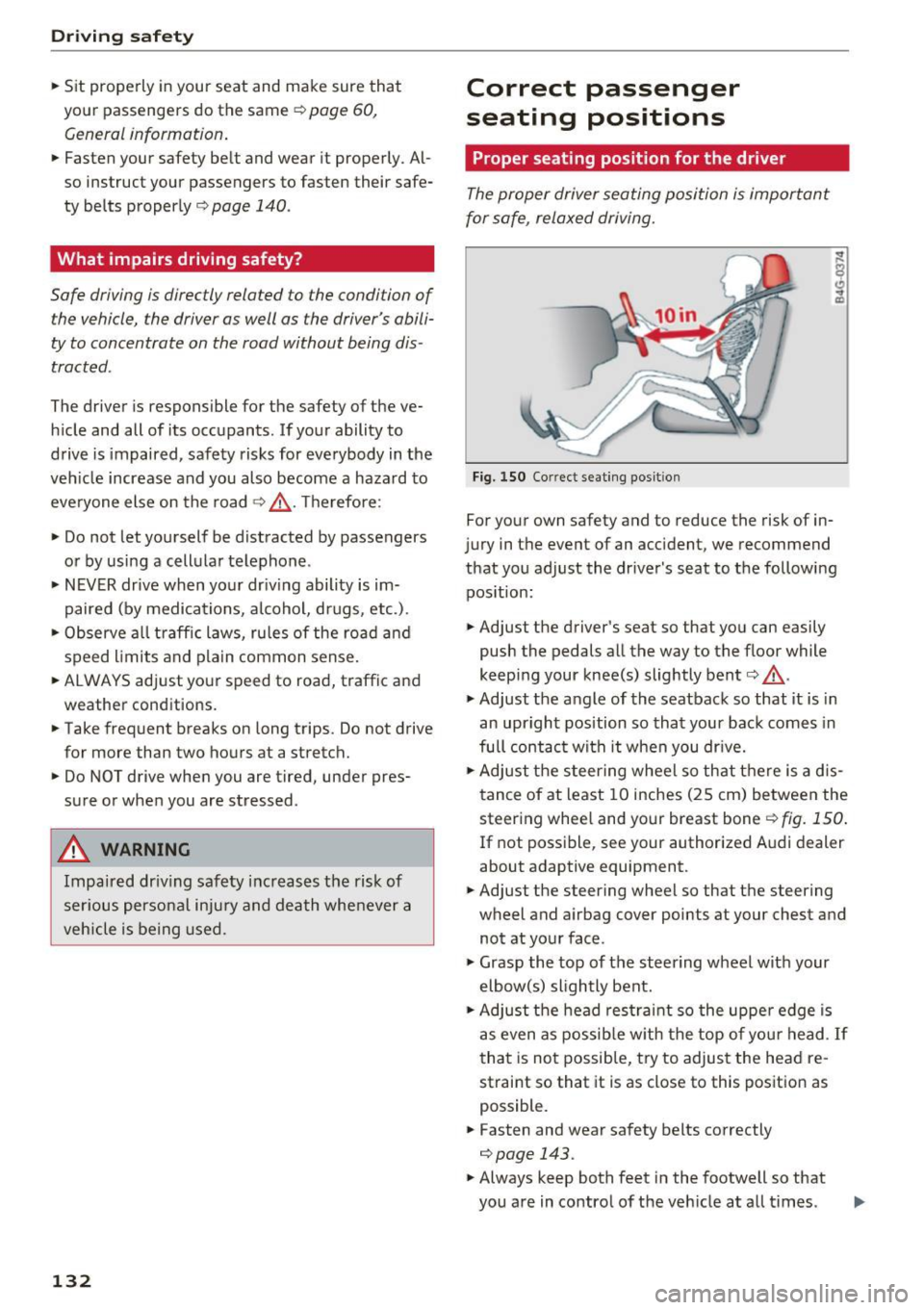
Fig. 150 Correct seating posit ion
For your own safety and to reduce the risk of in
jury in the event of an accident, we recommend
that you adjust the driver's seat to the following position:
• Adjust the driver's seat so that you can easily
push the pedals all the way to the floor while
keeping your knee(s) slightly bent
c:> .&_ .
• Adjust the angle of the seatback so that it is in
an upright position so that your back comes in
full contact with it when you drive.
• Adjust the steering wheel so that there is a d is
tance of at least 10 inches (25 cm) between the
steering wheel and your breast boner::!)
fig. 150.
If not possible, see your authorized Audi dealer
about adaptive equipment.
• Adjust the steering wheel so that the steering
wheel and airbag cover points at your chest and
not at your face.
• Grasp the top of the steering wheel with your
elbow(s) slightly bent.
• Adjust the head restraint so the upper edge is
as even as possible with the top of your head .
If
that is not possible, try to adjust the head re
straint so that it is as close to this position as
possible.
• Fasten and wear safety belts correctly
c:> page 143.
• Always keep both feet in the footwell so that
you are in control of the veh icle at all times .
Page 135 of 296
CD
CD
.... N ,-... N .... 0 0 C<'. 00
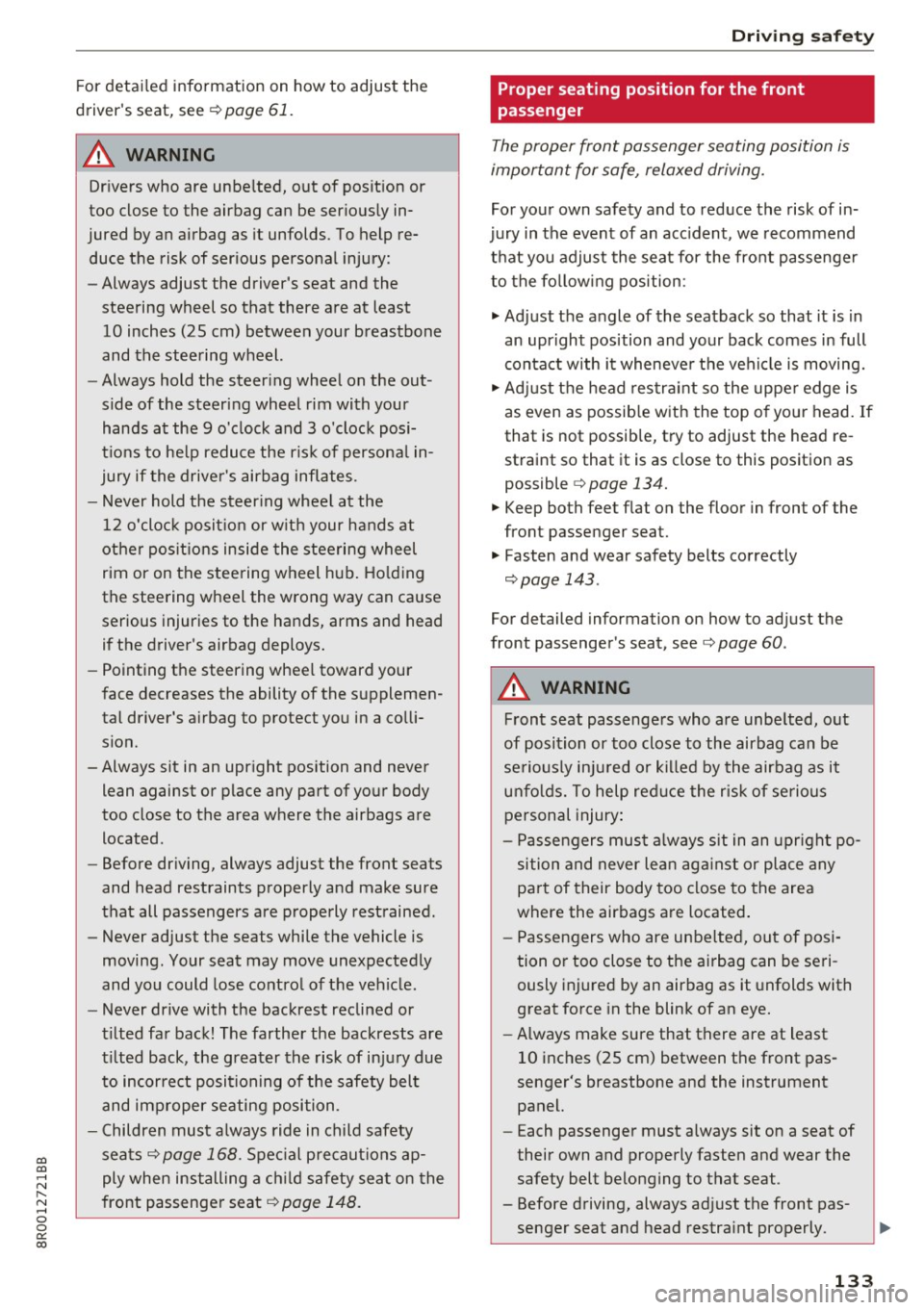
For detailed information on how to adjust the
driver's seat, see
¢ page 61.
A WARNING
Drivers who are unbelted, out of position or
too close to the airbag can be seriously in
jured by an airbag as it unfolds. To help re
duce the risk of serious personal injury:
- Always adjust the driver's seat and the
steering wheel so that there are at least 10 inches (25 cm) between your breastbone
and the steering wheel.
- Always hold the steer ing wheel on the out
side of the steering wheel rim with your
hands at the 9 o'clock and 3 o'clock posi
tions to help reduce the r isk of persona l in
jury if the driver's airbag inflates.
- Never hold the steer ing whee l at the
12 o'clock position or w ith your hands at
other pos it ions inside the steering wheel
rim or on the steering wheel hub. Holding
the steering wheel the wrong way can cause
serious injuries to the hands, arms and head if the driver's airbag deploys.
- Pointing the steering wheel toward your
face decreases the ability of the supplemen
tal driver's airbag to protect you in a colli sion.
- Always sit in an upright position and never lean against or place any part of your body
too close to the area where the airbags are
located .
- Before driving, always adjust the front seats
and head restraints properly and make sure
that all passengers are properly restrained.
- Never adjust the seats while the vehicle is
moving . Your seat may move unexpectedly
and you could lose control of the vehicle .
- Never drive with the backrest reclined or
t il ted far back! The farther the backrests are
tilted back, the greater the risk of injury due
to incorrect positioning of the safety belt
and improper seating position.
- Children must always ride in child safety
seats¢
page 168. Spec ial precaut ions ap
ply when installing a ch ild safety seat on the
front passenger seat
c:::;, page 148.
Driving safety
Proper seating position for the front
passenger
The proper front passenger seating position is
important for safe, relaxed driving.
For your own safety and to reduce the risk of in
jury in the event of an acc ident, we recommend
that you adjust the seat for the front passenger
to the follow ing position:
"' Adjust the angle of the seatback so that it is in
an upright position and your back comes in full
contact with it whenever the vehicle is moving.
"' Adjust the head restraint so the upper edge is
as even as possible with the top of your head. If
that is not possible, try to adjust the head re
straint so that it is as close to this position as
possible
¢ page 134.
"' Keep both feet flat on the floor in front of the
front passenger seat.
"' Fasten and wear safety belts correctly
c:::;, page 143.
For detailed information on how to adjust the
front passenger's seat, see
c:::;, page 60.
A WARNING
--
Front seat passengers who are unbelted, out
of position or too close to the airbag can be
seriously injured or killed by the airbag as it
unfolds. To help reduce the risk of serious
personal injury:
- Passengers must always s it in an upright po
sition and never lean against or place any
part of their body too close to the area
where the airbags are located.
- Passengers who are unbelted, out of posi
tion or too close to the airbag can be seri
ously injured by an airbag as it unfolds with
great force in the blink of an eye.
- Always make sure that there are at least
10 inches (25 cm) between the front pas
senger's breastbone and the instrument
panel.
- E ach passenger must always sit on a seat of
their own and properly fasten and wear the
safety belt belonging to that seat .
- Before driving, always adjust the front pas
senger seat and head restraint properly.
133
Page 143 of 296
a,
a,
..... N r-N ..... 0 0
0:
co
-Failure to pay attention to the warn ing light
that come on, could lead to persona l injury.
Why use safety belts?
Frontal collisions and the law of physics
Frontal crashes create very strong forces for peo
ple riding in vehicles .
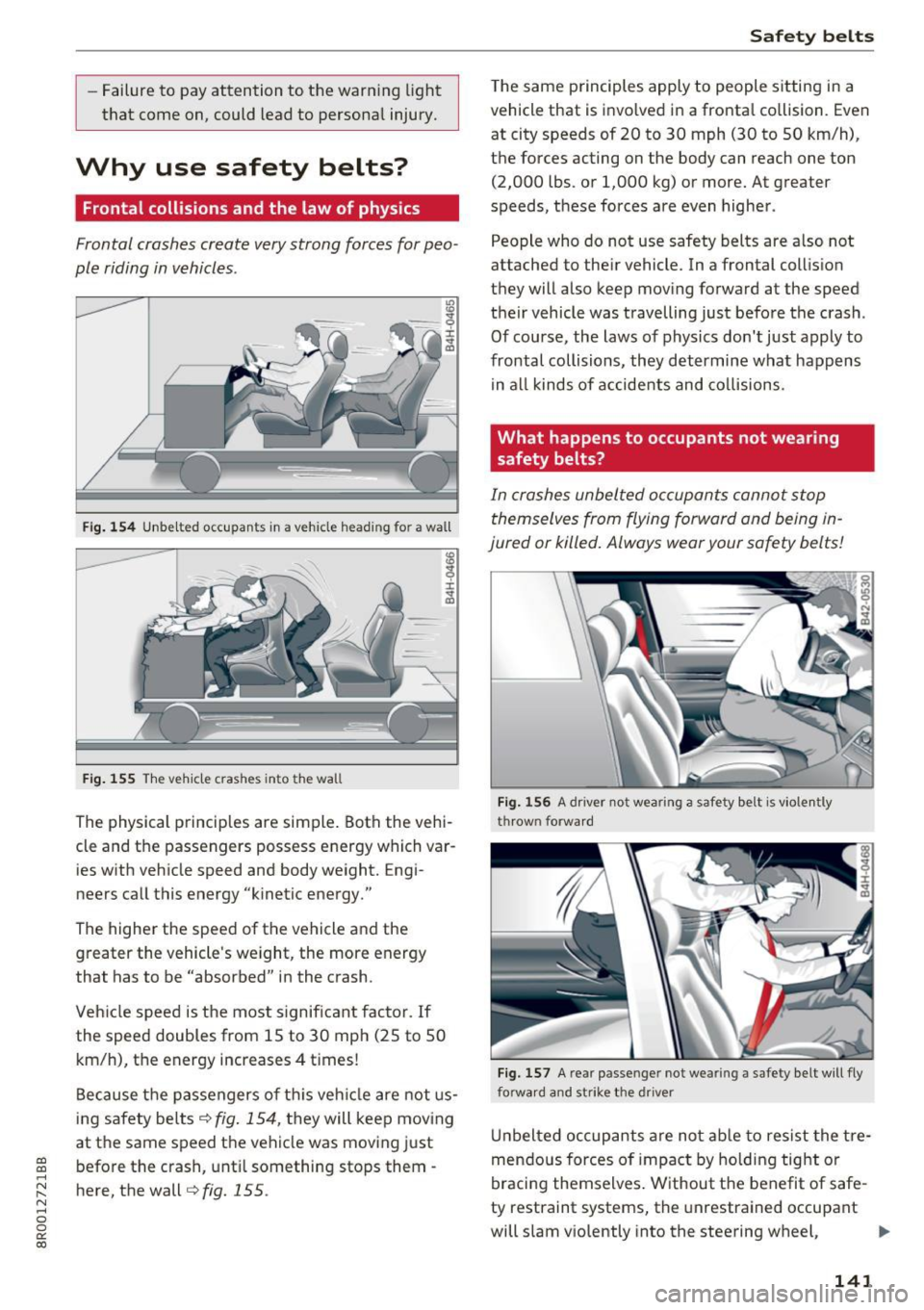
Fig. 154 Unbelted occupants in a vehicle heading for a wall
Fig. 155 The vehicle crashes into the wall
The physical principles are simple. Both the vehi
cle and the passengers possess energy which var ies with vehicle speed and body weight. Engi
neers call this energy "kinetic energy."
The higher the speed of the vehicle and the greater the vehicle's we ight, the more energy
that has to be "absorbed" in the crash.
Veh icle speed is the most significant factor. If
the speed doubles from 15 to 30 mph (25 to 50
km/h), the energy increases 4 t imes!
Because the passengers of this vehicle are not us
ing safety belts
¢fig. 154, they will keep moving
at the same speed the vehicle was moving just
before the crash, until something stops them -
here, the wall¢
fig. 155 .
Safety belts
The same p rinciples apply to people sitting in a
vehicle that is invo lved in a fronta l co llision. Even
at city speeds of 20 to 30 mph (30 to 50 km/h),
the forces acting on the body can reach one ton
(2,000 lbs. or 1,000 kg) or more. At greater
speeds, these forces are even higher.
People who do not use safety belts are a lso not
attached to the ir vehicle. In a frontal collis ion
they will also keep moving forward at the speed
their vehicle was travelling just before the crash .
Of course, the laws of physics don't just apply to
frontal collisions, they determine what happens in all kinds of accidents and collisions .
What happens to occupants not wea ring
safety belts?
In crashes unbelted occupants cannot stop
themselves from flying forward and being in
jured or killed. Always wear your safety belts!
Fig. 156 A dr iver not wearing a safety belt is violently
thrown forward
Fig . 157 A rear passe nger not wearing a safety belt will fly
forwa rd and strike the driver
Unbelted occupants are not able to resist the tre
mendous forces of impact by holding tight or
bracing themselves . Without the benefit of safe
ty restraint systems, the unrestrained occupant
will slam v iolently into the steering wheel,
Ill>-
141