brake AUDI Q5 2017 Owner's Guide
[x] Cancel search | Manufacturer: AUDI, Model Year: 2017, Model line: Q5, Model: AUDI Q5 2017Pages: 296, PDF Size: 74.43 MB
Page 100 of 296
Driving
Manual shift program
Using the manual shift program you can man
ually select gears .
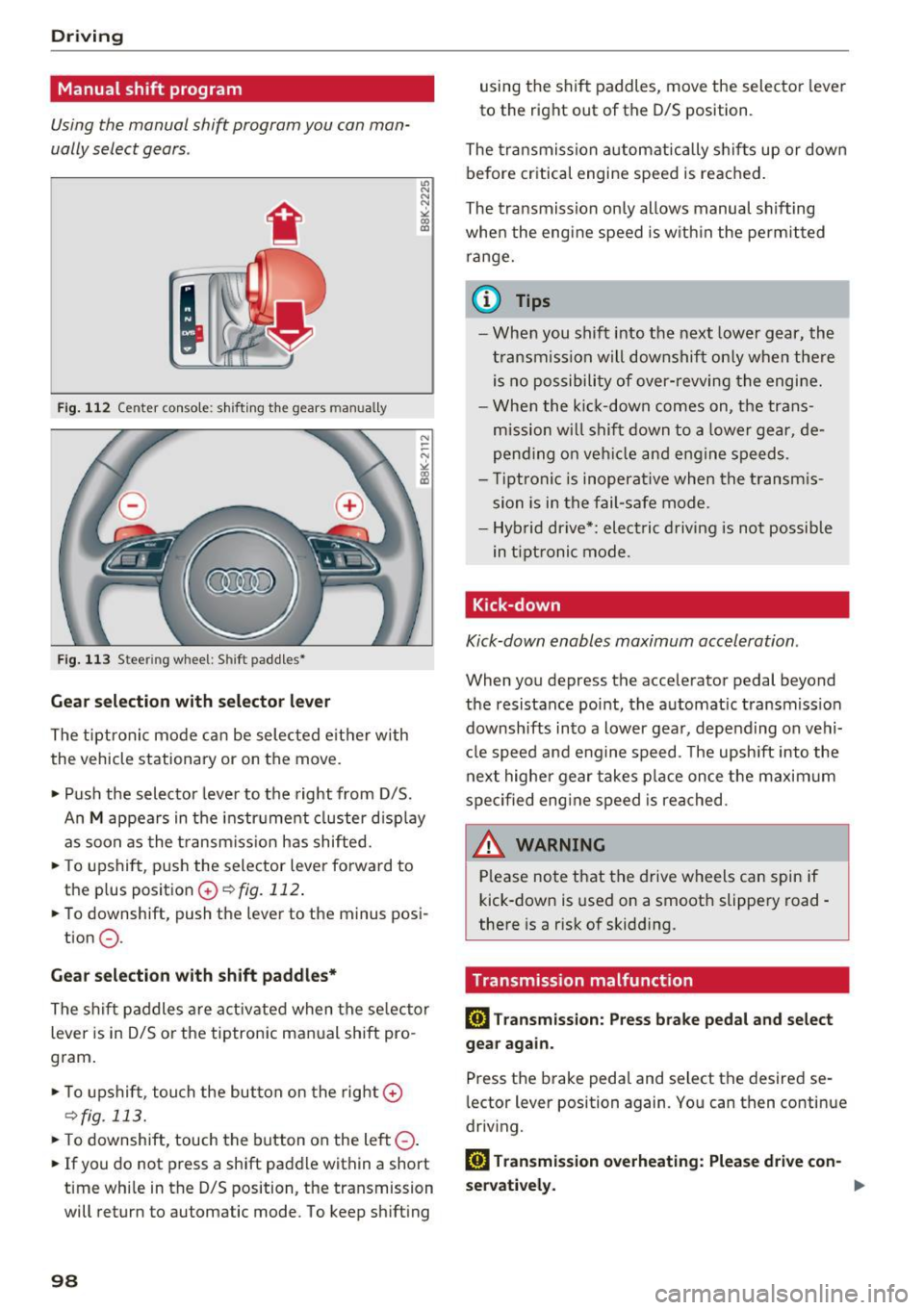
Fig . 1 12 Center console: s hift ing t he gears manually
F ig. 11 3 Steering wheel: Shift padd les•
Gear selection with selector lever
The tipt ron ic mode can be selected e it h er with
the vehicle stationary or on the
move.
• Pu sh the selector lever to t he right from D/S.
u, N
N
N
" ll1
An M appears in the i nstr ume nt cl uster d isp lay
as soon as the t ransm iss ion has shifted.
• To upshift, push the selector lever forward to
the plus posit ion
G) ¢ fig. 112 .
• To downshift, push the lever to the minus posi-
tion
0 .
Gear selection with shift paddl es*
The shif t paddles are activated when the se lector
lever is in D/S or the tiptronic manual shift pro
gram .
• To upshift, touch the but ton on the right
G)
¢fig. 113.
• To downshift, touch the button on the left 0-
• If you do not press a shift paddle within a short
t ime whi le in the D/S position, the transmission
will return to automatic mode. To keep sh ift ing
98
using the shift paddles, move the selector lever
to the right out of the D/S position.
The tra nsmissron auto matica lly s hifts up or down
before critical engine speed is reached.
The tra nsmiss ion on ly allows manual sh ifting
whe n the engine speed is w ith in the permit ted
range.
(D Tips
- When you shift into t he next lowe r gear, the
t ransmiss ion will downshift on ly when the re
is no possibili ty of over-revving the engi ne.
- Whe n the ki ck-down comes on, the trans
mission w ill shif t down to a lowe r gear, de
pend ing o n ve hicl e and engine speeds.
- Ti ptroni c is inoperat ive when the transm is
sion is in the fail-safe mode.
- Hyb rid drive*: elect ric dr iving is not po ssib le
in t ipt ronic mode.
Kick-down
Kick-down enables maximum acceleration.
When you depress the accelerator pedal beyond
the resistance point, the a utomat ic transmiss ion
downshifts into a lower gear, depending on vehi
cl e speed and engine speed. The upsh ift into the
next highe r gear takes p lace on ce t he maxim um
spec ified eng ine speed is reached .
A.::!!.ARNING
-Please no te that t he drive wheels can spin if
kick-down is used on a smooth slippe ry road -
there is a risk of skidd ing.
Transmission malfunction
ml Tran smission: Pre ss brake pedal and select
gear again.
Press the brake pedal and select the desired se
l ector lever position again. Yo u can then conti nue
driv ing.
ml Transmission o verheating: Plea se dri ve con-
servatively . .,,.
Page 104 of 296
Hybrid
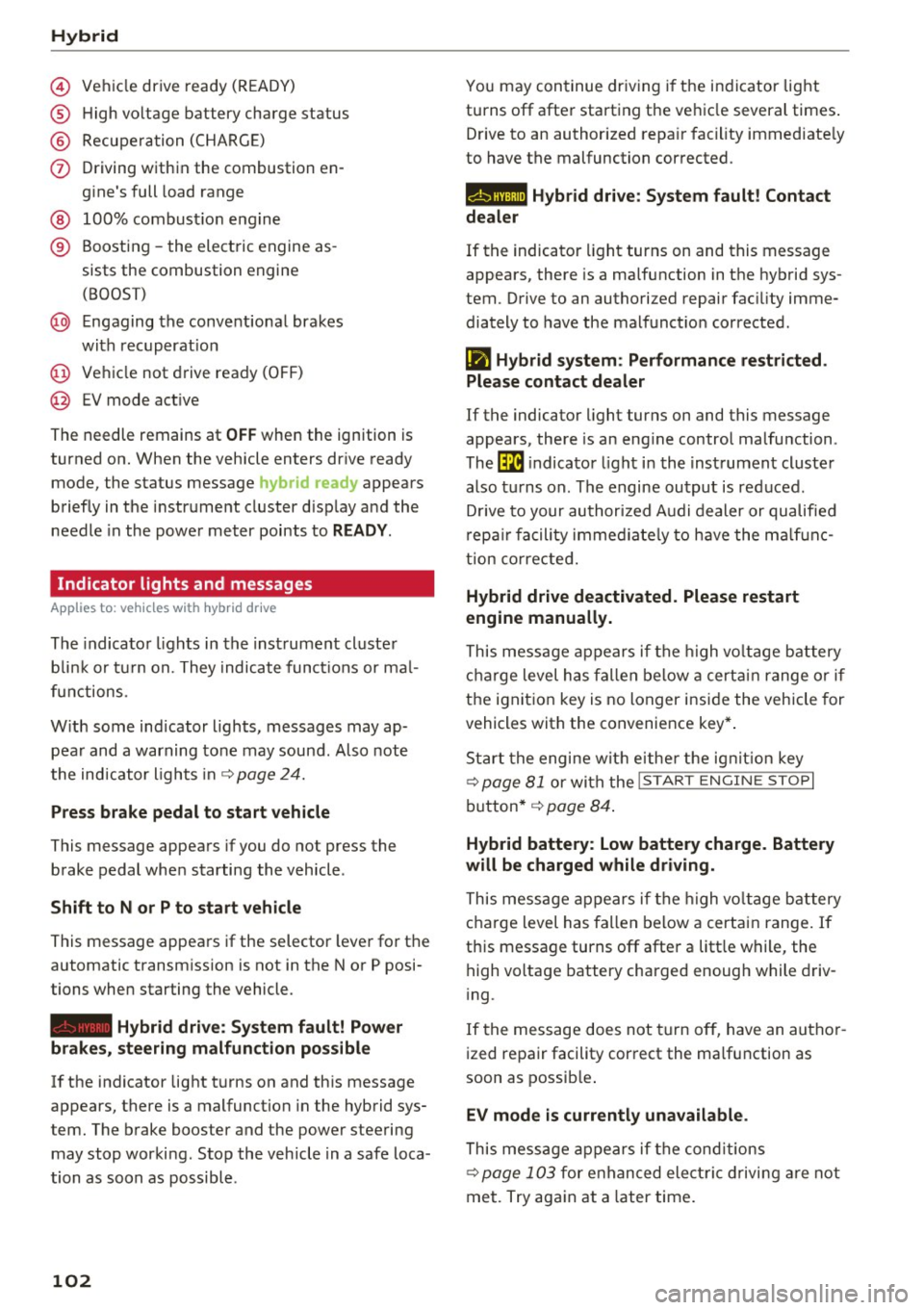
© Vehicl e drive ready (READY)
® High voltage battery charge status
® Recuperation (CHARGE)
(j) Driving within the combustion en-
gine's full load range
® 100% combust ion engine
® Boosting -the electric engine as-
sists the combustion engine
(BOOST)
@ Engaging the conventional brakes
with recuperat ion
@ Vehicle not drive ready (OFF)
@ EV mode act ive
The needle remains at
OFF when the ignition is
turned on. When the vehicle enters drive ready
mode, the status message
hybrid ready appears
briefly in the instrument cluster display and the
needle in the power meter points to
READY.
Indicator lights and messages
App lies to: ve hicles w ith hyb rid drive
The indicator lights in the instrument cluster
b lin k or tu rn on. They indicate functions or mal
f unct ions.
With some indicator lights, messages may ap
pear and a warning tone may sound . Also note
the indicator l ights in
¢page 24.
Press brake pedal to start vehicle
This message appears if you do not press the
brake pedal when starting the vehicle .
Shift to N or P to start vehicle
This message appears if the selector lever for the
automatic transmission is not in the Nor P posi
tions when starting the vehicle.
- Hybrid drive: System fault! Power
brakes, steering malfunction possible
lfthe indicator light turns on and this message
appears, there is a malfunction in the hybrid sys
tem . The brake booster and the power steering
may stop working. Stop the vehicle in a safe loca
tion as soon as possible.
102
You may continue driving i f the i ndicator light
turns off after starting the vehicle several times .
Drive to an authorized repair facility immediate ly
to have the malfunction corrected .
Q/ij:@,j rlybrid drive: System fault! Contact
dealer
If the indicator light turns on and this message
appears, there is a malfunction in the hybrid sys
tem. Drive to an authorized repair fac ility imme
diately to have the malfunct ion corrected.
(II Hybrid system: Performance restricted.
Please contact dealer
If the indicator light turns on and this message
appears, there is an eng ine control malfunction .
The
ffa i ndicator light in the instrument cluster
also turns on. The engine output is reduced.
D rive to your authorized Audi dealer or qualified
r epa ir facility immediate ly to have the malfunc
tion corrected.
Hybrid drive deactivated. Please restart
engine manually.
This message appears if the high vo ltage battery
charge level has fallen below a certain range or if
the ignition key is no longer inside the vehicle for
vehicles with the convenience key* .
Start the engine wit h eithe r the ignition key
¢
page 81 or with the !START ENGINE STOPI
button* ¢ page 84.
Hybrid battery: Low battery charge. Battery
will be charged while driving.
This message appears if the high vo ltage battery
charge level has fallen below a certain range. If
this message turns off after a litt le while, the
high voltage battery charged enough while driv
i ng.
If the message does not turn off, have an author
ized repair facility correct the ma lfunction as
soon as possib le .
EV mode is currently unavailable .
This message appears if the conditions
¢ page 103 for enha nced elect ric driving are not
met. Try again at a la ter time .
Page 106 of 296
Hybrid
Start-Stop function
The combustion engine is operated on ly as need
ed . Generally, the combustion engine turns off
when the vehicle is stationary and the high volt
age battery powers the electrical vehicle sys
tems.
The purpose o f automatica lly shutting the com
bustion engine off in hybrid drive mode is to save
fuel. All of the important vehicle systems, such
as steering, brakes and the A/C system, continue
to remain active. In some cases , systems may re
qu ire the combustion eng ine to continue running
when the vehicle is stationary . When dr iv ing in
congested traff ic for long per iods of t ime, the
combustion eng ine will cycle on when the veh icle
is stationary to keep the high voltage battery
charged.
Gliding
If the gas pedal is not pressed and the D posit ion
is selected, the combustion engine remains
turned off up to speeds of approximately 99 mph
(160 km/h) . Driving conservative ly like th is can
reduce fuel con5umption .
Energy recovery (recuperation)
When braking, the electric motor will act as a
generator creating e lectr ic energy that is then
sto red in the high voltage battery. This also oc
curs when the vehicle is coasting or driving down
hi ll. The combustion engine is automat ica lly
turned off in this case .
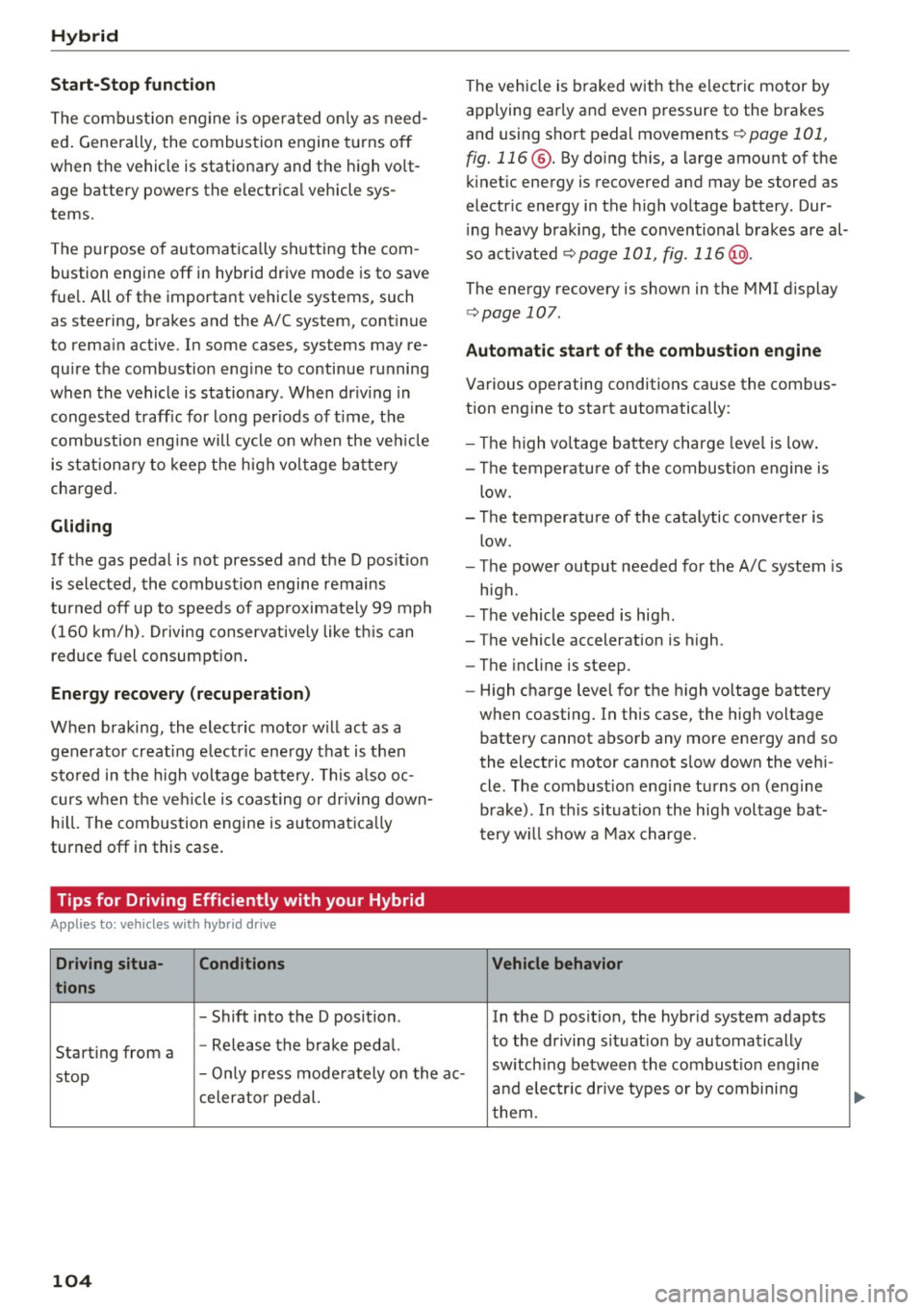
Tips for Driving Efficiently with your Hybrid
Appl ies to: ve hicles w ith hyb rid drive
Driving situa- Conditions
tions
- Shift into the D position .
Starting from a -
Release the brake pedal. The vehicle is braked with
the electric motor by
applying early and even pressure to the brakes
and using short pedal movements
¢ page 101,
fig. 116 @. By doing this, a large amount of the
kinet ic energy is recovered and may be stored as
electric energy in the high voltage battery. Dur
i ng heavy brak ing , the conventional brakes are al
so act ivated
¢ page 101, fig . 116 @.
The energy recovery is shown in the MMI display
¢page 107 .
Automatic start of the combustion engine
Various operating conditions cause the combus
tion eng ine to start automatically:
- Th e high voltage battery charge level is low.
- Th e temperature of the combustion engine is
low .
- Th e temperature of the catalytic converter is
low .
- T he power output needed for the A/C system is
high.
- The vehicle speed is high .
- The vehicle acceleration is high .
- The incline is steep .
- High charge level for the high voltage battery
when coasting. In this case, the high voltage battery cannot absorb any more energy and so
the electric motor cannot slow down the veh i
cle. The combust ion engine turns o n (engine
brake) . In this situation the high voltage bat
t ery w ill show a Max charge.
Vehicle behavior
In the D posit ion, the hybrid system adapts
to the driving situat ion by automatically
stop -
Only press moderately on the ac- sw
itch ing between the combustion engine
and e lectr ic drive types or by combining
celerator pedal.
them.
104
...
Page 107 of 296
CD
CD
.... N ,-... N .... 0 0 C<'. 00
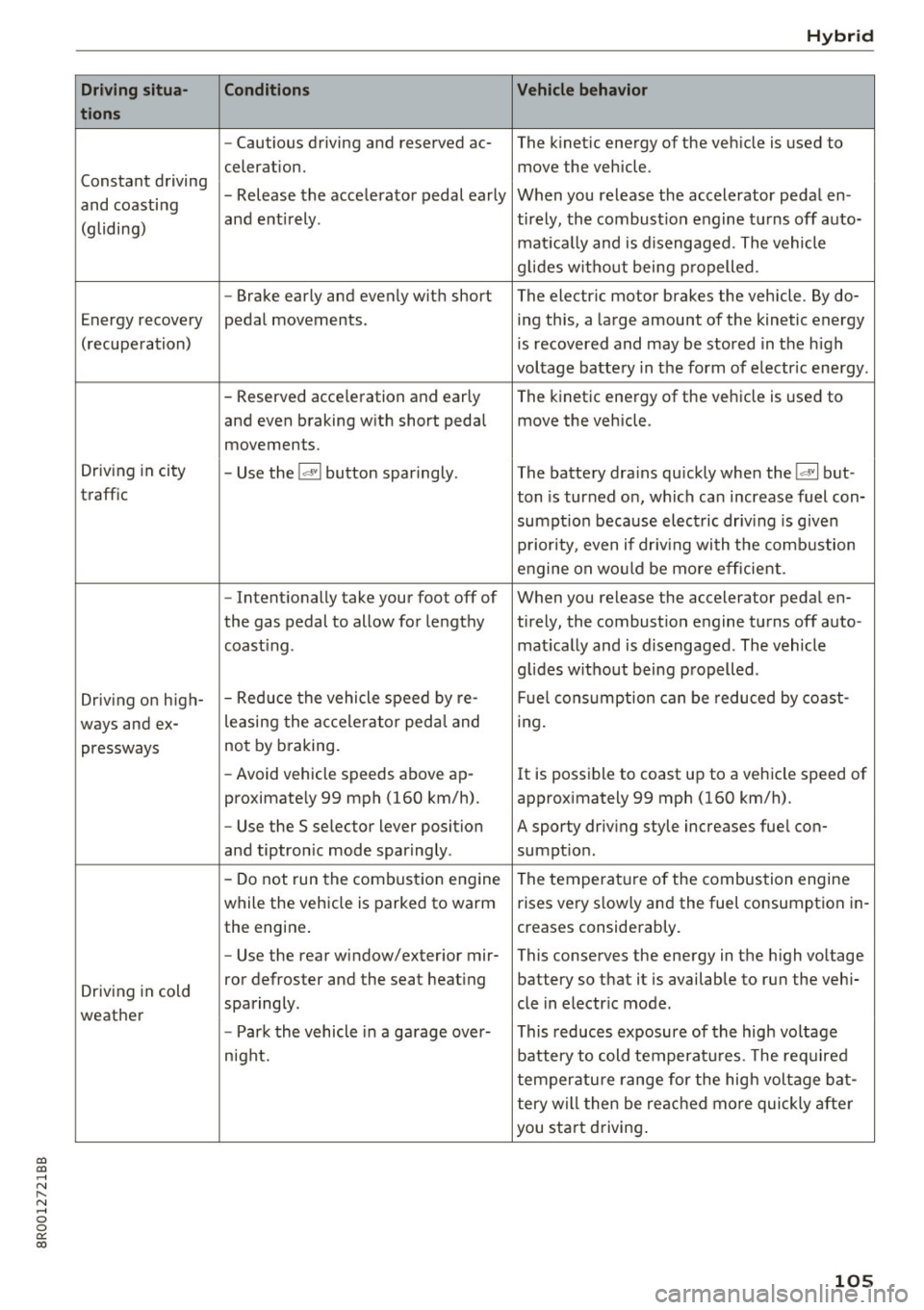
Driving situa -
tion s
Constant driving
and coasting
(gliding)
Energy recovery
(recupe ration)
Driving in city
traffic
Driving on high-
ways and ex- pressways
Driving in cold
weather
Cond itions
- Cautious driving and reserved ac-
celeration.
- Release the accelerator pedal early
and entirely .
- Brake early and evenly with short
pedal movements .
- Reserved acce leration and early
and even braking with short pedal
movements.
- Use the
!<=!VI button sparingly .
- Intentionally take your foot off of
the gas pedal to allow for lengthy
coast ing .
- Reduce the vehicle speed by re-
leasing the acce le rato r peda l and
not by b raking.
- Avoid vehicle speeds above ap-
proximately 99 mph (160 km/h).
- Use the 5 selector lever position
and tiptronic mode sparingly .
- Do not run the combustion erngine
while the vehicle is parked to warm
the engine.
- Use the rear window/exter ior mir-
ror defroster and the seat heating
sparingly .
- Park the vehicle in a garage over-
night.
H yb ri d
Vehicle behav ior
The kinetic energy of the vehicle is used to
move the vehicle .
When you release the accelerator pedal en-
tirely, the combustion engine turns off auto-
mat ica lly and is disengaged. The vehicle
g lides without being propelled .
The electric motor brakes the vehicle . By do-
ing this, a large amount of the kinetic energy
is recovered and may be stored in the h igh
voltage battery in the form of electric energy .
The kinetic energy of the vehicle is used to
move the vehicle .
The battery dra ins quickly when the
!<=!VI but -
ton is turned on, which can increase fuel con-
sumpt ion because electric driv ing is given
priority, even if driv ing with the combustion
engine on wo uld be more efficient.
When you release the accelerator pedal en-
tirely, the combustion engine turns off auto- mat ically and is disengaged . The vehicle
g lides without being propelled .
F ue l consumption can be reduced by coast-
i ng.
It is possible to coast up to a vehicle speed of
approximately 99 mph (160 km/h).
A sporty driving style increases fue l con-
sumption .
The temperature of the combustion engine
rises very s lowly and the fuel consumption in-
creases considerably.
This conserves the energy in the high voltage
battery so that it is available to run the vehi-
cle in electr ic mode .
This reduces exposure of the high voltage
battery to cold temperat ures . The required
temperature range for the high voltage bat-
tery will then be reached more quickly after
you sta rt driving .
105
Page 111 of 296
a,
a,
..... N r-N ..... 0 0
0:
co
Audi ada pti ve c ruise contr ol and br akin g gu ard
Audi adaptive cruise
control and braking
guard
Introduction
App lies to: veh icles with Audi adaptive cruise contro l
The adaptive cruise control system assists the
driver by regulat ing vehicle speed and helping to
maintain a set distance to the vehicle ahead,
within the limits of the system.
If the system de
tects a moving vehicle up ahead, adaptive cruise
control can brake and then accelerate your veh i
cle . This helps to make driving more comfortable
on long highway stretches .
The braking gua rd system can warn you about an
impend ing collision and initiat e braking maneu
vers
¢ page 115.
Adaptive cruise control and braking guard have
technical lim itations that you must know, so
please read th is section carefully, understand
how the system works and use them properly at
all times.
General information
General information
Applies to: vehicles with Audi adaptive cruise control
Fig. 122 Fro nt o f th e ve hicle: Pos it ion of rada r sen sor
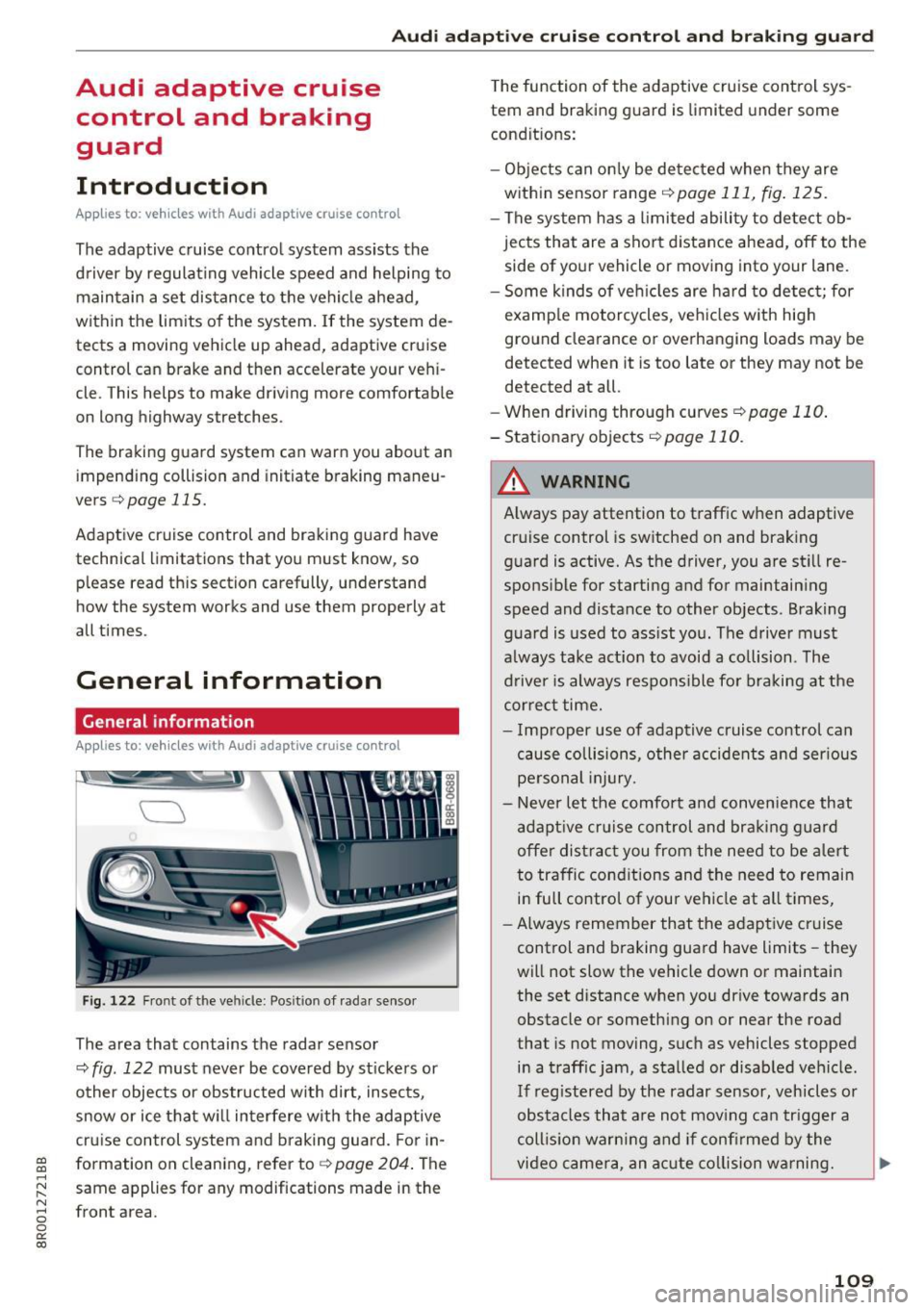
The area that contains the radar sensor
¢
fig . 122 must never be covered by st ickers or
other objects or obs tructed with dirt, insects,
snow or ice that w ill interfere w ith the adaptive
cruise control system and braking guard. For in
formation on cleaning, refer to¢
page 204 . The
same applies for any modifications made in the
front area . T
he function of the adaptive cruise control sys
tem and braking guard is limited under some
condit ions:
- Ob jects can on ly be de tected when they are
within sensor range
q page 111, fig . 125.
-The sys tem has a limited ability to de tect ob
jects that are a short distance ahead, off to the
side of your vehicle or moving into your lane .
- Some kinds of veh icles are hard to detect; for
examp le motorcycles, ve hicles w ith hig h
ground clearance or overhanging loads may be
detected when it is too late or they may not b e
detected at all.
- When driving through curves
¢ page 110 .
- Stationa ry objects q page 110 .
,&_ WARNING
-= -Always pay attention to t raffic when adaptive
cruise control is switched on and braking
g uard is active. As the driver, you are still re
sponsible for starting and for maintain ing
speed and distance to other objects . Braking
g uard is used to ass ist you . The driver must
a lways take act ion to avoid a co llision . The
driver is always respons ible for braking at the
cor rect time.
- I mproper use of adaptive cruise control can
cause collisions, other accidents and ser ious
pe rsonal injury.
- Never let the comfort and conven ience that
adapt ive cr uise control and braking g uard
offe r distract you from the need to be a lert
to traffic cond itions and the need to remain
in full control of your vehicle at all times,
- Always remember that the adapt ive cruise
control and braking guard have limits -they
will not slow the vehicle down or maintain
the set distance when you dr ive towards an
obstacle or something on or near the road
that is not moving, such as vehicles stopped
in a traff ic jam, a stalled or disab led vehicle .
If reg istered by the radar sensor, vehicles or
obstacles that a re not mov ing can trigger a
coll is ion warning and if confi rmed by the
video camera, an acute co llision wa rning.
IJ,,
109
Page 112 of 296
Audi adaptive cruise control and braking guard
-For safety reasons, do not use adaptive
cruise control when driving on roads with
many curves, when the road surface is in
poor condition and/or in bad weather (such
as ice, fog, gravel, heavy ra in and hydroplan
ing). Using the system under these condi·
tions could result in a collision.
- Switch adaptive cruise control off tempora
rily when driving in turning lanes, on ex
pressway exits or in construction zones. This
prevents the vehicle from accelerating to
the set speed when in these situations .
- The adaptive cruis e control system will not
brake by itself if you put your foot on the ac
celerator pedal. Doing so can override the
speed and distance regu lation.
- When approaching stationary objects such
as stopped traffic, adaptive cruise control
will not respond and braking guard will have
limited function.
- The adaptive cruise control system and
braking guard do not react to people, ani
mals, objects crossing the road or oncom ing
objects.
- The function of the radar sensor can be af
fected by reflective objects such as guard
rails, the entrance to a tunnel, heavy rain or
ice.
- Never follow a vehicle so closely that you
cannot stop your vehicle safely. The adap·
t ive cruise control cannot slow or brake the
vehicle safely when you fo llow another veh i
cle too closely. Always remember that the
automatic braking function cannot bring the
vehicle to a sudden or emergency stop un
der these conditions .
- To prevent unintended operation, always
switch adaptive cruise control off when it is
not being used.
(D Note
The sensor can be displaced by impacts or
damage to the bumper, wheel housing and
underbody. That could affect the adaptive
cruise control system and braking guard .
Have your authorized Audi dealer or author
ized Audi Service Facility check their function.
110
In curves
App lies to : vehicles wit h Audi adapt ive cruise control
Fig. 123 Example: driv ing into a curve
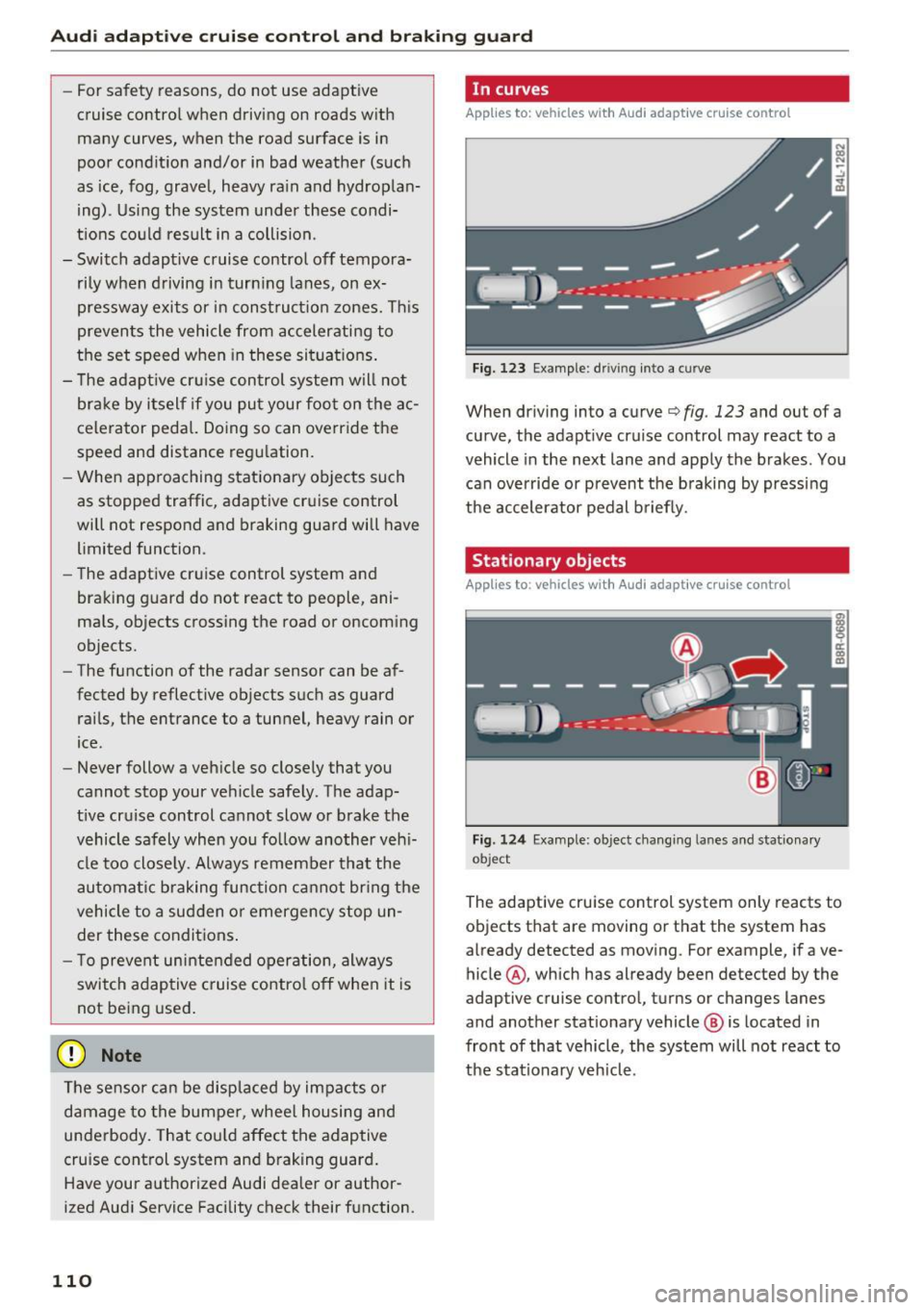
When driving into a curve c:::> fig . 123 and out of a
curve, the adapt ive cruise control may react to a
vehicle in the next lane and apply the brakes . You
can override or prevent the braking by pressing
the accelerator pedal briefly.
Stationary objects
Applies to: vehicles wi th Audi adaptive cruise control
Fig . 124 Examp le: object chang ing lanes and stat ionary
ob ject
The adaptive cruise control system only reacts to
objects that are moving or that the system has
already detected as moving . Fo r example, if ave
hicle @, which has already been detected by the
adaptive cruise control, turns or changes lanes
and another stationary vehicle @ is located in
front of that vehicle, the system will not react to
the sta tionary veh icle.
Page 114 of 296
Audi adaptive cruise control and braking guard
@ Indicator lights
Ill -Adaptive cruise control is switched on. No
vehicles are detected up ahead. The stored speed
is maintained .
• -A moving veh icle is detected up ahead. The
adaptive cruise control system regulates the
speed and distance to the moving vehicle ahead
and accelerates/brakes automatically.
• -When automatic braking is not able to keep
enough distance to a previously detected moving
vehicle up ahead, you must take contro l and
brake
¢ page 114, Request for driver interven
tion.
© Display
If
adaptive cruise control is not shown in the dis
play, you can call it up with the
IRESETI button
¢page 17.
Based on the symbo ls in the display, you can de
termine if the system is ma inta ining a distance to
the vehicle ahead and what that distance is .
No vehicle -No vehicle ahead was detected .
White vehicle -A vehicle ahead was detected.
Red vehicle -Prompt for the driver to take action
¢page 114.
Both arrows on the scale© indicate the distance
to the vehicle ahead . No arrow appears when the
veh icle is on an open road and there is no object
ahead. If an object is detected ahead, the arrow
moves on the scale .
The green zone on the scale shows the stored dis
tance . For information on changing the stored
distance, refer to
¢page 113. If the distance se
lected is too close or may soon become too close,
the arrows move into the red zone on the scale .
A WARNING
Improper use of the adaptive cruise control
can cause collis ions, other accidents and seri
ous personal injuries.
- Pressing the
! SET ! button when driving at
speeds below 20 mph (30 km/h), will auto
matically accelerate the vehicle to 20 mph
112
(30 km/h), which is the minimum speed
that can be set.
@ Tips
- If you switch the ign it ion or the adaptive
cruise control off, the set speed is erased
from the system memory.
- The Electronic Stabilization Control (ESC) is
automatically turned on when the adapt ive
cruise control is turned on. You cannot
switch the ESC into offroad mode while the
adaptive cruise control is turned on
¢page 187.
Changing the speed
App lies to: vehicles with Audi adaptive cru ise control
0
f
•
0
Fig. 128 Selector lever: ch an gin g the speed
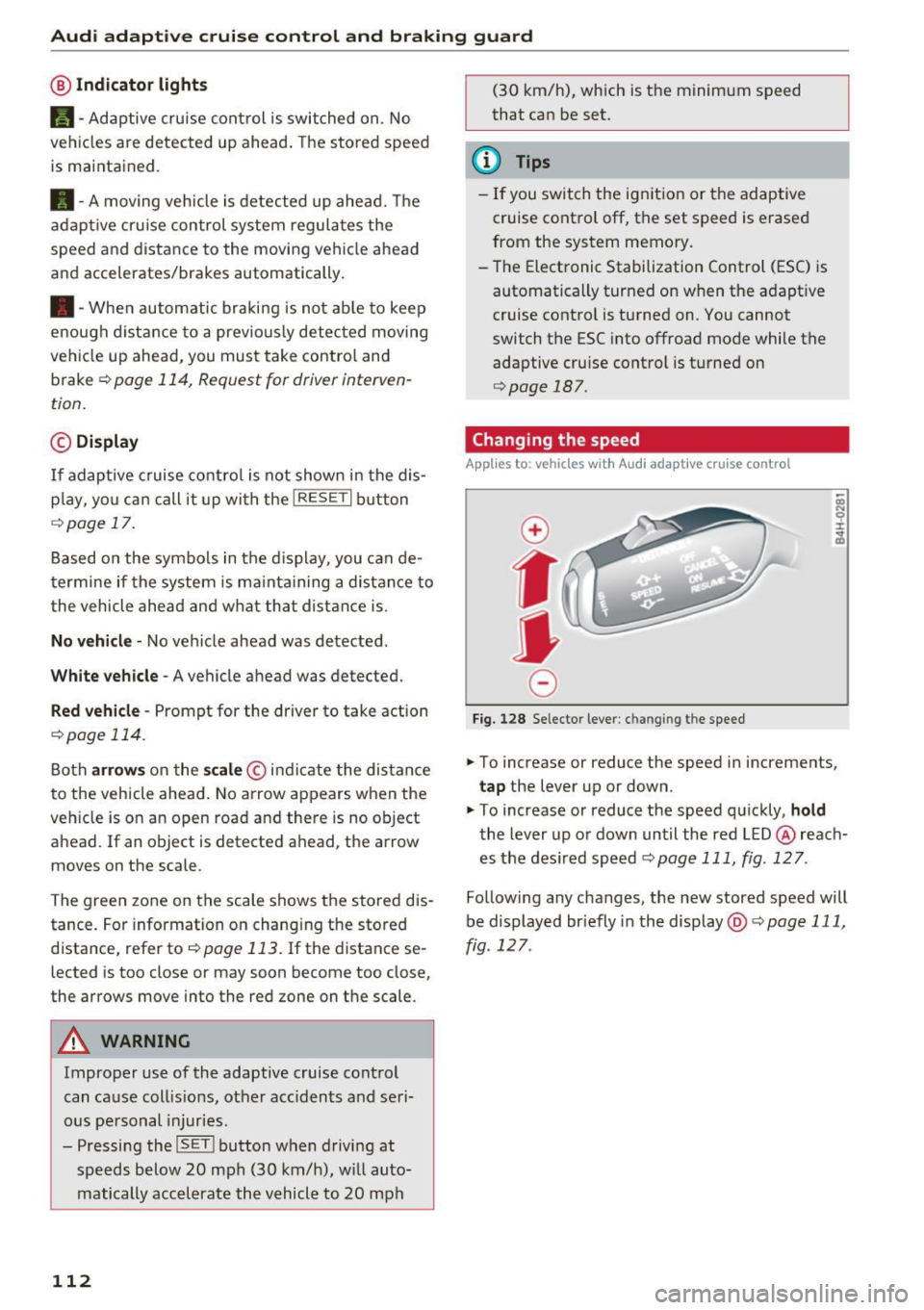
.,. To increase or reduce the speed in increments,
tap the lever up or down.
.,. To increase or reduce the speed quickly,
hold
the lever up or down until the red LED @ reach
es the desired speed
¢page 111, fig . 127 .
Follow ing any changes, the new stored speed will
be displayed br iefly in the display @¢
page 111,
fig . 127 .
Page 115 of 296
a,
a,
..... N r-N ..... 0 0
0:
co
Audi adaptive cruise control and braking guard
Interrupting cruise control
Applies to: vehicles with Audi adaptive cruise contro l
Fig. 129 Selector lever
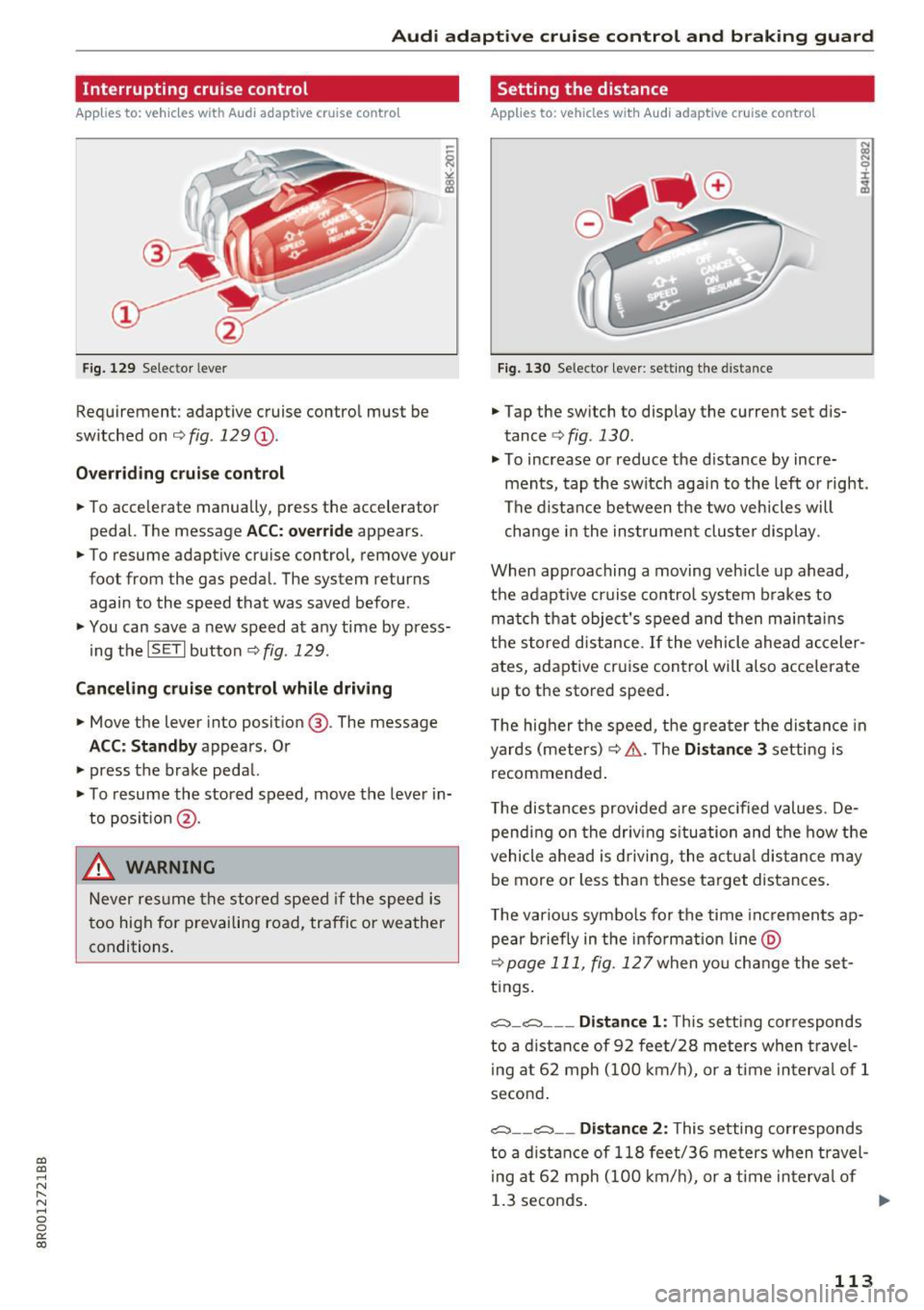
Requirement: adaptive cruise control must be
switched on ¢
fig. 129 (D.
Overriding cruise control
• To accelerate manua lly, press the accelerator
pedal. The message
ACC: override appears.
• To resume adaptive cruise control, remove your
foot from the gas pedal. The system returns again to the speed that was saved before .
• You can save a new speed at any time by press
i ng the
ISET I button ¢fig. 129.
Canceling cruise control while driving
• Move the lever into position @. The message
ACC: Standby appears. Or
• press the brake pedal.
• To resume the stored speed, move the lever in
to posit ion
@ .
& WARNING
Never resume the stored speed if the speed is
too high for prevailing road, traffic or weather
conditions.
Setting the distance
Applies to: vehicles with Audi adaptive cruise control
Fig. 130 Selector lever: setting the distance
• Tap the switch to display the current set dis
tance ¢
fig. 130.
• To increase or reduce the d istance by incre
ments, tap the switch aga in to the left or right.
The distance between the two veh icles will
change in the instrument cluster display.
When approaching a moving vehicle up ahead,
the adaptive cruise control system brakes to
match that object's speed and then maintains
the stored distance.
If the vehicle ahead acceler
ates, adaptive cruise control will also accelerate
up to the stored speed .
The higher the speed, the greater the distance in
yards (meters) ¢.& .T he
Distance 3 setting is
recommended .
T he distances provided a re spec ified values . De
pending on the driving situation and the how the
vehicle ahead is driving, the actual distance may
be more or less than these target distances .
T he various symbo ls for the time inc rements ap
pear briefly in the info rmat ion line @
¢page 111, fig. 127when yo u change the set
tings.
c::::,_ c::::, ___ Distance 1: This setting corresponds
to a distance of 92 feet/28 meters when travel
i ng at 62 mph (100 km/h), or a tim e interval of 1
second .
c::::, __ c::::, __ Distance 2: This setting corresponds
to a distance of 118 feet/36 meters when travel
i ng at 62 mph (100 km/h), or a time interval of
1.3 seconds . ..,.
113
Page 117 of 296
a,
a,
..... N r-N ..... 0 0
0:
co
Audi adaptive cruise control and braking guard
Audi braking guard
Description
Applies to: ve hicles with Audi adaptive cruise co ntro l
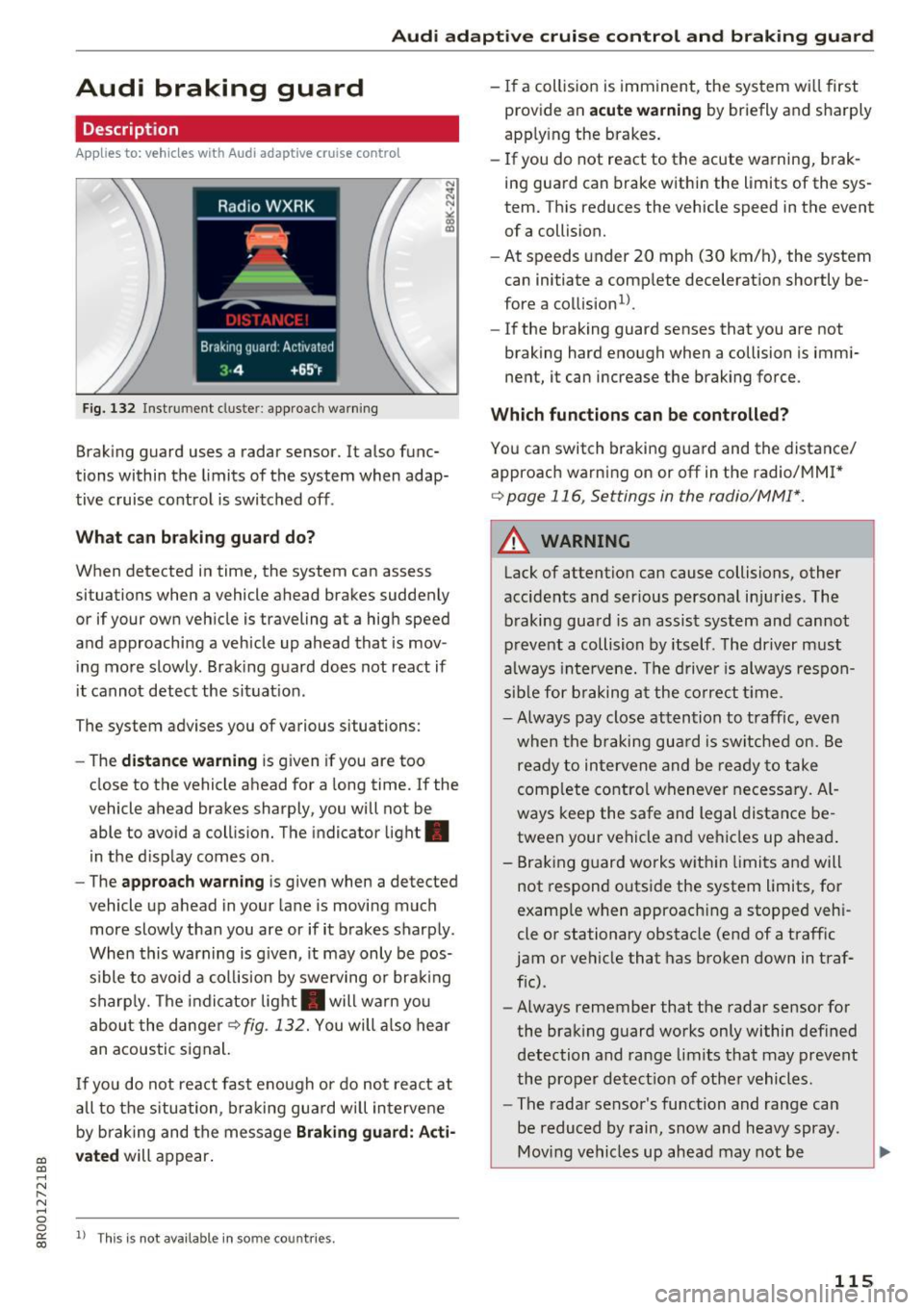
Fig. 132 Instrument cluste r: approach warning
Braking guard uses a radar sensor. It also func
tions within the limits of the system when adap
tive cruise control is switched off .
What can braking guard do?
When detected in time, the system can assess
situations when a vehicle ahead brakes suddenly
or if your own vehicle is traveling at a high speed
and approaching a vehicle up ahead that is mov
ing more slowly . Braking guard does not react if
it cannot detect the situat ion.
The system advises you of various situations:
- The
distance warning is g iven if you are too
close to the vehicle ahead for a long time.
If the
vehicle ahead brakes sharply, you will not be
able to avoid a collision. The indicator light .
in the display comes on.
- The
approach warning is given when a detected
vehicle up ahead in your lane is moving much
more slowly than you are or if it brakes sharply .
When this warning is g iven, it may only be pos
s ible to avo id a col lision by swerving or brak ing
sharp ly. Th e indicator light . will warn you
about the danger
¢fig. 132. You will also hear
an acoustic signal.
If you do not react fast enough or do not react at
all to the situation, braking guard will intervene
by braking and the message
Braking guard: Acti
vated
will appear.
1> Th is is not ava ilab le in some coun tries.
-If a collision is imminent, the system wi ll first
provide an
acute warning by briefly and sharply
apply ing the brakes.
- If you do not react to the acute warning, brak
ing guard can brake within the limits of the sys
tem. This reduces the vehicle speed in the event
of a collision.
- At speeds under 20 mph (30 km/h), the system
can initiate a comp lete decelerat ion shortly be
fore a collision
ll.
- If the braking guard senses that you are not
braking hard enough when a collision is immi
nent, it can increase the braking force .
Which functions can be controlled?
You can switch braking guard and the distance/
approach warn ing on or
off in the radio/MM!*
¢ page 116, Settings in the radio/MM!*.
A WARNING
-
Lack of attention can cause collisions, other
accidents and ser ious personal in juries. The
braking guard is an assist system and cannot
prevent a collision by itself. The driver must
always intervene. The driver is always respon
sible for braking at the correct tim e.
- Always pay close attention to traffic, even
when the braking guard is switched on. Be
ready to intervene and be ready to take
comp lete control whenever necessary. Al
ways keep the safe and legal distance be
tween your vehicle and vehicles up ahead .
- Braking guard works wit hin limits and will
not respond outside the system limits, for
examp le when approaching a stopped veh i
cle or stationary obstacle (end of a traffic
jam or vehicle that has broken down in traf
fic).
- Always remember that the radar sensor for
the braking guard works only within defined
detection and range limits that may prevent
the proper detect ion of other vehicles.
- The radar sensor's function and range can
be reduced by rain, snow and heavy spray.
Moving vehicles up ahead may not be
,.
115
Page 118 of 296
Audi adaptive cruise control and braking guard
promptly detected or may not be detected
at all.
- Reflective surfaces including crash barriers
or tunnel entrances may impair the function
oftheradarsensor.
(D Tips
-You can cancel the braking that is initiated
by the system by braking yourself, by accel
erating noticeably or by swerving.
- Braking guard error messages
c:> page 116.
- Keep in mind that braking guard can brake
unexpectedly. Always secure any cargo or
objects that you are transporting to reduce
the risk of damage or injury.
Settings in the radio/MMI*
Applies to: vehicl es w ith Audi adaptive cruise control
.,. Select : ICARI function button> Audi braking
guard .
Or
.,. Select:
~I C~A~R~I function button > Car systems*
control button > Driver assist> Audi braking
guard .
System -
Switch braking guard On and Off. When
you switch the ignition on, the message
Braking
guard: Off
appears if the system is switched off .
Early warning -The distance and approach warn
ings in the display can be switched
On/Off .
(D Tips
-Your settings are automatically stored and
assigned to the remote control key being
used at the times the settings are made
r=;,page 33.
-If you restrict the ESC, the braking guard al
so switches itself off
c:> page 18 7.
- Switch braking guard
off when you are load
ing the vehicle onto a vehicle carrier, train,
ship or other type of transportation . This
can prevent undesired warnings from the
braking guard system.
Messages
Applies to: vehicles w ith Audi adaptive cruise contro l
Braking guard: Off
116
This driver message appears if the system is
turned
off via the radio/MM I*. Otherwise, if the
system is turned
off, the information appears ev
ery time shortly after the start of the trip.
The driver message also appears if the system is
not available due to a malfunction or if the ESC is
not switched on
c:> page 187. If this is the case,
the system will not provide warnings about a possible collision.
Braking guard: Activated
This driver message appears if sharp brake pres
sure was applied due to an acute warning.
•••
Three white dots appear if a setting cannot be se
lected with the operating lever . For example, this
happens if you want to raise/lower the speed
even though there was no previously saved
speed.
ACC: Sensor blocked
This message appears if the sensor view is ob
structed, for example by leaves, snow, heavy
spray or dirt. Clean the sensor
r=;, page 109,
fig. 122 .
ACC: Unavailable
The driver message appears if, for example, the
brake temperature is too high. The adaptive
cruise control is temporarily unavailable. A chime
sounds as a rem inder.
ACC: Not available
The driver message appears if there is a malfunc
tion. The adaptive cruise control turns off. A
chime sounds as a reminder. Have the system
checked by an authorized Audi dealer or author
ized Audi Service Facility.
Shift lever position!
The driver message appears if the selector lever
is shifted to the N position. The adaptive cruise
control is not available while in this position.
Stabilization control (ESC)
This message appears if the Electronic Stabiliza
tion Control (ESC) is taking action to stabilize the .,.