page 4 AUDI Q5 2018 Owners Manual
[x] Cancel search | Manufacturer: AUDI, Model Year: 2018, Model line: Q5, Model: AUDI Q5 2018Pages: 392, PDF Size: 60.56 MB
Page 125 of 392
u co ..... N r-N .....
~ 0 co
Exit warning
Applies to: ve hicles with exit warning system
Fig. 122 Example dis play
Fig. 123 Door: warning lig h t
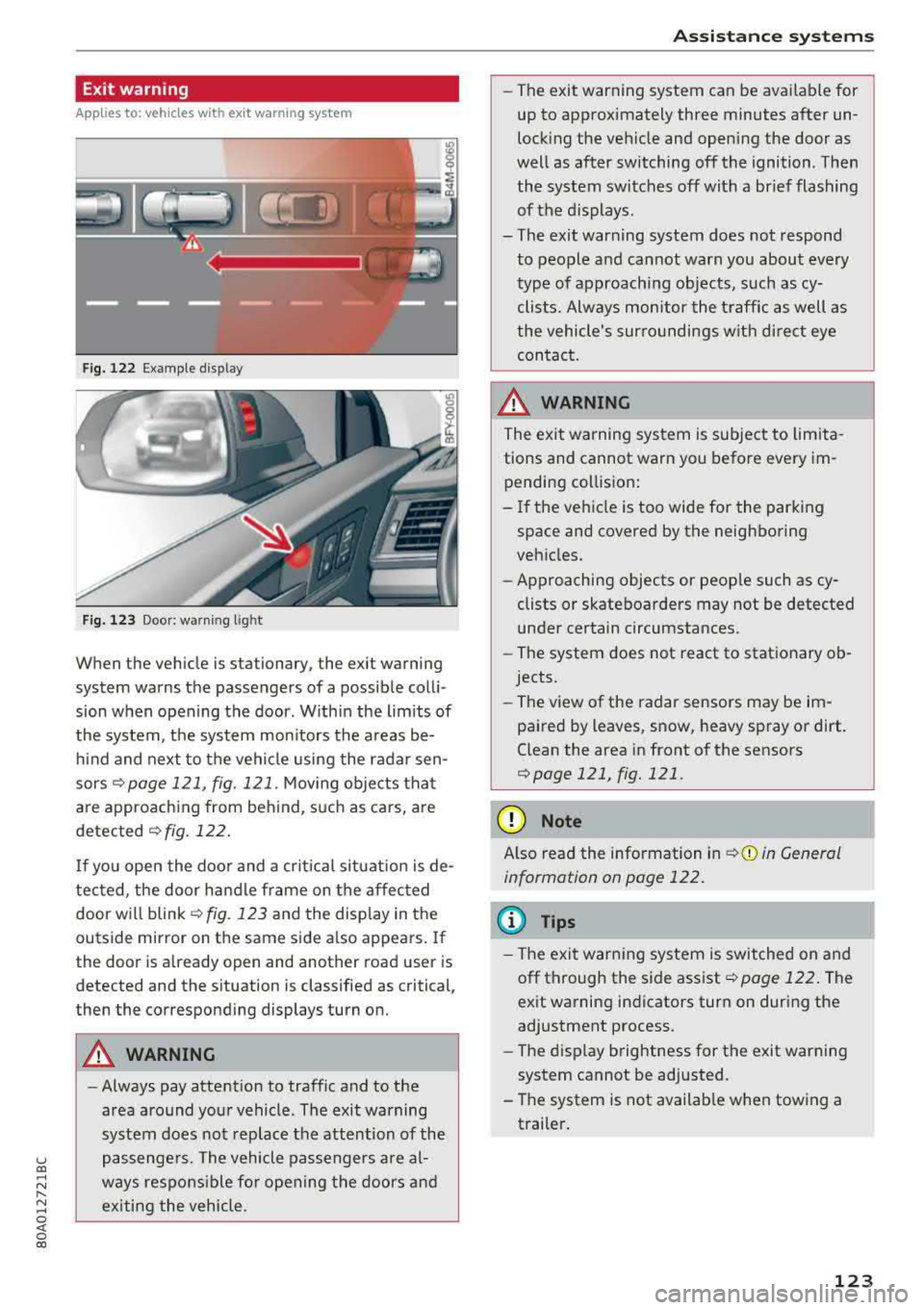
When the vehicle is stationary, the exit warning
system warns the passengers of a possible colli
sion when opening the door . Within the limits of
the system, the system monitors the areas be
hind and next to the vehicle using the radar sen
sors
¢ page 121, fig. 121 . Moving objects that
are approaching from behind, such as cars, are
detected ¢ fig. 122.
If you open the door and a critical situation is de
tected, the door handle frame on the affected door will
blink ¢ fig. 123 and the display in the
outside mirror on the same side also appears. If
the door is already open and another road user is
detected and the situation is classified as critical
J
then the corresponding displays turn on.
A WARNING
-
- Always pay attention to traffic and to the
area around your vehicle . The exit warning
system does not replace the attention of the
passengers. The vehicle passengers are al
ways responsible for opening the doors and
exiting the vehicle .
Assistance systems
-The exit warning system can be available for
up to approximately three minutes after un
locking the vehicle and opening the door as
well as after switching off the ignition . Then
the system switches off with a brief flashing
of the displays.
- The exit warning system does not respond to people and cannot warn you about every
type of approaching objects, such as cy clists. Always monitor the traffic as well as
the vehicle's surroundings with direct eye contact.
A WARNING
= -
The exit warning system is subject to limita-
tions and cannot warn you before every im
pending collision:
- If the vehicle is too wide for the parking
space and covered by the neighboring
vehicles.
- Approaching objects or people such as cy
clists or skateboarders may not be detected
under certain circumstances.
- The system does not react to stationary ob
jects.
- The view of the radar sensors may be im
paired by leaves, snow, heavy spray or dirt.
Clean the area in front of the sensors
¢page 121, fig. 121 .
(D Note
Also read the information in ¢(i) in General
information on page 122.
(D Tips
- The exit warning system is switched on and
off through the side
assist¢ page 122. The
exit warning indicators turn on during the
adjustment process.
- The display brightness for the exit warning
system cannot be adjusted.
- The system is not available when towing a
trailer.
123
Page 126 of 392
Ass is tance sy stem s
Rear cross-traffic assist
Applies to: ve hicles w ith rear cross -traff ic ass ist
F ig. 124 Example display
Fig . 125 Infotainment system: rear cross-traffic assist dis
play
Acti vating re ar c ro ss -tr affic assist
The rear cross-traffic assist is act ivated automat i
cally if you turn on the parking aid
Qpage 130 or
shift into reverse gear .
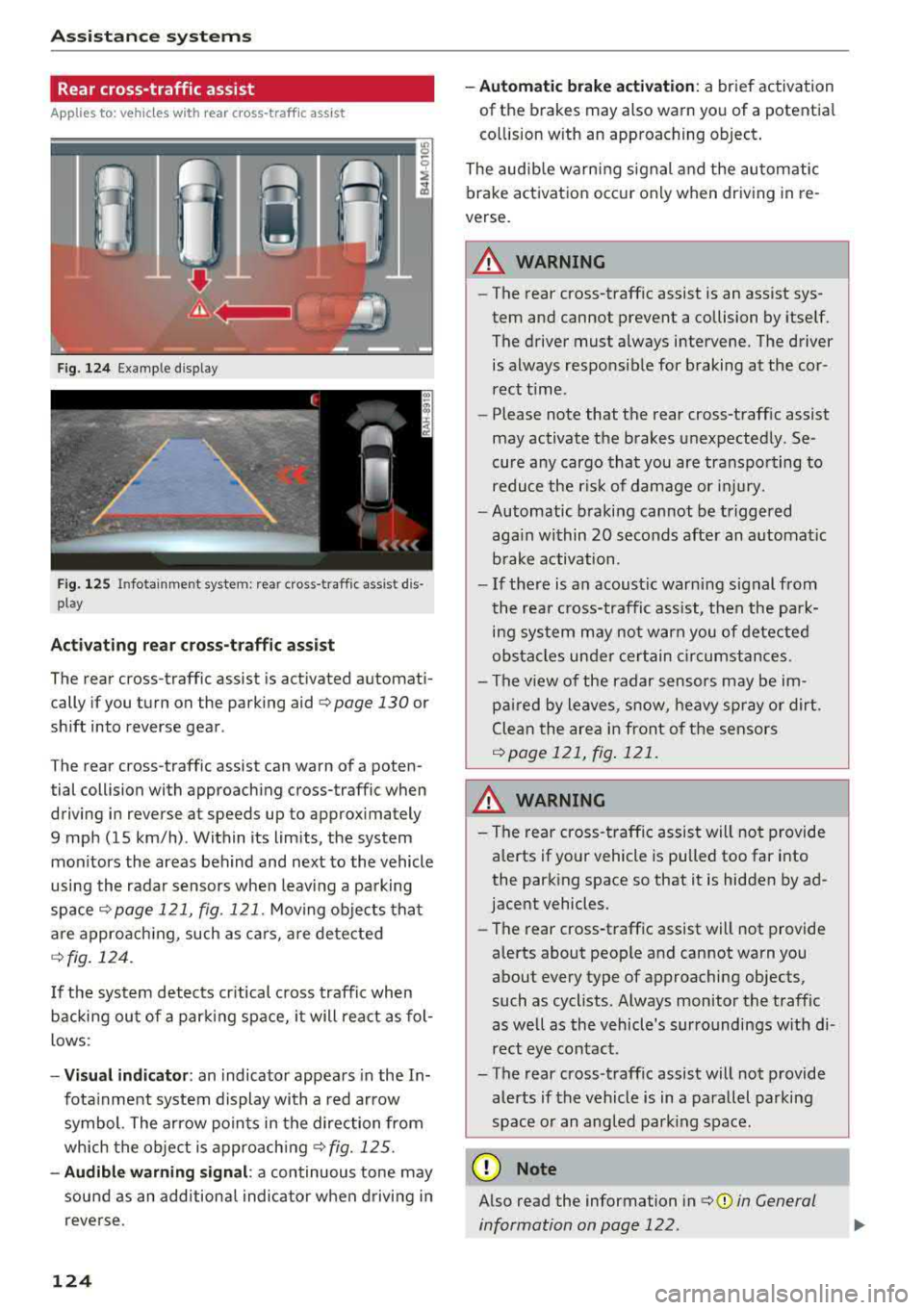
The rear cross-traffic assist can warn of a poten
tial collision with approaching cross-traffic when
driving in reverse at speeds up to approximately
9 mph (15 km/h) . Within its limits, the system
monitors the areas behind and next to the vehicle
using the radar sensors when leav ing a parking
space
Qpage 121, fig. 121. Mov ing objects tha t
are appro ach ing, such as ca rs, a re detected
Q fig . 124.
If the sys tem detects cr itical cross traffic when
backing ou t of a par king space, i t will react as fol
lows:
- Vi sua l indicator : an indicator appea rs in the In
fota inment system display with a red arrow
symbol. The ar row points in the direction from
which the object is approach ing
Q fig. 125.
- Audib le warning signal : a continuous tone may
sound as an additional indicator when driving i n
reve rse .
124 -
Automat ic brake act ivation :
a brief activation
of the brakes may also warn you of a potentia l
co llision w ith an approaching object .
The audib le warn ing signal and the automatic
brake activation occ ur only when driving in re
verse.
A WARNING
- The rear cross-traffic assist is an assist sys
tem and cannot prevent a collision by itself.
The driver must always intervene. The driver
is always respo nsible for braking at the cor
rect t ime.
- Please note that the rear cross-traff ic assist
may activate the brakes unexpectedly. Se
cure a ny cargo that you are transpo rting to
reduce the r is k of damage or inju ry.
- Automatic braking cannot be triggered
aga in within 20 seconds afte r an a utomat ic
brake activation.
- If the re is a n acoust ic warning signal from
the rea r cross-traffic assist, then the park
ing system may no t w arn you of detected
obstacles under ce rtain c ircumstances.
- The v iew of the radar sensors may be im
pa ired by leaves, snow, heavy spray or dirt.
Clea n the area i n front of t he sensors
Qpage 121, fig . 121.
,&. WARNING
- The rear cross-traffic assist will no t provide
a lerts if yo ur vehicle is pulled too far into
the parking space so that it is hidden by ad
jacent vehicles.
- The rear cross-traffic assist will not provide
alerts about people and cannot warn you
about every type of approaching objects,
such as cyclists. Always monitor the traffic as well as the vehicle's surroundings w ith di
rect eye contact.
- The rear cross-traffic assist will not provide
alerts if the vehicle is in a parallel parking
space or an angled park ing space .
(D Note
Also read the information in Q (j) in General
information on page 122.
-
Page 127 of 392
u co ..... N r--N ..... 0 <( 0 00
(D Tips
-You can cancel the automatic brake activa
tion w ith increasing braking fo rce if you ap
ply the brakes yourse lf or accelerate cons id
erab ly.
- In some situations, rea r cross-traffic assist
may warn you even if there is no cross traffic
i n a cr itical area , for examp le when back ing
i nto a parking space or maneuver ing .
- The rea r cross-traffic ass ist also switches off
when you switch off the ESC.
- The system is not available when towing a
trailer.
Messages
Applies to: vehicles with Audi side assist
A message appears in the inst rumen t cluste r dis
p lay if the s ide ass ist swi tches off automatically .
@t Audi side assist: malfunction! Please contact
Service
@j Audi side assist and exit warning: malfunc
tion! Please contact Service
The system cannot guarantee that it w ill detec t
ve hicles co rrectly a nd it has sw itched off. The
sensors have been mov ed o r are faulty. Have t he
system checked by an a uthori zed Audi dea ler or
author ized Audi Se rvice Facility soon.
@j Audi side assi st: cur rently unavailable. Sen
sor vision restricted due to surroundings . See
owner 's manual
e, Audi side as sis t and e xit warning: currently
unavailable. Sensor vision restricted due to sur
roundings
The rad ar senso r vis io n i s impa ire d. The area in
fron t of the senso rs must no t be covered by b ike
rac ks, st ic kers, leaves, snow or any othe r ob jects.
C lea n the area i n front of th e sensors, if necessa
ry¢ page 121, fig. 121.
e, Audi side as sis t: currentl y unavailable. See
owner 's manual
et Audi side a ssist and exit warning : currently
unavailable. See owner 's manual
A ss istance systems
S id e ass ist cannot be switched on at this time be
ca use there is a ma lfunction (for example, the
batte ry c harge leve l may be too low).
et Audi side assist : unavailable in towing mode
e, Audi side assist and exit warning: currently
unavailable . Towing mode
S ide ass ist switches off automatically when the
electrica l connec to r i n t he factory-installed t rail
er hitch is connec ted . There is no guarantee the
syste m will sw itch o ff when us ing a ret rofitted
t railer h itch . Do no t use side a ssist an d the ex it
war nin g when tow ing a tra ile r.
Ill Rear parking aid: obstacle detect ion restrict
ed
The rear cross-traffic ass ist is not available . E i
ther the ESC is sw itched off, or the rada r senso rs
may be cove red by a b ike rac k, st ic ke rs , leaves,
snow o r othe r objects . Swit ch the ESC on, o r
cl ea n the area in fron t of the senso rs if necess ary
¢page 12 1, fig . 12 1. If thi s message con tinues
to be displayed, dr ive imme dia tely to an author
ized Audi dea ler or author ized Audi Service Facili
ty to have the ma lf u nction repaired.
Audi drive select
Introduction
Applies to: vehicles with Audi drive select
Dr ive sele ct m akes i t possible to exper ien ce d if
f erent types of vehi cle se ttings in one veh icle.
Yo u can select the driv in g modes
Offroad* or
Lift / Offroad *, Allroad* , Comfort , Auto and Dy
namic
i n the Infota inme nt system, fo r example
to switch from a spo rty to a comfo rtable d riving
mode. In the
Individual mode, the settings can
be adjusted to you r persona l preferences. This
makes it possible to combine sett ings such as a
spo rty engine setting wi th light steer ing .
Description
Applies to: vehicles with Audi drive select
The following systems, among ot her th ings, a re
in fluenced by dr ive se lect:
.,.
125
Page 128 of 392
Assistance systems
Engine and automatic transmission
Depending on the mode , the engine and auto
matic transmission respond more quickly or in a
more balanced manner to accelerator peda l
movements. In the sporty
Dynamic mode, the
transmission shifts at higher speed ranges.
Air suspension*
The air suspension* is an electronically-control
led air suspension and damping system. The
ad
justment depends on the driving mode selected,
steering movements, the driver's braking and
ac
celeration, and as the road surface, vehicle speed
and load. The veh icle ground clearance depends
on the mode selected and the speed .
The ground clearance increases significantly
when the vehicle is in the
Allroad mode . At
speeds from approximate ly SO mph (80 km/h) to
75 mph (120 km/h), the ground clearance
re
duces in stages . When the speed decreases, the
ground clearance increases aga in automat ically .
The ground clearance is the lowest in
Dynamic
mode.
Suspension control*
The suspension control* uses sensors to record
information regard ing steering movements,
braking and acceleration operations by the driv
er, road surface, dr iv in g speed, and load. This
makes it possible to adapt damping to the driv
ing situation near ly in rea l time. With drive
se
lect, you can adjust the suspension contro l to be
sporty
( Dynamic ), comfortab le (C omfort ) or bal
anced
(A uto ).
Steering
The power steering adapts. Ind irect steer ing that
moves easi ly as in
Comfort mode is especia lly
suited to long drives on highways. The
Dynamic
mode provides sporty, direct steering.
The following applies to vehicles with dynamic
steering* : the steering ratio changes based on
vehicle speed in order to maintain optimum
steering effort for the driver at all times . This
sets the steering to be less sensitive at higher
speeds in order to prov ide improved vehicle con
trol. At reduced speeds, steering is more direct in
126
order to keep the steering effort as minima l as
possible when the driver is maneuvering the ve hi
cle. At low and average speeds, dynamic steer
i ng* addit iona lly prov ides more respons ive steer
i ng performance.
Sport differential*
As a component of the all whee l drive system
(quattro)
r=!> page 144, the sport differentia l dis
tributes the driving power to the rear axle
de
pending on the s ituation. The distr ibut ion of
power varies depending on the selected mode
from moderate
(C omfort ) to sporty (Dynamic ).
The goal is a high level of ag ility and ability to ac
celer ate on curves. The vehicle is very respons ive
to stee ring.
Adaptive cruise control (ACC)*
The behavior whe n accelerating can be adjusted
from comfortable to sporty, depending on the drive select mode . Adaptive cruise control also
r esponds to the driv in g behavior of the vehicle
ahead in a more conservative or sporty manner.
Engine sound*
The engine sound adapts to the current mode
and can be subtle to sporty .
@ Note
Applies to: vehicles with a ir suspension
- Make sure there is enough clearance above
and below the vehicle when pa rking. Th e
height of the vehicle (ground clearance) can
change once it is parked due to temperature
fluctuations, changes to the load conditions
and changes to the driving modes.
- When transporting the vehicle on a car
car
rier, train, ship or by other means, only tie
the vehicle down at the running sur face of
the tires, which is the outer c ircumference.
Securing the vehicle at the axle compo
nents, suspension struts or tow ing eyes is
not perm itted because the pressure in the
air suspens ion struts can change during
transport. The vehicle may not be secured
sufficiently if this happens .
Page 129 of 392
u co ..... N r--N ..... 0 <( 0 00
(D Tips
The "S" selector lever position automatically
engages when the
Dynamic mode is se lected .
Selecting the driving mode
Applies to: ve hicles with Audi drive select
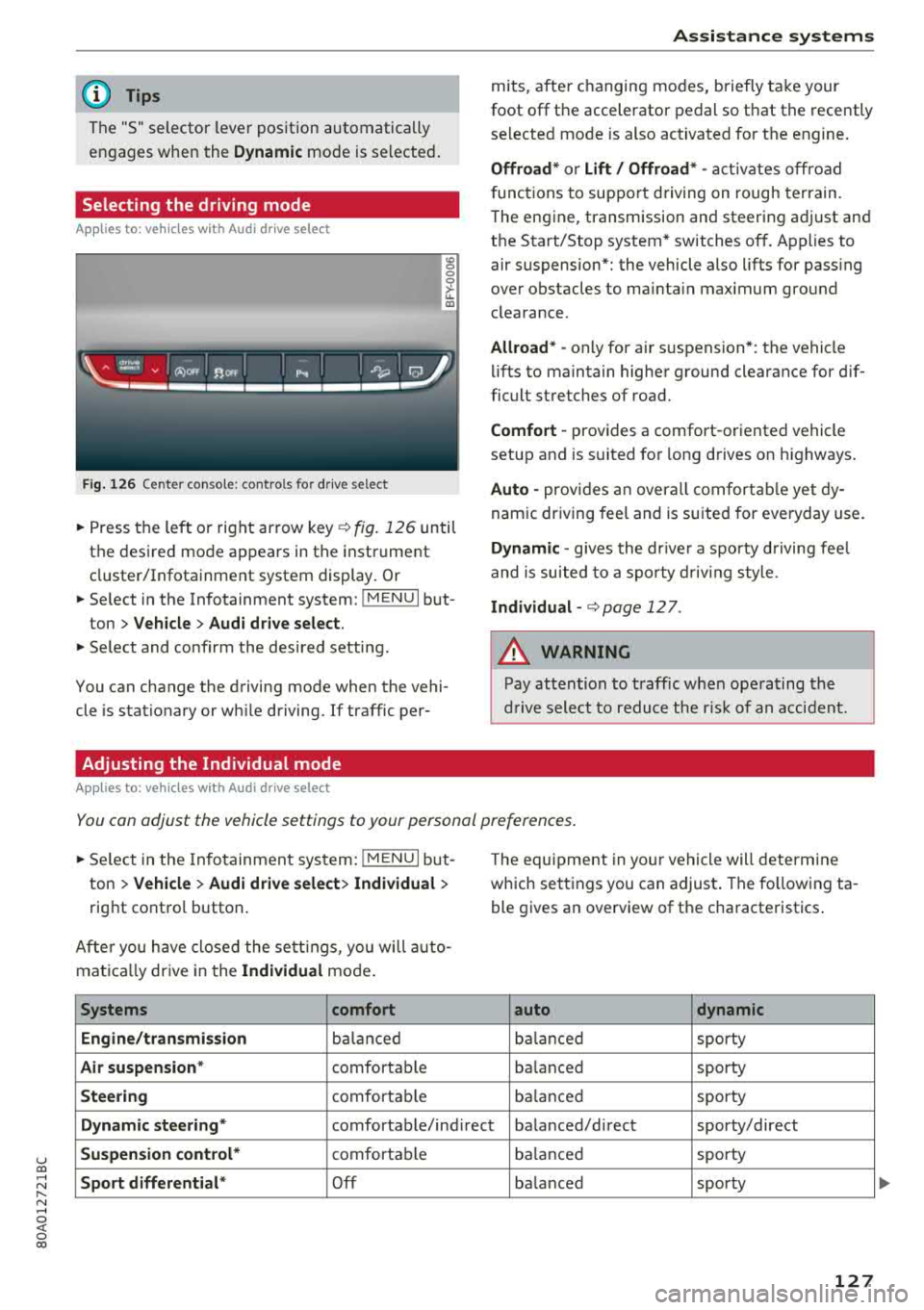
Fig. 126 Center conso le: controls for drive select
0 >'-LL ID
~ Press the left o r right arrow key¢ fig. 126 until
the desired mode appears in the instrument
cluster/Infotainment system display . Or
~ Se lect in the Infotainment system: !MENUI but-
ton
> Vehicle > Audi drive select.
~ Select and confirm the desired setting.
You can change the driving mode when the vehi
cle is stationary or wh ile driving. If traffic per-
Adjusting the Individual mode
Applies to: ve hicles with Audi drive select
Assistance systems
mits, after changing modes, briefly take your
foot
off the accelerator pedal so that the recently
selected mode is also activated for the engine.
Offroad* or Lift/ Offroad* -activates off road
f unct ions to support driving on rough terrain.
T he engine, transmission and steering adjust and
the Start/Stop system* switches
off. Applies to
air suspension*: the vehicle also lifts for pass ing
over obstacles to mainta in maximum ground
clearance.
Allroad * -only for ai r suspension *: the vehicle
lifts to maintain higher ground clearance for dif
ficult stretches of road.
Comfort -provides a comfort -oriented vehicle
setup and is suited fo r long d rives on h ighways .
Auto -provides an overall comfortable yet dy
namic driving feel and is suited for everyday use.
Dynamic -gives the drive r a sporty driving feel
and is suited to a sporty driving style .
Individual -¢ page 12 7.
A WARNING
-
Pay attention to traffic when operating the
drive select to reduce the risk of an accident.
You can adjust the vehicle settings to your personal preferences .
~ Select in the Infotainment system: !MENUI but
ton
> Vehicle > Audi drive select> Individual >
right contro l button.
Afte r you have closed the settings, you will auto
mat ica lly dr ive in the
Individual mode.
Systems comfort
Engine/transmission
balanced
Air suspension * comfortable
Steering comfortable Th
e equipment in yo ur vehicle will determine
which settings you can adjust . The fo llowing ta
ble gives an overview of the characteristics .
auto dynamic
balanced
sporty
ba lanced sporty
balanced sporty
Dynamic
steering* comfortable/ind irect ba lanced/direct sporty/direct
Suspension control* comfortab le balanced sporty
Sport differential* Off balanced sporty
127
...
Page 130 of 392
Ass is tance sy stem s
Systems comfort
Engine sound*
subtle
AC C* comfortable
al Subtle in th e se lector lever position "D" and sporty in " S".
@ Tips
Your sett ings a re automatical ly saved in Indi
vidual mode.
Raising/lowering the vehicle
Applies to: veh icles w ith a ir suspe nsion
.,.. Press the left or right arrow key ¢ page 127,
fig . 126
until the desired mode appears in the
instrument cluster/Infotainment system d is
play. Or
.,.. Select in the Infotainment system: I MENU I but
ton
> Ve hicle > Aud i d rive sele ct .
.,.. Select and conf irm the desired setting.
CD Note
The Lift / Offroad mode switches to All road
mode when dr iv ing above approximately
20 mph (30 km/h) and the vehicle automati
cally lowe rs again . These modes may only be
used on a tempo rary bas is and are not intend
ed for continuo us d riving.
(D Tips
- The filled -in boxes in the Infotainment sys
tem represent the current vehicle level. If
the segment is white or blinking, then the
vehicle is lifting or lowering. If only the bot
tom segment is filled in, then the veh icle is
at the lowest level ( lowest ground clear
ance). If all the segments are filled in, then
the vehicle is at the highest level (highest
ground clear a nee) .
- The target level is highlighted with a
red
frame while the vehicle is lifting or lower
i ng . The frame is then h idden when the ve
hicle reaches the target level.
- The vehicle lifts up to the highest level
when you select
Lift / Offroad . Select an
other mode to lower the vehicle again .
128
auto dynamic
subtle/sportyal sporty
ba lanced sporty
Rear lowering
Applies to: vehicles wit h air suspensio n
The rear of the vehicle con be lowered to make
loading and unloading easier.
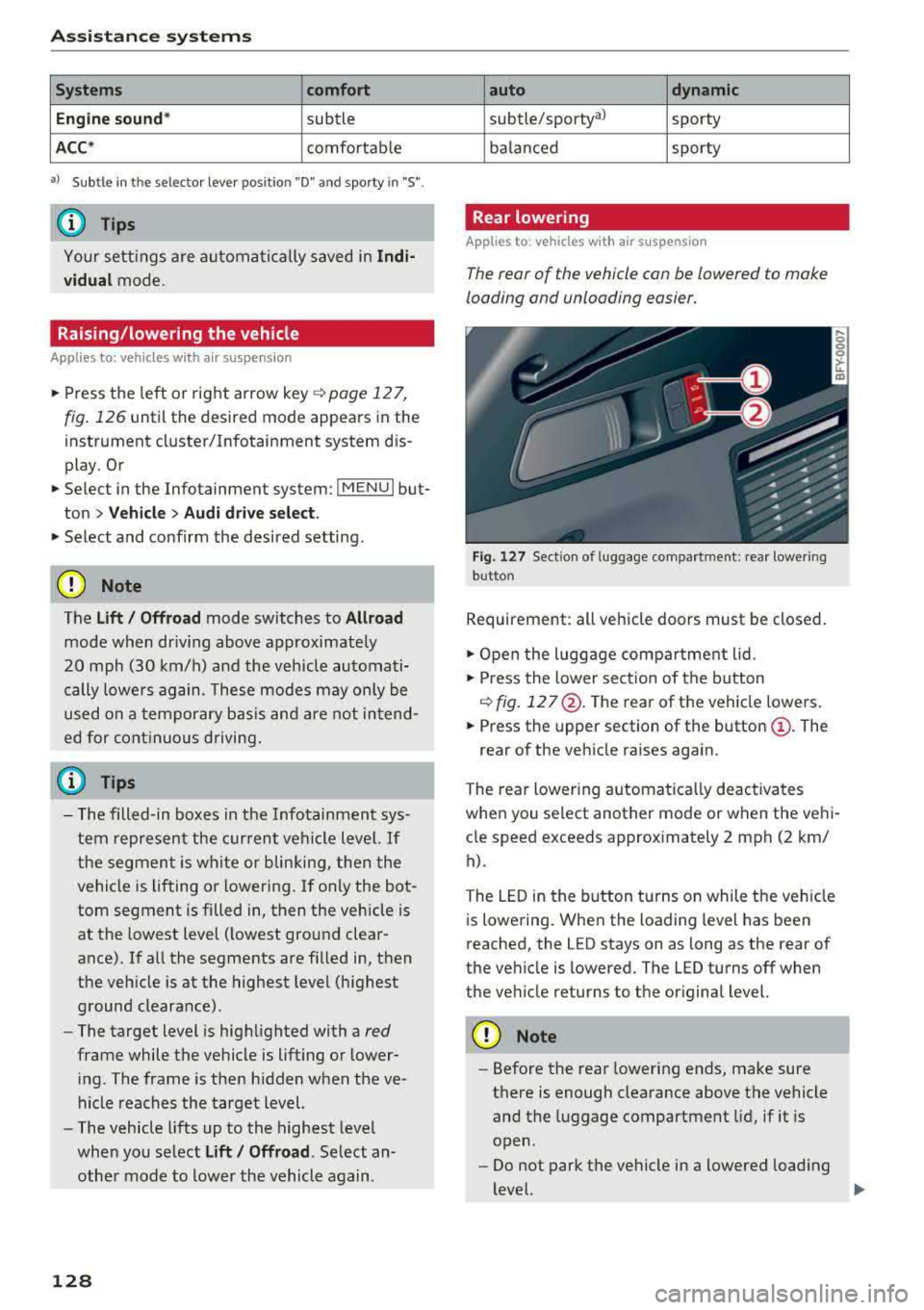
Fig. 127 Section of luggage compa rtment: rear lower ing
but ton
Requirement: all vehicle doors must be closed.
.,.. O pen the luggage compar tment lid.
.,.. Press the lower sect io n of the button
C) fig. 12 7@ . The rear of the vehicle lowe rs .
.,.. Press the upper section of the button@. The
rear of the veh icle raises again.
The rear lowering a utomat ica lly deactiva tes
whe n you select another mode or when the ve hi
cle speed exceeds approx imately 2 mph (2 km/
h).
The LED in the button t urns on while the veh icle
is lowering. When the loading level has been
reached, the LED stays on as long as the rear of
the vehicle is lowered. The LED turns off when
the veh icle returns to the original level.
CD Note
-Before the rear lowering ends, make sure
there is enough clearance above the vehicle
and the luggage compartment lid, if it is
open .
- Do not park the vehicle in a lowered load ing
level.
..,..
Page 132 of 392
Parking aid
Parking aid
General information
A pplies to: ve hicles w ith a rea r parking sys te m /parking sys
tem p lus/rearv iew camera/peripheral cameras
Depending on your vehicle's equipment , various
parking aids will help you when parking and ma
neuvering.
The
rear parking system is an audible parking aid
that warns you of obstacles
behind the vehicle
¢ page 131.
The parking system plus assists you when park
ing by audibly and visually indicating objects de
tected
in front of and behind the vehicle
¢ page 131.
The rearview camera shows the area behind the
vehicle in the Infotainment system display. The lines in the rearview camera image help you to
park or maneuver
¢ page 133.
The peripheral cameras give various views to
help you when parking or maneuvering
¢ page 135 . The parking system plus functions
are also available ¢
page 131.
_& WARNING
-Always look for traffic and check the area
around your vehicle by looking at it directly
as well. The parking system cannot replace
the driver's attention. The driver is always
responsible when entering or leaving a park
ing space and during similar maneuvers.
- Please note that some surfaces, such as
clothing, are not detected by the system.
-
- Sensors and cameras have blind spots in
which people and objects cannot be detect
ed . Be especially cautious of small children
and animals.
- Always keep your eyes on the vehicle's sur roundings, using the rearview mirror as
well.
- The sensors can be displaced by impacts or
damage to the radiator grille, bumper,
wheel housing and the underbody . The park
ing system may be impaired as a result.
Have an authorized Audi dealer or author-
130
ized Audi Service Facility check their func
tion .
@ Note
-Some objects are not detected or displayed
by the system under certain circumstances:
- objects such as barrier chains, trailer draw
bars, vertical poles or fences
- objects above the sensors such as wall ex
tensions
- objects with certain surfaces or structures
such as chain link fences or powder snow
- If you continue driving closer to a low ob
ject, it may disappear from the sensor range . Note that you will no longer be
warned about this obstacle.
- Keep enough distance from the curb to re
duce the risk of damage to the rims .
(D Tips
-The system may provide a warning even
though there are no obstacles in the cover
age area in some situations, such as:
- certain road surfaces or when there is tall
grass
- external ultrasonic sources such as from
cleaning vehicles
- in heavy rain, snow, or thick vehicle ex
haust
- We recommend that you practice parking in
a traffic-free location or parking lot to be
come familiar with the system. When doing
this, there should be good light and weath
er conditions.
- You can change the volume of the signals
and the display ¢
page 138.
-Please refer to the instructions for towing a
trailer located in
¢page 139.
-What appears in the infotainment display is
somewhat time-delayed.
- The sensors must be kept clean and free of
snow and ice for the parking aid to operate.
- The rearview camera is cleaned when clean
ing the rear window
¢page 51.
Page 133 of 392
u co ..... N r-N .....
~ 0 co
Rear parking system
Description
A pplies to: ve hicles with rear park ing aid
The rear parking system is an audible parking
aid .
Description
There is a sensor in the rear bumper cover. If
these detect an obstacle, audible signals warn
you .
Make sure the sensors are not covered by stick
ers, deposits or any other obstructions as it may
impair the function of the system . For informa
tion on cleaning, see
c::;, page 344 .
The range at which the sensors begin to measure
is approximately:
side 3 ft (0.90 m)
rear
center 5.2 ft (1.60 m)
The closer you get to the obstacle, the shorter
the interval between the audible signals . A con
tinuous tone sounds when the obstacle is less
than approximately 1 foot (0.30 meters) away.
Do not continue backing up
c::;, &. in General infor
mation on page 130,
c::;, (D in General information
on page
130!
If the distance to an obstacle remains constant,
the volume of the distance warning gradually lowers after a few seconds until it is muted (this
is not apply in the continuous tone range). If the
obstacle becomes closer than it was before the
sound was muted, the tone will sound again . If
the obstacle is farther away than it was before
the sound was muted, no tone will sound. Pay at
tention to the vehicle 's surroundings when you
start to drive.
Switching on automatically
The system switches on automatically when re
verse gear is engaged while the engine is run
ning. A brief confirmation tone will sound.
Park ing aid
Parking system plus
Description
Applies to: vehicles wit h parking system pl us
Parking system plus provides audio and visual
signals when parking.
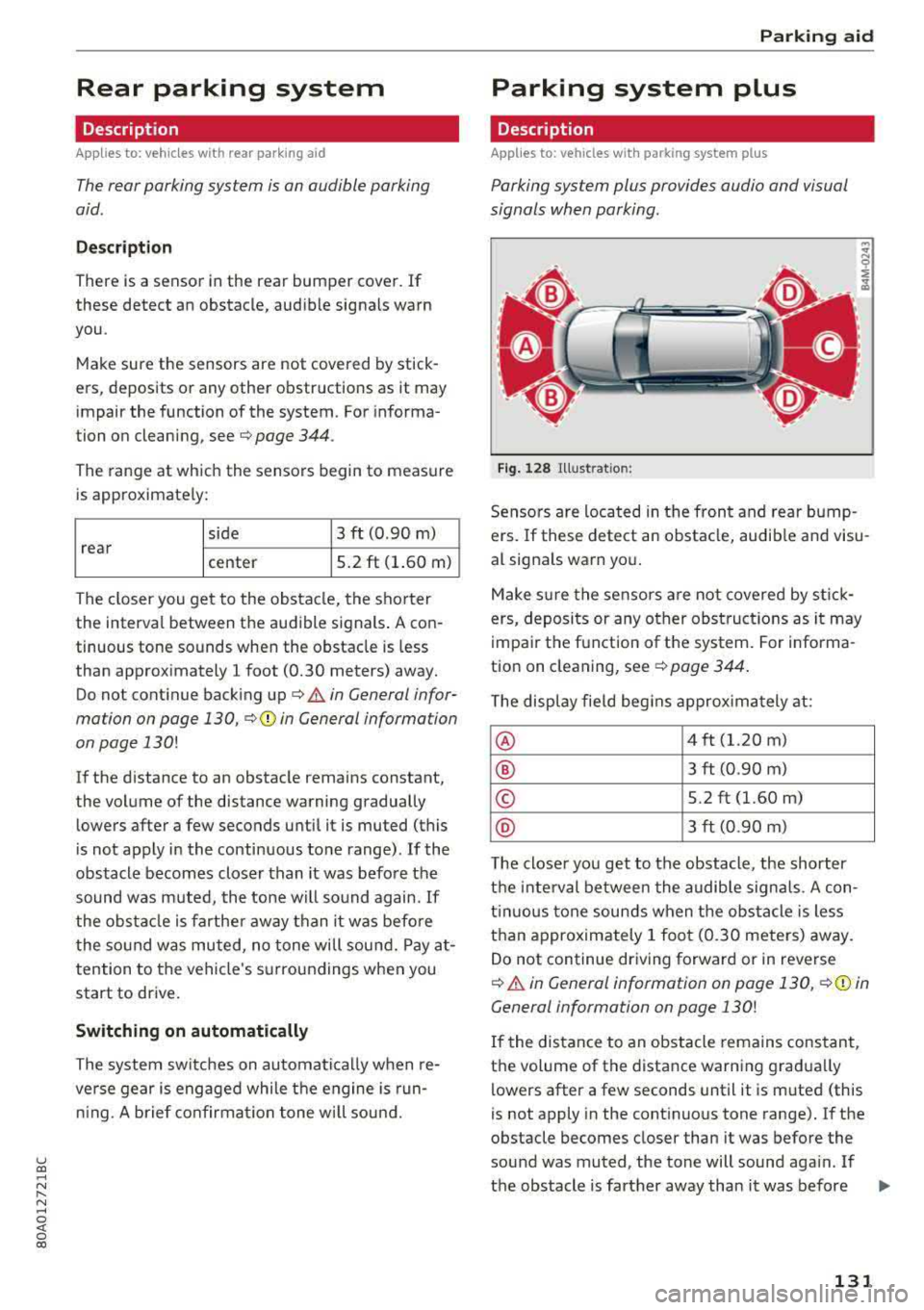
Fig. 128 Illust rat ion:
Sensors are located in the front and rear bump
ers. If these detect an obstacle, audible and visu
al signals warn you.
Make sure the sensors are not covered by st ick
ers, deposits or any other obstructions as it may
impair the function of the system. For informa
tion on cleaning, see
c::;, page 344.
The display field begins approximately at:
® 4 ft (1.20 m)
® 3 ft (0.90 m)
© 5.2 ft (1.60 m)
@ 3 ft (0.90 m)
T he closer you get to the obstacle, the shorter
the interval between the audible signals . A con
t inu ous tone sounds when the obstacle is less
than approximately 1 foot (0.30 meters) away.
Do not continue dr iving forward or in reverse
c::;, &. in General information on page 130, c::;, (D in
General information on page
130!
If the distance to an obstacle remains constant,
the volume of the distance warning gradua lly
lowers after a few seconds until it is muted (this
is not apply in the continuous tone range).
If the
obstacle becomes closer than it was before the
sound was muted , the tone will sound aga in . If
the obstacle is farther away than it was before
.,.
131
Page 134 of 392
Parking aid
the sound was muted, no tone will sound. Pay at
tention to the vehicle's surroundings when you
start to dr ive .
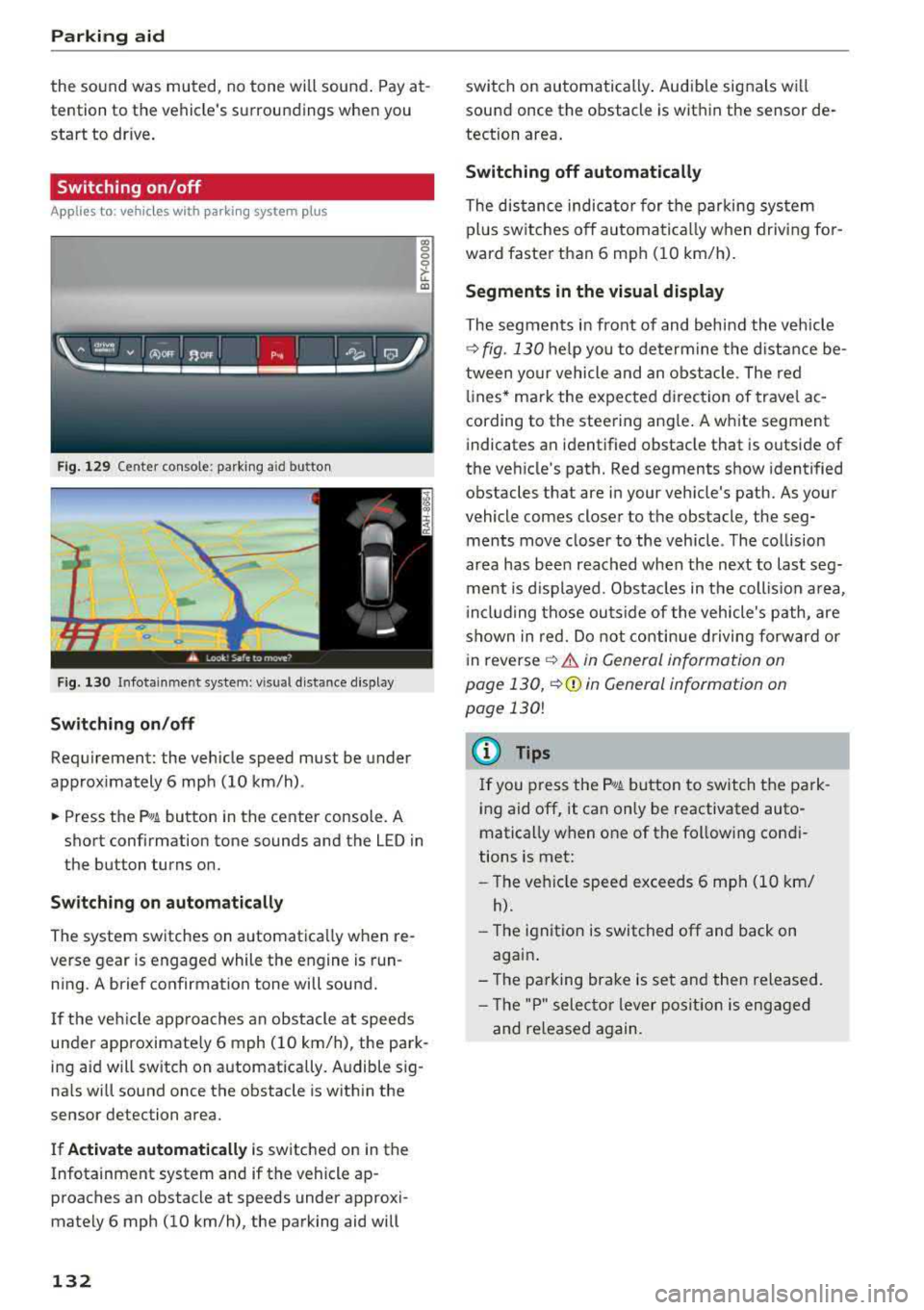
Switching on /off
Applies to: ve hicles w ith pa rking system plus
Fig. 129 Center console: park ing a id bu tton
Fig. 130 I n fot ainme nt system: v is ual d ist ance d isplay
Switching on /off
Requirement: the vehicle speed must be under
approximately 6 mph (10 km/h) .
co 0 0
~ LL. m
.. Press the p,, 1A button in the center console . A
short confirmation tone sounds and the LED in
the button turns on.
Switching on automatically
The system switches on automatica lly when re
verse gear is engaged while the engine is run
ning. A brief confirmation tone will sound.
I f the veh icle approaches an obstacle at speeds
under approximate ly 6 mph (10 km/h), the park
ing a id will sw itch on automatically . Audible sig
na ls will sound once the obstacle is within the
sensor detection area.
I f
Activate automatically is switched on in the
Infotainment system and if the vehicle ap
proaches an obstacle at speeds under approxi
mately 6 mph (10
km/h), the parking aid will
132
switch on automatically . Audible signals wi ll
sound once the obstacle is within the sensor de
tection area.
Switching off automatically
The distance indicator for the parking system
plus sw itches
off automatically when driving for
ward faster than 6 mph (10 km/h).
Segments in the visual display
The segments in front of and behind the vehicle
¢
fig. 130 he lp you to determine the distance be
tween your vehicle and an obstacle . The red
lin es* ma rk the expected d irection of travel ac
cording to the steering angle . A white segment
indicates an identified obstacle that is outside of
the veh icle's path. Red segments show identified
obstacles that are in your vehicle's path. As your
vehicle comes closer to the obstacle, the seg ments move closer to the vehicle . The collision
area has been reached when the next to last seg
ment is displayed . Obstacles in the collis ion area,
inclu ding those outside of the vehicle's path, are
shown in red. Do not continue driving forward or
i n
reverse ¢.&. in General information on
page 130,
¢ (D in General information on
page
130!
(D Tips
If you press the ?~A button to switch the park
ing aid
off, it can only be reactivated auto
matically when one of the following condi
tions is met:
-The vehicle speed exceeds 6 mph (10 km/
h).
-The ignition is switched off and back on
again .
- The parking brake is set and then released.
- Th e "P" selector lever position is engaged
and re leased again.
Page 135 of 392
u co ..... N r-N .....
~ 0 co
Rearview camera
Introduction
Applies to: vehicles with rearv iew camera
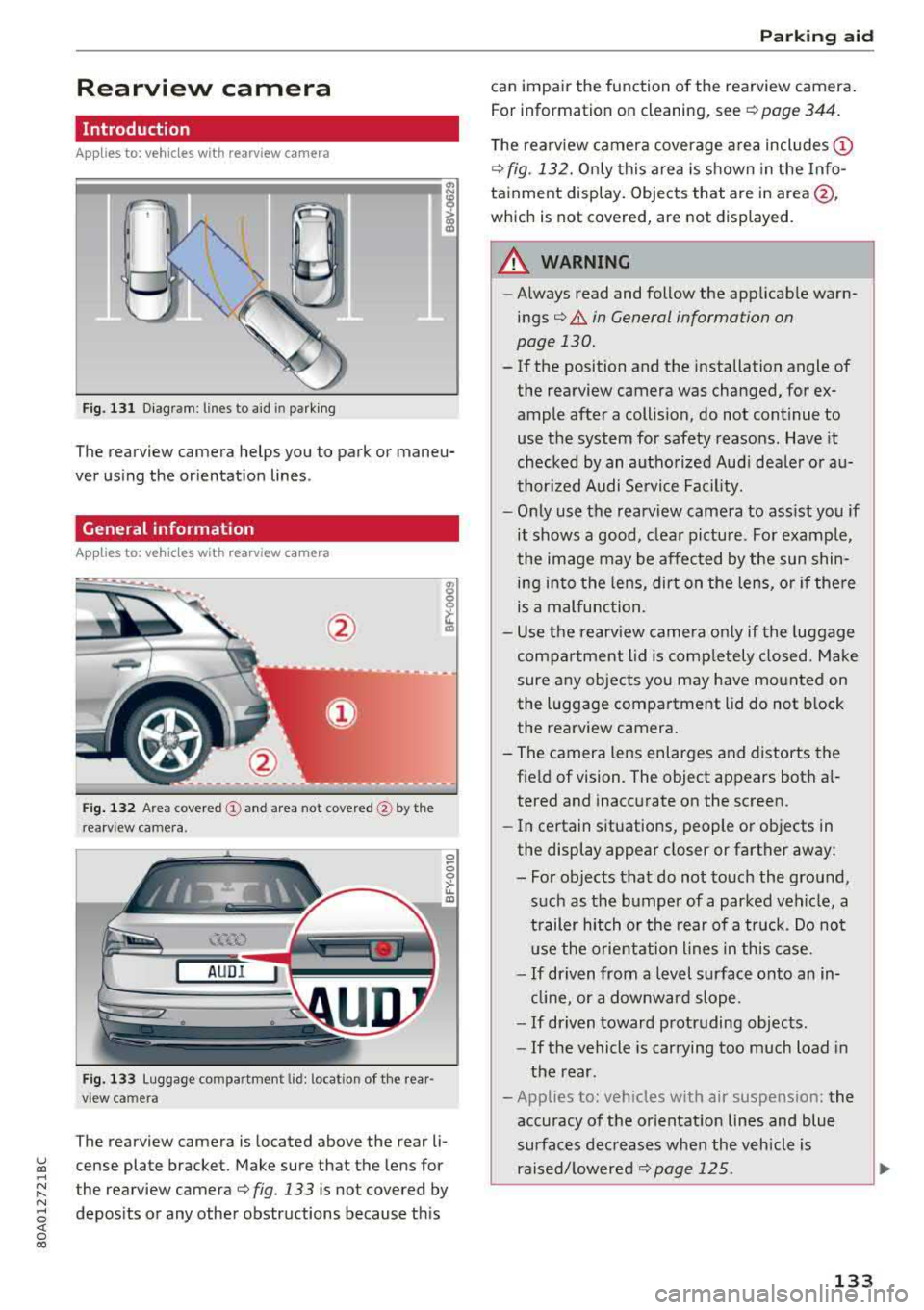
Fig. 131 Diagram: lines to aid in parking
The rearview camera helps you to park or maneu
ver us ing the orientation lines .
General information
Applies to: veh icles wit h rearv iew camera
Fig . 13 2 Area covered (y and area not covered @by th e
rearv iew camera .
AUDI
Fig. 1 33 Luggage compartment lid: locat io n of the rear
view camera
The rearview camera is located above the rear li
cense plate bracket. Make sure that the lens for
the rearview
camera¢ fig. 133 is not covered by
depos its or any other obstructions because th is
P ark ing aid
can impair the function of the rearview camera .
For information on cleaning, see
¢ page 344.
T he rearview camera coverage area includes (D
¢fig. 132. On ly this area is s hown in the Info
tainment display. Objects that are in
area@,
which is not covered, are not displayed.
A WARNING
-
-Always read and follow the applicab le warn-
ings¢ &. in General information on
page 130.
-If the position and the installation angle of
the rearview camera was changed, for ex
ample after a collision, do not continue to
use the system for safety reasons. Have it
checked by an autho rize d Aud i dea le r or a u
thor ized A udi Se rvice Fac ility.
-O nly use the rearv iew camera to ass ist you if
it shows a good, clea r pictu re . For example,
the image may be affected by the sun shin i n g into the lens, dirt on the lens, o r if the re
is a malfunction.
-U se the rearv iew came ra o nly if the luggage
compa rtment lid is comp letely closed. Make
sure any objects you may have mo unted on
the l uggage compartment lid do not block
the rea rview camera .
- The camera lens enlarges and distorts the field of vision. The object appears both a l
tered and inaccurate on the screen.
- In ce rtain situations, people o r objects in
the display appear closer or farther away :
- Fo r o bjects tha t do not touch the ground,
such as the bumper of a parked veh icle, a
trailer hitch o r the rear of a truck . Do no t
u se the orie nta tion l ines in th is case.
- If driven from a level surface onto an in
cl in e, or a downwar d slope.
- If driven toward protruding objec ts.
- If the vehicle is car rying too much load in
the rear .
- Applies to: veh icles w ith air suspens ion: the
accuracy of the or ientat ion lines and blue
surfaces dec reases whe n the vehicle is
raised/ lowere d¢
page 125.
133