change wheel AUDI Q5 2018 User Guide
[x] Cancel search | Manufacturer: AUDI, Model Year: 2018, Model line: Q5, Model: AUDI Q5 2018Pages: 392, PDF Size: 60.56 MB
Page 167 of 392
u co .... N r--N .... 0 <( 0 00
@ Distance to the next maneuver
® Direct ion arrow for the upcoming maneuver
@ A bar grap h appears when a d irect ion arrow
i s disp layed. The fewe r bars are show n, the
shorter t he distance is unti l the turn .
® Lane recommendat ion
@ Addit ional in fo rmat ion (on-board computer)
(J) Calculated arrival time
@ Display of the street currently be ing driven
on If a point is displayed before the street, it
i s ind icating the street you w ill be on w ith the
n ext maneuve r.
The follow ing funct ions are also available when
route guidance is act ive:
- Changing the voice guidance volume : turn the
rig ht thumbwhee l up or down during voice
guidance.
A WARNING
The route calculated by the navigation system
is a recommendation fo r reaching your desti
nation. Obey t raff ic lights, stopping rest ric
tions, one-way streets, lane change restr ic
tions, etc.
(D Tips
- Also see the chapter~ page 8, Controls at a
glance.
- An exclamation point" !" in front of the
street name indicates that the informat ion
abo ut this street or this section of the route
i s no t complete in the navigation da ta con
tained in the M MI. Obey traffic laws in one
way streets and pedestrian zones.
Multifunction ste ering wheel
165
Page 169 of 392
u co ..... N r--N ..... 0 <( 0 00
Voice recognition system Operating
Applies to: vehicles with voice recognitio n system
You con operate many Infotainment functions
conveniently by speaking.
Requirement: the ignition and the MM I must be
switched on ¢
page 148, there must not be any
phone call in progress and the park ing system
must not be active .
~ Switching on: press the~ button @
¢page 14, fig . 11 o r ¢ page 15, fig. 13 br iefly
on the mu ltifunction stee ring wheel and say
the des ired command after the
Beep .
~ Switching off : press and hold the [2;J b utton.
Or : press the [2] but to n.
~ Pausing : say the command Pause . To resume,
press the
[2;J b utton .
~ Correcting : say the com mand Correction . Or :
simp ly say a new comm and d uring an an
no uncement
¢ page 245.
Input assistance
The system gu ides you throug h the input with
v isua l and audio feedbac k.
- Visual input assistance : after switching on
vo ice recogn it ion, a display w ith a selection of
poss ible commands appea rs . This command
display can be sw itched on o r off. Se lec t:
IMEN UI butt on> Settings > left cont ro l button
> MMI settings > Speech dialog system .
- Audio input assistance :
to have the poss ible
comm ands read, tu rn th e voice rec ogn ition sys
tem o n and say
Help.
For the system to understand you:
Speak clearly and dis tinct ly a t a normal vo lume .
Speak lo uder when d riving faste r.
Emphasize the words in the commands even ly
a n d do no t leave long pauses .
C lose the doors, the windows and the sunroof* to
reduce background noise . Make s ure that passen
gers a re not speaking when you a re giving a voice
command .
Voice recognition system
D o not d irect the vents towa rd the hands -free mi
c ro p hone, wh ich is in the roof head liner nea r the
front interior lig hts.
O nly use the system from the dr ive r's sea t be
ca use the hands -free microphone is di rected to
ward that seat .
Additional settings
See¢ page 245, Speech dialog system .
_&. WARNING
- Dir e ct y ou r full a tte ntio n to dr iv in g. A s the
d river, you have com ple te re sponsibili ty fo r
safety in t raff ic . O nly use the functions in
such a way t hat you a lways maintai n com
p lete contro l over your vehicle in all traffic
situations.
- Do not use t he voice recognition system in
emergencies beca use your voice may change
in st ressfu l situations. It may take longe r to
d ia l the number o r th e system may not be
ab le to d ia l it at all. Dia l the emergency
number manually.
(D Tips
-The d ialog pauses w hen the re is a n incom
ing phone call a nd will con tinue if yo u ig
nore the ca ll. The dia log ends if yo u answer
t he ca ll.
- Yo u can select an item in the list using ei
t her the vo ice recogn it io n sys tem o r the
cont ro l knob .
Command overview
information
Applies to: vehicles with voice recognition system
T he following overv iews des cribe the comm ands
t h at can be used to ope rate the MMI using the
vo ice recognit ion system.
Alte rnative co m mand s ar e separate d using
a"/ ",
fo r ex ample say: Telephone / (or) Navigation /
(or) Radio.
Sequences of com mands used to perfo rm an a c
t io n a re iden tified w it h
a ">", fo r ex am ple s ay:
Enter address > ( then) Enter country/state . ..,
167
Page 282 of 392
Airbag syste m
airbag inflates -even with an Advanced Airbag
System.
- The inflating airbag will hit the child safety
seat or infant carrier with great force and
will smash the child safety seat and child
against the backrest, center armrest, door
or roof .
- Always install rear-facing child safety seats
on the rear seat .
- If you must install a rearward-fac ing child
safety seat on the front passenger seat be
cause of exceptional circumstances and the
PASSENGER AIR BAG OFF ~; light does not
come on and stay on, immed iate ly install
the rear-fac ing ch ild safety seat in a rear
seat ing pos ition and have the airbag system
inspected by your a uthorized Audi dea ler.
A WARNING
Objects between you and the a irbag w ill in
crease the risk of inj ury in a crash by interfer
ing with the way the airbag unfo lds or by be
ing pushed into you as the a irbag inflates.
- Never hold things in your hands or on your
lap when the vehicle is in use.
- Never transport items on or in the area of
the front passenger seat . Objects could
move into the area of the front airbags dur
ing brak ing or other sudden maneuvers and
become dangerous projectiles that can
cause serious personal injury if the a irbags
inflate .
- Never place or attach accessor ies or other
objects (such as cupholders, telephone
brackets, large, heavy o r bulky objects) on
the doors, over or nea r the area marked
"AIRBAG" on the steering wheel, instru
ment pane l, sea t backrests or between
those areas and yoursel f. These objects
could cause injury in a crash, especially
when the airbags inflate.
- Never recline the front passenger's seat to
transport objects . Items can also move into
the area of the side airbag o r the front a ir
bag dur ing braking or in a sudden maneu
ver. Objects near the airbags can become
280
-
pro jecti les and cause injury, part icularly
when the seat is reclined.
- Never p lace or transport objects on the
front passenger seat. Objects on the front passenger seat could cause the capacitive
sensor in the seat to signal to airbag system
that the seat is occupied by a person when it
in fact is not, or that the pe rson on the seat
is heavie r than he or she act ually is . The
change in elec tric capa citan ce beca use of
such o bje cts can c ause the p assenge r front
airbag to be turned on when it should be
off, or can cause the airbag to work in a way
that is different from the way it would have
wo rked without objects on the seat.
- Always make sure that there is nothing on
the front passenge r seat that will cause the
capacitive passenge r detection system in
the seat to signal to the Airbag System that
the seat is occup ied by a person when it is
not , or to signal that it is occupied by some
one who is heavier than the person act ually
sitt ing on the seat. The presence of an ob
ject could ca use the passenger front air bag
to be turned on when it should be off, or
could cause the airbag to work in a way that is different from the way it would have
worked without the object on the seat.
A WARNING
The fine dust created when airbags deploy can
cause breathing prob lems for people with a
h istory of asthma or other breath ing cond i
tions .
- To reduce the r isk of breathing p roblems,
those with asthma or other respiratory con
ditions should get fresh a ir right away by
getting out of the vehicle or opening win
dows or doors .
- If you are in a collision in which airbags de
ploy, wash your hands and face with m ild
soap and water before eating.
- Be ca refu l not to get the dust into your eyes,
or into any cuts or scratches.
- If the residue should get into your eyes,
flush them w ith wate r.
Page 286 of 392
Airbag syste m
Make sure that the PASSENGER AIR B AG
OFF ,;; light comes on and stays on all the
t ime whenever the ignition is switched on.
A WARNING
- If the PASS ENGER AIR B AG O FF 1'i; light
does not go out when an adult is sitting on
the front passenger seat after tak ing the
steps described above, make sure the adult
is p roperly seated and restrained at one of
the rear seating positions.
- Have the airbag system inspected by your
authorized Aud i dealer before transporting
anyone on the front passenger seat.
(D Tips
If the capacitive passenger detection system
determines that the front passenger seat is
empty, the frontal airbag on the passenge r
side w ill be tu rned off, and the
PA SSENGER
AIR BAG OFF
1'i ; light will stay on.
-
Repair, care and disposal of the airbags
Parts of the airbag system are installed at many
different places on your Audi. Installing, remov
ing, servic ing or repa iring a part in an area of the
veh icle can damage a part of an airbag system
and prevent that system from working properly
in a collision .
There are some important things you have to
know to make sure that the effectiveness of the
system w ill not be impaired and that discarded
components do not cause injury or pollute the
env ironment.
A WARNING
Improper care, serv icing and repai r proce
dures can increase the r is k of personal injury
and death by preventing an airbag from de
ploying when needed or dep loying an airbag
unexpectedly:
-
- Never cover, obstruct, or change the steer
ing wheel horn pad or airbag cover or the in
strument pane l or modify them in any way.
284
- Never attach any objects such as cupholders
or telephone mountings to the surfaces cov
ering the a irbag un its.
- For cleaning the horn pad or instrument
panel, use only a soft, dry cloth or one mois
tened w ith plain water. Solvents or cleaners
could damage the airbag cover or change
the st iffness or strength of the material so
that the airbag cannot deploy and protect
properly.
- Never repair, adjust, or change any parts of
the airbag system.
- All work on the steering wheel, instrument
panel, front seats or e lectr ica l system ( in
cluding the installation of a udio eq uipment,
cellular telephones and CB radios, etc.) m ust be performed by a qualified techn ician
who has the training and specia l equipment
necessary.
- For any work on the airbag system, we strong ly recommend that you see your au
thorized Audi dealer or qualified workshop.
- Never modify the front b umper or parts of
the vehicle body.
- Always make sure that the side a irbag can
inflate without interference:
- Never install seat covers or replacement
upholstery over the front seatbacks that
have not been specifically approved by
A udi.
- Never use additional seat c ushions that
cover the areas where the side airbags in
flate.
- Damage to the orig inal seat cove rs or to
the seam in the area of the s ide airbag
module mus t always be repaired immedi
ate ly by an autho rized Aud i dealer .
- The a irbag sys tem can deploy on ly once. Af
ter an airbag has been deployed, it m ust be
replaced with new replacement parts de
signed and approved especia lly for your
Audi model version . Replacement of com
plete airbag systems or airbag components
must be performed by qua lified workshops
only . Make sure that any airbag service ac
tion is entered in your Audi Warranty
&
Ma intenance booklet under AIRBAG RE-
PLAC EMENT RECORD.
Ii)-
Page 332 of 392
Wheels
Production options we igh t
means the combined weight of
those installed regular production
options weighing over 5 lbs.
(2.3 kg) in excess of those stand
ard items which they replace, not previously considered in curb
weight or accessory weight, in
cluding heavy duty brakes, ride levelers, roof rack, heavy duty
battery, and special trim.
Radial pl y tir e
means a pneumatic tire in which
the ply cords that extend to the beads are laid at substantially
90 degrees to the centerline of
the tread.
R ecomm ended in flation
pressure
see¢ page 328 , Cold tire infla
tion pressure.
R einforced tire
means a tire designed to operate
at higher loads and at higher in
flation pressures than the corre
sponding standard tire . Rein
forced tires may be identified as
"XL" "xl" "EXTRA LOAD" or "RF" , , ,
on the sidewall.
330
Rim
means a metal support for a tire
or a tire and tube assembly upon
which the tire beads are seated.
Rim diam eter
means nominal diameter of the
bead seat . If you change your
wheel size, you will have to pur
chase new tires to match the new rim diameter .
Rim size designation
means rim diameter and width.
Rim width
means nomina l distance between
r im
flanges .
Sidewall
means that portion of a tire be
tween the tread and bead .
Speed rating (letter code )
means the speed at which a tire is
designed to be driven for extend
ed periods of time. The ratings range from 93 mph (150 km/h)
to
186 mph (298 km/h) ¢ table
on page 326 .
You may not find
this information on all tires be
cause it is not required by law .
The speed rating letter code,
where applicable, is molded on
the tire sidewall and indicates the
...
Page 338 of 392
Wheels
increase the tire pressure to the
maximum specified
pressure ¢.&. -
Checking/correcting tire
pressure
~check the tire pressure at least
once per month and also check it
before every long drive .
~Always check the tire pressure
when the tires are
cold. Do not
reduce the pressure if it increas
es when the tires are warm.
~check the label¢ fig . 269 for
the correct tire pressure based
on vehicle load.
~correct the tire pressure if nec
essary .
~store the new tire pressure in
the Infotainment system
¢ page 343.
_&. WARNING
Always adapt the tire pressure
to your driving style and vehicle
load .
-Overloading can lead to loss of
vehicle control and increase
Tire pressure table
Please note that the information
contained in the following table
was correct at the time of print ing, and the information is sub
ject to change . If there are differ-
336
the risk of an accident. Read
and follow the important safe
ty precautions in
¢ page 337,
Tires and vehicle load limits.
-The tire must flex more if the tire pressure is too low or if
the vehicle speed or load are
too high. This heats the tire up
too much. This increases the risk of an accident because it
can cause the tire to burst and
result in loss of vehicle con
trol.
- Incorrect tire pressure in
creases tire wear and has a
negative effect on driving and
braking behavior, which in
creases the risk of an accident.
@ Note
Replace lost valve caps to re
duce the risk of damage to the
tire valves.
@ For the sake of the environment
Tire pressure that is too low in
creases fuel consumption.
ences between this information
and the tire pressures specified
Page 345 of 392
individual tires. If the pressure changes in one or
more tires, this is indicated in the instrument
cluster display with an indicator light
[IJ and a
message . If only one tire is affected, the location
of that tire will be indicated.
The tire pressures must be stored in the Infotain ment system again each time the pressures
change (switching between partial and full load
pressure) or after changing or replacing a tire on
your vehicle
¢ page 343 . The tire pressure moni
toring system only monitors the tire pressure you
have stored. Refer to the tire pressure label for
the recommended tire pressure for your vehicle
¢ page 335, fig. 269.
Tire tread circumference and vibration character
istics can change and cause a tire pressure warn
ing if:
- the tire pressure in one or more tires is too low
- the tires have structural damage
- the tire was replaced or the tire pressure was
changed and it was not stored
¢ page 343
- tires that are only partially used are replaced
with new tires
Indicator lights
[IJ-loss of pressure in at least one tire¢,&. .
Check the tires and replace or repair if necessary.
Check/correct the pressures of all four tires and
store the pressure again in the Infotainment sys
tem
¢ page 343 .
mm (Tire Pressure Monitoring System) Tire
pressure: malfunction! See owner's manual.
If
mm appears after switching the ignition on or
while driving and the
[IJ indicator light in the in
strument cluster blinks for approximately one minute and then stays on, there is system mal
function . Try to store the correct tire pressures
~ page 343 . In some cases , you must drive for
several minutes after storing the pressures until
the indicator light turns
off. If the indicator light
does turn off or turns on again after a short peri
od of time, drive to an authorized Audi dealer or
authorized Audi Service Facility immediately to
~ have the malfunction corrected. .... N ,..._
N ..... 0 <( 0 00
Wheels
A WARNING
--- If the tire pressure indicator appears in the
display, reduce your speed immediately and
avoid any hard steering or braking maneu
vers. Stop as soon as possible and check the
tires and their pressure.
- The driver is responsible for maintaining the
correct tire pressure. You must check the
tire pressure regularly .
- Under certain conditions (such as a sporty
driving style, winter conditions or unpaved
roads), the tire pressure monitoring system
indicator may be delayed.
@ Tips
- The tire pressure monitoring system can al
so stop working when there is an ESC mal
function.
- Using snow chains may result in a system
malfunction.
- The tire pressure monitoring system in your
Audi was calibrated with
"Audi Original
Tires"~ page 332. Using these tires is rec
ommended.
Storing tire pressures
App lies to: vehicles wi th Tir e Pr essure Mo nito ring Syste m in
dica tor
If the tire pressure changes or a tire is replaced ,
it must be confirmed in the Infotainment sys tem .
.. Before storing the tire pressures, make sure the
tire pressures of all four tires meet the speci
fied values and are adapted to the load
¢page 335 .
.. Switch the ignition on .
.. Select in the Infotainment system: I MENU ! but
ton
> Vehicle > Service & checks > Tire pres
sure monitoring
> Store tire pressure > Yes,
store now.
(D Tips
Do not store the tire pressures if snow chains
are installed .
343
Page 354 of 392
Emerg enc y assis tance
~ Inflate the tire to between 29 psi (200 kPA)
and 36 psi (250 kPA) and read the pressure on
the gauge.
~ If this tire pressure is not reached, remove the
filler hose. Drive s lowly approximately 33 feet
(10 m) forward or in reverse so that the sealant
can be d istr ibuted in the tire . Pump up the t ire
again ~,&. .
_& WARNING
-Read and follow the manufacture r's safety
precautions on the compresso r and in the
instructions on the bottle of sealant.
- If a t ire pressu re of 29 ps i (200 kPA) cannot
reached after inflating for 6 minutes, then
the tire is too severely damaged . Do not
continue driving .
- If the tire cannot be repaired with the tire sealant, see an authorized Audi dealer or au
thorized Audi Service Facility for assistance .
(D Tips
Do not operate the compressor for mo re than
six minutes continuously, or it can overheat .
Once the compressor has cooled, you can con
tinue to use it .
Completing
App lies to: ve hicles w ith t ire mobility kit
~ Adhere the sticker that says "max . 50 mph
(max. 80 km/h)" that is provided w ith the t ire
mobility kit within the driver 's field of vision .
~ Stop the vehicle after driving for about 10 m i
nutes and check the tire pressure.
~ If the t ire pressure is lower tha n 19 ps i (1 30
kPA), then the t ire is too severely damaged. Do
not continue driving .
_& WARNING
Pay attention to the following after repairing
the tire:
- Do not drive faster than 50 mph (80 km/h) .
- Avoid hard acceleration, bra king sharply,
and fast cornering .
- The veh icle m ay become mo re diff icul t to
contro l.
352 -
If the tire is too severe ly damaged, see an
author ized Audi dealer or authorized Audi
Serv ice Facility for ass istance.
@) For the sake of the environment
You can give the used tire sealant bottle to an
a uthorized Audi dea ler or authorized Audi
Service Fac ility for disposal.
(D Tips
Remember to obtain a new bott le of sealant
from an authorized Audi dealer or authorized
Audi Service Fac ility after repairing a tire.
Replacing a wheel
Preparation
You must complete the preparation before
changing a tire .
~ Read and follow the important safety precau-
tions ~ page 350 .
~ Set the park ing brake .
~ Select the "P" se lector lever position.
~ When tow ing a tra ile r: d isconnect the trailer
from yo ur vehicle.
~ Switch on wheel c hange mode* in the In fotain
ment system:
! MENUI button> Vehicle > left
control button >
Ser vic e & check s > Air suspen ·
sion : wheel change .
~ Switch the ignit ion off.
The vehicle jack mode* switches off automatica l
l y at speeds above 6 mph (10 km/h).
_& WARNING
When us ing the veh icle jack* on a road with a
steep hill or offroad, you must take extra pre
cautions to prevent the vehicle from rolling .
Use suitable objects to block the front and
bac k of the wheel that is d iagonal from the
wheel with the flat t ire.
_& WARNING
You o r you r passengers could be injured while
ch anging a whee l if you do not follow these
safety pre caut ions:
Page 355 of 392
u co ..... N r-N .....
~ 0 co
-If you have a flat tire, move a safe distance off the road. Turn off the engine, turn the
emergency flashers on and use other warn
ing devices to alert other motorists.
-Make sure that passengers wait in a safe
place away from the vehicle and well away
from the road and traffic.
-To help prevent the vehicle from moving
suddenly and possibly slipping off the jack*,
always fully set the parking brake and block
the front and back of the wheel diagonally opposite the wheel being changed. When
one front wheel is lifted off the ground,
placing the Automatic Transmission in P
(Park) will
not prevent the vehicle from
moving .
-Before you change a wheel, be sure the
ground is level and firm. If necessary, use a
sturdy board under the jack*.
-Always store the vehicle tool kit, the jack*
and the replaced tire in the luggage com
partment ¢ page 2 5 7.
(D Tips
-Obey all laws.
-Before changing the wheel, you must acti-
vate the jacking mode*, so that the auto
matic controls for the air suspension* do
not make it more difficult to lift the vehicle
with the jack*
c::> page 354.
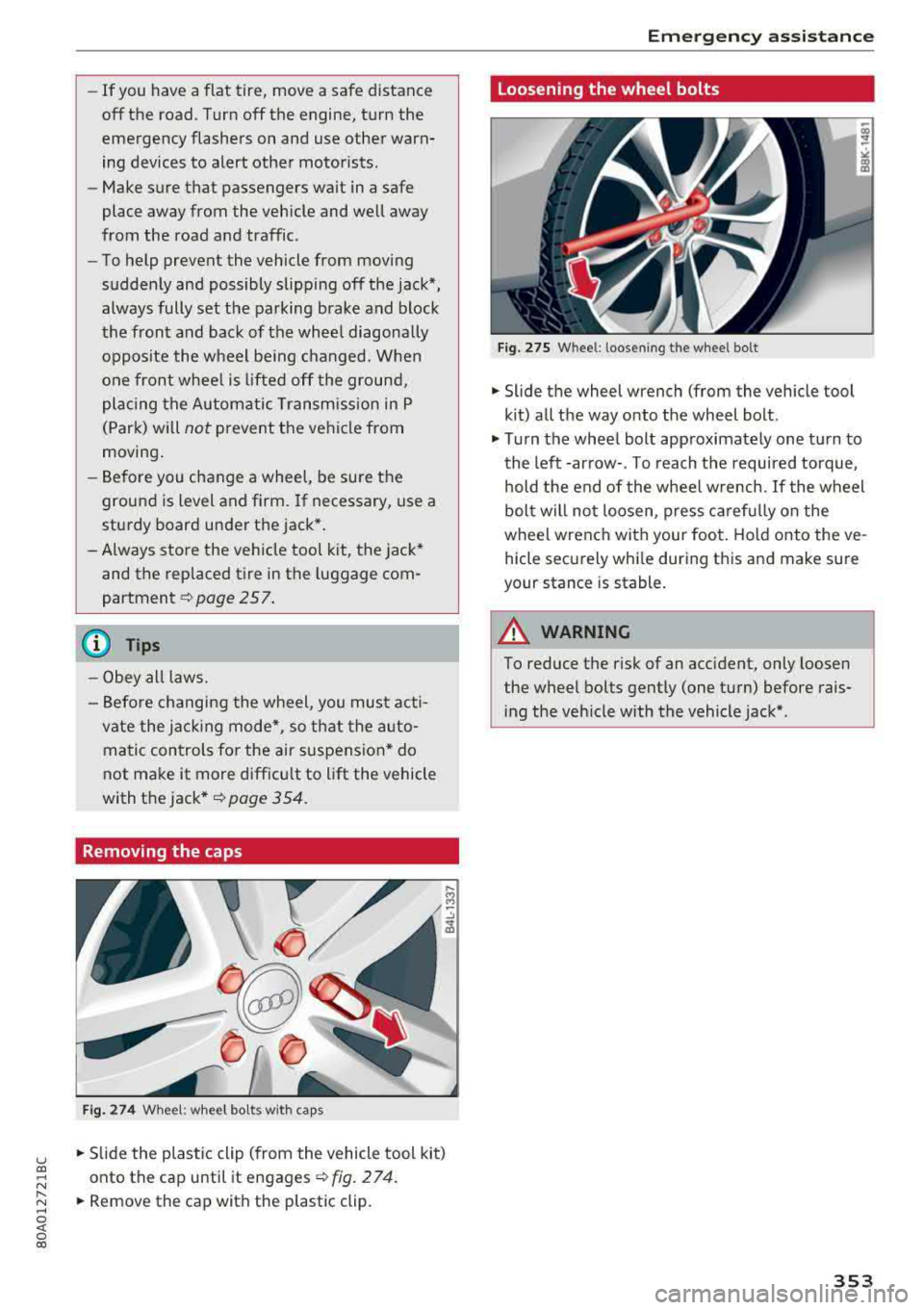
Removing the caps
Fig . 274 Wheel: wheel bolts with caps
.. Slide the plastic clip (from the vehicle tool kit)
onto the cap until it engages
¢ fig. 274.
.. Remove the cap with the plastic clip.
Emergency assistance
Loosening the wheel bolts
Fig. 275 W hee l: l oosen ing t he wheel bolt
.. Slide the wheel wrench (from the vehicle tool
kit) all the way onto the wheel bolt .
.. Turn the wheel bolt approximately one turn to
the left -arrow-. To reach the required torque,
hold the end of the wheel wrench. If the wheel
bolt will not loosen, press carefully on the
wheel wrench with your foot. Hold onto the ve
hicle securely while during this and make sure
your stance is stable.
A WARNING
--To reduce the risk of an accident, only loosen
the wheel bolts gently (one turn) before rais
ing the vehicle with the vehicle jack* .
353
Page 356 of 392

Emergency assistance
Raising the vehicle
Fig. 276 Sill p ane ls : mar kin gs
Fig. 277 Sill: pos itio nin g th e ve hicle jack
"' Place the vehicle jack* (vehicle tool kit) on a
firm surface . Use a flat , stable support if neces
sary . On a slippery surface such as tile, you
shou ld use a non-slip pad (such as a rubber
mat) ¢,&. .
"'Find the mark ing on the sill that is closest to
the tire that will be changed
¢ fig. 2 76 . Behind
the marking, there is a lifting point on the side
sill for the vehicle jack*.
"'Turn the handwheel to raise the vehicle jack*
under the lifting point on the side sill until the
bracket on the jack @completely covers the
notch on your vehicle .
"' Align the vehicle jack* so the bracket @covers
the notch and the base @ is flat on the ground .
T he base @ mus t be direct ly unde r the lifting
po int @ .
"'Mount the crank on the vehicle jack*: insert the
crank into the opening on the handwheel. Turn
the crank to the left or right to secure it.
"'Continue raising the vehicle jack* with the
crank until the wheel lifts off the ground slight
ly .
354
A WARNING
,-
- Make sure the vehicle jack* is stable . There
is a risk of injury when the ground is slick or
soft, because the vehicle jack* could slide or
sink .
- Only raise your vehicle with the vehicle jack*
provided by the factory. If you use a veh icle
jack designed for another vehicle, your vehi
cle can slide and cause injury.
- Position the vehicle jack* only at the desig
nated mounting points on the side sill and
align the jack. Otherwise, the vehicle jack*
could slip and cause an injury if it does not
have sufficient hold on the vehicle.
- Vehicles with air suspension*: changes in
temperature or load can affect the height of
the stopped vehicle .
- To reduce the risk of an accident,
neve r start
the engine when the vehicle is raised.
- To reduce the risk of injury, support the
ve
hicle securely with suitable stands if work is
to be performed underneath the vehicle .
- To help prevent injury to yourself and your
passengers:
- Do not raise the veh icle until you are sure
the jack* is securely engaged.
- Passengers must not remain in the vehicle
when it is jacked up .
- Make sure that passengers wait in a safe
place away from the vehicle and well away
from the road and traffic .
- Make sure jack position is correct, adjust
as necessary and then continue to ra ise
the jack*.
- If work has to be done under the vehicle,
ensure that it is safely supported on suita
ble stands -risk of injury!
- Never start the engine when the vehicle is
on the jack* - risk of accident!
(D Note
Do not lift the vehicle by the sill. Position the
vehicle jack* only at the designated mounting
po ints on the side sill. Otherw ise, your vehicle
will be damaged .
..,.