exterior AUDI Q5 2018 User Guide
[x] Cancel search | Manufacturer: AUDI, Model Year: 2018, Model line: Q5, Model: AUDI Q5 2018Pages: 392, PDF Size: 60.56 MB
Page 124 of 392
Ass is tanc e system s
A WARNING
-Always pay attention to traffic and to the
area around your vehicle . Side assist cannot
replace a dr iver's attention . The dr iver alone
is a lways responsible for lane changes and
s imi lar d riving maneuvers.
- In some situat ions, the system may not
funct ion or its f unct io n may be lim ited. For
example :
- If vehicles are approaching or being left
behind very quickly. The display may not
turn on in time .
- In poor weather conditions such as heavy
rain, snow or heavy mist.
- On very wide lanes, in tight curves, or if
there is a rise in the road surface. Vehicles
in the adjacent lane may not be detected
because they are outs ide of the sensor
range .
@ Note
The sensors can be displaced by impacts or
damage to the bumper, whee l housing and
underbody . Th is can impa ir the system . Have
an author ized Audi dealer or authorized Aud i
Serv ice Facility check their function .
@ Tips
-If the window glass in the driver's door or
front passenger 's door has been tinted, the
display in the exterior mirror may be incor
r ect.
- For an explanation on conformity with the
F CC regu lations in the United States and the
Industry Ca nada regu lations, see
¢ page 374.
Switching on/off
Applies to: veh icles w ith Audi side assis t
The system can be switched on/off in the Info
tainment system .
-
.,. Select in the Infotainment system: IM ENU I but
ton
> V ehicle > left contro l button > Dri ver a s
s is ta nce
> Audi sid e ass ist . Off sw itches the
system off.
122
If the system is activated , the disp lays in the ex
terior mirrors wi ll turn on briefly when th e igni
tion is switched on .
(D Tips
When you switch side assist on o r off, the exit
warning system activates or deactivates
¢ page 123 .
Setting the display brightness
Applies to : vehicles wit h Aud i side ass ist
The display brightness can be adjusted in the In
fotainment system.
.,. Select in the Infotainment system: I MENU ! but
ton
> V ehicle > left control button > Dri ver a s
s is tanc e
> Audi side a ssist.
The disp lay br ightness adjusts automatically to
t h e brightness of the sur roundings, both in the
information and in the warning stage. In very
dark or very bright surroundings , the automatic
adjustment will set the display to the minimum
or max imum level. In such cases, you may notice
no change when adjusting the br ightness, or the
change may only be noticeable once the sur
round ings change .
Adjust the br ightness to a leve l where the display
i n the in formation stage will not disrupt your
v iew ahead . If you change the br ightness, the dis
play in the exterior mirror w ill br iefly show the
br ightness leve l in t he info rmat ion stage . The
br ightness of the warn ing stage is linked to the
br ightness in the information stage and is adjust
ed along with the information stage .
© Tips
- The side assist f unct ions are not active dur
ing the adjustment process.
- Th e exit war ning indicato rs turn o n du ring
the adjustment process.
- Your sett ings are automat ica lly stored and
assigned to the remote control key be ing
used .
Page 136 of 392
Parking aid
(D Note
-Always read and follow the applicable warn
ings
¢ 0in General information on
page
130.
- The orange-colored orientation lines in the
Infotainment display show the vehicle path based on the steering wheel angle. The
front of the vehicle swings out more than
the rear of the vehicle. Maintain plenty of
distance so that an exterior mirror or a cor
ner of the vehicle does not collide with any
obstacles.
Switching on/off
A pp lies to: ve hicles w ith rearview ca mera
Switching on/off
Requirement: the vehicle speed must be under
approx imately
6 mph (10 km/h).
• Press the P,11A button in the center console
¢ page 132, fig . 129. A short confirmat ion
tone sounds and the LED in the button turns
on.
Switching on automatically
The system switches on automat ically when re
verse gear is engaged while the engine is run
n ing. A brief confirmation tone will sound.
Switching off automatically
The system switches off automatically when driv
ing forward faster than 6 mph
(10 km/h) .
Perpendicular parking
App lies to: ve hicles w ith rearview ca mera
This view may be used when parking in a garage
or in a parking space .
Fig. 134 In fotainme nt system: a iming at a parking space
134
Fig. 135 Infota inment system: al ign ing the vehicle
• Turn the Infotainment system on and shift into
reverse gear.
• The orange orientation lines (D show the vehi
cle's direction of travel. Turn the steering wheel
until the orange orientation lines appear in the
parking
space ¢ fig. 134 . Use the markings @
to help you estimate the distance to an obsta
cle. Each mark ing represents approximately 3
ft
(1 m). The b lue area represents an extension
of the vehicle's outline by approximate ly
16 ft
(5 meters) to the rear.
• While driving in reverse gear, adjust the steer
ing wheel angle to fit the parking space using
the orange orientat ion lines for assistance
¢ .&. in General information on page 133, i=>(D
in General information on page 134 .@ repre
sents the rear bumper. At the very latest, stop
the vehicle when the red orientation
line @
borders an object.
Trailer view
Applies to: vehicl es with rearv iew camera/peripheral ca meras
and trailer hitch
This view assists you in positioning the vehicle in
front of a trailer .
Fig. 136 Infotainment system : trailer view
Requirement: Trailer view must be selected
¢page 138 .
Page 137 of 392
u co ..... N r-N .....
~ 0 co
~ Now you can position your vehicle in front of
the trailer ¢
A in General information on
page 135,
¢ (Din General information on
page 135.
The orange orientation line indi
cates the expected path toward the trailer
hitch . Use the blue lines to help you estimate
the d ista nce to the trailer h itch.
Peripheral cameras
Introduction
Applies to: vehicles with peripheral cameras
With this equipment, the parking system plus*
¢
page 131 is supplemented w ith various periph
eral cameras. The four cameras give you the fol
lowing views : area around the vehicle, front cor
ner v iew and rear corner v iew, view in front of the
veh icle and beh ind the veh icle .
General information
App lies to: veh icles with peripheral cameras
i
Fig. 137 Locat ion of periphera l ca mera s
The four per ipheral cameras are located in the ra
d iator grille, in the luggage compartment lid and
on both exterior mirrors ¢
fig. 13 7 . Make sure
that the lenses are not covered by deposits or any
other obstructions as this may impa ir the system.
F or info rmat io n on cleaning, see
c::> page 344.
Black corners are shown in the vehicle si lhouette
when in
Surroundings mode. Objects in these
a reas a re outside of the camera 's field of v iew
and a re not detec ted .
_& WARNING
-Always read and follow the applicable warn
ings ¢
A in General information on
page 130.
P ark ing aid
- If the position or the installation angle of a
camera was changed, for example after a
coll is ion, do not cont inue to use the system
for safety reasons. Have it checked by a n au
thorized A udi dealer or authorized Audi
Serv ice Facility.
- Keep in mind that the image in the display is
i n correct if the exterior mirror housing has
been
moved out of p la ce.
- Use the
Rear mode and the Corner view
( rear )
mode only when the luggage com
pa rtment lid is comp letely closed. Other
wise the image in the disp lay w ill be inco r
re ct.
- The area around the veh icle is shown using
the camera images. The vehi cle image is
shown by the system. Objects and obs tacles
above the camera are not disp layed .
- Ca mera lenses enl arge and distort the field
of vision. The o bjects appear both a ltered
a nd inaccurate on the screen.
- Applies to: vehicle s with air suspension: the
accuracy of the orientation lines and blue
surfaces dec reases whe n the vehicle is
raised/lowered <=>
page 125.
(D Note
-Always read and fo llow the applicable wa rn
ings
c::> (D in General information on
page 130 .
- The Info tainmen t display shows the direc
tion i n which the rear of the vehicle is travel
ing based on t he steering wheel ang le . The
front of the veh icle swings out mo re than
the rear of the vehicle. Maintain plenty of
distance so that a n exterior m irror or a cor
ner of the vehicle does not coll ide with any
obstacles.
(0 Tips
If the 8/0";JJ/c:5 symbo l appears in the d is
play a nd the res pect ive d isplay area is grayed
out, then the power exter ior mir rors we re
fo lded in or the dr iver's door/front passeng
e r's door/luggage comp artme nt lid w as
opened .
135
Page 331 of 392
u a, .... N r-N ....
~ a,
Gross Axle Weight Rating ( " GAWR")
means the load-carrying capacity
of a single axle system, measured
at the tire-ground interfaces.
Gross Vehicle Weight Rating (" GVWR ")
means the maximum total loaded
weight of the vehic le.
Groove
means the space between two ad
jacent tread ribs.
Load rating (code )
means the maximum load that a
tire is rated to carry for a given in
flation pressure . You may not find
this information on all tires be
cause it is not required by law .
Maximum load rating
means the load rating for a tire at
the maximum permissible infla
tion pressure for that tire .
Maximum loaded vehicle
weight
means the sum of:
(a) Curb weight
(b) Accessory weight
(c) Vehicle capacity weight, and
(d) Production options weight
Ma ximum (permissible )
inflation pressure
Wh eel s
means the maximum cold infla
tion pressure to which a tire may be inflated . Also called "maxi
mum inflation pressure ."
Normal occup ant weight
means 150 lbs . (68 kilograms)
times the number of occupants
seated in the vehicle up to the to
ta l seating capacity of your vehi
cle .
Occupant distribut ion
means distribution of occupants
in a vehicle .
Outer diameter
means the overall diameter of an
inflated new tire .
Overall width
means the linear distance be
tween the exteriors of the side
walls of an inflated tire, including elevations due to labeling, deco
rations , or protective bands or
ribs.
Ply
means a layer of rubber-coated
parallel cords.
329
Page 347 of 392
u co ..... N r--N ..... 0 <( 0 00
wash operator to reduce the risk of acci
dents.
- To reduce the risk of cuts, protect yourself
from sharp metal components when wash ing the underbody or the inside of the wheel
housings.
- After washing the vehicle, the braking effect may be delayed due to moisture on the
brake rotors or ice in the winter . This in
creases the risk of an accident. The brakes
must be dried first with a few careful brake
applications.
@ Note
- If you wash the vehicle in an automatic car
wash, you must fold the exterior mirrors in
to reduce the risk of damage to the mirrors.
Power folding exterior mirrors* must only
be folded in and out using the power folding
function.
- To reduce the risk of damage to the rims
and tires, compare the width between the
wheels on your vehicle with the distance be
tween the guide rails in the car wash.
- To reduce the risk of damage, compare the
height and width of your vehicle with the
Care and cleaning
height and width of the inside of the car
wash .
- T o reduce the risk of paint damage, do not
wash the vehicle in direct sunlight .
- To reduce the risk of damage to the surface,
do not use insect removing sponges, kitchen
sponges or similar items .
- Matte finish painted vehicle components:
- To reduce the risk of damage to the sur-
face, do not use polishing agents or hard
wax.
- Never use protective wax. It can destroy
the matte finish effect .
- Do not place any stickers or magnetic
signs on vehicle parts painted with matte
finish paint. The paint could be damaged
when the stickers or magnets are re
moved.
@ For the sake of the environment
Only wash the vehicle in facilities specially de
signed for that purpose. This will reduce the
risk of dirty water contaminated with oil from
entering the sewer system.
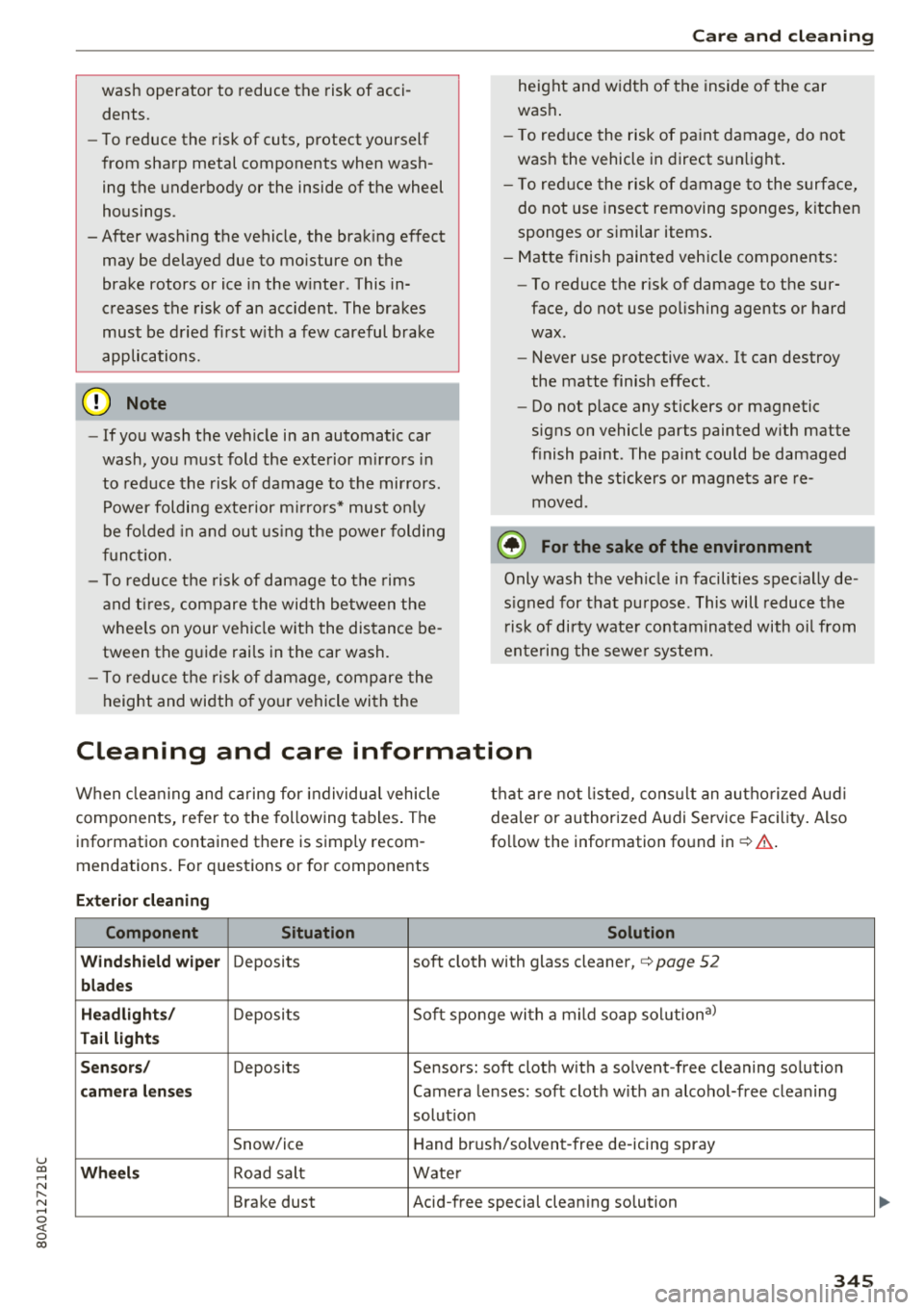
Cleaning and care information
When cleaning and caring for individual vehicle
components, refer to the following tables. The
information contained there is simply recom
mendations. For questions or for components that
are not listed, consult an authorized Audi
dealer or authorized Audi Service Facility. Also
follow the information found
in ¢.&. .
Exterior cleaning
Component Situation Solution
Windshield wiper
Deposits soft cloth with glass cleaner, ¢ page 52
blades
Headlights/
Deposits Soft sponge with a mild soap solution3>
Tail lights
Sensors/
Deposits Sensors: soft cloth with a solvent-free cleaning solution
camera lenses Camera lenses: soft cloth with an alcohol-free cleaning
solution
Snow/ice Hand brush/solvent-free de-icing spray
Wheels Road salt Water
Brake dust Acid-free special cleaning solution
345
Page 380 of 392
Index
Convenience key
Switching the ignition on . . . . . . . . . . . . . . 76
Unlock ing/ locking . . . . . . . . . . . . . . . . . . . . 33
Conven ience opening/closi ng . . . . . . . . . . . . 4 1
Convert ible ch ild safety seats . . . . . . . . . . . 299
Convertible locking retractor
Activating . . . . . . . . . . . . . . . . . . . . . . . . . . 304
Deactivating . . . . . . . . . . . . . . . . . . . . . . . . 305
Using to secure a child safety seat . . . . . . 304
Cooled glove compa rtment . . . . . . . . . . . . . . 61
Cooling mode (automatic climate control sys-
tem) . . . . . . . . . . . . . . . . . . . . . . . . . . . . . 70, 7 1
Cooling system Adding coolant . . . . . . . . . . . . . . . . . . . . . . 320
Coolant .. .. .. .. ................ ... . 319
Coolant level check ing . . . . . . . . . . . . . . . . 320
Coolant temperature indicato r . . . . . . . . . . 11
Cross hairs 205
Cr uise contro l system . . . . . . . . . . . . . . . . . . . 95
Cup holders . . . . . . . . . . . . . . . . . . . . . . . . . . . 60
Current cons umption . . . . . . . . . . . . . . . . . . . 1 6
D
Data connection . . . . . . . . . . . . . . . . . . . . . . 194
Data protect ion . . . . . . . . . . . . . . . . . . . . . . . 195
Data recorder 145
Date . . . . . . . . . . . . . . . . . . . . . . . . . . . . . 16, 245
Date display . . . . . . . . . . . . . . . . . . . . . . . . . 245
D aytime running lights . . . . . . . . . . . . . . . . . 45
D eclarat ion of compliance . . . . . . . . . . . . . . 374
Defrost ing (windows) . . . . . . . . . . . . . . . . . . . 71
D EF ( inst rument cluste r) . . . . . . . . . . . . . . . . 12
Demo mode
refer to Presentation mode . . . . . . . . . . . . 211
Destination on the map Using the MMI touch . . . . . . . . . . . . . . . . . 205
Determin ing correc t load limit . . . . . . . . . . 339
D. 't 1 191 a compass . . . . . . . . . . . . . . . . . . . . . . . S4
Dig ita l Rights Management . . . . . . . . . . . . . 225
Dimensions . . . . . . . . . . . . . . . . . . . . . . . . . . 369
Dimming the exterior mirrors . . . . . . . . . . . . SO
D imming the rearview mirror . . . . . . . . . . . . SO
D irectory
refer to Contacts . . . . . . . . . . . . . . . . . . . . 183
378
Display . . . . . . . . . . . . . . . . . . . . . . . . . . . . . . 12
Cleaning . . . . . . . . . . . . . . . . . . . . . . . . . . . 346
Infotainment system d isp lay . . . . . . 148, 246
Instrument cluster . . . . . . . . . . . . . . . . . . . . 15
Mult ifunct ion steer ing whee l . . . . . . . . . . . 12
Versions (MMI) . . . . . . . . . . . . . . . . . . . . . . 148
Distance . . . . . . . . . . . . . . . . . . . . . . . . . . . . . 16
Doors Mechan ica lly locking . . . . . . . . . . . . . . . . . . 35
Driver informat ion system
Chang ing v iews . . . . . . . . . . . . . . . . . . . . . . 12
Energy consumers . . . . . . . . . . . . . . . . . . . . 17
Outs ide temperat ure display. . . . . . . . . . . . 10
Se rvice interva l display . . . . . . . . . . . . . . . 32 4
T rip comp ute r . . . . . . . . . . . . . . . . . . . . . . . 16
V iew 14
D river seat
refer to Seating posit ion . . . . . . . . . . . . . . 253
D rives
refer to Media . . . . . . . . . . . . . . . . . . 225, 234
Drive select
refer to Audi drive select . . . . . . . . . . . . . . 125
D rivi ng econom ica lly . . . . . . . . . . . . . . . . . . . 73
Driving offroad . . . . . . . . . . . . . . . . . . . . . . . . 82
Drivi ng on hills . . . . . . . . . . . . . . . . . . . . . . . . 83
D rivi ng safely . . . . . . . . . . . . . . . . . . . . . . . . 252
Driving through water . . . . . . . . . . . . . . . . . . 73
D rivi ng time . . . . . . . . . . . . . . . . . . . . . . . . . . 16
DVD drive (med ia drives) . . . . . . . . . . . . . . . 226
Dynamic steering . . . . . . . . . . . . . . . . . . . . . 125
Dynam ic volume
refer to Syste m volume . . . . . . . . . . . . . . . 250
E
E-ma il 181
E asy seat entry . . . . . . . . . . . . . . . . . . . . . . . . 76
E conom ica l route . . . . . . . . . . . . . . . . . . . . . 210
eco (button) . . . . . . . . . . . . . . . . . . . . . . . . . . 70
EDS . . . . . . . . . . . . . . . . . . . . . . . . . . . . . . . . 140
El ec tromechanical pa rking brake . . . . . . . . . 80
E lectromechanical steering . . . . . . . . . . . . . 144
E lectronic immobilizer . . . . . . . . . . . . . . . . . . 31
Electron ic Stab il izat ion Control
refer to ESC . . . . . . . . . . . . . . . . . . . . 140, 141
Emergency assistance . . . . . . . . . . . . . . . . . 350
E mergency b raking fu nction . . . . . . . . . . . . . 81
Page 381 of 392
u co ..... N r--N ..... 0 <( 0 00
Emergency call function
Audi connect emergency ca ll and service .
201
Emergency flashe rs . . . . . . . . . . . . . . . . . . . . 47
Emergency operat ion
Fuel filler door . . . . . . . . . . . . . . . . . . . . . .
313
Emergency starting
E m issions control system ........... .. .
Energy management ........... .. .. .. .
Engine Coolant
.... .. ... .......... .. .. .... .
Start/Stop system ............ .. .... . .
Starting/stopping ............ .. .... . .
Starting w ith jumper cables .... .. .. .. .
En gin e compartment
Opening/closing the hood ............ .
Overview
... .. ... .......... .. .. .... .
Safety preca utions .......... .. .. .... .
En gin e oil
Adding .. .. .. ............... .. .. .. .
Changing .... ... .......... .. .. .... .
Checking oil level . .......... .. .. .... .
Consumption .... .......... .. .. .... .
363
3 13
145
3 19
78
76
363
3 15
3 16
3 14
317 3 19
3 17
3 17
Temperature disp lay .......... .. .. .. . . 17
Engin e sound . . . . . . . . . . . . . . . . . . . . . . . . 125
Eng ine Start/Stop mode
refer to Start/Stop system . . . . . . . . . . 78, 80
Eng ine stop
refer to Start/Stop system . . . . . . . . . . 78, 80
En hanced v iew . . . . . . . . . . . . . . . . . . . . . . . . 14
Enter ing characters/numbers (speller) . . . . 155
Entering letters (speller) . . . . . . . . . . . . . . . 155
Enterta inment sl iding menu . . . . . . . . . . . . 153
En try/ex it lighting . . . . . . . . . . . . . . . . . . . . . 47
Environment
Proper disposal of drained engine oi l ... .
Unleaded gasoline ............ .. .. .. .
ESC
.. .. .. .. .. ............... .. .. .. .
H ill descent assist .......... .. .. .. .. .
Offroad mode .... .......... .. .. .... .
Evasive steering support ......... ... .. .
E vent Dat a Recorder (EDR) ...... .. .. .. .
3 19
310
140
142 141
1 13
145
Ext erio r ligh ting . . . . . . . . . . . . . . . . . . . . . . . 45
Exterior mirrors . . . . . . . . . . . . . . . . . . . . . . . 49
External voice operation . . . . . . . . . . . . . . . . 172
Index
F
Factory default settings
Multi Media Interface . . . . . . . . . . . . . . . .
246
Fader (sound) . . . . . . . . . . . . . . . . . . . . . . . . 249
Fastening
Booster seats
.. .. ................. .. 301
Convertib le child safety seats ......... . 299
Infant seats ... .. .. ................ . 297
Fast forwarding/rewind ing (a udio/video
file) ....... .. .. .. ................. .
. 234
Fast forwarding (audio/v ideo file) . . . . . . . . 234
Fast route . . . . . . . . . . . . . . . . . . . . . . . . . . . 210
Favorites
Media
Navigation .. .. .. ................. . .
Telephone . .. .. .. ................. . .
237
205 179
Federal Communications Commission (FCC) 374
File formats (media drives) . . . . . . . . . . . . . 240
Fixture set . . . . . . . . . . . . . . . . . . . . . . . . . . . . 65
Floor mats . . . . . . . . . . . . . . . . . . . . . . . . . . . 257
Foot peda ls . . . . . . . . . . . . . . . . . . . . . . . . . . 256
For th e sake of t he envi ronment
Environmentally-friend ly driving . . . . . . . . 73
Fueling . . . . . . . . . . . . . . . . . . . . . . . . . . . .
311
Leaks..... .. .. .. ................. .. 315
Warming up the engine . . . . . . . . . . . . . . . . 76
Free text search ..... ... .......... .. ..
Media .... .. .. .. ................. ..
Navigation .. .. .. ................. . .
Radio
.... .. .. .. ................. ..
Telephone ..... .. .. ................ .
Freeze protection Coo lant ... .. .. .. ................. . .
157
236
204
221 183
319
Frequency band . . . . . . . . . . . . . . . . . . 220, 223
Front a irbags
Description . . . . . . . . . . . . . . . . . . . . . . . . .
273
How they work . . . . . . . . . . . . . . . . . . . . . . 279
Frontal collisions and the laws of physics . . 262
Front seats
Adjus ting . . . . . . . . . . . . . . . . . . . . . . . . . .
254
Child restraints in the front seat . . . . . . . . 270
also refer to Seats . . . . . . . . . . . . . . . . . . . . 56
Fuel 310
Additives.. .. .. .. ................. .. 3 10
Blended gasoline . . . . . . . . . . . . . . . . . . . . 3 10
379
Page 383 of 392
u co ..... N r--N ..... 0 <( 0 00
J
Jukebox . . . . . . . . . . . . . . . . . . . . . . . . . . . . . 227
Jump-starting . . . . . . . . . . . . . . . . . . . . . . . . 363
Jump start cable . . . . . . . . . . . . . . . . . . . . . . 364
K
Key.................................. 31
Key not recogni zed . . . . . . . . . . . . . . . . . . . 78
Key replacement . . . . . . . . . . . . . . . . . . . . . 31
Mechanical key ............... .. .. . 31, 32
Replacing the battery . . . . . . . . . . . . . . . . . 32
Unlocking/locking . . . . . . . . . . . . . . . . . 33, 35
Vehicle code . . . . . . . . . . . . . . . . . . . . . . . . . 31
Kick-down (automatic transmission) . . . . . . . 88
L
Lane assist
refer to Audi active lane assist . . . . . . . . . 117
La p timer . . . . . . . . . . . . . . . . . . . . . . . . . . . . . 98
Evaluating . . . . . . . . . . . . . . . . . . . . . . . . . . 99
Starting . . . . . . . . . . . . . . . . . . . . . . . . . . . . 99
L ATCH . . . . . . . . . . . . . . . . . . . . . . . . . . . . . . 305
Description . . . . . . . . . . . . . . . . . . . . . . . . . 306
Installing a child restraint . . . . . . . . . . . . . 307
L ocat ion . . . . . . . . . . . . . . . . . . . . . . . . . . . 306
Mounting and releasing the anchorage
hook .. .... .. ................ ..... . 307
Launch control program . . . . . . . . . . . . . . . . . 89
Leather care/cleaning . . . . . . . . . . . . . . . . . 347
L eft control button . . . . . . . . . . . . . . . . . . . . . 13
Licensing agreements (MMI) . . . . . . . . . . . . 250
Lifting points (vehicle jack) . . . . . . . . . . . . . 354
L ight/rain sensor
H eadlights . . . . . . . . . . . . . . . . . . . . . . . . . . 45
Interval mode (wipers) . . . . . . . . . . . . . . . . 51
L ight functions . . . . . . . . . . . . . . . . . . . . . . . . 45
High beam assistant . . . . . . . . . . . . . . . . . . 46
Instrument illumination . . . . . . . . . . . . . . . 49
I nter ior lighting . . . . . . . . . . . . . . . . . . . . . . 48
Lighting Exterior . . . . . . . . . . . . . . . . . . . . . . . . . . . . . 45
Interior . . . . . . . . . . . . . . . . . . . . . . . . . . . . . 48
Lights Headlight range control system . . . . . . . . . 45
Index
Listening to music
refer to Media . . . . . . . . . . . . . . . . . . 225, 234
Load....... .. .. .. .. ............... .. 370
Loading the luggage compartment . . . . . . . 257
Locking/unlocking By remote control . . . . . . . . . . . . . . . . . . . . 33
With the convenience key . . . . . . . . . . . . . . 33
With the lock cylinder . . . . . . . . . . . . . . . . . 35
Low beam headlights . . . . . . . . . . . . . . . . . . . 45
Lowering the rear of the vehicle . . . . . . . . . 128
Luggage compartment . . . . . . . . . . . . . . . . . . 62
Cover (manual) . . . . . . . . . . . . . . . . . . . . . . . 62
Power sources . . . . . . . . . . . . . . . . . . . . . . . 60
Storing cargo correctly . . . . . . . . . . . . . . . 257
Tie-downs . . . . . . . . . . . . . . . . . . . . . . . . . . . 65
also refer to Loading the luggage compart-
ment . . . . . . . . . . . . . . . . . . . . . . . . . . . . . . 257
Luggage compartment lid . . . . . . . . . . . . . . . 36
Emergency release . . . . . . . . . . . . . . . . . . . . 40
Lumbar support . . . . . . . . . . . . . . . . . . . . . . . 56
M
Maintenance . . . . . . . . . . . . . . . . . . . . . . . . . 371
Maintenance intervals . . . . . . . . . . . . . . . . . 324
Making an emergency call . . . . . . . . . . . . . . 179
Malfunction Indicator Lamp (MIL) . . . . . . . 313
Map Display . . . . . . . . . . . . . . . . . . . . . . . . . . . . 218
Operating . . . . . . . . . . . . . . . . . . . . . . . . . . 213
Settings . . . . . . . . . . . . . . . . . . . . . . . . . . . 214
Update . . . . . . . . . . . . . . . . . . . . . . . . . . . . 203
Map update . . . . . . . . . . . . . . . . . . . . . . . . . . 216
Mechan ical key .. .. .. ............... 31, 32
Mechanically locking the front passenger's
door . . . . . . . . . . . . . . . . . . . . . . . . . . . . . . . . . 35
Media . . . . . . . . . . . . . . . . . . . . . . . . . . 225, 234
Drives . . . . . . . . . . . . . . . . . . . . . . . . . . . . . 226
Supported formats . . . . . . . . . . . . . . . . . . 240
Media center . . . . . . . . . . . . . . . . . . . . . . . . . 235
Memory buttons
refer to Shortcut keys ............ 147, 155
Memory capacity Directory . . . . . . . . . . . . . . . . . . . . . . . . . . . 184
Jukebox . . . . . . . . . . . . . . . . . . . . . . . . . . . . 227
381
Page 384 of 392
Index
Memory card
SD card reader (MMI) . . . . . . . . . . . . . . . . . 226
Supported types/formats . . . . . . . . . . . . . 240
Memory function . . . . . . . . . . . . . . . . . . . . . . S9
MENU button . . . . . . . . . . . . . . . . . . . . . . . . 147
Menu language
refer to Setting the language . . . . . . . . . . 24S
M enu paths (Owner 's Manual) . . . . . . . . . . . 150
Menus/symbols . . . . . . . . . . . . . . . . . . . . . . 158
Messages . . . . . . . . . . . . . . . . . . . . . . . . . . . 180
Mirrors Adjusting exterior mirrors . . . . . . . . . . . . . . 49
Compass . . . . . . . . . . . . . . . . . . . . . . . . . . . . 54
D immi ng ... .. .. ................. .. .. 50
Van ity m irror . . . . . . . . . . . . . . . . . . . . . . . . 51
MMI
refer to Multi Media Interface . . . . . . . . . . 147
MMI search
refer to Free text search ....... ... 157, 236
MMI touch....... ... .......... .. .. ... 151
MODE button . . . . . . . . . . . . . . . . . . . . . . . . . 1 5
Monitoring the Advanced Airbag System 281
MP3
refer to Jukebox . . . . . . . . . . . . . . . . . . . . . 227
Multifunction steering wheel . . . . . . . . . . . . 160
B utton . . . . . . . . . . . . . . . . . . . . . . . . . . . . . 14
M ap zoom .. .. .. ............. .. .. .. .. 13
Operating . . . . . . . . . . . . . . . . . . . . . . . . 12 , 15
Speech dialog system . . . . . . . . . . . . . . . . . 14
Switching tabs . . . . . . . . . . . . . . . . . . . . 12, 15
Multi Media Interface . . . . . . . . . . . . . . . . . . 148
Music collection
refer to Jukebox . . . . . . . . . . . . . . . . . . . . . 227
Mu te . . . . . . . . . . . . . . . . . . . . . . . . . . . . . . . . 14
olso refer to Mu ting . . . . . . . . . . . . . . . . . . 249
Muting . . . . . . . . . . . . . . . . . . . . . . . . . . . 14, 249
myAudi ... .. .. ............... ... 187,207
Logging in in the vehicle . . . . . . . . . . . . . . 187
PIN . . . . . . . . . . . . . . . . . . . . . . . . . . . . . . . 187
N
Natural leather care/cleaning . . . . . . . . . . . 347
NAV/MAP button . . . . . . . . . . . . . . . . . . . . . 203
Navigating (in str ume nt cluster) . . . . . . . . . 163
382
Navigation . . . . . . . . . . . . . . . . . . . . . . . . . . . 203
Announcements . . . . . . . . . . . . . . . . . . . . . 212
Better ro ute . . . . . . . . . . . . . . . . . . . . . . . . 218
Driver informat ion system . . . . . . . . . . . . . 164
also refer to Map . . . . . . . . . . . . . . . . . . . . 213
Navigation (instrument cluster) . . . . . . . . . 162
Net . . . . . . . . . . . . . . . . . . . . . . . . . . . . . . . . . 61
Network connection (Wi-Fi) . . . . . . . . . . . . . 193
NHTSA Contacting . . . . . . . . . . . . . . . . . . . . . . . . . 259
Number of seats . . . . . . . . . . . . . . . . . . . . . . 261
0
Occupant protection . . . . . . . . . . . . . . . . . . . 112
Occupant seating positions . . . . . . . . . . . . . 253
Octane rating (gasoline) ................ 310
Odometer . . . . . . . . . . . . . . . . . . . . . . . . . . . . 12
Offroad driving . . . . . . . . . . . . . . . . . . . . . . . . 82
Offroad mode . . . . . . . . . . . . . . . . . . . . . . . . 141
OFF (button) . . . . . . . . . . . . . . . . . . . . . . . . . . 70
Oil
refer to Engin e oil .. .. ............. .. 317
On-Board Diagnostic System (OBD) . . . . . . . 313
On/Off knob ( MMI) . . . . . . . . . . . . . . . . . . . . 148
Online des tinations
refer to Point of interest search . . . . . . . . 207
Online map . . . . . . . . . . . . . . . . . . . . . . . . . . 215
Online map update..... ... .......... .. 216
Online media . . . . . . . . . . . . . . . . . . . . . . . . . 230
Online roadside assistance Audi connect emergency call and service 202
Online services
refer to Audi connect ( Infotainment) . . . . 187
Opening .. .. .. .. .. .. .. ... .. ..... ... .. . 30
Fuel filler door . . . . . . . . . . . . . . . . . . . . . . 311
Hood ....... .. .. .. .. ............. .. 315
Opening/closing
refer to Unlocking/locking . . . . . . . . . . . . . 30
Operat ing
Multifunction steering whee l . . . . . . . . 12, 15
Multi Media Interface . . . . . . . . . . . . . . . . 149
Vo ice recog nition system . . . . . . . . . . . . . 167
Options menu . . . . . . . . . . . . . . . . . . . . 150, 154
Other consumers . . . . . . . . . . . . . . . . . . . . . . 17
Outs ide temperature display . . . . . . . . . . . . . 10