heating AUDI Q5 2018 User Guide
[x] Cancel search | Manufacturer: AUDI, Model Year: 2018, Model line: Q5, Model: AUDI Q5 2018Pages: 392, PDF Size: 60.56 MB
Page 74 of 392
Warm and cold
SYNC Syn chr oniz ation
Use t he rocker sw itc h® to select the f unct ion.
When synchronization is switched on, the set
tings for the driver's side are applied to the front
passenger's side and the rear (except for seat
heating/venti lation*). When the settings on the
front passenger's side or in the rear are changed,
the synchron izat ion is automatically switched off
and
3 -z one appears in the display .
SET REAR function
Use the rocker switch ® to select the function .
When the function is switched on, you can adjust
all settings for the rear us ing the climate control
system controls in the cockpit . The rear climate
control system controls cannot be operated at
the same time . T his function switches off auto
mat ica lly after a ce rtain per iod of t ime or after
leav ing the menu.
Vents
You can open or close the center and rear vents in
the cockpit and the vents in the rear center con
sole us ing the r idged thumbwhee ls . T he levers
adjust the d irection of the airflow from the vents.
Re sidu al he at
You can activate the residual heat function when
the ignition is switched off by pressing the knob
(!) . The res idual heat from the coolant is used to
heat the vehicle interior. The residual heat func
tion switches off automatically afte r about 15
m inutes.
A WARNING
- Yo u should not use the re circulation mode
for an extended period of time, because no
fres h air is drawn in and the windows can
fog when cooling mode is sw itched off. This
increases the risk of an accident.
- Individuals with reduced sensitivity to pain
or temperature cou ld deve lop burns when
using the seat heating* funct ion. To reduce
the risk of injury, these ind iv iduals should
not use seat heati ng*.
72
@ Note
To avoid damaging the seat heating* ele
ments, do not knee l on the seats or p lace
heavy pressure on one area of the seat.
Setup
The climate control system basic settings ore ac
cessed in the Infotainment system .
.. Select in the Infotainment system : IMENU! but
ton
> Veh icle > left control button > Air condi
t ioning
Auto recirculation
When sw itched on, a utomat ic rec ircu lat ion con
tro ls the recircu lation mode automatically . If the
windows fog up, press
the® MAX button .
Automatic au xiliary heater *
The auxiliary heater he lps to wa rm the vehicle in
te rior more qu ic kl y.
Steering wheel heating
Applies to: vehicles with steering wheel heating
The steering wheel rim con be heated .
.. Press the lg\~ page 14, fig . 11 button on the
mu ltifu nction stee ring wheel to switch the
steer ing whee l heating on and off . The mes
sage
S teering wheel h eating : on /Ste ering
wheel heating: off
appears in the instrument
cluster display.
The tempe ra ture is ma inta ined at a constant lev
el when steering wheel heating is switc hed on .
The steer ing whee l heating sett ings are stored
automat ica lly and assigned to the remote control
k ey tha t is in use .
Page 76 of 392

Drivin g
engaged, for examp le when you notice that the
next traffic light is red . This produces an engine
braking effect, which helps to protect the brakes
and tires and reduces the emissions and fuel con
sumpt ion to zero (fuel shut-off during decelera
tion) .
Shift effici entl y
Upshifting earlier is an effective way to save fuel.
Staying in a gear too long uses fue l unnecessari
ly .
Press down on the acce lerator peda l slowly and
avoid "kick -down".
Avoid full acceleration
You shou ld rare ly t ravel at the maximum vehicle
speed. High speeds cause a d isp ropor tionately
high increase in fuel consumption, emissions and
traffic noise . Driving more slowly saves fue l.
Reduce idling time
The Start/Stop system* helps to reduce the idling
time automatically. In vehicles witho ut the Start/
Stop system* , it is
efficient to switch the eng ine
off when stopped at rai lroad crossings and long
red lights . Stopping the engine for
30 -40 sec
onds already saves more fu el than the amount of
extra fuel needed to restart the engine.
It t akes a very long time in idle to wa rm the en
gine up to operating temperature . Wear and
emissions are especially high in the warm -up
phase. Therefore, you should begin driving im
mediately after starting the engine. Avoid high
RPMs while do ing th is .
Ha ve mainten anc e performed regularly
By having maintenance performed regu lar ly on
your veh icle, you can he lp to reduc e fuel con
sumpt ion before you even start to dr ive. The
maintenance condition of your vehicle not only
affects traffic safety and long -term value but al
so impacts fuel consumption . A poorly main
tained engine can lead to fuel consumpt ion that
is
1 0% hi gher tha n normal.
74
Avoid short trip s
The engine and exh aust clean ing system mus t
reach their optima l operating temperature to ef
fective ly reduce consumption and emissions.
A cold engine uses a d isp roportionately high
amoun t of fue l. The eng ine re aches opera ting
temperat ure and cons umption norma lizes on ly
after approximate ly 2.5 mi les (4 km) .
Check the tire pressure
To save fue l, ma ke sure the t ires are always in
flated to the correct
press ure~ page 335. The
fuel consumpt ion can increase by
5% if the pres
sure is on ly
0 .5 bar too low. Due to t he increased
rolling resistance, low tire pressures wi ll also
l ead to greater tire wear and will affect driving
behavior.
Do not drive on winter tires year -round, as this
will consume up to
10% more fue l.
Eliminat e unnecessary weight
Since eve ry po und of ext ra weight increases f uel
consump tion, a quick inspec tion of the luggage
compartment may be worth it to avoid unneces
sary weight .
When not be ing used , a roof rack sho uld be re
moved to decrease the w ind resis tance of the ve
hicle . This will save you approx imately
12% fue l
at speeds from
6 2 -75 mph (100 -120 km/h) .
Save energy
The eng ine d rives the generator, which generates
electr ic ity; the f uel consumpt ion also inc reases
wi th the demand for e lec tricity . T he refore, sw itch
electrica l eq uipment o ff when you no longe r
need it . Examples of eq uipment that uses a lot of
energy are air blowers at a high setting, the rear
window defogger and seat heating* .
@ Note
Do not leave engine idling unattended after
starting. If warning lights s houl d come on to
i ndicate improper operation, they would go
unheeded. Extended idling also produces
h eat, which could result in overheating or
other damage to the veh icle or othe r proper
ty .
Page 98 of 392
Ass is tanc e system s
the cruise control from braking. This is be
cause pressing the accelerator pedal over
rides the cruise contro l system .
- If a brake system ma lfunction such as over
heating occurs when the cruise control sys
tem is sw itched on, the braking function in
the system may be switched off . The rest of
the cruise control system functions remain act ive as long as
the @;\l)~ij (USA models) /
Bl (Canada models) indicato r light is on.
@ Note
Before driving downhill a long distance on a
steep hill, decrease you r speed and select a
lower gear. This makes use of the eng ine
brak ing effect and re lieves the bra kes.
(D Tips
The b rake l ights turn on w hen the brakes a re
app lied automat ically .
Changing the speed
Applies to: vehicles with cruise control system
.,. T o inc rease/decrease the speed in 1 mph (1
k m/h) increments, br ie fly
tap the leve r toward
0 10 ¢ page 95, fig. 94 to the f irst leve l.
.,. To increase/decrease the speed in S mph (10
km/ h) increments, br iefly
tap the leve r toward
0 10 to the second level.
.,. To increase or decre ase the speed quickly, hold
the lever toward
0 10 to the first or second
level until the des ired speed is reached .
Overriding the speed
Applies to: vehicles with cruise control system
You can p ress t he accelerator pedal to inc rease
your speed, for examp le if you want to pass
someo ne. The speed yo u se t earlier w ill res ume
as soon as yo u release the accelerator peda l.
H oweve r, if you are exceeding the stored speed
by a cons ider able amo unt for a long time , the
cr uise con trol sys tem w ill tempo rar ily switch off.
The
[ij;\l)~ij (USA models) tBI (Canada models) in
dicator light in the instrument cluster turns off
and the stored speed is maintained .
96
Preselecting a speed
Applies to: vehicles with cruise control system
You can pre-select your desired speed when the
vehicle is stationary .
.,. Switch the ignition on.
.,. Pull the lever into pos ition (D ¢ page 95,
fig . 94 .
.,. To increase or decrease the speed, tap the leve r
toward
0 10 .
This function makes it possible , for example , to
save the speed you want before driving on the highway . Once you are on the expressway, acti
vate the c ruise control system by pull ing t he lev
e r in to position
(D .
Switching off
Applies to: vehicles with cruise control system
Deactivating temporarily
.,. Press the br ake pedal, or
.,. Press the lever towar d@ (not loc ke d in to
place)
¢ page 95, fig. 94.
Switching off completely
.,. Press the lever into position @(clicked into
place), or
.,. Switch the ignit io n off.
The speed you stored will be ma intained if the
c ruise contro l has been switched off tempora rily .
To resume the stored speed, re lease the bra ke
pedal and pull the lever to posi tion
(D .
Switc hing the ignit ion off w ill erase the stored
speed .
.&_ WARNING
You sho uld only resume the s to red speed if i t
i s no t too h igh fo r exis ting traff ic condi tions .
Ot herwise you can increase the risk of an acci
dent .
Page 142 of 392
Intelligent Technology
Intelligent Technology Electronic Stabilization
Control (ESC)
Description
Electronic Stabilization Control (ESC) supports
driver safety. It reduces the risk of slipping and improves driving stability. ESC detects critica l sit
uations such as when the vehicle is oversteering
and understeering or the wheels are spinning.
The vehicle is stabilized by applying the brakes or
reducing eng ine torque. When the ESC engages,
the
D.1 ind icator light blinks in the instrument
cluste r.
The follow ing systems are integrated in the ESC:
Anti-lock braking system (ABS)
ABS prevents the wheels from locking when brak
ing. The vehicle can still be steered even during
hard braking. Apply steady pressure to the brake
pedal. Do not pump the pedal. A pulsing in the
brake pedal indicates that the system is acting to
stabilize the vehicle .
Brake assist system
The brake assist system can decrease braking dis
tance. It increases braking power when the driver
presses the brake pedal quickly in emergency sit
uations . You must press and hold the brake pedal
until the dangerous situat ion is over . In veh icles
with adapt ive c ruise control*, the brake assist
system is more sensitive if the distance detected
t o the vehicle dr iv ing ahead is too small.
Anti-Slip Regulation (ASR)
ASR reduces engine power when the drive wheels
beg in sp inning and adapts the force to the road
conditions . This makes it easie r to start, acceler
ate and dr ive up hill s.
Electronic Differential Lock (EDL)
EDL applies the brakes to a wheel that starts
spinning and transfers the drive power to the
other driving wheels. This funct ion is not availa
b le at higher speeds.
140
In extreme cases, EDL automatica lly switches off
to keep the brake on the braked whee l from over
heating. The vehicle is still working correctly. ED L
will switch on again automatically when condi
tions have returned to normal.
Power steering
The ESC can also support vehicle stability
through steering .
Selective wheel torque control
Selective wheel torque control is used when driv
in g on curves. Brak ing is targeted toward the
whee ls on the inside of the curve as needed. This
a llows more precise driving in curves.
Automatic post-collision braking system
The "automatic post-collis io n braking system"
can help to reduce the risk of sl iding and of addi
tional collisions after an accident. If the airbag
contro l modu le detects a collision, the vehicle is
braked by the ESC.
The vehicle does not brake automatically if:
-the driver presses the accelerator pedal, or
-the ESC, the brake system or the veh icle electri-
cal system are not functioning.
A WARNING
-The ESC and its integrated systems cannot
overcome the lim its imposed by natura l
p hys ical laws. Th is is espec ially impo rtant
on slippery or wet roads. If the systems be
gin acting to stabilize your vehicle, you
should immediately alter your speed to
match the road and traffic conditions. Do
not let the increased safety provided tempt
you into taking risks. This could increase
your r isk of a coll is ion.
-Please note the risk of a collision increases
when dr iv ing fast, especially through curves
and on slippery or wet roads, and when dr iv
ing too close to objects ahead . The ESC and
its integrated systems cannot always pre
ve nt co llisions
-there is still a risk of acci
dents!
Page 315 of 392
u co ..... N r-N .....
~ 0 co
Fuel filler door emergency release
If the central locking system is faulty, the fuel filler door can be unlocked manually.
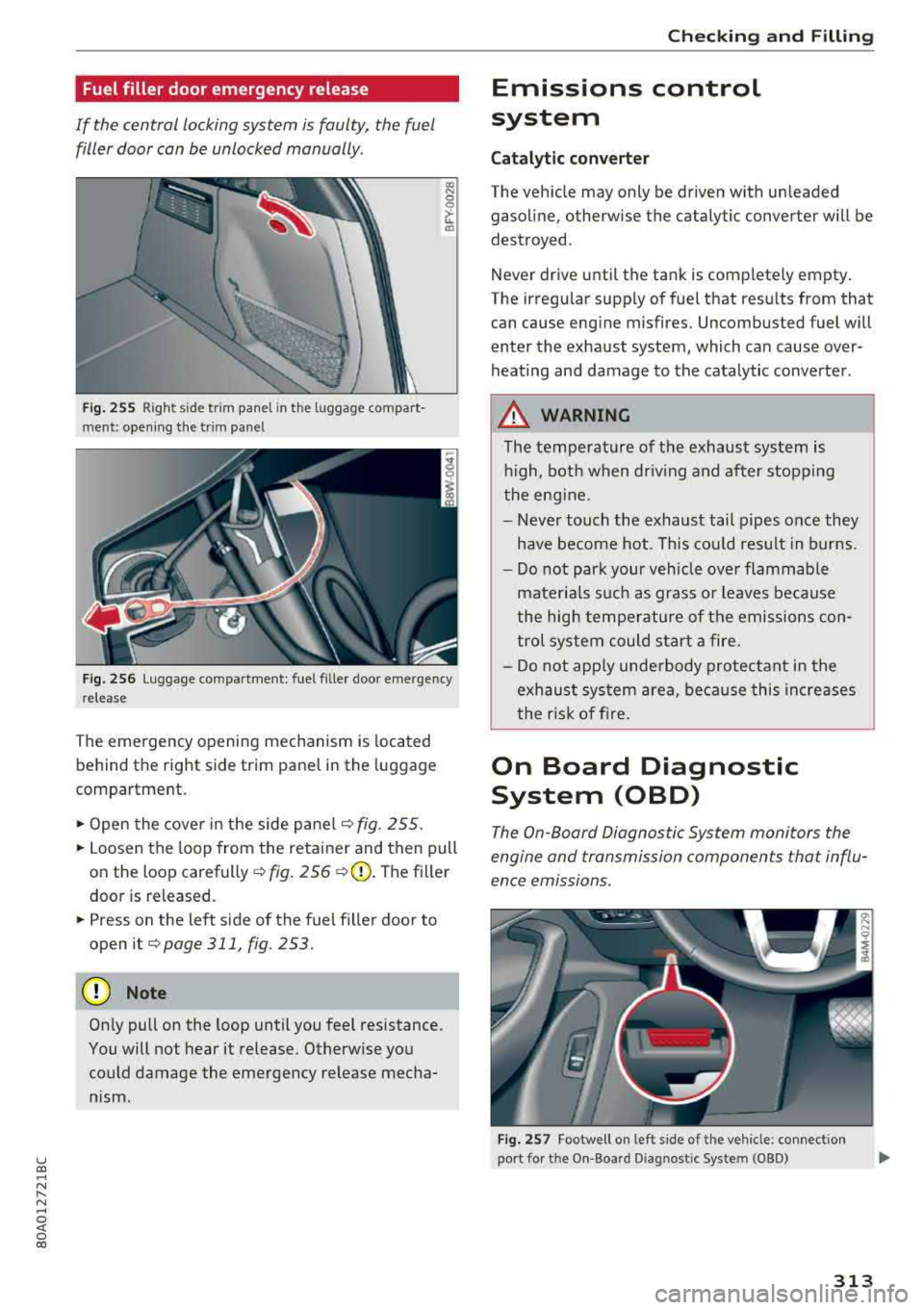
Fig . 255 Right side trim j)anel in the luggage compart
ment: opening the trim panel
Fig. 256 Luggage compartment: fuel filler door emergency
release
The emergency opening mechanism is located
behind the right side trim panel in the luggage
compartme nt.
.,. Open the cover in the side pane l¢ fig. 255.
.,. Loosen the loop from the retainer and then pull
on the loop
carefully¢ fig . 256 ¢ Q) . The filler
door is released .
.,. Press on the left side of the fuel filler door to
open it
¢page 311, fig. 253.
(D Note
On ly pull on the loop until you feel resistance.
You will not hear it release. Otherwise you could damage the emergency release mecha
nism.
Chec king and Filling
Emissions control
system
Cat alytic con verter
The vehicle may only be driven with unleaded
gasoline, otherwise the catalytic converter will be
destroyed.
Never drive until the tank is completely empty .
The irregu lar supply of fuel that results from that
can cause engine misfires. Uncombusted fuel will
enter the exhaust system, which can cause over
heating and damage to the catalytic converter .
A WARNING
The temperature of the exhaust system is
hi gh, both when driv ing and after stopping
the eng ine.
-
- Never touch the exhaust tail pipes once they
have be come hot. This cou ld resu lt in burns.
- Do not park your veh icle over flammable
mate ria ls such as grass or leaves because
the high temperature of the emissions con
trol system could start a fire.
- Do not app ly unde rbody protectant in the
exhaust sys tem area, beca use this increases
the risk of f ire.
On Board Diagnostic
System (OBD)
The On-Board Diagnostic System monitors the
engine and transmission components that influ
ence emissions .
Fig. 257 Footwell on left s ide of th e veh icle: conn ect io n
port fo r the O n-Board D iagnost ic System (08D)
313
Page 323 of 392
u co ..... N r-N .....
~ 0 co
cooli ng system is not le aking, a loss can come
from the coolant boili ng through overheating
and being pushed out of the cooling system.
.&_ WARNING
-The cooling system is under pressure. Do
not open the coolant expansion tank cap
when the eng ine is hot. This inc reases the
risk of burns.
- The coo lant add itive and the coolant can be
dangerous to you r healt h. For this reason,
keep t he coolant i n the o rigi nal container
and away from children. There is a risk of
poiso ning.
- When working in the engine compartment,
remember t hat the radiator fan can sw itch
o n even if the ign ition is swi tched off, which
increases the risk of i njury.
@ Note
Do not add coo lant if the expansion tank is
empty. There may be a ir in the coo ling sys
t em, wh ich increases t he risk of engi ne dam
age . If this is the case, do not continue driv
ing . See an authorized Aud i dea le r or a uthor
ize d Aud i Service Fac ility for assistance .
Brake fluid
-
N N ~ N
""
CX) IXl
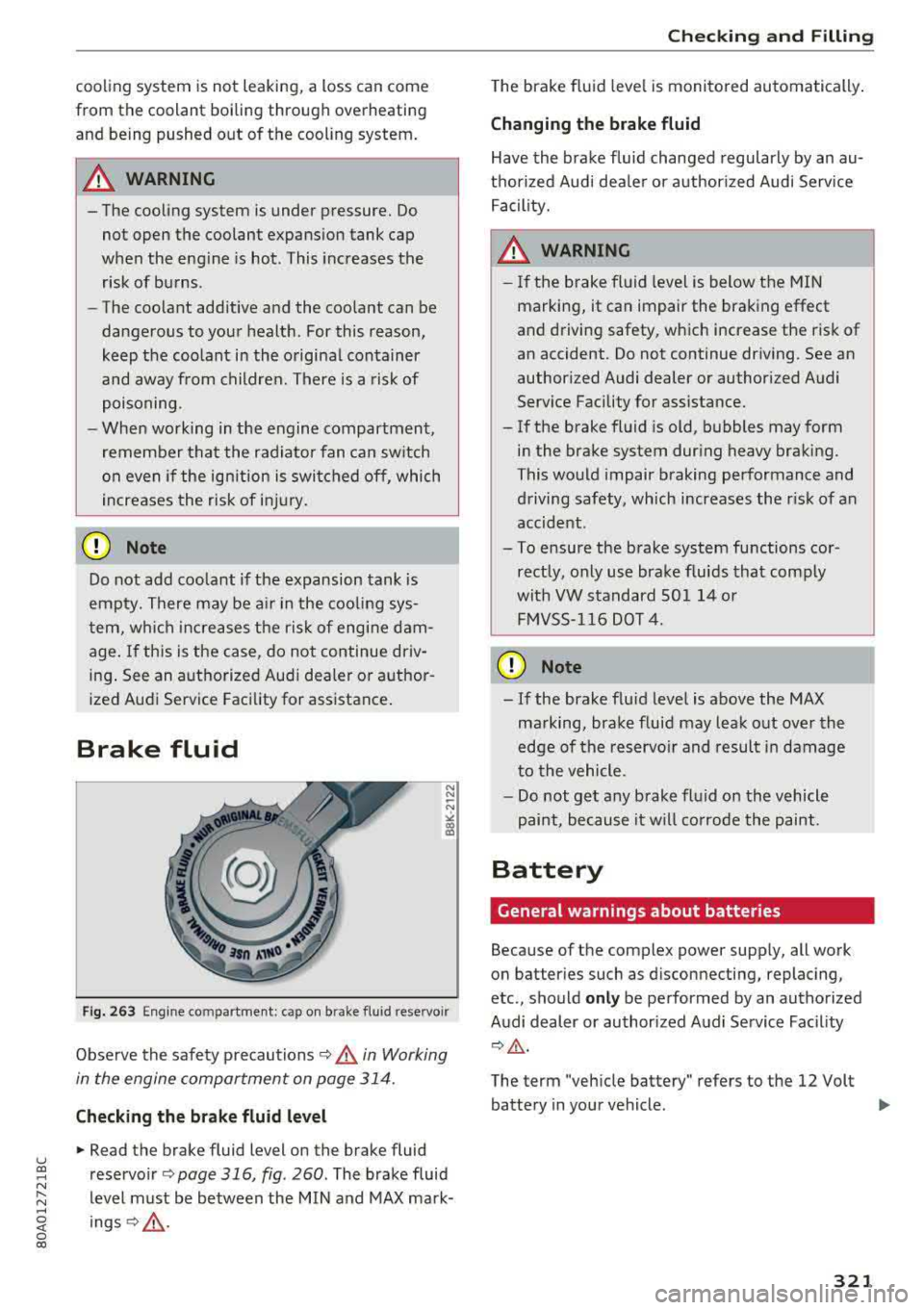
Fig . 2 63 Engi ne compartme nt: cap o n brake fluid reservoir
Observe the safety p recautions 9 &. in Working
in the engine comportment on page 31 4.
Checking the brake fluid level
"' Read the brake fluid level on the brake fluid
reservoir ¢
page 316, fig . 260. The brake fluid
level must be between the MI N and MAX mark
ings ¢,&. .
Chec king and Filling
The brake f lu id leve l is moni to red automatically .
Changing the brake fluid
Have the brake fluid changed regularly by an au
t h ori zed Audi dea le r or a uthor ized Audi Service
F ac ility.
A WARNING
-
- I f the b rake fl uid level is below t he MIN
marking, it can impair the brak ing effect
and d riving safety, which increase the risk of
an accident. Do not continue dr iving. See an
author ized Audi dealer or author ized Audi
Serv ice Facility for assistance.
- If the b rake fl uid is old, b ubbles may form
in the brake system dur ing heavy bra king.
This wo uld impair braking performance and
driving safety, which increases the r isk of an
accident.
- To ensure the brake system functions cor rectly, only use brake f luids tha t comply
wit h VW standard S0 l 14 o r
F M VSS -116 DOT 4 .
(D Note
-If the brake flu id leve l is above the MAX
ma rking, bra ke f luid may leak o ut over the
edge of the reservo ir and resul t in damage
t o the vehicle.
- Do not ge t any brake fl uid on the vehicle
pai nt, because it w ill corrode the paint.
Battery
General warnings about batteries
Because of the complex power supply, all work
on batter ies such as d isconnecting, replacing,
etc., sho uld
only be performed by an authorized
Audi dealer or author ized A udi Se rvice Facility
¢ &_ .
The term "veh icle battery" refers to the 12 Volt
batte ry in your vehicle.
..,.
321
Page 350 of 392
Care and cl eaning
avoid scratches, move the scraper on ly in
one direction and not back and forth.
- Never remove snow o r ice from door win
dows and mirrors using warm or hot water
because this could cause cracks to form .
- To avoid damage to the rear w indow de
fogger, do not apply any stickers on the heating wires on the inside of the window .
-Deco rati ve parts /trim
- Never use chrome care or cleaning prod-
ucts.
- Paint
-To red uce the risk of scratches, the vehicle
must be free of dirt and dus t before pol
ishing or waxing .
- To prevent pa int damage, do not pol ish or
w ax the veh icle in dire ct sunlight.
- To red uce the risk of pa int damage, do not
polish away rust spots.
- Remove cosmetics and sunscreen immedi
a tely
-these could damage the p aint.
- Displays /instrument cluster
- Make sure that the instrument cluster is
switched off and
has cooled off before
cleaning it.
- Displays, the instrument cluster and the
trim surrounding it must not be cleaned
w ith dry cleaning methods beca use they
cou ld become scratched.
- Make sure no fluids enter the spaces be
tween the instrument cluster and the
trim, because that could cause damage.
- Controls
- Make sure tha t no fluids enter the con-
trols, because this could ca use damage.
- Safety belts
- Do not remove the safety belts to clean
them .
- N ever clean sa fe ty belts o r their compo
nents chemically or wi th cor rosive fl uids
or so lvents and neve r allow sharp objects
to come into contact w ith the sa fety belts.
Th is could cause damage to the belt web
bing.
- If there is damage to the webbing, the
connect ions, the retractors or the b uck les,
348 have them replaced by an authorized Aud
i
dealer or authorized Aud i Serv ice Facility.
- Te xtile s/artificial leather/ Alcantara
- Never treat art ificial leather/ A lcantara
with leathe r ca re products, solvents, floor
polish, shoe polish, spot remove o r similar
p roducts.
- Have a spec ialist remove stubborn stains
to prevent damage .
- Never use steam cleaners, brushes, hard
sponges, etc. when cleaning.
- Do not turn on the seat heating* to dry the
seat .
- Objects w ith sharp edges, such as zippers
or rivets on clothing or belts, can cause
damage to the surface .
- Open hook and loop fastene rs, for exam
p le on clothing, can damage seat covers .
Make sure hook and loop fastene rs a re
closed.
- Natural l eather
- N eve r trea t le ather wi th solvents, floor
polish, shoe polish, spot remover or sim i
lar products .
- Obje cts w ith sharp edges, such as zippe rs
or rive ts on clothing or belts, can cause
damage to the surface .
- N eve r use s team cleaners, brushes, hard
spon ges, etc . when cleaning .
- D o not turn on the seat he ating * to dry the
seat.
- T o he lp prevent the le ather from f ading,
d o not leave the vehicle in d irec t sunlight
for long periods of time . If leav ing the ve
h icle parked for long periods of time, you
should cove r the leathe r to protect it from
d irect sunlight.
(D Tips
- Insects are easier to remove from paint that
has been freshly waxed.
- Regular waxing can prevent rust spots from
forming.
Page 359 of 392
u co .... N ,..._
N ..... 0 <( 0 00
~ Turn the handwheel counter -clockwise and re-
move it .
~ Remove the collapsible spare tire.
You must inflate the co ll apsible spa re ti re be
forehand in order to use it.
Inflating
~ Remove the valve cap from the collaps ible
spare tire.
~ T ighten the compressor hose on the collapsible
spare tire va lve.
~ Connect the compressor hose to a vehicle sock
et and switch it on.
~ Let the compressor run until the specified value
on the tire pressure sticker is reached
<=> page 335 , fig. 269 <=>@.
~ Screw the valve cap back onto the valve .
Returning to stora ge
~ Remove the valve cap to drain the air.
~ Wait several hours before placing the collapsi
ble spare t ire in the spare wheel well. Only then
will it fold down completely so that you can
store it securely .
~ Then screw the valve cap back onto the valve .
~ Secure the collapsible spare t ire w ith the hand-
wheel.
~ Fold the cargo floor cove r bac k into p lace.
Snow chains
Using snow chains on the collaps ible spare t ire is
not permitted for techn ica l reasons .
If you have to drive with snow chains and a rear
tire fa ils, mount the collapsible spare tire in
place of a front tire . Install the snow chains on
the fro nt t ire that you removed, and insta ll that
i n p lace of the rear t ire that fa iled .
.8, WARNING
- Only use the co llaps ible sp are t ire in eme r
gencies and dr ive very caref ully, especially if
it is more than six years old.
- T he comp ressor and the hose can become
very hot d uring operat ion which in creases
the risk of burn injuries .
-
Emergenc y ass is tanc e
-After insta lling a co llapsib le spare tire, the
tire pressure m ust be checked as quickly as
possible to reduce the r isk of an accident.
- Do not drive faster than SO mph (80 km/h)
with the collapsib le spare tire . Driving faster
than that increases the risk of an acc ident.
- Avoid full-throttle acceleration, heavy brak ing, and fast cornering with the collapsible
spare tire, because this increases the risk of
an accident .
- Never drive using more than one collapsible
spare tire, because this increases the risk of
an accident .
- Normal tires or w inter t ires must not be
mounted on the collapsible spare tire r im .
@ Note
The compressor must be switched off after 12
minutes at the most to reduce the risk of
overheating. Let the compressor cool down
for several m inutes before us ing it aga in .
357
Page 362 of 392
Fuses and bulb s
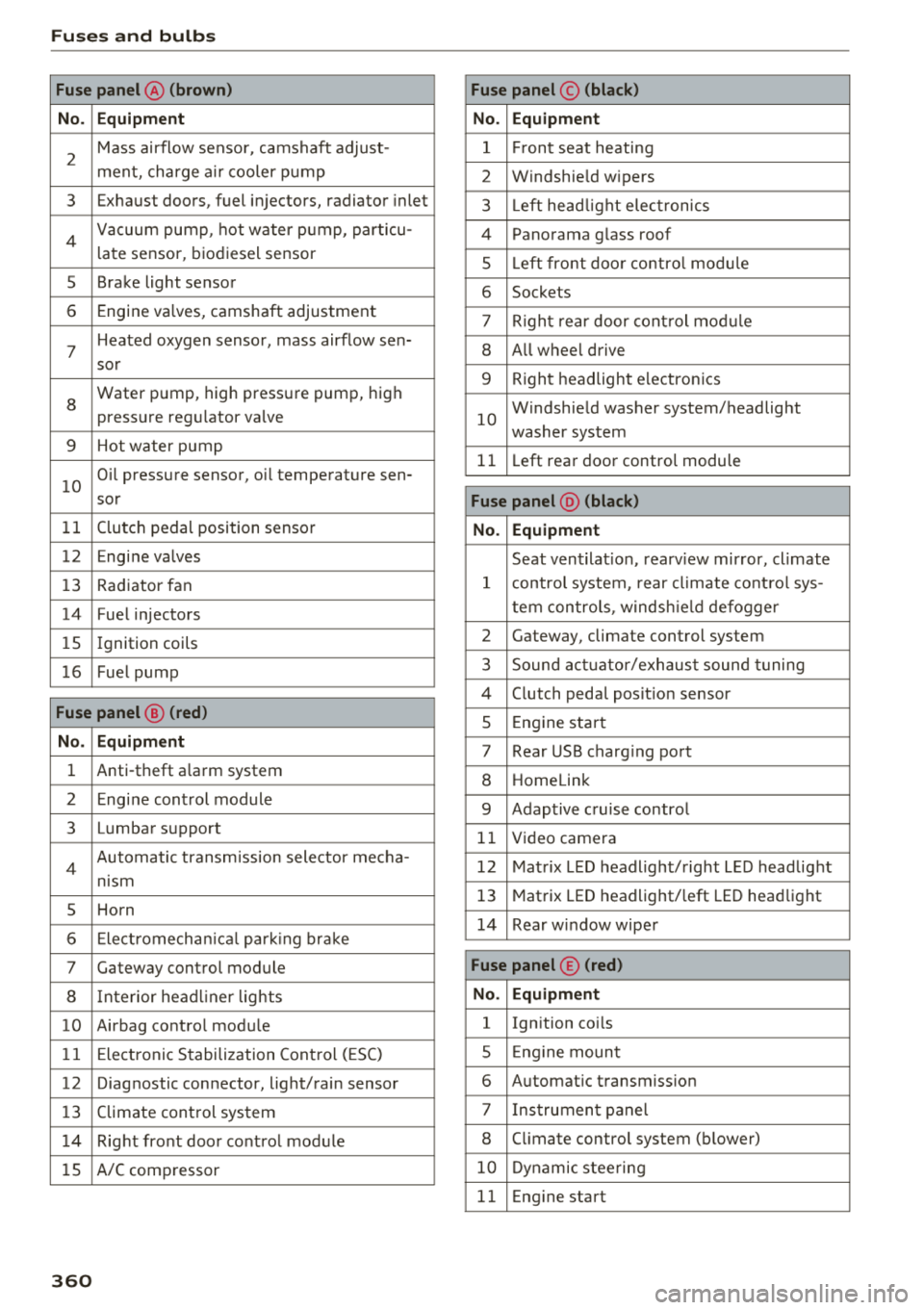
Fuse panel@ (brown ) Fuse panel© (blac k)
N o. E quip ment No. Equipmen t
2
Mass airflow sensor, camshaft adjust-
ment, charge air cooler pump 1 Fr ont seat heating
2 Windshie ld wipers
3 Exhaust doors, fuel injectors, radiator inlet 3 Left head light elect ronics
4 Vacuum pump , hot water p ump, particu-
late sensor, biodiesel sensor 4 Panorama glass roof
s L eft front doo r contro l modu le
5 Brake light sensor 6 Sockets
6 Engine valves, camshaft adjustment 7 Right rear door cont rol mod ule
7
Heated oxygen sensor, mass airflow sen-8 All wheel drive
sor
8
Water pump, high pressure pump, high
pressure regulator va lve
9 Hot water pump
9 R ight headlight electronics
10
Windshield washer system/headlight
washer system
1 1 Left rear door contro l module
10
Oil pressure sensor, oil temperature sen-
sor
Fu se p anel @ (blac k)
11 Clutch pedal position sensor No. Equipment
12 Engine valves
Seat ventilation, rearv iew mirror, cl imate
13 Radiator fan 1 control system, rear cl imate control sys-
14 Fuel injectors tern controls
, windsh ie ld defogger
15 Ignition coils 2 Gateway, climate control system
16 Fuel pump 3 Sound act uator/exhaust sound tuning
Fuse panel @ (red )
4 Clutch pedal posit ion sensor
5 Engine start
N o. Equipment 7 Rear USB charging port
1 Anti-theft a larm system 8 Homelink
2 Engine control module 9 Adaptive cruise control
3 Lumbar support 11 Video camera
4 Automatic transm ission selector mecha-
nism 12 Matrix LED headlight/right LED headlight
5 Horn
13 Matrix LED headlight/ left LED headlight
6 Electromechan ica l park ing brake
14 Rear window wiper
7 Gateway control module Fu se panel © (red )
8 Interior headliner lights No . Equipmen t
10 Airbag control module 1 Ignition coils
11 Electronic Stabilization Control (ESC) 5 E ng ine mount
12 Diagnostic connector, light/rain sensor 6 Automatic transmiss ion
13 Climate control system 7 I nstrument panel
1 4 Right front door control module 8 C limate control system (blower)
lS A/C compressor
10 Dynamic stee ring
11 Eng ine start
36 0
Page 363 of 392
u co ..... N r-N .....
~ 0 co
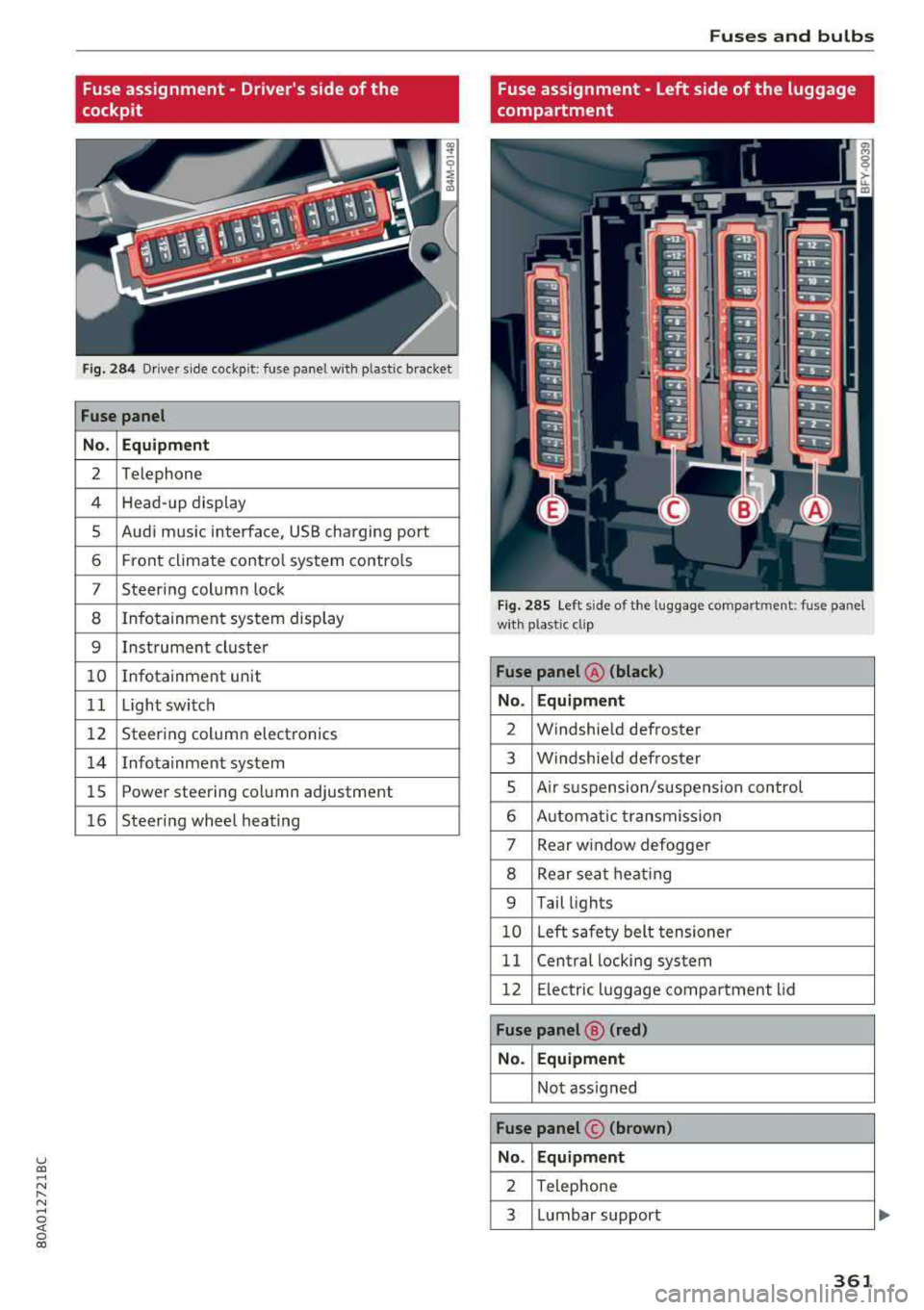
Fuse assignment - Driver's side of the
cockpit
Fig. 284 Driver s ide cockpit: fuse panel wit h plastic bracket
Fuse panel
No . Equipment
2 Telephone
4 Head-up display
5 Audi music interface, USB charging port
6 Front climate control system controls
7 Steering column lock
8 Infotainment system display
9 Instrument cluster
10 Infotainment unit
11 Light switch
12 Steering column electronics
14 Infotainment system
15 Power steering column adjustment
16 Steering wheel heating
Fuses and bulbs
Fuse assignment - Left side of the luggage
compartment
Fig. 285 Left side of the l uggage compartment: fuse panel
wi th plastic cl ip
Fuse panel @ (black)
No. Equipment
2 Windshield defroster
3 Windshield defroster
5 Air su spension/s uspension control
6 Automatic transmission
7 Rear window defogge r
8 Rear seat h eating
9 Tail lights
10 Left safety belt tensioner
11 Central locking system
12 Electr ic luggage compartment lid
Fuse panel@ (red)
No. Equipment
Not assigned
Fuse panel © (brown)
No. Equipment
2 Telephone
3 Lumbar support
361