heating AUDI Q5 2018 Owners Manual
[x] Cancel search | Manufacturer: AUDI, Model Year: 2018, Model line: Q5, Model: AUDI Q5 2018Pages: 392, PDF Size: 60.56 MB
Page 4 of 392
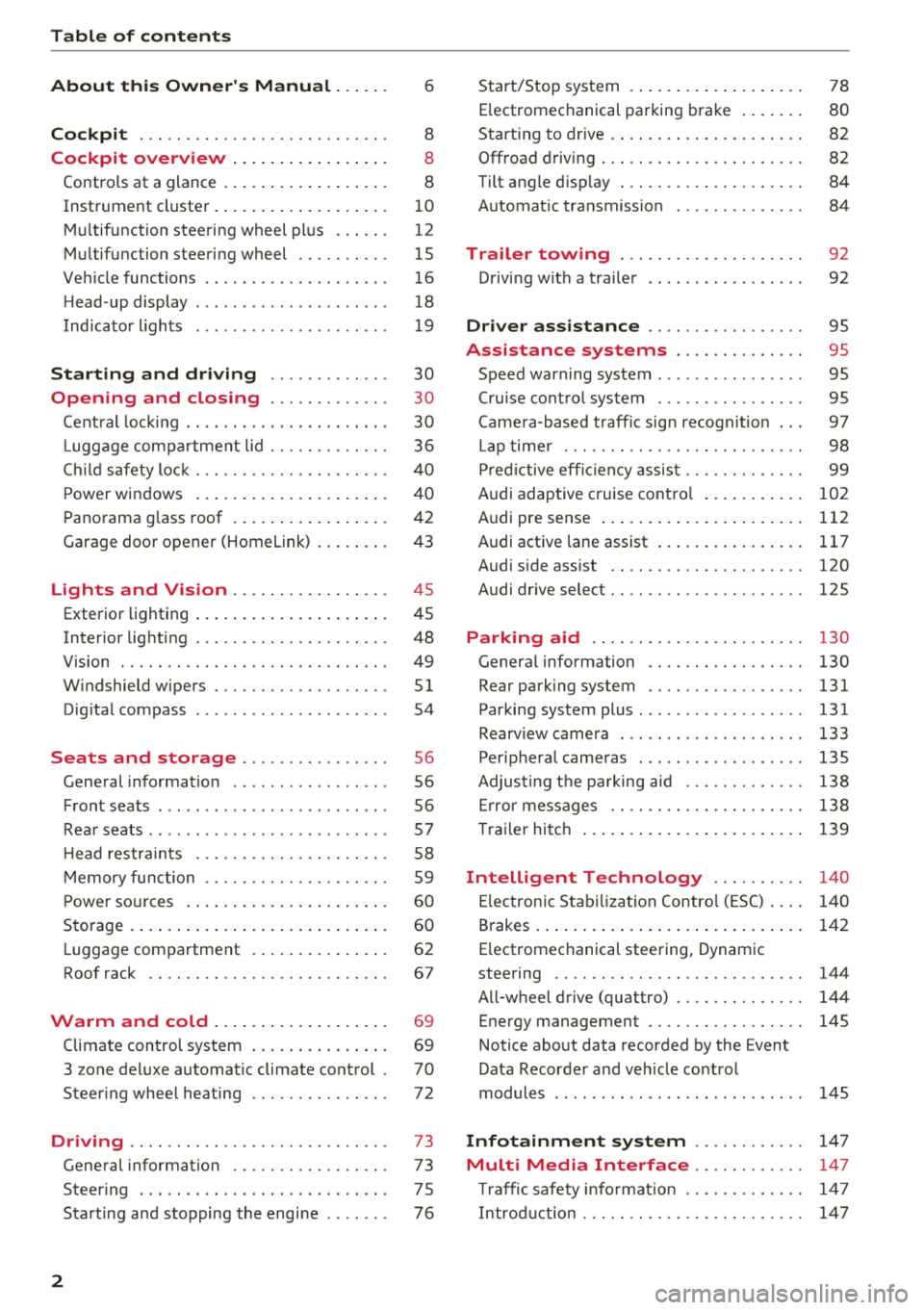
Table of contents
About this Owner's Manual. . . . . .
6
Cockpit . . . . . . . . . . . . . . . . . . . . . . . . . . . 8
Cockpit overview . . . . . . . . . . . . . . . . . 8
Controls at a glance . . . . . . . . . . . . . . . . . . 8
Instrument cluster . . . . . . . . . . . . . . . . . . .
1 0
M ultif unction steering wheel pl us . . . . . . 12
Mu ltifunction steering wheel . . . . . . . . . . 15
Ve hicle functions . . . . . . . . . . . . . . . . . . . . 16
H ead-up display . . . . . . . . . . . . . . . . . . . . . 18
Indicato r lights . . . . . . . . . . . . . . . . . . . . . 19
Starting and driving . . . . . . . . . . . . . 30
Opening and closing . . . . . . . . . . . . . 30
Cent ral lock ing . . . . . . . . . . . . . . . . . . . . . . 30
Luggage com part ment lid . . . . . . . . . . . . . 36
C hil d safety lock . . . . . . . . . . . . . . . . . . . . .
40
Powe r windows . . . . . . . . . . . . . . . . . . . . . 4 0
Panorama g lass roof . . . . . . . . . . . . . . . . . 42
Garage door opener (Homelink) . . . . . . . . 43
Lights and Vision . . . . . . . . . . . . . . . . . 45
Exterio r lighting . . . . . . . . . . . . . . . . . . . . . 45
Interior lighting . . . . . . . . . . . . . . . . . . . . . 48
V1s1on . . . . . . . . . . . . . . . . . . . . . . . . . . . . . 49
W indshield wipers . . . . . . . . . . . . . . . . . . .
51
Dig ita l compass . . . . . . . . . . . . . . . . . . . . . 54
Seats and storage . . . . . . . . . . . . . . . . 56
General information . . . . . . . . . . . . . . . . . 56
Front seats . . . . . . . . . . . . . . . . . . . . . . . . . 56
Rea r seats . . . . . . . . . . . . . . . . . . . . . . . . . .
57
H ead restra ints . . . . . . . . . . . . . . . . . . . . . 58
M emory fu nction . . . . . . . . . . . . . . . . . . . . 59
P ower so urces . . . . . . . . . . . . . . . . . . . . . . 60
Storage . . . . . . . . . . . . . . . . . . . . . . . . . . . . 60
L uggage compartment . . . . . . . . . . . . . . . 62
Roof rack . . . . . . . . . . . . . . . . . . . . . . . . . . 67
Warm and cold . . . . . . . . . . . . . . . . . . . 69
Climate control system . . . . . . . . . . . . . . . 69
3 zone del uxe automatic climate control .
70
Steering whee l heating . . . . . . . . . . . . . . . 72
Driving .... .. .. ............. .... .. . 73
Gene ral information . . . . . . . . . . . . . . . . . 73
Steer ing . . . . . . . . . . . . . . . . . . . . . . . . . . . 7 5
Starting and stopping the engi ne . . . . . . . 76
2
Start/Stop system .... ... .. ..... ... . .
E lectromechanical parking brake .. ... . .
Start ing to drive . ..... ... .. ..... ... . .
0ffroad driving . .. .. .. ............. . .
Tilt angle d isplay . .. .. ............. . .
Automat ic transmission
Trailer towing ... .. ............. . .
Driving with a tra iler .. ... .. ..... ... . .
Driver assistance .. ............. . .
Assistance systems ............. .
Speed warning system ............... .
78
80
82
82 84
84
92
92
95
95
95
Cru ise cont rol system . . . . . . . . . . . . . . . . 95
Came ra-based t raff ic sign recogn it io n . . . 97
Lap time r . . . . . . . . . . . . . . . . . . . . . . . . . . 98
P red ictive eff ic iency assis t . . . . . . . . . . . . . 99
Audi adaptive cruise contro l . . . . . . . . . . .
102
Audi pre sense . . . . . . . . . . . . . . . . . . . . . . 112
Audi active lane assist . . . . . . . . . . . . . . . . 117
Audi s ide ass ist . . . . . . . . . . . . . . . . . . . . . 120
Audi drive select . . . . . . . . . . . . . . . . . . . . . 125
Parking aid . . . . . . . . . . . . . . . . . . . . . . . 130
Genera l information . . . . . . . . . . . . . . . . . 130
Rear parking system . . . . . . . . . . . . . . . . . 131
Parking system plus ... ............... 131
Rearv iew camera . . . . . . . . . . . . . . . . . . . . 133
Per iphera l came ras . . . . . . . . . . . . . . . . . . 135
Adjus ting the pa rking aid . . . . . . . . . . . . . 138
Er ror messages . . . . . . . . . . . . . . . . . . . . . 138
T raile r hitch . . . . . . . . . . . . . . . . . . . . . . . . 139
Intelligent Technology . . . . . . . . . . 140
El ectron ic Stab iliza tion Contro l (ESC) . . . . 140
Brakes . . . . . . . . . . . . . . . . . . . . . . . . . . . . . 142
E lectromechanical steering, Dynamic
steering . . . . . . . . . . . . . . . . . . . . . . . . . . .
144
A ll-wheel drive (quattro) . . . . . . . . . . . . . . 144
Energy management . . . . . . . . . . . . . . . . . 145
Notice about data recorded by the Event
Data Recorder and veh icle co ntrol
modules . . . . . . . . . . . . . . . . . . . . . . . . . . .
145
Infotainment system . . . . . . . . . . . . 147
Multi Media Interface............ 147
Traffic safety info rmat ion . . . . . . . . . . . . . 14 7
Intro duction . . . . . . . . . . . . . . . . . . . . . . . .
14 7
Page 13 of 392
u co ..... N ,..._
N ..... 0 <( 0 00
Certain instrument cluster content can also be
displayed in the head-up display*
¢ page 18.
A WARNING
Do not assume the roads are free of ice based
on the outside temperature display . Be aware
that there may be ice on roads even when the
outside temperature is around 41 °F (+5 °C)
and that ice can increase the risk of accidents .
(D Tips
-Depending on vehicle equipment, the in
strument illumination (needles and gauges) may turn on when the lights are off and the
ignition is switched on . The illumination for
the gauges reduces automatically and even
tually turns off as brightness outside in
creases. This function reminds the driver to
turn the low beams on at the appropriate
time.
- You can select the units used for tempera
ture, speed and other measurements in the
Infotainment
system ¢ page 245.
-If your vehicle is stationary or if you are driv
ing at very low speeds, the temperature dis
played may be slightly higher than the ac
tual temperature outside due to the heat ra
diating from the engine.
- At temperatures below 41 °F (+5 °C), a
snowflake symbol appears in front of the
temperature
display ¢,&. .
Coolant temperature indicator
The coolant temperature display @¢ page 10,
fig . 3
or ¢ page 10, fig . 4 only functions when
the ignition is switched on. To prevent engine
damage, please observe the following notes
about the temperature ranges.
Cold range
If only the LEDs at the bottom of the gauge turn
on, the engine has not reached operating tem perature yet . Avoid high engine speeds, full ac
celeration and heavy engine loads.
Cockpit overview
Normal range
The engine has reached its operating tempera
ture once the LEDs up to the center of the gauge
turn on. If
the. indicator light in the instru
ment cluster display turns on, the coolant tem
perature is too
high ¢ page 23.
@ Note
-Auxiliary headlights and other accessories in
front of the cooling-air intake impair the
cooling effect of the coolant. This increases
the risk of the engine overheating during
high outside temperatures and heavy en
gine load .
- The front spoiler also helps to distribute
cooling air correctly while driving. If the
spoiler is damaged, the cooling effect will
be impaired and the risk of the engine over
heating will increase. See an authorized
Audi dealer or authorized Audi Service Fa
cility for assistance.
Tachometer
The tachometer displays the engine speed in rev
olutions per minute (RPM).
The beginning of the red zone in the tachometer
indicates the maximum permissible engine speed
for all gears once the engine has been broken in
and when it is warmed up to operating tempera
ture. Before reaching this zone, you should shift
into the next highest gear, select the "D/S" selec
tor lever position, or remove your foot from the
acce lerato r pedal.
@ Note
The needle in the tachometer @¢ page 10,
fig. 3
or ¢ page 10, fig. 4 may only be in the
red area of the gauge for a short time or there
is a risk of engine damage . The location where
the red zone begins varies depending on the
engine.
@) For the sake of the environment
Upshifting early helps you to save fuel and re
duces operating noise.
11
Page 14 of 392
Cockpit overv iew
Fuel level
The dis play (j) ¢ page 1 0, fig. 3 or ¢ page 10,
fig . 4 only f unctions when the ign ition is swi tc h
ed on. When the display has reached the reserve
mark, a red L ED turns on and the
H indicator
light turns on¢
page 27. The red LED wi ll blink
when the f uel leve l is very low.
F or the tank capacity in you r vehicle, refer to the
Technical Data
¢ page 369.
(gJ) Note
Never d rive until the tank is comple tely emp
ty. The irregular supp ly of fuel that resul ts
from that can ca use engine misfires. Uncom
busted fuel will then ente r the exhaust sys
tem. Th is can cause overheating and damage
to the cata lytic converter.
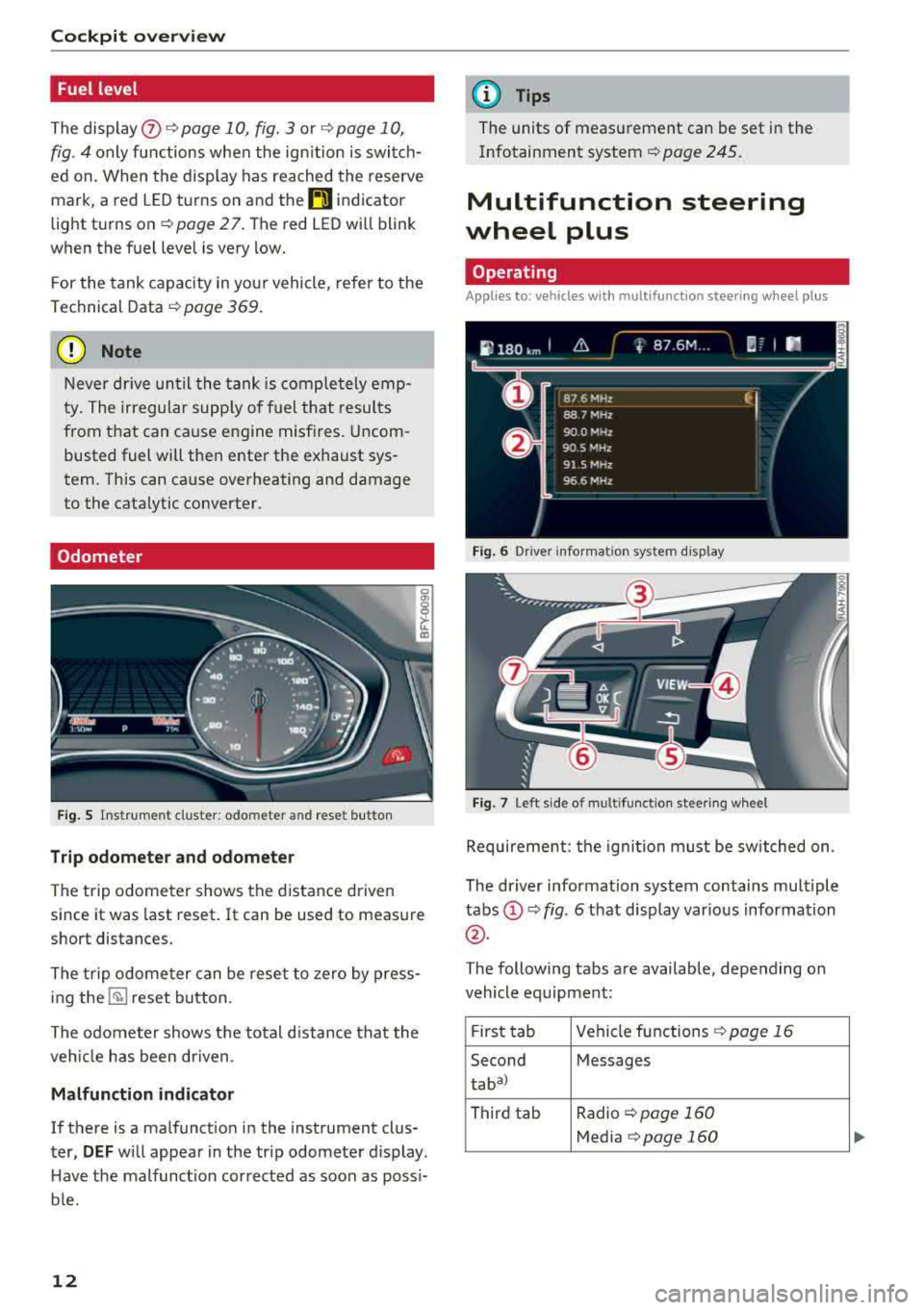
Odometer
Fig. 5 Ins tru me nt cluster: odometer and reset button
Trip odometer and odometer
The trip odome ter shows the dist ance driven
since it was last reset. It can be used to measure
short distances.
The trip odome ter can be rese t to zero by press
ing
the ~ reset button.
The odometer shows the total d istance that the
ve hicl e has been dr iven .
Malfunction indicator
If there is a malfunct io n in the instrument clus
ter,
DEF w ill appea r in the trip odometer display .
H ave the malfunct ion corrected as soon as possi
b le.
12
@ Tips
The units of meas urement can be set in the
Infotainment system ¢
page 245.
Multifunction steering
wheel plus
Operating
Applies to: vehicles with mult ifunct ion steeri ng w heel plus
Fi g. 6 Dr ive r in fo rm atio n system dis p lay
Fig. 7 Left side of m ultifunctio n stee ring wheel
Requireme nt: the igni tion must be switched on.
The dr iver information system contains multiple
tabs (!)¢ fig. 6 that disp lay var ious information
@ .
The following tabs are available, depending on
vehicle eq uipment :
F ir st tab Vehicle
fu nctions ~ page 16
Second Messages
taba)
Third tab Radio ~ page 160
Media ~page 160
Page 17 of 392
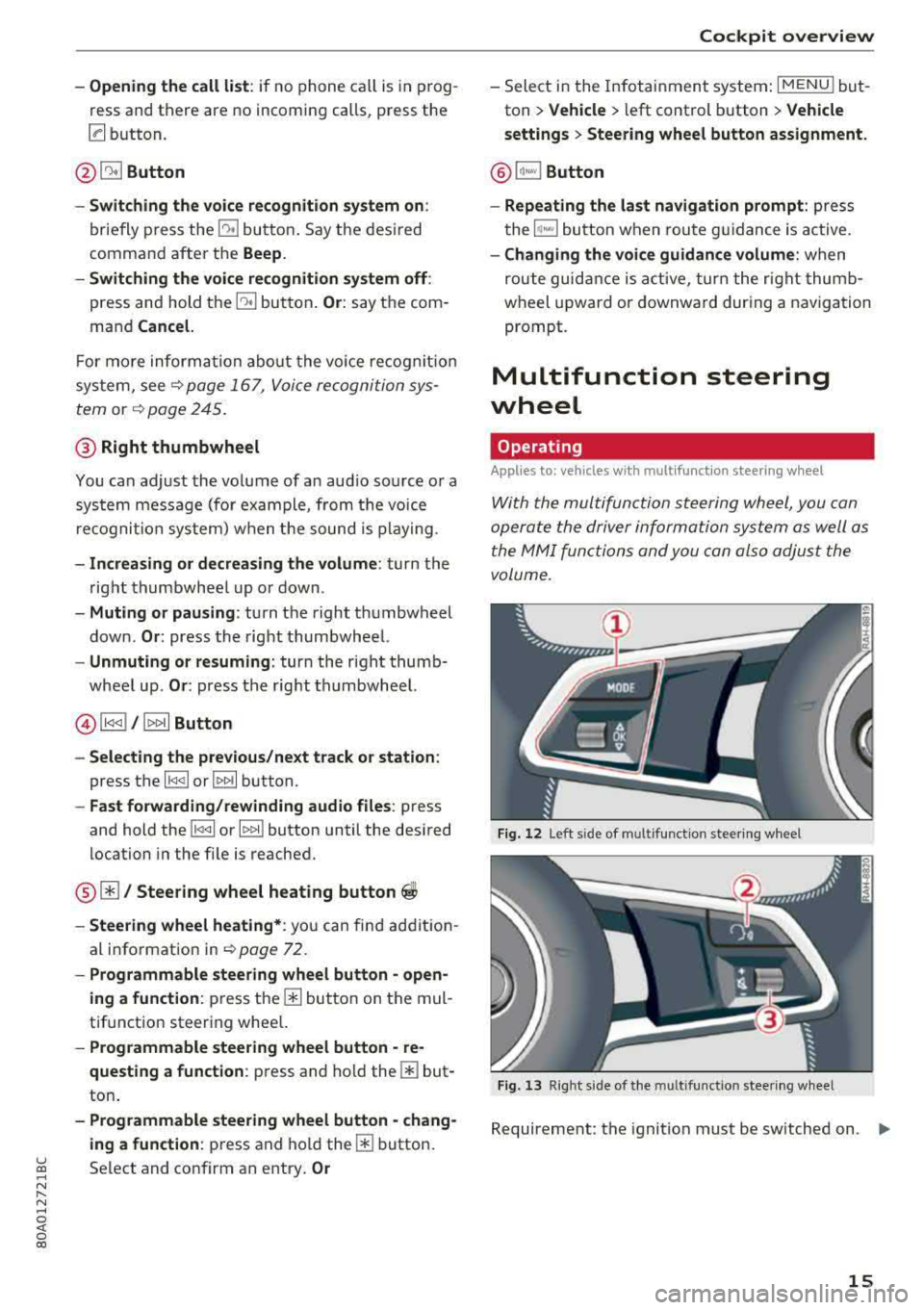
-Opening the call list : if no phone call is in prog
ress and there are no incoming calls, p ress the
[a button.
@ 51 Button
-Switching the voice recognition system on :
briefly press the 51 bu tto n. Say t he des ired
comma nd after t he
Beep.
- Switching the voice recognition system off :
press and hold the 51 but ton . Or : say t he com
mand
Cancel.
F or m ore inform ation abo ut the vo ice recog nitio n
sys tem, see
¢ p age 16 7, V oic e re cogni tion sys
tem
or ¢ page 2 45.
@ Right thumbwheel
You can adjust the vo lume of a n aud io so urce o r a
sys tem mess age (for exa mple, from the voice
r e cogni tion sy stem ) when t he s ound is play ing .
-Increasing or decreasing the volume : turn the
righ t thumbwhee l up o r down .
-Muting or pausing : turn the right thumbwheel
down.
Or : press the right th umbwhee l.
-Unmuting or resuming : turn the right thumb
wheel up.
Or : press the rig ht thu mbwheel.
@ l1<1<1 I / lt> t>II Button
- Selecting the previous/next track or station :
press the l1<1 <1 I or lt>1>1 I button.
-Fast forwarding/rewinding audio files : press
and hold the
l 1<1 <1 I or 11» 1! button until the desired
location in the fi le is reached .
@01 Steering wheel heating button ~
-Steering wheel heating* : you c an fin d ad dit io n
al i nfo rmation in
¢ page 7 2 .
- Programmable steering wheel button -open
ing a function:
p ress the m button on the mul
tifunctio n steer ing whee l.
-Programmable steering wheel button -re
questing a function :
press and hol d them but
ton .
-Programmable steering wheel button -chang-
ing a function :
press and ho ld them button.
u ~ Select and confirm an e ntry . Or
N r-N ......
~ 0 co
Cockpit overview
- Sele ct in the Infotain ment system: I MENU ! but
ton
> Vehicle > l eft control b utton > Vehicle
settings
> Steering wheel button assignment.
@ lq,~,I Button
- Repeating the last navigation prompt:
press
t he
1~...,I bu tton w hen rou te g uidan ce is active.
- Changing the voi ce guidance volume : when
rou te guid ance is ac tive, tur n t he r ig ht thu mb
w heel upw ard or downward dur ing a naviga tion
prompt.
Multifunction steering
wheel
Operating
Appl ies to: vehicles with multifunctio n steering wheel
With the mul tifuncti on st eering wheel, you can
opera te the driver inform ation system as well a s
the MM I functions and you can also adjus t the
volume.
Fig . 12 Lef t side of m ultifu nct io n st ee rin g w hee l
Fig . 13 R ig ht side of the m ultif unction s tee rin g w heel
Requireme nt: the ignition must be sw itched on . ..,.
15
Page 28 of 392

Cockpit overv ie w
Othe rw ise, conditions such as an uneven road
surface can lead to ve hicle damage.
B Su sp ension : malfun ction! You ma y continu e
driving
There is a suspension control malfunction .
Drive to an authorized Aud i dea ler or authorized
Aud i Serv ice Facility immediately to have the
malfunct ion corrected.
f;. ![J Electronic Stabilization Control (ESC)
If the D.1 indicato r light b links wh ile driving, the
E SC or ASR (Anti-S lip Reg ulation) is actively reg u
lating.
If the
Ii) i ndicato r light turns on, the system has
sw itched the ESC off. In this case, you can switch
the ign ition off and t hen o n to switch the ESC on
aga in. The indica tor ligh t turns off when the sys
tem is func tioning fully .
I f the
II indicato r light turns on, ESC was
sw itched off using the
1.$ ,., 1 button ~ page 140.
Stabilization control (ESC/ ABS): malfun ction!
See owner' s manual
If the Ii) indicator light and the [1] (USA mod
e ls)l liJ (Canada models) ABS indicator light turn
on and the message appears, there is a malfunc
tion in the ABS or the elect ronic d ifferential lock .
This a lso ca uses the ESC to malfunct ion. The
b rakes still f unct ion w it h t heir no rma l power , but
ABS is no t active.
Dr ive to an a utho rized Aud i deale r or a uth orized
Aud i Serv ice Facility immediately to have t he
malfunct io n corrected.
(D Tips
For add it ional information on ESC and ABS,
see
~ page 140.
!f Safety systems
The E,I ind icator ligh t moni to rs t he safety sys
tems .
I f t he
E,I indicato r light turns on o r blinks, there
is a malfunction in a safety sys tem .
26
Drive to an authori zed A udi dealer or au thori zed
Audi Service Facility immediate ly to have the
malfunction corrected.
A WARNING
-
Have the safety systems inspected immedi
ately. Otherwise, there is a r isk that the sys
tems may not activate during a collision,
which increases the risk of serious inju ry or
death.
( CD ) Brake system
miJ Brake s overheating . Please shift to D
There was a heavy load on the brakes . P lace the
selector lever in the "D/S" posit ion in order to use
t h e engine brak ing effect and reduce the load on
t h e b rakes.
wt:t /{0 ) Brake pads
II (USA model s)!£tjJ (Canada mod els ) Brake
pad s: wear limit reached. You can continue dri v
ing . Please contact Service
The bra ke pads a re wor n.
Drive to an authorized Audi dealer or authorized
Audi Service Fac il ity as soon as poss ible to have
t h e malfunct ion corrected.
d::, Engine control
II Drive sy ste m : malfun ction! Please contact
Service
There is a n eng ine contro l ma lfu nction .
D rive slowly to an authorized Audi dea ler or au
thorized Audi Serv ice Facility to have the engine
checked.
! '? Engine speed limitation
Ill Maximum engine speed : XXXX rpm
The engine speed is automatically limited to the
speed displayed in the instrument cluster . This
pro tects the engine from ove rheat ing.
The eng ine speed limitat ion deactivates once the
engine is no longer in the critical temperature
IJIJ,
Page 30 of 392
Cockpit overv ie w
Drive to an authorized Audi dea le r or a uth orized
Audi Service Facility immediately to have the
malfunct ion corrected .
·:q'): · Bulb failure indicator
If the II indicator light turns on, a bu lb has
fa iled. The message ind icates the location of the
bulb. Replace the bulb immediately .
Vehicle lights: malfunction! Plea se cont act
Service
There is a malfunction in the head lights or the
lig ht switch. Drive to an autho rized A udi dealer or
author ized Audi Service Facility immed iate ly to
have the ma lfunction corrected.
A WARNING
- light bu lbs are under pressure and can ex
plode when bulbs are replaced, which in
c reases the risk of injury.
- With HID headlights (xenon headlights), the high-voltage componen t must be handled
correctly. Othe rw ise, there is a risk of fata l
lnJUry.
i,(D Dynamic headlight range control
II Headlight rang e control : malfun ction! See
owner 's manual
There is a malfunc tion in the headl ight range
cont rol system, wh ich may ca use g la re fo r othe r
d rivers.
Drive to an authorized Aud i dea ler or aut horized
Aud i Serv ice Facility immediately to have t he
malfunct io n corrected.
~O Audi adaptive light
App lies to: ve hicles w ith Audi adaptive light
Ill Audi adaptive light : malfunction! See own
er' s manual
-
Adapt ive light is not work ing . The headlights st ill
f un ction.
Drive to an authorized Aud i dea ler or a uthorized
Aud i Serv ice Facility immediately to have the
malfunct io n corrected.
28
@. D Light/rain sensor
II Automa tic h eadlight s: malfun ction! See
owner' s manual
l;I Automat ic wipers: malfunction ! See owner's
manual
The light/rain sensor is malfunctioning.
The low beams remain switched on at all times
for safety reasons when the light switch is in the
AUTO position. However, yo u can cont inue to
turn the lig hts on and
off using the light switch.
You can sti ll contro l all functions that are inde
pendent of t he rain senso r thr ough the wind
shield wipe r leve r.
D rive to an authorized Audi dealer or authorized
Audi Service Fac ility immed iate ly to have the
malfunction corrected .
g Suspension control
Applies to : vehicles wit h suspension control
R Suspension : malfunction! You may continue
driving
There is a suspension control malfunction.
Drive to an authorized A udi dealer or authorized
Audi Service Facility immed iate ly to have the
malfunction corrected .
~: All wheel drive/sport differential
App lies to: vehicles wit h all w hee l drive/s port diffe re n tial
Ill All-wheel drive : malfunction! You may con
tinue driv ing. Please contact Service
Ill Sport d ifferential: malfunct ion! Please con
tact Service
There is a ma lf u nction.
D rive to an au thor ized A udi d ealer or au thori ze d
Audi Se rvice Facility immediate ly to have the
malfunction corrected.
Ill All -wheel driv e overheating . Please adapt
driving style . See owner's manual
Ill Sport differential: temperature too high .
Pl ease adapt driving style
Page 33 of 392
u co ..... N r-N .....
~ 0 co
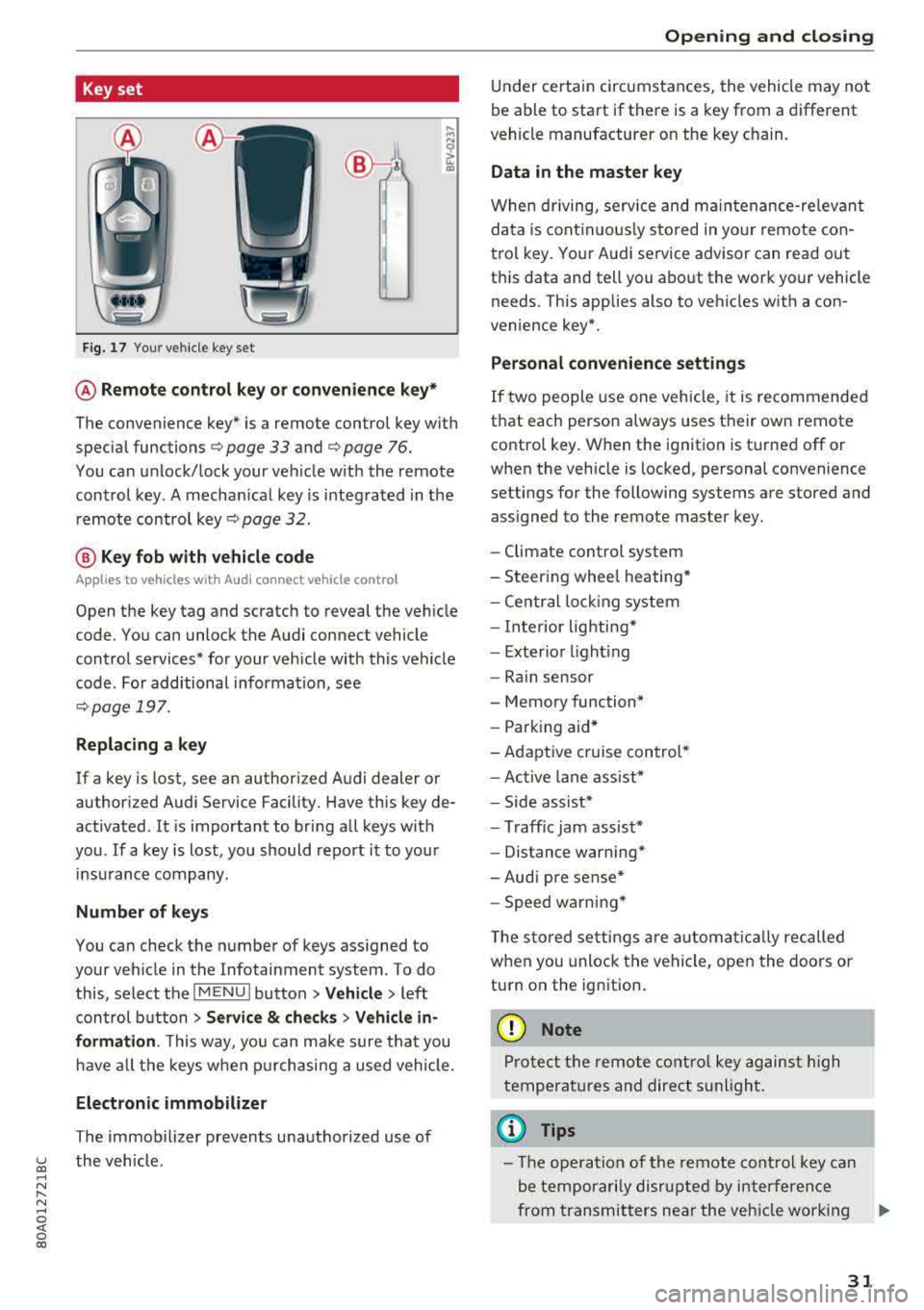
Key set
Fig. 17 Your vehicle key set
@ Remote control key or convenience key*
The convenience key* is a remote control key with
special
functions ¢ page 33 and¢ page 76.
You can unlock/lock your veh icle w ith the remote
control key. A mechan ical key is integrated in the
remote control
key¢ page 32.
@ Key fob with vehicle code
Applies to vehicles with Audi connect vehicle control
Open the key tag and scratch to reveal the vehicle
code. You can unlock the Audi connect vehicle
control services* for your vehicle with this vehicle
code . For additional informat ion, see
¢ page 197 .
Replacing a key
If a key is lost, see an authori zed Audi dealer or
authorized Audi Service Facility. Have this key de
activated . It is important to bring all keys with
you .
If a key is lost, you should report it to your
insurance company .
Number of keys
You can check the number of keys assigned to
your veh icle in the Infotainment system. To do
this, select the
I MENU I button >Ve hicle > left
control button
> Service & checks > Vehicle in
formation .
This way, you can make sure that you
ha ve all the keys when purchasing a used vehicle.
Electronic immobilizer
The immobilizer prevents unauthorized use of
the vehicle .
Opening and closing
Under certain circumstances, the vehicle may not
be able to start if there is a key from a different
vehicle manufacturer on the key c hain.
Data in the master key
When driving, service and maintenance-relevant
data is continuously stored in your remote con
trol key . Your Audi service advisor can read out
th is data and tell you about the work your vehicle
needs . This applies also to vehicles with a con
venience key*.
Personal convenience settings
If two people use one vehicle, it is recommended
that each person always uses their own remote
control key. When the ignition is turned off or
when the vehicle is locked, personal convenience
settings for the following systems are stored and assigned to the remote master key .
- Climate control system
- Steering wheel heating*
- Central locking system
- Interior lighting*
- Exterior lighting
- Rain sensor
- Memory function*
- Parking aid*
-Adaptive cruise control*
- Active lane assist*
- Side assist*
- Traff ic jam assist*
- Distance warning*
- Audi pre sense*
- Speed warning *
T he stored settings are automat ically recalled
when you unlock the vehicle, open the doors or
turn on the ignition.
(D Note
Protect the remote control key against high
temperat ures and direct sunlight.
(D Tips
- The operation of the remote control key can
be temporarily disrupted by interference
from transmitters near the veh icle work ing
..,_
31
Page 63 of 392
u co ..... N r-N .....
~ 0 co
-Do not use any breakable beverage contain
ers (for example, made out of glass or por
celain). You could be injured by them in the
event of an accident .
(D Note
Beverage containers in the cup holders should
always have a lid. If not, beverages could sp ill
and cause damage to vehicle equipment, such
electronics or seat covers .
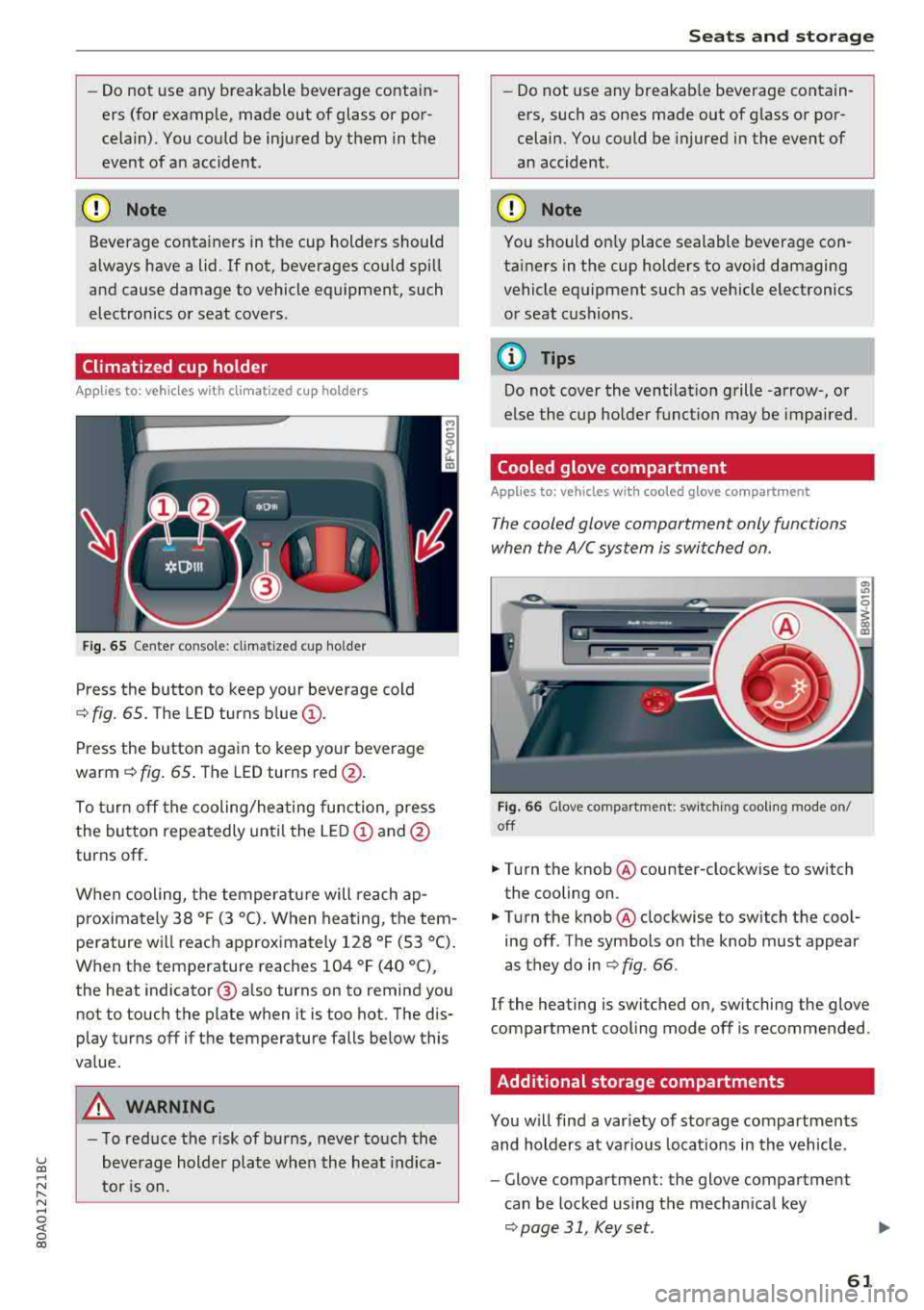
Climatized cup holder
Applies to: veh icles wit h clim atized cup holders
Fig. 65 Center co nsole: cl imatized cup holder
Press the button to keep your beverage cold
¢ fig. 65. The LED turns blue@.
Press the button again to keep your beverage
warm ¢ fig. 65 . The LED turns red @.
To turn off the cooling/heating function, press
the button repeatedly until the LED
(D and@
turns off .
When cooling, the temperature will reach
ap
p roximately 38 ° F (3 °C) . When heating, the tem
perature will reach approximately 128 ° F (53 °C).
When the temperature reaches 104 °F (40 °C),
the heat indicator @ also turns on to remind you
not to touch the plate when it is too hot. The dis
p lay turns off if the temperature falls below this
value.
_&, WARNING
- T o reduce the risk of burns, never touch the
beverage holder plate when the heat indica
tor is on.
Seats and storage
-Do not use any breakable beverage contain
ers, such as ones made out of glass or por
celain. You could be injured in the event of
an accident .
({I) Note
You should on ly place sealable beverage con
tainers in the cup holders to avoid damaging
vehicle equipment such as vehicle electronics
or seat cushions .
@ Tips
Do not cover the ventilation grille -arrow-, or
else the cup holder function may be impaired.
Cooled glove compartment
Applies to: vehicles with coo led glove compartment
The cooled glove compartment only functions
when the AIC system is switched on.
Fig . 66 G love compartment: switching cooling mode on/
off
.,. T ur n the knob @ counter-clockwise to switch
the cooling on .
.,. Turn the knob@ clockwise to switch the cool
ing off . The symbols on the knob must appear
as they do in
¢ fig. 66 .
If the heating is switched on, sw itching the glove
compartment cool ing mode off is recommended .
Additional storage compartments
You will find a var iety of storage compartments
and holders at various locat ions in the vehicle .
- Glove compartment: the glove compartment
can be locked using the mechan ical key
¢ page 31, Key set.
61
Page 71 of 392
u co ..... N r--N ..... 0 <( 0 00
Warm and cold Climate control system
Description
The climate control system warms , cools and re
moves humidity from the air in the vehicle inte ri
or. It is the most effective when the w indows and
sunroof* are closed . If there is a bu ild -up of heat
inside the ve hicle, ventilation can he lp to speed
up the cooling process.
I n all he ating mode f unct ions except for
defrost ,
the blower on ly switches to a higher speed once
the engine coolant has reached a sufficient tem
perature .
Pollutant filter
The pollutant filte r removes pollutants such as
d ust and pollen from the a ir.
Key recognition
The climate control settings are automatically
sto red and assig ned to the remote control key
that is i n use .
Warm and c old
@ For the sake of the environment
If you wo uld like to reduce fue l consumption,
switch the air conditioning off. T his w ill also
r educe em issions.
(D Tips
- To prevent interference with the heating
and cooling output and to prevent the win
dows from fogging over, the a ir intake in
fro nt of the w indshie ld must be free of ice,
snow o r leaves .
- Condensation from the coo ling system can
dr ip and form a pudd le of water under the
veh icle . Th is is norma l and does not mean
t here is a lea k.
- The e nergy management system may tem
pora rily switch off certa in functions, s uch as
the seat heati ng* o r rear window defogger .
Th ese sys tems are av ailable aga in as soon
as t he e nergy supply has been restore d.
69
Page 73 of 392
u co ..... N ,..._
N ..... 0 <( 0 00
system operates most efficiently in eco cooling
mode.
A/C MAX Cooling mode*
You can switch the maximum cooling mode on or
off using the rocker switch@. Th e air is not
cooled and humidity is not removed when coo ling
mode is switched off. This can cause fog on the
windows . Cooling mode switches off automati
cally when the o utside temperature is below
ze ro. When the cooling mode is switched on, the
vehicle interior is cooled as quickly as possible
and dehumidified.
<::E::> Recirculation mode
In recirculation mode, the air inside the vehicle is
circu lated and fi ltered. This prevents the unfil
tered air outside the vehicle from entering the
ve hicle interior . Switch ing recirculation mode on
when dr iv ing through a tunnel or when s itting in
traffic is recommended
~ ,&. .
You can switch the recircu lation mode on or off
using the
6<:> button . You can also sw itch the re
circulation mode off by pressing the knob(!) or
the Sfx button.
AUTO automatic mode
Automatic mode ma inta ins a constant tempera
ture ins ide the veh icle. Air temperature, airflow
and a ir distribution are controlled automatically .
You can switch automatic mode on or off by pressing the
knob @.
Temperature
You can adjust the temperature between 60°F
(+16°() and 84°F (+28°() by turn ing the knob
@. If outs ide of this range, LO or HI will appear
in the climate control system display. In both
sett ings, the climate control runs constantly at
the maximum cooling or heating level. The tem
perature is not regulated.
The temperature can be adjusted in the rear us
in g the rea r controls
~ fig . 83 .
<%'~ Blower
You can adjust the vo lume of air generated by the
blower to your preference using the rocker sw itch
@ . The blower should always run at a low setting
Warm and cold
to prevent the windows from fogging and to en
sure a continuous exchange of air inside the ve hi
cle . To have the blower regulated a utomatica lly,
press one of the
knobs @.
Air distribution
You can use the rocker sw itches @to adjust the
vents where the air wi ll flow out o f. Press the
rocker switches @repeatedly until the desired
air distrib ution setting is disp layed in the climate
contro l system controls. To have the air distribu
t ion regulated automat ically, press one of the
knobs @.
.JI~ Seat heating/ventilation*
Pressing the JI~ button switches the seat
heating/ventilation on at the highest setting
(level 3). The LEDs indicate the temperature lev
el. To reduce the temperature, press the button
again. To switch the seat heat ing/ventilat ion off,
press the button repeatedly until the LED turns
off.
:.f% Defrosting
The w indshield and side windows are defrosted
or cleared of condensat ion as quickly as poss ible.
The maximum amount of a ir flows mainly from
the vents below the windsh ield. Rec ircu lat ion
mode switches off. The temperatu re should be
set at +72°F (+22°() or hig her. Th e temperature
is controlled automat ically.
You can switch the defroster on or off using the
3R button. You can switch the fu nction off by
pressing a
knob @.
[ffi) REAR Rear window defogger
You can switch the rear w indow defogger on by
pressing the
!!P. button . It only operates when the
engi ne is run ning .
It switches off automatically
after 10 to 20 minutes , depending on the outside
temperature.
T o prevent the rear window defogger from
switching off automat ically, press and hold the
QiP REAR button for more than thr ee seconds.
T his is stored until the ignition is switched off .
.,.
71