parking brake AUDI Q5 2018 User Guide
[x] Cancel search | Manufacturer: AUDI, Model Year: 2018, Model line: Q5, Model: AUDI Q5 2018Pages: 392, PDF Size: 60.56 MB
Page 88 of 392
Drivin g
from rolling in t he "N " selector lever position, so
you need to set the pa rking
brake<®> ¢ page 80.
You must use the parking lock emergency release
before towing the
vehicle ¢ page 90.
R-Reverse
The reverse gear is engaged in this pos ition . Only
select reverse gear when the veh icle is stationary
and the eng ine is running at idle
speed ¢.& . To
engage the "R" se lecto r lever posit ion, p ress the
brake pedal , press the lock ing button
CD on the
selector lever, and select the "R " position
¢ fig . 90.
A confirmation tone w ill sound when the reve rse
gear is engaged .
N
· N eutral (idle )
The transm ission is in idle in this pos ition . To en
gage the "N" selector lever position, press the loc king button
CD on the se lector lever and sh ift
into t he "N " posit io n
¢ fig. 90.
If you sw itch the engine off when the "N" selector
lever position is se lected, the transmission re
mains in "N " for app rox imately 30 minutes and
t hen "P " is engaged.
You cannot select the "N " pos ition when the ign i
tion is sw itched off. When d riving through an au
tomatic ca r wash, first select the "N " posi tion and
t hen t urn the engine off.
For safety reasons, the vehicle cannot be locked
when the transm ission is in the "N" pos ition .
DIS· Dr iving forward
When the transmission is in the "D/S" pos it ion, it
can be operated e ither in the normal "D " mode or
in the "S" sport mode . Move the selector lever
back to engage the "S" spo rt mode . You can o nly
select the "S" se lector lever position when the "D"
or " E" pos it io n is selected. To sele ct the "D" or " E"
position again w hen "S " is engaged, move these
lecto r leve r
back ¢.& . To shi ft from "N" to "D"
when traveling at speeds below 1 mph (2 km/h), pr ess th e brak e pedal and s hift into the "D" posi
tion ¢_& .
In t he normal mode "D" , the transmission a uto
matica lly selects the suitab le gear ratio . It de -
86
pends on engine load , vehicle speed and driving
sty le.
Se lect t he sport mod e "S " for sporty dr iv ing. The
vehicle makes f ull use of the eng ine's power.
S hi ft ing may become noticeable when accelerat
ing .
The "S" se lector lever posi tion engages automati
c all y w hen you select the dynam ic* mode in drive
select.
A WARNING
Read and fo llow all WARNINGS .
- The vehi cle can roll even i f the ig nit ion is
switched off .
- P owe r is s till tra nsmi tted to t he wheels
when t he engine is running at idle . To pre
vent the vehicle from "creeping", yo u must
keep your foot on the b rake in a ll selector
lever positions (except "P " and "N") when
the engine is ru nning.
- Before open ing the hood, select the "P " se
lector lever pos it ion and set the parking
brake. This reduces the risk of an acc ident .
Always read and follow the app licab le warn
ings ¢ page 314, Working in the engine
compartment.
(D Tips
If you accide nta lly select "N" while dr iv ing,
take your foot off the accelerator pedal and
wait fo r the e ng ine to slow down to idle be
fo re selecti ng "D " or "S" .
Driving tips
Starting the engine
.,. The "P" or "N " pos it io n m ust be selected.
St arting from a stop
.,. Press and hold the brake peda l.
.,. Start the engine ¢ page 76.
.,. Press the locking button CD on the selector lev
er a nd se lect the "D", "E", "S " or "R " pos it io n
¢ page 85.
.,. Wa it a mome nt until the t ransmiss ion sh ifts.
You will notice a slig ht movement when the
gear engages .
Page 89 of 392
u co ..... N r--N ..... 0 <( 0 00
~ Release the brake pedal and press the acce lera-
tor pedal
~ ,&. .
Various conven ien ce fun ctions are ava ilable for
s tarting on hills
~page 82.
Stopping temporarily
~ Press the brake pedal to stop the vehicle, for
example at a t raff ic light . Do not press the ac
ce le rato r peda l w hen do ing th is.
~ T o p revent the vehicle from rolling when yo u
sta rt d riving, se t the pa rk ing brake when stop
ping on steep
hi lls¢ ,&..
~ The parking bra ke wi ll re lease automatically
and yo ur vehicle will begin to move when the
doors a re closed, the driver's safety belt is fas
tened, and you accelerate as usual.
Stopping /parking
If the se lector lever is not in the "P" position
when yo u ope n the driver's door, the ve hicle
could rol l.
~ Press and hold the b rake pedal ¢,&. .
~ Set the parking brake.
~ To se lect the "P" selector leve r position, press
the "P" button
@ on the selector lever
¢page 85, fig. 90.
Under certain conditions, such as driving in the
mo unta ins or when towing a trailer, it may be
he lpful to switch to manual mode temporarily
and sh ift
manually to adapt to the driving condi
tions
¢ page 88.
On hills, set the parking brake first and then s hift
into the "P" position
¢ page 80. This prevents too
much stress from being placed on the locking
mechanism .
A WARNING
- The veh icle can roll even when the engine is
switched off .
- Unintended veh icle movement can lead to
serious injur ies .
- To reduce the risk of an accident, do not
press the acce lera to r pedal when changing
the se lector lever posi tion while the vehi cle
is sta tionary an d the engine is running.
Driving
- To reduce the r is k of an accident, neve r se
lect the "R" or "P" pos itions wh ile d riving.
- Do not inadvertently press the accelerator
pedal when the vehicle is stationa ry. Other
wise the r is k of an accident increases be
cause the vehicle will start to move immedi
ately, even if the parking brake is set .
Hill descent control
The hill descent control system assists the driver
when driving down hills.
Hi ll d escent cont rol activates when the t ransmis
s ion is in the "D" or "S" pos ition and you press the
brake pedal. The transmission automatica lly se
lects a gear that is s uitable for the hill. Hill de
scent cont rol tr ies to maintain the speed ach
ieved a t the t ime of b raking, w it hi n physical a nd
tec hnical lim itations . If may still be necessary to
adjus t the speed w it h t he bra ke pedal.
Hill descent con trol switches off once the hill lev
els out or you press the accelerator pedal.
When operat ing the cru ise cont rol system*
¢ page 95, hill descent contro l is a lso activated
whe n the speed is set .
A WARNING
-
Hill descent cont rol cannot ove rcome physical
li mitat ions, so it may not be able to ma intain
a consta nt s pee d un der all conditions. A lways
b e ready to app ly the bra kes.
87
Page 92 of 392
Driving
cluster display. The parking lock engages auto
matica lly when you turn off the engine. Drive to
an author ized Audi dealer or authorized Audi
Serv ice Facility immediately to have the malfunc
tion corrected .
[O] Transmission : Please p ress brake pedal and
select gear ag ain
Press the bra ke pedal and se lect the des ired se
lector lever position again. You can then continue
driving.
[il Tran smi ssion: too h ot. Please adapt driving
s tyle
The transm ission tempe rature has increased s ig
n ificant ly. Dr ive ve ry ca utiously or take a b reak
from dr iv ing unt il the tempera ture returns to the
normal range and the ind icator light turns off .
[O] Transmis sion : malfunction ! You can contin
ue driving . See owner' s manual
There is a system malfunct ion in the transm is
sion . You may continue dr iv ing . Drive to an au
thor ized A udi dealer or authorized Audi Service
F acility soon to have the malfunction co rrected.
[il T ransmission : malfunct ion! You can contin
ue dri ving in D until engine is off
There is a system malfunct ion in the transmis
sion . The transmission is switching to emergency
mode . If you tur n the engine off, you will not be
able to select any other selector lever pos it ions
after start ing the eng ine again . Drive to a n au
thor ized Audi dealer or author ized A udi Service
F a cility immediately to have the malfunc tion cor
rected.
[O] Tran smis sion: malfunction! You can contin
ue driving with limited function . Pl ea se conta ct
Service
There is a system malfunct ion i n the transm is
sion . The transmission is switching to emergency
mode. This mode only shifts into certa in gea rs o r
w ill no longer shift at all. The engine may stall.
Dr ive to an a utho rized Aud i dea ler or a uthorized
Audi Serv ice Facility immediately to have the
malfunction corrected .
90
[il Transmis sion: malfunction! You can contin
ue dri ving with limited fun ction. No reve rse
gear
There is a system malfunction in the tra nsmis
s ion . The transmission is switch ing to emergency
mode. This mode only s hifts into certain gears or
will no longer shift at a ll. The eng ine may sta ll.
You cannot engage the reverse gear. Drive to an
authori zed Audi dealer or authori zed Audi Service
Facility immediately to have the ma lfunction cor
rected .
[il Danger of rolling away! P not poss ible.
Plea se apply park ing bra ke
- The parking lock was re leased using the emer
gency re lease
c::> page 90 . Or
- The parking lock can no longer be engaged .
Dr ive to an authorized Audi dealer or author
ized Aud i Service Facility immed iately to have
the malfunction corrected.
[il Mo ve selector le ver to automatic position
There is a ma lf u nction in the tiptron ic mode. End
tiptroni c mode by pus hing the se lec tor lever to
the left into the "D/S " position .
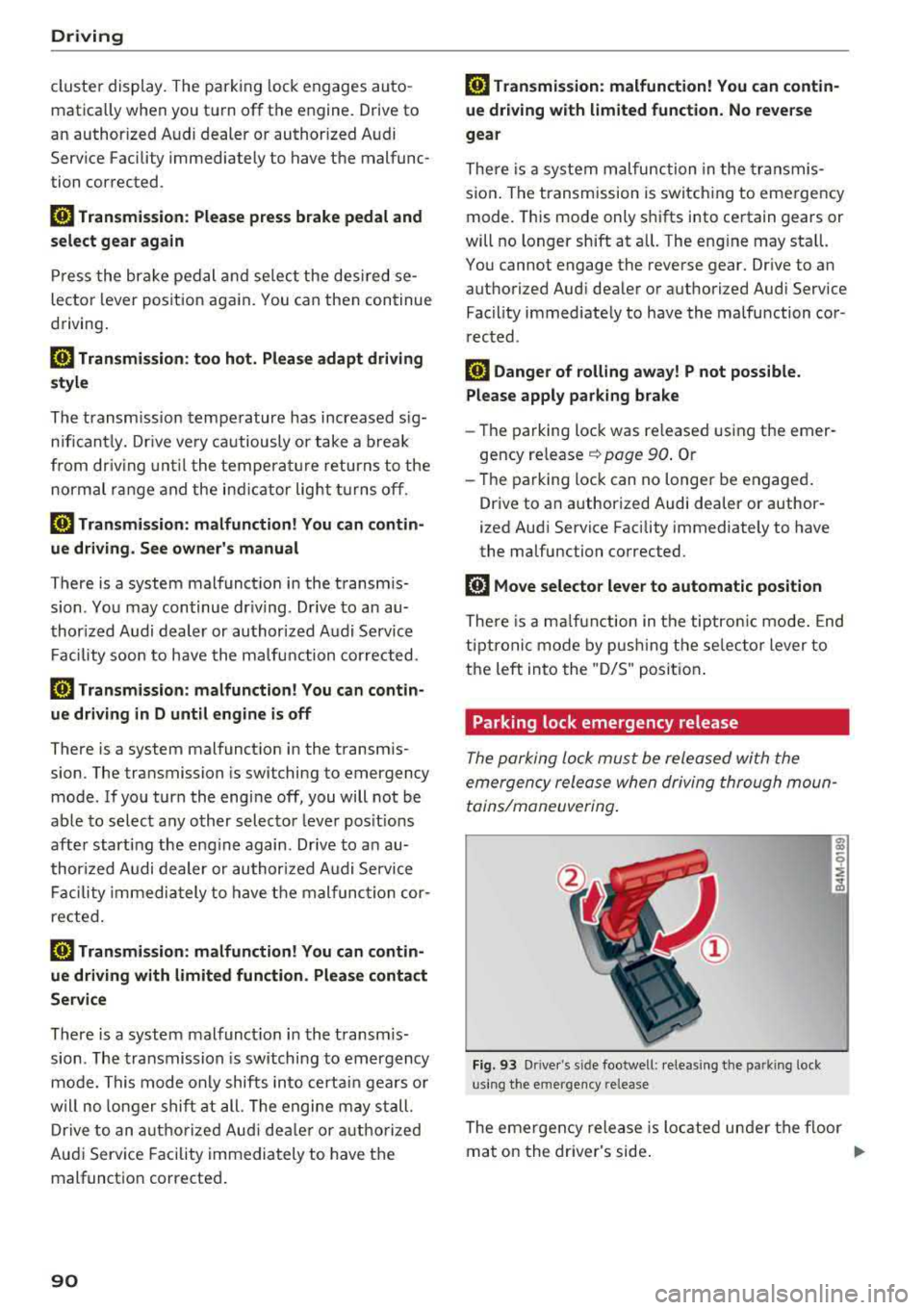
Parking lock emergency release
The parking lock must be released with the
emergency release when driving through moun
tains/maneuvering .
Fig. 93 Drive r's s ide footwell : relea sin g the parkin g lock
us ing the e mergency release
The emergen cy release is located under the f loor
mat on the dr iver's side .
.,.
Page 93 of 392
u co .... N r--N .... 0 <( 0 00
Releasing the parking lock using th e
e m erg enc y re leas e
~ To prevent the vehicle from ro lling unintention
ally, set the parking brake(®}
c> page 80 or
press the brake pedal.
~ There are two slits o n the cover . Position the
screwdriver from the vehicle tool kit in one of
the slits on the cover and pry the cover off .
~ Insert the socket wrench (from the vehicle tool
ki t) into the openi ng
c> fig. 93.
~ T urn the soc ket wrench all the way clockw ise (!)
and press it downward @unti l it locks into
place .
~ Leave the socket wrench inserted i::> .&_.
Re setting the parking lock
~ Press t he b rake peda l and sta rt the eng ine.
~ Keep the brake pedal pressed and engage the
f o llowing se lector lever positions one afte r the
other : "N", "D" and back to "N" .
~ Turn the engine off again .
~ Grasp the socket wrench w ith both hands and
pull it up and out carefully to remove
c> (D .
~ Install the cover .
When the parking lock emergency re lease is
used, the
[O] ind icator light and the "N" selector
lever position turn on in the instrument cluster.
The message
D ang er of rolling a way! P not pos
s ible . Plea se apply parking brake
also appears .
A WARNING
-Only activate the eme rgency re lease while
on a level s urface o r a s light slope.
- T he pa rking lock may only be released us ing
the emergency release if the parking brake
is set.
If i t i s no t fu nct ion ing, secure the ve
hicle from rolling using the brake ped al or
ot her s uitab le means, such as blocking a
front and a rear whee l. An unsec ured vehicle
may roll away, wh ich increases the r isk of an
acc ident.
- To reduce the risk of an accident, you m ust
not drive when the emergency re lease is ac
t ivated.
-
Driving
@ Note
- Read and follow the important instructions
about
tow ing ¢ page 365 .
-The risk of damage increases if yo u do not
remove the socket wrench caref ully w hen
resetting the parking lock.
91
Page 96 of 392
Trail er to wing
- Set the a ir suspension to the standard vehi
cle height, otherwise the applicab le tongue
weight no longer applies to your vehicle.
(D Tips
- Use chocks when parking on incl ines if the
trailer is loaded .
- We recommend also having the vehicle in
spected between the inspection intervals if
you are towing a trai ler frequent ly .
- Avo id driving with a trailer d uring the vehi
cle break-in period .
Driving with a trailer
Driving with a trailer requires extra caution .
Speed
Adhere to the legal speed limits. Follow the legal
regulat ions spec ific to the country.
As the speed increases, the driving stability of
the trailer decreases . Therefore you should not
exceed the maximum legal speed l imit whe n
there a re unfavorabl e road, weathe r and/or wind
conditions. This especially appl ies when dr iv ing
downhill.
You must always reduce you r speed as soon as
you not ice even the s lightest sw inging motion of
the t railer. Neve r try to "straighte n ou t" the t rail
e r by accelera ting.
The weight distribution is very poor if t he veh icle
is empty and the t railer is loaded . H oweve r if you
m ust dr ive under these c ircumstances, t hen d rive
espec ially slowly.
Brakes
Brake in a t imely manner . Downshift before driv
i n g downhill so that the engine can assist w ith
b raking
¢ ,&. .
When us ing a tra iler with overrun brakes, first
brake gently then qu ickly . This reduces the risk of
je rk ing w hile brak ing if the tra ile r w heels lock up .
Engine coolant temperature
Pay attention specif ica lly to the coolant tempera
ture display when there are h igh outside tempe r
atures, and when dr iv ing o n long inclines
94
¢ page 11. Shift to a higher gear in a timely man
ner .
A WARNING
Constant braking causes the brakes to over
heat and substantially reduces braking per
formance, increases braking distance or caus
es complete failure of the brake system.
-
Page 113 of 392
u co ..... N r--N ..... 0 <( 0 00
The road exceeds the maximum possible grade
for safe operation. The systems cannot be switch
ed on.
Ill AC C with traffic jam a ssis t: only availabl e in
D, Sor M
Select the "D/S " or " M" selector leve r pos it ion.
Ill A CC w ith tr affic j am ass is t: currentl y un
available . Parking brake applied
The systems sw itch off if you set the parking
brake . The systems are available again after you
release the parking brake .
llJ ACC with traffic jam a ssist: currentl y un·
av ailable. Stabili zation cont rol (E SC) input
This message appears if the Ele ctronic Stabili za
tion Control (ESC) is taking action to stabilize the
ve hicle . The systems switch off in this scenario .
Ill ACC with traffic jam a ssis t: manu al control!
This message appea rs if the veh icle rolls back
when sta rting on a slight incl ine, even t hough the
systems are active . P ress t he b rake peda l to pre
vent the vehicle from rolling or sta rting to move.
IIJ ACC w ith tr affic jam a ssis t: curr entl y un
availabl e. Downhill a ssis t activated
You cannot activate the system when hill hold as
sist is act ive .
II!! ACC with traffic jam assist: manual control!
This message appears if the driver does not take
over steering after mu ltip le driver intervention
requests and the system switches off . The vehicle
brakes unt il it is stationary .
ii Traffic jam a ssis t : una vailable. S ee o wner' s
manual
The system can no longer ensure that t he ve hicle
w ill stay in the lane and sw itches off. Have yo ur
vehicle checked by an a uth orized Audi dea ler or
authorized Audi Service Facility if the ma lfunc
tion is continuous .
14§ Traffic jam assis t : Plea se take over steering!
This message appea rs as soon as the system
stops detecting steer ing activ ity when the system
limits are rea ched. Always keep yo ur hands on
Ass istance systems
the steering whee l so you can be ready to steer at
any time.
14§ Traffic jam a ssis t : currentl y unavailable .
Pl ea se f asten se at belt
T he system switches off when the drive r's safety
belt is unfastened.
Ill AC C: eff iciency assist not available in thi s
countr y
The adaptation to speed lim its and routes ahead
is not available in this country .
IIJ ACC: predictive control currentl y una vaila
ble . See owne r's m anual
T he ad aptation to speed lim its and routes ahead
swi tches off at speed limits under 20 mph
(30 km/h) .
T he message ca n also appear if the adaptation to
speed limi ts and routes a head has a temporary
f ailure . Have your vehicle checked by an autho r
ized Audi dea ler or authorized Audi Service Facili
ty if the malfunction is continuous .
Distance warning : malfunction! Please contact
S erv ice
T he system cannot gua rantee that it will detect
vehicles correct ly and it has switc hed off. The ra
dar sensors have shifted or are fa ulty . Drive to an
authorized Aud i dea ler o r authorized Audi Serv ice
Facility immediate ly to have the ma lfunction cor
rected .
Distance warning : currentl y unavailable . Sen sor
view re stricted due to surrounding s. See own
e r' s manual
T his message appears if the rada r senso r view is
obstructed, for examp le by leaves, snow, heavy
spray or dirt. Clean the sensors
¢ page 103,
fig . 100.
Distance warning : curr entl y unavailable . See
owner' s manual
This message appears if the system has a tempo
r a ry fa il ur e. If this occurs m ultip le t imes, drive to
an a uth orized Aud i dea le r o r auth o rized Aud i
Se rvice Facility immed iate ly to have the ma lfunc -
t ion corrected .
liJ,,
111
Page 126 of 392
Ass is tance sy stem s
Rear cross-traffic assist
Applies to: ve hicles w ith rear cross -traff ic ass ist
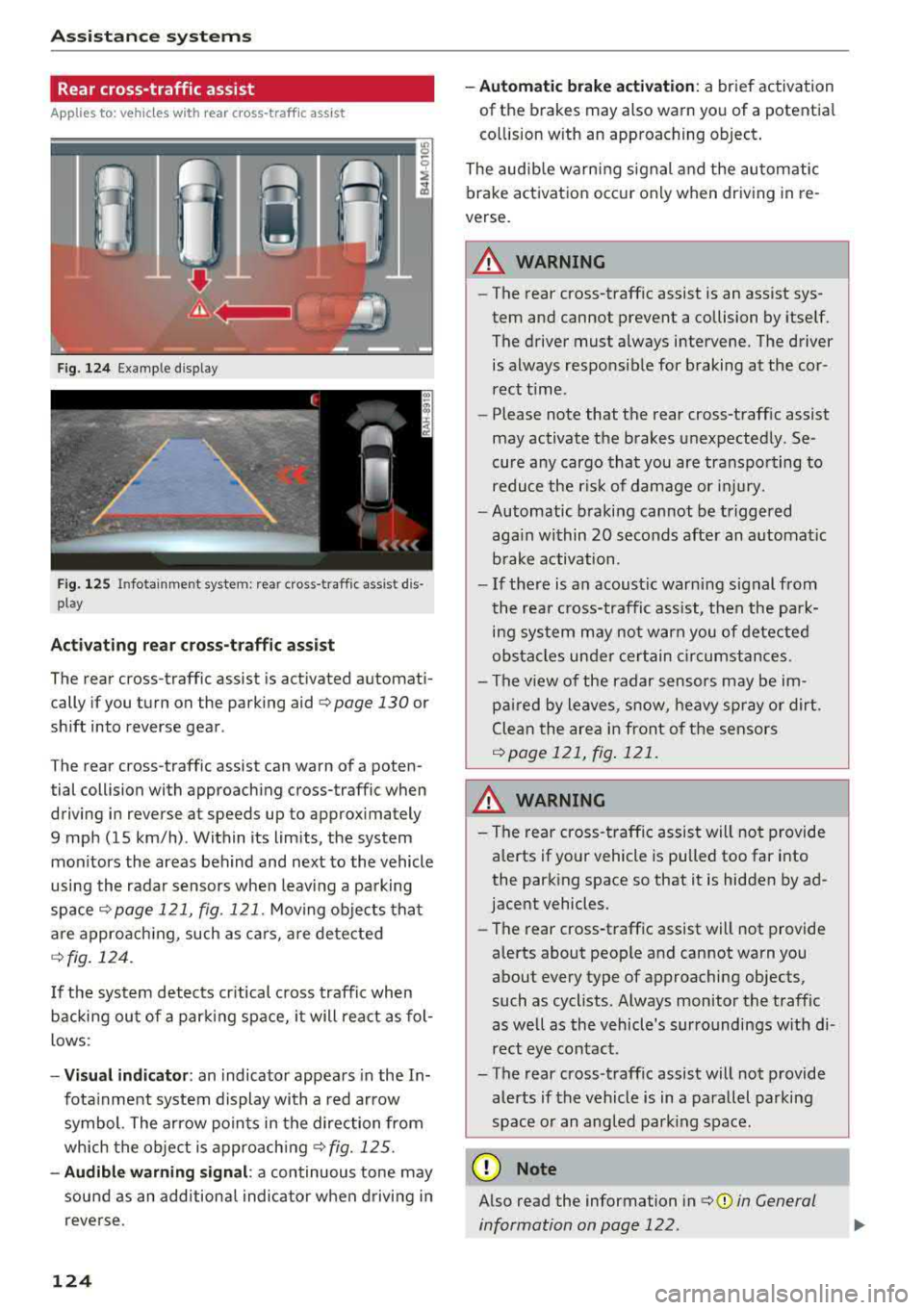
F ig. 124 Example display
Fig . 125 Infotainment system: rear cross-traffic assist dis
play
Acti vating re ar c ro ss -tr affic assist
The rear cross-traffic assist is act ivated automat i
cally if you turn on the parking aid
Qpage 130 or
shift into reverse gear .
The rear cross-traffic assist can warn of a poten
tial collision with approaching cross-traffic when
driving in reverse at speeds up to approximately
9 mph (15 km/h) . Within its limits, the system
monitors the areas behind and next to the vehicle
using the radar sensors when leav ing a parking
space
Qpage 121, fig. 121. Mov ing objects tha t
are appro ach ing, such as ca rs, a re detected
Q fig . 124.
If the sys tem detects cr itical cross traffic when
backing ou t of a par king space, i t will react as fol
lows:
- Vi sua l indicator : an indicator appea rs in the In
fota inment system display with a red arrow
symbol. The ar row points in the direction from
which the object is approach ing
Q fig. 125.
- Audib le warning signal : a continuous tone may
sound as an additional indicator when driving i n
reve rse .
124 -
Automat ic brake act ivation :
a brief activation
of the brakes may also warn you of a potentia l
co llision w ith an approaching object .
The audib le warn ing signal and the automatic
brake activation occ ur only when driving in re
verse.
A WARNING
- The rear cross-traffic assist is an assist sys
tem and cannot prevent a collision by itself.
The driver must always intervene. The driver
is always respo nsible for braking at the cor
rect t ime.
- Please note that the rear cross-traff ic assist
may activate the brakes unexpectedly. Se
cure a ny cargo that you are transpo rting to
reduce the r is k of damage or inju ry.
- Automatic braking cannot be triggered
aga in within 20 seconds afte r an a utomat ic
brake activation.
- If the re is a n acoust ic warning signal from
the rea r cross-traffic assist, then the park
ing system may no t w arn you of detected
obstacles under ce rtain c ircumstances.
- The v iew of the radar sensors may be im
pa ired by leaves, snow, heavy spray or dirt.
Clea n the area i n front of t he sensors
Qpage 121, fig . 121.
,&. WARNING
- The rear cross-traffic assist will no t provide
a lerts if yo ur vehicle is pulled too far into
the parking space so that it is hidden by ad
jacent vehicles.
- The rear cross-traffic assist will not provide
alerts about people and cannot warn you
about every type of approaching objects,
such as cyclists. Always monitor the traffic as well as the vehicle's surroundings w ith di
rect eye contact.
- The rear cross-traffic assist will not provide
alerts if the vehicle is in a parallel parking
space or an angled park ing space .
(D Note
Also read the information in Q (j) in General
information on page 122.
-
Page 127 of 392
u co ..... N r--N ..... 0 <( 0 00
(D Tips
-You can cancel the automatic brake activa
tion w ith increasing braking fo rce if you ap
ply the brakes yourse lf or accelerate cons id
erab ly.
- In some situations, rea r cross-traffic assist
may warn you even if there is no cross traffic
i n a cr itical area , for examp le when back ing
i nto a parking space or maneuver ing .
- The rea r cross-traffic ass ist also switches off
when you switch off the ESC.
- The system is not available when towing a
trailer.
Messages
Applies to: vehicles with Audi side assist
A message appears in the inst rumen t cluste r dis
p lay if the s ide ass ist swi tches off automatically .
@t Audi side assist: malfunction! Please contact
Service
@j Audi side assist and exit warning: malfunc
tion! Please contact Service
The system cannot guarantee that it w ill detec t
ve hicles co rrectly a nd it has sw itched off. The
sensors have been mov ed o r are faulty. Have t he
system checked by an a uthori zed Audi dea ler or
author ized Audi Se rvice Facility soon.
@j Audi side assi st: cur rently unavailable. Sen
sor vision restricted due to surroundings . See
owner 's manual
e, Audi side as sis t and e xit warning: currently
unavailable. Sensor vision restricted due to sur
roundings
The rad ar senso r vis io n i s impa ire d. The area in
fron t of the senso rs must no t be covered by b ike
rac ks, st ic kers, leaves, snow or any othe r ob jects.
C lea n the area i n front of th e sensors, if necessa
ry¢ page 121, fig. 121.
e, Audi side as sis t: currentl y unavailable. See
owner 's manual
et Audi side a ssist and exit warning : currently
unavailable. See owner 's manual
A ss istance systems
S id e ass ist cannot be switched on at this time be
ca use there is a ma lfunction (for example, the
batte ry c harge leve l may be too low).
et Audi side assist : unavailable in towing mode
e, Audi side assist and exit warning: currently
unavailable . Towing mode
S ide ass ist switches off automatically when the
electrica l connec to r i n t he factory-installed t rail
er hitch is connec ted . There is no guarantee the
syste m will sw itch o ff when us ing a ret rofitted
t railer h itch . Do no t use side a ssist an d the ex it
war nin g when tow ing a tra ile r.
Ill Rear parking aid: obstacle detect ion restrict
ed
The rear cross-traffic ass ist is not available . E i
ther the ESC is sw itched off, or the rada r senso rs
may be cove red by a b ike rac k, st ic ke rs , leaves,
snow o r othe r objects . Swit ch the ESC on, o r
cl ea n the area in fron t of the senso rs if necess ary
¢page 12 1, fig . 12 1. If thi s message con tinues
to be displayed, dr ive imme dia tely to an author
ized Audi dea ler or author ized Audi Service Facili
ty to have the ma lf u nction repaired.
Audi drive select
Introduction
Applies to: vehicles with Audi drive select
Dr ive sele ct m akes i t possible to exper ien ce d if
f erent types of vehi cle se ttings in one veh icle.
Yo u can select the driv in g modes
Offroad* or
Lift / Offroad *, Allroad* , Comfort , Auto and Dy
namic
i n the Infota inme nt system, fo r example
to switch from a spo rty to a comfo rtable d riving
mode. In the
Individual mode, the settings can
be adjusted to you r persona l preferences. This
makes it possible to combine sett ings such as a
spo rty engine setting wi th light steer ing .
Description
Applies to: vehicles with Audi drive select
The following systems, among ot her th ings, a re
in fluenced by dr ive se lect:
.,.
125
Page 134 of 392
Parking aid
the sound was muted, no tone will sound. Pay at
tention to the vehicle's surroundings when you
start to dr ive .
Switching on /off
Applies to: ve hicles w ith pa rking system plus
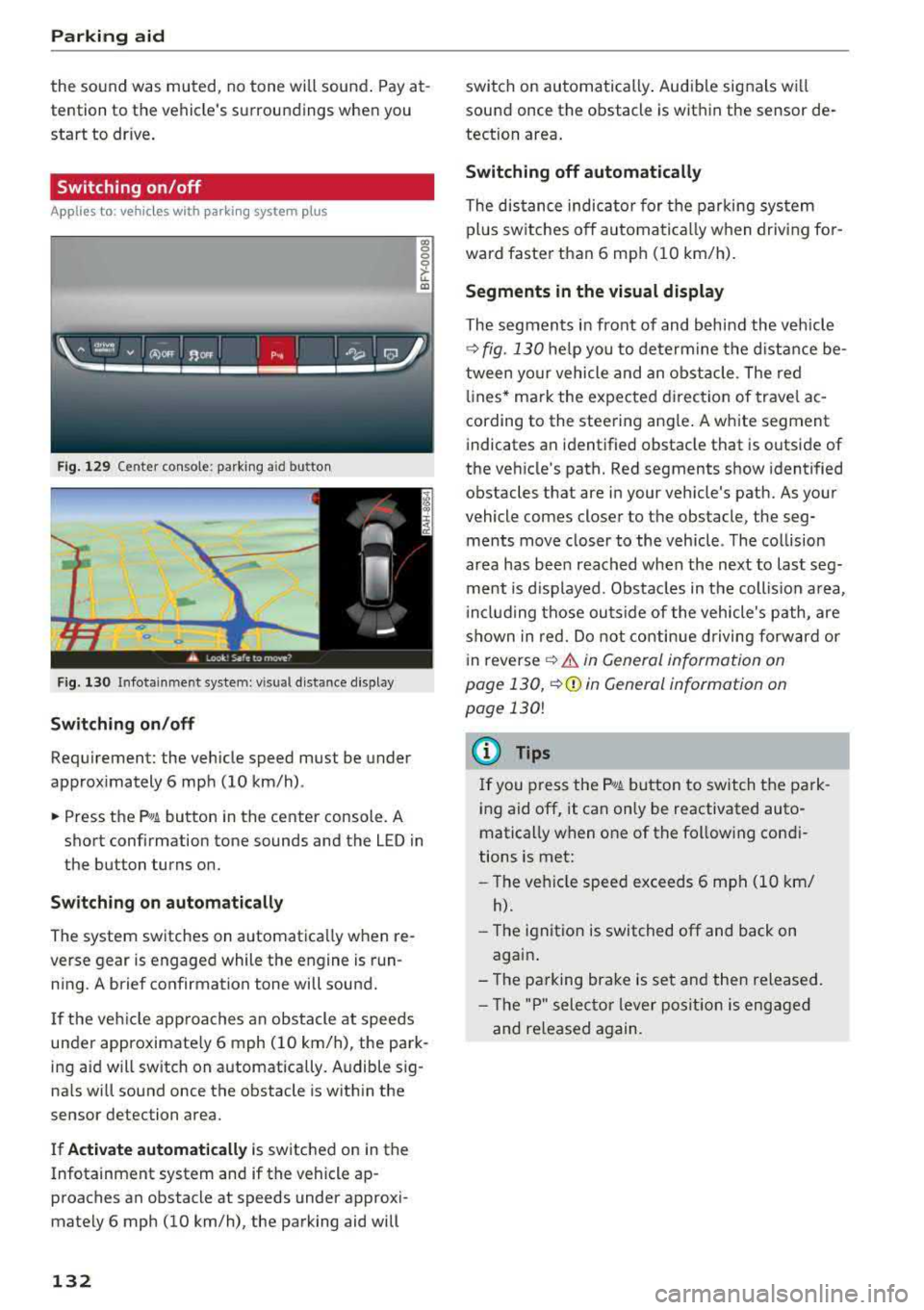
Fig. 129 Center console: park ing a id bu tton
Fig. 130 I n fot ainme nt system: v is ual d ist ance d isplay
Switching on /off
Requirement: the vehicle speed must be under
approximately 6 mph (10 km/h) .
co 0 0
~ LL. m
.. Press the p,, 1A button in the center console . A
short confirmation tone sounds and the LED in
the button turns on.
Switching on automatically
The system switches on automatica lly when re
verse gear is engaged while the engine is run
ning. A brief confirmation tone will sound.
I f the veh icle approaches an obstacle at speeds
under approximate ly 6 mph (10 km/h), the park
ing a id will sw itch on automatically . Audible sig
na ls will sound once the obstacle is within the
sensor detection area.
I f
Activate automatically is switched on in the
Infotainment system and if the vehicle ap
proaches an obstacle at speeds under approxi
mately 6 mph (10
km/h), the parking aid will
132
switch on automatically . Audible signals wi ll
sound once the obstacle is within the sensor de
tection area.
Switching off automatically
The distance indicator for the parking system
plus sw itches
off automatically when driving for
ward faster than 6 mph (10 km/h).
Segments in the visual display
The segments in front of and behind the vehicle
¢
fig. 130 he lp you to determine the distance be
tween your vehicle and an obstacle . The red
lin es* ma rk the expected d irection of travel ac
cording to the steering angle . A white segment
indicates an identified obstacle that is outside of
the veh icle's path. Red segments show identified
obstacles that are in your vehicle's path. As your
vehicle comes closer to the obstacle, the seg ments move closer to the vehicle . The collision
area has been reached when the next to last seg
ment is displayed . Obstacles in the collis ion area,
inclu ding those outside of the vehicle's path, are
shown in red. Do not continue driving forward or
i n
reverse ¢.&. in General information on
page 130,
¢ (D in General information on
page
130!
(D Tips
If you press the ?~A button to switch the park
ing aid
off, it can only be reactivated auto
matically when one of the following condi
tions is met:
-The vehicle speed exceeds 6 mph (10 km/
h).
-The ignition is switched off and back on
again .
- The parking brake is set and then released.
- Th e "P" selector lever position is engaged
and re leased again.
Page 316 of 392
Check ing and F illing
On -Board Diagnostic S yst em
Eng ine data can be read out at the On-Board D i
agnostic System connection po rt using a special
testing device
¢ fig. 257 .
Indicator light
Ift hP ¢..ifi indicato r light b lin ks o r tu rns o n, there
is a malfunction that is caus ing poor emiss ions
qua lity and that could damage the catalytic con
verter.
Dr ive s low ly to an author ized Audi dealer or au
thor ized Audi Se rvice Fac il ity to have the ma l
f u nction co rrected.
The indicator l ight can also turn on if the fuel fi ll
er cap is not closed correct ly
9 page 311.
_& WARNING
Incorrect use of the connection po rt fo r th e
On-Board Diagnostic Sys tem can ca use mal
functions, which can then result in accidents
and serious injuries.
- Only allow an authorized Audi dealer or au
thorized Audi Service Facility to read out the
engine data .
Engine compartment
Working in the engine compartment
Special care is required if you are working in the
engine compartment
-
Fo r w ork in th e engi ne comp artm ent su ch as
c heck ing and filli ng flu id s, the re is a risk of in
jur y, scalding , ac cident s, and b urns . Fo r this
r easo n, follow all th e warning s and g enera l
sa fe ty preca ution s pro vided in the foll owin g in
f o rm ation . Th e e ng ine comp artmen t is a d an
ger ous ar ea .
9 &, .
_& WARNING
- T urn the eng ine off.
- Switch the ig nition off.
- Set the parking brake .
- Select the "P" selector lever pos it io n.
- let the engine coo l down.
314
- Never open the hood when there is steam or
coo lant escaping from the engine compart
ment, because there is a risk that you could
be burned . Wait unt il no steam or coolant is
escaping.
- Keep children away from the eng ine com
partment .
- Never sp ill fluids on a hot engine . These flu
ids (such as the anti-freezing agent con
tained in the coolant) can ignite .
- Avoid short c ircuits in the electrical system.
- When working in the engine compartment, remember that the radiator fan can switch
on even if the ignition is switched off, wh ich
increases the r isk of injury .
- Never open the cap on the coolant expan
sion tank when the engine is warm . The
cool ing system is under pressure .
- To protect your face, hands, and arms from
hot steam or coolant, cover the cap w ith a
large cloth when open ing.
- Do not remove the engine cover under any
circumstances . This increases the risk of
burns .
- If tests need to be performed with the en
gine runni ng, there is add itiona l danger due
to mov ing components (such as the r ibbed
be lt, alte rnato r and rad iato r fan) and from
the hig h-voltage ignition system.
- Do not unde r any ci rcumstances activate the
throttle inadvertent ly (for example, by hand
from the engine compartment) if the veh i
cle is stationary but the engine is running
and a gear is engaged. Otherwise, the vehi
cle will start to move immediate ly and this
could result in an acc ident.
- Pay attention to the following warnings
when work on the fue l system is required:
- Do not smoke.
- Never work near open flames .
- Always have a working fire extinguisher
nearby.
- All work on the battery or electrical system in your vehicle can result in injuries, chemi
cal burns, acc idents or burns . Because of
this, all work must be performed
only by an
author ized Audi dealer or author ized Audi
Serv ice Faci lity.