towing AUDI Q5 2018 User Guide
[x] Cancel search | Manufacturer: AUDI, Model Year: 2018, Model line: Q5, Model: AUDI Q5 2018Pages: 392, PDF Size: 60.56 MB
Page 123 of 392
about detected vehicles that it has classified as
critical.
@ Tips
You c an ad just t he brig htness on of the dis
play on the rearview
mirror ~ page 122.
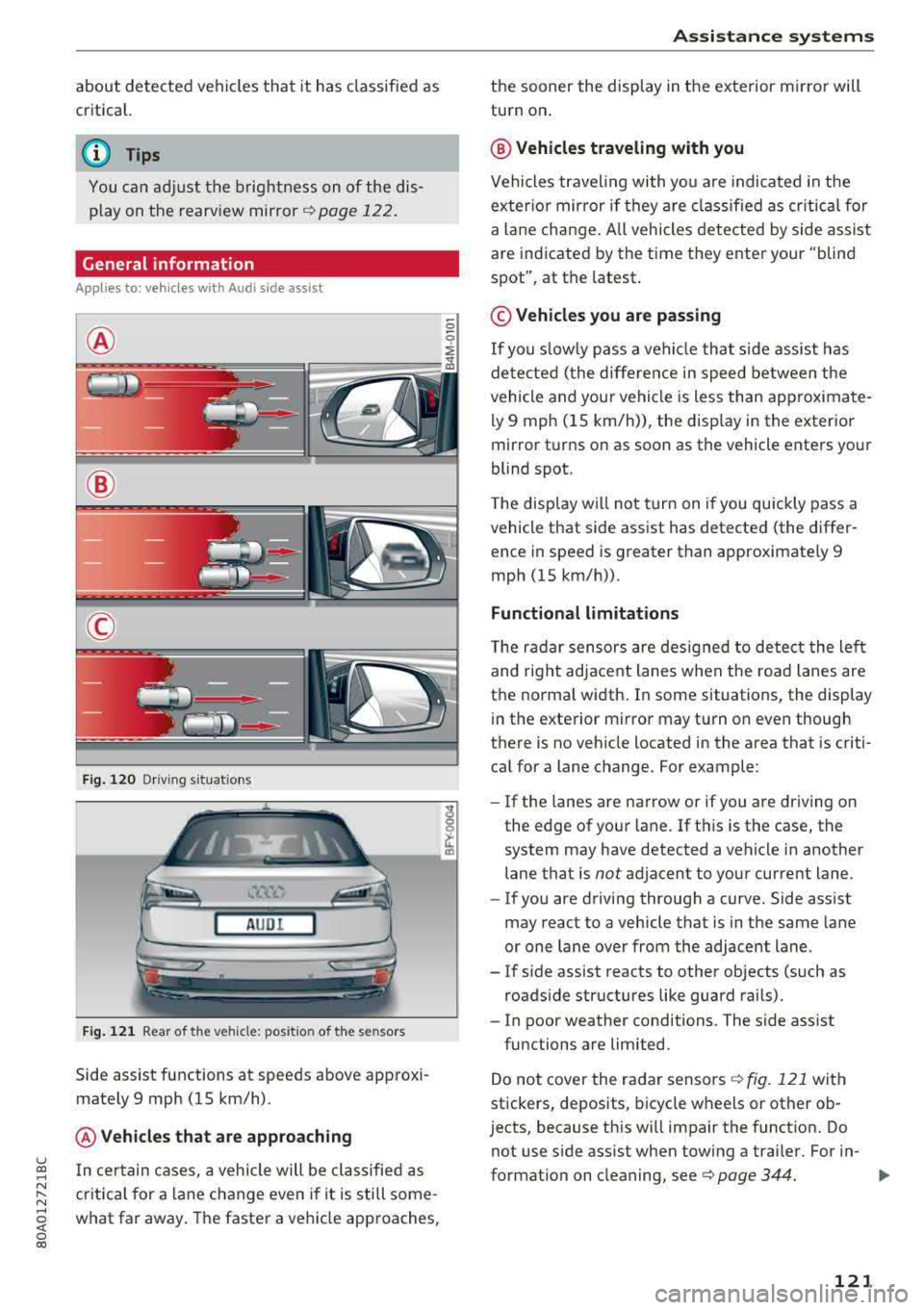
General information
Applies to: vehicles with Audi side assist
@
@
©
F ig . 12 0 Dr ivi ng s it u at ions
A U DI
Fig . 121 Rea r of the ve hicle: pos it io n of the sensors
Side assist functions at speeds above app roxi
mately 9 mph (15 km/h) .
@Vehicles that are app roaching
u ~ I n certain cases, a vehicle will be classified as
N :::. cr itica l for a lane change even i f it is still some-,.....
~ what far away . The faste r a veh icle approaches,
0 co
A ssi st a nce systems
the sooner the display in the exterior m irror will
turn on .
@ Vehicles traveling with you
Vehicles traveling with yo u are indicated in the
exter io r mirror if they a re classified as cr itical for
a la ne change. A ll vehicles dete cted by s ide assist
are indicated by the time they ente r your "blind
spot", at the latest.
© Vehicles you are passing
If
you s lowly pass a vehicle that s ide assist has
de tected ( the differe nce in speed between the
vehicle and your vehicle is less than app roximate
ly 9 mph (15 km/h)), the disp lay in the exterior
mirror turns on as soon as the vehicle enters your
blind spot.
T he display w ill not tur n on if you quickly pass a
vehicle that side assist has detected (the differ ence in speed is greater than approximate ly 9
mph (15 km/h)) .
Functional limitations
The radar sensors are des igned to detect the left
and right adjacent lanes when the road lanes are
the norma l width . In some situations, the display
in the exte rior mirror may turn on even though
there is no vehicle located in the area that is criti cal for a lane change. For example :
-If the lanes are narrow or if you are driving on
the edge of your lane. If t his is the case, the
system may have detected a vehicle in another lane that is
not adjacent to your current lane .
- If you are driving through a curve. Side assist
may react to a vehicle that is in the same lane
or one lane over from the adjacent lane .
- If s ide assist reacts to other objects (such as
roads ide structures like guard rails).
- In poor weather conditions . The side assist
functions are limited.
Do not cover the radar sensors
Q fig. 121 with
stickers, deposits, bicycle wheels or other ob
jects, because this w ill impair the funct ion. Do
not use s ide ass ist when towing a trai ler. For in-
format io n on cleaning, see ¢
page 344. ..,.
121
Page 125 of 392
u co ..... N r-N .....
~ 0 co
Exit warning
Applies to: ve hicles with exit warning system
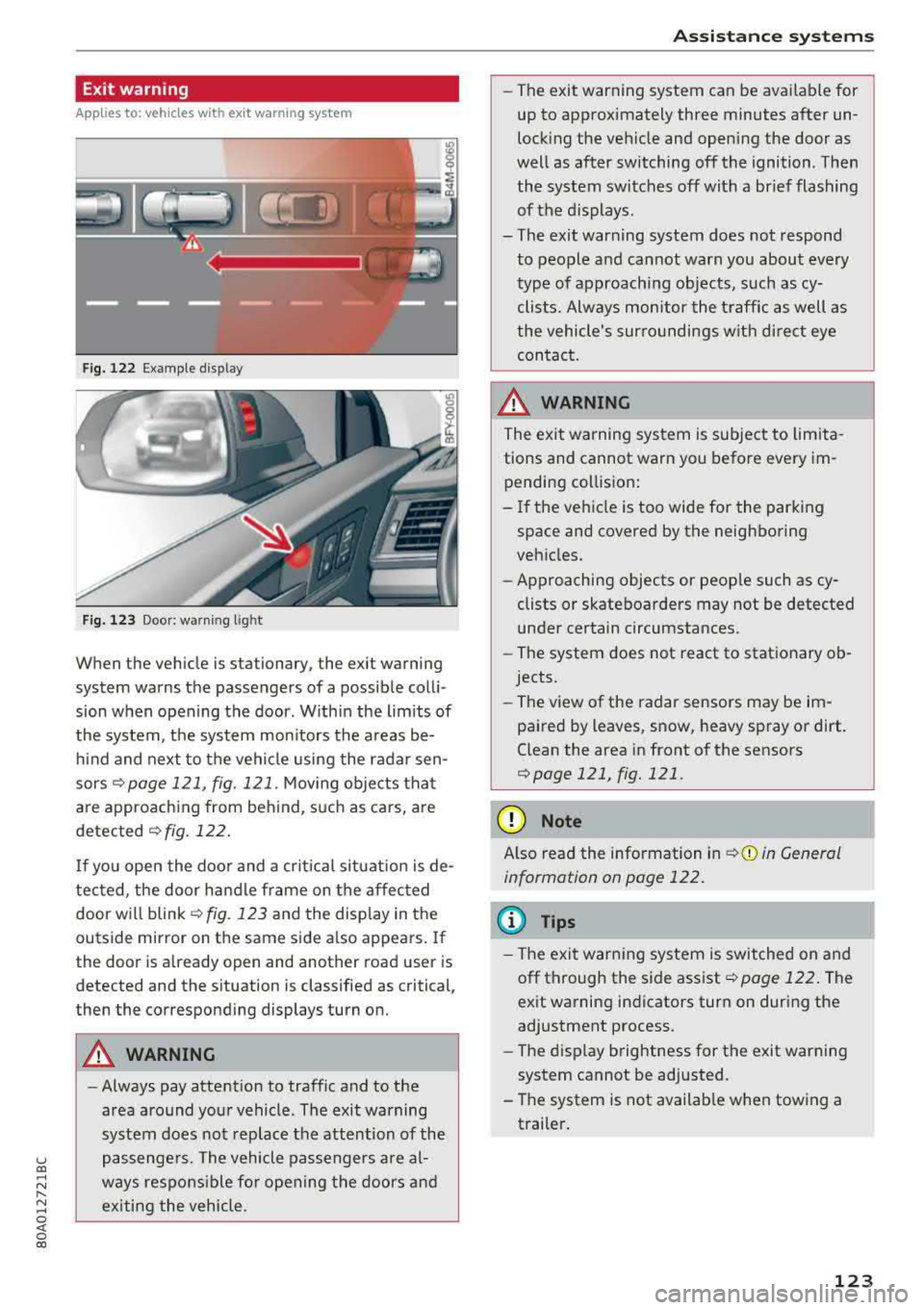
Fig. 122 Example dis play
Fig. 123 Door: warning lig h t
When the vehicle is stationary, the exit warning
system warns the passengers of a possible colli
sion when opening the door . Within the limits of
the system, the system monitors the areas be
hind and next to the vehicle using the radar sen
sors
¢ page 121, fig. 121 . Moving objects that
are approaching from behind, such as cars, are
detected ¢ fig. 122.
If you open the door and a critical situation is de
tected, the door handle frame on the affected door will
blink ¢ fig. 123 and the display in the
outside mirror on the same side also appears. If
the door is already open and another road user is
detected and the situation is classified as critical
J
then the corresponding displays turn on.
A WARNING
-
- Always pay attention to traffic and to the
area around your vehicle . The exit warning
system does not replace the attention of the
passengers. The vehicle passengers are al
ways responsible for opening the doors and
exiting the vehicle .
Assistance systems
-The exit warning system can be available for
up to approximately three minutes after un
locking the vehicle and opening the door as
well as after switching off the ignition . Then
the system switches off with a brief flashing
of the displays.
- The exit warning system does not respond to people and cannot warn you about every
type of approaching objects, such as cy clists. Always monitor the traffic as well as
the vehicle's surroundings with direct eye contact.
A WARNING
= -
The exit warning system is subject to limita-
tions and cannot warn you before every im
pending collision:
- If the vehicle is too wide for the parking
space and covered by the neighboring
vehicles.
- Approaching objects or people such as cy
clists or skateboarders may not be detected
under certain circumstances.
- The system does not react to stationary ob
jects.
- The view of the radar sensors may be im
paired by leaves, snow, heavy spray or dirt.
Clean the area in front of the sensors
¢page 121, fig. 121 .
(D Note
Also read the information in ¢(i) in General
information on page 122.
(D Tips
- The exit warning system is switched on and
off through the side
assist¢ page 122. The
exit warning indicators turn on during the
adjustment process.
- The display brightness for the exit warning
system cannot be adjusted.
- The system is not available when towing a
trailer.
123
Page 127 of 392
u co ..... N r--N ..... 0 <( 0 00
(D Tips
-You can cancel the automatic brake activa
tion w ith increasing braking fo rce if you ap
ply the brakes yourse lf or accelerate cons id
erab ly.
- In some situations, rea r cross-traffic assist
may warn you even if there is no cross traffic
i n a cr itical area , for examp le when back ing
i nto a parking space or maneuver ing .
- The rea r cross-traffic ass ist also switches off
when you switch off the ESC.
- The system is not available when towing a
trailer.
Messages
Applies to: vehicles with Audi side assist
A message appears in the inst rumen t cluste r dis
p lay if the s ide ass ist swi tches off automatically .
@t Audi side assist: malfunction! Please contact
Service
@j Audi side assist and exit warning: malfunc
tion! Please contact Service
The system cannot guarantee that it w ill detec t
ve hicles co rrectly a nd it has sw itched off. The
sensors have been mov ed o r are faulty. Have t he
system checked by an a uthori zed Audi dea ler or
author ized Audi Se rvice Facility soon.
@j Audi side assi st: cur rently unavailable. Sen
sor vision restricted due to surroundings . See
owner 's manual
e, Audi side as sis t and e xit warning: currently
unavailable. Sensor vision restricted due to sur
roundings
The rad ar senso r vis io n i s impa ire d. The area in
fron t of the senso rs must no t be covered by b ike
rac ks, st ic kers, leaves, snow or any othe r ob jects.
C lea n the area i n front of th e sensors, if necessa
ry¢ page 121, fig. 121.
e, Audi side as sis t: currentl y unavailable. See
owner 's manual
et Audi side a ssist and exit warning : currently
unavailable. See owner 's manual
A ss istance systems
S id e ass ist cannot be switched on at this time be
ca use there is a ma lfunction (for example, the
batte ry c harge leve l may be too low).
et Audi side assist : unavailable in towing mode
e, Audi side assist and exit warning: currently
unavailable . Towing mode
S ide ass ist switches off automatically when the
electrica l connec to r i n t he factory-installed t rail
er hitch is connec ted . There is no guarantee the
syste m will sw itch o ff when us ing a ret rofitted
t railer h itch . Do no t use side a ssist an d the ex it
war nin g when tow ing a tra ile r.
Ill Rear parking aid: obstacle detect ion restrict
ed
The rear cross-traffic ass ist is not available . E i
ther the ESC is sw itched off, or the rada r senso rs
may be cove red by a b ike rac k, st ic ke rs , leaves,
snow o r othe r objects . Swit ch the ESC on, o r
cl ea n the area in fron t of the senso rs if necess ary
¢page 12 1, fig . 12 1. If thi s message con tinues
to be displayed, dr ive imme dia tely to an author
ized Audi dea ler or author ized Audi Service Facili
ty to have the ma lf u nction repaired.
Audi drive select
Introduction
Applies to: vehicles with Audi drive select
Dr ive sele ct m akes i t possible to exper ien ce d if
f erent types of vehi cle se ttings in one veh icle.
Yo u can select the driv in g modes
Offroad* or
Lift / Offroad *, Allroad* , Comfort , Auto and Dy
namic
i n the Infota inme nt system, fo r example
to switch from a spo rty to a comfo rtable d riving
mode. In the
Individual mode, the settings can
be adjusted to you r persona l preferences. This
makes it possible to combine sett ings such as a
spo rty engine setting wi th light steer ing .
Description
Applies to: vehicles with Audi drive select
The following systems, among ot her th ings, a re
in fluenced by dr ive se lect:
.,.
125
Page 132 of 392
Parking aid
Parking aid
General information
A pplies to: ve hicles w ith a rea r parking sys te m /parking sys
tem p lus/rearv iew camera/peripheral cameras
Depending on your vehicle's equipment , various
parking aids will help you when parking and ma
neuvering.
The
rear parking system is an audible parking aid
that warns you of obstacles
behind the vehicle
¢ page 131.
The parking system plus assists you when park
ing by audibly and visually indicating objects de
tected
in front of and behind the vehicle
¢ page 131.
The rearview camera shows the area behind the
vehicle in the Infotainment system display. The lines in the rearview camera image help you to
park or maneuver
¢ page 133.
The peripheral cameras give various views to
help you when parking or maneuvering
¢ page 135 . The parking system plus functions
are also available ¢
page 131.
_& WARNING
-Always look for traffic and check the area
around your vehicle by looking at it directly
as well. The parking system cannot replace
the driver's attention. The driver is always
responsible when entering or leaving a park
ing space and during similar maneuvers.
- Please note that some surfaces, such as
clothing, are not detected by the system.
-
- Sensors and cameras have blind spots in
which people and objects cannot be detect
ed . Be especially cautious of small children
and animals.
- Always keep your eyes on the vehicle's sur roundings, using the rearview mirror as
well.
- The sensors can be displaced by impacts or
damage to the radiator grille, bumper,
wheel housing and the underbody . The park
ing system may be impaired as a result.
Have an authorized Audi dealer or author-
130
ized Audi Service Facility check their func
tion .
@ Note
-Some objects are not detected or displayed
by the system under certain circumstances:
- objects such as barrier chains, trailer draw
bars, vertical poles or fences
- objects above the sensors such as wall ex
tensions
- objects with certain surfaces or structures
such as chain link fences or powder snow
- If you continue driving closer to a low ob
ject, it may disappear from the sensor range . Note that you will no longer be
warned about this obstacle.
- Keep enough distance from the curb to re
duce the risk of damage to the rims .
(D Tips
-The system may provide a warning even
though there are no obstacles in the cover
age area in some situations, such as:
- certain road surfaces or when there is tall
grass
- external ultrasonic sources such as from
cleaning vehicles
- in heavy rain, snow, or thick vehicle ex
haust
- We recommend that you practice parking in
a traffic-free location or parking lot to be
come familiar with the system. When doing
this, there should be good light and weath
er conditions.
- You can change the volume of the signals
and the display ¢
page 138.
-Please refer to the instructions for towing a
trailer located in
¢page 139.
-What appears in the infotainment display is
somewhat time-delayed.
- The sensors must be kept clean and free of
snow and ice for the parking aid to operate.
- The rearview camera is cleaned when clean
ing the rear window
¢page 51.
Page 341 of 392
u a, .... N r-N ....
~ a,
including the weight of a trail
er hitch and the tongue
weight of a loaded trailer -
does not make the vehicle heavier than the vehicle's
Gross Vehicle Weight Rating .
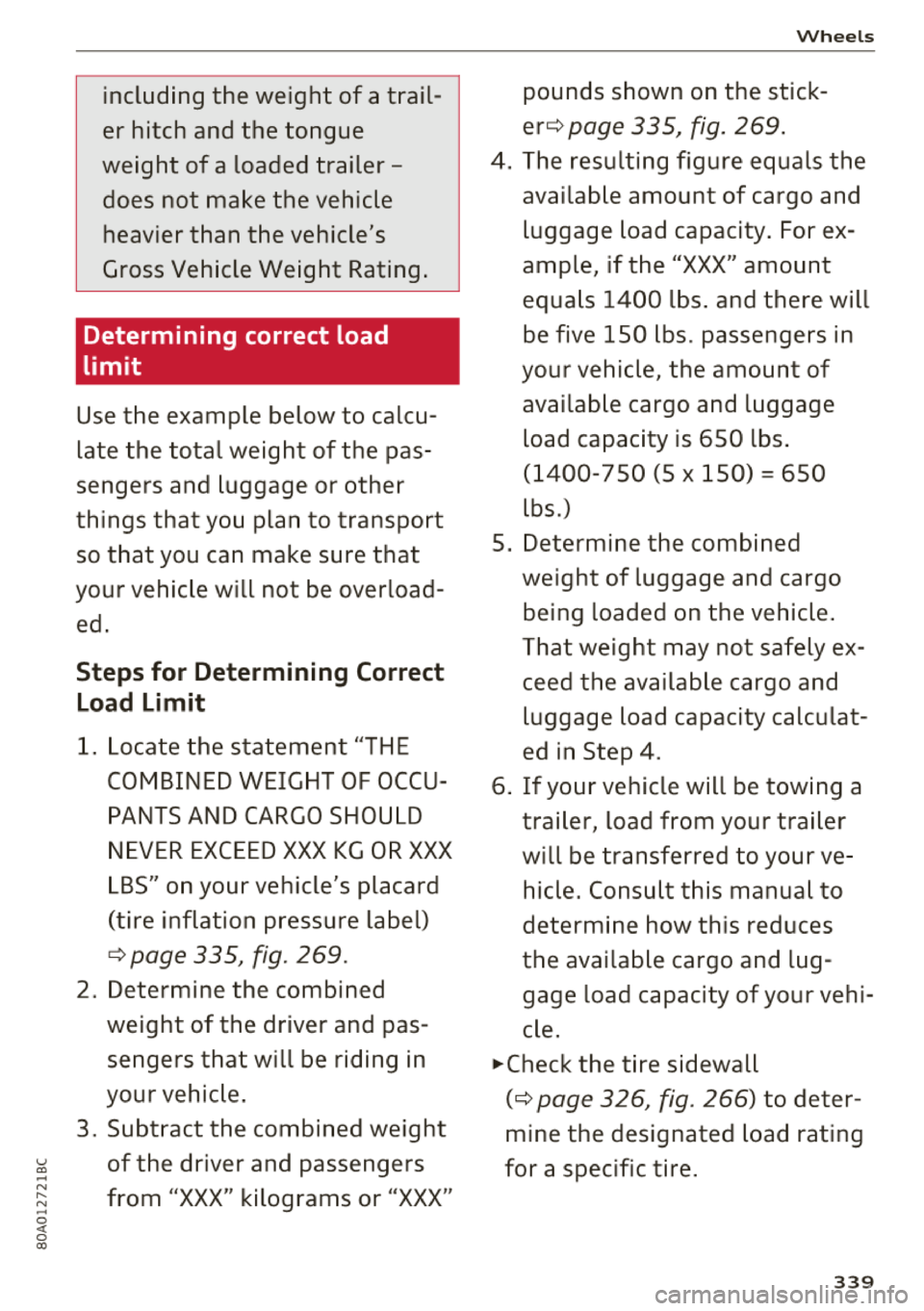
Determining correct load
limit
Use the example below to calcu
late the total weight of the pas
sengers and luggage or other
things that you plan to transport
so that you can make sure that
your vehic le w ill not be over load
ed .
Steps for Determining Correct
Load Limit
1. L ocate the statement "TH E
COMBINED WEIGH T OF OCCU
PANTS AND CARGO SHOULD
NEVER EXCEED XXX KG OR XXX
L BS" on your vehicle's placard
(tire inflation pressure label)
¢ page 335, fig . 269 .
2. Determine the combined
weight of the driver and pas
sengers that w ill be riding in
your vehic le .
3. Subt ract the combined weight
of the driver and passengers
from "XXX" kilograms or "XXX"
Wheels
pounds shown on the stick
er ¢ page 335, fig. 269 .
4. The resulting figure equals the
available amount of cargo and
luggage load capacity . For ex
ample , if the
"XXX" amount
equa ls
1400 lbs . and there will
be five
150 l bs . passengers in
your vehicle, the amount of
available cargo and luggage
load capacity is
650 lbs .
(1 400- 750 (5 X 1 50) = 650
lbs .)
5. Determine the comb ined
weight of luggage and cargo
being loaded on the vehicle .
T hat weight may not safely ex
ceed the availab le cargo and
luggage load capacity calculat
ed in Step 4 .
6 . If your vehicle will be towing a
tra iler, load from your tra iler
w ill be transferred to your ve
hicle. Consult this manual to
determine how this reduces
the availab le cargo and lug
gage load capacity of your veh i
c le .
.,. Check the tire sidewall
(¢ page 326, fig . 266) to deter
mine the designated load rat ing
for a specific t ire .
339
Page 365 of 392
u co .... N r--N .... 0 <( 0 00
Emergency situations
General
This chapter is intended for trained emergency
crews and working personnel who have the nec
essary tools and equipment to perform these
operations.
Starting by pushing or
towing
~ Note
Vehicles with an automatic transmission
cannot be started by pushing or towing.
Starting with jumper
cables
If necessary, the engine can be started by con
necting it to the battery of another vehicle.
If the engine should fail to start because of a dis
charged or weak battery, the battery can be con
nected to the battery of
another vehicle, using a
pair of jumper cables to start the engine.
Jumper cables
Use only jumper cables of sufficiently large cross
section
to carry the starter current safely. Refer
to the manufacturer's specifications.
Use only jumper cables with
insulated terminal
clamps which are distinctly marked:
plus(+) cable in most cases colored red
minus(-) cable
in most cases colored black.
A WARNING -
Batteries contain electricity, acid, and gas.
Any of these can cause very serious or fatal in
jury. Follow the instructions below for safe
handling of your vehicle's battery.
-Always shield your eyes and avoid leaning
over the battery whenever possible.
- A dead battery can freeze at temperatures
around 32 °F (0 °C). If the vehicle battery is
frozen, you must thaw it before connecting
the jump start cables. If you do not, this in-
Emergency situations
creases the risk of an explosion and chemi
cal burns. After jump starting the vehicle,
drive to an authorized Audi dealer or author
ized Audi Service Facility immediately to
have the vehicle battery checked.
- Do not allow battery acid to contact eyes or
skin. Flush any contacted area with water
immediately.
- Improper use of a booster battery to start a
vehicle may cause an explosion .
- Vehicle batteries generate explosive gases.
Keep sparks, flame and lighted cigarettes
away from batteries.
- Do not try to jump start any vehicle with a
low acid level in the battery .
- The voltage of the booster battery must also
have a 12-Volt rating. The capacity (Ah) of
the booster battery should not be lower
than that of the discharged battery. Use of
batteries of different voltage or substantial
ly different "Ah" rating may cause an explo
sion and personal injury.
- Never charge a frozen battery. Gas trapped
in the ice may cause an explosion.
- Never charge or use a battery that has been
frozen. The battery case may have be weak
ened.
- Use of batteries of different voltage or sub
stantially different capacity (Ah) rating may
cause an explosion and injury. The capacity
(Ah) of the booster battery should not be
lower than that of the discharged battery.
- Before you check anything in the engine
compartment, always read and heed all
WARNINGS
c>page 314.
@ Note
-Applying a higher voltage booster battery
will cause expensive damage to sensitive
electronic components, such as control
units, relays, radio, etc.
- There must be no electrical contact between
the vehicles as otherwise current could al
ready start to flow as soon as the positive
(+) terminals are connected.
363
Page 367 of 392
-When connecting jumper cables, make sure
that they cannot get ca ught in any mov ing
parts in the engine compartment.
- Do not bend over the batteries - danger of
chem ica l burns!
- The battery cell lock ing screws must be
t ightened sec ure ly.
- Be fore you check anything in the e ngine
compartment, a lways read and hee d all
WAR NINGS
q page 314 .
(D Note
Impro per hook -up of jum pe r cables can r uin
the gene rato r.
- Always connect POSITI VE (+ ) to POS ITIV E
( + ), and NEGATIVE( -) to NEGAT IVE( -)
g roun d post of t he battery mana ger contro l
u nit.
- Check that a ll sc rew p lugs on t he battery
cells are screwed in firmly. I f not, t ighten
plugs prior to connecting clamp on negative
batte ry terminal.
- P lease note that the procedure fo r con nect
i ng a jumper cab le as desc ribed above ap
p lies specifica lly to the case of yo ur vehicle
being jump starte d. When you are giv ing a
ju mp s ta rt to anothe r vehicle , d o
not con
n ect the neg ative (-) cab le to the neg ative
(-) t ermin al on the di sch arged b attery @
q fig. 287 . In ste ad , securely connec t the
nega tive ( -) cab le to either a solid me tal
com ponent that is f irm ly bolted to the e n
gine block o r to the engine bloc k itself. If
the battery that is be ing cha rge d does not
vent to the outs ide, escap ing battery gas
could ignite and exp lode!
Towing with a tow truck
General hints
Your Audi requires special handling for towi ng .
The fo llow ing information is to be used by com
mercia l tow tr uck operators who know how to op-
u e rate the ir equip ment safe ly. co .....
~ - Never tow your Audi, towing will cause dam-N
~ age to the engine and transmission .
0 co
Emergency situations
-Never wrap the safety chains or winch cables
around the brake lines .
- To prevent unnecessa ry damage , your Audi
must be transported with a flatbed truck.
- To load the vehicle on to the flatbed, use the
towing loop found in the vehicle tools and at
tach to the front or rear anchorage
¢ page 365 and ¢ page 366 .
A WARNING
-A veh icle being towed is not safe for passen-
ge rs . Neve r allow anyone to ride in a vehicle
b eing towed, fo r any r eason.
Front towing loop
Only install the front towing loop when it is
needed.
Fig . 288 Front bu mpe r: in sta lling the tow ing loop
T he threaded opening for the towing loo p is lo
cate d on t he righ t side of the front bum per.
.. Remove the towing loop from the vehicle too l
ki t
¢ pag e 350 .
.. Pull s harp ly o n the trim in the dire ct ion o f the
a rrow to remove
¢ fig . 288.
.,. T ig hten t he towi ng loop in the threade d open
in g until it stops and then tighten it with a
wheel wrenc h .
.,. After using, p lace the tow ing loop back in the
veh icle tool k it.
A WARNING
-If the tow ing loop is not tightened until it
stops whe n installing, t he threads may be
pull ed ou t wh en towing the vehicle and th at
could ca use a n accident.
365
Page 368 of 392

Emergency situations
(D Note
The trim is attached to the bumper with sev
eral hooks . To reduce the risk of damage, do
not use any force when removing and instal
ling.
Rear towing loop
F ig . 289 Rear bumper: installing the towing loop
Vehicles with a towing loop
On vehicles without a factory-installed trailer
h itch*, the towing loop threads are located on
the right rear side of the bumper.
... Remove the towing loop from the vehicle tool
kit ¢
page 350.
... Press the cap inward with brief, forcefu l pres
sure ¢ fig. 289. The cap will loosen from the
bumper.
... Tighten the towing loop in the threaded open
ing until it stops and then t ighten it w ith a
wheel wrench.
... After using, place the towing loop back in the
vehicle tool kit.
Vehicles with a trailer hitch*
... Attach the towing bar or the towing cable to
the tra iler hitch.
Vehicles with a factory-installed trailer hitch* are
not equipped with towing loop threads at the
rear.
A WARNING
If the towing loop is not tightened until it
stops when insta lling, the threads may be
pulled out when towing the vehicle and that
could cause an accident.
366
A WARNING
,-
Applies to: vehicles with trailer hitch
- Only use a special towing bar to prevent
damaging the ball hitch. These towing bars
have been spec ially designed for trailer tow
ing hitches.
- Only use special towing cables.
Loading the vehicle onto a flatbed truck
Fig. 290 Veh icle on flatbed t ruck
Front hook up
.,. Align the vehicle with the centerline of the car
carrier ramp .
.,. Attach the winch hook to the front towline eye
previously installed .
Rear hook up
... Align the vehicle with the centerline of the car
carrier ramp.
.,. Attach the w inch hook to the rear towline eye
previously installed .
(D Tips
Check carefully to make sure the hook-up is
secure before moving the car up the flatbed
truck ramp .
Page 388 of 392
Index
Speed warn ing syst em . . . . . . . . . . . . . . . . . . 95
Speller . . . . . . . . . . . . . . . . . . . . . . . . . . . . . . 155
Sport diffe rentia l . . . . . . . . . . . . . . . . . . . . . 125
Indicator light . . . . . . . . . . . . . . . . . . . . . . . 28
Sport view . . . . . . . . . . . . . . . . . . . . . . . . . . . . 1 4
Stabilization program
refer to E5C . . . . . . . . . . . . . . . . . . . . 140, 14 1
Start/Stop system . . . . . . . . . . . . . . . . . . . . . 78
Mess ages . . . . . . . . . . . . . . . . . . . . . . . . . . . 80
Sw itchi ng off/on . . . . . . . . . . . . . . . . . . . . . 80
S T ART ENGINE STOP button . . . . . . . . . . . . . 76
Starting to d rive . . . . . . . . . . . . . . . . . . . . . . . 8 2
Starting (eng ine) . . . . . . . . . . . . . . . . 76, 77, 79
S teer ing
Electromecha nica l steering . . . . . . . . . . . . 14 4
also refer to Elect romechanica l steering . 144
Steer ing whee l
E asy sea t entry . . . . . . . . . . . . . . . . . . . . . . . 7 6
M anual a djustmen t . . . . . . . . . . . . . . . . . . . 75
P ower adjustment . . . . . . . . . . . . . . . . . . . . 76
Shift padd les . . . . . . . . . . . . . . . . . . . . . . . . 88
Steer ing whee l heating . . . . . . . . . . . . . . . . 72
also refer to Mu ltifunction
steer ing whee l . . . . . . . . . . . . . . . . . 12, 14, 15
Steps for determining correct load limit . . . 339
Stopove r (navigation) . . . . . . . . . . . . . . . . . . 208
Stopping (eng ine) . . . . . . . . . . . . . . . . . . . . . . 79
S to ra ge comp artments . . . . . . . . . . . . . . . . . 6 1
Streaming
refer to Online media . . . . . . . . . . . . . . . . . 230
S tronic (automatic transm ission) . . . . . . . . . 84
Subti tles (DVD) . . . . . . . . . . . . . . . . . . . . . . . 23 7
Subwoofer . . . . . . . . . . . . . . . . . . . . . . . . . . . 249
Sunshade Rea r window/rear doors . . . . . . . . . . . . . . . 51
Sun viso rs . . . . . . . . . . . . . . . . . . . . . . . . . . . . 5 1
Swap call .. .. .. .. ............. .... .. . 178
Switching tabs
refer to Multifunction
steer ing whee l . . . . . . . . . . . . . . . . . 12, 14, 15
Sw itchi ng the ign ition on/off. . . . . . . . . . . . . 7 6
Symbo ls . . . . . . . . . . . . . . . . . . . . . . . . . . . . 158
Navigation . . . . . . . . . . . . . . . . . . . . . . . . . 213
T raff ic .. ... .. .. ................ 217,218
also refer to Indicato r lights . . . . . . . . . . . . 19
SYNC (b utton) . . . . . . . . . . . . . . . . . . . . . . . . . 72
386
System settings (MMI) . . . . . . . . . . . . . . . . . 2 45
System update (M MI) . . . . . . . . . . . . . . . . . . 248
System volume 250
T
Tachometer . . . . . . . . . . . . . . . . . . . . . . . . 10, 11
Tail lights
Cleaning . . . . . . . . . . . . . . . . . . . . . . . . . . . 345
Technica l data . . . . . . . . . . . . . . . . . . . . . . . . 369
Technica l modifications . . . . . . . . . . . . . . . . 3 74
Telephone ........ .. .. ............... 174
Connect ing ......................... 174
D ialing a numbe r . . . . . . . . . . . . . . . . . . . . 17 7
Options d uring a phone call . . . . . . . . . . . 178
P laying music . . . . . . . . . . . . . . . . . . . . . . . 228
Settings . . . . . . . . . . . . . . . . . . . . . . . . . . . 184
Temperatu re d isplay
Coo la nt . . . . . . . . . . . . . . . . . . . . . . . . . . . . . 10
Ou tside temperat ure . . . . . . . . . . . . . . . . . . 10
Tether anchors . . . . . . . . . . . . . . . . . . . . . . . 308
Tether strap . . . . . . . . . . . . . . . . . . . . . . . . . 308
Text messages . . . . . . . . . . . . . . . . . . . . . . . 180
also refer to T ext mess ages . . . . . . . . . . . 180
Tie -downs . . . . . . . . . . . . . . . . . . . . . . . . 65, 258
Tig htening specification
Wheel bo lts . . . . . . . . . . . . . . . . . . . . . . . . 356
Tig hte ning spe cifica tion (wheel bo lts) . . . . 356
Tilt angle d isplay . . . . . . . . . . . . . . . . . . . . . . 84
Time ... ... .. .. .... .. ... .. ..... ... .. 245
Tire Mob il ity System (t ire repa ir set) . . . . . . 350
Tires....... .. .. .. .. .. ............. .. 325
Low-profile t ires . . . . . . . . . . . . . . . . . . . . . 341
quattro . . . . . . . . . . . . . . . . . . . . . . . . . . . . 144
Repair set . . . . . . . . . . . . . . . . . . . . . . . . . . 350
Replacing . . . . . . . . . . . . . . . . . . . . . . . . . . 352
Se rvice life . . . . . . . . . . . . . . . . . . . . . . . . . 33 4
T ire p ressure . . . . . . . . . . . . . . . . . . . . . . . 33S
T ire pressure mo nitoring system . . . . . . . 3 42
Tire pressure table . . . . . . . . . . . . . . . . . . . 336
T ire pressure (trai ler towing) . . . . . . . . . . . 92
Treadwear indicators . . . . . . . . . . . . . . . . . 334
U nidirectional .. .. .. .. ........... 327,355
Uni form tire qua lity grading . . . . . . . . . . . 341
Tires and wheels Glossary of tire and loading te rminology . 328
Tires and vehicle load limits . . . . . . . . . . . 337
Page 389 of 392

u co ..... N ,..._
N ..... 0 <( 0 00
TMC
refer to Traffic information . . . . . . . . . . . . 218
Tone (sound)
refer to Adjusting the sound . . . . . . . . . . . 249
Too l . . . . . . . . . . . . . . . . . . . . . . . . . . . . . . . . 350
Torn or frayed safety be lts . . . . . . . . . . . . . . 263
Touch
refer to MMI touch 151
Towing Tow trucks . . . . . . . . . . . . . . . . . . . . . . . . . 365
Towing loop ... ................ .. 365,366
Towing protection monitoring . . . . . . . . . . . . 36
TPMS Tire pressure monitoring system . . . . . . . 342
Traffic information ............ 217,218,219
Traffic jam assist . . . . . . . . . . . . . . . . . . . . . 109
Traffic messages . . . . . . . . . . . . . . . . . . . . . . 214
Traffic sign recognit ion . . . . . . . . . . . . . . . . . 97
Trailer load . . . . . . . . . . . . . . . . . . . . . . . . . . 370
Trailer mode (navigation) ......... ..... . 211
Trailer tow ing . . . . . . . . . . . . . . . . . . . . . . . . . 92
Parking systems . . . . . . . . . . . . . . . . . . . . . 139
Trailer load . . . . . . . . . . . . . . . . . . . . . . . . . . 92
Turn signa ls . . . . . . . . . . . . . . . . . . . . . . . . . 29
Transport Canada . . . . . . . . . . . . . . . . . . . . . 259
Trave l guide
refer to Travel (travel guide) . . . . . . . . . . . 191
Trave l (travel guide) . . . . . . . . . . . . . . . . . . . 191
Treble (sound) . . . . . . . . . . . . . . . . . . . . . . . 249
Trip computer . . . . . . . . . . . . . . . . . . . . . . . . . 16
Turnassist . .... ............... .... ... 113
T urn signal . . . . . . . . . . . . . . . . . . . . . . . . . . . 46
u
Unfastening safety be lts
Uniform tire quality grad ing
Unlocking/locking 266
341
By remote control . . . . . . . . . . . . . . . . . . . . 33
W it h the central locking switch . . . . . . . . . 34
W ith the convenience key . . . . . . . . . . . . . . 33
W ith the lock cylinder . . . . . . . . . . . . . . . . . 3 5
Updating stations (radio) . . . . . . . . . . . . . . . 220
USB charging port ............. 60 , 232, 233
U5B stick
refer to Audi music interface ....... 231, 232
Index
V
Vanity mirror. ..... .. ................ .. 51
Vehicle Care/cleaning . . . . . . . . . . . . . . . . . . . . . . . 344
Dimensions . . . . . . . . . . . . . . . . . . . . . . . . . 369
Out of serv ice . . . . . . . . . . . . . . . . . . . . . . . 349
Raising . . . . . . . . . . . . . . . . . . . . . . . . . . . . 354
Specifications . . . . . . . . . . . . . . . . . . . . . . . 369
Transport ing . . . . . . . . . . . . . . . . . . . . . . . 368
Vehicle battery . . . . . . . . . . . . . . . . . . . . . . . 321
Charge level . . . . . . . . . . . . . . . . . . . . . . . . 145
Charging . . . . . . . . . . . . . . . . . . . . . . . . . . . 323
Winter operation . . . . . . . . . . . . . . . . . . . . 322
Vehicle care . . . . . . . . . . . . . . . . . . . . . . . . . . 344
Vehicle control modules . . . . . . . . . . . . . . . . 145
Vehicle jack . . . . . . . . . . . . . . . . . . . . . . . . . . 350
Lifting points . . . . . . . . . . . . . . . . . . . . . . . 354
Whee l change mode . . . . . . . . . . . . . . . . . 352
Vehicle key . . . . . . . . . . . . . . . . . . . . . . . . . . . 31
Vehicle status report Audi connect vehicle control . . . . . . . . . . . 198
Vehicle tool kit . . . . . . . . . . . . . . . . . . . . . . . 350
Ventilation . . . . . . . . . . . . . . . . . . . . . . . . . . . 69
Version information . . . . . . . . . . . . . . . . . . . 248
VIEW button . . . . . . . . . . . . . . . . . . . . . . . . . . 12
VIN . . . . . . . . . . . . . . . . . . . . . . . . . . . . . . . . 369
Voice guidance
refer to Multifunction
steering wheel . . . . . . . . . . . . . . . . . 12, 14, 15
Voicemail . . . . . . . . . . . . . . . . . . . . . . . . . . . 182
Voice recognition system . . . . . . . . . . . . . . . 167
Commands . . . . . . . . . . . . . . . . . . . . . . . . . 168
External ........................... 172
Operating . . . . . . . . . . . . . . . . . . . . . . . . . . 167
Settings . . . . . . . . . . . . . . . . . . . . . . . . . . . 245
Vo lume . . . . . . . . . . . . . . . . . . . . . . . . . . . . 250
Vo lume ..... ... .. .. ................ . 249
w
Warning lights
refer to Indicator lights . . . . . . . . . . . . . . . . 19
Warranty coverages . . . . . . . . . . . . . . . . . . . 371
Washing matte finish pa int . . . . . . . . . . . . . 344
Web radio . . . . . . . . . . . . . . . . . . . . . . . . . . . 230
Weights..... ..... .. ................ . 370
387