turn signal AUDI Q5 2018 User Guide
[x] Cancel search | Manufacturer: AUDI, Model Year: 2018, Model line: Q5, Model: AUDI Q5 2018Pages: 392, PDF Size: 60.56 MB
Page 144 of 392
Intelligent Technology
A WARNING
You should only switch offroad mode on or
switch ESC/ ASR
off if your driving abilities
and the traff ic conditions perm it. There is a
r isk of slid ing.
- The stabilization function is limited when
offroad mode is switched on. The driving
wheels cou ld spin and the vehicle could
swerve, espec ially on slick or slippery road
surfaces.
- There is no vehicle stab ilizat ion when ESC/
ASR are switched
off .
Hill descent assist
Hill descent assist makes it possible to drive
down a hill at a constant speed.
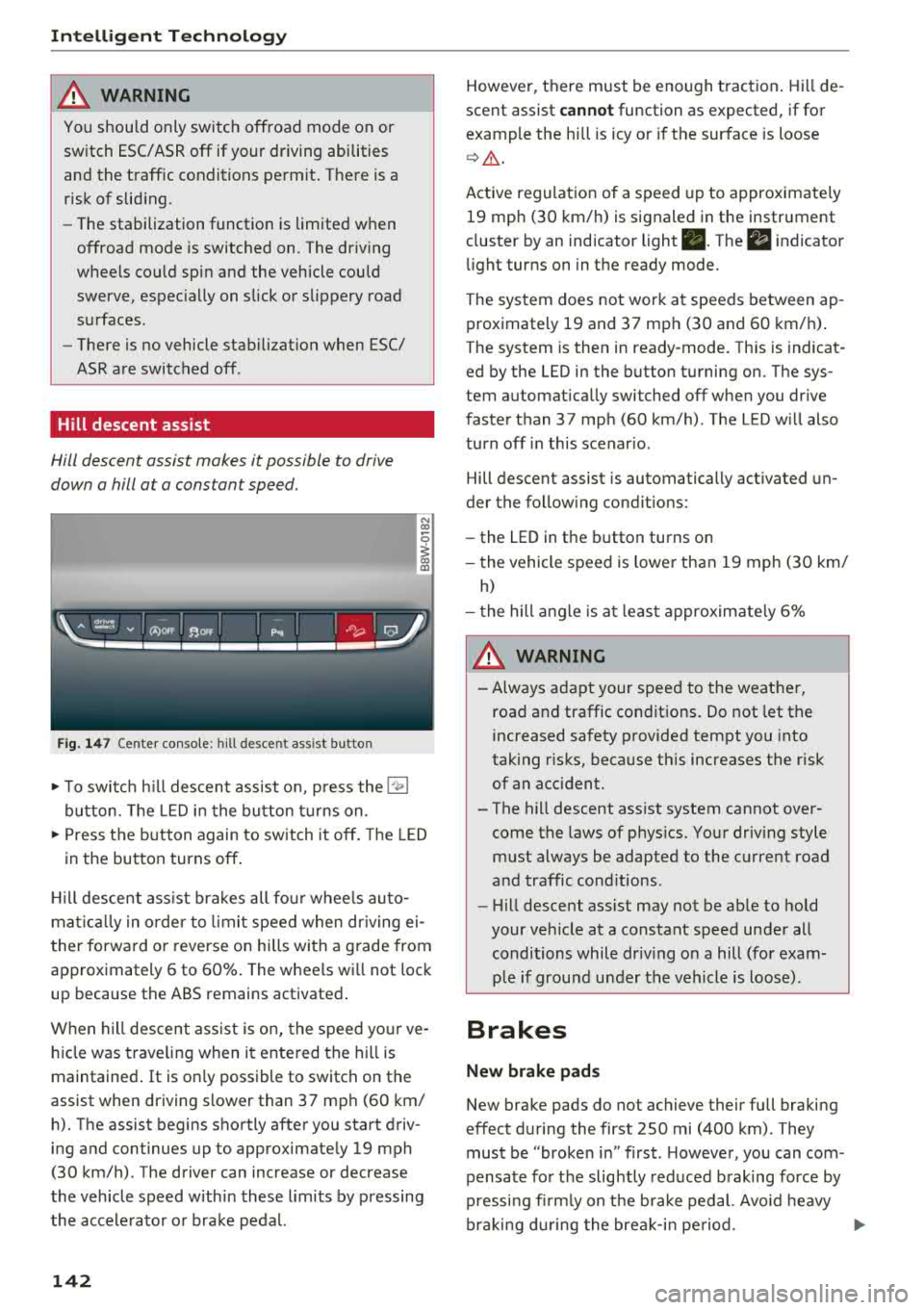
F ig . 147 Center console: hill desce nt ass ist button
.,. T o switc h hill descent assist on, press the l"l;,1
button. The LED in the button turns on.
-
N co
0
~ ID
.,. Press the button again to switch it off. The LED
in the button turns
off .
Hill descent ass ist brakes all fo ur whee ls auto
mat ically in o rder to limit speed when dr iving ei
ther forward or reverse on hills with a g rade from
approximately 6 to 60%. The wheels wi ll not lock
up because the ABS remains activated .
When hill descent ass ist is on, the speed yo ur ve
hicle was traveling when it ente red the hill is
maintained .
It is only possible to switch on the
assist when driving slower than 37 mph (60 km/
h). The assist begins shortly after you start driv
ing and continues up to approximate ly 19 mph
(30 km/h) . The driver can increase or decrease
the vehicle speed with in these limits by pressing
the accelerator or brake pedal.
142
However, there must be enough traction . Hi ll de
scent assist
cannot function as expected , if for
example the hill is icy or if the surface is loose
c> ,& .
Active regulation of a speed up to approximate ly
19 mph (30 km/h) is signaled in the instrument
cluster by an indicator light
• . The ii indicator
li ght turns on in the ready mode.
The system does not work at speeds between ap
proximately 19 and 37 mph (30 and 60 km/h).
The system is then in ready-mode. Th is is indicat
ed by the LED in the button turning on. The sys
tem automat ically switched off when you dr ive
faster than 37 mph (60 km/h) . The LED w ill also
turn off in this scenar io .
Hill descent assist is automatically activated un
der the follow ing condit ions:
- the LED in the button turns on
- the vehicle speed is lower than 19 mph (30 km/
h)
-the hill angle is at leas t approximate ly 6%
A WARNING
- Always adapt your speed to the weathe r,
road and traffic conditions . Do not let the
increased safety provided tempt you into
taking risks, because this increases the risk
of an accident .
- The hill descent assist system cannot over
come the laws of phys ics. Your driving style
must always be adapted to the current road
and traffic cond itions .
- Hill descent ass ist may not be ab le to hold
your veh icle at a constant speed under all
conditions while dr iv ing on a hill (fo r exam
p le if ground under the vehicle is loose).
Brakes
New brake pads
-
New brake pads do not achieve their full braking
effect during the first 250 mi (400 km). They
must be "broken in" first . H owever, you can com
pensate for the slightly reduced braking force by
pressi ng fi rml y on t he brake pedal. Avo id heavy
braking during the break-in period .
..,.
Page 150 of 392
Multi Media Interface
MMI On/Off knob with
joystick function
Operating
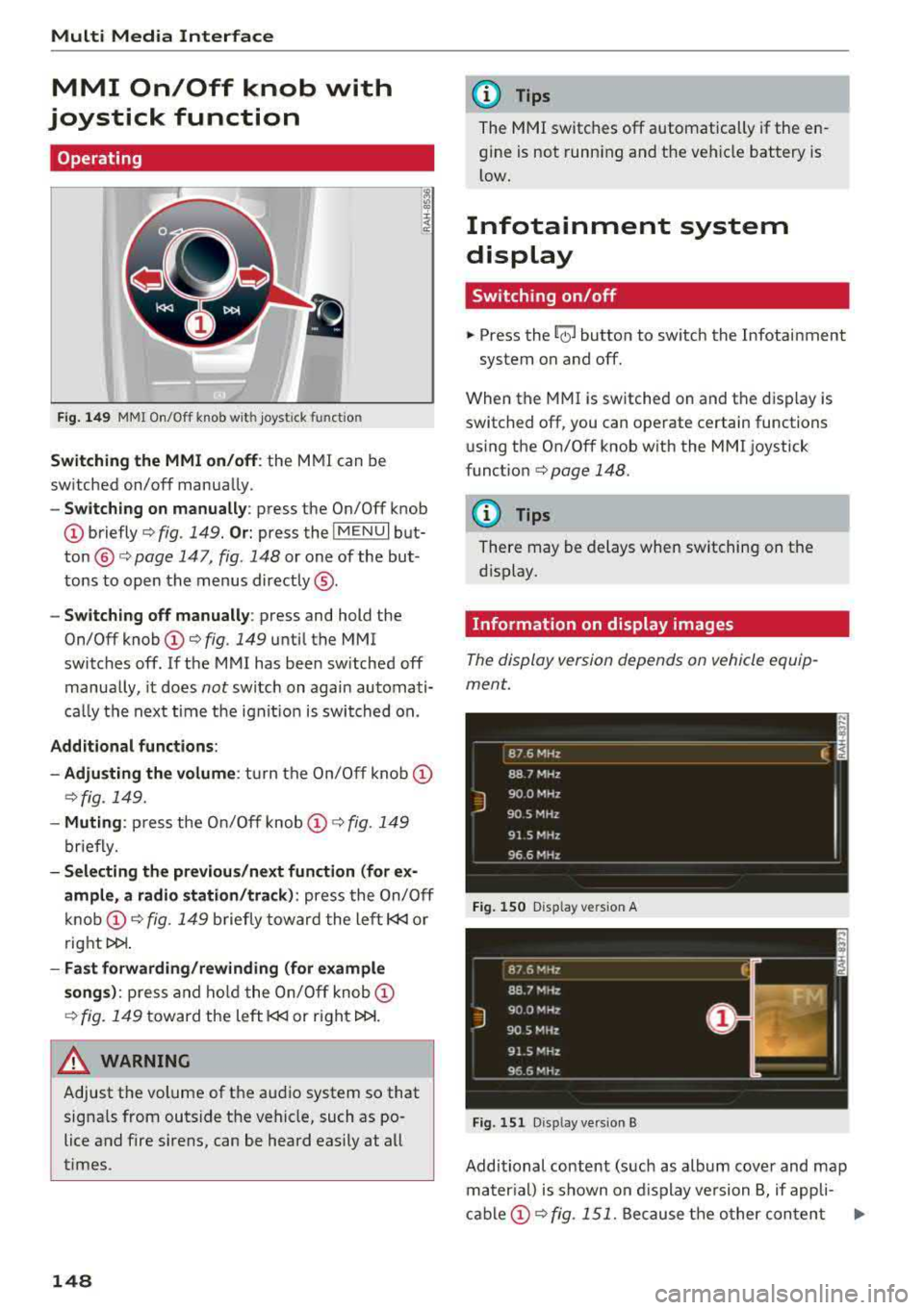
Fig.149 MMI On/Off knob wi th joystick functio n
Switching the MMI on/off: the MMI can be
switched on/off manually .
-Switching on manually : press the On/Off knob
@briefly c:> fig. 149. Or: press the IMENUI but
ton @ c:> page 147, fig. 148 or one of the but
tons to open the menus directly ®·
-Switching off manually: press and hold the
On/Off knob
(D c:> fig. 149 until the MMI
switches off. If the MMI has been switched off
manually, it does
not switch on again automati
ca lly the next time the ignit ion is switched on.
Additional functions:
- Adju sting the volume :
turn the On/Off knob (D
c:>fig. 149.
-Muting : press the On/Off knob (D c:> fig. 149
briefly.
- Selecting the previous /next function (for ex
ample, a radio station/track):
press the On/Off
knob
(D c:> fig . 149 briefly toward the left l
t>l>I .
-Fast forwarding/rewinding (for example
songs): press and hold the On/Off knob (D
c:> fig. 149 toward the left l
.&_ WARNING
Adjust the volume of the audio system so that
signals from outside the vehicle, such as po
lice and fire sirens, can be heard easily at all
times.
148
@ Tips
The MMI switches off automatically if the en
gine is not running and the vehicle battery is
low.
Infotainment system
display
Switching on/off
.. Press the~ button to switch the Infotainment
system on and off.
When the MMI is switched on and the display is
switched off, you can operate certain functions using the On/Off knob with the MMI joystick
funct ion
c:> page 148 .
{!) Tips
There may be delays when switching on the
display.
Information on display images
The display version depends on vehicle equip
ment.
_ 8_ 7_ 6
_ M_H _z ____________ ____ f. ;
88 7 MHz
J
900 MHz
90.5 MHz
91 5 MHz
96 6 MHz - -------------
Fig. 150 D isp lay vers ion A
Fig. 151 D isp lay vers ion B
Additional content (such as album cover and map
mater ial) is shown on display version B, if appli-
cable
(D c:> fig . 151. Because the other content Ill-
Page 222 of 392
Radio
Radio
Opening the radio
The radio supports the FM, AM and SiriusXM*
(satellite radio) bonds. Using the HO Radio re
ceiver also allows you to receive radio stations
on the FM and AM bonds in digital format.
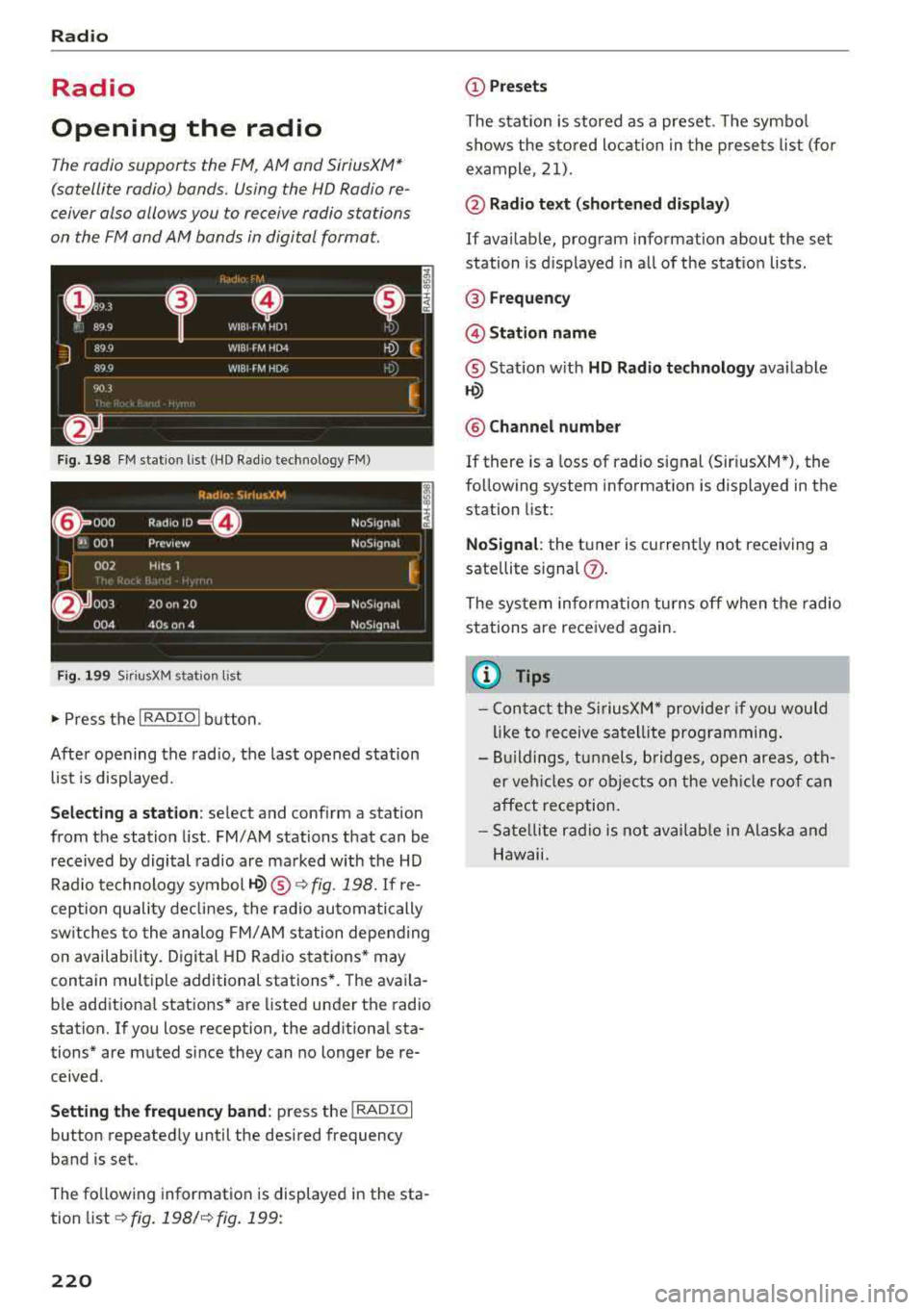
F ig. 19 8 FM stat ion list (HD Radio technology FM)
R,1d10 : 5irius.XM
~ 000 Rad,olD e NoS19n,1l
''JI 001 Preview NoS,gnal
J 002 H its 1
~
6 003 20 on 20 · NoS19nal
004 40s on 4 NoS19nal
Fig. 1 99 Sir iu sXM stat ion list
..., Press t he I RADIO I bu tton .
After opening the radio, t he last opened station
list is displayed.
.
I
Selecting a station : select and conf irm a stat ion
from the station list . FM/AM stations that can be
received by digital radio are ma rked with the HD
Rad io technology
symbol ~® ¢ fig. 198. If re
ception quality de clin es, the r ad io automatically
sw itches to the analog FM/ AM station depending
on availab ility. D igital HD Rad io sta tions * may
contain multiple additional stations *. The ava ila
b le add itiona l stations* are listed under the radio
station. If yo u lose reception, the add itiona l sta
tions* are muted since they can no longer be re ceived .
Setting the frequency band : press the I RADIO I
button repeated ly until the desired frequency
band is set.
The fo llow ing information is displayed in the sta
tion list
¢ fig. 198/ ¢fig . 199:
220
(D Presets
The stat ion is stored as a preset. The symbo l
shows the s to red loc ation in the p rese ts list (fo r
example, 21).
@ Radio te xt (shortened di spla y)
If availab le, program information about the set
station is d isplayed in al l of the stat io n lists .
® Frequency
@Stati on name
® Stat ion w ith HD Radio technolog y available
1-W
@ Channel number
If there is a loss of radio signal (Sir iusXM*), the
fo llow ing system information is displayed in the
station list:
NoSignal : the tuner is cu rrent ly not receiving a
sate llite s ignal
(J) .
The system informa tion turns off when the radio
stations are received again.
(I} Tips
- Con tact the SiriusXM" provide r if you would
like to receive satel lite prog ramming .
- Bui ldings, tu nnels, bridges, open areas, oth
er veh icles o r obje cts on the veh icle roof can
affect reception.
- Sate llite r ad io is not av aila ble in Alaska and
Hawaii.
Page 247 of 392
u co ..... N r--N ..... 0 <( 0 00
System settings
Setting the date and
time
You can set the clock time manually or using the
CPS* .
.. Select : IMENU I button> Settings > left co ntro l
button >
MMI settings > Date & time.
.. Or : select : IMENU I button> Vehicle > left con-
t ro l button >
Vehicle settings > Date & time .
Automatic setting
When t his function is sw itched on g, the time
and date are a utomat ically set.
Time
R eq uirement: the Automatic setting must be
sw itched
off .
Press the cont ro l kn ob. Yo u ca n se t the Time
manually by turn ing and press ing the con trol
k nob.
Date
R eq uirement: the Automati c setting must be
sw itched
off.
Press the cont rol knob . Yo u can set the Date
manually by turn ing and press ing the cont rol
knob.
Time zone
When se lecting the approp riate t ime zone, a
sampling of countr ies in this zone will be listed .
Automatic time zone*
When t his function is sw itched on g , the time
will automatically ad just to the corresponding
time zone.
Automatic daylight saving time*
When t his function is sw itche d on g, the time
w ill automatically switc h to day light saving time .
Time format
If yo u select 24h , the clock will d isp lay, for ex
a m ple,
13 :00 . If yo u se lec t AM /PM , the clock
w ill d isp lay, for examp le,
1 :00 PM .
System settings
Date format
If you select DD .MM .YYYY , the date displ ay will
show, for example ,
31.08.2018. If you select
MM /DD/YYYY , the date disp lay w ill show, for ex
amp le,
08/31/2018. If you select YYYY-MM
DD ,
the date display will show, fo r example,
2018 -08 -31 .
MMI settings
.. Select: !ME NUI button> Settings > left control
button >
MMI settings .
Language
Yo u can c hange the display language as well as
the lang uage fo r the voice guidance * and voice
r ecognition system *.
T he num ber of langu ages av ailab le depends on
t h e ma rket.
Measurement units
The following meas urement u nits can be set de
pend ing on ava ilab ility:
Speed , Distance , Tem
perature , Fuel consumption , Volume , Pressure .
Tool tips
When this f unct ion is switched on g, yo ur MMI
shows you tips fo r inpu t. The freq uency of how
often it displays dec reases w ith time .
Speech dialog system
App lies to : vehicles wit h voice recog nitio n system
Depend ing on veh icle equipment, the following
funct ions may be ava ilable:
Command display : when this function is sw itch
ed on
g , th e M MI w ill show yo u the poss ible
commands for voice input in the respective
menu.
Short dialog : when this function is sw itche d on
g, a shorter form of the prompts is used .
Command during voice output*: thi s fu nction i s
swi tched on at the factory . W hen this func tion is
switched on
g , yo u can say new commands dur-
i ng announcements. You do not need to wa it for
the signal tone (beep) dur ing an announcement.
When the funct io n is swi tched off
0, you need to Iii>
245
Page 251 of 392
-Version information : information on the MM I
software version and the nav igat io n database *
software vers ion is disp laye d. The
Software in·
formation function a lso provides information
on the software con tained i n the MMI and t he
li cens ing agreeme nt.
Sound settings
The sound distribution and volume of the MMI
can b e adjust ed individually . The settings d epend
on vehicle equipme nt.
----- 1
J -~+ ~-
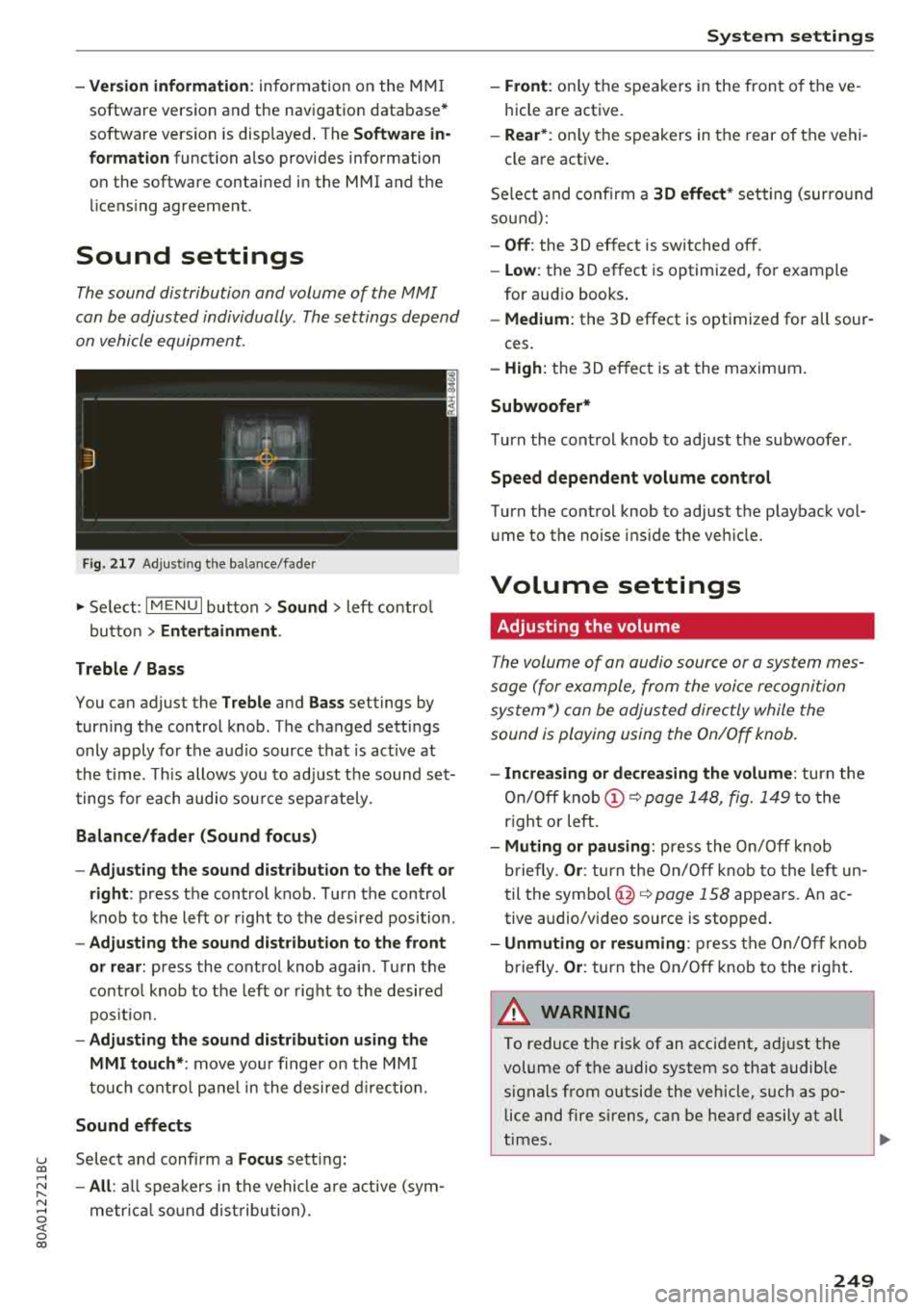
F ig. 217 A dj ustin g the ba la nce /fade r
"'Se lect : I MENU I bu tton >Sound > le ft contro l
b utt on
> Entertainment .
Treble / Bass
You can ad just the Treble and Bass settings by
turn ing t he control knob. The changed se ttings
only apply fo r the a ud io source tha t is ac tive at
t he time . T his allows you to ad just t he soun d set
t ings for each audio sou rce se para tely .
Balance/fader (Sound focus)
- Adjusting the sound d istribution to the left or
right :
press the control knob. Tur n the control
k nob to the left or right to the des ire d posi tion .
-Adjusting the sound distribution to the front
or rear:
press the cont rol knob again . T urn the
contro l knob to the left o r right to the desired
p os it io n.
- Adjusting the sound distribution using the
MMI touch* :
move your finger on the MM I
touch co ntro l pan el in th e desire d directio n.
Sound effects
u Selec t and confi rm a Focus se tt in g: co ...
~ -All : all sp eakers i n th e vehi cle ar e active (sym -
~ metrical sound dist ribu tion) . 0 <( 0 00
System settings
-Front : only t he s pea ke rs in the fron t of the ve
hicle are active.
- Rear* : only the s peakers in the rear of the vehi -
cle a re act ive .
Se lect a nd co nfir m a
30 effect * setting (su rround
so un d):
-Off : the 30 effect is switched off .
-Low : the 30 effect is optimized , fo r exam ple
for au dio books .
-Medium: the 30 effect is optimized for all sour -
ces .
-High : the 3 0 eff ect is at the ma ximum .
Subwoofer*
Turn the con trol knob to ad just t he subwoofer .
Speed dependent volume control
Turn the cont rol knob to ad just t he p layback vol
u me to the noise ins ide the ve hicle.
Volume settings
Adjusting the volume
Th e volum e of an audio source or a syst em mes
sage (f or example, from the voice recognition
sy stem *) can be adjus ted direc tly while the
sound is playing using the On/Off knob.
- Increasing or decreasing the volume : turn the
On /O ff knob
(D ~ page 1 48, fig. 1 49 to the
r igh t or left.
- Muting or pausing: press the On/ Off knob
b riefly .
Or: tur n t he On/Off knob to the le ft un
t il the
sym bo l@ ~ page 158 appe ars. An ac
tive audio/v ideo source is stoppe d.
-Unmuting or resuming : press the On/O ff knob
b riefly .
Or: turn the On/O ff knob to the right .
A WARNING ~ -
To reduce t he ris k of an acci den t, a djust t he
volume of t he a udio syst em so that audib le
signals from o utside the vehicle, such as po
lice and fire s irens, can be hea rd easily at all
times.
249
Page 275 of 392
u co .... N r-N ....
~ 0 co
-Improper installation of child restraints can
reduce their effectiveness or even prevent
them from providing any protection .
- An improperly installed child restraint can
interfere with the airbag as it deploys and
seriously injure or even kill the child
-even
with an Advanced Airbag System .
- Always carefully follow the manufacturer's
instructions provided with the child safety
seat or carrier.
- Always make sure that there is nothing on
the front passenger seat that will cause the
capacitive passenger detection system in
the seat to signal to the Airbag System that
the seat is occupied by a person when it is
not, or to signal that it is occupied by some
one who is heavier than the person actually
sitting on the seat. The presence of addi
tional objects could cause the passenger
front airbag to be turned on when it should
be off, or could cause the airbag to work in a
way that is different from the way it would
have worked without the object on the seat .
Front airbags
Description of front airbags
The airbag system can provide supplemental
protection to properly restrained front seat occu
pants.
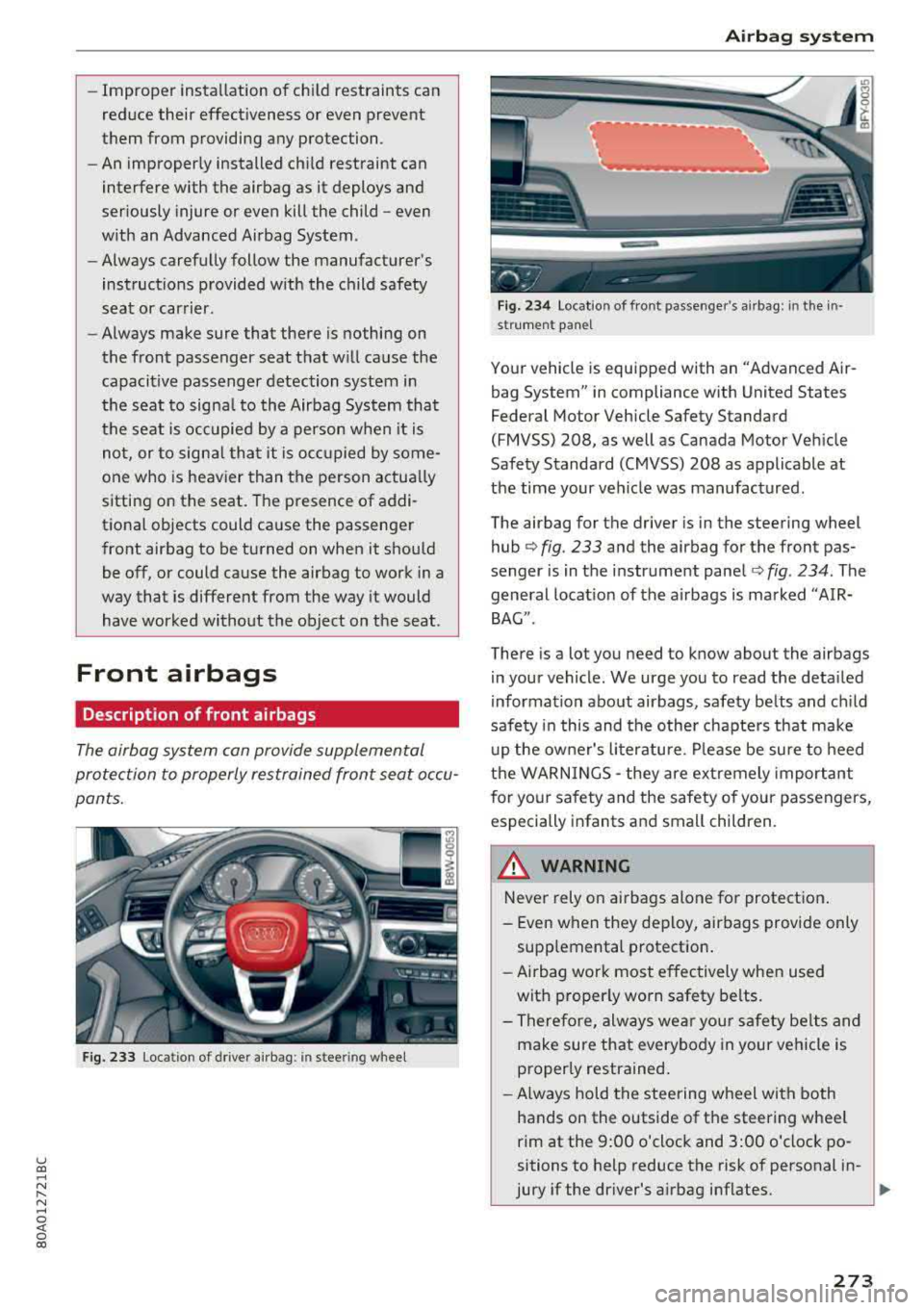
Fig. 233 Lo ca ti on of driver airb ag: in stee ring wheel
Airbag system
Fig. 234 Locat io n of fro nt passen ger 's airbag : in t he in·
s tr um en t pan el
Your vehicle is equipped with an "Advanced Air
bag System" in compliance with United States
Federal Motor Vehicle Safety Standard
(FMVSS) 208, as well as Canada Motor Vehicle
Safety Standard (CMVSS) 208 as applicable at
the time your veh icle was manufactured .
The airbag for the driver is in the steering wheel
hub
¢ fig . 233 and the airbag for the front pas
senger is in the instrument panel
¢fig . 234 . The
general location of the airbags is marked "AIR
BAG".
There is a lot you need to know abou t the airbags
in your vehicle . We urge you to read the detailed
information about airbags, safety belts and child
safety in this and the other chapters that make
up the owner's literature . Please be sure to heed
the WARNINGS
-they are extremely important
for your safety and the safety of your passengers,
especially infants and small children.
_& WARNING
-
Never rely on airbags alone for protection .
- Even when they deploy, airbags provide only
supplemental protection.
- Airbag work most effectively when used
with properly worn safety belts.
- Therefore, always wear your safety belts and
make sure that everybody in your vehicle is
properly restrained.
- Always hold the steering wheel with both
hands on the outside of the steering wheel
rim at the 9:00 o'clock and 3:00 o'clock po
sitions to help reduce the risk of personal in-
jury if the driver's airbag inflates.
..,..
273
Page 278 of 392
Airbag syste m
-If you are unrestrained, leaning forward, sit
t ing s ideways or out of pos ition in any way,
your risk of injury is much h igher.
- You will also receive serious injuries and
could even be killed if you are up aga inst the
airbag or too close to it when it inflates -
even with an Advanced
Airbag ¢ page 269.
A WARNING
A child in a rearward -facing child safety seat
installed on the front passenger seat w ill be
ser iously injured and can be killed if the front
airbag inflates - even w ith an Advanced Ai rbag
System.
- Although the Advanced A irbag System in
yo ur vehicle is designed to tu rn off the front
airbag when a rearward-facing child re
straint has been insta lled on the front pas
senger seat, nobody can absolutely guaran
tee that deployment is impossible in all con
ceivable s ituations that may happen during
the useful life of your vehicle.
- The inflating a irbag w ill hit the child safety
seat or infant carrier with great force and
will smash the chi ld safety seat and child
against the backrest, center armrest, door,
o r roof .
- Always install rearward -facing ch ild re
straints on the rear seat .
- If you must install a rearward fac ing ch ild
safety seat on the front passenger seat be
cause of exceptional circumstances and the
PASSENGER AIR BAG OFF ~; light does not
come on and s tay on, immed iate ly install
the rear-fac ing ch ild safety sea t in a rear
seat ing pos ition and have the airbag system
inspected by your authorized Audi dea ler.
A WARNING
If, in exceptional circumstances, you must in
stall a forward-facing chi ld restraint on the
front passenger's seat :
- Always make sure the forward-facing seat
has been designed and cert ified by its man
ufacturer for use on a front seat with a pas
senger front and side a irbag.
276
- Never put the forward-facing child restraint
up against or very near the instrument pan
el.
- Always move the front passenger seat to
the highest posit ion in the up and down ad
justment range and move it back to the rearmost posit ion in the seat's fo re and aft
ad justment range, as far away from the a ir
bag as poss ible, before installing the for
ward-f acing chi ld restrain t.
- Always make sure that the safety be lt upper
anchorage is behind the ch ild rest raint and
not next to o r in fron t of the child rest raint
so that the safety be lt will be p roperly posi
tioned.
- Always make sure that there is noth ing on
the front passenger seat tha t will cause the
capacitive passenger detection system in
the seat to signal to the Airbag System that
the seat is occup ied by a person when it is
not, or to signal that it is occupied by some
one who is heavier than the person actually
sitt ing on the seat. The presence of addi
tional objects could cause the passenger
front airbag to be turned on when it should
be off, or could cause the airbag to work in a
way that is differen t from the w ay it wou ld
have worked without the object on the seat .
- Ma ke sure that the
PASSENGER AIR BAG
OFF
"I,;; light comes on and stays on all the
time wheneve r the ignition is switched on .
Advanced Airbag System components
The front passenger seat in your vehicle has a lot
of very important parts of the Advanced Airbag
System in it. These pa rts include the capacitive
passenger detection system, wir ing, brackets,
and more . T he control unit monitors the system
o n the front passenger seat when the ignit ion is
switched on and turns the airbag indicato r light
o n when a malfunction in the one of the system
components is
detected ¢ page 281. Because
t h e fron t passenger sea t contains impo rtant
parts of the Advanced Ai rbag System , you must
take care to prevent it from being damaged .
Damage to the seat may prevent the Advanced
.,.
Page 282 of 392
Airbag syste m
airbag inflates -even with an Advanced Airbag
System.
- The inflating airbag will hit the child safety
seat or infant carrier with great force and
will smash the child safety seat and child
against the backrest, center armrest, door
or roof .
- Always install rear-facing child safety seats
on the rear seat .
- If you must install a rearward-fac ing child
safety seat on the front passenger seat be
cause of exceptional circumstances and the
PASSENGER AIR BAG OFF ~; light does not
come on and stay on, immed iate ly install
the rear-fac ing ch ild safety seat in a rear
seat ing pos ition and have the airbag system
inspected by your a uthorized Audi dea ler.
A WARNING
Objects between you and the a irbag w ill in
crease the risk of inj ury in a crash by interfer
ing with the way the airbag unfo lds or by be
ing pushed into you as the a irbag inflates.
- Never hold things in your hands or on your
lap when the vehicle is in use.
- Never transport items on or in the area of
the front passenger seat . Objects could
move into the area of the front airbags dur
ing brak ing or other sudden maneuvers and
become dangerous projectiles that can
cause serious personal injury if the a irbags
inflate .
- Never place or attach accessor ies or other
objects (such as cupholders, telephone
brackets, large, heavy o r bulky objects) on
the doors, over or nea r the area marked
"AIRBAG" on the steering wheel, instru
ment pane l, sea t backrests or between
those areas and yoursel f. These objects
could cause injury in a crash, especially
when the airbags inflate.
- Never recline the front passenger's seat to
transport objects . Items can also move into
the area of the side airbag o r the front a ir
bag dur ing braking or in a sudden maneu
ver. Objects near the airbags can become
280
-
pro jecti les and cause injury, part icularly
when the seat is reclined.
- Never p lace or transport objects on the
front passenger seat. Objects on the front passenger seat could cause the capacitive
sensor in the seat to signal to airbag system
that the seat is occupied by a person when it
in fact is not, or that the pe rson on the seat
is heavie r than he or she act ually is . The
change in elec tric capa citan ce beca use of
such o bje cts can c ause the p assenge r front
airbag to be turned on when it should be
off, or can cause the airbag to work in a way
that is different from the way it would have
wo rked without objects on the seat.
- Always make sure that there is nothing on
the front passenge r seat that will cause the
capacitive passenge r detection system in
the seat to signal to the Airbag System that
the seat is occup ied by a person when it is
not , or to signal that it is occupied by some
one who is heavier than the person act ually
sitt ing on the seat. The presence of an ob
ject could ca use the passenger front air bag
to be turned on when it should be off, or
could cause the airbag to work in a way that is different from the way it would have
worked without the object on the seat.
A WARNING
The fine dust created when airbags deploy can
cause breathing prob lems for people with a
h istory of asthma or other breath ing cond i
tions .
- To reduce the r isk of breathing p roblems,
those with asthma or other respiratory con
ditions should get fresh a ir right away by
getting out of the vehicle or opening win
dows or doors .
- If you are in a collision in which airbags de
ploy, wash your hands and face with m ild
soap and water before eating.
- Be ca refu l not to get the dust into your eyes,
or into any cuts or scratches.
- If the residue should get into your eyes,
flush them w ith wate r.
Page 283 of 392
u co ..... N r-N .....
~ 0 co
Monitoring the
Advanced Airbag System
Airbag monitoring indicator light
Two separate indicators monitor the function of
the Advanced Airbag System : the
El light and
the
PAS SENGE R AIR BAG OFF ~; ON @ light.
The Advanced Airbag System as we ll as the side
a ir bags and side curtain airbags with eject ion
m it igation feat ures ( including the e lectron ic con
trol unit, sensors and system wiring) are a ll
monitored continuously to make sure that they
a re funct ioning properly whenever the ignition is
on. Every time you turn on the ignition, the air
bag system ind icator
light E,lwill come on for a
few seconds (function check).
Th e sys tem mu st be in spect ed wh en the
indicato r light
E,I:
- does not come on when the ignit ion is switched
on
- does not go out a few seconds after you have
switched on the ign ition, or
- comes on while driving
If an airbag system malfunction is detected, the
indicator light wi ll come on to serve as a constant
reminder to have the system inspected immedi
ately .
If a malfunction occurs that turns the front air
bag on the passenger side
off, the PASSENGER
AIR BAG
OFF ~. light wi ll come on and stay on
whenever the ignition is on.
A WARNING
An airbag system that is not funct ioning prop
erly cannot provide supplemental protection
in a frontal crash .
- If the airbag indicator
light¢ page 26
comes when the vehicle is be ing used, have
the system inspected immed iate ly by your
au thorized Aud i dealer.
It is possible that
the a irbag will inflate when it is not s up
posed to, or will not inflate when it shou ld.
Airbag system
PASSENGER AIR BAG OFF '1; ON @ light
"' -N
i
F ig. 236 Sectio n fro m th e headliner : PASSENGER AIR BAG
OFF~ ; ON @ lig ht
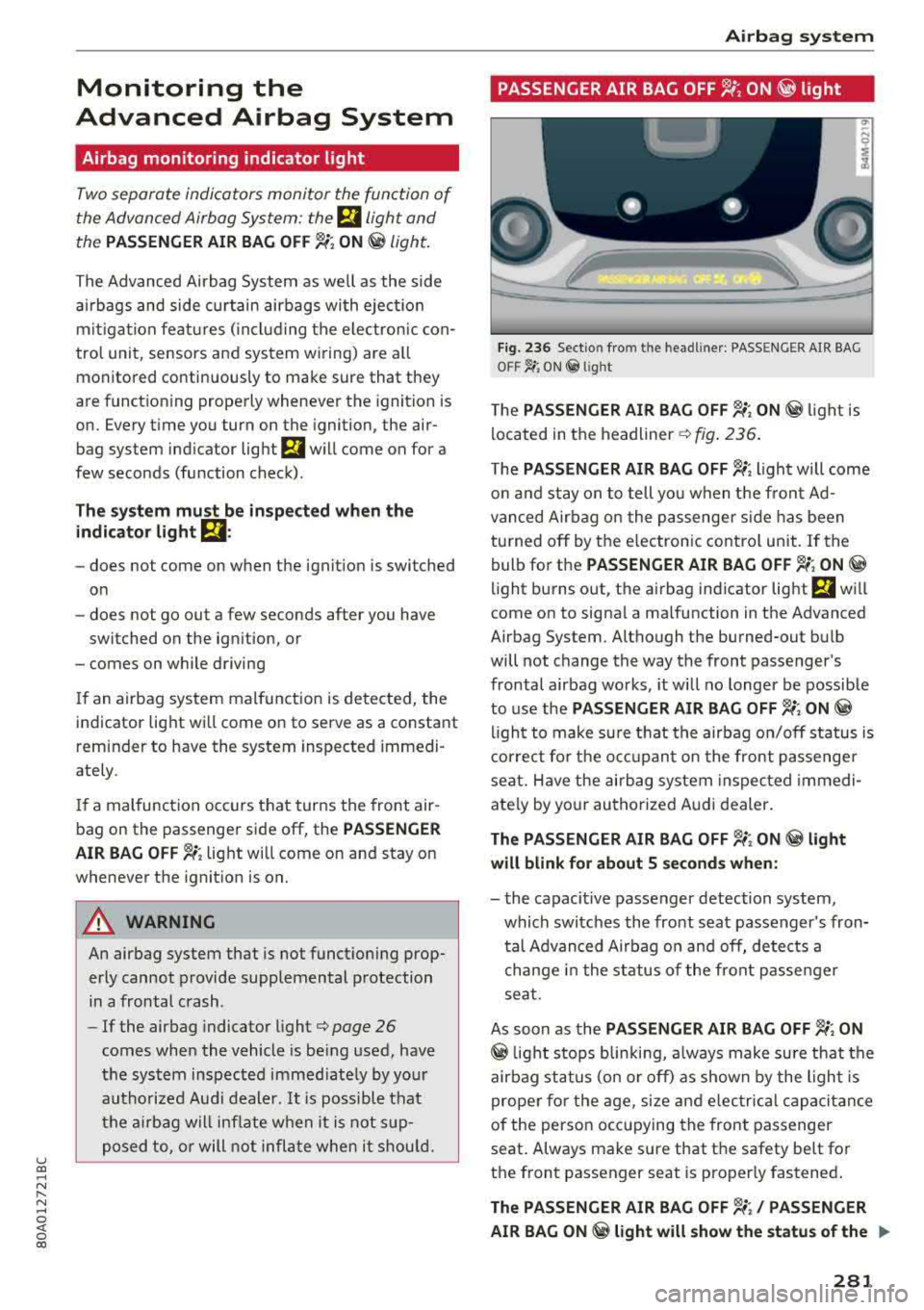
T he PAS SEN GER AIR BAG OFF ~; ON @ light is
located in the
headliner ¢ fig. 236.
T he PASS ENG ER AIR BAG OFF ~; light will come
o n and stay on to tell you when the fron t Ad
vanced Airbag o n the passenger s ide has been
turned
off by the e lectronic control unit . If the
bulb for the
PA SSENGER AIR BAG O FF ~; ON @
light burns out, the airbag ind icator light El will
come on to signal a malfunction in the Advanced
Airbag System. Although the burned-out bu lb
will not change the way the front passenger's
frontal a irbag works , it will no longer be possible
to use the
PAS SENGER A IR BAG OFF ~; ON@
light to make sure that the airbag on/off status is
correct fo r the occ upan t on the front passenge r
seat. Have the airbag system inspected immedi
ately by your authorized Audi dealer.
Th e PA SSENGER AIR BAG OFF ~; ON @ light
will blink for about 5 second s wh en :
- the capacit ive passenger detection system,
which switches the front seat passenger's fron tal Advanced Airbag o n and off, detects a
change in the status of the front passenger
seat.
As soon as the
PASSEN GER AIR BAG OFF ~; ON
@ light stops blinking, a lways make sure that the
airbag status (on or off) as shown by the ligh t is
proper fo r the age, size and e lectrical capacitance
of the person occ upying the front passenger
seat . Always make sure that the safety belt for
the front passenger seat is properly fastened .
The PASSENGER AIR BAG OFF ~/ PASSEN GER
AIR BAG ON
@ ligh t will show th e sta tu s o f the .,..
28 1
Page 296 of 392
Child sa fety
one o f th e rear seating positions . If in exception
a l circumstances you must use it on the front
passenger seat, carefully read all of the informa
tion on child safety and Advanced Airbags and
heed all of the app licab le WARNINGS. Make cer
tain that the child and child restraint are correct
ly recogn ized by the capacitive passenger detec
tion system in the front passenge r seat, that the
front passenger airbag is turned off, and t hat the
a ir bag stat us is a lways cor rectly signaled by the
PASSENGER AIR BA G OFF ~; light.
Many types and models of c hild rest raints have
been ava ilable ove r th e yea rs, new mode ls are in
troduced regularly incorporat ing new and im
p roved designs and o lder mode ls are taken o ut of
p roduction . Chi ld restraints are not standardized .
Chi ld restraints of the same type typically have
d ifferent weights and sizes and d ifferent "foot
prints", the s ize and shape of the bottom of the
chi ld restraint that s its on the seat, when they
are installed on a vehicle seat . These differences
make it virtually impossible to ce rtify compliance
with the requ irements fo r advanced airbags with
each and eve ry c hild rest raint that has ever been
sold in the pas t or will be sold ove r the co urse of
the useful life of your vehicle.
For this reason, the Un ited States Nat ional High
way Traffic Safety Adm inist ration has p ublished a
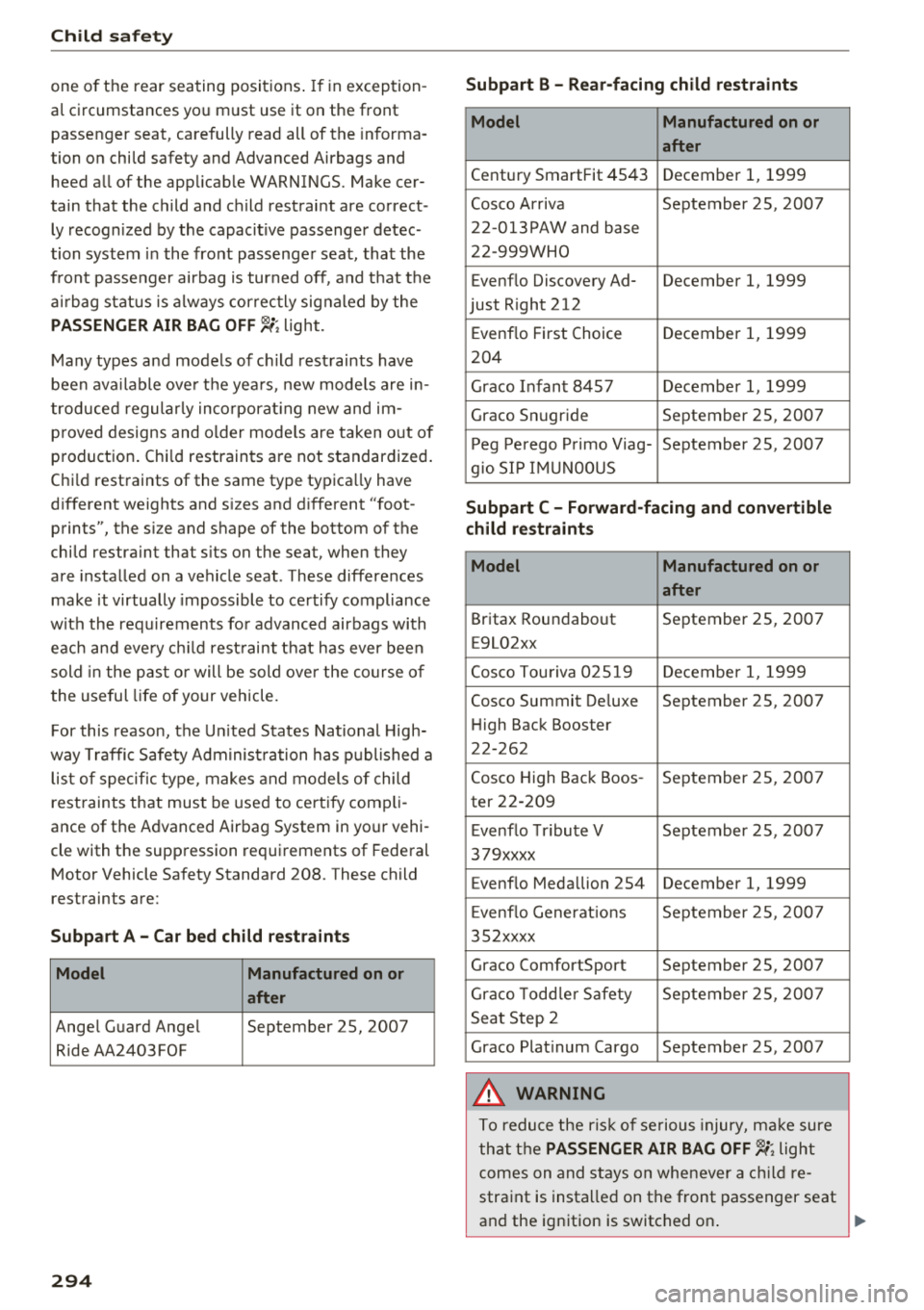
lis t of specific type, makes and models of child
rest raints that must be used to cert ify comp li
ance of the Advanced Airbag System in your vehi
cle with th e suppression requirements of Federal
Motor Vehicle Safety Standard 208. These child
restraints are:
Subpart A -Car bed child restraint s
Model Manufactured on or
after
Ange l Guard Ange l September 25, 2007
Ride AA2403FOF
294
Subpart B -Rear-facing child rest raints
Model Manufactured on or
after
Century SmartFit 4543 December 1, 1 999
Cosco Arriva September 25, 2007
22-013PAW and base
22 -999WHO
Evenflo Discovery Ad- December
1, 1999
just R ight 212
E venflo First Choice December
1, 1
999
204
Graco Infant 8457 December
1, 1 999
Graco Snugride September 25, 2007
P eg Perego P rimo Viag- September 25, 2007
g io SI P IMU NOOUS
Subpart C -Forward-facing and convertible
child restraints
Model Manufactured on or
after
Britax Roundabout September 25, 2007
E9L02xx
Cosco Tou riva 025 19 December
1, 1999
Cosco Summit Deluxe September 25, 2007
H igh Back Booster
22-262
Cosco High Back Boos -September 25, 2007
ter 22-209
E venflo Tribute V September 25, 2007
379xxxx
Evenflo Medallion 254 December
1, 1999
E venflo Generat ions September 25, 200 7
35 2xxxx
Graco ComfortSport September 25, 2007
Graco Todd le r Safety September 25, 200 7
Seat Step 2
Graco Plat inum Cargo September 25, 2007
A WARNING
To reduce the ris k of se rious injury, ma ke sure
that t he
PASSENGER AIR BAG OFF ~; light
comes on and stays on whenever a c hild re
straint is insta lled on the front passenger seat
and the ignition is switched on .