audio AUDI Q5 2018 Owner's Manual
[x] Cancel search | Manufacturer: AUDI, Model Year: 2018, Model line: Q5, Model: AUDI Q5 2018Pages: 392, PDF Size: 60.56 MB
Page 236 of 392
Media
-Do not use any additional USB extension ca
bles or adapters to connect mobile devices
to the USB charging port that have already
been connected by a USB adapter. They may
impair the functionality.
- USB hubs are not supported.
- Refer to the manufacturer's operating man-
ual for important information regarding the
operation of your mobile device.
- Correct funct ion of all mobile devices can
not be guaranteed .
- The vehicle batte ry drains when mobile de
vices are turned on but the engine is off .
Rear Seat Entertainment preparation
Applies to: ve hicles with Rea r Seat E nte rtainment preparation
The Rear Seat Entertainment preparation in
cludes cables and a mount for Audi Entertain
ment mobile in the driver's and front passenger's
seat backrests.
The suitab le Audi Entertainment mobile Rear
Seat Entertainment package is available through
Audi Genuine Accessories.
Using Audi Genuine Accessories is recommended.
Audi has established their rel iability, safety and
suitability.
We cannot eval uate or endo rse other products in
this way, even if the product is approved by a cer
tified testing agency or government agency .
(D Note
Only use devices that are approved for the
Rear Seat Entertainment preparation. Unap
proved devices may cause damage to the vehi
cle e lectronics.
@ Tips
- Contact an authorized Audi dealer or au
thorized Audi Service Facility for additional
information about
Audi Entertainment mo
bile.
- Always read the chapter ~ page 371.
-The Rear Seat Entertainment preparation is
not intended to charge external electron ic
devices.
234
Playing media
Accessing media
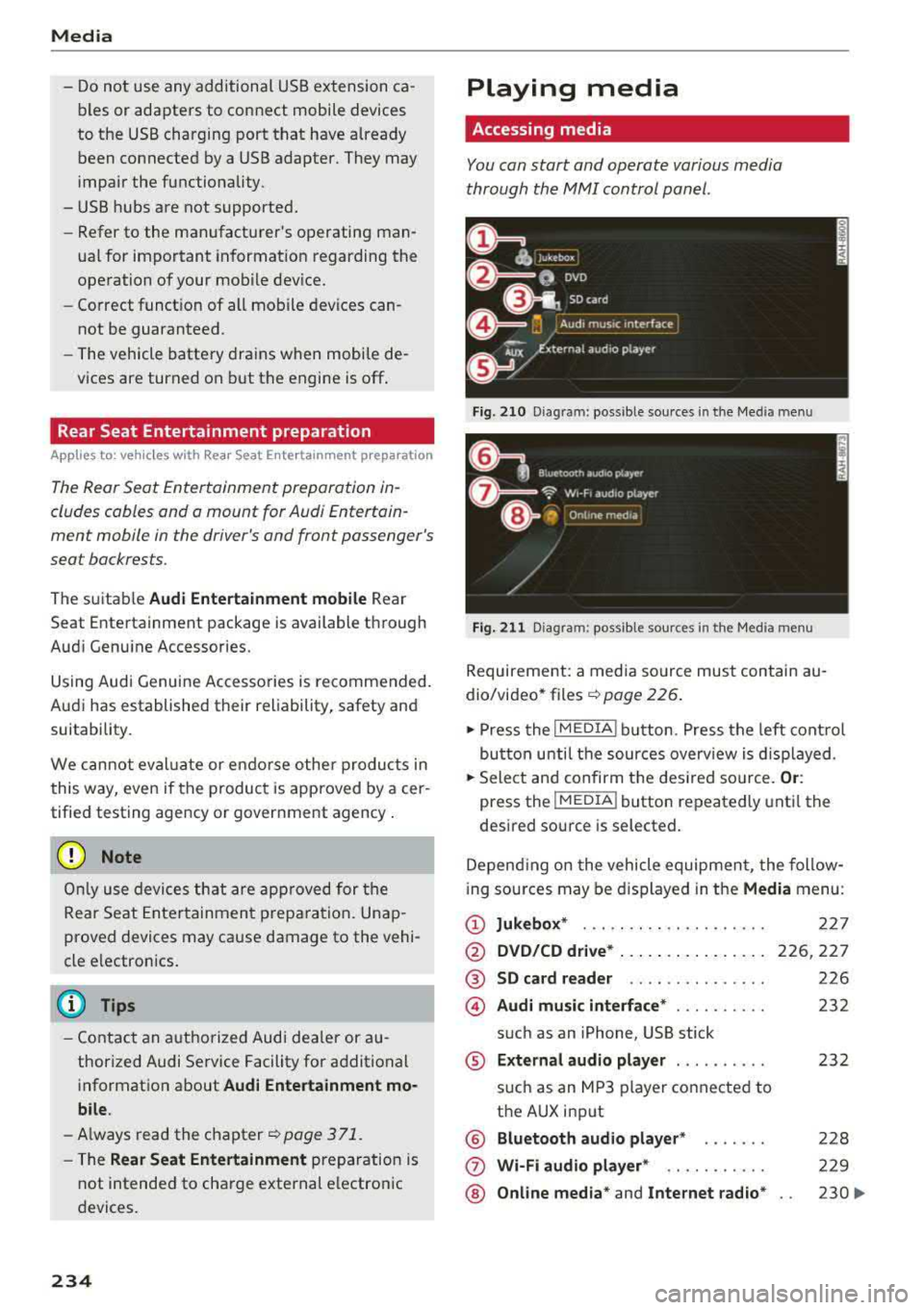
You can start and operate various media
through the
MMI control panel .
Fig. 210 Diag ram: possible sources in t he Me dia menu
Fig. 211 Diagra m: possible sources in t he Med ia me nu
Requireme nt: a media source must contain au
dio/video*
files ¢ page 226.
.,. Press the I MEDIA i button . Press the left control
button unti l the sources overview is displayed .
.,. Select and confirm the desired source. Or:
press the !MEDIA ! button repeatedly until the
desired source is selected.
Depending on the vehicle equipment, the follow
i ng sources may be displayed in the
Media menu:
(D Jukebox* ... .. .. .. .. ........ .
@ DVD/CD drive* ... .. ... ..... .. .
@ SD card reader .. .. ..... ..... .
@ Audi music interface* ......... .
such as an iPhone, USB stick
® External audio player ......... .
®
(j)
®
such as an MP3 player connected to
the AUX input
Bluetooth audio player*
Wi-Fi audio player* .. ........ .
Online media*
and Internet radio*
227
226,227
226
232
232
228
229
230
..,_
Page 237 of 392
-Playing audio/video files : select a source in the
Media menu > Category (such as artists > al
bum> track) .
-Moving one leve l up in the folder structure :
press the I BACKI button. Or: select and confirm
Folder up .
- Selecting the previous or ne xt track/chapter*
1>: press the On/Off knob on the M MI cont rol
panel br iefly to the left
l«1 or right l»t.
-Fast-forwarding and rewinding audio/video*
file s:
press and hold the On/Off knob on the
MMI control panel to the left
l«1 or right l»t for
a longer time.
-Pausing or resum ing playb ack : press the On/
Off knob on the MMI contro l pane l br iefly.
@ Tips
- You can scro ll th rough long lists quickly by
turning the contro l knob q uick ly. The scroll
i ng speed depends on the number of list e n
tries.
- Fo r safety reasons, the video image is only
displayed when the vehicle is stationary . On
l y the sound from t he v ideo plays while driv
i ng .
Media center
Various categories for selecting audio/video*
files are available in the media center .
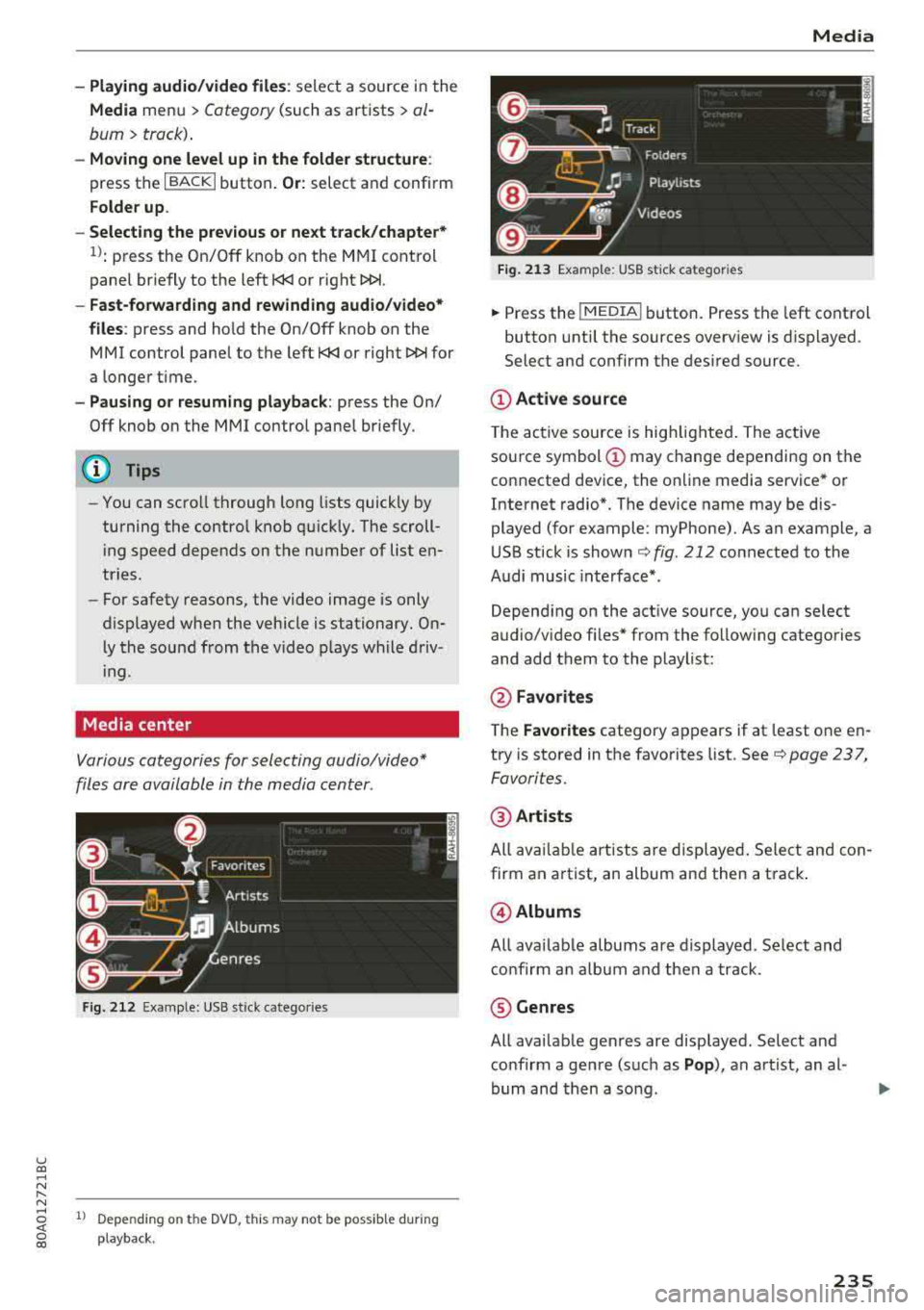
Fig. 212 Exa mple: USB stick cate gories
u co ..... N r-N ..... ~ 1l Depe ndi ng on the DVD, this m ay not be poss ib le d urin g
~ playba ck .
Media
Fi g. 21 3 Examp le: USB stick cat egories
.,. Press the I MEDIA i button. Press the left cont rol
button unti l the sources overv iew is d isplayed .
Select and confirm the desired source.
(D Active source
The active source is hig hlighted . The ac tive
sou rce symbol
(D may change depending on the
connected dev ice, the on line media service * or
Internet radio*. The device name may be dis
played (for example: myPhone). As an example, a
U SB stick is shown
c:::;, fig. 212 connected to the
Audi music inte rface *.
Depend ing on the act ive source, yo u can select
audio/v ideo fi les* from the follow ing categories
and add them to the playlist:
@ Favo rites
T he Favorites category ap pears if at least one e n
try is stored in the favo rites list . See
c:::;, page 237,
Favorites.
@ Artists
All av ailable art ists a re displayed . Sele ct and con
firm an a rtist, an album and then a t rack .
@ Albums
All ava ilab le albums are d isplayed. Se lect and
c o nfirm an alb um and then a track .
® Genres
All ava ilab le ge nres are disp layed. Select and
confirm a gen re (s uc h as
Pop ), an artist, an al
bum and then a so ng .
235
Page 239 of 392
u co .... N r--N ..... 0 <( 0 00
Opening free text search
.,. Keep turning the control knob to the left until
the
free text search input field (D ¢ fig. 214
appears . Or: push the contro l knob up.
Using the free text sear ch : see ¢ page 157, Free
text search .
Entries that contain the entered search term are
listed in the results
list @ ¢ fig. 214. You can
sea rch for
artists @¢ fig. 214, albums @ or
tracks @as we ll as genres and videos .
(D Tips
-It will then search thro ugh the files in the
active so urce.
- If yo u open free text search in the
Folders
category (i) ¢ page 235, fig. 213 or the
Composers , Podcasts and Audio books cat
egories, it wi ll only search through the files
in that folder.
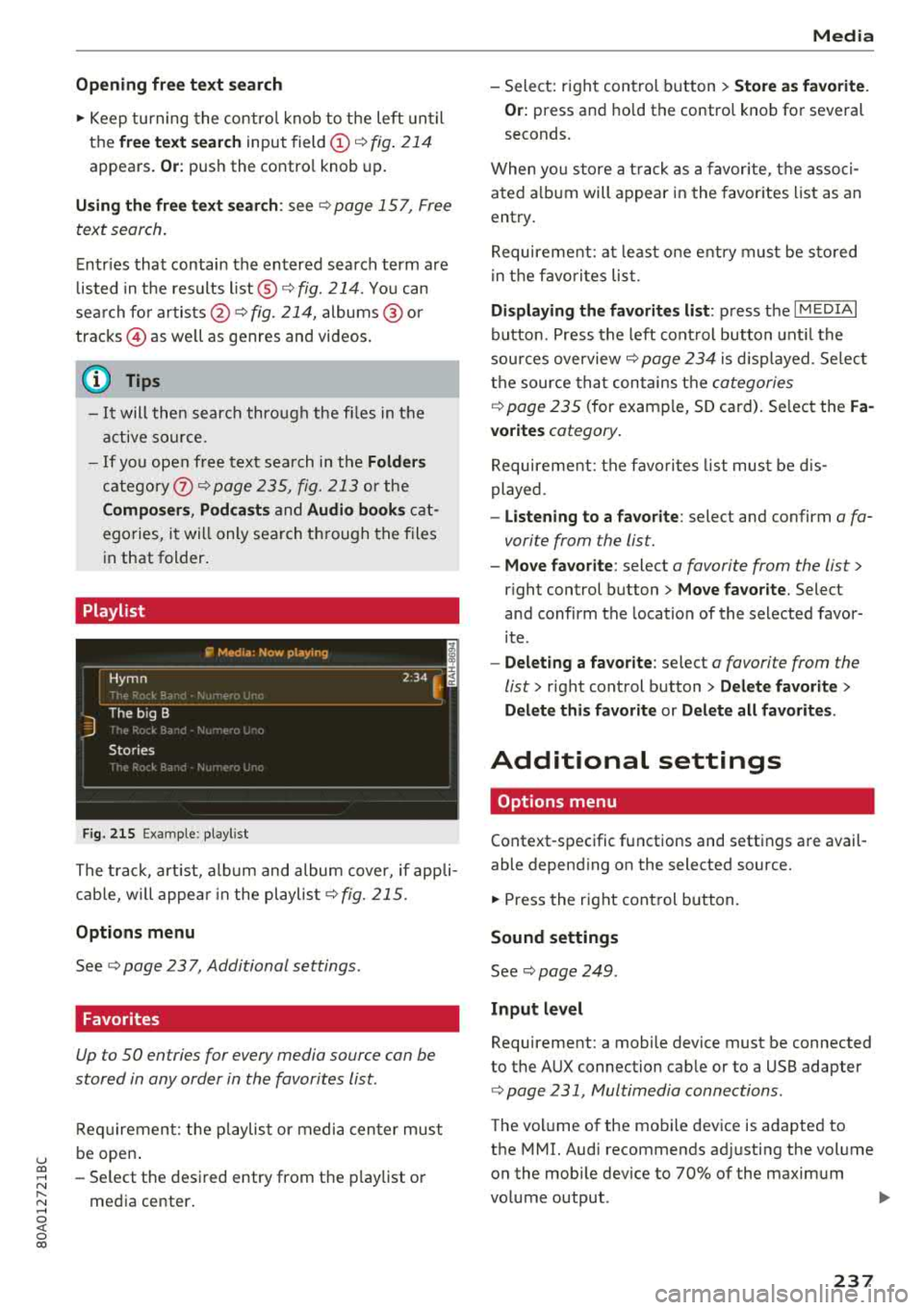
Playlist
Fig. 215 Example: playlist
The track, artist, album and album cover, if appli
cab le, w ill appea r in the playlist
¢fig. 215 .
Options menu
See ¢ page 23 7, Additional settings .
Favorites
Up to 50 entries for every media source can be
stored in any order in the favorites list.
Requirement: the pla ylist or media center must
be open .
- Select the desired entry from the playlist or
media center .
Media
-Select: right control button > Store as favorite.
Or:
press and ho ld the control knob for several
seconds.
When you store a track as a favorite, the associ
ated a lbum will appear in the favorites list as an
entry.
Requirement: at least one entry must be sto red
in the favorites list.
Displaying the favorites list : press the I MEDIAi
button. Press the left control button until the
sources overview ¢
page 234 is displayed. Select
the source that contains the
categories
¢ page 235 (for examp le, SD card). Select the Fa
vorites
category .
Requirement: the favorites list must be dis
played .
-Listening to a favorite: select and confirm a fa
vorite from the list.
- Move favorite : select a favorite from the list >
right control button > Move favorite. Select
and confirm the location of the selected favor
ite .
-Deleting a favorite : select a favorite from the
list>
right control button> Delete favorite >
Delete this favorite
or Delete all favorites .
Additional settings
Options menu
Context-specific functions and settings are avail
able depending on the selected source.
.,. Press the right control button.
Sound settings
See ¢ page 249.
Input level
Requirement: a mobile device must be connected
to the AUX connection cab le or to a USB adapter
¢ page 231, Multimedia connections .
The volume of the mobile device is adapted to
the MMI. Audi recommends ad justing the volume
on the mobi le device to 70% of the maximum
volume output .
237
Page 241 of 392
u co ..... N r--N ..... 0 <( 0 00
Enter the password fo r parental control. Pass
word set at the factory:
1234 . You have the fol
l owing options:
- Protection level : select and confirm the protec
tion level (for example, Leve l 5). Eight different
protection levels can be set for parental con
tro l. If you set the parental control leve l at Lev
el 5, all DVDs from level 1 -5 can be played. Vid
eo DVDs with a higher leve l will not play. Se lect
Unrestricted to remove all of the restrictions.
-Change password : edit the current password.
Switch to full screen
The video image is displayed. Turn the con trol
knob to display the playlist.
Or: press the I BACKI
button.
Replay video1>
When this function is sw itched on~. the current
v id eo w ill replay.
Show DVD menu
The DVD main menu opens in the Infotainment
system display.
- Selecting a menu item : select and confirm a
menu item .
Or: move your finger on the MMI
touch control pad* and press the control knob.
Audio track 2)
You can manually set the audio track (language
and audio format). The language and aud io for
mat options depend on the video DVD.
Subtitles2>
You can set subtit les for playback manua lly. The
l anguages available depend on the DVD .
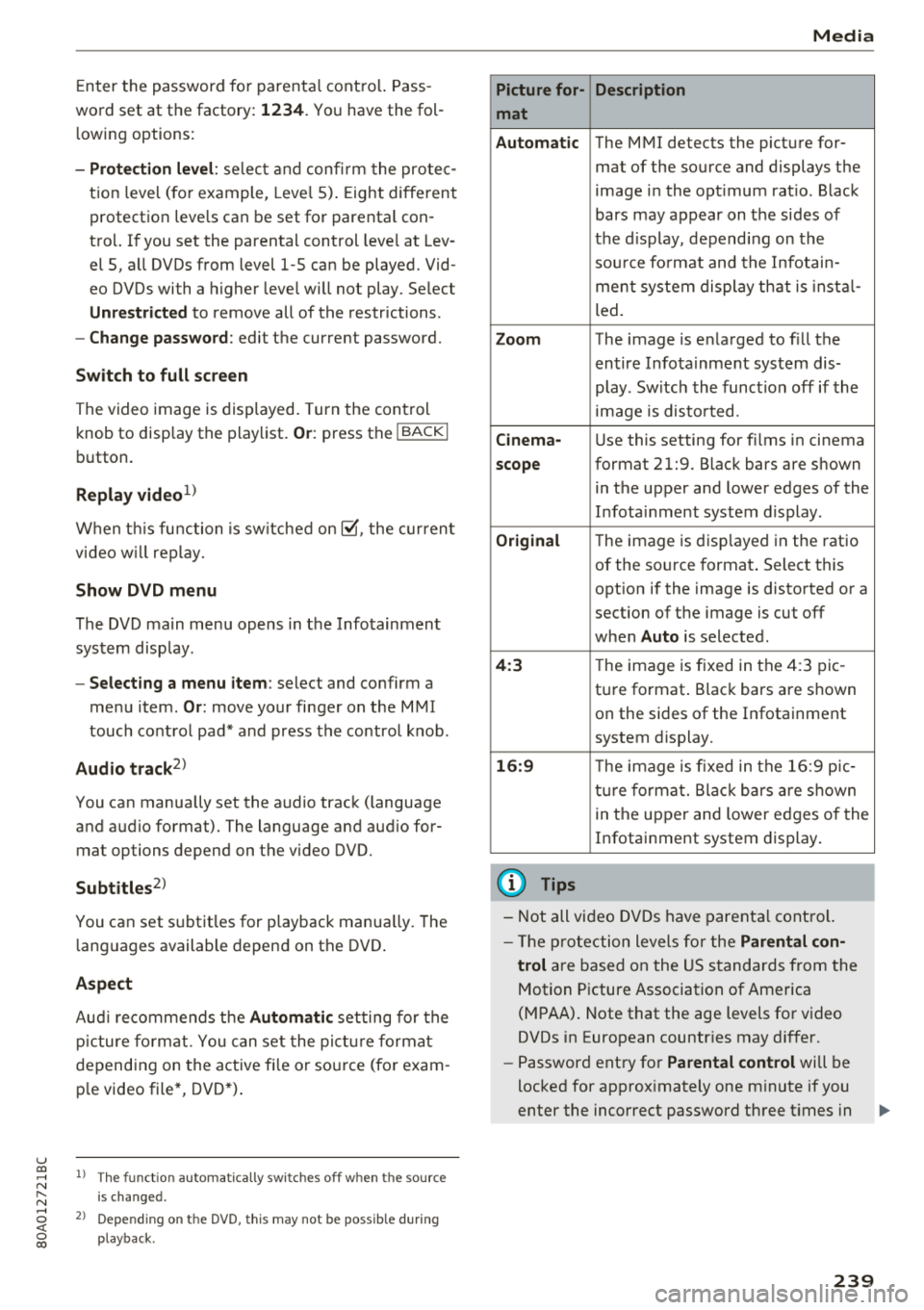
Aspect
Audi recommends the Automatic setting for the
picture format . You can set the picture format
depending on the active fi le or source (for exam
ple video file*, DVD*).
1> The fun ction automatica lly sw it c he s off when the source
is changed .
2> Dependi ng o n the DVD, this may not be possible during
pla ybac k.
Media
Picture for- Description
mat
Automatic
The MMI detects the picture for-
mat of the source and displays the
image in the opt imum rat io. Black
bars may appear on the sides of
the display , depending on the
so urc e fo rmat and the Infotain-
ment system display that is ins tal-
led.
Zoom The image is enlarged to fill the
entire Infota inment system dis-
play. Switch the function off if the
image is disto rted.
Cinema-Use this setting for f ilms in cinema
scope format 21:9. Black bars are shown
in the upper and lower edges of the
Infota inment system display.
Original The image is disp layed in the ratio
of the source format. Select this
opt ion if the image is distorted or a
section of the image is cut off
when
Auto is selected .
4:3 The image is fixed in the 4:3 pie-
ture format . Black bars are shown
on the sides of the Infotainment
system display.
16:9 T he image is fixed in the 16:9 pie -
ture format. Black bars are shown
in the upper and lower edges of the
Infotainment system display.
(D Tips
-Not all video DVDs have parental control.
- Th e protection levels for the
Parental con-
trol
are based on the US standards from the
Motion Picture Association of America
(MPAA) . Note that the age levels for video
DVDs in European countr ies may differ.
- Password entry for
Parental control will be
locked for approx imately one m inute if you
enter the incorrect password three t imes in
239
Page 242 of 392
Media
a row. The password ca n only be reset by a n
a uthorized Audi dea le r.
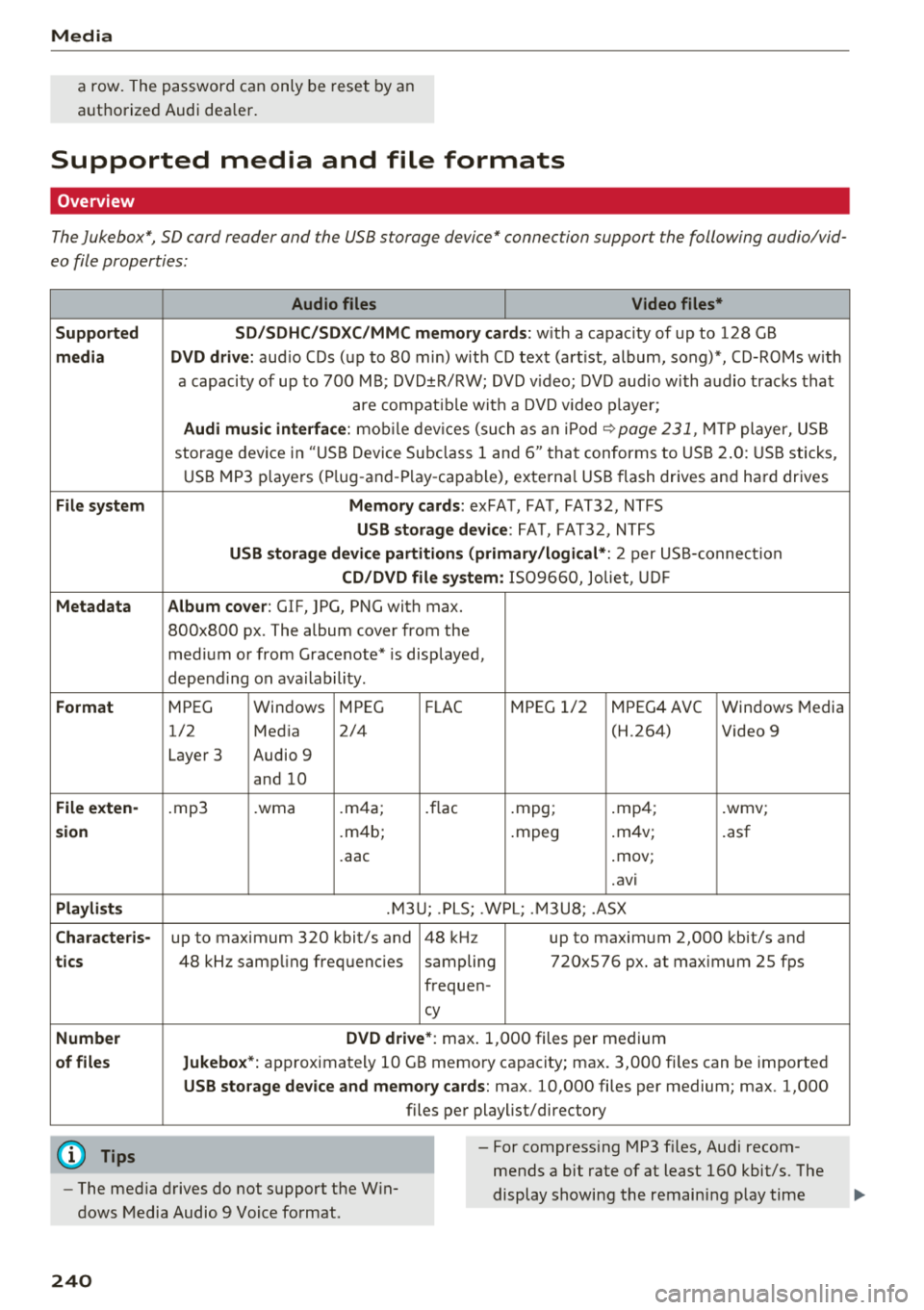
Supported media and file formats
Overview
The Jukebox*, SD card reader and the USB storage device" connection support the following audio/vid
eo file properties :
Audio files Video files*
Supported SD/SDHC/SDXC /MMC memory cards:
w it h a capacity of up to 128 GB
media DVD drive: aud io CDs ( up to 80 min) with CD tex t (art ist, album, song)*, CD-ROMs w ith
a capaci ty of up to 700 M B; DVD ±R/RW; DVD v ideo; DV D audio wi th a udio trac ks tha t
are compat ib le w ith a DVD v ideo p laye r;
Audi music interface : mobile dev ices (su ch as a n iPo d ~ page 231, MT P player, U SB
stor age dev ice in "US B Devi ce Subcl ass 1 and 6" tha t conforms to USB 2.0 : U SB sticks,
U SB MP3 players ( Plug -and -P lay -capa ble), externa l USB flash drives and ha rd drives
File system Memory cards: exFAT, FA T, FAT3 2, NTFS
USB storage device : FAT, FAT32, NTFS
USB storage device partitions (primary /logical *: 2 per US S-connect ion
CD/DVD file system: 1509660, Joliet, UDF
Metadata Album cover : GIF, )PG, PNC with max.
800x800 px . The album cover from the
med ium or from Grace note * is disp layed,
depend ing on ava ilability .
Format MPEG Windows MPEG
FLAC MPEG 1/2 MPEG4 AVC W
indows Media
1/2 Med ia 2/4 (H.264) Video 9
Laye r 3 Audio 9
and 10
File exten-.mp3 .wma .m4 a; . flac .mpg; .mp 4; .wmv;
sion .m4b; .mpeg .
m4v;
.asf
. aac .mov;
.avi
Playlists .M3 U; .PL S; .WPL; . M3U8; .ASX
Character is-up to maximum 320 kbit/s and 48 kH z up to maxim um 2,000 kbit/s and
tics 48 kHz samp ling frequencies sampling 720x576 px. at max imum 25 fps
freq uen -
cy
Number DVD drive*
: max. 1,000 files per medium
of files Jukebox *: app rox imately 10 GB memo ry capacity; max. 3,000 fi les can be imported
USB storage device and memory cards : max. 10,000 files per medium; max . 1,000
files pe r playlist/directory
(D Tips
- The med ia d rives do not s upport the W in
dows Media Audio 9 Voice fo rmat. - For compress
ing MP3 f iles, Audi recom
mends a bit rate of at least 160 kbit/s. The
display showing the remain ing p lay time
240
Page 243 of 392
u co ..... N ,..._
N ..... 0 <( 0 00
Media
may diffe r for audio files wi th variab le bi t
r ate. - Th
e manufac ture r of the s to ra g e device can
prov ide info rmat io n about its " USB Device
S ubcl ass".
- Sp ecial chara cte rs (such as th ose in 10 3 t ag
i nformat ion) d isp lay different ly depending
on the system lan guage and cannot a lways
be g uaranteed. -
Some M TP playe r fun ctions are not s upport
ed , su ch as ratin g music tracks and video
playback.
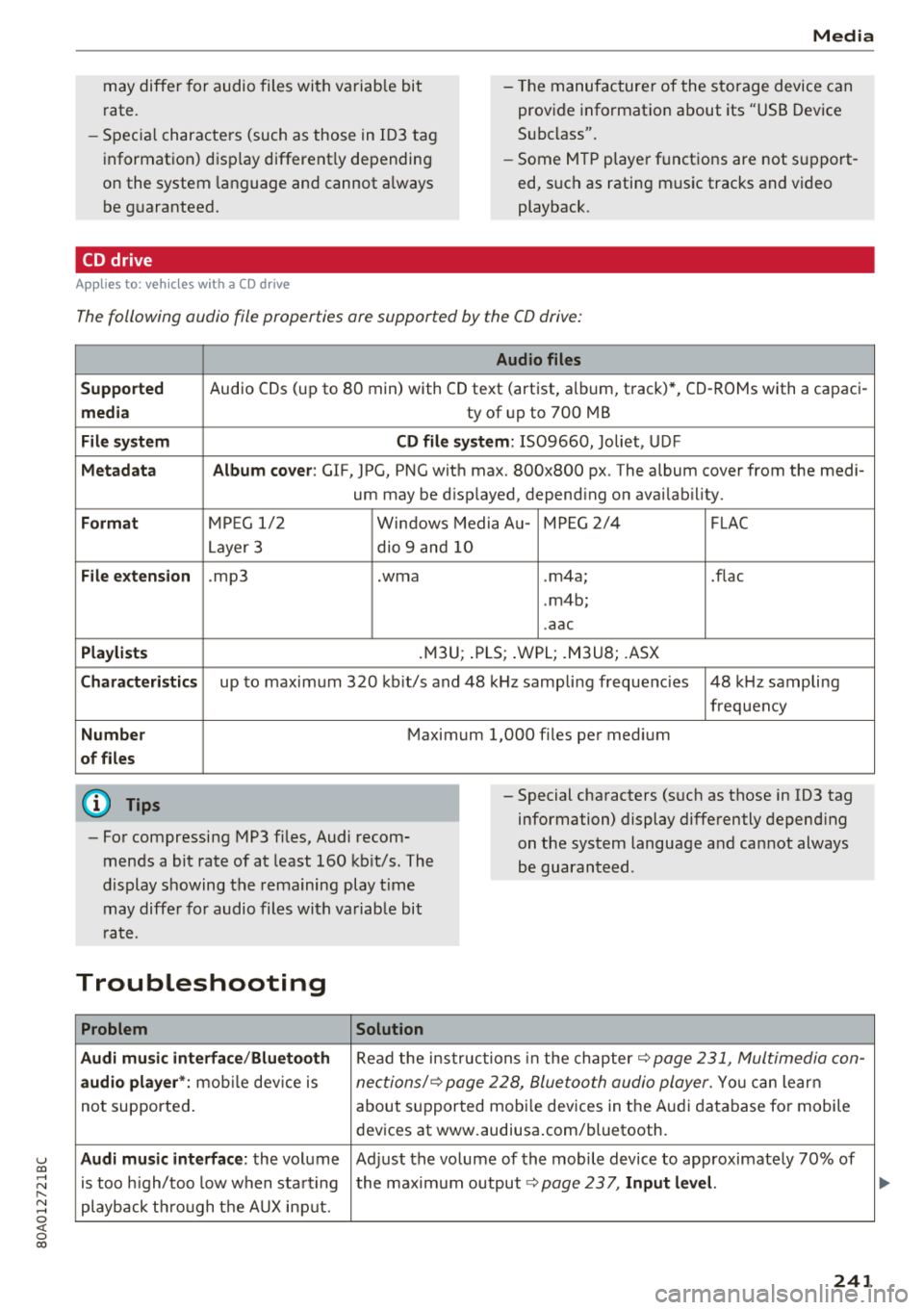
CD drive
A ppl ies to : ve hicles w it h a C D drive
The following audio file properties are supported by the CD drive:
Audio files
Supported
Audio CDs (up to 80 min) with CD text (artist, a lb um, t rack) *, CD-RO Ms with a capac i-
media ty of up to 700 MB
File system CD file system: 1509660, Joliet, UDF
Metadata Album cover : GIF, JPG, PNG wit h max. 800x800 px. The album cover from the medi -
um may be d isp layed, depend ing on avai lab ility.
Format M PE G 1/ 2 Windows Media Au-M PEG 2 /4 FLAC
Layer 3 dio 9 and 10
File extension .mp3 .wma .m4a ; .flac
. m4b;
. aac
Playlists .M3U; .PLS; .WPL; .M3U8; .ASX
Characteristics up to maxim um 3 20 kb it/s and 48 kHz samp lin g freque ncies 48 kHz sampling
frequen cy
Number Maximum 1,000 files pe r med ium
of files
(D Tips
- Fo r compressing MP3 fi les, Audi recom
mends a bit ra te of at least 160 kb it/s. The
d isplay s howing the rema ining play t ime
may diffe r fo r audio files wi th va riab le bi t
rat e. - Special cha
racters (s uch as those in 103 tag
information) display differently depend ing
on the sys tem language a nd can not always
be guaran teed .
Troubleshooting
Problem Solution
Audi music in terface /Bluetooth
R ead the ins truc tions in the c hapter~ page 231, Multimedia con-
audio player *: mobile dev ice is nec tions/~ page 2 28, Bluetoo th audio player . You ca n lear n
not supporte d. about suppor ted mobi le dev ices in the A udi d atabase fo r mobile
dev ices at www.audiusa.com/bluetooth.
Audi music interface : the volume Ad just the volume of the mobile device to approximate ly 70% of
is too high/too low w hen sta rt ing the maxim um output
~page 23 7, Input level.
playb ack t hrough t he AU X inpu t.
241
Page 244 of 392
Media
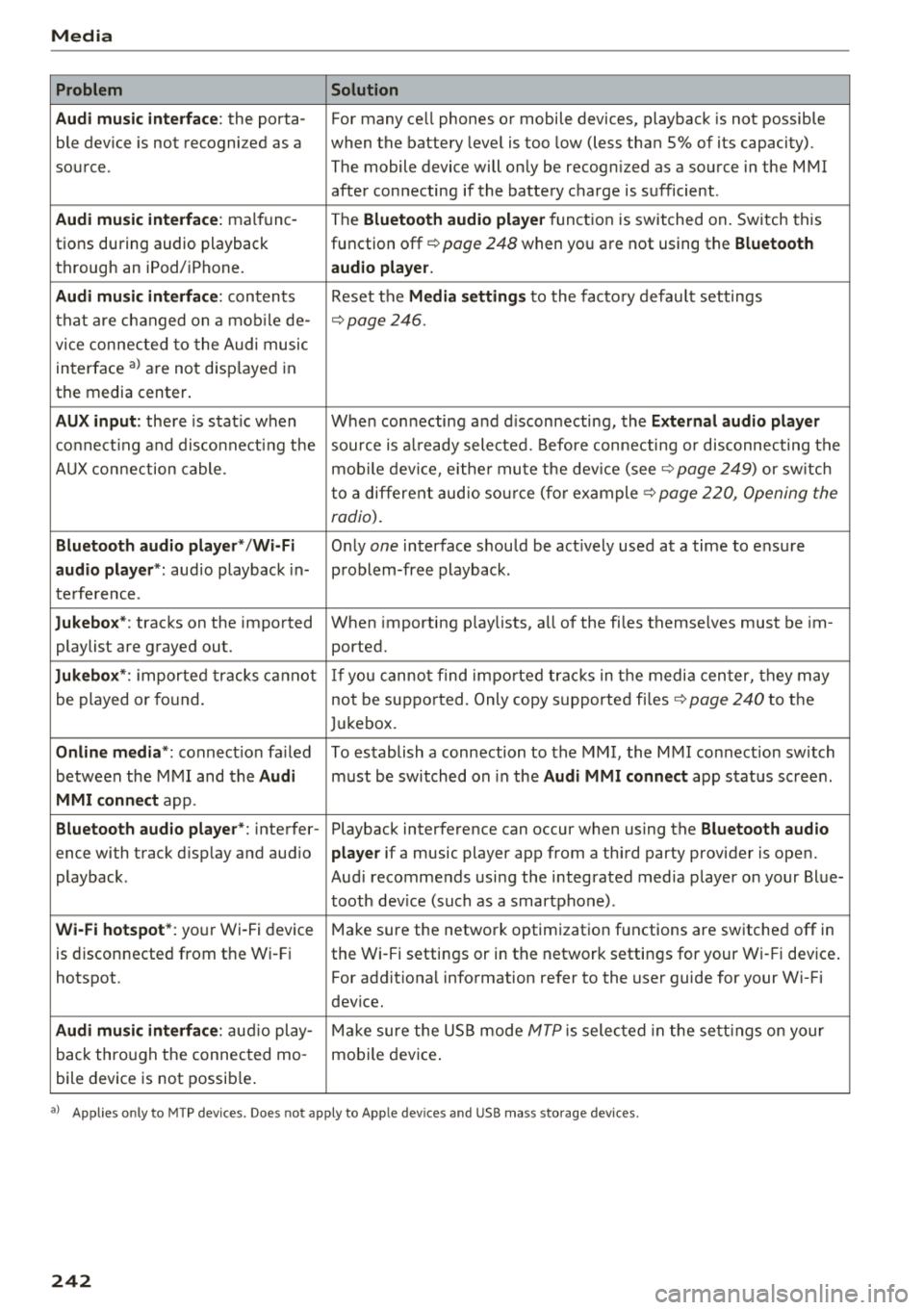
Problem Solution
Audi music interface :
the porta-For many ce ll phones or mobile devices, playback is not possible
ble device is not recogni zed as a when the battery level is too low (less than 5% of its capacity).
source. The mobile device will only be recogn ized as a source in the MMI
after connecting if the battery charge is sufficient .
Audi music interface: malfunc-
The Bluetooth audio player function is switched on. Switch this
tions during audio playback function off¢
page 248 when you are not using the Bluetooth
through an iPod/ iPhone. audio player.
Audi music interface:
contents Reset the Media settings to the factory default settings
that are changed on a mobile de -
¢page 246.
vice connected to the Audi music
interface
a l are not disp layed in
the media center .
AUX input: there is stat ic when When connecting a nd disconnecting, the External audio player
connecting and disconnect ing the source is already selected. Before connecting or disconnecting the
AUX connection cable. mobile device, either mute the device (see ¢
page 249) or sw itch
to a different audio source (for example ¢
page 220, Opening the
radio).
Bluetooth audio player* /Wi-Fi
Only one interface should be act ively used at a time to ensure
audio player*: audio playback in- problem-free playback.
terference.
Jukebox* : tracks on the imported When importing playlists, a ll of the files themselves must be im-
playlist are grayed out. ported.
Jukebox*: imported tracks cannot If you cannot find imported tracks in the media center, they may
be played or found. not be supported. Only copy supported files"*
page 240 to the
Jukebox.
Online media *: connection fa iled To establish a connection to the MMI, the MMI connection switch
between the MMI and the
Audi must be switched on in the Audi MMI connect app status sc ree n.
MMI connect app.
Bluetooth audio player *: interfer- Playback interference can occur when using the Bluetooth audio
ence with track d isp lay and aud io player if a music player app from a third party provider is open.
playback . Audi recommends using the integrated media player on your Blue-
tooth device (such as a smartphone) .
Wi-Fi hotspot*: your Wi-Fi device
Make sure the network optimization functions are switched off in
is disconnected from the Wi -Fi the Wi-Fi settings or in the network settings for your Wi -Fi device .
hotspot . For additional information refer to the user guide for your Wi-Fi
dev ice.
Audi music interface: audio play-Make sure the USB mode MTP is selected in the settings on your
back through the connected mo- mobile device.
bile device is not possible.
al Applie s onl y to MTP dev ice s. Does not apply to App le dev ices and USB mass s torage dev ice s.
242
Page 249 of 392
u co ..... N r--N ..... 0 <( 0 00
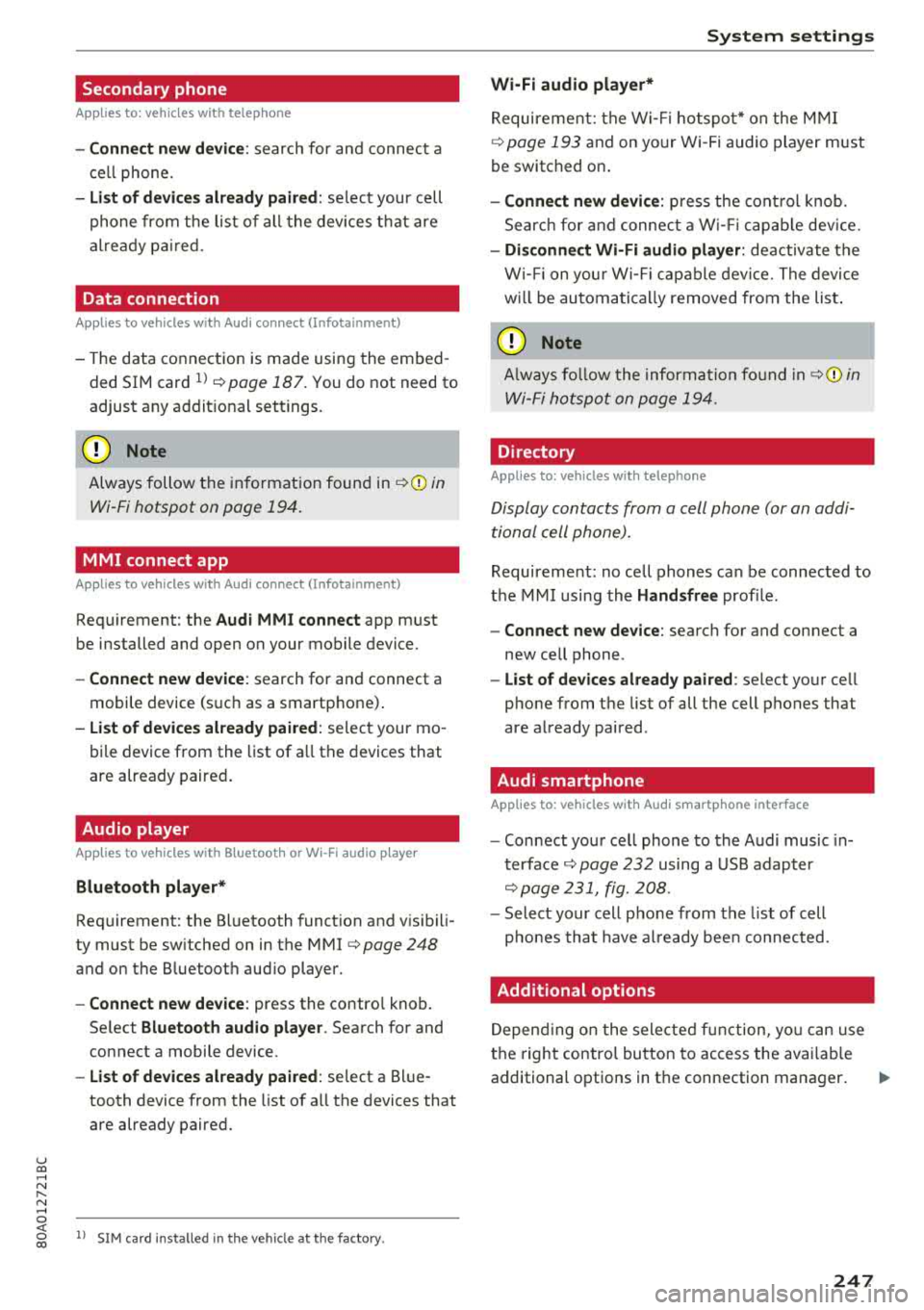
Secondary phone
Applies to: vehicles with telephone
-Connect new device : search for and connec t a
c e ll phone.
- List of devices already paired : selec t your cell
p hone fro m the lis t of all the devices t hat are
al re ad y p aired.
Data connection
Applies to vehicles with Audi connect (Infotainment)
- T he data conne ct ion is made using the em bed
ded SIM car d
ll i=>page 187. You do not need to
adjust a ny a ddit io n al sett ings.
{Ll) Note
Always follow t he inf ormat ion foun d in i=> @ in
Wi-Fi hotspot on page 19 4.
MMI connect app
Applies to vehicles with Audi connect (Infotainment)
Requirement: the Audi MMI connect app m ust
be installed and open on your mobile device.
- Connect new device : search for and connect a
mobile device (s uch as a smartp hone) .
-List of devices already paired : selec t your mo
bile device from the list of a ll the devices that
are already paire d.
Audio player
Applies to vehicles with Bluetooth or Wi-Fi audio player
Bluetooth player*
Requirement: the Bluetooth funct ion and v is ibili
ty must be sw itched on in the MMI
i=> page 248
and on the B luetoot h aud io player.
- Connect new device : press the control knob.
Se lect
Bluetooth audio player . Search fo r and
connect a mobile device .
-List of devices already paired : select a Bl ue
tooth device from the list of a ll the devices that
are already paire d.
ll SIM card inst alle d in t he v eh icle at the fa ctory.
System settings
Wi-Fi audio player*
R eq uiremen t: th e W i-Fi h otspo t* on the M MI
i=> page 193 an d on yo ur Wi -Fi audio playe r must
be switched o n.
-Connect new device: press the co ntrol knob.
Se arch for and conne ct a W i-Fi ca pabl e dev ice.
- Disconnect Wi-Fi audio player: de activate t he
W i-Fi on you r W i-Fi capa ble dev ice. The devi ce
w ill be au tom atic a lly removed from the lis t.
@ Note
Alway s follo w the inf ormat ion foun d in i=> @ in
W i-F i h ots pot on p age 194.
Directory
Applies to: vehicles with telephone
Display contacts from a cell phone (or an addi
tiona l cell phone).
Requirement: no ce ll phones can be connec ted to
the MMI using the
Handsfree pro file.
- Connect new device: search for and connect a
new ce ll phone .
-List of devices already paired : select yo ur cell
phone from t he list of all the cell phones that
are a lready paired .
Audi smartphone
Applies to: vehicles with Audi smartphone interface
-Connect yo ur cell phone to the A udi music in
t erface
i=> page 232 using a USB adap ter
i=> page 231, fig. 2 08 .
- Sel ect your cell p ho ne from t he list of cell
p ho nes th at h ave already bee n con nec ted.
Additional options
D epen ding on the sele cted fun ct ion, yo u ca n use
t h e righ t contro l bu tton to access the ava ila bl e
additional options in t he connection mana ger .
.,.
247
Page 250 of 392
System settings
Delete Bluetooth device*
The se lecte d cell p ho ne/mo bile dev ice is dis con
nected from t he M MI and is removed from the
list of all devices that are alrea dy paire d.
Show Bluetooth profiles*
You can Connect or Disconnect the Handsfree ,
Me ssages *, Dire ctory /contacts
an d Bluetooth
audio player
pro files sep arately.
Bluetooth settings*
- Bluetooth :
select and confirm a set ting for the
B luetoot h connec tion v is ibility . Select
Visible
fo r th e MM I to be vis ib le to o ther dev ices. Se
l ec t
Invisible fo r th e M MI to not be v is ible t o
othe r devi ce s. H oweve r, it is still possib le to es
tab lish a Bl uetoo th con nection with pai red de
vices when the v is ibi lity is switched off. Se lect
Off to t urn visibi lity off . Then a B luetooth con
nect ion is not possible .
-Bluetooth audio player : when this function is
switc hed
on ~' the Bluetooth audio player is
available as a so urce in t he
Media menu .
-Bluetooth name : the MMI B luetooth name (for
example "AUDI MMI") is d isp layed and ca n be
c h anged.
Online settings*
- Data usage counter :
the amount of data pack
ets that a re sent a nd received throug h the MMI
is d isp layed. You can reset the data usage infor
mation to zero using the
Reset data counter
option.
- Network status : the mobile netwo rk p rovider
fo r data se rvice as well as the netwo rk status
are disp layed .
Wi-Fi settings*
See ¢ page 193, Wi -Fi hotspot.
Storing as a default telephone
Applies to: vehicles with telephone
Requir emen t: a cell phone must be connected to
t he MM I
¢page 17 4.
As soon as t he cell phone is i n range and the
B lue tooth func tion on the ce ll phone and in the
MM I is swi tched o n, this ce ll phone is g iven pr io r
ity ove r th e ot her Blue tooth devices and is c on-
248
necte d dir ectly to the M MI. The connec ted ce ll
p hone is d is pl ayed first in t he dev ice li st .
Network settings*
- Login :
you can chose an automatic log in to
your cell p ho ne servi ce pro vider 's ne twor k, or
you can ch oose a
manual log in from t he list of
avai la bl e netwo rks .
-Network selection : availabl e netwo rks in t he
presen t loca tion can be sele cte d unde r network
select io n. This f unction is on ly avai la bl e for the
Manual log in setting.
Apple CarPlay sound settings/ Android Auto
sound settings
Applies to: vehicles with Audi smartphone interface
See q page 249.
About Apple CarPlay/ About Android Auto
Applies to: vehicles with Audi smartphone interface
Here you w ill find l ega l informa tion regarding
t h e use o f A pple Car Play o r And ro id Aut o and in
fo rmat ion a bout device -s p eci fic d ata exch ange.
Delete Apple CarPlay device/Delete Android
Auto device
Applies to: vehicles with Audi smartphone interface
Require ment: yo ur cell phone must not be con
n ect ed to the Au di music interf ace wi th a USB
adap ter.
Se lec t:
Audi smartphone > a dev ice from t he lis t
> r igh t con trol b utto n.
To remove your cell p ho ne from the list, se lect
and co nfirm
Delete Apple CarPlay device or De
lete Android Auto device .
System update
"'Select : !ME NUI bu tton> Settings > left control
bu tton >
System maintenance.
- System update :
slide the storage device with
t he update da ta into the a pprop ria te drive
¢ page 2 26 . Se lec t and conf irm the dr ive>
Start update . The length of the p rocess de
pe nds on the s ize of the upd ate.
- Reset driver installation: the selected media
dr iver p ackage is rese t to t he se ttings a t the
t im e of delivery .
Page 251 of 392
-Version information : information on the MM I
software version and the nav igat io n database *
software vers ion is disp laye d. The
Software in·
formation function a lso provides information
on the software con tained i n the MMI and t he
li cens ing agreeme nt.
Sound settings
The sound distribution and volume of the MMI
can b e adjust ed individually . The settings d epend
on vehicle equipme nt.
----- 1
J -~+ ~-
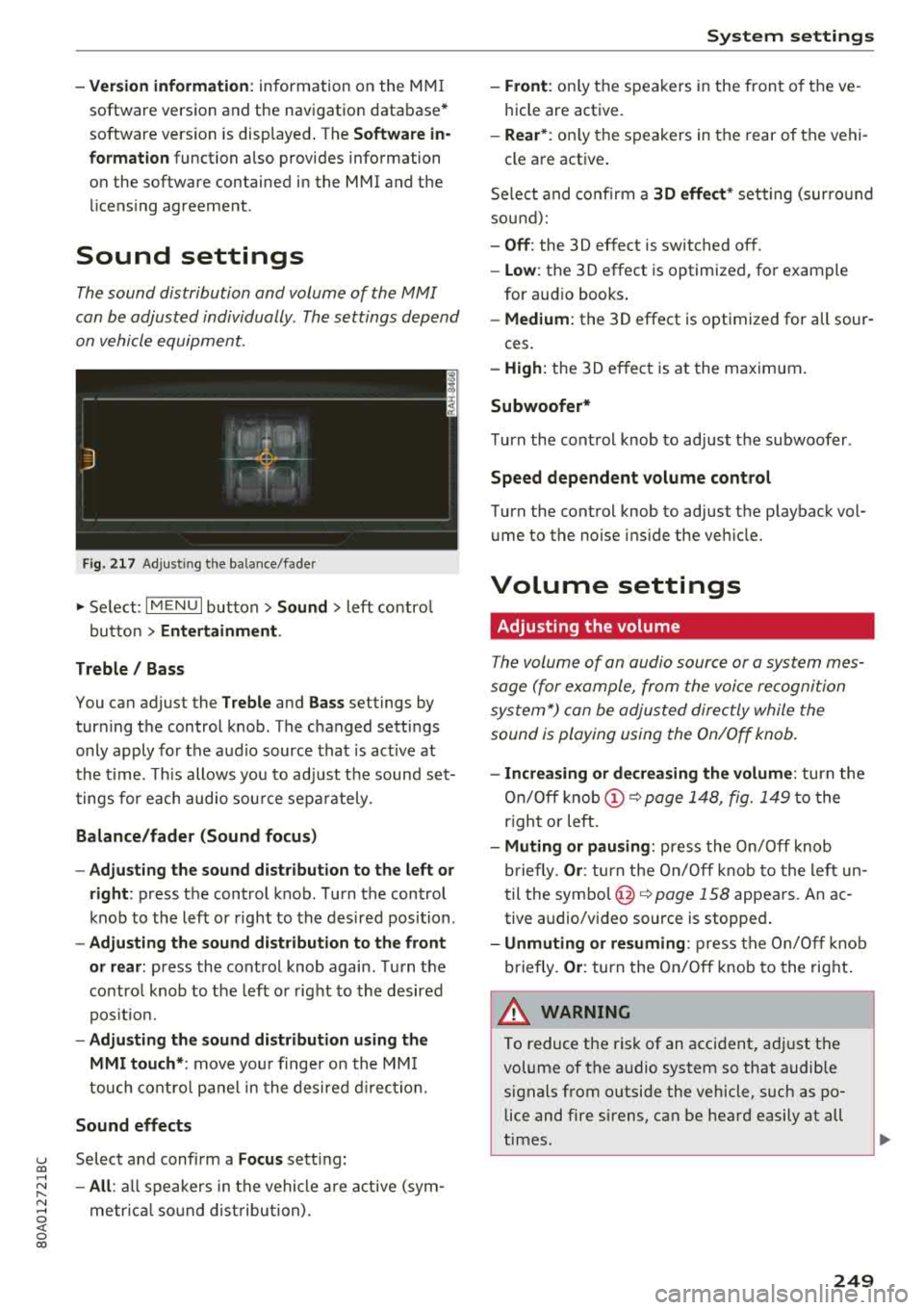
F ig. 217 A dj ustin g the ba la nce /fade r
"'Se lect : I MENU I bu tton >Sound > le ft contro l
b utt on
> Entertainment .
Treble / Bass
You can ad just the Treble and Bass settings by
turn ing t he control knob. The changed se ttings
only apply fo r the a ud io source tha t is ac tive at
t he time . T his allows you to ad just t he soun d set
t ings for each audio sou rce se para tely .
Balance/fader (Sound focus)
- Adjusting the sound d istribution to the left or
right :
press the control knob. Tur n the control
k nob to the left or right to the des ire d posi tion .
-Adjusting the sound distribution to the front
or rear:
press the cont rol knob again . T urn the
contro l knob to the left o r right to the desired
p os it io n.
- Adjusting the sound distribution using the
MMI touch* :
move your finger on the MM I
touch co ntro l pan el in th e desire d directio n.
Sound effects
u Selec t and confi rm a Focus se tt in g: co ...
~ -All : all sp eakers i n th e vehi cle ar e active (sym -
~ metrical sound dist ribu tion) . 0 <( 0 00
System settings
-Front : only t he s pea ke rs in the fron t of the ve
hicle are active.
- Rear* : only the s peakers in the rear of the vehi -
cle a re act ive .
Se lect a nd co nfir m a
30 effect * setting (su rround
so un d):
-Off : the 30 effect is switched off .
-Low : the 30 effect is optimized , fo r exam ple
for au dio books .
-Medium: the 30 effect is optimized for all sour -
ces .
-High : the 3 0 eff ect is at the ma ximum .
Subwoofer*
Turn the con trol knob to ad just t he subwoofer .
Speed dependent volume control
Turn the cont rol knob to ad just t he p layback vol
u me to the noise ins ide the ve hicle.
Volume settings
Adjusting the volume
Th e volum e of an audio source or a syst em mes
sage (f or example, from the voice recognition
sy stem *) can be adjus ted direc tly while the
sound is playing using the On/Off knob.
- Increasing or decreasing the volume : turn the
On /O ff knob
(D ~ page 1 48, fig. 1 49 to the
r igh t or left.
- Muting or pausing: press the On/ Off knob
b riefly .
Or: tur n t he On/Off knob to the le ft un
t il the
sym bo l@ ~ page 158 appe ars. An ac
tive audio/v ideo source is stoppe d.
-Unmuting or resuming : press the On/O ff knob
b riefly .
Or: turn the On/O ff knob to the right .
A WARNING ~ -
To reduce t he ris k of an acci den t, a djust t he
volume of t he a udio syst em so that audib le
signals from o utside the vehicle, such as po
lice and fire s irens, can be hea rd easily at all
times.
249