oil AUDI Q5 2018 Owner's Manual
[x] Cancel search | Manufacturer: AUDI, Model Year: 2018, Model line: Q5, Model: AUDI Q5 2018Pages: 392, PDF Size: 60.56 MB
Page 340 of 392
Wheels
vehicle's Gross Veh ic le Weig ht
R ati ng
("GVWR").
The "GVWR" includes the weight
of the basic vehicle, all factory in
stalled accessories, a full tank of
fuel, oil, coolant and other fluids
plus maximum load. The maxi
mum load includes the number of
passengers that the vehicle is in
tended to carry ("seating capaci
ty") with an assumed weight of 150 lbs . (68 kg) for each passen
ger at a designated seating posi
tion and the total weight of any luggage in the vehicle. If you tow
a trailer, the weight of the trailer
hitch and the tongue weight of
the loaded trailer must be includ
ed as part of the vehicle load .
The
Gro ss Ax le W eight Rating
("GAWR") is the maximum load
that can be applied at each of the
vehicle's two axles .
T he fact that there is an upper
limit to your vehicle's Gross Vehi
cle Weight Rating means that the
total weight of whatever is being
carried in the vehicle (including
the weight of a trailer hitch and
the tongue weight of the loaded
trailer) is limited . The more pas
sengers in the vehicle or passen -
338
gers who are heavier than the
standard weights assumed mean
that less weight can be carried as luggage .
The Gross Vehicle Weight Rating and the Gross Axle Weight Rat ing
are listed on the safety compli
ance sticker labe l located on the
driver's side B-pillar.
1.8. WARNING
Overloading a vehicle can cause loss of vehicle control, a crash
or other accident, serious per
sonal injury, and even death.
-Carrying more weight than your vehicle was designed to carry will prevent the vehicle
from handling properly and increase the risk of the loss of
vehicle control.
-The brakes on a vehicle that has been overloaded may not
be able to stop the vehicle
within a safe distance .
-Tires on a vehicle that has been overloaded can fail sud
denly, including a blowout and
sudden deflation, causing loss
of contro l and a crash.
-Always make sure that the to tal load being transported
-..
Page 347 of 392
u co ..... N r--N ..... 0 <( 0 00
wash operator to reduce the risk of acci
dents.
- To reduce the risk of cuts, protect yourself
from sharp metal components when wash ing the underbody or the inside of the wheel
housings.
- After washing the vehicle, the braking effect may be delayed due to moisture on the
brake rotors or ice in the winter . This in
creases the risk of an accident. The brakes
must be dried first with a few careful brake
applications.
@ Note
- If you wash the vehicle in an automatic car
wash, you must fold the exterior mirrors in
to reduce the risk of damage to the mirrors.
Power folding exterior mirrors* must only
be folded in and out using the power folding
function.
- To reduce the risk of damage to the rims
and tires, compare the width between the
wheels on your vehicle with the distance be
tween the guide rails in the car wash.
- To reduce the risk of damage, compare the
height and width of your vehicle with the
Care and cleaning
height and width of the inside of the car
wash .
- T o reduce the risk of paint damage, do not
wash the vehicle in direct sunlight .
- To reduce the risk of damage to the surface,
do not use insect removing sponges, kitchen
sponges or similar items .
- Matte finish painted vehicle components:
- To reduce the risk of damage to the sur-
face, do not use polishing agents or hard
wax.
- Never use protective wax. It can destroy
the matte finish effect .
- Do not place any stickers or magnetic
signs on vehicle parts painted with matte
finish paint. The paint could be damaged
when the stickers or magnets are re
moved.
@ For the sake of the environment
Only wash the vehicle in facilities specially de
signed for that purpose. This will reduce the
risk of dirty water contaminated with oil from
entering the sewer system.
Cleaning and care information
When cleaning and caring for individual vehicle
components, refer to the following tables. The
information contained there is simply recom
mendations. For questions or for components that
are not listed, consult an authorized Audi
dealer or authorized Audi Service Facility. Also
follow the information found
in ¢.&. .
Exterior cleaning
Component Situation Solution
Windshield wiper
Deposits soft cloth with glass cleaner, ¢ page 52
blades
Headlights/
Deposits Soft sponge with a mild soap solution3>
Tail lights
Sensors/
Deposits Sensors: soft cloth with a solvent-free cleaning solution
camera lenses Camera lenses: soft cloth with an alcohol-free cleaning
solution
Snow/ice Hand brush/solvent-free de-icing spray
Wheels Road salt Water
Brake dust Acid-free special cleaning solution
345
Page 349 of 392
u co .... N ,..._
N .... 0 <( 0 00
Care and cleaning
Component Situation Solution
T ex tile s,
Deposits adhering to Vacuum cleaner
art ifi ci al l eat her, the surface
A lcan tara Water-based deposits Absorbent cloth and mild soap solutiona>
such
as coffee, tea,
b lood, etc.
O il-based deposits Apply a m ild soap solution
al, blot away the dissolved o il or
such as oil, make-up, dye, treat afterward with water, if necessary
etc.
Special deposits such
Special stain remover, blot with absorbent material, treat
as ink, nail polish, la-afterward with mild soap solution, if necessary
a)
tex paint, shoe pol-
ish, etc.
Natu ral leathe r Fresh stains Cotton cloth with a mi
ld soap so lution a>
Water-based deposits Fresh stains : absorbent cloth
such as coffee, tea, Dried stains: stain remover suitable for leather
b lood , etc.
Oi l-based deposits Fresh stains: absorbent cloth and stain remover suitable
such as oil, make-up, for leather
etc . Dried stains: oil clean ing spray
Special deposits such Spot
remove r suitable for leather
as ink, nai l polish, la-
tex paint, shoe pol-
ish, etc.
Care Regula rly apply cond it ion ing cream that p rotects from
lig ht and penet rates into the mater ia l. Use specia l co lored
conditioning cream, if necessary.
Carbon p art s Deposits clean the same way as plast ic parts
a) Mi ld soap solution: maximum two tablespoons of neutral soap in 1 quar t (1 liter) of water
.8, WARNING
The windsh ie ld may not be trea ted with wa
ter-repelling windshield coating agents. Un
favorable conditions such as wetness, dark
ness, or low sun can result in increased glare .
Wiper blade chatter is also possible.
@ Note
- Headlights /tail light s
-Never clean headlights or tail lights with a
dry clot h or sponge.
- Do not use any cleaning product that con
tains alcohol, because they could cause
cracks to form .
-Wheels
-
- Never use any pa int polish or other abra
sive materials .
- Damage to the protect ive layer o n the
rims such as stone ch ips or scratches must
be repaired immediately .
-Cam era lenses
- Neve r use warm or hot wa ter to remove
snow or ice from the camera lens . This
could ca use the lens to crack .
- Neve r use ab rasive cleaning m ate rials or
a lcohol to clean the camera lens . This
could ca use scratches and cracks .
-Door window s
-Remove snow and ice on windows and ex-
terior mirrors w ith a plast ic scraper . To
347
Page 362 of 392
Fuses and bulb s
Fuse panel@ (brown ) Fuse panel© (blac k)
N o. E quip ment No. Equipmen t
2
Mass airflow sensor, camshaft adjust-
ment, charge air cooler pump 1 Fr ont seat heating
2 Windshie ld wipers
3 Exhaust doors, fuel injectors, radiator inlet 3 Left head light elect ronics
4 Vacuum pump , hot water p ump, particu-
late sensor, biodiesel sensor 4 Panorama glass roof
s L eft front doo r contro l modu le
5 Brake light sensor 6 Sockets
6 Engine valves, camshaft adjustment 7 Right rear door cont rol mod ule
7
Heated oxygen sensor, mass airflow sen-8 All wheel drive
sor
8
Water pump, high pressure pump, high
pressure regulator va lve
9 Hot water pump
9 R ight headlight electronics
10
Windshield washer system/headlight
washer system
1 1 Left rear door contro l module
10
Oil pressure sensor, oil temperature sen-
sor
Fu se p anel @ (blac k)
11 Clutch pedal position sensor No. Equipment
12 Engine valves
Seat ventilation, rearv iew mirror, cl imate
13 Radiator fan 1 control system, rear cl imate control sys-
14 Fuel injectors tern controls
, windsh ie ld defogger
15 Ignition coils 2 Gateway, climate control system
16 Fuel pump 3 Sound act uator/exhaust sound tuning
Fuse panel @ (red )
4 Clutch pedal posit ion sensor
5 Engine start
N o. Equipment 7 Rear USB charging port
1 Anti-theft a larm system 8 Homelink
2 Engine control module 9 Adaptive cruise control
3 Lumbar support 11 Video camera
4 Automatic transm ission selector mecha-
nism 12 Matrix LED headlight/right LED headlight
5 Horn
13 Matrix LED headlight/ left LED headlight
6 Electromechan ica l park ing brake
14 Rear window wiper
7 Gateway control module Fu se panel © (red )
8 Interior headliner lights No . Equipmen t
10 Airbag control module 1 Ignition coils
11 Electronic Stabilization Control (ESC) 5 E ng ine mount
12 Diagnostic connector, light/rain sensor 6 Automatic transmiss ion
13 Climate control system 7 I nstrument panel
1 4 Right front door control module 8 C limate control system (blower)
lS A/C compressor
10 Dynamic stee ring
11 Eng ine start
36 0
Page 369 of 392
u co ..... N r-N .....
~ 0 co
Raising the vehicle
Lifting with workshop hoist and with floor
jack
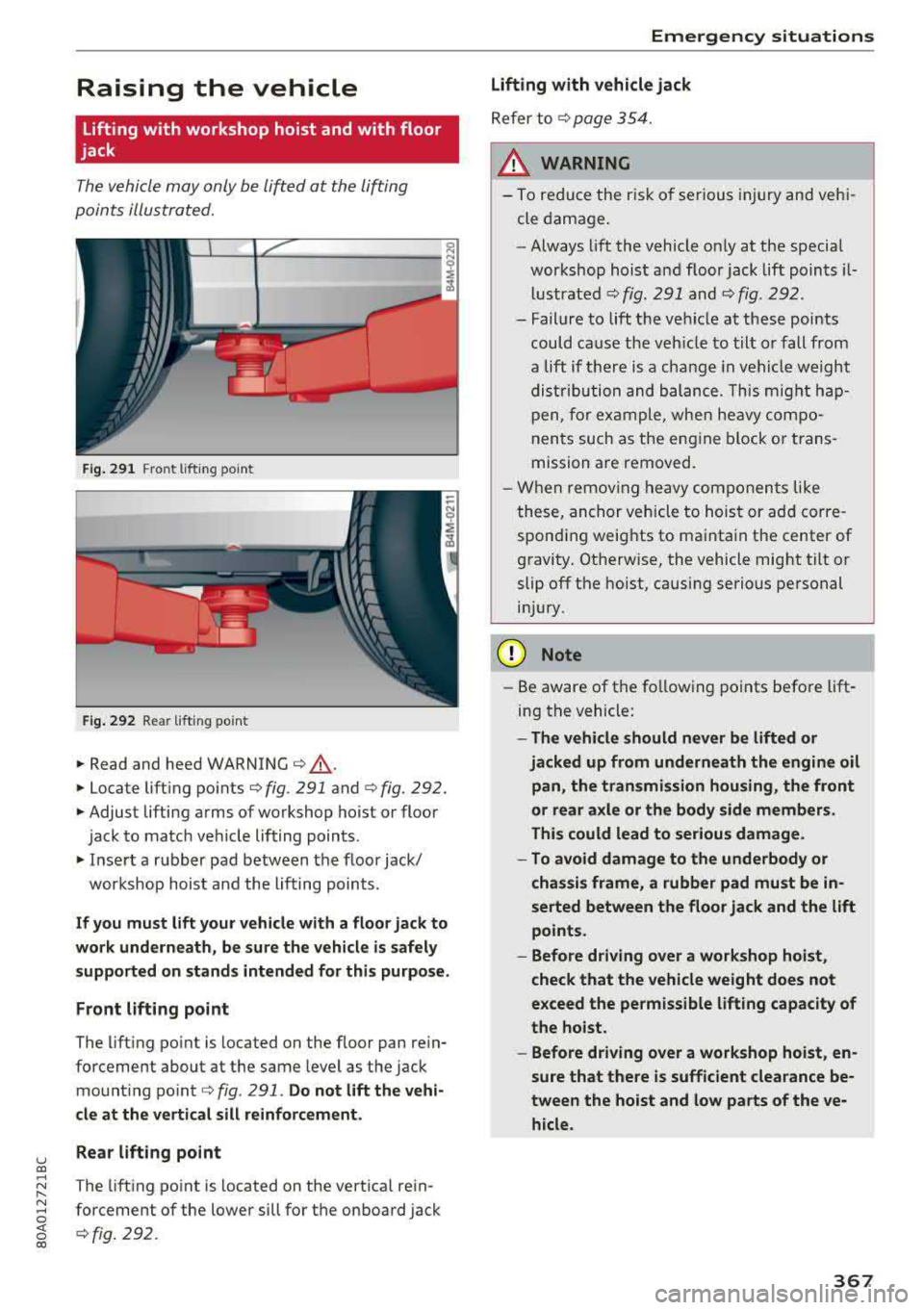
The vehicle may only be lift ed at the lifting
points illus tr at ed.
......_.__ -+,c___------= ------i
cli
Fig. 291 Fro nt lift in g poin t
Fig. 292 Re ar lift ing poin t
.,. Read and heed WARNING c::> &, .
.. Locate lift ing po in ts c::> fig . 291 and c::>fig. 292.
.. Adjust lifting arms of wo rkshop ho ist or floo r
jac k to match veh icle lifting points .
.. Insert a r ubb er pad b etween t he floor jack/
workshop hois t and the lifting points.
If you must lift your vehicle with a floor jack to
work underneath , be sure the vehicle is safely
supported on stands intended for this purpose.
F ront lifting point
The lift ing po int is located on the floor pan re in
forcement about a t th e same leve l as the jack
mo unt ing po int
c::> fig . 291 . Do not lift the vehi
cle at the vertical sill reinforcement.
Rear lifting point
T he lift ing po int is located on the vert ica l re in
forcement of the lower sill fo r th e on board jack
c::> fig. 292 .
Emergency situations
Lifting with vehicle jack
Refer to c::> page 354.
__&. WARNING
- To red uce the r is k of se riou s injury and veh i
cle dama ge.
- Always lift the vehicle on ly at the special
workshop hois t and floor jack lift poin ts i l
l u stra ted
c::> fig. 291 and c::> fig . 292.
- Failure to lift t he ve hicle at these poi nts
could cause the veh icle to tilt o r fall from
a lift if t here is a change in v ehi cle weight
d is tr ibu tion and b ala nce . T his migh t ha p
pen , for ex am ple, when heavy co mpo
nen ts such as the e ngine block o r trans
mission a re removed.
- Wh en remov ing heavy com ponen ts like
t hese, an chor ve hicle to hoist or ad d corre
spond ing weig hts to ma inta in the center of
g ravi ty . Ot herw ise, the vehicle mig ht tilt or
slip off the hoist, causing serious pe rsonal
in ju ry.
(D Note
- Be aware of the fo llow ing points before lift
in g th e vehicle :
-The vehicle should never be lifted or
jacked up from underneath the engine oil pan, the transmission housing, the front
or rear axle or the body side members .
This could lead to serious damage .
- To avoid damage to the underbody or
chassis frame, a rubber pad must be in
serted between the floor jack and the lift
points.
- Before driving over a workshop hoist ,
check that the vehicle weight does not
exceed the permissible lifting capacity of
the hoist.
- Before driving over a workshop hoist , en
sure that there is sufficient clearance be
tween the hoist and low parts of the ve hicle.
367
Page 373 of 392
u co ..... N r--N ..... 0 <( 0 00
Consumer Information
Warranty coverages
Your Audi i s co vered by the following warran
tie s:
- New Vehicle Limited Warranty
- Limited Warranty Against Corrosion Perfora-
tion
- Emissions Control System Warranty
- Emissions Performance Warranty
- California Emissions Control Warranty (USA
vehicles only)
- California Emissions Performance Warranty
(USA vehicles only)
Detailed information regarding your warranties
can be found in your
Warranty & Maintenance
booklet .
Operating your vehicle
outside the U.S.A. or
Canada
Government regulati ons in the United States and
Canada require that automobiles meet specific
emission regulations and safety standards.
Therefore, vehicles built for the U.S.A. and Cana
da differ from vehicles sold in other countries.
If you p lan to take you r vehicle outside the conti
nenta l limits of the United States or Canada,
there is the possibility that:
- un leaded fue ls for vehicles with catalytic con
verter may not be available;
- fuel may have a conside rably lower octane rat
ing . Improper fuel may cause engine damage;
- service may be inadequate due to lack of proper
service facilities, tools or testing eq uipment;
- r eplacement parts may not be readily available.
- Navigation systems for veh icles built for the
U.S .A . and Canada w ill not necessarily work in
Eur ope, and may not wo rk in other countries
outside of North America.
Consumer Information
@ Note
Audi cannot be responsib le for mechanical
damage that could resu lt from inadequate
fuel, service or parts ava ilability.
Audi Service Repair
Manuals and Literature
Audi Official Factory Service Manuals and Litera
ture are published as soon as poss ible after mod
el introduction. Se rvice Ma nuals and literature
are available to order from the Audi Tec hni cal Lit
erature Orde ring Center at :
www.audi.techliterature.com
Maintenance
General
Your vehicle has been designed to help keep
maintenance requirements to a minimum. How
ever, a certain amount of regular maintenance is
still necessary to assure your vehicle's safety,
economy and reliab ility . For detailed vehicle
maintenance consult your Warranty & Mainte
nance booklet .
Under difficult operating conditions, for exam
ple at extremely low outside temperatures, in
very dusty regions, when tow ing a trailer very fre
quently, etc., some service wo rk shou ld be per
formed between the intervals specified. This ap
plies particularly to:
- oil changes, and
- cleaning or replac ing the a ir filter .
® For the sake of the environment
By regularly maintain ing your vehicle, you
help make sure that emiss io n standards are
maintained, thus min imiz ing adverse effects
on the environment .
Important considerations for you and your
vehicle
The increasing use of electronics, sophisticated
fuel injection and emission control systems, and
the genera lly increasing technica l complexity of
.,.
371
Page 381 of 392
u co ..... N r--N ..... 0 <( 0 00
Emergency call function
Audi connect emergency ca ll and service .
201
Emergency flashe rs . . . . . . . . . . . . . . . . . . . . 47
Emergency operat ion
Fuel filler door . . . . . . . . . . . . . . . . . . . . . .
313
Emergency starting
E m issions control system ........... .. .
Energy management ........... .. .. .. .
Engine Coolant
.... .. ... .......... .. .. .... .
Start/Stop system ............ .. .... . .
Starting/stopping ............ .. .... . .
Starting w ith jumper cables .... .. .. .. .
En gin e compartment
Opening/closing the hood ............ .
Overview
... .. ... .......... .. .. .... .
Safety preca utions .......... .. .. .... .
En gin e oil
Adding .. .. .. ............... .. .. .. .
Changing .... ... .......... .. .. .... .
Checking oil level . .......... .. .. .... .
Consumption .... .......... .. .. .... .
363
3 13
145
3 19
78
76
363
3 15
3 16
3 14
317 3 19
3 17
3 17
Temperature disp lay .......... .. .. .. . . 17
Engin e sound . . . . . . . . . . . . . . . . . . . . . . . . 125
Eng ine Start/Stop mode
refer to Start/Stop system . . . . . . . . . . 78, 80
Eng ine stop
refer to Start/Stop system . . . . . . . . . . 78, 80
En hanced v iew . . . . . . . . . . . . . . . . . . . . . . . . 14
Enter ing characters/numbers (speller) . . . . 155
Entering letters (speller) . . . . . . . . . . . . . . . 155
Enterta inment sl iding menu . . . . . . . . . . . . 153
En try/ex it lighting . . . . . . . . . . . . . . . . . . . . . 47
Environment
Proper disposal of drained engine oi l ... .
Unleaded gasoline ............ .. .. .. .
ESC
.. .. .. .. .. ............... .. .. .. .
H ill descent assist .......... .. .. .. .. .
Offroad mode .... .......... .. .. .... .
Evasive steering support ......... ... .. .
E vent Dat a Recorder (EDR) ...... .. .. .. .
3 19
310
140
142 141
1 13
145
Ext erio r ligh ting . . . . . . . . . . . . . . . . . . . . . . . 45
Exterior mirrors . . . . . . . . . . . . . . . . . . . . . . . 49
External voice operation . . . . . . . . . . . . . . . . 172
Index
F
Factory default settings
Multi Media Interface . . . . . . . . . . . . . . . .
246
Fader (sound) . . . . . . . . . . . . . . . . . . . . . . . . 249
Fastening
Booster seats
.. .. ................. .. 301
Convertib le child safety seats ......... . 299
Infant seats ... .. .. ................ . 297
Fast forwarding/rewind ing (a udio/video
file) ....... .. .. .. ................. .
. 234
Fast forwarding (audio/v ideo file) . . . . . . . . 234
Fast route . . . . . . . . . . . . . . . . . . . . . . . . . . . 210
Favorites
Media
Navigation .. .. .. ................. . .
Telephone . .. .. .. ................. . .
237
205 179
Federal Communications Commission (FCC) 374
File formats (media drives) . . . . . . . . . . . . . 240
Fixture set . . . . . . . . . . . . . . . . . . . . . . . . . . . . 65
Floor mats . . . . . . . . . . . . . . . . . . . . . . . . . . . 257
Foot peda ls . . . . . . . . . . . . . . . . . . . . . . . . . . 256
For th e sake of t he envi ronment
Environmentally-friend ly driving . . . . . . . . 73
Fueling . . . . . . . . . . . . . . . . . . . . . . . . . . . .
311
Leaks..... .. .. .. ................. .. 315
Warming up the engine . . . . . . . . . . . . . . . . 76
Free text search ..... ... .......... .. ..
Media .... .. .. .. ................. ..
Navigation .. .. .. ................. . .
Radio
.... .. .. .. ................. ..
Telephone ..... .. .. ................ .
Freeze protection Coo lant ... .. .. .. ................. . .
157
236
204
221 183
319
Frequency band . . . . . . . . . . . . . . . . . . 220, 223
Front a irbags
Description . . . . . . . . . . . . . . . . . . . . . . . . .
273
How they work . . . . . . . . . . . . . . . . . . . . . . 279
Frontal collisions and the laws of physics . . 262
Front seats
Adjus ting . . . . . . . . . . . . . . . . . . . . . . . . . .
254
Child restraints in the front seat . . . . . . . . 270
also refer to Seats . . . . . . . . . . . . . . . . . . . . 56
Fuel 310
Additives.. .. .. .. ................. .. 3 10
Blended gasoline . . . . . . . . . . . . . . . . . . . . 3 10
379
Page 384 of 392
Index
Memory card
SD card reader (MMI) . . . . . . . . . . . . . . . . . 226
Supported types/formats . . . . . . . . . . . . . 240
Memory function . . . . . . . . . . . . . . . . . . . . . . S9
MENU button . . . . . . . . . . . . . . . . . . . . . . . . 147
Menu language
refer to Setting the language . . . . . . . . . . 24S
M enu paths (Owner 's Manual) . . . . . . . . . . . 150
Menus/symbols . . . . . . . . . . . . . . . . . . . . . . 158
Messages . . . . . . . . . . . . . . . . . . . . . . . . . . . 180
Mirrors Adjusting exterior mirrors . . . . . . . . . . . . . . 49
Compass . . . . . . . . . . . . . . . . . . . . . . . . . . . . 54
D immi ng ... .. .. ................. .. .. 50
Van ity m irror . . . . . . . . . . . . . . . . . . . . . . . . 51
MMI
refer to Multi Media Interface . . . . . . . . . . 147
MMI search
refer to Free text search ....... ... 157, 236
MMI touch....... ... .......... .. .. ... 151
MODE button . . . . . . . . . . . . . . . . . . . . . . . . . 1 5
Monitoring the Advanced Airbag System 281
MP3
refer to Jukebox . . . . . . . . . . . . . . . . . . . . . 227
Multifunction steering wheel . . . . . . . . . . . . 160
B utton . . . . . . . . . . . . . . . . . . . . . . . . . . . . . 14
M ap zoom .. .. .. ............. .. .. .. .. 13
Operating . . . . . . . . . . . . . . . . . . . . . . . . 12 , 15
Speech dialog system . . . . . . . . . . . . . . . . . 14
Switching tabs . . . . . . . . . . . . . . . . . . . . 12, 15
Multi Media Interface . . . . . . . . . . . . . . . . . . 148
Music collection
refer to Jukebox . . . . . . . . . . . . . . . . . . . . . 227
Mu te . . . . . . . . . . . . . . . . . . . . . . . . . . . . . . . . 14
olso refer to Mu ting . . . . . . . . . . . . . . . . . . 249
Muting . . . . . . . . . . . . . . . . . . . . . . . . . . . 14, 249
myAudi ... .. .. ............... ... 187,207
Logging in in the vehicle . . . . . . . . . . . . . . 187
PIN . . . . . . . . . . . . . . . . . . . . . . . . . . . . . . . 187
N
Natural leather care/cleaning . . . . . . . . . . . 347
NAV/MAP button . . . . . . . . . . . . . . . . . . . . . 203
Navigating (in str ume nt cluster) . . . . . . . . . 163
382
Navigation . . . . . . . . . . . . . . . . . . . . . . . . . . . 203
Announcements . . . . . . . . . . . . . . . . . . . . . 212
Better ro ute . . . . . . . . . . . . . . . . . . . . . . . . 218
Driver informat ion system . . . . . . . . . . . . . 164
also refer to Map . . . . . . . . . . . . . . . . . . . . 213
Navigation (instrument cluster) . . . . . . . . . 162
Net . . . . . . . . . . . . . . . . . . . . . . . . . . . . . . . . . 61
Network connection (Wi-Fi) . . . . . . . . . . . . . 193
NHTSA Contacting . . . . . . . . . . . . . . . . . . . . . . . . . 259
Number of seats . . . . . . . . . . . . . . . . . . . . . . 261
0
Occupant protection . . . . . . . . . . . . . . . . . . . 112
Occupant seating positions . . . . . . . . . . . . . 253
Octane rating (gasoline) ................ 310
Odometer . . . . . . . . . . . . . . . . . . . . . . . . . . . . 12
Offroad driving . . . . . . . . . . . . . . . . . . . . . . . . 82
Offroad mode . . . . . . . . . . . . . . . . . . . . . . . . 141
OFF (button) . . . . . . . . . . . . . . . . . . . . . . . . . . 70
Oil
refer to Engin e oil .. .. ............. .. 317
On-Board Diagnostic System (OBD) . . . . . . . 313
On/Off knob ( MMI) . . . . . . . . . . . . . . . . . . . . 148
Online des tinations
refer to Point of interest search . . . . . . . . 207
Online map . . . . . . . . . . . . . . . . . . . . . . . . . . 215
Online map update..... ... .......... .. 216
Online media . . . . . . . . . . . . . . . . . . . . . . . . . 230
Online roadside assistance Audi connect emergency call and service 202
Online services
refer to Audi connect ( Infotainment) . . . . 187
Opening .. .. .. .. .. .. .. ... .. ..... ... .. . 30
Fuel filler door . . . . . . . . . . . . . . . . . . . . . . 311
Hood ....... .. .. .. .. ............. .. 315
Opening/closing
refer to Unlocking/locking . . . . . . . . . . . . . 30
Operat ing
Multifunction steering whee l . . . . . . . . 12, 15
Multi Media Interface . . . . . . . . . . . . . . . . 149
Vo ice recog nition system . . . . . . . . . . . . . 167
Options menu . . . . . . . . . . . . . . . . . . . . 150, 154
Other consumers . . . . . . . . . . . . . . . . . . . . . . 17
Outs ide temperature display . . . . . . . . . . . . . 10