reset AUDI Q5 2018 Owner's Manual
[x] Cancel search | Manufacturer: AUDI, Model Year: 2018, Model line: Q5, Model: AUDI Q5 2018Pages: 392, PDF Size: 60.56 MB
Page 235 of 392
u C0 .... N ,..._
N
adapter(¢ page 231). They may impair the
functionality.
- You can purchase the AUX connector cable
from an authorized Audi dealer or at spe
cialty stores.
- Audi recommends setting the volume of a
mobile device connected to the AUX input to
approximately 70% of the maximum vol ume .
- Functionality is not guaranteed for mobile
devices that do not conform to the USB 2.0
specification.
- USB hubs are not supported.
- Some versions of the iPod such as the iPod
shuffle cannot be connected to the USB
adapter for devices with Apple Dock connec
tor. Connect these devices using a AUX con nector cable.
- Changed content on a mobile device
l) that
is connected to the Audi music interface
may not be displayed in the media center.
In this case, reset the
Media settings back
to
Factory settings ¢ page 246.
- Video playback through the Audi music in
terface is only supported if the connected
device is recognized as a USB storage device
(for example a USB stick). Apple devices and
MTP devices (such as smartphones) are not
recognized as USB storage devices.
- iPod/iPhone malfunctions also affect the
operation of the MMI. Reset your iPod/
iPhone if this happens.
- Audi recommends updating the iPod/iPhone
software to the latest version. For impor
tant information on operating your iPod/ iPhone, refer to the user guide for the de
vice.
- The USB adapter on the Audi music inter
face will support iPod touch/iPhone from
the 5th generation or later with the light
ning connector.
- For more information about the Audi music
interface and supported devices, check the
Audi database for mobile devices at
www .audiusa .com/mp3 or contact an au -
.... o l) A ppli es o nly t o MTP devic e s. Doe s not a pply to Ap ple de vi
thorized Audi dealer or authorized Audi
Service Facility.
USB charging ports in the rear
Applies to: vehicles with USB charging ports in the rear
You con charge the battery on your mobile device
through a USB charging port.
Two USB charging ports are located at the back
of the center console .
-USB adapter: refer to ¢ page 2 31, USB adopter
for Audi music interface or USB charging port.
- Charging a mobile device using the USB
adapter:
connect your mobile device to a USB
charging port using a suitable USB adapter.
- Disconnecting a mobile device from the charg
ing port:
remove the USB adapter from the USB
charging port .
-Disconnecting mobile devices with an Apple
Dock connector :
remove the Apple Dock con
nector from the Apple device with the release
tabs pressed in.
A WARNING
= -
Driving requires your complete and undivided
attention. As the driver, you have complete
responsibility for safety in traffic. Never oper
ate your mobile devices while driving, because
this increases the risk of an accident.
@ Note
Extremely high or low temperatures that can
occur inside vehicles can damage mobile devi
ces and/or impair their performance . Never
leave mobile devices in the vehicle in ex
tremely high or low temperatures .
(D Tips
-In preparation at the time of printing.
- Always follow the information found in
<=> page 60 .
-When you switch the ignition off, the USB
ports are still supplied with power until the
energy management intervenes .
233
Page 242 of 392
Media
a row. The password ca n only be reset by a n
a uthorized Audi dea le r.
Supported media and file formats
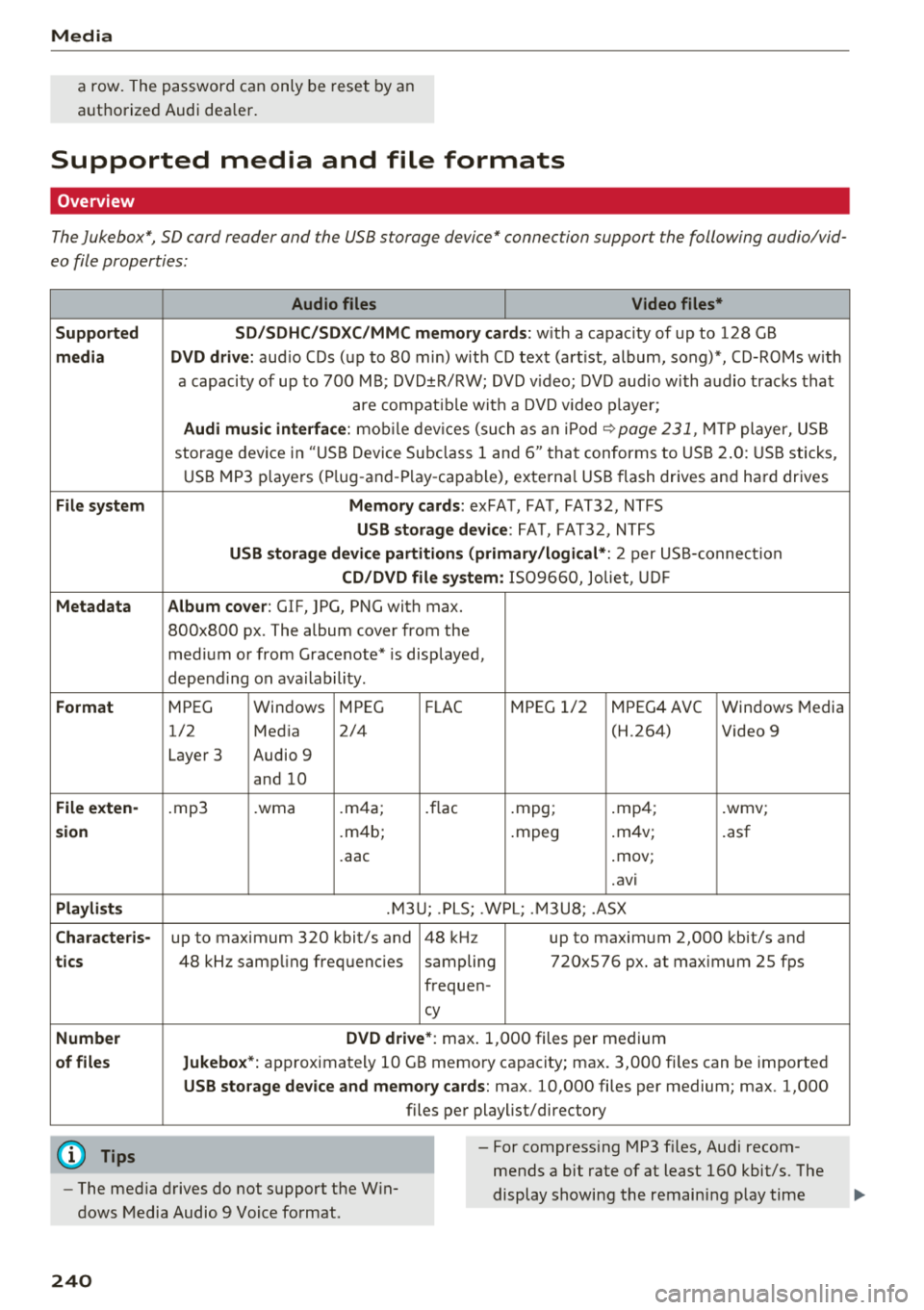
Overview
The Jukebox*, SD card reader and the USB storage device" connection support the following audio/vid
eo file properties :
Audio files Video files*
Supported SD/SDHC/SDXC /MMC memory cards:
w it h a capacity of up to 128 GB
media DVD drive: aud io CDs ( up to 80 min) with CD tex t (art ist, album, song)*, CD-ROMs w ith
a capaci ty of up to 700 M B; DVD ±R/RW; DVD v ideo; DV D audio wi th a udio trac ks tha t
are compat ib le w ith a DVD v ideo p laye r;
Audi music interface : mobile dev ices (su ch as a n iPo d ~ page 231, MT P player, U SB
stor age dev ice in "US B Devi ce Subcl ass 1 and 6" tha t conforms to USB 2.0 : U SB sticks,
U SB MP3 players ( Plug -and -P lay -capa ble), externa l USB flash drives and ha rd drives
File system Memory cards: exFAT, FA T, FAT3 2, NTFS
USB storage device : FAT, FAT32, NTFS
USB storage device partitions (primary /logical *: 2 per US S-connect ion
CD/DVD file system: 1509660, Joliet, UDF
Metadata Album cover : GIF, )PG, PNC with max.
800x800 px . The album cover from the
med ium or from Grace note * is disp layed,
depend ing on ava ilability .
Format MPEG Windows MPEG
FLAC MPEG 1/2 MPEG4 AVC W
indows Media
1/2 Med ia 2/4 (H.264) Video 9
Laye r 3 Audio 9
and 10
File exten-.mp3 .wma .m4 a; . flac .mpg; .mp 4; .wmv;
sion .m4b; .mpeg .
m4v;
.asf
. aac .mov;
.avi
Playlists .M3 U; .PL S; .WPL; . M3U8; .ASX
Character is-up to maximum 320 kbit/s and 48 kH z up to maxim um 2,000 kbit/s and
tics 48 kHz samp ling frequencies sampling 720x576 px. at max imum 25 fps
freq uen -
cy
Number DVD drive*
: max. 1,000 files per medium
of files Jukebox *: app rox imately 10 GB memo ry capacity; max. 3,000 fi les can be imported
USB storage device and memory cards : max. 10,000 files per medium; max . 1,000
files pe r playlist/directory
(D Tips
- The med ia d rives do not s upport the W in
dows Media Audio 9 Voice fo rmat. - For compress
ing MP3 f iles, Audi recom
mends a bit rate of at least 160 kbit/s. The
display showing the remain ing p lay time
240
Page 244 of 392
Media
Problem Solution
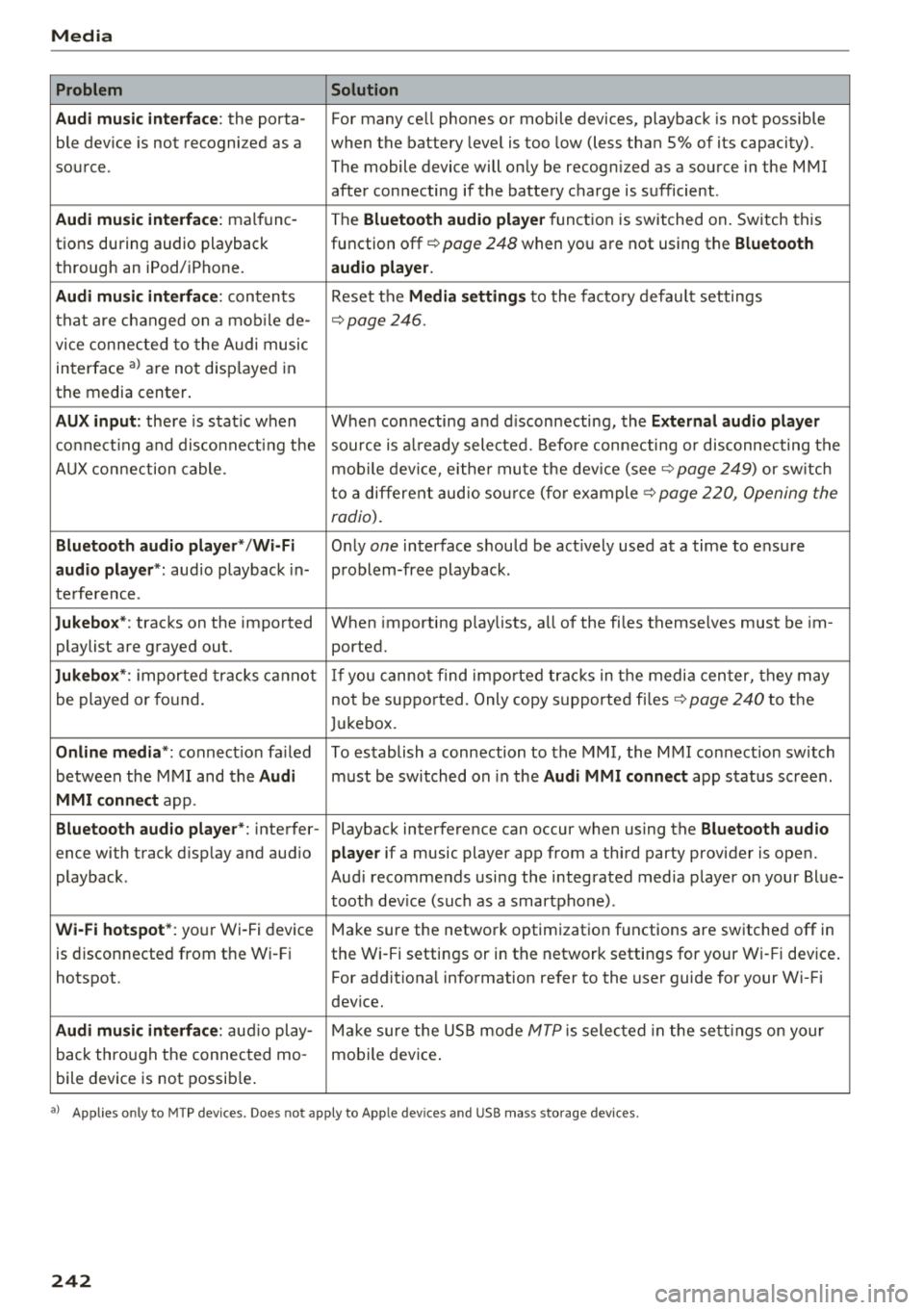
Audi music interface :
the porta-For many ce ll phones or mobile devices, playback is not possible
ble device is not recogni zed as a when the battery level is too low (less than 5% of its capacity).
source. The mobile device will only be recogn ized as a source in the MMI
after connecting if the battery charge is sufficient .
Audi music interface: malfunc-
The Bluetooth audio player function is switched on. Switch this
tions during audio playback function off¢
page 248 when you are not using the Bluetooth
through an iPod/ iPhone. audio player.
Audi music interface:
contents Reset the Media settings to the factory default settings
that are changed on a mobile de -
¢page 246.
vice connected to the Audi music
interface
a l are not disp layed in
the media center .
AUX input: there is stat ic when When connecting a nd disconnecting, the External audio player
connecting and disconnect ing the source is already selected. Before connecting or disconnecting the
AUX connection cable. mobile device, either mute the device (see ¢
page 249) or sw itch
to a different audio source (for example ¢
page 220, Opening the
radio).
Bluetooth audio player* /Wi-Fi
Only one interface should be act ively used at a time to ensure
audio player*: audio playback in- problem-free playback.
terference.
Jukebox* : tracks on the imported When importing playlists, a ll of the files themselves must be im-
playlist are grayed out. ported.
Jukebox*: imported tracks cannot If you cannot find imported tracks in the media center, they may
be played or found. not be supported. Only copy supported files"*
page 240 to the
Jukebox.
Online media *: connection fa iled To establish a connection to the MMI, the MMI connection switch
between the MMI and the
Audi must be switched on in the Audi MMI connect app status sc ree n.
MMI connect app.
Bluetooth audio player *: interfer- Playback interference can occur when using the Bluetooth audio
ence with track d isp lay and aud io player if a music player app from a third party provider is open.
playback . Audi recommends using the integrated media player on your Blue-
tooth device (such as a smartphone) .
Wi-Fi hotspot*: your Wi-Fi device
Make sure the network optimization functions are switched off in
is disconnected from the Wi -Fi the Wi-Fi settings or in the network settings for your Wi -Fi device .
hotspot . For additional information refer to the user guide for your Wi-Fi
dev ice.
Audi music interface: audio play-Make sure the USB mode MTP is selected in the settings on your
back through the connected mo- mobile device.
bile device is not possible.
al Applie s onl y to MTP dev ice s. Does not apply to App le dev ices and USB mass s torage dev ice s.
242
Page 250 of 392
System settings
Delete Bluetooth device*
The se lecte d cell p ho ne/mo bile dev ice is dis con
nected from t he M MI and is removed from the
list of all devices that are alrea dy paire d.
Show Bluetooth profiles*
You can Connect or Disconnect the Handsfree ,
Me ssages *, Dire ctory /contacts
an d Bluetooth
audio player
pro files sep arately.
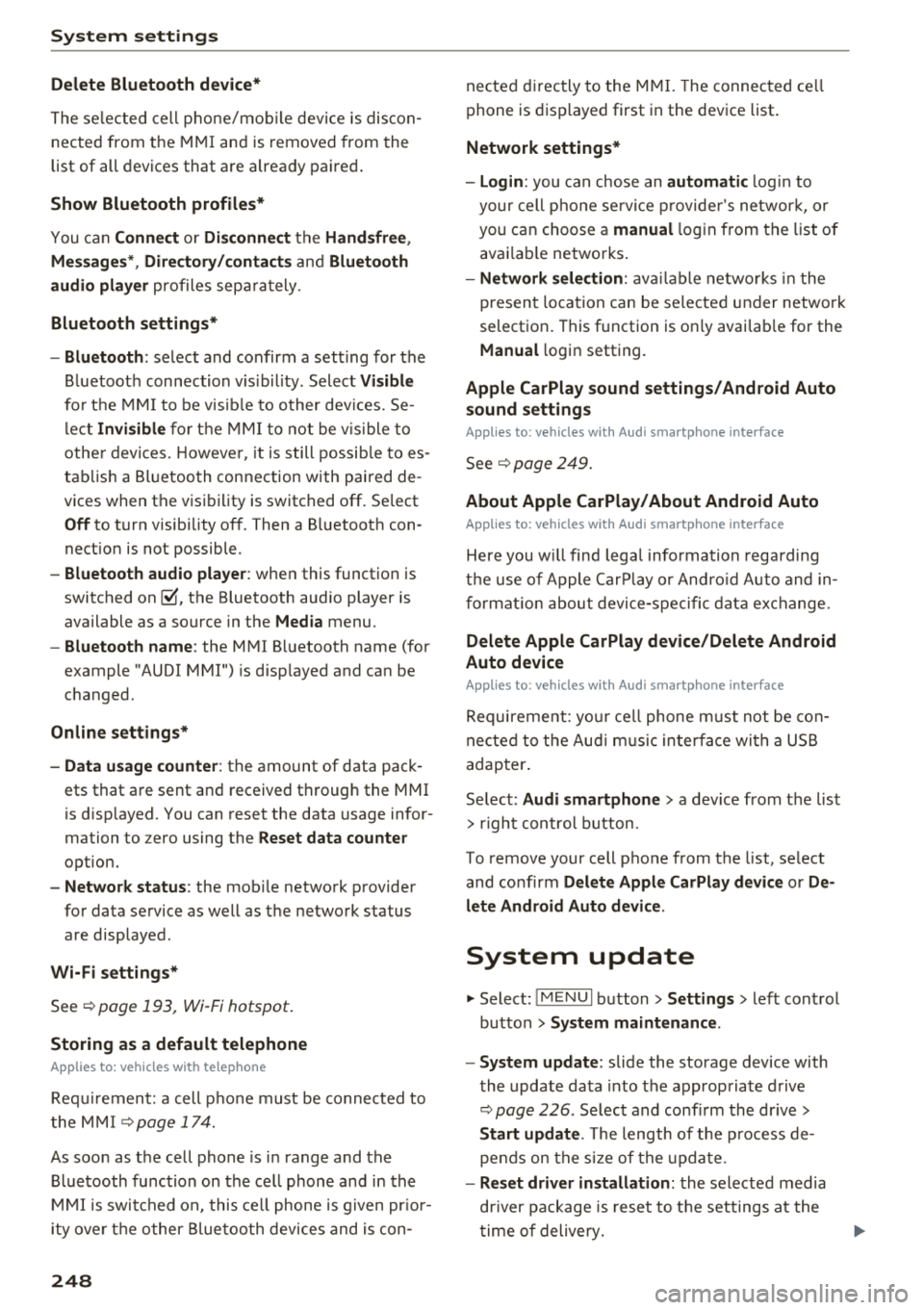
Bluetooth settings*
- Bluetooth :
select and confirm a set ting for the
B luetoot h connec tion v is ibility . Select
Visible
fo r th e MM I to be vis ib le to o ther dev ices. Se
l ec t
Invisible fo r th e M MI to not be v is ible t o
othe r devi ce s. H oweve r, it is still possib le to es
tab lish a Bl uetoo th con nection with pai red de
vices when the v is ibi lity is switched off. Se lect
Off to t urn visibi lity off . Then a B luetooth con
nect ion is not possible .
-Bluetooth audio player : when this function is
switc hed
on ~' the Bluetooth audio player is
available as a so urce in t he
Media menu .
-Bluetooth name : the MMI B luetooth name (for
example "AUDI MMI") is d isp layed and ca n be
c h anged.
Online settings*
- Data usage counter :
the amount of data pack
ets that a re sent a nd received throug h the MMI
is d isp layed. You can reset the data usage infor
mation to zero using the
Reset data counter
option.
- Network status : the mobile netwo rk p rovider
fo r data se rvice as well as the netwo rk status
are disp layed .
Wi-Fi settings*
See ¢ page 193, Wi -Fi hotspot.
Storing as a default telephone
Applies to: vehicles with telephone
Requir emen t: a cell phone must be connected to
t he MM I
¢page 17 4.
As soon as t he cell phone is i n range and the
B lue tooth func tion on the ce ll phone and in the
MM I is swi tched o n, this ce ll phone is g iven pr io r
ity ove r th e ot her Blue tooth devices and is c on-
248
necte d dir ectly to the M MI. The connec ted ce ll
p hone is d is pl ayed first in t he dev ice li st .
Network settings*
- Login :
you can chose an automatic log in to
your cell p ho ne servi ce pro vider 's ne twor k, or
you can ch oose a
manual log in from t he list of
avai la bl e netwo rks .
-Network selection : availabl e netwo rks in t he
presen t loca tion can be sele cte d unde r network
select io n. This f unction is on ly avai la bl e for the
Manual log in setting.
Apple CarPlay sound settings/ Android Auto
sound settings
Applies to: vehicles with Audi smartphone interface
See q page 249.
About Apple CarPlay/ About Android Auto
Applies to: vehicles with Audi smartphone interface
Here you w ill find l ega l informa tion regarding
t h e use o f A pple Car Play o r And ro id Aut o and in
fo rmat ion a bout device -s p eci fic d ata exch ange.
Delete Apple CarPlay device/Delete Android
Auto device
Applies to: vehicles with Audi smartphone interface
Require ment: yo ur cell phone must not be con
n ect ed to the Au di music interf ace wi th a USB
adap ter.
Se lec t:
Audi smartphone > a dev ice from t he lis t
> r igh t con trol b utto n.
To remove your cell p ho ne from the list, se lect
and co nfirm
Delete Apple CarPlay device or De
lete Android Auto device .
System update
"'Select : !ME NUI bu tton> Settings > left control
bu tton >
System maintenance.
- System update :
slide the storage device with
t he update da ta into the a pprop ria te drive
¢ page 2 26 . Se lec t and conf irm the dr ive>
Start update . The length of the p rocess de
pe nds on the s ize of the upd ate.
- Reset driver installation: the selected media
dr iver p ackage is rese t to t he se ttings a t the
t im e of delivery .
Page 253 of 392
u co .... N r--N .... 0 <( 0 00
-Press and hold the hea d-up disp lay but ton~
fo r more than five seconds after switching on
t h e ignit ion .
- Press t he control knob to close the information.
Or : start d riving .
Information on instrument cluster software and
licensing agreements
Pr ess the reset bu tton 10 .0 1 l) twice within five
seconds of sw it chi ng t he ig nition on .
ll Not avai lable in all ve hicles.
System settings
251
Page 326 of 392
Checking and Filling
-Never add radiator anti-freeze or other addi
tives to the washer fluid.
-Do not use a glass cleaner that contains
paint solvents, because this could damage
the paint .
Service interval display
The service interval display detects when your ve
hicle is due for service.
Checking service intervals
You can check the remaining distance or time un
til the next oil c hange or next inspection in the
Infotainment system .
.,. Select in the Infot ainment system: the I MENU I
button > Vehicle > left contro l button > Service
& checks > Service intervals.
Resetting the indicator
An author ized Audi dealer or authorized Audi
Service Facility will reset the service interval dis
p la y after performing serv ice.
If you have changed the oil yourself, you must re
set the oil c hange interva l.
.,. Select in the Infotainment system: the lMENUI
button
> Vehicle > left control button > Service
& checks > Service intervals > Reset oil change
interval.
If an oil change or inspection is due, you can ac
cess it in the Infotainment system . The display
works in two stages:
-Service reminder: after a certain distance is
driven, a message appears in the instrument
cluster display every time the ign ition is switch
ed on. The remaining distance and t ime is dis
played br iefly.
-Service due : if your vehicle has reached a serv
ice interval, a message appears briefly after
switching the ignition on.
0 Note
-Only reset the oil change indicator if the oil
was c hanged.
-Following the service inter vals is critical to
maintain ing the service life and value of
324
your vehicle, especially the engine . Even if
the mileage on the ve hicle is low, do not ex
ceed t he time for the next service .
Page 385 of 392
u co ..... N ,..._
N ..... 0 <( 0 00
Overview (Cockpit) . . . . . . . . . . . . . . . . . . . . . . 8
p
Pai nt damage . . . . . . . . . . . . . . . . . . . . . . . . 346
Paint number . . . . . . . . . . . . . . . . . . . . . . . . 369
Panorama g lass roof. . . . . . . . . . . . . . . . . . . . 42
Emergency operation . . . . . . . . . . . . . . . . . . 42
Parental control
DVD... .. .. ................. .. .. .. . 237
Park assist
Cleaning the sensors/camera . . . . . . . . . .
345
Parking aid . . . . . . . . . . . . . . . . . . . . . . . . . . 130
Parking brake
refer to Electromechanica l parking brake . 80
Parking lights . . . . . . . . . . . . . . . . . . . . . . . . . 45
Parking location
Audi connect vehicle control
Parking system
refer to Parking systems
Parking systems
198
131,133
Peripheral cameras . . . . . . . . . . . . . . . . . . 135
Rearview camera . . . . . . . . . . . . . . . . . . . . 133
Sett ings . . . . . . . . . . . . . . . . . . . . . . . . . . . 138
Trailer h itch . . . . . . . . . . . . . . . . . . . . . . . . 139
Partition net . . . . . . . . . . . . . . . . . . . . . . . . . . 64
Parts replacement . . . . . . . . . . . . . . . . . . . . 373
PASSENGER AIR BAG light . . . . . . . . . . . . . . 281
Pause (audio/video file) . . . . . . . . . . . . . . . . 234
Pedals . . . . . . . . . . . . . . . . . . . . . . . . . . . . . . 256
Personal route assistance
Phonebook 209
refer to
Contacts . . . . . . . . . . . . . . . . . . . . 183
Physical principles of a frontal collision . . . 262
Picture format (video) . . . . . . . . . . . . . . . . . 237
Pitch angle . . . . . . . . . . . . . . . . . . . . . . . . . . . 83
Playback (media) . . . . . . . . . . . . . . . . . . . . . 234
Playlist . . . . . . . . . . . . . . . . . . . . . . . . . . . . . 23 7
Point of interest . . . . . . . . . . . . . . . . . . . . . . 206
Point of interest search . . . . . . . . . . . . . . . . 207
also refer to
Point of interest . . . . . . . . . . 206
Polishing . . . . . . . . . . . . . . . . . . . . . . . . . . . . 346
Pollutant filter (automatic A/C system) . . . . 69
Power sources .. ............... 60, 232 , 233
Predictive efficiency assist . . . . . . . . . . . . . . 100
Index
Pregnant women
Special considerations when wearing a safe-
ty belt . . . . . . . . . . . . . . . . . . . . . . . . . . . . .
266
pre sense
refer to Aud i pre sense . . . . . . . . . . . . . . . 112
Presentation mode . . . . . . . . . . . . . . . . . . . . 212
Presets (radio) . . . . . . . . . . . . . . . . . . . . . . . 223
Pressure
Tire pressure monitoring system . . . . . . .
342
T ires . . . . . . . . . . . . . . . . . . . . . . . . . . . . . . 335
Program guide
Radio . . . . . . . . . . . . . . . . . . . . . . . . . . . . .
221
Programming buttons (multifunction steering
wheel) . . . . . . . . . . . . . . . . . . . . . . . . . . . . . . .
14
Proper occupant seating positions . . . . . . . 253
Proper safety belt position . . . . . . . . . . . . . . 265
Proper seating position
Front passenger . . . . . . . . . . . . . . . . . . . . .
254
Occupants. . . . . . . . . . . . . . . . . . . . . . . . . . 253
Rear passengers . . . . . . . . . . . . . . . . . . . . . 254
Prot ecting . . . . . . . . . . . . . . . . . . . . . . . . . . . 346
Q
quattro 144
Se lective wheel torque control . . . . . . . . . 140
Question
What happens to unbelted occupants?
262
R
Radio ....... ... .. .. ................ . 220
Additional station information . . . . . . . . . 222
Presets . . . . . . . . . . . . . . . . . . . . . . . . . . . . 223
Radio text . . . . . . . . . . . . . . . . . . . . . . . . . . 221
Station list . . . . . . . . . . . . . . . . . . . . . . . . . 220
Radio Standards Specification (RSS) . . . . . . 374
Rail carrier . . . . . . . . . . . . . . . . . . . . . . . . . . . 368
Rain/l ight sensor
Headlights . . . . . . . . . . . . . . . . . . . . . . . . . .
45
Interval mode (wipers) . . . . . . . . . . . . . . . . 51
Raising the vehicle . . . . . . . . . . . . . . . . . . . . 367
Random
refer to Shuffle . . . . . . . . . . . . . . . . . . . . . 23 7
Range (fuel level) . . . . . . . . . . . . . . . . . . . . . .
16
Reading lights . . . . . . . . . . . . . . . . . . . . . . . . . 48
Rear fog lights . . . . . . . . . . . . . . . . . . . . . . . . 45
383
Page 386 of 392
Index
Rear lid
refer to Luggage compartment lid . . . . 36, 37
Rea r lower ing . . . . . . . . . . . . . . . . . . . . . . . . 128
Rear Seat Entertainment preparation
refer to Audi Entertainment mobile . . . . . 234
Rearview camera
refer to Parking systems .... ... .. . 131,133
Rea r window defogge r . . . . . . . . . . . . . . . . . . 7 1
Rear window washer system . . . . . . . . . . . . . 51
R EAR (button) . . . . . . . . . . . . . . . . . . . . . . . . . 71
Recirculat ion mode (automatic climate con-
trol system) . . . . . . . . . . . . . . . . . . . . . . . . . . 7 1
Recuperation . . . . . . . . . . . . . . . . . . . . . . . . . 16
Ref ueling. ....... ... .. ..... ... .. .. ... 311
Remote control
refer to Remote contro l key . . . . . . . . . . . . 31
Remote control key . . . . . . . . . . . . . . . . . . . . 31
Remote con trol ope ra tion
Garage door opener (Home link) . . . . . . . . . 43
Remote lock ing and unlocking
Aud i connect vehicle control . . . . . . . . . . . 198
Removing the caps (wheel bolts) . . . . . . . . . 353
Repair man uals ... ... .. ..... ... .. .. ... 371
Repa irs
A irbag system . . . . . . . . . . . . . . . . . . . . . . 284
Rep lacement key . . . . . . . . . . . . . . . . . . . . . . 31
Rep lac ing
Light bulbs . . . . . . . . . . . . . . . . . . . . . . . . . 362
Replac ing wiper blades . . . . . . . . . . . . . . . . . 53
Reporting Safety Defects . . . . . . . . . . . . . . . 259
Reset
refer to Restart ( MMI) . . . . . . . . . . . . . . . . 250
Reset button (trip odometer) . . . . . . . . . . . . 1 2
Resetting the trip odometer . . . . . . . . . . . . . 1 2
Res id ual heat (automa tic climate cont rol) . . 7 2
Restart (MMI) . . . . . . . . . . . . . . . . . . . . . . . . 250
R etractor . . . . . . . . . . . . . . . . . . . . . . . . . . . . 264
Reve rse gear . . . . . . . . . . . . . . . . . . . . . . . . . . 85
Rewinding (a udio/video file) . . . . . . . . . . . . 234
R igh t cont rol b utton . . . . . . . . . . . . . . . . . . . . 13
Rims ....... .. .. ................ ... . 340
Clea ning . . . . . . . . . . . . . . . . . . . . . . . . . . . 345
Ringtone settings . . . . . . . . . . . . . . . . . . . . . 185
Road car rier . . . . . . . . . . . . . . . . . . . . . . . . . 368
384 Roaming
refer to Data connection
. . . . . . . . . . . . . . 194
Roof load ... .. .. .. .. .. ............ 67, 370
Roof rack ... .. .. .. .. .. ............. ... 67
also refer to Roof rack . . . . . . . . . . . . . . . . . 67
Ro ute criteria . . . . . . . . . . . . . . . . . . . . . . . . 212
Ro ute guidance
refer to Navigation .. .. ............. . .
Running direct io n (tires)
s
Safe driving habits
S afety 2
03
355
252
A irbag system . . . . . . . . . . . . . . . . . . . . . . 2 69
Be lts . . . . . . . . . . . . . . . . . . . . . . . . . . . . . . 261
Cargo . . . . . . . . . . . . . . . . . . . . . . . . . . . . . 257
Correct seat ing pos ition . . . . . . . . . . . . . . 253
Pedal area . . . . . . . . . . . . . . . . . . . . . . . . . . 256
Telephone . .... .. .. .. ............. .. 174
Safety be lt height adjustment . . . . . . . . . . . 266
Safety be lt pos ition . . . . . . . . . . . . . . . . . . . 265
Safety be lt heig ht adjustme nt . . . . . . . . . 266
S afety be lts wor n by pregnant women . . . 266
Safety be lt pretensioner
Service and disposal . . . . . . . . . . . . . . . . . . 268
Safety be lts . . . . . . . . . . . . . . . . . . . . . . 261, 264
Cleaning . . . . . . . . . . . . . . . . . . . . . . . . . . . 346
Danger to passengers who do not wear a
safety belt . . . . . . . . . . . . . . . . . . . . . . . . . 262
Fastening . . . . . . . . . . . . . . . . . . . . . . . . . . 264
Imprope rly wo rn . . . . . . . . . . . . . . . . . . . . 267
Not wor n . . . . . . . . . . . . . . . . . . . . . . . . . . 262
S afety be lt pos it ion . . . . . . . . . . . . . . . . . . 265
S afety i nstr uctions . . . . . . . . . . . . . . . . . . . 263
Securing child sa fety seats . . . . . . . . . . . . 302
Specia l considerations for pregnant wom -
en . . . . . . . . . . . . . . . . . . . . . . . . . . . . . . . . 266
Unfastening . . . . . . . . . . . . . . . . . . . . . . . . 266
Warn ing/ indicator light . . . . . . . . . . . . . . 261
Worn properly . . . . . . . . . . . . . . . . . . . . . . 263
Safety be lt warning light . . . . . . . . . . . . . . . 261
Safety i nstr uctions
fo r side c urtain airbags . . . . . . . . . . . . . . . 290
fo r us ing ch ild safety se ats . . . . . . . . . . . . 295
f or using sa fe ty be lts . . . . . . . . . . . . . . . . . 263
Monitoring the Advanced Airbag System . 283