reset AUDI Q5 2018 User Guide
[x] Cancel search | Manufacturer: AUDI, Model Year: 2018, Model line: Q5, Model: AUDI Q5 2018Pages: 392, PDF Size: 60.56 MB
Page 174 of 392
Voice recognition s ystem
-Always read the chapter ¢ page 194, Audi
connect (Infotainment) general informa tion .
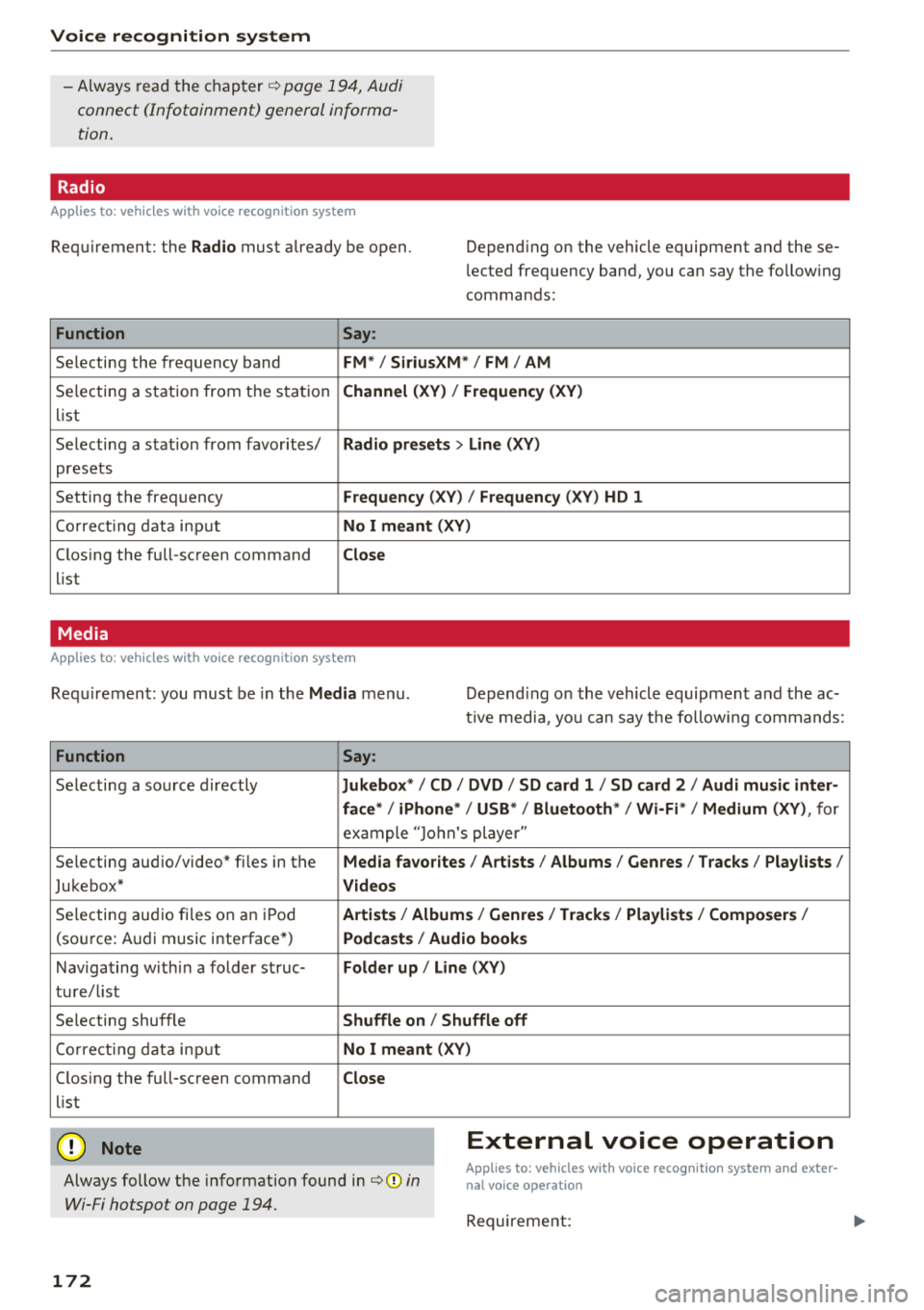
Radio
Applies to: vehicles with voice recognition system
Requirement: the Radio must already be open. Depend ing on the vehicle equipment and these
lected frequency band, you ca n say the fo llow ing
commands :
Function Say:
Selecting the frequency band FM*/ Siriu sXM* / FM / AM
Selecting a station from t he s ta tion Channel (XV ) / !Frequenc y (XV)
list
Selecting a stat ion from favorites/
Radio presets > Line (XV)
presets
Setting the frequency
F requency (X V ) / Frequency ( XV) HO 1
Correct ing data inp ut No I meant (XV )
Closing the full-screen command Close
list
Media
Applies to: vehicles with voice recognition system
Requirement: you mus t be in the Media menu . Depending on the vehicle equipment and the ac
t ive media, yo u can say the following commands :
Function Say:
Selecting a sou rce directly Ju kebox* / CO / DVD / SO card 1 / SO card 2 / Audi music inter-
face */ iPhone * / USB * / Bluetooth * / Wi -Fi * / Medium (XV) ,
for
exa mple "J o hn's player "
Selecting aud io/video" fi les in the
Media fa vorites I Artists / Albums / Genres I Tracks / Playlists /
Jukebox* Videos
Selecting aud io fi les on a n iP od Artists / Albu m is/ Genres I Track s/ Playlists / Compo sers I
(so urce: A udi music i nterface*) Podca st s / Aud io books
Nav iga ting with in a folder s truc-Folder up / Line (XV )
tu re/l ist
Selecting shuffle
Shuffle on / Shuffle off
Co rre ct in g data inp ut No I meant (XV )
Closing the full-screen command Close
list
@ Note External voice operation
Always follow the info rmation found in ¢@) in
Wi-Fi hotspot on page 194.
Applies to: vehicles with voice recognition system and exter·
nal voice operation
Requireme nt:
172
Page 187 of 392
u C0 ..... N ,..._
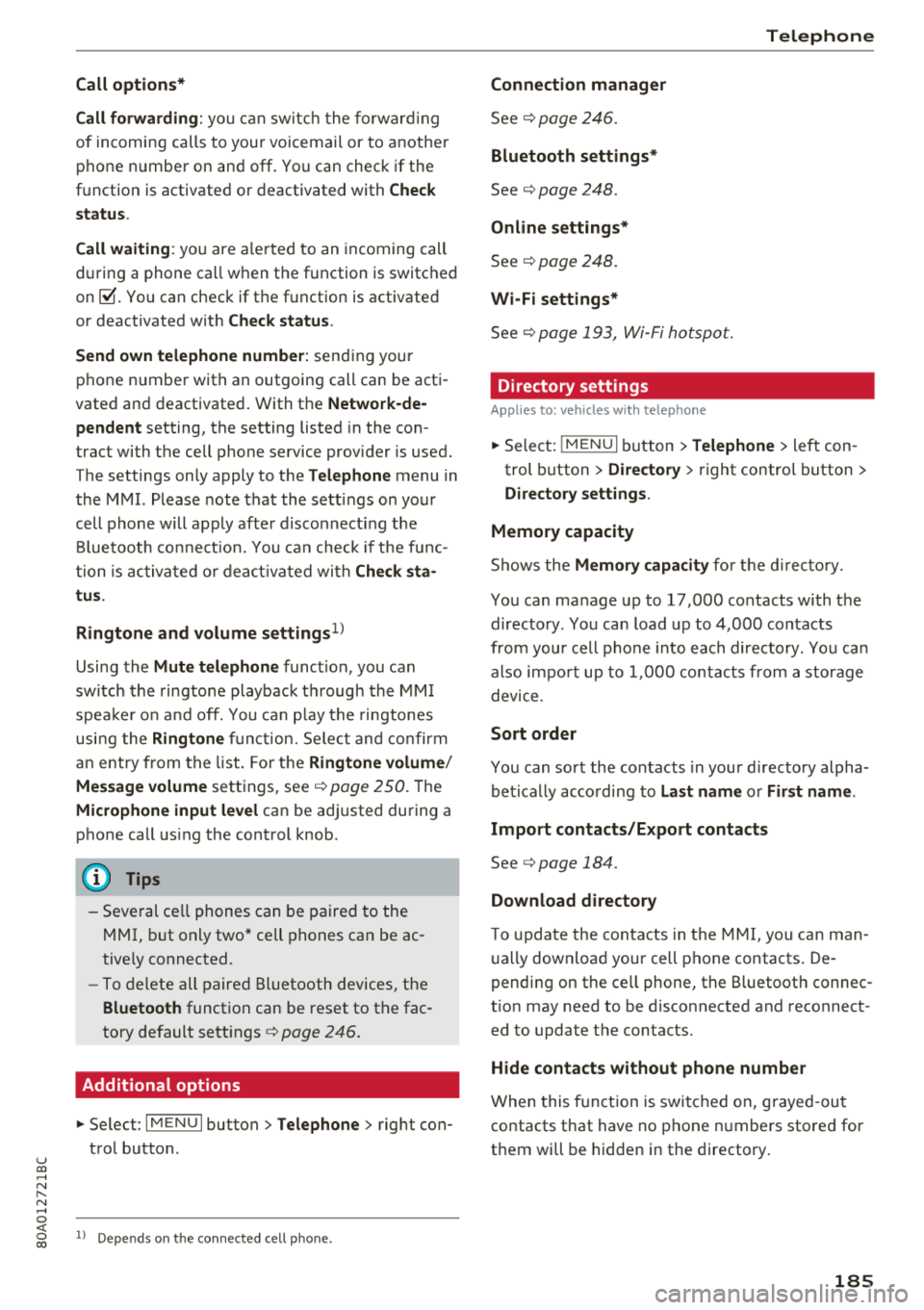
Call options*
Call forwarding :
you can switc h the forwarding
of incoming calls to your voicemail or to anothe r
phone number on and off . You can check if the
function is activated or deactivated with
Check
status .
Call waiting :
you are alerted to an incoming call
during a phone call when the function is switched
on~-You can check if th e function is activated
or deactivated with
Check status .
Send own telephone number:
sending your
phone n umber with an outgoing call can be acti
vated and deactivated . With the
Network -de
pendent
setting, the setting listed in the con
tract with the cell phone service provider is used.
The settings only apply to the
Telephone menu in
the MMI. Please note that the settings on your
cell phone will apply afte r disconnecting the
B luetooth co nnect ion. You ca n check if the func
tion is activated or deactivated with
Check sta
tus .
Ringtone and volume settings
1 )
Using the Mute telephone function, you can
switch the ringtone playback through the MMI
speake r o n and off. You can play the ringtones
using the
Ringtone fu nct ion. Select and confirm
an entry from the list. For th e
Ringtone volume/
Message volume
settings, see¢ page 250. The
Microphone input level can be adj usted during a
phone call using the control knob.
(D Tips
-Several cell phones can be paired to the
MMI, but only two* cell phones can be ac
tive ly connected.
-To delete all paired Bluetooth devices, the
Bluetooth function can be reset to the fac
tory default sett ings
c::> page 246.
Additional options
"' Select : I MENU I button> Telephone > right con
trol button .
N ..... 0 <(
~ ll Depends on th e conne cted cell pho ne.
Telephone
Connection manager
See¢ page 246.
Bluetooth settings*
See ¢ page 248 .
Online settings*
See c::> page 248.
Wi-Fi settings*
See ¢ page 193, Wi-Fi hotspot.
Directory settings
Applies to: vehicles with telephone
"'Sele ct: ! MENUI button> Telephone > left con
trol button >
Directory > right control button >
Directory settings.
Memory capacity
Shows the Memory capacity for the directory.
You can manage up to 17,000 contacts with the
directory. You can load up to 4,000 contacts
from your cell phone into each directory. Yo u can
also impo rt up to 1,000 contacts from a storage
device .
Sort order
You can sort the contacts in your directory alpha
bet ically according to
Last name or First name .
Import contacts/Export contacts
See ¢ page 184.
Download directory
To update the contacts in th e MMI, you can man
ually download your cell phone contacts . De
pending on the ce ll phone, the B luetooth connec
tion may need to be disconnected and reconnect
ed to update the contacts.
Hide contacts without phone number
When this function is switched on, g rayed -out
contacts that have no phone numbers stored for
them wi ll be hidden in the directory.
185
Page 199 of 392
u co ..... N r--N ..... 0 <( 0 00
Audi connect vehicle control
Introduction
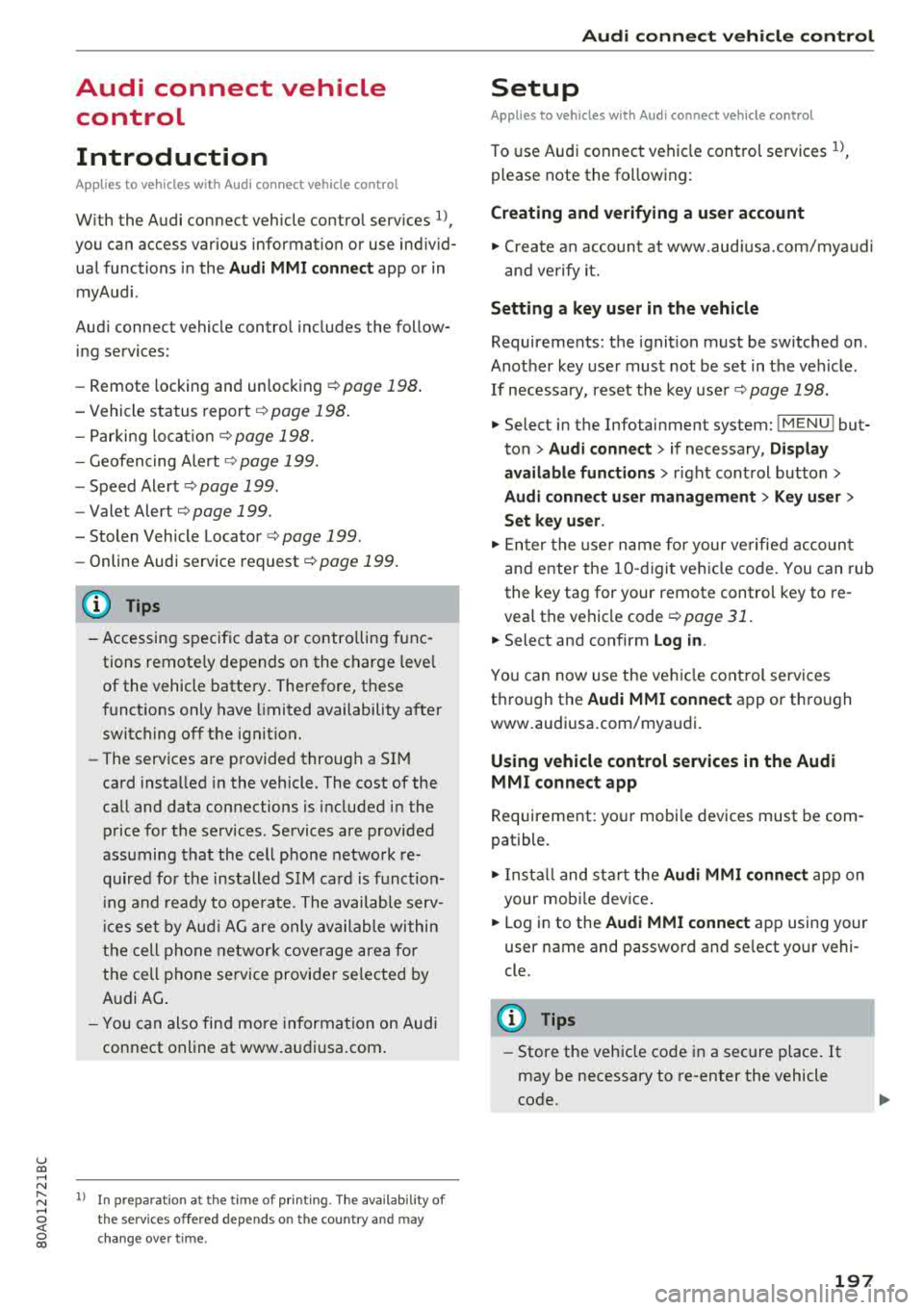
Applies to vehicles with Audi connect vehicle control
With the Audi connect vehicle control services l) ,
you can access various information or use individ
ual functions in the
Audi MMI connect app or in
myAudi .
Audi connect vehicle control includes the follow
ing services:
- Remote locking and unlocking ¢
page 198.
-Vehicle status report¢ page 198.
-Parking location ¢ page 198 .
-Geofencing Alert ¢ page 199.
-Speed Alert ¢ page 199.
-Valet Alert ¢ page 199.
- Stolen Vehicle Locator ¢ page 199.
-Online Audi service request ¢page 199.
(D Tips
-Accessing specific data or controlling func
tions remote ly depends on the charge leve l
of the vehicle battery. Therefore, these
functions only have limited availability after
switching off the ignit ion.
- The services are provided through a SIM
card installed in the vehicle. The cost of the
call and data connections is included in the
price for the services. Services are provided
assuming that the cell phone network re
quired for the installed S IM card is function
in g and ready to operate. The available serv
ic es set by Audi AG are only available within
the cell phone network coverage area for
the cell phone service provider selected by
Audi AG .
- You can also find more information on Audi
connect on line at www.audiusa.com.
l) In pre parat io n at t he time of p rinting. T he a vailab ilit y o f
the services o ffered depends o n the co untry and may
c hang e over tim e.
Audi connect vehicle control
Setup
Applies to vehicles with Audi connect vehicle control
To use Audi connect vehicle control services 1>,
please note the fo llowing :
Creating and verifying a user account
"'Create an account at www.aud iusa.com/myaudi
and verify it.
Setting a key user in the vehicle
Requirements: the ignition must be switched on .
Another key user must not be set in the veh icle .
If necessary, reset the key
user ¢ page 198.
.. Select in the Infotainment system: I MENU ! but
ton
> Audi connect > if necessary, Display
available functions >
right control button >
Audi connect user management > Key user >
Set key user .
"' Enter the user name for your ve rified account
and enter the IO-digit vehicle code. You can rub
the key tag for your remote control key to re
veal the vehicle code
¢ page 31.
.. Select and confirm Log in.
You can now use the vehicle control services
through the
Audi MMI connect app or through
www .audiusa.com/myaudi.
Using vehicle control services in the Audi
MMI connect app
Requirement: your mobile devices must be com
patible.
.. Install and start the Audi MMI connect app on
your mobi le device .
.. Log in to the Audi MMI connect app using your
user name and password and se lect your vehi
cle.
(D Tips
- Store the vehicle code in a secure place . It
may be necessary to re-enter the vehicle
code.
197
Page 200 of 392
Audi connect vehicle control
-Pay attention to upper-and lower -case let
ters when entering the vehicle code.
-If you do not have the 10-digit vehicl e code,
contact an authorized Audi dealer or author
ized Audi Service Facility .
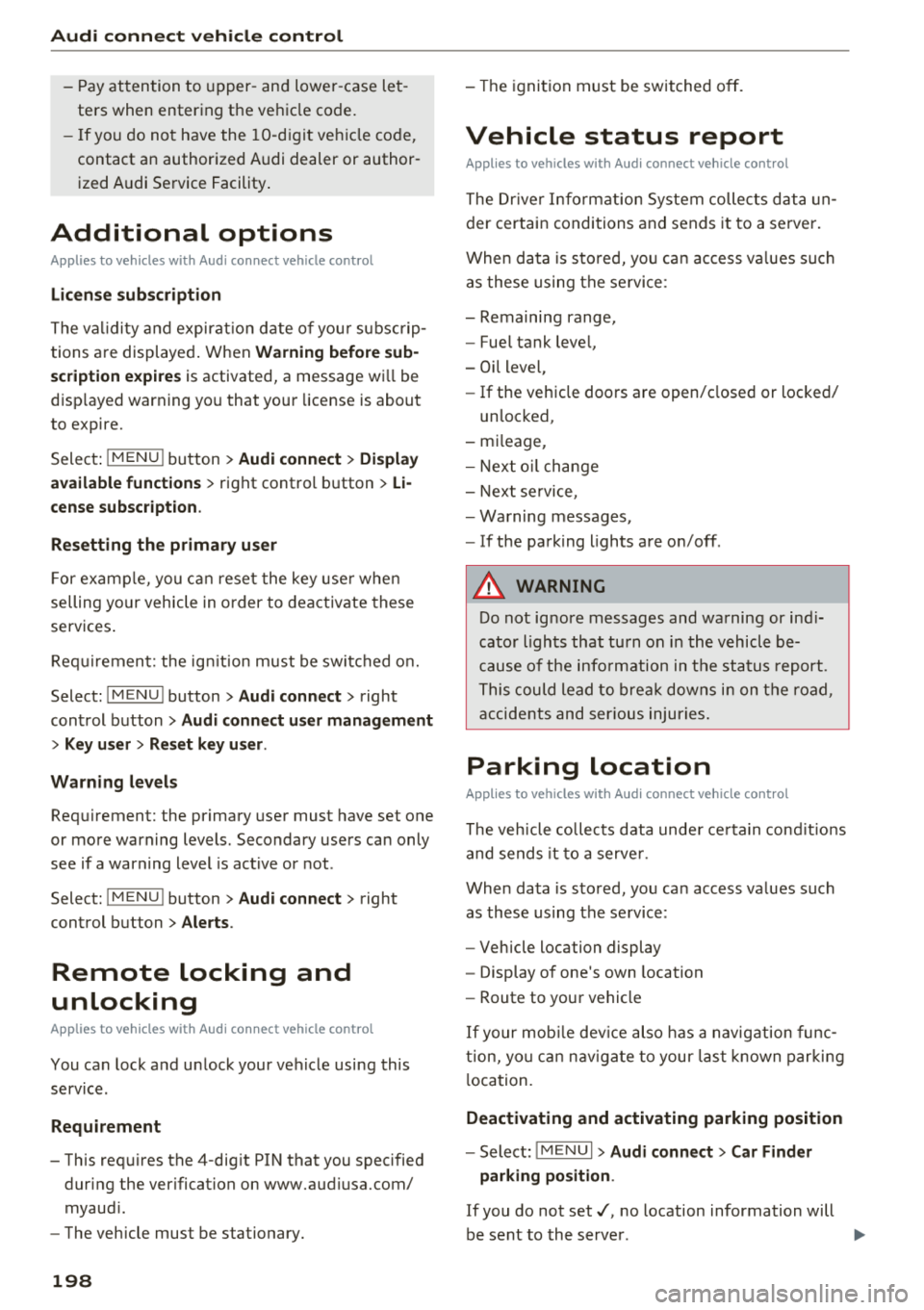
Additional options
Applies to vehicles with Audi co nnect vehicle control
License subscription
The validity and expirat ion date of you r subscrip
tions are displayed. When
Warning before sub
scription expires
is activated, a message wi ll be
disp layed warning you that your license is about
to expire.
Select :
!MENU ! button> Audi connect > Display
available functions >
right control button> Li
cense subscription.
Resetting the primary user
F or examp le, you ca n reset the key user when
selling your vehicle in order to deactivate these
services .
Requirement: the ignition must be switched o n.
Select :
!M ENU ! button> Audi connect > right
control button
> Audi connect user management
> Key user > Reset key user .
Warning levels
Requirement: the primary user must have set one
or more warning levels. Secondary users can only
see if a warning level is active or not .
Select:
! MENU ! button> Audi connect > right
control button
> Alerts.
Remote locking and
unlocking
Applies to veh icles with Audi connect vehicle control
You can lock and unlock your veh icle using this
service .
Requirement
-This requires the 4-dig it PIN that you specified
during the verification on www.audiusa.com/
myaud i.
-The vehicle must be stationary.
198
-The ignition must be switched off.
Vehicle status report
Applies to vehicles w ith Aud i connect ve hicle control
The Dr iver Informat ion System collects data un
der certain conditions and sends it to a server.
When data is sto red, you can access va lues such
as these using the service :
-Remaining range,
-Fuel tank level,
-Oil level,
-If the vehicle doors are open/closed or locked/
un locked,
-mi leage,
-Next oil change
-Next service,
-Warning messages,
-If the parking lights are on/off .
A WARNING
Do not ignore messages and warning or ind i
cator lights that turn on in the vehicle be
cause of the info rmation in the status report.
This could lead to break downs in on the road ,
accidents and serious injuries.
Parking location
Applies to vehicles w it h Aud i connect ve hicle co ntrol
The vehicle collects data unde r ce rta in cond it ions
and sends it to a server .
When data is stored, you can access values such
as these using the service :
-Vehicle location display
-Display of one's own location
-Route to your vehicle
If your mob ile dev ice also has a navigation func
tion, you can nav igate to your last known parking
l ocation.
Deactivating and activating parking position
-Select: ! MENU!> Audi connect> Car Finder
parking position .
If you do not set./, no location information will
be sent to the server.
Page 222 of 392
Radio
Radio
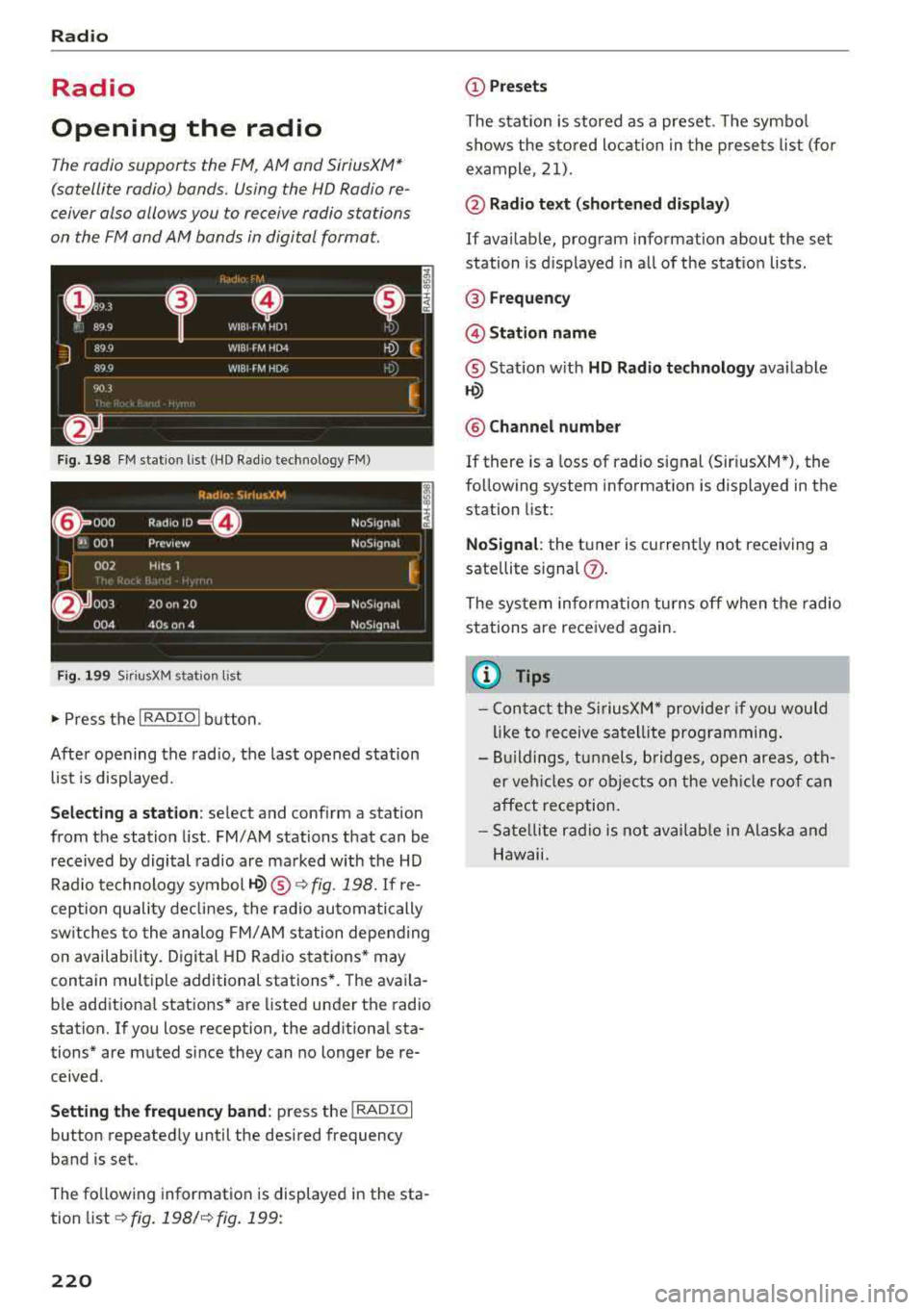
Opening the radio
The radio supports the FM, AM and SiriusXM*
(satellite radio) bonds. Using the HO Radio re
ceiver also allows you to receive radio stations
on the FM and AM bonds in digital format.
F ig. 19 8 FM stat ion list (HD Radio technology FM)
R,1d10 : 5irius.XM
~ 000 Rad,olD e NoS19n,1l
''JI 001 Preview NoS,gnal
J 002 H its 1
~
6 003 20 on 20 · NoS19nal
004 40s on 4 NoS19nal
Fig. 1 99 Sir iu sXM stat ion list
..., Press t he I RADIO I bu tton .
After opening the radio, t he last opened station
list is displayed.
.
I
Selecting a station : select and conf irm a stat ion
from the station list . FM/AM stations that can be
received by digital radio are ma rked with the HD
Rad io technology
symbol ~® ¢ fig. 198. If re
ception quality de clin es, the r ad io automatically
sw itches to the analog FM/ AM station depending
on availab ility. D igital HD Rad io sta tions * may
contain multiple additional stations *. The ava ila
b le add itiona l stations* are listed under the radio
station. If yo u lose reception, the add itiona l sta
tions* are muted since they can no longer be re ceived .
Setting the frequency band : press the I RADIO I
button repeated ly until the desired frequency
band is set.
The fo llow ing information is displayed in the sta
tion list
¢ fig. 198/ ¢fig . 199:
220
(D Presets
The stat ion is stored as a preset. The symbo l
shows the s to red loc ation in the p rese ts list (fo r
example, 21).
@ Radio te xt (shortened di spla y)
If availab le, program information about the set
station is d isplayed in al l of the stat io n lists .
® Frequency
@Stati on name
® Stat ion w ith HD Radio technolog y available
1-W
@ Channel number
If there is a loss of radio signal (Sir iusXM*), the
fo llow ing system information is displayed in the
station list:
NoSignal : the tuner is cu rrent ly not receiving a
sate llite s ignal
(J) .
The system informa tion turns off when the radio
stations are received again.
(I} Tips
- Con tact the SiriusXM" provide r if you would
like to receive satel lite prog ramming .
- Bui ldings, tu nnels, bridges, open areas, oth
er veh icles o r obje cts on the veh icle roof can
affect reception.
- Sate llite r ad io is not av aila ble in Alaska and
Hawaii.
Page 223 of 392
Radio functions
Free text search
App lies to: ve hicles with free text search
Using the free text search, you can select the or
der that the search terms are entered in the in
put field . Search in all frequency bands for a sta
tion name or program type, such as
News .
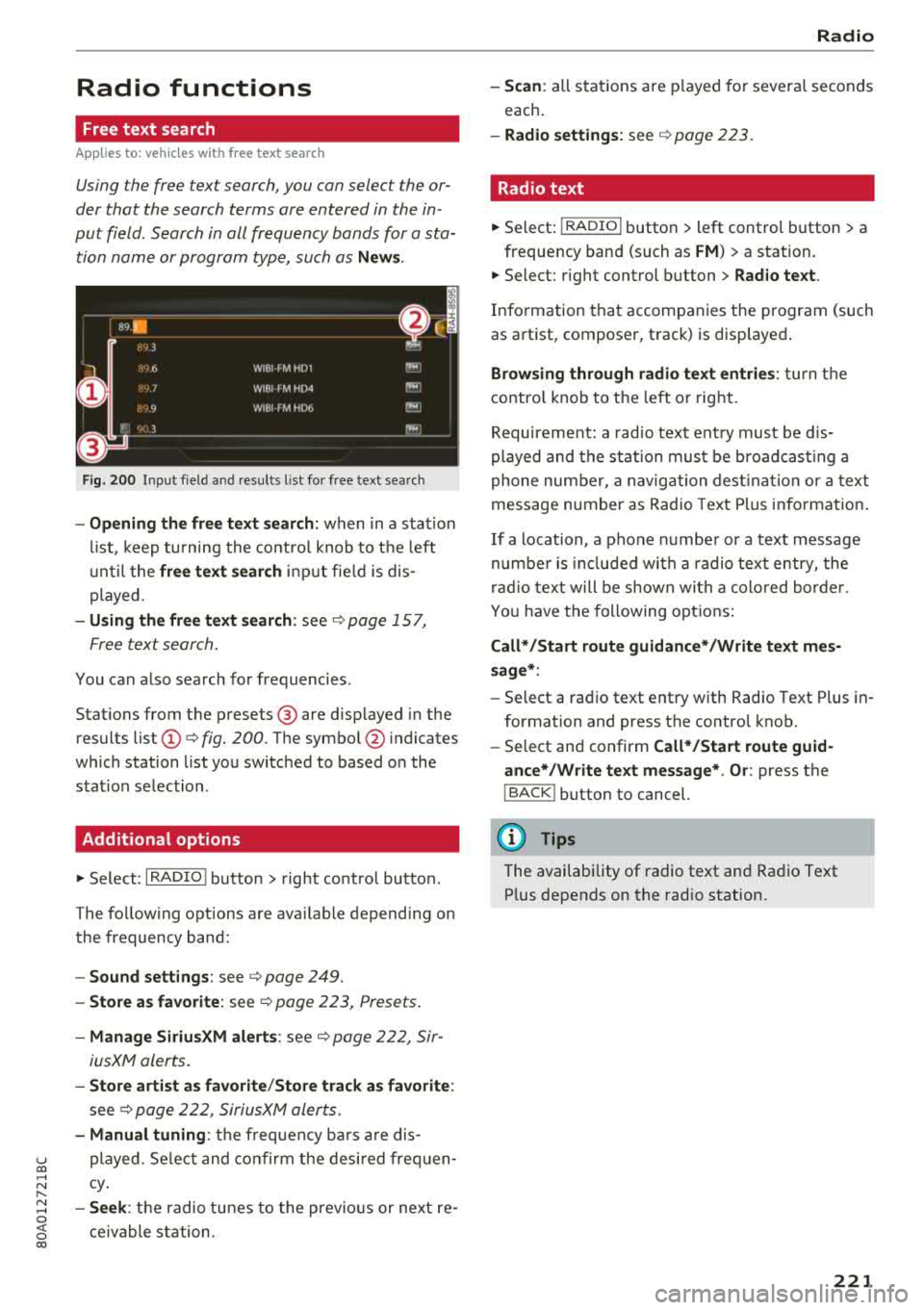
Fig . 20 0 Input f ield and results l ist fo r free text search
- Opening the free text search: when in a s tat ion
li st, keep tu rning the contro l knob to t he left
u nti l the
free text s ear ch in put fie ld is dis
played.
- Using th e free text search : see¢ page 157,
F ree text search.
You can a lso search for frequencies .
Stat ions from the p resets ® are disp layed in the
results list
(D ¢ fig. 200. T he symbo l@ indicates
which station list yo u switched to based o n the
s tat ion se lection .
Additional options
"'Se lect: I RADIO ! button > right co ntro l butto n.
The fo llow ing options are ava ilable depend ing on
the frequency band:
- Sound settings : see ¢page 249.
- Store a s favorite : see ¢ page 223, Presets .
-Manage SiriusXM alerts : see¢ page 222, Sir-
iusXM alerts.
- Store arti st a s favorite /Store track as favorite :
see¢ page 222, SiriusXM alerts.
- Manual tuning : the frequency ba rs a re dis-
u played. Se lect and co nf irm the desi red frequen -co ..... N Cy. I"-
~ - Se ek: th e radio tunes to the previo us or next re -o
~ ceivable station . 00
Radio
-Scan : all stat ions a re p layed fo r severa l seconds
each.
- Radio settings: see ¢ page 223.
Radio text
"' Select: I RADIO I button > left control button > a
frequency band (such as
FM ) > a station.
"' Select: r ight control b utton > Radio te xt.
Info rmation tha t accompanies the program (such
as art ist, composer, track) is disp layed .
Browsing through radio text entrie s: turn the
contro l kno b to t he left or rig ht.
Requirement: a rad io tex t ent ry must be d is
played and the sta tion mus t be b road cas tin g a
phone nu mber, a navig ation des tina tion or a text
message number as Radio Text Plus informat io n.
If a location, a phone numbe r or a text message
numbe r is incl ud ed wi th a radio text entry, the
ra dio tex t will be shown wi th a colo red bor der.
Y ou have the following opt ions :
Call* /Start route guidance* /Write text mes
sage* :
-Select a rad io text ent ry with Radio Text Plus in
formation and press the control knob.
- Select and confirm
Call* /Start route guid
ance* /W rite text message* . O r:
press the
I BACK ! button to cancel.
(D Tips
The availability of radio text a nd Rad io Text
P lus depends on the rad io station.
221
Page 225 of 392
Radio text is availab le for the selected station .
See
¢ page 221.
@ Screen view
Display Cover art or Station logo. See
¢ page 224, Preferred picture view *.
Displaying the station list:
Turn the control knob. Or : press the I BACK ! but
ton .
Radio menu
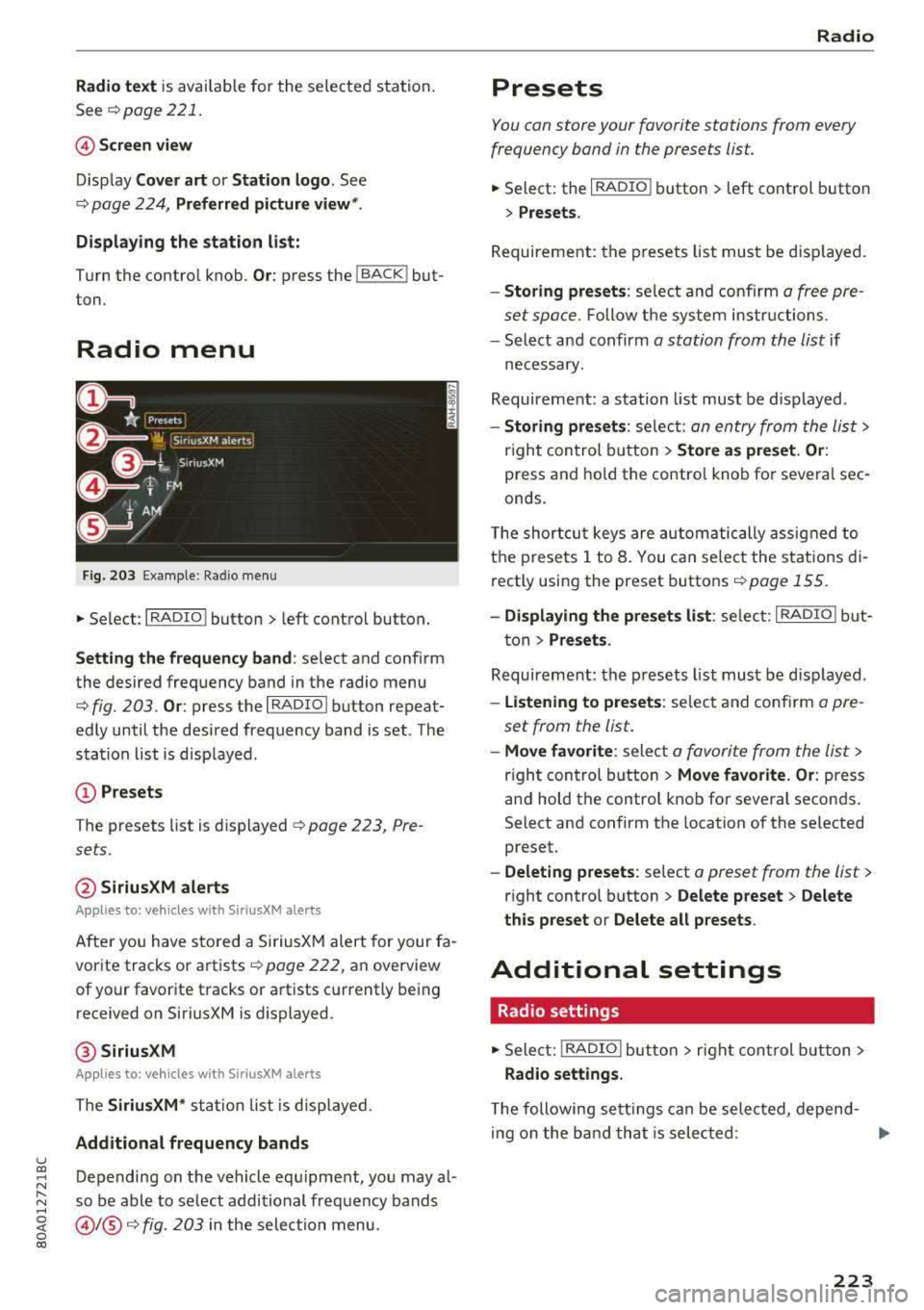
Fig. 203 Example: Ra dio menu
~ Se lect : I RADIO ! button > left control button.
Setting the frequency band : select and confirm
the desired frequency band in the radio menu
¢ fig. 203 . Or: press the I RADIO I button repeat
edly until the desired frequency band is set . The
station list is displayed.
@ Presets
The presets list is displayed q page 223, Pre
sets .
@SiriusXM alerts
App lies to: ve hicles with SiriusXM alerts
After you have sto red a SiriusXM alert for your fa
vorite tracks or artists
page 222, an overview
of your favorite tracks or artists currently being
received on SiriusXM is displayed .
@SiriusXM
App lies to: ve hicles with SiriusXM alerts
The SiriusXM* station list is disp layed.
Additional frequency bands
u co ~ Depending on the vehicle equ ipme nt, you may al-
:::. so be able to se lect additional frequency bands ......
~ @ /@ ¢ fig. 203 in the selection menu. 0 co
Radio
Presets
You can store your favorite stations from every
frequency band in the presets list.
~ Select: the I RADIO I button > l eft control button
> Presets.
Requirement: the presets list must be displayed.
-Storing presets : select and confirm a free pre
set space.
Follow the system instr uctions.
- Select and confirm
a station from the list if
necessary.
Requirement: a station list must be d isplayed .
-Storing presets : select: an entry from the list>
right control button > Store as preset. Or:
press and hold the contro l knob for several sec
onds .
T he shortcut keys are automatically assigned to
the presets 1 to 8. You can select the stations di
rectly using the preset buttons
page 155.
-Displaying the presets list : select: I RADIO I but
ton
> Presets .
Requirement: the presets list must be displayed .
-Listening to presets: select and confirm a pre
set from the list.
- Move favorite : select a favorite from the list >
right control button > Move favorite. Or : press
and hold the control knob for several seconds.
Select and confirm the location of the selected
preset.
- Deleting presets: select a preset from the list >
right control button > Delete preset > Delete
this preset or Delete all p resets .
Additional settings
Radio settings
~ Select: I RADIO I button > rig ht control button >
Radio settings.
The following se ttings can be selected , depend-
in g on the band that is selected :
..,.
223
Page 226 of 392
Radio
Station names (FM)
Variable :
scrolling text transmitted by the FM
stations is shown in the Infotainment system
display.
Fixed : scrolling text transmitted by the FM sta
tions is not shown in the Infotainment system
disp lay. Only the current section of the scro lling
text is displayed.
FM/AM HD Radio*
You can sw itch HD Rad io recept io n on o r off.
Channel sorting (SiriusXM*)
You can set the station sorting for SiriusXM sta
tion lists* by:
-Channel number: the channels are sorted in as
cending order according to their channel num
ber.
- Channel name : the channels are listed in alpha
betical order.
- First category, then channel number: th e
channels are sorted by the ir category and then
by the ir channel numbers.
- First category, then channel name: the chan
nels are sorted by their category and then by
their channel names.
Category filter (SiriusXM*)
The stations shown in the station list can be fi l
tered by your personal preferences and by pro
gram type. The program categories that you can
select depend on what is offered by your provid
er. Select the
All categories option to deactivate
all filter options and display all ava ilable stations
in the satellite station list.
Troubleshooting
Problem Solution Show "Now Playing"
screen
When the function is switched on~ and the sta
tions or presets list is open, the disp lay wi ll
switch to the
Show "Now Playing" screen view
after approximate ly five seconds ¢
page 222. De
pending on availability, information about the
set stat ion (such as stat ion name, artist and sta
tion logo) may be displayed in this view.
Preferred picture view*
You can set your preferred screen view for the
Show "Now Playing" screen¢ page 222.
-Station logo: the station logo is displayed, de
pending on availability .
-Cover art: the album cover is displayed if availa
ble.
Gracenote online database*
Requirement: the MMI must be connected to the
Internet. The
Cover art option must be selected
¢ page 224, Preferred picture view *.
When the funct ion is switched on~. the album
cover or genre cover for the song that is play ing
i s loaded from t he Gracenote online database,
depend ing on availability.
Subscription status (SiriusXM)*
This optio n is available when your subscr ipt ion is
about to expire or has already expired . The expi
ration date for your license is displayed.
Call to SiriusXM *: the contact information for
your satellite radio provider is displayed . To call
your satellite radio provider using the MMI, press
Call to SiriusXM *.
A station with poo r reception is no longer Store the stat io n as a preset in advance. Access the pre-
displayed in the station list once you sets using the presets list¢
page 223.
switch to a different station.
224
Page 227 of 392
u co ..... N r--N ..... 0 <( 0 00
Media
Introduction
There are various media drives and connections
avai lab le in the MMI. For example, you can play
audio/video* fi les from t he Jukebox* or connect
your mobi le device to the Audi mus ic interface*
and operate it through the MMI.
Notes
General
Media and format re strictions :
the MM I (includ
ing the SD card reader and the USB storage de
vice connection *) was tested wit h a variety of
products and media on the market. However,
there may be cases where ind ividual devices or
media and audio/video files* may not be recog
n ized, may play on ly w ith restrictions, or may not
play at all.
Digital Rights Management : please note that
the audio/video* files are subjec t to copyright
protection .
The med ia drives do not play f iles that are pro
tected by
ORM and that are ident ified with the
symbol
rfl.
Data secu rity : never store important data on SD
cards, the Jukebox*, CDs/DVDs or mobile devices .
Aud i AG is not responsib le for damaged or lost
f il es and media .
Loading times : th e more files/fo lders/p lay lists
that are on a storage medium, the longer it will
take to load the audio/v ideo* files . Audi recom
mends using storage med ia tha t on ly conta in au
d io/video files* . To decrease the t ime it takes to
l oad audio/v ideo f iles*, create subfolders (fo r ex
ample, fo r th e a rt ist o r album). The loading time
will also increase when importing fi les.
Additional information : when playing, audio
f iles are automatically displayed with any add i
tional informat ion that is sto red (such as the ar
tis t, trac k and albu m cover). If this informa tion is
n o t availa ble o n the sto rage med ium, t he
M MI
will check the Grace note metadata database .
Media
However, in some cases, the additional in fo rma
tion may not be displayed.
Re stri cted functionality : reset the Media set
tings
t o the fac to ry defau lt settings if func tional
ity is restr icted
¢ page 246.
If fu nctionali ty is rest ricted, reset the Jukebox *
to the fa ctory default se tt ings ¢ page 246.
For information about the propert ies of s upport
ed med ia and fi le formats ,
see¢ page 240 .
@ Note
Always fo llow the information fo und in ¢ @ in
Wi-Fi hotspot on page 194 .
CD/DVD operation
CD /DVD and format restrictions :
the funct iona li
ty of individ ua l st orage media may be limited due
to the v ariety of b lank CDs/DVDs avai lab le and
t h e various capacities. Audio C Ds or video DV Ds
with copy p rotection, CDs/DVDs that do not con
fo rm to the standard and multi session CDs may
have limit ed playback or may not play at a ll. Audi
recommends finaliz ing the recording process
whe n creat ing mult isess io n CDs . Mult isess ion is
not supported for DVDs .
Using CDs/DVDs , the CD dr ive or the DVD drive :
to ensure correct, hig h-quality playback and to
prevent damage to the dr ive or d isc read ing er
rors, always store CDs/DVDs in a protective
sleeve and do not expose t hem to direct sunlight .
Do
not u se:
- Damaged, dirty or scratched CDs/DVDs
- Sing le CDs/DVDs with 3 in (8 cm) d iameter
- CD/DVDs that a re not round
- CDs/DVDs w it h labe ls
- Protec tive rings
- Clea ning CDs
Thermal protection switch : CD/DVD playback
may be temporarily unavailab le if outs ide tem
peratures a re extremely hot or co ld . A thermal
pro tect io n sw itch is insta lled to p rotect the C D/
D VD and the laser.
La ser devi ce s: lase r devices a re divided i nto safe -
ty classes 1 to 4 in acco rdance w ith DIN I EC 76
.,.
225
Page 230 of 392
Media
When importing, the audio files a re au tomatica l
ly sorted into the media center categories based
on the stored addit iona l info rmation
¢ page 235. The copied video files a re stored in
the media center under the
Videos category.
Playing the Jukebo x
Req uiremen t: the J ukebox must con tain audio/
video
fi les ¢ page 22 7, Adding files to the Juke
box.
T he Jukebox is accessed an d ope ra ted t hrough
the
MMI (D ¢ page 234, fig . 210.
Displaying Jukebox memory capacity
Select : righ t control button > Juk ebo x memory
capacity .
Info rmation abou t the J ukebo x memo ry
c a pacity and the numbe r of s to red tracks is dis
p layed .
Deleting tracks from the Jukebox1
)
Req uiremen t: the Jukebox must contain audio/
video fi les.
- Delet ing an ent ry : se lect an e ntry from the
Jukebox media center . Se lect: rig ht contro l but
ton
> Delete from jukebox > Thi s entry or En
tire list .
- The status of t he de leti ng p rocess is shown in
the MMI. J ukebox playback s tops d uring the de
l et ing p ro cess a nd s tarts again au toma tically
o nce the dele tion is comp lete .
(D) Note
Do not import aud io/video files when the en
gi ne is t urne d off because this will drain the
veh icle b attery.
(D Tips
- Tracks fro m audio C Ds cannot be im port ed
t o t he Ju ke box for legal reasons .
- Fil es that have a lready been importe d are
a utomat ica lly recogn ized and cannot be
cop ie d to the J ukebo x again.
- It i s no t possib le to play audio/v ideo* files
i n the C D/DVD* dr ive while importi ng the m.
1> Not i n the Pl ayba ck view .
228
- Th e Juk eb ox does not provi de a n ex port
function due to legal reasons .
- Files o r tra cks w ithou t addi tional store d in
formation a re listed as
Unknown. A ud i rec
ommends adding a dditiona l info rmation
(such as ID3 tags) to a udio f iles.
- Reset the
Jukebox to the facto ry defa ult
settings when sel ling yo ur vehicle
¢ page 246.
Bluetooth audio player
Appl ies to: vehicles with Bluetooth audio player
With the Bluetooth audio player, you can play
music wirelessly from your Bluetooth-capable
device (such as a cell phone) through the MMI.
Requirement: the vehicle must be stationary and
the ignit io n m ust be switched on. The B luetooth
settings w ill open on your mob ile dev ice d uring
t h e connection setup . The Blue tooth function
and vis ibili ty of the
MM I ¢ pag e 248 and mob ile
device must be sw itched on. The
Bluetooth audio
player ¢ page 248 must be switched on in t he
MM I.
-Connecting a Bluetooth player : press the
!MEDIA ! butto n. Press the left con trol b utton
un til the sources ove rview is d isp layed. Selec t
and confirm
Bluetooth audio player ®
¢page 234, fig . 211 .
-If n ecess ary, se lect and co nf ir m , Not connected
> Connect Bluetooth audio player . The Bl ue
tooth device search starts. Follow the instruc
tions in the
MMI.
- Select and confirm t he des ired Bl uetooth de
vice from the list . The
MMI generates a PIN fo r
the connection.
- Select and confirm
Yes.
- En ter the PI N for conne ct in g on your Bluetoo th
dev ice .
Or : if the P IN is already dis played on
your Bl uetooth device, confi rm it in the Bl ue
tooth device and in the
M MI. The time a llowed
for entering the PI N is lim ited to approx imately
30 seconds .
IJIJ,