service AUDI Q5 2018 Owner's Manual
[x] Cancel search | Manufacturer: AUDI, Model Year: 2018, Model line: Q5, Model: AUDI Q5 2018Pages: 392, PDF Size: 60.56 MB
Page 80 of 392
Driving
you stop it. You also cannot lock the vehicle from
the outside.
Shift to P, otherwise vehicle can roll away.
Doors do not lock if gearshift is not in
P
This message appears for safety reasons if the
selecto r lever is in the "N" position when you
switch the ignition off. Move the selector lever to
the "P" posit ion. Otherwise the vehicle is not pro
tected from rolling and it cannot be locked.
I) Remote control key : hold back of key
against the designated area. See owner's man
ual
I f the indicator light turns on and this message
appears, there is a malfunction
c:> page 78.
Shift to P before leaving vehicle, otherwise vehi
cle can roll away
This message appears if the driver's door is
opened while the ignition is switched on and the
transmission has not been shifted to the "P" posi
tion . Sh ift the transm iss ion into the "P" position
and turn off the ignition if you are leav ing the ve
h icle. Otherwise the vehicle could roll. Also see
<=:>page 79.
Starting the engine when there is a
malfunction
It may not be possible to start the engine under
certain circumstances, for example, if the bat
tery in the vehicle key is drained, if interference is
affecting the key or if there is a system malfunc tion.
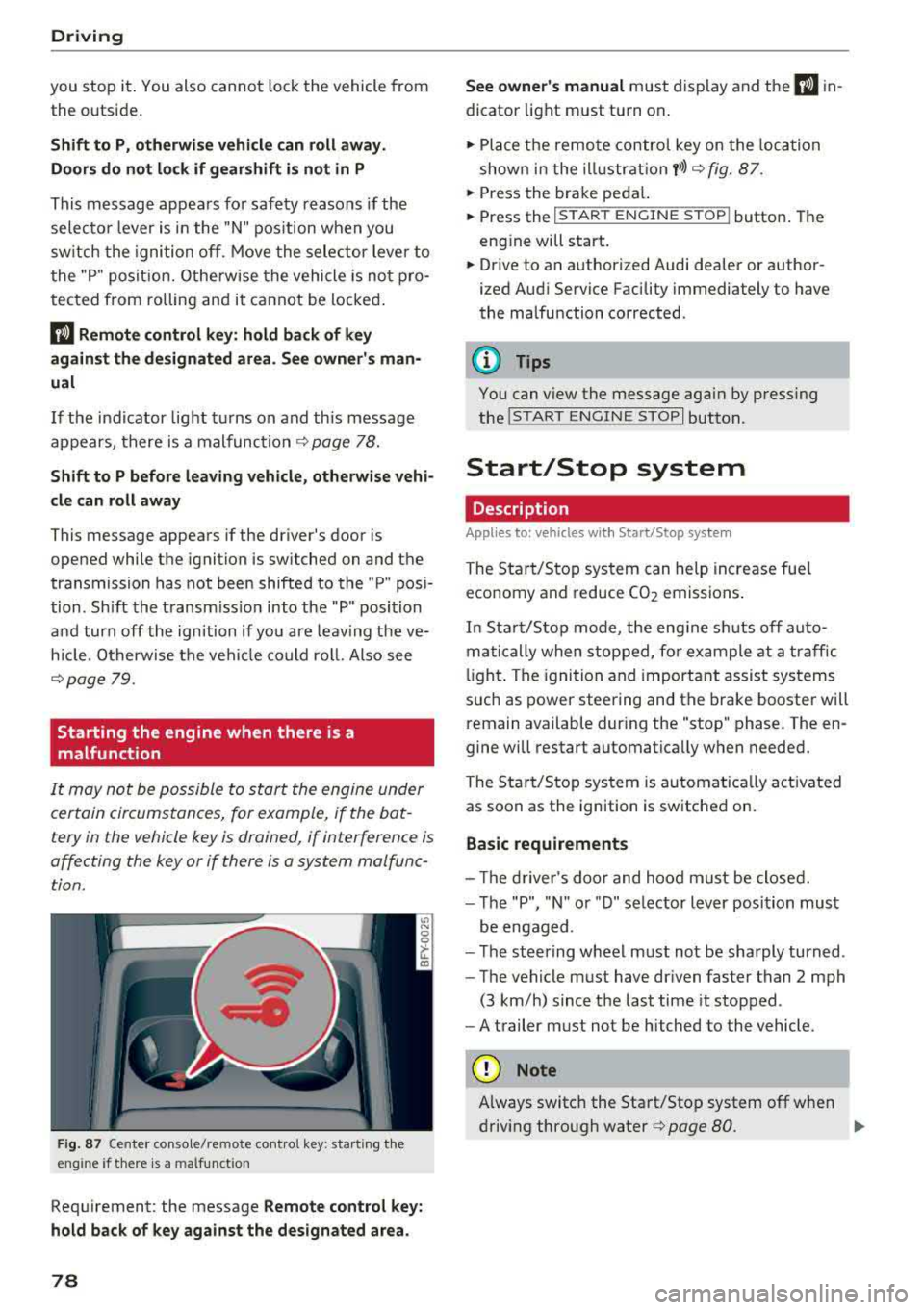
F ig. 87 Center console/remote contro l key : start ing the
eng ine if there is a malfunct ion
Requirement: the message Remote control key:
hold back of key against the designated area.
78
See owner's manual must display and the I) in
dicator light must turn on .
.,. Place the remote control key on the loca tion
shown in the illu strat ion
y >l) c:> fig. 87.
... Press the brake pedal.
... Press the I START ENGINE STOPI button. The
eng ine will start.
... Drive to an authorized Audi dealer or author
ized Aud i Service Facility immediately to have
the malfunction corrected .
(!) Tips
You can view the message aga in by pressing
the lS TART
ENGINE STOP I button.
Start/Stop system
Description
Appl ies to : vehicles wi th Start/Stop sys te m
The Start/Stop system can help increase fue l
economy and reduce CO2 emissions.
In Sta rt/S top mode, the engine sh uts off auto
matically when stopped, for example at a traffic
li ght . The ignition and important assist systems
such as power steering and the brake booster will
remain available dur ing the "stop" phase. The en
gine will restart automatically when needed.
The Start/Stop system is automat ica lly act ivated
as soon as the ignition is switched on.
Basic requirements
- Th e driver's door and hood must be closed.
- The "P", "N " or "D" selector lever position must
be engaged .
- The steering wheel must not be sharply turned .
- The vehicle must have dr iven faster than
2 mph
(3 km/h) since the last time it stopped.
- A trailer must not be hitched to the vehicle.
(D Note
Always switch the Start/Stop system off when
driving through water
r=;, page 80.
Page 82 of 392
Drivin g
(D Tips
If you leave t he vehicle with the "D/S" or "R"
selector lever pos ition engaged, the parking
brake is automatically set.
Manually switching the Start/Stop system
off/on
A pp lies to: ve hicles w ith Sta rt/Stop system
The (A_) oFF button is located in the center conso le .
.. Press (A_) OfF to switch on or off. The LED in the
button turns on when the funct ion is switched
off.
@ Tips
If you switch the system off dur ing a stop
phase, the engine w ill start again automati
cally .
Messages
App lies to: ve hicles w ith Sta rt/Stop system
Start /stop system: deactivated . Please start
engin e manually
This message appea rs when specific conditions
are not met during a stop phase. The Sta rt/Stop
system wi ll not be ab le to restart the engine . The
engine must be started wit h the
I S TAR T ENGINE STOP I button.
Start /stop sy stem: malfunction! Function
una vailable . Please cont act Se rvice
There is a malfunction in the Start/Stop system .
Drive the vehicle to an authorized Audi dealer or
author ized Service Facility as soon as poss ible to
have the malfunction corrected.
80
Electromechanical
parking brake
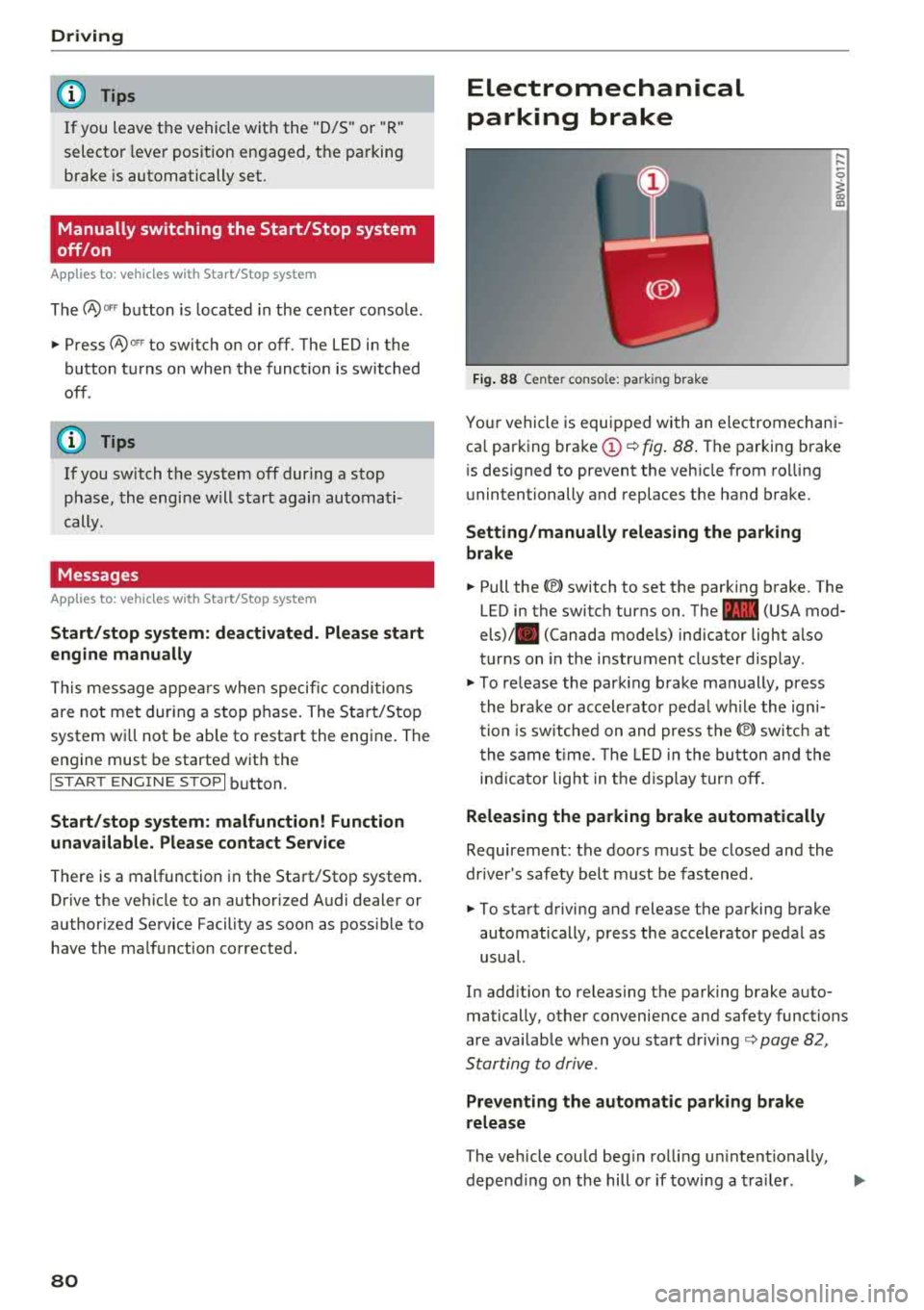
F ig . 88 Center console: parking brake
,-.. ,-..
0
1 m
Your vehicle is equipped with an electromechani
ca l parking
brake (!)¢ fig . 88 . The parking brake
is designed to prevent the vehicle from ro lling
unintentionally and replaces the hand brake.
Setting /manuall y re leasing the parking
br ake
.. Pull the®> switch to set the parking brake. The
LED in the switch turns on. The
-(USA mod
els)/ . (Canada models) indicator light also
turns on in the instrument cluster display .
.. To release the parking brake manually, press
the brake or accelerator peda l w hile the ign i
tion is switched on and press
the®) sw itc h at
the same t ime. The LED in the button and the
indicator light in t he disp lay turn off .
Releasing the parking brake automatically
Requirement: the doors m ust be closed and the
drive r's safety belt must be fastened.
.. To start driving and release the parking brake
automatically, press the accelerator pedal as
usual.
In add ition to releasing the parking brake auto
matically, other convenience and safety functions
are available when you start
driving¢ page 82,
Starting to drive .
Preventing the automatic parking br ake
release
The vehicle could beg in rolling un intentionally,
depend ing on the hill or if towi ng a tra iler.
.,.
Page 83 of 392
u co ..... N r--N ..... 0 <( 0 00
~ To prevent the parking brake from releasing au
tomatica lly, pull and ho ld
the(®) switch and
press the acce lerator pedal. The park ing brake
remains set and prevents the veh icle from ro ll
ing backward.
~ You can release the(®) switch again once you are sure that you are g iv ing enough dr iv ing
force to the whee ls by pressing the accele rator
pedal.
Emergency braking function
You can use the emergency brak ing funct ion in an
emergency situation, or if the standard brake op
erat ion malfunct ions or is disabled .
~ Pull and hold the(®) switch.
~ As soon as you release the (®) switch or acceler-
ate, the brak ing stops .
Pu lling and holding the(®) switch while driv ing
the vehicle activates the emergency braking func
tion . The vehicle is braked at all four wheels by
activating the hydraulic brake system . The brak
i ng effect is s imilar to heavy
braking ~.,&. .
To reduce the r isk of activating the emergency
braking by mistake, a warn ing tone (buzzer)
sounds when
the(®) switch is pulled . Emergency
braking stops as soon as
the(®) switch is released
or the accele rato r peda l is p ressed .
Parking
~ Press the brake pedal to stop the vehicle.
~ Pull the(®) switch to set the parking brake.
~ Select the "P" selector lever posit ion .
~ Turn the eng ine off ~.,&. .
~ Turn the steer ing whee l w hen pa rking on in
clin es so that the whee ls will roll into the curb
i f t he ve hicle starts moving.
A WARNING
- Do not press the accelerator pedal inadver
tent ly if a gear is selected when the vehicle
is stationary and the engine is running. Oth
erwise, the veh icle w ill start to move imme
diately and th is could result in an acc ident.
- Emergency braking should only be used in an emergency, when the normal brake peda l
has failed or the brake pedal is obstructed .
Driving
During emergency braking, your vehicle will
brake s imilar to heavy braking. ESC and the
associated components (ABS, ASR, EDL)
cannot overcome the laws of physics .
Around curves and when road or weather
conditions are bad, a full brake applicat ion
can cause the veh icle to skid o r the rear end
to swerve, which inc reases the risk of an ac
cident.
- I f the power supply fails, you cannot set the
p ar king brake if it is released . In this case,
park the veh icle on leve l ground and secu re
it by placing the selector lever in the "P" po
sition. See an authorized Audi dealer or au
thor ized Audi Service Facility for assistance.
- Always set the parking brake when leaving
your veh icle, even if for a sho rt period of
time. Otherwise the vehicle could roll away, increasing the risk of an accident .
- If you leave the vehicle, switch the ignition off and take the veh icle key with you. This
applies particularly when children remain in
the vehicle . Otherwise, ch ildren cou ld start
the engine, release the parking brake or op
erate e lectr ica l equipment such as power
windows, wh ich increases the r is k of an acci
dent.
- No one, especially children, should remain
in the vehicle when it is lo cked. Lo cked
doors ma ke it more diffic ult for emergency
workers to get into the vehicle, which puts lives at risk .
(D Tips
When stopp ing at a t raff ic sign al or stopp ing
i n city traffic, yo u can set the park ing brake
manua lly . The vehicle does not have to be
held with the brake pedal. The parking brake
eliminates the tendency to creep when a se l ector lever position is engaged. As soon as
you press the accelerator peda l, the parking
brake re leases automatically and your vehicle
starts to move
~page 82 .
(D Tips
- Occasional noises when the parking brake is
set and released are normal and are not a
cause for concern .
.,.
81
Page 84 of 392
Driving
-The parking brake goes through a se lf -test
cycle at regular intervals when the vehicle is
stopped . Any noises associated w ith this are
normal.
- If there is a power failure , the parking brake
will not set if it is re leased, and it will not
release if it is
set¢,&. See an authorized
Audi dealer or authorized Audi Service Fa
cility for ass istance .
Starting to drive
Various convenience and safety functions may be
ava ilable when the vehicle begins driving , de
pending on vehicle equipment.
Starting on hills with the parking brake set
Requirement: the doors must be closed and the
driver's safety belt must be fastened .
~ To start driving comfortably when on a hill, set
the parking brake and begin driving as usual.
The braking force of the parking brake does not
release automatically until the wheels build up
enough dr iv ing force .
Starting on hills with hill hold assist
Hill hold assist makes it easier to start on hills .
Requirement: the driver's door must be closed
and the engine must be running.
~ To activate hill hold assist, press and hold the
brake peda l for several seconds. The veh icle
must be in an uph ill direction of travel.
After releasing the brake pedal, the brak ing pow
er is ma intained for a brief
moment ¢.& to pre
ve nt the vehicle from rolling back when starting.
During this time, you can easily beg in to move
your ve hicle.
A WARNING
-If you do not begin driving immediately or
the engine stalls after releasing the brake
pedal, your vehicle may begin to roll back
ward . Press the brake pedal or set the park
ing brake immed iate ly.
- The intelligent techno logy of hill hold assist
cannot overcome the limitations imposed by
82
-
natural physica l laws. The increased comfort
offered by hill hold assist should not cause
you to take safety risks .
- Hill hold assist cannot hold the vehicle in
place on all hills (for examp le, if the ground
is s lippery or icy).
- To reduce the r isk of an accident, always
make sure the veh icle is situated safely
while stationary .
Off road driving
General information
The Electronic Stabilization Control (ESC) func
tions were enhanced for driving offroad. Offroad
mode can be activated when driving in situations
where slippage or a differential lock function is
necessary ¢ page 141. The hill descent assist is
also available, wh ich automatically brakes the ve
hicle to maintain a constant speed
¢ page 142 .
In add it ion, your Audi provides cont inuous all
whee l drive .
However, your Audi is not a purely offroad vehi
cle . Your vehicle was not designed to dr ive under
extreme operating conditions such as driving in
an expedition style.
Only drive on terrain that is suitable for the ve
hicle and your driving ability. Never take any
unnecessary risks!
Before driving offroad
- Check the engine oil level, the tire pressure, the coo lant level and the fluid level in the washer
fluid reservoir.
- Store pieces of luggage and other objects in the
luggage compartment and secure them from
sliding out of place .
After driving offroad
-After driving offroad, remove branches and
other debris from the radiator grille, under
body, and wheels. Look especially for foreign
objects (such as s tones) that may be stuck in
the t ire tread .
- Clean the vehicle body and underbody and in-
spect the vehicle for possible damage .
.,,.
Page 91 of 392
u co ..... N ,..._
N ..... 0 <( 0 00
Launch control program
App lies to: ve hicles with S tro nic tra nsm issio n
The launch control program provides the best
possible acceleration when starting from a stop.
Requirement: the eng ine must be at operating
temperature and the steer ing whee l must not be
turned .
~ Deactivate the Start/Stop system* c:> page 80.
The LED in the 10~ ·1 button turns on.
~ With the engine runn ing, press the ~
l fl - O~FF =I but
ton briefly
c> page 141 . The Ill indicator light
tu rns o n and the message
Stabil ization control
( ESC ): offroad . Warning! Reduc ed stabilit y
ap
pears in the inst rumen t cluste r display.
~ Pull the selector lever back o ut of t he "D/S" po
s it ion briefly to select the "S " position or se lect
the
D ynamic driving mode in drive se -
lect* ¢ page 12 7.
~ Press the brake pedal firmly with your left foot
and hold it all the way down for at least one
second.
~ At the same t ime, press the gas pedal all the
way dow n with your right foot unt il the engi ne
reaches and stays at a h igh RPM level.
~ Remove yo ur foot from t he b rake pedal within
five seconds
c:> ,&. .
A WARNING
-Always adapt yo ur driving to the traffic flow.
- O nly use the La unch contro l prog ram when
road and traffic conditions allow it and ot h
er drivers wi ll not be endangered or both
ered by your driving and the vehicle's accel
eration.
- Please note that the drive whee ls can spin
and the vehicle can break away when off
road mode is switched on, espec ia lly when
the road is slippery.
- Once the vehicle has started moving, press the
I~ OF F! button briefly to turn the offroad
mode off .
(D Tips
-The transmiss ion temperature may increase
s ignificantly after using the launc h control
program. If that happens, the program may
Driving
not be ava ilab le for a few minutes. It will be
avai lab le agai n after a coo l-down period.
- Whe n accelerati ng usi ng the launch cont ro l
program, all vehicle parts are s ubject to
heavy loads. This can lead to increased
wear.
Transmission malfunction
• Tran smiss ion: too hot. Please stop vehicle
Do not continue driving. Se lect the "P" selector
l ever posit ion and contact an authorized A udi
dealer or authorized Audi Service Fac ility for as
s istance.
• Tran smiss ion: malfunction! Plea se stop ve
hicle and shift to P
Do not continue dr iv ing . Se lect t he "P" selec to r
l ever posit ion and contact an authori zed A udi
dealer or authorized Audi Service Facility for as
s istance.
[O] Selector lever : malfunction ! You can con tin
ue d riving. Please contact Se rvice
The re is a system malfu nction in t he transmis
s io n. Dr ive to an a uth orized Aud i de aler o r au
tho rized Aud i Serv ice Facili ty immedia tely to have
the mal function corrected.
[i'J P button : malfun ction! Auto P when engine
off . Pl ea se conta ct Servi ce
T here is a malfunct ion in the "P" button on the
selector lever . The transm ission automatically
engages "P " when you sw itch off t he engine.
D rive to an author ized A udi dealer or autho riz ed
Audi Se rvice Faci lity immed iate ly to have the
malfunction corrected.
[i'J Select or lever : malfun ction! Gear change on
l y pos sibl e using both paddl e le ver s. Plea se con
ta ct Service
T here is a system malfunction in the transmis
s io n. You can con tinue dr iv ing with restr icted
funct ion. The se lector lever is not wo rk ing . Gea rs
can on ly be selected by tapping bo th shift pad
dles at the same time when the vehicle is station
ary
c> page 88 , fig . 92 . Pay attention to these-
l ected transmission position in the instrument
.,.
89
Page 92 of 392
Driving
cluster display. The parking lock engages auto
matica lly when you turn off the engine. Drive to
an author ized Audi dealer or authorized Audi
Serv ice Facility immediately to have the malfunc
tion corrected .
[O] Transmission : Please p ress brake pedal and
select gear ag ain
Press the bra ke pedal and se lect the des ired se
lector lever position again. You can then continue
driving.
[il Tran smi ssion: too h ot. Please adapt driving
s tyle
The transm ission tempe rature has increased s ig
n ificant ly. Dr ive ve ry ca utiously or take a b reak
from dr iv ing unt il the tempera ture returns to the
normal range and the ind icator light turns off .
[O] Transmis sion : malfunction ! You can contin
ue driving . See owner' s manual
There is a system malfunct ion in the transm is
sion . You may continue dr iv ing . Drive to an au
thor ized A udi dealer or authorized Audi Service
F acility soon to have the malfunction co rrected.
[il T ransmission : malfunct ion! You can contin
ue dri ving in D until engine is off
There is a system malfunct ion in the transmis
sion . The transmission is switching to emergency
mode . If you tur n the engine off, you will not be
able to select any other selector lever pos it ions
after start ing the eng ine again . Drive to a n au
thor ized Audi dealer or author ized A udi Service
F a cility immediately to have the malfunc tion cor
rected.
[O] Tran smis sion: malfunction! You can contin
ue driving with limited function . Pl ea se conta ct
Service
There is a system malfunct ion i n the transm is
sion . The transmission is switching to emergency
mode. This mode only shifts into certa in gea rs o r
w ill no longer shift at all. The engine may stall.
Dr ive to an a utho rized Aud i dea ler or a uthorized
Audi Serv ice Facility immediately to have the
malfunction corrected .
90
[il Transmis sion: malfunction! You can contin
ue dri ving with limited fun ction. No reve rse
gear
There is a system malfunction in the tra nsmis
s ion . The transmission is switch ing to emergency
mode. This mode only s hifts into certain gears or
will no longer shift at a ll. The eng ine may sta ll.
You cannot engage the reverse gear. Drive to an
authori zed Audi dealer or authori zed Audi Service
Facility immediately to have the ma lfunction cor
rected .
[il Danger of rolling away! P not poss ible.
Plea se apply park ing bra ke
- The parking lock was re leased using the emer
gency re lease
c::> page 90 . Or
- The parking lock can no longer be engaged .
Dr ive to an authorized Audi dealer or author
ized Aud i Service Facility immed iately to have
the malfunction corrected.
[il Mo ve selector le ver to automatic position
There is a ma lf u nction in the tiptron ic mode. End
tiptroni c mode by pus hing the se lec tor lever to
the left into the "D/S " position .
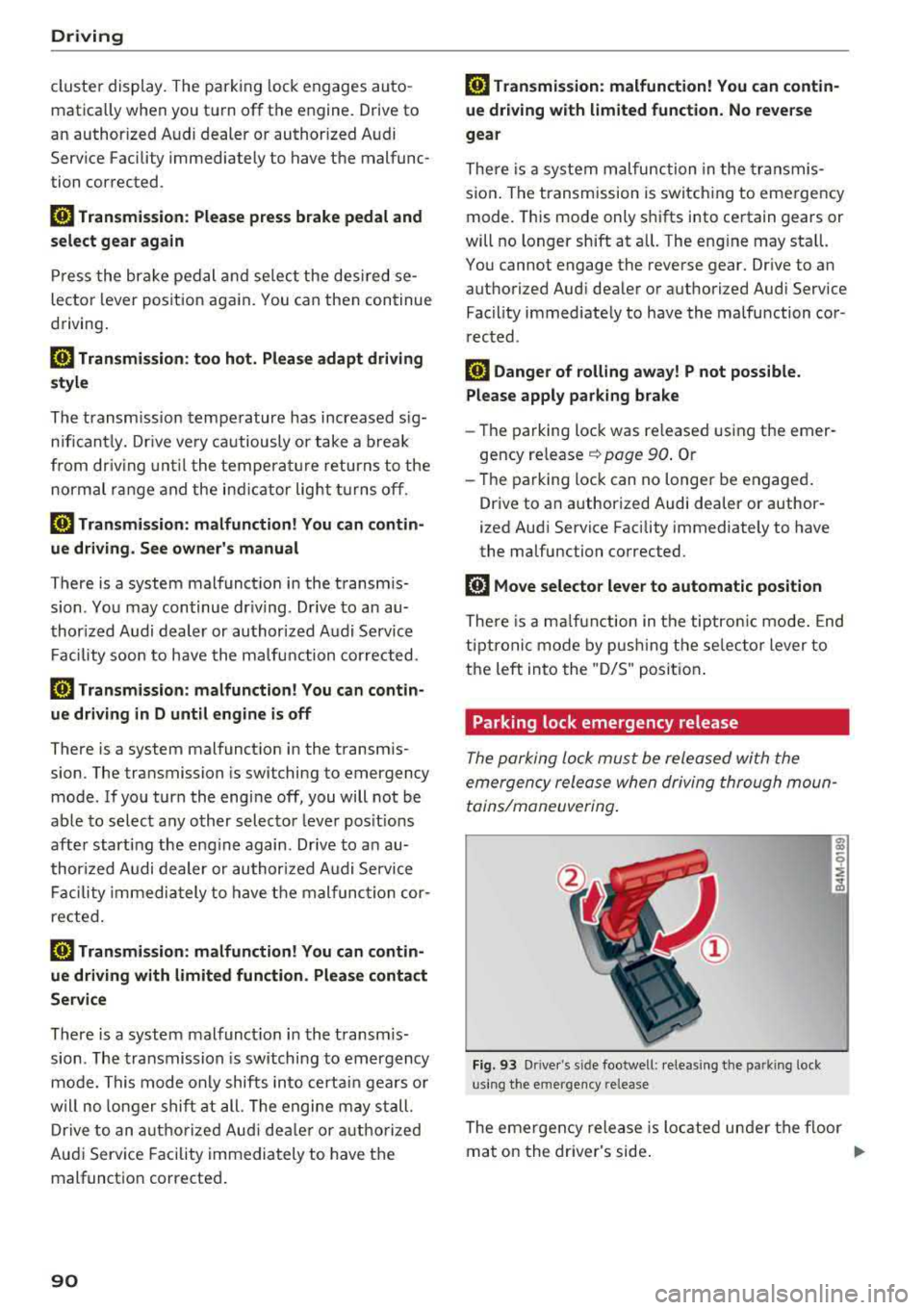
Parking lock emergency release
The parking lock must be released with the
emergency release when driving through moun
tains/maneuvering .
Fig. 93 Drive r's s ide footwell : relea sin g the parkin g lock
us ing the e mergency release
The emergen cy release is located under the f loor
mat on the dr iver's side .
.,.
Page 95 of 392
u co ..... N r--N ..... 0 <( 0 00
Tongue weight
The maximum permitt ed tongue weight of the
trailer drawbar on the trailer hitch ball head may
not be exceeded .
I f the tongue we ight is too low, th is affects t he
trailer's handling. For driv ing safety, we recom
mend to always utilize the maximum permitted
tongue weight, but not exceed it. You can reach
it, for example, by distributing the cargo in the
trailer correctly.
You can determine the tongue weight, for exam
p le, with a bathroom scale or a public weigh sta
tion .
The permitted tongue we ight of your veh icle can
be found in the vehicle documentation or in
¢page 370.
Load distribution
Poor cargo load and distribution can negatively
i mpact ve hicle handl ing .
-Store objects preferably in the vehicle luggage
compartment. The vehicle shou ld always carry
the heaviest possible load and the trailer
shou ld have the lightest possible load.
-Distribute the load in the tra iler so that the
heavy objects are as close to the axle as possi
ble.
-Secure objects from slid ing out of p lace.
-Utilize the maximum permitted tongue weight
if possible .
Tires
Set the tire pressure on your vehicle for a "full
load"; see the t ire pressure
sticker¢ page 335 .
If necessary, also adjust the tire pressure on the
trailer according to the manufacturer's recom
mendation .
W inter tires should be mounted on the vehicle
and on the trailer during winter temperatures .
Outside mirrors
If you cannot see the traffic behind the trailer
with the standard exterior mirrors, then you must attach addit ional exterior m irrors. Adjust
them so you have a sufficient visibility behind
you .
Trailer towing
Exterior lighting
Follow the legal regu lations rega rding the light
ing equipment on your trailer. Contact an author
ized Audi dea ler or authorized Audi Service Facili
ty for more information.
Before starting to drive , check all lighting eq uip
ment on the hitched trailer.
T he headlight range cont rol adjusts automat ica l
ly to the light range of the headlights .
Safety chains
Make sure the safety chains are correctly applied
when pulling a trailer . The cha ins should hang
enough so that the trailer can drive around
curves . Howeve r, th ey must not touch the
ground.
Air suspension
Applies to: vehicles with air suspension
The air suspens ion must be at the standard vehi
cle height before you set the tongue weight on
the tra iler and hitch the
trailer ¢@ , ¢page 128,
Raising/lowering the vehicle.
For vehicles with a factory-installed trailer hitch,
the a ir suspension trailer mode w ill automatically
switch on if you connect the trailer cable to the
socket.
For vehicles with a retrofitted trailer hitch, you
must sw itch on the a ir suspension trailer mode
manua lly . Select in the Infotainment system:
IMENU I button> Vehicle> left cont rol button>
Vehicle settings > Air suspension: trailer. Switch
i t off again after towing a tra iler .
You can also sw itch off trailer mode manually
wh ile dr iving, for example, whe n using a bicycle
rack system.
If you have to dr ive through d ifficult road cond i
tions, you can ra ise the vehicle again after hitch
i ng the tra iler o r after adjusting the tongue
we ight.
(UJ} Note
Applies to: vehicles with air suspension
-Changes in temperature or load can affect
the height of the vehicle .
93
Page 106 of 392
Assistance systems
-When approaching stationary obstacles
such as stopped traffic, adaptive cruise con
trol will respond with limited function.
- Adaptive cruise control does not respond to
people, animals, or cross ing or oncoming
objects.
- The function of the radar sensors can be af
fected by reflective objects such as guard
rails, the entrance to a tunnel, heavy rain or
ice.
(D Note
The sensors can be displaced by impacts or
damage to the bumper, wheel housing and
underbody . Th is can impair the adaptive
cruise control. Have an authorized Audi dealer
or authorized Audi Service Facility check their
function.
@ Tips
For an explanation on conformity with the
FCC regulations in the United States and the
Industry Canada regulations, see
¢page 374.
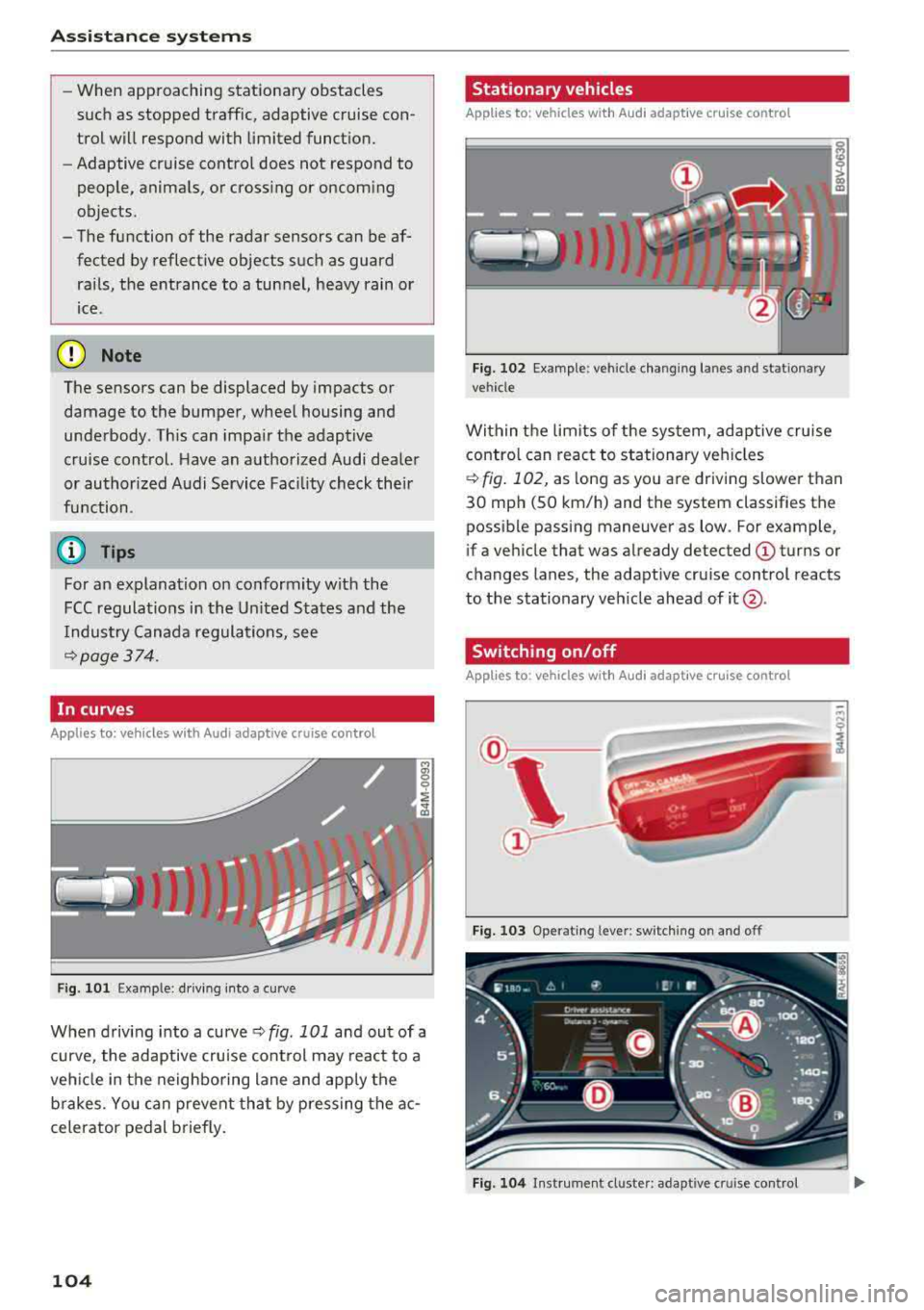
In curves
Applies to: vehicles w ith Audi adaptive cruise control
Fig . 101 Example: driving into a curve
When driving into a curve ¢ fig. 101 and out of a
curve, the adaptive cruise control may react to a
vehicle in the neighboring lane and apply the
brakes. You can prevent that by pressing the ac
celerator pedal briefly.
104
Stationary vehicles
Applies to: vehicles with Audi adapt ive cruise control
))
Fig . 102 Example: vehicle changing lanes and stationary
vehicle
Within the limits of the system, adaptive cruise control can react to stationary vehicles
¢
fig. 102, as long as you are driving slower than
30 mph (SO km/h) and the system classifies the
possible passing maneuver as low . For example,
if a vehicle that was already detected
(D turns or
c h anges lanes, the adaptive cruise control reacts
to the stationary vehicle ahead of
it @ .
Switching on/off
App lies to: vehicles with Audi adapt ive cruise control
Fig. 103 Operat ing leve r: sw itching on and off
Fig. 104 Instrument cl uster : adapt ive cruis e con trol
Page 113 of 392
u co ..... N r--N ..... 0 <( 0 00
The road exceeds the maximum possible grade
for safe operation. The systems cannot be switch
ed on.
Ill AC C with traffic jam a ssis t: only availabl e in
D, Sor M
Select the "D/S " or " M" selector leve r pos it ion.
Ill A CC w ith tr affic j am ass is t: currentl y un
available . Parking brake applied
The systems sw itch off if you set the parking
brake . The systems are available again after you
release the parking brake .
llJ ACC with traffic jam a ssist: currentl y un·
av ailable. Stabili zation cont rol (E SC) input
This message appears if the Ele ctronic Stabili za
tion Control (ESC) is taking action to stabilize the
ve hicle . The systems switch off in this scenario .
Ill ACC with traffic jam a ssis t: manu al control!
This message appea rs if the veh icle rolls back
when sta rting on a slight incl ine, even t hough the
systems are active . P ress t he b rake peda l to pre
vent the vehicle from rolling or sta rting to move.
IIJ ACC w ith tr affic jam a ssis t: curr entl y un
availabl e. Downhill a ssis t activated
You cannot activate the system when hill hold as
sist is act ive .
II!! ACC with traffic jam assist: manual control!
This message appears if the driver does not take
over steering after mu ltip le driver intervention
requests and the system switches off . The vehicle
brakes unt il it is stationary .
ii Traffic jam a ssis t : una vailable. S ee o wner' s
manual
The system can no longer ensure that t he ve hicle
w ill stay in the lane and sw itches off. Have yo ur
vehicle checked by an a uth orized Audi dea ler or
authorized Audi Service Facility if the ma lfunc
tion is continuous .
14§ Traffic jam assis t : Plea se take over steering!
This message appea rs as soon as the system
stops detecting steer ing activ ity when the system
limits are rea ched. Always keep yo ur hands on
Ass istance systems
the steering whee l so you can be ready to steer at
any time.
14§ Traffic jam a ssis t : currentl y unavailable .
Pl ea se f asten se at belt
T he system switches off when the drive r's safety
belt is unfastened.
Ill AC C: eff iciency assist not available in thi s
countr y
The adaptation to speed lim its and routes ahead
is not available in this country .
IIJ ACC: predictive control currentl y una vaila
ble . See owne r's m anual
T he ad aptation to speed lim its and routes ahead
swi tches off at speed limits under 20 mph
(30 km/h) .
T he message ca n also appear if the adaptation to
speed limi ts and routes a head has a temporary
f ailure . Have your vehicle checked by an autho r
ized Audi dea ler or authorized Audi Service Facili
ty if the malfunction is continuous .
Distance warning : malfunction! Please contact
S erv ice
T he system cannot gua rantee that it will detect
vehicles correct ly and it has switc hed off. The ra
dar sensors have shifted or are fa ulty . Drive to an
authorized Aud i dea ler o r authorized Audi Serv ice
Facility immediate ly to have the ma lfunction cor
rected .
Distance warning : currentl y unavailable . Sen sor
view re stricted due to surrounding s. See own
e r' s manual
T his message appears if the rada r senso r view is
obstructed, for examp le by leaves, snow, heavy
spray or dirt. Clean the sensors
¢ page 103,
fig . 100.
Distance warning : curr entl y unavailable . See
owner' s manual
This message appears if the system has a tempo
r a ry fa il ur e. If this occurs m ultip le t imes, drive to
an a uth orized Aud i dea le r o r auth o rized Aud i
Se rvice Facility immed iate ly to have the ma lfunc -
t ion corrected .
liJ,,
111
Page 116 of 392
Ass is tanc e system s
Turn a ssist
When start ing to dr ive and up to speeds of maxi
mum 6 mph (10 km/h), the turn assist uses a
braking intervention to prevent your vehicle from
colliding with an oncoming vehicle when turning left or right (available in certain co untries). The
braking intervent ion causes your vehicle to stay
in its lane.
A WARNING
-Pre sense front cannot overcome the laws of
physics . It is a system des igned to assist and
it cannot prevent a collision in every circum
sta nce. The d rive r must a lways i ntervene.
T he d river is always respons ib le for b raking
at the correct time. Do not let the increased
safety provided tempt you into taking risks .
This cou ld increase your risk of a co llision .
-The system can deploy incorrectly d ue to
system -specific limits .
-Please note that the sensors and the camera
do not always detect all objects or lane
markings. This increases the risk of an acci
dent.
-Pre sense front does not react to people, an
ima ls or ob jects that are crossing the veh i
cle's path or that are diff icu lt to detect
c::> &
in General information on page 103.
-Reflective ob jects s uch as guard rails or the
entrance to a tunnel, heavy rain and ice can
affect the function of the radar sensors and
the system's ability to detect a coll is io n risk.
{UJ) Note
The sensors can be displaced by impacts or
damage to the bumper, whee l housing and
underbody . Pre sense fro nt can be impa ired
by this. Have an authorized Aud i dealer or au
thori zed Aud i Service Fac ility check the ir func
tion.
(D Tips
-You can cancel the brak ing with increasing
fo rce that is in it iated by the system by b rak-
l) Th is is not ava ilab le in some co untri es .
114
ing yourse lf, by acce lerating not iceably or
by swerving.
-Keep in mind that pre sense front can brake
unexpectedly . A lways secure any cargo or
objects that you are transporting to reduce
the risk of damage or injury.
-Specific pre sense front functions switch off
when the ESC is restricted or sw itched off
c::> page 141 or the hill ho ld assist is switch
ed on
c::> page 142.
Audi pre sense rear
App lies to: vehicles wit h Audi side ass ist
If the risk of a collision with a vehicle ahead is de
tected, the follow ing funct ions can be triggered:
-Reversible tens ioning of the front safety belts
at the corresponding speeds.
-Closing the windows and sunroof*
- Activating the emergency f lashers with in -
creased frequency
ll .
The message Audi pre sen se. c::> page 113,
fig . 113
wi ll warn you about the danger.
Audi drive select* : th e function is not act ive de
pend ing on the mode selected.
A WARNING
-To re duce the r isk o f an accident, please
note that the side assist* radar sensors do
not a lways detect every object.
-
-P re sense rear does not react to people, ani
mals or objects that are crossing t he vehi
cle's path o r that are d ifficult to detect.
-R eflective objects such as guard rai ls, heavy
rain and ice can impair the function of the
radar sensors and the ability to detect a col
lision risk.
@ Note
The radar sensors can be disp laced by impacts
or damage to the bumper, w heel housing and
u nderbody. Pre sense rear can be impa ired by
..,.