tow AUDI Q5 2018 Owner's Manual
[x] Cancel search | Manufacturer: AUDI, Model Year: 2018, Model line: Q5, Model: AUDI Q5 2018Pages: 392, PDF Size: 60.56 MB
Page 109 of 392
u co ..... N r-N .....
~ 0 co
A WARNING
If the message ACC: autom atic go1
) appears,
your veh icle will start driving even if there is
an obstacle between your vehicle and the ve
hicle driv ing ahead . This increases the risk of
an ac cident.
@ Tips
- For safety reasons, your veh icle w ill only
start to drive automatical ly if:
- t he driver's safety belt is fastened
- all doors and the hood a re cl osed
- your vehicle is not stopped for a long per i-
od.
Interrupting cruise control
Applies to: vehicles with Audi adaptive cruise contro l
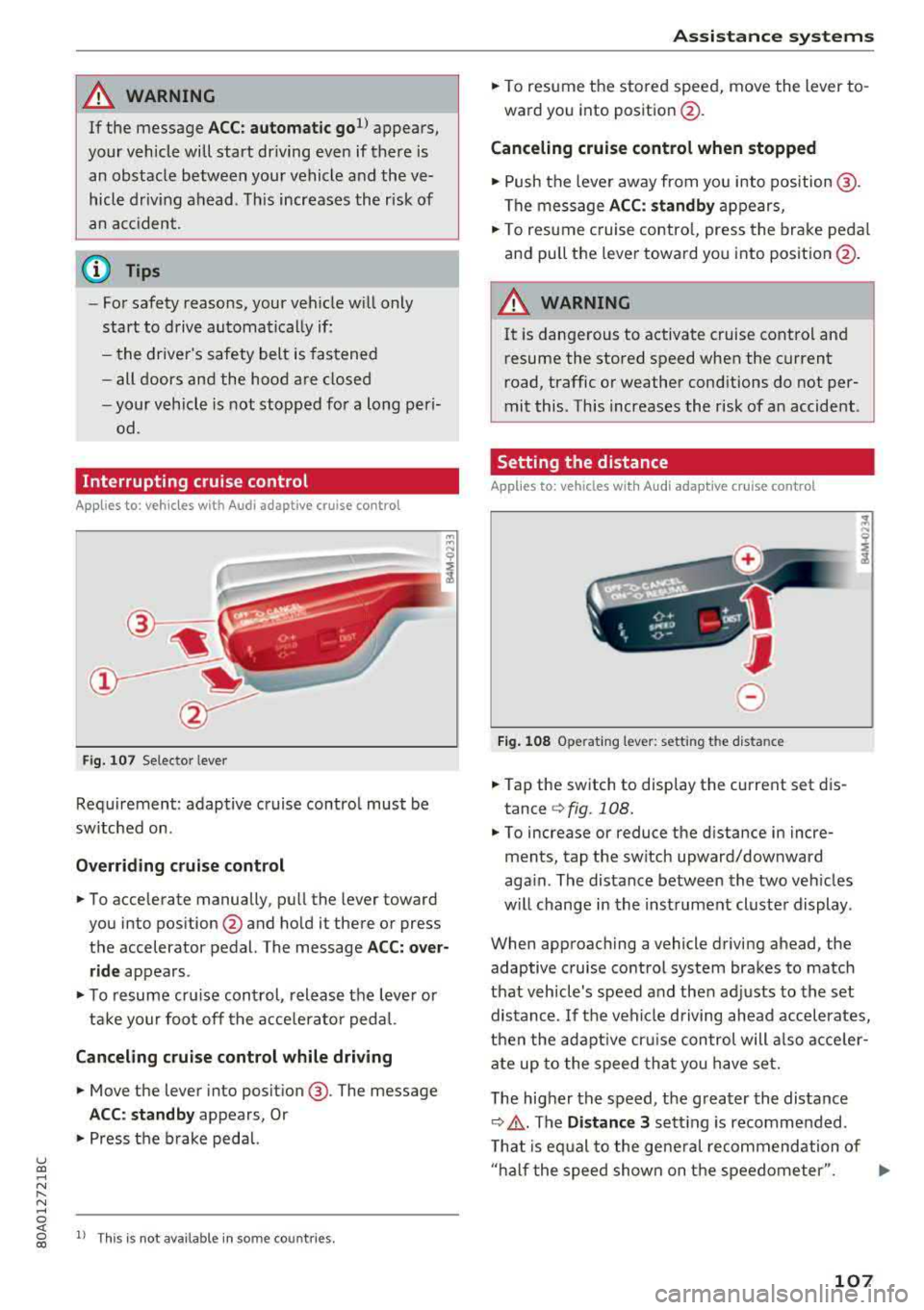
Fig . 107 Selecto r lever
Requirement: adaptive cruise contro l must be
sw itched on .
Overriding crui se control
"' To accelerate manually, pull the lever toward
you into position
@ and hold it there or press
the accelerator pedal. The message
ACC: over
ride
appears .
... To resume cr uise cont rol, release the leve r or
ta ke your foot off the acce le rato r peda l.
Canceling cruise control while driving
"'Move the lever into position @. The message
ACC: standby appears, Or
"'Press the b rake peda l.
l) This is no t available in some countries.
Assi st a nce systems
"' To resume the stored speed, move the lever to
ward you into position @.
Canceling cruise control when stopped
"' Push the lever away from you into position @.
The message
ACC: standby appears,
"' To resume c ruise contro l, press the brake peda l
and pull the lever toward you i nto position @.
A WARNING
It is dangerous to activate cruise contro l an d
resume the stored speed when the current
road, traffic or weather conditions do not per
mit this . This increases the risk of an accident .
Setting the distance
Applies to: vehicles with A udi ada ptive c ruise control
,
0
Fig. 1 08 Opera tin g lever: setting the distance
... Tap the switch to display the current set dis
tance
¢ fig. 108.
"'To increase or reduce the distance in incre
ments, tap the switch upward/downward
aga in . The distance between the two veh icles
w ill change in the inst rument cluste r display .
When approaching a vehicle driving ahead, the
adaptive cruise control system brakes to match
that vehicle's speed a nd then adj usts to the set
distance. If the veh icle d riving ahead accelerates,
t h en the adapt ive cr uise con trol will also acce ler
ate up to the speed th at you h ave set.
T he higher the speed, t he g reater the distance
¢ .&, .The Distance 3 sett ing is recommended .
T hat is eq ual to the ge ne ral recommendation of
" ha lf the speed shown on t he speedometer ".
..,.
107
Page 117 of 392
u co .... N ,..._
N .... 0 <( 0 00
this. H ave an authorized A udi deale r or a u
thorized A udi Service Faci lity check their func
tion.
(D Tips
-The pre sense rear functions switc h off
when towing a trai ler .
-The pre sense rear functions may also
switch off if there is a malfunction in the
side assist* system.
Audi pre sense city
A ppl ies to: ve hicles w ith Audi p re se nse c ity
D esc ription
Wit hin the limits of the system, pre sense city
can warn you of impending coll is ions w ith
ve hicles and pedestrians and initiate the applica
b le brak ing maneuver if needed. Pre sense city is
active at speeds of approximate ly 6 mph (10 km/
h) and h igher .
A pedestrian warning can occu r at speeds up to
SO mph (85 km/h), and vehicle warn ings ca n oc
cur at speeds up to 155 mph (250 km/h) . A pre
sense city braking maneuver is poss ible at speeds
up to SO mph (85 km/h).
Warnings
The system recogni zes var ious dangerous situa
tions . The
early warning occurs if:
-a vehicle driving ahead brakes s uddenly
-yo ur own vehicle approaches a significantly
s lower vehicle or stationary vehicle in the direc
t ion of travel
-a pedestrian is standing in the lane or is moving
into the lane
When t his wa rn in g oc curs, it may on ly be poss i
b le to avoid a co llision by swerv ing or braking
strong ly . T he message
Audi pre sense.
~ page 113, fig . 113 and a warning tone will
warn you about the danger .
Addit iona lly, a jerk on the brakes may occur as an
acute warning when there is an impending colli
sion. If you do not react to the acut e warning, pre
sense city can brake to the point of comp lete de
celerat ion w it hi n the lim its of the system. This
A ss istance systems
red uces the vehicle speed in the event o f a co lli
sio n. The message
Audi pre sense. also ap
pears .
T he following fu nctions a re trigge red in con junc
t ion w it h pre sense bas ic/rear :
-Reversible tens ion ing of the front safety belts
-Clos ing the windows and sunroof*
Audi drive select*: the function is not act ive de
pending on the mode selected.
A WARNING
-
-Pre sense city ca nnot overcome the laws of
p hys ics .
It is a sys tem designed to ass ist and
it cannot preven t a coll is io n in every circ um
s tance . The dr iver m ust a lw ays in terve ne.
T he d rive r is always responsible fo r brakin g
a t t he co rre ct time . Do not let the in cr eased
safety prov ided tempt you into taking r isks.
This could inc rease your r is k of a col lision .
-The system can dep loy incorrectly due to
system -specific limits.
-T o redu ce the r is k of an accident, please
note that the camera does not a lways detect
eve ry o bject.
-Pre sense city does not reac t to an ima ls,
crossing or oncoming ve hicles, objects such
as bars, ra ilings or railcars, and ob jects that
are difficult to detect
c> A in General infor
mation on page 103.
-In trailer mode, the bra king behavior o f the
tra ile r can be d ifferent than usual du ring au
tomatic braking.
A WARNING
--
Pre sense city may be restr icted or not ava ila
b le in the fo llow ing example s ituations:
-in heavy fog, ra in, spray, or snow
- when there are v isua l obst ruct ions, such as
g lare, reflections or variations in light
-when it is dar k
-if the camera window or the windshield is
d irty, iced over, damaged or cove red
-when dr iv ing o n snow, ice o r loose groun d
-in c urve s
-if the ESC was rest ricted or sw itched off
-when towing a trailer
115
Page 118 of 392
Assistance systems
-when the driver's seat belt is unfastene d
- u p to ten seconds after sw itchin g on t he ig-
n itio n
(Ud) Note
Impa cts or damag e to the ca m era m ou nt on
t he wi ndshi eld can di splac e the se nsor. Pr e
sense city can be im pa ir ed by t his . H ave an a u
thorized A udi dealer o r aut ho rize d A udi Serv
ice Facility check the ir funct ion.
(D Tips
- You can ca ncel the system brakin g inte rven
tion if yo u accelerate co nsidera bly or swerve
away.
- Kee p in m ind t hat pre sense city ca n brake
un expecte dly. Always sec ure a ny ca rgo o r
ob jects t hat you a re t ransport ing t o reduce
the r isk of damage or injury.
- Specific pre sense city funct io n s sw itch o ff
whe n the ESC is limited o r switc hed off
c:> page 141 or the hill d esce nt ass ist is
swi tch ed o n
c:> page 142 .
-Wh en t here is a mal function in the came ra,
the p re se nse city func tions also sw itch o ff.
Settings in the Infotainment system
Applies to: ve hicles w ith Audi p re se nse
.,. Se lect in the Info ta in m en t sys tem: IME NUI but
t on
> Vehicle > left contro l bu tton > Driver as
sistance
> Audi pre sense .
Switch on /off Audi pre sense -
the pre sense
fu nctions can be turned o n and off .
If the system is switched off, it switches o n aga in
automatically once the ignition is sw itched on
again .
Prewarning -the early warning can be switched
off or the p re sense city/front warning point ca n
be set
( Early /Medium /Late ).
Set the wa rnin g time fo r the ea rly warn ing to
Early at f irst. I f th is causes undesired ea rly warn
i n gs to appear, then set the wa rning time to
Me
dium .
The Late warning t ime sho uld on ly be set
i n sp ecia l cir cumstances .
116
(D Tips
Your settings are automatically store d and as
s ign ed to t he remote co ntro l key bein g used .
Messages
Applies to : vehicles wit h Audi pre sense
II] Audi pre sense: malfunction! Please contact
Service
This message ap pears w hen the pre sense f unc
tion is a ffected . Fo r example, th is co uld be
ca used by a faulty sensor. Drive to an autho rized
Audi dealer or author ized A udi Service Fac ility im
med iate ly to have the ma lfu nction corrected .
II] Audi pre sense: currently limited . Sensor
view limited due to surroundings. See owner's manual
This message a ppears if t he radar se nsor and
camera view is obstructed, fo r example by leaves,
snow, heavy sp ray o r dirt. If necessary, clean the
senso rs and the area around the camera
c:> page 103 , fig. 100 or c:>page 121, fig. 121 .
II] Audi pre sense: currently limited . Trailer
towing mode
Fo r vehicles wit h a tra ile r h itch installed at the
factory, the pre sense rear functions switc h off
whe n the elect rical connector at the soc ket is
pl ugged in. The re is no guarantee the functions
will switc h off w hen usin g a ret rofitted trailer
hitc h.
II] Audi pre sense: currently restricted
This mess age app ears if the ESC is res tricted or
switc hed off, fo r exam ple .
II] Audi pre sense: currently limited. See own
er's manual
This message a ppears w hen the re is a tem porary
failu re in a sub syst em, such as the ESC. If t his
m ess age app ears re pea te d ly, drive to an au thor
iz ed Audi de aler or auth oriz ed A udi Se rvice Facili
ty to h ave the m alfun ction co rrected .
II] Audi pre sense: emergency braking system
off
~
Page 122 of 392
Ass is tance sy stem s
Stee ring time
Earl y: in th is sett ing, the correct ive steering hap
pens continuously to help keep the vehicle in the
center of the lane.
La te : in this setting, the system provides correc
tive steering just before a w heel goes over a de
tected lane marker line .
Vibration warning
You can switch the additional vibration warning
i n the stee ring wheel on or off .
,&. WARNING
-
With the vibration warning switched off,
t here will also be no visual warn ing in the in
strument cluster display when crossing a lane
marker line.
© Tips
I n certain mar kets: you r settings are stored
automatically and ass igned to the remote
control key in use .
Audi side assist
Description
App lies to: ve hicles w it h Aud i side ass ist
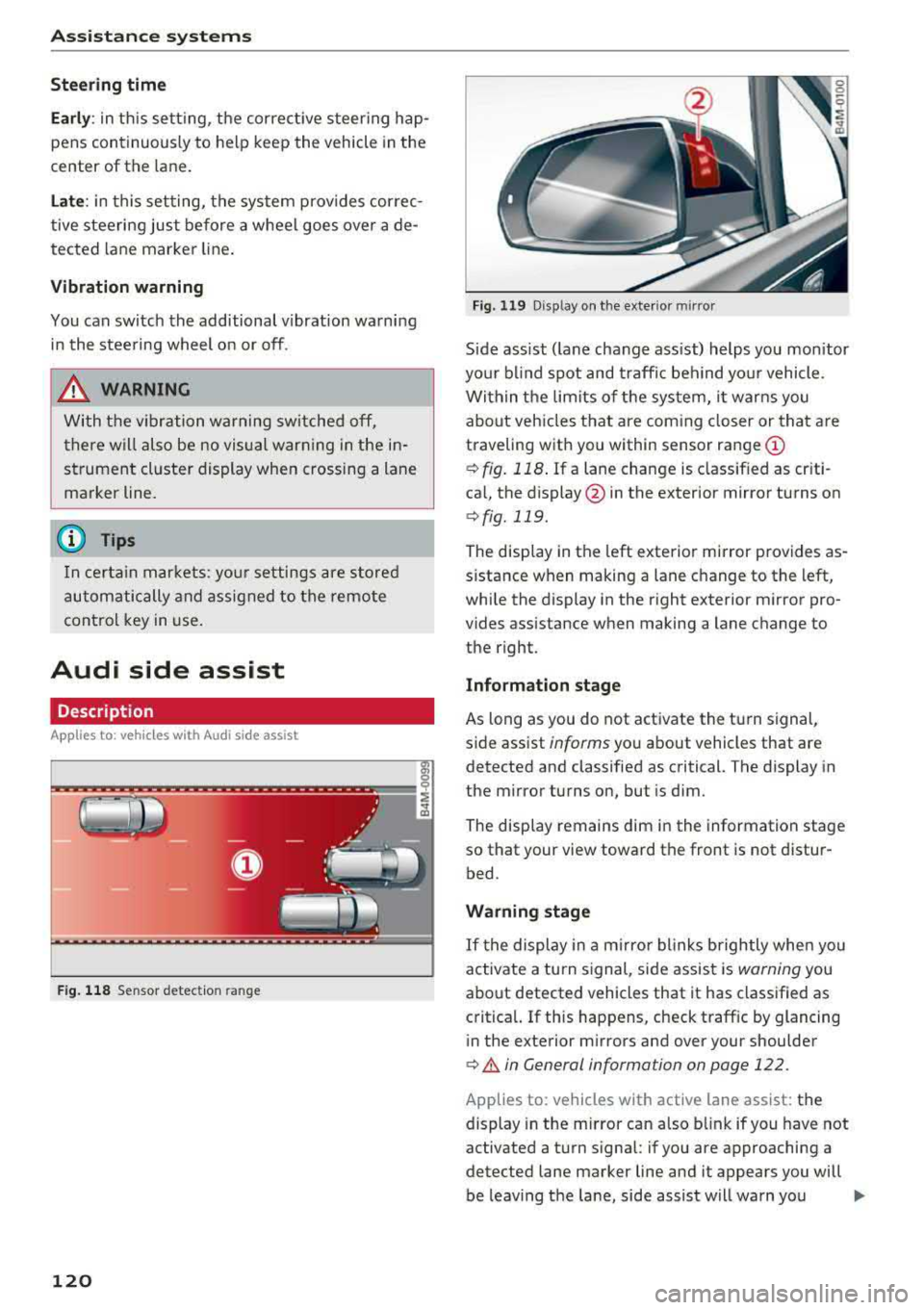
F ig . 11 8 Sensor detect ion ra n ge
120
Fig. 119 D isp lay on the exterior mirror
S ide ass ist ( lane change ass ist) helps you mon itor
you r bl ind spot and traff ic beh ind yo ur vehicle.
Within the limits of the system, it warns you about vehicles that are coming closer or that are
traveling with you within sensor range
(D
¢ fig. 118 . If a lane change is class ified as cr iti
ca l, the display @in the exterior mirror turns on
¢fig. 119.
The display in the left exterior mirror provides as
sistance when making a lane c hange to the left,
while the display in the r ight exterior m irror pro
vides assistance when making a lane change to
the right.
Information stage
As long as you do not activate the turn signal,
s ide assist
informs yo u about vehicles that are
detected and classified as critical. The display in
the mirror turns on, but is dim .
The disp lay remains dim in the information stage
so that your view toward the front is not distur
bed.
Warning stage
If t he display in a m irro r blinks brightly whe n you
activate a turn s ignal, side assist is
warning you
about detected vehicles that it has classified as
critica l. If this happens, check traff ic by glancing
in the exterior m irrors and over your shoulder
¢ A in General information on page 122 .
Applies to: vehicles with active lane assist: the
display in the m irror can also b link if you have not
activated a turn signal : if you are approaching a
detected lane marker line and it appears you will
be leaving the lane, side assist will warn you
..,.
Page 123 of 392
about detected vehicles that it has classified as
critical.
@ Tips
You c an ad just t he brig htness on of the dis
play on the rearview
mirror ~ page 122.
General information
Applies to: vehicles with Audi side assist
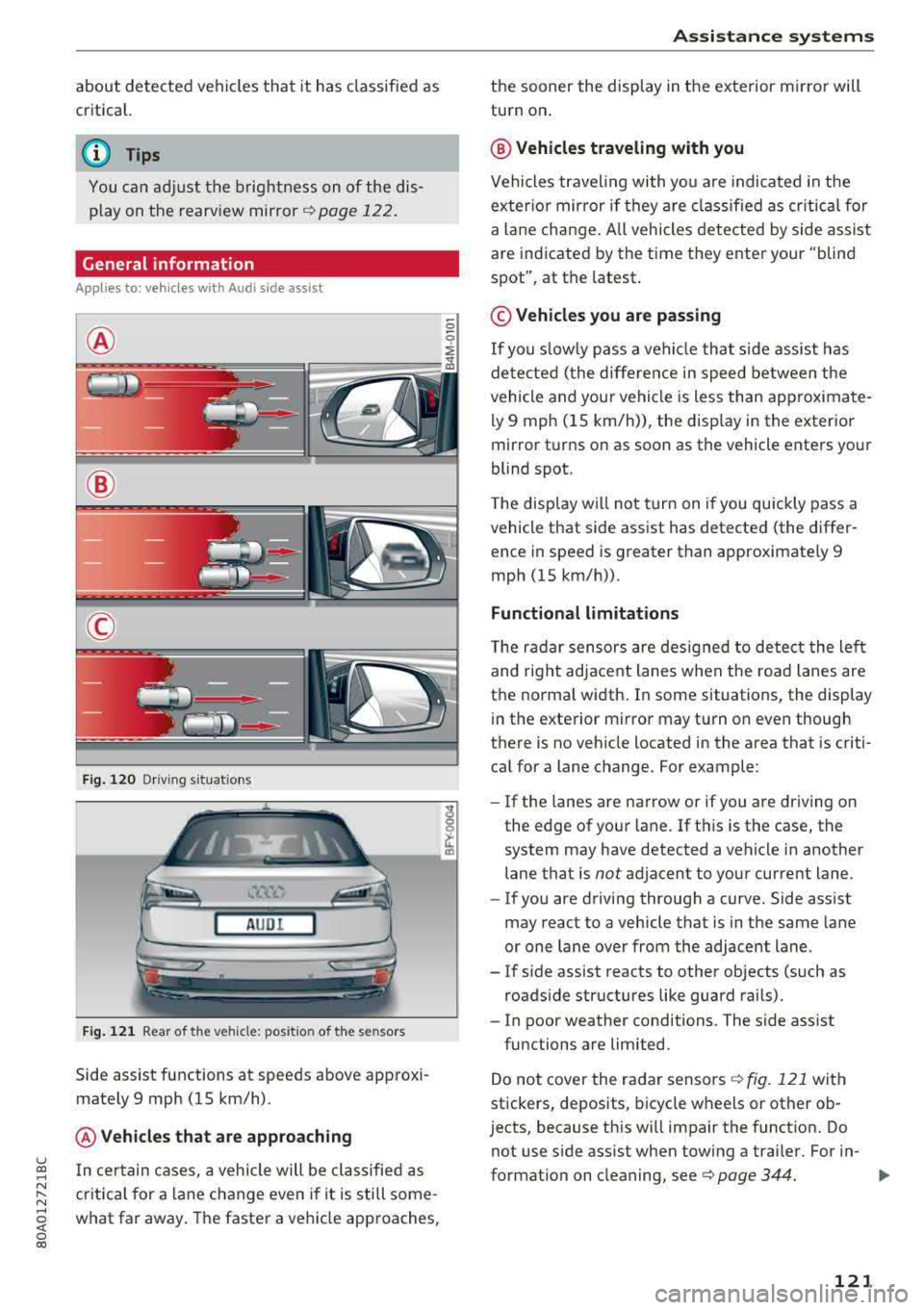
@
@
©
F ig . 12 0 Dr ivi ng s it u at ions
A U DI
Fig . 121 Rea r of the ve hicle: pos it io n of the sensors
Side assist functions at speeds above app roxi
mately 9 mph (15 km/h) .
@Vehicles that are app roaching
u ~ I n certain cases, a vehicle will be classified as
N :::. cr itica l for a lane change even i f it is still some-,.....
~ what far away . The faste r a veh icle approaches,
0 co
A ssi st a nce systems
the sooner the display in the exterior m irror will
turn on .
@ Vehicles traveling with you
Vehicles traveling with yo u are indicated in the
exter io r mirror if they a re classified as cr itical for
a la ne change. A ll vehicles dete cted by s ide assist
are indicated by the time they ente r your "blind
spot", at the latest.
© Vehicles you are passing
If
you s lowly pass a vehicle that s ide assist has
de tected ( the differe nce in speed between the
vehicle and your vehicle is less than app roximate
ly 9 mph (15 km/h)), the disp lay in the exterior
mirror turns on as soon as the vehicle enters your
blind spot.
T he display w ill not tur n on if you quickly pass a
vehicle that side assist has detected (the differ ence in speed is greater than approximate ly 9
mph (15 km/h)) .
Functional limitations
The radar sensors are des igned to detect the left
and right adjacent lanes when the road lanes are
the norma l width . In some situations, the display
in the exte rior mirror may turn on even though
there is no vehicle located in the area that is criti cal for a lane change. For example :
-If the lanes are narrow or if you are driving on
the edge of your lane. If t his is the case, the
system may have detected a vehicle in another lane that is
not adjacent to your current lane .
- If you are driving through a curve. Side assist
may react to a vehicle that is in the same lane
or one lane over from the adjacent lane .
- If s ide assist reacts to other objects (such as
roads ide structures like guard rails).
- In poor weather conditions . The side assist
functions are limited.
Do not cover the radar sensors
Q fig. 121 with
stickers, deposits, bicycle wheels or other ob
jects, because this w ill impair the funct ion. Do
not use s ide ass ist when towing a trai ler. For in-
format io n on cleaning, see ¢
page 344. ..,.
121
Page 125 of 392
u co ..... N r-N .....
~ 0 co
Exit warning
Applies to: ve hicles with exit warning system
Fig. 122 Example dis play
Fig. 123 Door: warning lig h t
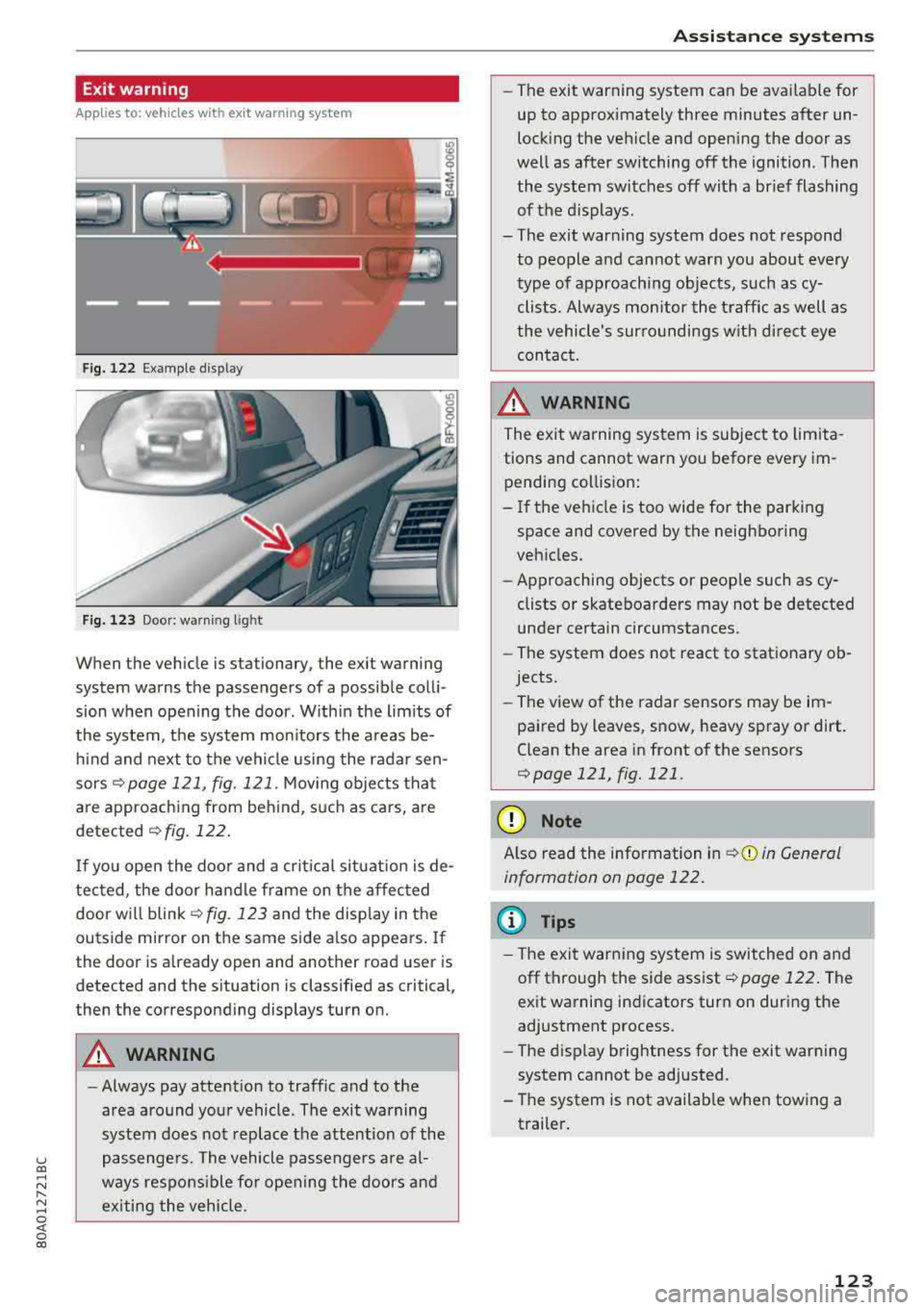
When the vehicle is stationary, the exit warning
system warns the passengers of a possible colli
sion when opening the door . Within the limits of
the system, the system monitors the areas be
hind and next to the vehicle using the radar sen
sors
¢ page 121, fig. 121 . Moving objects that
are approaching from behind, such as cars, are
detected ¢ fig. 122.
If you open the door and a critical situation is de
tected, the door handle frame on the affected door will
blink ¢ fig. 123 and the display in the
outside mirror on the same side also appears. If
the door is already open and another road user is
detected and the situation is classified as critical
J
then the corresponding displays turn on.
A WARNING
-
- Always pay attention to traffic and to the
area around your vehicle . The exit warning
system does not replace the attention of the
passengers. The vehicle passengers are al
ways responsible for opening the doors and
exiting the vehicle .
Assistance systems
-The exit warning system can be available for
up to approximately three minutes after un
locking the vehicle and opening the door as
well as after switching off the ignition . Then
the system switches off with a brief flashing
of the displays.
- The exit warning system does not respond to people and cannot warn you about every
type of approaching objects, such as cy clists. Always monitor the traffic as well as
the vehicle's surroundings with direct eye contact.
A WARNING
= -
The exit warning system is subject to limita-
tions and cannot warn you before every im
pending collision:
- If the vehicle is too wide for the parking
space and covered by the neighboring
vehicles.
- Approaching objects or people such as cy
clists or skateboarders may not be detected
under certain circumstances.
- The system does not react to stationary ob
jects.
- The view of the radar sensors may be im
paired by leaves, snow, heavy spray or dirt.
Clean the area in front of the sensors
¢page 121, fig. 121 .
(D Note
Also read the information in ¢(i) in General
information on page 122.
(D Tips
- The exit warning system is switched on and
off through the side
assist¢ page 122. The
exit warning indicators turn on during the
adjustment process.
- The display brightness for the exit warning
system cannot be adjusted.
- The system is not available when towing a
trailer.
123
Page 127 of 392
u co ..... N r--N ..... 0 <( 0 00
(D Tips
-You can cancel the automatic brake activa
tion w ith increasing braking fo rce if you ap
ply the brakes yourse lf or accelerate cons id
erab ly.
- In some situations, rea r cross-traffic assist
may warn you even if there is no cross traffic
i n a cr itical area , for examp le when back ing
i nto a parking space or maneuver ing .
- The rea r cross-traffic ass ist also switches off
when you switch off the ESC.
- The system is not available when towing a
trailer.
Messages
Applies to: vehicles with Audi side assist
A message appears in the inst rumen t cluste r dis
p lay if the s ide ass ist swi tches off automatically .
@t Audi side assist: malfunction! Please contact
Service
@j Audi side assist and exit warning: malfunc
tion! Please contact Service
The system cannot guarantee that it w ill detec t
ve hicles co rrectly a nd it has sw itched off. The
sensors have been mov ed o r are faulty. Have t he
system checked by an a uthori zed Audi dea ler or
author ized Audi Se rvice Facility soon.
@j Audi side assi st: cur rently unavailable. Sen
sor vision restricted due to surroundings . See
owner 's manual
e, Audi side as sis t and e xit warning: currently
unavailable. Sensor vision restricted due to sur
roundings
The rad ar senso r vis io n i s impa ire d. The area in
fron t of the senso rs must no t be covered by b ike
rac ks, st ic kers, leaves, snow or any othe r ob jects.
C lea n the area i n front of th e sensors, if necessa
ry¢ page 121, fig. 121.
e, Audi side as sis t: currentl y unavailable. See
owner 's manual
et Audi side a ssist and exit warning : currently
unavailable. See owner 's manual
A ss istance systems
S id e ass ist cannot be switched on at this time be
ca use there is a ma lfunction (for example, the
batte ry c harge leve l may be too low).
et Audi side assist : unavailable in towing mode
e, Audi side assist and exit warning: currently
unavailable . Towing mode
S ide ass ist switches off automatically when the
electrica l connec to r i n t he factory-installed t rail
er hitch is connec ted . There is no guarantee the
syste m will sw itch o ff when us ing a ret rofitted
t railer h itch . Do no t use side a ssist an d the ex it
war nin g when tow ing a tra ile r.
Ill Rear parking aid: obstacle detect ion restrict
ed
The rear cross-traffic ass ist is not available . E i
ther the ESC is sw itched off, or the rada r senso rs
may be cove red by a b ike rac k, st ic ke rs , leaves,
snow o r othe r objects . Swit ch the ESC on, o r
cl ea n the area in fron t of the senso rs if necess ary
¢page 12 1, fig . 12 1. If thi s message con tinues
to be displayed, dr ive imme dia tely to an author
ized Audi dea ler or author ized Audi Service Facili
ty to have the ma lf u nction repaired.
Audi drive select
Introduction
Applies to: vehicles with Audi drive select
Dr ive sele ct m akes i t possible to exper ien ce d if
f erent types of vehi cle se ttings in one veh icle.
Yo u can select the driv in g modes
Offroad* or
Lift / Offroad *, Allroad* , Comfort , Auto and Dy
namic
i n the Infota inme nt system, fo r example
to switch from a spo rty to a comfo rtable d riving
mode. In the
Individual mode, the settings can
be adjusted to you r persona l preferences. This
makes it possible to combine sett ings such as a
spo rty engine setting wi th light steer ing .
Description
Applies to: vehicles with Audi drive select
The following systems, among ot her th ings, a re
in fluenced by dr ive se lect:
.,.
125
Page 128 of 392
Assistance systems
Engine and automatic transmission
Depending on the mode , the engine and auto
matic transmission respond more quickly or in a
more balanced manner to accelerator peda l
movements. In the sporty
Dynamic mode, the
transmission shifts at higher speed ranges.
Air suspension*
The air suspension* is an electronically-control
led air suspension and damping system. The
ad
justment depends on the driving mode selected,
steering movements, the driver's braking and
ac
celeration, and as the road surface, vehicle speed
and load. The veh icle ground clearance depends
on the mode selected and the speed .
The ground clearance increases significantly
when the vehicle is in the
Allroad mode . At
speeds from approximate ly SO mph (80 km/h) to
75 mph (120 km/h), the ground clearance
re
duces in stages . When the speed decreases, the
ground clearance increases aga in automat ically .
The ground clearance is the lowest in
Dynamic
mode.
Suspension control*
The suspension control* uses sensors to record
information regard ing steering movements,
braking and acceleration operations by the driv
er, road surface, dr iv in g speed, and load. This
makes it possible to adapt damping to the driv
ing situation near ly in rea l time. With drive
se
lect, you can adjust the suspension contro l to be
sporty
( Dynamic ), comfortab le (C omfort ) or bal
anced
(A uto ).
Steering
The power steering adapts. Ind irect steer ing that
moves easi ly as in
Comfort mode is especia lly
suited to long drives on highways. The
Dynamic
mode provides sporty, direct steering.
The following applies to vehicles with dynamic
steering* : the steering ratio changes based on
vehicle speed in order to maintain optimum
steering effort for the driver at all times . This
sets the steering to be less sensitive at higher
speeds in order to prov ide improved vehicle con
trol. At reduced speeds, steering is more direct in
126
order to keep the steering effort as minima l as
possible when the driver is maneuvering the ve hi
cle. At low and average speeds, dynamic steer
i ng* addit iona lly prov ides more respons ive steer
i ng performance.
Sport differential*
As a component of the all whee l drive system
(quattro)
r=!> page 144, the sport differentia l dis
tributes the driving power to the rear axle
de
pending on the s ituation. The distr ibut ion of
power varies depending on the selected mode
from moderate
(C omfort ) to sporty (Dynamic ).
The goal is a high level of ag ility and ability to ac
celer ate on curves. The vehicle is very respons ive
to stee ring.
Adaptive cruise control (ACC)*
The behavior whe n accelerating can be adjusted
from comfortable to sporty, depending on the drive select mode . Adaptive cruise control also
r esponds to the driv in g behavior of the vehicle
ahead in a more conservative or sporty manner.
Engine sound*
The engine sound adapts to the current mode
and can be subtle to sporty .
@ Note
Applies to: vehicles with a ir suspension
- Make sure there is enough clearance above
and below the vehicle when pa rking. Th e
height of the vehicle (ground clearance) can
change once it is parked due to temperature
fluctuations, changes to the load conditions
and changes to the driving modes.
- When transporting the vehicle on a car
car
rier, train, ship or by other means, only tie
the vehicle down at the running sur face of
the tires, which is the outer c ircumference.
Securing the vehicle at the axle compo
nents, suspension struts or tow ing eyes is
not perm itted because the pressure in the
air suspens ion struts can change during
transport. The vehicle may not be secured
sufficiently if this happens .
Page 132 of 392
Parking aid
Parking aid
General information
A pplies to: ve hicles w ith a rea r parking sys te m /parking sys
tem p lus/rearv iew camera/peripheral cameras
Depending on your vehicle's equipment , various
parking aids will help you when parking and ma
neuvering.
The
rear parking system is an audible parking aid
that warns you of obstacles
behind the vehicle
¢ page 131.
The parking system plus assists you when park
ing by audibly and visually indicating objects de
tected
in front of and behind the vehicle
¢ page 131.
The rearview camera shows the area behind the
vehicle in the Infotainment system display. The lines in the rearview camera image help you to
park or maneuver
¢ page 133.
The peripheral cameras give various views to
help you when parking or maneuvering
¢ page 135 . The parking system plus functions
are also available ¢
page 131.
_& WARNING
-Always look for traffic and check the area
around your vehicle by looking at it directly
as well. The parking system cannot replace
the driver's attention. The driver is always
responsible when entering or leaving a park
ing space and during similar maneuvers.
- Please note that some surfaces, such as
clothing, are not detected by the system.
-
- Sensors and cameras have blind spots in
which people and objects cannot be detect
ed . Be especially cautious of small children
and animals.
- Always keep your eyes on the vehicle's sur roundings, using the rearview mirror as
well.
- The sensors can be displaced by impacts or
damage to the radiator grille, bumper,
wheel housing and the underbody . The park
ing system may be impaired as a result.
Have an authorized Audi dealer or author-
130
ized Audi Service Facility check their func
tion .
@ Note
-Some objects are not detected or displayed
by the system under certain circumstances:
- objects such as barrier chains, trailer draw
bars, vertical poles or fences
- objects above the sensors such as wall ex
tensions
- objects with certain surfaces or structures
such as chain link fences or powder snow
- If you continue driving closer to a low ob
ject, it may disappear from the sensor range . Note that you will no longer be
warned about this obstacle.
- Keep enough distance from the curb to re
duce the risk of damage to the rims .
(D Tips
-The system may provide a warning even
though there are no obstacles in the cover
age area in some situations, such as:
- certain road surfaces or when there is tall
grass
- external ultrasonic sources such as from
cleaning vehicles
- in heavy rain, snow, or thick vehicle ex
haust
- We recommend that you practice parking in
a traffic-free location or parking lot to be
come familiar with the system. When doing
this, there should be good light and weath
er conditions.
- You can change the volume of the signals
and the display ¢
page 138.
-Please refer to the instructions for towing a
trailer located in
¢page 139.
-What appears in the infotainment display is
somewhat time-delayed.
- The sensors must be kept clean and free of
snow and ice for the parking aid to operate.
- The rearview camera is cleaned when clean
ing the rear window
¢page 51.
Page 135 of 392
u co ..... N r-N .....
~ 0 co
Rearview camera
Introduction
Applies to: vehicles with rearv iew camera
Fig. 131 Diagram: lines to aid in parking
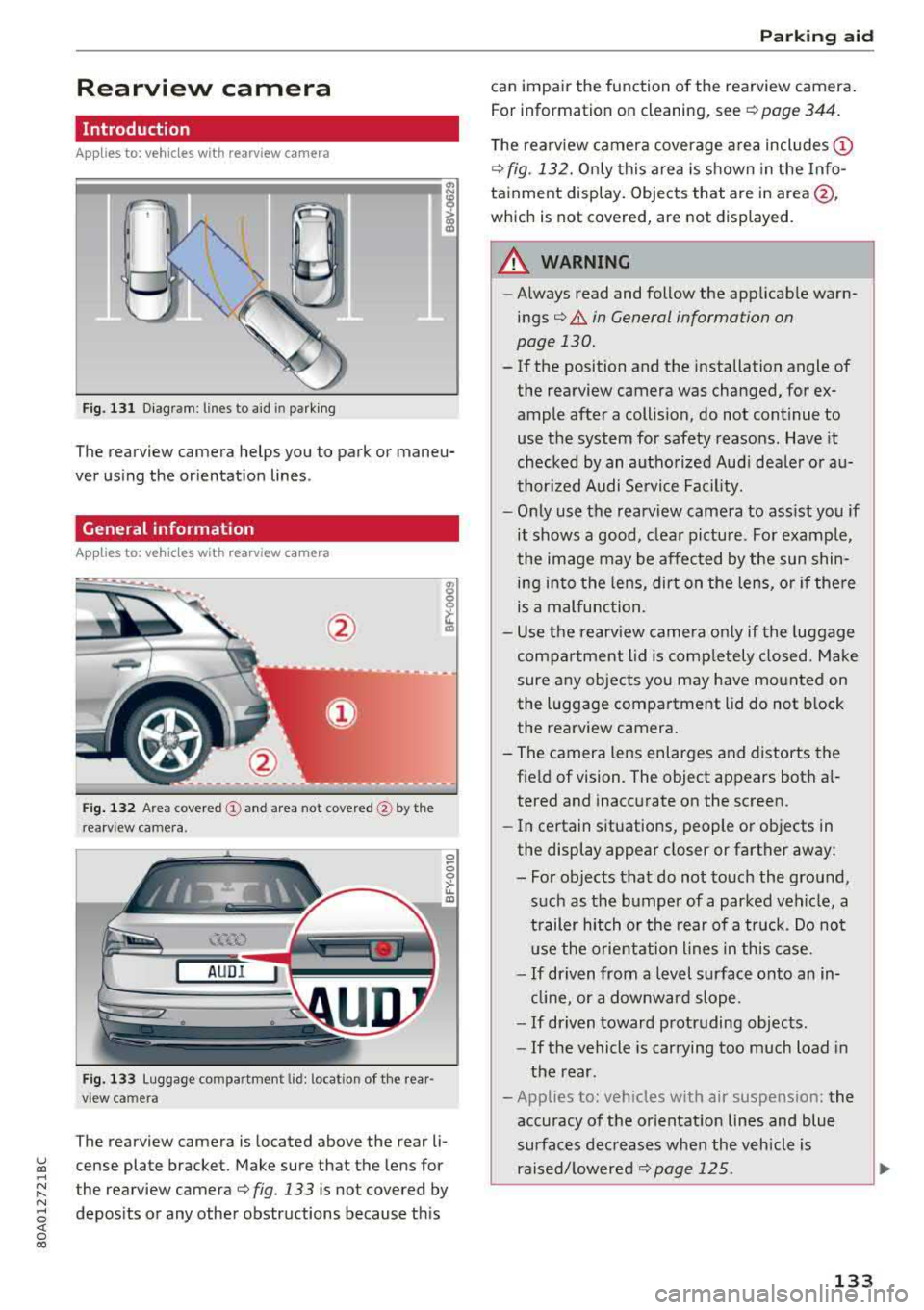
The rearview camera helps you to park or maneu
ver us ing the orientation lines .
General information
Applies to: veh icles wit h rearv iew camera
Fig . 13 2 Area covered (y and area not covered @by th e
rearv iew camera .
AUDI
Fig. 1 33 Luggage compartment lid: locat io n of the rear
view camera
The rearview camera is located above the rear li
cense plate bracket. Make sure that the lens for
the rearview
camera¢ fig. 133 is not covered by
depos its or any other obstructions because th is
P ark ing aid
can impair the function of the rearview camera .
For information on cleaning, see
¢ page 344.
T he rearview camera coverage area includes (D
¢fig. 132. On ly this area is s hown in the Info
tainment display. Objects that are in
area@,
which is not covered, are not displayed.
A WARNING
-
-Always read and follow the applicab le warn-
ings¢ &. in General information on
page 130.
-If the position and the installation angle of
the rearview camera was changed, for ex
ample after a collision, do not continue to
use the system for safety reasons. Have it
checked by an autho rize d Aud i dea le r or a u
thor ized A udi Se rvice Fac ility.
-O nly use the rearv iew camera to ass ist you if
it shows a good, clea r pictu re . For example,
the image may be affected by the sun shin i n g into the lens, dirt on the lens, o r if the re
is a malfunction.
-U se the rearv iew came ra o nly if the luggage
compa rtment lid is comp letely closed. Make
sure any objects you may have mo unted on
the l uggage compartment lid do not block
the rea rview camera .
- The camera lens enlarges and distorts the field of vision. The object appears both a l
tered and inaccurate on the screen.
- In ce rtain situations, people o r objects in
the display appear closer or farther away :
- Fo r o bjects tha t do not touch the ground,
such as the bumper of a parked veh icle, a
trailer hitch o r the rear of a truck . Do no t
u se the orie nta tion l ines in th is case.
- If driven from a level surface onto an in
cl in e, or a downwar d slope.
- If driven toward protruding objec ts.
- If the vehicle is car rying too much load in
the rear .
- Applies to: veh icles w ith air suspens ion: the
accuracy of the or ientat ion lines and blue
surfaces dec reases whe n the vehicle is
raised/ lowere d¢
page 125.
133