tow AUDI Q5 2018 Workshop Manual
[x] Cancel search | Manufacturer: AUDI, Model Year: 2018, Model line: Q5, Model: AUDI Q5 2018Pages: 392, PDF Size: 60.56 MB
Page 354 of 392
Emerg enc y assis tance
~ Inflate the tire to between 29 psi (200 kPA)
and 36 psi (250 kPA) and read the pressure on
the gauge.
~ If this tire pressure is not reached, remove the
filler hose. Drive s lowly approximately 33 feet
(10 m) forward or in reverse so that the sealant
can be d istr ibuted in the tire . Pump up the t ire
again ~,&. .
_& WARNING
-Read and follow the manufacture r's safety
precautions on the compresso r and in the
instructions on the bottle of sealant.
- If a t ire pressu re of 29 ps i (200 kPA) cannot
reached after inflating for 6 minutes, then
the tire is too severely damaged . Do not
continue driving .
- If the tire cannot be repaired with the tire sealant, see an authorized Audi dealer or au
thorized Audi Service Facility for assistance .
(D Tips
Do not operate the compressor for mo re than
six minutes continuously, or it can overheat .
Once the compressor has cooled, you can con
tinue to use it .
Completing
App lies to: ve hicles w ith t ire mobility kit
~ Adhere the sticker that says "max . 50 mph
(max. 80 km/h)" that is provided w ith the t ire
mobility kit within the driver 's field of vision .
~ Stop the vehicle after driving for about 10 m i
nutes and check the tire pressure.
~ If the t ire pressure is lower tha n 19 ps i (1 30
kPA), then the t ire is too severely damaged. Do
not continue driving .
_& WARNING
Pay attention to the following after repairing
the tire:
- Do not drive faster than 50 mph (80 km/h) .
- Avoid hard acceleration, bra king sharply,
and fast cornering .
- The veh icle m ay become mo re diff icul t to
contro l.
352 -
If the tire is too severe ly damaged, see an
author ized Audi dealer or authorized Audi
Serv ice Facility for ass istance.
@) For the sake of the environment
You can give the used tire sealant bottle to an
a uthorized Audi dea ler or authorized Audi
Service Fac ility for disposal.
(D Tips
Remember to obtain a new bott le of sealant
from an authorized Audi dealer or authorized
Audi Service Fac ility after repairing a tire.
Replacing a wheel
Preparation
You must complete the preparation before
changing a tire .
~ Read and follow the important safety precau-
tions ~ page 350 .
~ Set the park ing brake .
~ Select the "P" se lector lever position.
~ When tow ing a tra ile r: d isconnect the trailer
from yo ur vehicle.
~ Switch on wheel c hange mode* in the In fotain
ment system:
! MENUI button> Vehicle > left
control button >
Ser vic e & check s > Air suspen ·
sion : wheel change .
~ Switch the ignit ion off.
The vehicle jack mode* switches off automatica l
l y at speeds above 6 mph (10 km/h).
_& WARNING
When us ing the veh icle jack* on a road with a
steep hill or offroad, you must take extra pre
cautions to prevent the vehicle from rolling .
Use suitable objects to block the front and
bac k of the wheel that is d iagonal from the
wheel with the flat t ire.
_& WARNING
You o r you r passengers could be injured while
ch anging a whee l if you do not follow these
safety pre caut ions:
Page 365 of 392
u co .... N r--N .... 0 <( 0 00
Emergency situations
General
This chapter is intended for trained emergency
crews and working personnel who have the nec
essary tools and equipment to perform these
operations.
Starting by pushing or
towing
~ Note
Vehicles with an automatic transmission
cannot be started by pushing or towing.
Starting with jumper
cables
If necessary, the engine can be started by con
necting it to the battery of another vehicle.
If the engine should fail to start because of a dis
charged or weak battery, the battery can be con
nected to the battery of
another vehicle, using a
pair of jumper cables to start the engine.
Jumper cables
Use only jumper cables of sufficiently large cross
section
to carry the starter current safely. Refer
to the manufacturer's specifications.
Use only jumper cables with
insulated terminal
clamps which are distinctly marked:
plus(+) cable in most cases colored red
minus(-) cable
in most cases colored black.
A WARNING -
Batteries contain electricity, acid, and gas.
Any of these can cause very serious or fatal in
jury. Follow the instructions below for safe
handling of your vehicle's battery.
-Always shield your eyes and avoid leaning
over the battery whenever possible.
- A dead battery can freeze at temperatures
around 32 °F (0 °C). If the vehicle battery is
frozen, you must thaw it before connecting
the jump start cables. If you do not, this in-
Emergency situations
creases the risk of an explosion and chemi
cal burns. After jump starting the vehicle,
drive to an authorized Audi dealer or author
ized Audi Service Facility immediately to
have the vehicle battery checked.
- Do not allow battery acid to contact eyes or
skin. Flush any contacted area with water
immediately.
- Improper use of a booster battery to start a
vehicle may cause an explosion .
- Vehicle batteries generate explosive gases.
Keep sparks, flame and lighted cigarettes
away from batteries.
- Do not try to jump start any vehicle with a
low acid level in the battery .
- The voltage of the booster battery must also
have a 12-Volt rating. The capacity (Ah) of
the booster battery should not be lower
than that of the discharged battery. Use of
batteries of different voltage or substantial
ly different "Ah" rating may cause an explo
sion and personal injury.
- Never charge a frozen battery. Gas trapped
in the ice may cause an explosion.
- Never charge or use a battery that has been
frozen. The battery case may have be weak
ened.
- Use of batteries of different voltage or sub
stantially different capacity (Ah) rating may
cause an explosion and injury. The capacity
(Ah) of the booster battery should not be
lower than that of the discharged battery.
- Before you check anything in the engine
compartment, always read and heed all
WARNINGS
c>page 314.
@ Note
-Applying a higher voltage booster battery
will cause expensive damage to sensitive
electronic components, such as control
units, relays, radio, etc.
- There must be no electrical contact between
the vehicles as otherwise current could al
ready start to flow as soon as the positive
(+) terminals are connected.
363
Page 367 of 392
-When connecting jumper cables, make sure
that they cannot get ca ught in any mov ing
parts in the engine compartment.
- Do not bend over the batteries - danger of
chem ica l burns!
- The battery cell lock ing screws must be
t ightened sec ure ly.
- Be fore you check anything in the e ngine
compartment, a lways read and hee d all
WAR NINGS
q page 314 .
(D Note
Impro per hook -up of jum pe r cables can r uin
the gene rato r.
- Always connect POSITI VE (+ ) to POS ITIV E
( + ), and NEGATIVE( -) to NEGAT IVE( -)
g roun d post of t he battery mana ger contro l
u nit.
- Check that a ll sc rew p lugs on t he battery
cells are screwed in firmly. I f not, t ighten
plugs prior to connecting clamp on negative
batte ry terminal.
- P lease note that the procedure fo r con nect
i ng a jumper cab le as desc ribed above ap
p lies specifica lly to the case of yo ur vehicle
being jump starte d. When you are giv ing a
ju mp s ta rt to anothe r vehicle , d o
not con
n ect the neg ative (-) cab le to the neg ative
(-) t ermin al on the di sch arged b attery @
q fig. 287 . In ste ad , securely connec t the
nega tive ( -) cab le to either a solid me tal
com ponent that is f irm ly bolted to the e n
gine block o r to the engine bloc k itself. If
the battery that is be ing cha rge d does not
vent to the outs ide, escap ing battery gas
could ignite and exp lode!
Towing with a tow truck
General hints
Your Audi requires special handling for towi ng .
The fo llow ing information is to be used by com
mercia l tow tr uck operators who know how to op-
u e rate the ir equip ment safe ly. co .....
~ - Never tow your Audi, towing will cause dam-N
~ age to the engine and transmission .
0 co
Emergency situations
-Never wrap the safety chains or winch cables
around the brake lines .
- To prevent unnecessa ry damage , your Audi
must be transported with a flatbed truck.
- To load the vehicle on to the flatbed, use the
towing loop found in the vehicle tools and at
tach to the front or rear anchorage
¢ page 365 and ¢ page 366 .
A WARNING
-A veh icle being towed is not safe for passen-
ge rs . Neve r allow anyone to ride in a vehicle
b eing towed, fo r any r eason.
Front towing loop
Only install the front towing loop when it is
needed.
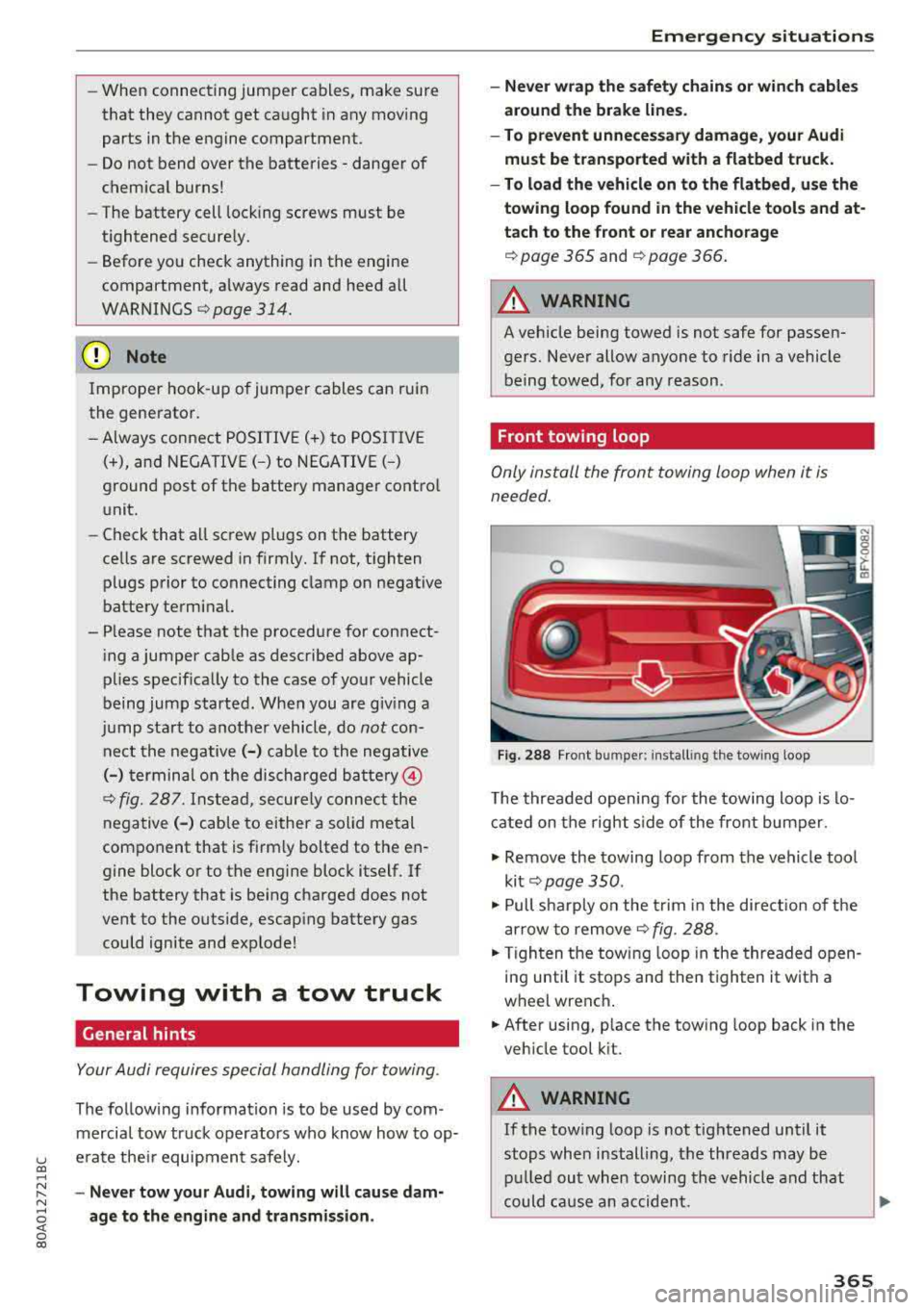
Fig . 288 Front bu mpe r: in sta lling the tow ing loop
T he threaded opening for the towing loo p is lo
cate d on t he righ t side of the front bum per.
.. Remove the towing loop from the vehicle too l
ki t
¢ pag e 350 .
.. Pull s harp ly o n the trim in the dire ct ion o f the
a rrow to remove
¢ fig . 288.
.,. T ig hten t he towi ng loop in the threade d open
in g until it stops and then tighten it with a
wheel wrenc h .
.,. After using, p lace the tow ing loop back in the
veh icle tool k it.
A WARNING
-If the tow ing loop is not tightened until it
stops whe n installing, t he threads may be
pull ed ou t wh en towing the vehicle and th at
could ca use a n accident.
365
Page 368 of 392

Emergency situations
(D Note
The trim is attached to the bumper with sev
eral hooks . To reduce the risk of damage, do
not use any force when removing and instal
ling.
Rear towing loop
F ig . 289 Rear bumper: installing the towing loop
Vehicles with a towing loop
On vehicles without a factory-installed trailer
h itch*, the towing loop threads are located on
the right rear side of the bumper.
... Remove the towing loop from the vehicle tool
kit ¢
page 350.
... Press the cap inward with brief, forcefu l pres
sure ¢ fig. 289. The cap will loosen from the
bumper.
... Tighten the towing loop in the threaded open
ing until it stops and then t ighten it w ith a
wheel wrench.
... After using, place the towing loop back in the
vehicle tool kit.
Vehicles with a trailer hitch*
... Attach the towing bar or the towing cable to
the tra iler hitch.
Vehicles with a factory-installed trailer hitch* are
not equipped with towing loop threads at the
rear.
A WARNING
If the towing loop is not tightened until it
stops when insta lling, the threads may be
pulled out when towing the vehicle and that
could cause an accident.
366
A WARNING
,-
Applies to: vehicles with trailer hitch
- Only use a special towing bar to prevent
damaging the ball hitch. These towing bars
have been spec ially designed for trailer tow
ing hitches.
- Only use special towing cables.
Loading the vehicle onto a flatbed truck
Fig. 290 Veh icle on flatbed t ruck
Front hook up
.,. Align the vehicle with the centerline of the car
carrier ramp .
.,. Attach the winch hook to the front towline eye
previously installed .
Rear hook up
... Align the vehicle with the centerline of the car
carrier ramp.
.,. Attach the w inch hook to the rear towline eye
previously installed .
(D Tips
Check carefully to make sure the hook-up is
secure before moving the car up the flatbed
truck ramp .
Page 370 of 392
Emerg enc y s it uati ons
Vehicle transport
Applies to: vehicles with air suspension
The following contains information you should
know about transporting your vehicle .
@ Note
When transporting the vehicle on a car carr i
er, tra in, ship or by other means, only tie the
veh icle down at the running surface of the
tires, wh ich is the outer circumference. Secur
ing the vehicle at the axle components, sus
pe nsio n struts or tow ing eyes is not pe rm itted
because the pressure in the air suspension
struts can change d uring transport . The vehi
cle may not be secured sufficient ly if this hap
pens.
3 68
Page 373 of 392
u co ..... N r--N ..... 0 <( 0 00
Consumer Information
Warranty coverages
Your Audi i s co vered by the following warran
tie s:
- New Vehicle Limited Warranty
- Limited Warranty Against Corrosion Perfora-
tion
- Emissions Control System Warranty
- Emissions Performance Warranty
- California Emissions Control Warranty (USA
vehicles only)
- California Emissions Performance Warranty
(USA vehicles only)
Detailed information regarding your warranties
can be found in your
Warranty & Maintenance
booklet .
Operating your vehicle
outside the U.S.A. or
Canada
Government regulati ons in the United States and
Canada require that automobiles meet specific
emission regulations and safety standards.
Therefore, vehicles built for the U.S.A. and Cana
da differ from vehicles sold in other countries.
If you p lan to take you r vehicle outside the conti
nenta l limits of the United States or Canada,
there is the possibility that:
- un leaded fue ls for vehicles with catalytic con
verter may not be available;
- fuel may have a conside rably lower octane rat
ing . Improper fuel may cause engine damage;
- service may be inadequate due to lack of proper
service facilities, tools or testing eq uipment;
- r eplacement parts may not be readily available.
- Navigation systems for veh icles built for the
U.S .A . and Canada w ill not necessarily work in
Eur ope, and may not wo rk in other countries
outside of North America.
Consumer Information
@ Note
Audi cannot be responsib le for mechanical
damage that could resu lt from inadequate
fuel, service or parts ava ilability.
Audi Service Repair
Manuals and Literature
Audi Official Factory Service Manuals and Litera
ture are published as soon as poss ible after mod
el introduction. Se rvice Ma nuals and literature
are available to order from the Audi Tec hni cal Lit
erature Orde ring Center at :
www.audi.techliterature.com
Maintenance
General
Your vehicle has been designed to help keep
maintenance requirements to a minimum. How
ever, a certain amount of regular maintenance is
still necessary to assure your vehicle's safety,
economy and reliab ility . For detailed vehicle
maintenance consult your Warranty & Mainte
nance booklet .
Under difficult operating conditions, for exam
ple at extremely low outside temperatures, in
very dusty regions, when tow ing a trailer very fre
quently, etc., some service wo rk shou ld be per
formed between the intervals specified. This ap
plies particularly to:
- oil changes, and
- cleaning or replac ing the a ir filter .
® For the sake of the environment
By regularly maintain ing your vehicle, you
help make sure that emiss io n standards are
maintained, thus min imiz ing adverse effects
on the environment .
Important considerations for you and your
vehicle
The increasing use of electronics, sophisticated
fuel injection and emission control systems, and
the genera lly increasing technica l complexity of
.,.
371
Page 388 of 392
Index
Speed warn ing syst em . . . . . . . . . . . . . . . . . . 95
Speller . . . . . . . . . . . . . . . . . . . . . . . . . . . . . . 155
Sport diffe rentia l . . . . . . . . . . . . . . . . . . . . . 125
Indicator light . . . . . . . . . . . . . . . . . . . . . . . 28
Sport view . . . . . . . . . . . . . . . . . . . . . . . . . . . . 1 4
Stabilization program
refer to E5C . . . . . . . . . . . . . . . . . . . . 140, 14 1
Start/Stop system . . . . . . . . . . . . . . . . . . . . . 78
Mess ages . . . . . . . . . . . . . . . . . . . . . . . . . . . 80
Sw itchi ng off/on . . . . . . . . . . . . . . . . . . . . . 80
S T ART ENGINE STOP button . . . . . . . . . . . . . 76
Starting to d rive . . . . . . . . . . . . . . . . . . . . . . . 8 2
Starting (eng ine) . . . . . . . . . . . . . . . . 76, 77, 79
S teer ing
Electromecha nica l steering . . . . . . . . . . . . 14 4
also refer to Elect romechanica l steering . 144
Steer ing whee l
E asy sea t entry . . . . . . . . . . . . . . . . . . . . . . . 7 6
M anual a djustmen t . . . . . . . . . . . . . . . . . . . 75
P ower adjustment . . . . . . . . . . . . . . . . . . . . 76
Shift padd les . . . . . . . . . . . . . . . . . . . . . . . . 88
Steer ing whee l heating . . . . . . . . . . . . . . . . 72
also refer to Mu ltifunction
steer ing whee l . . . . . . . . . . . . . . . . . 12, 14, 15
Steps for determining correct load limit . . . 339
Stopove r (navigation) . . . . . . . . . . . . . . . . . . 208
Stopping (eng ine) . . . . . . . . . . . . . . . . . . . . . . 79
S to ra ge comp artments . . . . . . . . . . . . . . . . . 6 1
Streaming
refer to Online media . . . . . . . . . . . . . . . . . 230
S tronic (automatic transm ission) . . . . . . . . . 84
Subti tles (DVD) . . . . . . . . . . . . . . . . . . . . . . . 23 7
Subwoofer . . . . . . . . . . . . . . . . . . . . . . . . . . . 249
Sunshade Rea r window/rear doors . . . . . . . . . . . . . . . 51
Sun viso rs . . . . . . . . . . . . . . . . . . . . . . . . . . . . 5 1
Swap call .. .. .. .. ............. .... .. . 178
Switching tabs
refer to Multifunction
steer ing whee l . . . . . . . . . . . . . . . . . 12, 14, 15
Sw itchi ng the ign ition on/off. . . . . . . . . . . . . 7 6
Symbo ls . . . . . . . . . . . . . . . . . . . . . . . . . . . . 158
Navigation . . . . . . . . . . . . . . . . . . . . . . . . . 213
T raff ic .. ... .. .. ................ 217,218
also refer to Indicato r lights . . . . . . . . . . . . 19
SYNC (b utton) . . . . . . . . . . . . . . . . . . . . . . . . . 72
386
System settings (MMI) . . . . . . . . . . . . . . . . . 2 45
System update (M MI) . . . . . . . . . . . . . . . . . . 248
System volume 250
T
Tachometer . . . . . . . . . . . . . . . . . . . . . . . . 10, 11
Tail lights
Cleaning . . . . . . . . . . . . . . . . . . . . . . . . . . . 345
Technica l data . . . . . . . . . . . . . . . . . . . . . . . . 369
Technica l modifications . . . . . . . . . . . . . . . . 3 74
Telephone ........ .. .. ............... 174
Connect ing ......................... 174
D ialing a numbe r . . . . . . . . . . . . . . . . . . . . 17 7
Options d uring a phone call . . . . . . . . . . . 178
P laying music . . . . . . . . . . . . . . . . . . . . . . . 228
Settings . . . . . . . . . . . . . . . . . . . . . . . . . . . 184
Temperatu re d isplay
Coo la nt . . . . . . . . . . . . . . . . . . . . . . . . . . . . . 10
Ou tside temperat ure . . . . . . . . . . . . . . . . . . 10
Tether anchors . . . . . . . . . . . . . . . . . . . . . . . 308
Tether strap . . . . . . . . . . . . . . . . . . . . . . . . . 308
Text messages . . . . . . . . . . . . . . . . . . . . . . . 180
also refer to T ext mess ages . . . . . . . . . . . 180
Tie -downs . . . . . . . . . . . . . . . . . . . . . . . . 65, 258
Tig htening specification
Wheel bo lts . . . . . . . . . . . . . . . . . . . . . . . . 356
Tig hte ning spe cifica tion (wheel bo lts) . . . . 356
Tilt angle d isplay . . . . . . . . . . . . . . . . . . . . . . 84
Time ... ... .. .. .... .. ... .. ..... ... .. 245
Tire Mob il ity System (t ire repa ir set) . . . . . . 350
Tires....... .. .. .. .. .. ............. .. 325
Low-profile t ires . . . . . . . . . . . . . . . . . . . . . 341
quattro . . . . . . . . . . . . . . . . . . . . . . . . . . . . 144
Repair set . . . . . . . . . . . . . . . . . . . . . . . . . . 350
Replacing . . . . . . . . . . . . . . . . . . . . . . . . . . 352
Se rvice life . . . . . . . . . . . . . . . . . . . . . . . . . 33 4
T ire p ressure . . . . . . . . . . . . . . . . . . . . . . . 33S
T ire pressure mo nitoring system . . . . . . . 3 42
Tire pressure table . . . . . . . . . . . . . . . . . . . 336
T ire pressure (trai ler towing) . . . . . . . . . . . 92
Treadwear indicators . . . . . . . . . . . . . . . . . 334
U nidirectional .. .. .. .. ........... 327,355
Uni form tire qua lity grading . . . . . . . . . . . 341
Tires and wheels Glossary of tire and loading te rminology . 328
Tires and vehicle load limits . . . . . . . . . . . 337
Page 389 of 392

u co ..... N ,..._
N ..... 0 <( 0 00
TMC
refer to Traffic information . . . . . . . . . . . . 218
Tone (sound)
refer to Adjusting the sound . . . . . . . . . . . 249
Too l . . . . . . . . . . . . . . . . . . . . . . . . . . . . . . . . 350
Torn or frayed safety be lts . . . . . . . . . . . . . . 263
Touch
refer to MMI touch 151
Towing Tow trucks . . . . . . . . . . . . . . . . . . . . . . . . . 365
Towing loop ... ................ .. 365,366
Towing protection monitoring . . . . . . . . . . . . 36
TPMS Tire pressure monitoring system . . . . . . . 342
Traffic information ............ 217,218,219
Traffic jam assist . . . . . . . . . . . . . . . . . . . . . 109
Traffic messages . . . . . . . . . . . . . . . . . . . . . . 214
Traffic sign recognit ion . . . . . . . . . . . . . . . . . 97
Trailer load . . . . . . . . . . . . . . . . . . . . . . . . . . 370
Trailer mode (navigation) ......... ..... . 211
Trailer tow ing . . . . . . . . . . . . . . . . . . . . . . . . . 92
Parking systems . . . . . . . . . . . . . . . . . . . . . 139
Trailer load . . . . . . . . . . . . . . . . . . . . . . . . . . 92
Turn signa ls . . . . . . . . . . . . . . . . . . . . . . . . . 29
Transport Canada . . . . . . . . . . . . . . . . . . . . . 259
Trave l guide
refer to Travel (travel guide) . . . . . . . . . . . 191
Trave l (travel guide) . . . . . . . . . . . . . . . . . . . 191
Treble (sound) . . . . . . . . . . . . . . . . . . . . . . . 249
Trip computer . . . . . . . . . . . . . . . . . . . . . . . . . 16
Turnassist . .... ............... .... ... 113
T urn signal . . . . . . . . . . . . . . . . . . . . . . . . . . . 46
u
Unfastening safety be lts
Uniform tire quality grad ing
Unlocking/locking 266
341
By remote control . . . . . . . . . . . . . . . . . . . . 33
W it h the central locking switch . . . . . . . . . 34
W ith the convenience key . . . . . . . . . . . . . . 33
W ith the lock cylinder . . . . . . . . . . . . . . . . . 3 5
Updating stations (radio) . . . . . . . . . . . . . . . 220
USB charging port ............. 60 , 232, 233
U5B stick
refer to Audi music interface ....... 231, 232
Index
V
Vanity mirror. ..... .. ................ .. 51
Vehicle Care/cleaning . . . . . . . . . . . . . . . . . . . . . . . 344
Dimensions . . . . . . . . . . . . . . . . . . . . . . . . . 369
Out of serv ice . . . . . . . . . . . . . . . . . . . . . . . 349
Raising . . . . . . . . . . . . . . . . . . . . . . . . . . . . 354
Specifications . . . . . . . . . . . . . . . . . . . . . . . 369
Transport ing . . . . . . . . . . . . . . . . . . . . . . . 368
Vehicle battery . . . . . . . . . . . . . . . . . . . . . . . 321
Charge level . . . . . . . . . . . . . . . . . . . . . . . . 145
Charging . . . . . . . . . . . . . . . . . . . . . . . . . . . 323
Winter operation . . . . . . . . . . . . . . . . . . . . 322
Vehicle care . . . . . . . . . . . . . . . . . . . . . . . . . . 344
Vehicle control modules . . . . . . . . . . . . . . . . 145
Vehicle jack . . . . . . . . . . . . . . . . . . . . . . . . . . 350
Lifting points . . . . . . . . . . . . . . . . . . . . . . . 354
Whee l change mode . . . . . . . . . . . . . . . . . 352
Vehicle key . . . . . . . . . . . . . . . . . . . . . . . . . . . 31
Vehicle status report Audi connect vehicle control . . . . . . . . . . . 198
Vehicle tool kit . . . . . . . . . . . . . . . . . . . . . . . 350
Ventilation . . . . . . . . . . . . . . . . . . . . . . . . . . . 69
Version information . . . . . . . . . . . . . . . . . . . 248
VIEW button . . . . . . . . . . . . . . . . . . . . . . . . . . 12
VIN . . . . . . . . . . . . . . . . . . . . . . . . . . . . . . . . 369
Voice guidance
refer to Multifunction
steering wheel . . . . . . . . . . . . . . . . . 12, 14, 15
Voicemail . . . . . . . . . . . . . . . . . . . . . . . . . . . 182
Voice recognition system . . . . . . . . . . . . . . . 167
Commands . . . . . . . . . . . . . . . . . . . . . . . . . 168
External ........................... 172
Operating . . . . . . . . . . . . . . . . . . . . . . . . . . 167
Settings . . . . . . . . . . . . . . . . . . . . . . . . . . . 245
Vo lume . . . . . . . . . . . . . . . . . . . . . . . . . . . . 250
Vo lume ..... ... .. .. ................ . 249
w
Warning lights
refer to Indicator lights . . . . . . . . . . . . . . . . 19
Warranty coverages . . . . . . . . . . . . . . . . . . . 371
Washing matte finish pa int . . . . . . . . . . . . . 344
Web radio . . . . . . . . . . . . . . . . . . . . . . . . . . . 230
Weights..... ..... .. ................ . 370
387