warning light AUDI Q5 2018 Owner's Guide
[x] Cancel search | Manufacturer: AUDI, Model Year: 2018, Model line: Q5, Model: AUDI Q5 2018Pages: 392, PDF Size: 60.56 MB
Page 89 of 392
u co ..... N r--N ..... 0 <( 0 00
~ Release the brake pedal and press the acce lera-
tor pedal
~ ,&. .
Various conven ien ce fun ctions are ava ilable for
s tarting on hills
~page 82.
Stopping temporarily
~ Press the brake pedal to stop the vehicle, for
example at a t raff ic light . Do not press the ac
ce le rato r peda l w hen do ing th is.
~ T o p revent the vehicle from rolling when yo u
sta rt d riving, se t the pa rk ing brake when stop
ping on steep
hi lls¢ ,&..
~ The parking bra ke wi ll re lease automatically
and yo ur vehicle will begin to move when the
doors a re closed, the driver's safety belt is fas
tened, and you accelerate as usual.
Stopping /parking
If the se lector lever is not in the "P" position
when yo u ope n the driver's door, the ve hicle
could rol l.
~ Press and hold the b rake pedal ¢,&. .
~ Set the parking brake.
~ To se lect the "P" selector leve r position, press
the "P" button
@ on the selector lever
¢page 85, fig. 90.
Under certain conditions, such as driving in the
mo unta ins or when towing a trailer, it may be
he lpful to switch to manual mode temporarily
and sh ift
manually to adapt to the driving condi
tions
¢ page 88.
On hills, set the parking brake first and then s hift
into the "P" position
¢ page 80. This prevents too
much stress from being placed on the locking
mechanism .
A WARNING
- The veh icle can roll even when the engine is
switched off .
- Unintended veh icle movement can lead to
serious injur ies .
- To reduce the risk of an accident, do not
press the acce lera to r pedal when changing
the se lector lever posi tion while the vehi cle
is sta tionary an d the engine is running.
Driving
- To reduce the r is k of an accident, neve r se
lect the "R" or "P" pos itions wh ile d riving.
- Do not inadvertently press the accelerator
pedal when the vehicle is stationa ry. Other
wise the r is k of an accident increases be
cause the vehicle will start to move immedi
ately, even if the parking brake is set .
Hill descent control
The hill descent control system assists the driver
when driving down hills.
Hi ll d escent cont rol activates when the t ransmis
s ion is in the "D" or "S" pos ition and you press the
brake pedal. The transmission automatica lly se
lects a gear that is s uitable for the hill. Hill de
scent cont rol tr ies to maintain the speed ach
ieved a t the t ime of b raking, w it hi n physical a nd
tec hnical lim itations . If may still be necessary to
adjus t the speed w it h t he bra ke pedal.
Hill descent con trol switches off once the hill lev
els out or you press the accelerator pedal.
When operat ing the cru ise cont rol system*
¢ page 95, hill descent contro l is a lso activated
whe n the speed is set .
A WARNING
-
Hill descent cont rol cannot ove rcome physical
li mitat ions, so it may not be able to ma intain
a consta nt s pee d un der all conditions. A lways
b e ready to app ly the bra kes.
87
Page 91 of 392
u co ..... N ,..._
N ..... 0 <( 0 00
Launch control program
App lies to: ve hicles with S tro nic tra nsm issio n
The launch control program provides the best
possible acceleration when starting from a stop.
Requirement: the eng ine must be at operating
temperature and the steer ing whee l must not be
turned .
~ Deactivate the Start/Stop system* c:> page 80.
The LED in the 10~ ·1 button turns on.
~ With the engine runn ing, press the ~
l fl - O~FF =I but
ton briefly
c> page 141 . The Ill indicator light
tu rns o n and the message
Stabil ization control
( ESC ): offroad . Warning! Reduc ed stabilit y
ap
pears in the inst rumen t cluste r display.
~ Pull the selector lever back o ut of t he "D/S" po
s it ion briefly to select the "S " position or se lect
the
D ynamic driving mode in drive se -
lect* ¢ page 12 7.
~ Press the brake pedal firmly with your left foot
and hold it all the way down for at least one
second.
~ At the same t ime, press the gas pedal all the
way dow n with your right foot unt il the engi ne
reaches and stays at a h igh RPM level.
~ Remove yo ur foot from t he b rake pedal within
five seconds
c:> ,&. .
A WARNING
-Always adapt yo ur driving to the traffic flow.
- O nly use the La unch contro l prog ram when
road and traffic conditions allow it and ot h
er drivers wi ll not be endangered or both
ered by your driving and the vehicle's accel
eration.
- Please note that the drive whee ls can spin
and the vehicle can break away when off
road mode is switched on, espec ia lly when
the road is slippery.
- Once the vehicle has started moving, press the
I~ OF F! button briefly to turn the offroad
mode off .
(D Tips
-The transmiss ion temperature may increase
s ignificantly after using the launc h control
program. If that happens, the program may
Driving
not be ava ilab le for a few minutes. It will be
avai lab le agai n after a coo l-down period.
- Whe n accelerati ng usi ng the launch cont ro l
program, all vehicle parts are s ubject to
heavy loads. This can lead to increased
wear.
Transmission malfunction
• Tran smiss ion: too hot. Please stop vehicle
Do not continue driving. Se lect the "P" selector
l ever posit ion and contact an authorized A udi
dealer or authorized Audi Service Fac ility for as
s istance.
• Tran smiss ion: malfunction! Plea se stop ve
hicle and shift to P
Do not continue dr iv ing . Se lect t he "P" selec to r
l ever posit ion and contact an authori zed A udi
dealer or authorized Audi Service Facility for as
s istance.
[O] Selector lever : malfunction ! You can con tin
ue d riving. Please contact Se rvice
The re is a system malfu nction in t he transmis
s io n. Dr ive to an a uth orized Aud i de aler o r au
tho rized Aud i Serv ice Facili ty immedia tely to have
the mal function corrected.
[i'J P button : malfun ction! Auto P when engine
off . Pl ea se conta ct Servi ce
T here is a malfunct ion in the "P" button on the
selector lever . The transm ission automatically
engages "P " when you sw itch off t he engine.
D rive to an author ized A udi dealer or autho riz ed
Audi Se rvice Faci lity immed iate ly to have the
malfunction corrected.
[i'J Select or lever : malfun ction! Gear change on
l y pos sibl e using both paddl e le ver s. Plea se con
ta ct Service
T here is a system malfunction in the transmis
s io n. You can con tinue dr iv ing with restr icted
funct ion. The se lector lever is not wo rk ing . Gea rs
can on ly be selected by tapping bo th shift pad
dles at the same time when the vehicle is station
ary
c> page 88 , fig . 92 . Pay attention to these-
l ected transmission position in the instrument
.,.
89
Page 93 of 392
u co .... N r--N .... 0 <( 0 00
Releasing the parking lock using th e
e m erg enc y re leas e
~ To prevent the vehicle from ro lling unintention
ally, set the parking brake(®}
c> page 80 or
press the brake pedal.
~ There are two slits o n the cover . Position the
screwdriver from the vehicle tool kit in one of
the slits on the cover and pry the cover off .
~ Insert the socket wrench (from the vehicle tool
ki t) into the openi ng
c> fig. 93.
~ T urn the soc ket wrench all the way clockw ise (!)
and press it downward @unti l it locks into
place .
~ Leave the socket wrench inserted i::> .&_.
Re setting the parking lock
~ Press t he b rake peda l and sta rt the eng ine.
~ Keep the brake pedal pressed and engage the
f o llowing se lector lever positions one afte r the
other : "N", "D" and back to "N" .
~ Turn the engine off again .
~ Grasp the socket wrench w ith both hands and
pull it up and out carefully to remove
c> (D .
~ Install the cover .
When the parking lock emergency re lease is
used, the
[O] ind icator light and the "N" selector
lever position turn on in the instrument cluster.
The message
D ang er of rolling a way! P not pos
s ible . Plea se apply parking brake
also appears .
A WARNING
-Only activate the eme rgency re lease while
on a level s urface o r a s light slope.
- T he pa rking lock may only be released us ing
the emergency release if the parking brake
is set.
If i t i s no t fu nct ion ing, secure the ve
hicle from rolling using the brake ped al or
ot her s uitab le means, such as blocking a
front and a rear whee l. An unsec ured vehicle
may roll away, wh ich increases the r isk of an
acc ident.
- To reduce the risk of an accident, you m ust
not drive when the emergency re lease is ac
t ivated.
-
Driving
@ Note
- Read and follow the important instructions
about
tow ing ¢ page 365 .
-The risk of damage increases if yo u do not
remove the socket wrench caref ully w hen
resetting the parking lock.
91
Page 96 of 392
Trail er to wing
- Set the a ir suspension to the standard vehi
cle height, otherwise the applicab le tongue
weight no longer applies to your vehicle.
(D Tips
- Use chocks when parking on incl ines if the
trailer is loaded .
- We recommend also having the vehicle in
spected between the inspection intervals if
you are towing a trai ler frequent ly .
- Avo id driving with a trailer d uring the vehi
cle break-in period .
Driving with a trailer
Driving with a trailer requires extra caution .
Speed
Adhere to the legal speed limits. Follow the legal
regulat ions spec ific to the country.
As the speed increases, the driving stability of
the trailer decreases . Therefore you should not
exceed the maximum legal speed l imit whe n
there a re unfavorabl e road, weathe r and/or wind
conditions. This especially appl ies when dr iv ing
downhill.
You must always reduce you r speed as soon as
you not ice even the s lightest sw inging motion of
the t railer. Neve r try to "straighte n ou t" the t rail
e r by accelera ting.
The weight distribution is very poor if t he veh icle
is empty and the t railer is loaded . H oweve r if you
m ust dr ive under these c ircumstances, t hen d rive
espec ially slowly.
Brakes
Brake in a t imely manner . Downshift before driv
i n g downhill so that the engine can assist w ith
b raking
¢ ,&. .
When us ing a tra iler with overrun brakes, first
brake gently then qu ickly . This reduces the risk of
je rk ing w hile brak ing if the tra ile r w heels lock up .
Engine coolant temperature
Pay attention specif ica lly to the coolant tempera
ture display when there are h igh outside tempe r
atures, and when dr iv ing o n long inclines
94
¢ page 11. Shift to a higher gear in a timely man
ner .
A WARNING
Constant braking causes the brakes to over
heat and substantially reduces braking per
formance, increases braking distance or caus
es complete failure of the brake system.
-
Page 97 of 392
u co ..... N r-N .....
~ 0 co
Assistance systems Speed warning system
Description
App lies to: vehicles with speed warning system
The speed warning system helps you to stay be
low a specified maximum speed that can be set,
changed or deleted in the Infotainment system .
The speed warning system warns you if you are
exceeding the maximum speed that you have set .
A warning tone will sound as soon as your speed
exceeds the stored value slightly. The
(Ol (USA
models)/
(01 (Canada models) indicato r light
and a message appear i n the ins trumen t cluster
d isplay at the same time. The
(Sl / (Ol indicator
light and the message turn
off if the speed falls
back below the stored maximum speed .
Sett ing a threshold is recommended if you would
like to be reminded when yo u reach a certa in
maximum speed . Situations where you may want
to do so include driving in a country with a gener
al speed limit or if there is a specified maximum
speed for winter tires.
Setting the warning threshold
Select in the I nfotai nment system: IMENU I but
ton
> Ve hicle > le ft control button > Dri ver a ssis
tan ce
> Speed warning > Manual.
@ Tips
Regard less of the speed warning system, you
should always monitor your speed using the
speedometer and make sure you are following
the legal speed limit.
A ssi st a nce systems
Cruise control system
Switching on
Applies to: vehicles with cruise control system
The cruise control system makes it possible to
drive at a constant speed starting at 15 mph
(20 km/h).
0
f
~
0
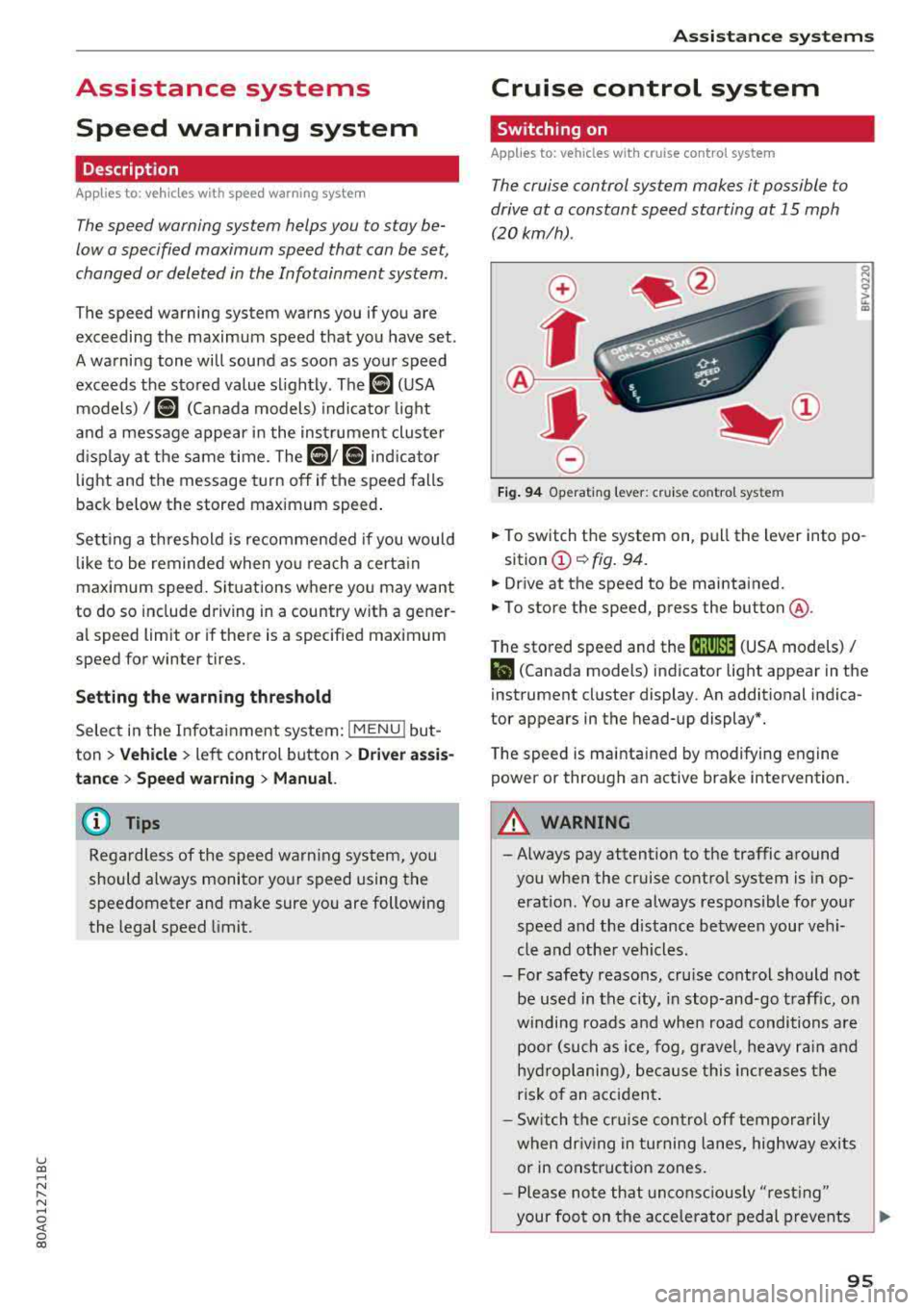
Fig . 94 Operat ing leve r: cru ise control system
.,. To switch t he system on, pull the lever into po-
sition
(D ¢ fig. 94.
.,. Drive at the speed to be maintained.
.,. To store the speed, press the button @.
T he stored speed and the
@jltJ~i, (USA models) /
l'I (Canada models) ind icator lig ht appear in the
instrument cluster display. An additional indica
tor appears in the head-up display*.
T he speed is mainta ined by modifyi ng engine
power or through an active brake intervention.
A WARNING
-Always pay attention to the traffic around
you when the cruise control system is in op
eration. You are always responsible for you r
speed and the distance between your vehi
cle and othe r vehicles .
- For safety reasons, cru ise control should not
be used in the city, in stop -and-go t raff ic, on
winding roads a nd when road conditions a re
poor (such as ice, fog, g rave l, heavy ra in and
hy droplani ng), bec ause this in cr eases the
risk of an acciden t.
- S witch the cr uise con trol
off tempor arily
when dr iv ing in turning lanes, highway exits
or in construction zones.
- P lease no te th at unconsc iously
"rest ing"
your foot on the accelerator ped al prevents
95
Page 98 of 392
Ass is tanc e system s
the cruise control from braking. This is be
cause pressing the accelerator pedal over
rides the cruise contro l system .
- If a brake system ma lfunction such as over
heating occurs when the cruise control sys
tem is sw itched on, the braking function in
the system may be switched off . The rest of
the cruise control system functions remain act ive as long as
the @;\l)~ij (USA models) /
Bl (Canada models) indicato r light is on.
@ Note
Before driving downhill a long distance on a
steep hill, decrease you r speed and select a
lower gear. This makes use of the eng ine
brak ing effect and re lieves the bra kes.
(D Tips
The b rake l ights turn on w hen the brakes a re
app lied automat ically .
Changing the speed
Applies to: vehicles with cruise control system
.,. T o inc rease/decrease the speed in 1 mph (1
k m/h) increments, br ie fly
tap the leve r toward
0 10 ¢ page 95, fig. 94 to the f irst leve l.
.,. To increase/decrease the speed in S mph (10
km/ h) increments, br iefly
tap the leve r toward
0 10 to the second level.
.,. To increase or decre ase the speed quickly, hold
the lever toward
0 10 to the first or second
level until the des ired speed is reached .
Overriding the speed
Applies to: vehicles with cruise control system
You can p ress t he accelerator pedal to inc rease
your speed, for examp le if you want to pass
someo ne. The speed yo u se t earlier w ill res ume
as soon as yo u release the accelerator peda l.
H oweve r, if you are exceeding the stored speed
by a cons ider able amo unt for a long time , the
cr uise con trol sys tem w ill tempo rar ily switch off.
The
[ij;\l)~ij (USA models) tBI (Canada models) in
dicator light in the instrument cluster turns off
and the stored speed is maintained .
96
Preselecting a speed
Applies to: vehicles with cruise control system
You can pre-select your desired speed when the
vehicle is stationary .
.,. Switch the ignition on.
.,. Pull the lever into pos ition (D ¢ page 95,
fig . 94 .
.,. To increase or decrease the speed, tap the leve r
toward
0 10 .
This function makes it possible , for example , to
save the speed you want before driving on the highway . Once you are on the expressway, acti
vate the c ruise control system by pull ing t he lev
e r in to position
(D .
Switching off
Applies to: vehicles with cruise control system
Deactivating temporarily
.,. Press the br ake pedal, or
.,. Press the lever towar d@ (not loc ke d in to
place)
¢ page 95, fig. 94.
Switching off completely
.,. Press the lever into position @(clicked into
place), or
.,. Switch the ignit io n off.
The speed you stored will be ma intained if the
c ruise contro l has been switched off tempora rily .
To resume the stored speed, re lease the bra ke
pedal and pull the lever to posi tion
(D .
Switc hing the ignit ion off w ill erase the stored
speed .
.&_ WARNING
You sho uld only resume the s to red speed if i t
i s no t too h igh fo r exis ting traff ic condi tions .
Ot herwise you can increase the risk of an acci
dent .
Page 103 of 392

u co ..... N I' N ..... 0 <( 0 00
Description
The predictive cont rol 1 l uses the map info rma
tion from the navigation system in order to react proactive ly when driving. Information from the
cam era-based traffic sign recognition * is a lso ap
plied to recognize traffic
signs ¢ page 97. When
coming up to areas wi th speed limits or changes
in the course of the road (such as curves, inter
sections or traffic c ircles), the system brakes au
tomatically and then accelerates back up to the
set speed .
Overriding control
The driver can override the predict ive control at
a ny time by press ing the accelerator or brake
pedal. If the system changes the vehicle speed to
adapt to speed limits, you ca n cha nge the speed
usi ng the lever
¢ page 106, fig. 105 .
Always switch off the predictive control in
the following situations:
- When increased atte ntion is needed from the
drive r.
- In poor weat her cond it ions such as snow or
heavy ra in.
- When driving on roads in poor condition .
Indicator in the instrument cluster display
When switching on the adaptive cru ise cont rol
for the first time, the message
ACC: R + B ac
ti ve
in the instrument cluste r indicates the ava il
ab ility of the predictive control.
T he
'?·;SOmh symbo l appears when the system
is reg ulating the speed to match a speed lim it. If
this is the case, the system is regulating a speed
of SO mph (80 km/h) . The speed is then taken
over by the adaptive cru ise control. The speed in
the speedomete r LE D ring ad justs to the speed to
be maintained
¢ page 104, fig. 104 . The ..
¢fig. 98 sym bo l appe ars whe n there is an adap
ta tion to t he ro ute ahea d.
I f you are in the
Driver assistance d isp lay in the
in str ument cluster, then the fo llow ing symbols
w ill in dica te w hic h oc currence t he sys tem is cu r
r en tly responding to:
ll Thi s is not availa ble in so m e co untri es.
A ss istance systems
Symbol Meaning
MPH
USA models:
Speed limit
km/h
Canada model s:
Speed limi t
ll
Curve
_J!L Intersection
,:r
w
T raffic ci rcle
A WARNING
-
- Read the wa rnin gs on ¢ .&. in General infor
mation on page 103
and on¢ & in De
scription on page
97.
- Pay attent ion to traffic and the a rea around
your veh icle when pred ictive cont rol is
sw itched on. The driver is always responsi
ble for assessing the traffic situation.
- There is an increase in the risk of an acci
dent, because the system does not consider
"right of way" rules and also does not re
spond to traffic lights .
- The system only cons iders t raff ic signs that
g ive a speed lim it .
- The permitted speed can be exceeded if the
adaptation to a speed lim it is incorrect . The
d river is responsible for adher ing to the pe r
mitte d speed .
- The s peed at w hich a curve is dr iven th rough
does not necessarily match your own driving
s tyle. Brake the vehicle yo urself whe n need
e d t o redu ce the risk of an a ccid en t.
0) Tips
- If a speed lim it is detected, the stored
speed is also adjusted in the speedometer
LE D line when the ada ptive cru ise control is
n ot a ctive .
- The adaptat ion by the system depends on
t he driving mode se t in dr ive se lec t*.
- Switching off predict ive con trol, fo r exam
ple whe n driving in low t raff ic zones, does
101
Page 107 of 392

You can set any speed between 20 mph and 95 mph (30 km/h and 150 km/h).
I ndicato r lights and messages in t he i nstr ument
cluste r display inform you abou t the cur ren t sit
uation and setting.
An addit ional ind icator appears in the head- up
d isp lay* .
Switching adaptive cruise control on
"' Pull the lever toward you into position @
<=>fig . 103 .
Storing the speed and acti vating regul ation
"' To store the c urrent speed, press the !SE TI but
ton
<=> fig. 103. The stored speed is shown in the
speedometer in the LED
line @ and appears
briefly i n the status line @<=>
fig. 104 .
"'To activate the regu lation wh ile stat ionary, also
press the b rake peda l.
Switching adaptive cruise control off
"' Push the lever away from you into position @
unt il i t clicks i nto place . The message
ACC: off
appears .
® Indicator light s
II-Adaptive cruise control is switched on. No
ve hicles are detected ahead. The stored speed is
maintained.
•-A vehicle driving ahead was detected . The
adaptiv e cruis e control system regulates the
speed and distance to the vehicle dr iv ing ahead
and accelerates/brakes automatically.
•-Adaptive cruise control is switched on. Ave
h icle was detect ed ahead. You r vehicle is station
ary and will not start driving automatically.
ti)-Adaptive cru ise con trol is switched on. No
ve hicles were detected ahead. Yo ur vehicle is sta
tionary and will not start driving automatically .
•-The autom atic br aking is no t en ough to
main tain a sufficient distance to a veh icle dr iving
ahead. You must intervene
c:!;> page 108, Driver
u intervention request . co ..... N ,..._
N ..... 0 <( 0 00
Ass istance systems
© Instrument cluster display
If the Driver a ssistance displ ay is not shown in
the instr ument cluster d isp lay, you can open it
u sing the m ultif unction steering whee l buttons
c:!;> page 12.
Ba sed on the gr aphic disp lay, you c an dete rm ine
i f th e system is maintain ing a d istance to the ve
hicle driving a head and what t hat distance is .
No vehicle -no vehicle was detec ted dr iv ing
ahe ad.
Silver vehicle -a vehicle was detected driving
ahead.
Red v ehicle -reques t for driver interve ntion
<=> page 108 .
The five distan ce bars on the gauge © represent
the set distance (refer to
c:!;> page 107for infor
ma tion o n how to change t he d istance). If you
fall below the selected d ista nce, the distance
bars become red from the bottom upwa rd .
A WARNING
If yo u press the !SET I butto n w hen dr iv ing at
speed s below 20 mph (30 km/h), t he ve hicle
a ccelera tes au tom atic ally u p to 2 0 mph (30
k m/h), w hich is the minim um speed tha t can
b e set.
(D Tips
- If you swi tch t he ig nit io n o r th e adaptive
cr uise cont ro l sys tem o ff, t he set s peed is
erased fo r safe ty reasons .
- Th e Elect ronic S tab ili za tion Control ( ES C)
and the An ti- Slip -Reg ula tion (ASR) are a uto
matically swi tched o n when the adap tive
c ruise cont ro l is switched on .
105
Page 111 of 392
u co ..... N r-N .....
~ 0 co
Traffic jam assist
Applies to: ve hicles with traff ic jam ass ist
Traffic jam assist supports the driver when driv
ing in traffic jams or in heavy traffic.
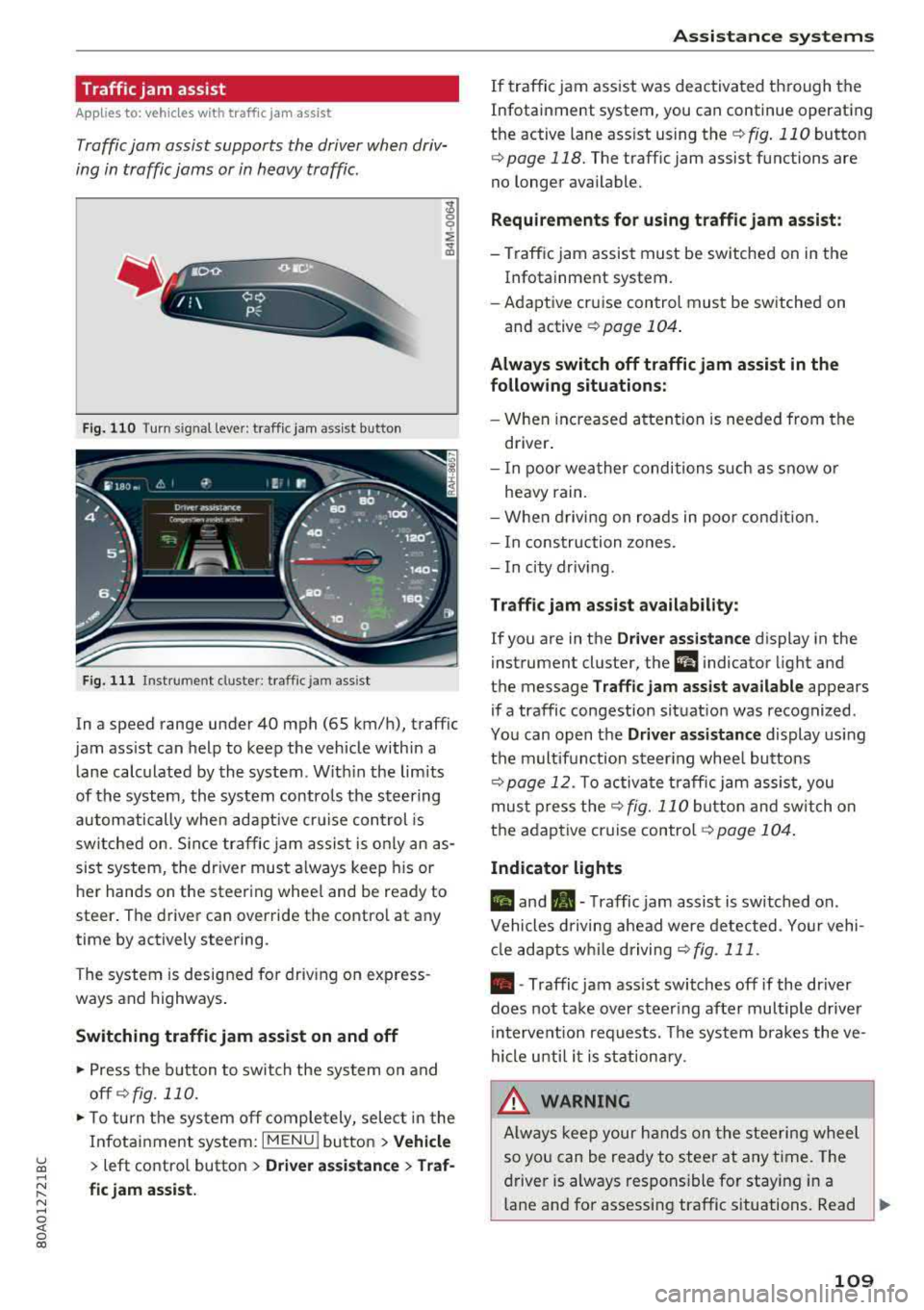
Fig. 110 Turn s ig n al leve r: traffic ja m ass ist button
F ig. 111 I nst ru ment duste r: tra ffic jam a ssist
In a speed range under 40 mph (65 km/h), traffic
jam ass ist can help to keep the vehicle within a
l ane calc ulated by the system . W ith in the lim its
of the system, the system contro ls the steering
automatically whe n adapt ive cr uise control is
switched on . S ince traffic jam assist is only an as
sist system, the dr iver must a lways keep his or
he r hands on the steer ing whee l and be ready to
steer . The driver can override the contro l at any
time by actively steering.
The system is designed for driv ing on express
ways and highways .
Switching traffic jam assist on and off
~ Press the b utton to switch the system on and
off ¢fig. 110.
~ To tu rn t he sys tem off comple tely, selec t in the
Infotai nment system:
I MENU ! button > Vehicle
> left contro l button > Driver a ssistance > Traf
fic jam assist.
A ssi st a nce systems
If traffic jam ass ist was deactivated through the
Infotainment system, you can continue operating
the active lane ass ist using
the ¢ fig. 110 button
¢ page 118. The traffic jam assist functions are
no longer available.
Requirements for using t raffic jam assi st :
-Traffic jam assist must be switched on in the
Infotainment system.
- Adapt ive cr uise con trol must be sw itched on
and active
r:::;, page 104 .
Always switch off traffic jam assist in the
following situations:
- When in cr eased a ttent ion is needed from the
driver .
- I n poor wea ther condi tions such as snow o r
heavy rain .
- When d riving on roads in poo r condit ion.
- I n construction zones.
- In city driv ing .
Traffic jam as sis t availabil ity :
If you are in the Dri ver assista nce display in the
instrument cluster, the
a i ndicator light and
the message
Traffi c jam as sist ava ilable appears
if a traffic congestion situat ion was recognized.
Yo u can open the
Driver assi stance display using
the m ultifunction steering whee l buttons
r:::;,page 12. To activa te traffic jam assist, you
mus t press the
r:::;, fig. 110 button and sw itch on
the adaptive cruise
contro l¢ page 104 .
Indicator lights
II and•-Traffic jam assist is switched on .
Vehicles d riving ahead were detected. Yo ur vehi
cl e adapts w hile driving
r:::;,fig . 111 .
•-Traffic jam ass ist switches off if the dr iver
does not take over steer ing after multiple driver
in terve ntion requests. The system b rakes the ve
hicle u nti l it is st ationary .
_& WARNING
Always keep y our hands on the stee ring whee l
so yo u can be ready to steer at any t ime . T he
driver is always respons ible fo r staying in a
lane and for assessi ng traffic situations . Read
..,.
109
Page 112 of 392
Ass is tance sy stem s
and follow the warni ngs on c::, &. in General
information on page 103.
N ever use traffic
jam assist in the following situat ions or you
w ill increase the risk of an accident .
- Drivi ng offroad or on unpaved roads . Traffic
jam assist is only designed for use on paved
roads .
- In city driving or in construction zones.
- On curving stretches of road.
- In narrow lanes .
- In unclear traffic situations s uch as a t inter-
sections or toll stations.
(D Tips
You are not necessarily gu ided to the cente r
of yo ur lane .
Distance display and distance warning
App lies to: ve hicles w ith Audi adaptive cruise co ntrol
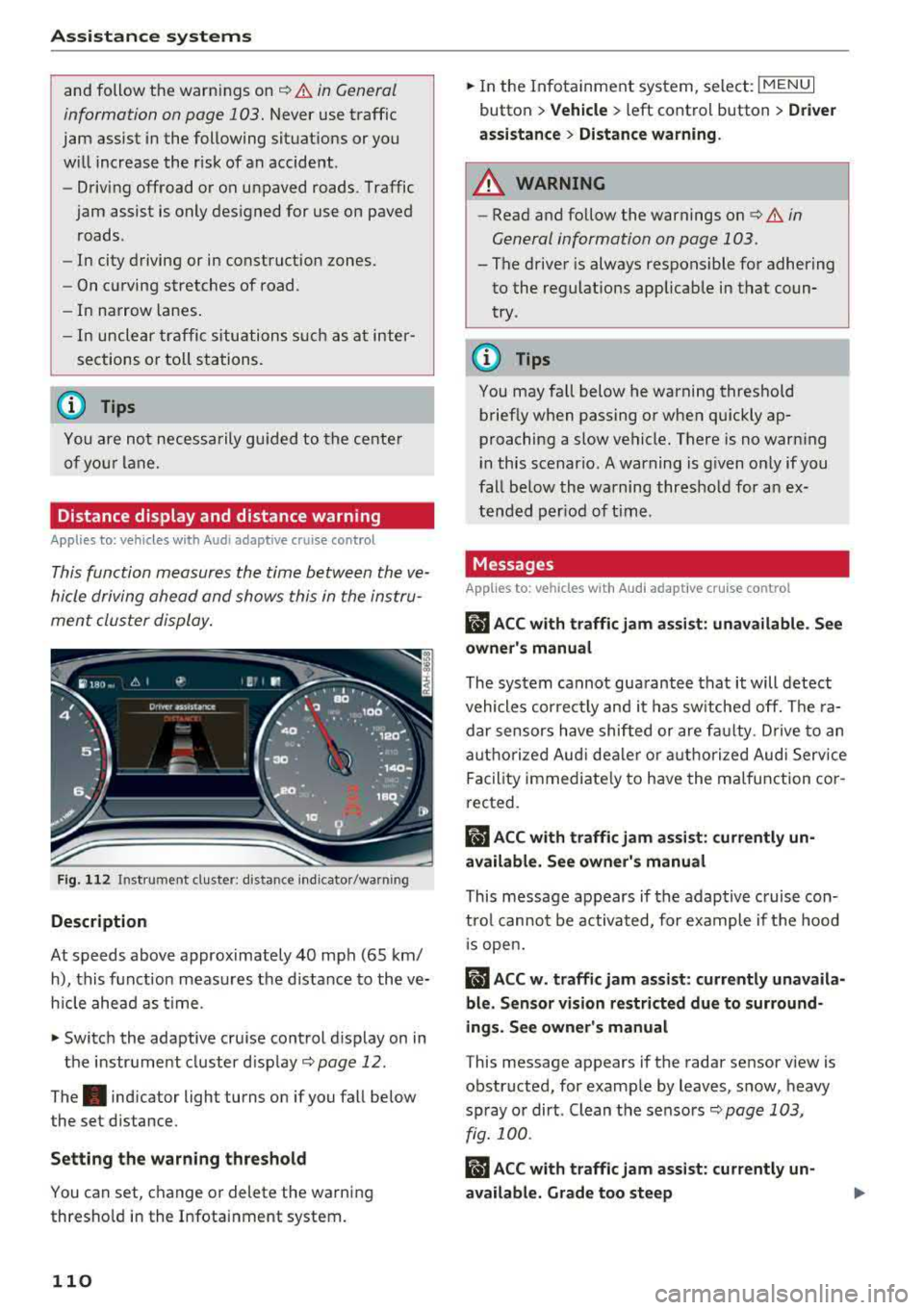
This function measures the time between the ve
hicle driving ahead and shows this in the instru
ment cluster display.
F ig . 11 2 Instru m ent clust er : di stance indic ato r/warn ing
Description
At speeds above approximately 40 mph (65 km/
h), this f unction meas ures the d istance to the ve
h icle ahead as time.
.,. Switch the adaptive cruise control d isplay on in
the instr ume nt cluster d isp lay
c::, page 12 .
The. indicator light turns on if you fall be low
the set distance.
Setting the warn ing threshold
You can set, c hange or delete the warning
thresho ld in the Infotainment system.
110
.,. In the In fotainment system, select : I MENU I
button > Vehicle > left control button > Dri ver
a ssi stan ce
> Di stan ce warning .
A WARNING
-Read and follow the warnings on c::, &. in
General information on page 103.
- The driver is always responsible for adhering
to the regulat ions applicab le in that coun
try .
(D Tips
You may fa ll below he warning threshold
brief ly when passing or when qu ickly ap
proaching a slow vehicle. There is no warn ing
i n this scenar io . A warning is g iven o nly if you
fall be low the warning thresho ld for a n ex
tended per iod of t ime .
Messages
App lies to: vehicles wi th Audi adap tive cru ise control
ii ACC with traffic jam assi st : unavailable . Se e
owner's manual
The system cannot gua rantee that it will detect
vehicles correc tly and it has sw itched off. The ra
dar sensors have shifted or are fa ulty . D rive to an
authorized Aud i dea le r o r a uthorized Aud i Serv ice
Facility immediate ly to have the ma lfunction co r
rected.
ii ACC with traffic jam assi st : c urrently un
available . See owner's manual
This message appears if the adap tive c ruise con
t rol canno t be activated, for example if the hood
1 s open.
ii ACC w . traffi c jam assist: currently unav aila
ble. Sensor vision re stricted du e to surround
ings. See owner's manual
T his message appears if the radar sensor v iew is
obstructed, for examp le by leaves, snow, heavy
spray or dirt . Clean the sensors
c::, page 103,
fig. 100 .
Rm ACC with traffic jam ass ist: currently un
available. Grade too steep