stop start AUDI Q5 2018 Owners Manual
[x] Cancel search | Manufacturer: AUDI, Model Year: 2018, Model line: Q5, Model: AUDI Q5 2018Pages: 392, PDF Size: 60.56 MB
Page 4 of 392
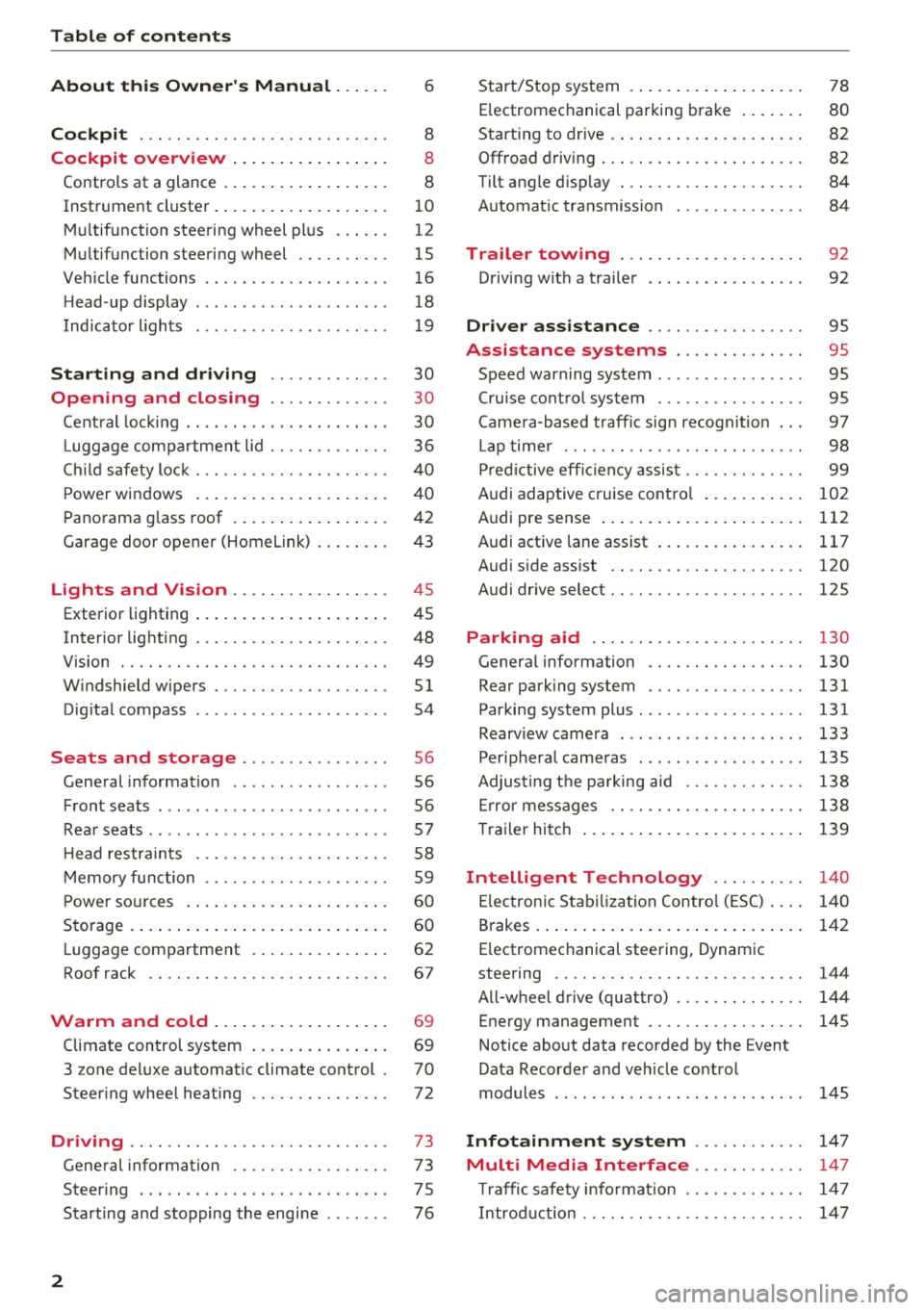
Table of contents
About this Owner's Manual. . . . . .
6
Cockpit . . . . . . . . . . . . . . . . . . . . . . . . . . . 8
Cockpit overview . . . . . . . . . . . . . . . . . 8
Controls at a glance . . . . . . . . . . . . . . . . . . 8
Instrument cluster . . . . . . . . . . . . . . . . . . .
1 0
M ultif unction steering wheel pl us . . . . . . 12
Mu ltifunction steering wheel . . . . . . . . . . 15
Ve hicle functions . . . . . . . . . . . . . . . . . . . . 16
H ead-up display . . . . . . . . . . . . . . . . . . . . . 18
Indicato r lights . . . . . . . . . . . . . . . . . . . . . 19
Starting and driving . . . . . . . . . . . . . 30
Opening and closing . . . . . . . . . . . . . 30
Cent ral lock ing . . . . . . . . . . . . . . . . . . . . . . 30
Luggage com part ment lid . . . . . . . . . . . . . 36
C hil d safety lock . . . . . . . . . . . . . . . . . . . . .
40
Powe r windows . . . . . . . . . . . . . . . . . . . . . 4 0
Panorama g lass roof . . . . . . . . . . . . . . . . . 42
Garage door opener (Homelink) . . . . . . . . 43
Lights and Vision . . . . . . . . . . . . . . . . . 45
Exterio r lighting . . . . . . . . . . . . . . . . . . . . . 45
Interior lighting . . . . . . . . . . . . . . . . . . . . . 48
V1s1on . . . . . . . . . . . . . . . . . . . . . . . . . . . . . 49
W indshield wipers . . . . . . . . . . . . . . . . . . .
51
Dig ita l compass . . . . . . . . . . . . . . . . . . . . . 54
Seats and storage . . . . . . . . . . . . . . . . 56
General information . . . . . . . . . . . . . . . . . 56
Front seats . . . . . . . . . . . . . . . . . . . . . . . . . 56
Rea r seats . . . . . . . . . . . . . . . . . . . . . . . . . .
57
H ead restra ints . . . . . . . . . . . . . . . . . . . . . 58
M emory fu nction . . . . . . . . . . . . . . . . . . . . 59
P ower so urces . . . . . . . . . . . . . . . . . . . . . . 60
Storage . . . . . . . . . . . . . . . . . . . . . . . . . . . . 60
L uggage compartment . . . . . . . . . . . . . . . 62
Roof rack . . . . . . . . . . . . . . . . . . . . . . . . . . 67
Warm and cold . . . . . . . . . . . . . . . . . . . 69
Climate control system . . . . . . . . . . . . . . . 69
3 zone del uxe automatic climate control .
70
Steering whee l heating . . . . . . . . . . . . . . . 72
Driving .... .. .. ............. .... .. . 73
Gene ral information . . . . . . . . . . . . . . . . . 73
Steer ing . . . . . . . . . . . . . . . . . . . . . . . . . . . 7 5
Starting and stopping the engi ne . . . . . . . 76
2
Start/Stop system .... ... .. ..... ... . .
E lectromechanical parking brake .. ... . .
Start ing to drive . ..... ... .. ..... ... . .
0ffroad driving . .. .. .. ............. . .
Tilt angle d isplay . .. .. ............. . .
Automat ic transmission
Trailer towing ... .. ............. . .
Driving with a tra iler .. ... .. ..... ... . .
Driver assistance .. ............. . .
Assistance systems ............. .
Speed warning system ............... .
78
80
82
82 84
84
92
92
95
95
95
Cru ise cont rol system . . . . . . . . . . . . . . . . 95
Came ra-based t raff ic sign recogn it io n . . . 97
Lap time r . . . . . . . . . . . . . . . . . . . . . . . . . . 98
P red ictive eff ic iency assis t . . . . . . . . . . . . . 99
Audi adaptive cruise contro l . . . . . . . . . . .
102
Audi pre sense . . . . . . . . . . . . . . . . . . . . . . 112
Audi active lane assist . . . . . . . . . . . . . . . . 117
Audi s ide ass ist . . . . . . . . . . . . . . . . . . . . . 120
Audi drive select . . . . . . . . . . . . . . . . . . . . . 125
Parking aid . . . . . . . . . . . . . . . . . . . . . . . 130
Genera l information . . . . . . . . . . . . . . . . . 130
Rear parking system . . . . . . . . . . . . . . . . . 131
Parking system plus ... ............... 131
Rearv iew camera . . . . . . . . . . . . . . . . . . . . 133
Per iphera l came ras . . . . . . . . . . . . . . . . . . 135
Adjus ting the pa rking aid . . . . . . . . . . . . . 138
Er ror messages . . . . . . . . . . . . . . . . . . . . . 138
T raile r hitch . . . . . . . . . . . . . . . . . . . . . . . . 139
Intelligent Technology . . . . . . . . . . 140
El ectron ic Stab iliza tion Contro l (ESC) . . . . 140
Brakes . . . . . . . . . . . . . . . . . . . . . . . . . . . . . 142
E lectromechanical steering, Dynamic
steering . . . . . . . . . . . . . . . . . . . . . . . . . . .
144
A ll-wheel drive (quattro) . . . . . . . . . . . . . . 144
Energy management . . . . . . . . . . . . . . . . . 145
Notice about data recorded by the Event
Data Recorder and veh icle co ntrol
modules . . . . . . . . . . . . . . . . . . . . . . . . . . .
145
Infotainment system . . . . . . . . . . . . 147
Multi Media Interface............ 147
Traffic safety info rmat ion . . . . . . . . . . . . . 14 7
Intro duction . . . . . . . . . . . . . . . . . . . . . . . .
14 7
Page 11 of 392
u co ..... N ,..._
N ..... 0 <( 0 00
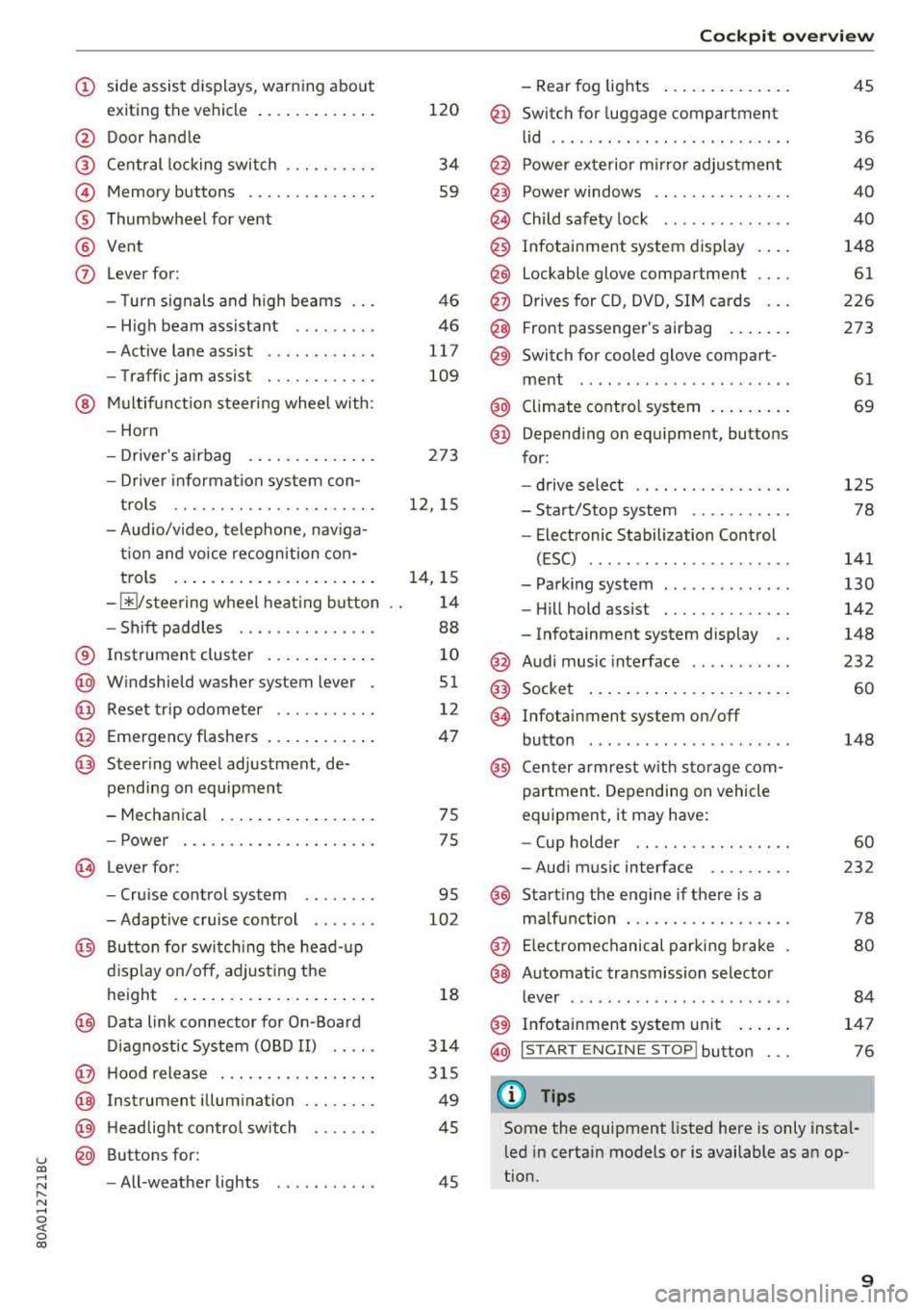
(D side assist displays, warn ing abo ut
exiting the vehicle ..... ... .. .. .
@ Door handle
@ Cen tral locking swit ch ....... .. .
@ Memory buttons ........... .. .
® Thumbwheel for vent
@ Vent
(J) Leverfor:
- T urn s ignals and high beams
- High beam assistant ........ .
- Active lane assist ........... .
- Traffic jam assist ......... .. .
@ Mul tifunct ion steer ing wheel with:
- Horn
- Drive r's airbag . ..... ... .. .. .
- Drive r informa tion system con -
t rols .. .. ............... .. .
- Audio/v ideo, telephone, nav iga
t io n and voice recogn ition con -
t rols .... ... .. ..... ... .. .. .
- ~/ stee ring wheel heat ing b utton
- Sh ift paddles ............. . .
® Instrument cluster .... ... .. .. .
@) W indshield washer system lever
@ Reset trip odometer ...... .. .. .
@ Emergency flashe rs .... ... .. .. .
@ Steer ing whee l adjustment, de-
pending on equipment
- Mechanica l .... ..... ... .. .. .
- Power . .. ............... .. .
@ Lever for:
- Cru ise cont rol system
- Adaptive cruise control ...... .
@ Bu tton for sw itch ing the hea d-up
d isp lay on/o ff, adjust ing t he
h eight .... ... .. ..... ... .. .. .
@) Data link connector for On -Board
D iagnostic System (OBD II) .... .
@ H oo d release .. .. ..... ... .. .. .
@ Instrument illum ination
@) H eadlight cont rol sw itch
@ Buttons for :
- All -weather lights
120
34
S9
4 6
46
117
109
273
12 , 15
1 4, 15
1 4
88
1 0
51
12
47
75
75
95
102
18
3 14
3 15
49
45
45
Coc kpit o ver view
- Rear fog lights .... .. ..... .. .
@ Switch for luggage compartment
lid ...... ... .. .. ............ .
@ Power exte rior m irro r adjustment
@) Power windows .............. .
@ Child safety lock ............. .
@ Infotainment system display . .. .
@ Lockable glove compartment ... .
@ D rives for CD, DVD, S IM cards .. .
@ Front passenger's airbag .... .. .
@ Switch for cooled glove compart -
me nt ... ... .. .. ............ .
@ Climate contro l system . ..... .. .
@ Depend ing o n equ ipment, buttons
for:
- drive select .. .............. .
- Sta rt/Stop system .......... .
- Electronic Stabilization Cont rol
( E SC) ..... .. .. ............ .
- Park ing system ............. .
- Hi ll hold ass ist . ............ .
- Infotainment system display ..
@ Audi music inte rface .......... .
@ Socket ... .... .. ... .. ..... .. .
@ Infotai nment system on/off
button ..... .. .. ............ .
@ Cen ter armrest w it h sto ra ge com
p artmen t. Depending on vehicle
equipment, it may have:
- Cup holder .. .. ... .. ..... .. .
- Aud i m usic interface ........ .
@ Start ing t he e ngine if the re is a
m alfu nction . .. .. ............ .
@ E lectromechanical par king brake
@ Automa tic transmission selector
lever ....... .. .. ............ .
@ Infotainment system unit ... .. .
@ I START E N GINE STOP I button
(D Tips
45
36
49
40
40
148
61
2 26
273
61
69
1 2 5
78
141
130
142
148
232 60
148
60
232
78
80
84
14 7
76
Some the equipment listed he re is only insta l
l ed in certa in models or is available as an op
tion.
9
Page 23 of 392
u co ..... N r--N ..... 0 <( 0 00
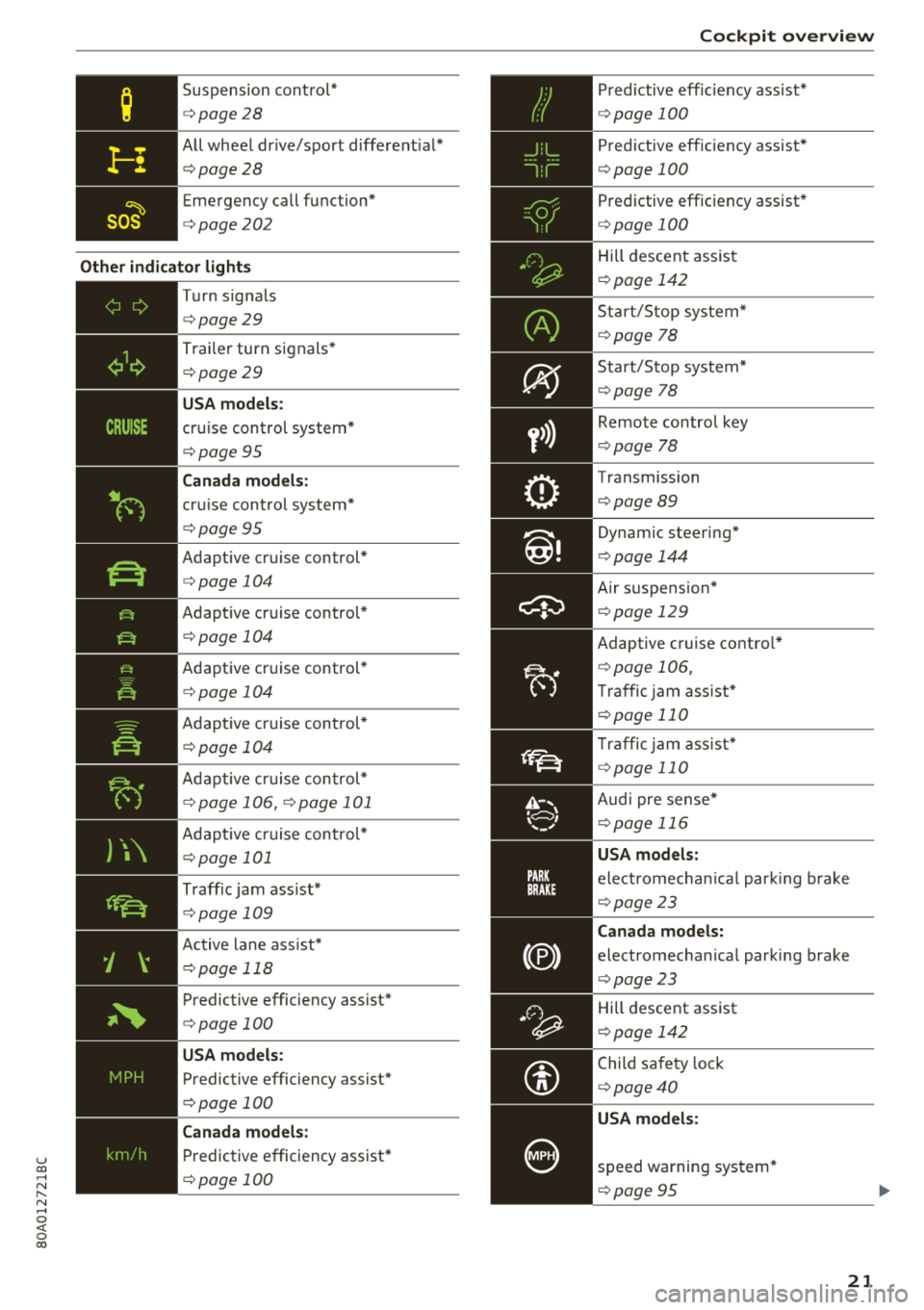
Suspension cont rol*
c:> page 28
All wheel dr ive/sport different ial*
c:> page28
Emergency call function*
c:>page202
Other indic ato r ligh ts
-
~
--------------
Turn signa ls
c:> page 29
Trai ler turn signals *
c:>page 29
USA model s:
cruise control system *
c:>page 95
Canada models :
cruise control system*
c:> page 95
Adapt ive cruise control*
c:> page 104
Adapt ive cruise control*
c:> page 104
Adaptive cruise control*
c:> page 104
Adapt ive cr uise control*
c:> page 104
Adapt ive cr uise con trol*
c:> page 106, c:> page 101
Adapt ive cr uise control*
c:> page 101
Traff ic jam ass ist*
c:> page 109
Active lane ass ist*
c:> page 118
Predictive efficiency assist*
c:> page 100
USA models :
Predictive efficiency assist*
c:> page 100
Canada models :
Predictive efficiency assist*
c:> page 100
Coc kpit o ver view
P red ictive eff ic iency assist*
c:> page 100
Pred ictive eff ic iency assist*
c:> page 100
Predictive efficiency assist*
c:> page 100
Hill descent assis t
c:>page 142
Start/Stop system*
c:>page 78
Start/Stop system*
c:>page 78
Remote control key
c:>page 78
Transmission
c:>page 89
Dynam ic steering*
c:> page 144
Air suspension*
c:> page 129
Adaptive cruise contro l*
c:> page 106,
Traffic jam assist*
c:> page 110
Traffic jam assist*
c:> page 110
Audi pre sense *
c:>page 116
USA models:
electromechan ica l par king b rake
c:> page 23
Canada models:
electromechan ica l park ing brake
c:> page 23
Hill descent assist
c:>page 142
Child sa fety lo ck
c:> page 40
USA models :
speed warning system*
c:>page 95
21
Page 25 of 392

u co ..... N ,..._
N ..... 0 <( 0 00
increases the risk that the vehicle will slide.
Do not continue driving. See an a uthorized
Audi dealer or author ized Audi Service Fac ili
ty for assistance .
PARK/{®)/ ~ Electromechanical parking
brake
I f t he -(USA models) / . (Canada models)
in dic ator light turns on , the pa rk ing br ake was
set.
I f the
-(USA models)/ . (Canada models) in
d icator light blinks, the bra king fo rce is no t buil d
in g up enough or no t bui lding up at all. Selec t the
"P" selec to r l eve r posit ion to he lp secure the vehi
cle. Make s ure t he indicato r light is off before yo u
start driving.
@ Parking brake : malfunction! Plea se contact
Service
There is a malfunction in the park ing brake . Dr ive
to an author ized Audi dealer or author ized A udi
Serv ice Fac ility immedia tely to have t he malfunc
tion
co rrected.
II (USA models )/ ffc,) (Canada model s) Parking
brake : warning! Vehicle parked too steep
There is not enoug h braking force to hold the ve
hi cle in place . The brakes have overhea ted . The
ve hicle could ro ll away even on a small incli ne .
II (USA models )/ l(C,)J (Canada models ) Parking
brake: applied
If t his message appears, press the brake pedal
fi rst and the n release the parking brake if neces
sary.
II ( USA models)/ ¢c,) (Canada model s) Parking
brake: emergency braking
The eme rgency bra king funct ion was tr iggere d.
Please release parking brake
Release the park ing bra ke if this message ap
pears .
Please press the brake pedal to release the park
ing brake
Coc kpit o ver view
To release the parking brake, press t he brake
peda l and press
the ~ button at the same time,
o r start driving w ith hill start assist ¢
page 82,
Starting to drive .
(D Tips
Fo r additional informat io n on the parking
b ra ke,
see ¢ page 80 .
-L Cooling system
• Turn off engine and check coolant level. See
owner's manual
T he coo lant level is too low.
D o no t con tinue dr iv ing and switch t he e ngine
off. Chec k the coolant leve l¢
page 319.
- I f the coo lant level is too low, add coolant
¢
page 320 . Only continue dr iving on ce the in
d icator ligh t turns off.
• Coolant temperature: too high . Let engine
run with vehicle stationary
Let the engine ru n at idle for a few mi nutes to
cool off , until the indicator light turns off .
-If the ind icator light does not t urn off, do not
cont inue driv ing the ve hicle. See an authori zed
Aud i dea ler or aut horized Audi Service Facility
for assistance .
A WARNING
-
-Never open the hood if you can see or hea r
s tea m or coo la nt escaping from t he e ngine
com partment. This increases t he r isk of
bu rns. Wait until yo u no lo nger see o r hear
s team or coo lant es caping .
- T he e ngine comp artment in a ny ve hicle c an
be a dange rous area . Stop the engine an d
a llow i t to cool be fore wor king in the eng ine
compartment. Always follow the informa
tion fo und in
c;, page 314, Working in the
engine compartment.
@ Note
D o not con tinue dr iv ing if the . indica to r
li ght tur ns on as this increases t he risk of en
g ine damage.
23
Page 26 of 392

Cockpit overview
~ Safety belt
The. indicator light stays on unt il the driver's
and front passenger's safety belts a re fastened.
Above a certain speed, there will also be a warn
ing tone.
(D Tips
For additional information on safety belts,
see
"* page 261.
0 Generator/vehicle battery
If the . or(•) indicator light turns on, there is a
malfunction in the generator or the vehicle elec
tr ica l system .
• Electrical system: malfunction! Safely stop
vehicle
Do not continue driving and switch the engine
off. See an authorized Audi dea le r or aut horized
Audi Service Facility for assistance .
(•) Electrical system: malfunction! Restart not
possible. Please contact Service
The vehicle battery was disconnected from the
veh icle elect rical system and will no longer
charge . Drive to an authorized Aud i dealer or au
thorized Audi Service Facility immediately.
Do not stop the engine, or you will not be able to
start it aga in . If you can no longer start the en
g in e, see an authorized Aud i dealer or autho rized
Aud i Service Facility for assistanc e.
(•) F.lectrical system: malfunction! Please con
tact Service
Drive to an authorized Aud i dea ler or authorized
Aud i Serv ice Facility immediately . Because the ve
h icle battery is d ischarg ing, turn off all unneces
sary electr ical equipment such as the radio. See
an authorized Audi dealer or authorized Audi
Service Facility if the battery charge level is too
low.
(•) Electrical system: low battery charge. Bat
tery will be charged while driving
The start ing ability may be impaired.
24
If this message turns off after a little whi le, the
vehicle battery charged enoug h while driving.
If the message does not turn off and stay off
whe n driving, have an authorized Aud i dealer or
authorized Audi Service Facility repair the mal
function .
~ Engine oil pressure
• Turn off engine. Oil pressure too low
Stop the engine and do not continue driving.
Check the engine oi l level
~ page 317.
- If the eng ine oil level is too low, add engi ne oil
¢ page 317 . Only continue driving once the in
dicator light turns off .
- I f the engine oil level is correct and the indica
tor light still turns on, turn the engine off and
do not continue driving. See an authorized Audi
dealer or authorized Audi Service Facility for as
sistance.
(D Tips
T he oil pressure warn ing is not an oil leve l in
dicator. Always check the oil leve l regularly.
't'.:7;, Engine oil level (MIN)
Appl ies to: vehicles with o il level warning
• Please add oil immediately.
Add engi ne oil immediately ¢page 317.
Ill Please add max. x qt (l) oil. You can contin
ue driving
Add the maximum amount of oi l indicated in the
display as soon as possible
¢ page 317 .
~-Steering lock
• Steering: malfunction! Please stop vehicle
There is a ma lfunction in the e lectron ic steering
lock. You cannot tur n the ignition on.
Do
not tow your vehicle because it cannot be
steered. See an a uthorized Audi dea ler or author
i z ed Audi Service Facility for assistance.
...
Page 27 of 392

u co ..... N r--N ..... 0 <( 0 00
1!11 Steering lock: malfunction! Please contact
Service
There is a malfunction in the elect ronic stee ring
l o ck.
Dri ve to an authorized Aud i dea ler or authorized
Audi Service Fac ility imm ediately to have the
malfunction corrected.
A WARNING
Do not tow your vehicle when there is a mal
function in the electronic steering lock
-this
increases the risk of an accident .
~ Engine start system
• Engine start system: malfunction! Please
contact Service
Do not switch the ignition off because you may
not be able to switch it on again.
Drive to an authorized Aud i dea le r or authorized
Aud i Service Facility im media tely to have the
mal function corrected.
-
l::J Engine start system: malfunction! Please
contact Service
There is a malfunction in the engine starting sys
tem .
Drive to an authori zed Aud i dea ler or authori zed
Aud i Service Facility immediately to have the
malfunction corrected.
c;:::::,Hood
• Warning! Hood is not locked. Stop vehicle
and check the lock
If the indicator light turns on and the message
appears, the hood locking mechanism is not en
gaged correctly.
Stop immediately and close the hood
c>page 315.
0/Q Air suspension
Applies to: vehicles with air suspension
• Air suspension: malfunction. Safely stop ve
hicle . Steering and ground clearance limited
Cockpit overview
Due to a system ma lf u nction, your vehicle's
ground clearance is very low at the front or rear
axle* (in veh icles with all -whee l steering) . Be
cause of this, the wheels no longer have enough
clearance to steer correctly.
See an authorized Audi dealer or authorized Audi
Service Facility for assistance.
• Air suspension: malfunction! You can con
tinue driving slowly. Speed limited to max.
3S mph (60 km/h )
The re is a malfunction that can result in restrict
ed driving stability. T he speed is limit ed to a
maximum of 35 mph (60 km/h).
Drive to an authorized Audi dealer or authorized
A udi Service Facility immediately to have the
malfunction corrected.
• Air suspension: malfunction! You may con
tinue driving slowly at max. 35 mph (60 km/h)
There is a malfunction that can result in restrict
ed driv ing stab ility .
Drive to an authorized Audi dealer or authorized
Audi Service Facility immed iate ly at a maximum
speed of 35 mph (60 km/h) to have the malfunc
t ion corrected .
• Air suspension: service mode! Vehicle can be
moved but handling may be impaired
Carefully drive to an authorized Audi dea ler or
authorized Audi Service Facility immediately to
have the service mode deactivated .
II Air suspension: malfunction! Please contact
Service
T he re is a system malfunction that can result in
restricted driving stability or red uced ground
clearance.
Drive to an authorized Audi dealer or autho rized
A udi Service Facility immediately to have the
malfunction corrected.
II Air suspension: vehicle too low. Limited
ground clearance
The ground clearance is very low due to a system
malfunction . Wait until the a ir suspension sys-
tem has restored normal ground clearance .
.,.
25
Page 36 of 392
Opening and clo sin g
,.. To lock the vehicle, close the door a nd touch
the se nsor in the doo r hand le
on ce r=> fig. 22. Do
not hold the door handle while do ing th is .
You ca n unl ock/ lock the vehicle at every door.
The remote control key cannot be more than ap
proximately 4 feet (1.5 m) away from the door
handle. It makes no difference whether the mas
ter key is in your jacket pocket or in your brief case, for example .
If you hold the door handle while locking, this
can impair the locking function.
T h e door cannot be opened for a brief period di
rectly after locking it. This way you have the op
portunity to check if the doors locked correctly .
The settings in the Infotainment system deter
mine if the entire vehicle or only one of the doors
is unlocked when unlocking the vehicle
r=> page 35 .
A WARNING
Read and following all WARNINGS r=> .&. in De
scription on page 30.
@ Tips
If your vehicle is left standing fo r a long peri
od of time, note the following:
- The energy management system grad ually
turns off unnecessary convenience functions
to prevent the vehicle battery from draining
and to mainta in the vehicle's ab ility to start
for as long as possib le. You may not be able
to unlock your vehicle usi ng the convenience
key.
(D Tips
Unlocking with the convenience key (keyless
access) can be deactivated in the Infotain-
ment sys tem
r=> page 35 .
34
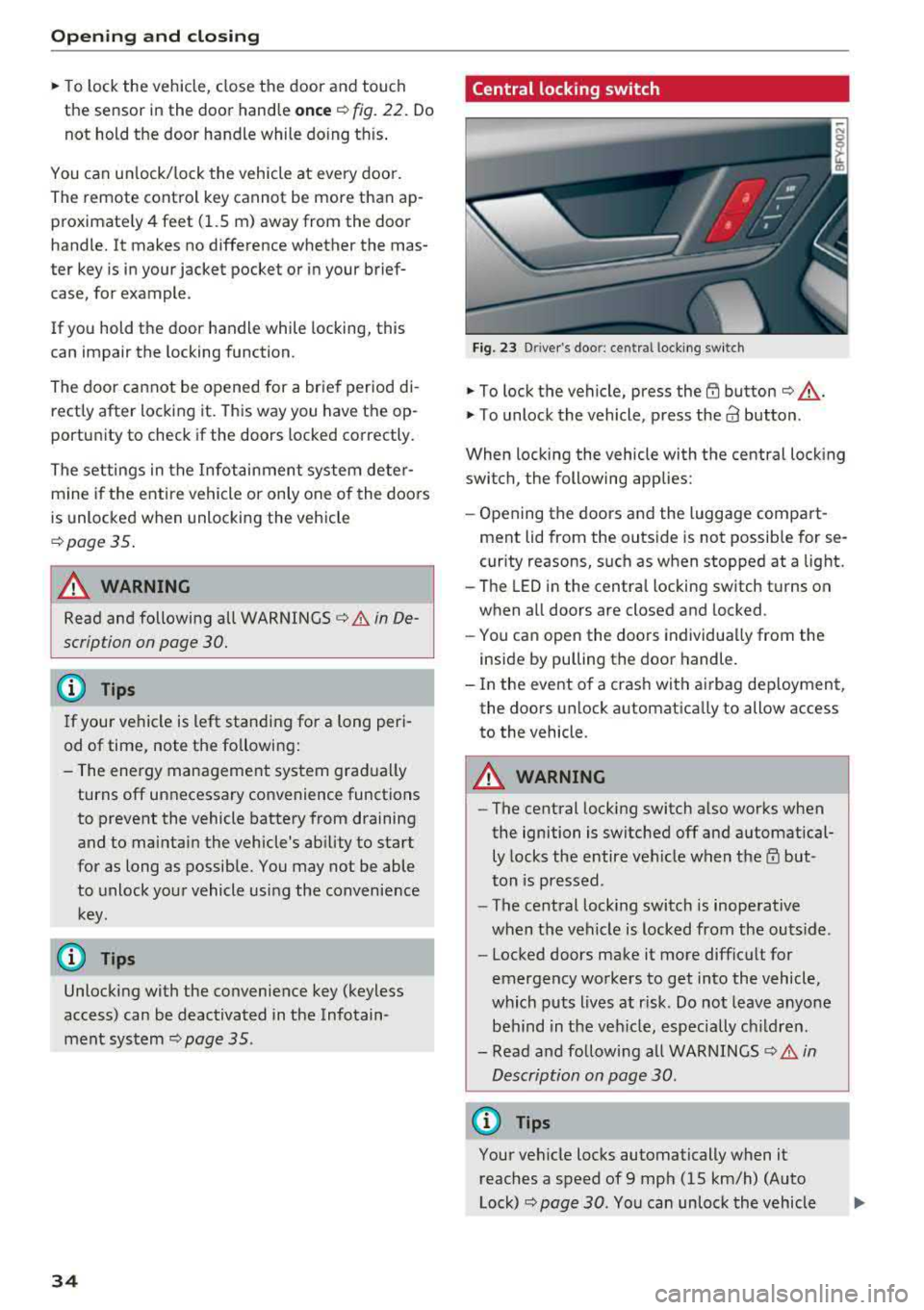
Central locking switch
Fig. 23 D river's door: central lock ing switch
,.. To lock the vehicle, press the {TI button r=> ,&. .
,.. To unlock the vehicle, p ress the a3 button.
When locking the vehicle with the central locking
switch, the following applies:
- Opening the doors and the luggage compart
ment lid from the outs ide is not possib le for se
curity reasons, such as when stopped at a light.
- The LED in the centra l locking switch t urns on
when a ll doors are closed and locked .
- You ca n open the doors individua lly from the
inside by pulling the door handle.
- In the event o f a crash with a irbag dep loyment,
the doo rs un lock automatica lly to allow access
to the vehicle .
A WARNING
-The central lock ing switch a lso works when
the ignition is switched off and automatical ly locks the entire vehicle when
t h e m but
ton is pressed.
- The central lock ing switch is inoperative
when the vehicle is locked from the outs ide.
- Locked doors make it more difficu lt for
emergency wo rkers to get into the vehicle,
which p uts lives at r isk. Do not leave anyone
be hind in the veh icle, especially c hildren.
- Read and fo llow ing a ll WARNINGS
r=> .&. in
Description on page 30.
(D Tips
Your vehicle locks automatically when it reaches a speed of 9 mph (15 km/h) (Auto
Lock)
r=> page 30. You can unlock the vehicle
Page 43 of 392
u co ..... N ,..._
N ..... 0 <( 0 00
All power window switches are equipped with a
two-stage function *:
Opening and clo sing the windows
.,. T o open or close the w indow completely, p ress
the sw itc h down or p ull the sw itc h up br iefly to
the second level. The operation wi ll stop if the
switch is pressed/pu lled again.
.. To se lect a position in between opened and
closed, press/pull the switch to the first leve l
until the desired window position is reached.
Po wer window switch es
(D Left front door
@ R ight front door
@ L eft rea r door*
© Right rear door*
A WARNING
- If you leave the veh icle, switch the ignition
off and take the vehicle key with you. This
applies particularly when children remain in
the vehicle . Otherw ise children could start
the engine or operate elect rical equipment
(such as powe r windows), which inc reases
the risk of an acc ident. The power windows
c ontin ue to f unct ion until the driver's door
or front passenge r's door has been opened .
- Pay ca reful attent ion when closing the win
dows. Pin ching co uld cause serious injur ies.
- When loc king the veh icle from outside, the
vehicle mus t be unoccupied since the win
dows can no longer be opened in an emer
gency.
(D Tips
You can still open and close the w indows for
app roxima tely 10 minutes after tu rning the
ign it ion off. The power windows do no t switch
off until the driver's door or front passenger's
door has been opene d.
Opening and cl osing
Convenience opening/closing
Applies to: vehicles with convenience key
All of the windows and the roof* con be opened/
closed at the some time .
Convenience opening f eature
.. Press and hold the @ button on the remote con
trol key until a ll of the windows reach the de
sired position and the roof* is ti lted open .
Convenience closing feature
.. Press the t'fl button on the remote control key
until the roof* is closed
~ ,&. , or
.. Touch the sensor * on the door handle unti l all
of the windows and the roof* are closed. Do not place your hand in the door handle when doing
this .
Sett ing con ven ience opening in the
Infotainment system
.. Select in the Infotainment system: I MENU ! but
ton
> V ehicle > left control button > V ehicle
s etting s
> Central locking > Long press to
open windows .
A WARNING
-Never close the w indows o r the roof* ca re
lessly or in an uncon trolled manner, be
cause this increases the risk o f injury .
- For secur ity reasons, the win dows and the
roof* c an only be opened and closed with
the remote control key at a maxim um dis
tance of approximately 6.S feet (2 m) away
from the vehicle. Always pay attention when using the
t'fl button to close the windows
and the roof * so that no one is pinched. The
clos ing process will stop immediately when
the
t'fl button is released.
(D Tips
Applies to: vehicles with panorama glass roof:
the power sunshade also opens/closes when
opening/closing the roof .
-
41
Page 75 of 392
u co ..... N r--N ..... 0 <( 0 00
Driving
General information
Breaking in
A new vehicle must be broken in for the first
1,000 miles (1,500 km). Do not drive at speeds
that will exceed 2/3 of the maximum permitted
engine speed (RPM) for the first 600 miles
(1,000 km), and avoid full acceleration during
this period . You may gradually start increasing
the RPM and the speed between 600 miles
(1,000 km) and 1,000 miles (1,500 km) .
During the first hours of use, the engine has a
higher internal friction than later on when all
moving parts have settled into p lace with each
other.
How the vehicle is driven during the first 1,000
miles (1,500 km) also affects the engine quality .
Drive at moderate engine speeds after the initial
break-in per iod, part icu larly when running a cold
engine. This will reduce engine wear and improve
the m ileage .
Do not drive at too low of an engine speed (RPM).
Shift down if the engine stops running "smooth ly". Extremely high eng ine speeds are automati
cally reduced.
Reducing the risk of vehicle damage
@ Note
When driving on poor roads, by curbs and on
steep ramps, make sure that low-hang ing
components such as the spoiler and ex haust
system do not come into contact with these
or they cou ld be damaged. This especia lly ap
plies to vehicles with low ground clearance
and veh icles that are heavily loaded.
Driving through water on roads
Note the following to reduce the r isk of vehicle
damage when driv ing through water, for example
on flooded roads:
- The water must not be any higher than the bot
tom of the vehicle body .
Driving
-Do not drive faster than walking speed.
A WARNING
= -
After driving thro ugh water or m ud, the effec
tiveness of the brakes may be reduced due to
moisture on the brake rotors and brake pads.
A few careful brake applications shou ld dry
off the brakes and restore the fu ll braking ef
fect.
@ Note
- Vehicle components such as the engine, transmission, suspens ion or electrical sys-
tem can be severely damaged by driving
through water.
- Always switch the Start/Stop system* off
when driving through water
¢page 78.
(D Tips
-Determine the depth before driving through
water.
- Do not stop the vehicle, drive in reverse or
switch the engine off when driving through
water.
- Keep in mind that oncom ing vehicles may
create waves that raise the water level and
make it too deep for your vehicle to drive
through safely.
- Avoid dr iv in g through salt water, because
this can cause corrosion.
Economical and environmentally-friendly
driving
T he amount of fuel consumption, the environ
menta l impact and the wear to the engine,
brakes and tires depends most ly on your driving
sty le. With an anticipatory and economic driving
style, fuel consumption can be reduced by ap prox imately 10-15%. The following t ips will help
you conserve the environment and your money at the same time .
Anticipatory driving
A vehicle uses the most fuel when accelerating.
When you drive w ith anticipation, you do not
need to brake as often and so you accelerate less.
When poss ible, let your vehicle coast with a gear
.,.
73
Page 76 of 392

Drivin g
engaged, for examp le when you notice that the
next traffic light is red . This produces an engine
braking effect, which helps to protect the brakes
and tires and reduces the emissions and fuel con
sumpt ion to zero (fuel shut-off during decelera
tion) .
Shift effici entl y
Upshifting earlier is an effective way to save fuel.
Staying in a gear too long uses fue l unnecessari
ly .
Press down on the acce lerator peda l slowly and
avoid "kick -down".
Avoid full acceleration
You shou ld rare ly t ravel at the maximum vehicle
speed. High speeds cause a d isp ropor tionately
high increase in fuel consumption, emissions and
traffic noise . Driving more slowly saves fue l.
Reduce idling time
The Start/Stop system* helps to reduce the idling
time automatically. In vehicles witho ut the Start/
Stop system* , it is
efficient to switch the eng ine
off when stopped at rai lroad crossings and long
red lights . Stopping the engine for
30 -40 sec
onds already saves more fu el than the amount of
extra fuel needed to restart the engine.
It t akes a very long time in idle to wa rm the en
gine up to operating temperature . Wear and
emissions are especially high in the warm -up
phase. Therefore, you should begin driving im
mediately after starting the engine. Avoid high
RPMs while do ing th is .
Ha ve mainten anc e performed regularly
By having maintenance performed regu lar ly on
your veh icle, you can he lp to reduc e fuel con
sumpt ion before you even start to dr ive. The
maintenance condition of your vehicle not only
affects traffic safety and long -term value but al
so impacts fuel consumption . A poorly main
tained engine can lead to fuel consumpt ion that
is
1 0% hi gher tha n normal.
74
Avoid short trip s
The engine and exh aust clean ing system mus t
reach their optima l operating temperature to ef
fective ly reduce consumption and emissions.
A cold engine uses a d isp roportionately high
amoun t of fue l. The eng ine re aches opera ting
temperat ure and cons umption norma lizes on ly
after approximate ly 2.5 mi les (4 km) .
Check the tire pressure
To save fue l, ma ke sure the t ires are always in
flated to the correct
press ure~ page 335. The
fuel consumpt ion can increase by
5% if the pres
sure is on ly
0 .5 bar too low. Due to t he increased
rolling resistance, low tire pressures wi ll also
l ead to greater tire wear and will affect driving
behavior.
Do not drive on winter tires year -round, as this
will consume up to
10% more fue l.
Eliminat e unnecessary weight
Since eve ry po und of ext ra weight increases f uel
consump tion, a quick inspec tion of the luggage
compartment may be worth it to avoid unneces
sary weight .
When not be ing used , a roof rack sho uld be re
moved to decrease the w ind resis tance of the ve
hicle . This will save you approx imately
12% fue l
at speeds from
6 2 -75 mph (100 -120 km/h) .
Save energy
The eng ine d rives the generator, which generates
electr ic ity; the f uel consumpt ion also inc reases
wi th the demand for e lec tricity . T he refore, sw itch
electrica l eq uipment o ff when you no longe r
need it . Examples of eq uipment that uses a lot of
energy are air blowers at a high setting, the rear
window defogger and seat heating* .
@ Note
Do not leave engine idling unattended after
starting. If warning lights s houl d come on to
i ndicate improper operation, they would go
unheeded. Extended idling also produces
h eat, which could result in overheating or
other damage to the veh icle or othe r proper
ty .