phone AUDI Q5 2018 Workshop Manual
[x] Cancel search | Manufacturer: AUDI, Model Year: 2018, Model line: Q5, Model: AUDI Q5 2018Pages: 392, PDF Size: 60.56 MB
Page 236 of 392
Media
-Do not use any additional USB extension ca
bles or adapters to connect mobile devices
to the USB charging port that have already
been connected by a USB adapter. They may
impair the functionality.
- USB hubs are not supported.
- Refer to the manufacturer's operating man-
ual for important information regarding the
operation of your mobile device.
- Correct funct ion of all mobile devices can
not be guaranteed .
- The vehicle batte ry drains when mobile de
vices are turned on but the engine is off .
Rear Seat Entertainment preparation
Applies to: ve hicles with Rea r Seat E nte rtainment preparation
The Rear Seat Entertainment preparation in
cludes cables and a mount for Audi Entertain
ment mobile in the driver's and front passenger's
seat backrests.
The suitab le Audi Entertainment mobile Rear
Seat Entertainment package is available through
Audi Genuine Accessories.
Using Audi Genuine Accessories is recommended.
Audi has established their rel iability, safety and
suitability.
We cannot eval uate or endo rse other products in
this way, even if the product is approved by a cer
tified testing agency or government agency .
(D Note
Only use devices that are approved for the
Rear Seat Entertainment preparation. Unap
proved devices may cause damage to the vehi
cle e lectronics.
@ Tips
- Contact an authorized Audi dealer or au
thorized Audi Service Facility for additional
information about
Audi Entertainment mo
bile.
- Always read the chapter ~ page 371.
-The Rear Seat Entertainment preparation is
not intended to charge external electron ic
devices.
234
Playing media
Accessing media
You can start and operate various media
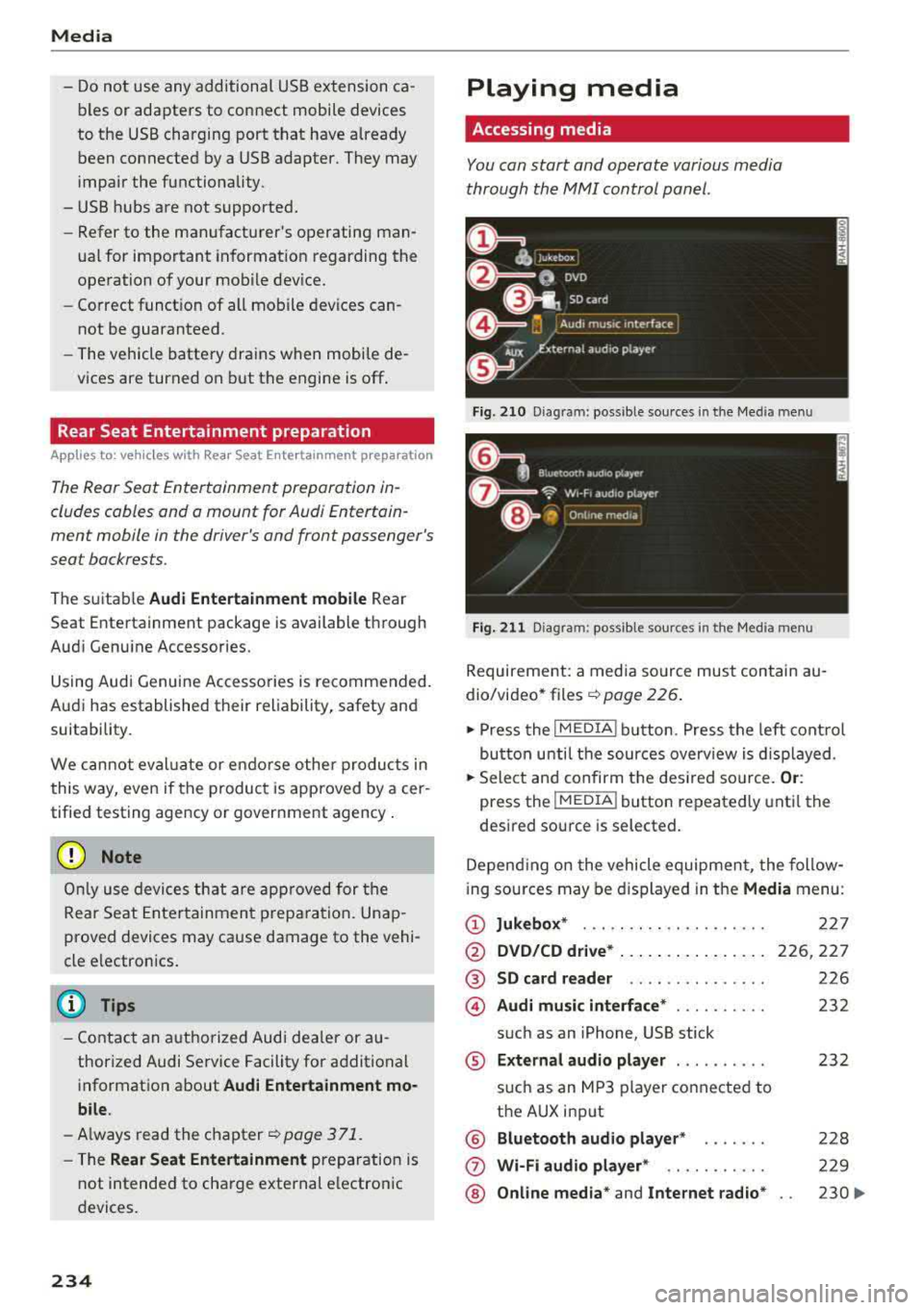
through the
MMI control panel .
Fig. 210 Diag ram: possible sources in t he Me dia menu
Fig. 211 Diagra m: possible sources in t he Med ia me nu
Requireme nt: a media source must contain au
dio/video*
files ¢ page 226.
.,. Press the I MEDIA i button . Press the left control
button unti l the sources overview is displayed .
.,. Select and confirm the desired source. Or:
press the !MEDIA ! button repeatedly until the
desired source is selected.
Depending on the vehicle equipment, the follow
i ng sources may be displayed in the
Media menu:
(D Jukebox* ... .. .. .. .. ........ .
@ DVD/CD drive* ... .. ... ..... .. .
@ SD card reader .. .. ..... ..... .
@ Audi music interface* ......... .
such as an iPhone, USB stick
® External audio player ......... .
®
(j)
®
such as an MP3 player connected to
the AUX input
Bluetooth audio player*
Wi-Fi audio player* .. ........ .
Online media*
and Internet radio*
227
226,227
226
232
232
228
229
230
..,_
Page 237 of 392
-Playing audio/video files : select a source in the
Media menu > Category (such as artists > al
bum> track) .
-Moving one leve l up in the folder structure :
press the I BACKI button. Or: select and confirm
Folder up .
- Selecting the previous or ne xt track/chapter*
1>: press the On/Off knob on the M MI cont rol
panel br iefly to the left
l«1 or right l»t.
-Fast-forwarding and rewinding audio/video*
file s:
press and hold the On/Off knob on the
MMI control panel to the left
l«1 or right l»t for
a longer time.
-Pausing or resum ing playb ack : press the On/
Off knob on the MMI contro l pane l br iefly.
@ Tips
- You can scro ll th rough long lists quickly by
turning the contro l knob q uick ly. The scroll
i ng speed depends on the number of list e n
tries.
- Fo r safety reasons, the video image is only
displayed when the vehicle is stationary . On
l y the sound from t he v ideo plays while driv
i ng .
Media center
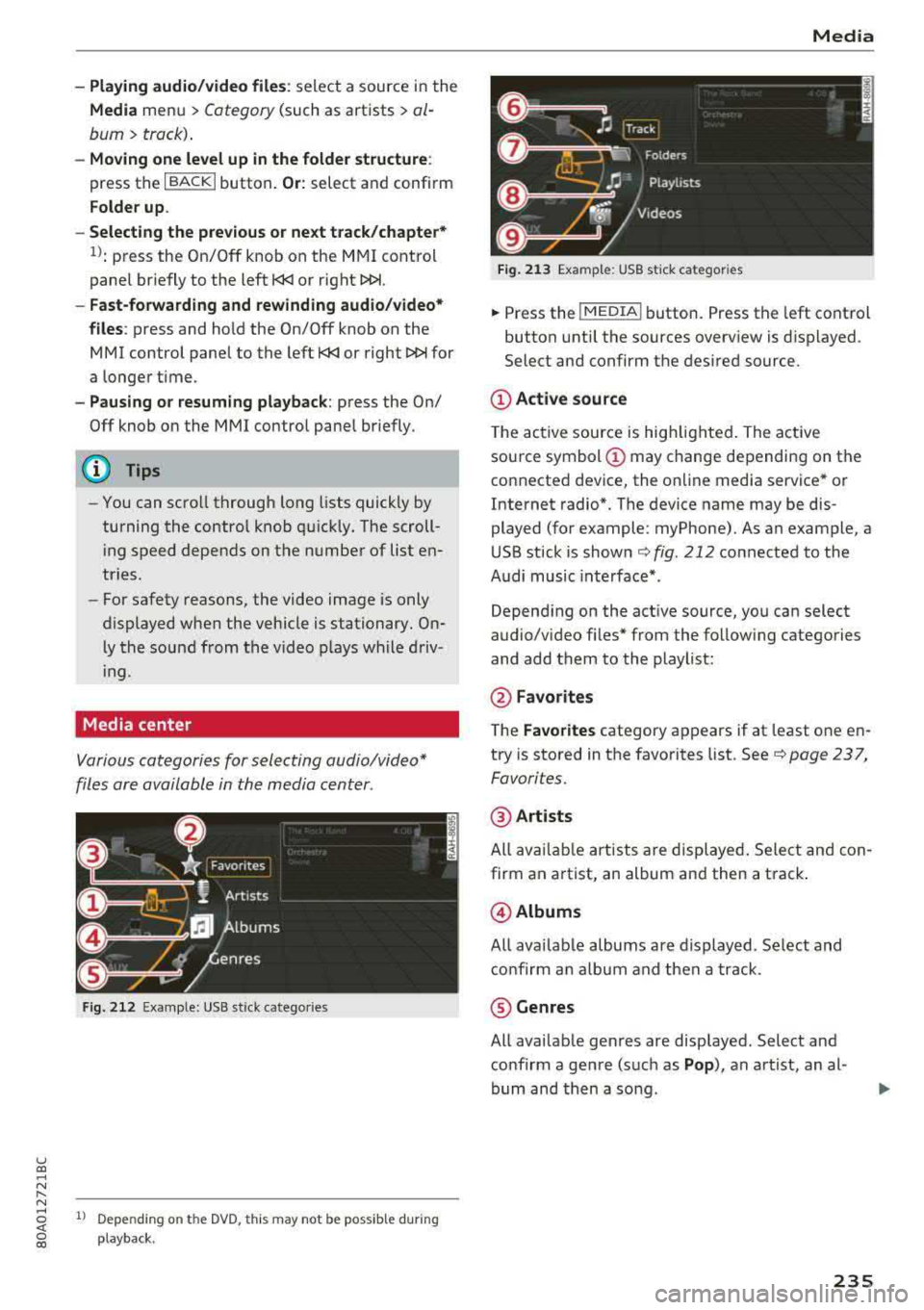
Various categories for selecting audio/video*
files are available in the media center .
Fig. 212 Exa mple: USB stick cate gories
u co ..... N r-N ..... ~ 1l Depe ndi ng on the DVD, this m ay not be poss ib le d urin g
~ playba ck .
Media
Fi g. 21 3 Examp le: USB stick cat egories
.,. Press the I MEDIA i button. Press the left cont rol
button unti l the sources overv iew is d isplayed .
Select and confirm the desired source.
(D Active source
The active source is hig hlighted . The ac tive
sou rce symbol
(D may change depending on the
connected dev ice, the on line media service * or
Internet radio*. The device name may be dis
played (for example: myPhone). As an example, a
U SB stick is shown
c:::;, fig. 212 connected to the
Audi music inte rface *.
Depend ing on the act ive source, yo u can select
audio/v ideo fi les* from the follow ing categories
and add them to the playlist:
@ Favo rites
T he Favorites category ap pears if at least one e n
try is stored in the favo rites list . See
c:::;, page 237,
Favorites.
@ Artists
All av ailable art ists a re displayed . Sele ct and con
firm an a rtist, an album and then a t rack .
@ Albums
All ava ilab le albums are d isplayed. Se lect and
c o nfirm an alb um and then a track .
® Genres
All ava ilab le ge nres are disp layed. Select and
confirm a gen re (s uc h as
Pop ), an artist, an al
bum and then a so ng .
235
Page 238 of 392
Media
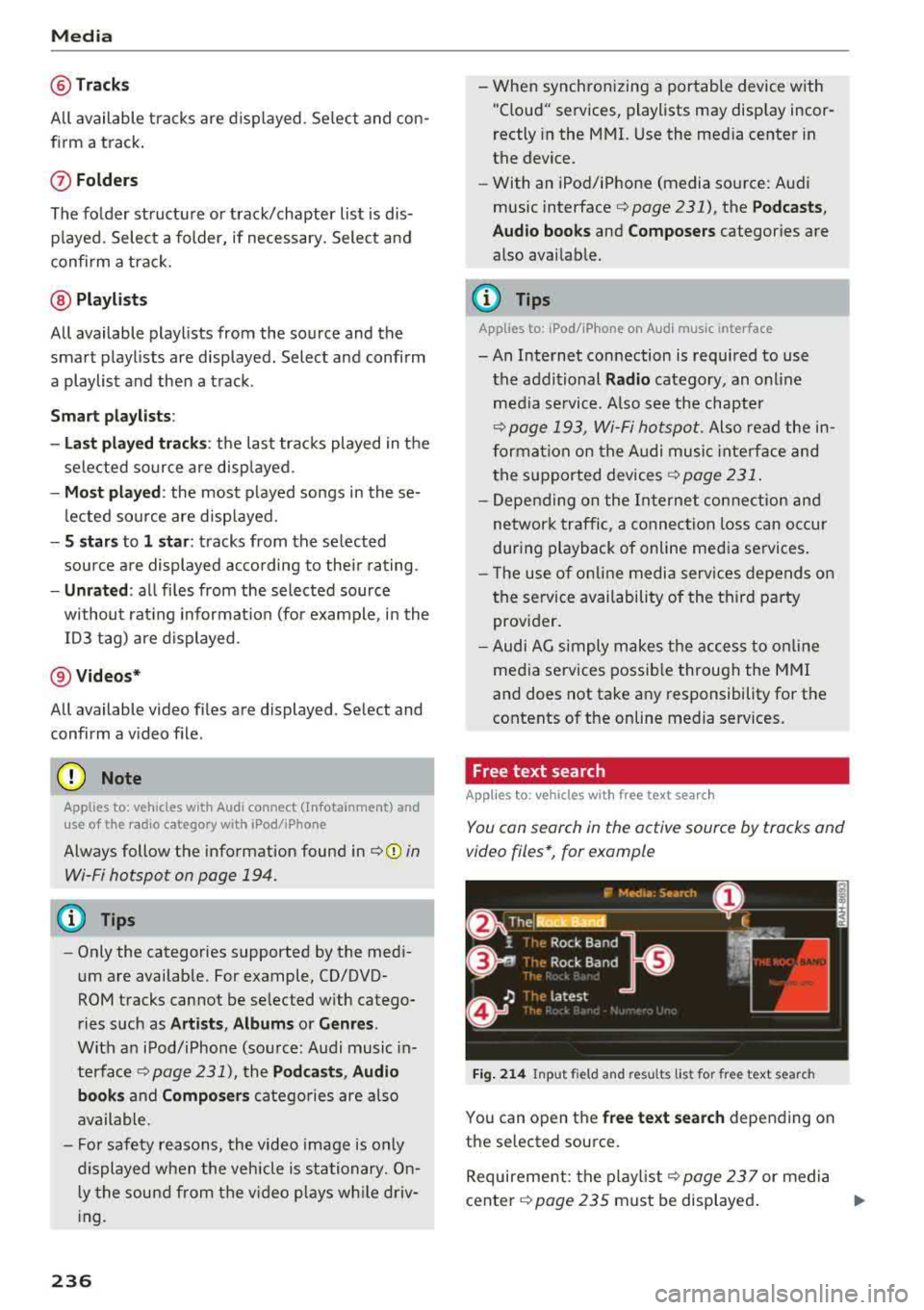
@Tra cks
All available tracks are displayed. Se lect and con
f irm a track.
(J) Folders
The fo lder structu re or track/chapter list is dis
p layed. Select a folder, if necessary. Select and
confirm a track.
@ Playli sts
All available playlists from the source and the
smart playlists are displayed. Select and confirm
a playlist and then a track .
Sm art play list s:
- La st pl ayed track s:
the last tracks played in the
selected source are disp layed.
- Mos t pl ayed: the most p layed songs in the se
lected source are disp layed.
- S sta rs to 1 st ar: tracks from the se lected
source are displayed according to their rating.
- Unr ated : all files from the selected source
without rat ing informa tion (for example, i n the
103 tag) are displayed .
@Vid eos *
All available video files are displayed . Select and
confirm a v ideo file .
@ Note
Applies to: vehicles with Audi connect (Infotainment) and
use of the radio category with iPod/iPhone
Always follow the information found in q(i) in
Wi-Fi hotspot on page 194.
@ Tips
- Only the categories supported by the medi
um are available. For example, CD/DVD
ROM tracks cannot be selected with catego
ries such as
A rti sts, Alb um s or Genre s.
With an iPod/iPhone (source: Audi music in
terface
q page 231), the P odca st s, Audi o
book s
and Compo ser s catego ries are also
available.
- Fo r safety reasons, the video image is only
displayed when the vehicle is stationary. On l y the sound from the v ideo p lays while driv
ing.
2 36
- When synchronizing a portable device with
"Cloud" services, playlists may display incor
rectly in the MMI. Use the med ia center in
the device.
- With an iPod/iPhone (media source: Audi
music interface
q page 231), the P od casts ,
Aud io boo ks
and C ompos ers categories are
also available.
(D Tips
Applies to: iPod/iPhone on Audi music interface
- An Internet connection is required to use
the additional
Radio category, an onl ine
media se rvice . Also see the chapter
q page 193, Wi -Fi hotspot . Also read the in
formation on the Audi music inte rface and
the supported devices
q page 231 .
-Depend ing on the In ternet connection and
network traffic, a connection loss can occur
during playback of online media services.
- T he use of on line media serv ices depends on
the service availability of the third party
provider.
- Audi AG simply makes the access to on line
media services possib le through the MMI
and does not take any responsibility for the
contents of the online media services.
Free text search
Applies to : vehicles with free text search
You con search in the active source by tracks and
video files*, for example
Fig . 214 Input field and resu lts list for free text search
You can open the free te xt se a rch depending on
the selected source.
Requirement: the p layl ist
q page 23 7 or media
center
q page 235 must be displayed . ..,.
Page 240 of 392
Media
Bluetooth settings
See ¢ page 248.
Wi-Fi settings*
See ¢ page 193, Wi-Fi hotspot.
Connection manager
See ¢ page 246.
Show "Now Playing" screen
W ith the funct ion switched on~ and a pla ylist
open, various information about the current track
(such as artist, album and album cover*) as well
as the playing time and the remaining playing
time are displayed.
Jukebox memory capacity*
I nformation on the Jukebox memory capacity and
the number of stored tracks in the Jukebox is dis
p layed .
Rewind/Fast forward
Turn the control knob to the left or to the right .
Or: move your finger across the MMI touch con
t rol pad* from left to right .
Shuffle1
)
With the function sw itched on~. all files in the
playlist are played and shown in random order .
Repeat track1l
When the function is switched on~. the current
track repeats.
Repeat*
Requirement: an iPod/iPhone* must be selected
as the media source in the Audi music interface
¢ page 234, Accessing media.
- Track : the current track will be repea ted.
- Folder : the tracks in the current folder are re -
peated continuously in a loop.
- Off : the funct ion is switched off .
l) Th e fun ction auto mat ic ally sw itches off w he n th e source
is c ha ng ed.
2> Thi s fun ctio n is not avai lab le fo r all cell phone s.
238
Back to 'Playback'
The options menu is closed. The track currently
playing appears in the p laylist .
Play similar music*
The track currently playing is quick ly analyzed
(suc h as artists, ge nres, mood , beat) and a smart
playlist with similar tracks is shown .
Play more ...
A smart playlist is shown based on the track cur
rently playing . You can select between a playl ist
with more tracks
by this artist , from this album
or of this genre.
Copy to jukebox*
See¢ page 22 7, Adding files to the Jukebox.
Set as ringtone*2
)
Requirement: a ce ll phone must be connected to
the MMI. The track currently p laying must be in
the
Jukebox* ¢ page 227.
The selected track will be used as the ringtone
for incoming calls .
Gracenote online database*
Requirement: the MMI must be connected to the
Internet.
Depend ing on availab ility, var ious information
will load about the track currently playing when
t hi s function is switched
on~ -
Favorites
See¢ page 237.
Additional options
Requirement: the vehicle must be stationary and
a video fi le* or a DVD* must be playing .
Parental control*
Playback of video DVDs can be restr icted using
parental control.
Page 244 of 392
Media
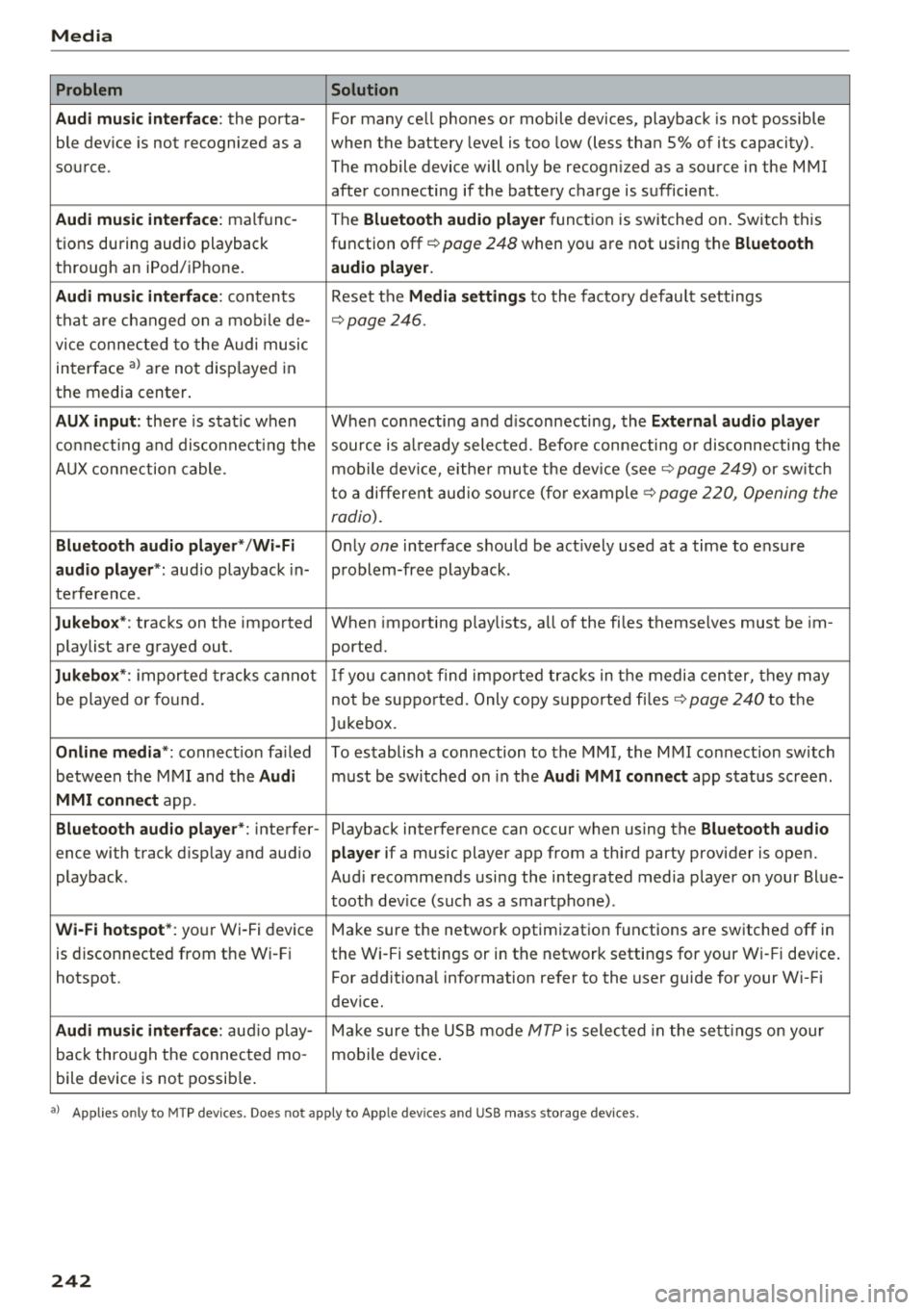
Problem Solution
Audi music interface :
the porta-For many ce ll phones or mobile devices, playback is not possible
ble device is not recogni zed as a when the battery level is too low (less than 5% of its capacity).
source. The mobile device will only be recogn ized as a source in the MMI
after connecting if the battery charge is sufficient .
Audi music interface: malfunc-
The Bluetooth audio player function is switched on. Switch this
tions during audio playback function off¢
page 248 when you are not using the Bluetooth
through an iPod/ iPhone. audio player.
Audi music interface:
contents Reset the Media settings to the factory default settings
that are changed on a mobile de -
¢page 246.
vice connected to the Audi music
interface
a l are not disp layed in
the media center .
AUX input: there is stat ic when When connecting a nd disconnecting, the External audio player
connecting and disconnect ing the source is already selected. Before connecting or disconnecting the
AUX connection cable. mobile device, either mute the device (see ¢
page 249) or sw itch
to a different audio source (for example ¢
page 220, Opening the
radio).
Bluetooth audio player* /Wi-Fi
Only one interface should be act ively used at a time to ensure
audio player*: audio playback in- problem-free playback.
terference.
Jukebox* : tracks on the imported When importing playlists, a ll of the files themselves must be im-
playlist are grayed out. ported.
Jukebox*: imported tracks cannot If you cannot find imported tracks in the media center, they may
be played or found. not be supported. Only copy supported files"*
page 240 to the
Jukebox.
Online media *: connection fa iled To establish a connection to the MMI, the MMI connection switch
between the MMI and the
Audi must be switched on in the Audi MMI connect app status sc ree n.
MMI connect app.
Bluetooth audio player *: interfer- Playback interference can occur when using the Bluetooth audio
ence with track d isp lay and aud io player if a music player app from a third party provider is open.
playback . Audi recommends using the integrated media player on your Blue-
tooth device (such as a smartphone) .
Wi-Fi hotspot*: your Wi-Fi device
Make sure the network optimization functions are switched off in
is disconnected from the Wi -Fi the Wi-Fi settings or in the network settings for your Wi -Fi device .
hotspot . For additional information refer to the user guide for your Wi-Fi
dev ice.
Audi music interface: audio play-Make sure the USB mode MTP is selected in the settings on your
back through the connected mo- mobile device.
bile device is not possible.
al Applie s onl y to MTP dev ice s. Does not apply to App le dev ices and USB mass s torage dev ice s.
242
Page 245 of 392
u co ..... N r--N ..... 0 <( 0 00
Audi smartphone interface
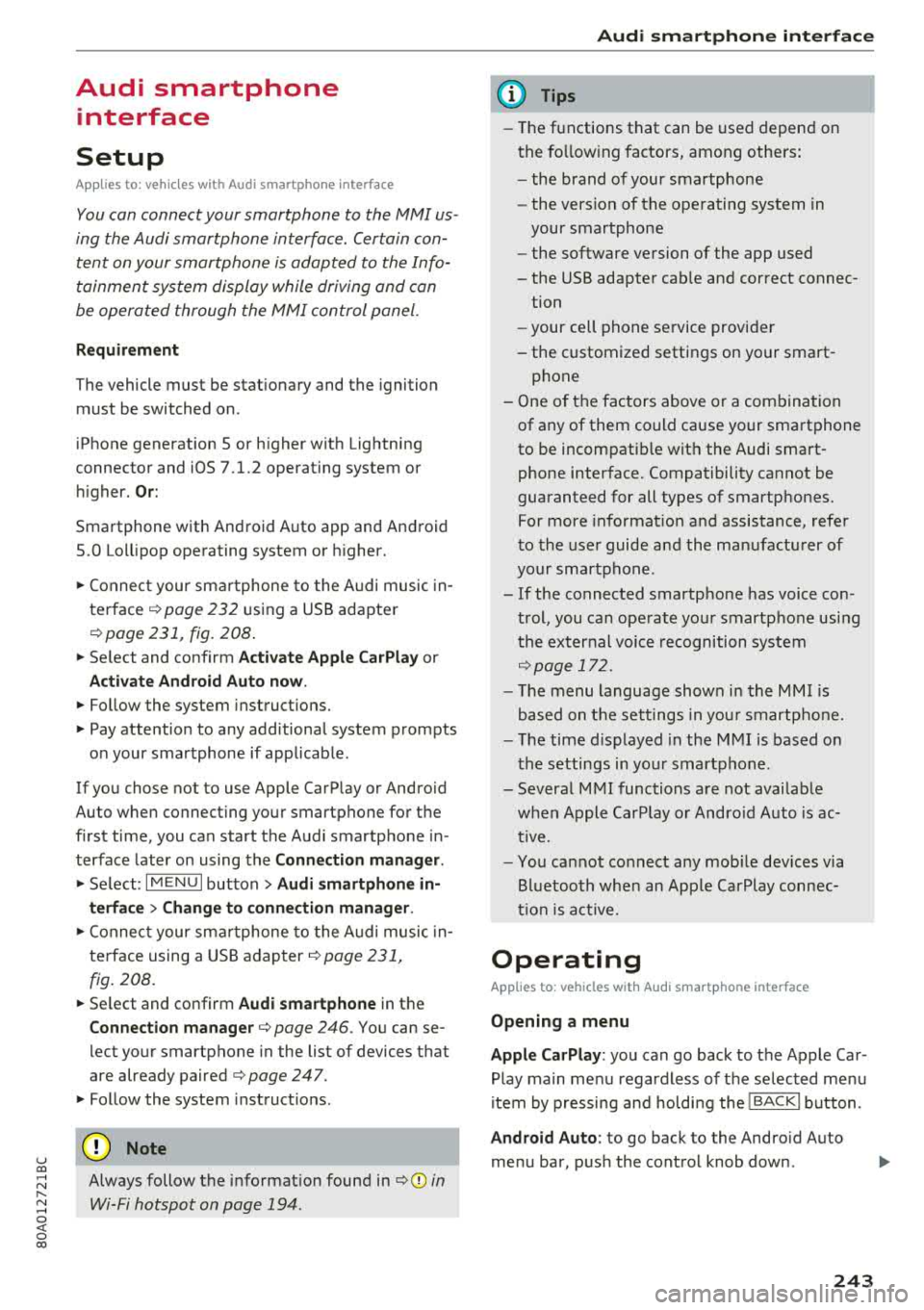
Setup
Applies to: vehicles with Audi smartphone interface
You con connect your smortphone to the MM I us
ing the Audi smortphon e int erfac e. Certain con
t e n t on you r sm ortphone is ado pted to th e Info
tainme nt system d is p lay while driving and con
be operated through the
MMI control panel .
Requirement
The vehicle must be stat ionary and the ignition
must be switched on .
iPhone generation 5 or h igher w ith Lightning
connector and iOS 7 .1.2 operating system or h igher.
O r:
Smartphone with Android Auto app and Android
5 .0 Loll ipop operating system or higher.
.,. Connec t your sma rtphone to the Audi music in
terface ¢ page 232 using a USB adapte r
¢page 231, fig. 208 .
.. Select and confirm A ctivate Apple CarPlay or
Acti vate And roid Auto now .
.. Follow the system instruct ions.
.. Pay attention to any additiona l system prompts
on your smartphone if applicable .
If yo u chose not to use Apple CarP lay or Android
Auto when connecting your smartphone for the
first time, you can start the Audi smartphone in
terface later on using the
Connection manager.
.,. Se lect : I MENU I button > Audi smartphone in-
terfa ce
> Change to connection manager .
.. Connect your sma rtphone to the A udi music in
terface using a USB
ad apter ¢ page 231,
fig . 208.
.. Se lect and confirm Audi smartphone in t he
Connection manager ¢ page 246. You can se
l ect your smartphone in the list of devices that
are already
paired¢ page 247.
.,. Follow the system instruct ions .
@ Note
Always follow the i nformat ion found in¢ @) in
Wi-Fi hotspot on page 194 .
Audi smartph one interfac e
(D Tips
-The functions that can be used depen d on
the fo llow ing factors, among others:
- the brand of your smartphone
- the vers io n of the ope rating system in
your smartphone
- the software ve rsion of the app used
- the USB adapter cab le and correct connec-
tion
- your cell phone se rvice provide r
- the customized settings on yo ur sma rt -
phone
- One of the factors above o r a com bina tion
of any of them could cause your sma rtphone
to be incompatib le wit h the Audi smart
phone inter face. Compatibility cannot be
guaranteed for all types of smartp hones.
For more informat io n and assistance, refer
t o the user guide and the man ufactu rer of
yo ur sma rtphone .
- If the connected smartphone has voice con
tr ol, you can ope rate yo ur smartp hon e usi ng
the ex ter nal voic e recognition system
¢page 172.
- Th e menu language show n in t he MMI is
based on t he sett ings in you r smartp ho ne .
- Th e time d is p layed in the M MI is based o n
the settings in yo ur sma rtphone .
- Severa l M MI functions a re not avai lab le
when Apple Car Play o r Andro id A uto is ac
t ive.
- Yo u ca nnot co nnect any mob ile dev ices via
B lu etooth whe n an App le CarPlay connec
tion is a ctive .
Operating
Applies to: vehicles with Audi smartphone interface
Opening a menu
Apple CarPlay :
you can go back to t he Apple Car
Play main me nu regardless of the se lected me nu
i tem by p ressing and holdi ng the
I B ACKI button .
Android Auto : to go back to the Andro id Auto
me nu bar, push the control knob down .
243
Page 246 of 392
Audi smartphone interface
Opening a menu item
Select and confirm a menu item using the MMI
control panel.
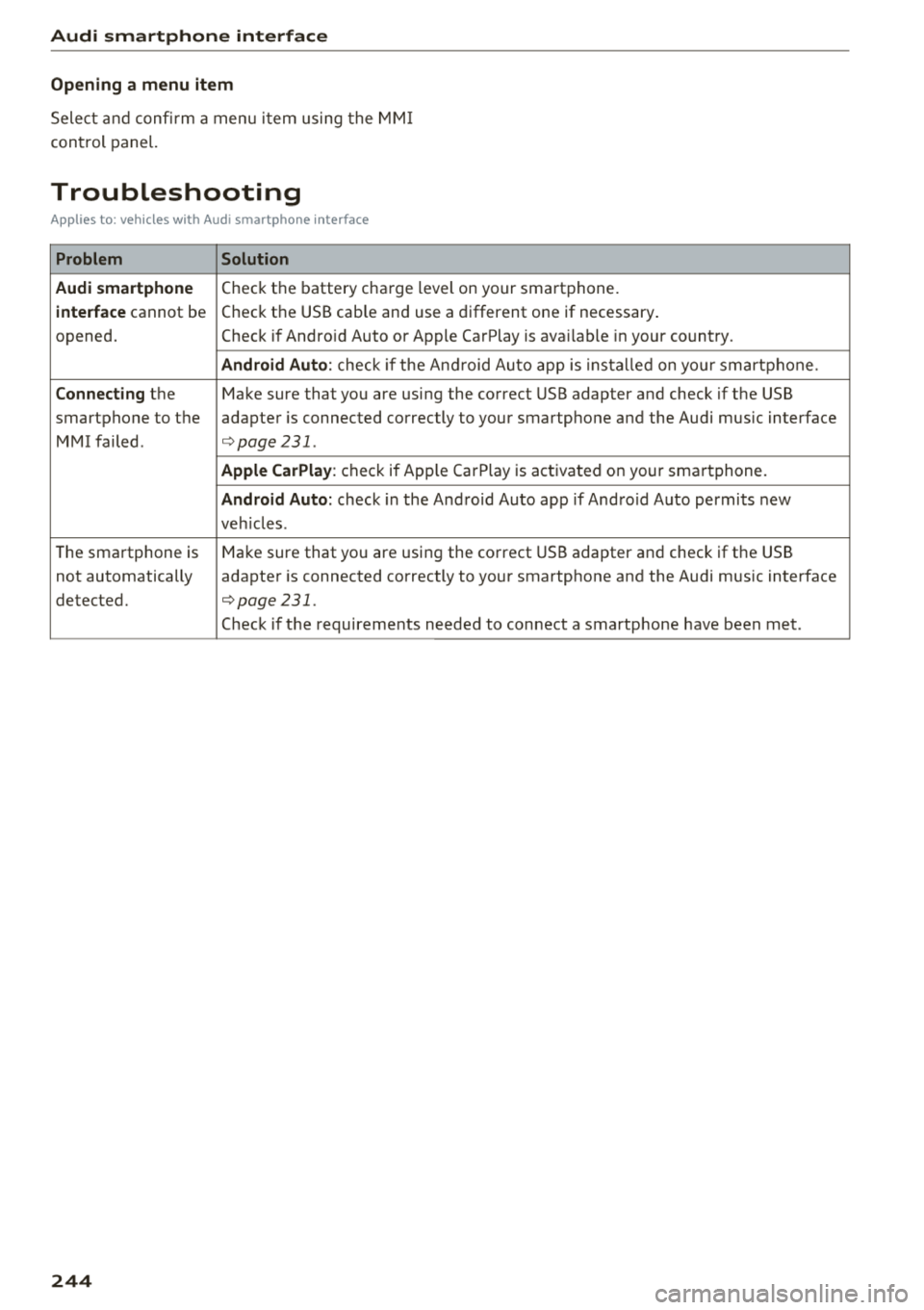
Troubleshooting
Applies to: vehicles with Audi smartphone interface
Problem Solution
Audi smartphone
Check the battery charge level on your smartphone .
interface cannot be Check the USB cable and use a different one if necessary
.
opened. Check if Android Auto or Apple CarPlay is available in your country.
Android Auto : check if the Android Auto app is installed on you r smartphone.
Connecting the Make sure that you are using the correct USB adapter and check if the USB
smartphone to the adapter is connected correctly to your smartphone and the Audi music interface
MMI failed .
¢page 231.
Apple CarPlay : check if Apple CarPlay is activated on your smartphone.
Android Auto : check in the And raid Auto app if Andro id Auto permits new
veh icles .
T he smartphone is Make sure that you are using the correct USB adapter and check if the USB
not automatically adapter is connected correctly to your smartphone and the Audi music interface
detected.
¢page 231 .
Check if the requirements needed to connect a smartphone have been met.
244
Page 248 of 392
System settings
wait for the sig nal t one (bee p) to say a new
command.
Volume : you can a djust th e vol ume of th e
p romp ts by turning the con tro l k no b.
Individual speech training (on ly when the v ehi
cle is s ta ti onary): yo u ca n ad apt the vo ice recog
ni tion sy ste m to your voic e or pro nunciati on in
or der to im prove the sys tem's a bili ty to re co gni ze
your speec h. Indivi dua l speech train ing is com
p rised of 20 s peech ent ries t hat consist o f com
mands and sequences of numbers . You can de
lete the p rogrammed voice t rain ing with the
Re
set individual speech training
function.
Display brightness
You can a djust the brigh tness o f the Info tain
ment system disp lay by t urning the cont ro l knob.
Factory settings
D epe ndi ng on t he ve hicle eq uipme nt, th e fo llow
i ng fu nctio ns ca n b e rese t to factory se ttings :
-Sound settings
- Radio
- Media settings
- Jukebox *
- Directory
-Telephone
- Bluetooth and Wi-Fi*
- Navigation settings*
- Navigation and online memory *
- Speech dialog system*
- Shortcut keys
- Message settings *
-Apps *
- Tool tips
- Audi connect *
- Audi smartphone interface *
You can select the desi red functio ns i nd ividua lly
or all at once with the option
Select all entries .
Select and confirm Restore factory settings .
(D Tips
Make sure that not o nly the sett ings were de
leted but a lso the sto red data, if ap plicable.
246
Connection manager
Introduction
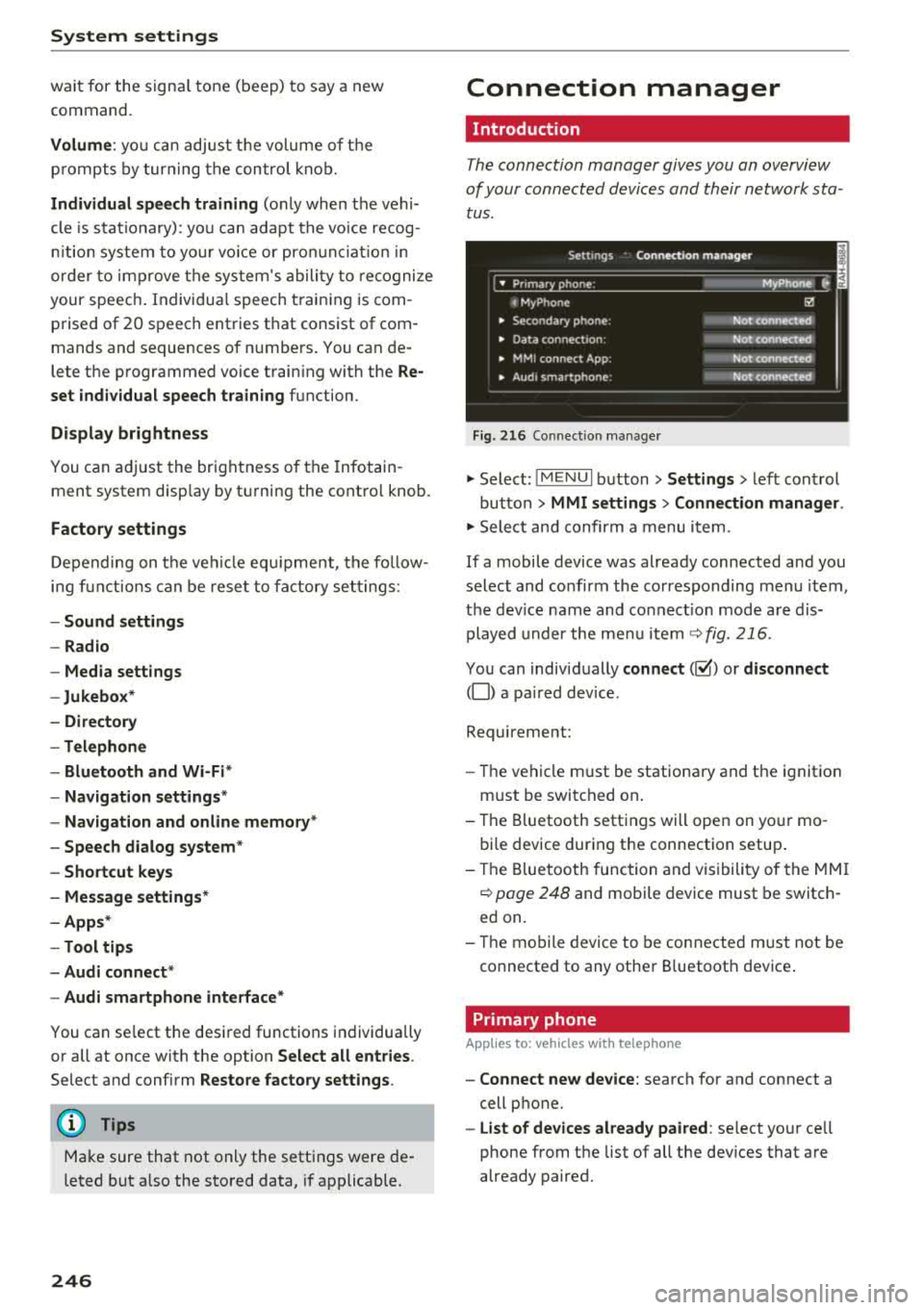
The connection manager gives you an overview
of your conn ected devic es and th eir network sta
tus .
Settings Conne -ction manager I
-====- ,.· • Prima hone: MyPhone .,.
c M yPhone
• Second ary phone :
• Data conn ection :
• MM I
connect App :
• Audi smartphone:
Fig. 216 Co nnec tion man ag er
Ii'!
Not connected
Not
conn.,ct.,d
Not connected
Not
conn..cted
"' Select : !ME NUI bu tton> Settings > left con trol
bu tton >
MMI settings > Connection manager .
"'Sele ct a nd confirm a menu item.
If a mobile device was already connected and you
select and co nfirm the co rresponding menu item,
t h e dev ice name and co nnect ion mode a re dis
p layed under the menu i tem
r:!;> fig. 216.
Yo u can indiv id ually connect (~) or disconnect
(0) a pa ired device .
Requirement:
- The ve hicl e m ust be statio na ry and the ignit io n
m ust be switc hed on .
- Th e Bluetooth sett ings will open on yo ur mo
bi le device dur ing the connection setup .
- T he Blue tooth func tion and v is ibili ty of the MMI
c:!;> page 24 8 and mobile device must be switc h
ed on.
- T he mo bile device to be con nected m ust not be
connected to any othe r Bluetoot h dev ice .
Primary phone
App lies to: vehicles wit h telepho ne
- Connect new device: search for and connect a
cell p hone.
- List of devices already paired : select yo ur cell
phone from the list of all the dev ices that a re
already paired.
Page 249 of 392
u co ..... N r--N ..... 0 <( 0 00
Secondary phone
Applies to: vehicles with telephone
-Connect new device : search for and connec t a
c e ll phone.
- List of devices already paired : selec t your cell
p hone fro m the lis t of all the devices t hat are
al re ad y p aired.
Data connection
Applies to vehicles with Audi connect (Infotainment)
- T he data conne ct ion is made using the em bed
ded SIM car d
ll i=>page 187. You do not need to
adjust a ny a ddit io n al sett ings.
{Ll) Note
Always follow t he inf ormat ion foun d in i=> @ in
Wi-Fi hotspot on page 19 4.
MMI connect app
Applies to vehicles with Audi connect (Infotainment)
Requirement: the Audi MMI connect app m ust
be installed and open on your mobile device.
- Connect new device : search for and connect a
mobile device (s uch as a smartp hone) .
-List of devices already paired : selec t your mo
bile device from the list of a ll the devices that
are already paire d.
Audio player
Applies to vehicles with Bluetooth or Wi-Fi audio player
Bluetooth player*
Requirement: the Bluetooth funct ion and v is ibili
ty must be sw itched on in the MMI
i=> page 248
and on the B luetoot h aud io player.
- Connect new device : press the control knob.
Se lect
Bluetooth audio player . Search fo r and
connect a mobile device .
-List of devices already paired : select a Bl ue
tooth device from the list of a ll the devices that
are already paire d.
ll SIM card inst alle d in t he v eh icle at the fa ctory.
System settings
Wi-Fi audio player*
R eq uiremen t: th e W i-Fi h otspo t* on the M MI
i=> page 193 an d on yo ur Wi -Fi audio playe r must
be switched o n.
-Connect new device: press the co ntrol knob.
Se arch for and conne ct a W i-Fi ca pabl e dev ice.
- Disconnect Wi-Fi audio player: de activate t he
W i-Fi on you r W i-Fi capa ble dev ice. The devi ce
w ill be au tom atic a lly removed from the lis t.
@ Note
Alway s follo w the inf ormat ion foun d in i=> @ in
W i-F i h ots pot on p age 194.
Directory
Applies to: vehicles with telephone
Display contacts from a cell phone (or an addi
tiona l cell phone).
Requirement: no ce ll phones can be connec ted to
the MMI using the
Handsfree pro file.
- Connect new device: search for and connect a
new ce ll phone .
-List of devices already paired : select yo ur cell
phone from t he list of all the cell phones that
are a lready paired .
Audi smartphone
Applies to: vehicles with Audi smartphone interface
-Connect yo ur cell phone to the A udi music in
t erface
i=> page 232 using a USB adap ter
i=> page 231, fig. 2 08 .
- Sel ect your cell p ho ne from t he list of cell
p ho nes th at h ave already bee n con nec ted.
Additional options
D epen ding on the sele cted fun ct ion, yo u ca n use
t h e righ t contro l bu tton to access the ava ila bl e
additional options in t he connection mana ger .
.,.
247
Page 250 of 392
System settings
Delete Bluetooth device*
The se lecte d cell p ho ne/mo bile dev ice is dis con
nected from t he M MI and is removed from the
list of all devices that are alrea dy paire d.
Show Bluetooth profiles*
You can Connect or Disconnect the Handsfree ,
Me ssages *, Dire ctory /contacts
an d Bluetooth
audio player
pro files sep arately.
Bluetooth settings*
- Bluetooth :
select and confirm a set ting for the
B luetoot h connec tion v is ibility . Select
Visible
fo r th e MM I to be vis ib le to o ther dev ices. Se
l ec t
Invisible fo r th e M MI to not be v is ible t o
othe r devi ce s. H oweve r, it is still possib le to es
tab lish a Bl uetoo th con nection with pai red de
vices when the v is ibi lity is switched off. Se lect
Off to t urn visibi lity off . Then a B luetooth con
nect ion is not possible .
-Bluetooth audio player : when this function is
switc hed
on ~' the Bluetooth audio player is
available as a so urce in t he
Media menu .
-Bluetooth name : the MMI B luetooth name (for
example "AUDI MMI") is d isp layed and ca n be
c h anged.
Online settings*
- Data usage counter :
the amount of data pack
ets that a re sent a nd received throug h the MMI
is d isp layed. You can reset the data usage infor
mation to zero using the
Reset data counter
option.
- Network status : the mobile netwo rk p rovider
fo r data se rvice as well as the netwo rk status
are disp layed .
Wi-Fi settings*
See ¢ page 193, Wi -Fi hotspot.
Storing as a default telephone
Applies to: vehicles with telephone
Requir emen t: a cell phone must be connected to
t he MM I
¢page 17 4.
As soon as t he cell phone is i n range and the
B lue tooth func tion on the ce ll phone and in the
MM I is swi tched o n, this ce ll phone is g iven pr io r
ity ove r th e ot her Blue tooth devices and is c on-
248
necte d dir ectly to the M MI. The connec ted ce ll
p hone is d is pl ayed first in t he dev ice li st .
Network settings*
- Login :
you can chose an automatic log in to
your cell p ho ne servi ce pro vider 's ne twor k, or
you can ch oose a
manual log in from t he list of
avai la bl e netwo rks .
-Network selection : availabl e netwo rks in t he
presen t loca tion can be sele cte d unde r network
select io n. This f unction is on ly avai la bl e for the
Manual log in setting.
Apple CarPlay sound settings/ Android Auto
sound settings
Applies to: vehicles with Audi smartphone interface
See q page 249.
About Apple CarPlay/ About Android Auto
Applies to: vehicles with Audi smartphone interface
Here you w ill find l ega l informa tion regarding
t h e use o f A pple Car Play o r And ro id Aut o and in
fo rmat ion a bout device -s p eci fic d ata exch ange.
Delete Apple CarPlay device/Delete Android
Auto device
Applies to: vehicles with Audi smartphone interface
Require ment: yo ur cell phone must not be con
n ect ed to the Au di music interf ace wi th a USB
adap ter.
Se lec t:
Audi smartphone > a dev ice from t he lis t
> r igh t con trol b utto n.
To remove your cell p ho ne from the list, se lect
and co nfirm
Delete Apple CarPlay device or De
lete Android Auto device .
System update
"'Select : !ME NUI bu tton> Settings > left control
bu tton >
System maintenance.
- System update :
slide the storage device with
t he update da ta into the a pprop ria te drive
¢ page 2 26 . Se lec t and conf irm the dr ive>
Start update . The length of the p rocess de
pe nds on the s ize of the upd ate.
- Reset driver installation: the selected media
dr iver p ackage is rese t to t he se ttings a t the
t im e of delivery .